

Overcoming Accessibility Problems in MQL5 Trading Tools (Part VII): MetaTrader 5 Model Context Protocol (MCP) the Grand Solution
 274
274
 0
0

In Part VI of this series, we explored neural command integration as a way to translate user intent into platform actions. That approach extended accessibility through a specialized communication bridge. In this part, we use the MetaTrader 5 AI Assistant and MCP as a common natural-language access layer for development, debugging, chart interaction, testing, and permission-controlled platform actions. We then build MCP_Accessibility_Assistant.mq5, an accessibility-oriented Expert Advisor with explicit signal, risk, confirmation, and logging rules.
Contents
- Introduction
- What MCP Changes—and What It Does Not
- Why Prompting Can Reduce Accessibility Friction
- The Single-Context Accessibility Workflow
- Project Definition and Architecture
- Implementation of MCP_Accessibility_Assistant.mq5
- Using the AI Assistant During Development
- Compilation and Testing
- Project Results and Observations
- Conclusion
- Key Lessons
- Attachments
Introduction
In earlier parts of the series we translated human intention into voice, Telegram, gesture, and simulated neural commands. Each solution was intended to improve access but also required a custom bridge that the user had to configure and maintain.
MetaTrader 5 already contains analytical objects, indicators, Expert Advisors, testing tools, and account functions; the barrier is often reaching and understanding them. The AI Assistant provides a natural-language entry point, while MCP exposes authorized platform tools to compatible agents. Build 6060 changes the integration path without replacing MQL5. The assistant coordinates the task, while the compiled EA enforces deterministic signal, risk, and execution rules.
The AI-assisted route simplifies access to these tools, but compilation, testing, log review, broker constraints, and risk judgment remain part of a responsible workflow.
The practical question for this article is: Can we describe an accessible trading requirement in natural language, develop it with the AI Assistant, and turn it into an MQL5 program with transparent signal, risk, and execution rules?
We answer this question by building the Expert Advisor step by step, examining its safeguards, and showing how the same AI-assisted context can support development and testing.
Before MCP
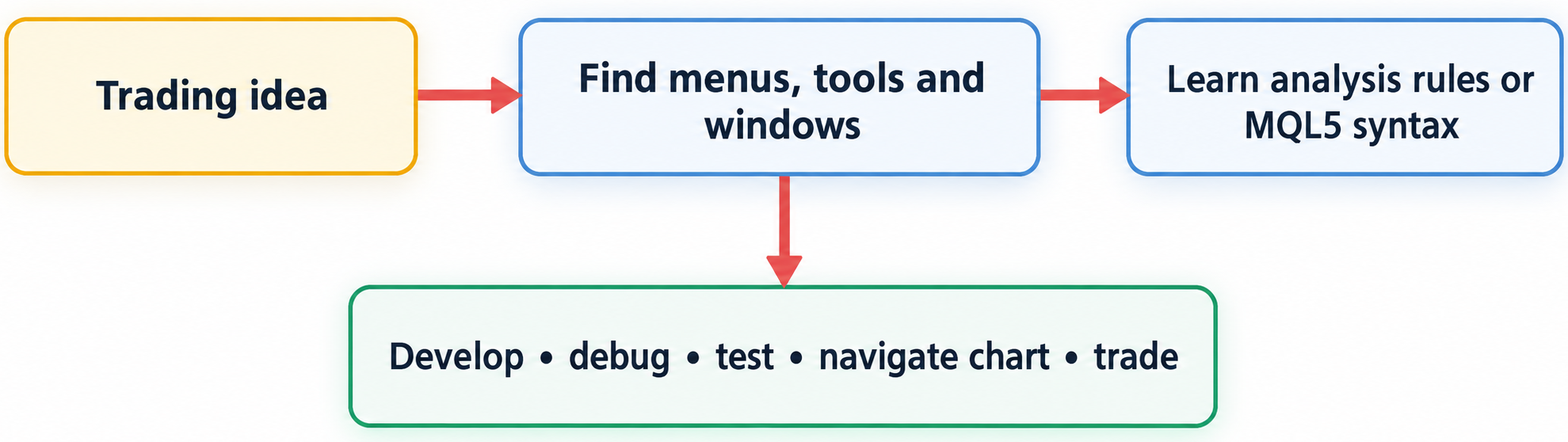
Fig. 1. Accessibility barriers created by separate navigation, development, and integration stages before MCP
With AI Assistant + MCP
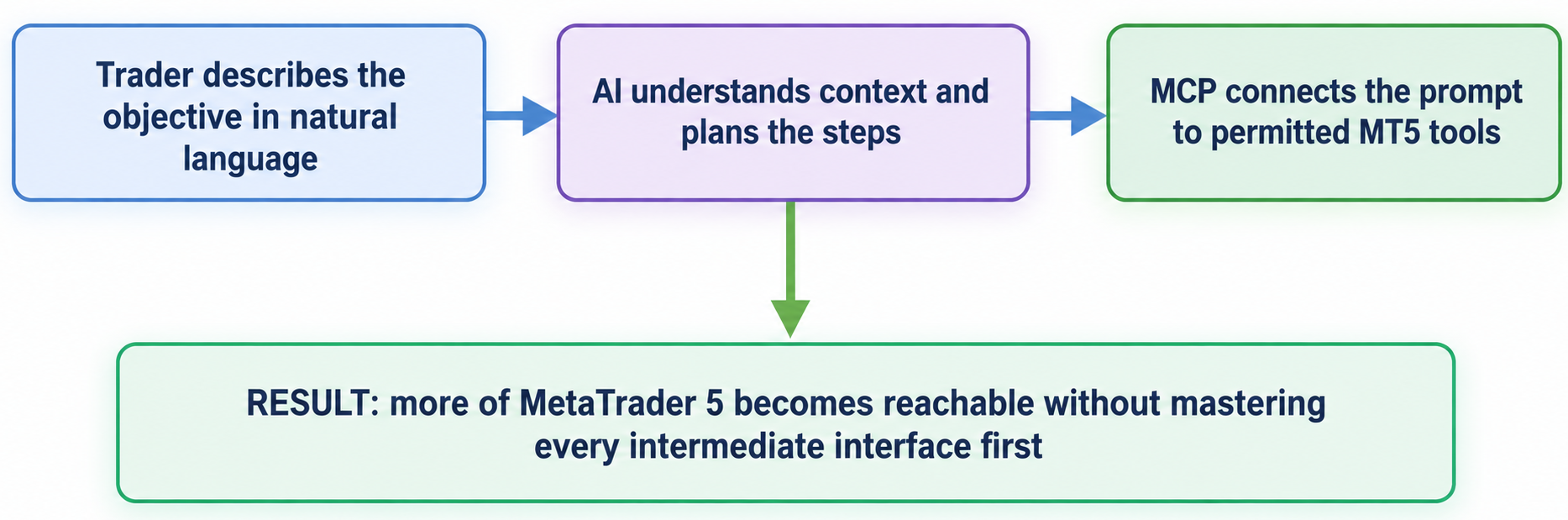
Fig. 2. The AI Assistant and MCP simplify access through one natural-language entry point
What MCP Changes—and What It Does Not
The Previous Integration Cost
Earlier AI-assisted integrations commonly followed this route:
MQL5 EA → WebRequest → local middleware → provider API → JSON response → parser → trading action.
That design remains useful when a developer needs a private model, a special data source, or a custom command protocol. For an ordinary user, however, it introduces several accessibility barriers: configuration files, network permissions, API keys, server lifecycle management, message parsing, and failure recovery.
Each added dependency creates another configuration and failure point for the user.
The Native Route
The official Build 6060 release notes describe two related facilities:
- The built-in AI Assistant in the terminal and MetaEditor.
- MCP support through which compatible agents can use MetaTrader 5 market-data, chart, environment, and trading tools.
The same release notes state that the integrated Assistant can generate programs, analyze existing code, detect errors, explain algorithms, and help with refactoring. They also document security settings that can prohibit AI trading, permit it, or require manual confirmation. You can therefore begin with analysis-only access, test the proposed workflow, and permit trading operations only when you are satisfied with its behavior.
The two settings areas serve complementary roles. AI Assistant settings select the provider/model and the trading-permission mode. MCP settings control tool connectivity: the internal MCP service, its authenticated endpoint, and any additional MCP servers. The trader sees one Assistant conversation, but a complex request may be completed through several connected platform tools.
This route reduces custom integration work, but it does not eliminate configuration. Provider/model selection, MCP endpoint and authentication settings, tool permissions, and the trust boundary of the connected environment still have to be configured and maintained. The practical change is that configuration moves from a custom WebRequest/middleware protocol into a standardized platform and MCP layer.
AI/MCP trading permission and the EA input InpEnableTrading are also different controls. AI/MCP permission governs actions requested through the Assistant or connected MCP tools. InpEnableTrading and the EA confirmation logic govern this compiled EA after it is attached to a chart. The EA is not an MCP client and continues to run even when no AI conversation is active.
When connecting an AI provider or MCP endpoint, protect credentials and grant only the tools required for the task. Trading permissions should remain as restrictive as the workflow allows.
| Configuration Area | Primary Role | Potential Accessibility Contribution |
|---|---|---|
| AI Assistant | Selects the AI provider and model, maintains the conversation, and applies trading permissions | Can accept a natural-language request and keep a large task in one context |
| Internal MCP service | Exposes authorized MetaTrader 5 capabilities through a standard MCP interface | Can reduce the need to design a separate protocol for each connected AI agent |
| Additional MCP servers | Connect external MCP-compatible systems and tools | Can extend the workflow without rebuilding every integration from the beginning |
| Trading permissions | Disable, confirm, or permit AI-assisted trading operations | Can combine easier operation with an explicit permission boundary |
A Necessary Boundary
We divide responsibilities as follows:
| Layer | Responsibility | Nature |
|---|---|---|
| Trader | Defines the strategy requirement and approves execution | Human judgment |
| AI Assistant/MCP agent | Explains, generates, reviews, and operates allowed terminal tools | Probabilistic assistance |
| MQL5 EA | Reads indicators, detects the signal, calculates risk, validates direction, sends the order, and logs the result | Deterministic program |
| Broker/terminal | Validates and processes the trade request | Authoritative execution |
These layers cooperate rather than operate as unrelated products. The model provides language understanding, the Assistant maintains the task, MCP provides standardized tool access, MetaTrader 5 performs the platform operation, and the trader controls the permissions. We use that combined workflow to shorten development and interaction without hiding the deterministic rule that risks money.
Why Prompting Can Reduce Accessibility Friction
Prompting is useful here because it gives the trader one familiar entry point into several platform tasks. A user can ask for an explanation, code generation, compiler-error analysis, chart assistance, or a permitted terminal action without first memorizing every menu path or MQL5 class. This reduces interaction and knowledge friction while keeping the normal platform checks in place.
| Previous Barrier | Example Prompt | How It Helps |
|---|---|---|
| You do not understand an analytical tool | “Explain how the Fibonacci Expansion works and show how its levels may be used on the current chart.” | Guided explanation of the concept, parameters, and chart interpretation |
| You do not know which indicator suits a task | “Which built-in indicators can help me compare trend strength and volatility on EURUSD H1?” | Indicator discovery and parameter explanation |
| You do not know MQL5 | “Create an EA that detects a closed-bar EMA crossover, calculates risk, and requires confirmation before trading.” | A starting implementation that can then be compiled, inspected, and tested |
| Your code does not compile | “Analyze these compiler errors, explain their causes, and correct the affected functions.” | Contextual debugging assistance while MetaEditor remains the compiler authority |
| You do not know how to test an EA | “Help me configure a visual Strategy Tester run and explain which results I should inspect.” | Guidance through the testing workflow and result interpretation |
| You find repeated market review difficult | “Scan Market Watch and summarize symbols that meet these explicit trend and volatility conditions.” | Reduced manual navigation when the requested analysis is supported by the available tools |
| You need help reviewing risk | “Summarize my open positions and show the inputs used in the risk calculation.” | A structured review that can be checked against terminal data |
| You want controlled execution | “Prepare the trade parameters and request confirmation before any permitted trading action.” | A permission-controlled interaction path when trading tools are enabled |
The same prompt-based entry point can assist with explanation, generation, review, refactoring, debugging, and testing. Because AI output remains probabilistic, MetaEditor, the Strategy Tester, terminal logs, and trading confirmations remain the practical checkpoints for the workflow.
The Single-Context Accessibility Workflow
Here, I use single-context workflow to mean one continuing objective carried through several prompts and platform actions. The user can begin with a natural-language strategy requirement, continue through code generation and compiler feedback, request chart assistance, and later work with testing or permitted trading actions without rebuilding the task context from the beginning.
Trading idea → strategy definition → MQL5 development → compilation feedback → correction → chart interaction → testing → permission decision → controlled action.
This does not mean one sentence performs every step. Parameters, compiler messages, confirmations, and permission changes can still require follow-up interaction. The accessibility benefit is continuity: the same conversational entry point can guide the user across several MetaTrader 5 tasks that would otherwise require separate navigation and technical knowledge.
Project Definition and Architecture
The Expert Advisor in this article is the MQL5 product developed through the AI-assisted workflow; it is not an MCP client implemented inside MQL5. We use the Assistant, its configured model, and connected platform tools to move from a natural-language requirement to source code that must then be compiled and tested. After compilation, the EA runs independently through the normal MQL5 runtime and applies the deterministic rules described below.
User Story
The design target is to reduce the number of separate interactions needed to understand the EA state and act on it. The interface therefore exposes:
- an explicit text state: BUY SETUP, SELL SETUP, WAIT, or DATA ERROR;
- a plain-language reason for the state;
- entry, stop-loss, take-profit, risk target, and calculated volume;
- optional popup and sound notifications when a new setup occurs;
- BUY, SELL, and REFRESH chart controls;
- EA-level execution controls: trading disabled by default, direction validation, and a confirmation dialog;
- a CSV record that can be reviewed by a person or analyzed with an AI assistant.
The panel combines explicit text, color, optional sound, and popup notifications so that the setup state is not communicated through a single visual cue.
Deterministic Strategy
To keep the focus on accessibility and workflow design, we use a simple EMA crossover as the deterministic signal. The example is educational; it is not optimized as a production trading strategy.
- Buy: on closed bar 2, fast EMA ≤ slow EMA; on closed bar 1, fast EMA > slow EMA.
- Sell: on closed bar 2, fast EMA ≥ slow EMA; on closed bar 1, fast EMA < slow EMA.
The ATR defines stop distance:
- stop distance = ATR(14) × stop multiplier
- The target is expressed as a reward-to-risk multiple:
- buy TP = entry + (entry − SL) × reward/risk
- sell TP = entry − (SL − entry) × reward/risk
Position size is based on the account equity and the monetary loss of one lot at the proposed stop. Instead of assuming a universal tick-value formula, the EA calls OrderCalcProfit() for one lot and scales the result:
lots = risk money / absolute loss for one lot
The requested risk percentage is an upper target, not a reason to force the broker's minimum volume. If the calculated raw volume is below SYMBOL_VOLUME_MIN, the safer behavior is to return zero and block the order rather than increase volume above the requested risk.
Event Flow
- OnInit() validates inputs, creates the EMA and ATR handles, configures CTrade, and creates the panel.
- OnTick runs the automatic analysis on the first tick it receives for each bar timestamp; initialization and manual refresh can also run the analysis.
- EvaluateSetup() reads closed-bar data, assigns the state, calculates levels and volume, refreshes the panel, and writes the audit event.
- OnChartEvent() receives button clicks.
- ConfirmAndTrade() verifies the EA trading switch, direction, symbol trade mode, current price, stop distance, risk volume, margin estimate, and existing EA exposure before asking for explicit confirmation and checking the CTrade result.
- OnDeinit() releases all indicator handles and removes only objects belonging to the EA.
Implementation of MCP_Accessibility_Assistant.mq5
The implementation fragments below come directly from the EA source. The comments describe the purpose, data flow, accessibility behavior, safety checks, and ownership of terminal resources so you can follow the program from initialization through analysis and execution.
Header, Standard Library, and Inputs
//+------------------------------------------------------------------+
//|                           MCP_Accessibility_Assistant.mq5        |
//|                       Copyright 2026, Clemence Benjamin          |
//|                                  https://www.mql5.com            |
//+------------------------------------------------------------------+
#property copyright "Copyright 2026, Clemence Benjamin"
#property link      "https://www.mql5.com"
#property version   "1.02"
#property strict

#include <Trade/Trade.mqh>

input group "Signal settings"
input int      InpFastMAPeriod       = 20;
input int      InpSlowMAPeriod       = 50;
input int      InpATRPeriod          = 14;
input double   InpStopATRMultiplier  = 1.5;
input double   InpRewardRiskRatio    = 2.0;

input group "Risk and execution"
input double   InpRiskPercent        = 1.0;
input bool     InpEnableTrading      = false;
input ulong    InpMagicNumber        = 260723;
input int      InpDeviationPoints    = 20;
input int      InpMaxQuoteAgeSeconds  = 60;

input group "Accessibility"
input bool     InpEnablePopupAlert   = true;
input bool     InpEnableSound        = true;
input string   InpAlertSound         = "alert.wav";
input bool     InpWriteAuditCSV      = true;
We set InpEnableTrading to false by default. You can attach the EA, observe its signals, inspect the proposed levels, and collect the audit records before allowing it to send an order. After testing on a demo account, you can enable trading from the EA inputs.
Explicit State Instead of Color-Only Meaning
enum ENUM_SETUP_STATE
  {
   SETUP_WAIT=0,
   SETUP_BUY,
   SETUP_SELL,
   SETUP_ERROR
  };

CTrade           g_trade;
int              g_fast_handle=INVALID_HANDLE;
int              g_slow_handle=INVALID_HANDLE;
int              g_atr_handle=INVALID_HANDLE;
datetime         g_last_bar=0;
ENUM_SETUP_STATE g_state=SETUP_WAIT;
double           g_entry=0.0;
double           g_sl=0.0;
double           g_tp=0.0;
double           g_lots=0.0;
string           g_reason="Waiting for data";
string           g_prefix="MCPAA_";
The panel uses color, but it never uses color alone. Every state is also written as text. This helps users with color-vision deficiency and makes screenshots, logs, and AI interpretation less ambiguous.
Panel Construction and Visible Controls
CreatePanel builds a 410 × 225 pixel panel with explicit state, reason, level, and risk labels plus BUY, SELL, and REFRESH controls. The setup state remains available as text even when button and label colors change.
//+------------------------------------------------------------------+
//| Creates the accessibility panel and all of its controls.         |
//+------------------------------------------------------------------+
void CreatePanel()
  {
//--- Create the background, labels and direction-specific controls.
   CreateRectangle(g_prefix+"BG",10,20,410,225,clrBlack,clrDimGray);
   CreateLabel(g_prefix+"TITLE",25,30,"MCP ACCESSIBILITY ASSISTANT",clrWhite,13);
   CreateLabel(g_prefix+"STATE",25,62,"STATE: INITIALIZING",clrGold,12);
   CreateLabel(g_prefix+"REASON",25,88,"",clrWhite,10);
   CreateLabel(g_prefix+"LEVELS",25,112,"",clrWhite,10);
   CreateLabel(g_prefix+"RISK",25,136,"",clrWhite,10);
   CreateButton(g_prefix+"BUY",25,170,105,32,"CONFIRM BUY",clrWhite,clrDarkGreen);
   CreateButton(g_prefix+"SELL",145,170,105,32,"CONFIRM SELL",clrWhite,clrMaroon);
   CreateButton(g_prefix+"REFRESH",265,170,120,32,"REFRESH",clrBlack,clrGold);
  }

//+------------------------------------------------------------------+
//| Updates the panel labels and button colors for the current plan. |
//+------------------------------------------------------------------+
void UpdatePanel()
  {
//--- Map the current state to text and visual cues.
   color state_color=clrGold;
   if(g_state==SETUP_BUY)
      state_color=clrLime;
   if(g_state==SETUP_SELL)
      state_color=clrTomato;
   if(g_state==SETUP_ERROR)
      state_color=clrOrangeRed;

   SetLabel(g_prefix+"STATE","STATE: "+StateText(),state_color);
   SetLabel(g_prefix+"REASON","WHY: "+g_reason,clrWhite);
   SetLabel(g_prefix+"LEVELS",StringFormat("ENTRY %.*f | SL %.*f | TP %.*f",
            _Digits,g_entry,_Digits,g_sl,_Digits,g_tp),clrWhite);
   SetLabel(g_prefix+"RISK",StringFormat("RISK %.2f%% | VOLUME %.2f | TRADING %s",
            InpRiskPercent,g_lots,(InpEnableTrading ? "ENABLED" : "DISABLED")),clrWhite);

   ObjectSetInteger(0,g_prefix+"BUY",OBJPROP_BGCOLOR,
                    g_state==SETUP_BUY ? clrGreen : clrDimGray);
   ObjectSetInteger(0,g_prefix+"SELL",OBJPROP_BGCOLOR,
                    g_state==SETUP_SELL ? clrFireBrick : clrDimGray);
   ChartRedraw();
  }

//+------------------------------------------------------------------+
//| Creates one rectangular background widget on the panel.          |
//+------------------------------------------------------------------+
void CreateRectangle(const string name,  // object name on the chart
                     const int    x,     // left x coordinate in pixels
                     const int    y,     // top y coordinate in pixels
                     const int    w,     // width in pixels
                     const int    h,     // height in pixels
                     const color  bg,    // background color
                     const color  border // border color
  )
  {
//--- Create and position the panel background.
   ObjectCreate(0,name,OBJ_RECTANGLE_LABEL,0,0,0);
   ObjectSetInteger(0,name,OBJPROP_CORNER,CORNER_LEFT_UPPER);
   ObjectSetInteger(0,name,OBJPROP_XDISTANCE,x);
   ObjectSetInteger(0,name,OBJPROP_YDISTANCE,y);
   ObjectSetInteger(0,name,OBJPROP_XSIZE,w);
   ObjectSetInteger(0,name,OBJPROP_YSIZE,h);
   ObjectSetInteger(0,name,OBJPROP_BGCOLOR,bg);
   ObjectSetInteger(0,name,OBJPROP_COLOR,border);
   ObjectSetInteger(0,name,OBJPROP_BACK,false);
  }

//+------------------------------------------------------------------+
//| Creates one text label widget on the panel.                      |
//+------------------------------------------------------------------+
void CreateLabel(const string name,  // object name on the chart
                 const int    x,     // left x coordinate in pixels
                 const int    y,     // top y coordinate in pixels
                 const string text,  // label text
                 const color  clr,   // text color
                 const int    size   // font size in points
  )
  {
//--- Create and format a readable panel label.
   ObjectCreate(0,name,OBJ_LABEL,0,0,0);
   ObjectSetInteger(0,name,OBJPROP_CORNER,CORNER_LEFT_UPPER);
   ObjectSetInteger(0,name,OBJPROP_XDISTANCE,x);
   ObjectSetInteger(0,name,OBJPROP_YDISTANCE,y);
   ObjectSetInteger(0,name,OBJPROP_COLOR,clr);
   ObjectSetInteger(0,name,OBJPROP_FONTSIZE,size);
   ObjectSetString(0,name,OBJPROP_FONT,"Arial");
   ObjectSetString(0,name,OBJPROP_TEXT,text);
  }

//+------------------------------------------------------------------+
//| Creates one button widget on the panel.                          |
//+------------------------------------------------------------------+
void CreateButton(const string name,  // object name on the chart
                  const int    x,     // left x coordinate in pixels
                  const int    y,     // top y coordinate in pixels
                  const int    w,     // width in pixels
                  const int    h,     // height in pixels
                  const string text,  // button caption text
                  const color  fg,    // text color
                  const color  bg     // background color
  )
  {
//--- Create and format a clickable panel control.
   ObjectCreate(0,name,OBJ_BUTTON,0,0,0);
   ObjectSetInteger(0,name,OBJPROP_CORNER,CORNER_LEFT_UPPER);
   ObjectSetInteger(0,name,OBJPROP_XDISTANCE,x);
   ObjectSetInteger(0,name,OBJPROP_YDISTANCE,y);
   ObjectSetInteger(0,name,OBJPROP_XSIZE,w);
   ObjectSetInteger(0,name,OBJPROP_YSIZE,h);
   ObjectSetInteger(0,name,OBJPROP_COLOR,fg);
   ObjectSetInteger(0,name,OBJPROP_BGCOLOR,bg);
   ObjectSetInteger(0,name,OBJPROP_FONTSIZE,9);
   ObjectSetString(0,name,OBJPROP_TEXT,text);
  }
Initialization and Resource Ownership
//+------------------------------------------------------------------+
//| Validates inputs and initializes indicators, panel and engine.   |
//+------------------------------------------------------------------+
int OnInit()
  {
//--- Validate signal and risk inputs before allocating handles.
   if(InpFastMAPeriod<2 || InpSlowMAPeriod<=InpFastMAPeriod ||
      InpATRPeriod<2 || InpStopATRMultiplier<=0.0 ||
      InpRewardRiskRatio<=0.0 || InpRiskPercent<=0.0 ||
      InpRiskPercent>100.0 || InpDeviationPoints<0 ||
      InpMaxQuoteAgeSeconds<1)
     {
      Print("Invalid input parameters.");
      return(INIT_PARAMETERS_INCORRECT);
     }

   g_fast_handle=iMA(_Symbol,_Period,InpFastMAPeriod,0,MODE_EMA,PRICE_CLOSE);
   g_slow_handle=iMA(_Symbol,_Period,InpSlowMAPeriod,0,MODE_EMA,PRICE_CLOSE);
   g_atr_handle =iATR(_Symbol,_Period,InpATRPeriod);
   if(g_fast_handle==INVALID_HANDLE || g_slow_handle==INVALID_HANDLE ||
      g_atr_handle==INVALID_HANDLE)
     {
      PrintFormat("Indicator creation failed. Error %d",GetLastError());
      if(g_fast_handle!=INVALID_HANDLE)
         IndicatorRelease(g_fast_handle);
      if(g_slow_handle!=INVALID_HANDLE)
         IndicatorRelease(g_slow_handle);
      if(g_atr_handle!=INVALID_HANDLE)
         IndicatorRelease(g_atr_handle);
      return(INIT_FAILED);
     }

   g_trade.SetExpertMagicNumber(InpMagicNumber);
   g_trade.SetDeviationInPoints(InpDeviationPoints);
   g_trade.SetTypeFillingBySymbol(_Symbol);

   CreatePanel();
   EvaluateSetup(true);
   return(INIT_SUCCEEDED);
  }

//+------------------------------------------------------------------+
//| Releases indicator handles and removes the chart panel.          |
//+------------------------------------------------------------------+
void OnDeinit(const int reason)
  {
//--- Release each successfully created indicator handle.
   if(g_fast_handle!=INVALID_HANDLE)
      IndicatorRelease(g_fast_handle);
   if(g_slow_handle!=INVALID_HANDLE)
      IndicatorRelease(g_slow_handle);
   if(g_atr_handle !=INVALID_HANDLE)
      IndicatorRelease(g_atr_handle);

//--- Remove this panel and repaint the chart.
   ObjectsDeleteAll(0,g_prefix);
   ChartRedraw();
  }
Initialization creates the indicator handles once, configures the CTrade object, builds the panel, and performs the first setup evaluation. On removal, the EA releases the handles and deletes only chart objects that use its own prefix.
New-Bar Event Gate
//+------------------------------------------------------------------+
//| Expert tick function: evaluate only when a new chart bar opens.  |
//+------------------------------------------------------------------+
void OnTick()
  {
//--- Ignore ticks until a new bar is detected
   datetime current_bar=iTime(_Symbol,_Period,0);
   if(current_bar==0 || current_bar==g_last_bar)
      return;
   g_last_bar=current_bar;

//--- Evaluate the closed-bar signal once for this new bar
   EvaluateSetup(false);
  }

//+------------------------------------------------------------------+
//| Route chart-button clicks to refresh or confirmation actions.    |
//+------------------------------------------------------------------+
void OnChartEvent(const int      id,      // event ID
                  const long&    lparam,  // long type event parameter
                  const double&  dparam,  // double type event parameter
                  const string&  sparam   // string type event parameter
  )
  {
//--- Dispatch chart-object clicks to the panel actions.
   if(id!=CHARTEVENT_OBJECT_CLICK)
      return;

   if(sparam==g_prefix+"REFRESH")
      EvaluateSetup(true);
   else if(sparam==g_prefix+"BUY")
      ConfirmAndTrade(ORDER_TYPE_BUY);
   else if(sparam==g_prefix+"SELL")
      ConfirmAndTrade(ORDER_TYPE_SELL);
   else
      return;

   ObjectSetInteger(0,sparam,OBJPROP_STATE,false);
   ChartRedraw();
  }
The code above shows the complete event gate from the EA source. OnTick reads the opening time of bar 0, compares it with g_last_bar, and returns on every tick belonging to the same bar. This means one automatic attempt per observed bar timestamp, including the first tick after attachment. If indicator data are not ready, the next automatic attempt waits for a new bar; you can also use REFRESH. OnChartEvent separately handles REFRESH, BUY, and SELL clicks, so manual interaction does not change the automatic new-bar gate.
Closed-Bar Signal Detection
//+------------------------------------------------------------------+
//| Copies fresh EMA, ATR and price values for the setup analysis.   |
//+------------------------------------------------------------------+
bool ReadIndicators(double&  fast1,   // fast EMA on the previous closed bar
                    double&  fast2,   // fast EMA on the bar before that
                    double&  slow1,   // slow EMA on the previous closed bar
                    double&  slow2,   // slow EMA on the bar before that
                    double&  atr1,    // ATR value on the previous closed bar
                    double&  close1   // close price of the previous closed bar
  )
  {
//--- Copy series data before accessing completed-bar values.
   double fast[],slow[],atr[],close_buffer[];
   ArraySetAsSeries(fast,true);
   ArraySetAsSeries(slow,true);
   ArraySetAsSeries(atr,true);
   ArraySetAsSeries(close_buffer,true);

   if(CopyBuffer(g_fast_handle,0,0,3,fast)<3 ||
      CopyBuffer(g_slow_handle,0,0,3,slow)<3 ||
      CopyBuffer(g_atr_handle,0,0,2,atr)<2 ||
      CopyClose(_Symbol,_Period,0,2,close_buffer)<2)
      return(false);

   fast1=fast[1];
   fast2=fast[2];
   slow1=slow[1];
   slow2=slow[2];
   atr1=atr[1];
   close1=close_buffer[1];
   return(atr1>0.0);
  }

//+------------------------------------------------------------------+
//| Detects the EMA crossover and builds the trade setup plan.       |
//+------------------------------------------------------------------+
void EvaluateSetup(const bool manual_refresh)
  {
//--- Local copies of indicator values
   double fast1,fast2,slow1,slow2,atr1,close1;
   ENUM_SETUP_STATE previous=g_state;

//--- Indicator data not ready -> error state and audit record
   if(!ReadIndicators(fast1,fast2,slow1,slow2,atr1,close1))
     {
      g_state=SETUP_ERROR;
      g_reason="Indicator data are not ready";
      g_entry=g_sl=g_tp=g_lots=0.0;
      UpdatePanel();
      WriteAudit("DATA_ERROR",g_reason);
      return;
     }

//--- Default state while waiting for a new closed-bar crossover
   g_state=SETUP_WAIT;
   g_reason="No fresh EMA crossover on the closed bar";

//--- Current tick is required for the displayed entry plan
   MqlTick tick;
   if(!SymbolInfoTick(_Symbol,tick) || tick.ask<=0.0 || tick.bid<=0.0 ||
      !QuoteFresh(tick))
     {
      g_state=SETUP_ERROR;
      g_reason="Current bid/ask is unavailable or the quote is stale";
      g_entry=g_sl=g_tp=g_lots=0.0;
      UpdatePanel();
      WriteAudit("DATA_ERROR",g_reason);
      return;
     }

//--- Bullish crossover: fast EMA crossed above slow EMA
   if(fast2<=slow2 && fast1>slow1)
     {
      g_state=SETUP_BUY;
      g_entry=tick.ask;
      g_sl=NormalizePrice(g_entry-InpStopATRMultiplier*atr1);
      g_tp=NormalizePrice(g_entry+(g_entry-g_sl)*InpRewardRiskRatio);
      g_reason="Fast EMA crossed above slow EMA";
      g_lots=CalculateRiskLots(ORDER_TYPE_BUY,g_entry,g_sl);
     }
//--- Bearish crossover: fast EMA crossed below slow EMA
   else if(fast2>=slow2 && fast1<slow1)
     {
      g_state=SETUP_SELL;
      g_entry=tick.bid;
      g_sl=NormalizePrice(g_entry+InpStopATRMultiplier*atr1);
      g_tp=NormalizePrice(g_entry-(g_sl-g_entry)*InpRewardRiskRatio);
      g_reason="Fast EMA crossed below slow EMA";
      g_lots=CalculateRiskLots(ORDER_TYPE_SELL,g_entry,g_sl);
     }
//--- No crossover: keep the last closed price for context only
   else
     {
      g_entry=close1;
      g_sl=g_tp=g_lots=0.0;
     }

//--- Refresh the panel and write every completed analysis state
   UpdatePanel();
   WriteAudit("ANALYSIS",g_reason);

//--- Announce only a newly detected automatic setup
   if(!manual_refresh && g_state!=SETUP_WAIT && g_state!=SETUP_ERROR &&
      g_state!=previous)
      AnnounceSetup();
  }
The crossover is evaluated on bars 2 and 1, not on the forming bar 0. This prevents the displayed proposal from oscillating as the current candle moves above and below an EMA. It does not guarantee profitability; it guarantees a more stable and reproducible event definition.
Multimodal Setup Announcement
//+------------------------------------------------------------------+
//| Announces a new setup with log message, alert and sound.         |
//+------------------------------------------------------------------+
void AnnounceSetup()
  {
//--- Build a readable summary of the current setup.
   string direction=(g_state==SETUP_BUY ? "BUY" : "SELL");
   string message=StringFormat("%s setup on %s %s. Entry %.*f, stop %.*f, target %.*f, volume %.2f lots.",
                               direction,_Symbol,EnumToString(_Period),_Digits,g_entry,
                               _Digits,g_sl,_Digits,g_tp,g_lots);
   Print(message);
   if(InpEnablePopupAlert)
      Alert(message);
   if(InpEnableSound)
      PlaySound(InpAlertSound);
  }
The same setup is exposed as panel text, color, an Experts-journal message, an optional popup, and an optional sound. A trader can disable either notification channel without changing the signal calculation.
Broker-Aware Risk Sizing
//+------------------------------------------------------------------+
//| Converts the risk budget into a valid volume for the broker.     |
//+------------------------------------------------------------------+
double CalculateRiskLots(const ENUM_ORDER_TYPE type,  // order side for the calculation
                         const double          entry, // planned entry price
                         const double          stop   // planned stop loss price
  )
  {
//--- Compute the loss of one lot across the planned stop distance
   double loss_for_one_lot=0.0;
   if(!OrderCalcProfit(type,_Symbol,1.0,entry,stop,loss_for_one_lot) ||
      loss_for_one_lot>=0.0)
      return(0.0);

//--- Convert the percentage risk budget into a raw lot size
   double risk_money=AccountInfoDouble(ACCOUNT_EQUITY)*InpRiskPercent/100.0;
   if(risk_money<=0.0)
      return(0.0);
   double raw_lots=risk_money/MathAbs(loss_for_one_lot);

//--- Read the broker volume constraints
   double min_lot=SymbolInfoDouble(_Symbol,SYMBOL_VOLUME_MIN);
   double max_lot=SymbolInfoDouble(_Symbol,SYMBOL_VOLUME_MAX);
   double step=SymbolInfoDouble(_Symbol,SYMBOL_VOLUME_STEP);
   if(min_lot<=0.0 || max_lot<=0.0 || step<=0.0)
      return(0.0);

//--- Never force volume upward when the minimum lot exceeds the risk budget
   if(raw_lots<min_lot)
      return(0.0);

//--- Round down to the broker step and cap only at the broker maximum
   double lots=MathFloor(MathMin(raw_lots,max_lot)/step)*step;
   if(lots<min_lot)
      return(0.0);

//--- Confirm that rounding to the broker step did not exceed the budget
   lots=NormalizeDouble(lots,VolumeDigits(step));
   double final_profit=0.0;
   if(!OrderCalcProfit(type,_Symbol,lots,entry,stop,final_profit) ||
      final_profit>=0.0 || -final_profit>risk_money)
      return(0.0);
   return(lots);
  }

//+------------------------------------------------------------------+
//| Accept only recent symbol quotes from the trade server.          |
//+------------------------------------------------------------------+
bool QuoteFresh(const MqlTick &tick)
  {
//--- Avoid interpreting missing or future timestamps as fresh data
   datetime now=TimeTradeServer();
   if(now<=0 || tick.time<=0 || tick.time>now)
      return(false);
   return((now-tick.time)<=InpMaxQuoteAgeSeconds);
  }
The sizing function treats InpRiskPercent as an upper risk target. It derives raw volume from OrderCalcProfit, refuses a trade when the broker minimum lot would exceed that budget, rounds downward to SYMBOL_VOLUME_STEP, and caps only at SYMBOL_VOLUME_MAX. This prevents rounding from increasing the estimated monetary risk above the configured budget.
Confirmation-Gated Execution
//+------------------------------------------------------------------+
//| Check whether this EA already has exposure on the chart symbol.  |
//+------------------------------------------------------------------+
bool HasEAExposure()
  {
//--- A netting position combines strategy deals under one symbol
   if(AccountInfoInteger(ACCOUNT_MARGIN_MODE)!=ACCOUNT_MARGIN_MODE_RETAIL_HEDGING)
     {
      //--- Any open position can contain deals from several strategies
      if(PositionSelect(_Symbol))
         return(true);
      //--- Pending orders on the symbol can also change net exposure
      for(int index=OrdersTotal()-1;index>=0;index--)
        {
         if(OrderGetTicket(index)>0 && OrderGetString(ORDER_SYMBOL)==_Symbol)
            return(true);
        }
      return(false);
     }

//--- Existing positions with the same symbol and magic number
   for(int i=PositionsTotal()-1;i>=0;i--)
     {
      ulong ticket=PositionGetTicket(i);
      if(ticket==0)
         continue;
      if(PositionGetString(POSITION_SYMBOL)==_Symbol &&
         (ulong)PositionGetInteger(POSITION_MAGIC)==InpMagicNumber)
         return(true);
     }

//--- Existing pending orders with the same symbol and magic number
   for(int i=OrdersTotal()-1;i>=0;i--)
     {
      ulong ticket=OrderGetTicket(i);
      if(ticket==0)
         continue;
      if(OrderGetString(ORDER_SYMBOL)==_Symbol &&
         (ulong)OrderGetInteger(ORDER_MAGIC)==InpMagicNumber)
         return(true);
     }

   return(false);
  }

//+------------------------------------------------------------------+
//| Check whether the current broker trading session is open.        |
//+------------------------------------------------------------------+
bool IsTradingSessionOpen()
  {
//--- Use trade-server time when available and fall back to terminal time
   datetime now=TimeTradeServer();
   if(now<=0)
      now=TimeCurrent();

   MqlDateTime current;
   TimeToStruct(now,current);
   int now_seconds=current.hour*3600+current.min*60+current.sec;

//--- Search all declared sessions for the current day of week
   for(uint index=0;;index++)
     {
      datetime from=0,to=0;
      if(!SymbolInfoSessionTrade(_Symbol,(ENUM_DAY_OF_WEEK)current.day_of_week,index,from,to))
         break;

      MqlDateTime from_parts,to_parts;
      TimeToStruct(from,from_parts);
      TimeToStruct(to,to_parts);
      int from_seconds=from_parts.hour*3600+from_parts.min*60+from_parts.sec;
      int to_seconds=to_parts.hour*3600+to_parts.min*60+to_parts.sec;

      //--- A session can remain within one day or cross midnight
      if(from_seconds==to_seconds)
         return(true);
      if(from_seconds<to_seconds && now_seconds>=from_seconds && now_seconds<to_seconds)
         return(true);
      if(from_seconds>to_seconds && (now_seconds>=from_seconds || now_seconds<to_seconds))
         return(true);
     }

   return(false);
  }

//+------------------------------------------------------------------+
//| Manual trade confirmation flow triggered by the panel buttons.   |
//+------------------------------------------------------------------+
void ConfirmAndTrade(const ENUM_ORDER_TYPE requested_type)
  {
//--- The EA runtime switch is independent of AI/MCP permissions
   if(!InpEnableTrading)
     {
      MessageBox("EA trading is disabled. Set InpEnableTrading=true only after demo testing.",
                 "MCP Accessibility Assistant",MB_OK|MB_ICONINFORMATION);
      return;
     }

//--- Terminal, program and account must permit algorithmic trading
   if(!TerminalInfoInteger(TERMINAL_TRADE_ALLOWED) ||
      !MQLInfoInteger(MQL_TRADE_ALLOWED) ||
      !AccountInfoInteger(ACCOUNT_TRADE_ALLOWED))
     {
      MessageBox("Trading permission is not available in the terminal, program, or account.",
                 "Order blocked",MB_OK|MB_ICONWARNING);
      return;
     }

//--- The requested direction must match the current confirmed setup
   if((requested_type==ORDER_TYPE_BUY && g_state!=SETUP_BUY) ||
      (requested_type==ORDER_TYPE_SELL && g_state!=SETUP_SELL))
     {
      MessageBox("The requested direction does not match the current confirmed setup.",
                 "Order blocked",MB_OK|MB_ICONWARNING);
      return;
     }

//--- Prevent repeated exposure from repeated button presses
   if(HasEAExposure())
     {
      MessageBox("An EA position or order already exists for this symbol and magic number.",
                 "Order blocked",MB_OK|MB_ICONWARNING);
      return;
     }

//--- Require a known setup bar and block a second accepted request on it
   static datetime last_executed_setup=0;
   datetime setup_bar=iTime(_Symbol,_Period,1);
   if(setup_bar<=0 || setup_bar==last_executed_setup)
     {
      MessageBox("This crossover setup has already produced an accepted order.",
                 "Order blocked",MB_OK|MB_ICONWARNING);
      return;
     }

//--- Verify that the symbol trade mode permits the requested side
   ENUM_SYMBOL_TRADE_MODE trade_mode=(ENUM_SYMBOL_TRADE_MODE)SymbolInfoInteger(_Symbol,SYMBOL_TRADE_MODE);
   if(trade_mode==SYMBOL_TRADE_MODE_DISABLED || trade_mode==SYMBOL_TRADE_MODE_CLOSEONLY ||
      (requested_type==ORDER_TYPE_BUY  && trade_mode==SYMBOL_TRADE_MODE_SHORTONLY) ||
      (requested_type==ORDER_TYPE_SELL && trade_mode==SYMBOL_TRADE_MODE_LONGONLY))
     {
      MessageBox("The symbol trade mode does not permit this order direction.",
                 "Order blocked",MB_OK|MB_ICONWARNING);
      return;
     }

//--- Reject the request when the current broker trading session is closed
   if(!IsTradingSessionOpen())
     {
      MessageBox("No broker trading session is open for this symbol at the current server time.",
                 "Order blocked",MB_OK|MB_ICONWARNING);
      return;
     }

//--- Refresh the market price immediately before rebuilding the plan
   MqlTick tick;
   if(!SymbolInfoTick(_Symbol,tick) || tick.ask<=0.0 || tick.bid<=0.0 ||
      !QuoteFresh(tick))
     {
      g_state=SETUP_ERROR;
      g_reason="Current bid/ask unavailable or quote stale during confirmation";
      UpdatePanel();
      WriteAudit("DATA_ERROR",g_reason);
      return;
     }

//--- Rebuild SL, TP and volume from the fresh entry price
   double stop_distance=MathAbs(g_entry-g_sl);
   if(stop_distance<=0.0)
     {
      MessageBox("The stored stop distance is invalid. Refresh the setup before trading.",
                 "Order blocked",MB_OK|MB_ICONWARNING);
      return;
     }

   double entry=(requested_type==ORDER_TYPE_BUY ? tick.ask : tick.bid);
   double sl=(requested_type==ORDER_TYPE_BUY ?
              NormalizePrice(entry-stop_distance) : NormalizePrice(entry+stop_distance));
   double tp=(requested_type==ORDER_TYPE_BUY ?
              NormalizePrice(entry+(entry-sl)*InpRewardRiskRatio) :
              NormalizePrice(entry-(sl-entry)*InpRewardRiskRatio));
   double lots=CalculateRiskLots(requested_type,entry,sl);
   if(lots<=0.0)
     {
      MessageBox("The requested risk cannot be represented safely by the symbol volume constraints.",
                 "Order blocked",MB_OK|MB_ICONWARNING);
      return;
     }

//--- Minimum stop distance must be satisfied before order submission
   long stops_level=SymbolInfoInteger(_Symbol,SYMBOL_TRADE_STOPS_LEVEL);
   long freeze_level=SymbolInfoInteger(_Symbol,SYMBOL_TRADE_FREEZE_LEVEL);
   double min_stop=(double)stops_level*_Point;
   if(min_stop>0.0 &&
      (MathAbs(entry-sl)<min_stop || MathAbs(tp-entry)<min_stop))
     {
      MessageBox("The planned SL/TP violates the symbol minimum stop distance.",
                 "Order blocked",MB_OK|MB_ICONWARNING);
      return;
     }

//--- Estimate margin before showing the final confirmation
   double margin=0.0;
   if(!OrderCalcMargin(requested_type,_Symbol,lots,entry,margin) ||
      margin>AccountInfoDouble(ACCOUNT_MARGIN_FREE))
     {
      MessageBox("The margin check failed or free margin is insufficient.",
                 "Order blocked",MB_OK|MB_ICONWARNING);
      return;
     }

//--- Calculate the actual projected loss for the rounded volume
   double projected_loss=0.0;
   if(!OrderCalcProfit(requested_type,_Symbol,lots,entry,sl,projected_loss))
     {
      MessageBox("The projected loss could not be calculated for the confirmation plan.",
                 "Order blocked",MB_OK|MB_ICONWARNING);
      return;
     }

   double equity=AccountInfoDouble(ACCOUNT_EQUITY);
   double risk_cash=MathAbs(projected_loss);
   if(projected_loss>=0.0 || equity<=0.0 ||
      risk_cash>equity*InpRiskPercent/100.0)
     {
      MessageBox("The projected loss exceeds the current risk budget.",
                 "Order blocked",MB_OK|MB_ICONWARNING);
      return;
     }
   double risk_pct=(equity>0.0 ? risk_cash/equity*100.0 : 0.0);
   string direction=(requested_type==ORDER_TYPE_BUY ? "BUY" : "SELL");
   string currency=AccountInfoString(ACCOUNT_CURRENCY);

//--- Present the parameters that will govern the market request
   string question=StringFormat(
      "Confirm %s %.2f lots on %s?\nEntry: %.*f\nSL: %.*f\nTP: %.*f\nProjected risk: %.2f %s (%.3f%%)\nEstimated margin: %.2f %s\nMax deviation: %d points\nStops level: %d points\nFreeze level: %d points",
      direction,lots,_Symbol,_Digits,entry,_Digits,sl,_Digits,tp,risk_cash,
      currency,risk_pct,margin,currency,InpDeviationPoints,(int)stops_level,(int)freeze_level);
   if(MessageBox(question,"Manual trade confirmation",MB_YESNO|MB_ICONQUESTION)!=IDYES)
     {
      WriteAudit("CANCELLED",direction+" cancelled by user");
      return;
     }

//--- Confirmation applies only to the displayed price, bar and risk
   MqlTick confirmed_tick;
   double confirmed_entry=0.0;
   double confirmed_margin=0.0;
   double confirmed_profit=0.0;
   if(!InpEnableTrading ||
      !TerminalInfoInteger(TERMINAL_TRADE_ALLOWED) ||
      !MQLInfoInteger(MQL_TRADE_ALLOWED) ||
      !AccountInfoInteger(ACCOUNT_TRADE_ALLOWED) ||
      (requested_type==ORDER_TYPE_BUY && g_state!=SETUP_BUY) ||
      (requested_type==ORDER_TYPE_SELL && g_state!=SETUP_SELL) ||
      HasEAExposure() || iTime(_Symbol,_Period,1)!=setup_bar ||
      !IsTradingSessionOpen() ||
      !SymbolInfoTick(_Symbol,confirmed_tick) ||
      !QuoteFresh(confirmed_tick))
     {
      MessageBox("Market or permissions changed. Refresh the plan and confirm again.",
                 "Order blocked",MB_OK|MB_ICONWARNING);
      return;
     }
   confirmed_entry=(requested_type==ORDER_TYPE_BUY ? confirmed_tick.ask : confirmed_tick.bid);
   trade_mode=(ENUM_SYMBOL_TRADE_MODE)SymbolInfoInteger(_Symbol,SYMBOL_TRADE_MODE);
   if(confirmed_entry<=0.0 || MathAbs(confirmed_entry-entry)>_Point*0.5 ||
      trade_mode==SYMBOL_TRADE_MODE_DISABLED || trade_mode==SYMBOL_TRADE_MODE_CLOSEONLY ||
      (requested_type==ORDER_TYPE_BUY && trade_mode==SYMBOL_TRADE_MODE_SHORTONLY) ||
      (requested_type==ORDER_TYPE_SELL && trade_mode==SYMBOL_TRADE_MODE_LONGONLY) ||
      SymbolInfoInteger(_Symbol,SYMBOL_TRADE_STOPS_LEVEL)>stops_level ||
      !OrderCalcMargin(requested_type,_Symbol,lots,entry,confirmed_margin) ||
      confirmed_margin>AccountInfoDouble(ACCOUNT_MARGIN_FREE) ||
      !OrderCalcProfit(requested_type,_Symbol,lots,entry,sl,confirmed_profit) ||
      confirmed_profit>=0.0 ||
      -confirmed_profit>AccountInfoDouble(ACCOUNT_EQUITY)*InpRiskPercent/100.0)
     {
      MessageBox("The confirmed price or risk changed. Refresh and confirm again.",
                 "Order blocked",MB_OK|MB_ICONWARNING);
      return;
     }

//--- Store the refreshed plan in the audit state
   g_entry=entry;
   g_sl=sl;
   g_tp=tp;
   g_lots=lots;

//--- Send the request using the refreshed entry as the requested price
   bool sent=(requested_type==ORDER_TYPE_BUY ?
      g_trade.Buy(lots,_Symbol,entry,sl,tp,"MCP accessible setup") :
      g_trade.Sell(lots,_Symbol,entry,sl,tp,"MCP accessible setup"));

//--- Treat only accepted trade-server retcodes as successful
   uint retcode=g_trade.ResultRetcode();
   bool accepted=sent &&
      (retcode==TRADE_RETCODE_DONE || retcode==TRADE_RETCODE_DONE_PARTIAL || retcode==TRADE_RETCODE_PLACED);
   if(!accepted)
     {
      string failure=StringFormat("Order failed: %u - %s",
                                  retcode,g_trade.ResultRetcodeDescription());
      Print(failure);
      WriteAudit("FAILED",failure);
      MessageBox(failure,"Trade result",MB_OK|MB_ICONERROR);
      return;
     }

//--- Success path: record both order and deal identifiers
   last_executed_setup=setup_bar;
   string success=StringFormat("%s request accepted. Order=%I64u, deal=%I64u",
                               direction,g_trade.ResultOrder(),g_trade.ResultDeal());
   WriteAudit("ACCEPTED",success);
   MessageBox(success,"Trade result",MB_OK|MB_ICONINFORMATION);
  }
Before the Yes/No decision, the EA checks its own runtime switch, terminal and account trading permission, signal direction, existing EA exposure, the current symbol trade mode and session, stop distance, margin, and the refreshed market price. It then rebuilds SL, TP, volume, and projected risk from that price. After submission, the trade-server retcode provides the final execution result.
The MessageBox provides a clear Yes/No gate. If you rely on keyboard navigation or assistive technology, verify the dialog focus and announcement behavior in your own terminal environment.
The confirmation dialog can remain open while prices change. The EA rechecks the quote, setup bar, permissions, exposure, session, margin, and projected risk after you confirm; a changed entry price cancels the request and requires another review. Execution and slippage can still change the realized result. The single-setup guard remains in memory only for the current EA attachment. On hedging accounts, exposure checks use this EA's symbol and magic number. On netting accounts, any position or pending order on the symbol blocks a new request because one position can combine strategy deals.
Audit Trail
The program appends the following columns to MQL5/Files/MCP_Accessibility_Assistant.csv:
//+------------------------------------------------------------------+
//| Writes one event record to the accessibility audit CSV file.     |
//+------------------------------------------------------------------+
void WriteAudit(const string event_type, // audit event type code
                const string details     // human readable event details
  )
  {
//--- Respect the audit setting before opening the event file.
   if(!InpWriteAuditCSV)
      return;
   int handle=FileOpen("MCP_Accessibility_Assistant.csv",
                       FILE_READ|FILE_WRITE|FILE_CSV|FILE_UNICODE|FILE_SHARE_READ,';');
   if(handle==INVALID_HANDLE)
     {
      PrintFormat("Audit file open failed. Error %d",GetLastError());
      return;
     }
   if(FileSize(handle)==0)
      FileWrite(handle,"time","symbol","timeframe","event","state","entry","sl","tp","lots","details");
   FileSeek(handle,0,SEEK_END);
   FileWrite(handle,TimeToString(TimeCurrent(),TIME_DATE|TIME_SECONDS),_Symbol,
             EnumToString(_Period),event_type,StateText(),
             DoubleToString(g_entry,_Digits),DoubleToString(g_sl,_Digits),
             DoubleToString(g_tp,_Digits),DoubleToString(g_lots,2),details);
   FileClose(handle);
  }
The CSV uses FILE_UNICODE and records analysis, DATA_ERROR, cancellation, failure, and accepted request events. Both indicator-data and tick-data failures are written before the function returns.
Using the AI Assistant During Development
The following prompt sequence moves from specification to code review and compiler-led correction without changing the strategy.
Initial Specification
Create an MQL5 Expert Advisor for the current chart. Use 20/50 EMA closed-bar crossovers and ATR(14) stops. Show WAIT, BUY SETUP, SELL SETUP, or DATA ERROR in a high-contrast text panel. Calculate volume from 1% equity risk using OrderCalcProfit and return zero if the broker minimum lot would exceed the risk target. Trading must default to disabled. A chart button may propose a trade, but the EA must refresh price and risk before a Yes/No confirmation, block duplicate EA exposure, preflight trade mode, stop distance and margin, and report the final trade-server retcode. Log analysis, data errors, cancellations and execution outcomes to CSV. Use only native MQL5 and Standard Library functionality.
Continue the Same Context: Review the EA Rules
Review the EA without changing its strategy. Verify: indicator handles are checked and released; signals use bars 1 and 2; SymbolInfoTick is checked; lots respect min/max/step; a wrong-direction button is blocked; CTrade return values and retcodes are reported; trading defaults to false; OnDeinit removes only prefixed objects. Return a checklist before proposing changes.
Continue the Same Context: Compiler-Led Correction
Here are the exact MetaEditor compiler messages. Correct only the responsible lines, explain each change, and return the full function containing every modification. Do not redesign working sections.
This stage is especially helpful when you are still learning MQL5. Instead of searching for every compiler message separately, you can place the exact message beside the affected code and ask the assistant to explain the correction. We then compile again and repeat the process until MetaEditor reports zero errors.
Compilation and Testing
Installation
- Update MetaTrader 5 to a build that includes the documented AI/MCP facilities.
- Open MetaEditor and create MQL5/Experts/Accessibility/MCP_Accessibility_Assistant.mq5.
- Paste the attached source and compile it with F7.
- Do not proceed until MetaEditor reports zero errors. Resolve warnings rather than ignoring trade-result warnings.
- Open a demo chart with enough history for the 50-period EMA.
- Attach the EA with InpEnableTrading=false.
The listings and attachment inventory have been checked statically for version 1.02. The chart capture below documents an earlier panel run; it does not establish that version 1.02 compiled or passed the execution checks. Compile this version and run the following checks before enabling trading.
Functional Test Matrix
Use the following checks on a demo account before enabling the EA for normal use. Inspect the panel, Experts journal, trade results, and CSV where applicable.
| Check | Expected Behavior |
|---|---|
| Attach with valid defaults | The panel initializes and no order is sent while trading is disabled. |
| WAIT and DATA ERROR states | The panel shows the correct text state; data failures are also written to CSV. |
| Fresh bullish or bearish crossover | The matching setup, entry, SL, TP, volume, and optional alert/sound are displayed. |
| Disabled trading or wrong-direction button | The request is blocked before an order can be sent. |
| Confirmation cancelled | No order is sent and a CANCELLED event is recorded. |
| Risk below broker minimum volume | Volume resolves to zero and execution is blocked rather than increasing risk. |
| Existing EA exposure or repeated setup | A duplicate position/order from the same symbol, magic number, or setup is blocked. |
| Trade mode, session, stop distance, or margin failure | The EA blocks the request and explains the failed precondition. |
| Confirmed demo order | The request result and trade-server retcode are reported and written to the audit trail. |
| Remove the EA | Indicator handles are released and objects with the EA prefix are removed. |
Strategy Tester Procedure
Use the Strategy Tester to check signal timing, initialization, calculation stability, and the non-interactive execution logic. Test chart controls and MessageBox behavior separately in visual mode or on a demo chart. A practical first pass is a liquid symbol on H1 using “Every tick based on real ticks” when available, with trading disabled while you inspect the journal and CSV.
For the second pass, enable trading only in a controlled demo/tester environment and verify the calculated stop direction:
- BUY: SL < entry < TP
- SELL: TP < entry < SL
The confirmation path checks SYMBOL_TRADE_STOPS_LEVEL, the current trading session, symbol trade mode, volume constraints, and estimated margin before submission. SYMBOL_TRADE_FREEZE_LEVEL is also shown because it can affect later position or order modifications. The chart-symbol quote age and planned entry are checked again after the dialog; price changes cancel the request. Conditions can still change during submission, so inspect the trade-server result and fill.
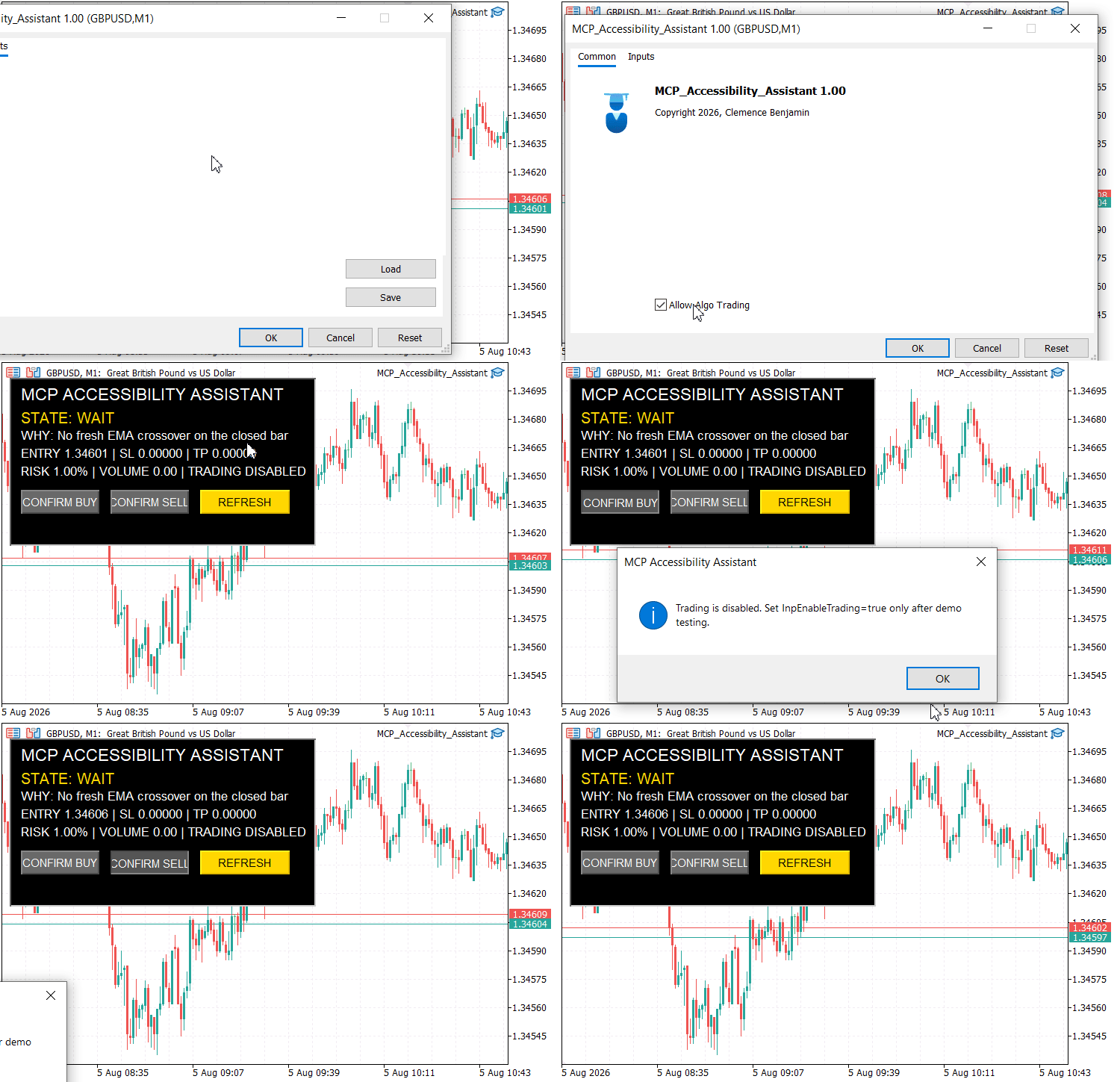
Fig. 3. Attaching MCP_Accessibility_Assistant to a USDJPY M1 chart and displaying its accessibility panel
The panel uses text in addition to color and provides optional sound and popup cues. Quote freshness uses server time and the configurable InpMaxQuoteAgeSeconds; a stale chart symbol quote sets DATA ERROR. If you use keyboard navigation, a screen reader, or another assistive technology, test the relevant controls in your own terminal setup.
Integrated AI and MCP Workflow Test
You can also test how the Assistant carries one contextual task across the connected platform tools:
- Ask the Assistant to open and explain the EA source, including CalculateRiskLots().
- Ask it to compile the program, inspect the compiler output, and correct any reported errors without changing the strategy.
- Ask it to analyze the current symbol and timeframe, then compare that explanation with the EA's explicit EMA state.
- Ask it to add a supported indicator or chart object that helps visualize the strategy logic.
- Run or configure a controlled test and ask the Assistant to explain the relevant log or tester result.
- Keep AI/MCP trading disabled and verify the behavior of an Assistant-originated trade request. Test the EA's InpEnableTrading switch separately because it is an independent runtime control.
- On a demo account, enable the appropriate permission, request a small controlled trade, and then request a permitted modification.
This keeps the responsibilities clear while preserving one workflow: the Assistant interprets the request, MCP and native platform capabilities expose permitted tools, MetaEditor compiles the source, the Strategy Tester checks EA behavior, and the completed EA continues to execute its own MQL5 logic.
Project Results and Observations
The completed project brings the main interaction points into one visible EA panel. The user can see the current state and reason, inspect the proposed entry, SL, TP, risk target, and volume, refresh the calculation, and use direction-specific confirmation controls. Fig. 3 shows the EA attached to the chart with this panel active.
The trade path guards the requested budget after final volume rounding, logs DATA ERROR states, checks the age of the symbol quote, and rebuilds the plan before confirmation. If price or key preconditions change while the dialog is open, the request is cancelled. It blocks matching exposure and checks trade mode, session, stop distance, and estimated margin. The final broker response is reported through the CTrade retcode.
The EMA crossover remains a simple demonstration signal. The value of the project is the reusable interaction pattern around it: explicit state, multimodal notification, risk-aware confirmation, broker preflight checks, and an audit trail that can be reviewed directly or with AI assistance.
Conclusion
In this article, we used the MetaTrader 5 AI Assistant and MCP as a common natural-language access layer across development, chart interaction, testing, and permission-controlled platform actions. The main accessibility improvement is continuity: you can begin from the trading objective and keep the same context while moving through several technical stages.
MCP_Accessibility_Assistant.mq5 complements that workflow with deterministic MQL5 rules. It evaluates a closed-bar EMA signal, calculates a volume under the estimated risk budget, presents the setup through text and optional notifications, refreshes the plan before confirmation, applies broker-aware preflight checks, reports execution results, and writes an audit record. AI/MCP permissions and the EA's own runtime controls remain separate safeguards.
MCP therefore does not replace MetaEditor, the Strategy Tester, broker rules, or user judgment. Its practical contribution is to make many of those capabilities easier to reach and coordinate through natural language while the compiled EA continues to enforce explicit rules.
Risk notice: AI-generated responses can be incorrect. The EMA example is educational and is not investment advice. Compile, inspect, and test generated or modified code in a controlled environment before considering live use.
Key Lessons
| Lesson | Practical meaning |
|---|---|
| One context can span many steps | Parameters, compiler feedback, testing, permissions, and confirmation can continue under one objective without restarting the task. |
| Natural language reduces navigation friction | You can begin with the required outcome while the Assistant helps you reach the relevant development or terminal tools. |
| MCP and the EA operate at different layers | MCP provides connected tool access; after compilation the EA executes its own MQL5 logic and runtime controls. |
| Accessibility should use more than color | Explicit state text, optional sound, and popup notifications provide multiple ways to understand a setup. |
| Risk sizing must not increase the requested budget | If the broker minimum lot would exceed the calculated risk, the EA blocks the trade instead of forcing a larger volume. |
| The broker remains the final execution authority | Local preflight checks catch obvious problems, while the final trade-server retcode determines the request result. |
Attachments
You can install the same EA from either attachment. For the standalone source, place MCP_Accessibility_Assistant.mq5 in MQL5/Experts/Accessibility/. Alternatively, extract MQL5.zip into the terminal data directory. The archive contains exactly one source file at that path; the standalone and archived copies are identical. Open the source in MetaEditor and compile it with F7. If you already have a file with the same name, back it up before overwriting it.
| File Name | Type | File Structure | Description |
|---|---|---|---|
| MCP_Accessibility_Assistant.mq5 | Expert Advisor source (.mq5) | MQL5/Experts/Accessibility/MCP_Accessibility_Assistant.mq5 | Complete EA, version 1.02, with the handlers and functions we discussed in this article. Uses the standard Trade/Trade.mqh include installed with MetaTrader 5. |
| MQL5.zip | Archive (.zip) | MQL5/Experts/Accessibility/MCP_Accessibility_Assistant.mq5 | One source file in its installation path: the same version 1.02 EA as the standalone attachment. |
Warning: All rights to these materials are reserved by MetaQuotes Ltd. Copying or reprinting of these materials in whole or in part is prohibited.
This article was written by a user of the site and reflects their personal views. MetaQuotes Ltd is not responsible for the accuracy of the information presented, nor for any consequences resulting from the use of the solutions, strategies or recommendations described.

 Features of Custom Indicators Creation
 Markov Chains in Trading and Price Forecasting
 Features of Experts Advisors
 Graph Theory: Study of Graphs Generated by Some Random Process

- Free trading apps
- Over 8,000 signals for copying
- Economic news for exploring financial markets
You agree to website policy and terms of use