

Real-Time Trade Event Logger to SQLite via MQL5 DLL Bridge
 1 059
1 059
 0
0

Introduction
Every trade executed on a MetaTrader 5 account produces a deal record: a timestamped entry capturing the instrument, direction, price, volume, profit, and a dozen other properties. The terminal stores these records internally and displays them in the History tab, but the storage is opaque. There is no way to run an SQL query against it, filter it by time of day, join it with external data, or feed it into a reporting pipeline. The built-in export options produce static HTML files. They require manual conversion before a spreadsheet or analysis tool can use them meaningfully. They also capture a snapshot rather than a live stream.
This article builds an Expert Advisor that solves the problem by writing every trade event to an SQLite database file the moment it occurs. On each OnTrade() callback, the EA detects deals that arrived since the previous call. It builds a structured record for each deal and inserts it into the trade_events table using parameterized SQL. The database file lives in MQL5/Files/ and can be opened simultaneously by SQLite-compatible tools (DB Browser for SQLite, Python's sqlite3 module, R's RSQLite package) and BI platforms that support SQLite. The bridge between MQL5 and the SQLite engine is the terminal's own built-in Database* API, which exposes a full parameterized SQL interface to the SQLite library bundled with MetaTrader 5 from build 2485 onward.
Why SQLite for Trade Event Logging
A flat file can record trade events, but it cannot be queried. Answering a question such as "what is the average profit on EURUSD BUY trades opened between 09:00 and 10:00 server time" requires loading the entire file into a separate tool, parsing it, filtering it, and aggregating it manually. If the file grows to tens of thousands of rows, that process becomes slow and error-prone.
SQLite answers that question with a single SELECT statement executed in milliseconds against an indexed table. It is a serverless, file-based database engine that requires no installation, no running process, and no network connection. The database is a single file that can be copied, backed up, or shared without any export step. It supports the full SQL standard including joins, aggregates, window functions, and indexes. For a trade logger, SQLite is the right choice because it is lightweight enough to write from an EA on every deal without measurable overhead, and structured enough to support any analysis query the trader needs.
The MQL5 Database API as an SQLite Bridge
MetaTrader 5 bundles the SQLite library internally and exposes it through a set of native MQL5 functions available from build 2485, released in 2021. These functions form a complete parameterized SQL interface: opening and closing database files, executing DDL statements, preparing parameterized INSERT and SELECT statements, binding typed values to placeholders, stepping through result rows, and finalizing statements. The trader requires no external DLL, no custom wrapper, and no third-party library. The terminal itself is the bridge between MQL5 code and the SQLite engine.
The key functions used in this implementation are:
- DatabaseOpen(): opens or creates a database file and returns a handle. The path is relative to MQL5/Files/. The flags DATABASE_OPEN_READWRITE | DATABASE_OPEN_CREATE open an existing file for writing or create it if it does not exist.
- DatabaseExecute(): runs a complete SQL statement and returns a boolean success indicator. It is used for DDL statements such as CREATE TABLE and CREATE INDEX where no result rows are expected.
- DatabasePrepare(): compiles a parameterized SQL statement and returns a statement handle. Parameters are represented by ? placeholders. The compiled statement can be executed many times with different parameter values without re-parsing the SQL on each execution.
- DatabaseBind(): is the single overloaded function for binding typed values to placeholders. It accepts string, long, int, and double arguments and selects the correct SQLite storage type automatically based on the MQL5 type passed. There are no separate DatabaseBindString, DatabaseBindInteger, or DatabaseBindDouble variants — DatabaseBind() handles all types through overloading.
- DatabaseRead(): advances a prepared statement's cursor to the next result row, returning true when a row is available. For INSERT statements it executes the write and returns false immediately because write statements produce no result rows. This false return is expected behavior, not an error, and GetLastError() must not be checked after DatabaseRead() on a write statement.
- DatabaseReset(): resets a prepared statement so it can be executed again with new parameter bindings, without recompiling the SQL.
- DatabaseColumnInteger(): reads an integer value from the specified column of the current result row. It is used to retrieve the COUNT(*) result from the row count query.
- DatabaseFinalize(): releases all resources associated with a prepared statement. Every statement returned by DatabasePrepare() must be finalized before the database is closed, or the file may be left in an inconsistent state.
- DatabaseClose(): closes the database handle and flushes all pending writes to disk.
The Trade Event Model
MetaTrader 5 records every financial transaction as a deal. A deal is a single atomic event: a position opening, a position closing, a balance credit, or a commission charge. The deal record carries a ticket number, a type, an entry direction, and the full financial details of that specific event.
This logger classifies each incoming deal into one of four event types. A deal with DEAL_ENTRY_IN is classified as "OPEN", representing a new position being established. A deal with DEAL_ENTRY_OUT or DEAL_ENTRY_INOUT is classified as "CLOSE", representing a position being reduced or reversed. A deal with DEAL_TYPE_BALANCE is classified as "BALANCE", covering deposits, withdrawals, and credit adjustments. Any other deal type is classified as "OTHER". All four types are stored in the same trade_events table with the same column set, making them queryable together or individually.
The trade_events table schema holds eighteen columns:
      "CREATE TABLE IF NOT EXISTS trade_events ("
      "  id           INTEGER PRIMARY KEY AUTOINCREMENT,"
      "  event_type   TEXT    NOT NULL,"
      "  deal_ticket  INTEGER,"
      "  order_ticket INTEGER,"
      "  position_id  INTEGER,"
      "  symbol       TEXT,"
      "  direction    TEXT,"
      "  volume       REAL,"
      "  price        REAL,"
      "  stop_loss    REAL,"
      "  take_profit  REAL,"
      "  profit       REAL,"
      "  swap         REAL,"
      "  commission   REAL,"
      "  magic        INTEGER,"
      "  comment      TEXT,"
      "  account_id   INTEGER,"
      "  event_time   TEXT    NOT NULL"
      ");";
id is the auto-incrementing primary key assigned by SQLite on each insert. event_type is one of the four classification labels. deal_ticket and order_ticket are the deal and order identifiers stored as integers. position_id links the deal to its parent position, allowing open and close events to be joined in a query. symbol, direction, volume, price, stop_loss, take_profit, profit, swap, and commission hold the financial details of the deal. magic stores the EA magic number. comment stores the free-text deal comment. account_id stores the account number, which is useful when a single database file collects events from multiple accounts. event_time stores the deal's server timestamp as a sortable text string in YYYY.MM.DD HH:MM:SS format, which sorts correctly as a string and supports LIKE prefix matching for date filtering.
Detecting New Deals in OnTrade
OnTrade() fires whenever any trade-related event occurs on the account: a new order, a deal execution, a position change, or a balance operation. The callback carries no information about what specifically changed. The EA must compare the current state of the deal history against what it has already logged to identify which deals are new.
The most reliable approach is to track the count of deals that have been logged and compare it against the current total on each OnTrade() call. HistorySelect() with a range from zero to the current server time selects the full deal history. HistoryDealsTotal() returns the count of deals in that selection. If the count is larger than the last logged count, the deals from the last logged index to the new total are new and must be logged. After logging, the last count is updated to the new total.
This approach handles multiple deals in a single OnTrade() call. This can happen when a partial close generates an additional commission deal or when multiple balance operations arrive together. It is also safe across EA restarts. During OnInit(), the EA calls CountRows() on the database to find how many rows were logged in previous sessions, then selects the full history and compares the two counts. If the history contains more deals than the database has rows, the gap represents deals that arrived while the EA was offline. These are logged immediately before normal operation begins, so no deals are ever lost between sessions.
Implementation — TradeEvent.mqh
CTradeEvent is a plain data struct that holds all fields describing one deal event. It carries both the raw deal data and the classification label that makes the event immediately readable in the database without requiring joins. The struct provides two helper methods: DirectionString() converts ENUM_DEAL_TYPE to a human-readable label, and FormatTime() converts a datetime to the sortable text string used in the database event_time column.
Class Declaration
//+------------------------------------------------------------------+
//|                                                   TradeEvent.mqh |
//+------------------------------------------------------------------+

#ifndef TRADEEVENT_MQH
#define TRADEEVENT_MQH

//+------------------------------------------------------------------+
//| Holds all fields describing one deal event for database storage. |
//| Both CSqliteBridge and the EA's OnTrade() handler read this      |
//| struct directly, so all fields are public.                       |
//+------------------------------------------------------------------+
struct CTradeEvent
  {
private:
   //--- no private members; direct field access is intentional

public:
   string            event_type;    // "OPEN", "CLOSE", or "BALANCE"
   ulong             deal_ticket;   // unique deal identifier
   ulong             order_ticket;  // originating order ticket
   ulong             position_id;   // parent position identifier
   string            symbol;        // traded instrument; empty for balance events
   ENUM_DEAL_TYPE    direction;     // DEAL_TYPE_BUY, DEAL_TYPE_SELL, or DEAL_TYPE_BALANCE
   double            volume;        // lot size; zero for balance events
   double            price;         // deal fill price
   double            stop_loss;     // SL at time of deal; zero if unset
   double            take_profit;   // TP at time of deal; zero if unset
   double            profit;        // deal profit in account currency
   double            swap;          // swap charge on this deal
   double            commission;    // commission charge on this deal
   long              magic;         // EA magic number; zero if manual trade
   string            comment;       // deal comment from broker or EA
   long              account_id;    // account number for multi-account setups
   datetime          event_time;    // server time of the deal execution

   string            DirectionString(void) const;
   string            FormatTime(void) const;
  };
All fields are public because both CSqliteBridge and the EA read them directly without accessor overhead. direction stores the raw ENUM_DEAL_TYPE so the struct retains the original terminal value while DirectionString() provides a human-readable form for the direction column. Both helper methods are declared const so they can be called on const CTradeEvent & parameters.
DirectionString()
//+------------------------------------------------------------------+
//| Returns a readable direction label for the deal type.            |
//| Returns empty string for balance and other non-directional types.|
//+------------------------------------------------------------------+
string CTradeEvent::DirectionString(void) const
  {
   if(direction == DEAL_TYPE_BUY)
      return("BUY");
   if(direction == DEAL_TYPE_SELL)
      return("SELL");
   return(""); // balance, credit, and other non-directional deal types
  }
DirectionString() returns "BUY" or "SELL" for directional deals and an empty string for everything else. Balance and credit deals have no meaningful direction, so storing an empty string is cleaner than storing a misleading label.
FormatTime()
//+------------------------------------------------------------------+
//| Returns the event time as a sortable text string.                |
//| Format: YYYY.MM.DD HH:MM:SS, consistent across all rows.         |
//+------------------------------------------------------------------+
string CTradeEvent::FormatTime(void) const
  {
   return(TimeToString(event_time, TIME_DATE | TIME_MINUTES | TIME_SECONDS));
  }
FormatTime() wraps TimeToString() with a fixed flag set so every timestamp in the database uses the same sortable text string. The YYYY.MM.DD HH:MM:SS output sorts correctly as a plain text string, making ORDER BY event_time and WHERE event_time LIKE '2024.01.15%' queries work without any date-parsing function.
Implementation — SqliteBridge.mqh
CSqliteBridge wraps the Database* API into a clean interface with four responsibilities: opening the database file and creating the schema, inserting one event record using a prepared statement, querying the count of existing rows for startup deduplication, and closing the database cleanly. It is the only component in the system that calls Database* functions directly. The EA and the test script interact only with this class, never with the raw API.
Class Declaration
//+------------------------------------------------------------------+
//|                                                 SqliteBridge.mqh |
//+------------------------------------------------------------------+

#ifndef SQLITEBRIDGE_MQH
#define SQLITEBRIDGE_MQH

#include "TradeEvent.mqh"

//+------------------------------------------------------------------+
//| Wraps the MQL5 Database* API for trade event persistence.        |
//| Manages one open database handle and one prepared INSERT stmt.   |
//| The INSERT statement is compiled once in Open() and reused on    |
//| every InsertEvent() call via DatabaseReset(), avoiding repeated  |
//| SQL parsing when events arrive in rapid succession.              |
//+------------------------------------------------------------------+
class CSqliteBridge
  {
private:
   int               m_db;           // database handle from DatabaseOpen()
   int               m_insert_stmt;  // compiled INSERT prepared statement handle
   string            m_filename;     // stored for log messages

   bool              PrepareInsert(void);

public:
                     CSqliteBridge(void);
                    ~CSqliteBridge(void);

   bool              Open(const string &filename);
   bool              CreateTable(void);
   bool              InsertEvent(const CTradeEvent &ev);
   long              CountRows(void);
   bool              IsOpen(void) const;
   void              Close(void);
  };
m_db holds the integer handle returned by DatabaseOpen(). m_insert_stmt holds the compiled INSERT statement, prepared once in Open() and reused on every subsequent InsertEvent() call via DatabaseReset(). Reusing the prepared statement avoids recompiling the same SQL on every deal, which matters when trades arrive in bursts. m_filename is stored for log messages. PrepareInsert() is private because it is only ever called from Open().
Constructor
//+------------------------------------------------------------------+
//| Constructor — sets handles to their invalid initial values.      |
//+------------------------------------------------------------------+
CSqliteBridge::CSqliteBridge(void)
  {
   m_db          = INVALID_HANDLE; // sentinel: no open database yet
   m_insert_stmt = INVALID_HANDLE; // sentinel: no compiled statement yet
   m_filename    = "";
  }
Both handles are initialized to INVALID_HANDLE so that IsOpen() and the guard checks in every other method have a reliable sentinel to test against.
Destructor
//+------------------------------------------------------------------+
//| Destructor — closes the database if the caller forgot to.        |
//+------------------------------------------------------------------+
CSqliteBridge::~CSqliteBridge(void)
  {
   if(m_db != INVALID_HANDLE)
      Close(); //--- prevent handle leak on abnormal termination
  }
The destructor calls Close() defensively if the database is still open. In normal operation OnDeinit() calls Close() explicitly, but the destructor catches any abnormal termination path.
Open()
//+------------------------------------------------------------------+
//| Opens the database file and prepares the INSERT statement.       |
//| DATABASE_OPEN_CREATE creates the file if it does not yet exist.  |
//+------------------------------------------------------------------+
bool CSqliteBridge::Open(const string &filename)
  {
   m_filename = filename;

   m_db = ::DatabaseOpen(filename,
                         DATABASE_OPEN_READWRITE | DATABASE_OPEN_CREATE);
   if(m_db == INVALID_HANDLE)
     {
      ::PrintFormat("CSqliteBridge::Open: DatabaseOpen('%s') failed, error %d",
                    filename, ::GetLastError());
      return(false);
     }

   if(!CreateTable())
      return(false);

   if(!PrepareInsert())
      return(false);

   ::PrintFormat("CSqliteBridge::Open: database ready at MQL5/Files/%s",
                 filename);
   return(true);
  }
Open() calls DatabaseOpen() with DATABASE_OPEN_READWRITE | DATABASE_OPEN_CREATE so it works whether the database file already exists from a previous session or is being created for the first time. On success it immediately creates the schema and prepares the INSERT statement, so the bridge is fully ready for InsertEvent() calls by the time Open() returns true.
CreateTable()
//+------------------------------------------------------------------+
//| Creates the trade_events table and its event_time index.         |
//| IF NOT EXISTS makes this safe to call on every Open(), including |
//| when the database already contains rows from a prior session.    |
//+------------------------------------------------------------------+
bool CSqliteBridge::CreateTable(void)
  {
   string sql =
      "CREATE TABLE IF NOT EXISTS trade_events ("
      "  id           INTEGER PRIMARY KEY AUTOINCREMENT,"
      "  event_type   TEXT    NOT NULL,"
      "  deal_ticket  INTEGER,"
      "  order_ticket INTEGER,"
      "  position_id  INTEGER,"
      "  symbol       TEXT,"
      "  direction    TEXT,"
      "  volume       REAL,"
      "  price        REAL,"
      "  stop_loss    REAL,"
      "  take_profit  REAL,"
      "  profit       REAL,"
      "  swap         REAL,"
      "  commission   REAL,"
      "  magic        INTEGER,"
      "  comment      TEXT,"
      "  account_id   INTEGER,"
      "  event_time   TEXT    NOT NULL"
      ");";

   if(!::DatabaseExecute(m_db, sql))
     {
      ::PrintFormat("CSqliteBridge::CreateTable: failed, error %d",
                    ::GetLastError());
      return(false);
     }

//--- index on event_time speeds up date-range queries on large histories
   string idx_sql =
      "CREATE INDEX IF NOT EXISTS idx_event_time"
      " ON trade_events(event_time);";

   if(!::DatabaseExecute(m_db, idx_sql))
     {
      ::PrintFormat("CSqliteBridge::CreateTable: index creation failed, error %d",
                    ::GetLastError());
      return(false);
     }

   return(true);
  }
CreateTable() uses IF NOT EXISTS on both the CREATE TABLE and CREATE INDEX statements so it is safe to call on every Open(), including when the database file already exists from a previous session. The index on event_time accelerates the most common query pattern: filtering events by date range. DatabaseExecute() is used for both DDL statements because neither returns result rows.
PrepareInsert()
//+------------------------------------------------------------------+
//| Compiles the INSERT statement once for reuse on every event.     |
//| The 17 placeholders match the 17 non-id columns in the table.    |
//+------------------------------------------------------------------+
bool CSqliteBridge::PrepareInsert(void)
  {
   string sql =
      "INSERT INTO trade_events"
      " (event_type, deal_ticket, order_ticket, position_id, symbol,"
      "  direction, volume, price, stop_loss, take_profit, profit,"
      "  swap, commission, magic, comment, account_id, event_time)"
      " VALUES (?,?,?,?,?,?,?,?,?,?,?,?,?,?,?,?,?);";

   m_insert_stmt = ::DatabasePrepare(m_db, sql);
   if(m_insert_stmt == INVALID_HANDLE)
     {
      ::PrintFormat("CSqliteBridge::PrepareInsert: DatabasePrepare failed, error %d",
                    ::GetLastError());
      return(false);
     }
   return(true);
  }
PrepareInsert() compiles the INSERT statement into a prepared statement handle stored in m_insert_stmt. The 17 ? placeholders correspond to the 17 non-id columns in the table. Compiling once and reusing the compiled form means the SQLite query planner does not re-parse the statement on each deal.
InsertEvent()
//+------------------------------------------------------------------+
//| Binds one CTradeEvent to the prepared statement and executes it. |
//| DatabaseBind() is the single overloaded function for all types:  |
//| string, long/int, and double — no separate named variants exist. |
//| DatabaseReset() clears the previous execution state so the same  |
//| compiled statement can be reused without re-parsing the SQL.     |
//+------------------------------------------------------------------+
bool CSqliteBridge::InsertEvent(const CTradeEvent &ev)
  {
   if(m_db == INVALID_HANDLE || m_insert_stmt == INVALID_HANDLE)
     {
      ::Print("CSqliteBridge::InsertEvent: database is not open");
      return(false);
     }

//--- reset the prepared statement to clear the previous execution state
   ::DatabaseReset(m_insert_stmt);

//--- bind each column value to its zero-based placeholder index;
//--- DatabaseBind() is overloaded and selects the correct SQLite type
//--- automatically based on the MQL5 type of the value argument
   bool ok = true;
   ok = ok && ::DatabaseBind(m_insert_stmt, 0,  ev.event_type);
   ok = ok && ::DatabaseBind(m_insert_stmt, 1, (long)ev.deal_ticket);
   ok = ok && ::DatabaseBind(m_insert_stmt, 2, (long)ev.order_ticket);
   ok = ok && ::DatabaseBind(m_insert_stmt, 3, (long)ev.position_id);
   ok = ok && ::DatabaseBind(m_insert_stmt, 4,  ev.symbol);
   ok = ok && ::DatabaseBind(m_insert_stmt, 5,  ev.DirectionString());
   ok = ok && ::DatabaseBind(m_insert_stmt, 6,  ev.volume);
   ok = ok && ::DatabaseBind(m_insert_stmt, 7,  ev.price);
   ok = ok && ::DatabaseBind(m_insert_stmt, 8,  ev.stop_loss);
   ok = ok && ::DatabaseBind(m_insert_stmt, 9,  ev.take_profit);
   ok = ok && ::DatabaseBind(m_insert_stmt, 10, ev.profit);
   ok = ok && ::DatabaseBind(m_insert_stmt, 11, ev.swap);
   ok = ok && ::DatabaseBind(m_insert_stmt, 12, ev.commission);
   ok = ok && ::DatabaseBind(m_insert_stmt, 13, ev.magic);
   ok = ok && ::DatabaseBind(m_insert_stmt, 14, ev.comment);
   ok = ok && ::DatabaseBind(m_insert_stmt, 15, ev.account_id);
   ok = ok && ::DatabaseBind(m_insert_stmt, 16, ev.FormatTime());

   if(!ok)
     {
      ::PrintFormat("CSqliteBridge::InsertEvent: bind failed on ticket %I64u, error %d",
                    ev.deal_ticket, ::GetLastError());
      return(false);
     }

//--- DatabaseRead() executes the INSERT statement.
//--- For a write statement it always returns false because there are
//--- no result rows — this is expected, not an error. Do NOT call
//--- GetLastError() here; it returns ERR_DATABASE_EXECUTE (5126)
//--- as a normal consequence of DatabaseRead() completing a non-SELECT.
   ::DatabaseRead(m_insert_stmt);

   return(true);
  }
InsertEvent() begins with DatabaseReset() to clear the statement's previous execution state, then binds all 17 column values using the single overloaded DatabaseBind() function. MQL5's overload resolution selects the correct SQLite storage type automatically: string arguments map to TEXT, long or int arguments map to INTEGER, and double arguments map to REAL. Parameter indices are zero-based and correspond to the order of the ? placeholders in the INSERT SQL. After all bindings succeed, DatabaseRead() executes the statement. For an INSERT, DatabaseRead() always returns false because write statements produce no result rows. This is correct expected behavior and GetLastError() must not be called after this point. For INSERT, the primary error signal is whether all DatabaseBind() calls succeeded. The ok flag captures this.
CountRows()
//+------------------------------------------------------------------+
//| Returns the number of rows currently in trade_events.            |
//| DatabaseColumnInteger() reads an int column from the current row.|
//| The COUNT(*) result fits comfortably in an int for any realistic |
//| trade history, but is returned as long for caller convenience.   |
//+------------------------------------------------------------------+
long CSqliteBridge::CountRows(void)
  {
   if(m_db == INVALID_HANDLE)
      return(0);

   int stmt = ::DatabasePrepare(m_db,
                                "SELECT COUNT(*) FROM trade_events;");
   if(stmt == INVALID_HANDLE)
      return(0);

   long count = 0;
   if(::DatabaseRead(stmt))
     {
      int n = 0;
      //--- DatabaseColumnInteger reads an integer value from column 0
      if(::DatabaseColumnInteger(stmt, 0, n))
         count = (long)n;
     }

   ::DatabaseFinalize(stmt); // always finalize to release statement resources
   return(count);
  }
CountRows() prepares a SELECT COUNT(*) query, calls DatabaseRead() to advance to the single result row, reads the integer value from column 0 using DatabaseColumnInteger(), and finalizes the statement immediately. The result is widened to long for the return value. This method is called in OnInit() to determine how many deals are already in the database from previous sessions so that the EA knows where to start logging without duplicating previously recorded events.
IsOpen()
//+------------------------------------------------------------------+
//| Returns true when the database handle is valid and ready.        |
//+------------------------------------------------------------------+
bool CSqliteBridge::IsOpen(void) const
  {
   return(m_db != INVALID_HANDLE);
  }
IsOpen() provides a simple readiness check that the EA calls at the start of OnTrade(). If the database failed to open during OnInit(), subsequent OnTrade() callbacks return immediately rather than failing repeatedly with error messages.
Close()
//+------------------------------------------------------------------+
//| Finalizes the prepared statement and closes the database handle. |
//| The statement must be finalized before the database is closed;   |
//| reversing this order leaves the file in an undefined state.      |
//+------------------------------------------------------------------+
void CSqliteBridge::Close(void)
  {
   if(m_insert_stmt != INVALID_HANDLE)
     {
      ::DatabaseFinalize(m_insert_stmt); // release compiled statement resources
      m_insert_stmt = INVALID_HANDLE;
     }

   if(m_db != INVALID_HANDLE)
     {
      ::DatabaseClose(m_db); // flush pending writes and release the file handle
      m_db = INVALID_HANDLE;
      ::PrintFormat("CSqliteBridge::Close: database closed (%s)", m_filename);
     }
  }
Close() finalizes the prepared statement before closing the database handle. The order is mandatory: SQLite requires all prepared statements to be finalized before the database handle is released. Closing the handle first can leave the .db file in a corrupted state on some platforms. After both handles are released, they are reset to INVALID_HANDLE so IsOpen() and the destructor guard behave correctly if Close() is called more than once.
Implementation — TradeEventLogger.mq5
TradeEventLogger.mq5 is the Expert Advisor that ties the bridge to the terminal's trade event stream. It holds one CSqliteBridge instance, tracks how many deals have been logged, and on each OnTrade() callback logs every deal that has arrived since the last call.
Property Block and Inputs
//+------------------------------------------------------------------+
//|                                           TradeEventLogger.mq5   |
//+------------------------------------------------------------------+

#property description "Logs every trade deal to a SQLite database in MQL5/Files/"

#include <SqliteLogger/TradeEvent.mqh>
#include <SqliteLogger/SqliteBridge.mqh>

input string InpDbFilename = "trade_log.db"; // SQLite database filename
input long   InpMagic      = 0;              // Magic filter: 0 = log all EAs

//--- file-scope bridge instance; no constructor arguments needed from inputs
CSqliteBridge g_bridge;

//--- tracks how many deals from the full history have been logged this session
int g_last_count = 0;
InpDbFilename lets the user name the output database file without recompiling. InpMagic provides optional filtering so the logger can be restricted to deals from a specific EA while others run on the same account. g_bridge is a file-scope object because it requires no constructor arguments from the inputs. g_last_count tracks how many history deals have been processed so far in this session, allowing OnTrade() to identify new deals by comparing the current total against the last known count.
LogDealsFrom()
//+------------------------------------------------------------------+
//| Logs deals from index start (inclusive) to end (exclusive).      |
//| Reads every deal property and inserts a CTradeEvent row for each.|
//+------------------------------------------------------------------+
void LogDealsFrom(int start, int end)
  {
   for(int i = start; i < end; i++)
     {
      ulong ticket = HistoryDealGetTicket(i);
      if(ticket == 0)
         continue; // guard against a stale index after concurrent history change

      //--- apply the optional magic number filter
      if(InpMagic != 0 &&
         HistoryDealGetInteger(ticket, DEAL_MAGIC) != InpMagic)
         continue;

      CTradeEvent ev;
      ev.deal_ticket  = ticket;
      ev.order_ticket = (ulong)HistoryDealGetInteger(ticket, DEAL_ORDER);
      ev.position_id  = (ulong)HistoryDealGetInteger(ticket, DEAL_POSITION_ID);
      ev.symbol       = HistoryDealGetString(ticket,  DEAL_SYMBOL);
      ev.direction    = (ENUM_DEAL_TYPE)HistoryDealGetInteger(ticket, DEAL_TYPE);
      ev.volume       = HistoryDealGetDouble(ticket,  DEAL_VOLUME);
      ev.price        = HistoryDealGetDouble(ticket,  DEAL_PRICE);
      ev.stop_loss    = HistoryDealGetDouble(ticket,  DEAL_SL);
      ev.take_profit  = HistoryDealGetDouble(ticket,  DEAL_TP);
      ev.profit       = HistoryDealGetDouble(ticket,  DEAL_PROFIT);
      ev.swap         = HistoryDealGetDouble(ticket,  DEAL_SWAP);
      ev.commission   = HistoryDealGetDouble(ticket,  DEAL_COMMISSION);
      ev.magic        = HistoryDealGetInteger(ticket, DEAL_MAGIC);
      ev.comment      = HistoryDealGetString(ticket,  DEAL_COMMENT);
      ev.account_id   = AccountInfoInteger(ACCOUNT_LOGIN);
      ev.event_time   = (datetime)HistoryDealGetInteger(ticket, DEAL_TIME);

      //--- classify the event from the deal entry direction
      ENUM_DEAL_ENTRY entry =
         (ENUM_DEAL_ENTRY)HistoryDealGetInteger(ticket, DEAL_ENTRY);

      if(entry == DEAL_ENTRY_IN)
         ev.event_type = "OPEN";
      else
         if(entry == DEAL_ENTRY_OUT || entry == DEAL_ENTRY_INOUT)
            ev.event_type = "CLOSE"; // INOUT = simultaneous close and reverse
         else
            if(ev.direction == DEAL_TYPE_BALANCE)
               ev.event_type = "BALANCE";
            else
               ev.event_type = "OTHER"; // credit adjustments and other terminal events

      if(!g_bridge.InsertEvent(ev))
         PrintFormat("TradeEventLogger: failed to insert deal %I64u", ticket);
     }
  }
LogDealsFrom() iterates deal indices from start to end, reads every property of each deal using the HistoryDealGetDouble(), HistoryDealGetInteger(), and HistoryDealGetString() functions, and constructs a CTradeEvent struct. The event type is derived from the deal's DEAL_ENTRY value. DEAL_ENTRY_INOUT is classified as "CLOSE" because it represents a position being closed and immediately reversed, which reduces the original position to zero. The stop_loss and take_profit fields are read from the deal record directly; these fields are often zero in live trading because MetaTrader 5 does not always persist SL/TP to the deal record.
OnInit()
//+------------------------------------------------------------------+
//| EA initialization: open database and sync with existing history. |
//+------------------------------------------------------------------+
int OnInit()
  {
   if(!g_bridge.Open(InpDbFilename))
     {
      Print("TradeEventLogger: failed to open database. "
            "Confirm MetaTrader 5 build >= 2485 and check the journal.");
      return(INIT_FAILED);
     }

//--- count rows already in the database from any previous sessions
   long db_rows = g_bridge.CountRows();

//--- select the full deal history so HistoryDealsTotal() is accurate
   HistorySelect(0, TimeCurrent());
   int total = (int)HistoryDealsTotal();

   if(db_rows >= (long)total)
     {
      //--- all history is already logged; start tracking from the current total
      g_last_count = total;
     }
   else
     {
      //--- gap exists: deals arrived between the last session and now
      g_last_count = (int)db_rows;
      LogDealsFrom(g_last_count, total); // log the missed deals
      g_last_count = total;
     }

   PrintFormat("TradeEventLogger: started. DB=%s history_deals=%d db_rows=%d",
               InpDbFilename, total, (int)db_rows);
   return(INIT_SUCCEEDED);
  }
OnInit() opens the database, queries how many rows it already contains from previous sessions, selects the full deal history, and reconciles the two counts. If the database contains fewer rows than the total deal history, the gap represents deals that arrived while the EA was offline. LogDealsFrom() logs those missed deals before the EA begins normal operation, ensuring no deals are ever lost between sessions regardless of how long the EA was offline.
OnTick() and OnTrade()
//+------------------------------------------------------------------+
//| OnTick is required for an EA but all work happens in OnTrade().  |
//+------------------------------------------------------------------+
void OnTick()
  {
//--- intentionally empty; EA runs on OnTrade() events only
  }

//+------------------------------------------------------------------+
//| Fires on every trade event; logs any deals that are new.         |
//| OnTrade() fires for orders and position changes too, not just    |
//| deal executions, so the count check filters those silent calls.  |                                                               |
//+------------------------------------------------------------------+
void OnTrade()
  {
   if(!g_bridge.IsOpen())
      return; // database failed to open during OnInit; skip silently

//--- refresh the full history selection to include any new deals
   HistorySelect(0, TimeCurrent());
   int total = (int)HistoryDealsTotal();

   if(total <= g_last_count)
      return; // no new deals; OnTrade fired for an order or position event

   LogDealsFrom(g_last_count, total);
   g_last_count = total;
  }
OnTick() is required because TradeEventLogger.mq5 is an EA, but its body is empty. All trade event handling happens in OnTrade(). The early return when total <= g_last_count handles the common case where OnTrade() fires for an order placement, modification, or cancellation that does not produce a deal. HistorySelect(0, TimeCurrent()) is called on every OnTrade() invocation to refresh the selection before querying the total, because the cached selection from OnInit() does not update automatically as new deals arrive.
OnDeinit()
//+------------------------------------------------------------------+
//| Closes the database cleanly when the EA is removed.              |
//+------------------------------------------------------------------+
void OnDeinit(const int reason)
  {
   g_bridge.Close();
   PrintFormat("TradeEventLogger: stopped. Reason code: %d", reason);
  }
OnDeinit() calls Close() explicitly, which finalizes the prepared statement and flushes all pending writes to disk before the process releases the file handle. This ensures the database file is in a consistent, readable state the moment the EA is removed.
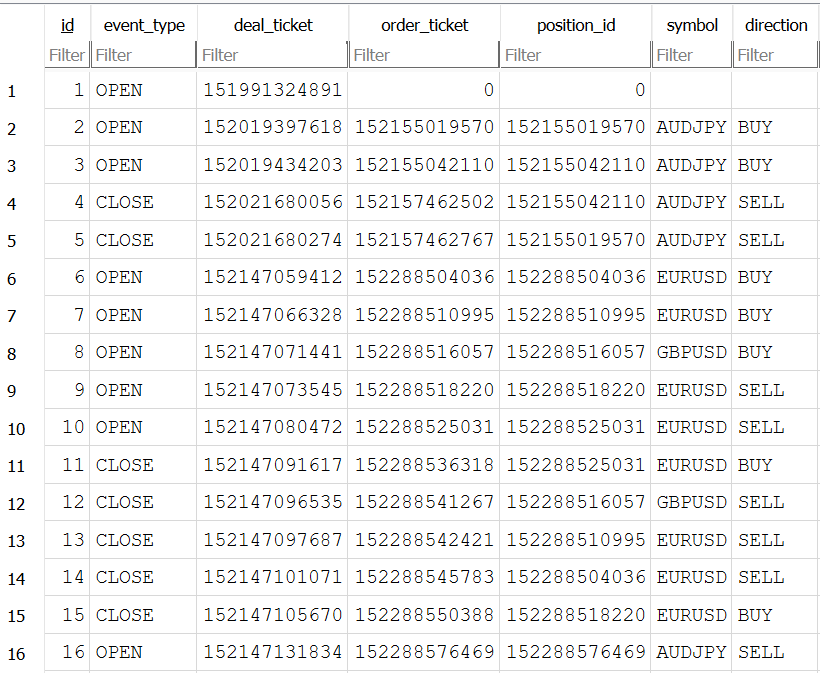
trade_log.db open in DB Browser for SQLite
Implementation — TestSqliteBridge.mq5
TestSqliteBridge.mq5 is a standalone script that verifies CSqliteBridge and CTradeEvent without requiring any open positions or live trade events. It creates a test database, inserts four hand-built events, queries the row count after each insertion, and asserts fifteen specific behaviors using the ASSERT macro.
//+------------------------------------------------------------------+
//|                                            TestSqliteBridge.mq5  |
//+------------------------------------------------------------------+

#property script_show_inputs

#include <SqliteLogger/TradeEvent.mqh>
#include <SqliteLogger/SqliteBridge.mqh>

//--- ASSERT: prints PASSED or FAILED with the test description
#define ASSERT(cond, msg) \
   if(!(cond)) { PrintFormat("ASSERT FAILED : %s", msg); } \
   else        { PrintFormat("ASSERT PASSED : %s", msg); }

input string InpTestDb = "test_trade_log.db"; // Test database filename

//+------------------------------------------------------------------+
//| Script entry point: create DB, insert events, verify results.    |
//+------------------------------------------------------------------+
void OnStart()
  {
   CSqliteBridge bridge;

//--- Test 1: database opens successfully
   bool opened = bridge.Open(InpTestDb);
   ASSERT(opened, "Database opens without error");

   if(!opened)
     {
      Print("TestSqliteBridge: cannot continue without an open database. "
            "Confirm MetaTrader 5 build >= 2485.");
      return;
     }

//--- Test 2: CountRows returns a non-negative value on a fresh database
   long initial_rows = bridge.CountRows();
   PrintFormat("TestSqliteBridge: initial row count = %d", (int)initial_rows);
   ASSERT(initial_rows >= 0, "CountRows() returns a non-negative value");

//--- Test 3: IsOpen() returns true after a successful Open()
   ASSERT(bridge.IsOpen(), "IsOpen() returns true after successful Open()");

//--- build a profitable BUY open event with & in the comment field
//--- to confirm that parameterized binding handles special characters safely
   CTradeEvent open_ev;
   open_ev.event_type   = "OPEN";
   open_ev.deal_ticket  = 99001;
   open_ev.order_ticket = 88001;
   open_ev.position_id  = 77001;
   open_ev.symbol       = "EURUSD";
   open_ev.direction    = DEAL_TYPE_BUY;
   open_ev.volume       = 0.10;
   open_ev.price        = 1.08500;
   open_ev.stop_loss    = 1.08200;
   open_ev.take_profit  = 1.09000;
   open_ev.profit       = 0.00;   // zero on open; profit realized on close
   open_ev.swap         = 0.00;
   open_ev.commission   = -0.70;
   open_ev.magic        = 12345;
   open_ev.comment      = "test open & entry"; // & exercises parameterized binding
   open_ev.account_id   = 1000001;
   open_ev.event_time   = StringToTime("2024.01.15 09:00:00");

//--- Test 4: BUY open event inserts without error
   bool ins1 = bridge.InsertEvent(open_ev);
   ASSERT(ins1, "InsertEvent succeeds for OPEN BUY deal");

//--- build a SELL close event that closes the same position
   CTradeEvent close_ev;
   close_ev.event_type   = "CLOSE";
   close_ev.deal_ticket  = 99002;
   close_ev.order_ticket = 88002;
   close_ev.position_id  = 77001; // same position_id links open and close
   close_ev.symbol       = "EURUSD";
   close_ev.direction    = DEAL_TYPE_SELL;
   close_ev.volume       = 0.10;
   close_ev.price        = 1.09000;
   close_ev.stop_loss    = 0.00;
   close_ev.take_profit  = 0.00;
   close_ev.profit       = 50.00;
   close_ev.swap         = -0.35;
   close_ev.commission   = -0.70;
   close_ev.magic        = 12345;
   close_ev.comment      = "tp hit";
   close_ev.account_id   = 1000001;
   close_ev.event_time   = StringToTime("2024.01.15 14:30:00");

//--- Test 5: CLOSE event inserts without error
   bool ins2 = bridge.InsertEvent(close_ev);
   ASSERT(ins2, "InsertEvent succeeds for CLOSE SELL deal");

//--- Test 6: row count increased by exactly 2
   long after_two = bridge.CountRows();
   ASSERT(after_two == initial_rows + 2,
          "CountRows() increased by 2 after two InsertEvent() calls");

//--- Test 7: DirectionString returns correct labels
   ASSERT(open_ev.DirectionString()  == "BUY",
          "DirectionString() returns BUY for DEAL_TYPE_BUY");
   ASSERT(close_ev.DirectionString() == "SELL",
          "DirectionString() returns SELL for DEAL_TYPE_SELL");

//--- Test 8: FormatTime returns a non-empty string
   ASSERT(StringLen(open_ev.FormatTime()) > 0,
          "FormatTime() returns a non-empty string");

//--- Test 9: FormatTime produces the expected date prefix
   string ft = open_ev.FormatTime();
   ASSERT(StringFind(ft, "2024.01.15") >= 0,
          "FormatTime() contains the correct date 2024.01.15");

//--- build a balance deposit event with no symbol or direction
   CTradeEvent bal_ev;
   bal_ev.event_type   = "BALANCE";
   bal_ev.deal_ticket  = 99003;
   bal_ev.order_ticket = 0;
   bal_ev.position_id  = 0;
   bal_ev.symbol       = "";          // balance events carry no symbol
   bal_ev.direction    = DEAL_TYPE_BALANCE;
   bal_ev.volume       = 0.00;
   bal_ev.price        = 0.00;
   bal_ev.stop_loss    = 0.00;
   bal_ev.take_profit  = 0.00;
   bal_ev.profit       = 10000.00;
   bal_ev.swap         = 0.00;
   bal_ev.commission   = 0.00;
   bal_ev.magic        = 0;
   bal_ev.comment      = "initial deposit";
   bal_ev.account_id   = 1000001;
   bal_ev.event_time   = StringToTime("2024.01.01 00:00:00");

//--- Test 10: balance event inserts without error
   bool ins3 = bridge.InsertEvent(bal_ev);
   ASSERT(ins3, "InsertEvent succeeds for BALANCE deal");

//--- Test 11: DirectionString returns empty for balance deal type
   ASSERT(bal_ev.DirectionString() == "",
          "DirectionString() returns empty string for DEAL_TYPE_BALANCE");

//--- Test 12: row count is now initial + 3
   long after_three = bridge.CountRows();
   ASSERT(after_three == initial_rows + 3,
          "CountRows() is initial + 3 after three InsertEvent() calls");

//--- Test 13: insert a deal with SQL-sensitive characters in the comment
//--- parameterized binding must handle these without corrupting the database
   CTradeEvent special_ev;
   special_ev.event_type   = "OTHER";
   special_ev.deal_ticket  = 99004;
   special_ev.order_ticket = 0;
   special_ev.position_id  = 0;
   special_ev.symbol       = "XAUUSD";
   special_ev.direction    = DEAL_TYPE_BUY;
   special_ev.volume       = 0.01;
   special_ev.price        = 2300.50;
   special_ev.stop_loss    = 0.00;
   special_ev.take_profit  = 0.00;
   special_ev.profit       = -5.00;
   special_ev.swap         = 0.00;
   special_ev.commission   = 0.00;
   special_ev.magic        = 0;
   special_ev.comment      = "it's a \"test\" comment with 'quotes' & <tags>";
   special_ev.account_id   = 1000001;
   special_ev.event_time   = StringToTime("2024.01.16 08:00:00");

   bool ins4 = bridge.InsertEvent(special_ev);
   ASSERT(ins4,
          "InsertEvent handles SQL-sensitive characters in comment via binding");

//--- Test 14: final row count is initial + 4
   long final_rows = bridge.CountRows();
   ASSERT(final_rows == initial_rows + 4,
          "CountRows() is initial + 4 after four InsertEvent() calls");

//--- close the bridge
   bridge.Close();

//--- Test 15: IsOpen() returns false after Close()
   ASSERT(!bridge.IsOpen(),
          "IsOpen() returns false after Close()");

//--- final summary for the Experts tab
   PrintFormat("TestSqliteBridge: all assertions complete. "
               "Final row count = %d (initial was %d).",
               (int)final_rows, (int)initial_rows);
   PrintFormat("TestSqliteBridge: open MQL5/Files/%s in DB Browser for SQLite "
               "to inspect the inserted rows.", InpTestDb);
  }
//+------------------------------------------------------------------+
The test constructs four hand-built events covering the main paths through InsertEvent(): a BUY open with an ampersand in the comment, a SELL close that shares a position_id with the open, a balance event with empty symbol and direction fields, and a deal whose comment contains single quotes, double quotes, ampersands, and angle brackets. Tests 1 through 3 verify the database lifecycle. Tests 4 through 6 confirm that two events insert correctly and the row count increments. Tests 7 through 9 verify the CTradeEvent helper methods. Tests 10 through 12 confirm balance event handling and the empty direction string. Tests 13 and 14 verify that SQL-sensitive characters in the comment field are stored literally by parameterized binding without causing a SQL syntax error. Test 15 confirms the open and closed state transitions of IsOpen(). All row-count assertions compare relative to initial_rows rather than absolute values, so the script produces correct results on any run including repeated runs on the same database.
Querying the Database
Once the EA is running and events are being logged, the database file at MQL5\Files\trade_log.db can be opened by any SQLite-compatible tool while MetaTrader 5 is running. SQLite supports concurrent reads from multiple processes, so a query tool does not need to wait for the EA to stop.
All events in chronological order:
SELECT event_time, event_type, symbol, direction,
       volume, price, profit, comment
FROM   trade_events
ORDER  BY event_time;
Expected output:
2026.07.03 03:04:30     OPEN    EURUSD  BUY     0.1     1.1423  0.0
2026.07.03 03:05:32     OPEN    AUDJPY  BUY     0.1     111.662 0.0
2026.07.03 04:33:07     CLOSE   AUDJPY  SELL    0.1     111.7   3.54    [tp 111.700]
2026.07.03 04:33:07     CLOSE   AUDJPY  SELL    0.1     111.7   3.66    [tp 111.700]
2026.07.06 12:52:45     CLOSE   EURUSD  SELL    0.1     1.1413  -25.1   [sl 1.14130]
Net profit by symbol for all close events:
SELECT symbol,
       COUNT(*)               AS trade_count,
       SUM(profit)            AS total_profit,
       AVG(profit)            AS avg_profit,
       SUM(commission + swap) AS total_costs
FROM   trade_events
WHERE  event_type = 'CLOSE'
GROUP  BY symbol
ORDER  BY total_profit DESC;
Expected output:
XAUUSD  5       2849.8  569.96  0.0
USDJPY  6       527.31  87.885  0.0
EURUSD  33      239.04  7.24363636363636        -1.05
GBPJPY  3       200.77  66.9233333333333        0.0
AUDJPY  35      187.53  5.358   0.0
GBPUSD  6       34.11   5.685   0.0
EURAUD  1       4.7     4.7     0.0
AUDUSD  1       2.4     2.4     0.0
All close events for a specific magic number on a given date:
SELECT event_time, symbol, direction, volume,
       price, profit, swap, commission
FROM   trade_events
WHERE  event_type = 'CLOSE'
  AND  magic      = 12345
  AND  event_time LIKE '2024.01.15%'
ORDER  BY event_time;
Running equity curve using a window function:
SELECT event_time,
       symbol,
       profit,
       SUM(profit + swap + commission)
          OVER (ORDER BY event_time
                ROWS UNBOUNDED PRECEDING) AS equity
FROM   trade_events
WHERE  event_type IN ('CLOSE', 'BALANCE')
ORDER  BY event_time;
Expected output:
2026.06.05 21:22:45     AUDJPY  -4.84   -4.84
2026.06.05 21:22:50     AUDJPY  -4.96   -9.8
2026.07.02 15:36:50     EURUSD  0.36    -9.44
2026.07.02 15:37:09     GBPUSD  0.31    -9.13
2026.07.02 15:37:15     EURUSD  0.03    -9.1
2026.07.02 15:37:26     EURUSD  0.05    -9.05
2026.07.02 15:37:48     EURUSD  -0.2    -9.25
2026.07.02 15:39:39     AUDJPY  0.09    -9.16
2026.07.02 15:39:54     AUDJPY  -2.36   -11.52
2026.07.02 15:59:33     AUDJPY  1.74    -9.78
Join open and close events for each position:
SELECT o.event_time  AS opened,
       c.event_time  AS closed,
       o.symbol,
       o.direction,
       o.volume,
       o.price       AS entry_price,
       c.price       AS exit_price,
       c.profit
FROM   trade_events o
JOIN   trade_events c ON o.position_id = c.position_id
WHERE  o.event_type = 'OPEN'
  AND  c.event_type = 'CLOSE'
ORDER  BY o.event_time;
Expected output:
2026.06.05 16:02:12     2026.06.05 21:22:50     AUDJPY  BUY     0.01    113.719 112.925 -4.96
2026.06.05 16:05:04     2026.06.05 21:22:45     AUDJPY  BUY     0.01    113.702 112.926 -4.84
2026.07.02 15:35:28     2026.07.02 15:37:26     EURUSD  BUY     0.01    1.14558 1.14563 0.05
2026.07.02 15:35:46     2026.07.02 15:37:15     EURUSD  BUY     0.01    1.14552 1.14555 0.03
2026.07.02 15:35:59     2026.07.02 15:37:09     GBPUSD  BUY     0.01    1.33622 1.33653 0.31
2026.07.02 15:36:06     2026.07.02 15:37:48     EURUSD  SELL    0.01    1.14548 1.14568 -0.2
2026.07.02 15:36:13     2026.07.02 15:36:50     EURUSD  SELL    0.01    1.14596 1.1456  0.36
2026.07.02 15:39:16     2026.07.02 15:39:39     AUDJPY  SELL    0.01    111.506 111.491 0.09
2026.07.02 15:39:27     2026.07.02 15:39:54     AUDJPY  SELL    0.1     111.479 111.517 -2.36
2026.07.02 15:58:07     2026.07.02 15:59:40     EURUSD  BUY     0.1     1.14493 1.14514 2.1
These queries run in DB Browser for SQLite, Python's sqlite3 module, DBeaver, or any other SQLite client. The event_time column stores YYYY.MM.DD HH:MM:SS strings that sort correctly as text and support LIKE prefix matching for date filtering without any date-parsing overhead.
Extending the Logger
A second table could be maintained alongside trade_events to store the reconstructed net state of each position after each deal. The EA would match "OPEN" and "CLOSE" events by position_id, compute the net volume and cumulative profit, and upsert the position record using INSERT OR REPLACE. This gives the database a directly queryable positions view without requiring query-time reconstruction through a join.
The logger could be extended to capture the bid and ask price at the moment each deal arrives by reading SymbolInfoDouble() for SYMBOL_BID and SYMBOL_ASK immediately inside LogDealsFrom() and storing them in two additional columns. This would allow execution quality analysis: comparing the deal fill price against the mid-price at the moment of execution to measure slippage in a form that persists across sessions.
A Python script running alongside MetaTrader 5 could poll trade_log.db at a configurable interval, compute aggregate metrics, and push updates to a web dashboard. Because SQLite supports concurrent readers, the Python process can read the database while the EA writes to it without any coordination mechanism. The EA writes rows; the Python script reads them. No message queue, shared memory, or network socket is required between the two processes.
Limitations
The Database* API requires MetaTrader 5 build 2485 or later. Traders running an older terminal build will see a compilation error on DatabaseOpen(). The build number is visible in the terminal's Help > About dialog. Updating the terminal resolves this without any code change.
The database file is created inside MQL5\Files\, which is the terminal's sandboxed file directory. It cannot be written to an arbitrary path on the file system. If the database must appear on a shared network path or in a specific system folder, copy the file periodically using a separate process. Alternatively, configure a symbolic link from MQL5\Files\ to the target directory.
SQLite uses file-level locking for write operations. While concurrent reads from multiple processes are safe, two EA instances attempting to write to the same database file simultaneously can produce lock contention and intermittent write failures. If multiple EAs need to log events, each should write to a distinct database filename, or a single dedicated logger EA should be designated per account.
The logger records DEAL_SL and DEAL_TP directly from the deal record. In live trading these fields are often zero because MetaTrader 5 does not always persist SL/TP values to the deal record. The two-pass order lookup pattern — reading SL/TP from the originating order via HistoryOrderGetDouble() when the deal record carries zero — would improve coverage, at the cost of additional history API calls on each deal.
Very high-frequency strategies that produce dozens of deals per second may find that the single-transaction-per-deal model becomes a write bottleneck. Wrapping batches of inserts in an explicit DatabaseTransactionBegin() and DatabaseTransactionCommit() block reduces the number of disk sync operations from one per deal to one per batch, which significantly improves write throughput for high-frequency scenarios at the cost of a small window where the most recent batch is not yet committed if the EA is terminated unexpectedly.
Conclusion
Building this EA leaves the reader with three working components. CTradeEvent holds every field describing one deal event along with helper methods that render the direction label and the timestamp in the formats the database expects. CSqliteBridge wraps the MQL5 Database* API into a clean lifecycle interface: opening the database and creating the schema once, preparing a single parameterized INSERT statement that is reused across every deal via DatabaseReset(), reading the existing row count for session continuity, and closing the database with proper statement finalization order. TradeEventLogger.mq5 detects new deals on each OnTrade() callback by comparing the current history total against a session counter, logs any missed deals on startup by comparing the history count against the database row count, and inserts each new deal within milliseconds of the terminal recording it.
The concrete operational guarantees are these: every deal that passes the magic number filter is logged to the database exactly once, including deals that arrive between EA sessions. The database file is valid SQLite and can be opened by any SQLite-compatible tool while the EA is running. Parameterized binding via DatabaseBind() stores any string value — including those containing single quotes, double quotes, ampersands, and angle brackets — correctly without any SQL injection risk. The schema includes an index on event_time so date-range queries run efficiently even on large histories. The honest limitations are the build 2485 requirement, the restriction to MQL5\Files\, the potential for write lock contention with multiple simultaneous EA writers, the absence of a two-pass SL/TP lookup, and the single-transaction-per-deal overhead that matters only for very high-frequency strategies.
Programs used in the article:
| # | Name | Type | Description |
|---|---|---|---|
| 1 | TradeEvent.mqh | Include File | Defines the struct that holds all fields for one deal event, with helper methods for direction labeling and timestamp formatting. |
| 2 | SqliteBridge.mqh | Include File | Wraps the MQL5 Database* API into a lifecycle interface that opens the database, creates the schema and index, inserts events via a reused prepared statement, counts existing rows for session continuity, and closes the database cleanly. |
| 3 | TradeEventLogger.mq5 | Demo EA | Detects new deals on each OnTrade() callback and inserts them into the SQLite database, with startup logic that prevents duplicate logging across EA restarts and logs any deals missed while the EA was offline. |
| 4 | TestSqliteBridge.mq5 | Script | Verifies the bridge and event struct by inserting four hand-built events into a test database and asserting fifteen behaviors including row counts, direction labels, timestamp format, and safe handling of SQL-sensitive characters. |
| 5 | Sql_Logger.zip | Zip Archive | Zip archive containing all the attached files and their paths relative to the terminal's root folder. |
Warning: All rights to these materials are reserved by MetaQuotes Ltd. Copying or reprinting of these materials in whole or in part is prohibited.
This article was written by a user of the site and reflects their personal views. MetaQuotes Ltd is not responsible for the accuracy of the information presented, nor for any consequences resulting from the use of the solutions, strategies or recommendations described.

 Porting the Canonical Catch22 Time-Series Feature Set and Testing It on Volatility Regimes
 Neural Networks in Trading: Effective Feature Extraction for Accurate Classification (Mantis)
 Analysis of the Impact of Solar and Lunar Cycles on Currency Exchange Rates
 From One Price to Four: Range-Based Volatility Estimators for MetaTrader 5

- Free trading apps
- Over 8,000 signals for copying
- Economic news for exploring financial markets
You agree to website policy and terms of use