

Price Action Analysis Toolkit Development (Part 77): Building a Searchable Indicator Panel for MetaTrader 5
 2 225
2 225
 0
0

Contents
Introduction
MetaTrader 5 provides a comprehensive collection of built-in technical indicators for market analysis. However, despite the platform's extensive functionality, locating a specific indicator still requires manually browsing through multiple indicator categories because the platform does not provide a built-in search function.
This limitation introduces several practical challenges:
- Locating a specific indicator becomes time-consuming, especially when navigating multiple categories.
- New users may struggle to find indicators because they are unfamiliar with the platform's menu structure.
- Market analysis is interrupted by repeatedly searching through menus instead of focusing on price action.
- Indicators with similar names can be selected unintentionally.
To address these limitations, this article develops a searchable indicator panel for MetaTrader 5 using a modular architecture. We will build an indicator catalog, implement a case-insensitive search engine, create a chart launcher capable of attaching built-in indicators programmatically, and integrate these components into a graphical interface that allows indicators to be searched and opened directly from a single panel.
Understanding the Concept
Before implementing the solution, let us examine how built-in indicators are typically accessed in MetaTrader 5. Although the platform includes a comprehensive collection of indicators, locating a specific one requires navigating through predefined menus because no search facility is available.
There are two standard ways to open built-in indicators:
1. Through the Navigator window
- Open the Navigator (Ctrl + N if hidden).
- Expand Indicators.
- Browse the categories (Trend, Oscillators, Volumes, Bill Williams, etc.).
- Double-click or drag the desired indicator onto the chart.
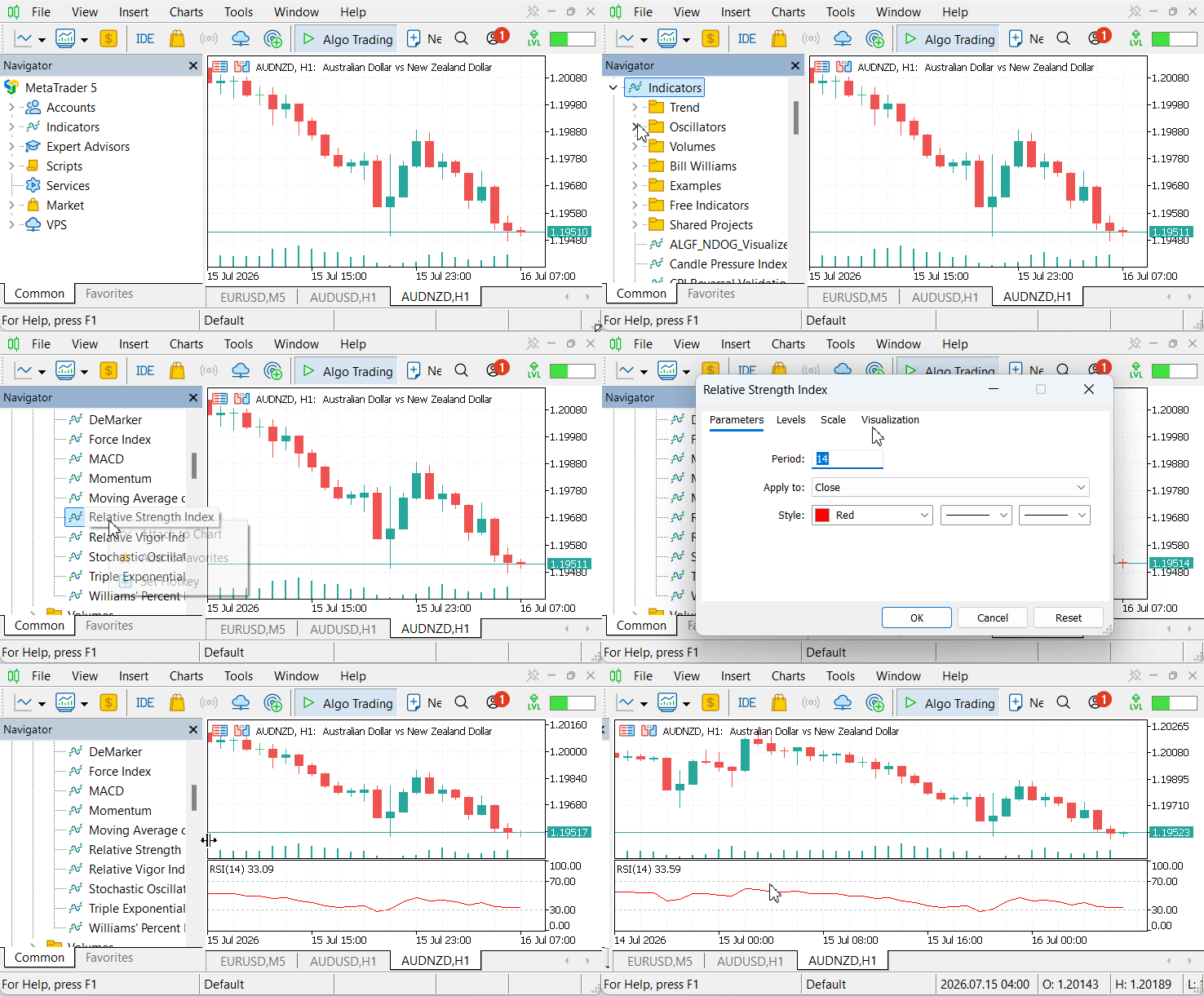
Figure 1. Attaching a built-in indicator through the Navigator window.
2. Through the Insert menu
- Click Insert → Indicators.
- Navigate through the indicator categories.
- Select the desired indicator.
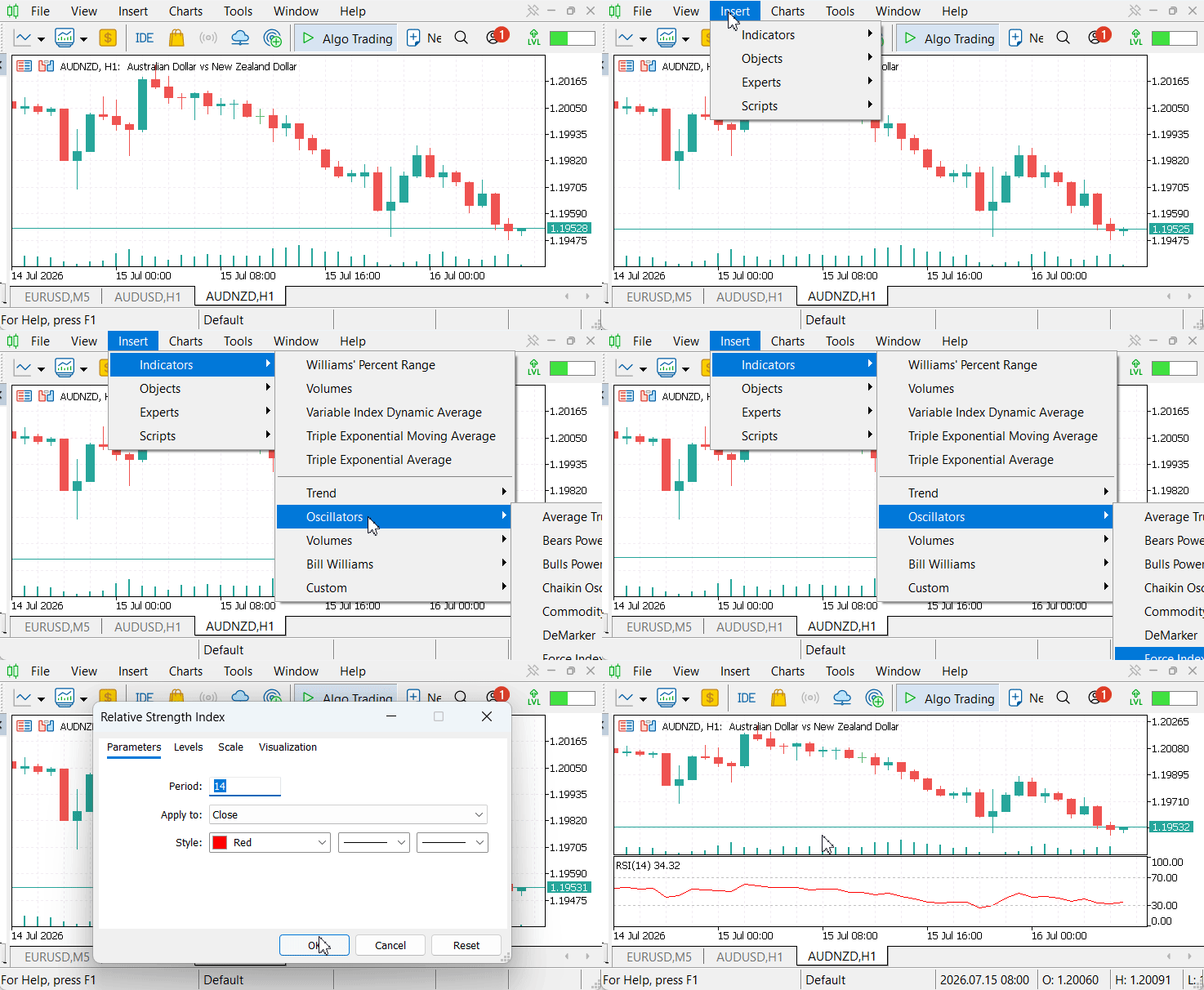
Figure 2. Attaching a built-in indicator through the Insert menu.
Both approaches rely on manually browsing indicator categories before the required indicator can be located. While practical for occasional use, this workflow becomes repetitive when frequently switching between indicators during market analysis.
System Architecture
To eliminate manual navigation, we organize the application into five independent modules, each responsible for a single task. This modular design separates indicator management, search processing, chart interaction, user interface management, and application lifecycle control into distinct components. Assigning a single responsibility to each module reduces coupling between components, simplifies maintenance, and allows individual parts of the application to evolve without affecting the rest of the system.
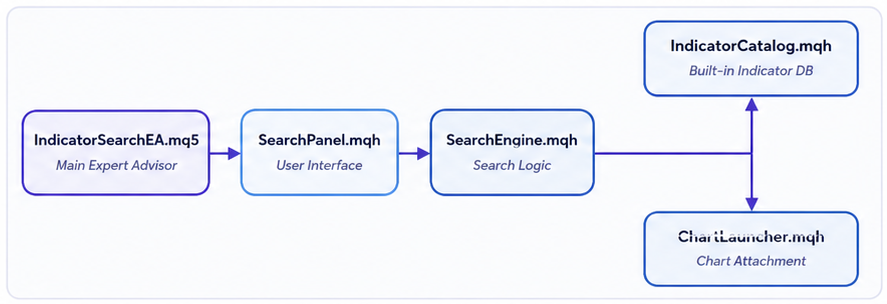
Figure 3. System architecture illustrating the indicator search workflow.
The workflow begins with IndicatorSearchEA.mq5, which initializes the application and manages communication with the MetaTrader 5 event model. User input entered through SearchPanel.mqh is forwarded to SearchEngine.mqh, where the query is evaluated against the centralized indicator catalog maintained by IndicatorCatalog.mqh. After the user selects an indicator, ChartLauncher.mqh creates the corresponding indicator instance using IndicatorCreate() and attaches it to the appropriate chart window through ChartIndicatorAdd(). Each module performs a well-defined responsibility while communicating through simple interfaces, producing a workflow that remains both modular and easy to extend.
The following section implements each module individually before integrating them into the completed application.
MQL5 Implementation
The application is implemented as five independent modules, each responsible for a specific part of the workflow. All modules use the standard file header, #property metadata, and include guards; therefore, the discussion below focuses only on the logic specific to each module.
The implementation follows this order:
- IndicatorCatalog.mqh
- SearchEngine.mqh
- ChartLauncher.mqh
- SearchPanel.mqh
- IndicatorSearchEA.mq5
1. IndicatorCatalog.mqh
We begin the implementation by centralizing all supported built-in MetaTrader 5 indicators within IndicatorCatalog.mqh. The module stores each indicator's display name together with its corresponding ENUM_INDICATOR value, allowing the search engine, graphical interface, and chart launcher to reference a single collection instead of maintaining their own indicator definitions.
To represent each indicator, we introduce the SIndicatorInfo structure, which associates a user-friendly name with its corresponding ENUM_INDICATOR value. This separation allows users to work with descriptive indicator names while the underlying implementation continues to operate with the enumeration values required by IndicatorCreate(). The structure also provides a foundation for extending indicator metadata, such as categories or search keywords, without affecting the remaining modules.
CIndicatorCatalog encapsulates the indicator collection and exposes a small public interface for accessing its contents. The catalog is initialized in the constructor so that the complete dataset is prepared once during application startup and remains available throughout the application's lifetime. Since all supported indicators are defined in one location, maintaining or extending the catalog requires modifying only this module.
To simplify initialization, the constructor populates the internal array through the ADD_INDICATOR helper macro. Each macro invocation inserts the indicator's display name and enumeration value into the collection, eliminating repetitive insertion code while keeping the list of supported indicators compact and easy to maintain.
The catalog exposes only the operations required by the remaining modules. GetInfo() retrieves an indicator entry through a validated interface, while Count() reports the number of available indicators. Restricting access through these methods hides the underlying storage implementation and allows the internal representation to change without affecting the search engine, user interface, or chart launcher.
//+------------------------------------------------------------------+
//|                                             IndicatorCatalog.mqh |
//|                                  Copyright 2025, MetaQuotes Ltd. |
//|                          https://www.mql5.com/en/users/lynnchris |
//+------------------------------------------------------------------+
#property copyright "Copyright 2025, MetaQuotes Ltd."
#property link      "https://www.mql5.com/en/users/lynnchris"
#property version   "1.00"

#ifndef _INDICATOR_CATALOG_MQH
#define _INDICATOR_CATALOG_MQH

#include <Indicators\Indicators.mqh>

//--- Structure to hold each indicator's name and enum type
struct SIndicatorInfo
  {
   string            name;
   ENUM_INDICATOR    type;
  };

//+------------------------------------------------------------------+
//| Catalog of built-in indicators                                   |
//+------------------------------------------------------------------+
class CIndicatorCatalog
  {
private:
   SIndicatorInfo    m_indicators[];
public:
                     CIndicatorCatalog();
                    ~CIndicatorCatalog() {}
   int               Count() const { return ArraySize(m_indicators); }
   bool              GetInfo(const int index, SIndicatorInfo &out) const;
  };

//+------------------------------------------------------------------+
//| Constructor – fills the catalog using a macro                    |
//+------------------------------------------------------------------+
CIndicatorCatalog::CIndicatorCatalog()
  {
   ArrayResize(m_indicators, 0);
   int idx = 0;

//--- Helper macro: adds one indicator to the array
#define ADD_INDICATOR(enum_name, display_name) \
   { \
      ArrayResize(m_indicators, idx + 1); \
      m_indicators[idx].name = display_name; \
      m_indicators[idx].type = enum_name; \
      idx++; \
   }

//--- All built-in MT5 indicators (as of build 4000+)
   ADD_INDICATOR(IND_AC, "Accelerator Oscillator")
   ADD_INDICATOR(IND_AD, "Accumulation/Distribution")
   ADD_INDICATOR(IND_ADX, "Average Directional Movement Index")
   ADD_INDICATOR(IND_ADXW, "ADX Welles Wilder")
   ADD_INDICATOR(IND_ALLIGATOR, "Alligator")
   ADD_INDICATOR(IND_AMA, "Adaptive Moving Average")
   ADD_INDICATOR(IND_AO, "Awesome Oscillator")
   ADD_INDICATOR(IND_ATR, "Average True Range")
   ADD_INDICATOR(IND_BANDS, "Bollinger Bands")
   ADD_INDICATOR(IND_BEARS, "Bears Power")
   ADD_INDICATOR(IND_BULLS, "Bulls Power")
   ADD_INDICATOR(IND_BWMFI, "Market Facilitation Index")
   ADD_INDICATOR(IND_CCI, "Commodity Channel Index")
   ADD_INDICATOR(IND_CHAIKIN, "Chaikin Oscillator")
   ADD_INDICATOR(IND_DEMA, "Double Exponential Moving Average")
   ADD_INDICATOR(IND_DEMARKER, "DeMarker")
   ADD_INDICATOR(IND_ENVELOPES, "Envelopes")
   ADD_INDICATOR(IND_FORCE, "Force Index")
   ADD_INDICATOR(IND_FRACTALS, "Fractals")
   ADD_INDICATOR(IND_GATOR, "Gator Oscillator")
   ADD_INDICATOR(IND_ICHIMOKU, "Ichimoku Kinko Hyo")
   ADD_INDICATOR(IND_MA, "Moving Average")
   ADD_INDICATOR(IND_MACD, "MACD")
   ADD_INDICATOR(IND_MFI, "Money Flow Index")
   ADD_INDICATOR(IND_MOMENTUM, "Momentum")
   ADD_INDICATOR(IND_OBV, "On Balance Volume")
   ADD_INDICATOR(IND_OSMA, "OSMA")
   ADD_INDICATOR(IND_RSI, "Relative Strength Index")
   ADD_INDICATOR(IND_RVI, "Relative Vigor Index")
   ADD_INDICATOR(IND_SAR, "Parabolic SAR")
   ADD_INDICATOR(IND_STDDEV, "Standard Deviation")
   ADD_INDICATOR(IND_STOCHASTIC, "Stochastic Oscillator")
   ADD_INDICATOR(IND_TEMA, "Triple Exponential Moving Average")
   ADD_INDICATOR(IND_TRIX, "TRIX")
   ADD_INDICATOR(IND_VIDYA, "Variable Index Dynamic Average")
   ADD_INDICATOR(IND_VOLUMES, "Volumes")
   ADD_INDICATOR(IND_WPR, "Williams' Percent Range")

#undef ADD_INDICATOR
  }

//+------------------------------------------------------------------+
//| Gets indicator info by index; returns false if out of bounds     |
//+------------------------------------------------------------------+
bool CIndicatorCatalog::GetInfo(const int index, SIndicatorInfo &out) const
  {
   if(index < 0 || index >= ArraySize(m_indicators))
      return(false);
   out = m_indicators[index];
   return(true);
  }

#endif // _INDICATOR_CATALOG_MQH
//+------------------------------------------------------------------+
2. SearchEngine.mqh
With the indicator catalog in place, we next implement the component responsible for locating indicators from user input. SearchEngine.mqh encapsulates the filtering logic, allowing the graphical interface to submit a search query and receive only the matching indicators. This separation keeps the search algorithm independent of the presentation layer while providing a reusable service that can be used throughout the application.
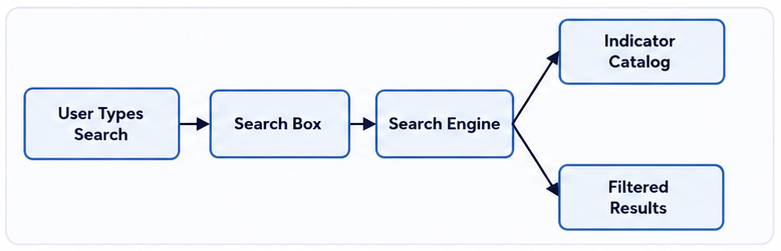
Figure 4. Flowchart of the indicator search process.
We implement the search engine around an instance of CIndicatorCatalog, allowing every search to operate directly on the catalog without maintaining duplicate indicator collections. This guarantees that search results always reflect the current contents of the catalog while avoiding the need to synchronize multiple data sources.
To improve usability, the Filter() function performs case-insensitive substring matching. Both the search text and indicator names are converted to lowercase before comparison, allowing searches to succeed regardless of letter casing. Substring matching also enables partial searches, so entering text such as moving returns every indicator whose name contains that term without requiring the complete indicator name.
The filtering process iterates through the catalog, validates each retrieved entry through GetInfo(), and appends matching indicators to the output array. By returning a filtered collection instead of exposing the catalog directly, the search engine presents a simple interface that remains independent of the underlying filtering implementation.
Future search strategies can be introduced by extending Filter() without changing how the remaining modules interact with the search engine. For example, prefix matching, keyword searches, or category-based filtering can be incorporated while preserving the existing interface.
//+------------------------------------------------------------------+
//|                                                 SearchEngine.mqh |
//|                                  Copyright 2025, MetaQuotes Ltd. |
//|                          https://www.mql5.com/en/users/lynnchris |
//+------------------------------------------------------------------+
#property copyright "Copyright 2025, MetaQuotes Ltd."
#property link      "https://www.mql5.com/en/users/lynnchris"
#property version   "1.00"

#ifndef _SEARCH_ENGINE_MQH
#define _SEARCH_ENGINE_MQH

#include "IndicatorCatalog.mqh"

//+------------------------------------------------------------------+
//| Search engine – filters indicators by name (case-insensitive)    |
//+------------------------------------------------------------------+
class CSearchEngine
  {
private:
   CIndicatorCatalog   m_catalog;
public:
                     CSearchEngine() {}
                    ~CSearchEngine() {}
   void               Filter(string searchText, SIndicatorInfo &outResults[]);
  };

//+------------------------------------------------------------------+
//| Filters the catalog by substring match in the indicator name     |
//+------------------------------------------------------------------+
void CSearchEngine::Filter(string searchText, SIndicatorInfo &outResults[])
  {
//--- Clear the output array
   ArrayResize(outResults, 0);
//--- If search text is empty, return no results
   if(searchText == "")
      return;

//--- Convert search text to lowercase for case‑insensitive comparison
   string lowerSearch = searchText;
   StringToLower(lowerSearch);

   int total = m_catalog.Count();
//--- Loop through all indicators in the catalog
   for(int i = 0; i < total; i++)
     {
      SIndicatorInfo info;
      if(!m_catalog.GetInfo(i, info))
         continue;

      string lowerName = info.name;
      StringToLower(lowerName);

      //--- If the indicator name contains the search string, add it to results
      if(StringFind(lowerName, lowerSearch) != -1)
        {
         int newSize = ArraySize(outResults);
         ArrayResize(outResults, newSize + 1);
         outResults[newSize] = info;
        }
     }
  }

#endif // _SEARCH_ENGINE_MQH
//+------------------------------------------------------------------+
3. ChartLauncher.mqh
Now that we have implemented the indicator catalog and search engine, we next transform the selected ENUM_INDICATOR into a functioning MetaTrader 5 indicator. This responsibility is delegated to ChartLauncher.mqh, which communicates directly with the MetaTrader 5 indicator framework. By standardizing indicator creation around IndicatorCreate(), the module provides a consistent interface for initializing supported built-in indicators while isolating platform-specific implementation details from the remaining application components.

Figure 5. Indicator attachment workflow from selection to chart display.
Determining the Target Window
The GetTargetWindow() function determines whether an indicator should be attached to the main chart or to a separate indicator subwindow. Overlay indicators, such as Moving Average and Bollinger Bands, are assigned to the main chart, while oscillators are placed in the next available subwindow.
//+------------------------------------------------------------------+
//|                                                ChartLauncher.mqh |
//|                                  Copyright 2025, MetaQuotes Ltd. |
//|                          https://www.mql5.com/en/users/lynnchris |
//+------------------------------------------------------------------+
#property copyright "Copyright 2025, MetaQuotes Ltd."
#property link      "https://www.mql5.com/en/users/lynnchris"
#property version   "1.00"

#ifndef _CHART_LAUNCHER_MQH
#define _CHART_LAUNCHER_MQH

#include <Indicators\Indicators.mqh>

//+------------------------------------------------------------------+
//| Determines the target window: 0 = main chart, >0 = sub-window    |
//+------------------------------------------------------------------+
int GetTargetWindow(const ENUM_INDICATOR type)
  {
//--- Overlay indicators are drawn directly on the price chart
   switch(type)
     {
      case IND_MA:
      case IND_DEMA:
      case IND_TEMA:
      case IND_AMA:
      case IND_VIDYA:
      case IND_BANDS:
      case IND_ENVELOPES:
      case IND_ICHIMOKU:
      case IND_SAR:
      case IND_ALLIGATOR:
      case IND_FRACTALS:
         return(0);
     }
//--- All other indicators go to a new sub‑window
   return((int)ChartGetInteger(0, CHART_WINDOWS_TOTAL));
  }
Creating Indicator Handles
Before an indicator can be attached to a chart, a valid handle must first be created. We standardize this process around IndicatorCreate(), using a single mechanism to initialize all supported built-in indicators. Since individual indicators require different parameter signatures, their initialization data is organized into a MqlParam array, allowing diverse parameter sets to be passed through the same interface.
Instead of implementing a separate creation routine for every indicator, we centralize the initialization logic within a single function that adapts its behavior according to the selected ENUM_INDICATOR. A switch statement associates each indicator with its required parameter configuration before invoking IndicatorCreate(). Consolidating this logic simplifies maintenance because changes to indicator initialization are confined to one location.
Indicators with identical parameter signatures share the same initialization pattern, reducing duplicated code while accommodating the varying requirements of the MetaTrader 5 API. Only indicators with unique parameter layouts require dedicated initialization branches, keeping the implementation compact without sacrificing flexibility.
Default MetaTrader 5 parameter values are preserved wherever applicable so that indicators created programmatically behave the same as those inserted through the platform interface. This ensures predictable results while providing users with the familiar default configurations expected from the terminal.
//+------------------------------------------------------------------+
//| Creates an indicator handle with sensible default parameters     |
//+------------------------------------------------------------------+
int CreateIndicator(const ENUM_INDICATOR type)
  {
   MqlParam params[];
   int paramCount = 0;

//--- Build parameter arrays according to each indicator's signature
   switch(type)
     {
      //--- Oscillators (typically placed in sub‑windows)
      case IND_RSI:
         ArrayResize(params, 2);
         params[0].type = TYPE_INT;
         params[0].integer_value = 14;
         params[1].type = TYPE_INT;
         params[1].integer_value = PRICE_CLOSE;
         paramCount = 2;
         break;

      case IND_MACD:
         ArrayResize(params, 4);
         params[0].type = TYPE_INT;
         params[0].integer_value = 12;
         params[1].type = TYPE_INT;
         params[1].integer_value = 26;
         params[2].type = TYPE_INT;
         params[2].integer_value = 9;
         params[3].type = TYPE_INT;
         params[3].integer_value = PRICE_CLOSE;
         paramCount = 4;
         break;

      case IND_STOCHASTIC:
         ArrayResize(params, 5);
         params[0].type = TYPE_INT;
         params[0].integer_value = 5;
         params[1].type = TYPE_INT;
         params[1].integer_value = 3;
         params[2].type = TYPE_INT;
         params[2].integer_value = 3;
         params[3].type = TYPE_INT;
         params[3].integer_value = MODE_SMA;
         params[4].type = TYPE_INT;
         params[4].integer_value = PRICE_CLOSE;
         paramCount = 5;
         break;

      case IND_MFI:
         ArrayResize(params, 2);
         params[0].type = TYPE_INT;
         params[0].integer_value = 14;
         params[1].type = TYPE_INT;
         params[1].integer_value = VOLUME_TICK;
         paramCount = 2;
         break;

      case IND_CCI:
         ArrayResize(params, 2);
         params[0].type = TYPE_INT;
         params[0].integer_value = 14;
         params[1].type = TYPE_INT;
         params[1].integer_value = PRICE_CLOSE;
         paramCount = 2;
         break;

      //--- Indicators with zero parameters (just draw on price or volume)
      case IND_AO:
      case IND_AC:
      case IND_AD:
      case IND_OBV:
      case IND_BWMFI:
      case IND_GATOR:
      case IND_VOLUMES:
         paramCount = 0;
         break;

      case IND_WPR:
         ArrayResize(params, 1);
         params[0].type = TYPE_INT;
         params[0].integer_value = 14;
         paramCount = 1;
         break;

      //--- Overlay indicators (main chart)
      case IND_MA:
         ArrayResize(params, 4);
         params[0].type = TYPE_INT;
         params[0].integer_value = 10;
         params[1].type = TYPE_INT;
         params[1].integer_value = 0;
         params[2].type = TYPE_INT;
         params[2].integer_value = MODE_SMA;
         params[3].type = TYPE_INT;
         params[3].integer_value = PRICE_CLOSE;
         paramCount = 4;
         break;

      case IND_DEMA:
      case IND_TEMA:
         ArrayResize(params, 4);
         params[0].type = TYPE_INT;
         params[0].integer_value = 14;
         params[1].type = TYPE_INT;
         params[1].integer_value = 0;
         params[2].type = TYPE_INT;
         params[2].integer_value = MODE_SMA;
         params[3].type = TYPE_INT;
         params[3].integer_value = PRICE_CLOSE;
         paramCount = 4;
         break;

      case IND_VIDYA:
         ArrayResize(params, 3);
         params[0].type = TYPE_INT;
         params[0].integer_value = 14;
         params[1].type = TYPE_DOUBLE;
         params[1].double_value = 0.2;
         params[2].type = TYPE_INT;
         params[2].integer_value = PRICE_CLOSE;
         paramCount = 3;
         break;

      case IND_AMA:
         ArrayResize(params, 5);
         params[0].type = TYPE_INT;
         params[0].integer_value = 9;
         params[1].type = TYPE_INT;
         params[1].integer_value = 30;
         params[2].type = TYPE_INT;
         params[2].integer_value = 2;
         params[3].type = TYPE_INT;
         params[3].integer_value = 30;
         params[4].type = TYPE_INT;
         params[4].integer_value = PRICE_CLOSE;
         paramCount = 5;
         break;

      case IND_BANDS:
         ArrayResize(params, 4);
         params[0].type = TYPE_INT;
         params[0].integer_value = 20;
         params[1].type = TYPE_DOUBLE;
         params[1].double_value = 2.0;
         params[2].type = TYPE_INT;
         params[2].integer_value = 0;
         params[3].type = TYPE_INT;
         params[3].integer_value = PRICE_CLOSE;
         paramCount = 4;
         break;

      case IND_ENVELOPES:
         ArrayResize(params, 5);
         params[0].type = TYPE_INT;
         params[0].integer_value = 10;
         params[1].type = TYPE_INT;
         params[1].integer_value = 0;
         params[2].type = TYPE_INT;
         params[2].integer_value = MODE_SMA;
         params[3].type = TYPE_INT;
         params[3].integer_value = PRICE_CLOSE;
         params[4].type = TYPE_DOUBLE;
         params[4].double_value = 0.1;
         paramCount = 5;
         break;

      case IND_ICHIMOKU:
         ArrayResize(params, 5);
         params[0].type = TYPE_INT;
         params[0].integer_value = 9;
         params[1].type = TYPE_INT;
         params[1].integer_value = 26;
         params[2].type = TYPE_INT;
         params[2].integer_value = 52;
         params[3].type = TYPE_INT;
         params[3].integer_value = 26;
         params[4].type = TYPE_INT;
         params[4].integer_value = 26;
         paramCount = 5;
         break;

      case IND_SAR:
         ArrayResize(params, 2);
         params[0].type = TYPE_DOUBLE;
         params[0].double_value = 0.02;
         params[1].type = TYPE_DOUBLE;
         params[1].double_value = 0.2;
         paramCount = 2;
         break;

      case IND_ALLIGATOR:
         ArrayResize(params, 6);
         params[0].type = TYPE_INT;
         params[0].integer_value = 13;
         params[1].type = TYPE_INT;
         params[1].integer_value = 8;
         params[2].type = TYPE_INT;
         params[2].integer_value = 5;
         params[3].type = TYPE_INT;
         params[3].integer_value = 8;
         params[4].type = TYPE_INT;
         params[4].integer_value = 5;
         params[5].type = TYPE_INT;
         params[5].integer_value = 3;
         paramCount = 6;
         break;

      case IND_FRACTALS:
         paramCount = 0;
         break;

      //--- Other sub‑window indicators with parameters
      case IND_ADX:
      case IND_ADXW:
         ArrayResize(params, 1);
         params[0].type = TYPE_INT;
         params[0].integer_value = 14;
         paramCount = 1;
         break;

      case IND_ATR:
         ArrayResize(params, 1);
         params[0].type = TYPE_INT;
         params[0].integer_value = 14;
         paramCount = 1;
         break;

      case IND_TRIX:
      case IND_MOMENTUM:
         ArrayResize(params, 2);
         params[0].type = TYPE_INT;
         params[0].integer_value = 14;
         params[1].type = TYPE_INT;
         params[1].integer_value = PRICE_CLOSE;
         paramCount = 2;
         break;

      case IND_STDDEV:
         ArrayResize(params, 3);
         params[0].type = TYPE_INT;
         params[0].integer_value = 10;
         params[1].type = TYPE_INT;
         params[1].integer_value = 0;
         params[2].type = TYPE_INT;
         params[2].integer_value = PRICE_CLOSE;
         paramCount = 3;
         break;

      case IND_FORCE:
         ArrayResize(params, 3);
         params[0].type = TYPE_INT;
         params[0].integer_value = 13;
         params[1].type = TYPE_INT;
         params[1].integer_value = MODE_SMA;
         params[2].type = TYPE_INT;
         params[2].integer_value = VOLUME_TICK;
         paramCount = 3;
         break;

      case IND_RVI:
         ArrayResize(params, 2);
         params[0].type = TYPE_INT;
         params[0].integer_value = 10;
         params[1].type = TYPE_INT;
         params[1].integer_value = MODE_SMA;
         paramCount = 2;
         break;

      case IND_OSMA:
         ArrayResize(params, 4);
         params[0].type = TYPE_INT;
         params[0].integer_value = 12;
         params[1].type = TYPE_INT;
         params[1].integer_value = 26;
         params[2].type = TYPE_INT;
         params[2].integer_value = 9;
         params[3].type = TYPE_INT;
         params[3].integer_value = PRICE_CLOSE;
         paramCount = 4;
         break;

      case IND_CHAIKIN:
         ArrayResize(params, 4);
         params[0].type = TYPE_INT;
         params[0].integer_value = 3;
         params[1].type = TYPE_INT;
         params[1].integer_value = 10;
         params[2].type = TYPE_INT;
         params[2].integer_value = MODE_SMA;
         params[3].type = TYPE_DOUBLE;
         params[3].double_value = 0.0;
         paramCount = 4;
         break;

      case IND_DEMARKER:
         ArrayResize(params, 1);
         params[0].type = TYPE_INT;
         params[0].integer_value = 14;
         paramCount = 1;
         break;

      case IND_BEARS:
      case IND_BULLS:
         ArrayResize(params, 2);
         params[0].type = TYPE_INT;
         params[0].integer_value = 13;
         params[1].type = TYPE_INT;
         params[1].integer_value = VOLUME_TICK;
         paramCount = 2;
         break;

      default:
         Print("Unsupported indicator type: ", EnumToString(type));
         return(INVALID_HANDLE);
     }

//--- Create the indicator using the built‑in MT5 function
   int handle = IndicatorCreate(Symbol(), PERIOD_CURRENT, type, paramCount, params);
   if(handle == INVALID_HANDLE)
      Print("Failed to create ", EnumToString(type), ", error: ", GetLastError());
   return(handle);
  }
Although most indicators follow the same initialization process, some require specialized handling. For example, IND_AO, IND_AC, and IND_FRACTALS are created without additional parameters, whereas IND_BANDS, IND_ENVELOPES, IND_VIDYA, IND_SAR, and IND_CHAIKIN require floating-point values represented through TYPE_DOUBLE. Unsupported indicator types immediately return INVALID_HANDLE, preventing invalid requests from progressing to the attachment stage.
Attaching Indicators to the Chart
Once a valid indicator handle has been created, the module determines whether the indicator should be displayed on the main chart or within a dedicated indicator subwindow before calling ChartIndicatorAdd(). Separating window selection from indicator creation keeps each responsibility independent, allowing placement rules to evolve without affecting the initialization logic.
The attachment routine validates the operation, refreshes the chart after a successful insertion, and releases the indicator handle if the attachment fails. Encapsulating these operations within a dedicated module provides a reusable interface for displaying indicators while shielding the remaining application components from the underlying MetaTrader 5 API.
//+------------------------------------------------------------------+
//| Attaches an indicator to the correct window (main or sub)        |
//+------------------------------------------------------------------+
bool AttachIndicator(const ENUM_INDICATOR type)
  {
   int handle = CreateIndicator(type);
   if(handle == INVALID_HANDLE)
      return(false);

//--- Choose the right window: 0 for main chart, or a new sub‑window
   int window = GetTargetWindow(type);
   if(!ChartIndicatorAdd(0, window, handle))
     {
      Print("Failed to add indicator to window ", window, ", error: ", GetLastError());
      IndicatorRelease(handle);
      return(false);
     }

   ChartRedraw();
   string windowDesc = (window == 0) ? "main chart" : "sub‑window " + IntegerToString(window);
   Print("Indicator ", EnumToString(type), " attached to ", windowDesc);
   return(true);
  }
ChartLauncher.mqh encapsulates the complete indicator creation workflow, from parameter preparation and handle creation to window selection and chart attachment. Consolidating these operations within a single module provides a reusable interface while isolating platform-specific API calls from the remaining components.
4. SearchPanel.mqh
Now that we have implemented the backend components, we integrate them through SearchPanel.mqh. This module implements the application's graphical interface by collecting user input, forwarding search queries to SearchEngine, and passing selected indicators to ChartLauncher. Keeping these responsibilities within the presentation layer prevents the interface from becoming coupled to the application's search and indicator creation logic.
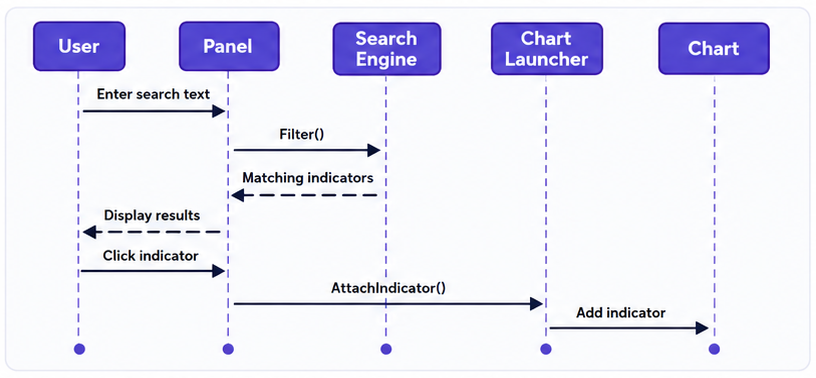
Figure 6. Sequence diagram of the indicator search panel workflow.
The interface is built with the MetaTrader 5 Standard Library controls. Rather than implementing search or indicator creation directly, the panel coordinates user interaction by forwarding search requests to SearchEngine and indicator launch requests to ChartLauncher, keeping the presentation layer independent of the underlying application logic.//+------------------------------------------------------------------+ //| SearchPanel.mqh | //| Copyright 2025, MetaQuotes Ltd. | //| https://www.mql5.com/en/users/lynnchris | //+------------------------------------------------------------------+ #property copyright "Copyright 2025, MetaQuotes Ltd." #property link "https://www.mql5.com/en/users/lynnchris" #property version "1.00" #ifndef _SEARCH_PANEL_MQH #define _SEARCH_PANEL_MQH #include <Controls\Dialog.mqh> #include <Controls\Edit.mqh> #include <Controls\Button.mqh> #include "SearchEngine.mqh" #include "ChartLauncher.mqh" //--- Layout constants (spacing and sizes) #define PANEL_MARGIN 10 #define EDIT_HEIGHT 22 #define BUTTON_HEIGHT 20 #define BUTTON_GAP 2 //+------------------------------------------------------------------+ //| Main search panel class – inherits from CAppDialog | //+------------------------------------------------------------------+ class CSearchPanel : public CAppDialog { private: //--- UI controls CEdit m_editSearch; // text input for search CButton m_btnOpen; // "Open" button CButton m_btnClose; // "Close" button CButton m_resultButtons[]; // dynamic array of result buttons int m_resultCount; // how many result buttons are shown //--- Search engine and filtered results CSearchEngine m_engine; SIndicatorInfo m_filtered[]; // current filtered list string m_lastSearchText; // last text we searched, to avoid re‑filtering //--- Private helper methods void UpdateList(); // refresh the result buttons void OpenSelected(int index); // attach indicator at given index void ClearButtons(); // remove all result buttons public: CSearchPanel(); ~CSearchPanel(); virtual bool Create(const long chart, const string name, const int subwin, const int x1, const int y1, const int x2, const int y2); virtual bool OnEvent(const int id, const long &lparam, const double &dparam, const string &sparam); void ChartEvent(const int id, const long &lparam, const double &dparam, const string &sparam); void OnTimer(); void KillTimer(); }; //+------------------------------------------------------------------+ //| Constructor / Destructor | //+------------------------------------------------------------------+ CSearchPanel::CSearchPanel() : m_resultCount(0), m_lastSearchText("") {} CSearchPanel::~CSearchPanel() { KillTimer(); }
Building the Interface
The Create() function initializes the parent dialog before constructing the search box and command buttons. Once the interface has been created, the panel performs an initial update of the result list and starts a timer responsible for monitoring changes to the search text. Initializing the interface in a single routine ensures that every control is created, registered, and ready for interaction before the panel becomes visible.
//+------------------------------------------------------------------+
//| Creates the panel and all its child controls                     |
//+------------------------------------------------------------------+
bool CSearchPanel::Create(const long chart, const string name, const int subwin, const int x1, const int y1, const int x2, const int y2)
  {
   Print("CSearchPanel::Create() called");
//--- First, create the parent dialog
   if(!CAppDialog::Create(chart, name, subwin, x1, y1, x2, y2))
     {
      Print("CAppDialog::Create failed");
      return(false);
     }

   int w = x2 - x1;
   int h = y2 - y1;

//--- Edit box (search input)
   int editX = PANEL_MARGIN;
   int editY = PANEL_MARGIN;
   int editW = w - 2 * PANEL_MARGIN;
   if(!m_editSearch.Create(chart, name + "Edit", subwin, editX, editY, editX + editW, editY + EDIT_HEIGHT))
     {
      Print("Edit box creation failed");
      return(false);
     }
   if(!Add(m_editSearch))
     {
      Print("Add edit box failed");
      return(false);
     }
   m_editSearch.Text("Type indicator name...");
   m_lastSearchText = "";

//--- Open button (opens the first result)
   int btnY = h - PANEL_MARGIN - BUTTON_HEIGHT;
   int btnW = 60;
   int btnH = BUTTON_HEIGHT;
   int btnX = w / 2 - btnW - 5;
   if(!m_btnOpen.Create(chart, "OpenBtn", subwin, btnX, btnY, btnX + btnW, btnY + btnH))
     {
      Print("Open button creation failed");
      return(false);
     }
   if(!Add(m_btnOpen))
     {
      Print("Add open button failed");
      return(false);
     }
   m_btnOpen.Text("Open");

//--- Close button (closes the panel)
   btnX = w / 2 + 5;
   if(!m_btnClose.Create(chart, "CloseBtn", subwin, btnX, btnY, btnX + btnW, btnY + btnH))
     {
      Print("Close button creation failed");
      return(false);
     }
   if(!Add(m_btnClose))
     {
      Print("Add close button failed");
      return(false);
     }
   m_btnClose.Text("Close");

//--- Initial empty list
   UpdateList();

//--- Start a timer to poll the edit box every second (since OnChange may not fire)
   EventSetTimer(1);
   Print("Panel created successfully, timer started");
   return(true);
  }
Managing User Interaction
After the interface is initialized, the panel responds to user actions and keeps the displayed results synchronized with the current search query. This functionality is distributed across four functions, each responsible for a specific aspect of the interaction workflow.
KillTimer() stops the timer when the panel is destroyed, ensuring that periodic callbacks do not continue after the interface has been closed. Performing timer cleanup during shutdown prevents unnecessary background processing and ensures that the panel releases its resources correctly.
OnEvent() handles all custom events generated by the panel controls. The function distinguishes between the Open button, Close button, and dynamically generated result buttons by examining the control name received through sparam. Selecting Open attaches the first matching indicator, Close destroys the panel, and selecting a result button extracts its corresponding index before passing the request to OpenSelected(). Any events that are not processed by the panel are forwarded to the base CAppDialog implementation, preserving the default behavior provided by the MetaTrader 5 Standard Library.
//+------------------------------------------------------------------+
//| Stops the internal timer when the panel is destroyed             |
//+------------------------------------------------------------------+
void CSearchPanel::KillTimer()
  {
   EventKillTimer();
   Print("Timer killed");
  }

//+------------------------------------------------------------------+
//| Event handler – routes all custom events to appropriate actions  |
//+------------------------------------------------------------------+
bool CSearchPanel::OnEvent(const int id, const long &lparam, const double &dparam, const string &sparam)
  {
//--- Only handle custom events (CHARTEVENT_CUSTOM)
   if(id == CHARTEVENT_CUSTOM)
     {
      //--- Open button: click opens the first result (if any)
      if(sparam == "OpenBtn")
        {
         Print("Open button clicked");
         if(m_resultCount > 0)
            OpenSelected(0);
         return(true);
        }
      //--- Close button: destroys the panel
      else
         if(sparam == "CloseBtn")
           {
            Print("Close button clicked");
            Destroy(0);
            return(true);
           }
         //--- Result buttons: sparam starts with "ResultBtn_"
         else
            if(StringFind(sparam, "ResultBtn_") == 0)
              {
               //--- Extract the index from the name, e.g., "ResultBtn_3" -> 3
               int index = (int)StringToInteger(StringSubstr(sparam, 10));
               Print("Result button ", index, " clicked");
               OpenSelected(index);
               return(true);
              }
            //--- For any other event (like the system X button), pass it to the base class
            else
              {
               return(CAppDialog::OnEvent(id, lparam, dparam, sparam));
              }
     }
//--- Non-custom events also go to base
   return(CAppDialog::OnEvent(id, lparam, dparam, sparam));
  }

//+------------------------------------------------------------------+
//| Forwards chart events to the base class                          |
//+------------------------------------------------------------------+
void CSearchPanel::ChartEvent(const int id, const long &lparam, const double &dparam, const string &sparam)
  {
   CAppDialog::ChartEvent(id, lparam, dparam, sparam);
  }

//+------------------------------------------------------------------+
//| Timer callback – checks if the search text has changed           |
//+------------------------------------------------------------------+
void CSearchPanel::OnTimer()
  {
   string current = m_editSearch.Text();
//--- Only re‑filter if the text actually changed
   if(current != m_lastSearchText)
     {
      m_lastSearchText = current;
      Print("Timer: text changed to: ", current);
      //--- Run the search engine
      m_engine.Filter(current, m_filtered);
      Print("Found ", ArraySize(m_filtered), " matches");
      //--- Refresh the displayed list
      UpdateList();
     }
  }
ChartEvent() acts as the bridge between the Expert Advisor and the graphical interface. Rather than interpreting chart events itself, the function forwards every event to the inherited dialog class, allowing the Standard Library controls to process mouse clicks, keyboard input, and other interface notifications transparently.
OnTimer() monitors the contents of the search box and updates the results only when the search text changes. Each timer callback compares the current input with the previously processed value before invoking the search engine. When a change is detected, the panel filters the indicator catalog, stores the matching results, and rebuilds the displayed button list through UpdateList(). Performing filtering only when the input changes eliminates unnecessary processing while ensuring that the displayed results always reflect the user's current search query.
Displaying Search Results
Search results are displayed as dynamically generated buttons, allowing the interface to adapt automatically to the number of matching indicators. Before creating a new set of controls, ClearButtons() removes the existing result buttons to ensure that the panel always reflects the current filtered collection.
UpdateList() determines how many buttons can be displayed within the available panel space, creates each button dynamically, assigns the corresponding indicator name as its caption, and registers the control with the dialog. This approach allows the interface to accommodate different search results without maintaining a fixed collection of controls.
//+------------------------------------------------------------------+
//| Removes all existing result buttons from the panel               |
//+------------------------------------------------------------------+
void CSearchPanel::ClearButtons()
  {
   for(int i = 0; i < m_resultCount; i++)
      m_resultButtons[i].Destroy(0);
   ArrayResize(m_resultButtons, 0);
   m_resultCount = 0;
   Print("Cleared all result buttons");
  }

//+------------------------------------------------------------------+
//| Refreshes the list of result buttons based on m_filtered[]       |
//+------------------------------------------------------------------+
void CSearchPanel::UpdateList()
  {
   Print("UpdateList() called");
   ClearButtons();

   int total = ArraySize(m_filtered);
   Print("Total filtered items: ", total);
   if(total == 0)
     {
      Print("No results to display");
      return;
     }

//--- Calculate how many buttons fit vertically in the panel
   int startY = PANEL_MARGIN + EDIT_HEIGHT + PANEL_MARGIN;
   int availableHeight = Height() - startY - BUTTON_HEIGHT - 2 * PANEL_MARGIN;
   int maxButtons = availableHeight / (BUTTON_HEIGHT + BUTTON_GAP);
   if(maxButtons < 1)
      maxButtons = 1;

   int count = (total < maxButtons) ? total : maxButtons;
   ArrayResize(m_resultButtons, count);

   int btnWidth = Width() - 2 * PANEL_MARGIN;
   int yPos = startY;

//--- Create one button for each filtered item
   for(int i = 0; i < count; i++)
     {
      string btnName = "ResultBtn_" + IntegerToString(i);
      if(!m_resultButtons[i].Create(0, btnName, 0, PANEL_MARGIN, yPos, PANEL_MARGIN + btnWidth, yPos + BUTTON_HEIGHT))
        {
         Print("Failed to create button ", i);
         continue;
        }
      m_resultButtons[i].Text(m_filtered[i].name);
      if(!Add(m_resultButtons[i]))
        {
         Print("Failed to add button ", i);
         continue;
        }
      m_resultButtons[i].Show();
      Print("Created button ", i, " name='", btnName, "' text='", m_filtered[i].name, "'");
      yPos += BUTTON_HEIGHT + BUTTON_GAP;
     }
   m_resultCount = count;
   Print("Displayed ", count, " buttons");
  }

//+------------------------------------------------------------------+
//| Attaches the indicator at the given filtered-list index          |
//+------------------------------------------------------------------+
void CSearchPanel::OpenSelected(int index)
  {
   if(index < 0 || index >= ArraySize(m_filtered))
     {
      Print("Invalid selection index");
      return;
     }
   Print("Opening indicator: ", m_filtered[index].name);
   ENUM_INDICATOR type = m_filtered[index].type;
//--- Call the launcher to attach it
   if(AttachIndicator(type))
      Print("Indicator '", m_filtered[index].name, "' attached.");
   else
      Print("Failed to attach '", m_filtered[index].name, "'");
  }
When a result button is selected, OpenSelected() validates the selected index, retrieves the corresponding ENUM_INDICATOR value from the filtered collection, and delegates indicator creation to ChartLauncher.mqh. Keeping indicator attachment outside the user interface allows the panel to remain focused on presenting search results and processing user selections.
5. IndicatorSearchEA.mq5
IndicatorSearchEA.mq5 serves as the application's entry point. It initializes the search panel, forwards MetaTrader 5 events to the user interface, and performs resource cleanup when the application is removed from the chart.
//+------------------------------------------------------------------+
//|                                            IndicatorSearchEA.mq5 |
//|                                  Copyright 2026, MetaQuotes Ltd. |
//|                          https://www.mql5.com/en/users/lynnchris |
//+------------------------------------------------------------------+
#property copyright "Copyright 2026, MetaQuotes Ltd."
#property link      "https://www.mql5.com/en/users/lynnchris"
#property version   "1.00"
#property strict

#include <IndicatorSearch/SearchPanel.mqh>

//--- Global instance of the search panel
CSearchPanel ExtPanel;
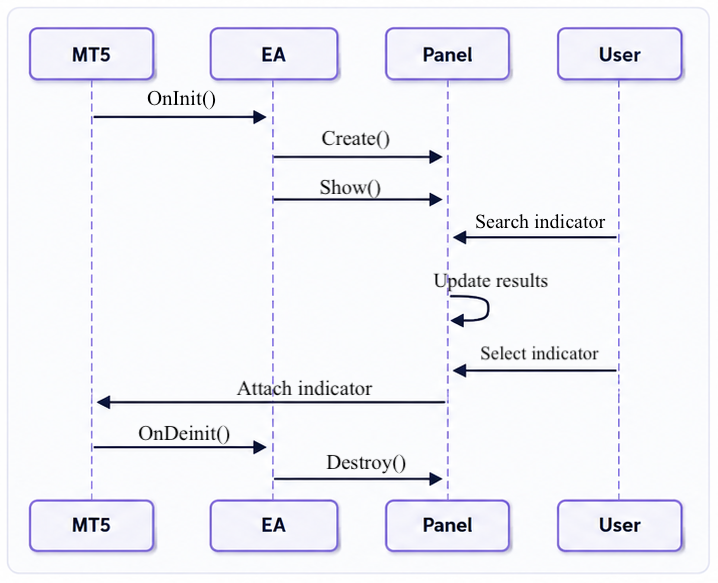
Figure 7. Expert Advisor lifecycle and panel interaction sequence.
Initializing the Application
Application startup is handled by OnInit(), which creates the search panel and prepares it for user interaction. Centralizing initialization within a single entry point ensures that all application resources are created in the correct order before any user events are processed.
//+------------------------------------------------------------------+
//| Expert initialization function                                   |
//+------------------------------------------------------------------+
int OnInit()
  {
   Print("EA OnInit() called");
//--- Create the panel at position (100,100) with size 350x400
   if(!ExtPanel.Create(0, "Indicator Search", 0, 100, 100, 350, 400))
     {
      Print(__FUNCTION__, " panel creation failed");
      return(INIT_FAILED);
     }
//--- Show the panel
   ExtPanel.Show();
   return(INIT_SUCCEEDED);
  }
Processing Platform Events
Once the application is running, MetaTrader 5 forwards chart events through the Expert Advisor. Rather than processing these events directly, the EA delegates them to SearchPanel.mqh, allowing the graphical interface to manage user interactions while keeping the application entry point lightweight. Timer events follow the same approach, ensuring that periodic updates remain synchronized with the panel without introducing duplicate logic.
//+------------------------------------------------------------------+
//| Chart event handler – forwards events to the panel               |
//+------------------------------------------------------------------+
void OnChartEvent(const int id,
                  const long &lparam,
                  const double &dparam,
                  const string &sparam)
  {
   ExtPanel.ChartEvent(id, lparam, dparam, sparam);
  }

//+------------------------------------------------------------------+
//| Timer event handler – forwards timer ticks to the panel          |
//+------------------------------------------------------------------+
void OnTimer()
  {
   ExtPanel.OnTimer();
  }
Resource Cleanup
When the application is removed from the chart, OnDeinit() releases the panel and its associated resources before terminating execution. Centralizing cleanup within the application's entry point provides a predictable shutdown sequence and ensures that allocated interface resources are released correctly.//+------------------------------------------------------------------+ //| Expert deinitialization function | //+------------------------------------------------------------------+ void OnDeinit(const int reason) { //--- Stop the timer and destroy the panel ExtPanel.KillTimer(); ExtPanel.Destroy(reason); }
IndicatorSearchEA.mq5 integrates the modular components with the MetaTrader 5 event model. By limiting the Expert Advisor to lifecycle management and event delegation, the implementation preserves the separation of responsibilities established throughout the application.
Testing
The completed application was tested on a MetaTrader 5 chart using the built-in indicators included with the platform. The evaluation focused on the complete workflow, including panel initialization, case-insensitive searching, dynamic result updates, indicator creation through IndicatorCreate(), correct placement of indicators on the main chart or subwindow, and attachment to the active chart. Additional tests verified that unsupported indicators were handled gracefully and that repeated searches did not affect the responsiveness of the user interface. 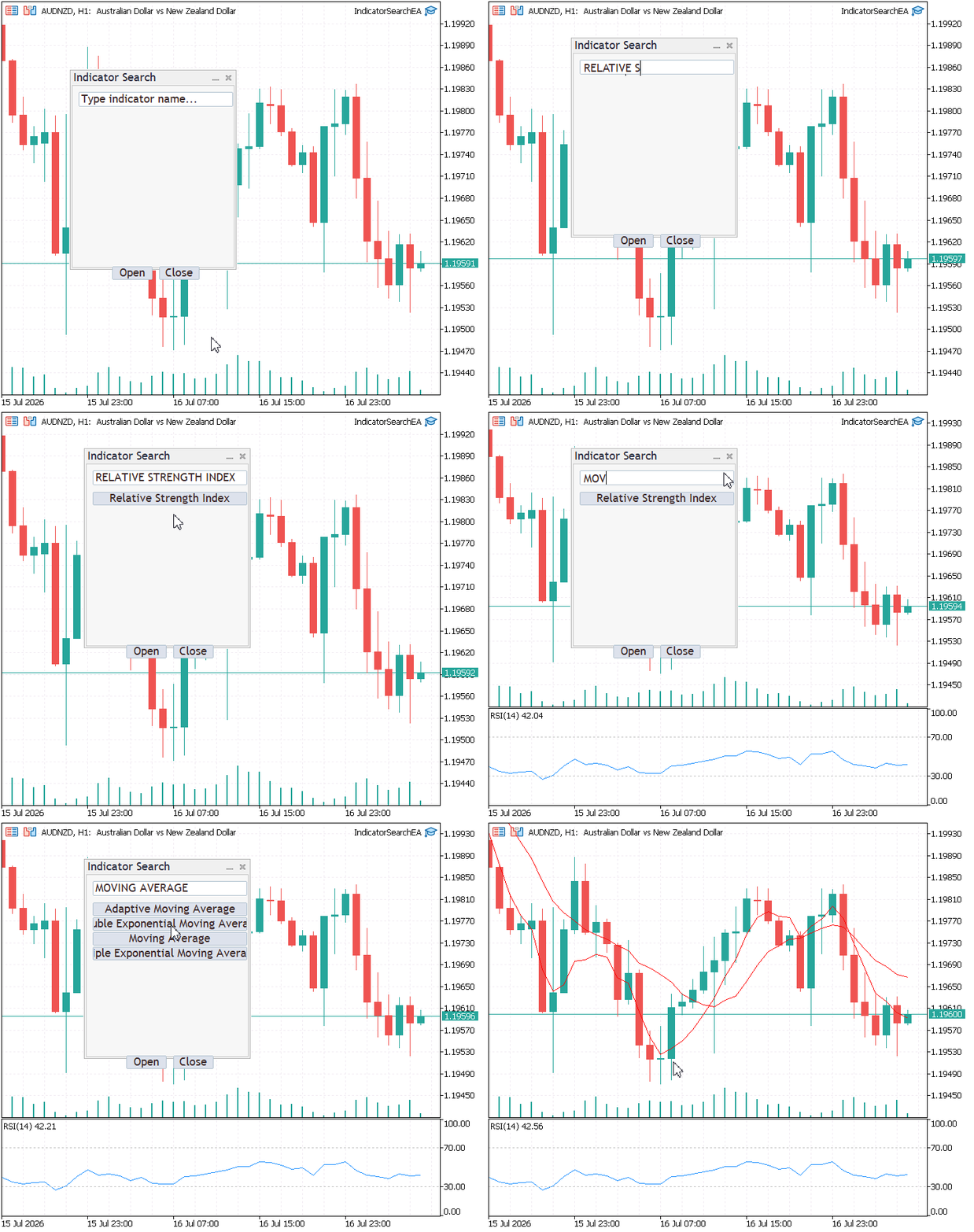
Figure 8. Demonstration of searching for and attaching built-in indicators.
The results confirmed that the search panel successfully located indicators using partial text matches and attached the selected indicators with the same default parameters used by the MetaTrader 5 interface. Overlay indicators appeared on the main chart, while oscillators were opened in separate subwindows, demonstrating that the placement logic operated correctly. Throughout testing, the modular architecture allowed the catalog, search engine, user interface, and chart launcher to work together as a single application without affecting the independence of the individual components.Conclusion
This article presented the design and implementation of a searchable interface for MetaTrader 5 built-in indicators using a modular architecture. Separating the application into dedicated modules establishes clear boundaries between responsibilities, simplifies maintenance, and allows new functionality to be introduced without affecting existing components.
The completed application enables traders to locate built-in indicators through case-insensitive partial searches and attach them directly to the chart without navigating the standard indicator hierarchy. The implementation preserves MetaTrader 5's default indicator parameters while automatically selecting the appropriate chart window, delivering a more efficient workflow without altering the platform's native behavior.
Although the current implementation focuses on built-in indicators, the architecture provides a solid foundation for future enhancements. Support for custom indicators, favorites, search history, indicator categorization, and advanced filtering can be incorporated by extending individual modules while preserving the existing application structure.
The techniques presented in this article demonstrate how a modular design, combined with the MetaTrader 5 graphical interface framework, can simplify the development of maintainable desktop tools. The same architectural principles can be applied to a wide range of trading utilities where search, interaction, and platform integration must remain cleanly separated.
Attachments
The table below summarizes the project files, their installation locations, and their respective responsibilities.
| File | Location | Description |
|---|---|---|
| IndicatorSearchEA.mq5 | MQL5\Experts\IndicatorSearch\ | Main Expert Advisor that initializes the application, creates the search panel, and manages its lifecycle. |
| SearchPanel.mqh | MQL5\Include\IndicatorSearch\ | Implements the graphical user interface and manages user interactions. |
| SearchEngine.mqh | MQL5\Include\IndicatorSearch\ | Implements the search logic used to filter built-in indicators. |
| ChartLauncher.mqh | MQL5\Include\IndicatorSearch\ | Creates and attaches the selected built-in indicator to the appropriate chart window. |
| IndicatorCatalog.mqh | MQL5\Include\IndicatorSearch\ | Maintains the catalog of built-in MetaTrader 5 indicators and provides access to their information. |
| MQL5.zip | Root Archive | Complete project archive containing all source files arranged in the required MetaTrader 5 directory structure. Extract the archive into the terminal's Data Folder so all files are placed automatically in their correct locations. |
Warning: All rights to these materials are reserved by MetaQuotes Ltd. Copying or reprinting of these materials in whole or in part is prohibited.
This article was written by a user of the site and reflects their personal views. MetaQuotes Ltd is not responsible for the accuracy of the information presented, nor for any consequences resulting from the use of the solutions, strategies or recommendations described.

 The Avellaneda-Stoikov Model: Inventory-Aware Quoting for Two-Sided Strategies
 Neural Networks in Trading: An Intelligent Forecast Pipeline (Time-MoE)
 Quick Integration of a Large Language Model into MetaTrader 5 (Part I): Building the Model
 A Team of AI Agents with Profit-Based Rotation: The Evolution of a Living Trading System in MQL5

- Free trading apps
- Over 8,000 signals for copying
- Economic news for exploring financial markets
You agree to website policy and terms of use