

Price Action Analysis Toolkit Development (Part 76): One-Click Symbol Dashboard for Centralized Multi-Chart Management in MQL5
 2 374
2 374
 0
0

Contents
Introduction
When working with MetaTrader 5, opening and managing charts can become a time-consuming process, especially when analyzing multiple symbols. To open a new chart, you must first locate the Market Watch window, search for the required symbol, right-click it, select Chart Window, and then wait for the chart to open before you can begin your analysis.
Closing charts is not much faster. After analyzing several instruments, it is common to end up with many open charts, making the workspace cluttered and difficult to navigate. As the number of charts increases, switching between them or finding the one you need becomes less efficient, slowing down the overall analysis workflow.
The GIF below demonstrates some of these challenges in the standard MT5 chart management process.
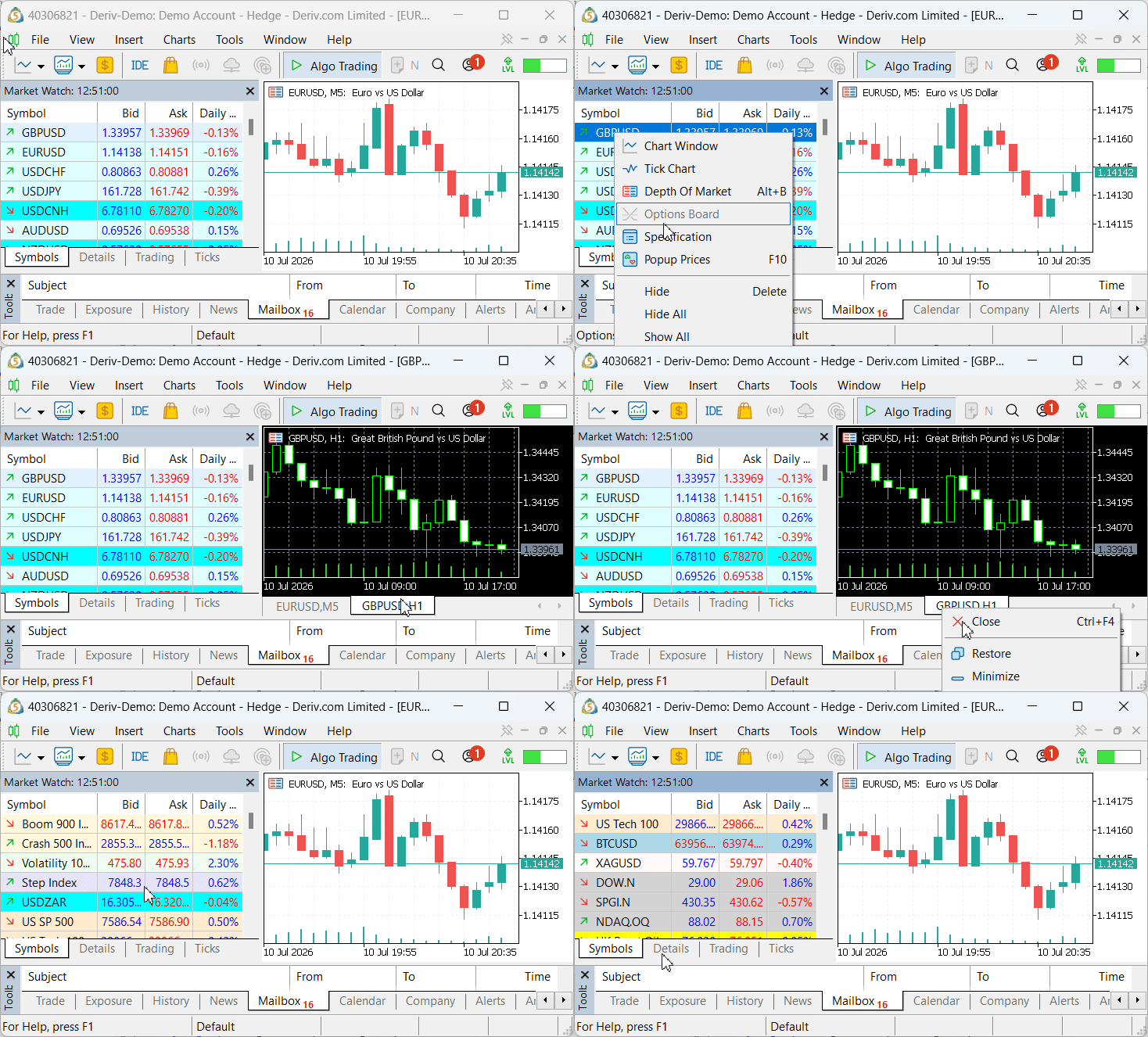
The issues discussed above can be summarized as follows:
- Opening a chart requires multiple manual steps, making the process slower than necessary.
- Finding symbols in the Market Watch window becomes increasingly time-consuming, particularly when many instruments are available.
- Closing or organizing multiple open charts is inefficient, resulting in a cluttered workspace.
- Frequent chart switching interrupts the analysis workflow, reducing productivity when monitoring multiple symbols.
Presenting the Solution
To address these challenges, this article introduces a centralized chart management panel that simplifies symbol and chart operations. Instead of navigating through the Market Watch window each time, you will be able to open and close charts directly from a single interactive dashboard. The solution also integrates the symbol search functionality into the same panel, allowing symbols to be located and accessed instantly. The result is a fully functional chart management dashboard. It streamlines multi-symbol navigation, reduces unnecessary mouse clicks, and makes working with multiple MT5 charts more efficient.
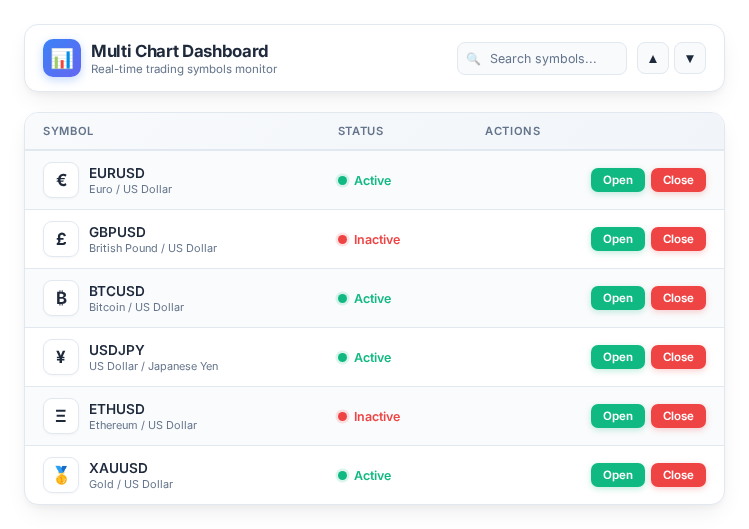
In the following section, we will implement this solution step by step.
MQL5 Implementation
Project Overview and Setting Up the Files in MetaEditor
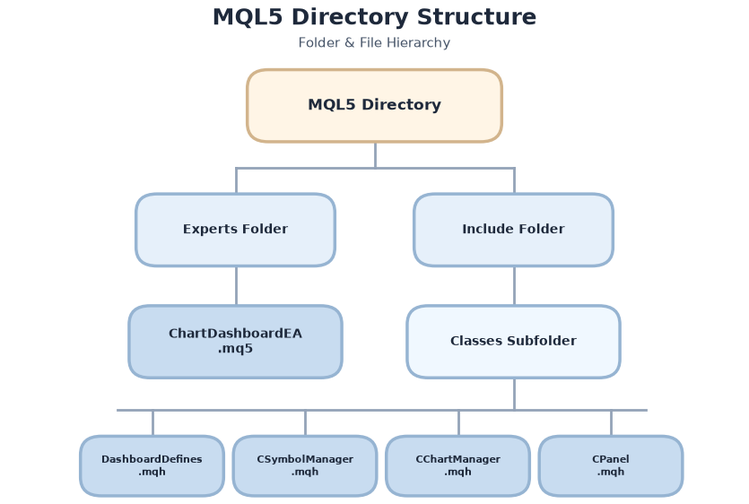
To keep the project organized, maintainable, and easy to extend, we divide the implementation into five separate files. Each file has a well-defined responsibility, allowing the user interface, symbol management, and chart operations to remain independent while working together as a complete system.
The table below summarizes the project structure.
| File Name | Location | Responsibility |
|---|---|---|
| DashboardDefines.mqh | MQL5/Include/ChartDashboard/ | Contains all shared definitions, including panel dimensions (PANEL_WIDTH, ROW_HEIGHT), color constants, font settings, and the global object prefix used throughout the dashboard. |
| CSymbolManager.mqh | MQL5/Include/ChartDashboard/ | Retrieves the complete list of available trading symbols, sorts them alphabetically, and performs case-insensitive filtering based on the user's search text. |
| CChartManager.mqh | MQL5/Include/ChartDashboard/ | Provides all chart management functionality, including opening charts, closing charts, and determining whether a chart for a particular symbol is already open. |
| CPanel.mqh | MQL5/Include/ChartDashboard/ | Implements the graphical dashboard. It creates the interface, manages the search box, scrolling controls, and symbol rows, processes user interactions, and refreshes the panel whenever its contents change. |
| ChartDashboardEA.mq5 | MQL5/Experts/ChartDashboard/ | Serves as the application's entry point. It initializes all project components, loads the available symbols, creates the dashboard, and handles chart events and timer updates. |
To better illustrate the project structure, the directory layout is shown below:
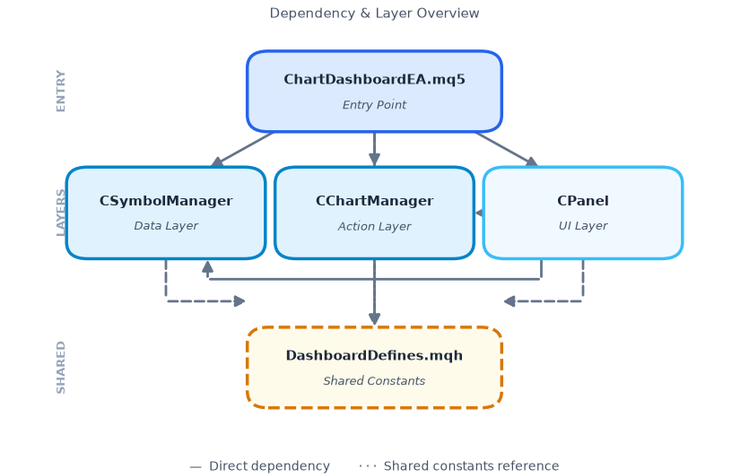
Here is the system architecture:
Before compiling the project, create the following folder structure inside your MetaTrader 5 data directory.
- Open MetaEditor, then select File → Open Data Folder.
- Navigate to the MQL5 directory.
- Inside MQL5, open or create the Include folder, then create a Classes subfolder if it does not already exist.
- Copy the four .mqh files into MQL5/Include/Classes/.
- Copy ChartDashboardEA.mq5 into MQL5/Experts/.
- Return to MetaEditor and compile ChartDashboardEA.mq5.
With the project structure in place, we can now implement each module, beginning with the shared definitions used throughout the dashboard.
1. Creating the Shared Dashboard Definitions
We begin by defining all the constants that will govern the appearance and behavior of our dashboard. Centralizing these definitions in a single include file offers two main advantages:
- first, it allows us to adjust the panel's dimensions, colors, or fonts from one location without hunting through multiple class files;
- second, it ensures consistency across all graphical elements. The file is populated with the geometric parameters, color palette, and control sizes that form the blueprint for our interface.
Panel Geometry and Row Calculations
The first block defines the physical dimensions of the dashboard and the spacing between rows. We'll use these values throughout the CPanel class to position every object precisely.
//--- Panel geometry: position, size, row spacing
#define PANEL_X             10
#define PANEL_Y             20
#define PANEL_WIDTH         550
#define PANEL_HEIGHT        620
#define ROW_HEIGHT          32
#define ROW_MARGIN          2

//--- Maximum visible rows calculated from available height
#define MAX_VISIBLE_ROWS    ((PANEL_HEIGHT - 110) / (ROW_HEIGHT + ROW_MARGIN))
- PANEL_X and PANEL_Y set the top‑left corner of the panel on the chart (10 pixels from the left edge and 20 pixels from the top).
- PANEL_WIDTH and PANEL_HEIGHT define the overall size of the dashboard — 550×620 pixels, which is spacious enough to display a meaningful list of symbols without covering the entire chart.
- ROW_HEIGHT and ROW_MARGIN control the vertical space allocated to each symbol row. With a row height of 32 pixels and a 2‑pixel margin between rows, the list remains readable and compact.
- MAX_VISIBLE_ROWS is calculated automatically based on the available height (after reserving space for the header, search box, and footer). This macro ensures that the panel dynamically adapts to the defined size without manual adjustments.
Control Sizes
Next, we define the dimensions of the interactive elements — the buttons, the search box, and the status indicator.
//--- Controls size
#define BUTTON_WIDTH        55
#define BUTTON_HEIGHT       24
#define SEARCH_WIDTH        220
#define STATUS_INDICATOR_WIDTH 24
- BUTTON_WIDTH (55 pixels) and BUTTON_HEIGHT (24 pixels) are used for both the Open and Close buttons. The width is sufficient to display the text comfortably.
- SEARCH_WIDTH (220 pixels) gives the search edit box enough room for typing longer symbol names.
- STATUS_INDICATOR_WIDTH (24 pixels) provides a compact area for the status symbol (● or ○), keeping the column narrow to maximize space for the symbol name.
Color Palette
The color palette is designed to create a clean, professional, and easy-on-the-eyes interface. By defining all colors as preprocessor macros, we centralize the styling in a single location, making it easy to adjust the appearance or improve contrast without changing the drawing logic. This also ensures a consistent look and feel across all dashboard elements.
//--- Color palette for the dashboard
#define COLOR_BG            C'230,240,250'
#define COLOR_BORDER        C'150,180,210'
#define COLOR_HEADER_BG     C'200,220,240'
#define COLOR_TITLE         C'20,60,100'
#define COLOR_TEXT          C'40,40,40'
#define COLOR_OPEN          C'0,180,0'
#define COLOR_CLOSED        C'200,50,50'
#define COLOR_BUTTON        C'200,200,200'
#define COLOR_BUTTON_TEXT   C'50,50,50'
#define COLOR_HIGHLIGHT     C'240,248,255'
#define COLOR_SEARCH_BG     C'255,255,255'
#define COLOR_SEARCH_TEXT   C'40,40,40'
#define COLOR_SEARCH_BORDER C'160,180,200'
The palette uses a soft light blue background (COLOR_BG) with a darker blue-gray border (COLOR_BORDER), while the header strip (COLOR_HEADER_BG) and title text (COLOR_TITLE) establish a clear visual hierarchy. The status indicator uses green (COLOR_OPEN) for open charts and red (COLOR_CLOSED) for closed ones, providing immediate visual feedback. Buttons use a neutral gray (COLOR_BUTTON) with dark text (COLOR_BUTTON_TEXT), and alternating row backgrounds (COLOR_BG and COLOR_HIGHLIGHT) improve readability. The search box features a clean white background (COLOR_SEARCH_BG) with dark text (COLOR_SEARCH_TEXT) and a subtle border (COLOR_SEARCH_BORDER).
Font Settings and Other Constants
The final block defines the typography and a few operational constants.
//--- Font settings
#define FONT_NAME           "Segoe UI"
#define FONT_SIZE           10
#define FONT_TITLE_SIZE     12
#define FONT_BOLD           "Segoe UI Bold"

//--- Default timeframe for new charts and object prefix
#define DEFAULT_TIMEFRAME   PERIOD_H1
#define OBJ_PREFIX          "DASH_"
- FONT_NAME and FONT_SIZE are used for all regular text (symbol names, statuses, button labels). "Segoe UI" is a clean, modern font that renders well on all Windows systems.
- FONT_TITLE_SIZE (12 points) is slightly larger for the dashboard title.
- FONT_BOLD is defined but not used in this phase — it is reserved for potential future enhancements.
- DEFAULT_TIMEFRAME sets the period for newly opened charts. We use PERIOD_H1 (hourly) as a sensible default, but this can be changed to any other timeframe.
- OBJ_PREFIX is a critical constant. It is prepended to every graphical object name (e.g., DASH_open_3, DASH_sym_0). This prefix allows us to easily identify, group, and delete all dashboard‑related objects without interfering with other chart elements.
Here is the entire DashboardDefines.mqh file with all definitions combined:
//+------------------------------------------------------------------+
//|                                             DashboardDefines.mqh |
//|                                  Copyright 2026, MetaQuotes Ltd. |
//|                          https://www.mql5.com/en/users/lynnchris |
//+------------------------------------------------------------------+
#property copyright "Copyright 2026, MetaQuotes Ltd."
#property link      "https://www.mql5.com/en/users/lynnchris"
#property version   "1.00"

#ifndef _DASHBOARD_DEFINES_
#define _DASHBOARD_DEFINES_

//--- Panel geometry: position, size, row spacing
#define PANEL_X             10
#define PANEL_Y             20
#define PANEL_WIDTH         550
#define PANEL_HEIGHT        620
#define ROW_HEIGHT          32
#define ROW_MARGIN          2

//--- Maximum visible rows calculated from available height
#define MAX_VISIBLE_ROWS    ((PANEL_HEIGHT - 110) / (ROW_HEIGHT + ROW_MARGIN))

//--- Controls size
#define BUTTON_WIDTH        55
#define BUTTON_HEIGHT       24
#define SEARCH_WIDTH        220
#define STATUS_INDICATOR_WIDTH 24

//--- Color palette for the dashboard
#define COLOR_BG            C'230,240,250'
#define COLOR_BORDER        C'150,180,210'
#define COLOR_HEADER_BG     C'200,220,240'
#define COLOR_TITLE         C'20,60,100'
#define COLOR_TEXT          C'40,40,40'
#define COLOR_OPEN          C'0,180,0'
#define COLOR_CLOSED        C'200,50,50'
#define COLOR_BUTTON        C'200,200,200'
#define COLOR_BUTTON_TEXT   C'50,50,50'
#define COLOR_HIGHLIGHT     C'240,248,255'
#define COLOR_SEARCH_BG     C'255,255,255'
#define COLOR_SEARCH_TEXT   C'40,40,40'
#define COLOR_SEARCH_BORDER C'160,180,200'

//--- Font settings
#define FONT_NAME           "Segoe UI"
#define FONT_SIZE           10
#define FONT_TITLE_SIZE     12
#define FONT_BOLD           "Segoe UI Bold"

//--- Default timeframe for new charts and object prefix
#define DEFAULT_TIMEFRAME   PERIOD_H1
#define OBJ_PREFIX          "DASH_"

#endif
//+------------------------------------------------------------------+
2. Implementing the Symbol Manager
With the dashboard definitions in place, we now turn to the data layer: the CSymbolManager class. Its primary responsibility is to retrieve a complete list of tradable symbols from the broker, maintain them in a sorted order, and provide fast, case‑insensitive filtering based on the user's search input. By encapsulating these tasks in a dedicated class, we keep the data management logic separate from the UI rendering, making the code easier to test and modify.
Private Members
The class defines three private members:
string m_symbols[];     // Full list of symbols
string m_filtered[];    // Filtered list based on search
string m_searchText;    // Current search string
- m_symbols holds the complete, alphabetically sorted list of all tradable symbols.
- m_filtered is a subset of m_symbols that matches the current search filter.
- m_searchText stores the last search string, enabling the class to reapply the filter after a refresh.
Loading and Sorting Symbols
The Initialize() method is responsible for populating the full symbol list. The method calls SymbolsTotal(false) to obtain the total number of tradable symbols before iterating through the list. After the loop, the private SortSymbols() method arranges the list alphabetically using ArraySort(). This sorted order is essential for quick location of symbols by scrolling through the list.
//+------------------------------------------------------------------+
//| Loads all tradable symbols from the broker                       |
//+------------------------------------------------------------------+
bool CSymbolManager::Initialize()
  {
//--- Clear existing list
   ArrayResize(m_symbols, 0);
   int total = SymbolsTotal(false);
   for(int i = 0; i < total; i++)
     {
      string sym = SymbolName(i, false);
      if(sym != "")
        {
         int sz = ArraySize(m_symbols);
         ArrayResize(m_symbols, sz + 1);
         m_symbols[sz] = sym;
        }
     }
//--- Sort and reset filter
   SortSymbols();
   m_searchText = "";
   return (ArraySize(m_symbols) > 0);
  }
Filtering Symbols
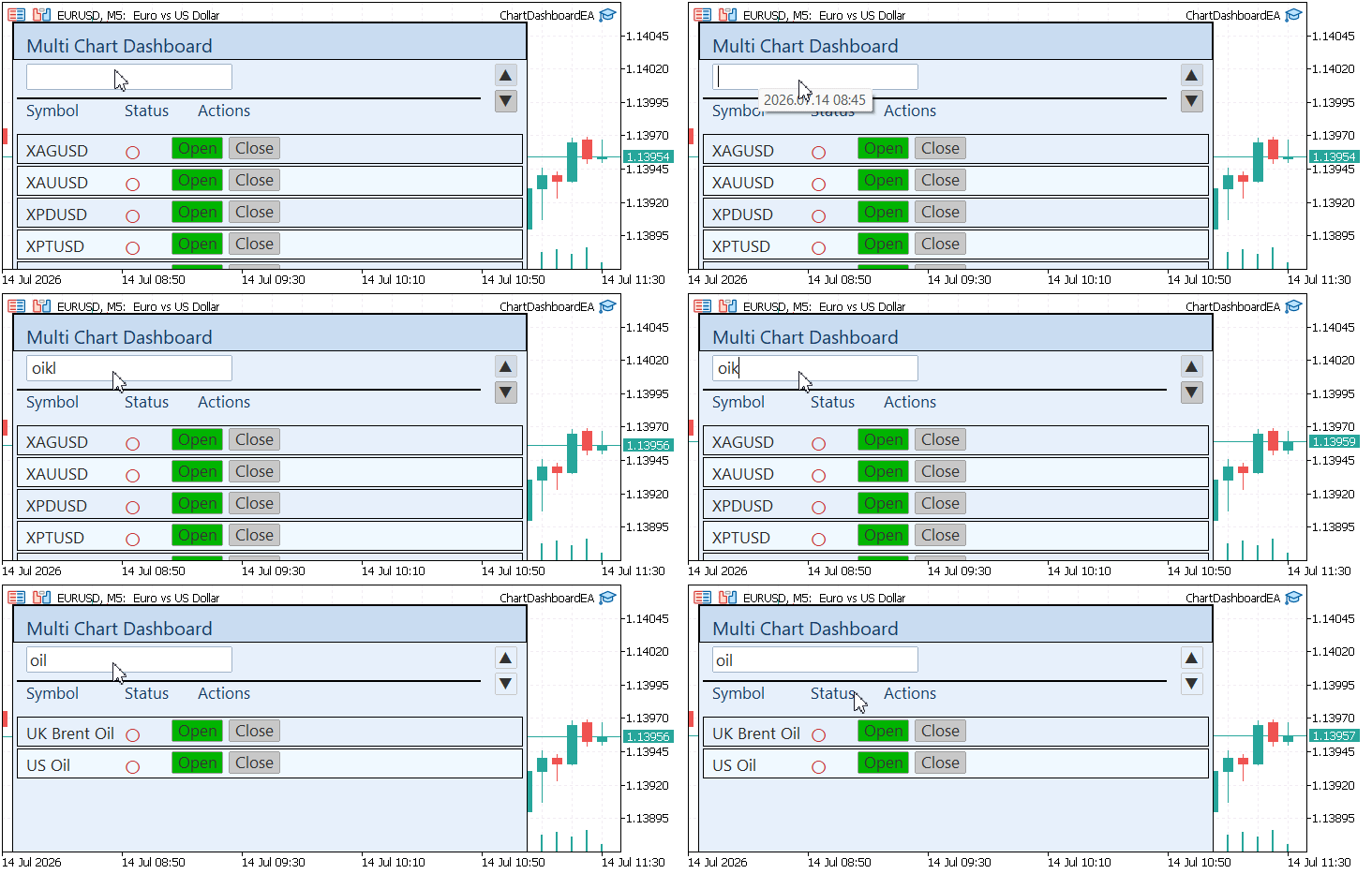
The primary responsibility of this manager is the filtering capability. The Filter(string search) method accepts a search string, converts it to uppercase for case‑insensitive matching, and then scans through the full m_symbols array. Any symbol containing the search substring is copied into the m_filtered array. If the search string is empty, the full list is copied, effectively showing all symbols.
//+------------------------------------------------------------------+
//| Filters the symbol list by a case‑insensitive substring search    |
//+------------------------------------------------------------------+
void CSymbolManager::Filter(const string search)
  {
   m_searchText = search;
   ArrayResize(m_filtered, 0);
//--- If search is empty, return all symbols
   if(search == "")
     {
      ArrayCopy(m_filtered, m_symbols);
      return;
     }
   string searchUpper = search;
   StringToUpper(searchUpper);
//--- Iterate and collect matching symbols
   for(int i = 0; i < ArraySize(m_symbols); i++)
     {
      string symUpper = m_symbols[i];
      StringToUpper(symUpper);
      if(StringFind(symUpper, searchUpper) != -1)
        {
         int sz = ArraySize(m_filtered);
         ArrayResize(m_filtered, sz + 1);
         m_filtered[sz] = m_symbols[i];
        }
     }
  }
This approach is efficient for typical symbol lists (a few hundred instruments) and provides a responsive user experience as the user types in the search box.
Accessor Methods
To retrieve data from the manager, we provide a set of simple accessor functions:
- GetCount() returns the total number of symbols.
- GetSymbol(int index) returns the symbol at a given position in the full list.
//+------------------------------------------------------------------+
//| Returns the total number of symbols                              |
//+------------------------------------------------------------------+
int CSymbolManager::GetCount() const
  {
   return ArraySize(m_symbols);
  }

//+------------------------------------------------------------------+
//| Returns the symbol at the given index                            |
//+------------------------------------------------------------------+
string CSymbolManager::GetSymbol(int index) const
  {
   if(index < 0 || index >= ArraySize(m_symbols))
      return("");
   return m_symbols[index];
  }
- GetFilteredCount() returns the number of symbols that match the current filter.
- GetFilteredSymbol(int index) returns a symbol from the filtered list by index.
- GetSearchText() returns the current search string, used by the panel to keep the search box synchronized.
//+------------------------------------------------------------------+
//| Returns the number of symbols after filtering                    |
//+------------------------------------------------------------------+
int CSymbolManager::GetFilteredCount() const
  {
   return ArraySize(m_filtered);
  }

//+------------------------------------------------------------------+
//| Returns a filtered symbol by index                               |
//+------------------------------------------------------------------+
string CSymbolManager::GetFilteredSymbol(int index) const
  {
   if(index < 0 || index >= ArraySize(m_filtered))
      return("");
   return m_filtered[index];
  }

//+------------------------------------------------------------------+
//| Returns the current search string                                |
//+------------------------------------------------------------------+
string CSymbolManager::GetSearchText() const
  {
   return m_searchText;
  }
All methods include bounds checking to prevent out‑of‑range errors.
Refreshing the Data
The Refresh() method allows the panel to reload the symbol list from the broker and reapply the existing filter. This is useful if new symbols become available (e.g., after a broker restart) or if we want to reset the list without restarting the EA. Initialize() is called to reload the data and then Filter(m_searchText) to restore the previous filter state.
//+------------------------------------------------------------------+
//| Refreshes the symbol list (reloads and reapplies filter)         |
//+------------------------------------------------------------------+
void CSymbolManager::Refresh()
  {
   Initialize();
   Filter(m_searchText);
  }
Below is the full CSymbolManager.mqh file with all methods implemented:
//+------------------------------------------------------------------+
//|                                               CSymbolManager.mqh |
//|                                  Copyright 2026, MetaQuotes Ltd. |
//|                          https://www.mql5.com/en/users/lynnchris |
//+------------------------------------------------------------------+
#property copyright "Copyright 2026, MetaQuotes Ltd."
#property link      "https://www.mql5.com/en/users/lynnchris"
#property version   "1.00"

#ifndef _CSYMBOL_MANAGER_
#define _CSYMBOL_MANAGER_

#include "DashboardDefines.mqh"

//+------------------------------------------------------------------+
//| Class CSymbolManager                                             |
//| Manages the list of tradable symbols and provides filtering      |
//+------------------------------------------------------------------+
class CSymbolManager
  {
private:
   string            m_symbols[];     // Full list of symbols
   string            m_filtered[];    // Filtered list based on search
   string            m_searchText;    // Current search string

   //+------------------------------------------------------------------+
   //| Sorts the symbol list alphabetically                             |
   //+------------------------------------------------------------------+
   void              SortSymbols();

public:
   //+------------------------------------------------------------------+
   //| Loads all tradable symbols from the broker                       |
   //+------------------------------------------------------------------+
   bool              Initialize();

   //+------------------------------------------------------------------+
   //| Returns the total number of symbols                              |
   //+------------------------------------------------------------------+
   int               GetCount() const;

   //+------------------------------------------------------------------+
   //| Returns the symbol at the given index                            |
   //+------------------------------------------------------------------+
   string            GetSymbol(int index) const;

   //+------------------------------------------------------------------+
   //| Filters the symbol list by a case‑insensitive substring search    |
   //+------------------------------------------------------------------+
   void              Filter(const string search);

   //+------------------------------------------------------------------+
   //| Returns the number of symbols after filtering                    |
   //+------------------------------------------------------------------+
   int               GetFilteredCount() const;

   //+------------------------------------------------------------------+
   //| Returns a filtered symbol by index                               |
   //+------------------------------------------------------------------+
   string            GetFilteredSymbol(int index) const;

   //+------------------------------------------------------------------+
   //| Returns the current search string                                |
   //+------------------------------------------------------------------+
   string            GetSearchText() const;

   //+------------------------------------------------------------------+
   //| Refreshes the symbol list (reloads and reapplies filter)         |
   //+------------------------------------------------------------------+
   void              Refresh();
  };

//+------------------------------------------------------------------+
//| Sorts the symbol list alphabetically                             |
//+------------------------------------------------------------------+
void CSymbolManager::SortSymbols()
  {
   ArraySort(m_symbols);
  }

//+------------------------------------------------------------------+
//| Loads all tradable symbols from the broker                       |
//+------------------------------------------------------------------+
bool CSymbolManager::Initialize()
  {
//--- Clear existing list
   ArrayResize(m_symbols, 0);
   int total = SymbolsTotal(false);   // Get only tradable symbols
   for(int i = 0; i < total; i++)
     {
      string sym = SymbolName(i, false);
      if(sym != "")
        {
         int sz = ArraySize(m_symbols);
         ArrayResize(m_symbols, sz + 1);
         m_symbols[sz] = sym;
        }
     }
//--- Sort and reset filter
   SortSymbols();
   m_searchText = "";
   return (ArraySize(m_symbols) > 0);
  }

//+------------------------------------------------------------------+
//| Returns the total number of symbols                              |
//+------------------------------------------------------------------+
int CSymbolManager::GetCount() const
  {
   return ArraySize(m_symbols);
  }

//+------------------------------------------------------------------+
//| Returns the symbol at the given index                            |
//+------------------------------------------------------------------+
string CSymbolManager::GetSymbol(int index) const
  {
   if(index < 0 || index >= ArraySize(m_symbols))
      return("");
   return m_symbols[index];
  }

//+------------------------------------------------------------------+
//| Filters the symbol list by a case‑insensitive substring search    |
//+------------------------------------------------------------------+
void CSymbolManager::Filter(const string search)
  {
   m_searchText = search;
   ArrayResize(m_filtered, 0);
//--- If search is empty, return all symbols
   if(search == "")
     {
      ArrayCopy(m_filtered, m_symbols);
      return;
     }
   string searchUpper = search;
   StringToUpper(searchUpper);
//--- Iterate and collect matching symbols
   for(int i = 0; i < ArraySize(m_symbols); i++)
     {
      string symUpper = m_symbols[i];
      StringToUpper(symUpper);
      if(StringFind(symUpper, searchUpper) != -1)
        {
         int sz = ArraySize(m_filtered);
         ArrayResize(m_filtered, sz + 1);
         m_filtered[sz] = m_symbols[i];
        }
     }
  }

//+------------------------------------------------------------------+
//| Returns the number of symbols after filtering                    |
//+------------------------------------------------------------------+
int CSymbolManager::GetFilteredCount() const
  {
   return ArraySize(m_filtered);
  }

//+------------------------------------------------------------------+
//| Returns a filtered symbol by index                               |
//+------------------------------------------------------------------+
string CSymbolManager::GetFilteredSymbol(int index) const
  {
   if(index < 0 || index >= ArraySize(m_filtered))
      return("");
   return m_filtered[index];
  }

//+------------------------------------------------------------------+
//| Returns the current search string                                |
//+------------------------------------------------------------------+
string CSymbolManager::GetSearchText() const
  {
   return m_searchText;
  }

//+------------------------------------------------------------------+
//| Refreshes the symbol list (reloads and reapplies filter)         |
//+------------------------------------------------------------------+
void CSymbolManager::Refresh()
  {
   Initialize();
   Filter(m_searchText);
  }

#endif
//+------------------------------------------------------------------+
3. Implementing the Chart Manager
Next, we implement the CChartManager class. It encapsulates chart-related operations in a reusable component. Its responsibilities include opening a new chart for a given symbol, closing an existing chart, and checking whether a chart is currently open — all while abstracting away the underlying MetaTrader 5 API calls.
Private Members
The class maintains a single private member:
ENUM_TIMEFRAMES m_defaultTF; // Default timeframe for new charts
This stores the timeframe that will be used when Open() is called without an explicit period. We set the default via the DEFAULT_TIMEFRAME macro defined in DashboardDefines.mqh (we use PERIOD_H1), but it can be easily modified in the constructor or via a setter if needed.
Constructor
The constructor initializes the default timeframe using the macro. This simple initialization ensures that every instance starts with a consistent configuration.
//+------------------------------------------------------------------+
//| Constructor – initializes the default timeframe                  |
//+------------------------------------------------------------------+
CChartManager::CChartManager() : m_defaultTF(DEFAULT_TIMEFRAME)
  {
//--- Initialize manager with default timeframe from defines
  }
Opening a Chart
The Open(string symbol) method attempts to open a new chart for the specified symbol using the default timeframe. The method first validates the input. If the symbol string is empty, it immediately returns false. Otherwise, we call ChartOpen(symbol, m_defaultTF), which returns a chart ID on success or -1 on failure. The method returns true only if ChartOpen() returns a valid chart ID.
//+------------------------------------------------------------------+
//| Opens a new chart for the specified symbol                       |
//+------------------------------------------------------------------+
bool CChartManager::Open(string symbol)
  {
//--- Validate input parameter - empty symbol is not allowed
   if(symbol == "")
      return false;

//--- Attempt to open a new chart with default timeframe
   long chart = ChartOpen(symbol, m_defaultTF);

//--- Return true if chart was opened successfully (valid chart ID)
   return (chart != -1);
  }
Note that ChartOpen does not fail if a chart for the same symbol already exists — it simply opens a new one. This behavior is acceptable for our dashboard, as the user may wish to have multiple timeframes for the same instrument. However, if we later want to limit to a single chart per symbol, we could add a check within this method.
Closing a Chart
The Close(string symbol) method uses the GetChartID() helper to retrieve the chart ID associated with the specified symbol. If no matching chart is found (that is, GetChartID() returns -1), the method immediately returns false. Otherwise, we call ChartClose(chart) to close the chart, and the method returns the result of the operation.
//+------------------------------------------------------------------+
//| Closes the first chart found for the specified symbol            |
//+------------------------------------------------------------------+
bool CChartManager::Close(string symbol)
  {
//--- Get the chart ID for the symbol
   long chart = GetChartID(symbol);

//--- If no chart found, return false
   if(chart == -1)
      return false;

//--- Close the chart and return the result
   return ChartClose(chart);
  }
Checking if a Chart is Open
The IsOpen(string symbol) method performs a simple boolean check. It uses the GetChartID() helper and returns true if a valid chart ID is found, or false otherwise. This method is called during the panel's refresh cycle to update the chart status indicators.
//+------------------------------------------------------------------+
//| Checks if any chart for the specified symbol is open             |
//+------------------------------------------------------------------+
bool CChartManager::IsOpen(string symbol)
  {
//--- Check if GetChartID returns a valid chart ID
   return (GetChartID(symbol) != -1);
  }
Finding a Chart ID
The main chart management logic is implemented in the GetChartID(string symbol) method. We use the ChartFirst() and ChartNext() functions to iterate through all open charts. For each chart, the method retrieves the associated symbol using ChartSymbol(curr) and compares it with the requested symbol. If a match is found, the corresponding chart ID is returned immediately. Otherwise, after all open charts have been examined, the method returns -1.
//+------------------------------------------------------------------+
//| Finds and returns the Chart ID of the first chart with given symbol |
//+------------------------------------------------------------------+
long CChartManager::GetChartID(string symbol)
  {
//--- Get the first chart in the chart list
   long curr = ChartFirst();

//--- Iterate through all open charts
   while(curr != -1)
     {
      //--- Check if the current chart's symbol matches the requested symbol
      if(ChartSymbol(curr) == symbol)
         return curr;  //--- Return the chart ID when match is found

      //--- Move to the next chart in the list
      curr = ChartNext(curr);
     }

//--- No matching chart found - return -1
   return -1;
  }
This approach is simple and works well for the typical number of open charts (usually under 50). However, if the user maintains many charts, we could consider caching the mapping, but for our purposes, this linear scan is sufficient.
Activating a Chart (Placeholder)
The Activate() method is included as a placeholder for a future enhancement. In Phase 1, it does nothing — but it serves as a reminder that we could later add functionality to bring the chart to the foreground or set focus. For now, we leave it empty.
//+------------------------------------------------------------------+
//| Activates the chart (placeholder - not implemented in Phase 1)   |
//+------------------------------------------------------------------+
void CChartManager::Activate(string symbol)
  {
//--- This function is reserved for future implementation
//--- Currently does nothing as per Phase 1 requirements
  }
Here is the full CChartManager.mqh file with all methods implemented:
//+------------------------------------------------------------------+
//|                                                CChartManager.mqh |
//|                                  Copyright 2026, MetaQuotes Ltd. |
//|                          https://www.mql5.com/en/users/lynnchris |
//+------------------------------------------------------------------+
#property copyright "Copyright 2026, MetaQuotes Ltd."
#property link      "https://www.mql5.com/en/users/lynnchris"
#property version   "1.00"

#ifndef _CCHART_MANAGER_
#define _CCHART_MANAGER_

//--- Include required definitions
#include "DashboardDefines.mqh"

//+------------------------------------------------------------------+
//| Class CChartManager                                              |
//| Manages chart operations for symbols in the trading platform     |
//+------------------------------------------------------------------+
class CChartManager
  {
private:
   ENUM_TIMEFRAMES   m_defaultTF;   // Default timeframe for new charts

public:
   //+------------------------------------------------------------------+
   //| Constructor – sets the default timeframe                         |
   //+------------------------------------------------------------------+
                     CChartManager();

   //+------------------------------------------------------------------+
   //| Opens a new chart for the given symbol                           |
   //+------------------------------------------------------------------+
   bool              Open(string symbol);

   //+------------------------------------------------------------------+
   //| Closes the first chart found for the given symbol                |
   //+------------------------------------------------------------------+
   bool              Close(string symbol);

   //+------------------------------------------------------------------+
   //| Checks whether a chart for the given symbol is open              |
   //+------------------------------------------------------------------+
   bool              IsOpen(string symbol);

   //+------------------------------------------------------------------+
   //| Returns the Chart ID of the first chart with the given symbol    |
   //+------------------------------------------------------------------+
   long              GetChartID(string symbol);

   //+------------------------------------------------------------------+
   //| (Optional) Activates the chart (not used in Phase 1)             |
   //+------------------------------------------------------------------+
   void              Activate(string symbol);
  };

//+------------------------------------------------------------------+
//| Constructor – initializes the default timeframe                  |
//+------------------------------------------------------------------+
CChartManager::CChartManager() : m_defaultTF(DEFAULT_TIMEFRAME)
  {
//--- Initialize manager with default timeframe from defines
  }

//+------------------------------------------------------------------+
//| Opens a new chart for the specified symbol                       |
//+------------------------------------------------------------------+
bool CChartManager::Open(string symbol)
  {
//--- Validate input parameter - empty symbol is not allowed
   if(symbol == "")
      return false;

//--- Attempt to open a new chart with default timeframe
   long chart = ChartOpen(symbol, m_defaultTF);

//--- Return true if chart was opened successfully (valid chart ID)
   return (chart != -1);
  }

//+------------------------------------------------------------------+
//| Closes the first chart found for the specified symbol            |
//+------------------------------------------------------------------+
bool CChartManager::Close(string symbol)
  {
//--- Get the chart ID for the symbol
   long chart = GetChartID(symbol);

//--- If no chart found, return false
   if(chart == -1)
      return false;

//--- Close the chart and return the result
   return ChartClose(chart);
  }

//+------------------------------------------------------------------+
//| Checks if any chart for the specified symbol is open             |
//+------------------------------------------------------------------+
bool CChartManager::IsOpen(string symbol)
  {
//--- Check if GetChartID returns a valid chart ID
   return (GetChartID(symbol) != -1);
  }

//+------------------------------------------------------------------+
//| Finds and returns the Chart ID of the first chart with given symbol |
//+------------------------------------------------------------------+
long CChartManager::GetChartID(string symbol)
  {
//--- Get the first chart in the chart list
   long curr = ChartFirst();

//--- Iterate through all open charts
   while(curr != -1)
     {
      //--- Check if the current chart's symbol matches the requested symbol
      if(ChartSymbol(curr) == symbol)
         return curr;  //--- Return the chart ID when match is found

      //--- Move to the next chart in the list
      curr = ChartNext(curr);
     }

//--- No matching chart found - return -1
   return -1;
  }

//+------------------------------------------------------------------+
//| Activates the chart (placeholder - not implemented in Phase 1)   |
//+------------------------------------------------------------------+
void CChartManager::Activate(string symbol)
  {
//--- This function is reserved for future implementation
//--- Currently does nothing as per Phase 1 requirements
  }

#endif
//+------------------------------------------------------------------+
4. Implementing the Dashboard Panel
With the data and action layers complete, we can now implement the centerpiece of the project—the CPanel class. This class integrates the data and chart management layers into a single graphical dashboard. The CPanel coordinates the interaction between the CSymbolManager and CChartManager, presenting their functionality through a single graphical interface.
Class Members
The class maintains several private members that track the state of the dashboard:
//+------------------------------------------------------------------+
//| Class CPanel                                                     |
//| Draws and manages the dashboard UI (symbol list, status, buttons)|
//+------------------------------------------------------------------+
class CPanel
  {
private:
   CSymbolManager    *m_symMgr;       // Symbol manager reference
   CChartManager     *m_chartMgr;     // Chart manager reference

   int               m_scrollOffset;  // Current scroll position
   string            m_searchText;    // Last search text
   bool              m_needRedraw;    // Flag to trigger redraw
   int               m_maxRows;       // Number of visible rows

   //--- Status cache to avoid frequent IsOpen() calls
   struct StatusCache
     {
      string         symbol;
      bool           isOpen;
     };
   StatusCache       m_statusCache[];

   //+------------------------------------------------------------------+
   //| Creates a graphical object with standard properties              |
   //+------------------------------------------------------------------+
   bool              CreateObject(string name, ENUM_OBJECT type, int x, int y,
                                  int w, int h, color clr, string text = "",
                                  int fontSize = FONT_SIZE, string tooltip = "");

   //+------------------------------------------------------------------+
   //| Removes all dashboard objects from the chart                     |
   //+------------------------------------------------------------------+
   void              ClearObjects();

   //+------------------------------------------------------------------+
   //| Returns the symbol for the given row index (including scroll)    |
   //+------------------------------------------------------------------+
   string            GetSymbolForRow(int rowIndex);

   //+------------------------------------------------------------------+
   //| Updates the cached open status for a symbol                      |
   //+------------------------------------------------------------------+
   void              UpdateStatusCache(string symbol, bool isOpen);

   //+------------------------------------------------------------------+
   //| Retrieves the cached open status for a symbol                    |
   //+------------------------------------------------------------------+
   bool              GetCachedStatus(string symbol);

   //+------------------------------------------------------------------+
   //| Draws the header row with column labels                          |
   //+------------------------------------------------------------------+
   void              DrawHeader(int y);

   //+------------------------------------------------------------------+
   //| Draws the rows of symbols with status and buttons                |
   //+------------------------------------------------------------------+
   void              DrawRows(int startY);

   //+------------------------------------------------------------------+
   //| Updates the scroll buttons' enabled/disabled state               |
   //+------------------------------------------------------------------+
   void              UpdateScrollButtons();

   //+------------------------------------------------------------------+
   //| Scrolls the list up by one row                                   |
   //+------------------------------------------------------------------+
   void              ScrollUp();

   //+------------------------------------------------------------------+
   //| Scrolls the list down by one row                                 |
   //+------------------------------------------------------------------+
   void              ScrollDown();

public:
   //+------------------------------------------------------------------+
   //| Constructor                                                      |
   //+------------------------------------------------------------------+
                     CPanel();

   //+------------------------------------------------------------------+
   //| Destructor                                                       |
   //+------------------------------------------------------------------+
                    ~CPanel();

   //+------------------------------------------------------------------+
   //| Sets the symbol and chart manager references                     |
   //+------------------------------------------------------------------+
   void              SetManagers(CSymbolManager *symMgr, CChartManager *chartMgr);

   //+------------------------------------------------------------------+
   //| Draws the entire dashboard from scratch                          |
   //+------------------------------------------------------------------+
   void              Draw();

   //+------------------------------------------------------------------+
   //| Refreshes the dashboard – updates filter and status              |
   //+------------------------------------------------------------------+
   void              Refresh();

   //+------------------------------------------------------------------+
   //| Handles clicks on dashboard objects                              |
   //+------------------------------------------------------------------+
   void              HandleClick(string objectName);
  };
The two manager pointers connect the panel to its data source and chart management operations. The scroll position keeps track of how far the user has scrolled through the filtered symbol list, while the m_needRedraw flag signals when the UI needs to be redrawn, avoiding unnecessary updates. The m_maxRows member stores the maximum number of rows that fit within the panel, ensuring that only the visible rows are rendered. Finally, we use the StatusCache structure and array to cache the open/closed status of each symbol, allowing the panel to detect changes without repeatedly calling m_chartMgr.IsOpen() during the refresh cycle.
The Status Cache
Before implementing the drawing logic, it is useful to examine the status cache in more detail. The UpdateStatusCache() and GetCachedStatus() methods work together to maintain a local copy of each symbol's chart status. When drawing a row, we call UpdateStatusCache(symbol, isOpen) to store the current state. During the refresh cycle, the cached value is compared with the current status. If they differ, the panel knows that a redraw is required. The cache stores the previous open/closed state for comparison during the refresh cycle.
//+------------------------------------------------------------------+
//| Updates the cached open status for a symbol                      |
//+------------------------------------------------------------------+
void CPanel::UpdateStatusCache(string symbol, bool isOpen)
  {
//--- Find existing entry and update
   for(int i = 0; i < ArraySize(m_statusCache); i++)
     {
      if(m_statusCache[i].symbol == symbol)
        {
         m_statusCache[i].isOpen = isOpen;
         return;
        }
     }
//--- Add new entry
   int sz = ArraySize(m_statusCache);
   ArrayResize(m_statusCache, sz + 1);
   m_statusCache[sz].symbol = symbol;
   m_statusCache[sz].isOpen = isOpen;
  }

//+------------------------------------------------------------------+
//| Retrieves the cached open status for a symbol                    |
//+------------------------------------------------------------------+
bool CPanel::GetCachedStatus(string symbol)
  {
   for(int i = 0; i < ArraySize(m_statusCache); i++)
      if(m_statusCache[i].symbol == symbol)
         return m_statusCache[i].isOpen;
   return false;
  }
The Constructor and Destructor
The constructor initializes the member variables to safe default values. The destructor is left empty because the panel does not manage any resources directly. Instead, we rely on the manager classes, which are cleaned up in the main Expert Advisor's OnDeinit() function.
//+------------------------------------------------------------------+
//| Constructor                                                      |
//+------------------------------------------------------------------+
CPanel::CPanel() : m_symMgr(NULL), m_chartMgr(NULL),
   m_scrollOffset(0), m_needRedraw(true), m_maxRows(0) {}

//+------------------------------------------------------------------+
//| Destructor                                                       |
//+------------------------------------------------------------------+
CPanel::~CPanel() {}

//+------------------------------------------------------------------+
//| Sets the symbol and chart manager references                     |
//+------------------------------------------------------------------+
void CPanel::SetManagers(CSymbolManager *symMgr, CChartManager *chartMgr)
  {
   m_symMgr = symMgr;
   m_chartMgr = chartMgr;
  }
The SetManagers() method provides a way to inject the manager references after the object is constructed. This separation allows the panel to be instantiated before the managers are fully ready, which is useful for initialization ordering.
Creating and Managing GUI Objects
The CreateObject() method is a central utility that abstracts the creation of all graphical objects. It accepts the object name, type, position, size, color, text, and an optional tooltip. Before creating a new object, the method deletes any existing object with the same name to prevent duplicates. We then configure the object according to its type—for example, buttons receive a background color and border, while labels receive only a text color. This centralized creation point simplifies the drawing logic and ensures consistent styling throughout the panel.
//+------------------------------------------------------------------+
//| Creates a graphical object with standard properties              |
//+------------------------------------------------------------------+
bool CPanel::CreateObject(string name, ENUM_OBJECT type, int x, int y,
                          int w, int h, color clr, string text,
                          int fontSize, string tooltip)
  {
//--- Delete existing object with same name
   if(ObjectFind(0, name) >= 0)
      ObjectDelete(0, name);
//--- Create the object
   if(!ObjectCreate(0, name, type, 0, 0, 0))
      return false;

//--- Set position
   ObjectSetInteger(0, name, OBJPROP_XDISTANCE, x);
   ObjectSetInteger(0, name, OBJPROP_YDISTANCE, y);

//--- Set size for non-label objects
   if(type != OBJ_LABEL)
     {
      ObjectSetInteger(0, name, OBJPROP_XSIZE, w);
      ObjectSetInteger(0, name, OBJPROP_YSIZE, h);
     }

//--- Set color and appearance based on type
   if(type == OBJ_LABEL)
     {
      ObjectSetInteger(0, name, OBJPROP_COLOR, clr);
     }
   else
      if(type == OBJ_BUTTON)
        {
         ObjectSetInteger(0, name, OBJPROP_BGCOLOR, clr);
         ObjectSetInteger(0, name, OBJPROP_COLOR, COLOR_BUTTON_TEXT);
         ObjectSetInteger(0, name, OBJPROP_BORDER_COLOR, C'160,160,160');
         ObjectSetInteger(0, name, OBJPROP_BORDER_TYPE, BORDER_FLAT);
         ObjectSetInteger(0, name, OBJPROP_WIDTH, 1);
        }
      else
         if(type == OBJ_RECTANGLE_LABEL)
           {
            ObjectSetInteger(0, name, OBJPROP_BGCOLOR, clr);
            ObjectSetInteger(0, name, OBJPROP_BORDER_COLOR, C'200,200,200');
            ObjectSetInteger(0, name, OBJPROP_BORDER_TYPE, BORDER_FLAT);
            ObjectSetInteger(0, name, OBJPROP_WIDTH, 1);
           }
         else
            if(type == OBJ_EDIT)
              {
               ObjectSetInteger(0, name, OBJPROP_BGCOLOR, clr);
               ObjectSetInteger(0, name, OBJPROP_COLOR, COLOR_SEARCH_TEXT);
               ObjectSetInteger(0, name, OBJPROP_BORDER_COLOR, COLOR_SEARCH_BORDER);
               ObjectSetInteger(0, name, OBJPROP_BORDER_TYPE, BORDER_FLAT);
               ObjectSetInteger(0, name, OBJPROP_WIDTH, 1);
              }

//--- Set text, font, and tooltip
   ObjectSetString(0, name, OBJPROP_TEXT, text);
   ObjectSetInteger(0, name, OBJPROP_FONTSIZE, fontSize);
   ObjectSetString(0, name, OBJPROP_FONT, FONT_NAME);

   if(tooltip != "")
      ObjectSetString(0, name, OBJPROP_TOOLTIP, tooltip);

   return true;
  }
The ClearObjects() method removes all dashboard objects from the chart by iterating through all objects and deleting those whose names begin with the OBJ_PREFIX ("DASH_"). This ensures a clean slate before each full redraw.
//+------------------------------------------------------------------+
//| Removes all dashboard objects from the chart                     |
//+------------------------------------------------------------------+
void CPanel::ClearObjects()
  {
   int total = ObjectsTotal(0);
   for(int i = total - 1; i >= 0; i--)
     {
      string name = ObjectName(0, i);
      if(StringFind(name, OBJ_PREFIX) == 0)
         ObjectDelete(0, name);
     }
  }
Drawing the Interface
The Draw() method is the entry point for rendering the entire dashboard. We begin by clearing all existing objects, then draw the main panel background, the header strip, the title, the search box, and the scroll buttons. Next, the method calculates the available vertical space and determines how many rows can fit within the panel (m_maxRows). Finally, we call DrawHeader() and DrawRows() to populate the symbol list.
//+------------------------------------------------------------------+
//| Draws the entire dashboard from scratch                          |
//+------------------------------------------------------------------+
void CPanel::Draw()
  {
   ClearObjects();

//--- Main panel background
   CreateObject(OBJ_PREFIX + "bg", OBJ_RECTANGLE_LABEL, PANEL_X, PANEL_Y,
                PANEL_WIDTH, PANEL_HEIGHT, COLOR_BG, "");
   ObjectSetInteger(0, OBJ_PREFIX + "bg", OBJPROP_BORDER_COLOR, COLOR_BORDER);
   ObjectSetInteger(0, OBJ_PREFIX + "bg", OBJPROP_BORDER_TYPE, BORDER_FLAT);
   ObjectSetInteger(0, OBJ_PREFIX + "bg", OBJPROP_WIDTH, 1);

//--- Colored header strip
   int headerHeight = 40;
   CreateObject(OBJ_PREFIX + "header_strip", OBJ_RECTANGLE_LABEL,
                PANEL_X + 1, PANEL_Y + 1, PANEL_WIDTH - 2, headerHeight,
                COLOR_HEADER_BG, "");
   ObjectSetInteger(0, OBJ_PREFIX + "header_strip", OBJPROP_BORDER_COLOR, COLOR_BORDER);
   ObjectSetInteger(0, OBJ_PREFIX + "header_strip", OBJPROP_BORDER_TYPE, BORDER_FLAT);
   ObjectSetInteger(0, OBJ_PREFIX + "header_strip", OBJPROP_WIDTH, 1);

//--- Title
   CreateObject(OBJ_PREFIX + "title", OBJ_LABEL, PANEL_X + 15, PANEL_Y + 10,
                300, 30, COLOR_TITLE, "Multi Chart Dashboard", FONT_TITLE_SIZE, "");

//--- Search box
   int searchY = PANEL_Y + 45;
   CreateObject(OBJ_PREFIX + "search", OBJ_EDIT, PANEL_X + 15, searchY,
                SEARCH_WIDTH, 28, COLOR_SEARCH_BG, "Search symbols...");
   ObjectSetInteger(0, OBJ_PREFIX + "search", OBJPROP_BGCOLOR, COLOR_SEARCH_BG);
   ObjectSetInteger(0, OBJ_PREFIX + "search", OBJPROP_COLOR, COLOR_SEARCH_TEXT);
   ObjectSetString(0, OBJ_PREFIX + "search", OBJPROP_TEXT, "");
   ObjectSetInteger(0, OBJ_PREFIX + "search", OBJPROP_BORDER_COLOR, COLOR_SEARCH_BORDER);
   ObjectSetInteger(0, OBJ_PREFIX + "search", OBJPROP_BORDER_TYPE, BORDER_FLAT);
   ObjectSetInteger(0, OBJ_PREFIX + "search", OBJPROP_WIDTH, 1);

//--- Scroll buttons (up/down)
   int scrollX = PANEL_X + PANEL_WIDTH - 35;
   CreateObject(OBJ_PREFIX + "scroll_up", OBJ_BUTTON, scrollX, searchY,
                24, 24, COLOR_BUTTON, "▲", FONT_SIZE, "Scroll up");
   CreateObject(OBJ_PREFIX + "scroll_down", OBJ_BUTTON, scrollX, searchY + 28,
                24, 24, COLOR_BUTTON, "▼", FONT_SIZE, "Scroll down");

//--- Compute vertical positions for header and rows
   int headerY = searchY + 28 + 10;
   int rowsStartY = headerY + ROW_HEIGHT + 5;

   int availableHeight = PANEL_HEIGHT - (rowsStartY - PANEL_Y) - 10;
   m_maxRows = availableHeight / (ROW_HEIGHT + ROW_MARGIN);
   if(m_maxRows < 1)
      m_maxRows = 1;

//--- Draw header and rows
   DrawHeader(headerY);
   m_searchText = "";
   m_symMgr.Filter("");
   m_scrollOffset = 0;
   DrawRows(rowsStartY);
   m_needRedraw = false;
  }
The DrawHeader() method creates the column labels ("Symbol", "Status", "Actions") and a separator line. We position the labels using the PANEL_X offsets defined in the shared definitions file, ensuring consistency with the row layout.
//+------------------------------------------------------------------+
//| Draws the header row with column labels                          |
//+------------------------------------------------------------------+
void CPanel::DrawHeader(int y)
  {
   int sepWidth = PANEL_WIDTH - 10 - 45;
//--- Separator line
   CreateObject(OBJ_PREFIX + "sep", OBJ_RECTANGLE_LABEL, PANEL_X + 5, y - 2,
                sepWidth, 2, COLOR_BORDER, "");

//--- Column labels
   CreateObject(OBJ_PREFIX + "hdr_sym", OBJ_LABEL, PANEL_X + 15, y,
                100, ROW_HEIGHT, COLOR_TITLE, "Symbol", FONT_SIZE, "");
   CreateObject(OBJ_PREFIX + "hdr_status", OBJ_LABEL, PANEL_X + 120, y,
                60, ROW_HEIGHT, COLOR_TITLE, "Status", FONT_SIZE, "");
   CreateObject(OBJ_PREFIX + "hdr_actions", OBJ_LABEL, PANEL_X + 198, y,
                60, ROW_HEIGHT, COLOR_TITLE, "Actions", FONT_SIZE, "");
  }
The DrawRows() method is the most complex part of the panel. We iterate through the visible rows, retrieving the corresponding symbol through GetSymbolForRow(). For each valid symbol, the method draws:
- A row background with alternating colors (COLOR_BG for even rows and COLOR_HIGHLIGHT for odd rows).
- The symbol name as a label.
- A status indicator (● for open, ○ for closed) with the appropriate color.
- An Open button (gray if the chart is already open, green otherwise).
- A Close button (red if the chart is open, gray otherwise).
For rows beyond the filtered list (that is, empty rows), we delete any existing objects to keep the display clean.
//+------------------------------------------------------------------+
//| Draws the rows of symbols with status and buttons                |
//+------------------------------------------------------------------+
void CPanel::DrawRows(int startY)
  {
   int filteredCount = m_symMgr.GetFilteredCount();
   int rowsToDraw = MathMin(m_maxRows, filteredCount - m_scrollOffset);
   if(rowsToDraw < 0)
      rowsToDraw = 0;

   for(int row = 0; row < m_maxRows; row++)
     {
      int curY = startY + row * (ROW_HEIGHT + ROW_MARGIN);
      string symbol = GetSymbolForRow(row);
      bool validRow = (symbol != "");

      //--- Row background (alternating colors)
      string bgName = OBJ_PREFIX + "bg_" + IntegerToString(row);
      if(validRow)
        {
         color bg = (row % 2 == 0) ? COLOR_BG : COLOR_HIGHLIGHT;
         CreateObject(bgName, OBJ_RECTANGLE_LABEL, PANEL_X + 5, curY,
                      PANEL_WIDTH - 10, ROW_HEIGHT, bg, "");
        }
      else
        {
         if(ObjectFind(0, bgName) >= 0)
            ObjectDelete(0, bgName);
        }

      //--- Symbol label
      string symName = OBJ_PREFIX + "sym_" + IntegerToString(row);
      if(validRow)
         CreateObject(symName, OBJ_LABEL, PANEL_X + 15, curY + 6,
                      100, ROW_HEIGHT, COLOR_TEXT, symbol, FONT_SIZE, "");
      else
        {
         if(ObjectFind(0, symName) >= 0)
            ObjectDelete(0, symName);
        }

      //--- Status indicator (open/closed)
      string statusName = OBJ_PREFIX + "status_" + IntegerToString(row);
      if(validRow)
        {
         bool isOpen = m_chartMgr.IsOpen(symbol);
         UpdateStatusCache(symbol, isOpen);
         string indicator = isOpen ? "●" : "○";
         color clr = isOpen ? COLOR_OPEN : COLOR_CLOSED;
         CreateObject(statusName, OBJ_LABEL, PANEL_X + 120, curY + 4,
                      STATUS_INDICATOR_WIDTH, ROW_HEIGHT, clr, indicator,
                      FONT_SIZE + 2, isOpen ? "Chart open" : "Chart closed");
        }
      else
        {
         if(ObjectFind(0, statusName) >= 0)
            ObjectDelete(0, statusName);
        }

      //--- Open button
      string openName = OBJ_PREFIX + "open_" + IntegerToString(row);
      if(validRow)
        {
         bool isOpen = m_chartMgr.IsOpen(symbol);
         color btnClr = isOpen ? COLOR_BUTTON : COLOR_OPEN;
         string tip = isOpen ? "Already open" : "Open chart for " + symbol;
         CreateObject(openName, OBJ_BUTTON, PANEL_X + 170, curY + 3,
                      BUTTON_WIDTH, BUTTON_HEIGHT, btnClr, "Open",
                      FONT_SIZE, tip);
         ObjectSetInteger(0, openName, OBJPROP_STATE, false);
         ObjectSetInteger(0, openName, OBJPROP_BGCOLOR, btnClr);
        }
      else
        {
         if(ObjectFind(0, openName) >= 0)
            ObjectDelete(0, openName);
        }

      //--- Close button
      string closeName = OBJ_PREFIX + "close_" + IntegerToString(row);
      if(validRow)
        {
         bool isOpen = m_chartMgr.IsOpen(symbol);
         color btnClr = isOpen ? COLOR_CLOSED : COLOR_BUTTON;
         string tip = isOpen ? "Close chart for " + symbol : "Not open";
         CreateObject(closeName, OBJ_BUTTON, PANEL_X + 170 + BUTTON_WIDTH + 6,
                      curY + 3, BUTTON_WIDTH, BUTTON_HEIGHT, btnClr,
                      "Close", FONT_SIZE, tip);
         ObjectSetInteger(0, closeName, OBJPROP_STATE, false);
         ObjectSetInteger(0, closeName, OBJPROP_BGCOLOR, btnClr);
        }
      else
        {
         if(ObjectFind(0, closeName) >= 0)
            ObjectDelete(0, closeName);
        }
     }

   UpdateScrollButtons();
  }
Managing Scroll
The ScrollUp() and ScrollDown() methods adjust the m_scrollOffset variable, which represents the starting index of the visible rows. We check the scroll boundaries before updating the offset. ScrollUp() decrements the offset only if it is greater than zero, while ScrollDown() increments it only if the offset plus the number of visible rows is less than the total number of filtered symbols. After updating the offset, the methods set m_needRedraw = true to trigger a redraw of the panel.
//+------------------------------------------------------------------+
//| Updates the scroll buttons' enabled/disabled state               |
//+------------------------------------------------------------------+
void CPanel::UpdateScrollButtons()
  {
   int total = m_symMgr.GetFilteredCount();
   bool canUp = (m_scrollOffset > 0);
   bool canDown = (m_scrollOffset + m_maxRows < total);

//--- Up button
   if(ObjectFind(0, OBJ_PREFIX + "scroll_up") >= 0)
     {
      ObjectSetInteger(0, OBJ_PREFIX + "scroll_up", OBJPROP_STATE, false);
      ObjectSetInteger(0, OBJ_PREFIX + "scroll_up", OBJPROP_BGCOLOR,
                       canUp ? COLOR_BUTTON : COLOR_BG);
      ObjectSetInteger(0, OBJ_PREFIX + "scroll_up", OBJPROP_BORDER_COLOR,
                       canUp ? C'160,160,160' : C'200,200,200');
     }
//--- Down button
   if(ObjectFind(0, OBJ_PREFIX + "scroll_down") >= 0)
     {
      ObjectSetInteger(0, OBJ_PREFIX + "scroll_down", OBJPROP_STATE, false);
      ObjectSetInteger(0, OBJ_PREFIX + "scroll_down", OBJPROP_BGCOLOR,
                       canDown ? COLOR_BUTTON : COLOR_BG);
      ObjectSetInteger(0, OBJ_PREFIX + "scroll_down", OBJPROP_BORDER_COLOR,
                       canDown ? C'160,160,160' : C'200,200,200');
     }
  }

//+------------------------------------------------------------------+
//| Scrolls the list up by one row                                   |
//+------------------------------------------------------------------+
void CPanel::ScrollUp()
  {
   if(m_scrollOffset > 0)
     {
      m_scrollOffset--;
      m_needRedraw = true;
     }
  }

//+------------------------------------------------------------------+
//| Scrolls the list down by one row                                 |
//+------------------------------------------------------------------+
void CPanel::ScrollDown()
  {
   int total = m_symMgr.GetFilteredCount();
   if(m_scrollOffset + m_maxRows < total)
     {
      m_scrollOffset++;
      m_needRedraw = true;
     }
  }
The UpdateScrollButtons() method visually enables or disables the scroll buttons based on the current position. The background and border colors indicate whether scrolling is possible.
Refreshing the Panel
The Refresh() method is called periodically by the Expert Advisor's timer. It performs two critical checks:
- The method reads the current text from the search edit box. If the text has changed, we apply the new filter and adjust the scroll offset to ensure the current view remains valid.
- For each visible symbol, the cached status is compared with the current chart status returned by the chart manager. If a change is detected, the method triggers a redraw.
If either condition sets m_needRedraw to true, we call DrawRows() to update only the rows instead of the entire panel. This partial redraw is more efficient than redrawing the complete dashboard.
//+------------------------------------------------------------------+
//| Refreshes the dashboard – updates filter and status              |
//+------------------------------------------------------------------+
void CPanel::Refresh()
  {
   if(!m_symMgr || !m_chartMgr)
      return;

//--- Read search text from edit box
   string currentSearch = "";
   if(ObjectFind(0, OBJ_PREFIX + "search") >= 0)
      currentSearch = ObjectGetString(0, OBJ_PREFIX + "search", OBJPROP_TEXT);
   if(currentSearch != m_searchText)
     {
      m_searchText = currentSearch;
      m_symMgr.Filter(m_searchText);
      if(m_scrollOffset >= m_symMgr.GetFilteredCount())
         m_scrollOffset = MathMax(0, m_symMgr.GetFilteredCount() - m_maxRows);
      m_needRedraw = true;
     }

//--- Check if any open status changed (compare with cache)
   int filteredCount = m_symMgr.GetFilteredCount();
   for(int i = 0; i < MathMin(filteredCount, m_maxRows + m_scrollOffset); i++)
     {
      string sym = m_symMgr.GetFilteredSymbol(i);
      if(sym == "")
         continue;
      bool nowOpen = m_chartMgr.IsOpen(sym);
      bool cached = GetCachedStatus(sym);
      if(nowOpen != cached)
        {
         m_needRedraw = true;
         break;
        }
     }

//--- Redraw if needed
   if(m_needRedraw)
     {
      int searchY = PANEL_Y + 45;
      int headerY = searchY + 28 + 10;
      int rowsStartY = headerY + ROW_HEIGHT + 5;
      DrawRows(rowsStartY);
      m_needRedraw = false;
     }
  }
Handling User Clicks
We implement the HandleClick() method to process clicks on the dashboard's interactive elements. The method first checks whether the user clicked one of the scroll buttons. If so, we call the corresponding scroll method and return. For the Open and Close buttons, the method extracts the row index from the object name, retrieves the corresponding symbol, and we call m_chartMgr.Open(symbol) or m_chartMgr.Close(symbol) as appropriate.
//+------------------------------------------------------------------+
//| Handles clicks on dashboard objects                              |
//+------------------------------------------------------------------+
void CPanel::HandleClick(string objectName)
  {
//--- Scroll buttons
   if(objectName == OBJ_PREFIX + "scroll_up")
     {
      ScrollUp();
      return;
     }
   if(objectName == OBJ_PREFIX + "scroll_down")
     {
      ScrollDown();
      return;
     }

//--- Parse row index from button names: "DASH_open_3" -> row=3
   int pos = StringFind(objectName, "_");
   if(pos == -1)
      return;
   string suffix = StringSubstr(objectName, pos + 1);
   int row = -1;
   if(StringFind(suffix, "open_") == 0)
      row = (int)StringToInteger(StringSubstr(suffix, 5));
   else
      if(StringFind(suffix, "close_") == 0)
         row = (int)StringToInteger(StringSubstr(suffix, 6));
      else
         return;

   if(row < 0 || row >= m_maxRows)
      return;
   string symbol = GetSymbolForRow(row);
   if(symbol == "")
      return;

//--- Perform action (open or close)
   if(StringFind(objectName, "open_") != -1)
      m_chartMgr.Open(symbol);
   else
      if(StringFind(objectName, "close_") != -1)
         m_chartMgr.Close(symbol);

   m_needRedraw = true;
   Refresh();
  }
The complete implementation is omitted from this section due to its length. All source files are available as a ZIP archive attached at the end of this article.
5. Assembling the Expert Advisor
With the supporting classes complete, we move to the final piece: the main Expert Advisor file, ChartDashboardEA.mq5. This file serves as the entry point for the entire application, orchestrating the initialization, execution, and cleanup of the dashboard. Its responsibilities are threefold: instantiating the manager and panel objects, setting up the timer for periodic refreshes, and handling chart events such as object clicks and edit box submissions.
Global Instance Variables
We begin by declaring global pointers to the three core objects. These are declared at the top of the file so they can be accessed from any of the EA's event handlers.
//--- Global instances
CSymbolManager *g_symMgr = NULL;
CChartManager  *g_chartMgr = NULL;
CPanel         *g_panel = NULL;
- g_symMgr manages the symbol list and filtering.
- g_chartMgr handles opening, closing, and checking chart status.
- g_panel draws the dashboard and coordinates user interactions.
Using global pointers simplifies the code by avoiding the need to pass references through event handlers. However, we must ensure they are properly cleaned up in OnDeinit() to prevent memory leaks.
Initialization (OnInit)
The OnInit() function is called when the Expert Advisor is attached to a chart. During initialization, OnInit() performs the following steps:
- Create and initialize the symbol manager: We instantiate CSymbolManager and call its Initialize() method to load the list of tradable symbols from the broker. If the initialization fails—for example, if no symbols are available—the function prints an error message and returns INIT_FAILED, preventing the Expert Advisor from starting.
- Create the chart manager and panel: We instantiate CChartManager and CPanel. We then connect the panel to both managers using the SetManagers() method, providing it with access to the symbol data and chart management operations.
- Draw the dashboard: We call the Draw() method to render the entire panel. At this point, the symbol list has been loaded, filtered using an empty search string (displaying all symbols), and drawn on the chart.
- Start the timer: We call EventSetTimer(1) to trigger the OnTimer() event every second. The timer drives the periodic refresh of the dashboard, ensuring that the status indicators and symbol list remain up to date.
- Return success: If all initialization steps complete successfully, the function returns INIT_SUCCEEDED, indicating that the Expert Advisor is ready to run.
//+------------------------------------------------------------------+
//| Expert initialization function                                   |
//+------------------------------------------------------------------+
int OnInit()
  {
//--- Create and initialize symbol manager
   g_symMgr = new CSymbolManager();
   if(!g_symMgr.Initialize())
     {
      Print("Failed to load symbols");
      return INIT_FAILED;
     }

//--- Create chart manager and panel
   g_chartMgr = new CChartManager();
   g_panel = new CPanel();
   g_panel.SetManagers(g_symMgr, g_chartMgr);
   g_panel.Draw();

//--- Start timer for periodic refresh
   EventSetTimer(1);
   return INIT_SUCCEEDED;
  }
Deinitialization (OnDeinit)
The OnDeinit() function is called when the Expert Advisor is removed from the chart, the terminal is closed, or the user manually stops the EA. Its role is to perform a clean shutdown:
- Stop the timer: EventKillTimer() prevents any further timer events from firing after the EA has been unloaded.
- Delete objects: We delete the panel and the two managers in reverse order of creation. Deleting the panel first ensures that any references it holds to the managers are released before the managers themselves are destroyed.
- Remove graphical objects: Finally, we call ObjectsDeleteAll(0, OBJ_PREFIX) to remove all dashboard objects from the chart. This is a safety net in case any objects were not properly cleaned up by the panel's destructor.
//+------------------------------------------------------------------+
//| Expert deinitialization function                                 |
//+------------------------------------------------------------------+
void OnDeinit(const int reason)
  {
//--- Kill timer and clean up objects
   EventKillTimer();
   if(g_panel)
      delete g_panel;
   if(g_chartMgr)
      delete g_chartMgr;
   if(g_symMgr)
      delete g_symMgr;
   ObjectsDeleteAll(0, OBJ_PREFIX);
  }
Timer Handler (OnTimer)
The OnTimer() function is called every second (as configured in OnInit). Its sole purpose is to refresh the dashboard by calling g_panel.Refresh(). This method checks for changes in the search text and updates the status indicators, ensuring that the dashboard always reflects the current state of open charts.
//+------------------------------------------------------------------+
//| Timer function                                                   |
//+------------------------------------------------------------------+
void OnTimer()
  {
//--- Refresh the panel periodically to update statuses
   if(g_panel)
      g_panel.Refresh();
  }
The timer interval of one second strikes a good balance between responsiveness and performance. The refresh operation is lightweight because the panel only redraws rows when something has actually changed — it does not perform a full redraw on every tick.
Chart Event Handler (OnChartEvent)
The OnChartEvent() function processes user interactions with the chart. We are interested in two specific events:
- CHARTEVENT_OBJECT_CLICK: This event fires when the user clicks on any graphical object on the chart. The object name (sparam) is passed to HandleClick(), which determines whether the click was on an Open/Close button or a scroll button and performs the appropriate action.
- CHARTEVENT_OBJECT_ENDEDIT: This event fires when the user finishes editing text in an edit box (i.e., the search box). The handler checks whether the object name matches the search box prefix (OBJ_PREFIX + "search"). If so, we call g_panel.Refresh() to apply the new search filter. The refresh will read the updated text from the edit box and update the symbol list accordingly.
//+------------------------------------------------------------------+
//| Chart event handler                                              |
//+------------------------------------------------------------------+
void OnChartEvent(const int id,
                  const long &lparam,
                  const double &dparam,
                  const string &sparam)
  {
//--- Handle clicks on dashboard objects
   if(id == CHARTEVENT_OBJECT_CLICK)
     {
      if(g_panel)
         g_panel.HandleClick(sparam);
     }

//--- Handle edit finish on the search box
   if(id == CHARTEVENT_OBJECT_ENDEDIT)
     {
      if(StringFind(sparam, OBJ_PREFIX + "search") == 0)
         if(g_panel)
            g_panel.Refresh();
     }
  }
Below is the full ChartDashboardEA.mq5 file with all methods implemented:
//+------------------------------------------------------------------+
//|                                             ChartDashboardEA.mq5 |
//|                                  Copyright 2026, MetaQuotes Ltd. |
//|                          https://www.mql5.com/en/users/lynnchris |
//+------------------------------------------------------------------+
#property copyright "Copyright 2026, MetaQuotes Ltd."
#property link      "https://www.mql5.com/en/users/lynnchris"
#property version   "1.00"
#property strict

//--- Include all required classes
#include <Classes/DashboardDefines.mqh>
#include <Classes/CSymbolManager.mqh>
#include <Classes/CChartManager.mqh>
#include <Classes/CPanel.mqh>

//--- Global instances
CSymbolManager *g_symMgr = NULL;
CChartManager  *g_chartMgr = NULL;
CPanel         *g_panel = NULL;

//+------------------------------------------------------------------+
//| Expert initialization function                                   |
//+------------------------------------------------------------------+
int OnInit()
  {
//--- Create and initialize symbol manager
   g_symMgr = new CSymbolManager();
   if(!g_symMgr.Initialize())
     {
      Print("Failed to load symbols");
      return INIT_FAILED;
     }

//--- Create chart manager and panel
   g_chartMgr = new CChartManager();
   g_panel = new CPanel();
   g_panel.SetManagers(g_symMgr, g_chartMgr);
   g_panel.Draw();

//--- Start timer for periodic refresh
   EventSetTimer(1);
   return INIT_SUCCEEDED;
  }

//+------------------------------------------------------------------+
//| Expert deinitialization function                                 |
//+------------------------------------------------------------------+
void OnDeinit(const int reason)
  {
//--- Kill timer and clean up objects
   EventKillTimer();
   if(g_panel)
      delete g_panel;
   if(g_chartMgr)
      delete g_chartMgr;
   if(g_symMgr)
      delete g_symMgr;
   ObjectsDeleteAll(0, OBJ_PREFIX);
  }

//+------------------------------------------------------------------+
//| Timer function                                                   |
//+------------------------------------------------------------------+
void OnTimer()
  {
//--- Refresh the panel periodically to update statuses
   if(g_panel)
      g_panel.Refresh();
  }

//+------------------------------------------------------------------+
//| Chart event handler                                              |
//+------------------------------------------------------------------+
void OnChartEvent(const int id,
                  const long &lparam,
                  const double &dparam,
                  const string &sparam)
  {
//--- Handle clicks on dashboard objects
   if(id == CHARTEVENT_OBJECT_CLICK)
     {
      if(g_panel)
         g_panel.HandleClick(sparam);
     }

//--- Handle edit finish on the search box
   if(id == CHARTEVENT_OBJECT_ENDEDIT)
     {
      if(StringFind(sparam, OBJ_PREFIX + "search") == 0)
         if(g_panel)
            g_panel.Refresh();
     }
  }
//+------------------------------------------------------------------+
Outcomes
After implementing all five files, we compiled the Expert Advisor in MetaEditor. We then tested it in MetaTrader 5 to verify that every component worked as expected. The GIF below demonstrates the dashboard in action. The navigation arrows scroll through the available symbols smoothly, the search box filters symbols instantly, and the chart control buttons correctly open and close charts with a single click.

The testing confirms that all major features operate as intended, resulting in a responsive and user-friendly interface. Instead of relying on the traditional Market Watch workflow, we now have a centralized chart and symbol management system that enables faster chart navigation, efficient symbol searching, and streamlined chart control from a single interactive dashboard.
This implementation successfully achieves the objective set at the beginning of the article by simplifying multi-chart management and providing a more efficient workflow for MT5 users.
Conclusion
We have built a complete interactive dashboard for managing charts in MetaTrader 5 using object-oriented programming principles. The project consists of five files:
- DashboardDefines.mqh — Centralizes all constants and configurations.
- CSymbolManager.mqh — Manages the symbol list and provides filtering.
- CChartManager.mqh — Handles chart operations (open, close, status check).
- CPanel.mqh — Draws the GUI and coordinates user interactions.
- ChartDashboardEA.mq5 — Assembles all components and serves as the entry point.
Keeping symbol and chart management in one place makes opening and closing charts much easier. The dashboard's search and scroll capabilities make it easy to navigate large symbol lists, while the real-time status indicators provide instant feedback on which charts are already open. The result is a professional, responsive tool that accelerates multi-chart analysis and enhances overall productivity in MetaTrader 5.
Attachments
The table below summarizes the attached files, their installation locations, and their respective responsibilities.
| File Name | Location | Description |
|---|---|---|
| DashboardDefines.mqh | MQL5\Include\ChartDashboard\ | Shared dashboard definitions, including layout, colors, fonts, and object prefixes. |
| CSymbolManager.mqh | MQL5\Include\ChartDashboard\ | Implements symbol loading, sorting, filtering, and search functionality. |
| CChartManager.mqh | MQL5\Include\ChartDashboard\ | Implements chart management operations, including opening, closing, and status checks. |
| CPanel.mqh | MQL5\Include\ChartDashboard\ | Implements the dashboard interface, rendering, scrolling, refreshing, and user interaction. |
| ChartDashboardEA.mq5 | MQL5\Experts\ChartDashboard\ | Main Expert Advisor that initializes the managers, displays the dashboard, and processes events. |
| MQL5.zip | Root Archive | Complete project archive containing all source files arranged in the required MetaTrader 5 directory structure. Extract the archive into the terminal's Data Folder so all files are placed automatically in their correct locations. |
Warning: All rights to these materials are reserved by MetaQuotes Ltd. Copying or reprinting of these materials in whole or in part is prohibited.
This article was written by a user of the site and reflects their personal views. MetaQuotes Ltd is not responsible for the accuracy of the information presented, nor for any consequences resulting from the use of the solutions, strategies or recommendations described.

 Formulating Dynamic Multi-Pair EA (Part 10): Asymmetric Stop-Loss Logic Based on Pair-Specific Volatility Signatures
 Automating Classic Market Methods in MQL5 (Part 5): The Original Turtle Trading Rules
 Trading Options Without Options (Part 3): Complex Option Strategies
 Automating Classic Market Methods in MQL5 (Part 4): Mark Minervini's Trend Template

- Free trading apps
- Over 8,000 signals for copying
- Economic news for exploring financial markets
You agree to website policy and terms of use