

Price Action Analysis Toolkit Development (Part 81): Adding Persistent Historical Bookmarks to an MQL5 Navigator
 833
833
 0
0

Contents
Introduction
In the previous instalment of this series, we developed a History Navigator for MetaTrader 5 that allowed a chart to be positioned at a specified historical date and time. The navigator provided a structured alternative to manually scrolling through large amounts of historical data.
However, date-based navigation remains temporary. Once a useful historical location has been identified, the navigator does not retain that location for future analysis. Returning to the same point therefore requires the date and time to be entered again.
This limitation is most noticeable during historical market analysis, where the same price-action events may be revisited repeatedly. A trader may want to preserve a significant market structure, a historical setup, an unusual price movement, or an important support or resistance area and return to it later without having to remember its exact timestamp.
The natural extension is to introduce persistent historical bookmarks.
A bookmark associates a historical chart position with a user-defined name and optional notes. In addition to the timestamp, the bookmark records the corresponding symbol and timeframe, allowing the navigator to reconstruct the original chart context when the bookmark is selected.
The bookmarks are persisted to a CSV file, allowing them to remain available beyond the lifetime of the navigator. They can therefore be reused after the navigator is removed and reattached or after the MetaTrader 5 terminal is restarted.
In this article, we extend the History Navigator by adding a bookmark storage layer and integrating it into the interface. The implementation covers creation, persistence, loading, selection, navigation, and deletion, while preserving the application's modular structure.
This transforms the navigator from a date-based positioning tool into a reusable historical reference system.
From Date Navigation to Historical Bookmarks
Date Navigation
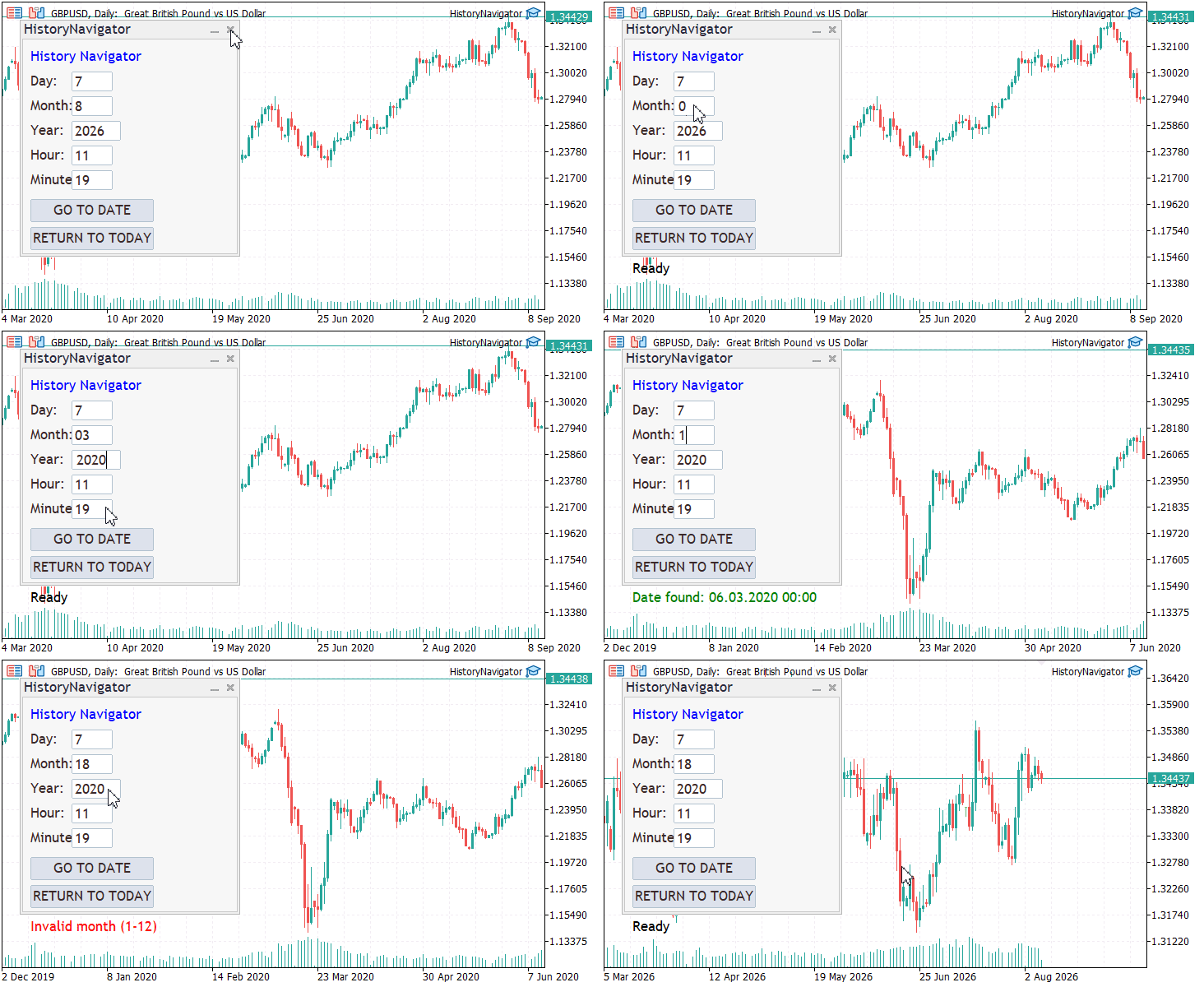
The GIF below demonstrates navigation to a specific historical date using the History Navigator developed in the previous instalment. Although this provides a convenient way to locate historical price action, the selected location is not retained as a reusable reference.
Historical Market Events Worth Revisiting
Market history contains numerous events that can be valuable for traders, analysts, and researchers to revisit. These may include distinctive price-action patterns, sudden price spikes, periods of extreme volatility, major reversals, breakouts, or unusual market behavior.
Reexamining such events allows the underlying price action to be studied in greater detail, including what happened, how the market responded, and what conditions preceded the movement. Studying these situations can provide useful insights for future analysis, while preserving references to them can help build a documented record of significant market behavior.
Some well-known historical market events and periods are presented in the table below.
| Date / Period | Market event | Example instruments | Behavior worth studying |
|---|---|---|---|
| March 2020 | COVID-19 market shock | S&P 500, Nasdaq 100, GBP/USD, EUR/USD, Gold, WTI | Extreme volatility, rapid sell-offs and reversals |
| 2022–2023 | Global inflation and interest-rate tightening | USD/JPY, EUR/USD, GBP/USD, Gold, Nasdaq 100 | Strong trends, breakouts and monetary-policy repricing |
| March 2023 | US banking-sector stress | Bank stocks, S&P 500, Nasdaq 100, Gold | Sharp declines, volatility and safe-haven flows |
| 5 August 2024 | Global market sell-off and yen carry-trade unwind | USD/JPY, EUR/JPY, AUD/JPY, Nikkei 225, S&P 500 | Sudden volatility, rapid reversals and cross-market movement |
| 2024–2025 | Strong gold price expansion | XAU/USD, Gold futures | Sustained bullish movement, breakouts and pullbacks |
These examples are not exhaustive; the relevance of a historical date depends on the trader's strategy, interests, and the specific market behavior or pattern being studied.
Historical Bookmarks
The examples above illustrate why traders may need to preserve specific chart locations for later analysis. A historical bookmark is a saved reference to a particular position in market history, allowing a trader to return to that location without manually searching for the date and time again.
In this development, each bookmark identifies the symbol, timeframe, date and time, together with a user-defined name and optional notes. This allows traders to attach meaningful context to locations such as a significant price-action pattern, support or resistance level, breakout, reversal, or period of unusual volatility.
Because the bookmarks are stored persistently, they remain available after the navigator is closed and reopened.
MQL5 Implementation
This implementation extends the History Navigator developed in the previous instalment with a persistent bookmark layer. A bookmark stores the chart symbol, timeframe, historical position, name, and optional notes so that an important market location can be revisited later.
Existing date and time navigation continues to handle chart positioning. Bookmark functionality is built around that navigation engine and adds persistent storage and bookmark management without duplicating the historical search logic.
Bookmark Data Model
A bookmark needs enough information to reconstruct a historical chart location. The SBookmark structure stores the chart context together with a user-defined name and optional notes.
//+------------------------------------------------------------------+
//| Bookmark structure                                               |
//+------------------------------------------------------------------+
struct SBookmark
  {
   string            name;
   string            symbol;
   ENUM_TIMEFRAMES   timeframe;
   datetime          dateTime;
   string            notes;
  };
The name identifies the bookmark in the navigator, while symbol and timeframe preserve the chart context in which it was created. The notes field provides an optional place for additional information about the saved location.
Using datetime instead of a bar index is important. A bar index depends on the current historical series and can change as data is loaded or updated. A timestamp remains tied to a specific point in market time and can be resolved again when the bookmark is recalled.
Persistent Bookmark Storage
Bookmark data must survive beyond the current session of the navigator. CBookmarkStorage provides this persistence layer.
The class keeps bookmarks in memory and handles CSV operations separately from CNavigatorDialog. This separation allows the dialog to concentrate on user interaction and navigation while the storage class manages loading, saving, validation, and record management.
CSV File Management
Bookmarks are stored in HistoryNavigatorBookmarks.csv. The filename is assigned when the storage object is created:
//+------------------------------------------------------------------+
//| Constructor – sets the filename                                  |
//+------------------------------------------------------------------+
CBookmarkStorage::CBookmarkStorage()
  {
   m_filename = "HistoryNavigatorBookmarks.csv";
  }
A CSV file is sufficient for this application because bookmark records are small and structured. It also makes the stored data easy to inspect during development.
Each record contains five fields:
Name, Symbol, Timeframe, DateTime, Notes
The writer stores ENUM_TIMEFRAMES as its numeric value and datetime as an integer value. The loader reads the fields in the same order and converts them back to their corresponding MQL5 types.
Maintaining the same field order in both directions ensures that saved records can be reconstructed correctly.
Loading Existing Bookmarks
When the navigator starts, it loads any previously saved bookmarks:
//--- Load existing bookmarks from disk into memory and show them
LoadBookmarks();
LoadBookmarks() delegates file access to CBookmarkStorage::Load(). The storage class opens the CSV file and reads each record. It skips header/empty rows, validates values, converts them to MQL5 types, and adds valid entries to the in-memory collection.
CBookmarkStorage::Load() brings these operations together:
//+------------------------------------------------------------------+
//| Loads bookmarks from the CSV file.                               |
//+------------------------------------------------------------------+
bool CBookmarkStorage::Load()
  {
   Clear();

   if(!FileIsExist(m_filename))
     {
      Print("BookmarkStorage: no bookmark file found. Starting empty.");
      return(true);
     }

   ResetLastError();

   int handle = FileOpen(m_filename,
                         FILE_READ | FILE_CSV | FILE_ANSI |
                         FILE_SHARE_READ | FILE_SHARE_WRITE,
                         ',');

   if(handle == INVALID_HANDLE)
     {
      PrintFormat("BookmarkStorage: failed to open '%s' for reading. Error=%d",
                  m_filename, GetLastError());
      return(false);
     }

//--- Read field by field. We expect exactly 5 fields per record.
   while(!FileIsEnding(handle))
     {
      string name     = FileReadString(handle);
      string symbol   = FileReadString(handle);
      string tf_text  = FileReadString(handle);
      string dt_text  = FileReadString(handle);
      string notes    = FileReadString(handle);

      //--- Skip an empty trailing record (sometimes appears)
      if(name == "" && symbol == "" && tf_text == "" && dt_text == "" && notes == "")
         continue;

      //--- Skip the header row
      if(name == "Name" && symbol == "Symbol")
         continue;

      //--- Validate the fields
      long tf_value = StringToInteger(tf_text);
      long dt_value = StringToInteger(dt_text);

      if(name == "" ||
         symbol == "" ||
         tf_text == "" ||
         dt_text == "" ||
         tf_value < 0 ||
         dt_value <= 0)
        {
         PrintFormat("BookmarkStorage: skipped invalid record: Name='%s' Symbol='%s' Timeframe='%s' DateTime='%s' Notes='%s'",
                     name, symbol, tf_text, dt_text, notes);
         continue;
        }

      //--- Convert and store
      SBookmark bm;
      bm.name       = name;
      bm.symbol     = symbol;
      bm.timeframe  = (ENUM_TIMEFRAMES)tf_value;
      bm.dateTime   = (datetime)dt_value;
      bm.notes      = notes;

      int index = ArraySize(m_bookmarks);
      ArrayResize(m_bookmarks, index + 1);
      m_bookmarks[index] = bm;
     }

   FileClose(handle);

   PrintFormat("BookmarkStorage: loaded %d bookmark(s).", ArraySize(m_bookmarks));

   return(true);
  }
After loading, the navigator works with m_bookmarks in memory instead of reading the CSV file for each operation. This gives the interface direct access to the current collection while keeping file handling inside CBookmarkStorage.
Handling the First Run
A bookmark file does not exist when the navigator is used for the first time. Load() treats this as an empty starting state rather than an error.
//--- Start with an empty collection when no bookmark file exists
if(!FileIsExist(m_filename))
  {
   Print("BookmarkStorage: no bookmark file found. Starting empty.");
   return(true);
  }
No error is generated in this case. The in-memory collection remains empty, and the file is created when the first bookmark is saved.
A missing file means that no bookmarks have been saved yet. File-access failures and invalid records are handled as storage errors.
Saving Changes
Changes are written to persistent storage as soon as they are made. When a bookmark is added, it is first appended to the in-memory array and then saved to the CSV file.
CBookmarkStorage::AddBookmark() validates the bookmark, updates the collection, saves the new state, and rolls back the memory change if persistence fails.
//+------------------------------------------------------------------+
//| Adds a new bookmark.                                             |
//+------------------------------------------------------------------+
bool CBookmarkStorage::AddBookmark(const SBookmark &bm)
  {
//--- Basic validation
   if(bm.name == "")
      return(false);

   if(bm.symbol == "")
      return(false);

   if(bm.dateTime <= 0)
      return(false);

//--- Append to memory
   int index = ArraySize(m_bookmarks);
   ArrayResize(m_bookmarks, index + 1);
   m_bookmarks[index] = bm;

//--- Try to save to file
   if(!Save())
     {
//--- Roll back the memory addition
      ArrayResize(m_bookmarks, index);
      return(false);
     }

   return(true);
  }
The rollback prevents the in-memory collection from diverging from persistent storage. When the file operation fails, the newly added bookmark is removed from memory as well.
Deletion and renaming use the same principle: modify the collection, save the new state, and restore the previous state if saving fails.
Validation of Stored Records
CSV data is external to the current execution, so each record must be validated before entering the in-memory collection.
Load() checks that required fields are present, the stored timeframe value is valid, and the timestamp is positive. Invalid records are skipped so that valid bookmarks in the same file can still be restored.
Rejected records are also reported in the Experts log, making storage problems visible during development.
Storage Workflow
The storage process can be summarized as:
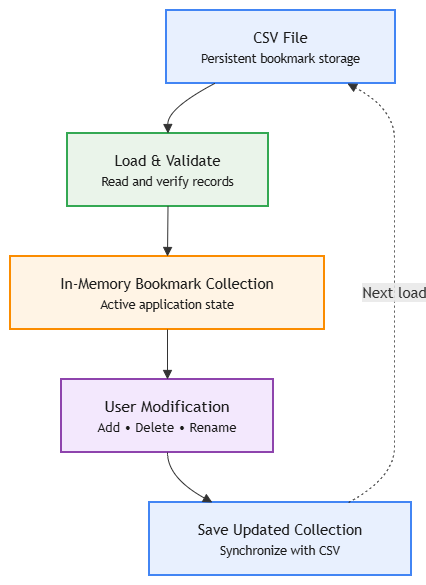
CBookmarkStorage owns this workflow. CNavigatorDialog interacts with it through Load(), AddBookmark(), DeleteBookmark(), and RenameBookmark() without performing CSV serialization itself.
This keeps persistence separate from the user interface and gives each class a clear responsibility.
Bookmark Management in the Navigator
CNavigatorDialog connects the bookmark collection to the user interface. It provides the controls and handlers required to create, select, navigate to, and delete bookmarks.
The dialog also maintains the index of the currently selected bookmark:
//--- Store the index of the currently selected bookmark
   int               m_selectedIndex;
The index provides a stable reference to the corresponding entry in CBookmarkStorage because the list control is recreated when its contents change.
Saving a Bookmark
OnSaveBookmark() collects the bookmark name and notes, determines the chart context, selects a historical position, and passes the completed SBookmark to the storage layer.
//+------------------------------------------------------------------+
//| Saves the current chart position as a new bookmark.              |
//+------------------------------------------------------------------+
void CNavigatorDialog::OnSaveBookmark(void)
  {
   string name = m_editBookmarkName.Text();
   StringTrimLeft(name);
   StringTrimRight(name);

   if(name == "")
     {
      UpdateStatus("Please enter a bookmark name.", clrRed);
      return;
     }

   string symbol = Symbol();
   ENUM_TIMEFRAMES tf = (ENUM_TIMEFRAMES)Period();

   datetime dt = m_lastNavigatedTime;

//--- If the user hasn't navigated yet, use the bar in the middle of the screen
   if(dt <= 0)
     {
      int visibleBars = (int)ChartGetInteger(0, CHART_VISIBLE_BARS);
      int firstVisible = (int)ChartGetInteger(0, CHART_FIRST_VISIBLE_BAR);

      if(visibleBars < 1)
         visibleBars = 50;

      int centerShift = firstVisible + visibleBars / 2;
      dt = iTime(symbol, tf, centerShift);
     }

   if(dt <= 0)
     {
      UpdateStatus("Unable to determine current chart time.", clrRed);
      return;
     }

//--- Build the bookmark structure
   SBookmark bm;
   bm.name       = name;
   bm.symbol     = symbol;
   bm.timeframe  = tf;
   bm.dateTime   = dt;
   bm.notes      = m_editBookmarkNotes.Text();

//--- Debug output to the Experts log
   PrintFormat("HistoryNavigator: saving bookmark '%s' -> %s %s %s",
               bm.name, bm.symbol, EnumToString(bm.timeframe),
               TimeToString(bm.dateTime, TIME_DATE | TIME_MINUTES));

//--- Ask the storage class to add it and write to file
   if(!m_bookmarkStorage.AddBookmark(bm))
     {
      UpdateStatus("Failed to save bookmark.", clrRed);
      return;
     }

//--- The newly added bookmark is at the end of the storage array
   int newIndex = m_bookmarkStorage.Count() - 1;

   RefreshBookmarkList();

//--- Auto-select the newly created bookmark so the user sees it
if(newIndex >= 0)
   SelectBookmarkIndex(newIndex);

UpdateStatus("Bookmark saved.",clrGreen);

//--- Clear the input fields
m_editBookmarkName.Text("");
m_editBookmarkNotes.Text("");
  }
symbol and timeframe come directly from the active chart. For the historical position, the function first uses m_lastNavigatedTime. When no date navigation has occurred, it falls back to a bar near the center of the visible chart.
After the storage operation succeeds, the list is refreshed and the new bookmark is selected. The name and notes fields are then cleared so that another bookmark can be entered.
Navigating to a Bookmark
OnGoToBookmark() restores the chart context stored in a selected bookmark and passes its timestamp to the existing navigation engine.
//+------------------------------------------------------------------+
//| Navigates to the location stored in the selected bookmark        |
//+------------------------------------------------------------------+
void CNavigatorDialog::OnGoToBookmark(void)
  {
//--- Ensure that a valid bookmark is selected
   if(!CaptureSelectedBookmark())
     {
      UpdateStatus("Please select a bookmark first.", clrRed);
      return;
     }

//--- Retrieve the selected bookmark from persistent storage
   SBookmark bm = m_bookmarkStorage.GetBookmark(m_selectedIndex);

   if(bm.name == "" || bm.symbol == "" || bm.dateTime <= 0)
     {
      UpdateStatus("Invalid bookmark selected.", clrRed);
      return;
     }

   PrintFormat("HistoryNavigator: opening bookmark '%s' -> %s %s %s",
               bm.name, bm.symbol, EnumToString(bm.timeframe),
               TimeToString(bm.dateTime, TIME_DATE | TIME_MINUTES));

//--- If the symbol or timeframe differ, switch the chart
   if(!ChartSetSymbolPeriod(0, bm.symbol, bm.timeframe))
     {
      UpdateStatus("Failed to switch symbol/timeframe.", clrRed);
      return;
     }

//--- Wait a moment for MT5 to load the new history data
   Sleep(100);

//--- Now navigate to the exact datetime within that new context
   NavigateToDateTime(bm.dateTime);

   UpdateStatus("Navigated to: " + bm.name, clrGreen);
  }
No separate bookmark-specific bar-search routine is required. NavigateToDateTime() already validates the requested time, locates the corresponding bar, and positions the chart. Bookmark navigation supplies that routine with a stored timestamp.
ChartSetSymbolPeriod() may require time to switch the chart context and load the corresponding history. The short delay allows that update to complete before NavigateToDateTime() searches for the stored position.
Deleting a Bookmark
Deletion uses the current selection, asks for confirmation, removes the bookmark from storage, and rebuilds the list.
After deletion, the list is rebuilt. If other bookmarks remain, the nearest available entry is selected; otherwise, the selection is cleared.
//+------------------------------------------------------------------+
//| Deletes the selected bookmark after user confirmation.           |
//+------------------------------------------------------------------+
void CNavigatorDialog::OnDeleteBookmark(void)
  {
   if(!CaptureSelectedBookmark())
     {
      UpdateStatus("Please select a bookmark first.", clrRed);
      return;
     }

   int index = m_selectedIndex;
   SBookmark bm = m_bookmarkStorage.GetBookmark(index);

   if(bm.name == "")
     {
      UpdateStatus("Invalid bookmark selected.", clrRed);
      return;
     }

//--- Ask the user to confirm
   string message = "Delete bookmark '" + bm.name + "'?";
   int answer = MessageBox(message, "Confirm Delete", MB_YESNO);

   if(answer != IDYES)
      return;

   PrintFormat("HistoryNavigator: deleting selected index=%d name='%s'",
               index, bm.name);

   if(!m_bookmarkStorage.DeleteBookmark(index))
     {
      UpdateStatus("Failed to delete bookmark.", clrRed);
      return;
     }

//--- Clear stale selection before rebuilding the list
   m_selectedIndex = -1;

   RefreshBookmarkList();

//--- Select the nearest remaining row (if any)
   int remaining = m_bookmarkStorage.Count();

   if(remaining > 0)
     {
      int nextIndex = index;

      if(nextIndex >= remaining)
         nextIndex = remaining - 1;

      SelectBookmarkIndex(nextIndex);
     }
   else
     {
      ClearSelection();
     }

   UpdateStatus("Bookmark deleted.", clrGreen);
  }
Synchronizing the Bookmark List
Changes to the collection require the list control to reflect the current storage state. RefreshBookmarkList() recreates the control and populates it from the bookmark array.
//+------------------------------------------------------------------+
//| Completely rebuilds the bookmark list from the storage array.    |
//+------------------------------------------------------------------+
void CNavigatorDialog::RefreshBookmarkList(void)
  {
//--- Destroy the old control to reset its internal state
   m_listBookmarks.Destroy();

   if(!m_listBookmarks.Create(m_chart_id, m_name + "BmList", m_subwin,
                              m_listX1, m_listY1, m_listX2, m_listY2))
     {
      Print("HistoryNavigator: failed to recreate bookmark list.");
      m_selectedIndex = -1;
      return;
     }

   if(!Add(GetPointer(m_listBookmarks)))
     {
      Print("HistoryNavigator: failed to add recreated bookmark list.");
      m_selectedIndex = -1;
      return;
     }

   int total = m_bookmarkStorage.Count();

   for(int i = 0; i < total; i++)
     {
      SBookmark bm = m_bookmarkStorage.GetBookmark(i);
      m_listBookmarks.AddItem(BookmarkDisplay(bm));
     }

//--- Reset selection - the caller will restore it if needed
   m_selectedIndex = -1;
  }
Recreating the control clears its previous selection state, so SelectBookmarkIndex() restores the required selection when necessary.
CBookmarkStorage remains the source of bookmark data, while CListView presents that data to the user.
Integration with the Existing Navigation Engine
Bookmark functionality is built around the navigation engine developed in the previous instalment. CBookmarkStorage manages persistence, while CNavigatorDialog handles bookmark interaction and passes stored locations to the existing navigation routines.
NavigateToDateTime() remains the central method for locating a historical bar. Direct date input and bookmark navigation both use this method.
CenterChartOnBar() performs the final chart positioning, so bookmark navigation does not require a separate scrolling mechanism.
m_lastNavigatedTime also connects date navigation with bookmark creation. When the navigator has already moved to a historical location, this timestamp can be stored directly as part of a new bookmark.
The two navigation paths converge on the same engine:
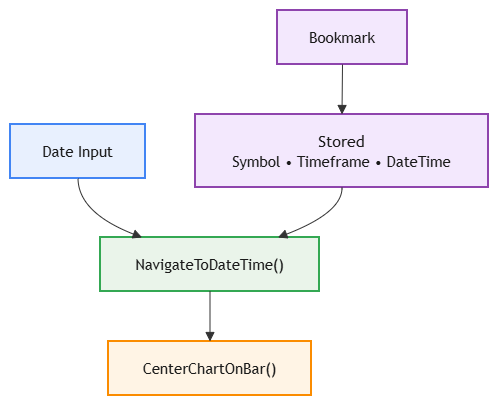
Reusing this path avoids duplicating the bar-search and chart-positioning logic developed in the previous instalment.
Modified Files
The bookmark functionality is distributed across three source files, with each file handling a specific part of the implementation.
| File | Modification |
|---|---|
| CNavigatorDialog.mqh | Extended with bookmark controls, selection state, and methods for creating, selecting, navigating to, deleting, and refreshing bookmarks. |
| BookmarkStorage.mqh | Added as the persistence layer, containing SBookmark and CBookmarkStorage for CSV-based storage and validation. |
| HistoryNavigator.mq5 | Updated to include the new storage header; the EA entry point and existing initialization flow remain unchanged. |
The unchanged framework code, file headers, and include guards are not discussed here. The focus is on components introduced for persistent bookmarks.
Preserving Existing Navigation
Existing navigation controls retain their original purpose. The date and time fields still provide direct access to historical dates, while GO TO DATE and RETURN TO TODAY continue to perform their original functions.
Bookmarks add another way to revisit historical locations without changing this workflow. A user can enter a date for one-time analysis or save frequently revisited locations as bookmarks.
Implementation Structure
The implementation consists of three cooperating layers:
- SBookmark — represents the information required to reconstruct a saved historical location.
- CBookmarkStorage — manages the persistent CSV representation and keeps the bookmark collection synchronized with the file.
- CNavigatorDialog — provides the user interface, maintains selection state, and connects bookmark operations to the existing navigation engine.
Together, these layers separate data representation, persistence, and user interaction while reusing the existing historical navigation engine.
Testing
The completed History Navigator was tested for both date navigation and the new bookmark workflow. Testing focused on persistence, selection, navigation, and deletion, because these operations involve both the UI and the CSV storage layer.
The test sequence included creating bookmarks with descriptive names, displaying them in the bookmark list, selecting individual entries, navigating to their stored historical positions, and deleting selected bookmarks. The navigator was also removed and reattached to confirm that previously saved bookmarks were loaded again from the CSV file.
The GIF below demonstrates the resulting interface and the bookmark workflow. It shows a saved historical location displayed in the bookmark list, together with the controls used to navigate to or delete the selected bookmark.
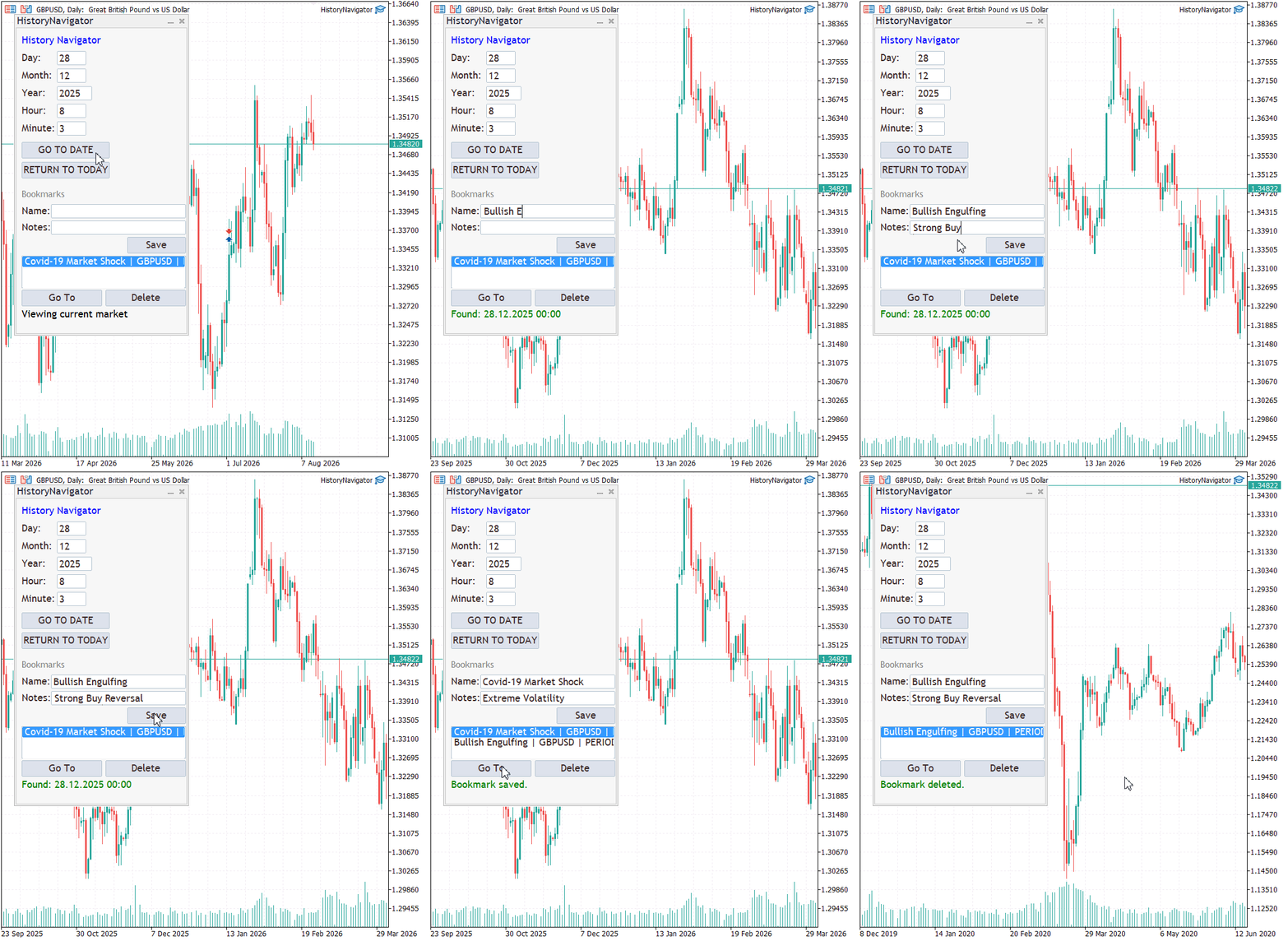
The tests confirmed that the bookmark data is retained independently of the current dialog session and can be restored when the navigator is initialized again. The selected bookmark is also used as the target for the corresponding operation, allowing individual historical locations to be revisited or removed without affecting the remaining entries.
Overall, the testing confirms that the bookmark layer integrates with the existing History Navigator while preserving its original date-based navigation functionality.
Conclusion
In this article, we extended the existing History Navigator with persistent historical bookmarks, allowing important chart locations to be saved and revisited without repeatedly entering their dates and times.
The implementation introduced a dedicated SBookmark data structure and a CBookmarkStorage class for managing persistent CSV storage. The existing CNavigatorDialog was then enhanced with bookmark creation, selection, navigation, and deletion while retaining the original date-based navigation workflow.
A key design decision was to reuse the existing navigation engine rather than creating a separate mechanism for bookmark navigation. A bookmark therefore provides the stored symbol, timeframe, and datetime, while the existing navigation routines remain responsible for locating and positioning the chart.
The resulting navigator provides a practical way to preserve personally significant areas of market history for later analysis. Because the bookmarks survive application and terminal restarts, they can serve as a reusable reference for historical price-action studies, market-event analysis, and trade review.
This enhancement establishes a persistent foundation that can be extended further, for example with richer bookmark notes, categories, filtering, or additional historical-analysis features.
Attachments
| Name | Type | Purpose |
|---|---|---|
| CNavigatorDialog.mqh | Include | Implements the navigator interface, bookmark controls, selection handling, and bookmark operations. |
| BookmarkStorage.mqh | Include | Defines the bookmark data model and manages persistent CSV storage, loading, validation, and deletion. |
| HistoryNavigator.mq5 | Expert Advisor | Main EA file that initializes and runs the History Navigator. |
| MQL5.zip | Archive | Contains the complete MQL5 source code and supporting files used in this article. |
Warning: All rights to these materials are reserved by MetaQuotes Ltd. Copying or reprinting of these materials in whole or in part is prohibited.
This article was written by a user of the site and reflects their personal views. MetaQuotes Ltd is not responsible for the accuracy of the information presented, nor for any consequences resulting from the use of the solutions, strategies or recommendations described.

 Building a Bar Replay Tool in MQL5
 Market Simulation: Position View (IX)
 From Basic to Intermediate: Queues, Lists, and Trees (II)
 From Basic to Intermediate: Queues, Lists, and Trees (I)

- Free trading apps
- Over 8,000 signals for copying
- Economic news for exploring financial markets
You agree to website policy and terms of use