

From Basic to Intermediate: Like Bubbles
 1 112
1 112
 1
1

Introduction
In the previous article, From Basic to Intermediate: Navigating the Sandbox, we looked at how to navigate within one of the sandboxes supported by MetaTrader 5. It was also shown that we can do this in two completely different ways and for different purposes. One way to navigate was to use a dialog box built into the operating system itself, which made it the most practical, simple, and convenient way to move around within the sandbox.
However, a second navigation method was also demonstrated. This method is implemented directly in the code of the application being developed., which makes it somewhat more complex. The fact is that the purpose of the navigation system in this case is not simple, fast interaction with the user, but a completely different task: to determine what types of files are present there and how the directory structure is organized within the sandbox.
This second approach—or, rather, this way of navigating within the sandbox—opens up certain possibilities for us, which we can explore a little right now. This happens because, even though everything seems perfect during application testing, in practice things can often go wrong. Files and directories may be presented in a completely chaotic order, and their names—even more likely—may turn out to be unsorted.
This is usually the most common scenario: we might want to create a filter based, for example, on the creation or modification date of a file or directory. This would be done for search purposes, to present files and directories in a specific order and thereby make it easier to find the desired information. In the code implementation we looked at in the previous article, we do not have an ordered way to output the results, or even any filtering, however simple it might be to implement.
To sort any values—that is, to create a sorted way of displaying the results—we need to include certain elements in the code. This situation often marks the point at which many beginners become completely confused. This has to do with the type of task that needs to be performed. he task is not inherently difficult; the challenge is that the same goal can be achieved in several different ways. However, such an implementation in a given programming language can be somewhat confusing. You often have to adapt code written in another language—something that many less experienced people are unable to do.
However, we'll be completely candid here: I won't make any special attempts or introduce any new concepts. We'll simply look at how to use something that is very common in programming, but whose inner workings many beginners are not even aware of. So let's move on to the next section and begin the most interesting part of the article. Because this is exactly the kind of topic I really enjoy whenever I need to use it in practice.
Like bubbles
Great, let's start by talking about something you have undoubtedly already used. I mean sorting an array of numbers in ascending order. So why am I bringing this up? The reason is simple, dear reader. The MQL5 library of functions and procedures includes a function called ArraySort. This function is designed to sort the contents of an array in ascending order.
For those who have not yet seen this function in action, we can look at how it works using the small code snippet provided below.
01. //+------------------------------------------------------------------+
02. #property copyright "Daniel Jose"
03. //+------------------------------------------------------------------+
04. void OnStart(void)
05. {
06.     uchar info[10];
07.
08.     MathSrand(GetTickCount());
09.
10.     for (uint c = 0; c < info.Size(); c++)
11.         info[c] = (uchar) MathRand();
12.
13.     Print("Array content before ordering...");
14.     ArrayPrint(info);
15.
16.     ArraySort(info);
17.
18.     Print("Array content after sorting...");
19.     ArrayPrint(info);
20. }
21. //+------------------------------------------------------------------+
Code 01
In Code 01, we use a pseudo-random number generator to initialize a small array. The array is declared on line 06. Initialization is performed by the loop on line 10. But here we are specifically interested in the following lines. In these lines, we first print the array before sorting, and then print it again after sorting. Since the generation is based on random values, the result will most likely differ from what you see in the following figure.
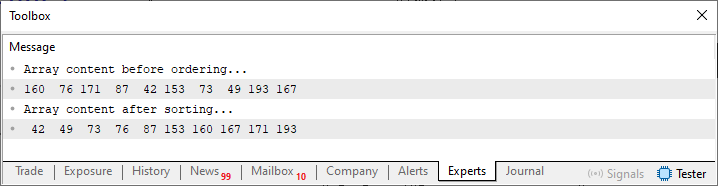
Figure 01
This happens because a new sequence of values will be generated each time it is executed. But the point is precisely to notice that the values have been sorted in ascending order. This is due to the function on line 16, which is present in Code 01.
But what does this have to do with our idea of navigating the sandbox? Well, dear reader, this is where things really start to get interesting. Many beginners may not understand an important point here. When data is presented in order—whether in ascending or descending order—it must be passed through some kind of sorting mechanism. Understanding how these mechanisms work will help you tackle a wide variety of tasks. The fact is that a programming language—whatever it may be—does not always include a built-in implementation that allows you to sort absolutely any data type. If you understand how the sorting mechanism works, you'll be able to create a function or procedure that generalizes the sorting process. This allows you to sort both numeric data and text, as well as other data types.
For example, if you try to replace Code 01 with the following code, you will notice that it cannot be compiled.
01. //+------------------------------------------------------------------+
02. #property copyright "Daniel Jose"
03. //+------------------------------------------------------------------+
04. void OnStart(void)
05. {
06.     string info[10];
07.
08.     MathSrand(GetTickCount());
09.
10.     for (uint c = 0; c < info.Size(); c++)
11.         info[c] = (string) MathRand();
12.
13.     Print("Array content before ordering...");
14.     ArrayPrint(info);
15.
16.     ArraySort(info);
17.
18.     Print("Array content after sorting...");
19.     ArrayPrint(info);
20. }
21. //+------------------------------------------------------------------+
Code 02
But why? The reason is precisely that the compiler cannot find a suitable implementation for string data. This is not due to the array itself, but rather to the ArraySort function, which was not implemented or designed to work with strings in order to sort them in ascending order. "But wait a second. So, are you saying that if we remove line 16 from Code 02, we will be able to get a result? This happens because the compiler can generate an executable application." Yes, that's right, dear reader. The thing is, if you do this, when you run Code 02, you will be able to see something similar to the following figure: of course, after removing line 16 from the code.
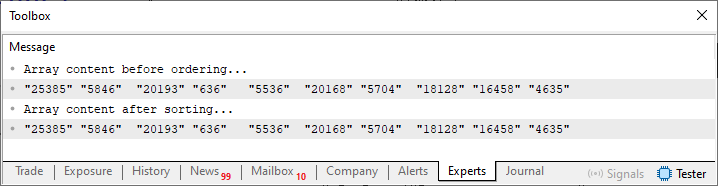
Figure 02
Now, please note the following. Figure 02 shows strings, but they are not sorted in ascending order. The reason is that we do not have a mechanism that would perform this sorting for us. Now let's consider the following detail: if you implement a method for sorting this same string data, even if it contains numeric values, you can use the same mechanism to sort files and directories so that they are arranged in a specific order—either in ascending order or in descending order. This is precisely where the need arises to study sorting mechanisms that can be implemented within a programming language.
To simplify the task and make it understandable for everyone—since our goal here is to be as educational as possible and present the material in a way that’s easy to grasp, even for beginners—we will take it step by step. This way, everyone will be able to follow the process and understand exactly what we are doing. Understanding exactly what's going on is much more important than simply copying the code when you need to do something similar. So, let's start with the following code:
01. //+------------------------------------------------------------------+
02. #property copyright "Daniel Jose"
03. //+------------------------------------------------------------------+
04. void OnStart(void)
05. {
06.     uchar info[10];
07.
08.     MathSrand(512);
09.
10.     for (uint c = 0; c < info.Size(); c++)
11.         info[c] = (uchar) MathRand();
12.
13.     Print("Array content before ordering...");
14.     ArrayPrint(info);
15.
16.     BubbleSort(info);
17.
18.     Print("Array content after sorting...");
19.     ArrayPrint(info);
20. }
21. //+------------------------------------------------------------------+
22. template <typename T>
23. void BubbleSort(T &arr[])
24. {
25.     #define macroSWAP(A, B) {                           \
26.                                 temp = arr[j - 1];      \
27.                                 arr[j - 1] = arr[j];    \
28.                                 arr[j] = temp;          \
29.                             }
30.
31.     uint nElements = arr.Size();
32.     T    temp;
33.
34.     for (uint i = 1; i < nElements; i++)
35.         for (uint j = nElements - 1; j >= i; j--)
36.             if (typename(T) == "string")
37.             {
38.             }else
39.                 if (arr[j - 1] > arr[j])
40.                     macroSWAP(arr[j - 1], arr[j])
41.
42.     #undef macroSWAP
43. }
44. //+------------------------------------------------------------------+
Code 03
Code 03 will be our starting point. Please note that we are doing something very similar to what was presented in Code 01. However, here we are setting up the code so that you will get the same results as those shown in the following figures. This happens because, although we are still using a pseudo-random number generator to initialize the array, we seed the pseudo-random number generator with a specific value. You can see this in line 08.
And now, dear reader, please pay close attention. Unlike Code 01 and Code 02, Code 03 contains, on line 16, a call to the procedure we implemented. The purpose of this procedure is to sort the data in the array in ascending order. Now let's move on to the important part: the previous articles explained how to create function and procedure templates. They also explained how we can apply this approach in practice. Well, here is an example of how to use this knowledge from the previous articles. Therefore, unlike the library function ArraySort, which does not allow us to sort values of any type, here we have an implementation that will allow us to do so.
To make this possible, we use the check on line 36 to determine whether we are sorting strings or any other type of data. Please note: WE ARE NOT SORTING STRING DATA YET. But we can already sort the remaining data types. We can see this by looking at the result shown in the following figure.
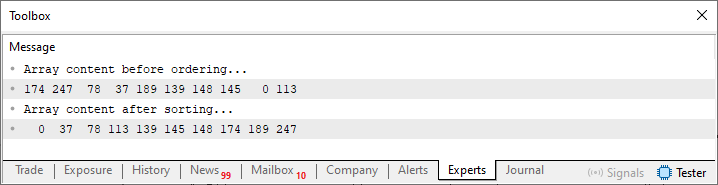
Figure 03
Although the mechanism implemented in the code is not the best one available—since it is very slow for large arrays—it is fast enough for our demonstration and works perfectly. This can be seen in Figure 03. "Is that all?" Yes, my dear reader. Now let's move on to the most interesting part: modifying the code to enable sorting of string data. Before we do that, let's take one small step. This is shown in the following code:
01. //+------------------------------------------------------------------+
02. #property copyright "Daniel Jose"
03. //+------------------------------------------------------------------+
04. void OnStart(void)
05. {
06.     string info[10];
07.
08.     MathSrand(512);
09.
10.     for (uint c = 0; c < info.Size(); c++)
11.         info[c] = (string) (uchar) MathRand();
12.
13.     Print("Array content before ordering...");
14.     ArrayPrint(info);
15.
16.     BubbleSort(info);
17.
18.     Print("Array content after sorting...");
19.     ArrayPrint(info);
20. }
21. //+------------------------------------------------------------------+
22. template <typename T>
23. void BubbleSort(T &arr[])
24. {
25.     #define macroSWAP(A, B) {                           \
26.                                 temp = arr[j - 1];      \
27.                                 arr[j - 1] = arr[j];    \
28.                                 arr[j] = temp;          \
29.                             }
30.
31.     uint nElements = arr.Size();
32.     T    temp;
33.
34.     for (uint i = 1; i < nElements; i++)
35.         for (uint j = nElements - 1; j >= i; j--)
36.             if (typename(T) == "string")
37.             {
38.             }else
39.                 if (arr[j - 1] > arr[j])
40.                     macroSWAP(arr[j - 1], arr[j])
41.
42.     #undef macroSWAP
43. }
44. //+------------------------------------------------------------------+
Code 04
Please note exactly what has changed between Code 03 and this Code 04. All the changes made are intended to ensure that the values used are the same in both cases. Nevertheless, we are still not sorting strings. However, the result of running Code 04 is shown below:
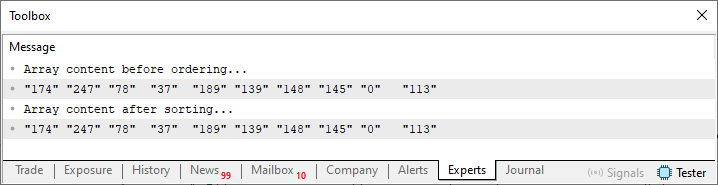
Figure 04
Now, dear reader, I would like you to pay close attention. What we are about to do may seem rather confusing to many readers. This is because, unlike sorting numeric values, sorting strings is not as straightforward a process. For sorting to work correctly, this must be done in a strictly defined manner. However, as you can see in Code 03 and Code 04, there is a spot between lines 37 and 38 where you can implement the sorting code itself. To understand how this sorting should be performed, I need you first to understand what kind of result we get when using certain methods to implement it. To start, let's use the StringCompare function, since that is obviously the first option that comes to mind. To do this, we use the following code.
01. //+------------------------------------------------------------------+
02. #property copyright "Daniel Jose"
03. //+------------------------------------------------------------------+
04. void OnStart(void)
05. {
06.     string info[10];
07.
08.     MathSrand(512);
09.
10.     for (uint c = 0; c < info.Size(); c++)
11.         info[c] = (string) (uchar) MathRand();
12.
13.     Print("Array content before ordering...");
14.     ArrayPrint(info);
15.
16.     BubbleSort(info);
17.
18.     Print("Array content after sorting...");
19.     ArrayPrint(info);
20. }
21. //+------------------------------------------------------------------+
22. template <typename T>
23. void BubbleSort(T &arr[])
24. {
25.     #define macroSWAP(A, B) {                           \
26.                                 temp = arr[j - 1];      \
27.                                 arr[j - 1] = arr[j];    \
28.                                 arr[j] = temp;          \
29.                             }
30.
31.     uint nElements = arr.Size();
32.     T    temp;
33.
34.     for (uint i = 1; i < nElements; i++)
35.         for (uint j = nElements - 1; j >= i; j--)
36.             if (typename(T) == "string")
37.             {
38.                 if (StringCompare(arr[j - 1], arr[j]) > 0)
39.                     macroSWAP(arr[j - 1], arr[j])
40.             }else
41.                 if (arr[j - 1] > arr[j])
42.                     macroSWAP(arr[j - 1], arr[j])
43.
44.     #undef macroSWAP
45. }
46. //+------------------------------------------------------------------+
Code 05
When we run this code, we will get the result shown in the following figure:
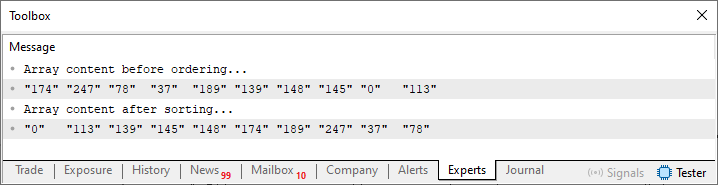
Figure 05
"What is this madness? Apparently, there is no order here at all. Although, at first glance, the elements do indeed seem to have been sorted. If I look more closely, I notice that there is something strange about this arrangement."
Exactly, dear reader, you are right. The code is capable of sorting the values contained in a string array. But there is something strange here, namely the fact that 37 and 78 are less than 113. However, these two values are placed at the end of the sequence. Why? The reason is that sorting takes into account only the contents of the string. Therefore, all values between 113 and 189 remain in the correct order. However, when we no longer take into account the number of characters in a string, the sorting seems somewhat strange, even though it worked.
It is interesting that if you use dictionary words instead of numeric values, as we are doing here, you will notice that the sorting actually works as expected. However, for what we are doing—or trying to do—the sorting wasn't 100 percent perfect. Well, to solve this problem, we also need to include the number of characters in the string as one of the filters we use. Thus, the bubble sort routine will be able to sort the string array correctly. The necessary changes are shown in the following code:
01. //+------------------------------------------------------------------+
02. #property copyright "Daniel Jose"
03. //+------------------------------------------------------------------+
04. void OnStart(void)
05. {
06.     string info[10];
07.
08.     MathSrand(512);
09.
10.     for (uint c = 0; c < info.Size(); c++)
11.         info[c] = (string) (uchar) MathRand();
12.
13.     Print("Array content before ordering...");
14.     ArrayPrint(info);
15.
16.     BubbleSort(info);
17.
18.     Print("Array content after sorting...");
19.     ArrayPrint(info);
20. }
21. //+------------------------------------------------------------------+
22. template <typename T>
23. void BubbleSort(T &arr[])
24. {
25.     #define macroSWAP(A, B) {                           \
26.                                 temp = arr[j - 1];      \
27.                                 arr[j - 1] = arr[j];    \
28.                                 arr[j] = temp;          \
29.                             }
30.
31.     uint nElements = arr.Size();
32.     T    temp;
33.
34.     for (uint i = 1; i < nElements; i++)
35.         for (uint j = nElements - 1; j >= i; j--)
36.             if (typename(T) == "string")
37.             {
38.                 if ((StringLen(arr[j - 1]) > StringLen(arr[j])))
39.                     macroSWAP(arr[j - 1], arr[j])
40.                 if ((StringCompare(arr[j - 1], arr[j]) > 0) && (StringLen(arr[j - 1]) == StringLen(arr[j])))
41.                     macroSWAP(arr[j - 1], arr[j])
42.             }else
43.                 if (arr[j - 1] > arr[j])
44.                     macroSWAP(arr[j - 1], arr[j])
45.
46.     #undef macroSWAP
47. }
48. //+------------------------------------------------------------------+
Code 06
When we run Code 06, we will get the following result.
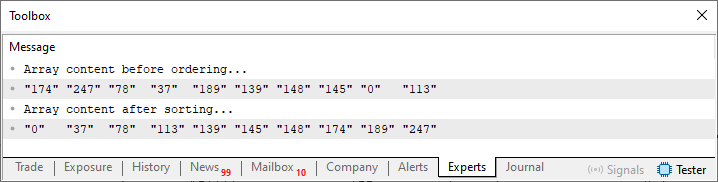
Figure 06
"Well, we really did get the result we wanted and expected. In a way, there are some things I do not understand. You recently said that Code 05 can sort—or, more precisely, sort words taken from a dictionary—in ascending order. However, we were unable to arrange the numeric values in the correct order, as can be clearly seen in Figure 05. However, by using this modified version of Code 06, we were able to sort the data correctly. But doesn't this change in Code 06 make the code unable to correctly sort words taken from a dictionary?" Well, perhaps many of those who consider themselves programmers would say: of course not. The code has been modified, but it is still able to sort the words correctly.
However, those who have doubts about the code may well think that the program might not work correctly. As they grapple with such doubts and question the viability of the changes made to the code structure, they ultimately come to realize—if I may put it that way—that there is no solution capable of covering absolutely every possible case. They also find that, at a certain point, knowing and understanding how mechanisms work internally can become the decisive factor that separates an adequate result from a mediocre one.
So let's run a simple test: let's modify Code 06 once more to see whether we can use this implementation in every case. To do this, we simply need to modify Code 06, as shown in the following example:
01. //+------------------------------------------------------------------+
02. #property copyright "Daniel Jose"
03. //+------------------------------------------------------------------+
04. void OnStart(void)
05. {
06.     string info[] = {"value", "data", "time", "assembly", "checking" };
07.
08.     Print("Array content before ordering...");
09.     ArrayPrint(info);
10.
11.     BubbleSort(info);
12.
13.     Print("Array content after sorting...");
14.     ArrayPrint(info);
15. }
16. //+------------------------------------------------------------------+
17. template <typename T>
18. void BubbleSort(T &arr[])
19. {
20.     #define macroSWAP(A, B) {                           \
21.                                 temp = arr[j - 1];      \
22.                                 arr[j - 1] = arr[j];    \
23.                                 arr[j] = temp;          \
24.                             }
25.
26.     uint nElements = arr.Size();
27.     T    temp;
28.
29.     for (uint i = 1; i < nElements; i++)
30.         for (uint j = nElements - 1; j >= i; j--)
31.             if (typename(T) == "string")
32.             {
33.                 if ((StringLen(arr[j - 1]) > StringLen(arr[j])))
34.                     macroSWAP(arr[j - 1], arr[j])
35.                 if ((StringCompare(arr[j - 1], arr[j]) > 0) && (StringLen(arr[j - 1]) == StringLen(arr[j])))
36.                     macroSWAP(arr[j - 1], arr[j])
37.             }else
38.                 if (arr[j - 1] > arr[j])
39.                     macroSWAP(arr[j - 1], arr[j])
40.
41.     #undef macroSWAP
42. }
43. //+------------------------------------------------------------------+
Code 07
Now we have something a little different. However, the only real difference lies in the values of the string array. In this case, we have words whose order you know for sure, since the words are in ascending order. But to your surprise, when we run Code 07, we get the result shown in the following figure:
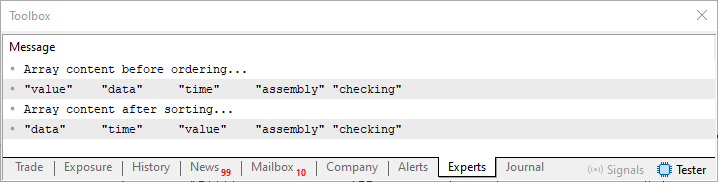
Figure 07
Without a doubt, the result shown in Figure 07 does not match the order in which these same words would appear in a dictionary. Nevertheless, the sorting here was performed exactly as it was during the execution of Code 05, whose result was shown in Figure 05. That is precisely why, my dear reader, it is important to understand that the response returned by the application will not always be completely correct, but it will not necessarily be incorrect either. Key point: What kind of result was expected from the application? Depending on the specific situation, this result may or may not be suitable for achieving the desired goal. In this case, it is not suitable. We have reached a dead end.
In this case, the procedure created to perform the task—which, here, is sorting the data in an array—returns results that may or may not make sense to us. We can make a small, barely noticeable change to the code to make this process a little more controllable. The following code includes this change.
01. //+------------------------------------------------------------------+
02. #property copyright "Daniel Jose"
03. //+------------------------------------------------------------------+
04. void OnStart(void)
05. {
06.     string info_01[10];
07.     string info_02[] = {"value", "data", "time", "assembly", "checking" };
08. //+----------------+
09.     MathSrand(512);
10.
11.     for (uint c = 0; c < info_01.Size(); c++)
12.         info_01[c] = (string) (uchar) MathRand();
13. //+----------------+
14.     Print("Number array before ordering...");
15.     ArrayPrint(info_01);
16.
17.     BubbleSort(info_01, true);
18.
19.     Print("Number array after ordering...");
20.     ArrayPrint(info_01);
21. //+----------------+
22.     Print("Dictionary before ordering...");
23.     ArrayPrint(info_02);
24.
25.     BubbleSort(info_02);
26.
27.     Print("Dictionary after sorting...");
28.     ArrayPrint(info_02);
29. }
30. //+------------------------------------------------------------------+
31. template <typename T>
32. void BubbleSort(T &arr[], const bool bUsingLength = false)
33. {
34.     #define macroSWAP(A, B) {                           \
35.                                 temp = arr[j - 1];      \
36.                                 arr[j - 1] = arr[j];    \
37.                                 arr[j] = temp;          \
38.                             }
39.
40.     uint nElements = arr.Size();
41.     T    temp;
42.
43.     for (uint i = 1; i < nElements; i++)
44.         for (uint j = nElements - 1; j >= i; j--)
45.             if (typename(T) == "string")
46.             {
47.                 if ((bUsingLength) && ((StringLen(arr[j - 1]) > StringLen(arr[j]))))
48.                     macroSWAP(arr[j - 1], arr[j])
49.                 if ((StringCompare(arr[j - 1], arr[j]) > 0) && ((StringLen(arr[j - 1]) == StringLen(arr[j])) || !bUsingLength))
50.                     macroSWAP(arr[j - 1], arr[j])
51.             }else
52.                 if (arr[j - 1] > arr[j])
53.                     macroSWAP(arr[j - 1], arr[j])
54.
55.     #undef macroSWAP
56. }
57. //+------------------------------------------------------------------+
Code 08
Code 08 allows you to verify the changes and ensure they are correct, as well as sort the string array as expected. Let's see what happens if we run Code 08 in the MetaTrader 5 terminal. As a result, we get the following figure:
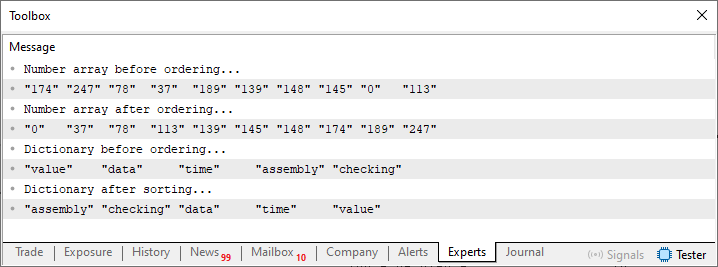
Figure 08
Just perfect. Please note that both the array of numeric strings and the array of words from the dictionary are sorted correctly. Or rather, as expected. That used to be impossible. The main question here is precisely what had to be implemented for this sorting to produce the expected result. All we had to do was add an additional check to the block where we process string data.
Although you might think that the sorting method presented here is an ideal model and can be used in any situation, I would like you to reconsider that assumption, my dear reader. This sorting method is, without a doubt, the worst of all existing methods. Although its code is very easy to understand, it very quickly reduces overall system performance. This happens because, for each element in the array being sorted, we have to run the loop a very large number of times.
To be more precise, the number of iterations that the loop must perform is, in the worst case, equal to the number of elements squared. In other words, to sort five elements, we need to run the loop 25 times. For ten elements—which is only twice as many as in the first case—the number of loop iterations increases to 100. Please note that the number of times the loop is executed increases very quickly as new elements are added to the array.
For this reason, some programmers often refer to the method described so far as “bubble hell.” This happens because each newly added element can potentially increase the number of iterations required to complete the sorting successfully.
Although this rudimentary and imperfect methodology presented here is problematic, there are cases where we do not need to run the loop so many times to produce a sorted array as output. This is because it may take only a few swap iterations to fully sort the array. As unbelievable as it may seem, a simple change in the code—one that might seem ineffective at first glance—can transform this “bubble hell” into something quite acceptable under certain circumstances.
To understand how this change affects the code—and, most importantly, how it can speed up its execution—you, dear reader, need to understand how the sorting process works in the implementation described so far.
Once you understand this, we can move on to improving the code. In this way, we aim to make the sorting system slightly faster or less demanding in terms of CPU load and processing time in certain situations.
Well, in order for us to understand how this modification we are about to implement affects code execution, we will first need to implement a way to see what is happening inside the sorting algorithm. To do this, we will replace Code 08 with the following code:
01. //+------------------------------------------------------------------+
02. #property copyright "Daniel Jose"
03. //+------------------------------------------------------------------+
04. void OnStart(void)
05. {
06.     string info_01[10];
07.     string info_02[] = {"value", "data", "time", "assembly", "checking" };
08. //+----------------+
09.     MathSrand(512);
10.
11.     for (uint c = 0; c < info_01.Size(); c++)
12.         info_01[c] = (string) (uchar) MathRand();
13. //+----------------+
14.     Print("+----------------+\nNumber array before ordering...");
15.     ArrayPrint(info_01);
16.
17.     BubbleSort(info_01, true);
18.
19.     Print("Number array after ordering...");
20.     ArrayPrint(info_01);
21. //+----------------+
22.     Print("+----------------+\nDictionary before ordering...");
23.     ArrayPrint(info_02);
24.
25.     BubbleSort(info_02);
26.
27.     Print("Dictionary after sorting...");
28.     ArrayPrint(info_02);
29. }
30. //+------------------------------------------------------------------+
31. template <typename T>
32. void BubbleSort(T &arr[], const bool bUsingLength = false)
33. {
34.     #define macroSWAP(A, B) {                           \
35.                                 temp = arr[j - 1];      \
36.                                 arr[j - 1] = arr[j];    \
37.                                 arr[j] = temp;          \
38.                             }
39.
40.     uint nElements = arr.Size();
41.     T    temp;
42.     uint count = 0;
43.
44.     for (uint i = 1; i < nElements; i++)
45.     {
46.         for (uint j = nElements - 1; j >= i; j--, count++)
47.             if (typename(T) == "string")
48.             {
49.                 if ((bUsingLength) && ((StringLen(arr[j - 1]) > StringLen(arr[j]))))
50.                     macroSWAP(arr[j - 1], arr[j])
51.                 if ((StringCompare(arr[j - 1], arr[j]) > 0) && ((StringLen(arr[j - 1]) == StringLen(arr[j])) || !bUsingLength))
52.                     macroSWAP(arr[j - 1], arr[j])
53.             }else
54.                 if (arr[j - 1] > arr[j])
55.                     macroSWAP(arr[j - 1], arr[j])
56.     }
57.
58.     Print("Number of interactions: ", count);
59.
60.     #undef macroSWAP
61. }
62. //+------------------------------------------------------------------+
Code 09
Please note that in Code 09, we simply added a way to count how many iterations occurred inside the sorting routine. This was done by adding line 42 and then counting the iterations on line 46. Finally, on line 58, we print the result to find out how many iterations occurred. Please note one thing: this implementation will not perform nElements squared operations. This is because for every iteration performed by the loop on line 44, one fewer iteration will be performed by the loop on line 46. It is very important that you understand this so that you do not get confused by the value that will be displayed as the number of iterations performed.
Great, so when we run this code, we will get the result shown in the following figure:
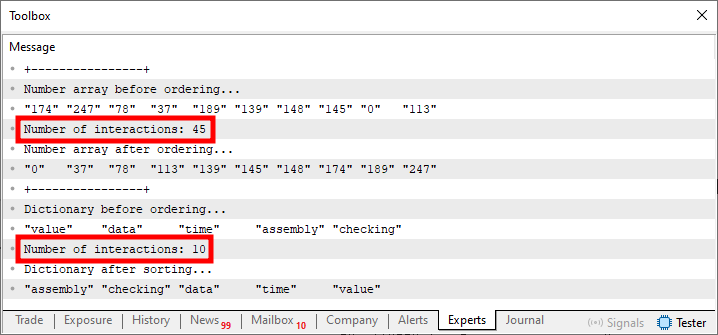
Figure 09
What really interests us here and now are the areas highlighted in Figure 09. Notice that a certain number of iterations are performed. Now I ask: is this a good or a bad result? And the answer to that question is: it all depends on the circumstances. There is one nuance here, and this is exactly the point I want to lead up to. Notice that the values to be sorted appear, at first glance, to be highly unordered. But what if they were closer to the desired sorted order? Would this reduce the number of iterations compared to the previous result? All right, let's give it a try and see what happens. To do this, we use the following code:
01. //+------------------------------------------------------------------+
02. #property copyright "Daniel Jose"
03. //+------------------------------------------------------------------+
04. void OnStart(void)
05. {
06.     string info_01[] = {"37", "78", "0", "145", "113", "139", "148", "247", "174", "189"};
07.     string info_02[] = {"value", "data", "time", "assembly", "checking" };
08. //+----------------+
09.     Print("+----------------+\nNumber array before ordering...");
10.     ArrayPrint(info_01);
11.
12.     BubbleSort(info_01, true);
13.
14.     Print("Number array after ordering...");
15.     ArrayPrint(info_01);
16. //+----------------+
17.     Print("+----------------+\nDictionary before ordering...");
18.     ArrayPrint(info_02);
19.
20.     BubbleSort(info_02);
21.
22.     Print("Dictionary after sorting...");
23.     ArrayPrint(info_02);
24. }
25. //+------------------------------------------------------------------+
26. template <typename T>
27. void BubbleSort(T &arr[], const bool bUsingLength = false)
28. {
29.     #define macroSWAP(A, B) {                           \
30.                                 temp = arr[j - 1];      \
31.                                 arr[j - 1] = arr[j];    \
32.                                 arr[j] = temp;          \
33.                             }
34.
35.     uint nElements = arr.Size();
36.     T    temp;
37.     uint count = 0;
38.
39.     for (uint i = 1; i < nElements; i++)
40.     {
41.         // interact = false;
42.         for (uint j = nElements - 1; j >= i; j--, count++)
43.             if (typename(T) == "string")
44.             {
45.                 if ((bUsingLength) && ((StringLen(arr[j - 1]) > StringLen(arr[j]))))
46.                     macroSWAP(arr[j - 1], arr[j])
47.                 if ((StringCompare(arr[j - 1], arr[j]) > 0) && ((StringLen(arr[j - 1]) == StringLen(arr[j])) || !bUsingLength))
48.                     macroSWAP(arr[j - 1], arr[j])
49.             }else
50.                 if (arr[j - 1] > arr[j])
51.                     macroSWAP(arr[j - 1], arr[j])
52.     }
53.
54.     Print("Number of interactions: ", count);
55.
56.     #undef macroSWAP
57. }
58. //+------------------------------------------------------------------+
Code 10
Notice that in line 6 of Code 10, we define the same values that were shown in Figure 09. They are, if I may put it that way, a little less chaotic. At first glance, it might seem that this would speed up the sorting process or require fewer iterations to complete it. But, to your surprise, when Code 10 is executed, the result will be as shown in the following figure.
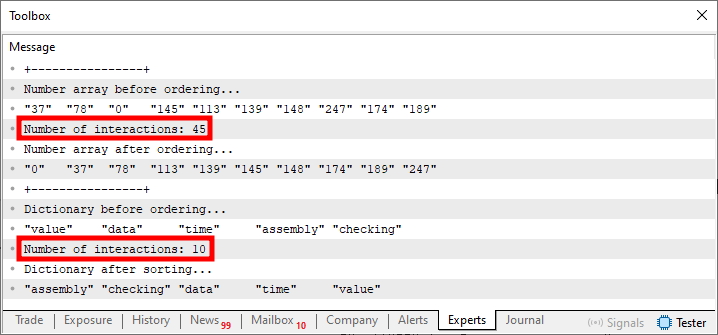
Figure 10
So, although it seems we should need fewer iterations to sort the array in line 06 of Code 10, we still perform the same number of iterations. This may seem strange to many people, but in that case, what is wrong with Code 10 that prevents it from performing fewer iterations? Actually, the code is fine. All that is left is to add a check to determine whether the array is sorted.
All right, but this check seems rather complicated, because to find out whether the array is sorted, we would have to check it. This will take time and require an additional iteration. This is undesirable, since our goal is precisely to reduce the number of iterations. All right, but how do we solve this? In my opinion, this is the most interesting part, precisely because all we need to do to solve this problem is make a few small changes to the code. Now take a look at the change that needs to be made to the following code:
01. //+------------------------------------------------------------------+
02. #property copyright "Daniel Jose"
03. //+------------------------------------------------------------------+
04. void OnStart(void)
05. {
06.     string info_01[] = {"37", "78", "0", "145", "113", "139", "148", "247", "174", "189"};
07.     string info_02[] = {"value", "data", "time", "assembly", "checking" };
08. //+----------------+
09.     Print("+----------------+\nNumber array before ordering...");
10.     ArrayPrint(info_01);
11.
12.     BubbleSort(info_01, true);
13.
14.     Print("Number array after ordering...");
15.     ArrayPrint(info_01);
16. //+----------------+
17.     Print("+----------------+\nDictionary before ordering...");
18.     ArrayPrint(info_02);
19.
20.     BubbleSort(info_02);
21.
22.     Print("Dictionary after sorting...");
23.     ArrayPrint(info_02);
24. }
25. //+------------------------------------------------------------------+
26. template <typename T>
27. void BubbleSort(T &arr[], const bool bUsingLength = false)
28. {
29.     #define macroSWAP(A, B) {                           \
30.                                 temp = arr[j - 1];      \
31.                                 arr[j - 1] = arr[j];    \
32.                                 arr[j] = temp;          \
33.                                 interact = true;        \
34.                             }
35.
36.     uint nElements = arr.Size();
37.     T    temp;
38.     bool interact = true;
39.     uint count = 0;
40.
41.     for (uint i = 1; (i < nElements) && interact; i++)
42.     {
43.         interact = false;
44.         for (uint j = nElements - 1; j >= i; j--, count++)
45.             if (typename(T) == "string")
46.             {
47.                 if ((bUsingLength) && ((StringLen(arr[j - 1]) > StringLen(arr[j]))))
48.                     macroSWAP(arr[j - 1], arr[j])
49.                 if ((StringCompare(arr[j - 1], arr[j]) > 0) && ((StringLen(arr[j - 1]) == StringLen(arr[j])) || !bUsingLength))
50.                     macroSWAP(arr[j - 1], arr[j])
51.             }else
52.                 if (arr[j - 1] > arr[j])
53.                     macroSWAP(arr[j - 1], arr[j])
54.     }
55.
56.     Print("Number of interactions: ", count);
57.
58.     #undef macroSWAP
59. }
60. //+------------------------------------------------------------------+
Code 11
When we run Code 11, we get the following result:
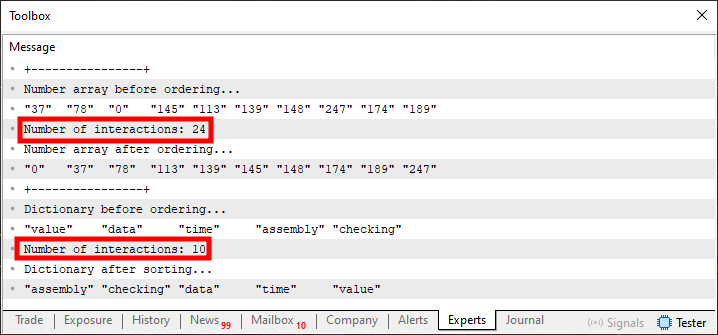
Figure 11
Note that in Figure 11, the number of iterations is now lower, without any significant changes to the code itself. All we had to do was add line 38 and then modify a few parts of the code. For example, the loop on line 41 and the macro. Note that the code itself will check whether any swaps have been performed in the array. If the loop on line 44 is executed, but line 33 is not executed during any iteration, we can be sure that the array is already properly sorted. Thus, on the next iteration of the loop on line 41, we will be able to terminate the sorting procedure. Interesting, isn't it?
Final Thoughts
This article explained a very simple and easy-to-understand mechanism designed to sort any array. It has also been shown that the result produced does not always match what we actually expect to obtain. Therefore, the implementation must be adjusted to ensure correct results.
We also demonstrated that, with just a little effort, we can transform what was initially a slow implementation into a more flexible one. This happens when the situation allows certain arrays to be processed more quickly. It may be the case that, with only minor adjustments, the expected result will already have been produced. This eliminates the need for further iterations, since they would no longer change the result obtained.
Since most of what is discussed here consists of changes made for instructional purposes, the attached materials will include only the final versions of the code. Therefore, if you want to understand why a particular approach was chosen, simply refer to the code listings presented in full in this article. Other than that, all that's left is to study and practice the material we've already covered in order to understand how the mechanism shown here works.
| File | Description |
|---|---|
| Code 01 | Demonstration of simple sorting |
| Code 02 | Demonstration of simple sorting |
| Code 03 | Demonstration of simple sorting |
Translated from Portuguese by MetaQuotes Ltd.
Original article: https://www.mql5.com/pt/articles/16418
Warning: All rights to these materials are reserved by MetaQuotes Ltd. Copying or reprinting of these materials in whole or in part is prohibited.
This article was written by a user of the site and reflects their personal views. MetaQuotes Ltd is not responsible for the accuracy of the information presented, nor for any consequences resulting from the use of the solutions, strategies or recommendations described.


 Neural Networks in Trading: Disentangling Structured Components (SCNN)
 Survival Analysis for Trade Exits: A Discrete-Time Competing-Risks Model in MQL5
 Market Simulation: Position View (VIII)
 Reinforcement Learning Meets MetaTrader 5: A Complete Pipeline for Training, Validating and Honestly Evaluating a Gold Trading Bot

- Free trading apps
- Over 8,000 signals for copying
- Economic news for exploring financial markets
You agree to website policy and terms of use