

AI Trading Platform: Why MetaTrader 5 Is the Best Choice for Algorithmic Trading with Python, ONNX, and AI Assistant
 7 690
7 690
 1
1

MetaTrader 5 is a great platform for AI trading when a trader needs a complete end-to-end workflow: market data, research, modeling, testing, automation, and control within a single working environment. Such a platform is important not because a neural network can elegantly explain a chart, but because a trading idea must become a verifiable system: obtaining data, engineering features, training a model, integrating its output into an Expert Advisor, and evaluating the strategy's behavior before committing real capital.
Artificial Intelligence (AI) genuinely accelerates a trader's operations. Until recently, traders manually searched for patterns on charts, compared indicators, read news, kept a trading journal, and checked ideas in a strategy tester. Today, AI helps traders faster analyze market conditions, formulate hypotheses, identify weaknesses in a strategy, write MQL5 code snippets, prepare model features, and reduce research time.
However, AI alone does not make trading professional. A neural network may convincingly explain a price movement and suggest a trading signal, but traders need more than an explanation — they need a reproducible process. Without formalization, testing, automation, and control, AI remains a discussion partner rather than a practical trading tool.
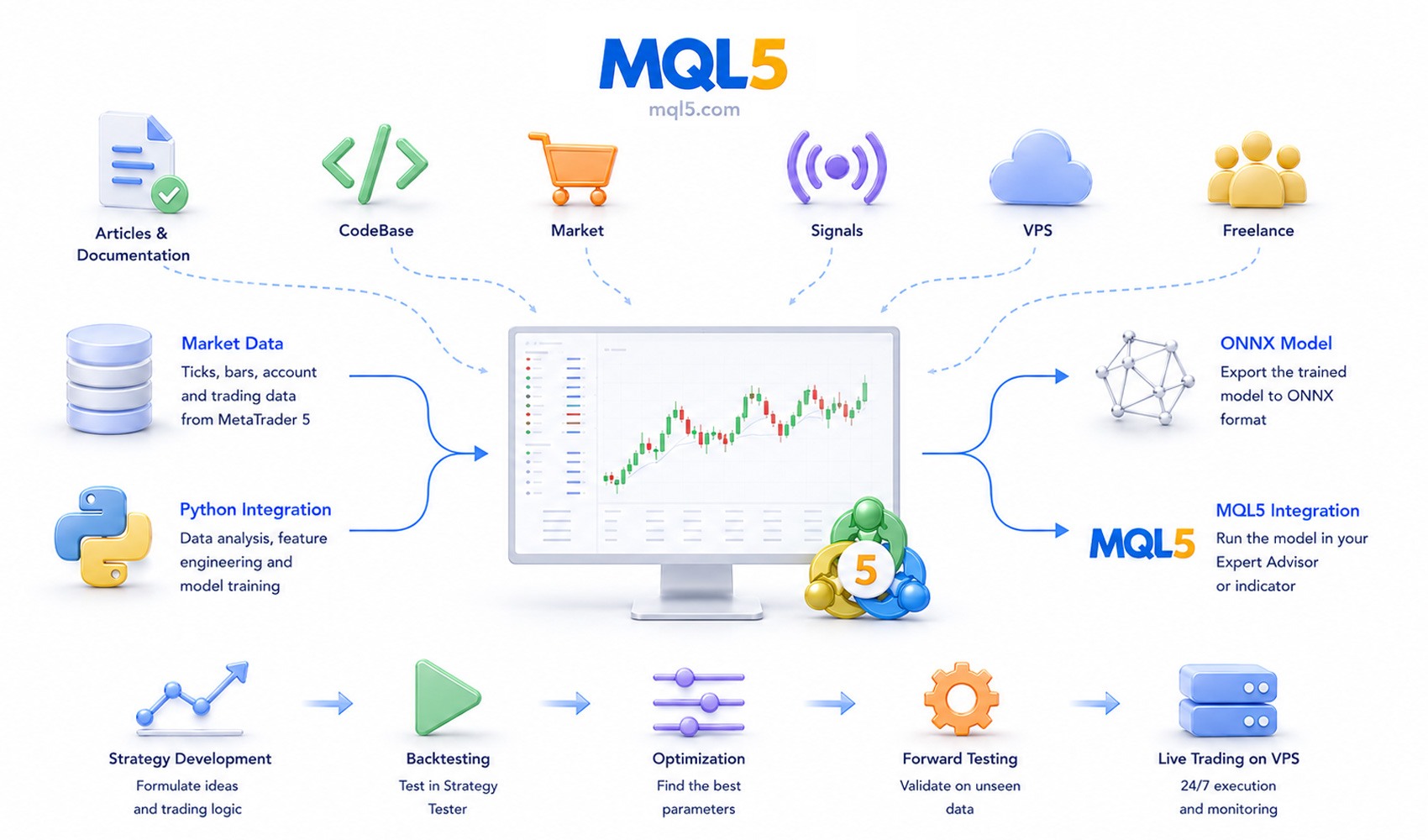
MetaTrader 5 supports this entire path in a single platform ecosystem. The terminal includes charts, market data, MQL5, Python integration, ONNX support, the Strategy Tester, MetaEditor, VPS hosting, and MQL5.community services. As a result, an AI-driven idea can pass a way from a chart observation to an Expert Advisor, testing, optimization, and real-world operation.
MetaQuotes has developed the MetaTrader 5 package for Python, enabling traders to retrieve terminal data directly into a Python research environment. Historical bars, ticks, account information, instrument specifications, positions, orders, and deals can all be used for statistical analysis, feature engineering, and machine learning without the need for manual spreadsheet exports.
MetaTrader 5 supports the ONNX format, allowing a trained model to become part of the trading logic. A model can be prepared in an external environment, exported to a universal format, and then used in an MQL5 Expert Advisor or indicator. Thus, research results do not remain in an analyst's notebook but become executable elements of a trading system.
In this article, AI is not considered as a magical Make Money button, but as a layer that enhances analysis, helps formalize trading ideas, and integrates into verifiable algorithmic logic. The main goal is to show MetaTrader 5 as an infrastructure where AI progresses from a hypothesis into a controllable trading robot.
AI Trading Begins with a Testable and Controlled Process
AI trading does not begin with the question, Where will the price go? It begins with a process that can be checked and repeated. A common mistake is to treat artificial intelligence as a source of ready-made answers: a trader asks, Should I buy EURUSD? or Where will gold go? and expects a ready-made answer. This is a new interface for an old habit of seeking external hints. Previously, traders looked for them from analysts, Telegram channels, or arrow indicators; today, they seek them from language models.
Professional trading operates differently: data, hypothesis generation, formalization, testing, risk assessment, execution, logging, and improvement. AI is useful when it accelerates individual stages of this process. AI becomes dangerous when it attempts to replace the entire process with a single confident answer.
A practical AI pipeline in trading can be described as follows:
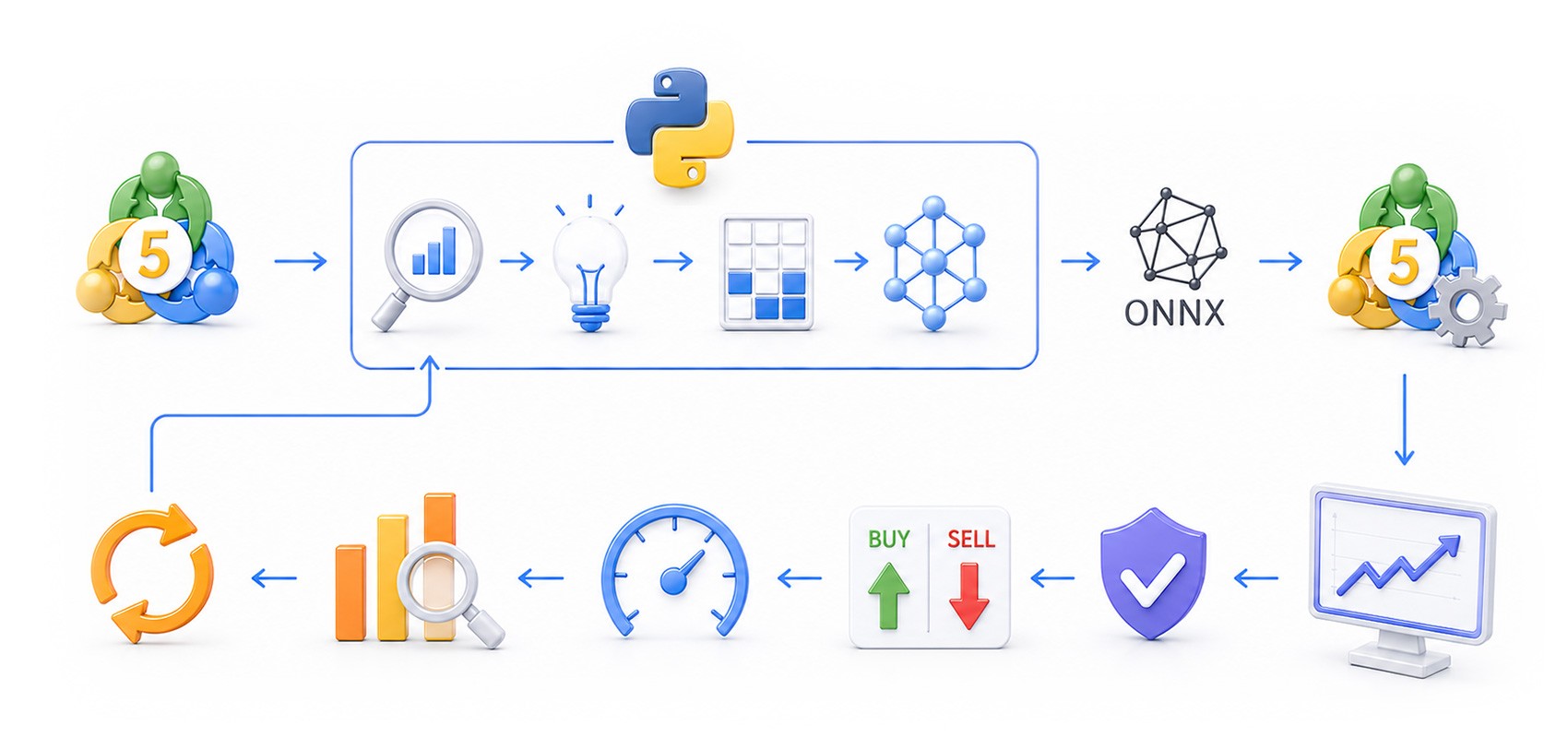
MetaTrader 5 allows you to build such a pipeline in a single ecosystem. Traders observe market conditions directly on charts. MQL5 can be used to develop Expert Advisors, indicators, control panels, signal managers, and trading modules. Python enables data research and model training. ONNX allows the trained model to be returned into an Expert Advisor. The Strategy Tester makes it possible to test the system on historical data. A VPS enables a trading robot to operate continuously without relying on a personal computer.
MetaTrader 5 Data Improves AI Model Training Efficiency
In algorithmic trading, an AI model must be trained on data close to the environment in which the trading logic will be executed. If a model is trained on one set of quotes, tested on another, and then used under entirely different conditions, the outcome quickly becomes a matter of chance. Algorithmic trading requires more than opening and closing prices; ticks, spreads, instrument specifications, stop levels, contract sizes, margin requirements, trading sessions, and execution types are equally important.
In MetaTrader 5, data is part of the trader's workspace. Market Watch displays real-time quotes, tick charts, and symbol parameters. Charts provide visual context. MQL5 programs can access historical bars and live market data, while the MetaTrader 5 Python package transfers this data into an analytical environment.
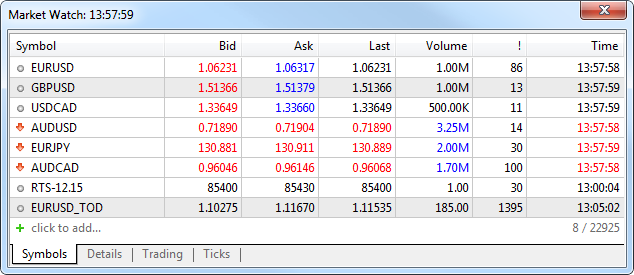
For AI trading, a unified data source reduces the risk of discrepancies between an experimental model and the live trading environment. If an Expert Advisor trades EURUSD on the H1 timeframe in MetaTrader 5, it is logical to begin research using data from the same terminal. This immediately links the model to the conditions under which it will later be tested and used.
The first practical task is to connect to the MetaTrader 5 terminal, retrieve the historical data of the selected symbol, and save that history for further analysis.
import MetaTrader5 as mt5
import pandas as pd
from datetime import datetime

symbol = "EURUSD"
timeframe = mt5.TIMEFRAME_H1

if not mt5.initialize():
    raise RuntimeError("MetaTrader 5 initialization failed")

rates = mt5.copy_rates_range(
    symbol,
    timeframe,
    datetime(2020, 1, 1),
    datetime(2026, 1, 1)
)
mt5.shutdown()

df = pd.DataFrame(rates)
df["time"] = pd.to_datetime(df["time"], unit="s")
df.to_csv("eurusd_h1.csv", index=False)

print(df.head())
print("Rows:", len(df))
This is how reproducible development begins. The symbol, timeframe, historical period, and data source are all explicitly defined. Without such discipline, an AI project can easily turn into a collection of attractive screenshots that cannot be checked or reproduced.
WebRequest Connects an AI Assistant on the Chart to an External LLM
An on-chart AI assistant is useful as a live analysis tool, not as an automated instruction to open a trade. A trader presses a button and receives a brief analysis of the current situation: where price is relative to the trend, whether volatility is increasing, whether there are signs of overheating, whether RSI confirms the momentum, and how risky it is to open a position at that moment.
Such a scenario can be implemented in MQL5 using a custom panel and the WebRequest function. Here, WebRequest does not analyze the market by itself; rather, it serves as an HTTP communication channel that sends a chart description to an external LLM service and returns the response to the terminal. The "Building AI-Powered Trading Systems in MQL5" series shows a practical approach to building a ChatGPT-integrated application directly inside MetaTrader 5. For traders, this represents an important shift: AI is no longer a separate browser window — it becomes part of the trading workspace.
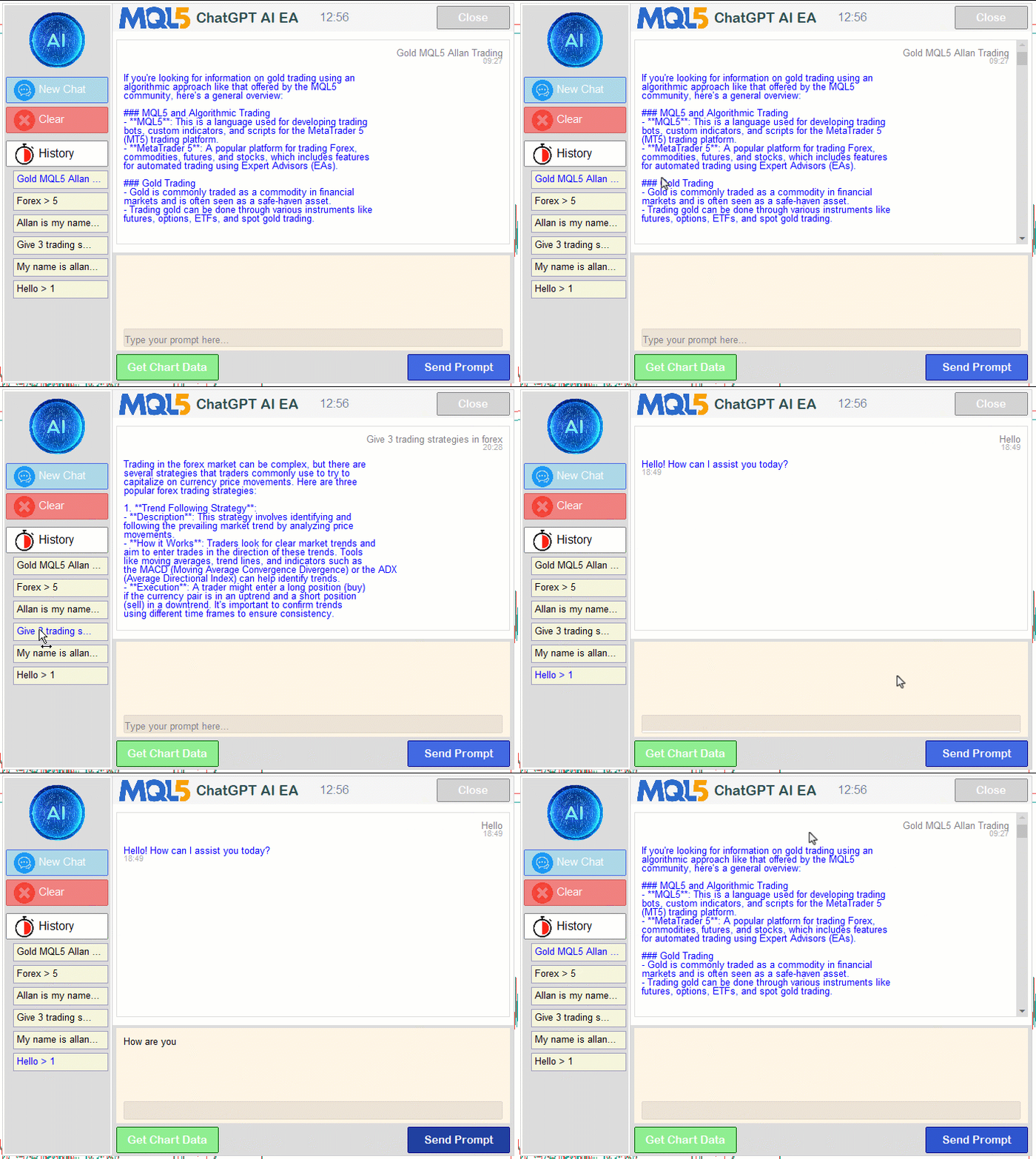
The panel itself does not need to be complex. Even one or two buttons are enough to generate a brief market summary and send it to the model. In the demonstration interface, six analysis scenarios and a custom prompt field have been added. Traders can obtain a standard market assessment or refine the task by asking the model to explain risks, comment on a decision, or perform additional analysis of the current chart.
The boundary of application here is important. AI on the chart helps explain the current situation, formulate ideas, and accelerate decision-making, but an external LLM layer cannot be directly incorporated into historical testing as a conventional indicator or Expert Advisor. An external AI service depends on network connectivity, model versions, generation parameters, and request structure. Furthermore, WebRequest is not executed in the Strategy Tester.
For this reason, we introduced a visual historical testing mode for interactive analysis. The user specifies an offset, sends a fragment of past market data to the model, and observes what analysis or signal the model would have produced under those conditions. The result can then be compared against subsequent price action. This type of check does not replace the Strategy Tester, but it helps eliminate weak ideas before rigorous testing.
As a result, we have two levels of control. Interactive AI analysis on the chart uses historical offsets and visual signal evaluation. Rigorous testing of trading logic uses a deterministic framework: of MQL5, an ONNX model, and the Strategy Tester. The first level accelerates analysis, while the second provides reproducible testing before live trading.
A Fixed-Format LLM Response Becomes a Trading Signal
A trading Expert Advisor cannot reliably operate on free-form prose, so AI responses must be translated into structured signals. A statement such as "the market appears moderately bullish, although the risk of a pullback remains" may be useful to a human, but it cannot be unambiguously tested, recorded as a trading decision, or passed to an execution module.
The next step is to define a response format in advance that MQL5 code can parse:
   string prompt =
      "You are Data Analyst. Analyze FULL DATA ONLY for: " + actionLabel +
      ". Decision by Bar with MAX time in DATA. Treat it as incomplete and lower confidence
       if its signal is not confirmed.\n"
      "BULLISH means C>O, BEARISH means C<O, DOJI means C=O.\n"
      "Focus: " + AiPanelAnalysisFocus(actionId) + "\n"
      "Return ONLY these 10 KEY: VALUE lines. No markdown, no HTML, no <br>, no extra text:\n"
      "ANALYSIS: " + actionLabel + "\n"
      "CONFIDENCE: <integer 0-100>\n"
      "DIRECTION: <BUY or SELL or NONE>\n"
      "TRIGGER_BAR: 1\n"
      "ENTRY: <decimal price or NONE>\n"
      "SL: <decimal price or NONE>\n"
      "TP: <decimal price or NONE>\n"
      "LEVEL_TYPE: <SUPPORT or RESISTANCE or MIDPOINT or NONE>\n"
      "LEVEL_PRICE: <decimal price or NONE>\n"
      "REASON: <one short line: bars analyzed; time and close price of last bar; evidence;
       why confidence is not higher>\n"
      "If DIRECTION is BUY/SELL, ENTRY/SL/TP must describe a trade on CLOSE Bar 1 only.
       If no trade, use NONE but still return useful LEVEL if present.\n"
      + barsBlock;
Such a format can already be processed programmatically. The Expert Advisor extracts the direction, confidence level, entry price, stop levels and target price. A comment can be saved to a log or displayed on the chart. AI is no longer merely communicating with the trader — it begins operating within a trading system.
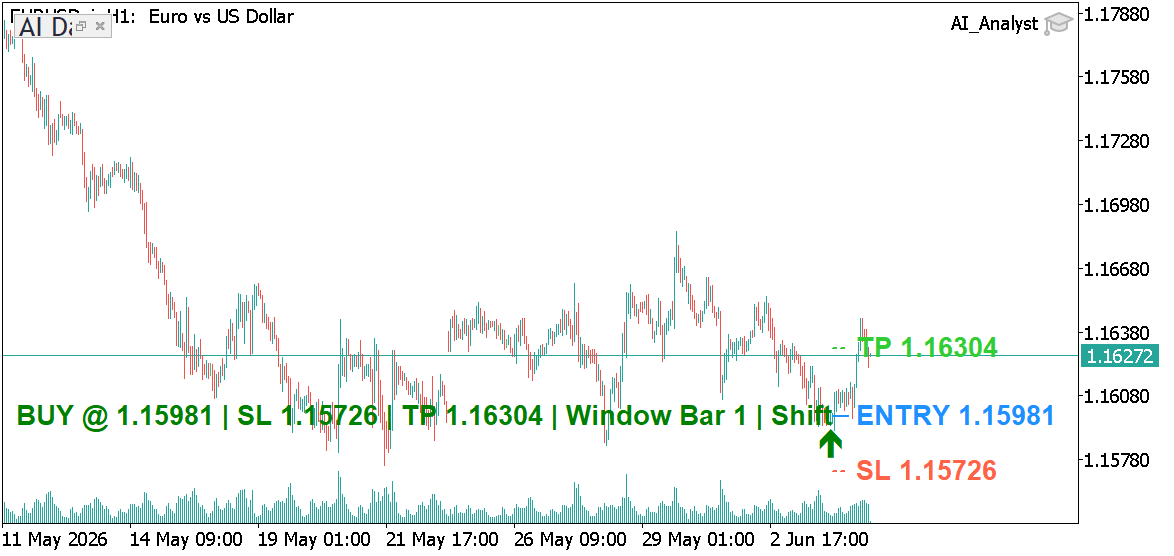
"Building AI-Powered Trading Systems in MQL5. Part 4" shows the evolution of the AI interface: chat history, multi-line input, and signal generation. The practical principle is more important than the specific interface design: AI should return structured outputs rather than free-form prose so that its results can be processed programmatically.
At this stage, architectural discipline emerges. AI may propose a signal, but the Expert Advisor should not immediately execute a trade. A separate control layer must exist between the signal and market execution.
What Is an AI Signal Dispatcher and Why Is It Necessary Before Trade Execution?
An AI Signal Dispatcher is a software layer within the Expert Advisor that sits between the model's response and the trading module. Its purpose is to prevent signals generated by an external LLM or another AI model from becoming uncontrolled trades. The model may propose a direction, entry level, stop loss, target price, and confidence score, but the trading decision itself must pass through the Expert Advisor's rules.
In MetaTrader 5, such a dispatcher checks several simple yet critical conditions: whether a position is already open for the symbol, whether the signal has already been processed on the current bar, whether the confidence level is sufficient, whether trading is permitted, whether enough margin is available, whether the stop loss violates broker restrictions, and whether the signal matches with the strategy's main logic. If even one condition is not satisfied, the Expert Advisor will not open a position; instead, it records the reason for rejection in the log or displays it on the chart.
This is precisely why an AI Signal Dispatcher is important for practical AI trading. AI analyzes and proposes; MQL5 code validates the trading conditions. The model may return a BUY or SELL signal, but the trading module remains responsible for position sizing, stop losses, profit targets, re-entry rules, and account restrictions.
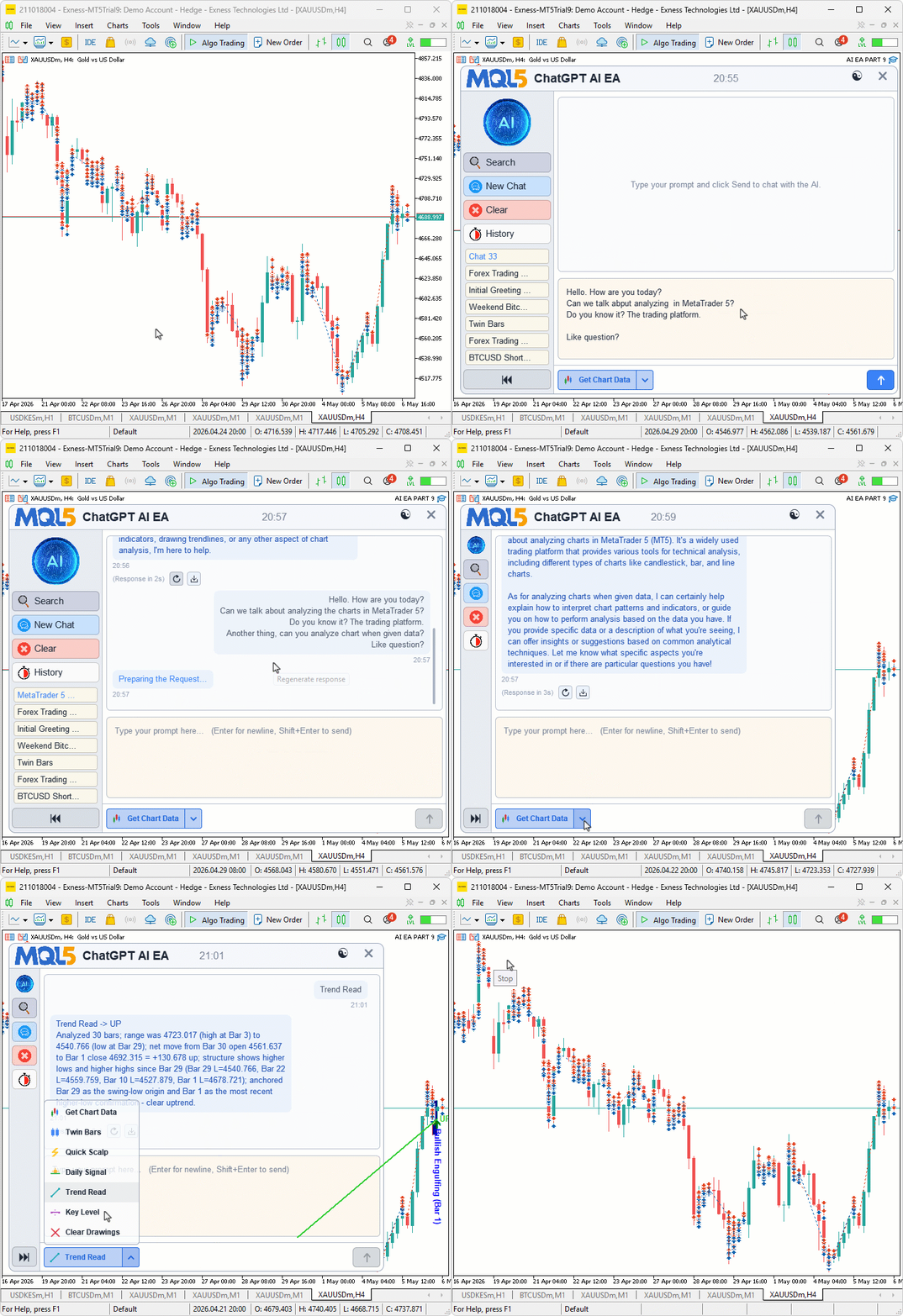
In "Building AI-Powered Trading Systems in MQL5. Part 9", this layer is referred to as the AI Signal Dispatcher. Its purpose is not to replace the strategy but to transform a free-form AI response into a verifiable object: parse its fields, filter invalid values, display the results on the chart, and only then pass an approved signal to the trading logic.
An MCP Server Allows an AI Agent to Access Market Data and Account State
An AI agent becomes useful when natural language is connected not to the model's assumptions, but to specific tools in the trading platform. The agent can receive account data, check positions, request recent bars, analyze trades, calculate risk, and generate reports.
A practical example is shown in "How to connect AI agents to MetaTrader 5 via MCP". In this article, MetaTrader 5 is connected to an AI agent through Python and an MCP server, and the agent receives tools for working with the account, market data, positions, orders, and historical records.
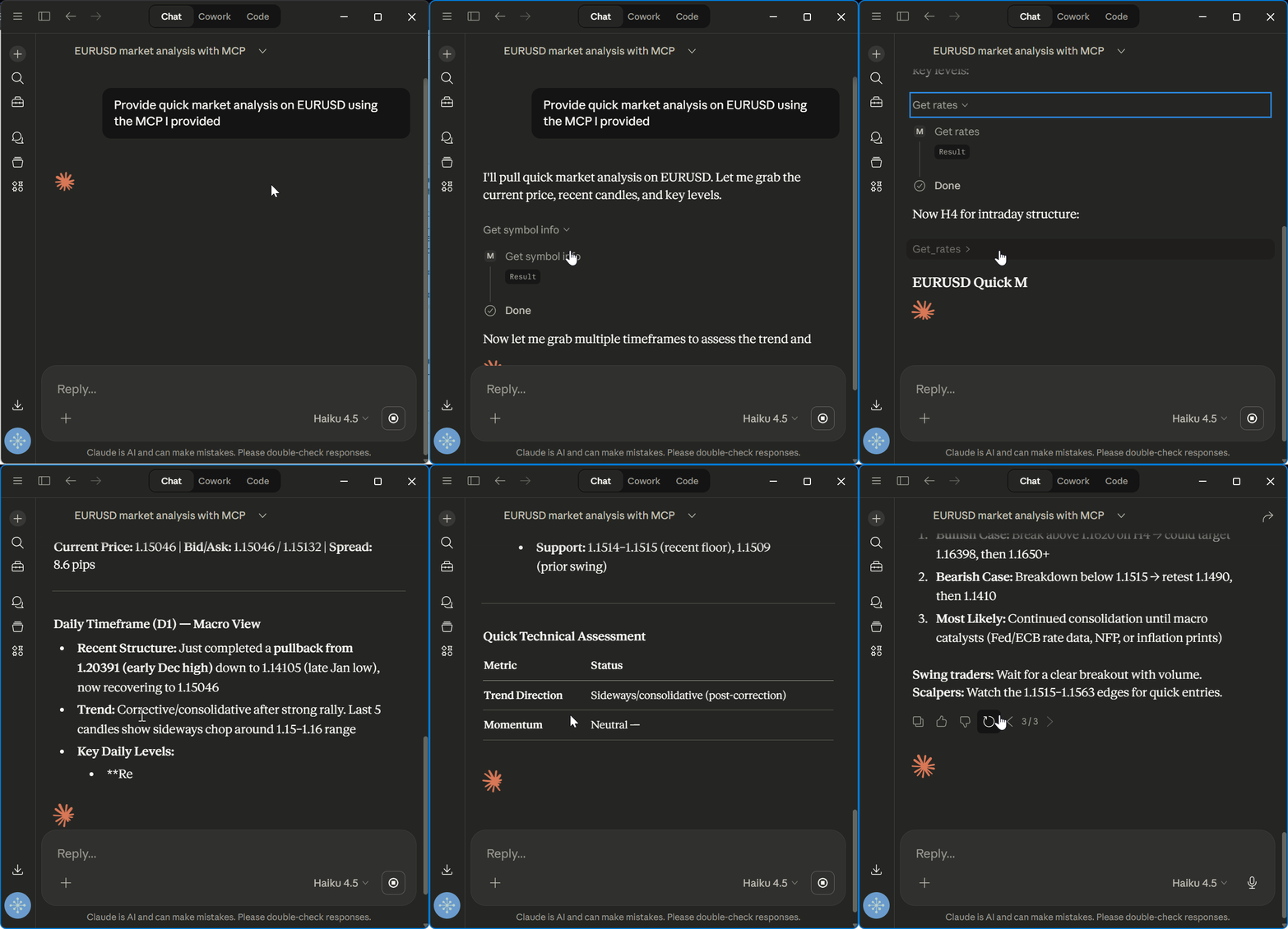
For example, a trader may write, Check my open positions or Calculate the risk based on the current Stop Loss. The AI agent converts such requests into a sequence of tool calls and returns a clear response. From the user's perspective, this looks like a conversation, but internally it is a set of controlled operations.
Control remains mandatory even in agent-based scenarios. If an agent is allowed to send trading commands, it must first operate on a demo account. Any actions affecting live positions should require trader confirmation or strictly defined rules. A good AI agent does not eliminate discipline — it accelerates routine tasks.
Python Integration Enables Data Analysis and Model Training
In AI trading, Python is used for data exploration, feature calculation, and model training. An LLM helps analyze charts, formulate hypotheses, and convert text into structured signals. However, many practical tasks are solved differently — through statistics, feature engineering, and machine learning.
In our demonstration, we will use the standard MACD Sample Expert Advisor as the base. Most traders know its logic: MACD generates signals, the signal line helps determine entry timing, and EMA confirms trend direction. Such an Expert Advisor can already be tested, optimized, and analyzed using the Strategy Tester. The limitation is that traditional indicator-based logic does not distinguish between high-quality and low-quality signals: some entries occur during weak momentum, some in overheated markets, and others immediately before adverse price movements.
Therefore, we do not force the model to predict the market on every bar. Traders spend most of their time outside the market, and such a formulation would quickly lead the model toward passive responses. A more practical task is different: MACD Sample identifies a potential entry candidate, while the model evaluates the quality of the context and decides whether the signal should be passed to the trading logic.
The MACD signal filtering scheme closely resembles how traders work in practice. Traders wait for a signal and then evaluate the context: Is momentum present? Is the entry already late? Has volatility increased? Is the price located in a high-risk area? In this framework, MACD generates the signal, Python trains a context-quality assessment model, ONNX transfers the model into the Expert Advisor, and the Strategy Tester determines whether performance improves.
During the research phase, the MetaTrader 5 Python package is used. The package retrieves historical bars and trading environment information directly from the terminal. It is important to understand the boundaries of the tool: the Python package transfers raw market data but does not provide ready-made indicator buffers in the same way MQL5 does through iMACD, iMA, iATR, and CopyBuffer(). Indicators and features are calculated separately in Python.
To keep the code concise, indicator calculations can be performed using the TA library. The library facilitates the computation of MACD, EMA, ATR, and other standard metrics based on the received quotes.
from ta.trend import EMAIndicator, MACD
from ta.volatility import AverageTrueRange

macd = MACD(close=df["close"],
            window_slow=macd_slow,
            window_fast=macd_fast,
            window_sign=macd_signal,
            fillna=False,
           )
df["macd_main"] = macd.macd()
df["macd_signal"] = macd.macd_signal()
df["macd_hist"] = df["macd_main"] - df["macd_signal"]
df["ema26"] = EMAIndicator(close=df["close"],
                           window=ema_trend_period,
                           fillna=False,
                          ).ema_indicator()
df["atr14"] = AverageTrueRange(high=df["high"],
                               low=df["low"],
                               close=df["close"],
                               window=atr_period,
                               fillna=False,
                              ).average_true_range()
df["range"] = df["high"] - df["low"]
The training dataset is constructed not from every bar, but only from those segments where MACD Sample generated a potential signal. For each signal, the trade direction is recorded and market-context features are calculated.
df["macd_prev"] = df["macd_main"].shift(1)
df["signal_prev"] = df["macd_signal"].shift(1)
df["ema_prev"] = df["ema26"].shift(1)

buy_setup = ( (df["macd_main"] < 0)
            & (df["macd_main"] > df["macd_signal"])
            & (df["macd_prev"] < df["signal_prev"])
            & (df["ema26"] > df["ema_prev"])
            )
sell_setup = ( (df["macd_main"] > 0)
             & (df["macd_main"] < df["macd_signal"])
             & (df["macd_prev"] > df["signal_prev"])
             & (df["ema26"] < df["ema_prev"])
             )

 if use_open_level_filter:
     buy_setup = buy_setup & (df["macd_main"].abs() > macd_open_level)
     sell_setup = sell_setup & (df["macd_main"] > macd_open_level)

 df["setup"] = buy_setup | sell_setup
 df["direction"] = 0
 df.loc[buy_setup, "direction"] = 1
 df.loc[sell_setup, "direction"] = -1
The target variable does not answer the question Where will the price go? Instead, it answers a different question: Was this specific MACD signal of high quality? If, after the signal, the price reaches the target within a predefined horizon before making a dangerous adverse move, the signal is assigned the good class. If an unfavorable move occurs first, or the price fails to produce a meaningful outcome, the signal is classified as weak. This labeling process does not replace the Strategy Tester; rather, it creates a supervised learning task for preliminary context evaluation.
As a result, the model solves a binary classification problem: good signal or weak signal. The direction has already been determined by the underlying MACD signal; the model evaluates only the quality of the setup. If the probability of a high-quality signal exceeds a threshold, the Expert Advisor allows the entry. If the probability falls below the threshold, the trade is skipped.
This architecture clearly illustrates the role of MetaTrader 5 as a platform for AI trading. Python serves as a research laboratory: traders retrieve data, calculate features, prepare datasets, and build models. The model is then exported to ONNX and returned to the terminal as an executable quality filter. MQL5 calculates the same features in real time, feeds them into the model, and the final check is performed by the Strategy Tester.
In this architecture, the neural network does not replace the trading system. Traders begin with a familiar strategy, add a layer of statistical evaluation, and then verify whether that layer can effectively filter out low-quality entries.
AI Assistant in MetaEditor Helps Write and Explain MQL5 Code
AI Assistant in MetaEditor helps traders move more quickly from a trading idea to working code in MQL5, Python, or C++. For AI trading, this represents the practical stage between hypothesis generation and testing: an idea such as evaluating the quality of MACD signals with a model must eventually be translated into functions, features, validation checks, and safe trading logic.
Consider a typical workflow. The trader already understands the direction of the experiment: MACD Sample identifies entry candidates, while a model filters out weak market conditions. The engineering stage then begins: where should features be calculated, how should input parameters be ordered, how should the model be called, how should errors be handled, and how can the system avoid opening a trade if trading environment conditions are not satisfied? This is precisely where AI Assistant becomes more than a standalone chatbot — it becomes an assistant integrated in the development environment.
The workflow remains natural for developers. A comment describing a task or function is added to the code, after which the user can select the Send Prompt to AI Assistant command or press Ctrl+Alt+\. The assistant analyzes the request and proposes an implementation. If an MQL5, Python, or C++ file is open, the corresponding language context is automatically added to the prompt, allowing the response to be generated for the current code type. This is especially convenient for AI projects: research code, trading logic, and supporting components all remain in one environment.
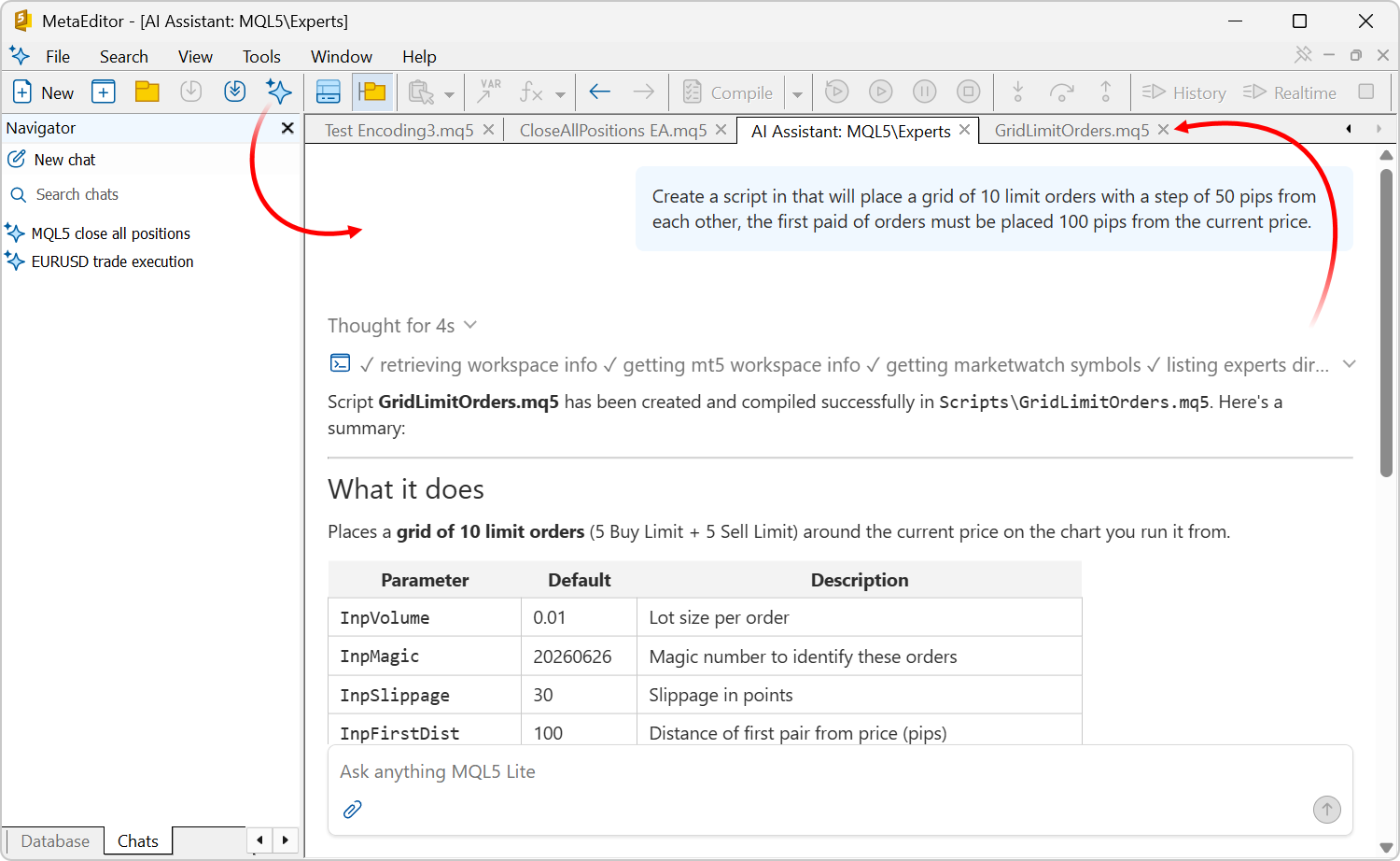
A second use case is equally important: AI Assistant helps developers understand existing code. A developer can highlight a fragment of an Expert Advisor and call AI Assistant explanation feature — the description is inserted above the selected section as comments. This is particularly useful when updating legacy robots, analyzing third-party examples, or collaborating in a team environment, as it quickly reveals where signals are generated, where risk is calculated, where models are called, and where trading decisions are made.
AI Assistant in MetaEditor does not replace compilation, code review, or the Strategy Tester, but it shortens the path from an idea to a verifiable prototype. The neural network helps write and explain code, while the trading value of that code must still be validated through backtesting, forward testing, and risk management.
ONNX Transfers a Trained Model into an MQL5 Expert Advisor
ONNX transfers a trained model from the research environment directly into a trading robot. In Python, datasets are prepared, features are calculated, MACD signals are labeled as either high quality or weak, and the model is trained. The model is then exported to ONNX format and embedded inside an MQL5 Expert Advisor. In this way, the model becomes part of the trading logic rather than remaining a laboratory experiment.
The model does not attempt to predict price directly. Instead, it evaluates the quality of a signal already generated by MACD Sample. The base Expert Advisor identifies an entry candidate, and the ONNX model receives a numerical feature vector and returns the probability that the signal should be allowed into the market.
This distinction is fundamental for traders. External LLMs are useful for explanations and hypothesis generation, but they are poorly suited for rigorous historical testing: their responses depend on network conditions, model versions, generation parameters, and prompt wording. An ONNX model operates differently: it is loaded into the Expert Advisor, receives a fixed set of features, and produces deterministic outputs. Such an AI layer can be validated in the Strategy Tester, optimized, and evaluated on forward periods.
When exporting a model, feature ordering must be fixed. MQL5 must supply the input vector in exactly the same composition and sequence used during training. If the feature order is altered, the Expert Advisor will continue to function technically, but the model will be making decisions based on corrupted inputs.
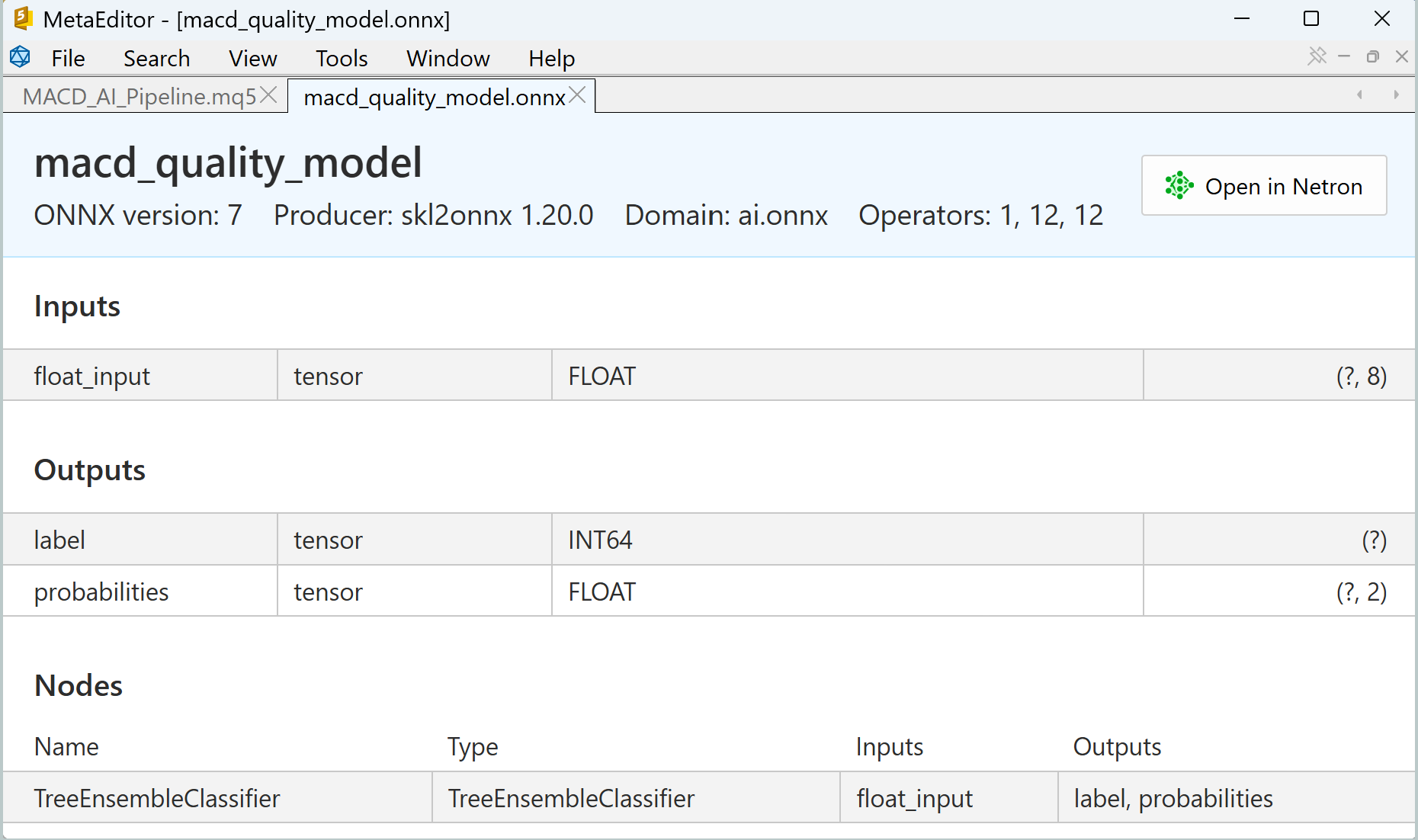
On the MQL5 side, the Expert Advisor creates an ONNX session during initialization. When MACD Sample generates a potential entry, the Expert Advisor calculates the same feature set, passes those features to the model, and receives a signal quality score. The integration process is straightforward: load the model, prepare the input vector, execute OnnxRun, and process the result.
Signal validation in the Expert Advisor remains simple. The model does not open trades directly; it only returns a quality assessment. The final trading decision still passes through the Expert Advisor's rules: the MACD signal, position direction, and trading environment constraints.
//--- check for long position (BUY) possibility
   if(m_macd_current < 0)
      if(m_macd_current > m_signal_current && m_macd_previous < m_signal_previous)
         if(MathAbs(m_macd_current) > (m_macd_open_level) && m_ema_current > m_ema_previous)
           {
            if(InpUseMLFilter)
              {
               double quality = 0.0;
               if(!MLSignalQuality(ORDER_TYPE_BUY, quality) || quality < InpMLThreshold)
                 {
                  if(InpMLLogSkipped)
                     PrintFormat("BUY signal skipped by ML filter. Quality=%.6f Threshold=%.6f",
                                                                       quality, InpMLThreshold);
                  return(true);
                 }
              }
            double price = m_symbol.Ask();
            double tp   = m_symbol.Bid() + m_take_profit;
            //--- check for free money
            if(m_account.FreeMarginCheck(Symbol(), ORDER_TYPE_BUY, InpLots, price) < 0.0)
               printf("We have no money. Free Margin = %f", m_account.FreeMargin());
            else
              {
               //--- open position
               if(m_trade.PositionOpen(Symbol(), ORDER_TYPE_BUY, InpLots, price, 0.0, tp))
                  printf("Position by %s to be opened", Symbol());
               else
                 {
                  printf("Error opening BUY position by %s : '%s'", Symbol(), m_trade.ResultComment());
                  printf("Open parameters : price=%f,TP=%f", price, tp);
                 }
              }
            //--- in any case we must exit from expert
            res = true;
           }
This architecture preserves control. AI does not replace the strategy and is not granted authority to open positions independently. First, the traditional MACD signal generates an entry candidate; next, the ONNX model validates the market context; finally, the MQL5 Expert Advisor makes a decision according to standard rules. The system remains transparent, verifiable, and easy to analyze in the Strategy Tester.
MetaEditor complements this workflow by providing tools for working with prepared ONNX models, inspecting model structures, and integrating models into MQL5 applications. It is not a replacement for Python or a training environment, but rather a bridge between a trained model and the MetaTrader 5 trading infrastructure.
MetaQuotes continues to expand this direction. MetaTrader 5 Build 5572 introduced ONNX improvements and accelerated model execution on GPUs with CUDA support. Machine learning is gradually becoming an integral part of MetaTrader 5 platform infrastructure.
Strategy Tester Evaluates the Contribution of the ONNX Filter Before Live Trading
The Strategy Tester in MetaTrader 5 determines whether an AI model adds trading value. Until trading logic has been validated on historical data, it remains a hypothesis. It does not matter how convincingly a neural network explains an idea or how visually appealing a feature chart appears. For traders, a more important question must be answered: What happens when this logic is executed across a series of historical market conditions?
In the demonstration framework, MACD Sample + ONNX Filter, the tester is used exclusively for the deterministic components of the system. The on-chart AI assistant, which communicates with an external LLM via WebRequest, remains a live analysis tool. Rigorous historical testing is performed on a different layer: the MQL5 Expert Advisor, the base MACD Sample logic, and the ONNX signal-quality model. The external interactive service is intentionally separated from reproducible trading tests.
The reference point is the original MACD Sample. The baseline version without the ONNX filter demonstrates how traditional indicator-based logic works: MACD generates a signal, EMA confirms the trend, the Expert Advisor opens a position and manages it according to predefined rules. Without such a baseline, it is impossible to evaluate honestly whether the model adds value or merely changes the number of trades.
The second configuration is MACD Sample + ONNX Quality Filter. The Expert Advisor still identifies entry candidates first, but every signal undergoes additional check before a position is opened. The Expert Advisor calculates features describing the current MACD context, passes them to the ONNX model, and receives a quality score. If the probability exceeds the MLThreshold parameter, the trade is approved. If the probability is below the threshold, the trade is skipped.
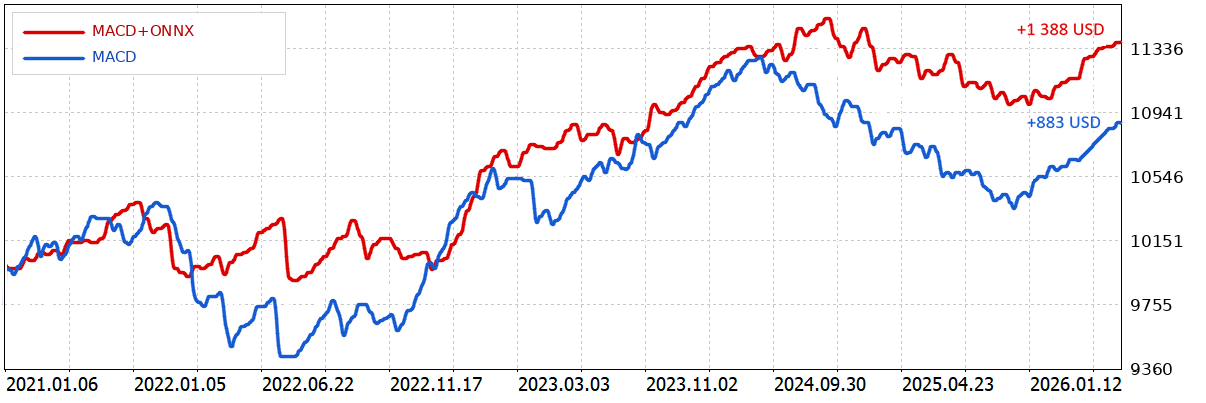
Table 1. Comparison of MACD Sample and MACD Sample + ONNX Filter
| Metric | MACD Sample | MACD Sample + ONNX Filter | Change |
|---|---|---|---|
| Net Profit | 883.44 USD | 1 387.96 USD | higher by 504.52 USD |
| Profit Factor | 1.16 | 1.39 | Profit quality improved |
| Expected Payoff | 4.23 USD | 9.13 USD | Average trade result increased |
| Recovery Factor | 0.80 | 1.98 | Recovery from drawdowns improved |
| Balance Drawdown | 980.14 USD / 8.68% | 567.45 USD / 4.92% | Drawdown decreased |
| Equity Drawdown | 1 110.86 USD / 10.67% | 700.60 USD / 6.73% | Floating risk decreased |
| Trades | 209 | 152 | Some weak entries filtered out |
| Win Rate | 60.77% | 66.45% | Percentage of profitable trades increased |
Compared to the baseline MACD Sample, the ONNX filter reduced the number of trades from 209 to 152 while increasing net profit from 883.44 USD to 1,387.96 USD. At the same time, maximum Equity Drawdown decreased from 10.67% to 6.73%, while the Profit Factor improved from 1.16 to 1.39. This demonstrates that the model did more than simply alter trading frequency — it improved the risk-reward profile.
The filter's primary effect was not to increase trading activity. On the contrary, fewer trades were executed. The improvement resulted from filtering out weak MACD signals: the percentage of profitable trades increased from 60.77% to 66.45%, while Expected Payoff more than doubled.
The MQL5 Ecosystem Helps You Go from a Prototype to Launch
The MQL5 ecosystem allows AI projects to begin with more than an empty editor. MetaTrader 5 is surrounded by documentation, articles, CodeBase, Market, Signals, VPS, Freelance services, and a developer community. For traders, this means that the path from idea to prototype can be built upon existing examples, services, and established practices.
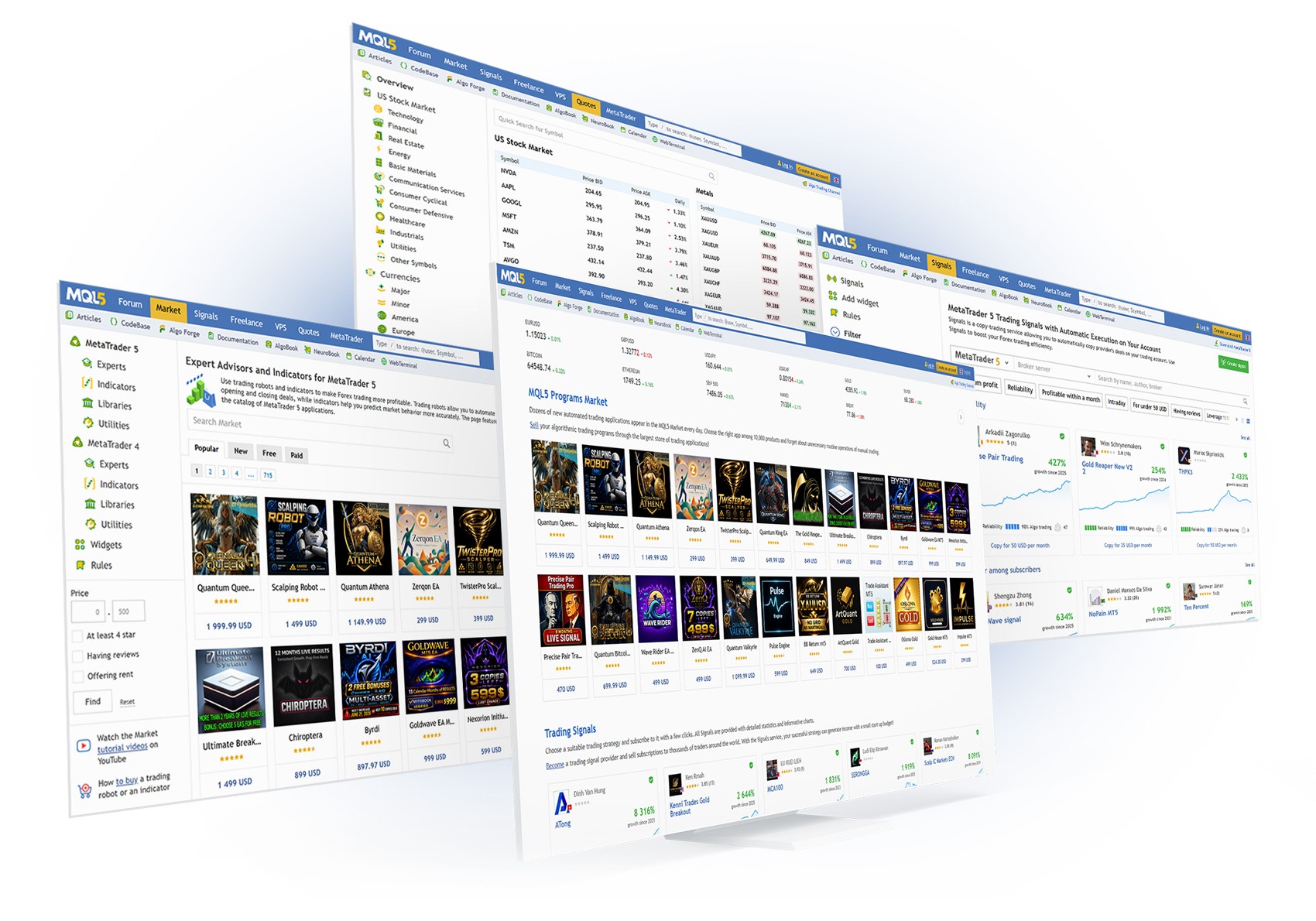
The scale of the ecosystem is especially important for AI projects. One trader may begin with an assistant on the chart, another may adapt an AI Signal Dispatcher, a third may outsource Expert Advisor modifications through Freelance, a fourth may publish a solution in Market, and a fifth may deploy a trading robot on a VPS and control its operation through logs.
The Machine Learning, CodeBase, Market, Signals, and VPS sections transform MetaTrader 5 from a trading terminal into a complete working ecosystem. This is particularly valuable for AI trading: final systems rarely emerge fully formed. Typically, they evolve through a sequence of stages: idea, prototype, testing, refinement, and deployment.
In this process, every platform component serves a specific purpose. Articles provide examples of interfaces and signal dispatchers. Python integration supplies data for research. ONNX transfers models into Expert Advisors. The Strategy Tester validates results. VPS enables 24/7 operation. These are not isolated tools but components of a unified workflow.
MetaTrader 5's AI Infrastructure Provides a Complete Path from Idea to Trading Robot
The AI infrastructure in MetaTrader 5 delivers practical advantages to traders: faster market analysis, fewer subjective impressions, systematic idea validation, risk control, and the ability to verify decisions before deploying them on a live account. The technology itself is important here only as part of the trading process.
MetaTrader 5 provides a clear development path for AI projects. Traders first use AI as an analytical assistant on the chart. Next, they require the assistant to produce structured signals. Those signals are then routed through a dispatcher, the idea's statistics are evaluated in Python, a lightweight model is trained, the model is exported to ONNX, integrated into an Expert Advisor, and only then subjected to testing, optimization, forward analysis, and finally considered for live deployment.
This workflow is far more professional than the scenario of "the neural network said BUY". Traders do not transfer random model outputs to a live account, do not trust impressive training accuracy, and do not deploy robots without testing. Instead, they gradually transform an idea into a formalized, testable, and controllable system.
AI in MetaTrader 5 Augments the Trader, but Control Remains with the Human
AI should not replace traders because responsibility for risk always remains with the owner of the trading system. A model is not accountable for drawdowns, a language model does not know the acceptable risk parameters of a specific account, and an Expert Advisor does not understand the personal circumstances of the capital owner. In financial markets, the illusion of completely replacing the trader is particularly dangerous.
However, AI can significantly strengthen a trader's capabilities. It helps structure market situations more quickly, prevents important factors from being overlooked, transforms observations into hypotheses, writes code, identifies errors, engineers features, trains models, and validates results. This is not magic — it is an acceleration of the research and trading process.
MetaTrader 5 is particularly well suited to this approach because it keeps control in the trader's hands. The AI assistant analyzes but is not required to trade. The AI Signal Dispatcher validates signals without replacing risk management. The ONNX model is validated in the Strategy Tester. VPS ensures 24/7 operation, while logs and results remain available for monitoring and control.
In a well-designed AI project, the trader does not disappear; instead, the trader moves to a higher level. Rather than manually debating every signal, the trader designs the process itself. Rather than trusting a model blindly, the trader validates it in the Strategy Tester. This is how artificial intelligence becomes a mature trading instrument.
Conclusion: MetaTrader 5 Is the Best Choice for AI Trading
MetaTrader 5 is the best choice for AI trading when traders need more than an isolated neural network suggestion — they need a complete path from idea to a verifiable trading robot. AI trading requires data, features, models, code, testing, logging, and risk management. When these components are scattered across disconnected services, the risk of errors during data transfer, feature calculation, and result validation increases.
In MetaTrader 5, this path is built as a coherent sequence. An AI assistant can be placed directly on the chart. Through WebRequest, an MQL5 application can send HTTP requests to an external LLM service and receive analysis or structured responses in real time. MQL5 can be used to build signal dispatchers and trading logic. MetaEditor's built-in AI Assistant helps write and explain code. Python integration enables data export and model training. ONNX transfers trained models into Expert Advisors. The Strategy Tester validates models on historical data and performs forward analysis. The MQL5 ecosystem helps traders learn, access examples, publish solutions, outsource development, and deploy robots on VPS infrastructure.
The greatest advantage of MetaTrader 5 for AI trading is not any single feature but its interconnected infrastructure. The platform allows an AI idea to progress from an initial chart observation to an Expert Advisor, a Strategy Tester, and a fully operational trading robot. This is where MetaTrader 5 is particularly powerful: not when traders simply want an answer from a model, but when they want to build a trading system that is controllable, reproducible, and ready for live operation.
References and Resources
- MetaTrader 5 for Python — official package enabling Python integration with the MetaTrader 5 terminal, providing access to market data, account information, positions, orders, and trading history.
- ONNX in MQL5 — a set of functions for loading, configuring, and executing ONNX models directly within MQL5 applications.
- AI Assistant in MetaEditor — code generation based on prompts, assistance for MQL5, Python, and C++, as well as explanation of selected code fragments.
- Working with machine learning models in MetaEditor — tools for working with pre-trained ONNX models and integrating them into MQL5 applications.
- WebRequest in MQL5 — network HTTP requests from MQL5 applications.
- How to connect AI agents to MetaTrader 5 via MCP — an example of integrating AI agents with MetaTrader 5 using Python and MCP tools.
- Building AI-Powered Trading Systems in MQL5. Part 2 — implementation of ChatGPT integration with a custom chart-based user interface in MetaTrader 5.
- Building AI-Powered Trading Systems in MQL5. Part 4 — evolution of the AI interface, including chat history storage, multi-line input, and signal generation.
- Building AI-Powered Trading Systems in MQL5. Part 7 — further modularization and transition toward automated trading workflows.
- Building AI-Powered Trading Systems in MQL5. Part 9: Creating an AI Signal Dispatcher — transformation of free-form AI responses into structured signals and the introduction of a trading dispatcher layer.
Translated from Russian by MetaQuotes Ltd.
Original article: https://www.mql5.com/ru/articles/22718
Warning: All rights to these materials are reserved by MetaQuotes Ltd. Copying or reprinting of these materials in whole or in part is prohibited.


 Quantum Neural Network in MQL5 (Part II): Training a Neural Network with Backpropagation on ALGLIB Markov Matrices
 Trading Options Without Options (Part 2): Use in Real Trading
 From Basic to Intermediate: Objects (III)
 MQL5 Wizard Techniques you should know (Part 97): Using Convex Hull and a miniature GRU Network in a Custom Trailing Stop Class

- Free trading apps
- Over 8,000 signals for copying
- Economic news for exploring financial markets
You agree to website policy and terms of use