

Larry Williams Market Secrets (Part 18): Automating the Greatest Swing Value Breakout Strategy in MQL5
 201
201
 0
0

Introduction
The Greatest Swing Value breakout strategy requires several conditions and calculations to be applied in a specific order. The system first identifies a bullish or bearish setup; It then finds the required number of qualifying failure bars and calculates their average swing. That value is multiplied by a breakout factor and projected from the current bar open to define the entry threshold.
Each setup remains valid for the current bar only. While it is active, the strategy monitors M1 closes for a confirmed cross above or below the projected level. When a breakout occurs, the Expert Advisor prepares a stop-loss, calculates the take-profit (based on the selected exit mode), determines the trade volume, and verifies that the order meets the symbol's trading requirements.
This article implements the rules in an MQL5 Expert Advisor. The EA validates market data, tracks one active setup, detects lower-timeframe breakouts, calculates broker-compatible trade parameters, and verifies trade-server results.
Understanding and Defining the Greatest Swing Value Strategy
The Greatest Swing Value concept measures how far price moved away from a bar’s open in one direction but failed to maintain that movement by the close.
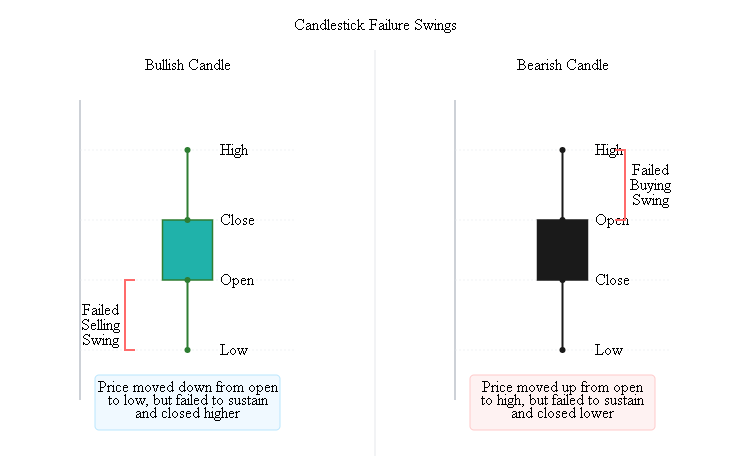
Consider a bearish bar. Price may trade above its open during the bar, showing temporary buying pressure, but later close below the open. The distance from the open to the high represents a failed upward swing. Buyers pushed price higher, but they could not preserve that advance.
The opposite applies to a bullish bar. Price may trade below its open before recovering and closing above it. The distance from the open to the low represents a failed downward swing. Sellers pushed price lower, but they could not maintain that decline.
The strategy averages several recent failed swings and uses that value as a reference for the next breakout. When price moves beyond the recent average by a configurable multiple, the movement may represent stronger directional pressure rather than another failed attempt.
The Expert Advisor applies this idea through four stages:
- Identify a directional setup;
- calculate the relevant average failure swing;
- project a breakout level from the current bar open;
- monitor that level until the setup confirms or expires.
Directional Setup
The strategy does not calculate a breakout on every bar. It first determines whether recent price movement supports a bullish or bearish setup. A bullish setup exists when the latest completed close is below the close from the configured oversold lookback:
Close[1] < Close[oversoldLookbackBars + 1]
A bearish setup exists when the latest completed close is above the close from the configured overbought lookback:
Close[1] > Close[overboughtLookbackBars + 1]
| Setup | Measurable condition | Interpretation |
|---|---|---|
| Bullish | Latest completed close is below the earlier comparison close | Price has declined over the selected lookback |
| Bearish | Latest completed close is above the earlier comparison close | Price has risen over the selected lookback |
These conditions establish direction only. They do not open a position. A trade becomes possible only after the corresponding Greatest Swing Value has been calculated and price crosses the projected breakout level.
Measuring Failure Swings
Once a setup is confirmed, the strategy searches completed bars for the failure swings associated with that direction. For a bullish setup, the Expert Advisor examines bearish bars:
Close < Open
On each qualifying bar, the failed upward swing is:
Buy swing = High − Open
The bar traded above its open but eventually closed below it. The measured distance therefore represents buying pressure that failed to hold.
For a bearish setup, the Expert Advisor examines bullish bars:
Close > Open
On each qualifying bar, the failed downward swing is:
Sell swing = Open − Low
The bar traded below its open but recovered to close above it. The measured distance represents selling pressure that failed to hold.
| Intended Breakout | Qualifying historical bar | Failure-swing calculation |
|---|---|---|
| Bullish | Bearish bar | High - Open |
| Bearish | Bullish bar | Open - Low |
The Expert Advisor must collect exactly the number of failure swings specified by failureSwingLookbackBars. It searches no farther than swingSearchLimitBars. If the required number of qualifying bars cannot be found within that range, the setup is rejected. This prevents the program from calculating the Greatest Swing Value from an incomplete sample.
The averages are calculated as follows:
Average buy swing  = Sum of qualifying buy swings  ÷ Required number of failure swings
Average sell swing = Sum of qualifying sell swings ÷ Required number of failure swings
Projecting the Breakout Level
After calculating the average failure swing, the Expert Advisor projects the breakout threshold from the current bar open.
For a bullish setup:
Bullish trigger = Current bar open + Average buy swing × Breakout multiplier
For a bearish setup:
Bearish trigger = Current bar open − Average sell swing × Breakout multiplier
The breakout multiplier controls how far price must move beyond the recent average failure swing before entry is permitted. A larger multiplier requires a stronger move, while a smaller multiplier places the trigger closer to the current bar open. The projected price is a trigger level. It identifies when the required breakout has occurred, but it is not used as the requested market-order price.
Setup Validity and Entry Confirmation
Only one setup can be active at a time. The setup belongs to the bar from which its breakout level was projected and remains valid only while that bar is current. If the breakout does not occur before the next bar opens, the Expert Advisor clears the setup. A new setup can then be evaluated from the latest market data.
While a setup is active, the program reads the two most recent M1 closes and checks for a confirmed crossing. A bullish breakout requires:
Previous M1 close ≤ bullish trigger
Current M1 close > bullish trigger
A bearish breakout requires:
Previous M1 close ≥ bearish trigger
Current M1 close < bearish trigger
This crossing requirement prevents the Expert Advisor from entering merely because price is already beyond the projected level when the setup is checked. After confirmation, the trade is submitted at the current executable market price. The difference between the projected trigger and the actual execution price may reflect spread, tick movement, and slippage.
Trade Management Rules
The Expert Advisor supports several configurable execution and risk-management modes.
| Component | Available Modes |
|---|---|
| Trade direction | Long only, short only, or both |
| Stop-loss | Current bar open or current bar extreme |
| Take-profit | First profitable open or risk-to-reward target |
| Position sizing | Fixed volume or percentage of account balance |
| Position control | One managed position per symbol and magic number |
For a buy position, the stop-loss is placed either at the current bar's open or at the current bar's low. For a sell position, it is placed either at the current bar's open or at the current bar's high.
In risk-to-reward mode, the take-profit is derived from the distance between the execution price and the stop-loss:
Buy take-profit  = Execution price + Risk distance × Risk-to-reward ratio
Sell take-profit = Execution price − Risk distance × Risk-to-reward ratio
In first-profitable-open mode, the Expert Advisor does not submit a fixed take-profit. Instead, it checks each new bar open. A buy position is closed when the new bar opens above its entry price, while a sell position is closed when the new bar opens below its entry price.
Before submitting a trade, the Expert Advisor validates stop-loss direction, minimum stop levels, and volume constraints. It also checks that no position with the same symbol and magic number already exists.
Creating the Expert Advisor File
In MetaEditor, select File > New, choose Expert Advisor (template), and create the file as: "lwGreatestSwingValueBreakoutExpert.mq5". The file can remain directly inside the standard "MQL5\Experts" directory. Replace the generated content with the following foundation:
//+------------------------------------------------------------------+
//|                           lwGreatestSwingValueBreakoutExpert.mq5 |
//|          Copyright 2026, MetaQuotes Ltd. Developer is Chacha Ian |
//|                          https://www.mql5.com/en/users/chachaian |
//+------------------------------------------------------------------+
#property copyright "Copyright 2026, MetaQuotes Ltd. Developer is Chacha Ian"
#property link      "https://www.mql5.com/en/users/chachaian"
#property version   "1.00"
#property strict

//+------------------------------------------------------------------+
//| Standard libraries                                               |
//+------------------------------------------------------------------+
#include <Trade\Trade.mqh>

//+------------------------------------------------------------------+
//| Expert initialization function                                   |
//+------------------------------------------------------------------+
int OnInit()
  {
//---

//---
   return(INIT_SUCCEEDED);
  }

//+------------------------------------------------------------------+
//| Expert deinitialization function                                 |
//+------------------------------------------------------------------+
void OnDeinit(const int reason)
  {
//---

  }

//+------------------------------------------------------------------+
//| Expert tick function                                             |
//+------------------------------------------------------------------+
void OnTick()
  {
//---

  }
//+------------------------------------------------------------------+
The property declarations identify the program, author, link, and version. Trade.mqh provides the CTrade class, which the Expert Advisor will later use for position opening, position closing, and trade-server result inspection.
The three event handlers provide the initial execution structure. OnInit() prepares the program when it starts, OnDeinit() handles shutdown, and OnTick() processes incoming market ticks. Their bodies are intentionally empty because the required logic will be added progressively.
Compile the file to confirm that the foundation produces zero errors and zero warnings.
Enumerations, Inputs, and Setup State
Before implementing the strategy logic, we need a clear configuration layer and a single place to store the active setup. Named enumerations make the input options readable, while the setup structure keeps all values related to the current Greatest Swing Value breakout in one organized unit. Add the following declarations below the Trade.mqh inclusion and above the event handlers.
Enumerations
The Expert Advisor uses named modes for trade direction, stop-loss placement, take-profit handling, and position sizing. This is clearer than passing numeric values whose meaning is not obvious.
//+------------------------------------------------------------------+
//| Custom enumerations                                              |
//+------------------------------------------------------------------+
enum ENUM_GSV_TRADE_DIRECTION
  {
   GSV_TRADE_LONG_ONLY,
   GSV_TRADE_SHORT_ONLY,
   GSV_TRADE_BOTH
  };

enum ENUM_GSV_STOP_LOSS_MODE
  {
   SL_AT_TODAYS_OPEN,
   SL_AT_TODAYS_EXTREME
  };

enum ENUM_GSV_TAKE_PROFIT_MODE
  {
   TP_FIRST_PROFITABLE_OPEN,
   TP_RISK_REWARD_RATIO
  };

enum ENUM_LOT_SIZE_INPUT_MODE
  {
   MODE_MANUAL,
   MODE_AUTO
  };
These declarations restrict each input to a known set of valid choices and make the selected behavior visible in both the source code and the Expert Advisor input panel.
Input Parameters
The input parameters define the setup filters, the Greatest Swing Value calculation, the trade direction, and the risk-management behaviour.
//+------------------------------------------------------------------+
//| Input parameters                                                 |
//+------------------------------------------------------------------+
input group "General Settings"
input ulong                    magicNumber              = 254700680002;
input ENUM_TIMEFRAMES          timeframe                = PERIOD_CURRENT;
input int                      maxDeviationPoints       = 20;

input group "Setup Conditions"
input int                      oversoldLookbackBars     = 5;
input int                      overboughtLookbackBars   = 5;

input group "Greatest Swing Value Parameters"
input int                      failureSwingLookbackBars = 4;
input int                      swingSearchLimitBars     = 500;
input double                   breakoutMultiplier      = 1.8;

input group "Trade Direction"
input ENUM_GSV_TRADE_DIRECTION tradeDirection           = GSV_TRADE_BOTH;

input group "Trade and Risk Management"
input ENUM_GSV_STOP_LOSS_MODE  stopLossMode             = SL_AT_TODAYS_EXTREME;
input ENUM_GSV_TAKE_PROFIT_MODE takeProfitMode          = TP_RISK_REWARD_RATIO;
input double                   riskRewardRatio          = 2.0;
input ENUM_LOT_SIZE_INPUT_MODE lotSizeMode              = MODE_AUTO;
input double                   riskPerTradePercent      = 1.0;
input double                   fixedLotSize             = 0.10;
| Input | Purpose |
|---|---|
| magicNumber | Identifies positions opened by this Expert Advisor |
| timeframe | Defines the main timeframe used for setup detection |
| maxDeviationPoints | Sets the maximum permitted deviation for market orders |
| oversoldLookbackBars | Defines the comparison distance used for bullish setups |
| overboughtLookbackBars | Defines the comparison distance used for bearish setups |
| failureSwingLookbackBars | Sets the number of qualifying failure swings required |
| swingSearchLimitBars | Limits how many completed bars are searched |
| breakoutMultiplier | Multiplies the average failure swing to project the breakout trigger |
| tradeDirection | Allows long-only, short-only, or both trade directions |
| stopLossMode | Selects the current bar open or current bar extreme for stop-loss placement |
| takeProfitMode | Selects the first-profitable-open exit or a risk-to-reward target |
| riskRewardRatio | Defines the take-profit distance relative to the stop-loss distance |
| lotSizeMode | Selects manual or percentage-risk position sizing |
| riskPerTradePercent | Defines the percentage of account balance risked in automatic mode |
| fixedLotSize | Defines the trade volume used in manual mode |
The parameters are grouped in the same order in which the Expert Advisor uses them. This keeps the input panel compact and makes the relationship between strategy rules and implementation settings easier to follow.
Setup-State Structure
A Greatest Swing Value setup remains active across multiple ticks, so the Expert Advisor needs to preserve its state between calls to OnTick(). The following structure stores all information required to track one active breakout setup:
//+------------------------------------------------------------------+
//| Greatest Swing Value breakout setup state                        |
//+------------------------------------------------------------------+
struct SGsvBreakoutState
  {
   bool            hasActiveSetup;        // Indicates whether a setup is active
   bool            longSetupActive;       // Identifies a bullish setup
   bool            shortSetupActive;      // Identifies a bearish setup
   datetime        setupBarTime;          // Opening time of the setup bar
   double          setupBarOpen;          // Open price used for breakout projection
   double          projectedEntryPrice;   // Price level monitored for confirmation
   double          averageSwingValue;     // Average of the qualifying failure swings
   ENUM_ORDER_TYPE orderType;             // Market order associated with the setup
  };
The structure keeps the setup status, direction, originating bar, projected trigger, average swing, and order type together. This avoids scattering related values across unrelated global variables and makes it easier to reset, validate, and pass the setup through the trading workflow. The remaining global variables support trade execution, new-bar detection, and M1 crossing checks:
//+------------------------------------------------------------------+
//| Global variables                                                 |
//+------------------------------------------------------------------+
CTrade            g_trade;                  // Handles trade operations
SGsvBreakoutState g_gsvState;               // Stores the current breakout setup
datetime          g_lastBarOpenTime = 0;    // Tracks the last processed main-timeframe bar
double            g_m1ClosePrices[];        // Stores the two M1 closes used for crossing detection
At this stage, the declarations define the complete configuration and state layer without implementing any strategy behavior. Compile the source to confirm that the new declarations integrate cleanly with the existing event-handler foundation.
Initialization and Input Validation
The event-handler foundation created earlier already contains OnInit() and OnDeinit(). We can now replace their empty bodies with the initialization and shutdown logic required by the Expert Advisor.
Initialization follows a fixed sequence. The program first validates the input parameters, configures the chart, prepares the CTrade object, selects the filling mode supported by the current symbol, configures the M1 close-price array, and clears the breakout state. If a required step fails, initialization stops before any market processing begins. Replace the existing OnInit() function with the following implementation:
//+------------------------------------------------------------------+
//| Expert initialization function                                   |
//+------------------------------------------------------------------+
int OnInit()
  {
   //--- Reject invalid parameter combinations before using them
   if(!ValidateInputs())
      return(INIT_PARAMETERS_INCORRECT);

   //--- Apply the chart appearance used throughout the project
   if(!ConfigureChartAppearance())
      return(INIT_FAILED);

   //--- Configure the trade object for this Expert Advisor
   g_trade.SetExpertMagicNumber(magicNumber);
   g_trade.SetDeviationInPoints(maxDeviationPoints);
   g_trade.SetAsyncMode(false);

   //--- Use the order filling mode supported by the current symbol
   if(!g_trade.SetTypeFillingBySymbol(_Symbol))
     {
      PrintFormat("Failed to set the filling mode for %s. Error: %d",
                  _Symbol,
                  GetLastError());
      return(INIT_FAILED);
     }

   //--- Store copied M1 prices with the newest value at index zero
   if(!ArraySetAsSeries(g_m1ClosePrices,true))
     {
      Print("Failed to configure the M1 close-price array.");
      return(INIT_FAILED);
     }

   //--- Start without a previously active breakout setup
   g_lastBarOpenTime=0;
   ResetGsvBreakoutState();

   Print("Greatest Swing Value Breakout EA initialized.");
   return(INIT_SUCCEEDED);
  }
ValidateInputs() checks settings that would otherwise make the strategy calculations unsafe or meaningless. Invalid values are rejected during initialization instead of being discovered later while a setup or trade is being processed. Add the following function below the event handlers:
//+------------------------------------------------------------------+
//| Validates the Expert Advisor input parameters                    |
//+------------------------------------------------------------------+
bool ValidateInputs()
  {
   if(magicNumber==0)
     {
      Print("The magic number must be greater than zero.");
      return(false);
     }

   if(oversoldLookbackBars<1 || overboughtLookbackBars<1)
     {
      Print("The setup lookback values must be greater than zero.");
      return(false);
     }

   if(failureSwingLookbackBars<1)
     {
      Print("The failure-swing lookback must be greater than zero.");
      return(false);
     }

   if(swingSearchLimitBars<failureSwingLookbackBars)
     {
      Print("The swing search limit cannot be smaller than the required number of failure swings.");
      return(false);
     }

   if(breakoutMultiplier<=0.0)
     {
      Print("The breakout multiplier must be greater than zero.");
      return(false);
     }

   if(maxDeviationPoints<0)
     {
      Print("The maximum deviation cannot be negative.");
      return(false);
     }

   if(takeProfitMode==TP_RISK_REWARD_RATIO && riskRewardRatio<=0.0)
     {
      Print("The risk-to-reward ratio must be greater than zero.");
      return(false);
     }

   if(lotSizeMode==MODE_MANUAL && fixedLotSize<=0.0)
     {
      Print("The fixed lot size must be greater than zero.");
      return(false);
     }

   if(lotSizeMode==MODE_AUTO &&
      (riskPerTradePercent<=0.0 || riskPerTradePercent>100.0))
     {
      Print("The risk percentage must be greater than zero and not exceed 100.");
      return(false);
     }

   return(true);
  }
The checks reflect the relationships between the inputs. For example, the historical search limit must be large enough to contain the requested number of failure swings, and the risk-to-reward ratio only needs validation when that take-profit mode is selected.
The chart configuration function applies a consistent visual environment. Each ChartSetInteger() call is checked independently so the Experts log can identify the exact property that failed to apply.
//+------------------------------------------------------------------+
//| Configures the chart appearance                                  |
//+------------------------------------------------------------------+
bool ConfigureChartAppearance()
  {
   if(!ChartSetInteger(0,CHART_COLOR_BACKGROUND,clrWhite))
     {
      PrintFormat("Failed to set the chart background. Error: %d",
                  GetLastError());
      return(false);
     }

   if(!ChartSetInteger(0,CHART_SHOW_GRID,false))
     {
      PrintFormat("Failed to hide the chart grid. Error: %d",
                  GetLastError());
      return(false);
     }

   if(!ChartSetInteger(0,CHART_MODE,CHART_CANDLES))
     {
      PrintFormat("Failed to set the chart mode. Error: %d",
                  GetLastError());
      return(false);
     }

   if(!ChartSetInteger(0,CHART_COLOR_FOREGROUND,clrBlack))
     {
      PrintFormat("Failed to set the foreground color. Error: %d",
                  GetLastError());
      return(false);
     }

   if(!ChartSetInteger(0,CHART_COLOR_CANDLE_BULL,clrSeaGreen))
     {
      PrintFormat("Failed to set the bullish candle color. Error: %d",
                  GetLastError());
      return(false);
     }

   if(!ChartSetInteger(0,CHART_COLOR_CANDLE_BEAR,clrBlack))
     {
      PrintFormat("Failed to set the bearish candle color. Error: %d",
                  GetLastError());
      return(false);
     }

   if(!ChartSetInteger(0,CHART_COLOR_CHART_UP,clrSeaGreen))
     {
      PrintFormat("Failed to set the bullish bar color. Error: %d",
                  GetLastError());
      return(false);
     }

   if(!ChartSetInteger(0,CHART_COLOR_CHART_DOWN,clrBlack))
     {
      PrintFormat("Failed to set the bearish bar color. Error: %d",
                  GetLastError());
      return(false);
     }

   //--- Request an immediate refresh after applying the properties
   ChartRedraw();

   return(true);
  }
ChartRedraw() is called directly because it does not return a value. Unlike the preceding chart-property operations, it cannot be placed inside a Boolean condition. The setup reset function clears every field in SGsvBreakoutState. Add it with the other supporting functions:
//+------------------------------------------------------------------+
//| Clears the current Greatest Swing Value breakout setup           |
//+------------------------------------------------------------------+
void ResetGsvBreakoutState()
  {
   ZeroMemory(g_gsvState);

   //--- Provide a valid default until a new setup assigns its direction
   g_gsvState.orderType=ORDER_TYPE_BUY;
  }
ZeroMemory() resets the structure in one operation. The order type is then assigned a valid default value, although it will be replaced when a bullish or bearish setup is initialized. Finally, replace the existing OnDeinit() function with the following version:
//+------------------------------------------------------------------+
//| Expert deinitialization function                                 |
//+------------------------------------------------------------------+
void OnDeinit(const int reason)
  {
   PrintFormat("Program terminated. Reason code: %d",reason);
  }
The termination message records the platform-provided reason code without unnecessary punctuation or informal wording. The program should compile with zero errors and zero warnings. At this point, initialization is complete, but OnTick() remains empty until the market-data and new-bar controls are introduced.
Safe Bar and Market-Data Access
The strategy depends on bar times, completed-bar prices, and recent M1 closes. These values must be available before setup detection or breakout confirmation can continue.
Instead of reading individual values repeatedly with functions such as iOpen(), iHigh(), iLow(), and iClose(), the Expert Advisor copies the required data in small validated blocks. Each helper returns bool, allowing the caller to stop when the requested data is incomplete rather than continue with missing or stale values.
Detecting a New Bar
CheckNewBar() copies the opening time of the current bar and compares it with the last processed value.
//+------------------------------------------------------------------+
//| Checks whether a new bar has opened                              |
//+------------------------------------------------------------------+
bool CheckNewBar(const string symbol,
                 const ENUM_TIMEFRAMES tf,
                 datetime &lastBarTime,
                 bool &isNewBar)
  {
   isNewBar=false;

   datetime barTimes[];
   ArraySetAsSeries(barTimes,true);

   //--- Request only the opening time of the current bar
   ResetLastError();
   int copied=CopyTime(symbol,tf,0,1,barTimes);

   if(copied!=1 || barTimes[0]<=0)
     {
      PrintFormat("Failed to retrieve the current bar time for %s. "
                  "Copied: %d, error: %d",
                  symbol,
                  copied,
                  GetLastError());
      return(false);
     }

   //--- No change means the current bar has already been processed
   if(barTimes[0]==lastBarTime)
      return(true);

   lastBarTime=barTimes[0];
   isNewBar=true;

   return(true);
  }
The function separates two outcomes. Its return value reports whether the data request succeeded, while isNewBar reports whether the bar time changed. This prevents a data failure from being mistaken for the absence of a new bar.
Reading the Setup Comparison Bars
The directional filters require the latest completed close and an earlier comparison close. Both values are retrieved with one CopyRates() call.
//+------------------------------------------------------------------+
//| Evaluates the bullish and bearish setup conditions               |
//+------------------------------------------------------------------+
bool EvaluateSetupConditions(bool &bullishSetup,
                             bool &bearishSetup)
  {
   bullishSetup=false;
   bearishSetup=false;

   int requiredBars=
      MathMax(oversoldLookbackBars,overboughtLookbackBars)+2;

   MqlRates rates[];
   ArraySetAsSeries(rates,true);

   //--- Copy enough bars for both directional comparisons
   ResetLastError();
   int copied=CopyRates(_Symbol,timeframe,0,requiredBars,rates);

   if(copied!=requiredBars)
     {
      PrintFormat("Insufficient data for setup evaluation. "
                  "Requested: %d, copied: %d, error: %d",
                  requiredBars,
                  copied,
                  GetLastError());
      return(false);
     }

   //--- Compare the latest completed close with the configured lookbacks
   bullishSetup=
      rates[1].close<rates[oversoldLookbackBars+1].close;

   bearishSetup=
      rates[1].close>rates[overboughtLookbackBars+1].close;

   return(true);
  }
Index 0 represents the current bar, so the latest completed bar is stored at index 1. The additional bar in requiredBars ensures that both configured lookback positions are available before either comparison is evaluated.
Reading the M1 Closes
Breakout confirmation requires only two M1 closes: the current close and the preceding close. GetRecentM1ClosePrices() requests exactly those values.
//+------------------------------------------------------------------+
//| Retrieves the M1 closes used for breakout confirmation           |
//+------------------------------------------------------------------+
bool GetRecentM1ClosePrices()
  {
   //--- Request the two values required by the crossing functions
   ResetLastError();
   int copied=CopyClose(_Symbol,
                        PERIOD_M1,
                        0,
                        2,
                        g_m1ClosePrices);

   if(copied!=2 || ArraySize(g_m1ClosePrices)<2)
     {
      PrintFormat("Failed to retrieve the required M1 closes. "
                  "Requested: 2, copied: %d, error: %d",
                  copied,
                  GetLastError());
      return(false);
     }

   return(true);
  }
The function checks that exactly two closes were copied. If only one value is available, it fails because the crossing logic requires two closes. These three helpers establish a common rule for the remaining implementation: market data is copied in the smallest complete block required by the calculation, the returned count is validated, and failure is propagated to the caller.
Calculating the Greatest Swing Value
Once a directional setup has been identified, the Expert Advisor calculates the corresponding Greatest Swing Value from completed historical bars.
For a bullish setup, the calculation uses bearish bars and measures the failed upward movement from the open to the high. For a bearish setup, it uses bullish bars and measures the failed downward movement from the open to the low.
| Direction | Qualifying bar | Swing calculation |
|---|---|---|
| Bullish Setup | Bearish Bar | High - Open |
| Bearish Setup | Bullish Bar | Open - Low |
The function below performs both calculations. The requested orderType determines which bars qualify and which swing formula is applied.
//+------------------------------------------------------------------+
//| Calculates the average failed swing for the requested direction  |
//+------------------------------------------------------------------+
bool CalculateAverageFailureSwing(const ENUM_ORDER_TYPE orderType,
                                  double &averageSwing)
  {
   averageSwing=0.0;

   //--- Confirm that usable history is available
   int availableBars=Bars(_Symbol,timeframe);

   if(availableBars<=1)
     {
      PrintFormat("No usable history is available for %s. Error: %d",
                  _Symbol,
                  GetLastError());
      return(false);
     }

   //--- Restrict the search to the configured historical range
   int barsToCopy=MathMin(swingSearchLimitBars,availableBars-1);

   if(barsToCopy<failureSwingLookbackBars)
     {
      Print("There are not enough completed bars to calculate the failure swing.");
      return(false);
     }

   MqlRates rates[];
   ArraySetAsSeries(rates,true);

   //--- Copy completed bars only; the current bar is excluded
   ResetLastError();
   int copied=CopyRates(_Symbol,timeframe,1,barsToCopy,rates);

   if(copied<=0)
     {
      PrintFormat("Failed to copy bars for the failure-swing calculation. "
                  "Error: %d",
                  GetLastError());
      return(false);
     }

   double totalSwing=0.0;
   int qualifyingBars=0;

   //--- Collect the exact number of failure swings required
   for(int index=0;
       index<copied && qualifyingBars<failureSwingLookbackBars;
       index++)
     {
      if(orderType==ORDER_TYPE_BUY &&
         rates[index].close<rates[index].open)
        {
         double swing=rates[index].high-rates[index].open;

         if(swing>0.0)
           {
            totalSwing+=swing;
            qualifyingBars++;
           }
        }
      else if(orderType==ORDER_TYPE_SELL &&
              rates[index].close>rates[index].open)
        {
         double swing=rates[index].open-rates[index].low;

         if(swing>0.0)
           {
            totalSwing+=swing;
            qualifyingBars++;
           }
        }
     }

   //--- Reject an incomplete sample
   if(qualifyingBars!=failureSwingLookbackBars)
     {
      PrintFormat("Only %d of %d required failure swings were found.",
                  qualifyingBars,
                  failureSwingLookbackBars);
      return(false);
     }

   averageSwing=totalSwing/qualifyingBars;

   if(averageSwing<=0.0)
     {
      Print("The calculated average failure swing is invalid.");
      return(false);
     }

   return(true);
  }
The function first checks how much history is available, then limits the request to swingSearchLimitBars. CopyRates() starts at shift 1, so the current forming bar is excluded from the calculation.
The loop applies the direction-specific filter. A bullish calculation accepts only bearish bars and measures High - Open. A bearish calculation accepts only bullish bars and measures Open - Low.
The search stops when the required number of qualifying bars has been collected. If the configured sample cannot be completed within the available search range, the function returns false, and no setup is created. This prevents the Greatest Swing Value from being based on fewer observations than the strategy requires.
Initializing and Expiring the Breakout Setup
After the directional condition and average failure swing have been validated, the Expert Advisor can create a breakout setup for the current bar. The setup is temporary. Its trigger is projected from the current bar open, and it remains valid only while that bar is active. If price does not cross the trigger before the next bar opens, the stored setup is cleared.
Initializing the Setup
InitializeSetup() retrieves the current bar, calculates the projected trigger, and stores the values required by the active setup.
//+------------------------------------------------------------------+
//| Initializes a one-bar Greatest Swing Value breakout setup        |
//+------------------------------------------------------------------+
bool InitializeSetup(const ENUM_ORDER_TYPE orderType,
                     const double averageSwing)
  {
   if(averageSwing<=0.0)
     {
      Print("The average failure swing must be greater than zero.");
      return(false);
     }

   MqlRates currentBar[];
   ArraySetAsSeries(currentBar,true);

   //--- Retrieve the current bar used to project the breakout trigger
   ResetLastError();
   int copied=CopyRates(_Symbol,timeframe,0,1,currentBar);

   if(copied!=1 ||
      currentBar[0].time<=0 ||
      currentBar[0].open<=0.0)
     {
      PrintFormat("Failed to retrieve the current setup bar. "
                  "Copied: %d, error: %d",
                  copied,
                  GetLastError());
      return(false);
     }

   double projectedEntryPrice=0.0;

   //--- Project the trigger above or below the current bar open
   if(orderType==ORDER_TYPE_BUY)
     {
      projectedEntryPrice=
         currentBar[0].open+(averageSwing*breakoutMultiplier);
     }
   else if(orderType==ORDER_TYPE_SELL)
     {
      projectedEntryPrice=
         currentBar[0].open-(averageSwing*breakoutMultiplier);
     }
   else
     {
      Print("Unsupported order type while initializing the setup.");
      return(false);
     }

   int digits=(int)SymbolInfoInteger(_Symbol,SYMBOL_DIGITS);
   projectedEntryPrice=NormalizeDouble(projectedEntryPrice,digits);

   if(projectedEntryPrice<=0.0)
     {
      Print("The projected breakout price is invalid.");
      return(false);
     }

   //--- Clear any previous values before storing the new setup
   ResetGsvBreakoutState();

   g_gsvState.hasActiveSetup     = true;
   g_gsvState.longSetupActive    = (orderType==ORDER_TYPE_BUY);
   g_gsvState.shortSetupActive   = (orderType==ORDER_TYPE_SELL);
   g_gsvState.setupBarTime       = currentBar[0].time;
   g_gsvState.setupBarOpen       = currentBar[0].open;
   g_gsvState.projectedEntryPrice= projectedEntryPrice;
   g_gsvState.averageSwingValue  = averageSwing;
   g_gsvState.orderType          = orderType;

   PrintFormat("%s setup initialized. Trigger: %s, average swing: %s",
               orderType==ORDER_TYPE_BUY ? "Bullish" : "Bearish",
               DoubleToString(projectedEntryPrice,digits),
               DoubleToString(averageSwing,digits));

   return(true);
  }
For a bullish setup, the trigger is projected above the current bar open:
Bullish trigger = Current bar open + Average buy swing × Breakout multiplier
For a bearish setup, it is projected below the open:
Bearish trigger = Current bar open − Average sell swing × Breakout multiplier
The function activates the setup only after the market data, average swing, order type, and projected price have passed validation. The structure stores only the information needed while the setup is active: its direction, originating bar time, originating open, projected trigger, average swing, and order type.
Resetting the Setup State
ResetGsvBreakoutState() clears the current setup before a new one is stored or after the existing one expires.
//+------------------------------------------------------------------+
//| Clears the current Greatest Swing Value breakout setup           |
//+------------------------------------------------------------------+
void ResetGsvBreakoutState()
  {
   ZeroMemory(g_gsvState);

   //--- Keep the enumeration field in a valid default state
   g_gsvState.orderType=ORDER_TYPE_BUY;
  }
ZeroMemory() resets all structure fields in one operation. The order type then receives a valid default value, although it is replaced whenever a new setup is initialized.
Enforcing One-Bar Validity
Setup creation is coordinated by ProcessNewBar(). At the beginning of every new main-timeframe bar, the previous setup is cleared before the Expert Advisor evaluates the latest directional conditions.
//+------------------------------------------------------------------+
//| Processes setup creation at the start of a new bar               |
//+------------------------------------------------------------------+
bool ProcessNewBar()
  {
   //--- The previous setup expires when its originating bar closes
   ResetGsvBreakoutState();

   bool bullishSetup=false;
   bool bearishSetup=false;

   if(!EvaluateSetupConditions(bullishSetup,bearishSetup))
      return(false);

   if((tradeDirection==GSV_TRADE_LONG_ONLY ||
       tradeDirection==GSV_TRADE_BOTH) &&
      bullishSetup)
     {
      double averageBuySwing=0.0;

      if(!CalculateAverageFailureSwing(ORDER_TYPE_BUY,
                                       averageBuySwing))
         return(true);

      return(InitializeSetup(ORDER_TYPE_BUY,averageBuySwing));
     }

   if((tradeDirection==GSV_TRADE_SHORT_ONLY ||
       tradeDirection==GSV_TRADE_BOTH) &&
      bearishSetup)
     {
      double averageSellSwing=0.0;

      if(!CalculateAverageFailureSwing(ORDER_TYPE_SELL,
                                       averageSellSwing))
         return(true);

      return(InitializeSetup(ORDER_TYPE_SELL,averageSellSwing));
     }

   return(true);
  }
The setup therefore follows a strict lifecycle:
- a new bar opens;
- any setup from the previous bar is cleared;
- the latest directional conditions are evaluated;
- the required failure swings are calculated;
- a new setup is activated only when all required data is valid;
- the setup remains active until it confirms or the next bar begins.
This one-bar validity rule prevents an outdated trigger from remaining active after the market has moved into a new setup period.
Lower-Timeframe Breakout Detection
After a setup is initialized, the Expert Advisor monitors M1 closes for a confirmed cross of the projected trigger. This lower-timeframe check allows the strategy to respond during the setup bar without treating every tick above or below the level as a new signal. A bullish entry requires the previous M1 close to be at or below the trigger and the current M1 close to finish above it:
Previous M1 close ≤ bullish trigger
Current M1 close > bullish trigger
A bearish entry uses the mirrored condition:
Previous M1 close ≥ bearish trigger
Current M1 close < bearish trigger
Merely finding price above a bullish trigger or below a bearish trigger is not enough. The Expert Advisor requires an actual transition across the level. The crossing functions are added below the market-data helpers:
//+------------------------------------------------------------------+
//| Checks whether M1 closes crossed above the projected trigger     |
//+------------------------------------------------------------------+
bool IsCrossOver(const double triggerPrice,
                 const double &closePrices[])
  {
   //--- Two closes are required to confirm the transition
   if(ArraySize(closePrices)<2 || triggerPrice<=0.0)
      return(false);

   return(closePrices[1]<=triggerPrice &&
          closePrices[0]>triggerPrice);
  }

//+------------------------------------------------------------------+
//| Checks whether M1 closes crossed below the projected trigger     |
//+------------------------------------------------------------------+
bool IsCrossUnder(const double triggerPrice,
                  const double &closePrices[])
  {
   //--- Two closes are required to confirm the transition
   if(ArraySize(closePrices)<2 || triggerPrice<=0.0)
      return(false);

   return(closePrices[1]>=triggerPrice &&
          closePrices[0]<triggerPrice);
  }
Because g_m1ClosePrices is configured as a series array, index 0 contains the current M1 close and index 1 contains the preceding close. Both functions verify the array size before accessing those positions.
The following OnTick() structure connects new-bar processing with lower-timeframe breakout detection:
//+------------------------------------------------------------------+
//| Expert tick function                                             |
//+------------------------------------------------------------------+
void OnTick()
  {
   bool isNewBar=false;

   //--- Stop processing when the current bar time is unavailable
   if(!CheckNewBar(_Symbol,
                   timeframe,
                   g_lastBarOpenTime,
                   isNewBar))
      return;

   //--- Create or expire setups once per main-timeframe bar
   if(isNewBar)
     {
      if(!ProcessNewBar())
         return;
     }

   //--- M1 data is unnecessary when no setup is active
   if(!g_gsvState.hasActiveSetup)
      return;

   if(!GetRecentM1ClosePrices())
      return;

   //--- Confirm a bullish transition across the projected trigger
   if(g_gsvState.longSetupActive &&
      IsCrossOver(g_gsvState.projectedEntryPrice,
                  g_m1ClosePrices))
     {
      //--- Trade execution is added in a later section
      return;
     }

   //--- Confirm a bearish transition across the projected trigger
   if(g_gsvState.shortSetupActive &&
      IsCrossUnder(g_gsvState.projectedEntryPrice,
                   g_m1ClosePrices))
     {
      //--- Trade execution is added in a later section
      return;
     }
  }
The M1 close series is refreshed only while a valid setup is active. This avoids unnecessary lower-timeframe data requests when there is no breakout level to monitor.
At this stage, OnTick() identifies the crossing but does not yet submit an order. The execution calls will be added after the stop-loss, take-profit, volume, and broker-validation logic have been prepared.
Preparing Stop-Loss and Take-Profit Prices
After a breakout is confirmed, the Expert Advisor must convert the active setup into valid trade parameters. The projected trigger is no longer used as the order price. Instead, the EA uses the current executable market price and prepares the stop-loss and take-profit from that value.
Two stop-loss modes are available:
| Stop-loss mode | Buy position | Sell position |
|---|---|---|
| Current bar open | Setup bar open | Setup bar open |
| Current bar extreme | Current bar low | Current bar high |
The setup bar open is stored when the breakout setup is initialized. The bar extreme is different because it can continue changing while the setup remains active. For that reason, the current low or high is retrieved when the breakout occurs rather than frozen at setup creation.
PrepareTradePrices() validates the stop-loss direction, calculates the optional risk-to-reward target, normalizes the prices, and passes them to the broker-distance check.
//+------------------------------------------------------------------+
//| Prepares and validates stop-loss and take-profit prices          |
//+------------------------------------------------------------------+
bool PrepareTradePrices(const ENUM_ORDER_TYPE orderType,
                        const double executionPrice,
                        double &stopLoss,
                        double &takeProfit)
  {
   if(executionPrice<=0.0 || stopLoss<=0.0)
     {
      Print("The execution or stop-loss price is invalid.");
      return(false);
     }

   double riskDistance=0.0;

   //--- Validate the stop direction and calculate the buy target
   if(orderType==ORDER_TYPE_BUY)
     {
      riskDistance=executionPrice-stopLoss;

      if(riskDistance<=0.0)
        {
         Print("The buy stop-loss must be below the execution price.");
         return(false);
        }

      if(takeProfitMode==TP_RISK_REWARD_RATIO)
         takeProfit=executionPrice+
                    (riskDistance*riskRewardRatio);
      else
         takeProfit=0.0;
     }
   //--- Validate the stop direction and calculate the sell target
   else if(orderType==ORDER_TYPE_SELL)
     {
      riskDistance=stopLoss-executionPrice;

      if(riskDistance<=0.0)
        {
         Print("The sell stop-loss must be above the execution price.");
         return(false);
        }

      if(takeProfitMode==TP_RISK_REWARD_RATIO)
         takeProfit=executionPrice-
                    (riskDistance*riskRewardRatio);
      else
         takeProfit=0.0;
     }
   else
     {
      Print("Unsupported order type while preparing trade prices.");
      return(false);
     }

   //--- Normalize all submitted prices to the symbol precision
   int digits=(int)SymbolInfoInteger(_Symbol,SYMBOL_DIGITS);

   stopLoss=NormalizeDouble(stopLoss,digits);

   if(takeProfit>0.0)
      takeProfit=NormalizeDouble(takeProfit,digits);

   return(ValidateStopLevelRequirements(orderType,
                                        executionPrice,
                                        stopLoss,
                                        takeProfit));
  }
For a buy position, the risk distance is:
Risk distance = Execution price − Stop-loss
The take-profit is then calculated as:
Buy take-profit = Execution price + Risk distance × Risk-to-reward ratio
For a sell position:
Risk distance = Stop-loss − Execution price
The corresponding target is:
Sell take-profit = Execution price − Risk distance × Risk-to-reward ratio
When TP_FIRST_PROFITABLE_OPEN is selected, takeProfit remains 0.0. No fixed target is sent with the order. The position is evaluated at subsequent new-bar opens and closed when the open is profitable relative to the entry price.
Before the prepared levels can be used, they must satisfy the symbol’s minimum stop-level requirements.
//+------------------------------------------------------------------+
//| Validates the broker's minimum stop-level requirements           |
//+------------------------------------------------------------------+
bool ValidateStopLevelRequirements(const ENUM_ORDER_TYPE orderType,
                                   const double executionPrice,
                                   const double stopLoss,
                                   const double takeProfit)
  {
   long stopsLevelPoints=0;

   //--- Retrieve the broker-defined minimum distance in points
   if(!SymbolInfoInteger(_Symbol,
                         SYMBOL_TRADE_STOPS_LEVEL,
                         stopsLevelPoints))
     {
      PrintFormat("Failed to retrieve the minimum stop level. "
                  "Error: %d",
                  GetLastError());
      return(false);
     }

   double point=0.0;

   if(!SymbolInfoDouble(_Symbol,SYMBOL_POINT,point) ||
      point<=0.0)
     {
      PrintFormat("Failed to retrieve a valid point value. "
                  "Error: %d",
                  GetLastError());
      return(false);
     }

   double minimumDistance=stopsLevelPoints*point;

   if(orderType==ORDER_TYPE_BUY)
     {
      if((executionPrice-stopLoss)<minimumDistance)
        {
         Print("The buy stop-loss violates the broker's minimum stop-level requirements.");
         return(false);
        }

      if(takeProfit>0.0 &&
         (takeProfit-executionPrice)<minimumDistance)
        {
         Print("The buy take-profit violates the broker's minimum stop-level requirements.");
         return(false);
        }
     }
   else if(orderType==ORDER_TYPE_SELL)
     {
      if((stopLoss-executionPrice)<minimumDistance)
        {
         Print("The sell stop-loss violates the broker's minimum stop-level requirements.");
         return(false);
        }

      if(takeProfit>0.0 &&
         (executionPrice-takeProfit)<minimumDistance)
        {
         Print("The sell take-profit violates the broker's minimum stop-level requirements.");
         return(false);
        }
     }
   else
     {
      Print("Unsupported order type during stop-level validation.");
      return(false);
     }

   return(true);
  }
The minimum distance is obtained from SYMBOL_TRADE_STOPS_LEVEL and converted from points to price units using SYMBOL_POINT. A zero stop level is valid and means the broker does not impose an additional minimum distance through this property.
The function rejects invalid levels instead of moving them automatically. Silent adjustment would change the intended stop distance, risk amount, and risk-to-reward relationship without the strategy explicitly approving that change.
Position Sizing and Volume Normalization
Once the execution price and stop-loss have been validated, the Expert Advisor can determine the trade volume. The implementation supports two modes: a fixed volume supplied by the user and an automatic volume derived from the configured account risk.
Both modes pass through the same normalization stage before an order is submitted. This ensures that the requested volume respects the symbol’s minimum volume, maximum volume, and volume step.
Selecting the Volume Mode
DetermineTradeVolume() acts as the entry point for position sizing. Manual mode uses the configured fixedLotSize, while automatic mode calculates the required volume from the execution price, stop-loss, and account balance.
//+------------------------------------------------------------------+
//| Determines the trade volume for the selected sizing mode         |
//+------------------------------------------------------------------+
bool DetermineTradeVolume(const ENUM_ORDER_TYPE orderType,
                          const double entryPrice,
                          const double stopLossPrice,
                          double &volume)
  {
   volume=0.0;

   //--- Manual mode still passes through broker-volume validation
   if(lotSizeMode==MODE_MANUAL)
      return(NormalizeVolume(fixedLotSize,volume));

   //--- Automatic mode derives volume from the configured account risk
   return(CalculatePositionSizeByRisk(orderType,
                                      entryPrice,
                                      stopLossPrice,
                                      volume));
  }
Manual sizing does not bypass broker constraints. The configured value is still normalized before use, so an invalid volume is not submitted directly.
Calculating Volume from Account Risk
In automatic mode, the Expert Advisor first calculates the monetary amount that may be lost if the stop-loss is reached:
Amount at risk = Account balance × Risk per trade (%) ÷ 100 The next step is to estimate the loss produced by one lot between the planned entry and stop-loss. OrderCalcProfit() is used because it accounts for the symbol’s contract specifications and trade direction.
//+------------------------------------------------------------------+
//| Calculates position size from the configured account risk        |
//+------------------------------------------------------------------+
bool CalculatePositionSizeByRisk(const ENUM_ORDER_TYPE orderType,
                                 const double entryPrice,
                                 const double stopLossPrice,
                                 double &volume)
  {
   volume=0.0;

   double accountBalance=AccountInfoDouble(ACCOUNT_BALANCE);

   if(accountBalance<=0.0)
     {
      Print("The account balance is unavailable or invalid.");
      return(false);
     }

   //--- Convert the configured percentage into a monetary risk amount
   double amountAtRisk=
      (riskPerTradePercent/100.0)*accountBalance;

   if(amountAtRisk<=0.0)
     {
      Print("The calculated amount at risk is invalid.");
      return(false);
     }

   double lossPerLot=0.0;

   //--- Estimate the stop-loss result for a one-lot position
   ResetLastError();

   if(!OrderCalcProfit(orderType,
                       _Symbol,
                       1.0,
                       entryPrice,
                       stopLossPrice,
                       lossPerLot))
     {
      PrintFormat("OrderCalcProfit failed. Error: %d",
                  GetLastError());
      return(false);
     }

   lossPerLot=MathAbs(lossPerLot);

   if(lossPerLot<=0.0)
     {
      Print("The calculated loss per lot is invalid.");
      return(false);
     }

   double rawVolume=amountAtRisk/lossPerLot;

   return(NormalizeVolume(rawVolume,volume));
  }
The raw position size is therefore:
Raw volume = Amount at risk ÷ Loss per lot
If the risk calculation fails, the trade is rejected. The program does not silently replace the result with fixedLotSize, because doing so would change the selected risk model without the user requesting that behavior.
Applying Broker Volume Constraints
The raw volume must still comply with the symbol’s trading rules. NormalizeVolume() retrieves the minimum volume, maximum volume, and volume step before adjusting the requested value.
//+------------------------------------------------------------------+
//| Normalizes volume to the symbol's permitted trading constraints  |
//+------------------------------------------------------------------+
bool NormalizeVolume(const double requestedVolume,
                     double &normalizedVolume)
  {
   normalizedVolume=0.0;

   double minimumVolume=0.0;
   double maximumVolume=0.0;
   double volumeStep=0.0;

   //--- Retrieve the symbol-specific volume limits
   if(!SymbolInfoDouble(_Symbol,SYMBOL_VOLUME_MIN,minimumVolume) ||
      !SymbolInfoDouble(_Symbol,SYMBOL_VOLUME_MAX,maximumVolume) ||
      !SymbolInfoDouble(_Symbol,SYMBOL_VOLUME_STEP,volumeStep))
     {
      PrintFormat("Failed to retrieve the symbol's volume constraints. "
                  "Error: %d",
                  GetLastError());
      return(false);
     }

   if(minimumVolume<=0.0 ||
      maximumVolume<minimumVolume ||
      volumeStep<=0.0)
     {
      Print("The symbol's volume constraints are invalid.");
      return(false);
     }

   //--- Keep the requested value inside the permitted range
   double boundedVolume=
      MathMax(minimumVolume,
              MathMin(maximumVolume,requestedVolume));

   //--- Align the value with the broker-defined volume step
   boundedVolume=
      MathFloor((boundedVolume+1.0e-12)/volumeStep)*volumeStep;

   int volumeDigits=GetVolumeDigits(volumeStep);

   normalizedVolume=
      NormalizeDouble(boundedVolume,volumeDigits);

   if(normalizedVolume<minimumVolume ||
      normalizedVolume>maximumVolume)
     {
      Print("The normalized volume is outside the permitted range.");
      return(false);
     }

   return(true);
  }
The requested value is first bounded by SYMBOL_VOLUME_MIN and SYMBOL_VOLUME_MAX, then aligned downward to SYMBOL_VOLUME_STEP. Rounding downward avoids increasing the calculated risk above the requested amount when automatic sizing is used.
Deriving Volume Precision
Volume precision should not be hard-coded to two decimal places. Symbols may use steps such as 0.1, 0.01, or finer increments. GetVolumeDigits() derives the required number of decimal places from the actual volume step:
//+------------------------------------------------------------------+
//| Returns the precision required by the symbol's volume step       |
//+------------------------------------------------------------------+
int GetVolumeDigits(const double volumeStep)
  {
   for(int digits=0;digits<=8;digits++)
     {
      if(MathAbs(NormalizeDouble(volumeStep,digits)-volumeStep)
         <1.0e-12)
         return(digits);
     }

   return(8);
  }
For example, a volume step of 0.1 requires one decimal place, while 0.01 requires two. Deriving this value from SYMBOL_VOLUME_STEP makes the normalization logic suitable for symbols with different volume specifications.
This also corrects an important weakness in the earlier implementation, where volume was normalized with a fixed two-decimal assumption and failed automatic sizing could fall back to a fixed lot size. The revised approach keeps the selected risk model intact and validates the final volume against the symbol’s actual trading constraints.
Position Control and Trade Execution
Before opening a new position, the Expert Advisor checks whether it already manages a position on the current symbol. This prevents duplicate entries while allowing the same magic number to be used independently on other symbols.
Detecting an Existing Managed Position
HasManagedPosition() scans the current account positions and filters them by both magic number and symbol.
//+------------------------------------------------------------------+
//| Checks whether this EA manages a position on the current symbol  |
//+------------------------------------------------------------------+
bool HasManagedPosition()
  {
   for(int index=PositionsTotal()-1;index>=0;index--)
     {
      ulong ticket=PositionGetTicket(index);

      if(ticket==0)
        {
         PrintFormat("PositionGetTicket failed at index %d. Error: %d",
                     index,
                     GetLastError());
         continue;
        }

      //--- Ignore positions that belong to another Expert Advisor
      if(PositionGetInteger(POSITION_MAGIC)!=(long)magicNumber)
         continue;

      //--- Ignore positions opened on another symbol
      if(PositionGetString(POSITION_SYMBOL)!=_Symbol)
         continue;

      return(true);
     }

   return(false);
  }
Filtering by both properties is important. Checking only the magic number could allow a position on another symbol to block the current chart, while checking only the symbol could interfere with positions opened manually or by another Expert Advisor.
Submitting the Market Order
The projected breakout level determines when entry becomes valid, but it is not used as the requested execution price. By the time the crossing is confirmed, the current Ask or Bid may already differ from that trigger. For this reason, OpenMarketPosition() passes 0.0 as the requested market-order price. CTrade then uses the current executable price for the selected symbol.
//+------------------------------------------------------------------+
//| Opens a market position and validates the trade-server result    |
//+------------------------------------------------------------------+
bool OpenMarketPosition(const ENUM_ORDER_TYPE orderType,
                        const double volume,
                        const double stopLoss,
                        const double takeProfit)
  {
   ResetLastError();

   bool requestAccepted=false;

   //--- Submit the appropriate market-order request
   if(orderType==ORDER_TYPE_BUY)
     {
      requestAccepted=
         g_trade.Buy(volume,
                     _Symbol,
                     0.0,
                     stopLoss,
                     takeProfit);
     }
   else if(orderType==ORDER_TYPE_SELL)
     {
      requestAccepted=
         g_trade.Sell(volume,
                      _Symbol,
                      0.0,
                      stopLoss,
                      takeProfit);
     }
   else
     {
      Print("Unsupported order type during market execution.");
      return(false);
     }

   //--- A failed method call means the request was not accepted locally
   if(!requestAccepted)
     {
      PrintFormat("%s request failed. Error: %d, "
                  "retcode: %u, description: %s",
                  orderType==ORDER_TYPE_BUY ? "Buy" : "Sell",
                  GetLastError(),
                  g_trade.ResultRetcode(),
                  g_trade.ResultRetcodeDescription());
      return(false);
     }

   //--- Confirm that the trade server actually completed the operation
   if(!IsSuccessfulMarketRetcode(g_trade.ResultRetcode()))
     {
      PrintFormat("%s request was not executed. "
                  "Retcode: %u, description: %s",
                  orderType==ORDER_TYPE_BUY ? "Buy" : "Sell",
                  g_trade.ResultRetcode(),
                  g_trade.ResultRetcodeDescription());
      return(false);
     }

   PrintFormat("%s position opened. Deal: %I64u",
               orderType==ORDER_TYPE_BUY ? "Buy" : "Sell",
               g_trade.ResultDeal());

   return(true);
  }
There are two separate success checks here. The Boolean result from Buy() or Sell() confirms that the method call itself succeeded. The trade-server retcode then confirms whether the requested operation was actually completed. A successful local call should therefore not be treated as sufficient evidence that a position was opened.
Validating Trade-Server Retcodes
The retcode check is kept in a small helper because the same validation is required for both opening and closing operations.
//+------------------------------------------------------------------+
//| Returns true for completed market-operation retcodes             |
//+------------------------------------------------------------------+
bool IsSuccessfulMarketRetcode(const uint retcode)
  {
   return(retcode==TRADE_RETCODE_DONE ||
          retcode==TRADE_RETCODE_DONE_PARTIAL);
  }
TRADE_RETCODE_DONE indicates that the requested operation was completed, while TRADE_RETCODE_DONE_PARTIAL covers cases where the server executed only part of the requested volume. This distinction between method success and server execution is important because CTrade acts as the local interface used to construct and send the request, while the final execution result is returned separately by the trade server.
Closing a Managed Position
Position closing follows the same validation pattern. CloseManagedPosition() checks both the result returned by PositionClose() and the subsequent trade-server retcode.
//+------------------------------------------------------------------+
//| Closes a managed position and validates the server response      |
//+------------------------------------------------------------------+
bool CloseManagedPosition(const ulong ticket)
  {
   ResetLastError();

   if(!g_trade.PositionClose(ticket))
     {
      PrintFormat("Position close request failed for ticket %I64u. "
                  "Error: %d, retcode: %u, description: %s",
                  ticket,
                  GetLastError(),
                  g_trade.ResultRetcode(),
                  g_trade.ResultRetcodeDescription());
      return(false);
     }

   if(!IsSuccessfulMarketRetcode(g_trade.ResultRetcode()))
     {
      PrintFormat("Position %I64u was not closed. "
                  "Retcode: %u, description: %s",
                  ticket,
                  g_trade.ResultRetcode(),
                  g_trade.ResultRetcodeDescription());
      return(false);
     }

   PrintFormat("Position %I64u closed successfully.",ticket);

   return(true);
  }
Using the same validation standard for both entry and exit prevents the program from assuming that a requested operation succeeded when the server returned a different result.
The active breakout state should also be cleared only after OpenMarketPosition() returns true. If execution fails, the setup remains available until it expires or another valid execution attempt occurs. This keeps setup state synchronized with confirmed trading activity rather than with the submission attempt alone.
First-Profitable-Open Exit
When TP_FIRST_PROFITABLE_OPEN is selected, the Expert Advisor does not submit a fixed take-profit. Instead, it checks the open of each new main-timeframe bar.
A buy position is closed when the new bar opens above the entry price. A sell position is closed when the new bar opens below it. Only positions matching the current symbol and magicNumber are managed.
//+------------------------------------------------------------------+
//| Closes managed positions at the first profitable bar open        |
//+------------------------------------------------------------------+
bool ManageFirstProfitableOpenExit()
  {
   if(takeProfitMode!=TP_FIRST_PROFITABLE_OPEN)
      return(true);

   MqlRates currentBar[];
   ArraySetAsSeries(currentBar,true);

   //--- Retrieve the current bar open used for the exit decision
   ResetLastError();
   int copied=CopyRates(_Symbol,timeframe,0,1,currentBar);

   if(copied!=1 || currentBar[0].open<=0.0)
     {
      PrintFormat("Failed to retrieve the current bar open. "
                  "Copied: %d, error: %d",
                  copied,
                  GetLastError());
      return(false);
     }

   for(int index=PositionsTotal()-1;index>=0;index--)
     {
      ulong ticket=PositionGetTicket(index);

      if(ticket==0)
         continue;

      if(PositionGetInteger(POSITION_MAGIC)!=(long)magicNumber ||
         PositionGetString(POSITION_SYMBOL)!=_Symbol)
         continue;

      ENUM_POSITION_TYPE positionType=
         (ENUM_POSITION_TYPE)PositionGetInteger(POSITION_TYPE);

      double entryPrice=PositionGetDouble(POSITION_PRICE_OPEN);

      bool profitableOpen=
         (positionType==POSITION_TYPE_BUY &&
          currentBar[0].open>entryPrice) ||
         (positionType==POSITION_TYPE_SELL &&
          currentBar[0].open<entryPrice);

      if(profitableOpen)
         return(CloseManagedPosition(ticket));
     }

   return(true);
  }
Because this function runs during new-bar processing, the exit is evaluated once per bar. Any closing failure is returned through CloseManagedPosition() rather than being ignored. This keeps the first-profitable-open mode separate from risk-to-reward mode, where the take-profit is submitted directly with the original order.
Final Event Workflow
The remaining step is to connect the components developed so far. ProcessNewBar() handles work that should occur once per main-timeframe bar, while OnTick() monitors the active setup and executes a trade only after the M1 crossing condition is confirmed.
New-Bar Processing
Replace the earlier ProcessNewBar() version with the following final implementation:
//+------------------------------------------------------------------+
//| Processes tasks that run once per new bar                        |
//+------------------------------------------------------------------+
bool ProcessNewBar()
  {
   //--- Manage positions that use the first-profitable-open exit
   if(!ManageFirstProfitableOpenExit())
      return(false);

   //--- Any unconfirmed setup expires when its originating bar closes
   ResetGsvBreakoutState();

   //--- Do not create another setup while a managed position is open
   if(HasManagedPosition())
      return(true);

   bool bullishSetup=false;
   bool bearishSetup=false;

   if(!EvaluateSetupConditions(bullishSetup,bearishSetup))
      return(false);

   //--- Create a bullish setup when the directional filter is satisfied
   if((tradeDirection==GSV_TRADE_LONG_ONLY ||
       tradeDirection==GSV_TRADE_BOTH) &&
      bullishSetup)
     {
      double averageBuySwing=0.0;

      if(!CalculateAverageFailureSwing(ORDER_TYPE_BUY,
                                       averageBuySwing))
         return(true);

      return(InitializeSetup(ORDER_TYPE_BUY,averageBuySwing));
     }

   //--- Otherwise evaluate the bearish direction
   if((tradeDirection==GSV_TRADE_SHORT_ONLY ||
       tradeDirection==GSV_TRADE_BOTH) &&
      bearishSetup)
     {
      double averageSellSwing=0.0;

      if(!CalculateAverageFailureSwing(ORDER_TYPE_SELL,
                                       averageSellSwing))
         return(true);

      return(InitializeSetup(ORDER_TYPE_SELL,averageSellSwing));
     }

   return(true);
  }
The sequence is deliberate: existing positions are managed first, the previous setup expires, and a new setup is considered only when no managed position remains open.
Final OnTick() Workflow
OnTick() now combines new-bar control, M1 breakout detection, trade preparation, volume calculation, and execution. Replace the earlier temporary version with:
//+------------------------------------------------------------------+
//| Expert tick function                                             |
//+------------------------------------------------------------------+
void OnTick()
  {
   MqlTick tick;

   //--- Retrieve the current executable Bid and Ask prices
   if(!SymbolInfoTick(_Symbol,tick))
     {
      PrintFormat("Failed to retrieve the current tick. Error: %d",
                  GetLastError());
      return;
     }

   bool isNewBar=false;

   if(!CheckNewBar(_Symbol,
                   timeframe,
                   g_lastBarOpenTime,
                   isNewBar))
      return;

   //--- Perform setup creation and expiration once per new bar
   if(isNewBar)
     {
      if(!ProcessNewBar())
         return;
     }

   if(HasManagedPosition() || !g_gsvState.hasActiveSetup)
      return;

   if(!GetRecentM1ClosePrices())
      return;

   bool breakoutConfirmed=
      (g_gsvState.longSetupActive &&
       IsCrossOver(g_gsvState.projectedEntryPrice,
                   g_m1ClosePrices)) ||
      (g_gsvState.shortSetupActive &&
       IsCrossUnder(g_gsvState.projectedEntryPrice,
                    g_m1ClosePrices));

   if(!breakoutConfirmed)
      return;

   MqlRates currentBar[];
   ArraySetAsSeries(currentBar,true);

   //--- Retrieve the latest bar extreme at the moment of confirmation
   ResetLastError();
   int copied=CopyRates(_Symbol,timeframe,0,1,currentBar);

   if(copied!=1 ||
      currentBar[0].time!=g_gsvState.setupBarTime)
     {
      PrintFormat("Failed to retrieve the active setup bar. "
                  "Copied: %d, error: %d",
                  copied,
                  GetLastError());
      return;
     }

   double executionPrice=0.0;
   double stopLoss=0.0;
   double takeProfit=0.0;

   if(g_gsvState.orderType==ORDER_TYPE_BUY)
     {
      executionPrice=tick.ask;
      stopLoss=(stopLossMode==SL_AT_TODAYS_OPEN)
               ? g_gsvState.setupBarOpen
               : currentBar[0].low;
     }
   else if(g_gsvState.orderType==ORDER_TYPE_SELL)
     {
      executionPrice=tick.bid;
      stopLoss=(stopLossMode==SL_AT_TODAYS_OPEN)
               ? g_gsvState.setupBarOpen
               : currentBar[0].high;
     }
   else
      return;

   if(!PrepareTradePrices(g_gsvState.orderType,
                          executionPrice,
                          stopLoss,
                          takeProfit))
      return;

   double volume=0.0;

   if(!DetermineTradeVolume(g_gsvState.orderType,
                            executionPrice,
                            stopLoss,
                            volume))
      return;

   //--- Clear the setup only after confirmed market execution
   if(OpenMarketPosition(g_gsvState.orderType,
                         volume,
                         stopLoss,
                         takeProfit))
      ResetGsvBreakoutState();
  }
The final runtime flow is now compact: new bars manage exits and create fresh setups, while normal ticks monitor only an active setup. After an M1 crossing is confirmed, the EA retrieves the current bar extreme, prepares valid trade prices, calculates broker-compatible volume, and submits the market order. The setup is cleared only when execution is confirmed. Compile the complete Expert Advisor. The integrated source should produce zero errors and zero warnings before moving to Strategy Tester verification.
Conclusion
In this article, we converted the Greatest Swing Value breakout rules into a configurable MQL5 Expert Advisor that follows the strategy as a defined sequence of measurable conditions. The implementation determines the directional setup, collects the required failure swings, calculates the average swing value, and projects the breakout level from the current bar open. The setup remains valid for only its originating bar, while the actual breakout is confirmed using completed M1 bars before the EA prepares and submits a market order.
An important part of the implementation is keeping the strategy logic separate from trade execution. Stop-loss and take-profit behavior can be selected through the inputs, position size can be fixed or calculated from account risk, and the resulting prices and volume are checked against the broker's symbol specifications before an order is submitted. Existing positions are filtered by symbol and magic number, while both the local CTrade result and the trade-server retcode are validated before execution is treated as successful.
The EA is deliberately configurable rather than tied to a single historical test configuration. This makes it possible to investigate how the strategy behaves across different symbols, timeframes, parameter values, and historical periods using the Strategy Tester. No backtest result is presented here as proof of profitability; instead, the attached source code provides a reproducible starting point for independent research.
Readers are encouraged to test the EA with their own historical data, document the configurations and results, and share their findings in the comments. Such testing can help determine whether the Greatest Swing Value breakout rules produce consistent results under different market conditions, while recognizing that historical performance does not establish future profitability.
Attachments
The article contains one source code attachment.
| File | Description |
|---|---|
| lwGreatestSwingValueBreakoutExpert.mq5 | Complete MQL5 Expert Advisor source code implementing the Greatest Swing Value breakout strategy described in this article |
The source code can also be accessed and tracked in the project's Algo Forge repository:
https://forge.mql5.io/CHACHAIAN/lwGreatestSwingValueBreakoutExpert
The attached ".mq5" file is provided as the complete source for compilation, testing, and further research.
Warning: All rights to these materials are reserved by MetaQuotes Ltd. Copying or reprinting of these materials in whole or in part is prohibited.
This article was written by a user of the site and reflects their personal views. MetaQuotes Ltd is not responsible for the accuracy of the information presented, nor for any consequences resulting from the use of the solutions, strategies or recommendations described.

 Master the Z-Score: Building Mean-Reverting MQL5 Trading Systems
 MetaTrader 5 Machine Learning Blueprint (Part 22): Auditing the Selection Criterion — Measuring Overfit in Hyperparameter Search
 Features of Experts Advisors
 Trade Entry Timing Accuracy Analyzer in MQL5

- Free trading apps
- Over 8,000 signals for copying
- Economic news for exploring financial markets
You agree to website policy and terms of use