

Custom Indicator Workshop (Part 4) : Automating UT Bot Alerts into a Trading Expert Advisor
 2 574
2 574
 0
0

Introduction
In Part 3, we developed a custom UT Bot Alerts indicator that generates clear and structured trading signals. However, an indicator alone does not execute trades. To convert these signals into a working trading system, we need an Expert Advisor that can read the indicator output, interpret the signal data correctly, and execute trades under controlled conditions.
Several practical challenges appear at this stage. Signals may look correct on the chart but still be unreliable when read programmatically for automated execution. The Expert Advisor must therefore read indicator buffers carefully, work only with confirmed candle data, and avoid acting on unstable values from the currently forming bar. It must also synchronize its logic with the opening of a new bar so that trades are not triggered too early or repeated multiple times within the same candle.
This article addresses these challenges by building a structured Expert Advisor around the UT Bot Alerts indicator developed earlier. The focus is on creating a system that reads signals reliably, executes trades only on confirmed conditions, and keeps the trading logic clear, modular, and testable. The article targets MQL5 developers with basic programming skills and experience working with custom indicators, especially readers who completed the previous part of this series and want to extend the indicator into an automated trading system.
By the end of the article, we will have a complete Expert Advisor that bridges the gap between indicator logic and automated execution in a controlled and repeatable manner.
Design Rules of the Expert Advisor
The Expert Advisor is built around a set of clear rules that control how signals are read, interpreted, and executed. These rules keep the system predictable during both testing and live execution. First, all trading decisions are executed strictly on the opening of a new bar. This is enforced with a new-bar detection mechanism so that the EA does not react to incomplete price data or repeated ticks within the same candle.
Second, signal evaluation is performed using indicator buffer values at index 1, which represents the most recently closed candle. Signals on the current forming candle are ignored to avoid unstable or misleading trade entries. Third, the EA reads signals directly from the indicator buffers using a controlled acquisition process. The required number of values is copied with CopyBuffer(), and the arrays are maintained as timeseries to keep indexing consistent.
Fourth, position management follows a strict one-direction-at-a-time model. When a new signal appears, any existing position in the opposite direction is closed before a new trade is considered. Fifth, trade direction is controlled through a user-defined input, allowing the system to trade only buys, only sells, or both without changing the core logic. This keeps the strategy flexible while preserving a single execution structure.
Sixth, protective stops are optional and are applied only when enabled. When active, stop-loss levels are calculated from the Average True Range of the most recently closed bar, which provides a volatility-based risk measure that adapts to market conditions. Seventh, take-profit levels are derived from the defined risk distance using a reward-to-risk ratio, keeping profit targets consistent with the level of risk used for each trade.
Finally, trade execution is handled through dedicated functions for opening buy and sell positions. These functions receive all required parameters, including entry price, stop-loss, take-profit, and position size. All positions are identified and managed using a unique magic number so that the Expert Advisor interacts only with its own trades and does not interfere with other running systems. With these rules in place, signal detection, decision-making, and execution remain well defined and consistent.
Building the Expert Advisor's Foundation
Preparing the Development Environment
Before building the trading logic, we need to establish a stable working environment. This ensures that each part of the process can be followed without interruption. We assume that the reader already has a working understanding of the MQL5 language, including variables, functions, conditions, loops, and enumerations. Basic experience with the MetaTrader platform is also expected, including opening charts, attaching programs, and using the Strategy Tester.
It is also important to be comfortable with MetaEditor. This is where the Expert Advisor source file is created, edited, compiled, and checked for errors. For reference, the completed Expert Advisor source file is attached as "ciw_uTBotAlertsExpert.mq5". Opening this file in a separate tab can help readers compare their implementation with the completed version while following the tutorial step by step.
Preparing the UT Bot Alerts Indicator
The Expert Advisor depends on a custom indicator to generate signals. The compiled file "ciw_uTBotAlerts.ex5" and the source file "ciw_uTBotAlerts.mq5" are included as attachments. These files allow the EA to load the indicator and read its signal buffers during execution.
There are two simple ways to make the indicator available for use. The first approach is to download the compiled ".ex5" version and place it in the "Indicators" directory. To do this, open MetaTrader, access the data folder from the file menu, and locate the "MQL5\Indicators" directory. After copying the compiled indicator file into this location, restart MetaTrader so the platform can load the indicator.
The second approach is to create a new indicator file directly from MetaEditor. Create a new file with the same name, copy the source code from the attached ".mq5" file into it, then save and compile it. After successful compilation, the result is the same: the indicator becomes available to the Expert Advisor, and its buffers can be read without additional setup.
Creating the Expert Advisor File
With the prerequisites in place, we can now begin building the Expert Advisor. We open MetaEditor and create a new Expert Advisor source file. The name can be chosen freely, but for consistency, we will use ciw_uTBotAlertsExpert.mq5.
The first step is to paste the provided boilerplate code into the file.
//+------------------------------------------------------------------+
//|                                        ciw_uTBotAlertsExpert.mq5 |
//|          Copyright 2026, MetaQuotes Ltd. Developer: Chacha Ian   |
//|                          https://www.mql5.com/en/users/chachaian |
//+------------------------------------------------------------------+

#property copyright "Copyright 2026, MetaQuotes Ltd. Developer is Chacha Ian"
#property link      "https://www.mql5.com/en/users/chachaian"
#property version   "1.00"
#resource "\\Indicators\\ciw_uTBotAlerts.ex5"

//+------------------------------------------------------------------+
//| Standard Libraries.                                              |
//+------------------------------------------------------------------+
#include <Trade\Trade.mqh>

//+------------------------------------------------------------------+
//| Custom Enumerations.                                             |
//+------------------------------------------------------------------+
enum ENUM_UT_TRADE_DIRECTION
  {
   UT_TRADE_LONG_ONLY,
   UT_TRADE_SHORT_ONLY,
   UT_TRADE_BOTH
  };

//+------------------------------------------------------------------+
//| User input variables.                                            |
//+------------------------------------------------------------------+
input group "Information"
input ulong           magicNumber = 254700680002;
input ENUM_TIMEFRAMES timeframe   = PERIOD_CURRENT;

input group "UT Bot Alerts indicator configurations"
input int    atrPeriod     = 10;
input double atrMultiplier = 1.5;
input bool   useHeikinAshi = true;

input group "Trade and Risk Management"
input ENUM_UT_TRADE_DIRECTION tradeDirection     = UT_TRADE_BOTH;
input bool                    useProtectiveStops = true;
input int                     stopAtrPeriod      = 10;
input double                  stopAtrMultiplier  = 1.5;
input double                  rewardRiskRatio    = 3.0;
input double                  positionSize       = 0.1;

//+------------------------------------------------------------------+
//| Global Variables.                                                |
//+------------------------------------------------------------------+

//--- ATR values.
int    atrHandle = INVALID_HANDLE;
double atrValues[];

//--- UT Bot Alerts indicator.
int    utBotAlertsIndicatorHandle = INVALID_HANDLE;
double sellSignals[];
double buySignals[];

//--- Create a CTrade object to handle trading operations.
CTrade Trade;

//--- Current market prices used for trade execution.
double askPrice = 0.0;
double bidPrice = 0.0;

//--- Current server time
datetime currentTime = 0;

//--- Last known bar open time, used to detect a new bar
datetime lastBarOpenTime = 0;

//--- Protective stop levels
double stopLossLevel   = 0.0;
double takeProfitLevel = 0.0;

//+------------------------------------------------------------------+
//| Expert initialization function.                                  |
//+------------------------------------------------------------------+
int OnInit()
  {
//--- Configure the chart appearance. If this fails, initialization stops.
   if(!ConfigureChartAppearance())
     {
      Print("Error while configuring chart appearance: ", GetLastError());
      return INIT_FAILED;
     }

//--- Initialize the ATR indicator used for protective stop calculations.
   ResetLastError();
   atrHandle = iATR(_Symbol, timeframe, stopAtrPeriod);
   if(atrHandle == INVALID_HANDLE)
     {
      Print("Error while initializing the ATR indicator. Error: ", GetLastError());
      return INIT_FAILED;
     }

//--- Initialize the UT Bot Alerts indicator used as the EA signal source.
   ResetLastError();
   utBotAlertsIndicatorHandle = iCustom(_Symbol,
                                        timeframe,
                                        "::Indicators\\ciw_uTBotAlerts.ex5",
                                        atrPeriod,
                                        atrMultiplier,
                                        useHeikinAshi);

   if(utBotAlertsIndicatorHandle == INVALID_HANDLE)
     {
      Print("Error while initializing the UT Bot Alerts indicator. Error: ", GetLastError());
      return INIT_FAILED;
     }

//--- Assign a unique magic number to identify trades opened by this EA.
   Trade.SetExpertMagicNumber(magicNumber);

//--- Initialize runtime tracking variables.
   lastBarOpenTime = 0;
   stopLossLevel   = 0.0;
   takeProfitLevel = 0.0;

//--- Set arrays as series so index 0 represents the current bar.
   if(!ArraySetAsSeries(atrValues, true))
     {
      Print("Failed to set atrValues as a series array.");
      return INIT_FAILED;
     }

   if(!ArraySetAsSeries(sellSignals, true))
     {
      Print("Failed to set sellSignals as a series array.");
      return INIT_FAILED;
     }

   if(!ArraySetAsSeries(buySignals, true))
     {
      Print("Failed to set buySignals as a series array.");
      return INIT_FAILED;
     }

   return INIT_SUCCEEDED;
  }

//+------------------------------------------------------------------+
//| Expert deinitialization function.                                |
//+------------------------------------------------------------------+
void OnDeinit(const int reason)
  {
//--- Release the ATR indicator handle if it was created successfully.
   if(atrHandle != INVALID_HANDLE)
     {
      ResetLastError();
      if(!IndicatorRelease(atrHandle))
        {
         Print("Failed to release ATR indicator handle. Error: ", GetLastError());
        }

      atrHandle = INVALID_HANDLE;
     }

//--- Release the UT Bot Alerts indicator handle if it was created successfully.
   if(utBotAlertsIndicatorHandle != INVALID_HANDLE)
     {
      ResetLastError();
      if(!IndicatorRelease(utBotAlertsIndicatorHandle))
        {
         Print("Failed to release UT Bot Alerts indicator handle. Error: ", GetLastError());
        }

      utBotAlertsIndicatorHandle = INVALID_HANDLE;
     }

//--- Notify why the program stopped running.
   Print("Program terminated. Reason code: ", reason);
  }

//+------------------------------------------------------------------+
//| Expert tick function.                                            |
//+------------------------------------------------------------------+
void OnTick()
  {
//--- Retrieve the current Ask price safely.
//--- If the price cannot be retrieved, the EA must not continue trading logic.
   ResetLastError();
   if(!SymbolInfoDouble(_Symbol, SYMBOL_ASK, askPrice))
     {
      Print("Failed to retrieve Ask price. Error: ", GetLastError());
      return;
     }

//--- Retrieve the current Bid price safely.
//--- If the price cannot be retrieved, the EA must not continue trading logic.
   ResetLastError();
   if(!SymbolInfoDouble(_Symbol, SYMBOL_BID, bidPrice))
     {
      Print("Failed to retrieve Bid price. Error: ", GetLastError());
      return;
     }

//--- Store the current server time.
   currentTime = TimeCurrent();

  }

//+------------------------------------------------------------------+
//| This function configures the chart's appearance.                 |
//+------------------------------------------------------------------+
bool ConfigureChartAppearance()
  {
//--- Each chart-setting call returns a status value.
//--- If any call fails, the function returns false and initialization stops.
   ResetLastError();
   if(!ChartSetInteger(0, CHART_COLOR_BACKGROUND, clrWhite))
     {
      Print("Error while setting chart background. Error: ", GetLastError());
      return false;
     }

   ResetLastError();
   if(!ChartSetInteger(0, CHART_SHOW_GRID, false))
     {
      Print("Error while setting chart grid visibility. Error: ", GetLastError());
      return false;
     }

   ResetLastError();
   if(!ChartSetInteger(0, CHART_MODE, CHART_CANDLES))
     {
      Print("Error while setting chart mode. Error: ", GetLastError());
      return false;
     }

   ResetLastError();
   if(!ChartSetInteger(0, CHART_COLOR_FOREGROUND, clrBlack))
     {
      Print("Error while setting chart foreground color. Error: ", GetLastError());
      return false;
     }

   ResetLastError();
   if(!ChartSetInteger(0, CHART_COLOR_CANDLE_BULL, clrWhite))
     {
      Print("Error while setting bullish candle color. Error: ", GetLastError());
      return false;
     }

   ResetLastError();
   if(!ChartSetInteger(0, CHART_COLOR_CANDLE_BEAR, clrWhite))
     {
      Print("Error while setting bearish candle color. Error: ", GetLastError());
      return false;
     }

   ResetLastError();
   if(!ChartSetInteger(0, CHART_COLOR_CHART_UP, clrSeaGreen))
     {
      Print("Error while setting bullish chart line color. Error: ", GetLastError());
      return false;
     }

   ResetLastError();
   if(!ChartSetInteger(0, CHART_COLOR_CHART_DOWN, clrBlack))
     {
      Print("Error while setting bearish chart line color. Error: ", GetLastError());
      return false;
     }

   return true;
  }

//+------------------------------------------------------------------+
//| To update ATR values.                                            |
//+------------------------------------------------------------------+
bool UpdateATRValues()
  {
//--- Validate the ATR handle before copying data from it.
   if(atrHandle == INVALID_HANDLE)
     {
      Print("ATR indicator handle is invalid.");
      return false;
     }

//--- Ensure that the ATR indicator has calculated enough bars.
   int calculatedBars = BarsCalculated(atrHandle);
   if(calculatedBars <= 0)
     {
      Print("ATR indicator is not ready. BarsCalculated returned: ", calculatedBars,
            ". Error: ", GetLastError());
      return false;
     }

   if(calculatedBars < 5)
     {
      Print("ATR indicator does not have enough calculated bars yet. Requested: 5, available: ",
            calculatedBars);
      return false;
     }

//--- Copy ATR values safely.
//--- The EA requires exactly 5 values because later logic reads from this copied data.
   ResetLastError();
   int numberOfCopiedATRValues = CopyBuffer(atrHandle, 0, 0, 5, atrValues);
   if(numberOfCopiedATRValues != 5)
     {
      Print("Error while copying ATR values. Requested: 5, copied: ",
            numberOfCopiedATRValues, ", error: ", GetLastError());
      return false;
     }

   return true;
  }

//+------------------------------------------------------------------+
//| Reads the most recent UT Bot Alerts signal buffer values into    |
//| the local sellSignals and buySignals arrays.                     |
//+------------------------------------------------------------------+
bool GetUTBotSignalValues(const int valuesToCopy)
  {
//--- Validate the indicator handle before attempting to copy buffers.
   if(utBotAlertsIndicatorHandle == INVALID_HANDLE)
     {
      Print("UT Bot Alerts indicator handle is invalid.");
      return false;
     }

//--- Validate the requested copy count.
   if(valuesToCopy <= 0)
     {
      Print("The number of values to copy must be greater than zero.");
      return false;
     }

//--- Ensure the indicator has calculated enough bars.
   ResetLastError();
   int calculatedBars = BarsCalculated(utBotAlertsIndicatorHandle);
   if(calculatedBars <= 0)
     {
      Print("UT Bot Alerts indicator is not ready. BarsCalculated returned: ",
            calculatedBars, ". Error: ", GetLastError());
      return false;
     }

   if(calculatedBars < valuesToCopy)
     {
      Print("UT Bot Alerts indicator does not have enough calculated bars yet. Requested: ",
            valuesToCopy, ", available: ", calculatedBars);
      return false;
     }

//--- Clear local arrays before copying fresh values.
   ArrayFree(sellSignals);
   ArrayFree(buySignals);

//--- Make sure arrays remain series arrays after being cleared.
   if(!ArraySetAsSeries(sellSignals, true))
     {
      Print("Failed to set sellSignals as a series array.");
      return false;
     }

   if(!ArraySetAsSeries(buySignals, true))
     {
      Print("Failed to set buySignals as a series array.");
      return false;
     }

//--- Copy sell signals from buffer 0.
   ResetLastError();
   int copiedSell = CopyBuffer(utBotAlertsIndicatorHandle, 0, 0, valuesToCopy, sellSignals);
   if(copiedSell != valuesToCopy)
     {
      Print("Failed to copy sell signal values. Requested: ", valuesToCopy,
            ", copied: ", copiedSell, ", error: ", GetLastError());
      return false;
     }

//--- Copy buy signals from buffer 1.
   ResetLastError();
   int copiedBuy = CopyBuffer(utBotAlertsIndicatorHandle, 1, 0, valuesToCopy, buySignals);
   if(copiedBuy != valuesToCopy)
     {
      Print("Failed to copy buy signal values. Requested: ", valuesToCopy,
            ", copied: ", copiedBuy, ", error: ", GetLastError());
      return false;
     }

   return true;
  }

//+------------------------------------------------------------------+
This code forms the foundation of the system. It defines the structure that will support all trading logic. At this stage, it is not necessary to modify anything. The goal is to understand how each part contributes to the final behavior.
Defining Program Properties and Resources
At the top of the file, we define basic properties of the program. These include the name, version, and reference link. These properties help identify the program and are useful when managing multiple tools. We also define a resource that links the Expert Advisor to the compiled indicator file. This allows the EA to access the indicator internally without requiring manual attachment on the chart.
//+------------------------------------------------------------------+
//|                                        ciw_uTBotAlertsExpert.mq5 |
//|          Copyright 2026, MetaQuotes Ltd. Developer: Chacha Ian   |
//|                          https://www.mql5.com/en/users/chachaian |
//+------------------------------------------------------------------+

#property copyright "Copyright 2026, MetaQuotes Ltd. Developer is Chacha Ian"
#property link      "https://www.mql5.com/en/users/chachaian"
#property version   "1.00"
#resource "\\Indicators\\ciw_uTBotAlerts.ex5"
This connection is important because the EA will later read signal values directly from the indicator buffers.
Including Trading Capabilities
Next, we include the standard trading library. This provides access to the CTrade class, which simplifies trade execution.
//+------------------------------------------------------------------+
//| Standard Libraries.                                              |
//+------------------------------------------------------------------+
#include <Trade\Trade.mqh>
Instead of manually constructing trade requests, we use this class to open and close positions. This keeps the code clean and reduces the chance of errors.
Defining Trade Direction Rules
An enumeration is introduced to control trade direction.
//+------------------------------------------------------------------+
//| Custom Enumerations.                                             |
//+------------------------------------------------------------------+
enum ENUM_UT_TRADE_DIRECTION
  {
   UT_TRADE_LONG_ONLY,
   UT_TRADE_SHORT_ONLY,
   UT_TRADE_BOTH
  };
This allows the system to operate in three modes. It can take only buy trades, only sell trades, or both. This design provides flexibility while keeping the logic simple. The selected mode will later determine whether a detected signal is allowed to trigger a trade.
Declaring User Inputs
User inputs are grouped to make the configuration clear and organized.
//+------------------------------------------------------------------+
//| User input variables.                                            |
//+------------------------------------------------------------------+
input group "Information"
input ulong           magicNumber = 254700680002;
input ENUM_TIMEFRAMES timeframe   = PERIOD_CURRENT;

input group "UT Bot Alerts indicator configurations"
input int    atrPeriod     = 10;
input double atrMultiplier = 1.5;
input bool   useHeikinAshi = true;

input group "Trade and Risk Management"
input ENUM_UT_TRADE_DIRECTION tradeDirection     = UT_TRADE_BOTH;
input bool                    useProtectiveStops = true;
input int                     stopAtrPeriod      = 10;
input double                  stopAtrMultiplier  = 1.5;
input double                  rewardRiskRatio    = 3.0;
input double                  positionSize       = 0.1;
The first group contains general information such as the magic number and timeframe. The magic number is used to identify trades opened by this system. The second group defines the indicator settings. These parameters control how the UT Bot Alerts indicator behaves. The third group manages risk and trade execution. It includes options for enabling protective stops, defining the stop calculation parameters, setting the reward-to-risk ratio, and specifying position size. These inputs allow the behavior of the Expert Advisor to be adjusted without modifying the code.
Preparing Global Variables
Global variables are declared to store important data during execution.
//+------------------------------------------------------------------+
//| Global Variables.                                                |
//+------------------------------------------------------------------+

//--- ATR values.
int    atrHandle = INVALID_HANDLE;
double atrValues[];

//--- UT Bot Alerts indicator.
int    utBotAlertsIndicatorHandle = INVALID_HANDLE;
double sellSignals[];
double buySignals[];

//--- Create a CTrade object to handle trading operations.
CTrade Trade;

//--- Current market prices used for trade execution.
double askPrice = 0.0;
double bidPrice = 0.0;

//--- Current server time
datetime currentTime = 0;

//--- Last known bar open time, used to detect a new bar
datetime lastBarOpenTime = 0;

//--- Protective stop levels
double stopLossLevel   = 0.0;
double takeProfitLevel = 0.0;
Handles are created for both the ATR indicator and the UT Bot Alerts indicator. These handles are used to request data from the indicators. Arrays are defined to store ATR values and signal buffers. These arrays will later hold the data copied from the indicators.
We also define variables to track market prices, time, and new bar detection. In addition, variables are prepared to store stop-loss and take-profit levels. This setup ensures that all required data is accessible throughout the program.
Initializing the Expert Advisor
The initialization function prepares everything before trading begins.
//+------------------------------------------------------------------+
//| Expert initialization function.                                  |
//+------------------------------------------------------------------+
int OnInit()
  {
//--- Configure the chart appearance. If this fails, initialization stops.
   if(!ConfigureChartAppearance())
     {
      Print("Error while configuring chart appearance: ", GetLastError());
      return INIT_FAILED;
     }

//--- Initialize the ATR indicator used for protective stop calculations.
   ResetLastError();
   atrHandle = iATR(_Symbol, timeframe, stopAtrPeriod);
   if(atrHandle == INVALID_HANDLE)
     {
      Print("Error while initializing the ATR indicator. Error: ", GetLastError());
      return INIT_FAILED;
     }

//--- Initialize the UT Bot Alerts indicator used as the EA signal source.
   ResetLastError();
   utBotAlertsIndicatorHandle = iCustom(_Symbol,
                                        timeframe,
                                        "::Indicators\\ciw_uTBotAlerts.ex5",
                                        atrPeriod,
                                        atrMultiplier,
                                        useHeikinAshi);

   if(utBotAlertsIndicatorHandle == INVALID_HANDLE)
     {
      Print("Error while initializing the UT Bot Alerts indicator. Error: ", GetLastError());
      return INIT_FAILED;
     }

//--- Assign a unique magic number to identify trades opened by this EA.
   Trade.SetExpertMagicNumber(magicNumber);

//--- Initialize runtime tracking variables.
   lastBarOpenTime = 0;
   stopLossLevel   = 0.0;
   takeProfitLevel = 0.0;

//--- Set arrays as series so index 0 represents the current bar.
   if(!ArraySetAsSeries(atrValues, true))
     {
      Print("Failed to set atrValues as a series array.");
      return INIT_FAILED;
     }

   if(!ArraySetAsSeries(sellSignals, true))
     {
      Print("Failed to set sellSignals as a series array.");
      return INIT_FAILED;
     }

   if(!ArraySetAsSeries(buySignals, true))
     {
      Print("Failed to set buySignals as a series array.");
      return INIT_FAILED;
     }

   return INIT_SUCCEEDED;
  }
First, the chart appearance is configured. This improves visual clarity when the EA is attached. Next, the ATR indicator is initialized using the defined parameters. If initialization fails, the program stops to prevent further errors. The UT Bot Alerts indicator is then loaded using a custom indicator call. This connects the EA to the signal source. The magic number is assigned to the trading object. This ensures that all trades opened by this EA are uniquely identified. Finally, arrays are set as timeseries. This is important because it aligns indexing with price data, where the most recent bar is accessed using index zero.
Handling Deinitialization
//+------------------------------------------------------------------+
//| Expert deinitialization function.                                |
//+------------------------------------------------------------------+
void OnDeinit(const int reason)
  {
//--- Release the ATR indicator handle if it was created successfully.
   if(atrHandle != INVALID_HANDLE)
     {
      ResetLastError();
      if(!IndicatorRelease(atrHandle))
        {
         Print("Failed to release ATR indicator handle. Error: ", GetLastError());
        }

      atrHandle = INVALID_HANDLE;
     }

//--- Release the UT Bot Alerts indicator handle if it was created successfully.
   if(utBotAlertsIndicatorHandle != INVALID_HANDLE)
     {
      ResetLastError();
      if(!IndicatorRelease(utBotAlertsIndicatorHandle))
        {
         Print("Failed to release UT Bot Alerts indicator handle. Error: ", GetLastError());
        }

      utBotAlertsIndicatorHandle = INVALID_HANDLE;
     }

//--- Notify why the program stopped running.
   Print("Program terminated. Reason code: ", reason);
  }
When the program stops, resources must be released properly. The indicator handles are freed to release memory. This is a good practice that prevents resource leaks. A message is also printed to indicate why the program stopped. This can help during debugging.
Establishing the Execution Loop
The OnTick function acts as the main execution loop.
//+------------------------------------------------------------------+
//| Expert tick function.                                            |
//+------------------------------------------------------------------+
void OnTick()
  {
//--- Retrieve the current Ask price safely.
//--- If the price cannot be retrieved, the EA must not continue trading logic.
   ResetLastError();
   if(!SymbolInfoDouble(_Symbol, SYMBOL_ASK, askPrice))
     {
      Print("Failed to retrieve Ask price. Error: ", GetLastError());
      return;
     }

//--- Retrieve the current Bid price safely.
//--- If the price cannot be retrieved, the EA must not continue trading logic.
   ResetLastError();
   if(!SymbolInfoDouble(_Symbol, SYMBOL_BID, bidPrice))
     {
      Print("Failed to retrieve Bid price. Error: ", GetLastError());
      return;
     }

//--- Store the current server time.
   currentTime = TimeCurrent();

  }
At this stage, it retrieves the current ask and bid prices and stores the current time. This data will be used later when placing trades. No trading logic is executed yet. This step prepares the structure that will later handle signal detection and trade execution.
Supporting Utility Functions
Several utility functions are included to support the system. The chart configuration function sets the visual properties of the chart. This improves readability during testing.
//+------------------------------------------------------------------+
//| This function configures the chart's appearance.                 |
//+------------------------------------------------------------------+
bool ConfigureChartAppearance()
  {
//--- Each chart-setting call returns a status value.
//--- If any call fails, the function returns false and initialization stops.
   ResetLastError();
   if(!ChartSetInteger(0, CHART_COLOR_BACKGROUND, clrWhite))
     {
      Print("Error while setting chart background. Error: ", GetLastError());
      return false;
     }

   ResetLastError();
   if(!ChartSetInteger(0, CHART_SHOW_GRID, false))
     {
      Print("Error while setting chart grid visibility. Error: ", GetLastError());
      return false;
     }

   ResetLastError();
   if(!ChartSetInteger(0, CHART_MODE, CHART_CANDLES))
     {
      Print("Error while setting chart mode. Error: ", GetLastError());
      return false;
     }

   ResetLastError();
   if(!ChartSetInteger(0, CHART_COLOR_FOREGROUND, clrBlack))
     {
      Print("Error while setting chart foreground color. Error: ", GetLastError());
      return false;
     }

   ResetLastError();
   if(!ChartSetInteger(0, CHART_COLOR_CANDLE_BULL, clrWhite))
     {
      Print("Error while setting bullish candle color. Error: ", GetLastError());
      return false;
     }

   ResetLastError();
   if(!ChartSetInteger(0, CHART_COLOR_CANDLE_BEAR, clrWhite))
     {
      Print("Error while setting bearish candle color. Error: ", GetLastError());
      return false;
     }

   ResetLastError();
   if(!ChartSetInteger(0, CHART_COLOR_CHART_UP, clrSeaGreen))
     {
      Print("Error while setting bullish chart line color. Error: ", GetLastError());
      return false;
     }

   ResetLastError();
   if(!ChartSetInteger(0, CHART_COLOR_CHART_DOWN, clrBlack))
     {
      Print("Error while setting bearish chart line color. Error: ", GetLastError());
      return false;
     }

   return true;
  }
The ATR update function retrieves recent ATR values and stores them in an array. These values will later be used for risk calculations.
//+------------------------------------------------------------------+
//| To update ATR values.                                            |
//+------------------------------------------------------------------+
bool UpdateATRValues()
  {
//--- Validate the ATR handle before copying data from it.
   if(atrHandle == INVALID_HANDLE)
     {
      Print("ATR indicator handle is invalid.");
      return false;
     }

//--- Ensure that the ATR indicator has calculated enough bars.
   int calculatedBars = BarsCalculated(atrHandle);
   if(calculatedBars <= 0)
     {
      Print("ATR indicator is not ready. BarsCalculated returned: ", calculatedBars,
            ". Error: ", GetLastError());
      return false;
     }

   if(calculatedBars < 5)
     {
      Print("ATR indicator does not have enough calculated bars yet. Requested: 5, available: ",
            calculatedBars);
      return false;
     }

//--- Copy ATR values safely.
//--- The EA requires exactly 5 values because later logic reads from this copied data.
   ResetLastError();
   int numberOfCopiedATRValues = CopyBuffer(atrHandle, 0, 0, 5, atrValues);
   if(numberOfCopiedATRValues != 5)
     {
      Print("Error while copying ATR values. Requested: 5, copied: ",
            numberOfCopiedATRValues, ", error: ", GetLastError());
      return false;
     }

   return true;
  }
The signal retrieval function reads buffer values from the UT Bot Alerts indicator. It ensures that enough data is available and copies it into local arrays.
//+------------------------------------------------------------------+
//| Reads the most recent UT Bot Alerts signal buffer values into    |
//| the local sellSignals and buySignals arrays.                     |
//+------------------------------------------------------------------+
bool GetUTBotSignalValues(const int valuesToCopy)
  {
//--- Validate the indicator handle before attempting to copy buffers.
   if(utBotAlertsIndicatorHandle == INVALID_HANDLE)
     {
      Print("UT Bot Alerts indicator handle is invalid.");
      return false;
     }

//--- Validate the requested copy count.
   if(valuesToCopy <= 0)
     {
      Print("The number of values to copy must be greater than zero.");
      return false;
     }

//--- Ensure the indicator has calculated enough bars.
   ResetLastError();
   int calculatedBars = BarsCalculated(utBotAlertsIndicatorHandle);
   if(calculatedBars <= 0)
     {
      Print("UT Bot Alerts indicator is not ready. BarsCalculated returned: ",
            calculatedBars, ". Error: ", GetLastError());
      return false;
     }

   if(calculatedBars < valuesToCopy)
     {
      Print("UT Bot Alerts indicator does not have enough calculated bars yet. Requested: ",
            valuesToCopy, ", available: ", calculatedBars);
      return false;
     }

//--- Clear local arrays before copying fresh values.
   ArrayFree(sellSignals);
   ArrayFree(buySignals);

//--- Make sure arrays remain series arrays after being cleared.
   if(!ArraySetAsSeries(sellSignals, true))
     {
      Print("Failed to set sellSignals as a series array.");
      return false;
     }

   if(!ArraySetAsSeries(buySignals, true))
     {
      Print("Failed to set buySignals as a series array.");
      return false;
     }

//--- Copy sell signals from buffer 0.
   ResetLastError();
   int copiedSell = CopyBuffer(utBotAlertsIndicatorHandle, 0, 0, valuesToCopy, sellSignals);
   if(copiedSell != valuesToCopy)
     {
      Print("Failed to copy sell signal values. Requested: ", valuesToCopy,
            ", copied: ", copiedSell, ", error: ", GetLastError());
      return false;
     }

//--- Copy buy signals from buffer 1.
   ResetLastError();
   int copiedBuy = CopyBuffer(utBotAlertsIndicatorHandle, 1, 0, valuesToCopy, buySignals);
   if(copiedBuy != valuesToCopy)
     {
      Print("Failed to copy buy signal values. Requested: ", valuesToCopy,
            ", copied: ", copiedBuy, ", error: ", GetLastError());
      return false;
     }

   return true;
  }
These utility functions separate data handling from trading logic. This keeps the program organized and easier to maintain.
Implementing Trading Logic
Detecting a New Candle
With the foundation in place, we now move to the part where the Expert Advisor begins to make decisions. All trading actions are executed only when a new candle opens. This ensures that every decision is based on completed price data.
To achieve this, we define a function that compares the current bar time with the last recorded bar time.
//+------------------------------------------------------------------+
//| Function to check if there's a new bar on a given chart timeframe|
//+------------------------------------------------------------------+
bool IsNewBar(string symbol, ENUM_TIMEFRAMES tf, datetime &lastTm)
  {
//--- iTime() can return 0 if the timeseries is not ready.
//--- In that case, the EA must not treat the result as a valid new bar.
   ResetLastError();
   datetime currentTm = iTime(symbol, tf, 0);
   if(currentTm == 0)
     {
      Print("Failed to retrieve current bar open time. Error: ", GetLastError());
      return false;
     }

   if(currentTm != lastTm)
     {
      lastTm = currentTm;
      return true;
     }

   return false;
  }
If the time has changed, it means a new candle has formed. The function updates the stored time and returns true. Otherwise, it returns false. This simple check controls the entire execution flow and prevents the EA from reacting to incomplete market data.
Reading Confirmed Signals
Once a new candle is detected, the next step is to evaluate signals. Signals are read from indicator buffers that were copied earlier. Each buffer contains values where valid signals are represented by numbers, while empty positions are marked using EMPTY_VALUE.
To detect a bullish signal, we define a function that checks whether the value at a given index is different from EMPTY_VALUE.
//+------------------------------------------------------------------+
//| Returns true if a valid bullish signal exists at the given index |
//+------------------------------------------------------------------+
bool IsBullishSignal(const int index)
  {
//--- Check array bounds before reading the signal value.
   if(index < 0 || index >= ArraySize(buySignals))
     {
      return false;
     }

//--- A bullish signal exists if the value is not EMPTY_VALUE.
   return (buySignals[index] != EMPTY_VALUE);
  }
A similar function is defined for bearish signals.
//+------------------------------------------------------------------+
//| Returns true if a valid bearish signal exists at the given index |
//+------------------------------------------------------------------+
bool IsBearishSignal(const int index)
  {
//--- Check array bounds before reading the signal value.
   if(index < 0 || index >= ArraySize(sellSignals))
     {
      return false;
     }

//--- A bearish signal exists if the value is not EMPTY_VALUE.
   return (sellSignals[index] != EMPTY_VALUE);
  }
We always evaluate index one. This represents the most recently closed candle. By doing this, we ensure that signals are stable and confirmed before acting on them. These two functions provide a clean and reliable way to interpret indicator output.
Controlling Active Positions
One of the key rules of this system is that only one position can be active at any time. To enforce this rule, we define two functions. One checks for active buy positions and the other checks for active sell positions.
//+------------------------------------------------------------------+
//| To verify whether this EA currently has an active buy position.  |
//+------------------------------------------------------------------+
bool IsThereAnActiveBuyPosition(ulong magic)
  {
   for(int i = PositionsTotal() - 1; i >= 0; i--)
     {
      ResetLastError();
      ulong ticket = PositionGetTicket(i);
      if(ticket == 0)
        {
         Print("Error while fetching position ticket at index ", i,
               ". Error: ", GetLastError());
         continue;
        }

      long positionMagic = 0;
      if(!PositionGetInteger(POSITION_MAGIC, positionMagic))
        {
         Print("Error while reading position magic. Ticket: ", ticket,
               ", error: ", GetLastError());
         continue;
        }

      long positionType = -1;
      if(!PositionGetInteger(POSITION_TYPE, positionType))
        {
         Print("Error while reading position type. Ticket: ", ticket,
               ", error: ", GetLastError());
         continue;
        }

      if((ulong)positionMagic == magic && positionType == POSITION_TYPE_BUY)
        {
         return true;
        }
     }

   return false;
  }

//+------------------------------------------------------------------+
//| To verify whether this EA currently has an active sell position. |
//+------------------------------------------------------------------+
bool IsThereAnActiveSellPosition(ulong magic)
  {
   for(int i = PositionsTotal() - 1; i >= 0; i--)
     {
      ResetLastError();
      ulong ticket = PositionGetTicket(i);
      if(ticket == 0)
        {
         Print("Error while fetching position ticket at index ", i,
               ". Error: ", GetLastError());
         continue;
        }

      long positionMagic = 0;
      if(!PositionGetInteger(POSITION_MAGIC, positionMagic))
        {
         Print("Error while reading position magic. Ticket: ", ticket,
               ", error: ", GetLastError());
         continue;
        }

      long positionType = -1;
      if(!PositionGetInteger(POSITION_TYPE, positionType))
        {
         Print("Error while reading position type. Ticket: ", ticket,
               ", error: ", GetLastError());
         continue;
        }

      if((ulong)positionMagic == magic && positionType == POSITION_TYPE_SELL)
        {
         return true;
        }
     }

   return false;
  }
Each function loops through all open positions and compares the stored magic number with the one assigned to this EA. If a matching position is found, the function returns true. Otherwise, it returns false. This allows the system to understand its current state before making any new decisions.
Closing Opposite Positions
When a new signal appears, it may conflict with an existing position. In such cases, the existing position must be closed before opening a new one. To handle this, we define a function that scans all open positions and closes those that belong to this EA.
//+------------------------------------------------------------------+
//| To close all positions with a specified magic number              |
//+------------------------------------------------------------------+
bool ClosePositionsByMagic(ulong magic)
  {
   bool allClosed = true;

   for(int i = PositionsTotal() - 1; i >= 0; i--)
     {
      ResetLastError();
      ulong ticket = PositionGetTicket(i);
      if(ticket == 0)
        {
         Print("Error while fetching position ticket at index ", i,
               ". Error: ", GetLastError());
         allClosed = false;
         continue;
        }

      if(!PositionSelectByTicket(ticket))
        {
         Print("Error while selecting position by ticket ", ticket,
               ". Error: ", GetLastError());
         allClosed = false;
         continue;
        }

      long positionMagic = 0;
      if(!PositionGetInteger(POSITION_MAGIC, positionMagic))
        {
         Print("Error while reading position magic. Ticket: ", ticket,
               ", error: ", GetLastError());
         allClosed = false;
         continue;
        }

      if((ulong)positionMagic != magic)
        {
         continue;
        }

      long positionType = -1;
      if(!PositionGetInteger(POSITION_TYPE, positionType))
        {
         Print("Error while reading position type. Ticket: ", ticket,
               ", error: ", GetLastError());
         allClosed = false;
         continue;
        }

      if(positionType == POSITION_TYPE_BUY || positionType == POSITION_TYPE_SELL)
        {
         ResetLastError();
         if(!Trade.PositionClose(ticket))
           {
            Print("Error while closing position. Ticket: ", ticket,
                  ", retcode: ", Trade.ResultRetcode(),
                  ", comment: ", Trade.ResultComment(),
                  ", error: ", GetLastError());
            allClosed = false;
           }
        }
     }

   return allClosed;
  }
The function uses the magic number to identify relevant trades. This ensures that the system always operates in a single direction and avoids holding conflicting positions at the same time.
Projecting Stop-Loss Levels
Risk management is handled through optional protective stops. To calculate a stop-loss for a buy position, we take the entry price and subtract a value derived from the Average True Range. This value is taken from the most recently closed candle and multiplied by a user-defined factor.
//+------------------------------------------------------------------+
//| Projects a bullish stop-loss level using the ATR value of bar 1  |
//+------------------------------------------------------------------+
double CalculateBullishStopLossFromATR(const double entryPrice)
  {
//--- Validate the entry price before calculating the stop level.
   if(entryPrice <= 0.0)
     {
      Print("Invalid bullish entry price received for stop-loss calculation: ", entryPrice);
      return 0.0;
     }

//--- Ensure ATR data is available for the most recently closed bar.
   if(ArraySize(atrValues) <= 1)
     {
      Print("Not enough ATR values available for bullish stop-loss calculation.");
      return 0.0;
     }

   if(atrValues[1] <= 0.0)
     {
      Print("Invalid ATR value for bullish stop-loss calculation: ", atrValues[1]);
      return 0.0;
     }

   double stopLoss = entryPrice - atrValues[1] * stopAtrMultiplier;
   return NormalizeDouble(stopLoss, _Digits);
  }
For a sell position, the same logic is applied in the opposite direction. The stop-loss is placed above the entry price using the same ATR-based distance.
//+------------------------------------------------------------------+
//| Projects a bearish stop-loss level using the ATR value of bar 1  |
//+------------------------------------------------------------------+
double CalculateBearishStopLossFromATR(const double entryPrice)
  {
//--- Validate the entry price before calculating the stop level.
   if(entryPrice <= 0.0)
     {
      Print("Invalid bearish entry price received for stop-loss calculation: ", entryPrice);
      return 0.0;
     }

//--- Ensure ATR data is available for the most recently closed bar.
   if(ArraySize(atrValues) <= 1)
     {
      Print("Not enough ATR values available for bearish stop-loss calculation.");
      return 0.0;
     }

   if(atrValues[1] <= 0.0)
     {
      Print("Invalid ATR value for bearish stop-loss calculation: ", atrValues[1]);
      return 0.0;
     }

   double stopLoss = entryPrice + atrValues[1] * stopAtrMultiplier;
   return NormalizeDouble(stopLoss, _Digits);
  }
Before performing these calculations, we ensure that valid ATR data is available. If not, the function returns zero to indicate that no valid stop can be set. This approach allows stop levels to adjust naturally to market volatility.
Projecting Take-Profit Levels
Take-profit levels are derived from the defined risk. For a buy position, the distance between the entry price and the stop-loss is calculated. This distance represents the risk. The take-profit is then placed above the entry price using a multiple of this risk.
//+------------------------------------------------------------------+
//| Projects a bullish take-profit level from entry and stop-loss    |
//| using the configured reward-to-risk ratio                        |
//+------------------------------------------------------------------+
double CalculateBullishTakeProfitFromRisk(const double entryPrice, const double stopLoss)
  {
//--- Validate the input values before calculating take-profit.
   if(entryPrice <= 0.0)
     {
      Print("Invalid bullish entry price received for take-profit calculation: ", entryPrice);
      return 0.0;
     }

   if(stopLoss <= 0.0 || stopLoss >= entryPrice)
     {
      Print("Invalid bullish stop-loss level received for take-profit calculation. Entry: ",
            entryPrice, ", Stop Loss: ", stopLoss);
      return 0.0;
     }

   if(rewardRiskRatio <= 0.0)
     {
      Print("Invalid reward-to-risk ratio: ", rewardRiskRatio);
      return 0.0;
     }

   double riskDistance = entryPrice - stopLoss;
   double takeProfit   = entryPrice + (riskDistance * rewardRiskRatio);

   return NormalizeDouble(takeProfit, _Digits);
  }
For a sell position, the same process is applied in reverse. The take-profit is placed below the entry price based on the calculated risk distance.
//+------------------------------------------------------------------+
//| Projects a bearish take-profit level from entry and stop-loss    |
//| using the configured reward-to-risk ratio                        |
//+------------------------------------------------------------------+
double CalculateBearishTakeProfitFromRisk(const double entryPrice, const double stopLoss)
  {
//--- Validate the input values before calculating take-profit.
   if(entryPrice <= 0.0)
     {
      Print("Invalid bearish entry price received for take-profit calculation: ", entryPrice);
      return 0.0;
     }

   if(stopLoss <= 0.0 || stopLoss <= entryPrice)
     {
      Print("Invalid bearish stop-loss level received for take-profit calculation. Entry: ",
            entryPrice, ", Stop Loss: ", stopLoss);
      return 0.0;
     }

   if(rewardRiskRatio <= 0.0)
     {
      Print("Invalid reward-to-risk ratio: ", rewardRiskRatio);
      return 0.0;
     }

   double riskDistance = stopLoss - entryPrice;
   double takeProfit   = entryPrice - (riskDistance * rewardRiskRatio);

   return NormalizeDouble(takeProfit, _Digits);
  }
Validation is performed before calculation to ensure that the stop-loss and reward ratio are valid. This method maintains a consistent relationship between risk and reward across all trades.
Executing Trades
Once all conditions are satisfied, the system is ready to open positions. Two helper functions are defined to handle trade execution.
//+------------------------------------------------------------------+
//| Function to open a market buy position                           |
//+------------------------------------------------------------------+
bool OpenBuy(double entryPrice, double stopLoss, double takeProfit, double lotSize)
  {
//--- Validate trade parameters before sending the buy request.
   if(entryPrice <= 0.0)
     {
      Print("Invalid buy entry price: ", entryPrice);
      return false;
     }

   if(lotSize <= 0.0)
     {
      Print("Invalid buy lot size: ", lotSize);
      return false;
     }

   ResetLastError();
   if(!Trade.Buy(lotSize, _Symbol, entryPrice, stopLoss, takeProfit))
     {
      Print("Error while executing a market buy order. Error: ", GetLastError(),
            ", retcode: ", Trade.ResultRetcode(),
            ", comment: ", Trade.ResultComment());
      return false;
     }

   return true;
  }

//+------------------------------------------------------------------+
//| Function to open a market sell position                          |
//+------------------------------------------------------------------+
bool OpenSell(double entryPrice, double stopLoss, double takeProfit, double lotSize)
  {
//--- Validate trade parameters before sending the sell request.
   if(entryPrice <= 0.0)
     {
      Print("Invalid sell entry price: ", entryPrice);
      return false;
     }

   if(lotSize <= 0.0)
     {
      Print("Invalid sell lot size: ", lotSize);
      return false;
     }

   ResetLastError();
   if(!Trade.Sell(lotSize, _Symbol, entryPrice, stopLoss, takeProfit))
     {
      Print("Error while executing a market sell order. Error: ", GetLastError(),
            ", retcode: ", Trade.ResultRetcode(),
            ", comment: ", Trade.ResultComment());
      return false;
     }

   return true;
  }
One opens buy positions, and the other opens sell positions. Each function receives the entry price, stop-loss, take-profit, and position size. If the trade request fails, the function prints detailed error information. Otherwise, it confirms successful execution. By isolating trade execution into dedicated functions, the main logic remains clean and easy to follow.
Bringing Everything Together
All components are now combined inside the main execution loop.
//+------------------------------------------------------------------+
//| Expert tick function                                             |
//+------------------------------------------------------------------+
void OnTick()
  {
//--- Retrieve the current Ask price safely.
//--- If the price cannot be retrieved, the EA must not continue trading logic.
   ResetLastError();
   if(!SymbolInfoDouble(_Symbol, SYMBOL_ASK, askPrice))
     {
      Print("Failed to retrieve Ask price. Error: ", GetLastError());
      return;
     }

//--- Retrieve the current Bid price safely.
//--- If the price cannot be retrieved, the EA must not continue trading logic.
   ResetLastError();
   if(!SymbolInfoDouble(_Symbol, SYMBOL_BID, bidPrice))
     {
      Print("Failed to retrieve Bid price. Error: ", GetLastError());
      return;
     }

//--- Store the current server time.
   currentTime = TimeCurrent();

//--- Execute the trading logic only once when a new bar opens.
   if(IsNewBar(_Symbol, timeframe, lastBarOpenTime))
     {
      //--- Update ATR data before calculating protective stops.
      //--- If ATR values are unavailable, the EA skips this bar.
      if(!UpdateATRValues())
        {
         return;
        }

      //--- Read the UT Bot Alerts buffers before checking signals.
      //--- If the buffers cannot be copied, the EA skips this bar.
      if(!GetUTBotSignalValues(10))
        {
         return;
        }

      if(IsBullishSignal(1))
        {
         if(IsThereAnActiveSellPosition(magicNumber))
           {
            if(!ClosePositionsByMagic(magicNumber))
              {
               Print("Failed to close existing sell position before opening a buy position.");
               return;
              }
           }

         if(tradeDirection == UT_TRADE_LONG_ONLY || tradeDirection == UT_TRADE_BOTH)
           {
            if(useProtectiveStops)
              {
               stopLossLevel   = CalculateBullishStopLossFromATR(askPrice);
               takeProfitLevel = CalculateBullishTakeProfitFromRisk(askPrice, stopLossLevel);

               if(stopLossLevel <= 0.0 || takeProfitLevel <= 0.0)
                 {
                  Print("Invalid bullish protective stop levels. Trade skipped. Stop Loss: ",
                        stopLossLevel, ", Take Profit: ", takeProfitLevel);
                  return;
                 }

               if(!OpenBuy(askPrice, stopLossLevel, takeProfitLevel, positionSize))
                 {
                  return;
                 }
              }
            else
              {
               if(!OpenBuy(askPrice, 0.0, 0.0, positionSize))
                 {
                  return;
                 }
              }
           }
        }

      if(IsBearishSignal(1))
        {
         if(IsThereAnActiveBuyPosition(magicNumber))
           {
            if(!ClosePositionsByMagic(magicNumber))
              {
               Print("Failed to close existing buy position before opening a sell position.");
               return;
              }
           }

         if(tradeDirection == UT_TRADE_BOTH || tradeDirection == UT_TRADE_SHORT_ONLY)
           {
            if(useProtectiveStops)
              {
               stopLossLevel   = CalculateBearishStopLossFromATR(bidPrice);
               takeProfitLevel = CalculateBearishTakeProfitFromRisk(bidPrice, stopLossLevel);

               if(stopLossLevel <= 0.0 || takeProfitLevel <= 0.0)
                 {
                  Print("Invalid bearish protective stop levels. Trade skipped. Stop Loss: ",
                        stopLossLevel, ", Take Profit: ", takeProfitLevel);
                  return;
                 }

               if(!OpenSell(bidPrice, stopLossLevel, takeProfitLevel, positionSize))
                 {
                  return;
                 }
              }
            else
              {
               if(!OpenSell(bidPrice, 0.0, 0.0, positionSize))
                 {
                  return;
                 }
              }
           }
        }
     }
  }
At the start of each tick, current market prices are updated. The system then checks for a new candle. If a new candle is detected, indicator values are refreshed.
The EA then evaluates bullish and bearish signals using the confirmed bar. If a bullish signal is detected, any active sell position is closed. A buy trade is then opened if allowed by the selected trade direction.
If protective stops are enabled, stop-loss and take-profit levels are calculated before execution. Otherwise, the trade is opened without them.
The same logic is applied for bearish signals, with roles reversed. This structure ensures that signal detection, position management, and trade execution work together clearly and consistently.
At this point, the Expert Advisor is fully functional. All rules are implemented, and the system is ready for testing and validation.
Testing Perfomance and Evaluation
In this phase, the Expert Advisor is evaluated through a series of controlled backtest experiments. The objective is to observe how the system behaves under consistent market conditions while varying only one key parameter.
All experiments are conducted on Gold against the US Dollar on the daily timeframe. The test period spans from the first day of January 2025 to the end of February 2026. This provides a full year of historical data for analysis. To ensure consistency, all environment settings remain unchanged across the experiments. Only the trade direction parameter is adjusted.
To support reproducibility, configuration files are provided. The tester environment settings are stored in the configuration files. Each experiment has a corresponding parameter file that defines the exact input values used during testing. This allows the same conditions to be recreated without manual setup.
The first experiment allows both long and short trades.
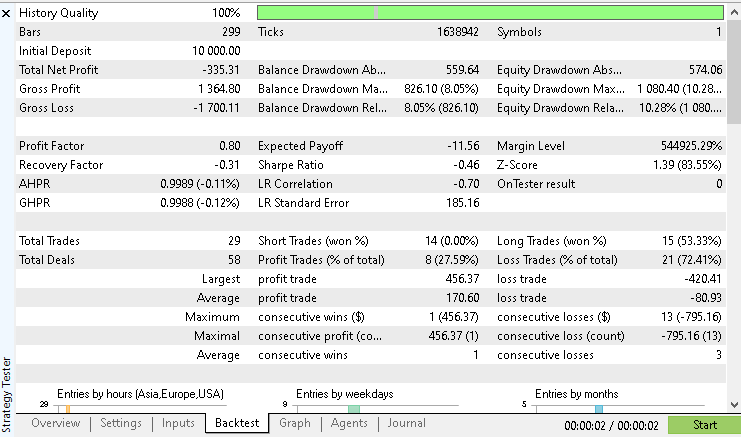
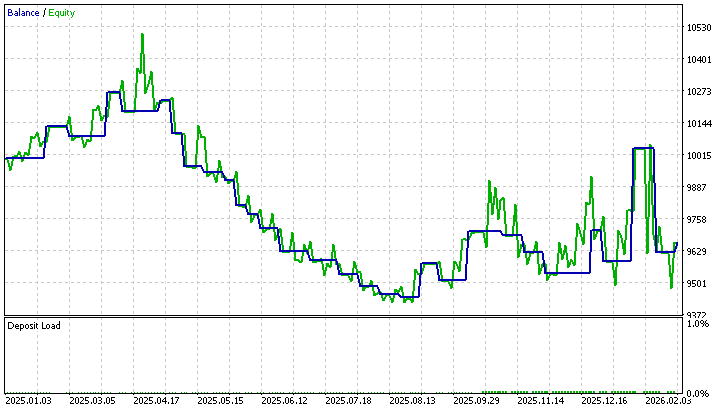
Under these conditions, the system produces a negative net result. While long trades show moderate success, short trades fail to produce any winning outcomes. This imbalance affects overall performance.
The second experiment restricts trading to long positions only.
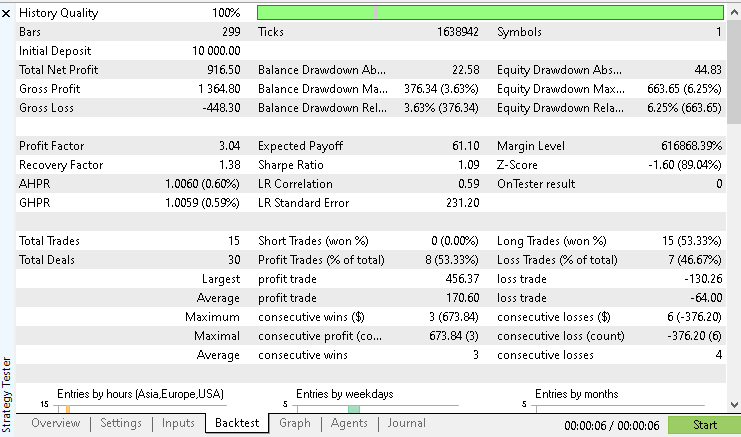
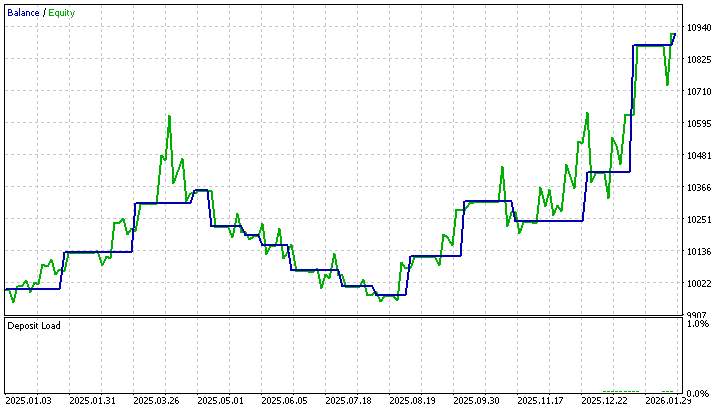
In this case, the system produces a positive result with fewer trades. The win rate remains consistent with the long trades observed earlier, which confirms that the strength of the system is concentrated on the long side.
The third experiment allows only short trades.
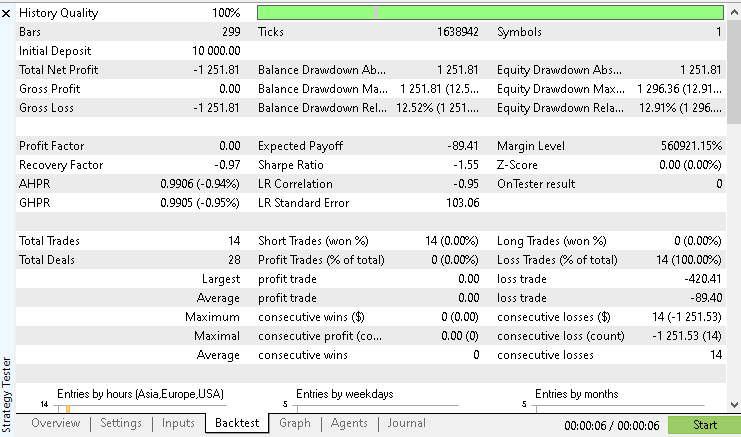
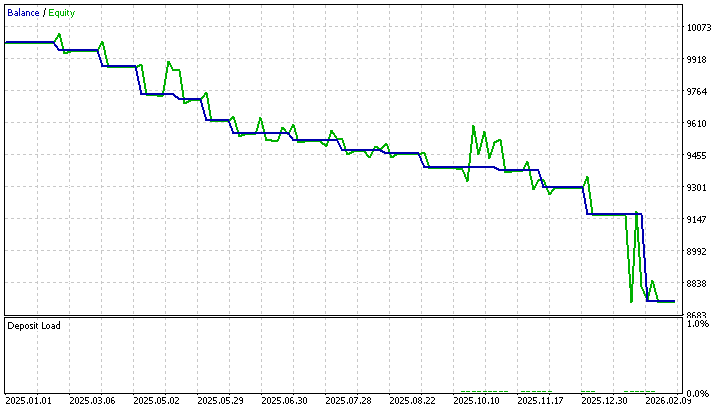
The result is significantly negative, with no winning trades recorded. This highlights a clear weakness in the system when operating in bearish conditions.
From these observations, it becomes clear that the current implementation performs better in upward market conditions. The logic used to interpret signals appears to align more effectively with bullish trends, while bearish conditions are not handled with the same level of accuracy. This insight is useful for guiding future improvements and refining the strategy.
It is important to note that during the selected test period, the market was in a sustained upward trend. This directional bias provides context for the observed results. Since the strategy relies on trend following behavior, long positions benefited from favorable market conditions while short positions struggled to gain traction. The dominance of bullish trades is therefore not only a result of the system logic, but also a reflection of the broader market environment during the test period.
Despite producing valid results, it is important to recognize the limitations of the current system:
- The strategy does not include time-based filtering to control when trades are allowed.
- There is no awareness of major economic events that may affect price behavior.
- Market context, such as trend strength or higher timeframe direction, is not considered.
- Position sizing remains fixed and does not adapt to changing market conditions.
- The system relies entirely on a single signal source without confirmation from additional indicators,
These limitations indicate that while the system is functional, there is room for further refinement. The current results provide a solid baseline upon which more advanced features can be introduced in future development stages.
Conclusion
In this article, we have completed the transition from signal generation to automated execution. Building on the UT Bot Alerts indicator developed in the previous part of this series, we have designed an Expert Advisor that can read signals and act on them in a consistent and controlled manner. The key challenges identified at the beginning have been addressed:
- Signals from the custom indicator are read accurately using indicator buffers
- Trade execution is synchronized with new bar formation to ensure stable and confirmed entries
- Signal detection and trade execution are separated into clear components, improving structure and readability
The result is a working system that demonstrates how an indicator can be extended into a practical automated trading tool. This establishes a solid foundation for further experimentation and refinement.
Attachments and Reproducing the Experiments
The attached files are provided in a single archive named "MQL5.zip". The archive contains the "MQL5" folder as its root. When extracted into the terminal installation directory, the files are placed in their required project subfolders.
Reproducing the Experiments
- Extract the provided archive into the terminal's "MQL5" folder.
- Open MetaEditor and compile the Expert Advisor and the custom indicator.
- Open Strategy Tester in MetaTrader 5.
- Select the compiled "ciw_uTBotAlertsExpert" Expert Advisor.
- Set the symbol to XAUUSD.
- Set the timeframe to D1.
- Set the testing period from January 1, 2025 to February 28, 2026.
- Load the tester configuration file.
- Load the parameter file for the required experiment.
- Run the test.
- Repeat the same process for each remaining parameter file.
- Compare the reports and equity curves for all experiments.
The table below summarizes the attached archive and its contents:
| Folder | File Name | Description |
|---|---|---|
| MQL5\Experts\CustomIndicatorWorkshop_Part4 | ciw_uTBotAlertsExpert.mq5 | Source code for the Expert Advisor developed in this article. |
| MQL5\Indicators\CustomIndicatorWorkshop_Part4 | ciw_uTBotAlerts.mq5 | Source code for the UT Bot Alerts custom indicator used by the Expert Advisor. |
| MQL5\Files\CustomIndicatorWorkshop_Part4 | configurations.ini | Strategy Tester configuration file used to reproduce the testing environment. |
| MQL5\Files\CustomIndicatorWorkshop_Part4 | parameters_exp1.set | Input parameters used for experiment 1. |
| MQL5\Files\CustomIndicatorWorkshop_Part4 | parameters_exp2.set | Input parameters used for experiment 2 |
| MQL5\Files\CustomIndicatorWorkshop_Part4 | parameters_exp3.set | Input parameters used for experiment 3. |
| MQL5.zip | Archive containing all files arranged under the "MQL5" root folder. When extracted into the terminal installation directory, the files are placed in their required project subfolders. |
Warning: All rights to these materials are reserved by MetaQuotes Ltd. Copying or reprinting of these materials in whole or in part is prohibited.
This article was written by a user of the site and reflects their personal views. MetaQuotes Ltd is not responsible for the accuracy of the information presented, nor for any consequences resulting from the use of the solutions, strategies or recommendations described.

 Trading Robot Based on a GPT Language Model
 Creating an Interactive Portfolio Analyzer Dashboard with CCanvas in MQL5
 From Basic to Intermediate: FileSave and FileLoad
 Exponentially Weighted Covariance Matrix in MQL5: Building an Adaptive Correlation Monitor for Multi-Symbol EAs

- Free trading apps
- Over 8,000 signals for copying
- Economic news for exploring financial markets
You agree to website policy and terms of use