

Larry Williams Market Secrets (Part 2): Automating a Market Structure Trading System
 18 428
 3
3

Introduction
Many traders understand market structure visually but struggle to translate that understanding into a precise, repeatable trading process. Swing points are easy to spot on a chart in hindsight, but making consistent decisions in real time is far more difficult. This challenge becomes even bigger when a trader wants to remove discretion and rely on objective rules that can be tested and automated.
In the first article of this series, we addressed part of this problem by building a custom Market Structure indicator in MQL5 based on concepts presented in Larry Williams's book, Long-Term Secrets to Short-Term Trading. That indicator identifies short and intermediate-term swing points directly on the chart, giving traders a clear, structured view of price behavior. In this second article, we take the next logical step. We move from visual analysis to full automation. Using MQL5, we design an Expert Advisor that reads market structure data from the indicator and converts it into actionable trading decisions. The goal is to show how a discretionary idea can be expressed as clear rules and executed automatically without emotional interference.
This article is part of the Larry Williams Market Secrets series, in which each installment focuses on implementing one concept from Larry Williams' work in a practical, testable way. In this part, we focus on short and intermediate-term swing points and demonstrate how they can be used to trigger trades immediately after structure is confirmed. By the end of this article, the reader will have a working trading system that bridges the gap between market structure theory and real-world automation using MQL5.
Who is Larry Williams?
Larry Williams is one of the most respected names in trading. He is a stock and commodity trader with a long track record. He is also the author of many trading books. One of his best-known releases is Long-Term Secrets to Short-Term Trading. Many traders study this book for its practical approach to market structure and swing analysis, which serves as the foundation for this article.
Larry Williams gained significant recognition after winning the World Cup Championship of Futures Trading in 1987. In that contest, he turned ten thousand dollars ($10,000) into more than one million dollars ($1,000,000) within twelve months. No one has ever broken that record. Ten years later, his daughter Michelle Williams entered the same contest and won as well. This demonstrated that his ideas could be learned and applied successfully by others.
Strategy Overview
Before we automate anything, it is important to revisit the market structure concepts that drive this strategy briefly. These ideas are explained in detail in Part 1 of this series, so here we focus only on what is necessary to understand the trading logic.
Below is a chart screenshot showing the Market Structure indicator developed in Part 1 applied to a live market.

This visual reference will help you clearly see how short-term and intermediate-term swing points are identified, and it will make it easier to follow how these same points are later used by the Expert Advisor to generate trading signals.
Larry Williams defines market structure using swing points that naturally emerge from price movement. A short-term swing low forms when the price makes a low that is surrounded by higher lows on both sides.

This tells us that selling pressure has weakened and the price has started to turn upward. A short-term swing high is the opposite.

It forms when price makes a high that is surrounded by lower highs on both sides, signaling that buying pressure has faded and price has started to turn downward. Larry originally referred to these as ringed highs and lows, because traders would circle them on charts to make them stand out.
Markets do not stop at one level of structure. According to Larry Williams, short-term swing points combine to form intermediate-term swing points. An intermediate-term low is a short-term low that is lower than the short-term lows on both sides.
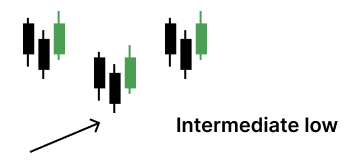
An intermediate-term high is a short-term high that is higher than the short-term highs on both sides.

This nesting of swings allows us to describe market movement mechanically and objectively, without subjective chart interpretation.
One of the most important observations Larry Williams makes in Long-Term Secrets to Short-Term Trading is that these swing points are not just descriptive. They are actionable. He explains that he consistently made profits by using the formation and violation of these swing points as entries, exits, and stop-loss levels. In his words, these points represent the most meaningful support and resistance levels in the market. When they hold, they confirm trend continuation. When they break, they warn of a trend change.
This article focuses on turning that idea into a fully automated trading system. For Part 2 of the series, we deliberately limit ourselves to short-term and intermediate-term swing points. Long-term swing points will be introduced and automated in a later article, once the foundation is complete.
The core trading logic is simple and closely follows Larry Williams' reasoning. We wait for an intermediate-term swing point to be confirmed by the formation of a short-term swing point. When this confirmation occurs, the EA enters the market immediately, provided there is no active position.
A long position is opened when a short-term swing low confirms an intermediate-term swing low. This suggests that price has likely completed a corrective phase and may be entering a new upward leg. The EA checks for this condition on every new bar and opens a market buy order as soon as the confirmation is detected.
A short position follows the inverse logic. When a short-term swing high confirms an intermediate-term swing high, the EA interprets this as the start of a downward move. If there is no active position, it immediately opens a market sell order.
All signal detection is evaluated only at the opening of a new bar. This ensures that swing points are fully formed and avoids reacting to incomplete price data.
Beyond the core entry logic, the strategy includes several features designed to make it practical and robust in real trading conditions.
The user can control trade direction. The EA can be configured to take only long trades, only short trades, or both, depending on market conditions or personal preference.
Position sizing can be fully automated or manual. The EA can calculate lot size based on a user-defined risk percentage of the current account balance, or it can use a fixed lot size specified by the trader.
Stop loss placement is based entirely on market structure. The user can choose whether to place the stop loss at the most recent short-term swing point or at the most recently confirmed intermediate-term swing point. This keeps risk management aligned with the same structure that generates entries.
To avoid unrealistic or undesirable trades, the user defines minimum and maximum stop-loss distances. This prevents trades with stops that are too tight to survive normal price movement or too wide to justify the risk.
Profit targets are controlled through a configurable risk-to-reward ratio. This allows the strategy to remain consistent across different markets and timeframes.
Finally, the EA includes an optional step-based trailing stop mechanism. When enabled, this feature locks in profits as the price moves in the trade's favor, while still allowing the trend to develop.
Together, these components transform Larry Williams' market structure concepts from a visual analysis tool into a complete and systematic trading strategy. In the following sections, we will break down how each part is implemented in MQL5 and how the indicator and the Expert Advisor communicate to produce reliable, repeatable trading decisions.
Signal Generation Logic
To begin, open MetaEditor 5, create a new Expert Advisor file, and name it larryWilliamsMarketStructureExpert.mq5. Once the file is created, remove the default template code and replace it with the boilerplate shown below.
//+------------------------------------------------------------------+
//|                           larryWilliamsMarketStructureExpert.mq5 |
//|          Copyright 2025, MetaQuotes Ltd. Developer is Chacha Ian |
//|                          https://www.mql5.com/en/users/chachaian |
//+------------------------------------------------------------------+

#property copyright "Copyright 2025, MetaQuotes Ltd. Developer is Chacha Ian"
#property link      "https://www.mql5.com/en/users/chachaian"
#property version   "1.00"

//+------------------------------------------------------------------+
//| Standard Libraries                                               |
//+------------------------------------------------------------------+
#include <Trade\Trade.mqh>

//+------------------------------------------------------------------+
//| User input variables                                             |
//+------------------------------------------------------------------+
input group "Information"
input ulong           magicNumber = 254700680002;
input ENUM_TIMEFRAMES timeframe   = PERIOD_CURRENT;

//+------------------------------------------------------------------+
//| Global Variables                                                 |
//+------------------------------------------------------------------+
//--- Create a CTrade object to handle trading operations
CTrade Trade;

//--- Bid and Ask
double   askPrice;
double   bidPrice;

//+------------------------------------------------------------------+
//| Expert initialization function                                   |
//+------------------------------------------------------------------+
int OnInit(){

   //---  Assign a unique magic number to identify trades opened by this EA
   Trade.SetExpertMagicNumber(magicNumber);

   return(INIT_SUCCEEDED);
}

//+------------------------------------------------------------------+
//| Expert deinitialization function                                 |
//+------------------------------------------------------------------+
void OnDeinit(const int reason){

   //--- Notify why the program stopped running
   Print("Program terminated! Reason code: ", reason);

}

//+------------------------------------------------------------------+
//| Expert tick function                                             |
//+------------------------------------------------------------------+
void OnTick(){

   //--- Scope variables
   askPrice      = SymbolInfoDouble (_Symbol, SYMBOL_ASK);
   bidPrice      = SymbolInfoDouble (_Symbol, SYMBOL_BID);

}

//+------------------------------------------------------------------+
//| TradeTransaction function                                        |
//+------------------------------------------------------------------+
void OnTradeTransaction(const MqlTradeTransaction& trans,
                        const MqlTradeRequest& request,
                        const MqlTradeResult& result)
{
}

//--- UTILITY FUNCTIONS

//+------------------------------------------------------------------+
This initial code gives us a clean and reliable structure that we will build on step by step.
The header section defines basic information about the file. It includes the EA name, author details, version number, and a link to the MQL5 profile. This is standard practice and helps with identification, version control, and future maintenance.
Next, we include the standard trading library. The Trade.mqh file provides the CTrade class, which we will use later to open, manage, and close positions in a safe and structured way.
After that, we define user input variables. These inputs allow the trader to control important settings when attaching the EA to a chart. For now, we only define a magic number to uniquely identify trades opened by this EA, and a timeframe parameter that allows flexibility when working across different charts.
The global variables section follows. Here, we create a CTrade object that will handle all trading operations. We also declare variables to store the current bid and ask prices, which are updated on every tick and reused throughout the EA.
The OnInit function runs once when the EA is attached to a chart. At this stage, we only assign the magic number to the CTrade object. This ensures that all trades opened by this EA can be tracked, identified, and managed independently by this Expert Advisor.
The OnDeinit function is called when the EA is removed or stopped. For now, it simply prints a message explaining why the program terminated. This is useful during testing and debugging.
The OnTick function is executed every time new price data arrives at the terminal. At this early stage, we only update the bid and ask prices. All signal detection and trading logic will be added here later, but for now we keep it minimal and clean.
Finally, the OnTradeTransaction function is included as a placeholder. We are not using it yet, but it will become useful later when handling trade events such as executions, modifications, or closures.
At this point, the EA does nothing by design. That is intentional. We now have a solid and readable foundation that follows MQL5 best practices. In the next steps, we will begin adding signal generation logic and connect this EA to the market structure indicator built in Part 1.
Now that the basic Expert Advisor structure is in place, the real work can begin. This strategy does not calculate market structure internally. Instead, it reads signals directly from the Market Structure Indicator developed in Part 1 of this series.
The complete source code for that indicator is attached to this article as larryWilliamsMarketStructureIndicator.mq5. To work with the same setup, the reader should first make sure the indicator is available in the terminal.
There are two simple ways to do this. The first option is to download the attached source file, open MetaEditor 5, create a new empty indicator file named larryWilliamsMarketStructureIndicator.mq5, paste the source code into it, and compile it. The second option is even simpler. After downloading the file, copy it directly into the Indicators folder inside the MQL5 data directory. After restarting the terminal, the indicator will appear normally and can be edited or compiled if needed.
Because this Expert Advisor depends on an external indicator, it is good practice to package that resource together with the EA. This ensures the EA can always find and load the indicator correctly. To do that, we add the following line just below the existing property directives.
#resource "\\Indicators\\larryWilliamsMarketStructureIndicator.ex5"
This directive embeds the compiled indicator file into the Expert Advisor. When the EA runs, the terminal knows precisely where to locate the indicator without relying on manual installation paths. This makes distribution and reuse much more reliable.
Next, we need a way for the EA to communicate with the indicator. In MQL5, this communication is done through an indicator handle. Under the global variables section, declare the following variable.
//--- The Larry Williams Market Structure Indicator handle
int larryWilliamsMarketStructureIndicatorHandle;
An indicator handle is simply a reference. It represents a live connection between the Expert Advisor and the indicator instance running in the background. Without this handle, the EA cannot request data from the indicator buffers.
After that, we declare four arrays in the global scope to store the market structure values read from the indicator.
//--- Arrays to track market structure data
double shortTermLows [];
double shortTermHighs[];
double intermediateTermLows [];
double intermediateTermHighs[];
These arrays act as containers. They will be filled with the most recent swing-point values generated by the indicator. Later, our signal logic will inspect these arrays to decide when to open trades.
Inside the OnInit function, we now tell MQL5 to treat these arrays as time series.
//+------------------------------------------------------------------+
//| Expert initialization function                                   |
//+------------------------------------------------------------------+
int OnInit(){

   ...

   //--- Treat the following arrays as timeseries (index 0 becomes the most recent bar)
   ArraySetAsSeries(shortTermLows,  true);
   ArraySetAsSeries(shortTermHighs, true);
   ArraySetAsSeries(intermediateTermLows,  true);
   ArraySetAsSeries(intermediateTermHighs, true);
   ArraySetAsSeries(closePriceMinutesData, true);

   return(INIT_SUCCEEDED);
}
This setting ensures that index zero always represents the most recent bar. This is extremely important for signal detection, as we want to evaluate newly formed swing points without having to scan the entire history each time.
With the handle declared, we can now initialize the indicator itself. This is also done inside the OnInit function.
int OnInit(){

   ...

   //--- Initialize larryWilliamsMarketStructureIndicator
   larryWilliamsMarketStructureIndicatorHandle    = iCustom(_Symbol, timeframe, "::Indicators\\larryWilliamsMarketStructureIndicator.ex5");
   if(larryWilliamsMarketStructureIndicatorHandle == INVALID_HANDLE){
      Print("Error while initializing Larry Williams' Market Structure Indicator: ", GetLastError());
      return(INIT_FAILED);
   }

   return(INIT_SUCCEEDED);
}
Here, iCustom loads the indicator and returns a handle if successful. The symbol and timeframe parameters ensure the indicator runs on the same chart context as the EA. If the handle is invalid, the EA stops immediately. This prevents the strategy from running without reliable data.
Now that the indicator is running, we need a clean way to read its buffer values. For this purpose, we define a custom utility function.
//--- UTILITY FUNCTIONS
//+-------------------------------------------------------------------------------+
//| Copies the latest swing high and low data from the market structure indicator |
//+-------------------------------------------------------------------------------+
void RefreshMarketStructureBuffers(){

   //--- Get the last 200 short-term swing low points
   int copiedShortTermSwingLows = CopyBuffer(larryWilliamsMarketStructureIndicatorHandle, 0, 0, 200, shortTermLows);
   if(copiedShortTermSwingLows == -1){
      Print("Error while copying short-term swing lows: ", GetLastError());
      return;
   }

   //--- Get the last 200 short-term swing high points
   int copiedShortTermSwingHighs = CopyBuffer(larryWilliamsMarketStructureIndicatorHandle, 1, 0, 200, shortTermHighs);
   if(copiedShortTermSwingHighs == -1){
      Print("Error while copying short-term swing highs: ", GetLastError());
      return;
   }

   //--- Get the last 200 intermediate swing low points
   int copiedIntermediateSwingLows = CopyBuffer(larryWilliamsMarketStructureIndicatorHandle, 2, 0, 200, intermediateTermLows);
   if(copiedIntermediateSwingLows == -1){
      Print("Error while copying intermediate swing lows: ", GetLastError());
      return;
   }

   //--- Get the last 200 intermediate swing high points
   int copiedIntermediateSwingHighs = CopyBuffer(larryWilliamsMarketStructureIndicatorHandle, 3, 0, 200, intermediateTermHighs);
   if(copiedIntermediateSwingHighs == -1){
      Print("Error while copying intermediate swing highs: ", GetLastError());
      return;
   }

   //--- Treat the following arrays as timeseries (index 0 becomes the most recent bar)
   ArraySetAsSeries(shortTermLows,  true);
   ArraySetAsSeries(shortTermHighs, true);
   ArraySetAsSeries(intermediateTermLows,  true);
   ArraySetAsSeries(intermediateTermHighs, true);

}
This function uses CopyBuffer to retrieve the most recent swing point data from the indicator. Each call copies up to the last 200 values from a specific buffer into the corresponding array.
Short-term lows and highs are read first, followed by intermediate-term lows and highs. After each CopyBuffer call, we check for errors to ensure the data is valid. If copying fails, the function exits early to avoid working with incomplete information.
At the end of the function, the arrays are again treated as time series. This guarantees that index zero always points to the latest bar, even if the internal memory layout changes.
This function keeps the EA logic clean. Instead of copying indicator data across multiple places, we refresh everything in a single, controlled step whenever needed.
Market structure signals are valid only when a bar closes. For that reason, the EA should react only when a new bar opens. To detect this, we define the following function.
//+------------------------------------------------------------------+
//| Function to check if there's a new bar on a given chart timeframe|
//+------------------------------------------------------------------+
bool IsNewBar(string symbol, ENUM_TIMEFRAMES tf, datetime &lastTm)
{

   datetime currentTm = iTime(symbol, tf, 0);
   if(currentTm != lastTm){
      lastTm       = currentTm;
      return true;
   }
   return false;

}
This function compares the current bar's opening time with a stored value. If the time has changed, a new bar has formed. The function then updates the stored value and returns true.
To support this logic, we declare a global variable.
//--- To help track new bar open
datetime lastBarOpenTime;
This variable remembers the opening time of the last processed bar. Inside OnInit, it is initialized to zero, so the first bar is always detected correctly.
//+------------------------------------------------------------------+
//| Expert initialization function                                   |
//+------------------------------------------------------------------+
int OnInit(){

   ...

   //--- Initialize global variables
   lastBarOpenTime = 0;

   return(INIT_SUCCEEDED);
}
With fresh indicator data available, we can now define our signal logic. The first function checks for a buy signal.
//+---------------------------------------------------------------------------+
//| Checks whether current market structure conditions generate a buy signal  |
//+---------------------------------------------------------------------------+
bool IsBuySignal(){

   if(shortTermLows[2] == EMPTY_VALUE){
      return false;
   }

   int commonIndex = -1;
   for(int i = 3; i < ArraySize(shortTermLows); i++){
      if(shortTermLows[i] != EMPTY_VALUE){
         commonIndex = i;
         break;
      }
   }

   if(commonIndex == -1){
      return false;
   }

   if(intermediateTermLows[commonIndex] != EMPTY_VALUE){
      return true;
   }

   return false;

}
The function starts by verifying that a short-term low has just formed. This is done by checking a recent bar index. If no short-term low exists, the function exits immediately.
bool IsBuySignal(){

   if(shortTermLows[2] == EMPTY_VALUE){
      return false;
   }

   ...

}
Next, the function searches backward to find the most recent confirmed short-term low. Once its index is identified, it is checked against the intermediate-term lows array.
bool IsBuySignal(){

   ...

   int commonIndex = -1;
   for(int i = 3; i < ArraySize(shortTermLows); i++){
      if(shortTermLows[i] != EMPTY_VALUE){
         commonIndex = i;
         break;
      }
   }

   if(commonIndex == -1){
      return false;
   }

   ...

}
If an intermediate-term low exists at that position, it means the short-term structure has confirmed an intermediate-term low. At that moment, the function returns true. Otherwise, it returns false.
bool IsBuySignal(){

   ...

   if(intermediateTermLows[commonIndex] != EMPTY_VALUE){
      return true;
   }

   return false;

}
This logic mirrors Larry Williams' idea of nested swings. A higher-level swing is only actionable when a lower-level structure confirms it.
The sell signal function follows the same structure, but with inverse logic. Instead of lows, it works with highs.
//+---------------------------------------------------------------------------+
//| Checks whether current market structure conditions generate a sell signal |
//+---------------------------------------------------------------------------+
bool IsSelSignal(){

   if(shortTermHighs[2] == EMPTY_VALUE){
      return false;
   }

   int commonIndex = -1;
   for(int i = 3; i < ArraySize(shortTermHighs); i++){
      if(shortTermHighs[i] != EMPTY_VALUE){
         commonIndex = i;
         break;
      }
   }

   if(commonIndex == -1){
      return false;
   }

   if(intermediateTermHighs[commonIndex] != EMPTY_VALUE){
      return true;
   }

   return false;

}
It checks for the formation of a short-term high, finds the most recent valid one, and then verifies whether an intermediate-term high exists at the same index. If it does, the function confirms a sell signal.
Because the logic is symmetrical, understanding the buy signal function makes the sell signal immediately clear.
Before placing real trades, it is important to confirm that signal detection works correctly. For this reason, we call the functions inside OnTick and print messages instead of opening positions.
//+------------------------------------------------------------------+
//| Expert tick function                                             |
//+------------------------------------------------------------------+
void OnTick(){

   ...

   //--- Execute logic only when a new bar opens
   if(IsNewBar(_Symbol, timeframe, lastBarOpenTime)){

      //--- Get updated market structure data
      RefreshMarketStructureBuffers();

      //--- Handle Buy signals
      if(IsBuySignal()){
         Print("Intermediate low confirmed!");
      }

      //--- Handle Sell signals
      if(IsSelSignal()){
         Print("Intermediate high confirmed!");
      }
   }
}
At this stage, the EA only reports detected signals in the terminal log. This allows the reader to visually compare printed messages with the indicator on the chart and confirm that everything aligns correctly.
Once this behavior is verified, we can proceed to the trade execution logic in the next section.
From Signals To Trades
Now that we can reliably detect swing signals from market structure, the next logical step is to convert those signals into real trades. In this section, we introduce the trading logic of the Expert Advisor. The goal is to give the user complete control over how trades are executed while keeping the internal logic clean and structured.
Before writing any trading functions, we first need to define the variables and configurations that support them. These settings allow the user to control trade direction, position size, risk, stop loss placement, and reward targets.
Controlling trade direction
Market conditions are not always neutral. A trader may decide to trade only in the direction of the dominant trend. To support this, we introduce a custom enumeration that defines the allowed trade direction.
//+------------------------------------------------------------------+
//| Custom Enumerations                                              |
//+------------------------------------------------------------------+
enum ENUM_TRADE_DIRECTION
{
   ONLY_LONG,
   ONLY_SHORT,
   TRADE_BOTH
};
ONLY_LONG allows only long positions. ONLY_SHORT allows only short positions. TRADE_BOTH allows both long and short positions.
We then expose this choice to the user as an input parameter.
...

input group "Trade and Risk Management"
input ENUM_TRADE_DIRECTION            direction  = TRADE_BOTH;
By default, the EA is allowed to trade in both directions. When attaching the EA to a chart, the user can change this behavior based on their market bias. This gives flexibility without changing the source code.
Lot size calculation modes
Next, we give the user control over how the position size is calculated. Some traders prefer a fixed lot size, while others prefer risk-based position sizing. We define another enumeration with two modes.
enum ENUM_LOT_SIZE_INPUT_MODE
{
   MODE_MANUAL,
   MODE_AUTO
};
MODE_MANUAL uses a fixed lot size. MODE_AUTO calculates lot size based on account risk.
When automatic mode is selected, the EA uses a user-defined risk percentage of the account balance. This percentage represents the maximum loss the trader is willing to incur if the stop loss is triggered. When manual mode is selected, the EA uses the user-provided fixed lot size.
input ENUM_LOT_SIZE_INPUT_MODE      lotSizeMode  = MODE_AUTO;
input double                 riskPerTradePercent = 1.0;
input double                             lotSize = 5.0;
This approach allows both conservative and aggressive traders to use the same EA comfortably.
Stop loss placement based on market structure
Since this EA trades based on market structure, the stop loss should be placed logically as well. We allow the user to choose whether the stop loss is placed on the most recent short-term swing or the most recent confirmed intermediate swing.
enum ENUM_STOP_LOSS_STRUCTURE{
   SL_AT_SHORT_TERM_SWING,
   SL_AT_INTERMEDIATE_SWING
};
This choice affects how tight or wide the stop loss will be. Short-term swings result in tighter stops, while intermediate swings give more room for price movement. The user can choose what best fits their trading style.
input ENUM_STOP_LOSS_STRUCTURE stopLossStructure = SL_AT_INTERMEDIATE_SWING;
Valid stop distance range
Because market structure is dynamic, stop distances can sometimes be too short or too long. Both cases can be undesirable.
To control this, the user defines a minimum and maximum allowed stop distance in points. Any trade that falls outside this range is ignored. This protects the EA from entering trades with poor risk characteristics.
input int              minimumStopDistancePoints = 100;
input int              maximumStopDistancePoints = 600;
Risk to reward configuration
We also allow the user to select a predefined risk-to-reward ratio.
enum ENUM_RISK_REWARD_RATIO
{
   ONE_TO_ONE,
   ONE_TO_ONEandHALF,
   ONE_TO_TWO,
   ONE_TO_THREE,
   ONE_TO_FOUR,
   ONE_TO_FIVE,
   ONE_TO_SIX
};
Each option specifies how many reward units are targeted for each unit of risk. This value is later used to automatically calculate the take-profit level.
input ENUM_RISK_REWARD_RATIO riskRewardRatio = ONE_TO_TWO;
Tracking open trade information
Once a trade is opened, we need to track its details. This allows us to effectively implement future features such as trailing stops and trade management.
For this purpose, we define a structure that stores essential information about the active position. This includes entry price, stop loss, take profit, lot size, and open time. We then declare a global instance of this structure to store the current trade data.
//+------------------------------------------------------------------+
//| Data Structures                                                  |
//+------------------------------------------------------------------+
struct MqlTradeInfo
{
   ulong orderTicket;
   ENUM_ORDER_TYPE type;
   ENUM_POSITION_TYPE posType;
   double entryPrice;
   double takeProfitLevel;
   double stopLossLevel;
   datetime openTime;
   double lotSize;
};

//--- Instantiate the trade information data structure
MqlTradeInfo tradeInfo
Point value initialization
Stop distance validation requires knowledge of the instrument point size. Since different symbols have different point values, we store this value in a global variable.
//--- The size of a point for this financial security
double pointValue;
Inside the OnInit function, we initialize it using the symbol properties. This ensures that stop distance calculations are always accurate for the current instrument.
//+------------------------------------------------------------------+
//| Expert initialization function                                   |
//+------------------------------------------------------------------+
int OnInit(){

   ...

   pointValue      = SymbolInfoDouble(_Symbol, SYMBOL_POINT);

   return(INIT_SUCCEEDED);
}
Opening a long position
The OpenBuy function opens a market buy order. It performs several important steps in a structured way.
//+------------------------------------------------------------------+
//| Function used to open a market buy order.                        |
//+------------------------------------------------------------------+
bool OpenBuy(const double askPr){

   ENUM_ORDER_TYPE action          = ORDER_TYPE_BUY;
   ENUM_POSITION_TYPE positionType = POSITION_TYPE_BUY;
   datetime currentTime            = TimeCurrent();
   double contractSize             = SymbolInfoDouble(_Symbol, SYMBOL_TRADE_CONTRACT_SIZE);
   double accountBalance           = AccountInfoDouble(ACCOUNT_BALANCE);
   double rewardValue              = 1.0;

   switch(riskRewardRatio){
      case ONE_TO_ONE:
         rewardValue = 1.0;
         break;
      case ONE_TO_ONEandHALF:
         rewardValue = 1.5;
         break;
      case ONE_TO_TWO:
         rewardValue = 2.0;
         break;
      case ONE_TO_THREE:
         rewardValue = 3.0;
         break;
      case ONE_TO_FOUR:
         rewardValue = 4.0;
         break;
      case ONE_TO_FIVE:
         rewardValue = 5.0;
         break;
      case ONE_TO_SIX:
         rewardValue = 6.0;
         break;
      default:
         rewardValue = 1.0;
         break;
   }

   double stopLevel = 0;

   if(stopLossStructure == SL_AT_SHORT_TERM_SWING  ){
      stopLevel = NormalizeDouble(shortTermLows[2], Digits());
   }

   if(stopLossStructure == SL_AT_INTERMEDIATE_SWING){

      for(int i = 0; i < ArraySize(intermediateTermLows); i++){
         if(intermediateTermLows[i] != EMPTY_VALUE){
            stopLevel = NormalizeDouble(intermediateTermLows[i], Digits());
            break;
         }
      }
   }

   double stopDistance = NormalizeDouble(askPr - stopLevel, Digits());
   if(stopDistance > (maximumStopDistancePoints * pointValue) || stopDistance < (minimumStopDistancePoints * pointValue)){
      Print("The Stop Distance falls outside desired distance range");
      return false;
   }

   double targetLevel  = NormalizeDouble(askPr + (rewardValue * stopDistance), Digits());

   double volume       = NormalizeDouble(lotSize, 2);
   if(lotSizeMode == MODE_AUTO){
      double amountAtRisk = (riskPerTradePercent / 100.0) *  accountBalance;
      volume              = amountAtRisk / (contractSize * stopDistance);
      volume              = NormalizeDouble(volume, 2);
   }

   if(!Trade.Buy(volume, _Symbol, askPr, stopLevel, targetLevel)){
      Print("Error while opening a long position, ", GetLastError());
      Print(Trade.ResultRetcode());
      Print(Trade.ResultComment());
      return false;
   }else{
      MqlTradeResult result = {};
      Trade.Result(result);
      tradeInfo.orderTicket                 = result.order;
      tradeInfo.type                        = action;
      tradeInfo.posType                     = positionType;
      tradeInfo.entryPrice                  = result.price;
      tradeInfo.takeProfitLevel             = targetLevel;
      tradeInfo.stopLossLevel               = stopLevel;
      tradeInfo.openTime                    = currentTime;
      tradeInfo.lotSize                     = result.volume;

      return true;
   }

   return false;
}
First, it determines the selected risk-to-reward ratio and converts it into a numeric reward value. This value is later used to calculate the take-profit level.
Next, the function determines the stop loss level. Depending on the user's choice, the stop is placed at either the most recent short-term low or the most recent intermediate low.
Once the stop level is known, the stop distance is calculated. This distance is then checked against the user-defined minimum and maximum range. If the distance is not acceptable, the trade is skipped.
The take profit level is calculated using the reward value and the stop distance. This ensures that every trade follows the selected risk-to-reward profile.
The function then determines the trade volume. If manual mode is selected, the fixed lot size is used. If automatic mode is selected, the lot size is calculated based on account balance, risk percentage, contract size, and stop distance.
Finally, the function sends a buy order to the server. If the trade is successful, all relevant trade details are stored in the trade information structure for later use.
Opening a short position
The OpenSel function follows the same logic as the buy function, but in the opposite direction. Stop loss levels are taken from swing highs instead of swing lows, and price calculations are inverted accordingly.
//+------------------------------------------------------------------+
//| Function used to open a market sell order.                       |
//+------------------------------------------------------------------+
bool OpenSel( const double bidPr){

   ENUM_ORDER_TYPE action          = ORDER_TYPE_SELL;
   ENUM_POSITION_TYPE positionType = POSITION_TYPE_SELL;
   datetime currentTime            = TimeCurrent();
   double contractSize             = SymbolInfoDouble(_Symbol, SYMBOL_TRADE_CONTRACT_SIZE);
   double accountBalance           = AccountInfoDouble(ACCOUNT_BALANCE);
   double rewardValue              = 1.0;

   switch(riskRewardRatio){
      case ONE_TO_ONE:
         rewardValue = 1.0;
         break;
      case ONE_TO_ONEandHALF:
         rewardValue = 1.5;
         break;
      case ONE_TO_TWO:
         rewardValue = 2.0;
         break;
      case ONE_TO_THREE:
         rewardValue = 3.0;
         break;
      case ONE_TO_FOUR:
         rewardValue = 4.0;
         break;
      case ONE_TO_FIVE:
         rewardValue = 5.0;
         break;
      case ONE_TO_SIX:
         rewardValue = 6.0;
         break;
      default:
         rewardValue = 1.0;
         break;
   }

   double stopLevel = 0;

   if(stopLossStructure == SL_AT_SHORT_TERM_SWING  ){
      stopLevel = NormalizeDouble(shortTermHighs[2], Digits());
   }

   if(stopLossStructure == SL_AT_INTERMEDIATE_SWING){

      for(int i = 0; i < ArraySize(intermediateTermHighs); i++){
         if(intermediateTermHighs[i] != EMPTY_VALUE){
            stopLevel = NormalizeDouble(intermediateTermHighs[i], Digits());
            break;
         }
      }

   }

   double stopDistance = NormalizeDouble(stopLevel - bidPr, Digits());
   if(stopDistance > (maximumStopDistancePoints * pointValue) || stopDistance < (minimumStopDistancePoints * pointValue)){
      Print("The Stop Distance falls outside desired distance range");
      return false;
   }

   double targetLevel  = NormalizeDouble(bidPr - (rewardValue * stopDistance), Digits());
   double volume       = NormalizeDouble(lotSize, 2);
   if(lotSizeMode == MODE_AUTO){
      double amountAtRisk = (riskPerTradePercent / 100.0) *  accountBalance;
      volume              = amountAtRisk / (contractSize * stopDistance);
      volume              = NormalizeDouble(volume, 2);
   }

   if(!Trade.Sell(volume, _Symbol, bidPr, stopLevel, targetLevel)){
      Print("Error while opening a short position, ", GetLastError());
      Print(Trade.ResultRetcode());
      Print(Trade.ResultComment());
      return false;
   }else{
      MqlTradeResult result = {};
      Trade.Result(result);
      tradeInfo.orderTicket                 = result.order;
      tradeInfo.type                        = action;
      tradeInfo.posType                     = positionType;
      tradeInfo.entryPrice                  = result.price;
      tradeInfo.takeProfitLevel             = targetLevel;
      tradeInfo.stopLossLevel               = stopLevel;
      tradeInfo.openTime                    = currentTime;
      tradeInfo.lotSize                     = result.volume;

      return true;
   }

   return false;
}
Because the structure mirrors the buy logic, the behavior remains consistent while avoiding duplicated complexity.
Checking for existing positions
Before opening a new trade, the EA must ensure that no active position already exists. To handle this, we introduce two utility functions.
//+------------------------------------------------------------------+
//| To verify whether this EA currently has an active buy position.  |                                 |
//+------------------------------------------------------------------+
bool IsThereAnActiveBuyPosition(ulong magic){

   for(int i = PositionsTotal() - 1; i >= 0; i--){
      ulong ticket = PositionGetTicket(i);
      if(ticket == 0){
         Print("Error while fetching position ticket ", _LastError);
         continue;
      }else{
         if(PositionGetInteger(POSITION_MAGIC) == magic && PositionGetInteger(POSITION_TYPE) == POSITION_TYPE_BUY){
            return true;
         }
      }
   }

   return false;
}

//+------------------------------------------------------------------+
//| To verify whether this EA currently has an active sell position. |                                 |
//+------------------------------------------------------------------+
bool IsThereAnActiveSellPosition(ulong magic){

   for(int i = PositionsTotal() - 1; i >= 0; i--){
      ulong ticket = PositionGetTicket(i);
      if(ticket == 0){
         Print("Error while fetching position ticket ", _LastError);
         continue;
      }else{
         if(PositionGetInteger(POSITION_MAGIC) == magic && PositionGetInteger(POSITION_TYPE) == POSITION_TYPE_SELL){
            return true;
         }
      }
   }

   return false;
}
One function checks for an active buy position. The other checks for an active sell position. Each function scans all open positions and filters them by magic number and position type.
This ensures that the EA opens only one position at a time and avoids conflicting trades.
Executing trades inside OnTick
With all components in place, the final step is to connect the trading logic to the main execution loop.
//+------------------------------------------------------------------+
//| Expert tick function                                             |
//+------------------------------------------------------------------+
void OnTick(){

   //--- Scope variables
   askPrice      = SymbolInfoDouble (_Symbol, SYMBOL_ASK);
   bidPrice      = SymbolInfoDouble (_Symbol, SYMBOL_BID);

   //--- Execute logic only when a new bar opens
   if(IsNewBar(_Symbol, timeframe, lastBarOpenTime)){

      //--- Get updated market structure data
      RefreshMarketStructureBuffers();

      //--- Handle Buy signals
      if(IsBuySignal()){

         //--- Open a long position if there is no active position
         if(!IsThereAnActiveBuyPosition(magicNumber) && !IsThereAnActiveSellPosition(magicNumber)){
            OpenBuy(askPrice);
         }
      }

      //--- Handle Sell signals
      if(IsSelSignal()){

         //--- Open a short position if there is no active position
         if(!IsThereAnActiveBuyPosition(magicNumber) && !IsThereAnActiveSellPosition(magicNumber)){
            OpenSel(bidPrice);
         }
      }

   }

}
Inside the OnTick function, we first update the current bid and ask prices. We then check if a new bar has opened. Trade logic is executed only on new bars to avoid duplicate signals.
When a buy signal is detected, the EA checks that no active position exists. If conditions are met, a buy order is opened.
The same logic applies to sell signals. This completes the whole cycle from market structure detection to trade execution.
At this point, the Expert Advisor is fully functional and capable of trading market structure signals in a controlled, configurable manner.
Adding a Dynamic Step Trailing Stop
At this stage, our Expert Advisor can detect signals, open trades, and manage risk correctly. The final piece is trade protection. In this section, we add a dynamic trailing stop that gradually locks in profits as the price moves toward the target. The trailing stop is optional. The user can deactivate or activate it when launching the EA on a chart. This keeps the system flexible and suitable for different trading styles.
Enabling or disabling the trailing stop
We begin by adding a Boolean input parameter. This acts as a simple switch.
input bool enableTrailingStop = false;
When the value is true, the EA actively manages trailing stops. When it is false, trades are left to reach either stop loss or take profit without intervention. This decision is entirely in the user's hands.
Defining the step trailing stop structure
The trailing stop is implemented as a step-based system. Instead of moving the stop loss continuously, it advances in predefined stages as the price progresses toward the target.
To support this behavior, we define a structure to hold all trailing-stop information.
//--- Instantiate the trade information data structure
MqlTradeInfo tradeInfo;

struct MqlTrailingStop
{
   double level1;
   double level2;
   double level3;
   double level4;
   double level5;

   double stopLevel1;
   double stopLevel2;
   double stopLevel3;
   double stopLevel4;
   double stopLevel5;

   bool isLevel1Active;
   bool isLevel2Active;
   bool isLevel3Active;
   bool isLevel4Active;
   bool isLevel5Active;
};

//--- Instantiate the trailing stop structure
MqlTrailingStop trailingStop;
The first five fields store price levels that must be crossed before a stop update is allowed. These are the trigger levels. The following five fields store the stop-loss levels that will be applied when each trigger is reached. These levels indicate where the stop loss is moved. The final five boolean fields track whether each step has already been activated. This prevents the EA from applying the same stop update more than once. In simple terms, the price must cross a level once to unlock a stop update. After that, the EA remembers that the step has already been handled. The entire trailing distance is divided into six equal parts. This creates five trailing steps between entry and take profit.
Detecting price crossings
The trailing logic depends on detecting when the price crosses specific levels. To handle this cleanly, we introduce two small utility functions.
//+------------------------------------------------------------------+
//| To detect a crossover at a given price level                     |
//+------------------------------------------------------------------+
bool IsCrossOver(const double price, const double &closePriceMinsData[]){
   if(closePriceMinsData[1] <= price && closePriceMinsData[0] > price){
      return true;
   }
   return false;
}


//+------------------------------------------------------------------+
//| To detect a crossunder at a given price level                    |
//+------------------------------------------------------------------+
bool IsCrossUnder(const double price, const double &closePriceMinsData[]){
   if(closePriceMinsData[1] >= price && closePriceMinsData[0] < price){
      return true;
   }
   return false;
}
One function detects when the price crosses above a level. The other detects when the price crosses below a level. Each function compares the previous close and the current close to determine whether a crossing has occurred. These functions take two inputs. The first is the level being tested. The second is an array of recent close prices.
Storing minute level price data
To support accurate crossover detection, we store recent minute close prices in a global array. This array is treated as a time series, so index zero always represents the most recent value.
//--- To store minutes data
double closePriceMinutesData [];
Inside the OnTick function, this array is updated on every tick using minute timeframe data. This ensures that trailing stop decisions are based on fresh price movement and not delayed bar data. If the data copy fails, the EA exits early to avoid making decisions with invalid information.
Preparing trailing stop levels when opening a trade
Trailing stop levels must be calculated immediately upon opening a new trade. This ensures that the EA knows exactly where each trailing step lies from the start. Inside both the buy and sell order functions, we refill the trailing stop structure after a successful trade execution.
//+------------------------------------------------------------------+
//| Function used to open a market buy order.                        |
//+------------------------------------------------------------------+
bool OpenBuy(const double askPr){

   ...

   if(!Trade.Buy(volume, _Symbol, askPr, stopLevel, targetLevel)){

   ...

   }else{

      ...

      //--- Refill the trailing Stop struct
      double targetDistance       = targetLevel - askPr;
      double trailingStep         = NormalizeDouble(targetDistance / 6,   Digits());
      trailingStop.level1         = NormalizeDouble(askPr + trailingStep, Digits());
      trailingStop.level2         = NormalizeDouble(trailingStop.level1 + trailingStep, Digits());
      trailingStop.level3         = NormalizeDouble(trailingStop.level2 + trailingStep, Digits());
      trailingStop.level4         = NormalizeDouble(trailingStop.level3 + trailingStep, Digits());
      trailingStop.level5         = NormalizeDouble(trailingStop.level4 + trailingStep, Digits());

      trailingStop.stopLevel1     = NormalizeDouble(stopLevel + trailingStep, Digits());
      trailingStop.stopLevel2     = NormalizeDouble(trailingStop.stopLevel1 + trailingStep, Digits());
      trailingStop.stopLevel3     = NormalizeDouble(trailingStop.stopLevel2 + trailingStep, Digits());
      trailingStop.stopLevel4     = NormalizeDouble(trailingStop.stopLevel3 + trailingStep, Digits());
      trailingStop.stopLevel5     = NormalizeDouble(trailingStop.stopLevel4 + trailingStep, Digits());

      trailingStop.isLevel1Active = false;
      trailingStop.isLevel2Active = false;
      trailingStop.isLevel3Active = false;
      trailingStop.isLevel4Active = false;
      trailingStop.isLevel5Active = false;

      return true;
   }

   return false;
}

//+------------------------------------------------------------------+
//| Function used to open a market sell order.                       |
//+------------------------------------------------------------------+
bool OpenSel( const double bidPr){

   ...

   if(!Trade.Sell(volume, _Symbol, bidPr, stopLevel, targetLevel)){

      ...

      return false;
   }else{

      ...

      //--- Refill the trailing Stop struct
      double targetDistance       = bidPr - targetLevel;
      double trailingStep         = NormalizeDouble(targetDistance / 6,   Digits());
      trailingStop.level1         = NormalizeDouble(bidPr - trailingStep, Digits());
      trailingStop.level2         = NormalizeDouble(trailingStop.level1 - trailingStep, Digits());
      trailingStop.level3         = NormalizeDouble(trailingStop.level2 - trailingStep, Digits());
      trailingStop.level4         = NormalizeDouble(trailingStop.level3 - trailingStep, Digits());
      trailingStop.level5         = NormalizeDouble(trailingStop.level4 - trailingStep, Digits());

      trailingStop.stopLevel1     = NormalizeDouble(stopLevel - trailingStep, Digits());
      trailingStop.stopLevel2     = NormalizeDouble(trailingStop.stopLevel1 - trailingStep, Digits());
      trailingStop.stopLevel3     = NormalizeDouble(trailingStop.stopLevel2 - trailingStep, Digits());
      trailingStop.stopLevel2     = NormalizeDouble(trailingStop.stopLevel3 - trailingStep, Digits());
      trailingStop.stopLevel3     = NormalizeDouble(trailingStop.stopLevel4 - trailingStep, Digits());

      trailingStop.isLevel1Active = false;
      trailingStop.isLevel2Active = false;
      trailingStop.isLevel3Active = false;
      trailingStop.isLevel4Active = false;
      trailingStop.isLevel5Active = false;
      return true;
   }

   return false;
}
First, the distance from the entry to take profit is calculated. This distance is divided into six equal parts to form the trailing step size. For buy trades, trigger levels are placed above the entry price. For sell trades, trigger levels are placed below the entry price. The corresponding stop-loss levels are moved in the same direction from the original stop loss. All step activation flags are reset to false. This prepares the structure to track trailing progress for the new position only.
Managing the trailing stop in real time
Once a trade is active, trailing stop management is handled by a dedicated utility function.
//+------------------------------------------------------------------+
//| To track price action and updates the trailing stop              |
//+------------------------------------------------------------------+
void ManageTrailingStop(){

   int totalPositions = PositionsTotal();
   //--- Loop through all open positions
   for(int i = totalPositions - 1; i >= 0; i--){
      ulong ticket = PositionGetTicket(i);
      if(ticket != 0){
         // Get some useful position properties
         ENUM_POSITION_TYPE positionType = (ENUM_POSITION_TYPE)PositionGetInteger(POSITION_TYPE);
         string symbol                   = PositionGetString (POSITION_SYMBOL);
         ulong magic                     = PositionGetInteger(POSITION_MAGIC);
         double targetLevel              = PositionGetDouble(POSITION_TP);
         if(positionType == POSITION_TYPE_BUY ){
            if(symbol == _Symbol && magic == magicNumber){

               if(IsCrossOver(trailingStop.level1, closePriceMinutesData) && !trailingStop.isLevel1Active){
                  if(!Trade.PositionModify(ticket, trailingStop.stopLevel1, targetLevel)){
                     Print("Error while trailing SL at level 1: ", GetLastError());
                     Print(Trade.ResultRetcodeDescription());
                     Print(Trade.ResultRetcode());
                  }else{
                     trailingStop.isLevel1Active = true;
                  }
               }

               if(IsCrossOver(trailingStop.level2, closePriceMinutesData) && !trailingStop.isLevel2Active){
                  if(!Trade.PositionModify(ticket, trailingStop.stopLevel2, targetLevel)){
                     Print("Error while trailing SL at level 2: ", GetLastError());
                     Print(Trade.ResultRetcodeDescription());
                     Print(Trade.ResultRetcode());
                  }else{
                     trailingStop.isLevel2Active = true;
                  }
               }

               if(IsCrossOver(trailingStop.level3, closePriceMinutesData) && !trailingStop.isLevel3Active){
                  if(!Trade.PositionModify(ticket, trailingStop.stopLevel3, targetLevel)){
                     Print("Error while trailing SL at level 3: ", GetLastError());
                     Print(Trade.ResultRetcodeDescription());
                     Print(Trade.ResultRetcode());
                  }else{
                     trailingStop.isLevel3Active = true;
                  }
               }

               if(IsCrossOver(trailingStop.level4, closePriceMinutesData) && !trailingStop.isLevel4Active){
                  if(!Trade.PositionModify(ticket, trailingStop.stopLevel4, targetLevel)){
                     Print("Error while trailing SL at level 4: ", GetLastError());
                     Print(Trade.ResultRetcodeDescription());
                     Print(Trade.ResultRetcode());
                  }else{
                     trailingStop.isLevel4Active = true;
                  }
               }

               if(IsCrossOver(trailingStop.level5, closePriceMinutesData) && !trailingStop.isLevel5Active){
                  if(!Trade.PositionModify(ticket, trailingStop.stopLevel5, targetLevel)){
                     Print("Error while trailing SL at level 5: ", GetLastError());
                     Print(Trade.ResultRetcodeDescription());
                     Print(Trade.ResultRetcode());
                  }else{
                     trailingStop.isLevel5Active = true;
                  }
               }
            }
         }


         if(positionType == POSITION_TYPE_SELL){
            if(symbol == _Symbol && magic == magicNumber){

               if(IsCrossUnder(trailingStop.level1, closePriceMinutesData) && !trailingStop.isLevel1Active){
                  if(!Trade.PositionModify(ticket, trailingStop.stopLevel1, targetLevel)){
                     Print("Error while trailing SL at level 1: ", GetLastError());
                     Print(Trade.ResultRetcodeDescription());
                     Print(Trade.ResultRetcode());
                  }else{
                     trailingStop.isLevel1Active = true;
                  }
               }

               if(IsCrossUnder(trailingStop.level2, closePriceMinutesData) && !trailingStop.isLevel2Active){
                  if(!Trade.PositionModify(ticket, trailingStop.stopLevel2, targetLevel)){
                     Print("Error while trailing SL at level 2: ", GetLastError());
                     Print(Trade.ResultRetcodeDescription());
                     Print(Trade.ResultRetcode());
                  }else{
                     trailingStop.isLevel2Active = true;
                  }
               }

               if(IsCrossUnder(trailingStop.level3, closePriceMinutesData) && !trailingStop.isLevel3Active){
                  if(!Trade.PositionModify(ticket, trailingStop.stopLevel3, targetLevel)){
                     Print("Error while trailing SL at level 3: ", GetLastError());
                     Print(Trade.ResultRetcodeDescription());
                     Print(Trade.ResultRetcode());
                  }else{
                     trailingStop.isLevel3Active = true;
                  }
               }

               if(IsCrossUnder(trailingStop.level4, closePriceMinutesData) && !trailingStop.isLevel4Active){
                  if(!Trade.PositionModify(ticket, trailingStop.stopLevel4, targetLevel)){
                     Print("Error while trailing SL at level 4: ", GetLastError());
                     Print(Trade.ResultRetcodeDescription());
                     Print(Trade.ResultRetcode());
                  }else{
                     trailingStop.isLevel4Active = true;
                  }
               }

               if(IsCrossUnder(trailingStop.level5, closePriceMinutesData) && !trailingStop.isLevel5Active){
                  if(!Trade.PositionModify(ticket, trailingStop.stopLevel5, targetLevel)){
                     Print("Error while trailing SL at level 5: ", GetLastError());
                     Print(Trade.ResultRetcodeDescription());
                     Print(Trade.ResultRetcode());
                  }else{
                     trailingStop.isLevel5Active = true;
                  }
               }
            }
         }
      }
   }
}
This function loops through all open positions and filters them by symbol and magic number. This ensures that only positions belonging to the EA are managed.
For buy positions, the function checks whether the price has crossed any trailing trigger levels from below. When a level is crossed for the first time, the stop loss is moved to the corresponding stop level and the step is marked as active.
For sell positions, the same logic applies in the opposite direction. The function detects price crossing below trigger levels and updates the stop loss accordingly.
Each step is applied only once. If price pulls back and crosses the same level again, no further action is taken. This keeps the stop movement orderly and predictable.
If any stop modification fails, an error message is printed to help with debugging.
Integrating the trailing stop into the EA
The trailing stop function can now be called inside the OnTick function. It should only be executed when the user enables the trailing stop feature.
//+------------------------------------------------------------------+
//| Expert tick function                                             |
//+------------------------------------------------------------------+
void OnTick(){

   ...

   //--- Manage trailing stop
   if(enableTrailingStop){
      ManageTrailingStop();
   }
}
With this final addition, the Expert Advisor now has complete control over the trade lifecycle. It detects structure-based signals, opens trades with controlled risk, and protects profits using a structured trailing stop. This completes the core development of the EA. Further enhancements, such as break-even logic or partial exits, can now be built on top of this solid foundation.
The complete source code developed in this article is attached to the article attachments. It can be downloaded at any time to follow along, recover from mistakes, or compare it with your own implementation.
Testing and Results
With the complete trading logic in place, the next step is to validate the Expert Advisor's performance under real market conditions. To do this, the EA was tested using the MetaTrader 5 Strategy Tester on historical price data. The backtest was conducted on Gold using the H1 timeframe. The testing period ran from 1st January 2025 to 30th November 2025. The initial account balance was set to 10000 USD, and all trades during the test were executed automatically by the EA without any manual intervention.
The configuration used for this test reflects the strategy logic discussed throughout this article. The exact input settings used are provided in a set file attached to this article so that readers can reproduce the results on their own terminals.At the end of the testing period, the EA recorded a total net profit of 8950.01 USD. This represents approximately 80% growth over 11 months. Achieving this level of return over such a period highlights the strength of combining structured market logic with disciplined risk management and rule-based execution.
Beyond profitability, it is important to observe how the equity behaved throughout the test. The equity growth curve shows a smooth and steady progression rather than sharp spikes or unstable swings.
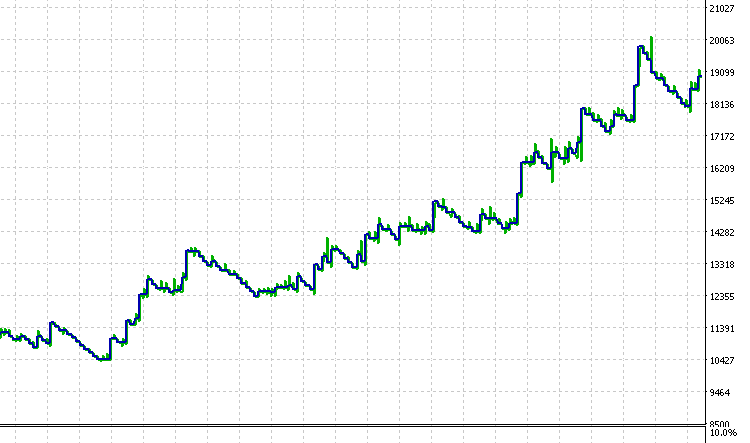

This indicates that profits were consistently accumulated over time and that drawdowns were kept under control by the strategy's rules.
The test results suggest that the EA does not rely on random entries or isolated market conditions. Instead, it benefits from repeatedly identifying meaningful market structure points and acting only when those conditions align. This supports the core idea behind Larry Williams' market structure, which holds that price movements follow identifiable, repeatable patterns rather than pure randomness.
Conclusion
In this article, we have taken a complete trading idea and turned it into a fully working Expert Advisor using MQL5. Starting with Larry Williams' objective definition of market structure, we translated short and intermediate-term swing points into code and used them to generate clear, repeatable trading signals. This removes guesswork from market analysis and replaces it with rules that can be tested, verified, and improved.
Beyond signal generation, we built a practical trading system. The EA includes configurable trade-direction control, flexible risk management, structure-based stop-loss placement, fixed risk-to-reward targeting, and an optional step trailing stop. Each feature was added with a clear purpose and implemented in a modular way, ensuring the logic remains easy to read, test, and extend.
One of the key outcomes of this work is not just the strategy itself, but the process used to build it. Throughout the article, we followed best practices for writing maintainable MQL5 code by separating responsibilities into small utility functions, using enumerations for user choices, and relying on clear data structures to manage trades and trailing logic. This approach makes the EA easier to debug and modify, and it is suitable as a foundation for more advanced systems.
The backtesting results demonstrate that a rule-based interpretation of market structure can produce consistent performance when combined with disciplined risk management. More importantly, the EA presented here provides readers with a complete framework for experimentation. Different symbols, timeframes, risk parameters, and stop loss structures can be tested to explore how market behavior changes and where the strategy performs best.
Finally, this article reinforces an important idea behind Larry Williams' work. Markets are not purely random. Price tends to move in structured swings that can be identified objectively. By encoding these concepts into an Expert Advisor, we can systematically study market behavior and remove emotional bias from execution.
This concludes Part Two of the series. In the following article, we will build on this foundation by exploring higher-level market structure and further ways to analyze and validate non-random price behavior using MQL5.
All source code files and other files used in this article are provided below. The table that follows explains each file and its purpose.
| File Name | Description |
|---|---|
| larryWilliamsMarketStructureIndicator.mq5 | Custom indicator that identifies and plots short-term and intermediate-term market structure swing points based on Larry Williams methodology. |
| larryWilliamsMarketStructureExpert.mq5 | Expert Advisor that reads signals from the market structure indicator and automatically executes trades with risk management and step trailing stop logic. |
| setFile.set | Configuration file containing the exact input parameters used during testing and example runs of the Expert Advisor. |
Warning: All rights to these materials are reserved by MetaQuotes Ltd. Copying or reprinting of these materials in whole or in part is prohibited.
This article was written by a user of the site and reflects their personal views. MetaQuotes Ltd is not responsible for the accuracy of the information presented, nor for any consequences resulting from the use of the solutions, strategies or recommendations described.

 Billiards Optimization Algorithm (BOA)
 Tables in the MVC Paradigm in MQL5: Customizable and sortable table columns
 From Novice to Expert: Higher Probability Signals
 Reimagining Classic Strategies (Part 20): Modern Stochastic Oscillators

- Free trading apps
- Over 8,000 signals for copying
- Economic news for exploring financial markets
You agree to website policy and terms of use
Dear William,
Thank you for your kind words and for following my work.
Regarding your request, I specialize exclusively in MQL5 development for the MetaTrader 5 platform. Because the architecture of MT4 and MT5 is significantly different, porting the code requires a complete rewrite.
Unfortunately, I am unable to fulfill custom coding requests or conversions at this time due to my current project schedule. I appreciate your understanding and hope you find the MT5 version of the article useful.
Dear William,
Thank you for your kind words and for following my work.
Regarding your request, I specialize exclusively in MQL5 development for the MetaTrader 5 platform. Because the architecture of MT4 and MT5 is significantly different, porting the code requires a complete rewrite.
Unfortunately, I am unable to fulfill custom coding requests or conversions at this time due to my current project schedule. I appreciate your understanding and hope you find the MT5 version of the article useful.