

Master the Z-Score: Building Mean-Reverting MQL5 Trading Systems
 282
282
 0
0

Introduction
Many technical indicators rely on predefined thresholds or trend-following calculations, but they do not directly answer a core statistical-trading question: how unusual is the current deviation from the recent average relative to recent volatility? This is where the Z-Score becomes useful. The Z-Score expresses the distance between a value and its mean in terms of standard deviations. In trading, this provides a normalized way to examine whether price is trading relatively close to its recent average or has moved unusually far away from it.
That makes the Z-Score particularly useful when studying mean reversion, but it can also be applied to momentum and trend-following approaches. A large positive or negative Z-Score does not automatically imply a reversal; it only indicates an unusually large deviation from the recent mean. Whether it is tradable depends on the regime, timeframe, volatility, and the strategy's assumptions.
In this guide, we will build the concept from the statistical foundations through to practical algorithmic implementation in MQL5. We will cover:
- Understanding the Z-Score: What it measures and how statistical mean reversion can be applied to financial markets.
- The Mathematical Calculation: A step-by-step explanation of the Z-Score formula, including the role of the mean and standard deviation.
- Interpreting the Z-Score: How to read positive and negative deviations, standard deviation levels, and potential changes in market behavior.
- Three Z-Score Trading Strategies: Practical approaches based on mean reversion, momentum breakouts, and trend-filtered execution.
- Building a Custom Z-Score Indicator in MQL5: Developing a complete indicator and explaining the key components of the implementation.
- Coding the Expert Advisors (EAs): Turning the strategies into automated MQL5 Expert Advisors, with detailed explanations of the trading logic and execution rules.
- Risk Management and Practical Considerations: Examining issues such as fat-tailed distributions, volatility changes, parameter selection, overfitting, and structural market regime changes.
- Conclusion.
The objective is to understand what the Z-Score measures, when it is useful, and how to translate that logic into a testable systematic process.
Understanding the Z-Score
In statistics, the Z-Score (or standard score) measures how many standard deviations an individual data point lies away from the mean (average) of its dataset. When applied to financial markets, the Z-Score measures how far the current price (or a specific indicator value) has drifted from its historical moving average over a designated lookback window. If price trades at its 20-period Simple Moving Average (SMA), its Z-Score is 0.0. If price surges far above its average, the Z-Score climbs positive (e.g., +2.0 or higher). Conversely, a deep drop pushes the Z-Score into negative territory (e.g., -2.0 or lower).
| Z-Score | Measurement |
|---|---|
| +3.0 | Extreme Overbought (Upper Outer Band) |
| +2.0 | Overbought Threshold (Sell Signal Area) |
| +1.0 | Upper Deviation |
| 0.0 | Mean Line (Moving Average Target) |
| -1.0 | Lower Deviation |
| -2.0 | Oversold Threshold (Buy Signal Area) |
| -3.0 | Extreme Oversold (Lower Outer Band) |
Because financial assets tend to fluctuate around dynamic equilibrium points, extreme Z-Score values often mark unsustainable moves. When price stretches too far from its mean, probabilities shift toward a reversal, this is known as mean reversion.
The Mathematical Calculation
To compute the Z-Score for a financial instrument at any given price bar, we execute three distinct mathematical operations across a rolling window of length N:
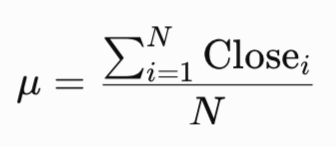
1. Calculate the Simple Moving Average of the closing price over N periods:
2. Calculate the population variance across those same N periods:
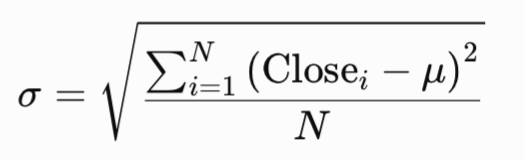
Note: While sample variance with Bessel's correction ($N-1$) provides an unbiased estimator for sample distributions, population variance ($N$) is intentionally utilized here for computational efficiency and consistency with standard financial charting algorithms.
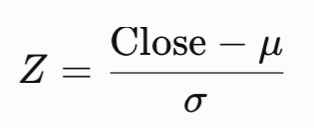
3. Subtract the moving average from the current closing price and divide by the standard deviation:
Numerical Example
Suppose over a 20-period window, EURUSD has:
- Current Close = 1.0850
- 20-period Mean (Average) = 1.0800
- 20-period Standard Deviation = 0.0025

A score of +2.0 informs us that EURUSD is currently trading precisely 2 standard deviations above its 20-period mean.
Note: Calculating Z-Score directly on price measures relative distance from the rolling SMA; for strict statistical stationarity, the calculation can be applied to log-returns or detrended price oscillator residuals.
Interpreting the Z-Score
Under a standard normal distribution (Gaussian Bell Curve):
- ~68.2% of all price observations fall between -1.0 and +1.0.
- ~95.4% of observations fall between -2.0 and +2.0.
- ~99.7% of observations fall between -3.0 and +3.0.
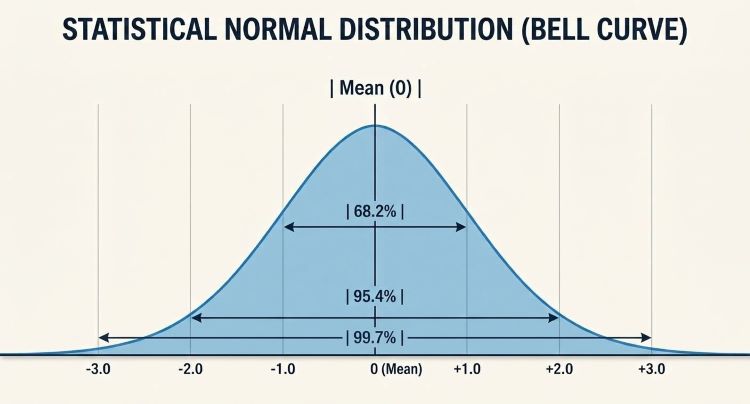
However, market returns exhibit fat tails (leptokurtosis), meaning extreme events occur more frequently than pure Gaussian distribution predicts.
Despite this reality, the empirical threshold levels used as standardized momentum benchmark triggers:
- Zone 0 to +/- 1.0 (Equilibrium Zone): The market is in normal dynamic balance. Trend traders look for pullbacks here; mean-reversion traders stay quiet.
- Zone +/- 1.0 to +/- 2.0 (Developing Move): Price is breaking away from historical norms. Depending on market context, this indicates either a healthy trend or an approaching reversal.
- Zone Beyond +/- 2.0 (Extreme Stretch): Less than 5% of price distribution normally resides here during range-bound conditions. Mean-reversion systems seek short entries above +2.0 and long entries below -2.0.
Three Z-Score Trading Strategies
In this section, we present three Z-Score strategies and then optimize their parameters. These strategies are:
Strategy 1: Classic Mean Reversion
- Market Regime: Ranging or consolidated markets.
- Buy Setup: Z-Score crosses below -2.0 and then re-enters above -2.0. Exit when Z-Score crosses back to 0.0 (the mean).
- Sell Setup: Z-Score crosses above +2.0 and then re-enters below +2.0. Exit when Z-Score returns to 0.0.
- Market Regime: Low-volatility squeezes transitioning to expansion.
- Buy Setup: Z-Score surges past +2.5, signaling high momentum that breaks out of normal statistical bounds.
- Sell Setup: Z-Score plunges past -2.5, signaling downside institutional selling pressure.
- Exit: Exit when Z-Score reverts inside the +/- 1.0 threshold.
Strategy 3: Trend-Filtered Mean Reversion
- Market Regime: Strongly trending markets.
- Filter: A 200-period Exponential Moving Average (EMA) determines overall bias.
- Buy Setup: Price is above 200 EMA (Uptrend). Buy when Z-Score dips below -1.5 (a statistically discounted entry inside an established uptrend). Exit when Z-Score reaches +1.0.
- Sell Setup: Price is below 200 EMA (Downtrend). Short when Z-Score rises above +1.5. Exit when Z-Score reaches -1.0.
Building a Custom Z-Score Indicator in MQL5
In this section, you will find a step-by-step guide to building a custom Z-Score indicator for later use in the EAs.
#property indicator_separate_window // Render in a separate window below price
#property indicator_buffers 1       // Total dynamic buffers managed
#property indicator_plots   1       // Number of visible plotted lines
Define properties for the Z-Score Plot Line
#property indicator_type1   DRAW_LINE
#property indicator_color1  clrDodgerBlue
#property indicator_style1  STYLE_SOLID
#property indicator_width1  2
Input parameters configurable by the user - Setting lookback period (N) for SMA and Standard Deviation
input int InpPeriod = 20; // Lookback Period (N) for SMA and Standard Deviation
Global indicator buffer array
double ExtZScoreBuffer[]; In the custom indicator initialization function OnInit(), we implement the following:
- Map the dynamic double array to the first indicator buffer index
- Set short visual label displayed in indicator subwindow
- Set empty line draw begin offset equal to the calculation period
- Restrict visual decimals to 2 places
- Validate input window length
//+------------------------------------------------------------------+
//| Custom indicator initialization function                         |
//+------------------------------------------------------------------+
int OnInit()
  {
   SetIndexBuffer(0, ExtZScoreBuffer, INDICATOR_DATA);  // Binds dynamic array to indicator buffer index 0
   PlotIndexSetString(0, PLOT_LABEL, "Z-Score");                // Sets data window label description
   PlotIndexSetInteger(0, PLOT_DRAW_BEGIN, InpPeriod);  // Offsets plotting start until sufficient bars exist
   IndicatorSetInteger(INDICATOR_DIGITS, 2);                    // Caps precision output display to 2 decimal places

   // Input Parameter Guard Clause
   if(InpPeriod <= 1)
     {
      Print("Error: Lookback period must be greater than 1."); // Log runtime error to Experts terminal tab
      return(INIT_FAILED);                             // Abort execution safely on invalid lookback
     }

   return(INIT_SUCCEEDED);                             // Initialization successful
  }
Custom indicator iteration function, through OnCalculate to code the following:
- Ensure we have enough price bars to compute the lookback window
- Determine starting bar index for dynamic recalculation optimization
- Main calculation loop over bars through three steps:
- Step 1: Calculate Mean (SMA) over the lookback window
- Step 2: Calculate Variance and Standard Deviation
- Step 3: Compute the Z-Score (protect against divide by zero)
- Return total calculated bars for incremental execution on next tick
//+------------------------------------------------------------------+
//| Custom indicator iteration function                              |
//+------------------------------------------------------------------+
int OnCalculate(const int rates_total,
                const int prev_calculated,
                const datetime &time[],
                const double &open[],
                const double &high[],
                const double &low[],
                const double &close[],
                const long &tick_volume[],
                const long &volume[],
                const int &spread[])
  {
   // Check bar history sufficiency
   if(rates_total < InpPeriod)
      return(0);                                       // Exit if total historical bars fall below window size
   // Incremental Calculation Optimization
   int start = prev_calculated - 1;                    // Recalculate only the latest/unclosed bars
   if(start < InpPeriod)
      start = InpPeriod;                               // Ensure starting index respects lookback window
   // Core Calculation Loop
   for(int i = start; i < rates_total && !IsStopped(); i++)
     {
      // Step 1: Compute Rolling Arithmetic Mean
      double sum = 0.0;                                // Accumulator for historical close prices
      for(int j = 0; j < InpPeriod; j++)
        {
         sum += close[i - j];                          // Sum close prices over lookback window
        }
      double mean = sum / InpPeriod;                   // Calculate Simple Moving Average (SMA)
      // Step 2: Compute Sum of Squared Differences
      double sum_sq_diff = 0.0;                        // Accumulator for squared deviations from mean
      for(int j = 0; j < InpPeriod; j++)
        {
         double diff = close[i - j] - mean;            // Deviation of price relative to current mean
         sum_sq_diff += diff * diff;                   // Square deviation to eliminate negative signs
        }
      // Step 3: Compute Variance & Standard Deviation
      double variance = sum_sq_diff / InpPeriod;       // Population variance formula
      double std_dev  = MathSqrt(variance);            // Standard deviation as square root of variance
      // Step 4: Normalize to Z-Score
      if(std_dev != 0.0)
         ExtZScoreBuffer[i] = (close[i] - mean) / std_dev; // Standardized Z-Score equation
      else
         ExtZScoreBuffer[i] = 0.0;                     // Zero-division safety lock for flat periods
     }
   return(rates_total);                                // Return processed bar count to optimize next tick
The full code:
//+------------------------------------------------------------------+
//|                                           Custom_Z-Score_V2.mq5  |
//+------------------------------------------------------------------+
#property indicator_separate_window // Render in a separate window below price
#property indicator_buffers 1       // Total dynamic buffers managed
#property indicator_plots   1       // Number of visible plotted lines
// Define properties for the Z-Score Plot Line
#property indicator_type1   DRAW_LINE
#property indicator_color1  clrDodgerBlue
#property indicator_style1  STYLE_SOLID
#property indicator_width1  2
input int InpPeriod = 20; // Lookback Period (N) for SMA and Standard Deviation
double ExtZScoreBuffer[];
//+------------------------------------------------------------------+
//| Custom indicator initialization function                         |
//+------------------------------------------------------------------+
int OnInit()
  {
   SetIndexBuffer(0, ExtZScoreBuffer, INDICATOR_DATA);  // Binds dynamic array to indicator buffer index 0
   PlotIndexSetString(0, PLOT_LABEL, "Custom_Z-Score_V2");                // Sets data window label description
   PlotIndexSetInteger(0, PLOT_DRAW_BEGIN, InpPeriod);  // Offsets plotting start until sufficient bars exist
   IndicatorSetInteger(INDICATOR_DIGITS, 2);                    // Caps precision output display to 2 decimal places

   // Input Parameter Guard Clause
   if(InpPeriod <= 1)
     {
      Print("Error: Lookback period must be greater than 1."); // Log runtime error to Experts terminal tab
      return(INIT_FAILED);                             // Abort execution safely on invalid lookback
     }

   return(INIT_SUCCEEDED);                             // Initialization successful
  }
//+------------------------------------------------------------------+
//| Custom indicator iteration function                              |
//+------------------------------------------------------------------+
int OnCalculate(const int rates_total,
                const int prev_calculated,
                const datetime &time[],
                const double &open[],
                const double &high[],
                const double &low[],
                const double &close[],
                const long &tick_volume[],
                const long &volume[],
                const int &spread[])
  {
   // Check bar history sufficiency
   if(rates_total < InpPeriod)
      return(0);                                       // Exit if total historical bars fall below window size

   // Incremental Calculation Optimization
   int start = prev_calculated - 1;                    // Recalculate only the latest/unclosed bars
   if(start < InpPeriod)
      start = InpPeriod;                               // Ensure starting index respects lookback window

   // Core Calculation Loop
   for(int i = start; i < rates_total && !IsStopped(); i++)
     {
      // Step 1: Compute Rolling Arithmetic Mean
      double sum = 0.0;                                // Accumulator for historical close prices
      for(int j = 0; j < InpPeriod; j++)
        {
         sum += close[i - j];                          // Sum close prices over lookback window
        }
      double mean = sum / InpPeriod;                   // Calculate Simple Moving Average (SMA)

      // Step 2: Compute Sum of Squared Differences
      double sum_sq_diff = 0.0;                        // Accumulator for squared deviations from mean
      for(int j = 0; j < InpPeriod; j++)
        {
         double diff = close[i - j] - mean;            // Deviation of price relative to current mean
         sum_sq_diff += diff * diff;                   // Square deviation to eliminate negative signs
        }

      // Step 3: Compute Variance & Standard Deviation
      double variance = sum_sq_diff / InpPeriod;       // Population variance formula
      double std_dev  = MathSqrt(variance);            // Standard deviation as square root of variance

      // Step 4: Normalize to Z-Score
      if(std_dev != 0.0)
         ExtZScoreBuffer[i] = (close[i] - mean) / std_dev; // Standardized Z-Score equation
      else
         ExtZScoreBuffer[i] = 0.0;                     // Zero-division safety lock for flat periods
     }

   return(rates_total);                                // Return processed bar count to optimize next tick
  }//+------------------------------------------------------------------+
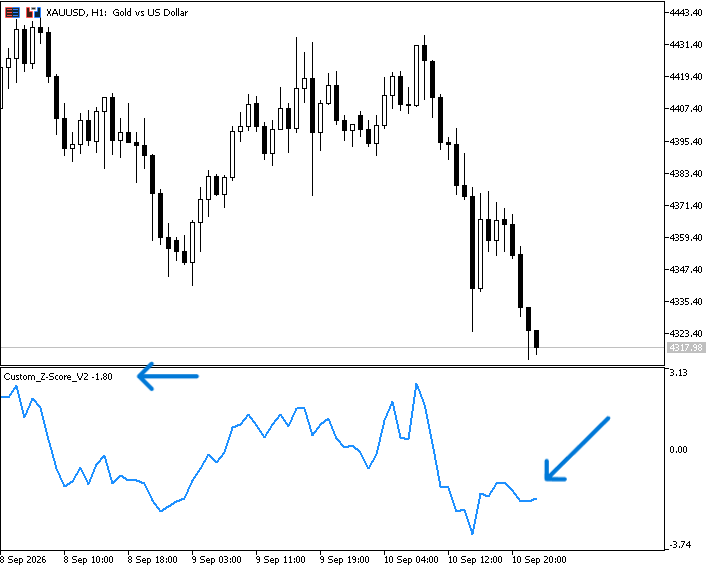
After compiling the code and attaching it to the chart, we can find it the same as below:
Coding the Expert Advisors (EAs)
In this section we will code the three strategies to execute trades automatically based on the logic of each one. The code provided presents the pure core strategy engine; production deployment requires adding spread, session time, and minimum volume filters.
Strategy 1: Z-Score Classic Mean Reversion
Z-Score < -2.0 then > -2.0 ==> Buy ==== Z-Score > 0.0 ==> Exit
Z-Score > +2.0 then < +2.0 ==> Sell ==== Z-Score < 0.0 ==> Exit
Code Steps:
Include official Trade execution class
#include <Trade\Trade.mqh> // Standard MQL5 trading execution library
Creates an operational object called trade that handles buy, sell, and position close requests
CTrade trade; // Trade object to handle order placement and exits Input parameters:
- Sets the period (20 candles) used by the Z-Score indicator to calculate mean and standard deviation.
- The upper boundary (2 standard deviations above the average) for triggering short trades.
- The lower boundary (-2 standard deviations below the average) for triggering long trades.
- The fixed trade volume (0.1 lots) for every executed order.
- A unique ID assigned to all trades so the EA only manages its own positions without messing with manual trades or other algorithms running on the same account.
// Strategy Input Parameters
input int    InpZPeriod     = 20;           // Lookback bars used to calculate rolling mean and std dev
input double InpUpperThresh = 2.0;          // Upper Z-Score threshold to trigger short mean-reversion entries
input double InpLowerThresh = -2.0;         // Lower Z-Score threshold to trigger long mean-reversion entries
input double InpLotSize     = 0.1;          // Fixed position sizing per trade - Fixed 0.1 lot used for baseline comparison; production deployment should utilize dynamic lot sizing based on account equity percentage risk.
input ulong  InpMagicNumber = 111001;       // Unique EA identification number to manage orders safely
Global variable to store the memory pointer (handle) for the custom indicator.
int zscore_handle; // Stores the memory handle for our custom Z-Score indicator
In OnInit() (called once when the EA is attached to a chart), we do the following:
- Tags the trade handler with your unique Magic Number.
- Requests a handle for the custom indicator named Custom_Z-Score_V2 using the chart's current symbol, timeframe, and your 20-period input.
- Checks if MetaTrader failed to load the indicator.
- Prints an error log to the platform Terminal if loading failed.
- Aborts setup and detaches the EA safely.
- Tells MetaTrader 5 everything initialized properly and the EA can start listening to market ticks.
//+------------------------------------------------------------------+
//| Initialize EA settings and connect indicator handles             |
//+------------------------------------------------------------------+
int OnInit()
  {
   trade.SetExpertMagicNumber(InpMagicNumber);                                 // Assign unique magic number to separate our EA's trades

   zscore_handle = iCustom(_Symbol, _Period, "Custom_Z-Score_V2", InpZPeriod); // Bind the compiled custom Z-Score indicator instance
   if(zscore_handle == INVALID_HANDLE)                                         // Verify indicator handle loaded successfully
     {
      Print("Failed to initialize ZScore indicator handle.");                  // Log error to Experts journal if path or handle fails
      return(INIT_FAILED);                                                     // Abort initialization to prevent executing without signals
     }

   return(INIT_SUCCEEDED);                                                     // EA setup completed without issues
  }
Expert deinitialization function through OnDeinit() to release indicator handle resources upon EA removal
//+------------------------------------------------------------------+
//| Release indicator memory allocations on system shutdown          |
//+------------------------------------------------------------------+
void OnDeinit(const int reason)
  {
   IndicatorRelease(zscore_handle);                                         // Clean up memory buffer occupied by the indicator handle
  }
Expert tick function through OnTick() function to detect continuously every single time a new price tick hits the platform and code the following:
- Declares a static variable that retains its value across tick updates to track bar changes.
- Fetches the open timestamp of the current active candle.
- Bar-close filter: If the current candle timestamp matches our last recorded bar time, it skips the rest of the execution to prevent calculating on every tick mid-bar.
- Declares a dynamic array to hold the fetched indicator values.
- Reverses the array index so index 0 refers to the most recently closed candle.
- Copies 2 readings from the indicator buffer starting at bar index 1 (the last fully closed candle). If it fails to copy both, it exits early.
- Stores the Z-Score value of the most recently closed candle.
- Stores the Z-Score value of the candle right before that.
   // Bar-Completion Filter: Prevent intra-bar recalculations and execution churn
   static datetime last_bar_time;                                           // Tracks the open time of the last processed candle
   datetime current_bar_time = iTime(_Symbol, _Period, 0);                  // Fetch opening timestamp of the active candle
   if(current_bar_time == last_bar_time)                                    // Skip execution if current bar has already been processed
      return;

   // Fetch Calculated Indicator Values
   double z_val[];                                                          // Array buffer to hold fetched Z-Score data
   ArraySetAsSeries(z_val, true);                                           // Index 0 represents the most recently completed bar
   if(CopyBuffer(zscore_handle, 0, 1, 2, z_val) < 2)                        // Copy 2 completed bars starting from bar index 1
      return;                                                               // Exit if buffer copy returns insufficient data

   double z_current  = z_val[0];                                            // Z-Score of the last completed candle (index 1)
   double z_previous = z_val[1];                                            // Z-Score of the candle prior to last (index 2)
Auditing Open Positions:
- Initializes state trackers before checking active account orders.
- Iterates backward through all open trades on the account.
- Retrieves the ticket number of the position at index i (which also selects it for property inspection).
- Ensures the trade matches both the current chart symbol and this EA's Magic Number.
- Increments our EA's active position count.
- Checks whether the position is a Buy or a Sell.
- Sets flags to track whether we currently hold a Long or Short position.
   // Monitor Active Positions
   int total_positions = 0;                                                 // Total open trades belonging to this EA
   bool is_long  = false;                                                   // Track if long position is open
   bool is_short = false;                                                   // Track if short position is open

   for(int i = PositionsTotal() - 1; i >= 0; i--)                           // Loop backward through all open platform positions
     {
      ulong ticket = PositionGetTicket(i);                                  // Select position ticket
      if(PositionGetString(POSITION_SYMBOL) == _Symbol &&                   // Ensure position matches current symbol
         PositionGetInteger(POSITION_MAGIC) == InpMagicNumber)              // Ensure position matches EA magic number
        {
         total_positions++;                                                 // Increment position count for this EA
         long type = PositionGetInteger(POSITION_TYPE);                     // Read position direction
         if(type == POSITION_TYPE_BUY)  is_long  = true;                    // Set active long flag
         if(type == POSITION_TYPE_SELL) is_short = true;                    // Set active short flag
        }
     }
Exit Logic (Take Profit at Mean):
- If holding a Buy order and the Z-Score climbs back up to or above 0.0 (the baseline mean), the trade target is hit.
- Calls the helper function to close only Buy positions.
- Resets the Long position flag.
- If holding a Sell order and the Z-Score drops back down to or below 0.0 (the baseline mean), the trade target is hit.
- Calls the helper function (ClosePositions) to close only Sell positions.
- Resets the Short position flag.
   // Strategy Exits: Take profit when Z-Score reverts back to the mean (0.0)
   if(is_long && z_current >= 0.0)                                          // Long profit target reached mean level
     {
      ClosePositions(POSITION_TYPE_BUY);                                    // Close active buy trade
      is_long = false;                                                      // Reset long flag
     }
   if(is_short && z_current <= 0.0)                                         // Short profit target reached mean level
     {
      ClosePositions(POSITION_TYPE_SELL);                                   // Close active sell trade
      is_short = false;                                                     // Reset short flag
     }
Entry Logic (Reversion Crosses):
- Only looks for entry signals if there are no open trades managed by this EA.
- Buy Signal: Checks if the Z-Score was below -2.0 on the previous candle and has now crossed back above -2.0 (rebound from oversold territory).
- Opens a market Buy order at the Ask price with no Stop Loss or Take Profit hardcoded on the order level.
- Updates the bar timestamp to lock out additional entries until the next candle opens.
- Sell Signal: Checks if the Z-Score was above +2.0 on the previous candle and has now crossed back below +2.0 (reversal from overbought territory).
- Opens a market Sell order at the Bid price.
- Updates the bar timestamp lock.
   // Strategy Entries: Buy when recovering from oversold; Sell when cooling from overbought
   if(total_positions == 0)                                                 // Ensure market is clear of existing EA positions
     {
      if(z_previous < InpLowerThresh && z_current >= InpLowerThresh)        // Price re-entered above lower limit (Oversold Recovery)
        {
         trade.Buy(InpLotSize, _Symbol, SymbolInfoDouble(_Symbol, SYMBOL_ASK), 0, 0, "Z-Score Buy Reversion");
         last_bar_time = current_bar_time;                                  // Lock bar timestamp after execution
        }
      else if(z_previous > InpUpperThresh && z_current <= InpUpperThresh)   // Price re-entered below upper limit (Overbought Recovery)
        {
         trade.Sell(InpLotSize, _Symbol, SymbolInfoDouble(_Symbol, SYMBOL_BID), 0, 0, "Z-Score Sell Reversion");
         last_bar_time = current_bar_time;                                  // Lock bar timestamp after execution
        }
     }
Helper Function: Close positions:
- A dedicated helper function to close open positions belonging to this EA based specifically on position type.
- Loops backward through all active open positions on the account.
- Gets the position ticket ID for index i .
- Confirms the position belongs to this symbol and EA magic number.
- Checks if the position type matches the specific directional type passed into the function.
- Closes that specific position using its ticket number.
//+------------------------------------------------------------------+
//| Close specific position types filtered by Magic Number and Symbol|
//+------------------------------------------------------------------+
void ClosePositions(ENUM_POSITION_TYPE pos_type)
  {
   for(int i = PositionsTotal() - 1; i >= 0; i--)                           // Iterate backward through open trades pool
     {
      ulong ticket = PositionGetTicket(i);                                  // Retrieve position ticket index
      if(PositionGetString(POSITION_SYMBOL) == _Symbol &&                   // Match current asset symbol
         PositionGetInteger(POSITION_MAGIC) == InpMagicNumber)              // Match EA's designated magic number
        {
         if(PositionGetInteger(POSITION_TYPE) == pos_type)                  // Filter position direction matching target exit type
            trade.PositionClose(ticket);                                    // Submit order request to close trade ticket
        }
     }
  }
The full code:
//+------------------------------------------------------------------+
//|                                   ZScore_MeanReversion_EA-v2.mq5 |
//|                                  Copyright 2026, Quant Systems   |
//|                                             https://www.mql5.com |
//+------------------------------------------------------------------+

//+------------------------------------------------------------------+
// INCLUDES & GLOBAL PARAMETERS                                      |
//+------------------------------------------------------------------+
#include <Trade\Trade.mqh>                  // Standard MQL5 trading execution library

CTrade trade;                               // Trade object to handle order placement and exits

// Strategy Input Parameters
input int    InpZPeriod     = 20;           // Lookback bars used to calculate rolling mean and std dev
input double InpUpperThresh = 2.0;          // Upper Z-Score threshold to trigger short mean-reversion entries
input double InpLowerThresh = -2.0;         // Lower Z-Score threshold to trigger long mean-reversion entries
input double InpLotSize     = 0.1;          // Fixed position sizing per trade
input ulong  InpMagicNumber = 111001;       // Unique EA identification number to manage orders safely

// Global Variables
int zscore_handle;                          // Stores the memory handle for our custom Z-Score indicator
//+------------------------------------------------------------------+
//| Initialize EA settings and connect indicator handles             |
//+------------------------------------------------------------------+
int OnInit()
  {
   trade.SetExpertMagicNumber(InpMagicNumber);                                 // Assign unique magic number to separate our EA's trades

   zscore_handle = iCustom(_Symbol, _Period, "Custom_Z-Score_V2", InpZPeriod); // Bind the compiled custom Z-Score indicator instance
   if(zscore_handle == INVALID_HANDLE)                                         // Verify indicator handle loaded successfully
     {
      Print("Failed to initialize ZScore indicator handle.");                  // Log error to Experts journal if path or handle fails
      return(INIT_FAILED);                                                     // Abort initialization to prevent executing without signals
     }

   return(INIT_SUCCEEDED);                                                     // EA setup completed without issues
  }
//+------------------------------------------------------------------+
//| Release indicator memory allocations on system shutdown          |
//+------------------------------------------------------------------+
void OnDeinit(const int reason)
  {
   IndicatorRelease(zscore_handle);                                            // Clean up memory buffer occupied by the indicator handle
  }
//+------------------------------------------------------------------+
//|  Core strategy execution loop triggered on every price tick      |
//+------------------------------------------------------------------+
void OnTick()
  {
   // Bar-Completion Filter: Prevent intra-bar recalculations and execution churn
   static datetime last_bar_time;                                           // Tracks the open time of the last processed candle
   datetime current_bar_time = iTime(_Symbol, _Period, 0);                  // Fetch opening timestamp of the active candle
   if(current_bar_time == last_bar_time)                                    // Skip intra-bar tick updates
      return;
   last_bar_time = current_bar_time;

   // Fetch Calculated Indicator Values
   double z_val[];                                                          // Array buffer to hold fetched Z-Score data
   ArraySetAsSeries(z_val, true);                                           // Index 0 represents the most recently completed bar
   if(CopyBuffer(zscore_handle, 0, 1, 2, z_val) < 2)                        // Copy 2 completed bars starting from bar index 1
      return;                                                               // Exit if buffer copy returns insufficient data

   double z_current  = z_val[0];                                            // Z-Score of the last completed candle (index 1)
   double z_previous = z_val[1];                                            // Z-Score of the candle prior to last (index 2)

   // Monitor Active Positions
   int total_positions = 0;                                                 // Total open trades belonging to this EA
   bool is_long  = false;                                                   // Track if long position is open
   bool is_short = false;                                                   // Track if short position is open

   for(int i = PositionsTotal() - 1; i >= 0; i--)                           // Loop backward through all open platform positions
     {
      ulong ticket = PositionGetTicket(i);                                  // Select position ticket
      if(PositionGetString(POSITION_SYMBOL) == _Symbol &&                   // Ensure position matches current symbol
         PositionGetInteger(POSITION_MAGIC) == InpMagicNumber)              // Ensure position matches EA magic number
        {
         total_positions++;                                                 // Increment position count for this EA
         long type = PositionGetInteger(POSITION_TYPE);                     // Read position direction
         if(type == POSITION_TYPE_BUY)  is_long  = true;                    // Set active long flag
         if(type == POSITION_TYPE_SELL) is_short = true;                    // Set active short flag
        }
     }

   // Strategy Exits: Take profit when Z-Score reverts back to the mean (0.0)
   if(is_long && z_current >= 0.0)                                          // Long profit target reached mean level
     {
      ClosePositions(POSITION_TYPE_BUY);                                    // Close active buy trade
      is_long = false;                                                      // Reset long flag
     }
   if(is_short && z_current <= 0.0)                                         // Short profit target reached mean level
     {
      ClosePositions(POSITION_TYPE_SELL);                                   // Close active sell trade
      is_short = false;                                                     // Reset short flag
     }

   // Strategy Entries: Buy when recovering from oversold; Sell when cooling from overbought
   if(total_positions == 0)                                                 // Ensure market is clear of existing EA positions
     {
      if(z_previous < InpLowerThresh && z_current >= InpLowerThresh)        // Price re-entered above lower limit (Oversold Recovery)
        {
         trade.Buy(InpLotSize, _Symbol, SymbolInfoDouble(_Symbol, SYMBOL_ASK), 0, 0, "Z-Score Buy Reversion");
         last_bar_time = current_bar_time;                                  // Lock bar timestamp after execution
        }
      else if(z_previous > InpUpperThresh && z_current <= InpUpperThresh)   // Price re-entered below upper limit (Overbought Recovery)
        {
         trade.Sell(InpLotSize, _Symbol, SymbolInfoDouble(_Symbol, SYMBOL_BID), 0, 0, "Z-Score Sell Reversion");
         last_bar_time = current_bar_time;                                  // Lock bar timestamp after execution
        }
     }
  }
//+------------------------------------------------------------------+
//| Close specific position types filtered by Magic Number and Symbol|
//+------------------------------------------------------------------+
void ClosePositions(ENUM_POSITION_TYPE pos_type)
  {
   for(int i = PositionsTotal() - 1; i >= 0; i--)                           // Iterate backward through open trades pool
     {
      ulong ticket = PositionGetTicket(i);                                  // Retrieve position ticket index
      if(PositionGetString(POSITION_SYMBOL) == _Symbol &&                   // Match current asset symbol
         PositionGetInteger(POSITION_MAGIC) == InpMagicNumber)              // Match EA's designated magic number
        {
         if(PositionGetInteger(POSITION_TYPE) == pos_type)                  // Filter position direction matching target exit type
            trade.PositionClose(ticket);                                    // Submit order request to close trade ticket
        }
     }
  }
//+------------------------------------------------------------------+
Testing results:
- To compare the strategy test results, we focus on the following key metrics:
- Net profit: It is calculated by subtracting the gross loss from the gross profit, and the highest value is the best.
- Balance DD relative: It is the maximum loss that the account experiences during trades, and the lowest is the best.
- Profit factor: It is the ratio of gross profit to gross loss, and the highest is the best.
- Expected Payoff: It is the average profit or loss of a trade, and the highest value is the best.
- Recovery factor: It measures how well the tested strategy recovers after losses, and the highest is the best.
- Sharpe Ratio: It determines the risk and stability of the tested trading system by comparing the return with the risk-free return, and the highest Sharpe Ratio is the best.
Test conditions:
- Initial Deposit: $30,000
- Leverage: 1:100
- Delays: Zero latency, ideal execution
- Tick Model: Every tick
Notes:
- Z-Score Provides a standardized scale to evaluate relative asset deviations, though optimal thresholds vary per asset class.
- For simplicity, we look at net profit without normalizing by deposit, contract specification, pip value, and risk per trade but doing that could give better insights.
The testing results for the Z-Score Classic Mean Reversion strategy under the following settings:
- Time Frame: 15-minute
- Symbol: XAUUSD
- Period: January 1st, 2026 to September 10th, 2026
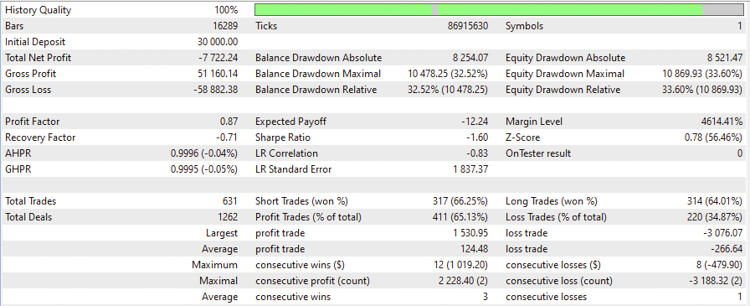
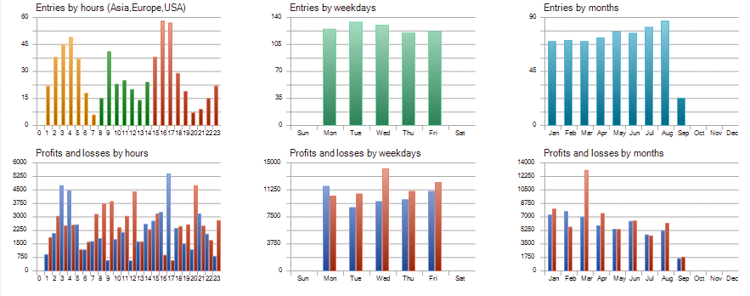
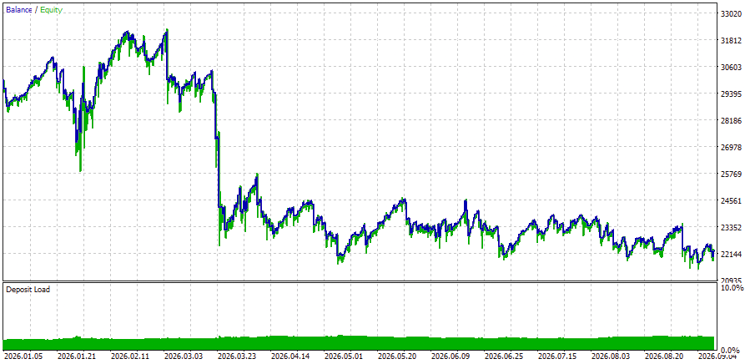
Based on the above results of the testing, we can find the following important values for the test numbers:
- Net Profit: -7722.24 USD.
- Balance DD relative: 32.52%.
- Profit factor: 0.87.
- Expected payoff: -12.24.
- Recovery factor: -0.71.
- Sharpe Ratio: -1.60.
Another test result for the Z-Score Classic Mean Reversion strategy under the following settings:
- Time Frame: 4H
- Symbol: US30
- Period: January 1st, 2026 to September 11th, 2026
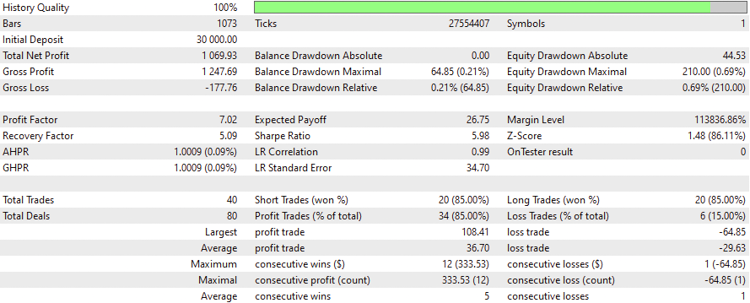
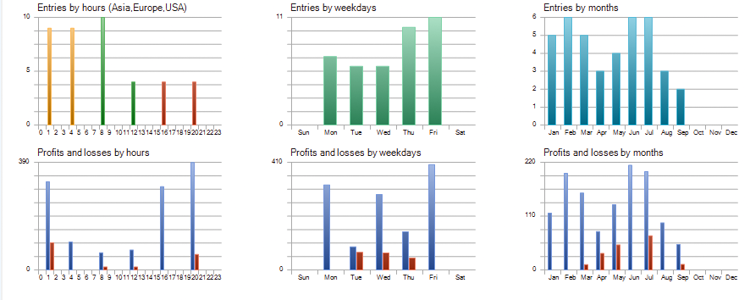
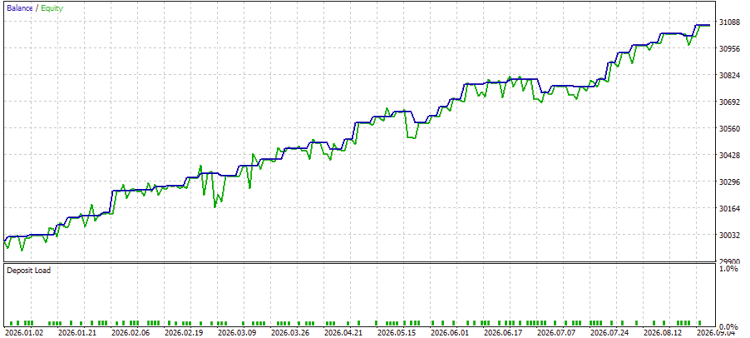
Based on the above results of the testing, we can find the following important values for the test numbers:
- Net Profit: 1069.93 USD.
- Balance DD relative: 0.21%.
- Profit factor: 7.02.
- Expected payoff: 26.75.
- Recovery factor: 5.09.
- Sharpe Ratio: 5.98.
Another test results for the Z-Score Classic Mean Reversion strategy under the following settings:
- Time Frame: 4H
- Symbol: BTCUSD
- Period: January 1st, 2026 to September 11th, 2026
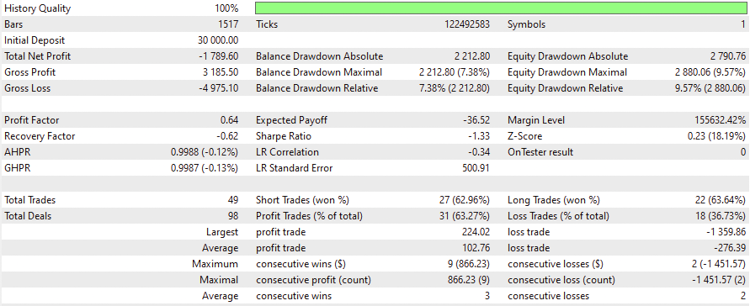
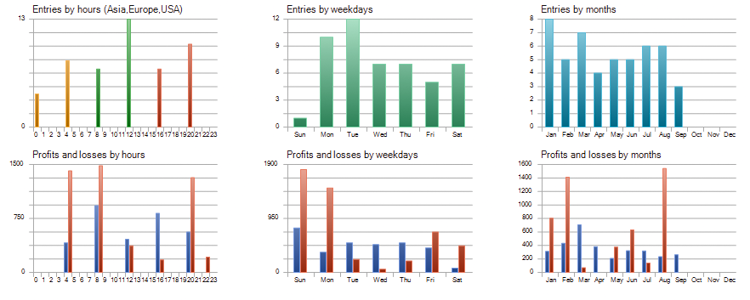
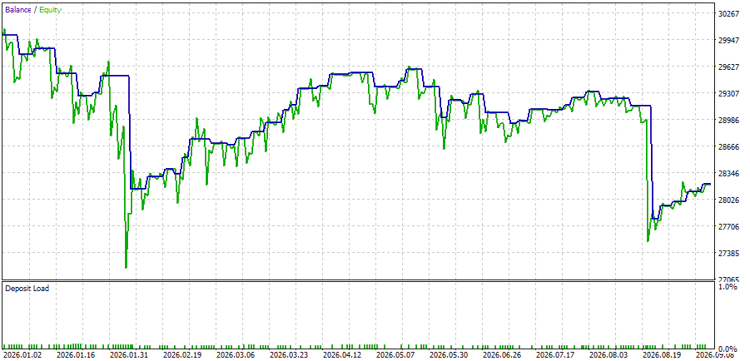
Based on the above results of the testing, we can find the following important values for the test numbers:
- Net Profit: -1789.60 USD.
- Balance DD relative: 7.38%.
- Profit factor: 0.64.
- Expected payoff: -36.52.
- Recovery factor: -0.62.
- Sharpe Ratio: -1.33.
Strategy 2: Z-Score Volatility Breakout
Z-Score > +2.5 ==> high momentum ==> Buy ==== Z-Score < +1 ==> Exit
Z-Score < -2.5 ==> selling pressure ==> Sell ==== Z-Score > -1 ==> Exit
Strategy 2 triggers entries when the Z-Score breaks out beyond statistical deviation thresholds (+/- 2.5), capturing momentum expansion.
The full code:
//+------------------------------------------------------------------+
//|                                      ZScore_Breakout_EV-v2.mq5   |
//|                                  Copyright 2026, Quant Systems   |
//|                                             https://www.mql5.com |
//+------------------------------------------------------------------+
//+------------------------------------------------------------------+
//| INCLUDES & GLOBAL PARAMETERS                                     |
//+------------------------------------------------------------------+
#include <Trade\Trade.mqh>                  // Standard MQL5 trading execution library

CTrade trade;                               // Instantiates global trade management object

// Strategy Input Parameters
input int    InpZPeriod       = 20;         // Rolling lookback window for the statistical calculation
input double InpBreakoutUpper = 2.5;        // Upper deviation threshold to trigger momentum long entries
input double InpBreakoutLower = -2.5;       // Lower deviation threshold to trigger momentum short entries
input double InpExitThreshold = 1.0;        // Exit boundary when expansion momentum cools back down
input double InpLotSize       = 0.1;        // Trade volume allocated per order
input ulong  InpMagicNumber   = 111002;     // EA ticket ID tag for isolated trade management

// Global Variables
int zscore_handle;                          // Memory pointer handle for the custom Z-Score indicator
//+------------------------------------------------------------------+
//| Initialize EA configurations and validate indicator links        |
//+------------------------------------------------------------------+
int OnInit()
  {
   trade.SetExpertMagicNumber(InpMagicNumber);                                 // Assign magic number tag to distinguish EA trades

   zscore_handle = iCustom(_Symbol, _Period, "Custom_Z-Score_V2", InpZPeriod); // Bind compiled custom indicator with parameter
   if(zscore_handle == INVALID_HANDLE)                                         // Guard clause to catch path or loading failure
      return(INIT_FAILED);                                                     // Terminate initialization safely

   return(INIT_SUCCEEDED);                                                     // System ready for tick processing
  }
//+------------------------------------------------------------------+
//| Clean up memory handles on EA uninitialization                   |
//+------------------------------------------------------------------+
void OnDeinit(const int reason)
  {
   IndicatorRelease(zscore_handle);                                         // Free up memory resources allocated to the handle
  }
//+------------------------------------------------------------------+
//| Main strategy execution handler called on every tick event       |
//+------------------------------------------------------------------+
void OnTick()
  {
   // Bar-Completion Filter: Prevent intra-bar noise and false triggers
   static datetime last_bar_time;                                           // Static variable preserving last processed bar timestamp
   datetime current_bar_time = iTime(_Symbol, _Period, 0);                  // Fetch open timestamp of current candle
   if(current_bar_time == last_bar_time)                                    // Skip intra-bar tick updates
      return;
   last_bar_time = current_bar_time;

   // Fetch Calculated Indicator Values
   double z_val[];                                                          // Array buffer for retrieving calculated Z-Score values
   ArraySetAsSeries(z_val, true);                                           // Index 0 set as newest completed bar
   if(CopyBuffer(zscore_handle, 0, 1, 2, z_val) < 2)                       // Pull last 2 completed bars starting from index 1
      return;                                                               // Exit tick cycle if array buffer fails to populate

   double z_current  = z_val[0];                                            // Z-Score of the most recently closed candle
   double z_previous = z_val[1];                                            // Z-Score of the candle preceding it

   // Audit Active Positions
   int total_positions = 0;                                                 // Counter for active EA trades
   bool is_long  = false;                                                   // Dynamic state tracking active buy orders
   bool is_short = false;                                                   // Dynamic state tracking active sell orders

   for(int i = PositionsTotal() - 1; i >= 0; i--)                           // Scan open position pool backward
     {
      ulong ticket = PositionGetTicket(i);                                  // Retrieve position ticket handle
      if(PositionGetString(POSITION_SYMBOL) == _Symbol &&                   // Confirm position belongs to current instrument
         PositionGetInteger(POSITION_MAGIC) == InpMagicNumber)              // Confirm position belongs to this EA
        {
         total_positions++;                                                 // Increment open EA positions tally
         long type = PositionGetInteger(POSITION_TYPE);                     // Retrieve trade order direction
         if(type == POSITION_TYPE_BUY)  is_long  = true;                    // Flag active long position state
         if(type == POSITION_TYPE_SELL) is_short = true;                    // Flag active short position state
        }
     }

   // Strategy Exits: Close momentum position when deviation falls below exit line
   if(is_long && z_current < InpExitThreshold)                              // Long momentum exhausted below upper threshold
     {
      ClosePositions(POSITION_TYPE_BUY);                                                     // Flatten open long positions
      is_long = false;                                                      // Reset long state flag
     }
   if(is_short && z_current > -InpExitThreshold)                            // Short momentum exhausted above lower threshold
     {
      ClosePositions(POSITION_TYPE_SELL);                                                     // Flatten open short positions
      is_short = false;                                                     // Reset short state flag
     }

   // Strategy Entries: Execute breakout trades when price surges past statistical boundaries
   if(total_positions == 0)                                                 // Ensure zero open exposure before trade entry
     {
      if(z_previous < InpBreakoutUpper && z_current >= InpBreakoutUpper)    // Upside breakout: Z-Score crosses above +2.5
        {
         trade.Buy(InpLotSize, _Symbol, SymbolInfoDouble(_Symbol, SYMBOL_ASK), 0, 0, "Z-Breakout Buy");
         last_bar_time = current_bar_time;                                  // Lock timestamp to prevent duplicate entries on bar
        }
      else if(z_previous > InpBreakoutLower && z_current <= InpBreakoutLower) // Downside breakout: Z-Score plunges below -2.5
        {
         trade.Sell(InpLotSize, _Symbol, SymbolInfoDouble(_Symbol, SYMBOL_BID), 0, 0, "Z-Breakout Sell");
         last_bar_time = current_bar_time;                                  // Lock timestamp to prevent duplicate entries on bar
        }
     }
  }
//+------------------------------------------------------------------------+
//| Close all active trades associated with this EA magic number and symbol|
//+------------------------------------------------------------------------+
void ClosePositions(ENUM_POSITION_TYPE pos_type)
  {
   for(int i = PositionsTotal() - 1; i >= 0; i--)                           // Iterate through open platform positions backward
     {
      ulong ticket = PositionGetTicket(i);                                  // Retrieve position ticket index
      if(PositionGetString(POSITION_SYMBOL) == _Symbol &&                   // Match symbol filter
         PositionGetInteger(POSITION_MAGIC) == InpMagicNumber)              // Match EA magic number filter
        {
         if(PositionGetInteger(POSITION_TYPE) == pos_type)
            trade.PositionClose(ticket);
        }
     }
  }
//+------------------------------------------------------------------+
Code differences:
Inputs:
- Threshold Values & Purpose: uses wider limits (+/- 2.5) to catch explosive breakout moves.
- Exit Parameters: Introduces an explicit InpExitThreshold parameter set at 1.0 to lock in profits when momentum cools down.
- Magic Number: uses 111002.
// Strategy Input Parameters
input int    InpZPeriod       = 20;         // Rolling lookback window for the statistical calculation
input double InpBreakoutUpper = 2.5;        // Upper deviation threshold to trigger momentum long entries
input double InpBreakoutLower = -2.5;       // Lower deviation threshold to trigger momentum short entries
input double InpExitThreshold = 1.0;        // Exit boundary when expansion momentum cools back down
input double InpLotSize       = 0.1;        // Trade volume allocated per order - no change
input ulong  InpMagicNumber   = 111002;     // EA ticket ID tag for isolated trade management
Exit Rules (OnTick):
- Long Exits: exits a Buy trade when momentum drops back down below the exit threshold (< +1.0).
- Short Exits: exits a Sell trade when momentum recovers back above the negative threshold (> -1.0).
   // Strategy Exits: Close momentum position when deviation falls below exit line
   if(is_long && z_current < InpExitThreshold)                              // Long momentum exhausted below upper threshold
     {
      ClosePositions(POSITION_TYPE_BUY);                                                     // Flatten open long positions
      is_long = false;                                                      // Reset long state flag
     }
   if(is_short && z_current > -InpExitThreshold)                            // Short momentum exhausted above lower threshold
     {
      ClosePositions(POSITION_TYPE_SELL);                                                     // Flatten open short positions
      is_short = false;                                                     // Reset short state flag
     }
Entry Rules (OnTick):
- Buy Condition: buys when price moves up through +2.5 (breaking out into a strong upward trend).
- Sell Condition: sells when price moves down through -2.5 (breaking out into a strong downward trend).
- Order Comments: tags orders as "Z-Breakout Buy/Sell".
   // Strategy Entries: Execute breakout trades when price surges past statistical boundaries
   if(total_positions == 0)                                                 // Ensure zero open exposure before trade entry
     {
      if(z_previous < InpBreakoutUpper && z_current >= InpBreakoutUpper)    // Upside breakout: Z-Score crosses above +2.5
        {
         trade.Buy(InpLotSize, _Symbol, SymbolInfoDouble(_Symbol, SYMBOL_ASK), 0, 0, "Z-Breakout Buy");
         last_bar_time = current_bar_time;                                  // Lock timestamp to prevent duplicate entries on bar
        }
      else if(z_previous > InpBreakoutLower && z_current <= InpBreakoutLower) // Downside breakout: Z-Score plunges below -2.5
        {
         trade.Sell(InpLotSize, _Symbol, SymbolInfoDouble(_Symbol, SYMBOL_BID), 0, 0, "Z-Breakout Sell");
         last_bar_time = current_bar_time;                                  // Lock timestamp to prevent duplicate entries on bar
        }
     }
  }
The testing results for the Z-Score Volatility Breakout strategy as per the rules of:
- Time Frame: 15-minute
- Symbol: XAUUSD
- Period: January 1st, 2026 to September 10th, 2026
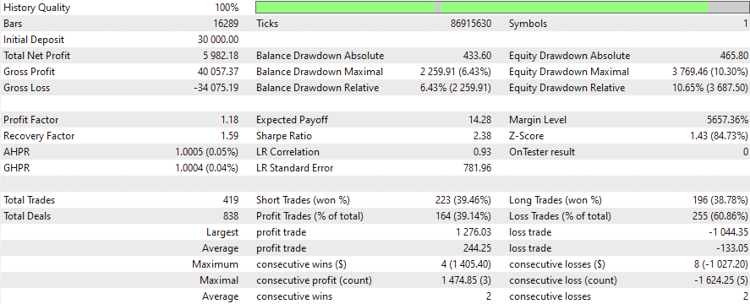
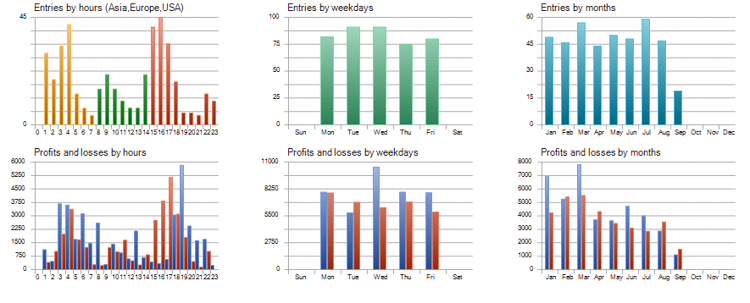
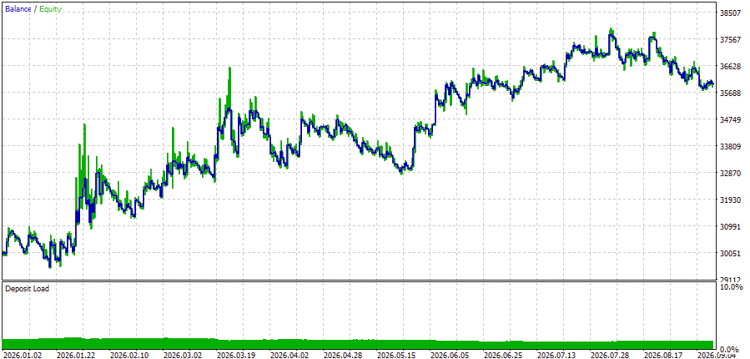
Based on the above results of the testing, we can find the following important values for the test numbers:
- Net Profit: 5982.18 USD.
- Balance DD relative: 6.43%.
- Profit factor: 1.18.
- Expected payoff: 14.28.
- Recovery factor: 1.59.
- Sharpe Ratio: 2.38.
Another test results for the Z-Score Volatility Breakout strategy as per the rules of:
- Time Frame: 4H
- Symbol: US30
- Period: January 1st, 2026 to September 11th, 2026
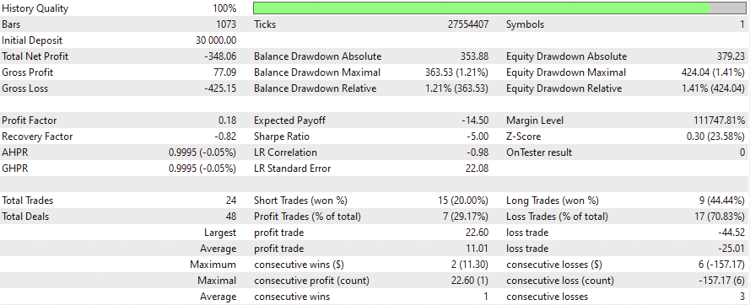
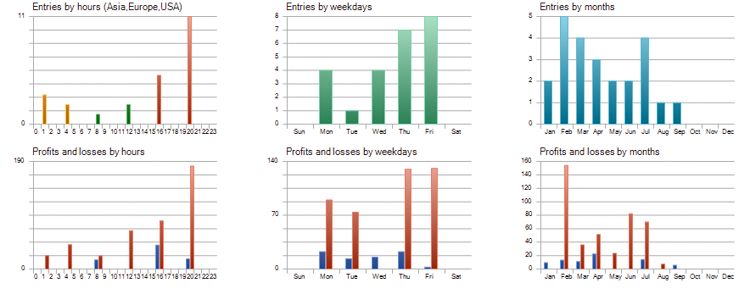
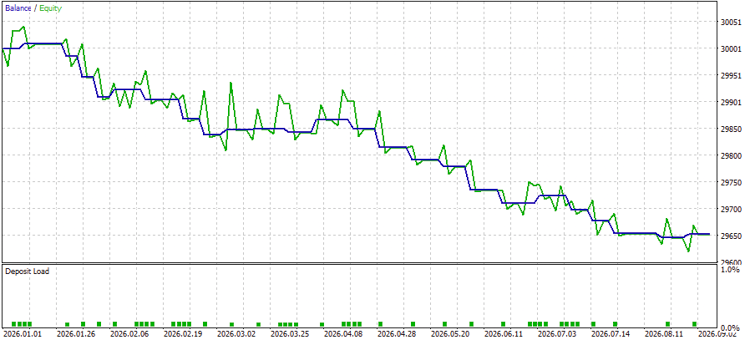
Based on the above results of the testing, we can find the following important values for the test numbers:
- Net Profit: -348.06 USD.
- Balance DD relative: 1.21%.
- Profit factor: 0.18.
- Expected payoff: -14.50.
- Recovery factor: -0.82.
- Sharpe Ratio: -5.00.
Another test results for the Z-Score Volatility Breakout strategy as per the rules of:
- Time Frame: 4H
- Symbol: BTCUSD
- Period: January 1st, 2026 to September 11th, 2026
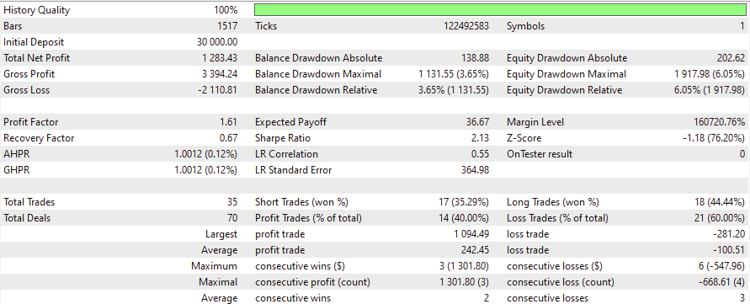
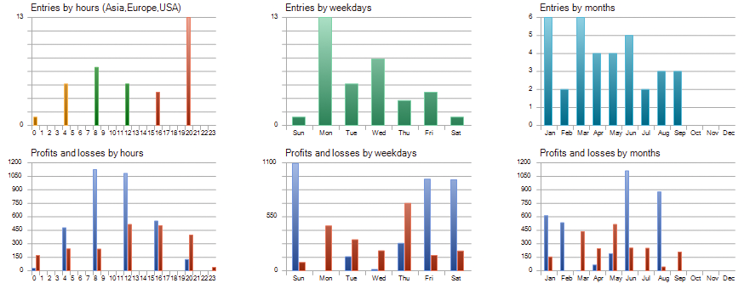
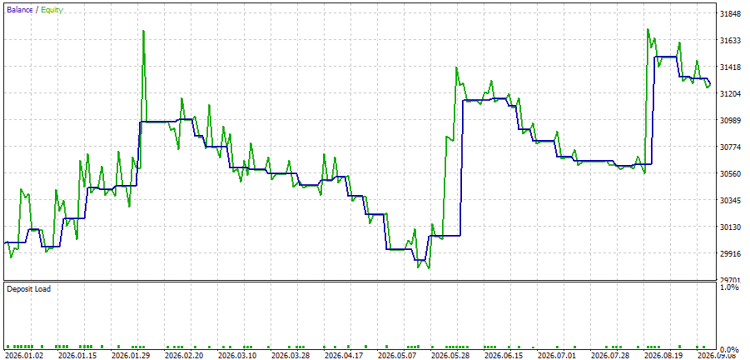
Based on the above results of the testing, we can find the following important values for the test numbers:
- Net Profit: 1283.43 USD.
- Balance DD relative: 3.65%.
- Profit factor: 1.61.
- Expected payoff: 36.67.
- Recovery factor: 0.67.
- Sharpe Ratio: 2.13.
Strategy 3: Z-Score Trend-Filtered
Price > 200EMA & Z-Score < -1.5 && Z-Score > -1.5 ==> Buy ==== Z-Score > +1 ==> Exit
Price < 200EMA & Z-Score > +1.5 && Z-Score < +1.5 ==> Sell ==== Z-Score < -1 ==> Exit
- Market Regime: Trend-following pullback entries using EMA200 as a trend-direct filter.
- Filter: A 200-period Exponential Moving Average (EMA) determines overall bias.
- Buy Setup: Price is above 200 EMA (Uptrend). Buy when Z-Score dips below -1.5 & Z-Score crosses back above -1.5 (a statistically discounted entry inside an established uptrend). Exit when Z-Score reaches +1.0.
- Sell Setup: Price is below 200 EMA (Downtrend). Short when Z-Score rises above +1.5 & Z-Score dips below +1.5. Exit when Z-Score reaches -1.0.
The full code:
//+------------------------------------------------------------------+
//|                                  ZScore_TrendFilter_EA-v2.mq5    |
//|                                  Copyright 2026, Quant Systems   |
//|                                             https://www.mql5.com |
//+------------------------------------------------------------------+
//+------------------------------------------------------------------+
//| Structuring core inputs, strategy thresholds, and trade handles  |
//+------------------------------------------------------------------+
#include <Trade\Trade.mqh>                  // Standard MQL5 trade execution library

CTrade trade;                               // Global CTrade instance for order routing

// Strategy Input Parameters
input int    InpZPeriod      = 20;          // Lookback period for Z-Score statistical window
input int    InpEMAPeriod    = 200;         // Baseline EMA period used to determine overall macro trend
input double InpBuyPullback  = -1.5;        // Z-Score threshold to trigger long entry in an uptrend
input double InpSellPullback = 1.5;         // Z-Score threshold to trigger short entry in a downtrend
input double InpLotSize      = 0.1;         // Fixed lot sizing allocated per order execution
input ulong  InpMagicNumber  = 111003;      // Unique identifier tag to manage position allocation

// Global Handles
int zscore_handle;                          // Custom Z-Score indicator pointer handle
int ema_handle;                             // Moving Average indicator pointer handle
//+----------------------------------------------------------------------+
//| Initialization sequence to configure magic number and indicator links|
//+----------------------------------------------------------------------+
int OnInit()
  {
   trade.SetExpertMagicNumber(InpMagicNumber);                               // Assign magic number tag to isolate trades

   // Load indicator handles for runtime data fetching
   zscore_handle = iCustom(_Symbol, _Period, "Custom_Z-Score_V2", InpZPeriod);
   ema_handle    = iMA(_Symbol, _Period, InpEMAPeriod, 0, MODE_EMA, PRICE_CLOSE);

   // Validate handle creation to prevent runtime errors
   if(zscore_handle == INVALID_HANDLE || ema_handle == INVALID_HANDLE)
     {
      Print("Failed to load indicator handles.");                            // Log error to Experts journal
      return(INIT_FAILED);                                                   // Abort initialization safely
     }

   return(INIT_SUCCEEDED);                                                   // Setup successfully verified
  }
//+------------------------------------------------------------------+
//| Clean-up routine to release allocated indicator handles on remove|
//+------------------------------------------------------------------+
void OnDeinit(const int reason)
  {
   IndicatorRelease(zscore_handle);                                         // Free custom indicator memory
   IndicatorRelease(ema_handle);                                            // Free EMA indicator memory allocation
  }
//+------------------------------------------------------------------+
//| Core strategy execution loop triggered on every price quote tick |
//+------------------------------------------------------------------+
void OnTick()
  {
   // Bar-Completion Control: Restrict strategy evaluation to closed candles
   static datetime last_bar_time;                                           // Persistent timestamp tracker
   datetime current_bar_time = iTime(_Symbol, _Period, 0);                  // Obtain current candle open time
   if(current_bar_time == last_bar_time) return;                            // Skip intra-bar tick updates
   last_bar_time = current_bar_time;

   // Buffer Setup and Data Retrieval
   double z_val[];                                                          // Array buffer for Z-Score readings
   double ema_val[];                                                        // Array buffer for EMA baseline
   double close_val[];                                                      // Array buffer for historical close prices

   ArraySetAsSeries(z_val, true);                                           // Reverse index ordering (0 = newest closed)
   ArraySetAsSeries(ema_val, true);
   ArraySetAsSeries(close_val, true);

   // Copy calculated indicator and bar values into local buffers
   if(CopyBuffer(zscore_handle, 0, 1, 2, z_val) < 2) return;                 // Read last 2 closed Z-Score values
   if(CopyBuffer(ema_handle, 0, 1, 1, ema_val) < 1) return;                  // Read latest closed EMA value
   if(CopyClose(_Symbol, _Period, 1, 1, close_val) < 1) return;              // Read latest closed price bar

   double z_current   = z_val[0];                                            // Most recently completed candle Z-Score
   double z_previous  = z_val[1];                                            // Candle preceding the most recent closed
   double current_ema = ema_val[0];                                          // Current EMA trendline value
   double close_price = close_val[0];                                        // Closed price of the evaluated bar

   // Audit Existing EA Positions
   int total_positions = 0;                                                 // Counter for active positions owned by EA
   bool is_long  = false;                                                   // Flag tracking active buy state
   bool is_short = false;                                                   // Flag tracking active sell state

   for(int i = PositionsTotal() - 1; i >= 0; i--)                           // Scan active platform positions backwards
     {
      ulong ticket = PositionGetTicket(i);                                  // Retrieve order ticket ID
      if(PositionGetString(POSITION_SYMBOL) == _Symbol &&                   // Verify current chart symbol matches
         PositionGetInteger(POSITION_MAGIC) == InpMagicNumber)              // Verify EA magic number matches
        {
         total_positions++;                                                 // Increment position counter
         long type = PositionGetInteger(POSITION_TYPE);                     // Retrieve position direction
         if(type == POSITION_TYPE_BUY)  is_long  = true;                    // Long trade active
         if(type == POSITION_TYPE_SELL) is_short = true;                    // Short trade active
        }
     }

   // Dynamic Position Exits: Take profit when reversion reaches opposite boundary
   if(is_long && z_current >= 1.0)                                          // Long profit target reached (+1.0 standard dev)
     {
      ClosePositions(POSITION_TYPE_BUY);                                                     // Exit active long positions
      is_long = false;                                                      // Reset state flag
     }
   if(is_short && z_current <= -1.0)                                        // Short profit target reached (-1.0 standard dev)
     {
      ClosePositions(POSITION_TYPE_SELL);                                                     // Exit active short positions
      is_short = false;                                                     // Reset state flag
     }

   // Strategy Entry Logic: Trend-aligned pullback execution
   if(total_positions == 0)                                                 // Confirm no exposure before entering
     {
      // Long Entry: Macro Uptrend (Price > 200 EMA) + Oversold Pullback Rebound (Z-Score crosses back above -1.5)
      if(close_price > current_ema && z_previous < InpBuyPullback && z_current >= InpBuyPullback)
        {
         trade.Buy(InpLotSize, _Symbol, SymbolInfoDouble(_Symbol, SYMBOL_ASK), 0, 0, "Z-Trend Pullback Buy");
         last_bar_time = current_bar_time;                                  // Lock bar time to prevent double entry
        }
      // Short Entry: Macro Downtrend (Price < 200 EMA) + Overbought Pullback Rebound (Z-Score crosses back below +1.5)
      else if(close_price < current_ema && z_previous > InpSellPullback && z_current <= InpSellPullback)
        {
         trade.Sell(InpLotSize, _Symbol, SymbolInfoDouble(_Symbol, SYMBOL_BID), 0, 0, "Z-Trend Pullback Sell");
         last_bar_time = current_bar_time;                                  // Lock bar time to prevent double entry
        }
     }
  }
//+-------------------------------------------------------------------+
//| Iterates and flattens all open positions matching symbol and magic|
//+-------------------------------------------------------------------+
void ClosePositions(ENUM_POSITION_TYPE pos_type)
  {
   for(int i = PositionsTotal() - 1; i >= 0; i--)                           // Loop through open positions in reverse order
     {
      ulong ticket = PositionGetTicket(i);                                  // Read position ticket number
      if(PositionGetString(POSITION_SYMBOL) == _Symbol &&                   // Ensure symbol matches current chart
         PositionGetInteger(POSITION_MAGIC) == InpMagicNumber &&              // Ensure magic number matches EA instance
	 PositionGetInteger(POSITION_TYPE) == pos_type)
        {
         trade.PositionClose(ticket);                                       // Execute position closure
        }
     }
  }
//+------------------------------------------------------------------+
Differences
Input Parameters:
- Introduces InpEMAPeriod (200) for trend determination, alongside InpBuyPullback (-1.5) and InpSellPullback (1.5) to enter dips/rallies within the broader trend.
- Magic Numbers: 111003
// Strategy Input Parameters
input int    InpZPeriod      = 20;          // Lookback period for Z-Score statistical window - no change
input int    InpEMAPeriod    = 200;         // Baseline EMA period used to determine overall macro trend
input double InpBuyPullback  = -1.5;        // Z-Score threshold to trigger long entry in an uptrend
input double InpSellPullback = 1.5;         // Z-Score threshold to trigger short entry in a downtrend
input double InpLotSize      = 0.1;         // Fixed lot sizing allocated per order execution - no change
input ulong  InpMagicNumber  = 111003;      // Unique identifier tag to manage position allocation
Indicator Handles & Initialization (OnInit/OnDeinit):
- Handle Variables: Declares two handles: zscore_handle and ema_handle.
- Initialization (OnInit): Calls iCustom() for Z-Score and adds iMA() to initialize a 200-period Exponential Moving Average (MODE_EMA, PRICE_CLOSE). It also validates both handles in its if check.
- Deinitialization (OnDeinit): Releases both zscore_handle and ema_handle.
// Global Handles
int zscore_handle;                          // Custom Z-Score indicator pointer handle
int ema_handle;                             // Moving Average indicator pointer handle
//+----------------------------------------------------------------------+
//| Initialization sequence to configure magic number and indicator links|
//+----------------------------------------------------------------------+
int OnInit()
  {
   trade.SetExpertMagicNumber(InpMagicNumber);                               // Assign magic number tag to isolate trades

   // Load indicator handles for runtime data fetching
   zscore_handle = iCustom(_Symbol, _Period, "Custom_Z-Score_V2", InpZPeriod);
   ema_handle    = iMA(_Symbol, _Period, InpEMAPeriod, 0, MODE_EMA, PRICE_CLOSE);

   // Validate handle creation to prevent runtime errors
   if(zscore_handle == INVALID_HANDLE || ema_handle == INVALID_HANDLE)
     {
      Print("Failed to load indicator handles.");                            // Log error to Experts journal
      return(INIT_FAILED);                                                   // Abort initialization safely
     }

   return(INIT_SUCCEEDED);                                                   // Setup successfully verified
  }
//+------------------------------------------------------------------+
//| Clean-up routine to release allocated indicator handles on remove|
//+------------------------------------------------------------------+
void OnDeinit(const int reason)
  {
   IndicatorRelease(zscore_handle);                                         // Free custom indicator memory
   IndicatorRelease(ema_handle);                                            // Free EMA indicator memory allocation
  }
Data Buffers & Data Fetching (OnTick):
- Buffer Arrays: Declares three arrays—z_val[], ema_val[], and close_val[] and sets all three as time series (ArraySetAsSeries).
- Copying Data: Calls CopyBuffer() for Z-Score, CopyBuffer() for the EMA, and CopyClose() to retrieve the latest completed bar's close price for trend comparisons.
   // Buffer Setup and Data Retrieval
   double z_val[];                                                          // Array buffer for Z-Score readings
   double ema_val[];                                                        // Array buffer for EMA baseline
   double close_val[];                                                      // Array buffer for historical close prices

   ArraySetAsSeries(z_val, true);                                           // Reverse index ordering (0 = newest closed)
   ArraySetAsSeries(ema_val, true);
   ArraySetAsSeries(close_val, true);

   // Copy calculated indicator and bar values into local buffers
   if(CopyBuffer(zscore_handle, 0, 1, 2, z_val) < 2) return;                 // Read last 2 closed Z-Score values
   if(CopyBuffer(ema_handle, 0, 1, 1, ema_val) < 1) return;                  // Read latest closed EMA value
   if(CopyClose(_Symbol, _Period, 1, 1, close_val) < 1) return;              // Read latest closed price bar
Trade Exit Logic (Trend Filter):
- Closes long trades when the Z-Score expands to a +1.0 standard deviation target (z_current >= 1.0).
- Closes short trades when the Z-Score expands down to a -1.0 standard deviation target (z_current <= -1.0).
- Calls ClosePositions() without arguments to liquidate open trades.
   // Dynamic Position Exits: Take profit when reversion reaches opposite boundary
   if(is_long && z_current >= 1.0)                                          // Long profit target reached (+1.0 standard dev)
     {
      ClosePositions(POSITION_TYPE_BUY);                                                     // Exit active long positions
      is_long = false;                                                      // Reset state flag
     }
   if(is_short && z_current <= -1.0)                                        // Short profit target reached (-1.0 standard dev)
     {
      ClosePositions(POSITION_TYPE_SELL);                                                     // Exit active short positions
      is_short = false;                                                     // Reset state flag
     }
Trade Entry Logic (Trend-Filtered Entry):
- Buy: Requires two conditions: price must be above the 200 EMA (close_price > current_ema) AND the Z-Score must pull back and recover (z_previous < -1.5 and z_current >= -1.5)—buying dips in an uptrend.
- Sell: Requires two conditions: price must be below the 200 EMA (close_price < current_ema) AND the Z-Score must rally and roll over (z_previous > 1.5 and z_current <= 1.5)—selling rallies in a downtrend.
- Comment Tags: Sets order comments to "Z-Trend Pullback Buy"/"Z-Trend Pullback Sell".
   // Strategy Entry Logic: Trend-aligned pullback execution
   if(total_positions == 0)                                                 // Confirm no exposure before entering
     {
      // Long Entry: Macro Uptrend (Price > 200 EMA) + Oversold Pullback Rebound (Z-Score crosses back above -1.5)
      if(close_price > current_ema && z_previous < InpBuyPullback && z_current >= InpBuyPullback)
        {
         trade.Buy(InpLotSize, _Symbol, SymbolInfoDouble(_Symbol, SYMBOL_ASK), 0, 0, "Z-Trend Pullback Buy");
         last_bar_time = current_bar_time;                                  // Lock bar time to prevent double entry
        }
      // Short Entry: Macro Downtrend (Price < 200 EMA) + Overbought Pullback Rebound (Z-Score crosses back below +1.5)
      else if(close_price < current_ema && z_previous > InpSellPullback && z_current <= InpSellPullback)
        {
         trade.Sell(InpLotSize, _Symbol, SymbolInfoDouble(_Symbol, SYMBOL_BID), 0, 0, "Z-Trend Pullback Sell");
         last_bar_time = current_bar_time;                                  // Lock bar time to prevent double entry
        }
     }
The testing results for the Z-Score Trend-Filtered strategy under the following settings:
- Time Frame: 15-minute
- Symbol: XAUUSD
- Period: January 1st, 2026 to September 10th, 2026
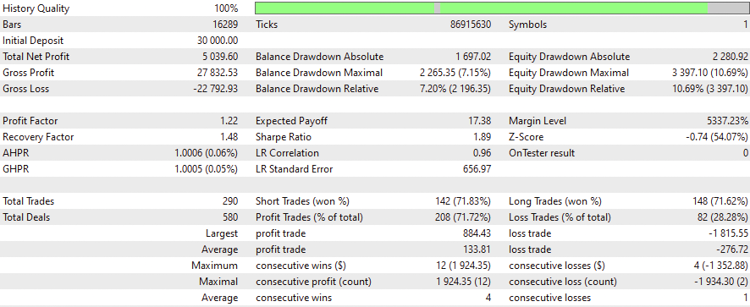
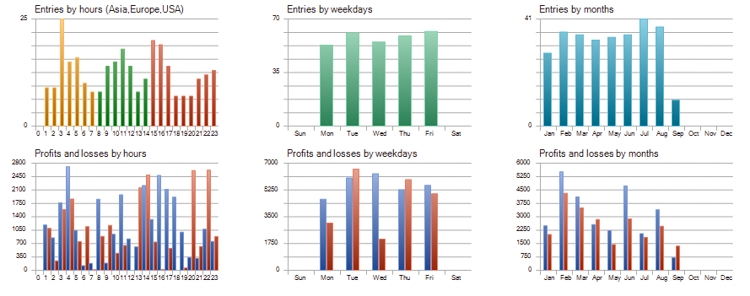
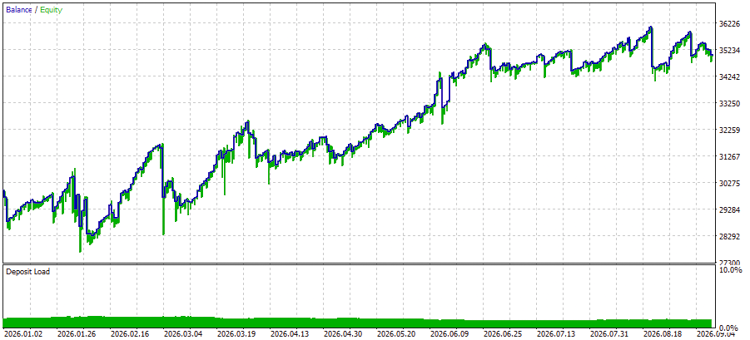
Based on the above results of the test of a 15-minute time frame, we can find the following important values for the test numbers:
- Net Profit: 5039.60 USD.
- Balance DD relative: 7.20%.
- Profit factor: 1.22.
- Expected payoff: 17.38.
- Recovery factor: 1.48.
- Sharpe Ratio: 1.89.
Another set of test results for the Z-Score Trend-Filtered strategy as per the rules of:
- Time Frame: 4H
- Symbol: US30
- Period: January 1st, 2026 to September 11th, 2026
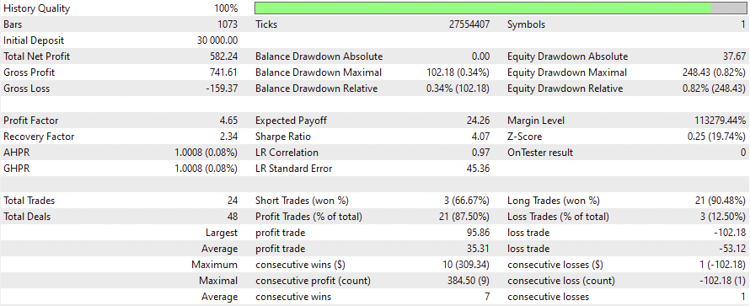
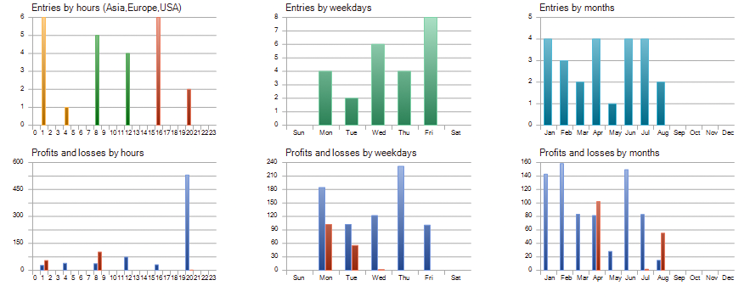
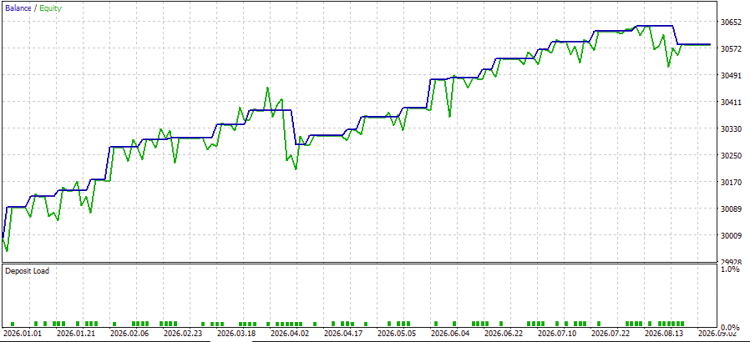
Based on the above results of the testing, we can find the following important values for the test numbers:
- Net Profit: 582.24 USD.
- Balance DD relative: 0.34%.
- Profit factor: 4.65.
- Expected payoff: 24.26.
- Recovery factor: 2.34.
- Sharpe Ratio: 4.07.
Another test results for the Z-Score Trend-Filtered strategy as per the rules of:
- Time Frame: 4H
- Symbol: BTCUSD
- Period: January 1st, 2026 to September 11th, 2026
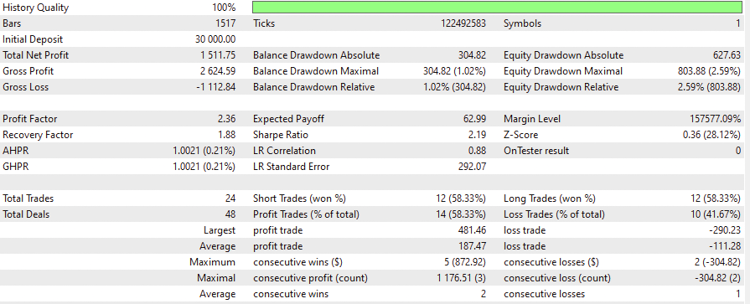
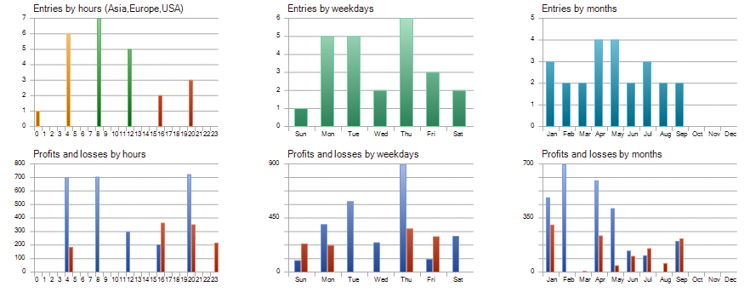
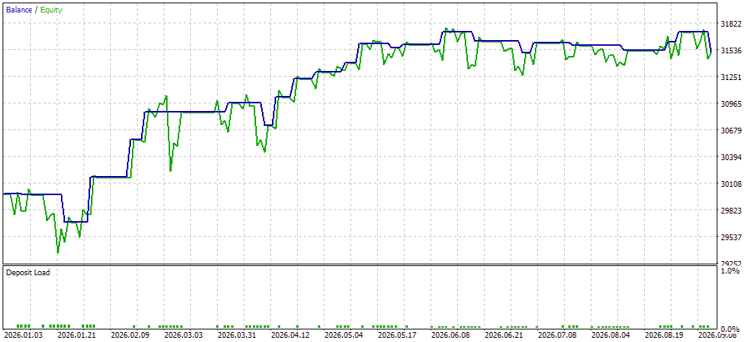
Based on the above results of the testing, we can find the following important values for the test numbers:
- Net Profit: 1511.75 USD.
- Balance DD relative: 1.02%.
- Profit factor: 2.36.
- Expected payoff: 62.99.
- Recovery factor: 1.88.
- Sharpe Ratio: 2.19.
The tables below show all the results in a comparable approach:
XAUUSD - 15-minute:
| Metric | Strategy 1: Classic Mean Reversion | Strategy 2: Z-Score Volatility Breakout | Strategy 3: Trend-Filtered Mean Reversion |
|---|---|---|---|
| Net Profit | -$7,722.24 | $5,982.18 | $5,039.60 |
| Balance DD relative | 32.52% | 6.43% | 7.20% |
| Profit factor | 0.87 | 1.18 | 1.22 |
| Expected payoff | -12.24 | 14.28 | 17.38 |
| Recovery factor | -0.71 | 1.59 | 1.48 |
| Sharpe Ratio | -1.60 | 2.38 | 1.89 |
US30 - 4H:
| Metric | Strategy 1: Classic Mean Reversion | Strategy 2: Z-Score Volatility Breakout | Strategy 3: Trend-Filtered Mean Reversion |
|---|---|---|---|
| Net Profit | $1,069.93 | -$348.06 | $582.24 |
| Balance DD relative | 0.21% | 1.21% | 0.34% |
| Profit factor | 7.02 | 0.18 | 4.65 |
| Expected payoff | 26.75 | -14.50 | 24.726 |
| Recovery factor | 5.09 | -0.82 | 2.34 |
| Sharpe Ratio | 5.98 | -5.00 | 4.07 |
BTCUSD - 4H:
| Metric | Strategy 1: Classic Mean Reversion | Strategy 2: Z-Score Volatility Breakout | Strategy 3: Trend-Filtered Mean Reversion |
|---|---|---|---|
| Net Profit | -$1,789.60 | $1,283.43 | $1,511.75 |
| Balance DD relative | 7.38% | 3.65% | 1.02% |
| Profit factor | 0.64 | 1.61 | 2.36 |
| Expected payoff | -36.52 | 36.67 | 62.99 |
| Recovery factor | -0.62 | 0.67 | 1.88 |
| Sharpe Ratio | -1.33 | 2.13 | 2.19 |
Performance Summary:
- Strategy 1 (Classic Mean Reversion): Unfiltered mean reversion gets crushed by real market trends, Gold wiped out -$7,722.24 with a painful 32.52% drawdown. The US30 result may reflect asset-specific behavior during the tested period and would require additional out-of-sample validation before treating it as a robust edge.
- Strategy 2 (Z-Score Volatility Breakout): It printed $5982.18 on Gold and $1,283.43 on Bitcoin with manageable drawdowns, suggesting that breakout logic may work better on the higher-volatility assets tested here. Just keep it away from US30 (-$348.06 loss, terrible 0.18 PF), where it gets chopped up in ranges.
- Strategy 3 (Trend-Filtered Mean Reversion): Adding a trend filter solved Strategy 1's drawdown problem entirely. Among the tested configurations, it was the only strategy that produced positive results across all three instruments. (Gold, US30, and Bitcoin) while keeping drawdowns under 7.20%.
Risk Management and Practical Considerations
While the Z-Score provides robust statistical grounding, automated trading introduces real-world mechanics you must account for:
- The Fat Tail Hazard: Financial markets do not exhibit a pure normal distribution. Black Swan events and trend extensions can push the Z-Score to +4.0 or higher, causing significant drawdowns for unfiltered mean-reversion strategies. Always utilize explicit Stop Losses (SL) or hard equity drawdown caps. For baseline testing purposes, hard SL/TP levels are set to 0 to evaluate pure Z-Score exit signals. Production environments must define explicit stop-loss orders.
- Lookback Period (N) Sensitivity: A short lookback period (e.g., N=10) creates a sensitive oscillator prone to false signals. A long period (e.g., N=100) smooths the output but introduces lag. A window of N=20 to N=50 offers a balanced baseline for most timeframe structures.
- Multi-Asset Normalization: Because the Z-Score is expressed in standardized deviations rather than nominal currency values, you can compare instruments across asset classes—from Forex pairs to equity indices and crypto—using identical parameter thresholds.
- Execution Timing: Intra-bar Z-Score values fluctuate with every tick. Always evaluate signals on completed bars (bar index 1) to eliminate false triggers caused by temporary mid-candle spikes, and implement a maximum spread filter to avoid executing during liquidity pullbacks by using the following code
if(SymbolInfoInteger(_Symbol, SYMBOL_SPREAD) > 30) return; // Skip if spread exceeds thresholdThis filter was intentionally excluded from the test code to keep the results focused on the raw Z-Score logic.
Conclusion
The Z-Score moves beyond traditional subjective visual charting by converting raw price fluctuations into standardized statistical metrics. By understanding how far price has deviated from its rolling average, you can construct objective systems designed for both mean-reverting ranges and high-momentum breakouts.
By pairing the custom MQL5 indicator with the Expert Advisors provided above, you have a solid structural foundation for backtesting and deploying quantitative trading strategies on MetaTrader 5. However, transitioning from a baseline model to a production-ready system requires bridging statistical theory with real-world market mechanics.
To take these systems further before deploying live capital, focus on three key quantitative enhancements:
- Dynamic Volatility Sizing: Incorporate Average True Range (ATR) or historical volatility filters to dynamically adjust position size and stop-loss distance. This ensures your capital exposure scales appropriately during shifting market regimes.
- Rigorous Optimization & Testing: Subject your parameters to walk-forward optimization and out-of-sample testing within the Strategy Tester to ensure lookback periods (N) reflect true statistical plateaus rather than over-fitted historical noise.
- Execution & Regime Safeguards: Enforce strict execution rules such as evaluating signals exclusively on confirmed candle closes and applying spread filters to protect the system against slippage and intra-bar false triggers.
By pairing statistical probability with systematic risk controls, you transform a basic technical indicator into a robust, institutional-grade algorithmic framework. I hope you found this article useful, and if you want to read more articles from me such as guides on building trading systems based on popular technical indicators — you can access them through my Publications page.
You can find my attached source code files below:
| File Name | Description |
|---|---|
| Custom_Z-Score_V2.mq5 | It is for the custom Z-Score indicator |
| ZScore_MeanReversion_EA-v2.mq5 | It is for the EA of ZScore_MeanReversion for the first strategy |
| ZScore_TrendBreakout_EA-v2.mq5 | It is for the EA of EA_ZScore_Breakout for the second strategy |
| ZScore_TrendFiltered_EA-v2.mq5 | It is for the EA of EA_ZScore_TrendFilter for the third strategy |
| MQL5.zip | It contains all the attached files as per the terminal's directory |
Warning: All rights to these materials are reserved by MetaQuotes Ltd. Copying or reprinting of these materials in whole or in part is prohibited.
This article was written by a user of the site and reflects their personal views. MetaQuotes Ltd is not responsible for the accuracy of the information presented, nor for any consequences resulting from the use of the solutions, strategies or recommendations described.

 Features of Custom Indicators Creation
 Larry Williams Market Secrets (Part 18): Automating the Greatest Swing Value Breakout Strategy in MQL5
 Features of Experts Advisors
 MetaTrader 5 Machine Learning Blueprint (Part 22): Auditing the Selection Criterion — Measuring Overfit in Hyperparameter Search

- Free trading apps
- Over 8,000 signals for copying
- Economic news for exploring financial markets
You agree to website policy and terms of use