
Feature Engineering for ML (Part 2): Implementing Fixed-Width Fractional Differentiation in MQL5
 2 113
2 113
 0
0

Table of Contents
- Introduction
- Architecture Constraints on Live Feeds
- The CFFDEngine Class
- Weight Computation in MQL5
- Single-Bar Computation
- The FFD Custom Indicator
- Integration with Expert Advisors
- Validation Against the Python Pipeline
- Performance Considerations
- Conclusion
- References
- Attached Files
Introduction
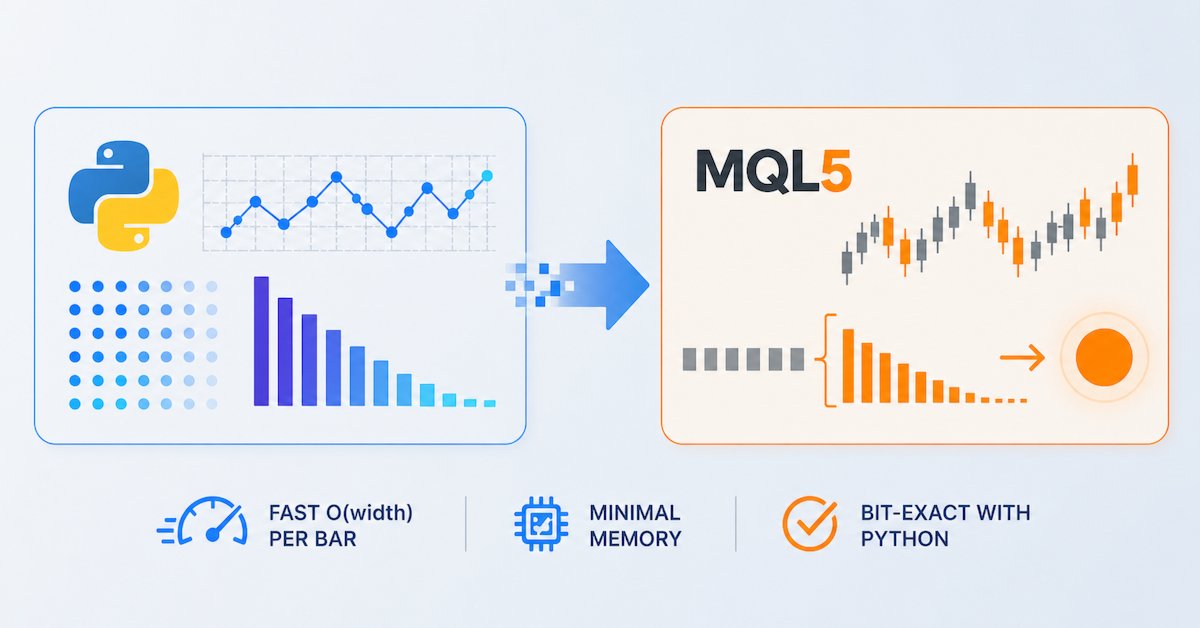
Part 1 developed the theory and Python implementation of fractional differentiation using the fixed-width window (FFD) method from Chapter 5 of AFML. Three properties of the FFD method make it ideal for live deployment: the weight vector is precomputed once, each observation depends on a bounded lookback window, and the computation is a single dot product. This article translates those properties into a production-grade MQL5 engine that runs efficiently on live MetaTrader 5 data feeds.
The implementation has two components: CFFDEngine (a header-only .mqh class for weight generation and dot-product computation) and FFD.mq5 (a custom indicator that wraps CFFDEngine and draws the fractionally differentiated series). The indicator supports MetaTrader's prev_calculated optimization and recomputes only what has changed since the last call.
The design goal throughout is: zero per-tick allocation, O(width) per new bar, and O(1) initialization amortized. On a typical instrument with d = 0.4 and τ = 10−5, the threshold-determined window width is 1457 bars. At τ = 10−4 it falls to 281 bars. The dot product over that window completes in microseconds on modern hardware.
Architecture Constraints on Live Feeds
MQL5 imposes a different computational model than Python. There is no NumPy, no Numba, no parallel array operations. Everything runs in a single thread inside the terminal process. These constraints shape every design decision:
- No dynamic memory on tick path. MQL5's ArrayResize is expensive relative to arithmetic. Weight arrays must be allocated once in OnInit() and never resized during live operation.
- Minimize CopyClose calls. Each CopyClose call involves an IPC round-trip to the terminal's history server. We request exactly width + 1 bars per new bar, no more.
- No redundant log computation. For the indicator path, we could precompute a log price buffer, but that would add a second indicator buffer and complexity. Since MathLog is typically implemented efficiently on modern hardware, calling it width + 1 times per bar is negligible.
- prev_calculated optimization. MetaTrader calls OnCalculate on every tick, not just on new bars. The indicator must detect whether the bar count has changed and skip recomputation when it has not.
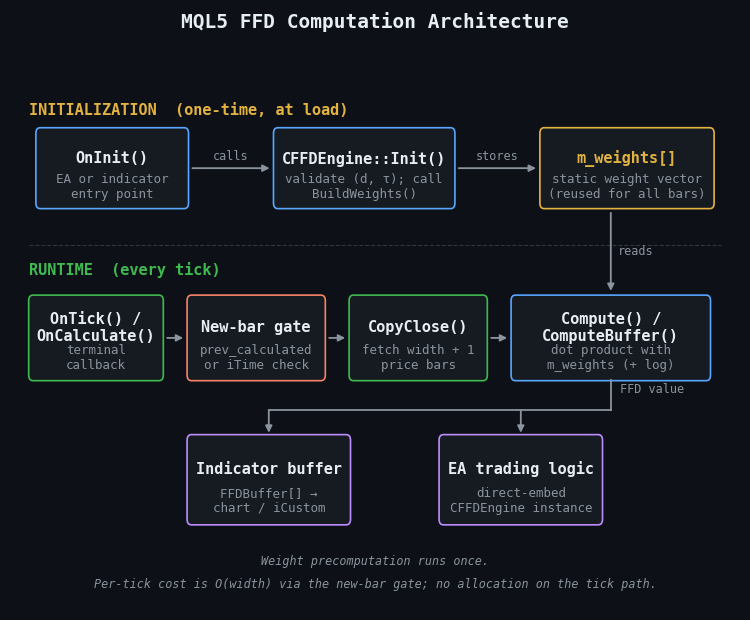
Figure 1. MQL5 FFD computation architecture
- OnInit(): Precomputes the FFD weight vector once and stores it in a static array. No further allocation occurs after this step.
- OnTick() / OnCalculate(): Detects new bar formation and retrieves the minimal lookback window via CopyClose().
- Compute(): Applies the log transform (optional) and computes the dot product between the weight vector and the price window.
- Ring Buffer: Stores the last width + 1 log prices for O(1) update per bar when used in the direct-embed EA pattern.
- Output: The resulting FFD value is either stored in an indicator buffer for chart display or used directly in EA trading logic.
The CFFDEngine Class
The engine class exposes three methods: Init() (called once), Compute() (called per bar in EA mode), and ComputeBuffer() (called per tick in indicator mode). All internal state (the weight array, window width, and configuration parameters) is set during initialization and never modified afterward.
//+------------------------------------------------------------------+
//| FFDEngine.mqh — Fixed-Width Fractional Differentiation Engine    |
//| Copyright 2025, Patrick M. Njoroge                               |
//+------------------------------------------------------------------+

#ifndef FFDENGINE_MQH
#define FFDENGINE_MQH

class CFFDEngine
  {
private:
   double            m_weights[];       // reversed weight vector (oldest lag first)
   int               m_width;           // number of weights minus 1
   double            m_d;               // differentiation order
   double            m_threshold;       // weight cutoff τ
   bool              m_use_log;         // apply log transform
   bool              m_initialized;     // initialization flag

   void              BuildWeights(void);

   //--- ln(max(price, 1e-8)): matches Python's clip(lower=1e-8) before np.log
   double            SafeLog(double price) const
     {
      if(price<1e-8)
         price=1e-8;
      return(MathLog(price));
     }

public:
                     CFFDEngine(void) : m_d(0),m_threshold(1e-5),
                     m_use_log(true),m_width(0),
                     m_initialized(false) {}

   bool              Init(double d,double threshold=1e-5,
                          bool use_log=true);
   int               GetWidth(void)   const { return(m_width);       }
   int               GetMinBars(void) const { return(m_width+1);     }
   double            GetD(void)       const { return(m_d);           }
   bool              IsReady(void)    const { return(m_initialized); }

   //--- Single-bar: prices[0]=oldest, prices[count-1]=newest
   double            Compute(const double &prices[],int count);

   //--- Indicator buffer fill with prev_calculated optimization
   int               ComputeBuffer(const double &prices[],
                                   double &buffer[],
                                   int total,int prev_calculated);
  };

#endif // FFDENGINE_MQH
The class is designed as a header-only include file. No .mq5 compilation unit is needed, so any EA or indicator that includes FFDEngine.mqh gets the full implementation compiled inline. This avoids library versioning issues and makes the deployment footprint a single file. Use #include "FFDEngine.mqh" in consuming files. The compiler then searches MQL5\Include, so the header must be placed there.
Weight Computation in MQL5
The weight generation mirrors the Python implementation exactly: the iterative recurrence ωk = −ωk−1 · (d − k + 1) / k, terminated when |ωk| falls below the threshold. The result is reversed so that m_weights[0] corresponds to the oldest observation and m_weights[m_width] corresponds to the most recent observation in the window.
void CFFDEngine::BuildWeights(void)
  {
//--- doubling-growth strategy: start at capacity 512, double when full.
//--- this avoids an ArrayResize call on every iteration.
   int    capacity=512;
   double temp[];
   ArrayResize(temp,capacity);
   temp[0]=1.0;
   int n=1;

   for(int k=1; ; k++)
     {
      double w_next=-temp[n-1]*(m_d-(double)k+1.0)/(double)k;
      if(MathAbs(w_next)<m_threshold)
         break;   // mirrors Python: "if abs(weights_) < thres: break"
      if(n>=capacity)
        {
         capacity*=2;
         ArrayResize(temp,capacity);
        }
      temp[n]=w_next;
      n++;
     }

//--- trim to exact size, then reverse into m_weights.
//--- m_weights[0]   = smallest |w|, multiplies oldest price.
//--- m_weights[n-1] = 1.0,          multiplies newest price.
   ArrayResize(temp,n);
   m_width=n-1;
   ArrayResize(m_weights,n);
   for(int i=0; i<n; i++)
      m_weights[i]=temp[n-1-i];
  }
There is no fixed ceiling on the number of iterations. The loop terminates when |ωk| drops below the threshold, exactly as the Python get_weights_ffd() function does. A fixed cap is dangerous because it can silently truncate the weight vector and produce FFD values that no longer match the Python pipeline. A cap of 1000 would truncate the weights and corrupt the output for d < 0.5 at τ = 10−5 , with no error or warning. The doubling-growth buffer costs O(log N) allocation calls rather than O(N), and is trimmed to exact size before reversal.
The Init() method validates parameters, calls BuildWeights(), and logs the configuration:
bool CFFDEngine::Init(double d,double threshold=1e-5,
                      bool use_log=true)
  {
   if(d<0.0 || d>2.0)
     {
      PrintFormat("CFFDEngine::Init — d must be in [0, 2], got %.4f",d);
      return(false);
     }
   if(threshold<=0.0)
     {
      Print("CFFDEngine::Init — threshold must be positive");
      return(false);
     }

   m_d=d;
   m_threshold=threshold;
   m_use_log=use_log;

   BuildWeights();
   m_initialized=(m_width>0);

   if(m_initialized)
      PrintFormat("CFFDEngine: d=%.4f  threshold=%.2e  width=%d  min_bars=%d  use_log=%s",
                  m_d,m_threshold,m_width,GetMinBars(),
                  m_use_log ? "true" : "false");
   else
      Print("CFFDEngine::Init — no weights generated (d too small?)");

   return(m_initialized);
  }
Single-Bar Computation
The Compute() method is the heart of the engine. It takes a price array and returns the FFD value for the most recent bar. The implementation is a direct dot product; no branching, no allocation, no function calls beyond SafeLog:
double CFFDEngine::Compute(const double &prices[],int count)
  {
   if(!m_initialized || count<m_width+1)
      return(EMPTY_VALUE);

//--- use the last (m_width + 1) prices.
   int start=count-m_width-1;

   double result=0.0;
   for(int i=0; i<=m_width; i++)
     {
      double val=prices[start+i];
      if(m_use_log)
         val=SafeLog(val);   // ln(max(price, 1e-8)) — matches Python clip
      result+=m_weights[i]*val;
     }

   return(result);
  }
The loop iterates exactly m_width + 1 times. For d = 0.4 at τ = 10−5 the window width is 1457, so each new bar requires 1458 multiply-add operations, well under one millisecond. SafeLog applies a floor of 10−8 before calling MathLog, matching Python's clip(lower=1e-8) exactly. For real price data the floor is never reached; it exists solely to ensure numerically identical cross-validation results against the Python pipeline.
The buffer variant for indicators follows the same logic but adds the prev_calculated optimization:
int CFFDEngine::ComputeBuffer(const double &prices[],
                              double &buffer[],
                              int total,int prev_calculated)
  {
   if(!m_initialized)
      return(0);

//--- determine starting bar
   int start;
   if(prev_calculated>m_width)
      start=prev_calculated-1;  // recompute only current bar
   else
     {
      //--- full computation: mark lookback bars as empty
      for(int i=0; i<m_width && i<total; i++)
         buffer[i]=EMPTY_VALUE;
      start=m_width;
     }

//--- main computation loop
   for(int i=start; i<total; i++)
     {
      double result=0.0;

      for(int k=0; k<=m_width; k++)
        {
         double val=prices[i-m_width+k];
         if(m_use_log)
            val=SafeLog(val);   // ln(max(price, 1e-8))
         result+=m_weights[k]*val;
        }

      buffer[i]=result;
     }

   return(total);
  }
The prev_calculated gate is the key efficiency mechanism. On the first call (prev_calculated == 0), the function computes FFD values for every bar from m_width onward, a one-time cost for the full history. On subsequent calls, prev_calculated reflects the number of processed bars. In practice, the loop processes at most two bars: the most recently closed bar and the newly formed bar. This means the indicator processes each inbound tick in O(width) time, not O(total × width).
The FFD Custom Indicator
The indicator wraps CFFDEngine and draws the FFD series in a separate subwindow. It uses the second form of OnCalculate, which accepts a single price[] array selected by the ENUM_APPLIED_PRICE input. This allows the indicator to process any applied price (close, open, high, low, median, typical, or weighted) without code changes.
//+------------------------------------------------------------------+
//| FFD.mq5 — Fixed-Width Fractional Differentiation Indicator       |
//| Copyright 2025, Patrick M. Njoroge                               |
//+------------------------------------------------------------------+
#property indicator_separate_window
#property indicator_buffers 1
#property indicator_plots   1
#property indicator_label1  "FFD"
#property indicator_type1   DRAW_LINE
#property indicator_color1  clrDodgerBlue
#property indicator_style1  STYLE_SOLID
#property indicator_width1  2

//--- inputs
input double             InpD         = 0.4;         // Differentiation order d
input double             InpThreshold = 1e-5;        // Weight cutoff τ
input bool               InpUseLog    = true;        // Log-transform prices
input ENUM_APPLIED_PRICE InpPrice     = PRICE_CLOSE; // Applied price

#include "FFDEngine.mqh"

double     FFDBuffer[];
CFFDEngine g_engine;

//+------------------------------------------------------------------+
//| Custom indicator initialization function                         |
//+------------------------------------------------------------------+
int OnInit(void)
  {
   SetIndexBuffer(0,FFDBuffer,INDICATOR_DATA);
   PlotIndexSetDouble(0,PLOT_EMPTY_VALUE,EMPTY_VALUE);

   if(!g_engine.Init(InpD,InpThreshold,InpUseLog))
     {
      Print("FFD indicator: engine initialization failed");
      return(INIT_FAILED);
     }

//--- hide bars before the lookback window is filled
   PlotIndexSetInteger(0,PLOT_DRAW_BEGIN,g_engine.GetWidth());

//--- display name in chart window
   string short_name=StringFormat("FFD(%.2f, τ=%.0e)",
                                  InpD,InpThreshold);
   IndicatorSetString(INDICATOR_SHORTNAME,short_name);
   IndicatorSetInteger(INDICATOR_DIGITS,6);

   return(INIT_SUCCEEDED);
  }
//+------------------------------------------------------------------+
//| Custom indicator iteration function                              |
//+------------------------------------------------------------------+
int OnCalculate(const int rates_total,
                const int prev_calculated,
                const int begin,
                const double &price[])
  {
   return(g_engine.ComputeBuffer(price,FFDBuffer,
                                 rates_total,prev_calculated));
  }
The entire indicator logic is one line in OnCalculate, and everything else is configuration. This is the payoff of encapsulating the computation in CFFDEngine: the indicator is a thin display layer, and the same engine can be reused in EAs, scripts, and multi-indicator frameworks without duplication.
Using the Indicator from an EA
An EA that needs the FFD value of a particular symbol and timeframe can call the indicator via iCustom:
int ffd_handle;

int OnInit(void)
  {
   ffd_handle=iCustom(_Symbol,_Period,"FFD",
                      0.4,          // InpD
                      1e-5,         // InpThreshold
                      true,         // InpUseLog
                      PRICE_CLOSE); // InpPrice

   if(ffd_handle==INVALID_HANDLE)
     {
      Print("Failed to create FFD indicator");
      return(INIT_FAILED);
     }
   return(INIT_SUCCEEDED);
  }

void OnTick(void)
  {
   double ffd_val[];
   if(CopyBuffer(ffd_handle,0,0,1,ffd_val)<1)
      return;

//--- ffd_val[0] is the FFD value of the current (forming) bar
   if(ffd_val[0]==EMPTY_VALUE)
      return;

//--- use ffd_val[0] in trading logic...
  }
This approach delegates all computation to the indicator process, which runs only once regardless of how many EAs request the same buffer. If multiple EAs trade the same symbol on the same timeframe with the same d, they share a single indicator instance: MetaTrader deduplicates automatically.
Integration with Expert Advisors
For EAs that need direct control, or that operate on symbols and timeframes not matching the chart, the engine can be embedded directly. The EA calls CopyClose on each new bar and feeds the result to Compute():
#include "FFDEngine.mqh"

CFFDEngine g_ffd;
datetime   g_last_bar=0;

input double InpD         = 0.4;
input double InpThreshold = 1e-5;

int OnInit(void)
  {
   if(!g_ffd.Init(InpD,InpThreshold,true))
      return(INIT_FAILED);

   return(INIT_SUCCEEDED);
  }

void OnTick(void)
  {
//--- new bar detection
   datetime current_bar=iTime(_Symbol,_Period,0);
   if(current_bar==g_last_bar)
      return;
   g_last_bar=current_bar;

//--- retrieve prices
   int bars_needed=g_ffd.GetMinBars();
   double prices[];
   if(CopyClose(_Symbol,_Period,1,bars_needed,prices)<bars_needed)
      return;

//--- compute FFD value for the last closed bar
   double ffd_value=g_ffd.Compute(prices,bars_needed);
   if(ffd_value==EMPTY_VALUE)
      return;

//--- trading logic uses ffd_value as a feature
   ProcessSignal(ffd_value);
  }
Two implementation details deserve attention. First, CopyClose(_Symbol, _Period, 1, bars_needed, prices) starts copying from bar index 1 (the most recently closed bar), not bar index 0 (the currently forming bar). This avoids computing FFD on an incomplete bar with a changing close. Otherwise, you can introduce look-ahead bias when making decisions at bar close.
Second, the new-bar detection uses iTime to compare bar open timestamps. This is more reliable than counting ticks because MetaTrader can deliver multiple ticks within the same millisecond, and the tick counter can reset on reconnection.
Multi-Feature FFD
In a full ML pipeline, an EA may need to fractionally differentiate several features (close price, VWAP, volume-weighted close, etc.), each potentially with its own optimal d*. The engine supports this by instantiating multiple CFFDEngine objects:
CFFDEngine g_ffd_close;     // d* = 0.40 for close price
CFFDEngine g_ffd_volume;    // d* = 0.25 for cumulative volume

int OnInit(void)
  {
   if(!g_ffd_close.Init(0.40,1e-5,true))
      return(INIT_FAILED);
   if(!g_ffd_volume.Init(0.25,1e-5,false))
      return(INIT_FAILED);

   return(INIT_SUCCEEDED);
  }
Each engine maintains its own weight vector. The combined memory footprint is a few kilobytes total. The per-bar cost scales linearly with the number of features, but each dot product is independent, so the total remains well under one millisecond even for five or six simultaneous features.
Validation Against the Python Pipeline
Before deploying the MQL5 engine, it must produce numerically identical results to the Python pipeline on the same input data. The validation procedure is:
- Export a price series from MetaTrader to CSV using a script.
- Run the Python frac_diff_ffd on the CSV prices with the same d, τ, and use_log settings.
- Run the MQL5 CFFDEngine on the same prices (either via a script that writes results to CSV, or by comparing indicator buffer values to the Python output).
- Compute the maximum absolute difference across all bars. The maximum absolute difference should be below 10−12.
The following MQL5 script automates the export and computation for validation:
//+------------------------------------------------------------------+
//| FFDValidation.mq5 — Export FFD values for cross-validation       |
//+------------------------------------------------------------------+
#include "FFDEngine.mqh"

input double InpD         = 0.4;
input double InpThreshold = 1e-5;
input int    InpBars      = 5000;

//+------------------------------------------------------------------+
//| Script program start function                                    |
//+------------------------------------------------------------------+
void OnStart(void)
  {
   CFFDEngine engine;
   if(!engine.Init(InpD,InpThreshold,true))
      return;

   double close[];
   int copied=CopyClose(_Symbol,_Period,0,InpBars,close);
   if(copied<engine.GetMinBars())
     {
      PrintFormat("Not enough bars: got %d, need at least %d",
                  copied,engine.GetMinBars());
      return;
     }

//--- ensure chronological order (oldest first)
   ArraySetAsSeries(close,false);

//--- compute FFD for all bars
   double ffd_buffer[];
   ArrayResize(ffd_buffer,copied);
   engine.ComputeBuffer(close,ffd_buffer,copied,0);

//--- write to CSV
   int file=FileOpen("ffd_validation.csv",FILE_WRITE|FILE_CSV,",");
   if(file==INVALID_HANDLE)
     {
      Print("Cannot open file");
      return;
     }

   FileWrite(file,"bar_index","close","ffd");
   for(int i=0; i<copied; i++)
     {
      if(ffd_buffer[i]!=EMPTY_VALUE)
         FileWrite(file,i,DoubleToString(close[i],8),
                   DoubleToString(ffd_buffer[i],12));
     }

   FileClose(file);
   PrintFormat("Validation file written: %d bars",copied);
  }
The corresponding Python validation reads both CSVs and reports the discrepancy:
import pandas as pd
import numpy as np
from afml.features.fracdiff import frac_diff_ffd

# Load MQL5 output
mql5 = pd.read_csv("ffd_validation.csv")

# Reconstruct the same computation in Python
prices = pd.Series(mql5["close"].values, name="close")
py_ffd = frac_diff_ffd(prices, d=0.4, thres=1e-5, use_log=True)

# Align indices and compare
mql5_ffd = mql5["ffd"].values
py_ffd_vals = py_ffd.values

max_diff = np.max(np.abs(mql5_ffd[:len(py_ffd_vals)] - py_ffd_vals))
print(f"Max absolute difference: {max_diff:.2e}")
assert max_diff < 1e-12, "VALIDATION FAILED"
print("VALIDATION PASSED")
If the maximum difference exceeds 10−12, the two most common causes are a truncated weight vector and an array ordering error. CopyClose writes data according to the target array's ArraySetAsSeries flag. If another part of the EA changes that flag, the array order can be reversed silently. Always call ArraySetAsSeries(close, false) defensively before passing the array to ComputeBuffer.
Performance Considerations
The FFD computation is lightweight, but several design choices affect real-world performance in a live EA.
When to Compute
The most important optimization is not computational but temporal: compute FFD only on new bar formation, not on every tick. An M1 chart on an active forex pair receives 5–50 ticks per second. Computing FFD on every tick wastes CPU and produces unstable values (the current bar's close changes with every tick). The new-bar detection pattern shown above avoids this entirely.
For the indicator, MetaTrader handles this automatically via prev_calculated. On subsequent ticks within the same bar, prev_calculated equals rates_total, and the ComputeBuffer loop body executes exactly once (to update the forming bar's value). This is acceptable for visual display, where the user expects to see the indicator update in real time.
Memory Layout
MQL5 arrays are contiguous in memory. The inner dot-product loop accesses prices[] and m_weights[] sequentially, which is optimal for CPU cache lines. No special layout considerations are needed: the natural access pattern is already cache-friendly.
Branching in the Hot Loop
The if(m_use_log) check inside the dot-product loop introduces a branch on every iteration. To maximize throughput, you can split Compute() into log and non-log versions and select the function in Init() . In practice, the branch predictor will quickly converge because the condition is invariant within the call, so the overhead is effectively zero. The code clarity of a single function outweighs the theoretical nanosecond improvement.
Numerical Precision
MQL5 uses IEEE 754 double-precision (64-bit) arithmetic, the same as Python's float64. The dot product accumulates width + 1 additions. For widths in the hundreds to low thousands, the accumulated floating-point error is on the order of 10−13 to 10−14, well below any practical significance. Compensated summation (Kahan) is unnecessary.
| Parameter | Typical Value | Impact |
|---|---|---|
| d | 0.3 – 0.5 | Controls stationarity/memory tradeoff |
| τ (threshold) | 10−5 – 10−4 | Primary driver of window width; halving τ roughly doubles width |
| Width (bars) | 200 – 4000 | Set by d and τ. At τ = 10−5: 926 (d = 0.5) to 4075 (d = 0.1). At τ = 10−4: 199 to 650. |
| Compute time per bar | < 1 ms | Scales linearly with width. At width = 1457 the dot product completes in well under one millisecond, negligible relative to CopyClose latency. |
| Memory per engine | < 40 KB | Weight array (8 bytes × width) + state variables. At width = 4075: ~33 KB. |
Table 1. Performance characteristics of the CFFDEngine for typical parameter values
Conclusion
The MQL5 implementation preserves the mathematical properties established in the companion article while adapting to the constraints of a live trading environment. The weight vector is computed once using a threshold-driven loop with no fixed cap, the per-bar computation is a bounded dot product, and the indicator integrates with MetaTrader's prev_calculated optimization.
Three deployment patterns are supported. The custom indicator (FFD.mq5) provides visual feedback and serves as a shared data source for multiple EAs via iCustom handles. The direct-embed pattern uses CFFDEngine inside an EA for full control over timing and price selection. The multi-feature pattern instantiates separate engines for each feature that requires fractional differentiation, with each engine maintaining its own d* and weight vector.
The validation script confirms numerical equivalence with the Python pipeline. Once validated, the d* values determined by fracdiff_optimal in Python can be hardcoded as EA inputs, closing the loop between offline research and live deployment. As the pipeline matures, future articles will integrate the FFD engine into the full feature construction and model inference chain within the Expert Advisor framework.
The project is supported in Algo Forge.
References
- López de Prado, M. (2018). Advances in Financial Machine Learning. Wiley. Chapter 5: Fractionally Differentiated Features.
- Hosking, J. R. M. (1981). "Fractional differencing." Biometrika, 68(1), 165–176.
- MQL5 Reference: CopyBuffer, CopyClose, OnCalculate.
Attached Files
| File | Place in | Description |
|---|---|---|
| FFDEngine.mqh | MQL5\Include | The CFFDEngine class: weight generation, single-bar computation, indicator buffer fill |
| FFD.mq5 | MQL5\Indicators | Custom indicator drawing the FFD series in a separate window |
| FFDValidation.mq5 | MQL5\Scripts | Validation script that exports FFD values for cross-checking against Python |
| ffd_cross_validate.py | Project directory | Reads the CSV exported by FFDValidation.mq5, recomputes FFD values in Python via frac_diff_ffd with the same d, threshold, and log settings, and reports the maximum absolute difference bar-by-bar. Requires NumPy and Pandas; infers d from the filename. |
Warning: All rights to these materials are reserved by MetaQuotes Ltd. Copying or reprinting of these materials in whole or in part is prohibited.
This article was written by a user of the site and reflects their personal views. MetaQuotes Ltd is not responsible for the accuracy of the information presented, nor for any consequences resulting from the use of the solutions, strategies or recommendations described.

 Price Action Analysis Toolkit Development (Part 68): Price-Attached RSI Panel in MQL5
 From CPU to GPU in MQL5: A Practical OpenCL Framework for Accelerating Research, Optimizations, and Patterns
 MQL5 Wizard Techniques you should know (Part 88): Using Blooms Filter with a Custom Trailing Class
 Algorithmic Trading Without the Routine: Quick Trade Analysis in MetaTrader 5 with SQLite

- Free trading apps
- Over 8,000 signals for copying
- Economic news for exploring financial markets
You agree to website policy and terms of use