

From Novice to Expert: Animated News Headline Using MQL5 (III) — Indicator Insights
 3 453
3 453
 0
0

Contents:
Introduction
Today, we introduce a new indicator insights lane—a rule-based on-chart feature designed to complement the tools we’ve explored in previous episodes (I and II). If you had not noticed by now, the core objective is clear: optimizing the MetaTrader 5 terminal interface for compact and efficient access to essential trading resources—directly within the chart.
Most oscillators traditionally display in separate subwindows below the main chart, which fragments the workspace and consumes valuable pixel space. The more indicators you use, the more your chart gets compressed, limiting your ability to view price action clearly.To address this, we’ll streamline these challenges by integrating an on-chart indicator insights lane using the CCanvas class. This allows us to fetch and process indicator values via the MQL5 API and display meaningful signals without cluttering the interface. I’ve prepared a visual example that illustrates how multiple indicator sub-windows shrink the main chart view.
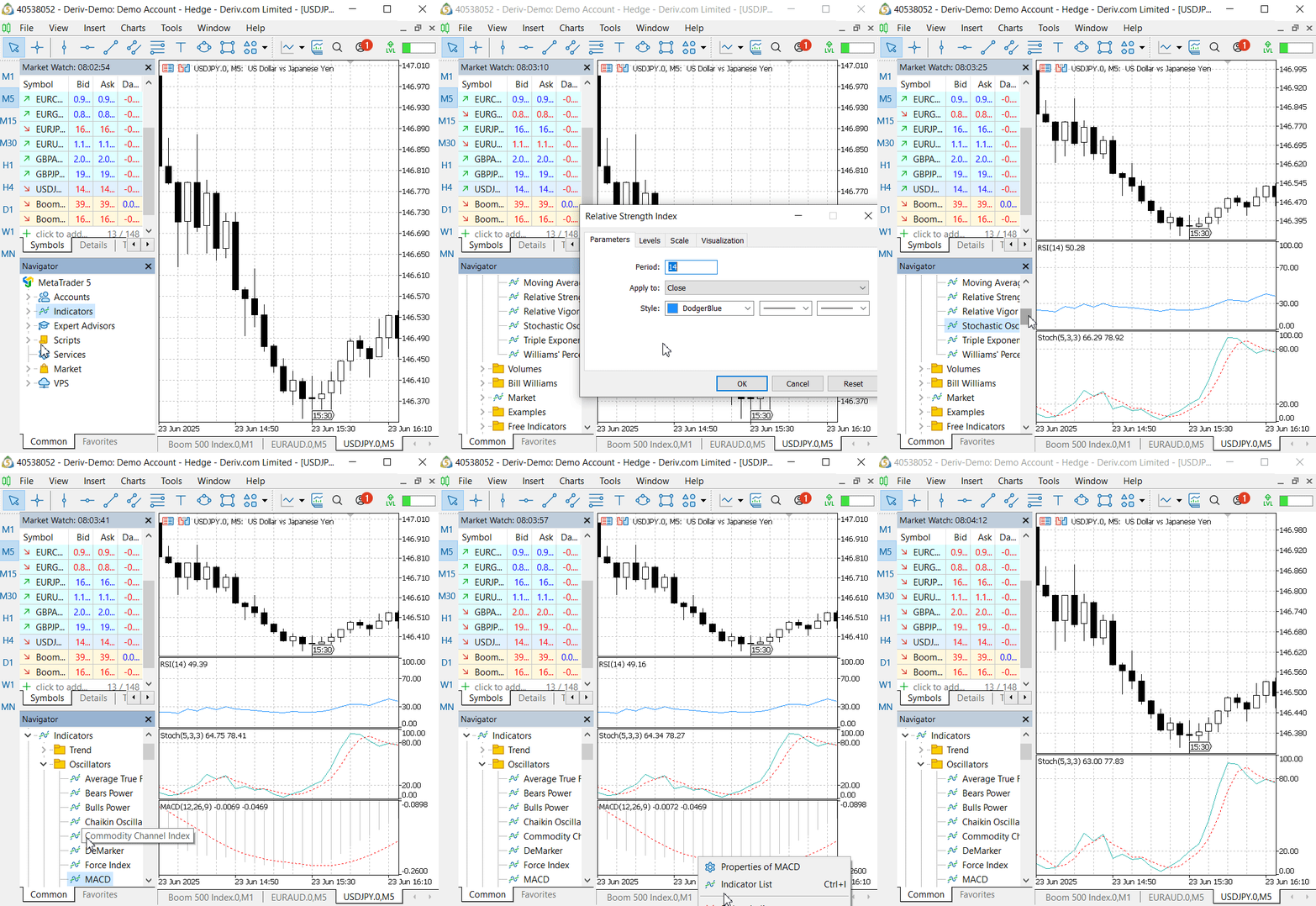
This illustration shows how the indicator windows affect the chart.
In the next segment, we’ll break down the concept behind this approach before diving into the implementation.
Concept
Our plan is to introduce a single scrolling lane by default that displays insights from four key oscillators—indicators that provide traders with critical signals to guide their decisions. This compact design reduces chart clutter and ensures a cleaner, more focused view. However, users who prefer more detail can optionally expand the insights into separate lanes, each dedicated to a specific indicator.
Understanding these indicators in depth is essential for appreciating how they support sound trading strategies. By the end of this setup, you’ll have news headlines, the economic calendar, and real-time indicator insights—all consolidated in one smart interface right on the MetaTrader 5 chart.
Looking ahead to future updates, I'm also considering the addition of an Analyst Insights Lane—a dedicated space that could display curated insights from professional analyst publications. By accessing their APIs, this feature could bring expert commentary and strategic perspectives directly onto the chart, creating a powerful, decision-ready display for traders.
Now, for beginners and the edification of experienced traders alike, let’s take a moment to explore how each of the four oscillators we will integrate, is commonly used in trading—and how their combined insights can significantly enhance your real-time decision-making.
Understanding RSI, CCI, Stochastic and MACD in trading:
The RSI, developed by J. Welles Wilder in 1978, is a momentum oscillator that measures the speed and change of price movements. It is primarily used to identify overbought and oversold conditions, as well as potential trend reversals. RSI is particularly effective in range-bound markets, where prices oscillate between support and resistance levels.
Calculation:
RSI is typically calculated over a 14-day period, though traders can adjust this for shorter or longer timeframes. The formula is:

Where RSI (Relative Strength) is the ratio of the average gain to the average loss over the specified period. The average gain and loss are calculated based on the price changes over the lookback period.
Key Levels and Interpretation:
RSI ranges from 0 to 100, with the midpoint at 50.
- Readings above 70 are considered overbought, suggesting the asset may be overvalued and due for a downward correction.
- Readings below 30 are considered oversold, indicating the asset may be undervalued and due for an upward rebound.
- Values above 50 generally indicate bullish momentum, while below 50 suggest bearish momentum.
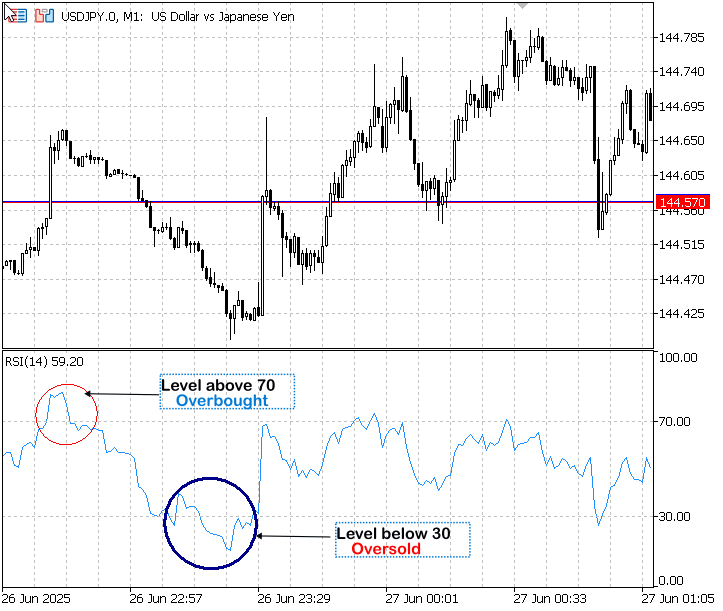
Relative Strength Index
Trading Strategies based on RSI:
- Overbought/Oversold Signals: Traders often look for RSI crossing above 30 as a potential buy signal, indicating the asset is moving out of oversold territory. Conversely, crossing below 70 may signal a sell, indicating overbought conditions.
- Divergence: RSI can signal potential reversals through divergence. For example, a bearish divergence occurs when the price makes a new high, but RSI makes a lower high, suggesting weakening momentum. A bullish divergence occurs when the price makes a new low, but RSI makes a higher low.
- Trend Confirmation: In an uptrend, RSI should generally stay above 50, while in a downtrend, it should stay below 50, helping traders confirm the direction of the trend.
- Failure Swings: Wilder identified "failure swings" as strong indications of market reversals, such as RSI failing to cross above 70 after reaching 76, then falling below 72, signaling a potential reversal.
Example Application:
If the RSI crosses above 30 after being in oversold territory (below 30), it might signal a buying opportunity, especially if accompanied by other bullish indicators like a moving average crossover. Conversely, if RSI crosses below 70 after being overbought, it might signal a selling opportunity.
The CCI is a momentum oscillator originally designed to identify cyclical turns in commodities but now used across various asset classes, including stocks and currencies. It measures the current price level relative to an average price level over a given period, helping traders identify overbought/oversold conditions and trend strength. It was introduced by Donald Lambert in 1980.
Calculation:
CCI is typically calculated over a 20-period timeframe, though this can be adjusted. The formula is:

where:
Typical Price = (High + Low + Close) / 3SMA = Simple Moving Average of the Typical Price over the specified period
Mean Deviation = Average of the absolute deviations of the Typical Price from the SMA
The factor 0.015 is used to scale the results for readability.
Key Levels and Interpretation:
- CCI oscillates around zero, with no upper or lower bounds.
- Readings above +100 indicate overbought conditions, suggesting potential selling opportunities.
- Readings below -100 indicate oversold conditions, suggesting potential buying opportunities.
- In strong trends, CCI can exceed +200 or -200, indicating extreme momentum.
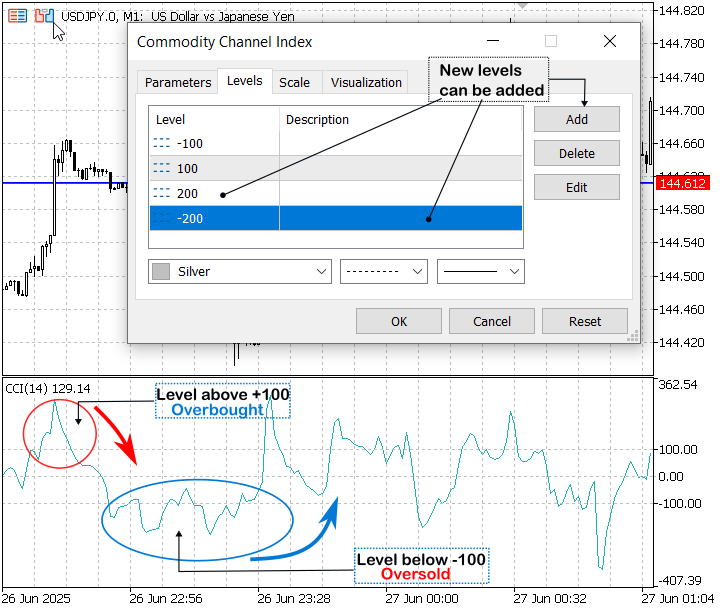
Commodity Channel Index
It is worth noting that when the Commodity Channel Index (CCI) crosses below -100 or above +100, it does not necessarily signal an immediate opportunity to enter a trade. Often, confirmation from other indicators or price action analysis is essential before executing an order. For instance, in the example above, even after the CCI crossed below -100, the price continued to decline for several more pips before reversing direction.
This behavior is not unique to the CCI; similar patterns are observed with other oscillators, such as the Stochastic Oscillator, especially around their predefined threshold levels. While these crossover signals can be valuable, relying on them in isolation can lead to premature entries. A more robust approach involves combining oscillator signals with additional technical confirmation to strengthen decision-making.
Trading Strategies based on CCI:
- Overbought/Oversold Signals: A CCI reading above +100 may signal a potential sell, while below -100 may signal a buy. Traders often wait for CCI to cross back below +100 or above -100 to confirm the signal.
- Trend Strength: A sustained move above +100 suggests a strong uptrend, while below -100 suggests a strong downtrend. This can help traders stay in trends longer.
- Divergence: Similar to RSI, CCI can signal potential reversals through divergence, such as price making new highs while CCI makes lower highs, indicating weakening momentum.
- Crossovers: Some traders use CCI crossovers of the zero line as trend signals, with upward crosses indicating bullish momentum and downward crosses indicating bearish momentum.
Example Application:
If CCI crosses above +100, it might signal a strong uptrend, but traders should watch for a reversal if CCI starts to decline and crosses back below +100. Similarly, a CCI below -100 might signal a buying opportunity if it starts to rise and crosses above -100.
The Stochastic Oscillator is a momentum-based indicator designed to highlight potential turning points in market behavior by comparing a security's closing price to its recent trading range. Often set to a 14-period window, it is especially effective in spotting overbought and oversold conditions. By focusing on the rate of price change, it aims to signal trend reversals before they occur.
This powerful tool was introduced by George Lane in the 1950s, and its principles continue to guide traders seeking early clues to market momentum shifts.
Calculation:
The Stochastic Oscillator consists of two lines: %K (fast line) and %D (slow line). The %K line is calculated as:

where:
Close = Current closing priceLowest Low = Lowest low over the specified period
Highest High = Highest high over the specified period
The %D line is a moving average of %K, typically a 3-period simple moving average, to smooth out fluctuations.
Key Levels and Interpretation:
- The Stochastic Oscillator ranges from 0 to 100.
- Readings above 80 are considered overbought, suggesting potential selling opportunities.
- Readings below 20 are considered oversold, suggesting potential buying opportunities.
- The %D line acts as a signal line, with crossovers of %K and %D providing trading signals.

Stochastic Oscillator
Trading Strategies based Stochastic:
- Overbought/Oversold Signals: Traders look for %K crossing above 20 as a potential buy signal, indicating the asset is moving out of oversold territory. Conversely, crossing below 80 may signal a sell, indicating overbought conditions.
- Crossovers: A bullish signal occurs when %K crosses above %D, especially in oversold territory (below 20). A bearish signal occurs when %K crosses below %D, especially in overbought territory (above 80).
- Divergence: Stochastic can signal potential reversals through divergence, such as a bullish divergence when price makes lower lows, but %K makes higher lows, indicating weakening downward momentum.
- Trend Confirmation: In an uptrend, Stochastic should generally stay above 50, while in a downtrend, it should stay below 50, helping confirm the trend direction.
Example Application:
If %K crosses above %D while both are below 20, it might signal a strong buy, especially if accompanied by other bullish signals like a break above a resistance level. Conversely, if %K crosses below %D while above 80, it might signal a sell, indicating potential reversal from overbought conditions.
Moving Average Convergence/Divergence (MACD)
The MACD is a widely used trend-following momentum indicator that compares short-term and long-term price trends by analyzing the difference between two EMAs. It helps detect shifts in market momentum, trend direction, and potential entry or exit points, making it a valuable component of many technical trading systems.
It was developed by Gerald Appel in the late 1970s, the MACD remains one of the most trusted tools among traders for identifying trend strength and possible reversals.
Calculation:
MACD is calculated by subtracting the 26-period EMA from the 12-period EMA:

A 9-period EMA of the MACD line is then plotted as the "Signal Line." The difference between the MACD line and the Signal line is often displayed as a histogram, which visually represents momentum strength.
Key Levels and Interpretation:
- MACD oscillates around zero, with no upper or lower bounds.
- A positive MACD value indicates bullish momentum, while a negative value indicates bearish momentum.
- Crossovers of the MACD line and Signal line provide trading signals: bullish when MACD crosses above the Signal line, bearish when below.
- Zero-line crossings are also significant: crossing above zero indicates a potential uptrend, while crossing below indicates a potential downtrend.
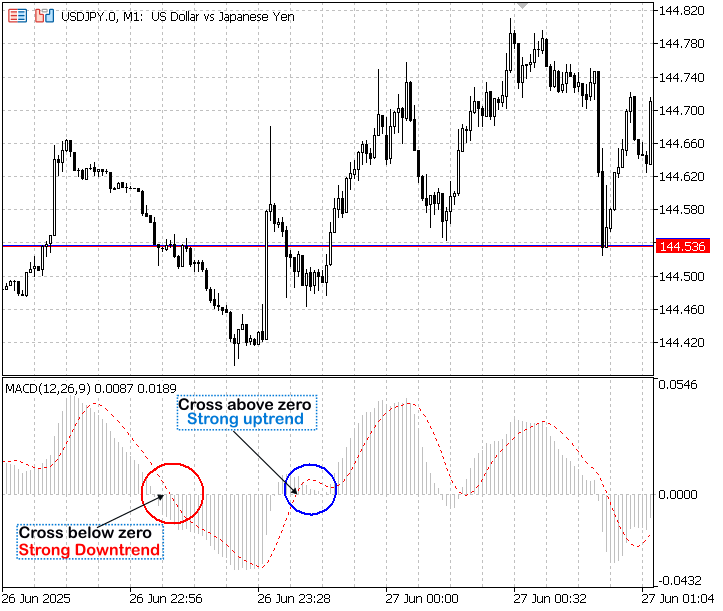
Moving Average Convergence Divergence (MACD)
Trading Strategies based on MACD:
- Crossovers: Traders buy when the MACD line crosses above the Signal line, indicating bullish momentum, and sell when it crosses below, indicating bearish momentum.
- Zero-Line Crossovers: MACD crossing above zero suggests a potential uptrend, while crossing below suggests a downtrend, useful for trend confirmation.
- Histogram Analysis: The histogram's height reflects momentum strength. A widening histogram indicates increasing momentum, while a narrowing histogram suggests slowing momentum, potentially signaling a reversal.
- Divergence: MACD can signal potential reversals through divergence, such as a bullish divergence when price makes lower lows, but MACD makes higher lows, indicating weakening downward momentum.
Example Application:
If the MACD line crosses above the Signal line and the histogram widens, it might signal a buy, especially if accompanied by a break above a key resistance level. Conversely, if the MACD line crosses below the Signal line and the histogram narrows, it might signal a sell, indicating potential reversal.
| Indicator | Purpose | Key Levels | Main Signals | Best Application |
|---|---|---|---|---|
| RSI | Measures momentum and identifies overbought/oversold conditions | >70 (overbought), <30 (oversold), 50 (midpoint) | Cross above 30 (buy), cross below 70 (sell), divergences, failure swings | Range-bound markets |
| CCI | Identifies cyclical turns and trend strength | >+100 (overbought), <-100 (oversold), zero line | Cross above +100 (sell), cross below -100 (buy), divergences, zero-line crossovers | Trending markets |
| Stochastic | Measures momentum and identifies potential reversals | >80 (overbought), <20 (oversold) | %K/%D crossovers (buy when %K crosses above %D below 20, sell when below %D above 80), divergences | Sideways and trending markets |
| MACD | Trend-following and momentum indicator | Zero line, signal line crossovers | MACD line crosses above signal line (buy), below signal line (sell), zero-line crossovers, histogram changes | Trending markets |
Implementation
Built-in indicator values for the symbol and timeframe displayed on the active chart can be obtained through a three-step “handle → buffer → release” sequence. First, an indicator handle is created by calling the relevant MQL5 function—such as iRSI or iMACD—while omitting explicit symbol and timeframe parameters so that the chart’s context is used. Next, CopyBuffer is invoked on that handle to extract the latest values from one or more of the indicator’s output buffers. Finally, IndicatorRelease is called to free the handle and associated resources. Encapsulating these steps within a helper routine ensures efficient, on-demand retrieval of RSI, MACD, Stochastic, CCI or any other standard indicator without spawning additional chart windows.
The following steps outline the process of integrating the Indicator Insights feature into the News Headline EA, providing a practical demonstration of how to work with built-in indicators using MQL5.
Integration of Indicator Insights into the EA
1. User Inputs Declaration
By surfacing InpSeparateLanes and InpInsightSpeed alongside your other inputs, you let the trader choose whether to see a single scrolling lane of combined indicators.
input bool   InpSeparateLanes    = false; // combined vs separate insights
input int    InpInsightSpeed     = 3;     // scroll speed for insight text
2. Globals & Canvas Handles
We declare both the combined and individual canvases up front. Their scroll offsets drive the animation. In MQL5, canvas handles must persist globally so they survive across timer callbacks. By organizing these handles alongside other state variables (like chart width and reload timestamps), we keep all cross‐tick state in one place.
//--- Globals ---------------------------------------------
CCanvas   combinedCanvas;        // holds all four insights in one lane
CCanvas   rsiCanvas, stochCanvas, macdCanvas, cciCanvas;  // separate lanes
int       offCombined, offRSI, offStoch, offMACD, offCCI;
3. Indicator Computation Helpers
Each helper function follows a “handle → buffer → release” pattern, ensuring we build each indicator handle only once per tick, read the latest value, then immediately release system resources. Centralizing formatting here keeps the main drawing loop clean and performant. Combining four signals into a single string for the combined‐lane mode further simplifies rendering logic.
//+------------------------------------------------------------------+
//| Compute indicator insights                                       |
//+------------------------------------------------------------------+
string ComputeRSIInsight()
{
  int h=iRSI(NULL,PERIOD_CURRENT,14,PRICE_CLOSE);
  if(h==INVALID_HANDLE) return "["+Symbol()+"] RSI err";
  double b[]; CopyBuffer(h,0,1,1,b); IndicatorRelease(h);
  double v=b[0]; string s=DoubleToString(v,1);
  string m=v<30?"Oversold("+s+")":v>70?"Overbought("+s+")":"Neutral("+s+")";
  return "["+Symbol()+"] RSI:"+m;
}

string ComputeStochInsight()
{
  int h=iStochastic(NULL,PERIOD_CURRENT,14,3,3,MODE_SMA,STO_LOWHIGH);
  if(h==INVALID_HANDLE) return "["+Symbol()+"] Stoch err";
  double b[]; CopyBuffer(h,0,1,1,b); IndicatorRelease(h);
  double v=b[0]; string s=DoubleToString(v,1);
  string m=v<20?"Oversold("+s+")":v>80?"Overbought("+s+")":"Neutral("+s+")";
  return "["+Symbol()+"] Stoch:"+m;
}

string ComputeMACDInsight()
{
  int h=iMACD(NULL,PERIOD_CURRENT,12,26,9,PRICE_CLOSE);
  if(h==INVALID_HANDLE) return "["+Symbol()+"] MACD err";
  double m[],g[]; CopyBuffer(h,0,1,1,m); CopyBuffer(h,1,1,1,g); IndicatorRelease(h);
  double d=m[0]-g[0]; string s=DoubleToString(d,2);
  string m2=d>0?"Bull("+s+")":d<0?"Bear("+s+")":"Neu(0)";
  return "["+Symbol()+"] MACD:"+m2;
}

string ComputeCCIInsight()
{
  int h=iCCI(NULL,PERIOD_CURRENT,14,PRICE_TYPICAL);
  if(h==INVALID_HANDLE) return "["+Symbol()+"] CCI err";
  double b[]; CopyBuffer(h,0,1,1,b); IndicatorRelease(h);
  double v=b[0]; string s=DoubleToString(v,1);
  string m=v<-100?"Oversold("+s+")":v>100?"Overbought("+s+")":"Neutral("+s+")";
  return "["+Symbol()+"] CCI:"+m;
}

string ComputeAllInsights()
{
  return ComputeRSIInsight() + "  |  " +
         ComputeStochInsight() + "  |  " +
         ComputeMACDInsight() + "  |  " +
         ComputeCCIInsight();
}
4. Canvas Creation in OnInit
In OnInit, we wire in our new lanes. In separate‐lane mode, we initialize four canvases; in combined‐lane mode, just one, complete with a static “Indicator Insights:” label. Calling an initial Update ensures that even before the first timer tick, traders see context—an important usability detail when loading large EAs.
int OnInit()
{
  // … existing canvases for events & news …

  if(InpSeparateLanes)
  {
    rsiCanvas.CreateBitmapLabel("RsiC",0,0,canvW,lineH);
    stochCanvas.CreateBitmapLabel("StoC",0,0,canvW,lineH);
    macdCanvas.CreateBitmapLabel("MacC",0,0,canvW,lineH);
    cciCanvas.CreateBitmapLabel("CciC",0,0,canvW,lineH);
    // set transparency…
  }
  else
  {
    combinedCanvas.CreateBitmapLabel("AllC",0,0,canvW,lineH);
    combinedCanvas.TransparentLevelSet(120);
    // static label at x=5: “Indicator Insights:”
    combinedCanvas.FontSizeSet(-120);
    combinedCanvas.TextOut(5, (lineH-combinedCanvas.TextHeight("Indicator Insights:"))/2,
                           "Indicator Insights:", XRGB(200,200,255), ALIGN_LEFT);
    combinedCanvas.Update(true);
  }

  // … remainder of OnInit …
}
5. Scrolling Logic in OnTimer
This is the EA’s heartbeat: each timer tick repositions canvases, reloads data, handles any chart resize, then runs compute and draw cycle for each lane—whether events, news, or indicators. By batching all update calls at the end, we minimize flicker and keep the scrolling perfectly synchronized across layers. A helper function to wrap offsets keeps the code DRY.
//+------------------------------------------------------------------+
//| OnTimer: redraw                                                  |
//+------------------------------------------------------------------+
void OnTimer()
{
  // reposition canvases
  SetCanvas("EvC",InpPositionTop,InpTopOffset);
  SetCanvas("NwC",InpPositionTop,InpTopOffset+3*lineH);

  if(InpSeparateLanes)
  {
    SetCanvas("RsiC",InpPositionTop,InpTopOffset+4*lineH);
    SetCanvas("StoC",InpPositionTop,InpTopOffset+5*lineH);
    SetCanvas("MacC",InpPositionTop,InpTopOffset+6*lineH);
    SetCanvas("CciC",InpPositionTop,InpTopOffset+7*lineH);
  }
  else
  {
    SetCanvas("AllC",InpPositionTop,InpTopOffset+4*lineH);
  }

  // refresh data
  ReloadEvents();
  FetchAlphaVantageNews();

  // resize if needed
  int wNew=(int)ChartGetInteger(0,CHART_WIDTH_IN_PIXELS);
  if(wNew!=canvW)
  {
    canvW=wNew;
    ObjectSetInteger(0,"EvC",OBJPROP_WIDTH,canvW);
    ObjectSetInteger(0,"NwC",OBJPROP_WIDTH,canvW);
    if(InpSeparateLanes)
    {
      ObjectSetInteger(0,"RsiC",OBJPROP_WIDTH,canvW);
      ObjectSetInteger(0,"StoC",OBJPROP_WIDTH,canvW);
      ObjectSetInteger(0,"MacC",OBJPROP_WIDTH,canvW);
      ObjectSetInteger(0,"CciC",OBJPROP_WIDTH,canvW);
    }
    else
    {
      ObjectSetInteger(0,"AllC",OBJPROP_WIDTH,canvW);
    }
  }

  // draw events
  DrawAll();

  // draw news
  newsCanvas.Erase(ARGB(170,0,0,0));
  string nt = totalNews>0?newsHeadlines[0]:placeholder;
  newsCanvas.TextOut(offNews,(lineH-newsCanvas.TextHeight(nt))/2,
                     nt,XRGB(255,255,255),ALIGN_LEFT);
  offNews-=InpNewsSpeed;
  if(offNews+newsCanvas.TextWidth(nt)<-20) offNews=canvW;

  // draw insights
  if(InpSeparateLanes)
  {
    string t;
    t=ComputeRSIInsight();
    rsiCanvas.Erase(ARGB(120,0,0,0));
    rsiCanvas.TextOut(offRSI,(lineH-rsiCanvas.TextHeight(t))/2,
                      t,XRGB(180,220,255),ALIGN_LEFT);
    offRSI-=InpInsightSpeed;
    if(offRSI+rsiCanvas.TextWidth(t)<-20) offRSI=canvW;

    t=ComputeStochInsight();
    stochCanvas.Erase(ARGB(120,0,0,0));
    stochCanvas.TextOut(offStoch,(lineH-stochCanvas.TextHeight(t))/2,
                        t,XRGB(180,220,255),ALIGN_LEFT);
    offStoch-=InpInsightSpeed;
    if(offStoch+stochCanvas.TextWidth(t)<-20) offStoch=canvW;

    t=ComputeMACDInsight();
    macdCanvas.Erase(ARGB(120,0,0,0));
    macdCanvas.TextOut(offMACD,(lineH-macdCanvas.TextHeight(t))/2,
                       t,XRGB(180,220,255),ALIGN_LEFT);
    offMACD-=InpInsightSpeed;
    if(offMACD+macdCanvas.TextWidth(t)<-20) offMACD=canvW;

    t=ComputeCCIInsight();
    cciCanvas.Erase(ARGB(120,0,0,0));
    cciCanvas.TextOut(offCCI,(lineH-cciCanvas.TextHeight(t))/2,
                      t,XRGB(180,220,255),ALIGN_LEFT);
    offCCI-=InpInsightSpeed;
    if(offCCI+cciCanvas.TextWidth(t)<-20) offCCI=canvW;
  }
  else
  {
    combinedCanvas.Erase(ARGB(120,0,0,0));
    string txt=ComputeAllInsights();
    combinedCanvas.TextOut(offCombined,(lineH-combinedCanvas.TextHeight(txt))/2,
                           txt,XRGB(180,220,255),ALIGN_LEFT);
    offCombined-=InpInsightSpeed;
    if(offCombined+combinedCanvas.TextWidth(txt)<100) offCombined=canvW;
  }

  // batch update
  eventsCanvas.Update(true);
  newsCanvas.  Update(true);
  if(InpSeparateLanes)
  {
    rsiCanvas.  Update(true);
    stochCanvas.Update(true);
    macdCanvas. Update(true);
    cciCanvas.  Update(true);
  }
  else
  {
    combinedCanvas.Update(true);
  }
}
6. Cleanup in OnDeinit
Proper teardown prevents orphaned bitmaps and lingering timers. Each CreateBitmapLabel in OnInit is matched by a Destroy plus ObjectDelete in OnDeinit, and the timer is killed to avoid any stray callbacks. Explicitly deleting any dynamic objects (like event instances) rounds out a robust cleanup phase.
//+------------------------------------------------------------------+
//| OnDeinit: cleanup                                                |
//+------------------------------------------------------------------+
void OnDeinit(const int reason)
{
  EventKillTimer();
  eventsCanvas.Destroy(); ObjectDelete(0,"EvC");
  newsCanvas.Destroy();   ObjectDelete(0,"NwC");
  if(InpSeparateLanes)
  {
    rsiCanvas.Destroy();  ObjectDelete(0,"RsiC");
    stochCanvas.Destroy();ObjectDelete(0,"StoC");
    macdCanvas.Destroy(); ObjectDelete(0,"MacC");
    cciCanvas.Destroy();  ObjectDelete(0,"CciC");
  }
  else
  {
    combinedCanvas.Destroy();ObjectDelete(0,"AllC");
  }
  for(int i=0;i<ArraySize(highArr);i++) delete highArr[i];
  for(int i=0;i<ArraySize(medArr);i++)   delete medArr[i];
  for(int i=0;i <ArraySize(lowArr);i++)   delete lowArr[i];
  ArrayResize(newsHeadlines,0);
}
By appropriately integrating the new components with the existing code from the previous article, we now have an upgraded version of our program that features real-time indicator insights. In the next section, we’ll present the test results of these newly added features, followed by a summary of key takeaways and conclusions from the development process.
Testing
In MetaTrader 5, you can test the EA by dragging it onto a chart from the Expert Advisors section in the Navigator panel. As of version 1.04, the News Headline EA now includes integrated indicator insights. The image below illustrates how to switch between the default single-lane view and the separate-lane view via the EA’s input settings. Please note that the API key has been intentionally left blank for security reasons and should be entered manually before use.
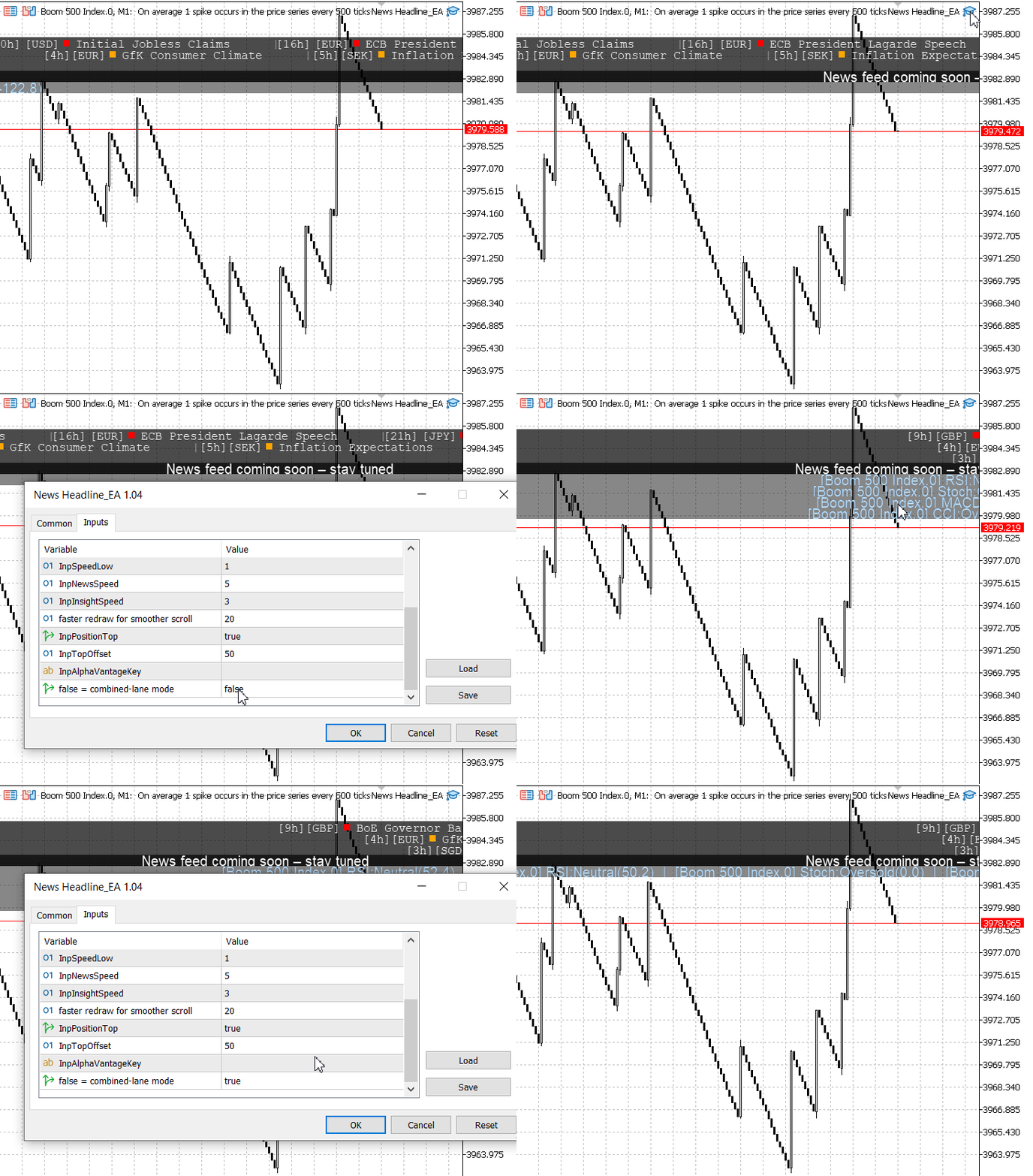
Testing the new features
Once the Alpha Vantage API key is added, the news headlines will be displayed alongside our newly integrated indicator insights, as shown below.
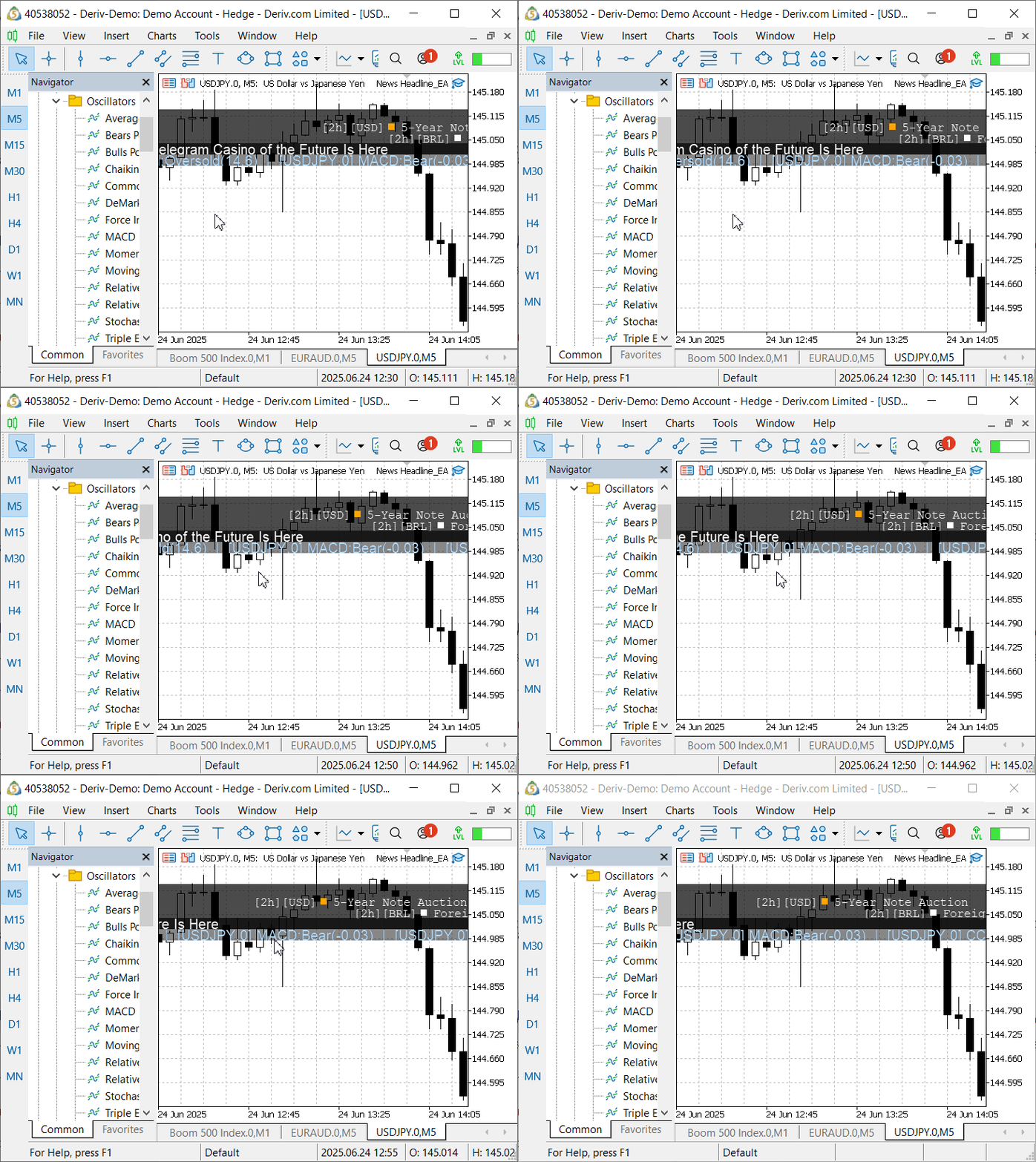
The News Headline EA with Indicators Insights
I tested the EA using the Strategy Tester, and while the canvas lanes were displayed, they appeared without data. This is likely because the required information—such as news and indicator values—must be accessed in real time, which the tester does not fully support.
Conclusion
To wrap everything together, we successfully brought our idea to life. We demonstrated the feasibility of creating an integrated on-chart tool that delivers essential trading information—economic calendar events, financial news headlines, and rule-based indicator insights—all within a compact, visually accessible interface.
The inclusion of indicator insights is particularly valuable for traders, as it provides immediate context for market conditions, helping users make informed decisions without switching between multiple indicator windows or charts. This improves efficiency and preserves valuable screen space.
From a development perspective, we deepened our understanding of how to retrieve and manipulate data from MetaTrader 5’s built-in indicators using the MQL5 API. By leveraging the flexibility of the CCanvas class, we were able to present that data in a visually distinct and streamlined format, enhancing the user experience. This project showcased the power of programmatic interface customization in MQL5 and also paved the way for future enhancements—such as analyst insights or user-defined indicator integrations—that could further elevate the tool’s utility.
I’ve prepared a summary table below highlighting the key lessons learned from this discussion. You’ll also find the full source code attached at the end of the article. You are welcome to join the conversation by sharing your thoughts and feedback in the comments—your input is highly valued!
Key Lessons
| Lesson | Description |
|---|---|
| Separation of Concerns | Using distinct canvases for events, news, and indicator insights improves code modularity and allows flexible layout and styling. |
| Use of CCanvas | It enables smooth rendering of custom text and graphics on the chart, allowing for unique interface enhancements beyond default MetaTrader 5 objects. |
| Scroll Animation Logic | Managing offset variables helps create smooth, horizontally scrolling text elements—ideal for dynamic displays like news feeds and indicator summaries. |
| DRY Principle | Creating helper functions such as SetCanvas keeps the code clean, reusable, and easier to maintain by avoiding repetition. |
| API Integration | Using WebRequest to fetch external data shows how MetaTrader 5 can be extended with third-party services like financial news providers. |
| Real-Time Data Constraints | Live data like economic events and market news often requires real-time access, which may not work in the Strategy Tester environment. |
| Using Built-in Indicators | Accessing and interpreting buffers from standard indicators such as RSI, MACD, and CCI allows automated insights generation directly within code. |
| Compact UI Design | Consolidating multiple data streams into a single scrollable lane helps reduce chart clutter while providing all essential information in one place. |
| Dynamic Canvas Positioning | Repositioning canvas objects based on user preferences and chart dimensions ensures a responsive and adaptable layout. |
| Version Control and Feature Tracking | Maintaining clear version numbers helps track changes, document progress, and communicate updates effectively to users and developers. |
Attachments
| File | Version | Description |
|---|---|---|
| News Headline EA.mq5 | 1.04 | Expert Advisor that displays economic calendar events and real-time market news headlines directly on the chart using the built-in MQL5 Canvas and Alpha Vantage API, plus indicator technical insights. |
Warning: All rights to these materials are reserved by MetaQuotes Ltd. Copying or reprinting of these materials in whole or in part is prohibited.
This article was written by a user of the site and reflects their personal views. MetaQuotes Ltd is not responsible for the accuracy of the information presented, nor for any consequences resulting from the use of the solutions, strategies or recommendations described.

 Data Science and ML (Part 45): Forex Time series forecasting using PROPHET by Facebook Model
 Moving Average in MQL5 from scratch: Plain and simple
 Atomic Orbital Search (AOS) algorithm: Modification
 Price Action Analysis Toolkit Development (Part 29): Boom and Crash Interceptor EA

- Free trading apps
- Over 8,000 signals for copying
- Economic news for exploring financial markets
You agree to website policy and terms of use