

From Basic to Intermediate: Technical Indicators (I)
 124
124
 0
0

Introduction
The previous article, “From Basic to Intermediate: Operator Overloading (VI)”, showed how to use operator overloading in a particularly expressive way, to the point where we needed to write less and less code while making it increasingly readable. At least, that's how I see the end result. Perhaps this has to do with my experience working with C and C++, where the code tends to make extensive use of symbols. This is a little different from what we usually see in code written in MQL5 or other languages, such as Python. Unlike Python, where you can't use the language's built-in features to make the code more symbolic, in MQL5 we can create something similar to what we saw in previous articles.
I have to admit one thing. It was truly a brilliant idea on the part of MQL5's creators to give more experienced programmers the opportunity to show how such things can be done. Of course, there's also the fact that MQL5 is similar to C and C++ in many ways. This makes MQL5 much easier for such programmers to learn, even though C and C++ are much harder to master than MQL5. But that's not the main point right now.
In this article, we'll touch on a slightly lighter and more unusual topic. For many of you, this might actually be even more interesting, since the most recent articles were quite dense and contained material that isn't easy to study and grasp right away. So, in this article, we'll explore a much more enjoyable and significantly simpler topic. Plus, it's something you can start using almost right away.
So, it's time to set aside anything that might distract us and focus on what we'll be discussing and explaining in this article. All right, let's get started.
Technical Indicators (I)
For beginners learning MQL5 to develop tools that speed up the analysis of trading setups, one of the most time-consuming things to grasp is perhaps how to create—or, more precisely, program—an indicator. You also need to know how to link it to an Expert Advisor. But we'll take a closer look at that later.
In the article “From Basic to Intermediate: Indicator (IV)”, we have already seen how to implement a simple indicator designed to show when one bar is contained within the previous one, forming what is known as an inside bar pattern. Although all the code provided here is for educational purposes, I can't deny that in some cases we can create a very simple application. However, it may not have been programmed correctly and should under no circumstances be considered 100% complete. This is precisely the case we will examine below. Therefore, exercise caution when using what we implement here on a live account, as this could, for obvious reasons, result in financial losses. What we're going to create is an application intended solely for educational purposes.
If you're just getting started with MQL5 programming, you've probably already looked into how to create indicators for various tasks. However, MetaTrader 5 already provides various indicators by default, with calculations performed within the platform itself. And no, I'm not referring to the indicators you can find by browsing the contents of the indicators directory. No, not those.
The indicators I'm referring to can be found in the “Technical Indicator Functions” section. All the indicators listed there are calculated by MetaTrader 5 by default. You don't need to write all the code required to calculate them. All you need to do is call them from your code to use them. This applies to any application developed to run on MetaTrader 5.
I realize that for many people, this approach may not seem very interesting, while others may find it difficult to implement. When you're just starting out, it's only natural to think that you need to write all the code required to calculate the indicator. In other cases, you might also think that if you add an indicator to a chart without creating it from scratch, you won't be able to fully control its behavior.
Well, this way of thinking is, to some extent, part of the learning process. You're unlikely to truly learn anything if you limit yourself to using ready-made solutions. In reality, this isn't learning—it's just a way to save time while you're trying to reinvent the wheel. Like any good professional, you should try to set goals and objectives for yourself whenever possible. This does not mean that learning to use all the features a particular tool has to offer is a waste of time. It isn't. That's why I'm showing you a lot of features that you'll most likely never need. One of them was operator overloading. It's quite fun, although you may never actually have to put this knowledge into practice.
Why am I bringing this up? The thing is, my dear reader, that you'll meet a huge number of people who will show you how to do this or that. However, only a few of them will actually explain why you should do it one way rather than another. That way, you can choose the easiest and fastest way to achieve your goal.
All right, let's start with what I consider to be the simplest indicator of all: the moving average. To create something similar using technical indicators, all we need to do is write code like the example below.
01. //+------------------------------------------------------------------+
02. #property copyright "Daniel Jose"
03. //+------------------------------------------------------------------+
04. #property description "DEMO Indicator"
05. //+------------------------------------------------------------------+
06. #property indicator_chart_window
07. #property indicator_applied_price   PRICE_CLOSE
08. #property indicator_buffers         1
09. #property indicator_plots           1
10. #property indicator_type1           DRAW_LINE
11. #property indicator_color1          clrRed
12. #property indicator_style1          STYLE_SOLID
13. #property indicator_width1          1
14. //+------------------------------------------------------------------+
15. #define  def_nPeriods               9
16. //+------------------------------------------------------------------+
17. double   Buff_iMA[];
18. int      Handle;
19. //+------------------------------------------------------------------+
20. int OnInit(void)
21. {
22.    SetIndexBuffer(0, Buff_iMA, INDICATOR_DATA);
23.    if ((Handle = iMA(NULL, NULL, def_nPeriods, 0, MODE_EMA, _AppliedTo)) == INVALID_HANDLE)
24.    {
25.       Print("Could not start the indicator...");
26.       return INIT_FAILED;
27.    };
28.
29.    return INIT_SUCCEEDED;
30. };
31. //+------------------------------------------------------------------+
32. int OnCalculate(const int rates_total, const int prev_calculated, const int begin, const double &price[])
33. {
34.    CopyBuffer(Handle, 0, 0, Bars(NULL, NULL), Buff_iMA);
35.
36.    return rates_total;
37. };
38. //+------------------------------------------------------------------+
39. void OnDeinit(const int reason)
40. {
41.    if (Handle != INVALID_HANDLE)
42.       IndicatorRelease(Handle);
43. };
44. //+------------------------------------------------------------------+
Code 01
Code 01 contains everything you need to create a moving average and display it on a chart. Indeed, we cannot change the type of moving average or the period—that is, the number of bars used in the calculation. However, we can change a number of settings, such as color, thickness, line style, and applied price. And all of this is done using this code, which is ridiculously simple.
"Wait a minute. You say that there are a few things that can be changed here, but I don't see a single line that explains how to do it. In my opinion, if we want to change anything, we'll have to recompile the code." So, we have a skeptic (LAUGHTER). Great—I like it when people are skeptical at first. Let's see how this code behaves to check if what I'm saying about it is true.
First, before we use our code 01 on the chart, we need some code that we know will produce correct data. Fortunately, MetaTrader 5 offers a perfectly suitable option for this. So first, we'll add this indicator to use it as a benchmark. This is shown in the following animation.
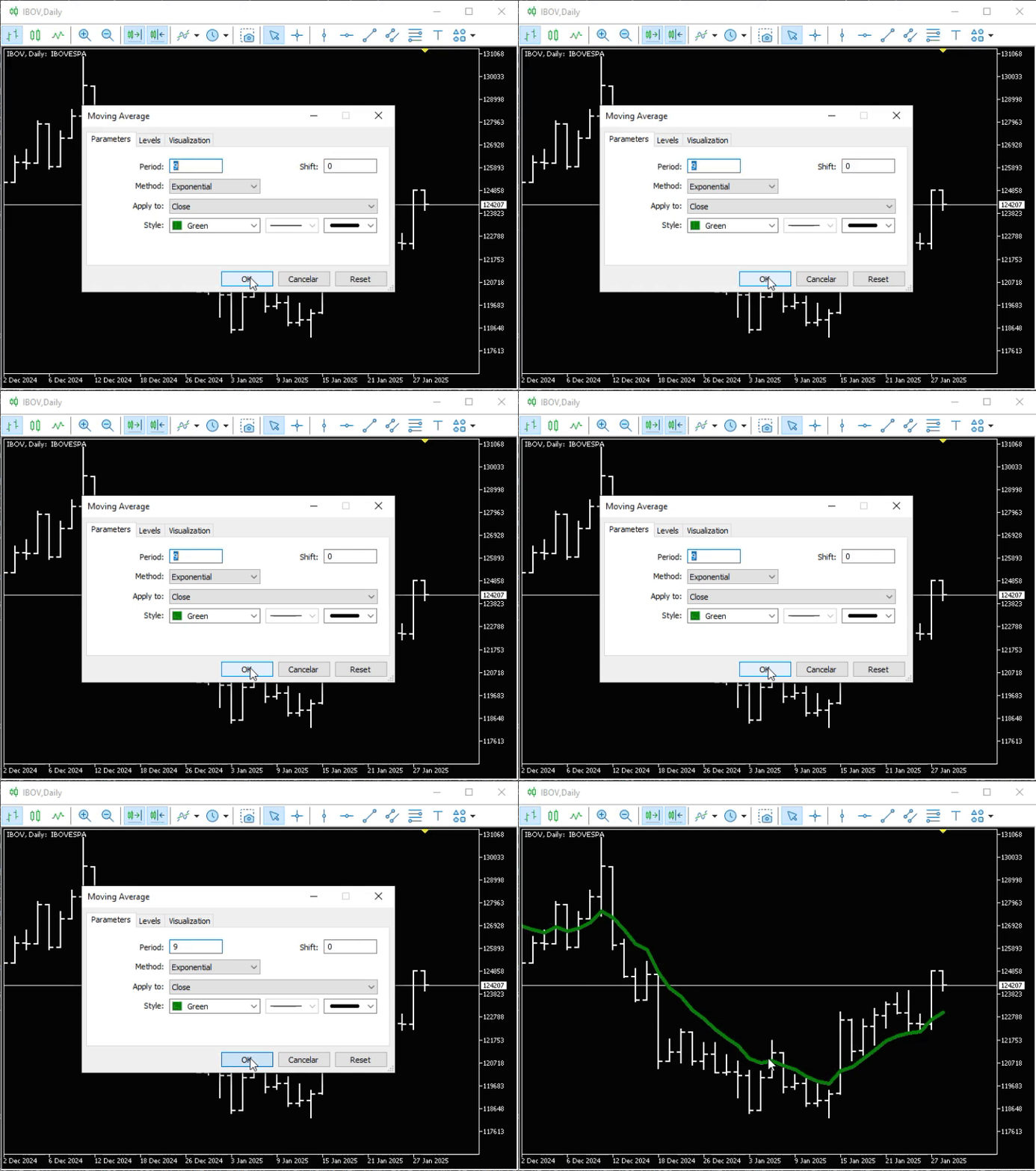
Animation 01
Now we have a way to check whether code 01 is working correctly. All right, let's add it to the chart. Once we've done that, we'll get the result shown in the following animation.
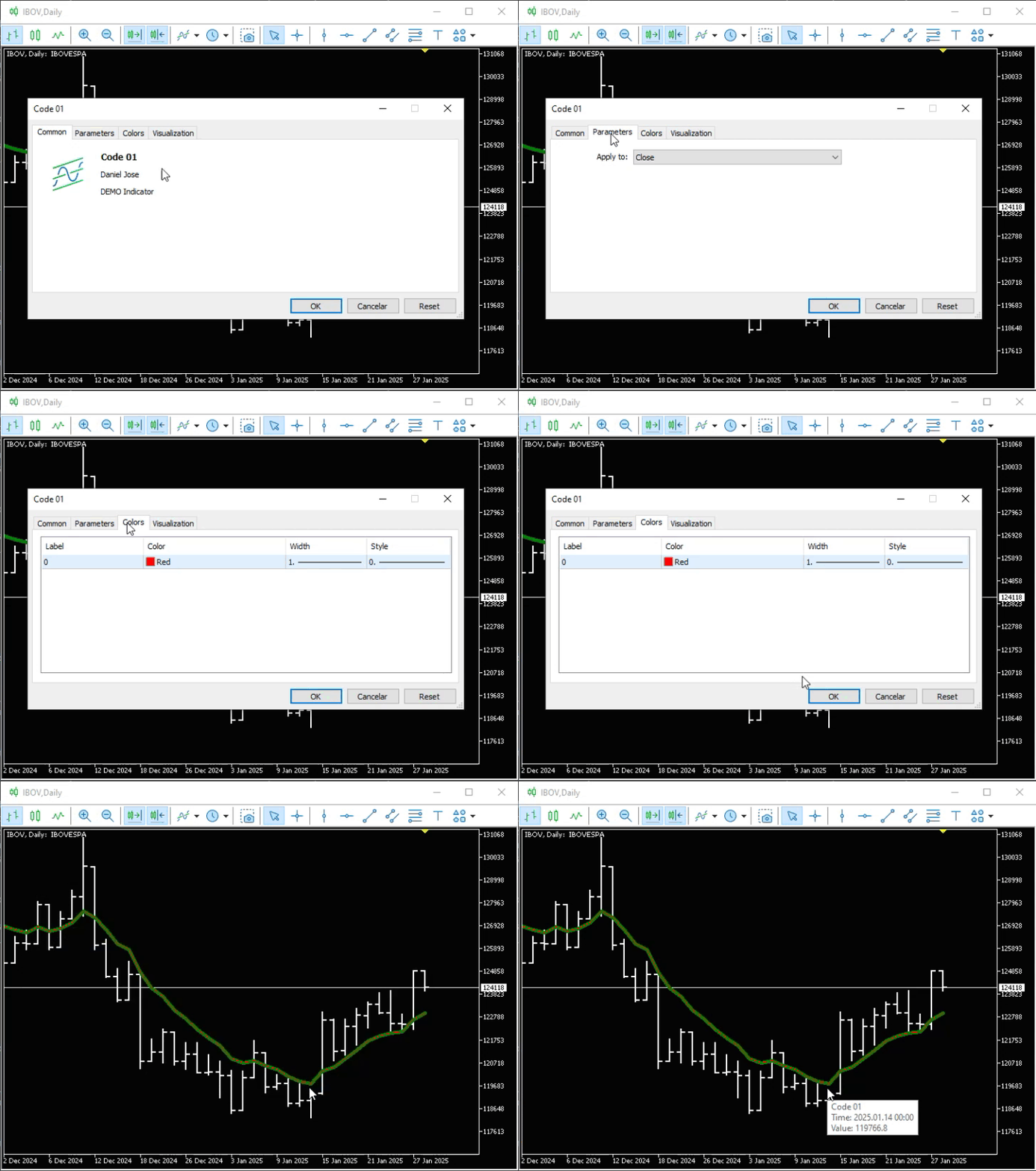
Animation 02
Please note that it lined up perfectly with the moving average that was already on the chart. Now, to change the settings, let's do what is shown in the following animation.
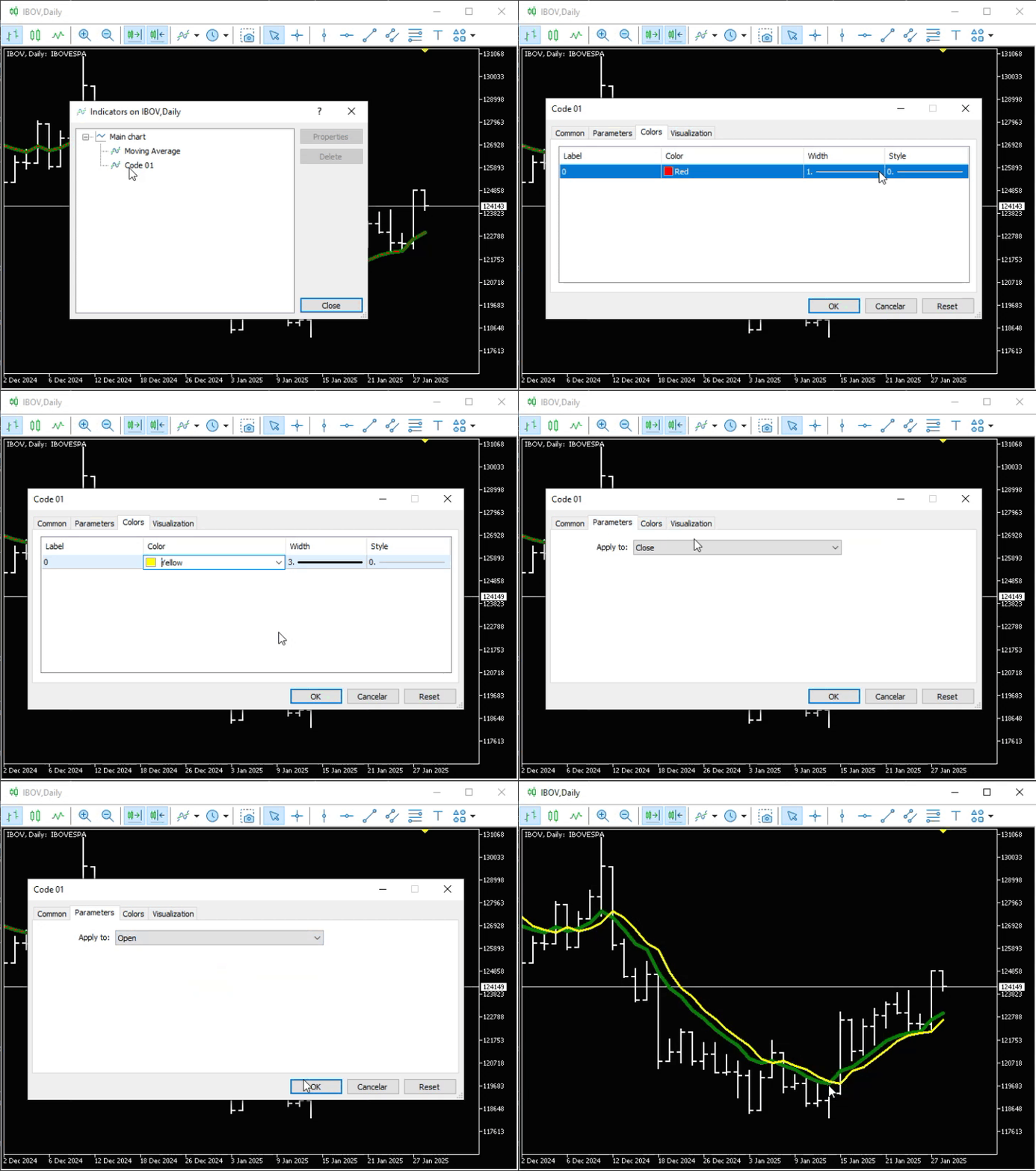
Animation 03
Note that although at first glance it seemed we couldn't customize anything, we were able to make all the changes I mentioned above. This proves that the code works exactly as specified. However, we are not limited to that. We can take it a step further. But let's take it one step at a time. First, I want to explain why code 01 works the way we saw in the animations. Much of what you need to know has already been explained in another article.
Read the articles “From Basic to Intermediate: Indicator (I)” through “From Basic to Intermediate: Indicator (IV)” to understand the basics of code 01.
You might also want to refer to the article “From Basic to Intermediate: Events (I)”, which explains the basics of event-driven programming. This will help you understand how and why code 01 works.
If you already have the necessary knowledge to understand the following explanations, we can continue. Note that I set a value on line 15. This is the value that will be used to calculate the moving average. Now let's move on to the creative part of the code. It might seem strange to call it the creative part, but you'll soon see why. As with any indicator that is supposed to display something on a chart, we need to define at least one buffer. This is done on line 22. On line 23, we attempt to assign a value to the variable that will store the indicator handle. Now, pay attention to this, my dear reader. Each technical indicator must be configured so that MetaTrader 5 knows how to handle it.
It's not enough to simply say, "I want an indicator"—and expect MetaTrader 5 to create it exactly the way you want it. For this to happen, we need to specify how the indicator should be calculated. To find out what information you need to provide to MetaTrader 5, refer to the documentation for the relevant technical indicators. However, in most cases, you can use the first two arguments, as shown in Code 01. This will allow the indicator to adjust to the current symbol and chart timeframe. If you specify a chart timeframe or even a specific symbol here, MetaTrader 5 will find and use the data that matches what you specified.
This allows us, for example, to have a 10-minute chart, while calculations are based on data from a 60-minute chart or even a daily chart. The same applies to the symbol. You can specify one symbol and use the indicator on the chart for another.
"Friends, this is just amazing. I didn't know we could do something like that." Yes, my dear reader, we can do that and much more. The question is this: why would anyone actually do something like this in practice?
So, as you can see, in the case of iMA, we need to use the third argument to specify how many bars will be used in the calculation. Next, we specify the shift applied to the moving average. The value 0 is typically used here, although in some cases a different value may be required—for example, if you are implementing a moving average to visualize the formation of a trend reversal. For iMA, the fifth parameter specifies which type of moving average should be calculated. Finally, we specify the applied price to be used in the calculation.
If the indicator handle was successfully created, the next step will be executed in the OnCalculate event handler. If an error occurs, it will be reported by the message generated on line 25. In any case—whether an error occurs here or everything works as expected—the OnDeinit event will be triggered at some point. When that happens, we'll release the indicator handle on line 42. This is good programming practice because, in theory, if we don't release the indicator handle, MetaTrader will continue to perform calculations that are no longer needed and consume valuable resources.
Now let's take a look at the creative part of the code. It is located in the OnCalculate event handler. But wait a minute—where are the calculations for plotting the moving average? Well, this is where the real fun begins, my dear reader. You don't need to program these calculations or even worry about them, since MetaTrader 5 handles them automatically. For this reason, all we need to do is ask MetaTrader 5 to transfer the calculated values to the indicator buffer. This is done on line 34.
"Hmm. I see it, but I don't understand it. Even after seeing the results in the animations, I still don't fully understand what line 34 does or why we need it." All right, let's figure this out. Since MetaTrader 5 performs the calculations for us, the results are stored in the platform's internal buffer. To access this data, we need to tell MetaTrader 5 what data we want to retrieve.
To do this, we need to know the indicator handle associated with these calculations. Without it, we won't be able to obtain this data. "But wait a minute. Are you saying that if I know where the data is, I can read it at any time?" Yes, my dear reader, if the data is available, you can access it at any time, as long as you know which indicator handle to use. That is interesting. It really is quite interesting, and I'll show you a little later how you can take advantage of it. But let's continue examining what Code 01 does.
The second argument in line 34 may vary depending on certain circumstances. It will usually be zero. However, this is not a rule. As for the third parameter, in almost all cases it will also be zero, unless you want to perform some kind of analysis to try to identify a trend reversal or examine a specific price movement. But in general, this third parameter will be equal to zero.
As for the fourth parameter, there's something interesting here. Depending on how you configure the parameters, more or less data may be displayed. In addition, depending on how you use this parameter, you can obtain a moving average that, at first glance, may seem rather unusual. The last parameter, in turn, is related to the second one, since both are associated with the buffer in which the data to be displayed will be stored.
Now let's experiment with this a little. This is directly related to the fourth parameter in line 34. To understand what I just said about this curious and interesting behavior, let's replace the code in the OnCalculate event handler with the snippet below.
                   .
                   .
                   .
31. //+------------------------------------------------------------------+
32. int OnCalculate(const int rates_total, const int prev_calculated, const int begin, const double &price[])
33. {
34.     CopyBuffer(Handle, 0, 0, def_nPeriods, Buff_iMA);
35.     PlotIndexSetInteger(0, PLOT_DRAW_BEGIN, Bars(NULL, NULL) - def_nPeriods);
36.
37.    return rates_total;
38. };
39. //+------------------------------------------------------------------+
                   .
                   .
                   .
Snippet 01
Now pay close attention, dear reader. You'll usually see moving averages plotted from the oldest bars to the most recent bar on the chart. However, as programmers, we can do things completely differently and thereby avoid cluttering the chart or displaying unnecessary data.
Snippet 01 creates a "worm-like" moving average that moves forward as new bars appear and maintains a length equal to the number of periods used in the calculations. In the following animation, you can see this behavior.
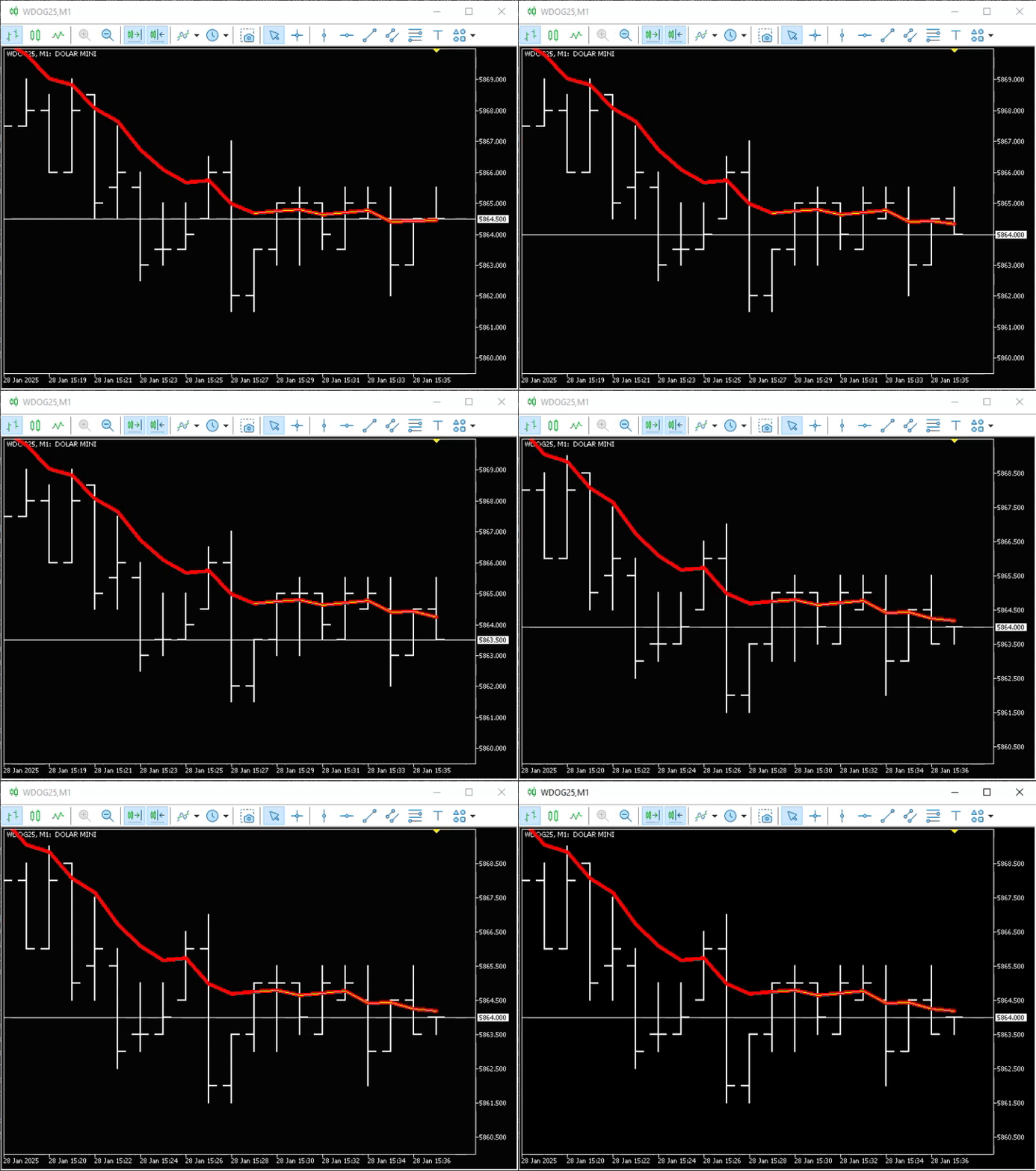
Animation 04
Please note that the yellow moving average is contained within the red one. The red moving average is the one we saw at the beginning of the article. The yellow moving average corresponds to code 01, but uses snippet 01. As soon as a new bar appears, the moving average shifts so that its length remains equal to nine bars or the value specified in line 15 of code 01. That's really interesting, isn't it? And notice how easy it was to create something like this. This is exactly the kind of implementation you can achieve when you're learning to program. Regular users don't know that we can do things like this in MetaTrader 5.
Great. But couldn't we make all of this a little more interesting? I'm saying this because I'd like to know how to change the number of bars used in the calculation, or perhaps the type of moving average to be used, without having to compile the code multiple times. Yes, my dear reader, we can do this very simply, easily, and quickly.
Using code 01 as a starting point, we will modify it using the snippet shown below.
                   .
                   .
                   .
14. //+------------------------------------------------------------------+
15. input uint              def_nPeriods = 9;
16. input ENUM_MA_METHOD    def_MA_Method  = MODE_EMA;
17. //+------------------------------------------------------------------+
18. double   Buff_iMA[];
19. int      Handle;
20. //+------------------------------------------------------------------+
21. int OnInit(void)
22. {
23.    SetIndexBuffer(0, Buff_iMA, INDICATOR_DATA);
24.    if ((Handle = iMA(NULL, NULL, def_nPeriods, 0, def_MA_Method, _AppliedTo)) == INVALID_HANDLE)
25.    {
26.       Print("Could not start the indicator...");
27.       return INIT_FAILED;
28.    };
29.
30.    return INIT_SUCCEEDED;
31. };
32. //+------------------------------------------------------------------+
                   .
                   .
                   .
Snippet 02
Now, after recompiling the code, you'll have access to what's shown in the following image.
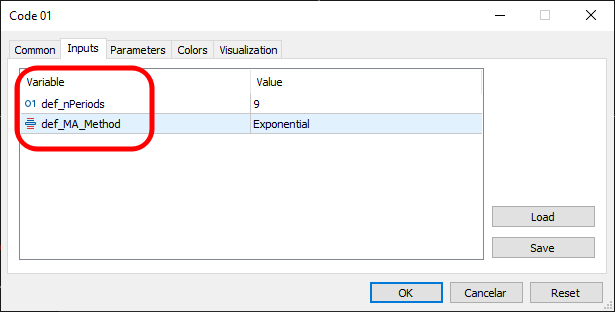
Image 01
Although this works, the information highlighted in Image 01 isn't very informative for the user. It would be advisable to replace snippet 02 with the one shown below. This will give us the result shown in the following image.
                   .
                   .
                   .
14. //+------------------------------------------------------------------+
15. input uint              def_nPeriods = 9;             //Period:
16. input ENUM_MA_METHOD    def_MA_Method  = MODE_EMA;    //Method:
17. //+------------------------------------------------------------------+
                   .
                   .
                   .
Snippet 03
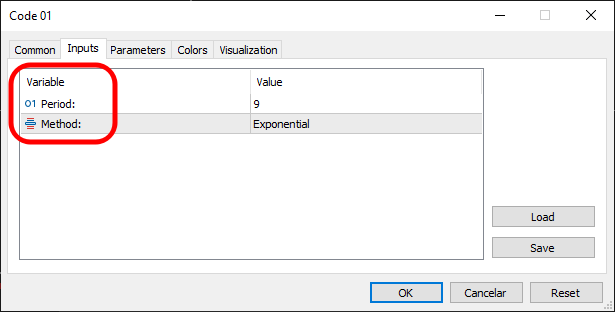
Image 02
Now the user will know how each value affects the calculation, even if they have absolutely no idea how the code actually works or how a moving average is calculated. This indicator really does work. However, depending on how you implement your indicator, something rather strange may appear on the chart when you add it. You can see the problem in the following image.
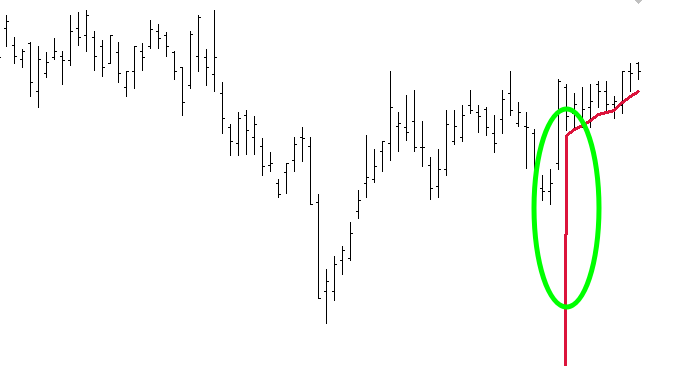
Image 03
The problem is circled in green. But why did my indicator show this particular result? The reason, my dear reader, lies in the data stored within the indicator. In the case of the indicator we're discussing in this article, if the code had been written as shown below, the exact same problem would have arisen.
01. //+------------------------------------------------------------------+
02. #property copyright "Daniel Jose"
03. //+------------------------------------------------------------------+
04. #property description "DEMO Indicator"
05. //+------------------------------------------------------------------+
06. #property indicator_chart_window
07. #property indicator_applied_price   PRICE_CLOSE
08. #property indicator_buffers         1
09. #property indicator_plots           1
10. #property indicator_type1           DRAW_LINE
11. #property indicator_color1          clrRed
12. #property indicator_style1          STYLE_SOLID
13. #property indicator_width1          1
14. //+------------------------------------------------------------------+
15. input uint              def_nPeriods = 9;             //Period:
16. input ENUM_MA_METHOD    def_MA_Method  = MODE_EMA;    //Method:
17. //+------------------------------------------------------------------+
18. double   Buff_iMA[];
19. int      Handle;
20. //+------------------------------------------------------------------+
21. int OnInit(void)
22. {
23.    SetIndexBuffer(0, Buff_iMA, INDICATOR_DATA);
24.    if ((Handle = iMA(NULL, NULL, def_nPeriods, 0, def_MA_Method, _AppliedTo)) == INVALID_HANDLE)
25.    {
26.       Print("Could not start the indicator...");
27.       return INIT_FAILED;
28.    };
29.
30.    return INIT_SUCCEEDED;
31. };
32. //+------------------------------------------------------------------+
33. int OnCalculate(const int rates_total, const int prev_calculated, const int begin, const double &price[])
34. {
35.    CopyBuffer(Handle, 0, 0, def_nPeriods, Buff_iMA);
36.
37.    return rates_total;
38. };
39. //+------------------------------------------------------------------+
40. void OnDeinit(const int reason)
41. {
42.    if (Handle != INVALID_HANDLE)
43.       IndicatorRelease(Handle);
44. };
45. //+------------------------------------------------------------------+
Code 02
"But wait. Code 02 is almost the same as Code 01. However, I haven't noticed this problem occurring there." Nevertheless, the problem is present there too, my dear reader. The thing is, because there are so many bars on the chart, the problem is partially hidden. But it's still there. In Code 02, the problem becomes even more obvious precisely because, on line 35—where we copy the values into the indicator buffer to be displayed—because fewer data points are copied, the plotted section is shorter. My point here is that even if you haven't found a bug in your code, that doesn't mean there isn't one; it might simply be in a place where you can't see it.
So, to resolve these kinds of problems, we essentially have two options. The first of these already appeared in snippet 01, where line 35 corrects this issue. Another way to solve the same problem is to initialize the buffer containing the data to be displayed. Exactly where you initialize the indicator buffer affects the result we can get.
To make this a little clearer and help you understand it better, let's do two tests. The first test will involve initializing the buffer directly in the OnInit procedure, as shown below.
                   .
                   .
                   .
20. //+------------------------------------------------------------------+
21. int OnInit(void)
22. {
23.    SetIndexBuffer(0, Buff_iMA, INDICATOR_DATA);
24.     ArrayInitialize(Buff_iMA, EMPTY_VALUE);
25.    if ((Handle = iMA(NULL, 0, def_nPeriods, 0, def_MA_Method, _AppliedTo)) == INVALID_HANDLE)
26.    {
27.       Print("Could not start the indicator...");
28.       return INIT_FAILED;
29.    };
30.
31.    return INIT_SUCCEEDED;
32. };
33. //+------------------------------------------------------------------+
34. int OnCalculate(const int rates_total, const int prev_calculated, const int begin, const double &price[])
35. {
36.    CopyBuffer(Handle, 0, 0, def_nPeriods, Buff_iMA);
37.
38.    return rates_total;
39. };
40. //+------------------------------------------------------------------+
                   .
                   .
                   .
Snippet 04
The problem is that this approach can cause the indicator to behave somewhat strangely, as you can see in the following image.
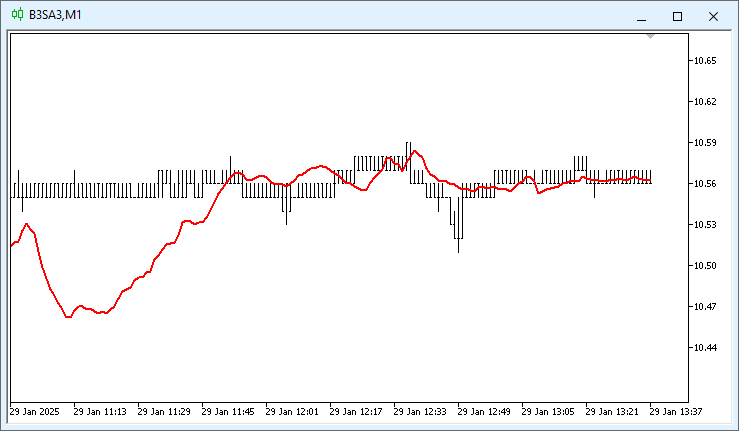
Image 04
Do you see how the moving average line in Image 04 looks completely chaotic? This usually happens when you force the indicator to update between two calls to the OnCalculate function made by MetaTrader 5. Remember that the data to be displayed comes from MetaTrader 5. We do not calculate them locally. We simply use the data pre-calculated by MetaTrader 5. Even after MetaTrader 5 triggers the OnCalculate event, this WILL NOT fix the display. This is because when we copy the buffer, we will only receive a portion of the previously calculated values. You can see this in line 36.
However, if you load all the data calculated by MetaTrader 5, the problem shown in Image 04 will not occur. Therefore, you should exercise caution when programming this type of logic, especially if you intend to use these calculations and applications for commercial purposes or to automate trading in the financial markets.
All right, let's get back to our main question. Remember when I said that there are, in fact, two ways to initialize a buffer? So, the second one is shown below.
                   .
                   .
                   .
20. //+------------------------------------------------------------------+
21. int OnInit(void)
22. {
23.    SetIndexBuffer(0, Buff_iMA, INDICATOR_DATA);
24.    if ((Handle = iMA(NULL, 0, def_nPeriods, 0, def_MA_Method, _AppliedTo)) == INVALID_HANDLE)
25.    {
26.       Print("Could not start the indicator...");
27.       return INIT_FAILED;
28.    };
29.
30.    return INIT_SUCCEEDED;
31. };
32. //+------------------------------------------------------------------+
33. int OnCalculate(const int rates_total, const int prev_calculated, const int begin, const double &price[])
34. {
35.    ArrayInitialize(Buff_iMA, EMPTY_VALUE);
36.    CopyBuffer(Handle, 0, 0, def_nPeriods, Buff_iMA);
37.
38.    return rates_total;
39. };
40. //+------------------------------------------------------------------+
                   .
                   .
                   .
Snippet 05
The advantage of this second method is that the indicator will not behave unpredictably. The result will be very similar to what we saw in Animation 04, with the indicator tracking the entire process as it unfolds. However, it may not have been shown clearly enough in Animation 04. If that's the case, take a look at the following animation.
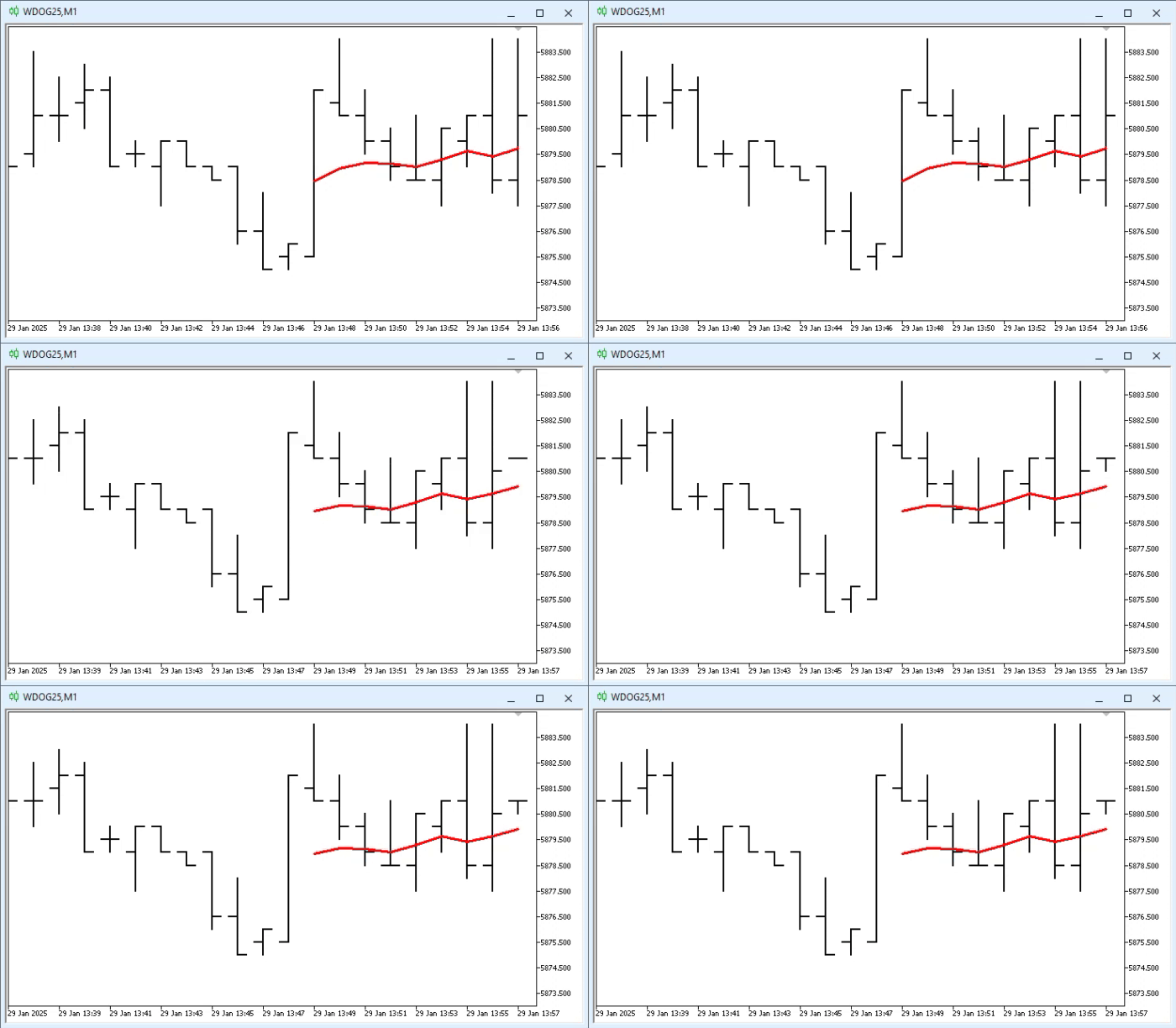
Animation 05
As I've already said, things like this are quite interesting. Finally, I'll explain how to change one of the elements displayed when a user configures the indicator. This can be seen in Image 05.
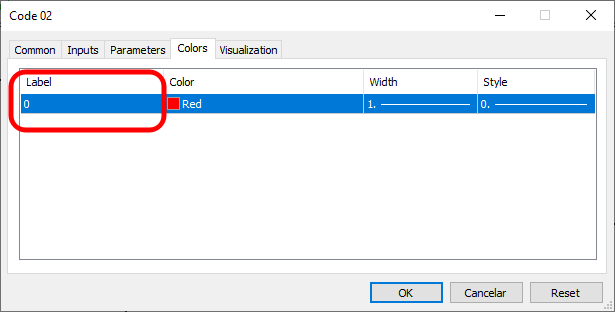
Image 05
This information tells the user nothing useful. However, it's fair to say that there's not much point in changing it. And in many cases, that is indeed true. However, I want to remind you—in case you haven't noticed—that a single indicator can display multiple lines or data sets at the same time.
In the article “From Basic to Intermediate: Indicator (III)”, I showed how this can be done. However, in that article I forgot to explain how to change the information highlighted in Image 05. It's actually quite simple. All we need to do is add to the code what is shown in line 14 of the code snippet below.
                   .
                   .
                   .
12. #property indicator_style1          STYLE_SOLID
13. #property indicator_width1          1
14. #property indicator_label1          "EMA"
15. //+------------------------------------------------------------------+
16. input uint              def_nPeriods   = 9;           //Period:
17. input ENUM_MA_METHOD    def_MA_Method  = MODE_EMA;    //Method:
                   .
                   .
                   .
Snippet 06
As a result, we will get what is shown in the following image.
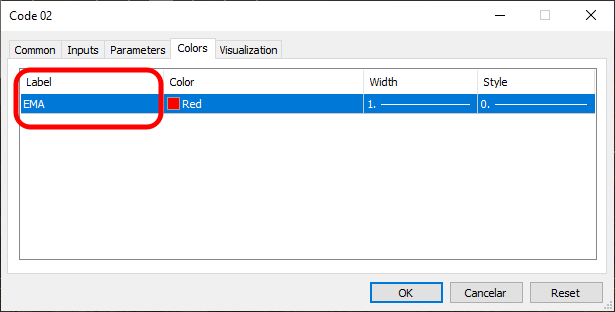
Image 06
Although this works relatively well, makes the settings clearer and more interesting, and makes it easier for users to configure the parameters, there is one minor drawback. The information highlighted in Image 06 is static. In other words, if a user changes the type of moving average, the information in Image 06 will not reflect that change. And if you configure multiple moving averages within a single indicator, this will ultimately ruin the user experience.
Solving this problem is quite simple. However, I won't go into that topic right now, since I first want to highlight a few more points related to the ability to manage various pieces of information more dynamically. But we'll talk about that in the next article.
Concluding Thoughts
In this article, we discussed how to use the technical indicators built into MetaTrader 5 and supported by this platform. Knowing and understanding these indicators can make implementing a solution much simpler, faster, and more efficient, since you won't have to worry about the necessary calculations. The platform handles them for us automatically.
However, knowing how to use technical indicators is only part of a much broader topic. In the next article, we'll explore how to use this approach much more effectively to significantly simplify the implementation of certain trading models. Well then, see you soon.
| MQ5 File | Description |
|---|---|
| Code 01 | Basic Demonstration |
| Code 02 | Basic Demonstration |
Translated from Portuguese by MetaQuotes Ltd.
Original article: https://www.mql5.com/pt/articles/17025
Warning: All rights to these materials are reserved by MetaQuotes Ltd. Copying or reprinting of these materials in whole or in part is prohibited.
This article was written by a user of the site and reflects their personal views. MetaQuotes Ltd is not responsible for the accuracy of the information presented, nor for any consequences resulting from the use of the solutions, strategies or recommendations described.

 Neural Networks in Practice: Gradient Descent
 Using the MQL5 Economic Calendar for News Filter (Part 5): The Tier the Calendar Does Not Have
 Building a Trade Replay Tool in MQL5
 Building a PDF Creation Library in MQL5 (Part 3): The Byte-Exact Writer

- Free trading apps
- Over 8,000 signals for copying
- Economic news for exploring financial markets
You agree to website policy and terms of use