

Using the MQL5 Economic Calendar for News Filter (Part 5): The Tier the Calendar Does Not Have
 105
105
 0
0

Contents
- Introduction
- Two Copies of One Decision
- Section 1: The Vocabulary
- Section 2: The Rules
- Section 3: The EA
- Reading Your Own Broker
- What This Part Does Not Do
- Conclusion
Introduction
The news filter we have built so far in Part 4 of this series reads the broker's economic calendar, works out which events touch the chart symbol, blocks new trades inside a window around them, suspends and restores stops, survives a terminal restart, and runs all of it against a static CSV file when the Strategy Tester is driving. Every event the calendar tags as "High" gets the same treatment. For most high-impact releases, that is what you want. You set a window on either side, the EA stands down for that long, and the release passes.
A few releases behave differently. A central bank rate decision, the statement published with it, and the press conference that follows do not simply move price; they can change where the market thinks policy is going. Price can then keep adjusting for longer than the window you would give a routine release. A regional manufacturing survey can spike the chart just as hard and be fully absorbed inside two minutes. The calendar tags both of them "High," and this part does not dispute the tag. Importance is one question, and the tag answers it. How much room a release needs is a second question, which the tag was never meant to answer: it does not separate the kind of release that can reset expectations from the kind that is absorbed before the next bar closes. Whether a particular release did reset them is known only after it is out, and this part does not try to measure that. It works one step earlier: you decide in advance which kinds of release get more room, and the filter gives that room to every release a rule names.
What this can cost depends on the strategy, its settings, and the instrument. Three examples:
- A mean-reversion system can take the other side of the spike and wait for a return to a mean that has moved.
- A trend system can be whipsawed out on the first leg and then watch the real move happen without it.
- A system with a fixed stop can meet a market moving faster than the distance that stop was sized for.
You need a way to mark a specific release as different and have the filter treat it differently, without giving up the calendar's tagging for everything else. By the end of this part, the EA will:
- Rank events on one ordered scale that keeps the calendar's four importance levels and adds a special tier above them.
- Take its list of special releases from a rule table instead of an input; with a CSV file, you can edit to add releases, override the shipped ones, or drop an event you have decided to ignore.
- Give every event its own before and after window, so a rate decision holds the filter open longer than a routine release without changing what the routine release gets.
- Classify events once, through one function shared by the live calendar and the backtest CSV.
- Come with a script that prints what your own broker's calendar publishes so the rules you write match what your terminal reports.
Scope of This Article
This part changes how the EA decides that an event matters. The actions stay the same: it blocks new trades, closes positions before a release, and suspends stops during the window. This part only changes which events trigger those actions and for how long. There are five files:
- NewsTypes.mqh and NewsRules.mqh, which go in MQL5\Include\NewsFilterSuite\. This is the first time this series has put code in a header instead of in the EA. The reason is specific: a script, or a second EA, will want to read the tier scale and the rule table without depending on the trading system, and the Reading Your Own Broker section does exactly that.
- NewsIntegration_Part5.mq5, the EA.
- NewsTierInspector.mq5, a script for MQL5\Scripts\.
- NewsRules.csv, a sample override file for Common\Files\. Its full text is printed under the Overriding the Table subsection.
Two Copies of One Decision
Before adding anything, open isUpcomingNews() in your EA and look at what is already there. The tester branch decided on importance like this:
         //--- Importance filter
         bool okImportance = false;
         switch(NewsImportanceMode)
           {
            case NEWS_HIGH_ONLY:
               okImportance = (historicalNews[i].importance == 3);
               break;
            case NEWS_MODERATE_ONLY:
               okImportance = (historicalNews[i].importance == 2);
               break;
            case NEWS_HIGH_AND_MODERATE:
               okImportance = (historicalNews[i].importance >= 2);
               break;
           }
         if(!okImportance)
            continue;
Further down the same function, the live branch decides it again:
      //--- Importance Filter
      bool okImportance = false;
      switch(NewsImportanceMode)
        {
         case NEWS_HIGH_ONLY:
            okImportance = (ev.importance == CALENDAR_IMPORTANCE_HIGH);
            break;
         case NEWS_MODERATE_ONLY:
            okImportance = (ev.importance == CALENDAR_IMPORTANCE_MODERATE);
            break;
         case NEWS_HIGH_AND_MODERATE:
            okImportance = (ev.importance == CALENDAR_IMPORTANCE_HIGH || ev.importance == CALENDAR_IMPORTANCE_MODERATE);
            break;
        }
      if(!okImportance)
         continue;
The two blocks reach the same answer for a reason that is not enforced anywhere: the tester block tests for the number 3, the live block tests for CALENDAR_IMPORTANCE_HIGH, and only the export script, which writes 3 for a high-impact event, connects the two. Change what the file writes, and only one of the two blocks has to follow. While this decision is only a single numeric comparison, maintaining two copies costs almost nothing. The special tier adds more logic: it reads an event name, matches it against a rule table, assigns a tier, and resolves a window.
If implemented twice, you must keep two tables aligned, and the backtest can diverge from the live EA for that reason alone. The first change in this part, therefore, moves the decision into one place that both branches can call. That removes the second copy. It does not make the two sources identical, and the One Classifier subsection lists what else has to hold for them to agree.
Section 1: The Vocabulary
First we create a header file called NewsTypes.mqh with the necessary properties. Like this:
//+------------------------------------------------------------------+
//|                                                    NewsTypes.mqh |
//|                                    Copyright 2026, soloharbinger |
//|                      https://www.mql5.com/en/users/soloharbinger |
//+------------------------------------------------------------------+
#property copyright   "Copyright 2026, soloharbinger"
#property link        "https://www.mql5.com/en/users/soloharbinger"
#property version     "1.00"
#property description "Vocabulary for the news filter: the tier scale, one event record, one rule, and the classifier's configuration."

#ifndef NEWSFILTERSUITE_NEWSTYPES_MQH
#define NEWSFILTERSUITE_NEWSTYPES_MQH
NewsTypes.mqh defines the terms the rest of the part is written in: a scale for importance, a record for a classified event, a record for a rule, and the settings the classifier reads. It contains no trading logic and includes nothing.
The Tier Scale
//+------------------------------------------------------------------+
//| The tier scale                                                   |
//+------------------------------------------------------------------+
enum ENUM_NEWS_TIER
  {
   NEWS_TIER_NONE     = 0,   // Untagged by the calendar
   NEWS_TIER_LOW      = 1,   // Calendar: low importance
   NEWS_TIER_MODERATE = 2,   // Calendar: moderate importance
   NEWS_TIER_HIGH     = 3,   // Calendar: high importance
   NEWS_TIER_SPECIAL  = 4    // Ours: releases the calendar cannot separate from the rest of High
  };
The first four values keep the numbers the historical file already uses in its importance column: 1 for low, 2 for moderate, and 3 for high, with 0 added for an event the calendar leaves untagged. A number read from the file is therefore already on this scale, and TierFromImportance() only keeps it inside that range. The calendar's own value is never read as a number. The documentation lists the four names of ENUM_CALENDAR_EVENT_IMPORTANCE and gives them no numeric values, so ImportanceFromCalendar() converts by name:
//+------------------------------------------------------------------+
//| Calendar importance as the 0 to 3 number the historical file     |
//| uses. Converted by name, never by the enum's own value           |
//+------------------------------------------------------------------+
int ImportanceFromCalendar(const ENUM_CALENDAR_EVENT_IMPORTANCE importance)
  {
   switch(importance)
     {
      case CALENDAR_IMPORTANCE_HIGH:
         return 3;
      case CALENDAR_IMPORTANCE_MODERATE:
         return 2;
      case CALENDAR_IMPORTANCE_LOW:
         return 1;
      default:
         return 0;   // CALENDAR_IMPORTANCE_NONE
     }
  }
Nothing in the code now depends on how that enum is numbered. The scale also corrects something from earlier. The calendar publishes four importance levels, not three. CALENDAR_IMPORTANCE_NONE is the fourth, and it is why this scale starts at zero. The numbers in the file remain a convention, as they are in any file format: the script that writes the file and the loader that reads it must agree on them. The export script in Part 4 writes 1 for an untagged event as well as for a low one, so a file made with it cannot tell the two apart, while the inspector's export writes 0.
Value 4 sits above the calendar's highest rather than beside it, which makes the scale ordered. "Watch this tier and everything above it" then becomes one test, and that is what replaces ENUM_NEWS_IMPORTANCE_MODE. The test is TierMeetsThreshold(), which returns tier >= minimum && tier > NEWS_TIER_NONE. Its second condition means an event at tier 0 is never watched, even with NewsMinimumTier set to NEWS_TIER_NONE, a setting that watches Low and everything above it. The three old modes were mutually exclusive sets, so asking for more room around rate decisions meant selecting a mode that excluded everything else. With an ordered scale, one input covers both cases: NewsMinimumTier = NEWS_TIER_HIGH watches High and Special together, and a special event brings its own wider window with it. Existing settings map across like this:
| Old setting | New setting |
|---|---|
| NEWS_HIGH_ONLY | NewsMinimumTier = NEWS_TIER_HIGH |
| NEWS_HIGH_AND_MODERATE | NewsMinimumTier = NEWS_TIER_MODERATE |
| NEWS_MODERATE_ONLY | no equivalent |
NEWS_MODERATE_ONLY restricted trading on moderate news while trading straight through rate decisions. An ordered scale cannot express that, because everything at or above the threshold is watched. If you were using that mode, this part removes the capability. The ordered scale is therefore a trade and not a pure gain: one threshold and a tier above High, at the price of the one mode that skipped a level.
The Event Record
//+------------------------------------------------------------------+
//| One event, after classification                                  |
//+------------------------------------------------------------------+
struct SNewsEvent
  {
   datetime          time;
   string            currency;
   string            name;
   string            code;
   ENUM_NEWS_TIER    reportedTier;   // What the source said
   ENUM_NEWS_TIER    tier;           // What the rules decided
   int               minutesBefore;  // This event's own window, not a global setting
   int               minutesAfter;
   bool              affectsSymbol;  // Relevance to the chart symbol, decided once at load
   int               ruleIndex;      // Rule that classified it, -1 if none matched
  };
The EA has described an event with a time, a currency, an importance number, and a name. Those four fields answer whether an event is important. They cannot answer how long the event needs to remain in scope, because there is nowhere to record that.
reportedTier and tier hold the source's answer and the rules' answer separately. Keeping both means the difference can be printed instead of inferred, and it settles what the rule table is: an addition to the calendar's tagging rather than a replacement for it. An event that matches no rule comes out of the classifier exactly as the calendar described it.
minutesBefore and minutesAfter store the window on the event. Previously, the window was read from a global input inside the detection loop, which is why every event received the same treatment. With the window on the record, the detection loop asks each event how much room it wants.
affectsSymbol and ruleIndex are both computed once when events are loaded and then carried with the event, rather than recomputed on every tick. The EA section covers how relevance gets decided.
The Settings the Classifier Reads
//+------------------------------------------------------------------+
//| Everything the classifier needs, in one place                    |
//+------------------------------------------------------------------+
struct SNewsConfig
  {
   //--- What counts as news worth acting on
   ENUM_NEWS_TIER    minimumTier;

   //--- Windows in minutes. Special events get their own pair
   int               defaultBefore;
   int               defaultAfter;
   int               specialBefore;
   int               specialAfter;

   //--- Rule table
   bool              loadBuiltInRules;
   string            rulesFile;

   //--- Diagnostics
   bool              verbose;

   void              SetDefaults(void);
  };
There are two window pairs, one threshold, two rule-table settings, and a verbose flag. SetDefaults() fills in starting values so a caller overrides only what it cares about. Passing settings in a structure rather than reading inputs directly is what allows a caller with no inputs of its own to classify events. The EA fills this in from its input block. The inspector script fills in the same structure from its own inputs, and both get identical classification.
Section 2: The Rules
NewsRules.mqh holds the rule table and the classifier that reads it. It includes NewsTypes.mqh and nothing else.
A Rule Is Data
//+------------------------------------------------------------------+
//| One rule: which events get moved to which tier, and how much     |
//| room they are given                                              |
//+------------------------------------------------------------------+
struct SNewsRule
  {
   string            currency;       // Three-letter code, or "*" for any
   string            match;          // Stored uppercase, read according to matchMode
   ENUM_NEWS_MATCH   matchMode;
   ENUM_NEWS_TIER    tier;           // Tier this event moves to, up or down
   int               minutesBefore;  // -1 inherits the configured window for the resulting tier
   int               minutesAfter;   // -1 inherits
  };
A list of releases that deserve different handling is data. When the list is written as a chain of string comparisons inside the EA, every addition needs a recompile, and finding out what is on the list means reading the program. Written as a table of structures, the list can be loaded from a file, printed, counted, and edited without touching the EA.
currency accepts * to match any currency, so one rule can cover a release that several central banks publish under the same words, such as an interest rate decision. minutesBefore and minutesAfter take -1 to mean inherit whatever window the resulting tier is configured with. A rule states a window only when it wants something different from the tier default. tier moves an event up the scale or down it, so a rule can take a release out of the filter as easily as it can promote one.
Two Ways to Name an Event
//+------------------------------------------------------------------+
//| Does this rule describe this event?                              |
//+------------------------------------------------------------------+
bool NewsRule_Matches(const SNewsRule &rule,
                      const string upperCurrency,
                      const string upperCode,
                      const string upperName)
  {
   if(rule.currency != "*" && rule.currency != upperCurrency)
      return false;

   switch(rule.matchMode)
     {
      case NEWS_MATCH_CODE:
         return (StringLen(upperCode) > 0 && upperCode == rule.match);

      case NEWS_MATCH_EXACT:
         return (upperName == rule.match);

      default:
         return (StringFind(upperName, rule.match) != -1);
     }
  }
Currency is checked first and rejects the rule immediately if it does not match, which avoids the string comparisons for most rules on most events. Substring matching is the default. It suits releases that appear under a name containing a phrase you can recognize, and it tolerates a broker adding a prefix or a month to the name. Exact matching exists for cases where a substring catches something it should not, and a short phrase catches more. A substring rule written as "Nonfarm" matches "Nonfarm Payrolls" and also "ADP Nonfarm Employment Change," which is a different release published on a different day. That rule would open the special window on both days. The built-in table, therefore, uses exact matching for its short names, because "CPI m/m" as a substring would also match "Core CPI m/m" and every other name that contains it.
Code matching compares against MqlCalendarEvent.event_code, which is stored alongside name. The documentation describes name as the event's text in the terminal language, so a name rule works only in the language it was written in. It describes event_code only as the event code. It attaches no language to the code, which is the reason to prefer a code rule where names are translated, but it does not promise the same code on every server either. The shipped table therefore matches on names. A name is the field you can check against the calendar already open in front of you, while the codes have to be read off your own terminal first. The script near the end of this article prints them.The Built-In Table
One question decides what goes on the list: Is this the kind of release that can change where the market thinks policy is going, or the kind that only moves price for a few minutes? The answer is a judgment about a kind of release, made in advance, and not a measurement of any single one. The rate decision of each of the eight central banks is on the list with the communication around it, and so are a few of the inflation and employment numbers that strongly influence those decisions. That gives thirty-four rules across eight major currencies. The list is not complete even by its own question: it has no inflation rule for Japan or Switzerland, for example, and none for the US unemployment rate. Each block looks like this://+------------------------------------------------------------------+ //| The built-in table | //+------------------------------------------------------------------+ void NewsRules_LoadBuiltIn(void) { int before = ArraySize(g_newsRules); //--- USD NewsRules_AddSpecial("USD", "Fed Interest Rate Decision", NEWS_MATCH_NAME); NewsRules_AddSpecial("USD", "FOMC Statement", NEWS_MATCH_NAME); NewsRules_AddSpecial("USD", "FOMC Economic Projections", NEWS_MATCH_NAME); NewsRules_AddSpecial("USD", "FOMC Press Conference", NEWS_MATCH_NAME); NewsRules_AddSpecial("USD", "Nonfarm Payrolls", NEWS_MATCH_EXACT); NewsRules_AddSpecial("USD", "CPI m/m", NEWS_MATCH_EXACT); NewsRules_AddSpecial("USD", "CPI y/y", NEWS_MATCH_EXACT); NewsRules_AddSpecial("USD", "Core PCE Price Index", NEWS_MATCH_NAME); //--- EUR NewsRules_AddSpecial("EUR", "ECB Interest Rate Decision", NEWS_MATCH_NAME); NewsRules_AddSpecial("EUR", "ECB Monetary Policy Statement", NEWS_MATCH_NAME); NewsRules_AddSpecial("EUR", "ECB Monetary Policy Press Conference", NEWS_MATCH_NAME); NewsRules_AddSpecial("EUR", "Flash CPI", NEWS_MATCH_NAME); NewsRules_AddSpecial("EUR", "Flash HICP", NEWS_MATCH_NAME); //--- GBP NewsRules_AddSpecial("GBP", "BoE Interest Rate Decision", NEWS_MATCH_NAME); NewsRules_AddSpecial("GBP", "BoE Monetary Policy Report", NEWS_MATCH_NAME); NewsRules_AddSpecial("GBP", "BoE Press Conference", NEWS_MATCH_NAME); NewsRules_AddSpecial("GBP", "CPI m/m", NEWS_MATCH_EXACT); NewsRules_AddSpecial("GBP", "CPI y/y", NEWS_MATCH_EXACT); //--- JPY NewsRules_AddSpecial("JPY", "BoJ Interest Rate Decision", NEWS_MATCH_NAME); NewsRules_AddSpecial("JPY", "BoJ Monetary Policy Statement", NEWS_MATCH_NAME); NewsRules_AddSpecial("JPY", "BoJ Press Conference", NEWS_MATCH_NAME); //--- AUD NewsRules_AddSpecial("AUD", "RBA Interest Rate Decision", NEWS_MATCH_NAME); NewsRules_AddSpecial("AUD", "RBA Rate Statement", NEWS_MATCH_NAME); NewsRules_AddSpecial("AUD", "Employment Change", NEWS_MATCH_EXACT); //--- CAD NewsRules_AddSpecial("CAD", "BoC Interest Rate Decision", NEWS_MATCH_NAME); NewsRules_AddSpecial("CAD", "BoC Rate Statement", NEWS_MATCH_NAME); NewsRules_AddSpecial("CAD", "Employment Change", NEWS_MATCH_EXACT); //--- CHF NewsRules_AddSpecial("CHF", "SNB Interest Rate Decision", NEWS_MATCH_NAME); NewsRules_AddSpecial("CHF", "SNB Monetary Policy Assessment", NEWS_MATCH_NAME); //--- NZD NewsRules_AddSpecial("NZD", "RBNZ Interest Rate Decision", NEWS_MATCH_NAME); NewsRules_AddSpecial("NZD", "RBNZ Rate Statement", NEWS_MATCH_NAME); NewsRules_AddSpecial("NZD", "RBNZ Monetary Policy Statement", NEWS_MATCH_NAME); NewsRules_AddSpecial("NZD", "RBNZ Press Conference", NEWS_MATCH_NAME); NewsRules_AddSpecial("NZD", "Employment Change", NEWS_MATCH_EXACT); g_newsRulesBuiltIn = ArraySize(g_newsRules) - before; }
NewsRules_AddSpecial() is shorthand for a rule that moves an event to the special tier and inherits the configured special window, which is what every shipped rule does. One window for all thirty-four is a default, and not a claim that they all need the same room: nothing here measures how long any of them moves the market. A rule can give a single release its own window, as the next subsection shows. Rule names are stored uppercase, and events are uppercased before comparison, so the capitalization you write here is not relevant.
Overriding the Table
The built-in list is a starting position. Your instrument may not care about half of it and may need something that is not on it. NewsRules.csv is how you say so, and its commented header is the configuration reference:
# NewsRules.csv - optional overrides for the built-in special tier table.
#
# Place in the terminal's Common\Files folder. Nothing here is required.
# The built-in table works without this file, and this file only extends
# or overrides it. Rules loaded from here beat built-ins that describe
# the same event, because the classifier walks the table backwards and
# stops at the first match. For the same reason, a later line in this
# file beats an earlier one, whatever its mode. Write broad rules first
# and narrow ones after them.
#
# Columns
#   currency   Three-letter code, or * for any currency
#   match      What to compare against, read according to mode
#   mode       code  = whole MqlCalendarEvent.event_code
#              exact = whole event name
#              name  = substring of the event name
#   tier       0 None  1 Low  2 Moderate  3 High  4 Special
#              Use 0 to drop an event your broker tags high but you ignore
#   before     Minutes before the event. -1 inherits the configured window
#   after      Minutes after the event.  -1 inherits
#
# Blank lines and lines starting with # are ignored, as is this header row.
#
currency,match,mode,tier,before,after
#
# --- Per-event windows -------------------------------------------------
# The built-in table gives every special event the same configured
# window. These four ask for more. The minute values below demonstrate
# the mechanism; they are not measured figures. Test on your own
# instrument before trusting any number here.
#
USD,FOMC Press Conference,name,4,20,90
USD,Nonfarm Payrolls,exact,4,30,75
USD,Fed Interest Rate Decision,name,4,20,90
EUR,ECB Monetary Policy Press Conference,name,4,15,75
#
# --- Matching on event_code --------------------------------------------
# A name is shown in the terminal's language, so a name rule works in
# that language only. The code is a separate field with no language
# attached to it. The built-in table does not use codes because the
# strings have to be read off your own terminal first.
# NewsTierInspector.mq5 prints the code beside every event; copy the
# ones you care about into rules like this. A code rule matches on live
# data only, because the historical news file has no code column.
#
# USD,<paste-the-code-here>,code,4,30,75
#
# --- Demotion ----------------------------------------------------------
# Anything your broker tags high that you have decided does not move your
# instrument. An event at tier 0 is never watched, whatever
# NewsMinimumTier is set to.
#
# USD,EIA Crude Oil Stocks Change,name,0,-1,-1
The file is optional, and the filter runs without it. When the file is missing and verbose is on, the loader prints one line saying that the built-in rules are used alone. That line carries the terminal's code for a file that could not be opened, 5004, as the inspector's output shows later. It is information, and nothing fails. The loader reports how many rules it read and how many lines it rejected. A line is rejected when it has fewer than four columns or an empty currency or match field, and the Experts tab gives its line number. A minute value below -1 is read as -1. Built-in rules load first; file rules append after them; matching walks the table backwards.
A rule from your file, therefore, takes precedence over a built-in rule describing the same event, and you override by adding a line rather than editing the library. The same order applies inside the file. Of two lines that match the same event, the later one wins, whatever their modes, so a broad name rule placed after an exact rule replaces it. Write the broad rules first and the narrow ones after them, then check the rule listing the inspector prints, which shows the mode and tier each rule was read with. Each promoted or demoted line in its event listing also names the rule that decided it, and that is where a rule shadowed by a broader one shows up.
The four sample rules in the file give the FOMC press conference, Nonfarm Payrolls, the Fed rate decision, and the ECB press conference wider windows than the tier default. A rule can also assign tier 0, which drops an event below every threshold. That is how you tell the filter your broker tags a release high and you have decided it does not move your instrument.
One Classifier
//+------------------------------------------------------------------+
//| The classifier                                                   |
//+------------------------------------------------------------------+
void NewsRules_Classify(const SNewsConfig &cfg,
                        const datetime eventTime,
                        const string currency,
                        const string eventCode,
                        const string eventName,
                        const int reportedImportance,
                        SNewsEvent &event)
  {
   event.time          = eventTime;
   event.currency      = NormalizeField(currency);
   event.name          = eventName;
   event.code          = eventCode;
   event.reportedTier  = TierFromImportance(reportedImportance);
   event.tier          = event.reportedTier;
   event.ruleIndex     = -1;
   event.affectsSymbol = false;

   NewsRules_ResolveWindow(cfg, event.tier, event.minutesBefore, event.minutesAfter);

   string upperCode = NormalizeField(eventCode);
   string upperName = NormalizeField(eventName);

//--- Backwards, so a rule loaded from file beats a built-in that
//--- describes the same event
   for(int i = ArraySize(g_newsRules) - 1; i >= 0; i--)
     {
      if(!NewsRule_Matches(g_newsRules[i], event.currency, upperCode, upperName))
         continue;

      event.tier      = g_newsRules[i].tier;
      event.ruleIndex = i;

      NewsRules_ResolveWindow(cfg, event.tier, event.minutesBefore, event.minutesAfter);

      if(g_newsRules[i].minutesBefore >= 0)
         event.minutesBefore = g_newsRules[i].minutesBefore;
      if(g_newsRules[i].minutesAfter >= 0)
         event.minutesAfter = g_newsRules[i].minutesAfter;

      break;
     }
  }
The function runs in four steps. First, it copies the source fields and converts importance to a tier. Second, it resolves the default window for that tier. Third, it scans the rules table backwards for a match. Fourth, on a match, it updates the tier, resolves the window again, and overrides the window if the rule specifies explicit values. The break ends the search at the first match.
Both loaders call this function. The live loader passes ev.event_code, ev.name, and the importance that ImportanceFromCalendar() converts. The CSV loader passes the time, currency, importance, and name it reads from the file and an empty string for the code. The classifier itself cannot differ between the two, because there is only one. That removes one cause of a backtest disagreeing with live trading, and only that one. The two agree when four more things hold: the rules match on names and not on codes, because the file has no event code; the file's names are in the same language as the live terminal's, because names are translated; its times are server times; and it covers the tested period completely, with the importance the calendar gave each event.
When they hold, the same event gets the same tier and window in both. The value of a single implementation grows with the rules. Two switches agreeing on a single numeric comparison are easy to check by reading both. Two rule tables, two sets of matching modes, and two window resolutions are not, and the first symptom of drift would be a backtest trading through a release the live EA refuses. A backtest that disagrees with live trading without showing it can do more harm than no backtest, because it produces confidence instead of a visible gap.
Classification also moves off the tick. The existing EA evaluates event importance on every tick in both branches. Because importance depends only on the event and the rules, it does not change tick-to-tick. It is now settled once when events are loaded and stored on the record and the detection loop reads a decision that has already been made. The threshold is settled at the same moment. A loader stores an event only if TierMeetsThreshold() accepts its tier, so the detection loop never meets an event below NewsMinimumTier or at tier 0.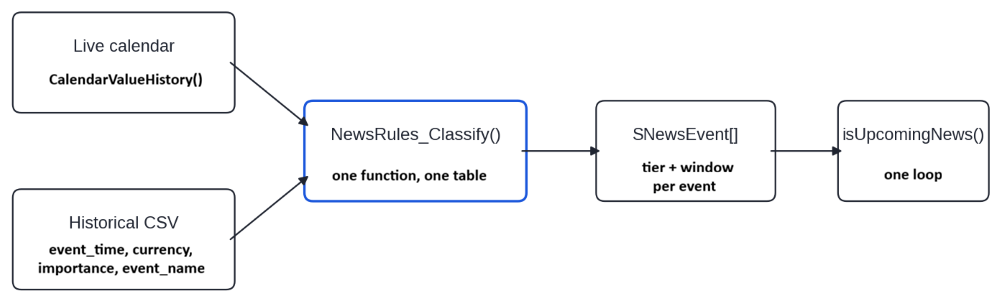
Sharing one implementation between a live source and a test source is a common answer to this problem rather than an original one. Other implementations reach the same place by a different route, wrapping the calendar in interchangeable providers so that the live connector and CSV reader expose the same interface to the EA. What is here is narrower: one classifier and two loaders, with no provider abstraction.
Section 3: The EA
NewsIntegration_Part5.mq5 continues the EA. The include line at the top is new, and the rest follows from it.
The New Inputs
//+------------------------------------------------------------------+
//| INPUTS                                                           |
//+------------------------------------------------------------------+
input group "News Filter Configuration"
input bool   EnableNewsFilter = false;                           // Enable Economic News Filter
input int    NewsMinutesBefore = 5;                              // Minutes before news to restrict
input int    NewsMinutesAfter = 5;                               // Minutes after news to restrict
input bool   RestrictNewTradesDuringNews = true;                 // Block new trades during news window
input bool   SuspendStopsDuringNews = false;                     // Pause SL/TP modifications during the news window
input bool   CloseTradesOnWindowStart = false;                   // Close all trades when a news window opens
input string SymbolCurrencyOverride = "";                        // Manual currency override e.g. "USD,JPY"
input ENUM_NEWS_TIER NewsMinimumTier = NEWS_TIER_HIGH;           // Watch this tier and everything above it
//--- Cache reload interval
input int CacheReloadHours = 6;                                  // How often to reload calendar cache (hours)
input string HistoricalNewsFile = "HistoricalNews.csv";          // CSV file for backtesting news events

input group "Special Tier Configuration"
input int    SpecialMinutesBefore = 30;                          // Minutes before a special event to restrict
input int    SpecialMinutesAfter = 60;                           // Minutes after a special event to restrict
input bool   UseBuiltInSpecialRules = true;                      // Load the shipped rule table
input string SpecialRulesFile = "NewsRules.csv";                 // Optional rule overrides, blank to skip
input bool   NewsFilterVerbose = false;                          // Print each loaded event and its tier
ENUM_NEWS_IMPORTANCE_MODE and NewsImportanceMode are gone, replaced by NewsMinimumTier. A saved .set file referencing the old input will not carry over, so use the mapping table above to pick its replacement. CloseOpenTradesBeforeHighImpactNews is renamed CloseTradesOnWindowStart. It acts when any watched window opens, whatever the tier of the event behind it, so "high impact" no longer described it, and a saved .set file will not carry that value over either.
The two special window values are set well apart from the routine pair so the difference is visible on the first run. They are starting values chosen to be obviously different, not measured figures. BuildNewsConfig() copies the threshold, the four window values, the two rule-table settings, and the verbose flag into the SNewsConfig structure once, and the rule table and the classifier read that structure. A window value below zero is copied as zero, and the Experts tab says so. No upper limit is applied, because a long window is a choice and not an error.
Two Loaders, One Array
TodayEvents[] and HistoricalNews[] are replaced by a single array of classified events:
SNewsEvent newsEvents[];
Both loaders fill it. The raw MqlCalendarValue records are now local to the live loader, because once an event has been classified, the raw record has nothing left to offer. Widening the window exposed an assumption in the live loader. The calendar query ran from now forward, which was harmless while the window after a release was a few minutes wide. A special event can hold the filter open for an hour after it fires, and an event that occurred twenty minutes before a reload or restart would not be in the array at all. The query now reaches back by the longest after-window any event can be given. That is the larger of the two inputs, or a rule's own value when a rule sets more, as two of the sample rules do with 90 minutes:
//--- Reach back by the longest after-window an event can have.
//--- A rule can set one longer than either input
   int lookBack = MathMax(newsConfig.defaultAfter, newsConfig.specialAfter);
   for(int r = 0; r < ArraySize(g_newsRules); r++)
      lookBack = MathMax(lookBack, g_newsRules[r].minutesAfter);
   datetime fromTime = now - (lookBack * 60);
Each record then takes the same three steps in both loaders: it is classified, its tier is tested against NewsMinimumTier, and it is stored only if it passes. These are the lines from the live loader:
      //--- One classification, the same one the CSV loader uses
      SNewsEvent parsed;
      NewsRules_Classify(newsConfig, records[i].time, eventCurrency,
                         ev.event_code, ev.name, ImportanceFromCalendar(ev.importance), parsed);

      //--- Below the threshold, or at tier 0, the event is never stored
      if(!TierMeetsThreshold(parsed.tier, newsConfig.minimumTier))
         continue;

      int idx = ArraySize(newsEvents);
      ArrayResize(newsEvents, idx + 1);
      newsEvents[idx] = parsed;
This step, in each loader, is the only place the threshold is applied. An event that fails TierMeetsThreshold() never enters newsEvents[], so the scan shown later has no tier left to test. It is also how a rule that assigns tier 0 takes an event out of the filter: the event is classified, fails the test, and is not stored.
The CSV loader changes less. It reads the same four columns as before. It now accepts an importance of 0 to 3, the calendar's full range, where it used to reject 0. Not only that, it also removes the quotation marks that the Part 4 export script puts around each name so that an exact rule can match the whole name. The larger change is where a parsed row goes: into the classifier and through the same threshold test, rather than into a separate array with a separate importance test. The file carries no event code, so a code-matching rule cannot fire against historical data. Name and exact rules are applied to the file's names exactly as they are to the calendar's. The loader also looks for the header row only at the start of a line now. The earlier test looked for "time" and "date" anywhere in the line and so dropped every event whose name contains those letters, as "Sentiment" does.Relevance Decided Once
//+------------------------------------------------------------------+
//| Decide once per event whether it touches the chart symbol        |
//+------------------------------------------------------------------+
void MarkSymbolRelevance()
  {
   int total = ArraySize(newsEvents);
   int relevant = 0;

   for(int i = 0; i < total; i++)
     {
      bool affect = false;

      if(currencyCacheValid)
        {
         for(int j = 0; j < cachedCurrencyCount; j++)
           {
            if(newsEvents[i].currency == cachedCurrencies[j])
              {
               affect = true;
               break;
              }
           }
        }

      newsEvents[i].affectsSymbol = affect;
      if(affect)
         relevant++;
     }

   PrintFormat("News relevance: %d of %d loaded events affect %s.", relevant, total, _Symbol);
  }
This comparison used to run inside the detection loop, on every tick, for every event. The answer cannot change between loads. The currency cache is built in OnInit() from the chart symbol and the SymbolCurrencyOverride input, and a change to either one sends the EA through OnInit() again. So the comparison belongs with the load. It is made for the chart symbol only, and the scan in the next subsection answers for that symbol and no other. The currency cache itself is unchanged and is reused as it is.
The print at the end is a useful first check. In the tester, where the whole file is loaded, zero relevant events on a major pair usually mean the currency cache did not build, and the filter will remain inactive for the whole run. On a live chart, the count covers only about the next 24 hours, so a zero can also mean a quiet day.
One Scan
//+-----------------------------------------------------------------------+
//| Core Detection Logic                                                  |
//| Returns true if 'now' is inside a news window for the chart symbol    |
//+-----------------------------------------------------------------------+
bool isUpcomingNews(const string symbol)
  {
   datetime now = TimeCurrent();

//--- Relevance is marked for the chart symbol only.
//--- Say so once if a call asks about another symbol
   static bool otherSymbolReported = false;
   if(!otherSymbolReported && symbol != _Symbol)
     {
      PrintFormat("News filter: asked about %s, but the answer is for %s only.", symbol, _Symbol);
      otherSymbolReported = true;
     }

//--- Cache Management for live calendar
   if(!MQLInfoInteger(MQL_TESTER))
     {
      if(lastCalendarLoad == 0 || (now - lastCalendarLoad) > (datetime)CacheReloadHours * 3600)
        {
         LoadTodayCalendarEvents();
         MarkSymbolRelevance();
        }
     }

   if(!newsEventsLoaded)
      return false;

   if(!currencyCacheValid)
      return false;


//--- Event Scan
   for(int i = 0; i < ArraySize(newsEvents); i++)
     {
      //--- Relevance was decided at load
      if(!newsEvents[i].affectsSymbol)
         continue;

      //--- Each event carries its own window, so a special release stays
      //--- in scope long after a routine one released the same minute
      datetime eventTime = newsEvents[i].time;
      datetime windowStart = eventTime - (newsEvents[i].minutesBefore * 60);
      datetime windowEnd   = eventTime + (newsEvents[i].minutesAfter * 60);


      if(now >= windowStart && now <= windowEnd)
        {
         //--- Optional: Print once per detection to avoid log spam
         static string lastDetectedKey = "";
         string key = newsEvents[i].name + "|" + TimeToString(eventTime);
         if(key != lastDetectedKey)
           {
            PrintFormat("NEWS [%s]: %s | Time: %s | Currency: %s | window -%d/+%d min",
                        TierToString(newsEvents[i].tier),
                        newsEvents[i].name,
                        TimeToString(eventTime),
                        newsEvents[i].currency,
                        newsEvents[i].minutesBefore,
                        newsEvents[i].minutesAfter);
            lastDetectedKey = key;
           }
         return true;
        }
     }

   return false;
  }

//--- Wrapper for external calls
bool IsNewsTime(string symbol)
  {
   return isUpcomingNews(symbol);
  }
The function is simpler because several decisions moved to load time. The scan has no MQL_TESTER branch, no tier test, and no currency comparison, because the loaders stored only the events that passed TierMeetsThreshold() and relevance was marked after they ran. Inside the loop, it only checks the time window and optionally logs the detection. The reload check at the top is the only part that still distinguishes between the two modes, and it governs refreshing the source rather than interpreting it. The symbol argument is kept so that existing calls still compile.
The answer is always for the chart symbol, because relevance was marked for it at load. When a call passes any other symbol, the function says so once in the Experts tab and still answers for the chart symbol, so it cannot serve as a filter for a second instrument. The scan returns at the first event in the array whose window is open, and the log line prints that event's tier and resolved window. When two windows overlap, as those of a rate decision and its press conference can, the line names the first of them and names the other only after the first has closed. The filter stays on until the last one closes.
Wiring It Up
//+------------------------------------------------------------------+
//| Expert initialization function                                   |
//+------------------------------------------------------------------+
int OnInit()
  {
   Print("News Filter Part 5 initialized");

   BuildNewsConfig();

   if(EnableNewsFilter)
     {
      //--- Build the rule table before anything is classified
      NewsRules_Build(newsConfig);

      //--- Load static news for backtesting (does nothing if it's not in the Strategy Tester)
      LoadHistoricalNewsFromCSV();

      //--- Build currency cache for current symbol (used in both live and backtest)
      BuildCurrencyCache();
     }

//--- Load persistent stop state after restart
   LoadStopsFromGlobals();
   if(ArraySize(savedStops) > 0)
     {
      Print("Recovered suspended trades from previous session.");
     }

//--- Pre-load live calendar only if not in tester
   if(EnableNewsFilter && !MQLInfoInteger(MQL_TESTER))
      LoadTodayCalendarEvents();

//--- Decide once which loaded events touch this symbol
   if(EnableNewsFilter)
      MarkSymbolRelevance();

   return INIT_SUCCEEDED;
  }
Order matters in three places here. The configuration is built before the rule table because the table's settings come from it. The rule table is built before either loader runs, because a loader classifying against an empty table gets the calendar's tagging and nothing else. Relevance is marked after whichever loader ran because it needs events in the array. Set NewsFilterVerbose to true on the first run. Each loader then prints every event it kept with its resolved tier and window, which is the quickest way to confirm the rules are matching what you expect.
Reading Your Own Broker
How your broker's calendar tags events, what strings it publishes as event codes, and what its server clock reads are facts about your terminal rather than facts about MQL5. NewsTierInspector.mq5 reports all three. It is a script rather than an EA, and it includes NewsRules.mqh and nothing else. There is no CTrade instance in it and no position handling, which is possible because classification is now a question about data and can be answered without starting a trading system.
For each event in range at or above the MinimumTier input, the script prints the scheduled time, the currency, the broker's tier beside the resolved tier, the resolved window, the raw event code, and the name. Anything a rule moved is marked promoted or demoted with the index of the rule that moved it, and a summary counts them. The block below is not illustrative. It is the output from an actual run of the script, and the layout comes from its own format strings. The Experts tab shows the result:
KR      0       15:03:29.908    NewsTierInspector (XAUUSD,M15)  === News Tier Inspector ===
GO      0       15:03:29.908    NewsTierInspector (XAUUSD,M15)  Chart symbol: XAUUSD
FJ      0       15:03:29.908    NewsTierInspector (XAUUSD,M15)  --- Terminal clocks ---
QN      0       15:03:29.908    NewsTierInspector (XAUUSD,M15)    TimeCurrent() server : 2026.09.09 17:03:34
DK      0       15:03:29.908    NewsTierInspector (XAUUSD,M15)    TimeGMT()            : 2026.09.09 14:03:29
HF      0       15:03:29.908    NewsTierInspector (XAUUSD,M15)    TimeLocal()          : 2026.09.09 15:03:29
PS      0       15:03:29.908    NewsTierInspector (XAUUSD,M15)    Server minus GMT     : 3.0 hours
NP      0       15:03:29.908    NewsTierInspector (XAUUSD,M15)    Write historical CSV times in server time, because that is
CF      0       15:03:29.908    NewsTierInspector (XAUUSD,M15)    what every window comparison in the EA uses.
DI      0       15:03:29.910    NewsTierInspector (XAUUSD,M15)  NewsRules: no override file 'NewsRules.csv' (error 5004). Built-in rules only.
PG      0       15:03:29.910    NewsTierInspector (XAUUSD,M15)  NewsRules: 34 rules active (34 built-in, 0 from file).
EI      0       15:03:29.910    NewsTierInspector (XAUUSD,M15)  --- Rule table (34 rules) ---
PL      0       15:03:29.910    NewsTierInspector (XAUUSD,M15)    [0] USD FED INTEREST RATE DECISION [name] -> SPECIAL
FO      0       15:03:29.910    NewsTierInspector (XAUUSD,M15)    [1] USD FOMC STATEMENT [name] -> SPECIAL
QF      0       15:03:29.910    NewsTierInspector (XAUUSD,M15)    [2] USD FOMC ECONOMIC PROJECTIONS [name] -> SPECIAL
JD      0       15:03:29.910    NewsTierInspector (XAUUSD,M15)    [3] USD FOMC PRESS CONFERENCE [name] -> SPECIAL
NM      0       15:03:29.910    NewsTierInspector (XAUUSD,M15)    [4] USD NONFARM PAYROLLS [exact] -> SPECIAL
QS      0       15:03:29.910    NewsTierInspector (XAUUSD,M15)    [5] USD CPI M/M [exact] -> SPECIAL
RF      0       15:03:29.910    NewsTierInspector (XAUUSD,M15)    [6] USD CPI Y/Y [exact] -> SPECIAL
JP      0       15:03:29.910    NewsTierInspector (XAUUSD,M15)    [7] USD CORE PCE PRICE INDEX [name] -> SPECIAL
OM      0       15:03:29.910    NewsTierInspector (XAUUSD,M15)    [8] EUR ECB INTEREST RATE DECISION [name] -> SPECIAL
LR      0       15:03:29.910    NewsTierInspector (XAUUSD,M15)    [9] EUR ECB MONETARY POLICY STATEMENT [name] -> SPECIAL
HG      0       15:03:29.910    NewsTierInspector (XAUUSD,M15)    [10] EUR ECB MONETARY POLICY PRESS CONFERENCE [name] -> SPECIAL
OD      0       15:03:29.910    NewsTierInspector (XAUUSD,M15)    [11] EUR FLASH CPI [name] -> SPECIAL
LS      0       15:03:29.910    NewsTierInspector (XAUUSD,M15)    [12] EUR FLASH HICP [name] -> SPECIAL
HN      0       15:03:29.910    NewsTierInspector (XAUUSD,M15)    [13] GBP BOE INTEREST RATE DECISION [name] -> SPECIAL
FL      0       15:03:29.910    NewsTierInspector (XAUUSD,M15)    [14] GBP BOE MONETARY POLICY REPORT [name] -> SPECIAL
IG      0       15:03:29.910    NewsTierInspector (XAUUSD,M15)    [15] GBP BOE PRESS CONFERENCE [name] -> SPECIAL
HI      0       15:03:29.910    NewsTierInspector (XAUUSD,M15)    [16] GBP CPI M/M [exact] -> SPECIAL
GL      0       15:03:29.910    NewsTierInspector (XAUUSD,M15)    [17] GBP CPI Y/Y [exact] -> SPECIAL
JJ      0       15:03:29.910    NewsTierInspector (XAUUSD,M15)    [18] JPY BOJ INTEREST RATE DECISION [name] -> SPECIAL
OD      0       15:03:29.910    NewsTierInspector (XAUUSD,M15)    [19] JPY BOJ MONETARY POLICY STATEMENT [name] -> SPECIAL
JI      0       15:03:29.910    NewsTierInspector (XAUUSD,M15)    [20] JPY BOJ PRESS CONFERENCE [name] -> SPECIAL
IR      0       15:03:29.910    NewsTierInspector (XAUUSD,M15)    [21] AUD RBA INTEREST RATE DECISION [name] -> SPECIAL
EN      0       15:03:29.910    NewsTierInspector (XAUUSD,M15)    [22] AUD RBA RATE STATEMENT [name] -> SPECIAL
FN      0       15:03:29.910    NewsTierInspector (XAUUSD,M15)    [23] AUD EMPLOYMENT CHANGE [exact] -> SPECIAL
II      0       15:03:29.910    NewsTierInspector (XAUUSD,M15)    [24] CAD BOC INTEREST RATE DECISION [name] -> SPECIAL
KH      0       15:03:29.910    NewsTierInspector (XAUUSD,M15)    [25] CAD BOC RATE STATEMENT [name] -> SPECIAL
OQ      0       15:03:29.910    NewsTierInspector (XAUUSD,M15)    [26] CAD EMPLOYMENT CHANGE [exact] -> SPECIAL
NN      0       15:03:29.910    NewsTierInspector (XAUUSD,M15)    [27] CHF SNB INTEREST RATE DECISION [name] -> SPECIAL
HJ      0       15:03:29.910    NewsTierInspector (XAUUSD,M15)    [28] CHF SNB MONETARY POLICY ASSESSMENT [name] -> SPECIAL
FE      0       15:03:29.910    NewsTierInspector (XAUUSD,M15)    [29] NZD RBNZ INTEREST RATE DECISION [name] -> SPECIAL
ED      0       15:03:29.910    NewsTierInspector (XAUUSD,M15)    [30] NZD RBNZ RATE STATEMENT [name] -> SPECIAL
CS      0       15:03:29.910    NewsTierInspector (XAUUSD,M15)    [31] NZD RBNZ MONETARY POLICY STATEMENT [name] -> SPECIAL
OS      0       15:03:29.910    NewsTierInspector (XAUUSD,M15)    [32] NZD RBNZ PRESS CONFERENCE [name] -> SPECIAL
GO      0       15:03:29.910    NewsTierInspector (XAUUSD,M15)    [33] NZD EMPLOYMENT CHANGE [exact] -> SPECIAL
CF      0       15:03:29.910    NewsTierInspector (XAUUSD,M15)  --- 21 calendar records in range ---
DD      0       15:03:29.911    NewsTierInspector (XAUUSD,M15)  2026.09.09 12:41 | EUR | broker Moderate | tier Moderate | window -5/+5 | code '10-year-bond-auction' | 10-Year Bond Auction
MI      0       15:03:29.911    NewsTierInspector (XAUUSD,M15)  2026.09.09 15:00 | MXN | broker Moderate | tier Moderate | window -5/+5 | code 'cpi-mm' | CPI m/m
EN      0       15:03:29.911    NewsTierInspector (XAUUSD,M15)  2026.09.09 15:00 | MXN | broker Moderate | tier Moderate | window -5/+5 | code 'cpi-yy' | CPI y/y
CO      0       15:03:29.911    NewsTierInspector (XAUUSD,M15)  2026.09.09 19:00 | USD | broker Moderate | tier Moderate | window -5/+5 | code 'eia-short-term-energy-outlook' | EIA Short-Term Energy Outlook
HG      0       15:03:29.911    NewsTierInspector (XAUUSD,M15)  2026.09.09 20:00 | USD | broker High     | tier High     | window -5/+5 | code '10-year-note-auction' | 10-Year Note Auction
MO      0       15:03:29.911    NewsTierInspector (XAUUSD,M15)  2026.09.09 20:00 | EUR | broker High     | tier High     | window -5/+5 | code 'ecb-president-lagarde-speech' | ECB President Lagarde Speech
LD      0       15:03:29.911    NewsTierInspector (XAUUSD,M15)  2026.09.10 04:00 | CNY | broker Moderate | tier Moderate | window -5/+5 | code 'pbc-new-loans' | PBC New Loans
IH      0       15:03:29.911    NewsTierInspector (XAUUSD,M15)  --- Summary ---
QP      0       15:03:29.911    NewsTierInspector (XAUUSD,M15)    Listed at or above Moderate : 7
MO      0       15:03:29.911    NewsTierInspector (XAUUSD,M15)    Promoted by a rule       : 0
GI      0       15:03:29.911    NewsTierInspector (XAUUSD,M15)    Demoted by a rule        : 0
IS      0       15:03:29.911    NewsTierInspector (XAUUSD,M15)  Any event marked promoted is one your broker tagged below the tier
KR      0       15:03:29.911    NewsTierInspector (XAUUSD,M15)  your rules assign it. That gap is what the special tier closes.
A promoted line is an event your broker tagged below the tier your rules give it, and closing that gap is the reason the tier exists. A run that promotes nothing, like the one above, means no event in the range matched a rule. Either none of the listed releases fall inside the range, or your calendar names them differently from the rules. Widen the range with HoursBehind and HoursAhead before deciding which. The string in the code column is what a code-matching rule compares against. Copy it from a real run rather than guessing. Switching on ExportCSV writes a historical news file in the same four-column format the EA's loader already reads, so the output drops straight into a backtest.
The Clock Report
The script prints TimeCurrent(), TimeGMT(), TimeLocal(), and the difference between the first two. Every window comparison in the EA runs against TimeCurrent(), which is the server time. The MQL5 documentation states that the economic calendar functions use the trade server time, so the times CalendarValueHistory() returns and the clock the EA compares them with are both server time. A historical CSV written in a different time zone shifts every backtest window by that offset, and the run still looks plausible while it does so. Nothing in the four-column format records which time zone a file was written in, so the loader cannot detect a shifted file.
The field table in Part 4 labeled the time column UTC, but the export script in that part writes the time the calendar returns, which is server time, and a file written by hand should use server time too. The script prints your offset so you can check a file against it rather than assume.
What This Part Does Not Do
The special tier marks a kind of release, chosen in advance. The classifier decides from an event's currency, code, name, and reported importance, and nothing else. It does not see the published figure, the forecast, or how price reacted. A release on the list is therefore treated as special even when it surprises nobody, and a release that is not on the list gets only its routine window, however far the market moves.
A window is also a fixed number of minutes around the scheduled time. It does not extend while the move continues, and a repricing that runs for days is outside what this filter covers. The tier and the window are separate fields on a rule. The tier decides whether the event is watched and which window it inherits, and the rule's own minutes replace that window, so a release can be given a long window without being made special.
A name-based rule only works in the terminal's display language. The shipped table is written in English, so a terminal running in another language matches nothing against it, and the special tier stops having any effect. Code matching is the answer, and building those rules is left to you and your broker's codes. Code matching does not work in the tester. The historical CSV has no event-code column, so a code rule can only trigger on live data. Name and exact rules behave identically in both.
The built-in table is a starting point. Thirty-four rules chosen with major pairs in mind is a place to begin, not a finding about your instrument, and the table does not list every inflation or employment release for the currencies it covers. A rule whose name does not appear in your terminal's calendar matches nothing, so compare the names with the inspector's output before relying on them. Every window here is configuration rather than measurement. Nothing in this part derives a window from realized volatility, and the sample values in the CSV demonstrate the mechanism. Classification happens at load. The rule table is built once, in OnInit(), so editing the rules file while the EA is running changes nothing until the EA is restarted. A calendar reload classifies its events against the table already in memory. An event the calendar adds or reschedules is picked up at the next reload, which can be up to CacheReloadHours later.
The default is six hours. A smaller value shortens that gap at the cost of more calendar queries. The tier changes how long the filter stays on, not what it does. Blocking entries, closing positions, and suspending stops remain the whole response set, and a special event and a high-impact event trigger the same actions for different durations.
Some limitations carry forward. The calendar still returns nothing for past dates in the Strategy Tester, which is why the CSV path remains necessary for backtesting. A position whose stops are suspended has no stop protection while the window is open. And the design is still single-symbol, with persistence keys that are terminal-wide.
Conclusion
The news filter EA began this part by treating every high-impact news release the same way, which is right for most of them and wrong for the few that can change where the market thinks policy is going. It can now give the releases you name a tier and a window of their own. It does not judge a release itself: the list is written in advance, by kind of release, and it is yours to maintain.
What the EA gained:
- An ordered tier scale built on the calendar's four importance levels, with a special tier above them, so a single threshold can cover multiple levels.
- A rule table held as data: a built-in list that a CSV can extend, override, or cut down without a recompile.
- Windows that belong to events, so a rate decision gets its own room without changing what a routine release gets.
- One classifier serves the live calendar and the historical file, replacing two importance switches that were kept in step by hand.
- A script that reports what your broker publishes and what your server clock reads, so your rules rest on your own terminal rather than on assumption.
The EA also gave one thing up: the moderate-only mode, which an ordered scale cannot express. The tier and its window answer how long to stand down. They do not yet answer what to do while standing down, and a special event and a routine one still trigger the same three responses. That is the next question this suite needs to address.
The source files are attached below.
| Filename | Description |
|---|---|
| NewsRules.mqh | Contains the built-in special-event rules, CSV rule loading, event matching, and the shared event-classification logic. |
| NewsTypes.mqh | Defines the news-filter vocabulary: the ordered tier scale, event and rules structures, and classifier configuration. |
| NewsTierInspector.mq5 | A diagnostic script that shows the broker's calendar data, event codes, classifications, rule matches, and server-time information. |
| NewsIntegration_Part5.mq5 | The EA that integrates the new tier system, rule-based classification, per-event windows, and shared news data into the existing news filter. |
| MQL5.zip | Archive containing the four source files, arranged in the required MQL5 terminal directory structure. |
Warning: All rights to these materials are reserved by MetaQuotes Ltd. Copying or reprinting of these materials in whole or in part is prohibited.
This article was written by a user of the site and reflects their personal views. MetaQuotes Ltd is not responsible for the accuracy of the information presented, nor for any consequences resulting from the use of the solutions, strategies or recommendations described.

 From Basic to Intermediate: Technical Indicators (I)
 Building a PDF Creation Library in MQL5 (Part 3): The Byte-Exact Writer
 Neural Networks in Practice: Gradient Descent
 Neural Networks in Trading: Temporal Motion Aggregation (TMA)

- Free trading apps
- Over 8,000 signals for copying
- Economic news for exploring financial markets
You agree to website policy and terms of use