

From Basic to Intermediate: Technical Indicators (II)
 169
169
 0
0

Introduction
In the previous article, “From Basic to Intermediate: Technical Indicators (I)”, we looked at how to implement code designed to demonstrate how to use a technical indicator. The indicators described in that article are built into MetaTrader 5 and are supported by the platform. You can access them very easily and directly from MQL5.
However, everything stated there also applies to another type of indicator. Specifically, an indicator that you, my dear reader, implement to better understand a particular market movement. Before we get into that, though, we need to consider a few more issues that, in my opinion, will be very helpful in understanding how to use custom indicators in a wide variety of situations.
In addition, this will, of course, allow us to better explain how to control MetaTrader 5 so that it displays what we want to see or even performs the actions we need.
To reach this level of understanding, it is necessary to explain a number of concepts that many people do not understand or are not even aware of, even though they can be used in MQL5 programming. Once these concepts have been properly explained and you understand them correctly, my dear reader, a world of opportunities will open up for you on your journey to becoming a skilled MQL5 programmer.
So, it's time to set aside anything that might distract you and focus on what will be explained in this article.
Technical Indicators (II)
In the previous article, we finished reviewing the code shown below.
01. //+------------------------------------------------------------------+
02. #property copyright "Daniel Jose"
03. //+------------------------------------------------------------------+
04. #property description "DEMO Indicator"
05. //+------------------------------------------------------------------+
06. #property indicator_chart_window
07. #property indicator_applied_price   PRICE_CLOSE
08. #property indicator_buffers         1
09. #property indicator_plots           1
10. #property indicator_type1           DRAW_LINE
11. #property indicator_color1          clrRed
12. #property indicator_style1          STYLE_SOLID
13. #property indicator_width1          1
14. #property indicator_label1          "EMA"
15. //+------------------------------------------------------------------+
16. input uint              def_nPeriods   = 9;           //Period:
17. input ENUM_MA_METHOD    def_MA_Method  = MODE_EMA;    //Method:
18. //+------------------------------------------------------------------+
19. double   Buff_iMA[];
20. int      Handle;
21. //+------------------------------------------------------------------+
22. int OnInit(void)
23. {
24.    SetIndexBuffer(0, Buff_iMA, INDICATOR_DATA);
25.    if ((Handle = iMA(NULL, 0, def_nPeriods, 0, def_MA_Method, _AppliedTo)) == INVALID_HANDLE)
26.    {
27.       Print("Could not start the indicator...");
28.       return INIT_FAILED;
29.    };
30.
31.    return INIT_SUCCEEDED;
32. };
33. //+------------------------------------------------------------------+
34. int OnCalculate(const int rates_total, const int prev_calculated, const int begin, const double &price[])
35. {
36.     ArrayInitialize(Buff_iMA, EMPTY_VALUE);
37.    CopyBuffer(Handle, 0, 0, def_nPeriods, Buff_iMA);
38.
39.    return rates_total;
40. };
41. //+------------------------------------------------------------------+
42. void OnDeinit(const int reason)
43. {
44.    if (Handle != INVALID_HANDLE)
45.       IndicatorRelease(Handle);
46. };
47. //+------------------------------------------------------------------+
Code 01
Of course, I won't repeat the explanation from that article of what happens when Code 01 runs in MetaTrader 5. But I think many of you are curious about one specific question. Here it is: Let's say you want to add several moving averages to a single indicator. This will save you from having to configure each one individually every time you want to add them to any symbol. I mention this because some traders have a predetermined set of moving averages and indicators that must always be displayed on the chart. However, they do not want to use chart templates, or do not like using them, to achieve this chart layout. We'll see how it's done soon. But for now, let's focus on this article.
As a result, many of these traders are trying to create an indicator that is simple to implement yet functional—one that would allow them to add multiple moving averages at once and remove them all by removing that single indicator.
This might seem like one of those tasks that’s almost impossible to accomplish, wouldn’t you agree, my dear reader? However, given the level of knowledge we have already acquired in this series of articles, doing something like this is relatively simple. However, there are a few techniques that many of you may not even be aware of, even though they can significantly speed up the implementation of this indicator.
That is why the initial goal of this article is to explore and demonstrate these techniques. It's not difficult, but it will significantly change your approach to programming, making you much more productive while also reducing the likelihood of errors in your code.
So, let's start by adding a second moving average to the code of the previous indicator. However, since the goal now is to create an indicator with a predefined configuration, the code will no longer be the same as in Code 01. Now we'll organize the code a little differently. You can see this below.
01. //+------------------------------------------------------------------+
02. #property copyright "Daniel Jose"
03. //+------------------------------------------------------------------+
04. #property description "DEMO Indicator"
05. //+------------------------------------------------------------------+
06. #property indicator_chart_window
07. #property indicator_applied_price   PRICE_CLOSE
08. //+----------------+
09. #property indicator_buffers         2
10. #property indicator_plots           2
11. //+----------------+
12. #property indicator_type1           DRAW_LINE
13. #property indicator_color1          clrRed
14. #property indicator_style1          STYLE_SOLID
15. #property indicator_width1          2
16. //+----------------+
17. #property indicator_type2           DRAW_LINE
18. #property indicator_color2          clrBlue
19. #property indicator_style2          STYLE_SOLID
20. #property indicator_width2          2
21. //+------------------------------------------------------------------+
22. double   Buff_iMA_01[],
23.          Buff_iMA_02[];
24. int      Handle_01,
25.          Handle_02;
26. //+------------------------------------------------------------------+
27. int OnInit(void)
28. {
29.    SetIndexBuffer(0, Buff_iMA_01, INDICATOR_DATA);
30.    SetIndexBuffer(1, Buff_iMA_02, INDICATOR_DATA);
31.
32.    if ((Handle_01 = iMA(NULL, NULL, 9, 0, MODE_EMA, _AppliedTo)) == INVALID_HANDLE)
33.    {
34.       Print("Could not start the indicator...");
35.       return INIT_FAILED;
36.    };
37.    if ((Handle_02 = iMA(NULL, NULL, 20, 0, MODE_SMA, _AppliedTo)) == INVALID_HANDLE)
38.    {
39.       Print("Could not start the indicator...");
40.       return INIT_FAILED;
41.    };
42.
43.    return INIT_SUCCEEDED;
44. };
45. //+------------------------------------------------------------------+
46. int OnCalculate(const int rates_total, const int prev_calculated, const int begin, const double &price[])
47. {
48.     ArrayInitialize(Buff_iMA_01, EMPTY_VALUE);
49.     ArrayInitialize(Buff_iMA_02, EMPTY_VALUE);
50.
51.    CopyBuffer(Handle_01, 0, 0, 9, Buff_iMA_01);
52.    CopyBuffer(Handle_02, 0, 0, 20, Buff_iMA_02);
53.
54.    return rates_total;
55. };
56. //+------------------------------------------------------------------+
57. void OnDeinit(const int reason)
58. {
59.    if (Handle_01 != INVALID_HANDLE)
60.       IndicatorRelease(Handle_01);
61.    if (Handle_02 != INVALID_HANDLE)
62.       IndicatorRelease(Handle_02);
63. };
64. //+------------------------------------------------------------------+
Code 02
When we run Code 02 and apply it to the chart, we get a result similar to the one shown below.
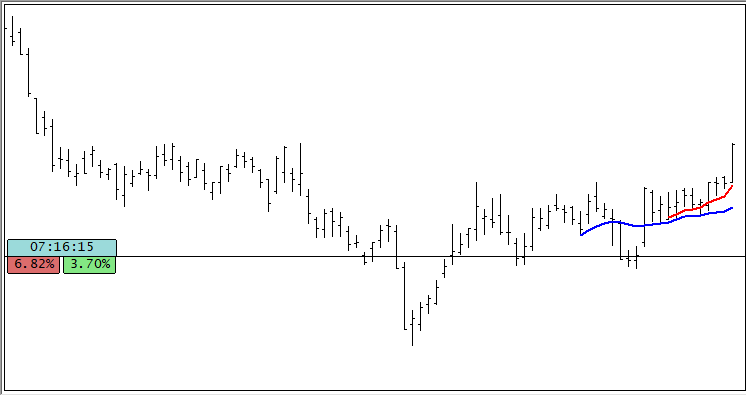
Image 01
Take a close look at the two moving averages shown in Image 01. Their behavior will be very similar to what we saw in the previous article. However, although Code 02 works, as shown in Image 01, it is still too complicated. At least, that is how I see it. The reason is that several pieces of code are repeated throughout. And, what's worse, this repetition makes the code too difficult to maintain and modify, especially if we want to add new moving averages. As a rule, some traders use four or more moving averages, as well as other indicators. Therefore, Code 02 will require much more effort on our part than if we used a few techniques to make it significantly simpler and easier to modify.
The first issue that you, my dear reader, may notice here is that there are several settings between lines 12 and 15. Virtually the same settings are repeated in lines 17 through 20. And all of this is just to define two moving averages. Think about what would happen if there were more moving averages. The next issue that, in my opinion, unnecessarily complicates the code is the declarations in lines 22 through 25. Please note that they also depend on the number of moving averages we plan to add to the chart.
As a result, all calls for initializing each moving average, accessing its indicator buffer, and releasing its handle had to be duplicated. Let me emphasize this once again: if there were more moving averages, we would have to implement all those calls in the code. In other words, it would take quite a bit of effort.
But the worst part is lines nine and ten. You might even come up with a way—as we'll soon see—to solve a significant portion of the problems mentioned above. However, solving the problem that arises in lines nine and ten is much more difficult. This is because if you increase or decrease the number of moving averages displayed on the chart, you'll have to modify these two lines and adjust them accordingly. If you don't do this correctly, you may encounter problems when plotting on the chart.
So, our goal is to show you an alternative that will reduce all this effort and allow the MQL5 compiler to solve most, if not all, of these problems for us. The only thing we'll really need to do is specify which moving averages to use. And from there, everything will just fall into place, because we won't have to worry about a single thing anymore.
All right, now I'm really curious to see how you plan to resolve all these issues. I can even imagine how to solve some of them. However, in other cases—for example, with the problem in lines nine and ten—I have no idea how to do it. Then come along with me and let's find out how we can solve this. Here, we'll look at just one of many possible ways to do the same thing. Remember: what matters most is the result. How it is achieved is of little importance.
So, the first thing we'll do is try to reduce the number of procedure or function calls that are duplicated in the code. This is relatively simple and straightforward, as you can see by looking at the code below.
01. //+------------------------------------------------------------------+
02. #property copyright "Daniel Jose"
03. //+------------------------------------------------------------------+
04. #property description "DEMO Indicator"
05. //+------------------------------------------------------------------+
06. #property indicator_chart_window
07. #property indicator_applied_price   PRICE_CLOSE
08. //+----------------+
09. #property indicator_buffers         2
10. #property indicator_plots           2
11. //+----------------+
12. #property indicator_type1           DRAW_LINE
13. #property indicator_color1          clrRed
14. #property indicator_style1          STYLE_SOLID
15. #property indicator_width1          2
16. //+----------------+
17. #property indicator_type2           DRAW_LINE
18. #property indicator_color2          clrBlue
19. #property indicator_style2          STYLE_SOLID
20. #property indicator_width2          2
21. //+------------------------------------------------------------------+
22. struct stInfos
23. {
24.    double         Buff_iMA[];
25.    int            Handle;
26.    uint           nPeriods;
27.    ENUM_MA_METHOD Method;
28. }Infos[2];
29. //+------------------------------------------------------------------+
30. int OnInit(void)
31. {
32.    Infos[0].nPeriods = 9;
33.    Infos[0].Method = MODE_EMA;
34.    Infos[1].nPeriods = 20;
35.    Infos[1].Method = MODE_SMA;
36.    for (uint c = 0; c < Infos.Size(); c++)
37.    {
38.       SetIndexBuffer(c, Infos[c].Buff_iMA, INDICATOR_DATA);
39.       if ((Infos[c].Handle = iMA(NULL, NULL, Infos[c].nPeriods, 0, Infos[c].Method, _AppliedTo)) == INVALID_HANDLE)
40.       {
41.          Print("Could not start the indicator...");
42.          return INIT_FAILED;
43.       };
44.    }
45.
46.    return INIT_SUCCEEDED;
47. };
48. //+------------------------------------------------------------------+
49. int OnCalculate(const int rates_total, const int prev_calculated, const int begin, const double &price[])
50. {
51.    for (uint c = 0; c < Infos.Size(); c++)
52.    {
53.       ArrayInitialize(Infos[c].Buff_iMA, EMPTY_VALUE);
54.       CopyBuffer(Infos[c].Handle, 0, 0, Infos[c].nPeriods, Infos[c].Buff_iMA);
55.    }
56.
57.    return rates_total;
58. };
59. //+------------------------------------------------------------------+
60. void OnDeinit(const int reason)
61. {
62.    for (uint c = 0; c < Infos.Size(); c++)
63.       IndicatorRelease(Infos[c].Handle);
64. };
65. //+------------------------------------------------------------------+
Code 03
Applying Code 03 to any chart will produce the same result as shown in Image 01. However, notice how much simpler and easier to work with the code has become. This is because we removed all duplicate function and procedure calls. And thanks to this, the code becomes much easier to understand and work with. If we want to add new moving averages, we'll have to change much less code. Essentially, we'll only need to change what's on lines 9 through 35. This is because everything else will adjust to what we do in these lines. Hmm, it seems that the amount of work required to configure and modify the code for future updates has been significantly reduced. That's true, my dear reader, but we can still make things much better.
The next improvement we'll implement will be a little more challenging at first. But it's only difficult right now. As you put into practice what we'll cover here, it will all become very easy to understand.
So, let's take a look at the next improvement we'll implement here. To understand what we're going to do, you need to go back to code 03 and look at the content on lines 32 through 35. What appears in these lines doesn't necessarily have to be there. In addition, the variables declared in lines 26 and 27 do not necessarily have to be defined in this particular way.
Why? The thing is, if you want to create an indicator that contains a specific set of rules, those rules won't change over time. Right? So there isn't much point in storing these values in variables. We can turn them into constants.
"But wait a minute. How is that possible? If we convert these values to constants, how can we keep the code from getting even longer? To be honest, I don't know how to do something like that." Well, that's exactly why we're here, my dear reader. The goal is precisely to show you how you can modify the code to make it much simpler and easier to work with. There's no point in wasting time writing a bunch of code when you can do it much faster and without any unnecessary complications.
Therefore, to achieve our goal, we will modify code 03 as shown below.
01. //+------------------------------------------------------------------+
02. #property copyright "Daniel Jose"
03. //+------------------------------------------------------------------+
04. #property description "DEMO Indicator"
05. //+------------------------------------------------------------------+
06. #property indicator_chart_window
07. #property indicator_applied_price   PRICE_CLOSE
08. #property indicator_buffers         2
09. #property indicator_plots           2
10. //+----------------+
11. #property indicator_type1           DRAW_LINE
12. #property indicator_color1          clrRed
13. #property indicator_style1          STYLE_SOLID
14. #property indicator_width1          2
15. //+----------------+
16. #property indicator_type2           DRAW_LINE
17. #property indicator_color2          clrBlue
18. #property indicator_style2          STYLE_SOLID
19. #property indicator_width2          2
20. //+------------------------------------------------------------------+
21. const struct stAverange
22. {
23.     uint           nPeriods;
24.     ENUM_MA_METHOD Method;
25. }Averange[] =
26. {
27.     {9, MODE_EMA},
28.     {20, MODE_SMA}
29. };
30. //+----------------+
31. struct stInfos
32. {
33.     double   Buff_iMA[];
34.     int      Handle;
35. }Infos[Averange.Size()];
36. //+------------------------------------------------------------------+
37. int OnInit(void)
38. {
39.     for (uint c = 0; c < Averange.Size(); c++)
40.     {
41.         SetIndexBuffer(c, Infos[c].Buff_iMA, INDICATOR_DATA);
42.         if ((Infos[c].Handle = iMA(NULL, NULL, Averange[c].nPeriods, 0, Averange[c].Method, _AppliedTo)) == INVALID_HANDLE)
43.         {
44.             Print("Could not start the indicator...");
45.             return INIT_FAILED;
46.         };
47.     }
48.
49.     return INIT_SUCCEEDED;
50. };
51. //+------------------------------------------------------------------+
52. int OnCalculate(const int rates_total, const int prev_calculated, const int begin, const double &price[])
53. {
54.     for (uint c = 0; c < Averange.Size(); c++)
55.     {
56.         ArrayInitialize(Infos[c].Buff_iMA, EMPTY_VALUE);
57.         CopyBuffer(Infos[c].Handle, 0, 0, Averange[c].nPeriods, Infos[c].Buff_iMA);
58.     }
59.
60.     return rates_total;
61. };
62. //+------------------------------------------------------------------+
63. void OnDeinit(const int reason)
64. {
65.     for (uint c = 0; c < Averange.Size(); c++)
66.         IndicatorRelease(Infos[c].Handle);
67. };
68. //+------------------------------------------------------------------+
Code 04
Once again, running code 04 produces the same result, as shown in Image 01. But look what we've done here. Now, on line 21, we have a declaration of a const instance of the structure. However, contrary to what you might think, it is NOT THE STRUCTURE TYPE THAT IS CONST, but the instance declared on line 25. "Wait a minute. Now I want you to explain all of this to me properly. Because I can clearly see that the declaration is on line 21, not on line 25. So how can the declaration on line 25 be const while the one on line 21 is not?" Okay, that needs some explanation. The problem is that here I'm presenting the code in a more compact format. To understand this better, let's use a short script. It is shown below.
01. //+------------------------------------------------------------------+
02. #property copyright "Daniel Jose"
03. //+------------------------------------------------------------------+
04. void OnStart(void)
05. {
06.     struct stInfos
07.     {
08.         uint u32;
09.         double pf64;
10.     };
11.
12.     const stInfos m1[] =
13.     {
14.         {10, 1.3},
15.         {15, 3.14}
16.     };
17.
18.     for (uint c = 0; c < m1.Size(); c++)
19.         Print("[", c, "]:  ", m1[c].u32, "   ", m1[c].pf64);
20. }
21. //+------------------------------------------------------------------+
Code 05
When we run code 05, we'll get the result shown in the following figure.
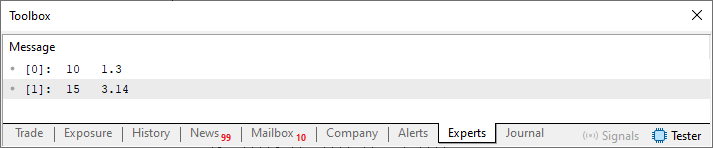
Image 02
Now note that on line 6 we define a structure type. We can use this type for any variable we declare later. You should already know how to do this. But suppose we want a set of constant values. In that case, when we declare these values on line 12, we can make what would otherwise be a variable a constant. This does not change the fact that the structure type declared on line six can be used to declare both variables and constants.
This becomes clear when you look at these declarations individually. But what would happen if we combined them, as shown in Code 04? What would you say about that? Obviously, one might think that the structure would be considered a constant. Isn't that right? However, this idea is completely wrong. This is because you are NOT SEEING THE CODE; you are only seeing what is shown there. To make this really clear to you, my dear reader, let's modify Code 05 and run a quick test to prove it. This new code is shown below.
01. //+------------------------------------------------------------------+
02. #property copyright "Daniel Jose"
03. //+------------------------------------------------------------------+
04. void OnStart(void)
05. {
06.     const struct stInfos
07.     {
08.         uint u32;
09.         double pf64;
10.     } m1[] =
11.     {
12.         {10, 1.3},
13.         {15, 3.14}
14.     };
15.
16.     stInfos var;
17.
18.     var.u32 = 5;
19.     var.pf64 = 2.59;
20.
21.     for (uint c = 0; c < m1.Size(); c++)
22.         Print("[", c, "]:  ", m1[c].u32, "   ", m1[c].pf64);
23.     Print("[ variable ]:  ", var.u32, "   ", var.pf64);
24. }
25. //+------------------------------------------------------------------+
Code 06
And, to the surprise of many, when you run Code 06, you'll get the result shown in the following image.
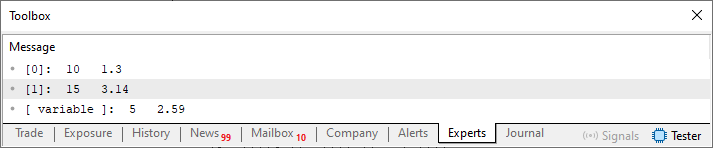
Image 03
"But how can that be? To me, that makes absolutely no sense." If you still don't understand this, take your time studying Code 06 and experimenting with it until you see what is happening. In practice, the `const` keyword that appears on line six is actually associated not with the structure declaration, but with the variable declared on line ten. However, since the keyword `const` appears in line six before the variable declaration in line ten, the compiler immediately recognizes that line ten contains a constant declaration. Therefore, in line 16, we can declare an ordinary variable of the structure type defined in line 6.
"Okay, I think I get it now. Still, it seems a little confusing to me." So, my dear reader, do you still have any doubts about this matter? "Hmm, I noticed something, and there's one detail in this code that I don't quite understand. Aside from the question about constants, which I'll explore further through practice later, my question now concerns this declaration—or, more precisely, how this array is initialized. I see that you're arranging the values in a certain way. Why?" Well, that's a perfectly reasonable question. And since this hasn't been explained yet, I think it deserves a proper explanation.
Usually, when we initialize a constant array, we use the concepts already explained in the article “From Basic to Intermediate: Array (II)”. However, what we saw there applies only to discrete values. When dealing with structures, there are some additional considerations to keep in mind.
In this case, we will focus on code 06. Each element, so to speak, is a block that must contain the appropriate structure. Now pay attention, because this is important. As a general rule, to make the code as readable as possible, we put one structure initializer list on each line. And within this initializer list, the order of the values determines the result we'll get.
But what does this mean? So, my dear reader, in some programming languages—such as Python—you can specify which structure member each particular value corresponds to when declaring a variable. It will look something like what is shown in lines 18 and 19 of code 06. However, in many programming languages, including MQL5, the order in which structure members are declared determines the order of the values in the initializer list.
In other words, since the first member, declared on line 8 of the structure declared on line 6 of code 06, has an integer type, the first value in the initializer list on line 12 MUST ALSO be an integer. And that's not all: the first value in the initializer list corresponds to the first member of the structure itself. This might seem trivial. But rules like these must be strictly followed. Many programs or code snippets produce incorrect values precisely because the programmer placed a member's value in the wrong position in the initializer list. And in doing so, we can completely change the behavior of our code.
To give you an idea of just how harmful this can be, let's create a very simple example. In one case, the initializer list is specified correctly; in the other, it is specified incorrectly. This example is shown below.
01. //+------------------------------------------------------------------+
02. #property copyright "Daniel Jose"
03. //+------------------------------------------------------------------+
04. void OnStart(void)
05. {
06.     const struct stAverange
07.     {
08.         uint    nPeriods,
09.                 Method;
10.     }Averange[] =
11.     {
12.         {9, MODE_EMA},
13.         {MODE_SMA, 20}
14.     };
15.
16.     for (uint c = 0; c < Averange.Size(); c++)
17.         Print("[", c, "]:  Periods=> ", Averange[c].nPeriods, "   ", EnumToString((ENUM_MA_METHOD)Averange[c].Method));
18. }
19. //+------------------------------------------------------------------+
Code 07
When executed, code 07 will produce the result shown below.
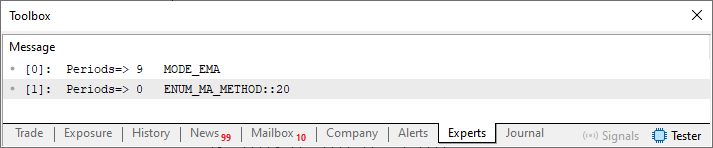
Image 04
So, you might be thinking, “But who could be so inattentive as not to notice that something is wrong with code 07?” And I'll answer: any one of us could make a mistake like that, my dear reader. And, strange as it may seem, this happens much more often than you might imagine. Of course, I'm deliberately taking this to the extreme here, since in one case we're using an integer, and in the other, an enumeration.
However, keep in mind that an enumeration is nothing more than an integer represented by a symbolic constant. The result shown in Image 04 makes it clear that something is wrong here. However, in many cases, it won't be that easy to notice. Therefore, be careful when declaring a constant array of structures, since the order of the values in each initializer list will inevitably have a significant effect on the result. We'll look at this later when we cover arrays and vectors.
Great—now that you have a basic understanding of how code 04 works, we can move on to the next step and find a much more suitable implementation. At this stage, we will eliminate a significant portion of what is still duplicated. But we'll do it in a very specific way. Not because it is the best or even the most appropriate option, but because, in my opinion, it best meets the educational objective. So, here is an improved version of code 04, as shown below.
01. //+------------------------------------------------------------------+
02. #property copyright "Daniel Jose"
03. //+------------------------------------------------------------------+
04. #property description "DEMO Indicator"
05. //+------------------------------------------------------------------+
06. #property indicator_chart_window
07. #property indicator_applied_price   PRICE_CLOSE
08. #property indicator_buffers         2;
09. #property indicator_plots           2;
10. //+------------------------------------------------------------------+
11. const struct stAverange
12. {
13.    uint           nPeriods;
14.    ENUM_MA_METHOD Method;
15.    color          cor;
16.    string         szLabel;
17. }Averange[] =
18. {
19.    {9, MODE_EMA, clrRed, "exponential of %d"},
20.    {20, MODE_SMA, clrGreen, "arithmetica of %d"}
21. };
22. //+----------------+
23. struct stInfos
24. {
25.    double   Buff_iMA[];
26.    int      Handle;
27. }Infos[Averange.Size()];
28. //+------------------------------------------------------------------+
29. int OnInit(void)
30. {
31.    for (uint c = 0; c < Averange.Size(); c++)
32.    {
33.       SetIndexBuffer(c, Infos[c].Buff_iMA, INDICATOR_DATA);
34.       PlotIndexSetInteger(c, PLOT_DRAW_TYPE, DRAW_LINE);
35.       PlotIndexSetInteger(c, PLOT_LINE_STYLE, STYLE_SOLID);
36.       PlotIndexSetInteger(c, PLOT_LINE_WIDTH, 2);
37.       PlotIndexSetInteger(c, PLOT_LINE_COLOR, Averange[c].cor);
38.       PlotIndexSetString(c, PLOT_LABEL, StringFormat(Averange[c].szLabel, Averange[c].nPeriods));
39.       if ((Infos[c].Handle = iMA(NULL, NULL, Averange[c].nPeriods, 0, Averange[c].Method, _AppliedTo)) == INVALID_HANDLE)
40.       {
41.          Print("Could not start the indicator...");
42.          return INIT_FAILED;
43.       };
44.    }
45.
46.    return INIT_SUCCEEDED;
47. };
48. //+------------------------------------------------------------------+
49. int OnCalculate(const int rates_total, const int prev_calculated, const int begin, const double &price[])
50. {
51.    for (uint c = 0; c < Averange.Size(); c++)
52.    {
53.        ArrayInitialize(Infos[c].Buff_iMA, EMPTY_VALUE);
54.       CopyBuffer(Infos[c].Handle, 0, 0, Averange[c].nPeriods, Infos[c].Buff_iMA);
55.    }
56.
57.    return rates_total;
58. };
59. //+------------------------------------------------------------------+
60. void OnDeinit(const int reason)
61. {
62.    for (uint c = 0; c < Averange.Size(); c++)
63.       IndicatorRelease(Infos[c].Handle);
64. };
65. //+------------------------------------------------------------------+
Code 08
Now, pay attention to one thing, my dear reader, because what we're doing here is quite unusual, and there's still room for improvement. Notice that, compared to code 04, code 08 no longer contains that huge number of declarations related to the properties of each moving average we will plot on the chart. Here, all of that has been replaced by a set of functions that will be configured according to a predefined pattern.
Please note the section between lines 34 and 38. These lines dynamically perform what was previously done statically using declarations in code 04. Of course, line 38 might seem rather strange to you. But from the compiler's perspective, this makes perfect sense. That's why I'm working through it step by step, so that you can truly understand this concept. Notice that on line 16, we declare a new structure member. This member takes on different values, as defined on lines 19 and 20. However, take a look at these two lines. Do they look familiar to you?
If so, congratulations: that means you've been reading the articles and practicing to learn how to do everything correctly. For those who didn't quite follow: these two lines contain format strings of the kind used with functions such as PrintFormat or StringFormat. This is used to format a string and produce information in a very specific format.
Since we define these in lines 19 and 20, in line 38 we can use these constants as the first argument to the `StringFormat` function to format the string that will be displayed.
One way or another, the final result will be exactly as shown in Image 01. However, there is one difference here. When you apply the indicator to a chart for the first time, you'll see what's shown in the following image.
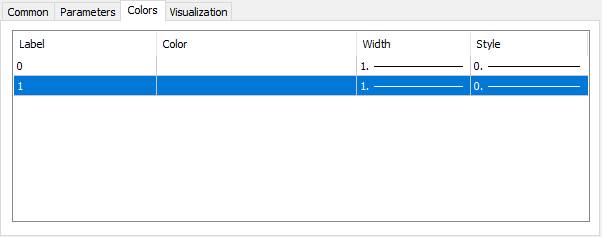
Image 05
Please note that we do not have any information about what exactly can be configured or how to do it. However, once the indicator has loaded, we can open it again, and in that case, the result will be as shown below.
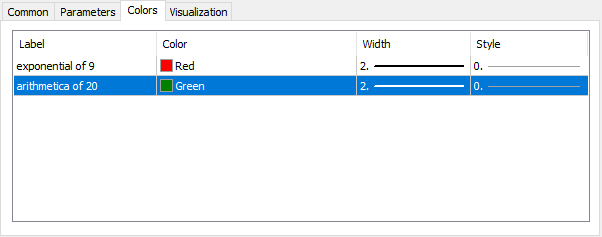
Image 06
Note that now, since the code in lines 34 through 38 has been executed for the first time, we have information that actually makes sense. And this is particularly interesting for the following reason. Please note that in lines 35, 36, and 37, we specify fixed values. However—and this is the interesting part—these same values will be overwritten by the ones specified in the window shown in Image 06. In other words, even if you set them a certain way when writing code, MetaTrader 5 will give priority to the values specified by the user. This gives us much more flexibility than many people might imagine just by looking at the code.
If we take all of this into account and consider the situation carefully, it's easy to see that we can improve this code even further with some very simple changes. In fact, I'll show these changes in the next code snippet.
                   .
                   .
                   .
10. //+------------------------------------------------------------------+
11. const struct stAverange
12. {
13.    uint           nPeriods;
14.    ENUM_MA_METHOD Method;
15.    color          cor;
16. }Averange[] =
17. {
18.    {9, MODE_EMA, clrRed},
19.    {20, MODE_SMA, clrGreen}
20. };
21. //+----------------+
                   .
                   .
                   .
37.       PlotIndexSetString(c, PLOT_LABEL, StringFormat("%s of %d", (Averange[c].Method == MODE_EMA ? "Exponential" : "Arithmetica"), Averange[c].nPeriods));
                   .
                   .
                   .
Code snippet 01
Please note that everything is now much simpler and that this could have been done from the very beginning. But since there was an opportunity to show something different, I decided to take advantage of it so that you could learn something new. Something that many people might not understand if they see it in some of my other code.
Okay, everything looks really beautiful and wonderful. However, despite this, there is still one limitation in our code. Even code snippet 08, which already looks quite suitable, can still be improved to arrive at the solution I want to present in this article. This is because we still have a problem with lines 8 and 9 of code snippet 08. As you can see, we still have to change these numbers manually. Okay, but isn't there another way that would make things even easier for us? Yes, my dear reader, there is one more way. But before I show it to you, I need to explain one more thing. Please note that in both lines—the eighth and the ninth—we have specified the same value. Could we use a declaration instead? Well, let's see. To do this, let's modify the code as shown in the following code snippet.
01. //+------------------------------------------------------------------+
02. #property copyright "Daniel Jose"
03. //+------------------------------------------------------------------+
04. #property description "DEMO Indicator"
05. //+------------------------------------------------------------------+
06. #define nAveranges                  2
07. //+------------------------------------------------------------------+
08. #property indicator_chart_window
09. #property indicator_applied_price   PRICE_CLOSE
10. #property indicator_buffers         nAveranges;
11. #property indicator_plots           nAveranges;
12. //+------------------------------------------------------------------+
13. const struct stAverange
14. {
15.    uint           nPeriods;
16.    ENUM_MA_METHOD Method;
17.    color          cor;
18. }Averange[] =
                   .
                   .
                   .
Code snippet 02
"Hmm, that's interesting. I didn't know we could do that. I like this because, if I need to change something, all I have to do now is change the value in the sixth line, and that takes care of it. But when I really think about it, it doesn't seem all that surprising to me. Now I remember that the article 'From Basic to Intermediate: Definitions (II)' mentioned that macro definitions can be used for many things." That's true, my dear reader. But the idea of using a macro definition is just a small detail that will help you understand something else. Now let's modify code snippet 02 so that it looks as shown below.
01. //+------------------------------------------------------------------+
02. #property copyright "Daniel Jose"
03. //+------------------------------------------------------------------+
04. #property description "DEMO Indicator"
05. //+------------------------------------------------------------------+
06. const int nAveranges = 2;
07. //+------------------------------------------------------------------+
08. #property indicator_chart_window
09. #property indicator_applied_price   PRICE_CLOSE
10. #property indicator_buffers         nAveranges;
11. #property indicator_plots           nAveranges;
12. //+------------------------------------------------------------------+
13. const struct stAverange
14. {
15.    uint           nPeriods;
16.    ENUM_MA_METHOD Method;
17.    color          cor;
18. }Averange[] =
                   .
                   .
                   .
Code snippet 03
Now pay close attention, because we're going to do something pretty unusual. Notice that the only difference between code snippet 02 and code snippet 03 is line six. Only that line has been changed. However, if you try to compile the indicator code, you will receive the following message from the compiler.

Image 07
So, the compiler reports an error. This error indicates that the compiler was unable to determine what to do on lines 10 and 11. However, that is precisely what makes the system I am teaching you to create so interesting, my dear reader. The compiler was unable to interpret what we did in code snippet 03. But if we change the code this time to produce the result shown below, what will happen?
01. //+------------------------------------------------------------------+
02. #property copyright "Daniel Jose"
03. //+------------------------------------------------------------------+
04. #property description "DEMO Indicator"
05. //+------------------------------------------------------------------+
06. const struct stAverange
07. {
08.    uint           nPeriods;
09.    ENUM_MA_METHOD Method;
10.    color          cor;
11. }Averange[] =
12. {
13.    {9, MODE_EMA, clrRed},
14.    {20, MODE_SMA, clrGreen},
15.    {50, MODE_SMA, clrBlue},
16.    {200, MODE_SMA, clrBlack}
17. };
18. //+----------------+
19. #property indicator_chart_window
20. #property indicator_applied_price   PRICE_CLOSE
21. #property indicator_buffers         Averange.Size();
22. #property indicator_plots           Averange.Size();
23. //+------------------------------------------------------------------+
24. struct stInfos
25. {
26.    double   Buff_iMA[];
27.    int      Handle;
28. }Infos[Averange.Size()];
29. //+------------------------------------------------------------------+
30. int OnInit(void)
31. {
32.    for (uint c = 0; c < Averange.Size(); c++)
33.    {
34.       SetIndexBuffer(c, Infos[c].Buff_iMA, INDICATOR_DATA);
35.       PlotIndexSetInteger(c, PLOT_DRAW_TYPE, DRAW_LINE);
36.       PlotIndexSetInteger(c, PLOT_LINE_STYLE, STYLE_SOLID);
37.       PlotIndexSetInteger(c, PLOT_LINE_WIDTH, 2);
38.       PlotIndexSetInteger(c, PLOT_LINE_COLOR, Averange[c].cor);
39.       PlotIndexSetString(c, PLOT_LABEL, StringFormat("%s of %d", (Averange[c].Method == MODE_EMA ? "Exponential" : "Arithmetica"), Averange[c].nPeriods));
40.       if ((Infos[c].Handle = iMA(NULL, NULL, Averange[c].nPeriods, 0, Averange[c].Method, _AppliedTo)) == INVALID_HANDLE)
41.       {
42.          Print("Could not start the indicator...");
43.          return INIT_FAILED;
44.       };
45.    }
46.
47.    return INIT_SUCCEEDED;
48. };
49. //+------------------------------------------------------------------+
50. int OnCalculate(const int rates_total, const int prev_calculated, const int begin, const double &price[])
51. {
52.    for (uint c = 0; c < Averange.Size(); c++)
53.    {
54.        ArrayInitialize(Infos[c].Buff_iMA, EMPTY_VALUE);
55.       CopyBuffer(Infos[c].Handle, 0, 0, Averange[c].nPeriods, Infos[c].Buff_iMA);
56.    }
57.
58.    return rates_total;
59. };
60. //+------------------------------------------------------------------+
61. void OnDeinit(const int reason)
62. {
63.    for (uint c = 0; c < Averange.Size(); c++)
64.       IndicatorRelease(Infos[c].Handle);
65. };
66. //+------------------------------------------------------------------+
Code 09
As a result, you'll get what's shown in the following image.
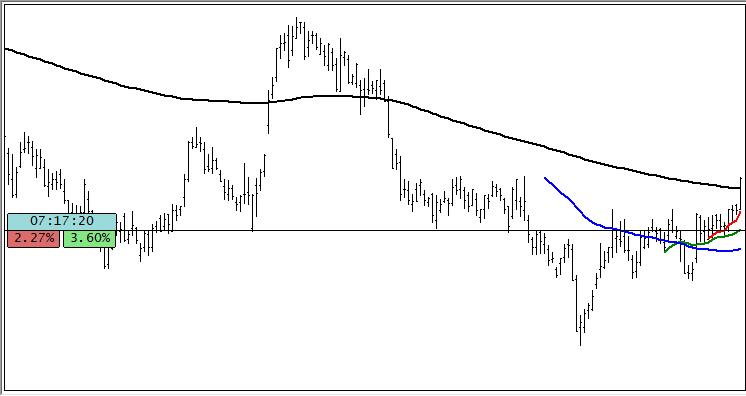
Image 08
"But wait a minute. You're not leaving until you explain to me what that was. How is that possible? What kind of strange and ridiculous code did you create? But just a short while ago, it seemed like this wouldn't work. "And now you come along and do something like this?" Well, my dear reader, that's exactly where I was heading. Code 09 is much more practical because all you need to do to plot more or fewer moving averages on the chart is to add them to the constant declaration on line six. In this case, I'm declaring four different moving averages, but if you need more—or perhaps fewer—you'll only need to change this part of the code. Once you've done that, the compiler will adapt the code to what you've declared there, and you won't have to change anything else in the code.
Such knowledge isn't acquired overnight. That's because I know how the compiler interprets certain parts of the code—after all, I've been studying and practicing this for years. Note that even though code snippet 03 doesn't work, that doesn't mean the compiler won't understand it if we try to do something in a certain way. The fact that the compiler did not interpret code snippet 03 the way we wanted did not prevent it from understanding code snippet 09. And in the end, we managed to create something that many would have previously considered impossible.
Concluding Thoughts
This article turned out to be quite interesting, even though there were many parts where I wasn't particularly enthusiastic. The thing is, what we've done here is so routine to me that it seems boring, and many of you probably already know this. However, as I looked through other people's code, I eventually realized that many of them didn't even know that was possible. And if the final code example had simply been shown without first properly explaining how to arrive at it, many people would undoubtedly have understood nothing in it at all—and, above all, would not have understood why code snippet 09 works.
So, here's some advice for everyone. Try to learn and practice by doing things a little differently. Eventually, you'll discover that there are much simpler solutions to problems that everyone seems to be trying to solve in the same way. So enjoy the attached code, and see you in the next article.
| MQ5 File | Description |
|---|---|
| Indicators\Code 01 | Basic Demonstration |
| Indicators\Code 02 | Basic Demonstration |
| Indicators\Code 03 | Basic Demonstration |
| Scripts\Code 01 | Basic Demonstration |
| Scripts\Code 02 | Basic Demonstration |
Translated from Portuguese by MetaQuotes Ltd.
Original article: https://www.mql5.com/pt/articles/17070
Warning: All rights to these materials are reserved by MetaQuotes Ltd. Copying or reprinting of these materials in whole or in part is prohibited.
This article was written by a user of the site and reflects their personal views. MetaQuotes Ltd is not responsible for the accuracy of the information presented, nor for any consequences resulting from the use of the solutions, strategies or recommendations described.

 A Grid Expert Advisor Based on a Cellular Automaton with Online Learning in MQL5 (Part I): Continuous Adaptation of the Trading Model on Each Bar
 Building a Trade Replay Tool in MQL5
 Features of Experts Advisors
 Neural Networks in Practice: Gradient Descent

- Free trading apps
- Over 8,000 signals for copying
- Economic news for exploring financial markets
You agree to website policy and terms of use