

From Basic to Intermediate: Operator Overloading (VI)
 166
166
 0
0

Introduction
In the previous article, “From Basic to Intermediate: Operator Overloading (V),” which, in my opinion, was one of those articles that beginners should study slowly and carefully, we covered the first part of implementing a doubly linked list using operator overloading in a fairly clean way. And all of this is possible within the capabilities of MQL5. As I was writing and explaining this, it became clear that I would have to make some sacrifices to keep the article from becoming too confusing or too long, so I decided to split the material into two articles.
If you haven't read the previous article or didn't fully understand what was discussed in it, please go back and read it before starting this one. Without understanding what we covered there, it will be virtually impossible to understand what we'll see here, given the type of implementation we're about to move on to.
Most of the techniques and concepts we'll cover in this article are based on my experience programming in C and C++. So take your time and study this material carefully, because we'll cover topics that, in my opinion, an intermediate-level programmer should master. Since we have a lot to talk about, let's get right to the main topic of this article.
An Interesting Linked List (II)
Thanks to what we did in the previous article, we already have mechanisms for adding elements to and reading elements from a linked list. However, what we implemented there is NOT yet enough to produce a fully functional list. First, because we don't yet have a mechanism for deleting elements. Second, when we read the list, it is destroyed, and we need to fix that. Third, we cannot access its elements randomly, since this mechanism has not yet been implemented.
As for this third point, the article “From Basic to Intermediate: Operator Overloading (IV)” explained one small detail that we should keep in mind. However, there is a way to get around this minor limitation. To do this, we'll use a different technique, although it doesn't quite work the way you might imagine. Please keep in mind that the information presented in the article mentioned above is still relevant. Nevertheless, we can organize the code in such a way as to implement this third point.
All right, then let's start with the simplest thing and gradually move on to more complex topics. Since the second and third points are closely related, in a sense they can be viewed as a single task. Although, in reality, it's not even a challenge—and you'll soon see why. This will be a little easier to understand than the section on the deletion of list elements using operator overloading.
So, let's go back to what we've already implemented: that will be our starting point.
01. //+------------------------------------------------------------------+
02. #property copyright "Daniel Jose"
03. //+------------------------------------------------------------------+
04. #include "Include\C_Demo_01.mqh"
05. //+------------------------------------------------------------------+
06. void OnStart(void)
07. {
08.     C_Demo <char> demo;
09.
10.     demo << 10;
11.     demo << 84;
12.     demo << -6;
13.     demo[2] <<= 35;
14.     demo[0] <<= 47;
15.     demo[4] <<= 110;
16.     demo.Debug(__FUNCTION__, __LINE__);
17.
18.     for (char info; demo >> info;)
19.         Print(info);
20. };
21. //+------------------------------------------------------------------+
Code 01
01. //+------------------------------------------------------------------+
02. #property copyright "Daniel Jose"
03. //+------------------------------------------------------------------+
04. template <typename T> class C_Demo
05. {
06.     private:
07. //+----------------+
08.         T           m_info;
09.         C_Demo <T>  *m_prev,
10.                     *m_next;
11. //+----------------+
12. #define def_Adjust(x) (m_prev = (m_prev == NULL ? x : ((*m_prev).m_prev != NULL ? (*m_prev).m_prev : m_prev)))
13. //+----------------+
14.         void Debug_Private(string fn, uint line)
15.         {
16.             Print("===== DEBUG [", fn, " :: ", line, "]=====");
17.             for (C_Demo <T> *loc = m_prev; (loc != NULL); loc = (*loc).m_next)
18.                 PrintFormat("0x%06X ->> 0x%06X <<- 0x%06X = [%d]", (*loc).m_prev, loc, (*loc).m_next, (*loc).m_info);
19.             Print("=================");
20.         }
21. //+----------------+
22.     public:
23. //+----------------+
24.         C_Demo() : m_next(NULL), m_prev(NULL) {}
25. //+----------------+
26.         void operator<<(const T arg)
27.         {
28.             C_Demo <T>  *loc = new C_Demo <T>;
29.
30.             (*loc).m_info = arg;
31.             (*loc).m_prev = m_next;
32.             if (m_next != NULL) (*m_next).m_next = loc;
33.             m_next = loc;
34.             m_prev = def_Adjust(loc);
35.         }
36. //+----------------+
37.         bool operator>>(T &arg)
38.         {
39.             C_Demo <T>  *loc = def_Adjust(m_prev);
40.             if (loc == NULL) return false;
41.             arg = (*loc).m_info;
42.             if ((m_prev = (*loc).m_next) != NULL) (*m_prev).m_prev = NULL;
43.             delete loc;
44.
45.             return true;
46.         }
47. //+----------------+
48.         C_Demo <T> *operator[](const uint arg)
49.         {
50.             C_Demo <T> *loc = def_Adjust(m_prev);
51.             for (uint c = 0; (loc != NULL) && (c < arg); loc = (*loc).m_next, c++);
52.             return loc;
53.         }
54. //+----------------+
55.         void operator=(const T arg)
56.         {
57.             m_info = arg;
58.         }
59. //+----------------+
60.         void operator<<=(const T arg)
61.         {
62.             C_Demo <T>  *loc = new C_Demo <T>;
63.
64.             (*loc).m_info = arg;
65.             (*loc).m_next = GetPointer(this);
66.             (*loc).m_prev = m_prev;
67.             if (m_prev != NULL) (*m_prev).m_next = loc;
68.             m_prev = loc;
69.         }
70. //+----------------+
71.         void Debug(string fn, uint line)
72.         {
73.             m_prev = def_Adjust(m_prev);
74.             Debug_Private(fn, line);
75.         }
76. //+----------------+
77. #undef def_Adjust
78. //+----------------+
79. };
80. //+------------------------------------------------------------------+
Code 02
Okay, when we run Code 01, we get the result shown below.
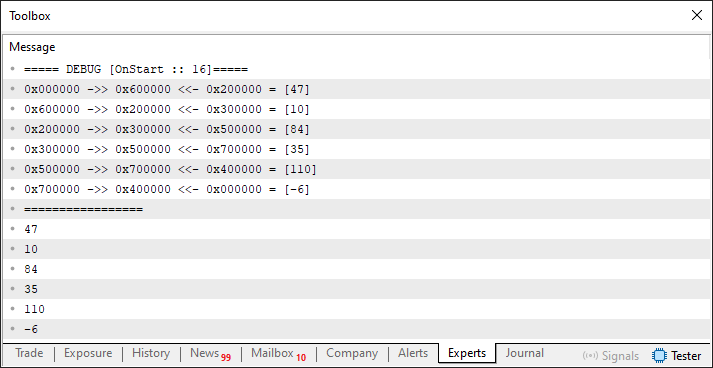
Figure 01
Great. Now we can get started. The article “From Basic to Intermediate: Classes (III)” explained some details regarding class lifetime. Now think about this: since in many cases we won't be iterating through the entire list from our main code to destroy it and free the allocated memory, we need to implement a destructor in the class we discussed in Code 02. This will prevent MetaTrader 5 from displaying warnings when a variable containing a list is destroyed without first freeing the allocated memory. It's very simple and easy to do. All we need to do is add the code snippet shown below to Code 02.
                   .
                   .
                   .
25. //+----------------+
26.         ~C_Demo()
27.         {
28.             for (T loc; this >> loc;);
29.         }
30. //+----------------+
                   .
                   .
                   .
Snippet 01
This means we no longer need to worry about errors caused by allocated memory not being freed. Great, now we can focus on random access to list elements, since during sequential reading, elements may be deleted as they are read. By contrast, random access will not destroy the list, allowing us to better control the operations performed on it. As a result, the list will become much more functional.
Since I want you to review every change we make here and understand it step by step, I'll use different files whenever possible. This way, you'll have access to all the code I deem necessary to include in the attachments. In any case, try to test everything we cover in this article so you can better understand how each change will affect the final result.
All right, then let's move on to the first test. To do this, we'll use the code shown below.
01. //+------------------------------------------------------------------+
02. #property copyright "Daniel Jose"
03. //+------------------------------------------------------------------+
04. #include "Include\C_Demo_02.mqh"
05. //+------------------------------------------------------------------+
06. void OnStart(void)
07. {
08.     C_Demo <char> demo;
09.
10.     demo << 10;
11.     demo << 84;
12.     demo << -6;
13.     demo[2] <<= 35;
14.     demo[0] <<= 47;
15.     demo[4] <<= 110;
16.     demo.Debug(__FUNCTION__, __LINE__);
17.     demo[3] = 18;
18.     demo.Debug(__FUNCTION__, __LINE__);
19. };
20. //+------------------------------------------------------------------+
Code 03
When executed, this code produces the result shown below.
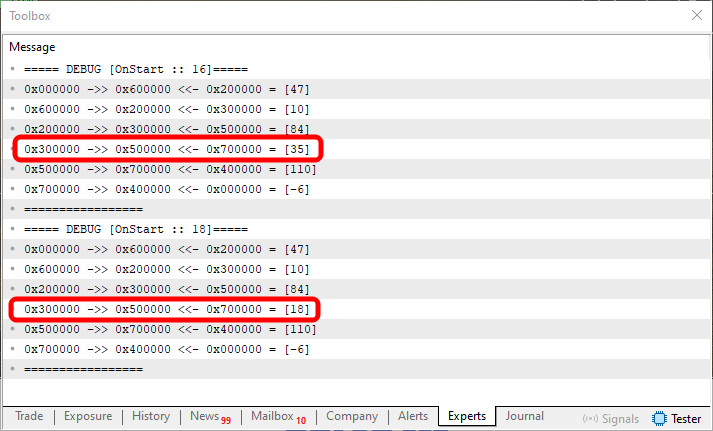
Figure 02
In other words, we have no problems changing a value in a linked list. In addition, we can verify that the destructor works flawlessly. However, if we want to read the contents of a specific element, we'll need to add the code shown in the following snippet to the header file.
                   .
                   .
                   .
75. //+----------------+
76.         void GetElement(T &arg)
77.         {
78.             arg = m_info;
79.         }
80. //+----------------+
                   .
                   .
                   .
Snippet 02
The most troublesome thing about Snippet 02 is that our code will now use more than just operator overloading. Nevertheless, we'll be able to read any element whenever we want. To do this, we'll need to use what's shown in the following code.
01. //+------------------------------------------------------------------+
02. #property copyright "Daniel Jose"
03. //+------------------------------------------------------------------+
04. #include "Include\C_Demo_02.mqh"
05. //+------------------------------------------------------------------+
06. void OnStart(void)
07. {
08.     char info;
09.     C_Demo <char> demo;
10.
11.     demo << 10;
12.     demo << 84;
13.     demo << -6;
14.     demo[2] <<= 35;
15.     demo[0] <<= 47;
16.     demo[4] <<= 110;
17.     demo[3] = 18;
18.     demo.Debug(__FUNCTION__, __LINE__);
19.     for (uint pos = 1; pos < 3; pos++)
20.     {
21.         demo[pos].GetElement(info);
22.         Print("The content of position ", pos, " is ", info);
23.     }
24. };
25. //+------------------------------------------------------------------+
Code 04
Take a look at what happens in the loop on line 19 of Code 04. It is right here—or, more precisely, on line 21—that we get the value at the requested position. By doing it this way, WE DO NOT DELETE THE ELEMENT FROM THE LIST. We simply read it, and the element remains in place, ready to be reused.
Well, I don't think anything we've seen so far is particularly difficult; in fact, it's pretty easy to understand. In any case, the result of running Code 04 is shown below.
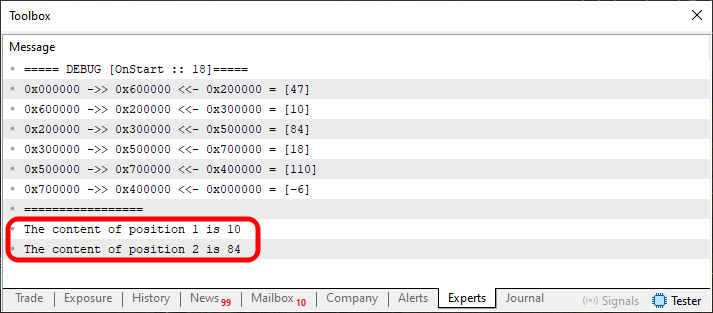
Figure 03
Now, my dear reader, take a moment to reflect on what we've seen so far. We can modify the code so that operator overloading is also used on line 21 of Code 04. To do this, we simply need to modify Snippet 02 as shown below.
                   .
                   .
                   .
75. //+----------------+
76.         void operator>>=(T &arg)
77.         {
78.             arg = m_info;
79.         }
80. //+----------------+
                   .
                   .
                   .
Snippet 03
After that, we can modify the loop in Code 04 as shown below.
                   .
                   .
                   .
19.     for (uint pos = 1; pos < 3; pos++)
20.     {
21.         demo[pos] >>= info;
22.         Print("The content of position ", pos, " is ", info);
23.     }
                  .
                  .
                  .
Snippet 04
Look how interesting this is. Essentially, the code continues to work exactly the same way. However, looking at line 21 in Snippet 04, many people might think that this is an entirely different piece of code.
See, it's actually not that hard to adapt the code to use operator overloading, is it? We just need to take certain precautions so as not to ruin the code or make it completely unreadable.
Well, line 21 might seem rather strange. Actually, it's not all that strange, my dear reader. If you look closely, you'll see that this is equivalent to what we see in lines 14 through 16. We can even implement operator overloading to use this code in much more unusual ways, as shown in the example below.
                   .
                   .
                   .
75. //+----------------+
76.         T operator>>=(T &arg)
77.         {
78.             return (arg = m_info);
79.         }
80. //+----------------+
                   .
                   .
                   .
Snippet 05
01. //+------------------------------------------------------------------+
02. #property copyright "Daniel Jose"
03. //+------------------------------------------------------------------+
04. #include "Include\C_Demo_02.mqh"
05. //+------------------------------------------------------------------+
06. void OnStart(void)
07. {
08.     char info;
09.     C_Demo <char> demo;
10.
11.     demo << 10;
12.     demo << 84;
13.     demo << -6;
14.     demo[2] <<= 35;
15.     demo[0] <<= 47;
16.     demo[4] <<= 110;
17.     demo[3] = 18;
18.     demo.Debug(__FUNCTION__, __LINE__);
19.     for (uint pos = 1; pos < 3; pos++)
20.         Print("The content of position ", pos, " is ", demo[pos] >>= info);
21. };
22. //+------------------------------------------------------------------+
Code 05
Although these changes may look like new code, they allow us to modify the structure of the main code itself, as you can see by examining the loop on line 19 of Code 05.
All right, let's leave that part for now. I think by now everyone has figured out what we can and cannot do. Now things will take a different turn, because we're going to implement the deletion of list elements.
Since this part usually causes much more confusion than anything we've covered so far, we'll simplify our list even further. This way, the explanation will be clearer, and it will be easier to understand what is happening.
The problem with implementing deletion using the code you've seen so far lies specifically in the class's destructor. Without it, MetaTrader 5 will display warnings about unreleased resources. With the destructor, however, the code will crash every time we try to delete an element that is not at the list's base position. This can be fixed while retaining the code you've seen so far. However, it is much easier to make some changes to the header file's code than to implement a solution in any other way.
So, we'll modify the header file so that it looks like the example below.
01. //+------------------------------------------------------------------+
02. #property copyright "Daniel Jose"
03. //+------------------------------------------------------------------+
04. template <typename T> class C_NODE
05. {
06.     private :
07. //+----------------+
08.         T           m_info;
09.         C_NODE <T>  *m_next,
10.                     *m_prev;
11. //+----------------+
12.     public  :
13. //+----------------+
14.         C_NODE(const T arg1, C_NODE <T> *arg2, C_NODE <T> *arg3) : m_info(arg1), m_prev(arg2), m_next(arg3) {}
15. //+----------------+
16.         const T info(void) { return m_info; }
17. //+----------------+
18.         C_NODE <T> *prev(void) { return m_prev; }
19. //+----------------+
20.         C_NODE <T> *next(void) { return m_next; }
21. //+----------------+
22.         void setPrev(C_NODE <T> *arg) { m_prev = arg; }
23. //+----------------+
24.         void setNext(C_NODE <T> *arg) { m_next = arg; }
25. //+----------------+
26.         void operator=(const T arg) { m_info = arg; }
27. //+----------------+
28.         T operator>>=(T &arg) const { return (arg = m_info); }
29. //+----------------+
30.         void operator<<=(const T arg)
31.         {
32.             C_NODE <T>  *loc = new C_NODE<T>(arg, m_prev, GetPointer(this));
33.             if (m_prev != NULL) (*m_prev).m_next = loc;
34.             m_prev = loc;
35.         }
36. //+----------------+
37. };
38. //+------------------------------------------------------------------+
39. template <typename T> class C_Demo
40. {
41.     private :
42. //+----------------+
43.         C_NODE <T>  *m_Base,
44.                     *m_Top;
45. //+----------------+
46.         C_NODE<T> *AdjustBase(C_NODE <T> *arg) { return m_Base = (m_Base == NULL ? arg : ((*m_Base).prev() == NULL ? m_Base : (*m_Base).prev())); }
47. //+----------------+
48.     public  :
49. //+----------------+
50.         C_Demo(): m_Base(NULL), m_Top(NULL) {}
51. //+----------------+
52.         ~C_Demo()
53.         {
54.             for(C_NODE <T> *ptr = (*m_Top).prev(); m_Top != NULL; m_Top = ptr, ptr = (ptr != NULL ? (*m_Top).prev() : NULL))
55.                 delete m_Top;
56.         }
57. //+----------------+
58.         void operator<<(const T arg)
59.         {
60.             C_NODE <T> *tmp = m_Top;
61.
62.             m_Top = new C_NODE <T> (arg, m_Top, NULL);
63.             if (tmp != NULL) tmp.setNext(m_Top);
64.             AdjustBase(m_Top);
65.         }
66. //+----------------+
67.         bool operator>>(T &arg)
68.         {
69.             C_NODE <T> *tmp;
70.
71.             if ((tmp = AdjustBase(m_Base)) == NULL) return false;
72.             arg = (*m_Base).info();
73.             if ((m_Base = (*m_Base).next()) != NULL) (*m_Base).setPrev(NULL);
74.             delete tmp;
75.             return true;
76.         }
77. //+----------------+
78.         C_NODE <T> *operator[](const uint arg)
79.         {
80.             C_NODE <T> *loc = AdjustBase(m_Base);
81.             for (uint c = 0; (loc != NULL) && (c < arg); loc = (*loc).next(), c++);
82.             return loc;
83.         }
84. //+----------------+
85.         void Debug(string fn, uint line)
86.         {
87.             Print("===== DEBUG [", fn, " :: ", line, "]=====");
88.             for (C_NODE<T>*loc = AdjustBase(m_Base); (loc != NULL); loc = (*loc).next())
89.                 PrintFormat("0x%06X ->> 0x%06X <<- 0x%06X = [%d]", (*loc).prev(), loc, (*loc).next(), (*loc).info());
90.             Print("=================");
91.         }
92. //+----------------+
93. };
94. //+------------------------------------------------------------------+
Code 06
Code 06 is much simpler than all the others we've looked at so far. Nevertheless, it has the same capabilities as the code shown above. That's why I think it's completely unnecessary to explain it, since everything it does has already been shown by this point. And I'm absolutely certain that any of you following along with this explanation will have no trouble understanding how this code works.
"Then why didn't you show it to us sooner? Why are you showing this code only now?" Well, my dear reader, there's a good reason for that. If this code 06 had been shown earlier, you probably wouldn't have been able to figure out how it works. Here, the C_Demo class manages the list, and the C_NODE class creates the elements.
To see this for yourself, just take a look at line 62 of code 06. This line creates a new element almost entirely automatically. Once it has been created, all that remains is to set the pointers to the previous and next elements, which is done in lines 63 and 64. Notice how much simpler this is than all the setup we had to do before.
Why was it important to get to code 06? The thing is, without it, it would be much harder to implement deletion the way I want to show you. It would be possible to do this, but the level of complexity would ultimately undermine the explanation and understanding of the concept we intend to use.
Now that we understand this, we can finally begin implementing the deletion code. We'll take our time, because we're going to use something that, if you know only one or two programming languages, might seem completely meaningless to you. The mechanism we'll ultimately use actually comes from C and C++. As far as I know, and based on what I've seen in MQL5 code, this technique has never been used. At least, I haven't found any mention of it.
All right, let's not waste any time and get right to what we're interested in. To implement the deletion procedure based on code 06, which we just reviewed, we only need to do a few things. With this code, we can do it very easily. Essentially, all we need to do is add the code snippet shown below.
001. //+------------------------------------------------------------------+
002. #property copyright "Daniel Jose"
003. //+------------------------------------------------------------------+
004. template <typename T> class C_NODE
005. {
                   .
                   .
                   .
015. //+----------------+
016.         ~C_NODE()
017.         {
018.             if (m_prev != NULL) (*m_prev).m_next = m_next;
019.             if (m_next != NULL) (*m_next).m_prev = m_prev;
020.         }
021. //+----------------+
                   .
                   .
                   .
043. };
044. //+------------------------------------------------------------------+
045. template <typename T> class C_Demo
046. {
                   .
                   .
                   .
090. //+----------------+
091.         void Exclude(const uint arg)
092.         {
093.             C_NODE <T> *loc = AdjustBase(m_Base);
094.             for (uint c = 0; (loc != NULL) && (c < arg); loc = (*loc).next(), c++);
095.             delete loc;
096.         }
097. //+----------------+
                   .
                   .
                   .
106. };
107. //+------------------------------------------------------------------+
Snippet 06
"What? Is that all we need to add to the code? I can't believe it. You must be joking." Yes, my dear reader, it's true: that's all we need to add. However, there is one small problem, though we'll get to that later. First, let's check to see if this modified code actually works. To test this, we'll use the code shown below.
01. //+------------------------------------------------------------------+
02. #property copyright "Daniel Jose"
03. //+------------------------------------------------------------------+
04. #include "Include\C_Demo_04.mqh"
05. //+------------------------------------------------------------------+
06. void OnStart(void)
07. {
08.     C_Demo <char> demo;
09.
10.     demo << 10;
11.     demo << 84;
12.     demo << -6;
13.     demo[2] <<= 35;
14.     demo[0] <<= 47;
15.     demo[4] <<= 110;
16.     demo[3] = 18;
17.     demo.Debug(__FUNCTION__, __LINE__);
18.     demo.Exclude(4);
19.     demo.Debug(__FUNCTION__, __LINE__);
20. };
21. //+------------------------------------------------------------------+
Code 07
All right, now let's run Code 07. Remember that in line 18, we request the deletion of the list element at index four. And don't forget: the numbering starts at zero precisely because of line 94 of Snippet 06. Therefore, when we run this code, we will get the result shown in the following figure.
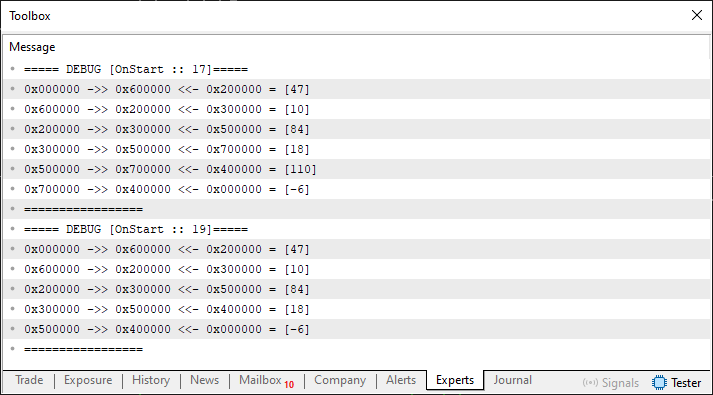
Figure 04
Great, everything worked out just perfectly. However, there is a small problem: Snippet 06 only handles the deletion of list elements in the middle of the list correctly. In fact, we can also delete the nodes at either end of the list, but doing so will cause a crash because the pointers are not updated correctly. To see this more clearly, let's try deleting the element with a value of 47, since it is at index 0. All we need to do is replace the contents of line 18 of Code 07 with what is shown below.
demo.Exclude(0); Now, when we run the code again, we'll get the result shown in the following figure.
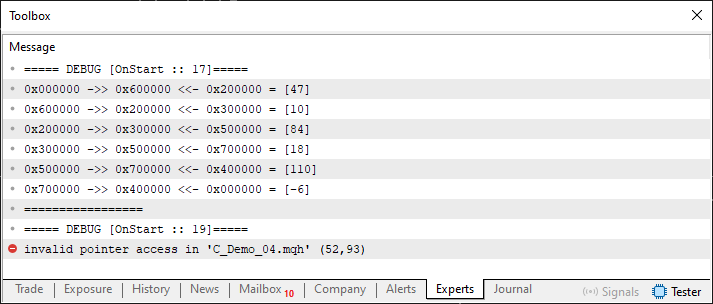
Figure 05
Well, that was a little strange. Now let's try deleting the element whose value is -6. Its index is 5. So we need to replace that same line shown above with the one shown below.
demo.Exclude(5); The result is shown in the following figure.
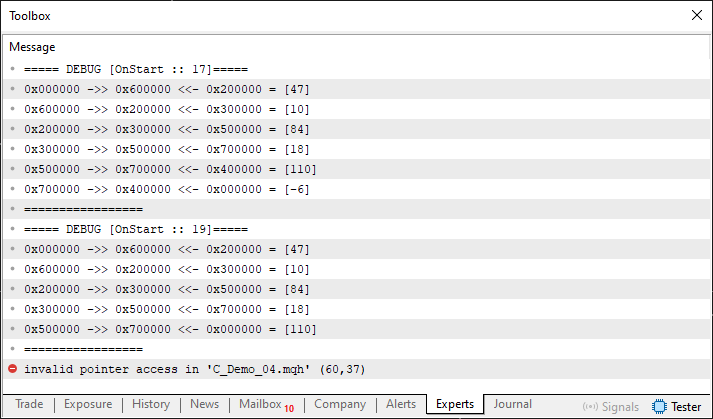
Figure 06
Now that's pretty strange. In Figure 06, we can clearly see that the pointers inside the node were updated correctly thanks to the destructor shown in Snippet 06. However, since the pointers were not updated correctly, the code simply crashes. This is one of those situations where different approaches can be used to solve the problem, and each has its own advantages and disadvantages. Nevertheless, in this article, for teaching purposes, I will offer you, my dear reader, the solution shown below.
                   .
                   .
                   .
090. //+----------------+
091.         void Exclude(const uint arg)
092.         {
093.             C_NODE <T>  *loc = AdjustBase(m_Base),
094.                         *ptr = NULL,
095.                         *tmp;
096.             for (uint c = 0; (loc != NULL) && (c < arg); ptr = loc, loc = (*loc).next(), c++);
097.             tmp = (*loc).next();
098.             delete loc;
099.             if (ptr != NULL) m_Top = ((*ptr).next() == NULL ? ptr : m_Top);
100.                 else m_Base = tmp;
101.         }
102. //+----------------+
                   .
                   .
                   .
Snippet 07
Now, using what is shown in Snippet 07, we can finally solve the problem of deleting the nodes at either end of the list, as you can see for yourself by running Code 07 again with the changes discussed above. But just out of curiosity, let's see what happens when we delete the topmost node. This is shown in the following figure.
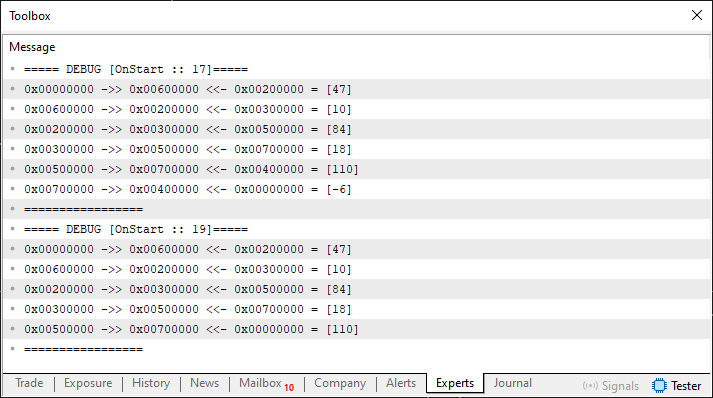
Figure 07
Just perfect. Notice that solving the problem of element deletion turned out to be much easier than we had initially imagined. However, that's not exactly what I want to show here. Here, I want to show you how this can be done using operator overloading. Now I ask you to pay even closer attention to what I'm about to explain, because at first it might all seem rather confusing. To begin explaining what we need to do, let's highlight a section of the code. It is shown below.
                   .
                   .
                   .
083. //+----------------+
084.         C_NODE <T> *operator[](const uint arg)
085.         {
086.             C_NODE <T> *loc = AdjustBase(m_Base);
087.             for (uint c = 0; (loc != NULL) && (c < arg); loc = (*loc).next(), c++);
088.             return loc;
089.         }
090. //+----------------+
091.         void Exclude(const uint arg)
092.         {
093.             C_NODE <T>  *loc = AdjustBase(m_Base),
094.                         *ptr = NULL,
095.                         *tmp;
096.             for (uint c = 0; (loc != NULL) && (c < arg); ptr = loc, loc = (*loc).next(), c++);
097.             tmp = (*loc).next();
098.             delete loc;
099.             if (ptr != NULL) m_Top = ((*ptr).next() == NULL ? ptr : m_Top);
100.                 else m_Base = tmp;
101.         }
102. //+----------------+
                   .
                   .
                   .
Snippet 08
It is no coincidence that these two procedures, shown in Snippet 08, are next to each other. I arranged them this way on purpose so that you would understand what we're going to do. Please note that line 86 is the same as line 93, just as line 87 is the same as line 96. The only difference between them is in line 88, and line 98 performs a similar operation, albeit for a different purpose. And why do I want you to pay attention to these lines, my dear reader? Because we're going to overload the subscript operator to delete a list element.
"But wait. How are you going to do that?" Well, that's exactly where the confusion lies. So let's take our time, because I want you to fully understand the concept we'll be using here.
If you look closely, you'll notice that in various situations when working with pointers, we use the NULL constant to check whether a value is valid. And when the `delete` operator destroys an element, as happens in line 98 of Snippet 08, it not only destroys it but also effectively marks that position as invalid. Therefore, this position can no longer be used in the code. If you try to access this position, you'll see that the code crashes and displays error messages similar to those shown in Figures 05 and 06. Understanding this is very important if you are to understand what we're going to do next.
Well, if you take a look at the MQL5 documentation, you'll find out what NULL means. You can see this in the “Other Constants” section. However, this is only part of what we need to do—and it’s the easiest part. In other words, if you assign NULL to a particular element, the code must interpret this assignment as a request to delete that element and free the memory it occupies, thereby modifying the linked list. That is the main idea. However, to achieve this, we'll have to take an approach that many people won't understand at first.
To make it clearer what I'm trying to show, let's take a look at what Code 07 will look like when we apply this principle. It is shown below.
01. //+------------------------------------------------------------------+
02. #property copyright "Daniel Jose"
03. //+------------------------------------------------------------------+
04. #include "Include\C_Demo_05.mqh"
05. //+------------------------------------------------------------------+
06. void OnStart(void)
07. {
08.     C_Demo <char> demo;
09.
10.     demo << 10;
11.     demo << 84;
12.     demo << -6;
13.     demo[2] <<= 35;
14.     demo[0] <<= 47;
15.     demo[4] <<= 110;
16.     demo[3] = 18;
17.     demo.Debug(__FUNCTION__, __LINE__);
18.     demo[4] = NULL;
19.     demo.Debug(__FUNCTION__, __LINE__);
20. };
21. //+------------------------------------------------------------------+
Code 08
Now pay attention: when line 18 of Code 08 is executed, we will request deletion of the element at index 4 from the list. However, when we run the code, we get the result shown below.
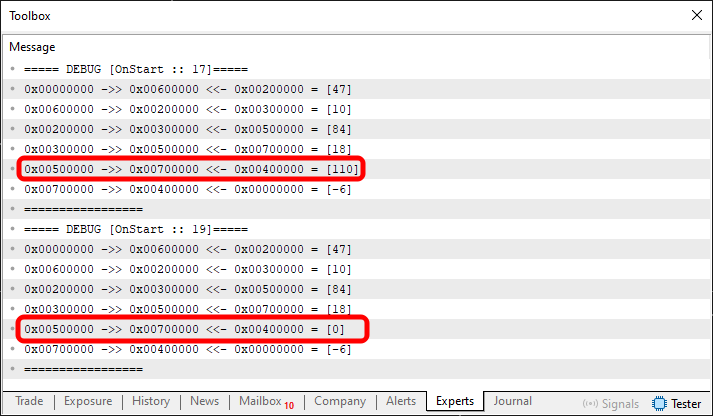
Figure 08
Please note that the element was not deleted; only its value changed—it is now zero. And now comes the confusing part. In such cases, there are two main ways to delete this element. The first method involves deleting the corresponding list element—if it exists—every time an attempt is made to assign a zero value to that element. If it doesn't exist, it won't be created and added to the list. Here's one way to do it. However, in many cases this is not suitable: depending on its purpose, the list may need to contain elements with a value of zero, possibly more than one. That's why we need to take a different approach.
To apply this approach, you'll need to review the following section in the MQL5 documentation: The `void` Type and the `NULL` Constant. And please don't judge me for what I'm about to say. What is included in the MQL5 documentation is only a part of something much more extensive. I think they present it this way specifically so as not to confuse beginner programmers. However, if you ever decide to learn C and C++, you'll come across something truly troubling: variables of type `void`.
But what could be so alarming about that? I don't understand what you're getting at. The problem, my dear reader, is that a value declared as `void` can contain data of any size. It can even change completely depending on how it is interpreted. It really is very confusing. In MQL5, the language's developers have restricted the `void` type as much as possible, preventing it from being used in the usual way as a data type. However—and it's very important that you understand this clearly—there are situations where we can indeed declare a variable of type `void` and pass it to a function or procedure.
At the same time, in many cases, we end up creating problems that are extremely difficult to fix. However, if we think it through carefully and do it right, simply using a variable of type `void` in our code can open up a world of possibilities. And for many of you—whether out of curiosity or because you might one day want to become professionals—encountering a variable of type `void` can be so confusing that it ties your mind in knots.
So, I want you to understand this: what we're about to see here must not be done without due caution. If you do this carelessly, it could lead to serious problems. The first thing we need to do to make line 18 of Code 08 tell the code to delete a specific list element is to add another overload of the assignment operator.
This topic of overloading was discussed in the article “From Basic to Intermediate: Overloading”. So, after modifying the code in the header file, we'll end up with what's shown below.
01. //+------------------------------------------------------------------+
02. #property copyright "Daniel Jose"
03. //+------------------------------------------------------------------+
04. template <typename T> class C_NODE
05. {
                   .
                   .
                   .
31. //+----------------+
32.         void operator=(const T arg) { m_info = arg; }
33. //+----------------+
34.         void operator=(void *arg)
35.         {
36.             Print(__FUNCTION__, " :: ", __LINE__, " Recognized void type variable...");
37.         }
38. //+----------------+
                   .
                   .
                   .
Snippet 09
Now, to see Snippet 09 in action, we need to modify the code as shown below.
01. //+------------------------------------------------------------------+
02. #property copyright "Daniel Jose"
03. //+------------------------------------------------------------------+
04. #include "Include\C_Demo_05.mqh"
05. //+------------------------------------------------------------------+
06. void OnStart(void)
07. {
08.     C_Demo <char> demo;
09.
10.     demo << 10;
11.     demo << 84;
12.     demo << -6;
13.     demo[2] <<= 35;
14.     demo[0] <<= 47;
15.     demo[4] <<= 110;
16.     demo[3] = 18;
17.     demo.Debug(__FUNCTION__, __LINE__);
18.     demo[4] = (void *)NULL;
19.     demo.Debug(__FUNCTION__, __LINE__);
20. };
21. //+------------------------------------------------------------------+
Code 09
Note that line 18 of Code 09 has changed again. However, this will be the last time we change it. Everything else will be implemented in the header file. Okay, when you run Code 09, you'll see what's shown in the following figure.
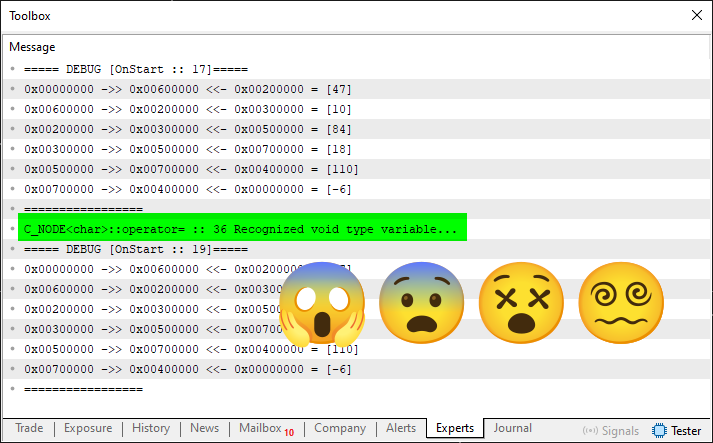
Figure 09
"Oh my God. My God, what kind of senseless madness am I seeing in Figure 09? That's definitely not God's doing. Well, well, what a load of nonsense." Take it easy, my dear reader; let's not lose our composure. I did warn you that all of this is pretty confusing. And mind you, I'm still putting it mildly. Now that you've seen that it works, we can move on to the next step: take that deletion procedure and move it into this section of code.
However, before we do that, we have one more problem. This isn't just a matter of copying and pasting, since the deletion code was implemented for use within the C_Demo class. We cannot use the same code here, in the C_NODE class, because the compiler would not be able to interpret it. Therefore, we would not achieve the result we are striving for. Therefore, we need to adapt the Exclude code from the C_Demo class so that we can use it here, in the C_NODE class. Well, isn't programming incredibly exciting? (LAUGHTER).
Right now, we're going to fix one problem and create another. Then we'll fix any issues that come up until we've completed the implementation we need. First of all, I need you to understand one thing. To do this, we will modify Snippet 09 as shown below.
01. //+------------------------------------------------------------------+
02. #property copyright "Daniel Jose"
03. //+------------------------------------------------------------------+
04. template <typename T> class C_NODE
05. {
                   .
                   .
                   .
31. //+----------------+
32.         void operator=(const T arg) { m_info = arg; }
33. //+----------------+
34.         void operator=(void *arg)
35.         {
36.             PrintFormat("0x%08X ->> 0x%08X:[%d] <<- 0x%08X", m_prev, GetPointer(this), m_info, m_next);
37.         }
38. //+----------------+
                   .
                   .
                   .
Snippet 10
Now, when we run Code 09 again, we'll see what is shown in Figure 10 below.
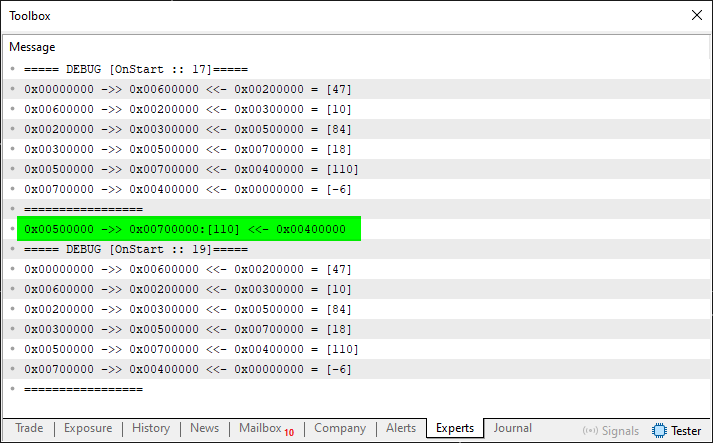
Figure 10
Notice that this highlighted area shows exactly the list element we want to delete. So, first we'll solve the problem of deleting elements from the middle of the list, and then we'll tackle the nodes at either end of the list. With this initial goal defined, we will modify Snippet 10 as shown below.
01. //+------------------------------------------------------------------+
02. #property copyright "Daniel Jose"
03. //+------------------------------------------------------------------+
04. template <typename T> class C_NODE
05. {
                   .
                   .
                   .
31. //+----------------+
32.         void operator=(const T arg) { m_info = arg; }
33. //+----------------+
34.         void operator=(void *arg)
35.         {
36.             delete GetPointer(this);
37.         }
38. //+----------------+
                   .
                   .
                   .
Snippet 11
Let's compile and run Code 09 again. Now we get the result shown below.
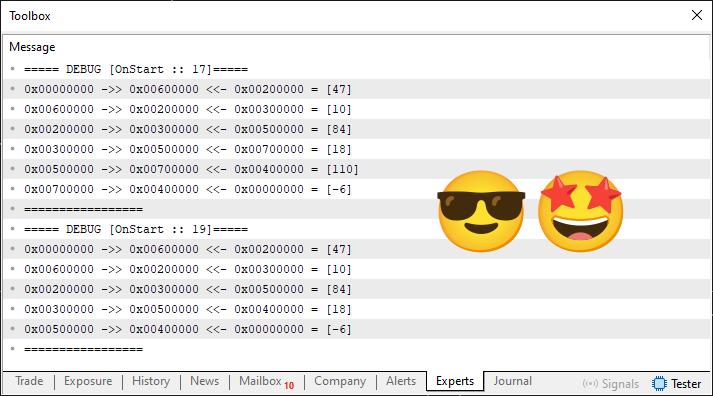
Figure 11
Great! That's wonderful. It works. That's really incredible. Take it easy, my dear reader; let's focus on what's important. We still have to solve the problem of the nodes at either end of the list, remember? Now the problem is a little more complicated than it was before. This is because we used to have our own procedure that helped us update the nodes at either end of the list. We no longer have that kind of support. We need to find a way to solve this problem. To do this, we'll modify code 09 to focus on the deletion of the topmost node. We need to replace line 18 with what is shown below.
demo[5] = (void *)NULL;
So, when we run code 09 again, we get the result shown in the following figure.
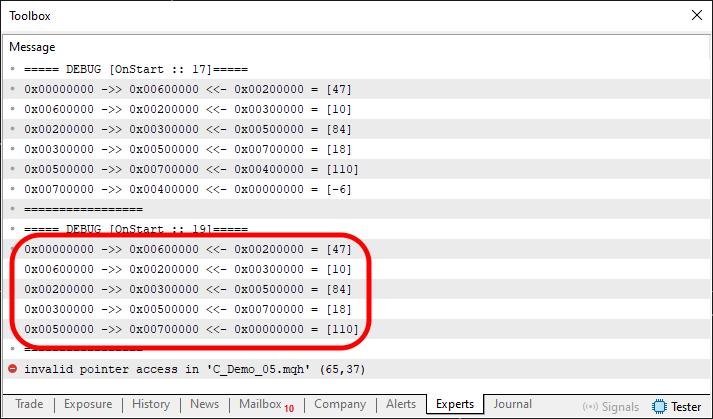
Figure 12
Please note one thing. In this highlighted section, you can see that the list structure was correctly updated after the deletion of the topmost node. However, we once again ran into the same problem we had before, as shown in Figure 06. So, if we try to delete the bottommost node of the list, we will undoubtedly end up with something similar to what is shown in Figure 05. If you'd like, you can try it later. Now let's see how we're going to fix this.
To do this, we need to understand the logical sequence of code execution. Once you understand this sequence, you'll see that the best place to fix the nodes at either end of the list is in the AdjustBase function. But how should we change it? To understand this better, we need to go back to Snippet 08. There, we can clearly see that the code for deleting an element is very similar to the code used by the subscript operator. So much so that they are both in the same snippet. Remember when I explained why I put them next to each other?
Well, it's clear that we'll need two auxiliary pointers to make everything work and so that we can adjust them later. So, to fix the code properly and handle both the nodes at either end of the list and the intermediate list elements, deleting any of them without problems, we need to use the following code.
001. //+------------------------------------------------------------------+
002. #property copyright "Daniel Jose"
003. //+------------------------------------------------------------------+
004. template <typename T> class C_NODE
005. {
006.     private :
007. //+----------------+
008.         T           m_info;
009.         C_NODE <T>  *m_next,
010.                     *m_prev;
011. //+----------------+
012.     public  :
013. //+----------------+
014.         C_NODE(const T arg1, C_NODE <T> *arg2, C_NODE <T> *arg3) : m_info(arg1), m_prev(arg2), m_next(arg3) {}
015. //+----------------+
016.         ~C_NODE()
017.         {
018.             if (m_prev != NULL) (*m_prev).m_next = m_next;
019.             if (m_next != NULL) (*m_next).m_prev = m_prev;
020.         }
021. //+----------------+
022.         const T info(void) { return m_info; }
023. //+----------------+
024.         C_NODE <T> *prev(void) { return m_prev; }
025. //+----------------+
026.         C_NODE <T> *next(void) { return m_next; }
027. //+----------------+
028.         void setPrev(C_NODE <T> *arg) { m_prev = arg; }
029. //+----------------+
030.         void setNext(C_NODE <T> *arg) { m_next = arg; }
031. //+----------------+
032.         void operator=(const T arg) { m_info = arg; }
033. //+----------------+
034.         void operator=(void *arg)
035.         {
036.             delete GetPointer(this);
037.         }
038. //+----------------+
039.         T operator>>=(T &arg) const { return (arg = m_info); }
040. //+----------------+
041.         void operator<<=(const T arg)
042.         {
043.             C_NODE <T>  *loc = new C_NODE<T>(arg, m_prev, GetPointer(this));
044.             if (m_prev != NULL) (*m_prev).m_next = loc;
045.             m_prev = loc;
046.         }
047. //+----------------+
048. };
049. //+------------------------------------------------------------------+
050. template <typename T> class C_Demo
051. {
052.     private :
053. //+----------------+
054.         C_NODE <T>  *m_Base,
055.                     *m_Top;
056. //+----------------+
057.         struct st01
058.         {
059.             C_NODE <T>  *prev,
060.                         *next;
061.         }m_aux;
062. //+----------------+
063.         C_NODE<T> *AdjustBase(C_NODE <T> *arg)
064.         {
065.             if (m_aux.prev != NULL) m_Top = ((*m_aux.prev).next() == NULL ? m_aux.prev : m_Top);
066.                 else m_Base = (m_aux.next != NULL ? ((*m_aux.next).prev() == NULL ? m_aux.next : m_Base) : m_Base);
067.             return m_Base = (m_Base == NULL ? arg : ((*m_Base).prev() == NULL ? m_Base : (*m_Base).prev()));
068.         }
069. //+----------------+
070.     public  :
071. //+----------------+
072.         C_Demo(): m_Base(NULL), m_Top(NULL) {}
073. //+----------------+
074.         ~C_Demo()
075.         {
076.             for(C_NODE <T> *ptr = (*m_Top).prev(); m_Top != NULL; m_Top = ptr, ptr = (ptr != NULL ? (*m_Top).prev() : NULL))
077.                 delete m_Top;
078.         }
079. //+----------------+
080.         void operator<<(const T arg)
081.         {
082.             C_NODE <T> *tmp = m_Top;
083.
084.             m_Top = new C_NODE <T> (arg, m_Top, NULL);
085.             if (tmp != NULL) tmp.setNext(m_Top);
086.             AdjustBase(m_Top);
087.         }
088. //+----------------+
089.         bool operator>>(T &arg)
090.         {
091.             C_NODE <T> *tmp;
092.
093.             if ((tmp = AdjustBase(m_Base)) == NULL) return false;
094.             arg = (*m_Base).info();
095.             if ((m_Base = (*m_Base).next()) != NULL) (*m_Base).setPrev(NULL);
096.             delete tmp;
097.             return true;
098.         }
099. //+----------------+
100.         C_NODE <T> *operator[](const uint arg)
101.         {
102.             C_NODE <T> *loc = AdjustBase(m_Base);
103.             m_aux.prev = NULL;
104.             for (uint c = 0; (loc != NULL) && (c < arg); m_aux.prev = loc, loc = (*loc).next(), c++);
105.             m_aux.next = (loc != NULL ? (*loc).next() : NULL);
106.             return loc;
107.         }
108. //+----------------+
109.         void Debug(string fn, uint line)
110.         {
111.             Print("===== DEBUG [", fn, " :: ", line, "]=====");
112.             for (C_NODE<T>*loc = AdjustBase(m_Base); (loc != NULL); loc = (*loc).next())
113.                 PrintFormat("0x%08X ->> 0x%08X <<- 0x%08X = [%d]", (*loc).prev(), loc, (*loc).next(), (*loc).info());
114.             Print("=================");
115.         }
116. //+----------------+
117. };
118. //+------------------------------------------------------------------+
Code 10
Take a look at Code 10 and tell me: isn't it a marvel of code? (LAUGHTER). Now note that, to achieve the desired effect and fix the errors we discussed earlier, I created a small structure on line 57 to store the auxiliary values we will use for updating pointers. These values are updated using the overloaded operator on line 100, although they are actually used on lines 65 and 66 to perform a task similar to the one we saw in Snippet 08.
Now you can delete any list element. Thus, when you run Code 09 to delete the first element, you will get the result shown in the following figure.
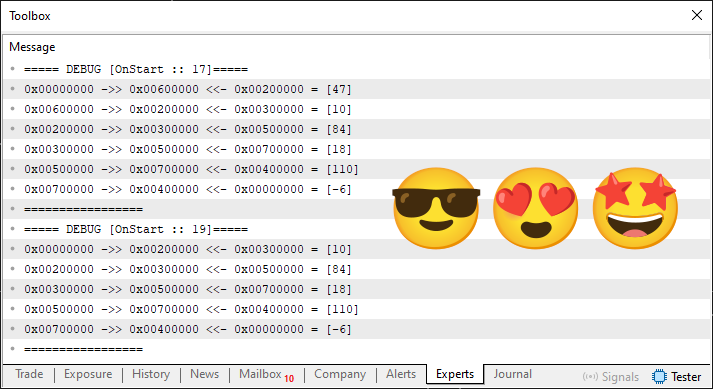
Figure 13
Now we can truly celebrate. Congratulations, my dear reader: you've just learned a lot of new things that you might have previously thought were practically impossible.
Concluding Thoughts
This is, without a doubt, an article that many of you will have to study for quite some time in order to grasp everything that has been presented here. I'd like to remind you that everything we've covered so far is just a small and insignificant part of what we call programming. When I say that I LOVE TO PROGRAM, I don't mean creating mundane and boring things. Most problems can be solved easily.
However, nothing—absolutely nothing—can take away our joy in creating what many consider impossible or unachievable. When some people complained about the content of certain articles I had published in the past, I simply ignored them. I prefer to use code to illustrate what they're trying to express in words. So don't feel bad when someone tells you that you're not capable of anything. You don’t have to put yourself down; just show what you've learned over the years and prove that you can do it, while they can't. In the next article, we'll continue this journey in search of new knowledge about MQL5.
| MQ5 File | Description |
|---|---|
| Code 01 | Basic Demonstration |
| Code 02 | Basic Demonstration |
| Code 03 | Basic Demonstration |
| Code 04 | Basic Demonstration |
| Code 05 | Basic Demonstration |
Translated from Portuguese by MetaQuotes Ltd.
Original article: https://www.mql5.com/pt/articles/17010
Warning: All rights to these materials are reserved by MetaQuotes Ltd. Copying or reprinting of these materials in whole or in part is prohibited.
This article was written by a user of the site and reflects their personal views. MetaQuotes Ltd is not responsible for the accuracy of the information presented, nor for any consequences resulting from the use of the solutions, strategies or recommendations described.

 Color Harmony Algorithm (CHA)
 Neural Networks in Practice: An Example of Implementing an XOR Gate
 Trading Strategy Beyond Raw Volume: Using Transformed Volume Change for Trading
 How to Train an MLP Using Markov Chain Features in MQL5

- Free trading apps
- Over 8,000 signals for copying
- Economic news for exploring financial markets
You agree to website policy and terms of use