

Building a Trade Replay Tool in MQL5
 207
207
 0
0

Introduction
In the previous article, Building a Bar Replay Tool in MQL5, we took the first step toward creating a chart replay experience by developing a replay mechanism that reveals historical candles one bar at a time. The tool also introduced Buy and Sell controls, allowing users to manually open a single paper trade while progressing through historical price action. Although this provides a useful foundation for studying market behavior, the implementation has two important limitations:
- Fixed replay speed: The replay interval is hard-coded, giving the user no control over how quickly or slowly historical candles are revealed.
- Manual trade reconstruction: The tool cannot automatically reconstruct historical trades. Users must manually identify a historical trade event and recreate it as a simulated position.
In this article, we will extend the concepts introduced in the bar replay tool to build a Trade Replay Tool capable of automatically reconstructing historical trades within a user-defined time range. The tool will retrieve the relevant historical trade events and recreate them as paper trades at their original execution times, preserving key trade properties such as the entry price, volume, Stop Loss (SL), and Take Profit (TP). As the replay progresses and reaches the corresponding historical exit event, the simulated position will be closed automatically.
To provide greater control over the replay experience, the tool introduces a dedicated control interface. It includes a menu button, one or two replay anchors, playback-speed controls, and keyboard shortcuts. The anchors allow the user to define the historical region to be replayed, supporting both a standard single-anchor mode and a dual-anchor mode for explicitly specifying the replay interval. Playback controls let the user increase or decrease replay speed dynamically. Shortcut hotkeys provide faster interaction without relying on the interface.
Project Overview
Unlike conventional bar replay tools that typically rely on a fixed playback speed, provide limited interaction with the replay range, and do not reconstruct the historical trades associated with the replayed market, this project presents the design and implementation of a Trade Replay Tool for MetaTrader 5 using MQL5.
The tool extends the conventional candle-by-candle replay workflow by combining historical price reconstruction with historical trade reconstruction. Instead of merely revealing previously hidden candles as playback progresses, the program retrieves historical trade events that occurred within the selected replay range and reproduces them alongside the unfolding market. As replay reaches the time of a historical trade, its relevant properties—including entry time, entry price, trade direction, volume, Stop Loss, and Take Profit—are used to recreate the position as a simulated paper trade on the chart. The position remains visible as subsequent candles are revealed. It is removed when replay reaches the corresponding historical exit time. This allows the trader to observe not only how price evolved, but also how an actual historical position developed throughout the market sequence.
The replay range is defined interactively using start and end anchors, allowing the user to control both where the replay begins and where it ends. This anchor-based approach gives the trader greater control over the portion of historical data being studied. Playback speed is similarly designed to be interactive rather than fixed. Instead of relying on a single hard-coded replay interval, the tool provides dedicated controls for dynamically increasing or decreasing the playback speed. The current speed is displayed directly on the replay interface, allowing the user to quickly adjust the pace depending on the level of detail required. The same functionality is available through keyboard shortcuts: Ctrl + '+' increases the replay speed, while Ctrl + '-' decreases it. This makes it possible to move quickly through uneventful market periods while slowing the replay when closer examination of price action is required. Below is a visual model of the tool described in this project:
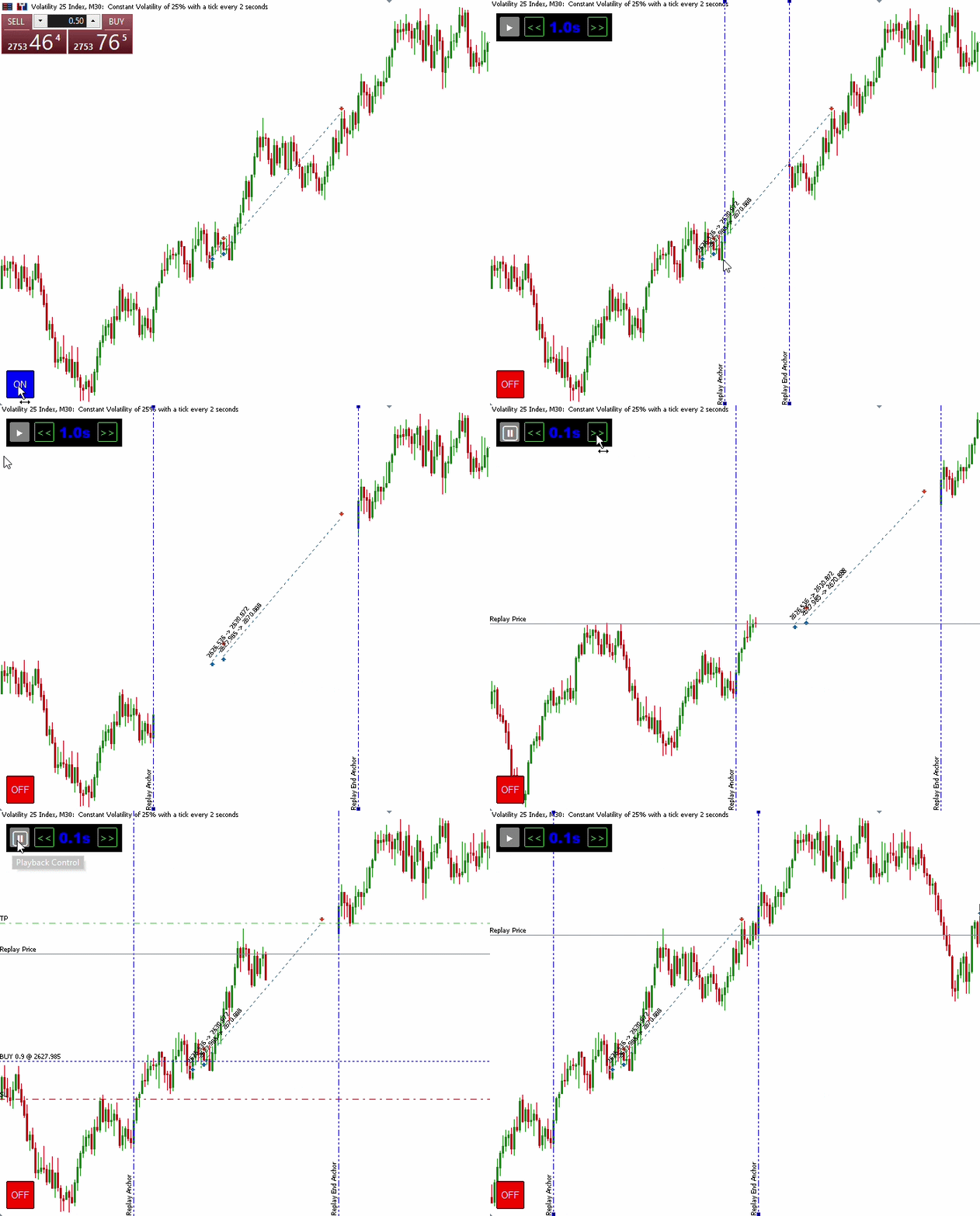
Fig. 1. Project Overview
Design Workflow
This section presents the end-to-end workflow of the Trade Replay Tool. We break the implementation into its core stages: initialization, event-driven interaction, replay range selection, historical trade retrieval, replay playback, replay trade management, and chart restoration.
Initialization
The initialization workflow prepares the program for operation. It begins by creating the main menu button that provides access to the replay functionality. The required indicator buffers are then configured and initialized with empty values to ensure that no replay candles are displayed before the replay mode is activated. Finally, a millisecond timer is started with a default interval of 500 milliseconds, which controls the initial playback speed. This interval can be changed later through the playback speed controls, allowing the replay to run at different speeds.
Event-Driven Interaction
The OnChartEvent() function coordinates the Trade Replay Tool's interactive behavior. It responds to button clicks, anchor movements, and keyboard hotkeys, allowing users to control the replay and define its range interactively. This event-driven approach ensures that user actions are processed only when they occur, keeping the tool responsive and computationally efficient.
Replay Range Selection
The replay range is selected after the menu button is activated, which switches the tool into replay mode and creates the initial start anchor. The replay range is then defined by positioning the replay anchor(s) on the chart. In single-anchor mode, the start anchor can be moved to any desired starting point, allowing playback to continue toward the latest candle on the chart. Dual-anchor mode can be activated by pressing Shift + E while the start anchor is selected. This creates a second anchor, initially positioned 20 bars from the start anchor. All candles between the two anchors are then hidden, while candles to the left of the start anchor and to the right of the end anchor remain visible, establishing the selected replay range.
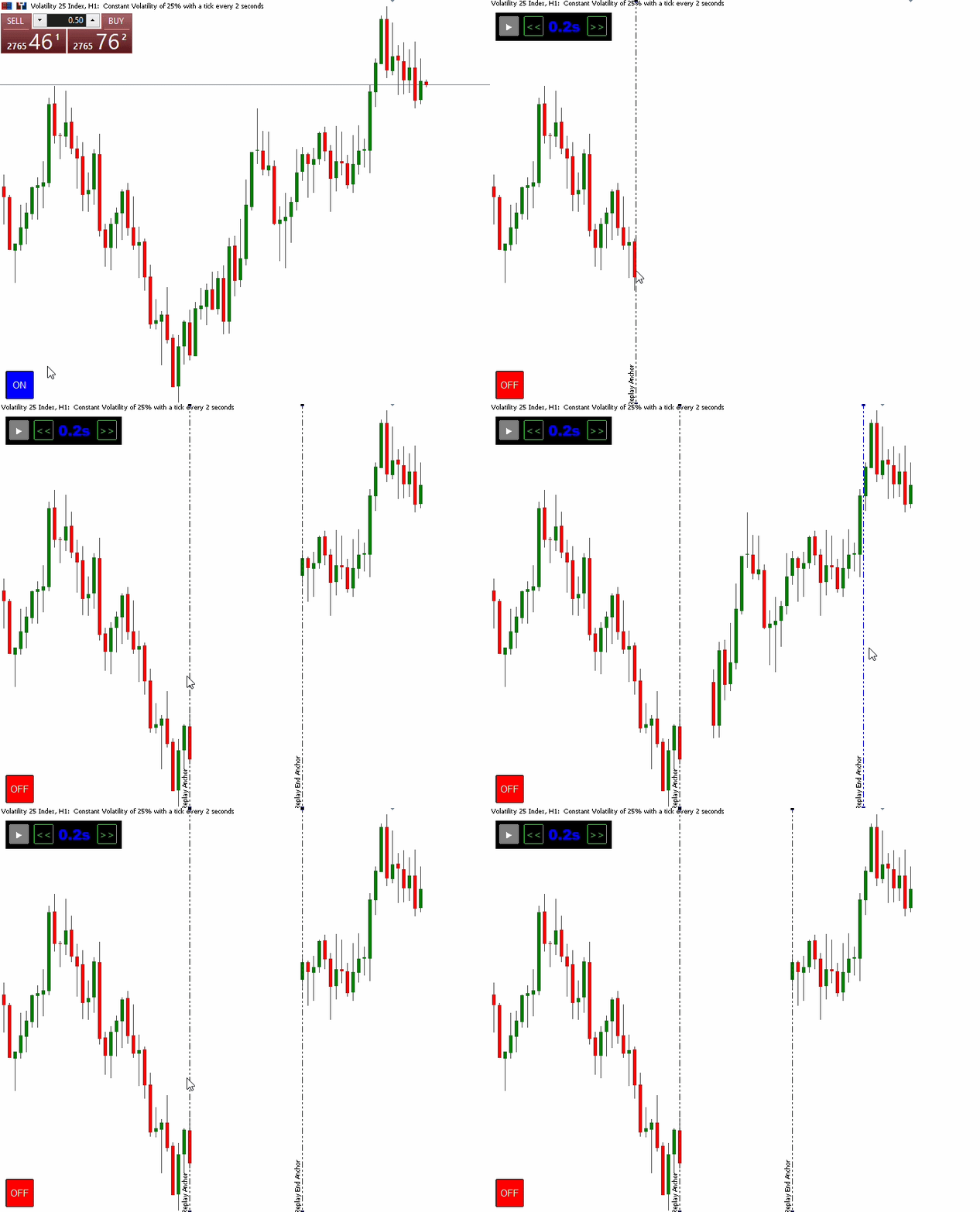
Fig. 2. Replay Range Selection
Historical Trade Retrieval
Within the selected replay range, the program retrieves the relevant historical trade events from the trading history. In dual-anchor mode, only trades occurring between the start and end anchors are retrieved. In single-anchor mode, trade events are retrieved from the start anchor through the latest available bar on the chart. Each qualifying entry deal is collected with key properties, including the position ID, deal type, entry time and price, volume, Stop Loss (SL), Take Profit (TP), and corresponding exit time. These properties are then used to construct the trade records required for replay.
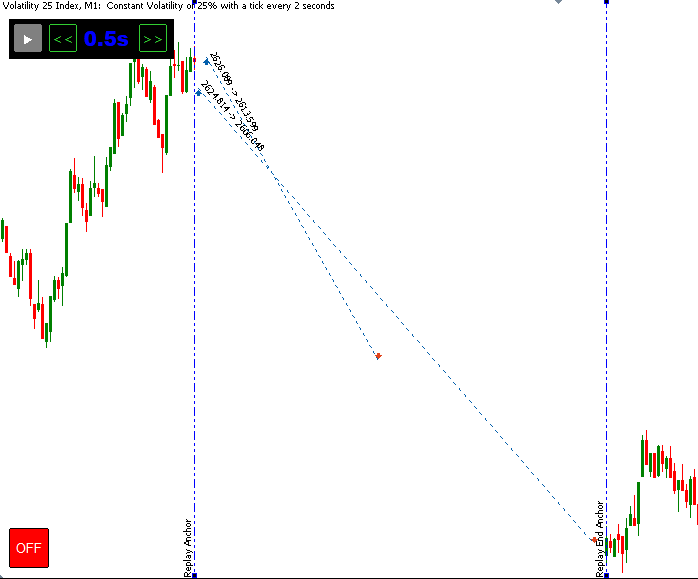
Fig. 3. Historical Trade Retrieval
Note: This demonstration uses the trade history of the current trading account.
Replay Playback
Once the replay range has been defined and the required historical trade events have been retrieved, the replay engine takes control of the playback process. Its primary role is to progressively reconstruct the selected portion of historical market activity, by revealing hidden candles one at a time.
Replay Trade Management
With playback enabled, the program manages the reconstructed paper trades as the replay progresses. At each replay time, it checks whether a historical trade event has occurred. When an entry is reached, the corresponding paper trade is recreated using its recorded properties, including the entry price, volume, Stop Loss (SL), and Take Profit (TP). The program also monitors for historical trade exits. When the replay reaches an exit event, the corresponding paper position is identified and gracefully closed, completing its simulated trade lifecycle.
Chart Restoration
The replay workflow concludes when replay mode is deactivated through the menu button. The program gracefully terminates the replay environment by removing the custom replay candles and graphical objects, restoring the chart's original visual settings, and returning the native MT5 chart controls to their normal state.
MQL5 Implementation
Having established the design workflow and the responsibilities of each stage, we can now translate the design into a fully functional MQL5 indicator. This chapter implements each component of the workflow, from initialization and event-driven interaction to replay range selection, historical trade retrieval, replay playback, replay trade management, and chart restoration.
Preprocessor Directives
We begin by establishing the compiler directives, which define the indicator's metadata, configure its rendering in the main chart window, and set up the DRAW_COLOR_CANDLES plot and its required buffers. A series of macros is then defined to provide consistent names for the chart objects used throughout the program, including the menu, replay anchors, playback controls, and paper trade levels. Finally, the DealInfo.mqh library is included to provide convenient access to historical deal information required for trade reconstruction.
//+------------------------------------------------------------------+
//|                                            Trade Replay Tool.mq5 |
//|                                             © 2026, ChukwuBuikem |
//|                             https://www.mql5.com/en/users/bikeen |
//+------------------------------------------------------------------+
#property copyright "© 2026, ChukwuBuikem"
#property link      "https://www.mql5.com/en/users/bikeen"
#property indicator_chart_window
#property indicator_plots 1
#property indicator_buffers 5
#property indicator_type1 DRAW_COLOR_CANDLES
#property indicator_color1 clrGreen,clrRed,clrNONE;
#property indicator_width1 2
#property indicator_label1 "REPLAY: OPEN;REPLAY: HIGH;REPLAY: LOW;REPLAY: CLOSE"

#define _PROG_NAME "Trade Replay Tool"
#define _MENU_BUTTON _PROG_NAME + "MENU_BUTTON"
#define _REPLAY_ANCHOR1 _PROG_NAME + "REPLAY_VLINE#1"
#define _REPLAY_ANCHOR2 _PROG_NAME + "REPLAY_VLINE#2"
#define _REPLAY_PRICE _PROG_NAME + "REPLAY_PRICE"
#define _REPLAY_PLAY_BUTTON _PROG_NAME + "REPLAY_PLAY_BUTTON"
#define _REPLAY_DASHBOARD _PROG_NAME + "REPLAY_DASHBOARD"
#define _REPLAY_SPEED_UP_BUTTON _PROG_NAME + "REPLAY_SPEED_UP_BUTTON"
#define _REPLAY_SPEED_LABEL _PROG_NAME + "REPLAY_SPEED_LABEL"
#define _REPLAY_SPEED_DOWN_BUTTON _PROG_NAME + "REPLAY_SPEED_DOWN_BUTTON"
//--- PLAY AND PAUSE UNICODE SYMBOLS
#define _PLAY_SYMBOL ShortToString(0X25B6)
#define _PAUSE_SYMBOL ShortToString(0X23F8)
//--- REPLAY TRADE MACROS
#define _REPLAY_POSITION_ENTRY _PROG_NAME + "REPLAY_POSITION_ENTRY"
#define _REPLAY_POSITION_TP _PROG_NAME + "REPLAY_POSITION_TP"
#define _REPLAY_POSITION_SL _PROG_NAME + "REPLAY_POSITION_SL"

#include <Trade\DealInfo.mqh>
Custom Data Structures
Two custom structures are defined to organize the data required by the replay system. The st_ChartInfo structure stores the chart's original visual settings, including candle, chart-line, Ask, and Bid colors. These values are captured when the structure is initialized and are later used to restore the chart after replay mode is deactivated.
The st_ReplayTrade structure represents a historical trade to be reconstructed during replay. It stores the position ID, deal type, entry time, exit time, entry price, volume, Stop Loss (SL), and Take Profit (TP). Its constructor also initializes these members with safe default values, ensuring that each trade record starts from a known state.
//--- CUSTOM DATA STRUCTURES
struct st_ChartInfo
  {
private:
   color             barUpClr;
   color             barDownClr;
   color             bullClr;
   color             bearClr;
   color             lineClr;
   color             askClr;
   color             bidClr;
public:
   //--- CONSTRUCTOR
                     st_ChartInfo()
     {
      barUpClr = (color)ChartGetInteger(0, CHART_COLOR_CHART_UP);
      barDownClr = (color)ChartGetInteger(0, CHART_COLOR_CHART_DOWN);
      bullClr = (color)ChartGetInteger(0, CHART_COLOR_CANDLE_BULL);
      bearClr = (color)ChartGetInteger(0, CHART_COLOR_CANDLE_BEAR);
      lineClr = (color)ChartGetInteger(0, CHART_COLOR_CHART_LINE);
      askClr = (color)ChartGetInteger(0, CHART_COLOR_ASK);
      bidClr = (color)ChartGetInteger(0, CHART_COLOR_BID);
     }
   //--- FUNCTIONS
   void              customize();
   void              restore();
   color             getPriceColor();

  } chartState;
//---
struct st_ReplayTrade
  {
   long              positionID;
   ENUM_DEAL_TYPE    dealType;
   datetime          time;
   datetime          exitTime;
   double            entryPrice;
   double            tp;
   double            sl;
   double            volume;
   //--- CONSTRUCTOR
                     st_ReplayTrade()
     {
      positionID = LONG_MIN;
      dealType = DEAL_TYPE_CREDIT;
      time = 0;
      exitTime = 0;
      entryPrice = EMPTY_VALUE;
      tp = EMPTY_VALUE;
      sl = EMPTY_VALUE;
      volume = EMPTY_VALUE;
     }
  };
Global Variables
With the core data structures defined, the next step is to establish the global state required to coordinate the replay process. These variables maintain the indicator buffers, replay positions, anchor times, playback state, historical trade records, and playback speed throughout the program's execution.
The candle buffers and calculation variables support the rendering and progressive revelation of replay candles, while the anchor variables define the selected replay range. The replayMode and isPlay flags control the current replay and playback states. Historical trades and reconstructed paper positions are maintained separately through the replayDeals[] and replayPositions[] arrays, allowing the engine to distinguish between retrieved historical events and active simulated positions.
Finally, the playback speed is controlled through predefined timer intervals and corresponding display labels, with speedIndex tracking the currently selected speed. The range of 0.1 to 2.0 seconds provides flexibility between rapid historical progression and slower observation of price movements and simulated trade execution, with practical increments that keep speed selection simple.
//--- GLOBAL VARIABLES
double openBuffer[], highBuffer[], lowBuffer[],
       closeBuffer[], colorBuffer[];
double lastPrice = EMPTY_VALUE;
int lastCalculated = 0, endCalculate = 0, bars = 0;
datetime anchor1Time, anchor2Time;
MqlRates rates[];
bool replayMode = false;
bool isPlay = false;
//--- HISTORICAL DEAL MANAGEMENT
st_ReplayTrade replayDeals[], replayPositions[];
string dealType[2] = {"BUY", "SELL"};
//--- PLAYBACK SPEED CONTROL
int speedIntervals[7] = {100, 200, 500, 800, 1000, 1500, 2000};
string speedTexts[7] = {"0.1s", "0.2s", "0.5s", "0.8s", "1.0s", "1.5s", "2.0s"};
int speedIndex = 2;
Helper Functions
This section introduces a collection of helper functions that encapsulate the indicator’s core responsibilities. These utilities coordinate chart configuration, viewport detection and time normalization, chart-object management, toggle-state handling, replay-trade management, and replay-candle rendering. By separating these responsibilities into dedicated functions, the implementation becomes more modular, reusable, and easier to maintain.
Implementation Note: For brevity, some functions are presented in shortened form to focus on the key implementation details. The complete, fully implemented source code is provided in the attached MQL5 file.
- Chart Configuration
We begin by implementing the member functions declared earlier in the st_ChartInfo structure. These functions manage the chart's visual state throughout the replay lifecycle: customizing the chart for replay, restoring its original appearance when replay ends, and retrieving the stored Bid color used to render the replay price line.
//+------------------------------------------------------------------+
//|                     CUSTOMIZE CHART                              |
//+------------------------------------------------------------------+
void st_ChartInfo::customize(void)
  {
//---
   ChartSetInteger(0, CHART_COLOR_CANDLE_BULL, clrNONE);
   ChartSetInteger(0, CHART_COLOR_CANDLE_BEAR, clrNONE);
   ChartSetInteger(0, CHART_COLOR_CHART_UP, clrNONE);
   ChartSetInteger(0, CHART_COLOR_CHART_DOWN, clrNONE);
   ChartSetInteger(0, CHART_COLOR_CHART_LINE, clrNONE);
   ChartSetInteger(0, CHART_COLOR_ASK, clrNONE);
   ChartSetInteger(0, CHART_COLOR_BID, clrNONE);
   ChartRedraw();
  }
//+------------------------------------------------------------------+
//|                        RESTORE CHART SETTINGS                    |
//+------------------------------------------------------------------+
void st_ChartInfo::restore(void)
  {
//---
   ChartSetInteger(0, CHART_COLOR_CANDLE_BULL, bullClr);
   ChartSetInteger(0, CHART_COLOR_CANDLE_BEAR, bearClr);
   ChartSetInteger(0, CHART_COLOR_CHART_UP, barUpClr);
   ChartSetInteger(0, CHART_COLOR_CHART_DOWN, barDownClr);
   ChartSetInteger(0, CHART_COLOR_CHART_LINE, lineClr);
   ChartSetInteger(0, CHART_COLOR_ASK, askClr);
   ChartSetInteger(0, CHART_COLOR_BID, bidClr);
   ChartRedraw();
  }
//+------------------------------------------------------------------+
//|                      OBTAIN PRICE COLOR                          |
//+------------------------------------------------------------------+
color st_ChartInfo::getPriceColor(void)
  {
//---
   return bidClr;
  }
- Viewport Detection and Time Normalization
Next, we define the functions responsible for viewport detection and chart-time normalization. The first determines the middle of the currently visible chart area, providing the initial position for the replay anchor when it is created. The second normalizes a given time to the timestamp of its corresponding chart bar, ensuring that anchor movements remain aligned with actual chart timestamps.
//+------------------------------------------------------------------+
//|                    VIEWPORT DETECTION                            |
//+------------------------------------------------------------------+
datetime getViewportMiddleTime(void)
  {
//---
   datetime start = 0, end = 0;
   int first = (int) ChartGetInteger(0, CHART_FIRST_VISIBLE_BAR);
   int visibleBars = (int) ChartGetInteger(0, CHART_VISIBLE_BARS);
   int last = first - visibleBars + 2;
   if(last < 0)
      last = 0;

   start = iTime(_Symbol, PERIOD_CURRENT, last);
   end = iTime(_Symbol, PERIOD_CURRENT, first);

   datetime rawMiddleTime = (start + end) / 2;
   int nearestBar = iBarShift(_Symbol, PERIOD_CURRENT, rawMiddleTime, false);
   if(nearestBar < 0)
      return 0;

   return iTime(_Symbol, PERIOD_CURRENT, nearestBar);
  }
//+------------------------------------------------------------------+
//|                      TIME NORMALIZATION                          |
//+------------------------------------------------------------------+
datetime normalizeToChartTime(const datetime time)
  {
//---
   int shift = iBarShift(_Symbol, PERIOD_CURRENT, time);
   if(shift < 0)
      shift = 0;

   return iTime(_Symbol, PERIOD_CURRENT, shift);
  }
- Chart Object Management
The indicator dynamically creates, updates, and removes chart objects in response to user actions. The following helper functions encapsulate the creation and management of chart objects, including buttons, lines, labels, and the mini-dashboard used as the control interface. This approach keeps the implementation modular, reusable, and easier to maintain.
//+------------------------------------------------------------------+
//|                      BUTTON CREATION                             |
//+------------------------------------------------------------------+
void createButton(const string objName, const int xDistance, const int yDistance,
                  const int xSize, const int ySize, const ENUM_BASE_CORNER corner,
                  const color clr, const color bgClr, const color bdClr, const int fontsize,
                  const string tooltip, const string display, const string font = "Arial")
  {
//---
   if(ObjectCreate(0, objName, OBJ_BUTTON, 0, 0, 0))
     {
      ObjectSetInteger(0, objName, OBJPROP_CORNER, corner);
      ObjectSetInteger(0, objName, OBJPROP_XDISTANCE, xDistance);
      ObjectSetInteger(0, objName, OBJPROP_YDISTANCE, yDistance);
      ObjectSetInteger(0, objName, OBJPROP_XSIZE, xSize);
      ObjectSetInteger(0, objName, OBJPROP_YSIZE, ySize);
      ObjectSetInteger(0, objName, OBJPROP_COLOR, clr);
      ObjectSetInteger(0, objName, OBJPROP_BGCOLOR, bgClr);
      ObjectSetInteger(0, objName, OBJPROP_BORDER_COLOR, bdClr);
      ObjectSetInteger(0, objName, OBJPROP_SELECTABLE, false);
      ObjectSetInteger(0, objName, OBJPROP_STATE, false);
      ObjectSetInteger(0, objName, OBJPROP_FONTSIZE, fontsize);
      ObjectSetString(0, objName, OBJPROP_TOOLTIP, tooltip);
      ObjectSetString(0, objName, OBJPROP_TEXT, display);
      ObjectSetString(0, objName, OBJPROP_FONT, font);
      ChartRedraw();
     }
  }
//+------------------------------------------------------------------+
//|                            LABEL CREATION                        |
//+------------------------------------------------------------------+
void createLabel(const string objName, const int xDistance, const int yDistance,
                 const int xSize, const int ySize, const ENUM_BASE_CORNER corner,
                 const color clr, const string text, const int font)
  {
//---
   if(ObjectCreate(0, objName, OBJ_LABEL, 0, 0, 0))
     {
      ObjectSetInteger(0, objName, OBJPROP_XDISTANCE, xDistance);
      ObjectSetInteger(0, objName, OBJPROP_YDISTANCE, yDistance);
      ObjectSetInteger(0, objName, OBJPROP_XSIZE, xSize);
      ObjectSetInteger(0, objName, OBJPROP_YSIZE, ySize);
      ObjectSetInteger(0, objName, OBJPROP_COLOR, clr);
      ObjectSetInteger(0, objName, OBJPROP_FONTSIZE, font);
      ObjectSetInteger(0, objName, OBJPROP_CORNER, corner);
      ObjectSetString(0, objName, OBJPROP_FONT, "Arial Black");
      ObjectSetString(0, objName, OBJPROP_TEXT, text);
      ObjectSetString(0, objName, OBJPROP_TOOLTIP, "Replay Speed");
      ChartRedraw();
     }
  }
//+------------------------------------------------------------------+
//|                            SHOW DASHBOARD                        |
//+------------------------------------------------------------------+
void createDashboard(void)
  {
//---
   if(ObjectCreate(0, _REPLAY_DASHBOARD, OBJ_RECTANGLE_LABEL, 0, 0, 0))
     {
      ObjectSetInteger(0, _REPLAY_DASHBOARD, OBJPROP_XDISTANCE, 10);
      ObjectSetInteger(0, _REPLAY_DASHBOARD, OBJPROP_YDISTANCE, 20);
      ObjectSetInteger(0, _REPLAY_DASHBOARD, OBJPROP_XSIZE, 165);
      ObjectSetInteger(0, _REPLAY_DASHBOARD, OBJPROP_YSIZE, 40);
      ObjectSetInteger(0, _REPLAY_DASHBOARD, OBJPROP_BGCOLOR, clrBlack);
      ObjectSetInteger(0, _REPLAY_DASHBOARD, OBJPROP_BORDER_TYPE, BORDER_FLAT);
      ObjectSetInteger(0, _REPLAY_DASHBOARD, OBJPROP_BORDER_COLOR, clrBlue);
      ObjectSetInteger(0, _REPLAY_DASHBOARD, OBJPROP_COLOR, clrBlack);
      ObjectSetInteger(0, _REPLAY_DASHBOARD, OBJPROP_STYLE, STYLE_SOLID);
      ObjectSetInteger(0, _REPLAY_DASHBOARD, OBJPROP_WIDTH, 3);

      createButton(_REPLAY_PLAY_BUTTON, 15, 25, 28, 28, CORNER_LEFT_UPPER,
                   clrWhite, clrGray, clrGray, 15, "Playback Control", _PLAY_SYMBOL, "Segoe UI");
      createButton(_REPLAY_SPEED_DOWN_BUTTON, 50, 25, 28, 28, CORNER_LEFT_UPPER,
                   clrLimeGreen, clrBlack, clrLimeGreen, 12, "Slower, Ctrl+'-'",
                   ShortToString(0X003C) + ShortToString(0X003C), "Segoe UI");
      createLabel(_REPLAY_SPEED_LABEL, 85, 25, 28, 28, CORNER_LEFT_UPPER, clrBlue,
                  speedTexts[speedIndex], 15);
      createButton(_REPLAY_SPEED_UP_BUTTON, 140, 25, 28, 28, CORNER_LEFT_UPPER,
                   clrLimeGreen, clrBlack, clrLimeGreen, 12, "Faster, Ctrl+'+'",
                   ShortToString(0X003E) + ShortToString(0X003E), "Segoe UI");
      ChartRedraw();
     }
  }
//+------------------------------------------------------------------+
//|                   HORIZONTAL LINE CREATION                       |
//+------------------------------------------------------------------+
void createHLine(const string objName, const double price1, const color clr,
                 const string toolTip = "\n", const ENUM_LINE_STYLE style = STYLE_SOLID)
  {
//---
   if(ObjectCreate(0, objName, OBJ_HLINE, 0, 0, price1))
     {
      ObjectSetInteger(0, objName, OBJPROP_COLOR, clr);
      ObjectSetInteger(0, objName, OBJPROP_WIDTH, 1);
      ObjectSetInteger(0, objName, OBJPROP_HIDDEN, true);
      ObjectSetInteger(0, objName, OBJPROP_SELECTABLE, false);
      ObjectSetInteger(0, objName, OBJPROP_STYLE, style);
      ObjectSetString(0, objName, OBJPROP_TEXT, toolTip);
      ObjectSetString(0, objName, OBJPROP_TOOLTIP, toolTip);
     }
  }
//+------------------------------------------------------------------+
//|                      ANCHOR LINE CREATION                        |
//+------------------------------------------------------------------+
void drawAnchorLine(const string objName, const datetime vTime,
                    const string tooltip = "\n")
  {
//---
   if(ObjectCreate(0, objName, OBJ_VLINE, 0, vTime, 0))
     {
      ObjectSetInteger(0, objName, OBJPROP_COLOR, clrBlue);
      ObjectSetInteger(0, objName, OBJPROP_WIDTH, 1);
      ObjectSetInteger(0, objName, OBJPROP_HIDDEN, true);
      ObjectSetInteger(0, objName, OBJPROP_SELECTABLE, true);
      ObjectSetInteger(0, objName, OBJPROP_SELECTED, true);
      ObjectSetInteger(0, objName, OBJPROP_STYLE, STYLE_DASHDOTDOT);
      ObjectSetString(0, objName, OBJPROP_TEXT, tooltip);
      ObjectSetString(0, objName, OBJPROP_TOOLTIP, tooltip);
      ChartRedraw();
     }
  }
- Toggle System
Interactivity is essential to a responsive trading tool, allowing the program to dynamically react to user commands. The toggle system provides this control by allowing the user to activate or deactivate replay mode and start or pause playback through the menu and play buttons. These functions also configure the chart environment as required, preparing it for a smooth replay experience.
//+------------------------------------------------------------------+
//|                     TOGGLE MENU BUTTON                           |
//+------------------------------------------------------------------+
void toggleMenuButton(void)
  {
//---
   static bool isMenuOn = false;
   isMenuOn = !isMenuOn;
   if(!isMenuOn)
     {
      ObjectSetInteger(0, _MENU_BUTTON, OBJPROP_BGCOLOR, clrBlue);
      ObjectSetString(0, _MENU_BUTTON, OBJPROP_TEXT, "ON");
      ObjectSetInteger(0, _MENU_BUTTON, OBJPROP_STATE, false);
      //--- RESTORE CHART SETTINGS
      ChartSetInteger(0, CHART_EVENT_OBJECT_DELETE, false);
      ChartSetInteger(0, CHART_SHOW_ONE_CLICK, true);
      ChartSetInteger(0, CHART_SHOW_OBJECT_DESCR, false);
      ChartSetInteger(0, CHART_KEYBOARD_CONTROL, true);
      ChartSetInteger(0, CHART_SHOW_PRICE_SCALE, true);
      //--- CLEAR AND RESTORE DEFAULT CANDLE SETTINGS
      ObjectsDeleteAll(0, _PROG_NAME + "REPLAY_");
      clearReplayCandles();
      chartState.restore();
      replayMode = false;
      //--- CLEAR ARRAY
      ArrayResize(replayPositions, 0);
      ChartRedraw();
     }
   else
     {
      ObjectSetInteger(0, _MENU_BUTTON, OBJPROP_BGCOLOR, clrRed);
      ObjectSetString(0, _MENU_BUTTON, OBJPROP_TEXT, "OFF");
      ObjectSetInteger(0, _MENU_BUTTON, OBJPROP_STATE, false);
      //--- CUSTOMIZE CHART SETTINGS
      ChartSetInteger(0, CHART_EVENT_OBJECT_DELETE, true);
      ChartSetInteger(0, CHART_SHOW_ONE_CLICK, false);
      ChartSetInteger(0, CHART_SHOW_OBJECT_DESCR, true);
      ChartSetInteger(0, CHART_KEYBOARD_CONTROL, false);
      ChartSetInteger(0, CHART_SHOW_PRICE_SCALE, false);
      //---
      anchor1Time = getViewportMiddleTime();
      anchor2Time = iTime(_Symbol, PERIOD_CURRENT, 0);
      drawAnchorLine(_REPLAY_ANCHOR1, anchor1Time, "Replay Anchor");
      createDashboard();
      chartState.customize();
      renderReplayCandles(anchor1Time, anchor2Time);
      ChartRedraw();
     }
  }
//+------------------------------------------------------------------+
//|                 TOGGLE PLAYBACK BUTTON                           |
//+------------------------------------------------------------------+
void togglePlayButton(void)
  {
//---
   isPlay = !isPlay;
   if(!isPlay)
     {
      ObjectSetString(0, _REPLAY_PLAY_BUTTON, OBJPROP_TEXT, _PLAY_SYMBOL);
      ObjectSetInteger(0, _REPLAY_PLAY_BUTTON, OBJPROP_STATE, false);
      ObjectSetInteger(0, _REPLAY_ANCHOR1, OBJPROP_SELECTED, true);
      ObjectSetInteger(0, _REPLAY_ANCHOR2, OBJPROP_SELECTED, true);
      replayMode = false;
     }
   else
     {
      ObjectSetString(0, _REPLAY_PLAY_BUTTON, OBJPROP_TEXT, _PAUSE_SYMBOL);
      ObjectSetInteger(0, _REPLAY_PLAY_BUTTON, OBJPROP_STATE, false);
      ObjectSetInteger(0, _REPLAY_ANCHOR1, OBJPROP_SELECTED, false);
      ObjectSetInteger(0, _REPLAY_ANCHOR2, OBJPROP_SELECTED, false);
      replayMode = true;
      //--- CLEAR ARRAY
      ArrayResize(replayPositions, 0);
      //--- FETCH HISTORICAL DEALS WITHIN TIME RANGE
      getDeals(anchor1Time, anchor2Time, replayDeals);
     }
   ChartRedraw();
  }
Explanation:
- toggleMenuButton()
This function switches the replay environment between its ON and OFF states. - OFF state: The function restores the normal MT5 chart environment by disabling object-deletion monitoring, re-enabling one-click trading, hiding object descriptions, restoring native keyboard control and the price scale. It then removes replay-related objects, clears the custom replay candles, restores the chart's original visual settings, and disables replay mode.
- ON state: The function prepares the chart for replay by enabling object-deletion monitoring, disabling one-click trading, displaying object descriptions, disabling native keyboard control, and hiding the price scale. It then positions the first anchor at the viewport midpoint, sets the second anchor to the latest available candle, creates the replay anchor and dashboard, customizes the chart, and renders the replay candles.
- togglePlayButton()
This function controls whether the replay is paused or playing.
- Paused state: The play button displays the play symbol, both anchors are selected, and replayMode is set to false.
- Playing state: The button changes to the pause symbol, both anchors become unselected, and replayMode is set to true. The function then retrieves the historical deals within the selected replay range using getDeals(), preparing them for reconstruction as playback progresses.
- Replay Trade Management
For a trade replay tool like this, the ability to open, track and manage open paper positions throughout playback is essential. The following functions handle the reconstruction, monitoring, and closure of historical trades as the replay progresses.
//+------------------------------------------------------------------+
//|                  IMAGINARY REPLAY PAPER TRADE                    |
//+------------------------------------------------------------------+
void showPosition(const long id, const double entry, const double tp,
                  const double sl, const string toolTip)
  {
//---
   createHLine(_REPLAY_POSITION_ENTRY + IntegerToString(id), entry, clrBlue, toolTip, STYLE_DOT);
   createHLine(_REPLAY_POSITION_SL + IntegerToString(id), sl, clrRed, "SL", STYLE_DASHDOT);
   createHLine(_REPLAY_POSITION_TP + IntegerToString(id), tp, clrLimeGreen, "TP", STYLE_DASHDOT);
   ChartRedraw();
  }
//+------------------------------------------------------------------+
//|                                                                  |
//+------------------------------------------------------------------+
bool findTradesByTime(const bool isExit, st_ReplayTrade & searchArr[],
                      const datetime time, st_ReplayTrade & destArr[])
  {
//---
   ArrayResize(destArr, 0);
   for(int w = 0; w < ArraySize(searchArr); w++)
     {
      if(isExit && searchArr[w].exitTime == time)
        {
         ArrayResize(destArr, ArraySize(destArr) + 1);
         destArr[ArraySize(destArr) - 1] = searchArr[w];
        }
      if(!isExit && searchArr[w].time == time)
        {
         ArrayResize(destArr, ArraySize(destArr) + 1);
         destArr[ArraySize(destArr) - 1] = searchArr[w];
        }
     }
   return (ArraySize(destArr) > 0) ? true : false;
  }
//+------------------------------------------------------------------+
//|           RETRIEVE HISTORICAL DEALS WITHIN TIME RANGE            |
//+------------------------------------------------------------------+
void getDeals(const datetime time1, const datetime time2, st_ReplayTrade &arr[])
  {
//---
   CDealInfo deal;
   ArrayResize(arr, 0);
//--- LOAD HISTORY WITH BUFFER OFFSET
   if(HistorySelect(time1, time2 + 100))
     {
      //--- GET ENTRY PROPERTIES
      for(int i = 0; i < HistoryDealsTotal(); i++)
        {
         if(deal.SelectByIndex(i))
           {
            if(deal.DealType() != DEAL_TYPE_BUY && deal.DealType() != DEAL_TYPE_SELL)
               continue;
            if(deal.Entry() == DEAL_ENTRY_IN && deal.Symbol() == _Symbol)
              {
               ArrayResize(arr, ArraySize(arr) + 1);
               arr[ArraySize(arr) - 1].positionID = deal.PositionId();
               arr[ArraySize(arr) - 1].dealType = (ENUM_DEAL_TYPE)deal.DealType();
               arr[ArraySize(arr) - 1].entryPrice = deal.Price();
               arr[ArraySize(arr) - 1].volume = deal.Volume();
               arr[ArraySize(arr) - 1].time = normalizeToChartTime(deal.Time());
               if(HistoryDealGetDouble(deal.Ticket(), DEAL_SL) > 0)
                  arr[ArraySize(arr) - 1].sl = HistoryDealGetDouble(deal.Ticket(), DEAL_SL);
               if(HistoryDealGetDouble(deal.Ticket(), DEAL_TP) > 0)
                  arr[ArraySize(arr) - 1].tp = HistoryDealGetDouble(deal.Ticket(), DEAL_TP);
              }
           }
        }
      /* FOR EVERY ENTRY DEAL,
         SEARCH FOR THE FINAL CORRESPONDING EXIT DEAL */
      for(int w = 0; w < ArraySize(arr); w++)
        {
         for(int d = 0; d < HistoryDealsTotal(); d++)
           {
            if(deal.SelectByIndex(d))
              {
               if(deal.DealType() != DEAL_TYPE_BUY && deal.DealType() != DEAL_TYPE_SELL)
                  continue;
               if(deal.Entry() == DEAL_ENTRY_OUT && deal.Symbol() == _Symbol)
                 {
                  if(arr[w].positionID != deal.PositionId())
                     continue;
                  arr[w].exitTime = normalizeToChartTime(deal.Time());
                  //--- UPDATE SL AND TP TO KEEP UP WITH MODIFICATIONS
                  if(HistoryDealGetDouble(deal.Ticket(), DEAL_SL) > 0)
                     arr[w].sl = HistoryDealGetDouble(deal.Ticket(), DEAL_SL);
                  if(HistoryDealGetDouble(deal.Ticket(), DEAL_TP) > 0)
                     arr[w].tp = HistoryDealGetDouble(deal.Ticket(), DEAL_TP);
                 }
              }
           }
        }
     }
  }
Explanation:
- showPosition()
This function recreates a historical trade visually on the chart by creating three horizontal lines for the Entry, Stop Loss (SL), and Take Profit (TP) levels. Each line is uniquely identified using the position ID, allowing the paper position to be tracked and managed throughout replay.
- findTradeByTime()
To synchronize historical trades with the replay timeline, the program must be able to identify trade events occurring at a given replay time. The findTradesByTime() function performs this lookup by checking either the entry time or exit time, as determined by the isExit parameter, and stores all matching trade records in the destination array for subsequent processing.
- getDeals()
Before trades can be reconstructed during playback, the program must first transform the relevant historical deals into structured trade records. The getDeals() function performs this task by selecting deals within the specified replay range, adding a 100-second buffer to the end time to help include deals recorded near the range boundary, filtering for relevant BUY/SELL entry deals, and storing their position ID, entry properties, volume, SL, and TP. It then locates the corresponding exit deals using the position ID and records the normalized exit time, updating the SL and TP values when necessary.
- Replay Candles
The replay system is not complete without the ability to render, clear, and progressively update custom candles throughout playback. The following functions manage the replay candle lifecycle, from initially rendering the selected replay range to revealing each candle sequentially and clearing the custom candles when replay ends.
//+------------------------------------------------------------------+
//|                    SHOW CUSTOM REPLAY CANDLES                    |
//+------------------------------------------------------------------+
void renderReplayCandles(const datetime time1, const datetime time2)
  {
//---
   bars = iBars(_Symbol, PERIOD_CURRENT);
   if(CopyRates(_Symbol, PERIOD_CURRENT, 0, bars, rates) > 0)
     {
      lastCalculated = (ArraySize(rates) - (iBarShift(_Symbol, PERIOD_CURRENT, time1)));
      endCalculate = (ArraySize(rates) - (iBarShift(_Symbol, PERIOD_CURRENT, time2) + 2));
      for(int w = 0; w < ArraySize(rates) - 1 && !IsStopped(); w++)
        {
         openBuffer[w] = rates[w].open;
         highBuffer[w] = rates[w].high;
         lowBuffer[w] = rates[w].low;
         closeBuffer[w] = rates[w].close;
         colorBuffer[w] = (closeBuffer[w] > openBuffer[w]) ? 0 : 1;

         if(rates[w].time > time1 && rates[w].time < time2)
           {
            //--- EMPTY BUFFER SLOTS THAT FALLS IN BETWEEN BOTH TIME VALUES
            openBuffer[w] = EMPTY_VALUE;
            highBuffer[w] = EMPTY_VALUE;
            lowBuffer[w] = EMPTY_VALUE;
            closeBuffer[w] = EMPTY_VALUE;
            colorBuffer[w] = 2;
           }
        }
      //--- CREATE REPLAY PRICE LINE
      createHLine(_REPLAY_PRICE, 0, chartState.getPriceColor(), "Replay Price");
     }
   ChartRedraw();
  }
//+------------------------------------------------------------------+
//|                    HIDE CUSTOM REPLAY CANDLES                    |
//+------------------------------------------------------------------+
void clearReplayCandles()
  {
//---
   int total = iBars(_Symbol, PERIOD_CURRENT);
   for(int w = 0; w < total && !IsStopped(); w++)
     {
      openBuffer[w] = EMPTY_VALUE;
      highBuffer[w] = EMPTY_VALUE;
      lowBuffer[w] = EMPTY_VALUE;
      closeBuffer[w] = EMPTY_VALUE;
      colorBuffer[w] = 2;
     }
   ChartRedraw();
  }
//+------------------------------------------------------------------+
//|                     REVEAL ONE CANDLE AT A TIME                  |
//+------------------------------------------------------------------+
void revealOneCandle(const int prevCalculated)
  {
//---
   if(CopyRates(_Symbol, PERIOD_CURRENT, 0, bars, rates) > 0)
     {
      datetime time = INT_MAX;
      string toolTip = "";
      openBuffer[prevCalculated] = rates[prevCalculated].open;
      highBuffer[prevCalculated] = rates[prevCalculated].high;
      lowBuffer[prevCalculated] = rates[prevCalculated].low;
      closeBuffer[prevCalculated] = rates[prevCalculated].close;
      colorBuffer[prevCalculated] = (closeBuffer[prevCalculated] > openBuffer[prevCalculated]) ? 0 : 1;
      lastPrice = closeBuffer[prevCalculated];
      time = rates[prevCalculated].time;
      st_ReplayTrade tempArr[];
      //--- POSITION OPENING
      if(findTradesByTime(false, replayDeals, time, tempArr))
        {
         //--- HANDLE SINGLE AND MULTIPLE POSITION OPENING
         for(int w = 0; w < ArraySize(tempArr); w++)
           {
            toolTip = (string)(dealType[tempArr[w].dealType] + " " + (string)tempArr[w].volume)
                      + " @ " + DoubleToString(tempArr[w].entryPrice, _Digits);
            showPosition(tempArr[w].positionID, tempArr[w].entryPrice,
                         tempArr[w].tp, tempArr[w].sl, toolTip);
            //--- APPEND OPENED POSITION TO ARRAY
            ArrayResize(replayPositions, ArraySize(replayPositions) + 1);
            replayPositions[ArraySize(replayPositions) - 1] = tempArr[w];
           }
         PlaySound("ok.wav");
        }
      //--- POSITION CLOSURE
      if(findTradesByTime(true, replayPositions, time, tempArr))
        {
         for(int w = 0; w < ArraySize(tempArr); w++)
           {
            //--- REMOVE POSITIONS FROM THE ACTIVE REPLAY POSITIONS ARRAY
            for(int m = ArraySize(replayPositions) - 1; m >= 0; m--)
              {
               if(tempArr[w].positionID == replayPositions[m].positionID)
                 {
                  ArrayRemove(replayPositions, m, 1);
                 }
              }
            //--- HANDLE SINGLE AND MULTIPLE POSITION CLOSURE
            ObjectDelete(0, _REPLAY_POSITION_ENTRY + IntegerToString(tempArr[w].positionID));
            ObjectDelete(0, _REPLAY_POSITION_TP + IntegerToString(tempArr[w].positionID));
            ObjectDelete(0, _REPLAY_POSITION_SL + IntegerToString(tempArr[w].positionID));
            ChartRedraw();
           }
         PlaySound("ok.wav");
        }
     }
//--- ENSURE REPLAY BAR IS IN VIEW
   int replayBar = iBarShift(_Symbol, PERIOD_CURRENT, rates[prevCalculated].time);
   int visible = (int)ChartGetInteger(0, CHART_VISIBLE_BARS);
   ChartNavigate(0, CHART_END, -(replayBar - (visible / 4)));
//--- UPDATE REPLAY PRICE
   ObjectMove(0, _REPLAY_PRICE, 0, 0, closeBuffer[prevCalculated]);
   ChartRedraw();
  }
Explanation:
- renderReplayCandles()
This function initializes the custom replay candles for the selected time range. It retrieves the available price data, populates the indicator buffers with the corresponding OHLC values, and hides the candles that fall within the selected replay range by assigning EMPTY_VALUE. This creates the hidden section that will later be revealed progressively during playback. It also creates the replay price line used to track the current replay price.
- clearReplayCandles()
When replay mode is deactivated, clearing the rendered custom candles is essential. The clearReplayCandles() function handles this by resetting all OHLC buffer values to EMPTY_VALUE, effectively removing the custom candle display and preparing the chart for restoration to its normal state.
- revealOneCandle()
This function drives the candle-by-candle playback. At each replay interval, it reveals the next hidden candle by writing its OHLC values into the corresponding buffers and updates the current replay price. It then handles trade openings by searching the retrieved deal history for trade records whose entry time matches the current replay time. When a match is found, the corresponding paper trade is recreated using its recorded properties, and the opened position is appended to the replayPositions[] array for subsequent tracking.
For position closure, the function searches the array of currently open paper trades for positions whose recorded exit time matches the current replay time. When a match is found, all graphical objects associated with that position, including its Entry, SL, and TP lines, are deleted, visually closing the reconstructed paper position. Finally, the function keeps the replay candle within the visible chart area and moves the replay price line to the latest closing price.
Initialization and Cleanup
Having established the supporting helper functions, we can now implement the standard MQL5 event handlers that control the indicator's lifecycle. The OnInit() function prepares the replay system by creating the main ON/OFF menu button, binding and initializing the custom candle buffers, configuring the replay arrays and indicator precision, and starting the millisecond timer used to drive playback.
The OnDeinit() function performs the corresponding cleanup when the indicator is removed or reinitialized. It stops the playback timer, restores the chart's default interaction settings, removes all program objects, clears the custom replay candles, restores the chart's original visual state, and redraws the chart to ensure that no replay-related elements remain.
//+------------------------------------------------------------------+
//|                      INITIALIZATION                              |
//+------------------------------------------------------------------+
int OnInit()
  {
//---
   createButton(_MENU_BUTTON, 10, 50, 40, 40, CORNER_LEFT_LOWER,
                clrWhite, clrBlue, clrBlack, 10, "Menu Button", "ON");

   SetIndexBuffer(0, openBuffer, INDICATOR_DATA);
   SetIndexBuffer(1, highBuffer, INDICATOR_DATA);
   SetIndexBuffer(2, lowBuffer, INDICATOR_DATA);
   SetIndexBuffer(3, closeBuffer, INDICATOR_DATA);
   SetIndexBuffer(4, colorBuffer, INDICATOR_COLOR_INDEX);

   ArrayInitialize(openBuffer, EMPTY_VALUE);
   ArrayInitialize(highBuffer, EMPTY_VALUE);
   ArrayInitialize(lowBuffer, EMPTY_VALUE);
   ArrayInitialize(closeBuffer, EMPTY_VALUE);

   ArraySetAsSeries(replayDeals, true);
   ArraySetAsSeries(replayPositions, true);
   IndicatorSetInteger(INDICATOR_DIGITS, _Digits);

   EventSetMillisecondTimer(speedIntervals[speedIndex]);
   return(INIT_SUCCEEDED);
  }
//+------------------------------------------------------------------+
//|                    DEINITIALIZATION                              |
//+------------------------------------------------------------------+
void OnDeinit(const int32_t reason)
  {
//---
   EventKillTimer();
   ChartSetInteger(0, CHART_EVENT_OBJECT_DELETE, false);
   ChartSetInteger(0, CHART_SHOW_ONE_CLICK, true);
   ChartSetInteger(0, CHART_SHOW_OBJECT_DESCR, false);
   ChartSetInteger(0, CHART_KEYBOARD_CONTROL, true);
   ChartSetInteger(0, CHART_SHOW_PRICE_SCALE, true);
   ObjectsDeleteAll(0, _PROG_NAME);
   clearReplayCandles();
   chartState.restore();
   ChartRedraw();
  }
Iteration Engine (OnCalculate)
Unlike conventional MQL5 indicators whose core calculations are primarily driven by the OnCalculate() event, this Trade Replay Tool is event-driven through OnChartEvent() and OnTimer(). Consequently, no calculation logic is required in OnCalculate() for this implementation. The handler simply returns rates_total, leaving the replay engine to operate through the dedicated chart and timer events.
//+------------------------------------------------------------------+
//|                      CALCULATE EVENT FUNCTION                    |
//+------------------------------------------------------------------+
int OnCalculate(const int32_t rates_total,
                const int32_t prev_calculated,
                const datetime &time[],
                const double &open[],
                const double &high[],
                const double &low[],
                const double &close[],
                const long &tick_volume[],
                const long &volume[],
                const int32_t &spread[])
  {
//--- EMPTY
   return(rates_total);
  }
Interactive Engine
The OnChartEvent() function serves as the interactive engine of the replay system, processing user-driven events and translating them into replay actions. It responds to chart-object clicks, keyboard shortcuts, anchor movements, and object deletions, allowing the user to control playback, adjust speed, define the replay range, and interact with the replay environment dynamically.
//+------------------------------------------------------------------+
//|                         CHART EVENT FUNCTION                     |
//+------------------------------------------------------------------+
void OnChartEvent(const int32_t id,
                  const long &lparam,
                  const double &dparam,
                  const string &sparam)
  {
//---
   switch(id)
     {
      case CHARTEVENT_OBJECT_CLICK:
         //--- TOGGLE MENU BUTTON
         if(sparam == _MENU_BUTTON)
           {
            toggleMenuButton();
           }
         //--- TOGGLE PLAY BUTTON
         if(sparam == _REPLAY_PLAY_BUTTON)
           {
            togglePlayButton();
           }
         //--- TOGGLE PLAY BUTTON WHEN START ANCHOR IS SELECTED
         if(sparam == _REPLAY_ANCHOR1 && ObjectGetInteger(0, _REPLAY_ANCHOR1, OBJPROP_SELECTED))
           {
            isPlay = true;
            togglePlayButton();
           }
         //--- TOGGLE PLAY BUTTON WHEN END ANCHOR IS SELECTED
         if(sparam == _REPLAY_ANCHOR2 && ObjectGetInteger(0, _REPLAY_ANCHOR2, OBJPROP_SELECTED))
           {
            isPlay = true;
            togglePlayButton();
           }
         //--- INCREASE PLAYBACK SPEED
         if(sparam == _REPLAY_SPEED_UP_BUTTON)
           {
            ObjectSetInteger(0, _REPLAY_SPEED_UP_BUTTON, OBJPROP_STATE, false);
            if(speedIndex > 0)
              {
               speedIndex--;
               EventSetMillisecondTimer(speedIntervals[speedIndex]);
               ObjectSetString(0, _REPLAY_SPEED_LABEL, OBJPROP_TEXT, speedTexts[speedIndex]);
               ChartRedraw();
              }
           }
         //--- REDUCE PLAYBACK SPEED
         if(sparam == _REPLAY_SPEED_DOWN_BUTTON)
           {
            ObjectSetInteger(0, _REPLAY_SPEED_DOWN_BUTTON, OBJPROP_STATE, false);
            if(speedIndex < ArraySize(speedIntervals) - 1)
              {
               speedIndex++;
               EventSetMillisecondTimer(speedIntervals[speedIndex]);
               ObjectSetString(0, _REPLAY_SPEED_LABEL, OBJPROP_TEXT, speedTexts[speedIndex]);
               ChartRedraw();
              }
           }
         ChartRedraw();
         break;
      case CHARTEVENT_KEYDOWN:
         //--- END ANCHOR CREATION
         if(ObjectGetInteger(0, _REPLAY_ANCHOR1, OBJPROP_SELECTED))
           {
            //--- SHIFT + E
            if(TerminalInfoInteger(TERMINAL_KEYSTATE_SHIFT) && lparam == 'E')
              {
               //--- EXTEND END ANCHOR BY 20 BARS TO THE RIGHT
               int startIndex = iBarShift(_Symbol, PERIOD_CURRENT, anchor1Time);
               int endIndex = ((startIndex - 20) < 1) ? 1 : (startIndex - 20);
               anchor2Time = iTime(_Symbol, PERIOD_CURRENT, endIndex);
               ChartSetInteger(0, CHART_SHOW_PRICE_SCALE, true);
               drawAnchorLine(_REPLAY_ANCHOR2, anchor2Time, "Replay End Anchor");
               renderReplayCandles(anchor1Time, anchor2Time);
               ChartRedraw();
              }
           }
         //--- HOTKEYS
         if(ObjectFind(0, _REPLAY_SPEED_LABEL) != -1)
           {
            //--- CTLR + '+'
            if(TerminalInfoInteger(TERMINAL_KEYSTATE_CONTROL) && lparam == 187)
              {
               if(speedIndex > 0)
                 {
                  speedIndex--;
                  EventSetMillisecondTimer(speedIntervals[speedIndex]);
                  ObjectSetString(0, _REPLAY_SPEED_LABEL, OBJPROP_TEXT, speedTexts[speedIndex]);
                  ChartRedraw();
                 }
              }
            //--- CTLR + '-'
            if(TerminalInfoInteger(TERMINAL_KEYSTATE_CONTROL) && lparam == 189)
              {
               if(speedIndex < ArraySize(speedIntervals) - 1)
                 {
                  speedIndex++;
                  EventSetMillisecondTimer(speedIntervals[speedIndex]);
                  ObjectSetString(0, _REPLAY_SPEED_LABEL, OBJPROP_TEXT, speedTexts[speedIndex]);
                  ChartRedraw();
                 }
              }
           }
         break;
      case CHARTEVENT_OBJECT_DRAG:
         //--- DRAG-AND-DROP OPERATIONS
         if(sparam == _REPLAY_ANCHOR1)
           {
            //--- ENSURE REPLAY START ANCHOR IS PLACED CORRECTLY
            anchor1Time = (datetime)ObjectGetInteger(0, _REPLAY_ANCHOR1, OBJPROP_TIME);
            anchor1Time = normalizeToChartTime(anchor1Time);
            anchor1Time = (anchor1Time > iTime(_Symbol, PERIOD_CURRENT, 1)) ?
                          iTime(_Symbol, PERIOD_CURRENT, 1) : anchor1Time;

            int endIndex = iBarShift(_Symbol, PERIOD_CURRENT, anchor2Time);
            int startIndex = ((endIndex + 20) > iBars(_Symbol, PERIOD_CURRENT)) ? iBars(_Symbol, PERIOD_CURRENT) : (endIndex + 20);
            anchor1Time = (anchor1Time > anchor2Time) ? iTime(_Symbol, PERIOD_CURRENT, startIndex) : anchor1Time;
            ObjectSetInteger(0, _REPLAY_ANCHOR1, OBJPROP_TIME, anchor1Time);
            if(ObjectFind(0, _REPLAY_POSITION_ENTRY))
              {
               //--- DELETE IMAGINARY POSITION LEVELS
               ObjectsDeleteAll(0, _PROG_NAME + "REPLAY_POSITION");
              }
            renderReplayCandles(anchor1Time, anchor2Time);
            //--- CLEAR ARRAY
            ArrayResize(replayPositions, 0);
           }
         if(sparam == _REPLAY_ANCHOR2)
           {
            //--- ENSURE REPLAY END ANCHOR IS PLACED CORRECTLY
            anchor2Time = (datetime)ObjectGetInteger(0, _REPLAY_ANCHOR2, OBJPROP_TIME);
            anchor2Time = normalizeToChartTime(anchor2Time);
            anchor2Time = (anchor2Time > iTime(_Symbol, PERIOD_CURRENT, 1)) ?
                          iTime(_Symbol, PERIOD_CURRENT, 1) : anchor2Time;
            int startIndex = iBarShift(_Symbol, PERIOD_CURRENT, anchor1Time);
            int endIndex = ((startIndex - 20) < 1) ? 1 : (startIndex - 20);
            anchor2Time = (anchor2Time < anchor1Time) ? iTime(_Symbol, PERIOD_CURRENT, endIndex) : anchor2Time;

            ObjectSetInteger(0, _REPLAY_ANCHOR2, OBJPROP_TIME, anchor2Time);
            if(ObjectFind(0, _REPLAY_POSITION_ENTRY))
              {
               ObjectsDeleteAll(0, _PROG_NAME + "REPLAY_POSITION");
              }
            renderReplayCandles(anchor1Time, anchor2Time);
            //--- CLEAR ARRAY
            ArrayResize(replayPositions, 0);
           }
         ChartRedraw();
         break;
      case CHARTEVENT_OBJECT_DELETE:
         //--- OBJECT DELETION RESTORATION
         if(sparam == _REPLAY_ANCHOR1)
           {
            Print("Replay start anchor line deleted. RESTORED");
            drawAnchorLine(_REPLAY_ANCHOR1, anchor1Time, "Replay Anchor");
           }
         if(sparam == _REPLAY_ANCHOR2)
           {
            Print("Replay end anchor line deleted. RESTORED");
            drawAnchorLine(_REPLAY_ANCHOR2, anchor2Time, "Replay Anchor#2");
           }
         ChartRedraw();
         break;
     }
  }
Explanation:
This function acts as the central event dispatcher for user interaction, receiving chart events and routing them to the appropriate replay operation. It uses a switch statement to distinguish between different event types and execute the corresponding logic.
- Object Click
Handles interactions with the replay controls. Clicking the ON/OFF button toggles replay mode, while the Play button controls playback. Selecting either replay anchor can also initiate playback. The speed buttons adjust the timer interval and update the displayed playback speed.
- Keypresses
To provide faster control during replay, the function also responds to dedicated keyboard shortcuts. Shift + E extends the replay range by creating the end anchor 20 bars from the selected start anchor, while Ctrl + '+' and Ctrl + '-' adjust the playback speed by increasing or decreasing the timer interval.
- Drag-and-Drop Operation
Monitors movement of the start and end anchors. Their positions are normalized to valid chart times and constrained to maintain a valid replay range. Whenever an anchor is moved, the replay candles are re-rendered and any existing paper-position levels are cleared.
- Object Deletion Restoration
To maintain the integrity of the replay interface during user interaction, the program monitors the deletion of replay anchors. If an anchor is accidentally deleted, the corresponding anchor is automatically recreated at its previously stored time, allowing the replay range and controls to remain intact.
Timer Event
Playback is driven by the timer event at the user-selected interval. On each tick, the program verifies that replay mode is active and updates the bar count. It then checks a safety boundary to prevent playback from advancing beyond the replay range. If the boundary is reached, replay stops and the Play button state is updated. Otherwise, revealOneCandle() reveals the next candle and lastCalculated is incremented.
//+------------------------------------------------------------------+
//|                       TIMER EVENT FUNCTION                       |
//+------------------------------------------------------------------+
void OnTimer()
  {
//---
   if(replayMode)
     {
      bars = iBars(_Symbol, PERIOD_CURRENT);
      //--- SAFETY BOUNDARY
      if(lastCalculated > endCalculate)
        {
         replayMode = false;
         togglePlayButton();
         return;
        }
      revealOneCandle(lastCalculated);
      lastCalculated++;
     }
  }
Indicator Testing
Having completed the development and implementation of the Trade Replay Tool, the next step is to verify its behavior under actual usage. The GIFs below demonstrate the completed tool in action, showcasing key aspects of the replay workflow, including trade management, playback speed control, chart restoration, and both single- and dual-anchor modes. Together, these examples demonstrate that the replay workflow and its interactive features function as intended.
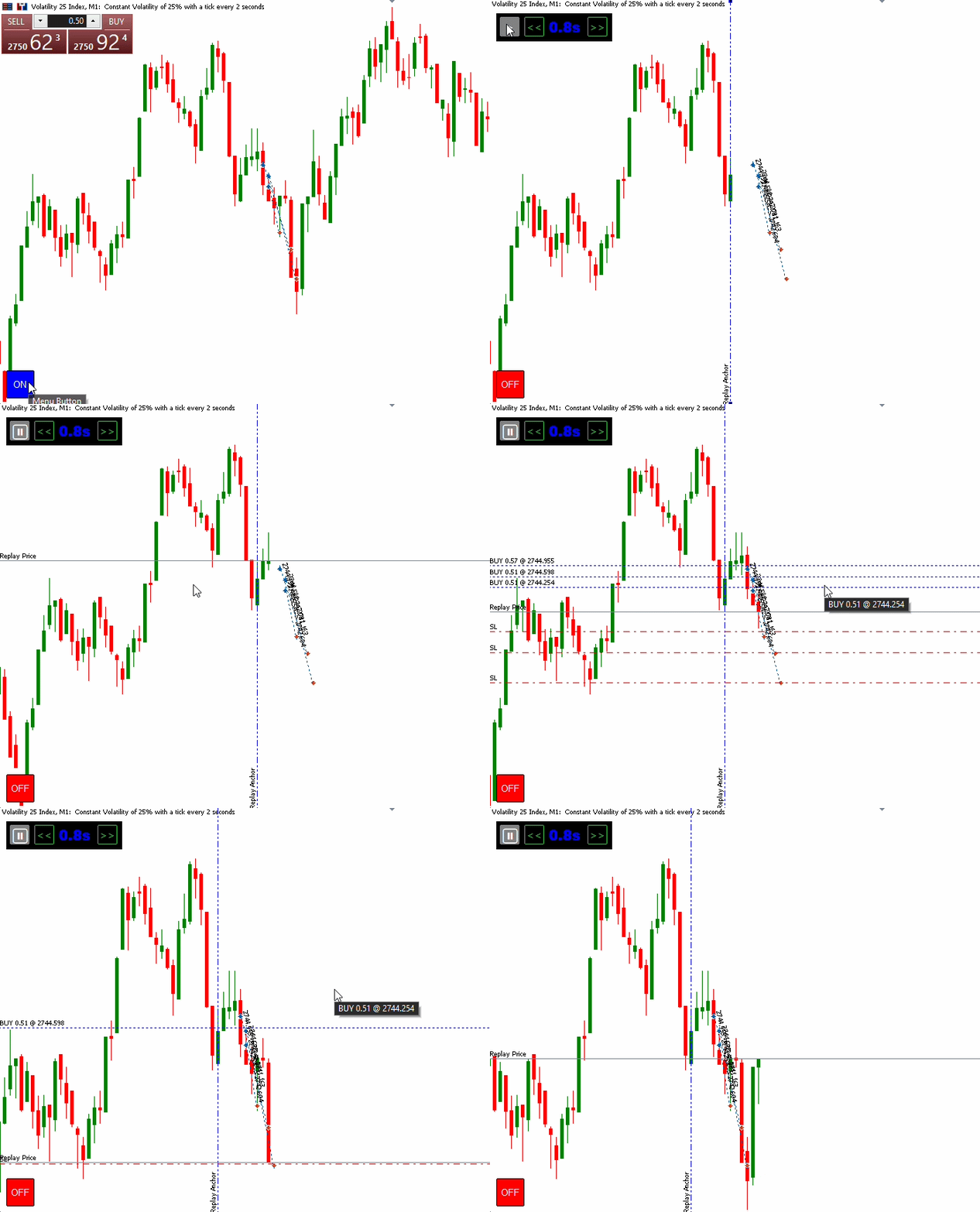
Fig. 4. Test for Trade Management

Fig. 5. Test for Playback Speed, Chart Restoration, Single and Dual Anchor Mode
Conclusion
In this article, we implemented an interactive Trade Replay Tool for MetaTrader 5 using MQL5's event-driven architecture to provide a more comprehensive approach to historical market replay. Rather than simply revealing historical candles at a fixed interval, the tool combines candle-by-candle playback with interactive replay-range selection, historical trade reconstruction, and visual paper trade management. The major implementations include:
- Candle-by-candle replay — custom indicator buffers and a timer-driven engine progressively reveal historical candles within the selected replay range, with playback controls and adjustable speed.
- Interactive replay-range selection — draggable start and end anchors allow users to define and adjust the historical region to be replayed while keeping the selected times aligned with actual chart bars.
- Historical trade reconstruction — historical entry and exit deals are retrieved within the selected range and linked through their position IDs to reconstruct the corresponding trade lifecycle.
- Paper trade management — reconstructed trades are displayed as paper positions with Entry, Stop Loss, and Take Profit levels, which are managed as replay progresses.
- Event-driven chart interaction and restoration — chart events handle controls, keyboard shortcuts, anchor movement, and object management, while the original chart state is restored when replay mode is deactivated.
By combining historical candle playback with trade reconstruction and interactive chart control, you now have a robust foundation for developing more advanced trade analysis, replay, and adaptive trading tools in MQL5.
Warning: All rights to these materials are reserved by MetaQuotes Ltd. Copying or reprinting of these materials in whole or in part is prohibited.
This article was written by a user of the site and reflects their personal views. MetaQuotes Ltd is not responsible for the accuracy of the information presented, nor for any consequences resulting from the use of the solutions, strategies or recommendations described.

 From Basic to Intermediate: Technical Indicators (II)
 Neural Networks in Practice: Gradient Descent
 A Grid Expert Advisor Based on a Cellular Automaton with Online Learning in MQL5 (Part I): Continuous Adaptation of the Trading Model on Each Bar
 From Basic to Intermediate: Technical Indicators (I)

- Free trading apps
- Over 8,000 signals for copying
- Economic news for exploring financial markets
You agree to website policy and terms of use