From Basic to Intermediate: Operator Overloading (III)
 445
445
 0
0

Introduction
In the previous article, From Basic to Intermediate: Operator Overloading (II), we examined how to create a debugging mechanism, as well as the risks associated with debugging code that uses operator overloading. Although that article may seem confusing and complicated at first, you, my dear reader, need to fully understand how this mechanism works. At some point, you may encounter difficulties debugging code that uses operator overloading. And without this knowledge, you won't be able to solve some rather complex problems correctly.
All right, although I've already introduced some operators that can be overloaded in MQL5—at least two of them—I think you'll have no trouble applying what we've already covered to most of the rest. At least when it comes to arithmetic operators. However, there are other operators whose overloading mechanisms differ significantly. In some cases, they have very specific characteristics.
So, it remains to explain how to overload logical operators—or, as many people call them, relational (comparison) operators—and that is exactly what this article will cover. So it's time to set aside anything that might distract you and focus on what matters most. To do that, we'll start a new topic.
Operator Overloading (III)
Great—now that we’ve talked a little about overloading arithmetic operators, I imagine you’d like to learn how to overload operators that control the flow of code execution depending on whether a condition is true or false. Generally, to determine which path the code will follow, we need to check several variables that a structure or class may contain. However, there is a much more practical and straightforward way to evaluate such a condition if you design the class or structure very carefully. Otherwise, you risk hitting a wall. Unlike arithmetic operators, logical operators and comparison operators leave little room for error and require much greater attention from the programmer. But if you understood the explanations in the two previous articles, you'll find this one much easier to understand.
Well, let's get started. To make the explanation easier and more pleasant to follow, we'll take the following approach: we won't write the code from scratch. We will reuse concepts from the previous article. The following block contains all the source code.
01. //+------------------------------------------------------------------+
02. #property copyright "Daniel Jose"
03. //+------------------------------------------------------------------+
04. struct stComplex
05. {
06. //+----------------+
07.     private :
08.         double m_r, m_i;
09. //+----------------+
10.     public  :
11. //+----------------+
12.         stComplex(): m_r(0), m_i(0) {}
13. //+----------------+
14.         stComplex(double r, double i): m_r(r), m_i(i) {}
15. //+----------------+
16.         stComplex operator+(const stComplex &arg)
17.         {
18.             return stComplex(m_r + arg.m_r, m_i + arg.m_i);
19.         }
20. //+----------------+
21.         stComplex operator+(const double arg)
22.         {
23.             return stComplex(m_r + arg, m_i);
24.         }
25. //+----------------+
26.         stComplex operator+=(const double arg)
27.         {
28.             return stComplex(m_r += arg, m_i);
29.         }
30. //+----------------+
31.         stComplex Debug(uint arg)
32.         {
33.             PrintFormat("Debugging the line %d = %.02f %c %.02fi", arg, m_r, (m_i < 0 ? '-' : '+'), MathAbs(m_i));
34.             return this;
35.         }
36. //+----------------+
37. };
38. //+------------------------------------------------------------------+
39. void OnStart(void)
40. {
41.     stComplex   a(2, 5),
42.                 b(8, -3),
43.                 c;
44.
45.     c = (a + b).Debug(__LINE__);
46.     c.Debug(__LINE__);
47.     (c += 4).Debug(__LINE__);
48.     c = (b + 4).Debug(__LINE__);
49.     c.Debug(__LINE__);
50. }
51. //+------------------------------------------------------------------+
Code 01
In a sense, you don’t need to recreate this implementation step by step. In practice, you can implement the necessary overloads right away. However, since I want this article to be truly educational, I prefer to build on the code from the previous article, whose operating principle is already familiar to readers. The task now is to implement everything needed to make this snippet work.
                   .
                   .
                   .
38. //+------------------------------------------------------------------+
39. void OnStart(void)
40. {
41.     for (stComplex c(1, 0), step(1, 3), max(5, 6); c < max; c += step)
42.         c.Debug(__LINE__);
43. }
44. //+------------------------------------------------------------------+
Snippet 01
Yes, I know—this construct may seem utterly insane, because you've never seen a loop like this in MQL5 before. However, that doesn't mean we can't create a for loop in the form shown in this snippet. Strange as it may seem, many of you are probably wondering right now if I'm in my right mind. But as we implement each part, you'll see that MQL5 really does allow you to implement a wide variety of behaviors. All we need to do is understand the relevant concepts and apply them correctly. Okay, if we modify the OnStart procedure according to Snippet 01, the compiler will issue the following messages.
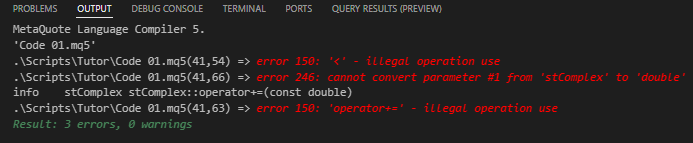
Figure 01
Well, that was to be expected. The reason is simple: the compiler does not know how to use the “less than” operator when one of the operands is a variable of type stComplex, since the required overload has not yet been defined in the code. But what about the other two errors? So, my dear reader, these two other errors are actually one and the same error. If you look at Code 01, you will see that stComplex defines an overload of the += operator whose right operand must contain a value of type double. There is currently no other overload that accepts a variable of type stComplex as the right operand. You can see this for yourself in line 26 of Code 01.
So, let’s start by fixing this first error related to the += operator. We will keep the overload that adds a double value to the stComplex object on the left of the operator, and implement another one that will add the contents of the second stComplex variable. To do this, we will implement a second overload of the += operator in the code.
01. //+------------------------------------------------------------------+
02. #property copyright "Daniel Jose"
03. //+------------------------------------------------------------------+
04. struct stComplex
05. {
06. //+----------------+
07.     private :
08.         double m_r, m_i;
09. //+----------------+
10.     public  :
11. //+----------------+
12.         stComplex(): m_r(0), m_i(0) {}
13. //+----------------+
14.         stComplex(double r, double i): m_r(r), m_i(i) {}
15. //+----------------+
16.         stComplex operator+(const stComplex &arg)
17.         {
18.             return stComplex(m_r + arg.m_r, m_i + arg.m_i);
19.         }
20. //+----------------+
21.         stComplex operator+(const double arg)
22.         {
23.             return stComplex(m_r + arg, m_i);
24.         }
25. //+----------------+
26.         stComplex operator+=(const double arg)
27.         {
28.             return stComplex(m_r += arg, m_i);
29.         }
30. //+----------------+
31.         stComplex operator+=(const stComplex &arg)
32.         {
33.             return stComplex(m_r += arg.m_r, m_i += arg.m_i);
34.         }
35. //+----------------+
36.         stComplex Debug(uint arg)
37.         {
38.             PrintFormat("Debugging the line %d = %.02f %c %.02fi", arg, m_r, (m_i < 0 ? '-' : '+'), MathAbs(m_i));
39.             return this;
40.         }
41. //+----------------+
42. };
43. //+------------------------------------------------------------------+
44. void OnStart(void)
45. {
46.     for (stComplex c(1, 0), step(1, 3), max(5, 6); c < max; c += step)
47.         c.Debug(__LINE__);
48. }
49. //+------------------------------------------------------------------+
Code 02
Now, if we try to compile the code again, the compiler will display the following error message.

Figure 02
Great. Before checking how the loop in line 46 of Code 02 works, we'll run a preliminary test first. It is not a very good idea to test the overload of a comparison operator or logical operator directly inside a loop. For this kind of check, it is best to use an if statement. So we will make a few changes to Code 02 to perform this check. Thus, an if statement for this check will be added to Code 02.
01. //+------------------------------------------------------------------+
02. #property copyright "Daniel Jose"
03. //+------------------------------------------------------------------+
04. struct stComplex
05. {
06. //+----------------+
07.     private :
08.         double m_r, m_i;
09. //+----------------+
10.     public  :
11. //+----------------+
12.         stComplex(): m_r(0), m_i(0) {}
13. //+----------------+
14.         stComplex(double r, double i): m_r(r), m_i(i) {}
15. //+----------------+
16.         stComplex operator+(const stComplex &arg)
17.         {
18.             return stComplex(m_r + arg.m_r, m_i + arg.m_i);
19.         }
20. //+----------------+
21.         stComplex operator+(const double arg)
22.         {
23.             return stComplex(m_r + arg, m_i);
24.         }
25. //+----------------+
26.         stComplex operator+=(const double arg)
27.         {
28.             return stComplex(m_r += arg, m_i);
29.         }
30. //+----------------+
31.         stComplex operator+=(const stComplex &arg)
32.         {
33.             return stComplex(m_r += arg.m_r, m_i += arg.m_i);
34.         }
35. //+----------------+
36.         bool operator<(const stComplex &arg)
37.         {
38.             return ((m_r <= arg.m_r) && (m_i < arg.m_i));
39.         }
40. //+----------------+
41.         stComplex Debug(uint arg)
42.         {
43.             PrintFormat("Debugging the line %d = %.02f %c %.02fi", arg, m_r, (m_i < 0 ? '-' : '+'), MathAbs(m_i));
44.             return this;
45.         }
46. //+----------------+
47. };
48. //+------------------------------------------------------------------+
49. void OnStart(void)
50. {
51.     stComplex   a(1, 3),
52.                 b(1, 4);
53.
54.     if (a < b) Print("Condition is: True"); else Print("Condition is: False.");
55.     // for (stComplex c(1, 0), step(1, 3), max(5, 6); c < max; c += step)
56.     //     c.Debug(__LINE__);
57. }
58. //+------------------------------------------------------------------+
Code 03
Please note that I commented out the lines in the for loop and added an if statement to check whether the < operator is implemented correctly in the code. When you run Code 03, the MetaTrader 5 terminal will display the following result.

Figure 03
Great, it works. Now we can uncomment the lines related to the for loop and check whether it works correctly. However, since it never hurts to be safe, we'll add a safety check before testing this for loop. The loop could become infinite, since we don't yet know for sure how the code will behave with these overloaded operators. As a result, we get a version of the code with an additional safeguard.
01. //+------------------------------------------------------------------+
02. #property copyright "Daniel Jose"
03. //+------------------------------------------------------------------+
04. struct stComplex
05. {
06. //+----------------+
07.     private :
08.         double m_r, m_i;
09. //+----------------+
10.     public  :
11. //+----------------+
12.         stComplex(): m_r(0), m_i(0) {}
13. //+----------------+
14.         stComplex(double r, double i): m_r(r), m_i(i) {}
15. //+----------------+
16.         stComplex operator+(const stComplex &arg)
17.         {
18.             return stComplex(m_r + arg.m_r, m_i + arg.m_i);
19.         }
20. //+----------------+
21.         stComplex operator+(const double arg)
22.         {
23.             return stComplex(m_r + arg, m_i);
24.         }
25. //+----------------+
26.         stComplex operator+=(const double arg)
27.         {
28.             return stComplex(m_r += arg, m_i);
29.         }
30. //+----------------+
31.         stComplex operator+=(const stComplex &arg)
32.         {
33.             return stComplex(m_r += arg.m_r, m_i += arg.m_i);
34.         }
35. //+----------------+
36.         bool operator<(const stComplex &arg)
37.         {
38.             return ((m_r <= arg.m_r) && (m_i < arg.m_i));
39.         }
40. //+----------------+
41.         stComplex Debug(uint arg)
42.         {
43.             PrintFormat("Debugging the line %d = %.02f %c %.02fi", arg, m_r, (m_i < 0 ? '-' : '+'), MathAbs(m_i));
44.             return this;
45.         }
46. //+----------------+
47. };
48. //+------------------------------------------------------------------+
49. void OnStart(void)
50. {
51.     stComplex   a(1, 3),
52.                 b(1, 3),
53.                 m(5, 6);
54.     int counter = 0;
55.
56.     while (a < m)
57.     {
58.         a.Debug(__LINE__);
59.         a += b;
60.         counter++;
61.         if (counter > 50) break;
62.     }
63.
64.     a.Debug(__LINE__);
65.     Print("The counter value is: ", counter);
66.
67.     // for (stComplex c(1, 0), step(1, 3), max(5, 6); c < max; c += step)
68.     //     c.Debug(__LINE__);
69. }
70. //+------------------------------------------------------------------+
Code 04
Now let's analyze the changes in the code. When we run it, we will get an incorrect counter value.
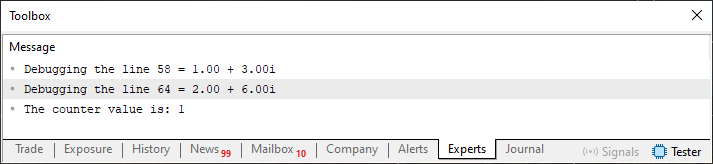
Figure 04
Hmm, that doesn't seem right. Or is it? Actually, no, my dear reader. That is exactly why I said that operator overloads should always be checked with caution. Just as the calculation could have yielded an incorrect result, we could just as easily have ended up in an infinite loop. For this reason, overloading logical and comparison operators requires much greater caution than overloading arithmetic operators. All it takes is one small mistake to waste hours trying to figure out where the error is. That is why I repeat in every article that you should study and practice the procedures described so that you can understand when it makes sense to use the operator overloading you have just implemented—and when it does not.
Okay, but where exactly is the problem in the code? And that's the easy part, my dear reader. The problem is on line 38. Please note the following: when we performed the check using an if statement, it was line 38 that allowed us to perform the check correctly. However, when using a while loop, the check stopped working properly. The value of m_i causes the expression to return false even before m_i reaches or exceeds the value of m_r. See how easy it is to find the mistake? To fix this, we need to replace line 38 in Code 04 with the expression from Snippet 02.
                   .
                   .
                   .
38.            return ((m_r < arg.m_r) ? true : (m_r > arg.m_r ? false : (m_i < arg.m_i)));;
                   .
                   .
                   .
Snippet 02
When run again, the code produces the following result:
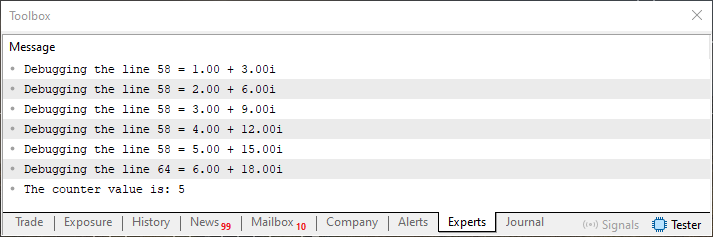
Figure 05
Great. Everything worked perfectly. Now, finally, we can uncomment the lines in the for loop and reuse the implementation from Snippet 01. If we now run the code with the for loop, we will get the correct count.
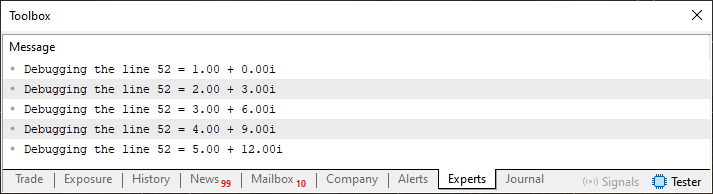
Figure 06
Simple and quite amusing, isn't it, my dear reader? Very good—that was the easy part. Now we're going to expand the implementation and, at the same time, make it much more interesting. To do this, we will implement the > operator using another overload.
                   .
                   .
                   .
40. //+----------------+
41.         bool operator>(const stComplex &arg)
42.         {
43.             return ((m_r > arg.m_r) ? true : (m_r < arg.m_r ? false : (m_i > arg.m_i)));
44.         }
45. //+----------------+
                   .
                   .
                   .
Snippet 03
Note that this one is also quite simple and almost the opposite of the operator we just implemented. Now we can check whether one value is greater than or less than another. However, this comparison has a limitation and requires a certain degree of caution. But we'll go through all of this step by step and see how to address some of the limitations that will undoubtedly arise.
The complete Code 05 will serve as the basis for subsequent changes.
01. //+------------------------------------------------------------------+
02. #property copyright "Daniel Jose"
03. //+------------------------------------------------------------------+
04. struct stComplex
05. {
06. //+----------------+
07.     private :
08.         double m_r, m_i;
09. //+----------------+
10.     public  :
11. //+----------------+
12.         stComplex(): m_r(0), m_i(0) {}
13. //+----------------+
14.         stComplex(double r, double i): m_r(r), m_i(i) {}
15. //+----------------+
16.         stComplex operator+(const stComplex &arg)
17.         {
18.             return stComplex(m_r + arg.m_r, m_i + arg.m_i);
19.         }
20. //+----------------+
21.         stComplex operator+(const double arg)
22.         {
23.             return stComplex(m_r + arg, m_i);
24.         }
25. //+----------------+
26.         stComplex operator+=(const double arg)
27.         {
28.             return stComplex(m_r += arg, m_i);
29.         }
30. //+----------------+
31.         stComplex operator+=(const stComplex &arg)
32.         {
33.             return stComplex(m_r += arg.m_r, m_i += arg.m_i);
34.         }
35. //+----------------+
36.         bool operator<(const stComplex &arg)
37.         {
38.             return ((m_r < arg.m_r) ? true : (m_r > arg.m_r ? false : (m_i < arg.m_i)));
39.         }
40. //+----------------+
41.         bool operator>(const stComplex &arg)
42.         {
43.             return ((m_r > arg.m_r) ? true : (m_r < arg.m_r ? false : (m_i > arg.m_i)));
44.         }
45. //+----------------+
46.         stComplex Debug(uint arg)
47.         {
48.             PrintFormat("Debugging the line %d = %.02f %c %.02fi", arg, m_r, (m_i < 0 ? '-' : '+'), MathAbs(m_i));
49.             return this;
50.         }
51. //+----------------+
52. };
53. //+------------------------------------------------------------------+
54. void OnStart(void)
55. {
56.     stComplex   a(1, 3);
57.     int counter = 0;
58.
59.     while (a < stComplex(5, 6))
60.     {
61.         a.Debug(__LINE__);
62.         a += stComplex(1, 3);
63.         counter++;
64.         if (counter > 50) break;
65.     }
66.
67.     a.Debug(__LINE__);
68.     Print("The counter value is: ", counter);
69. }
70. //+------------------------------------------------------------------+
Code 05
Now I want you to pay very close attention, because all the changes we'll be making from this point on will be related to this Code 05. You might be thinking, “Wow, you've completely lost your mind. I understand almost nothing about this Code 05.” However, the implementation of Code 05 is nothing more than an equivalent reworking of Code 04. But I'd like to draw your attention to lines 59 and 62.
In Code 05, we already have everything we need to modify the behavior of line 62. We have already explained and applied this in previous articles. However, we cannot yet change the condition on line 59 in the same way. Not yet. Nevertheless, I want to explore some of the possibilities this implementation offers. First, we'll run this code as is. When the code is executed, you will get the result shown in Figure 07.
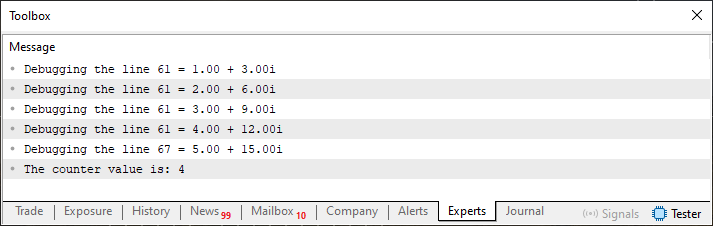
Figure 07
Good. Now let's rewrite the expression on line 59.
while (stComplex(5, 6) > a)
The code will still produce the result shown in Figure 07. Now we'll rewrite the operation on line 62.
a += 1; In this case, running the code will produce a different result.
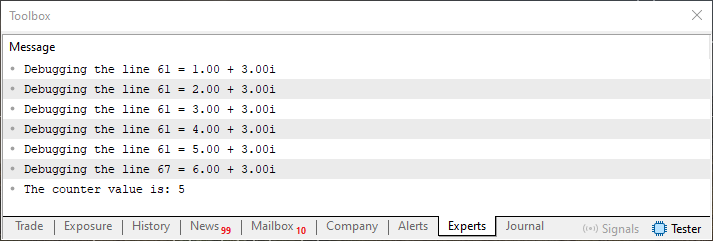
Figure 08
Please note that we can use either an integer or the stComplex variable as the right operand without any problems. What about the loop termination condition? Is it possible to write this condition regardless of the order of the operands? All right, let's check this possibility directly in the code. So now we'll change the order of the operands in the condition on line 59.
while (a < 5)
When you try to compile the code with this change, the compiler will display the following error messages.
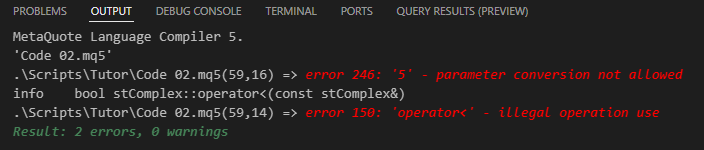
Figure 09
The problem is that in this expression, the left operand is the stComplex variable, while the right operand is a value of a built-in MQL5 type, and the compiler needs a corresponding overload for this combination. To support both operand combinations, we will implement the corresponding overloads in Code 05.
01. //+------------------------------------------------------------------+
02. #property copyright "Daniel Jose"
03. //+------------------------------------------------------------------+
04. struct stComplex
05. {
06. //+----------------+
07.     private :
08.         double m_r, m_i;
09. //+----------------+
10.     public  :
11. //+----------------+
12.         stComplex(): m_r(0), m_i(0) {}
13. //+----------------+
14.         stComplex(double r, double i): m_r(r), m_i(i) {}
15. //+----------------+
16.         stComplex operator+(const double arg)
17.         {
18.             return stComplex(m_r + arg, m_i);
19.         }
20. //+----------------+
21.         stComplex operator+=(const double arg)
22.         {
23.             return stComplex(m_r += arg, m_i);
24.         }
25. //+----------------+
26.         bool operator<(const double arg)
27.         {
28.             return (m_r < arg);
29.         }
30. //+----------------+
31.         bool operator>(const double arg)
32.         {
33.             return (m_r > arg);
34.         }
35. //+----------------+
36.         stComplex operator+(const stComplex &arg)
37.         {
38.             return stComplex(m_r + arg.m_r, m_i + arg.m_i);
39.         }
40. //+----------------+
41.         stComplex operator+=(const stComplex &arg)
42.         {
43.             return stComplex(m_r += arg.m_r, m_i += arg.m_i);
44.         }
45. //+----------------+
46.         bool operator<(const stComplex &arg)
47.         {
48.             return ((m_r < arg.m_r) ? true : (m_r > arg.m_r ? false : (m_i < arg.m_i)));
49.         }
50. //+----------------+
51.         bool operator>(const stComplex &arg)
52.         {
53.             return ((m_r > arg.m_r) ? true : (m_r < arg.m_r ? false : (m_i > arg.m_i)));
54.         }
55. //+----------------+
56.         stComplex Debug(uint arg)
57.         {
58.             PrintFormat("Debugging the line %d = %.02f %c %.02fi", arg, m_r, (m_i < 0 ? '-' : '+'), MathAbs(m_i));
59.             return this;
60.         }
61. //+----------------+
62. };
63. //+------------------------------------------------------------------+
64. void OnStart(void)
65. {
66.     stComplex   a(1, 3);
67.     int counter = 0;
68.
69.     while (a < 5)
70.     {
71.         a.Debug(__LINE__);
72.         a += 1;
73.         counter++;
74.         if (counter > 50) break;
75.     }
76.
77.     a.Debug(__LINE__);
78.     Print("The counter value is: ", counter);
79. }
80. //+------------------------------------------------------------------+
Code 06
Now the compiler successfully compiles this new code and creates an executable file.
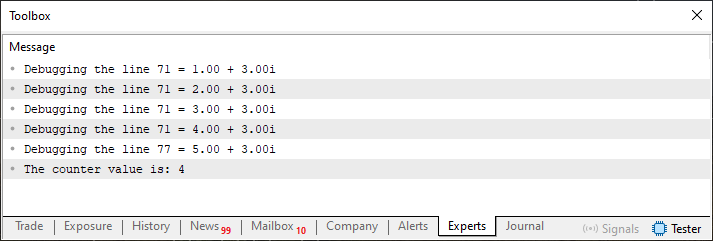
Figure 10
We now encounter a restriction: MQL5 DOES NOT ALLOW this. In fact, as far as I know, only the SMALLTALK language allows for this kind of construct, because everything in it is an object. Quite literally, it is a language that has taken object-oriented programming to the extreme. Apart from it, I don't know of any other language that allows such a construct. Although there are so many programming languages that we cannot rule out the possibility that others also support this construct. And this is despite the fact that I have studied various programming languages for many years. Yes, my dear reader, I can read and understand code written in various programming languages. However, I don't know how to write in many of them—only in a few. But let's get back to the order of operands. The condition in Snippet 04 illustrates what the problem is.
                   .
                   .
                   .
63. //+------------------------------------------------------------------+
64. void OnStart(void)
65. {
66.     stComplex   a(1, 3);
67.     int counter = 0;
68.
69.     while (5 > a)
70.     {
71.         a.Debug(__LINE__);
72.         a += 1;
73.         counter++;
74.         if (counter > 50) break;
75.     }
76.
77.     a.Debug(__LINE__);
78.     Print("The counter value is: ", counter);
79. }
80. //+------------------------------------------------------------------+
Snippet 04
Now, if you try to compile Code 06 after replacing the condition with the condition from Snippet 04, the compiler will issue the corresponding error.

Figure 11
Why is the compiler issuing this error? In principle, `stComplex` defines an overloaded `>` operator that accepts a value of a built-in numeric type—either an integer or a floating-point value—as its right operand. This definition appears on line 31 of Code 06.
The reason for this error is that you may have forgotten how the compiler interprets overloaded operators. The problem is not whether the code implements this operator, but whether the compiler allows this order of operands. Many people might think, “Of course, this won’t work; the literal 5 is not a variable. Therefore, the compiler will not be able to determine how to perform the comparison.” However, that is not the reason, although that line of reasoning is quite close to the truth. To demonstrate this, let's replace the literal with a variable.
                   .
                   .
                   .
63. //+------------------------------------------------------------------+
64. void OnStart(void)
65. {
66.     stComplex   a(1, 3);
67.     int counter = 0;
68.
69.     while (counter > a)
70.     {
71.         a.Debug(__LINE__);
72.         a += 1;
73.         counter++;
74.         if (counter > 50) break;
75.     }
76.
77.     a.Debug(__LINE__);
78.     Print("The counter value is: ", counter);
79. }
80. //+------------------------------------------------------------------+
Snippet 05
Even in this case, the compiler will still generate the same type of error, which proves that the problem is not related to using a literal or a variable. The problem is with the type of the left operand: the overload is defined for stComplex, and the compiler cannot call it when the left operand is a value of a built-in type. We need to create an stComplex value from this left operand. Thus, the compiler will interpret the code correctly and generate an executable file.
In any case, we must apply this conversion in exactly the same way in both Snippet 04 and Snippet 05. If we take Snippet 04 as an example, we need to explicitly cast the left operand to the stComplex type.
01. //+------------------------------------------------------------------+
02. #property copyright "Daniel Jose"
03. //+------------------------------------------------------------------+
04. struct stComplex
05. {
06. //+----------------+
07.     private :
08.         double m_r, m_i;
09. //+----------------+
10.     public  :
11. //+----------------+
12.         stComplex(): m_r(0), m_i(0) {}
13. //+----------------+
14.         stComplex(double r): m_r(r), m_i(0) {}
15. //+----------------+
16.         stComplex(double r, double i): m_r(r), m_i(i) {}
17. //+----------------+
                   .
                   .
                   .
63. //+----------------+
64. };
65. //+------------------------------------------------------------------+
66. void OnStart(void)
67. {
68.     stComplex   a(1, 3);
69.     int counter = 0;
70.
71.     while (stComplex(5) > a)
72.     {
73.         a.Debug(__LINE__);
74.         a += 1;
75.         counter++;
76.         if (counter > 50) break;
77.     }
78.
79.     a.Debug(__LINE__);
80.     Print("The counter value is: ", counter);
81. }
82. //+------------------------------------------------------------------+
Snippet 06
The compiler will now generate an executable file. However, to do this, we had to declare a new constructor in the structure. This declaration appears on line 14. Without its implementation, the compiler will generate the corresponding error.

Figure 12
The error message also lists the constructors defined in the structure quite precisely. This information allows us to fix the code we are trying to compile. After adding the necessary constructor, the compiler correctly generates the executable file.
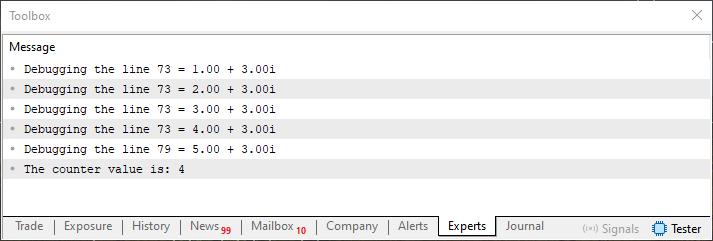
Figure 13
All right, I think I've figured out how to fix this kind of problem. But what about the other logical operators? How do you overload them? Could you show me an example that would serve as a starting point if I ever need to overload one of these operators? Of course, I can show you an example. In fact, we'll cover almost all operators. Although I won't go over them one by one, since, in my opinion, that would be unnecessary. Nevertheless, I want to show you how to use overloading so that you have a starting point for further study.
So, let's take a look at two more operators right away. Both are implemented in Code 07.
001. //+------------------------------------------------------------------+
002. #property copyright "Daniel Jose"
003. //+------------------------------------------------------------------+
004. struct stComplex
005. {
006. //+----------------+
007.     private :
008.         double m_r, m_i;
009. //+----------------+
010.     public  :
011. //+----------------+
012.         stComplex(): m_r(0), m_i(0) {}
013. //+----------------+
014.         stComplex(double r): m_r(r), m_i(0) {}
015. //+----------------+
016.         stComplex(double r, double i): m_r(r), m_i(i) {}
017. //+----------------+
018.         stComplex operator+(const double arg)
019.         {
020.             return stComplex(m_r + arg, m_i);
021.         }
022. //+----------------+
023.         stComplex operator+=(const double arg)
024.         {
025.             return stComplex(m_r += arg, m_i);
026.         }
027. //+----------------+
028.         bool operator<(const double arg)
029.         {
030.             return (m_r < arg);
031.         }
032. //+----------------+
033.         bool operator>(const double arg)
034.         {
035.             return (m_r > arg);
036.         }
037. //+----------------+
038.         stComplex operator+(const stComplex &arg)
039.         {
040.             return stComplex(m_r + arg.m_r, m_i + arg.m_i);
041.         }
042. //+----------------+
043.         stComplex operator+=(const stComplex &arg)
044.         {
045.             return stComplex(m_r += arg.m_r, m_i += arg.m_i);
046.         }
047. //+----------------+
048.         bool operator<(const stComplex &arg)
049.         {
050.             return ((m_r < arg.m_r) ? true : (m_r > arg.m_r ? false : (m_i < arg.m_i)));
051.         }
052. //+----------------+
053.         bool operator>(const stComplex &arg)
054.         {
055.             return ((m_r > arg.m_r) ? true : (m_r < arg.m_r ? false : (m_i > arg.m_i)));
056.         }
057. //+----------------+
058.         bool operator&&(const stComplex &arg)
059.         {
060.             return m_r && arg.m_r && m_i && arg.m_i;
061.         }
062. //+----------------+
063.         stComplex operator&(const stComplex &arg)
064.         {
065.             union u1
066.             {
067.                 double p64;
068.                 ulong  u64;
069.             }v_r0, v_i0, v_r1, v_i1;
070.
071.             v_r0.p64 = m_r;
072.             v_i0.p64 = m_i;
073.             v_r1.p64 = arg.m_r;
074.             v_i1.p64 = arg.m_i;
075.
076.             v_r0.u64 &= v_r1.u64;
077.             v_i0.u64 &= v_i1.u64;
078.
079.             return stComplex(v_r0.p64, v_i0.p64);
080.         }
081. //+----------------+
082.         stComplex Debug(uint arg)
083.         {
084.             PrintFormat("Debugging the line %d = %.02f %c %.02fi", arg, m_r, (m_i < 0 ? '-' : '+'), MathAbs(m_i));
085.             return this;
086.         }
087. //+----------------+
088. };
089. //+------------------------------------------------------------------+
090. void OnStart(void)
091. {
092.     stComplex   a(15, 49),
093.                 b(7, 25);
094.
095.     a.Debug(__LINE__);
096.     b.Debug(__LINE__);
097.
098.     Print("The result of A & B is:");
099.     (a & b).Debug(__LINE__);
100.
101.     Print("The result of A && B is: ", (a && b ? "TRUE" : "FALSE"));
102. }
103. //+------------------------------------------------------------------+
Code 07
Before we examine Code 07, let's run it. The program produces the result shown in the following figure.
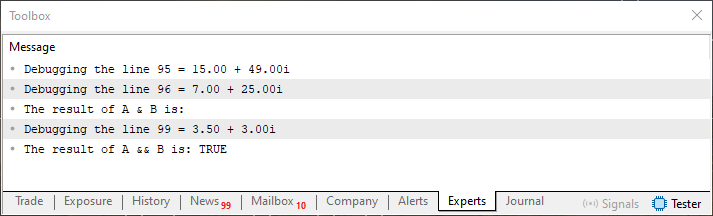
Figure 14
This result may not seem entirely intuitive if you don't understand how binary representation and bitwise operations interact. Since I have already explained and demonstrated everything used in Code 07 in previous articles in this series, I will not repeat those explanations. If you have any questions, please refer to the previous articles for more detailed information. However, none of these articles explains how the binary representation of double values determines the result shown in Figure 14.
To understand how binary representation determines the result, you need to grasp what I explained in another article—one that many people may not have given the importance it deserves. I'm referring to the article “From Basic to Intermediate: Floating Point”. There, I explain how to interpret a floating-point value based on its constituent bits; this knowledge helps you understand the result printed on line 99 of Code 07.
As I have emphasized time and again, dear reader, not a single article in this series is useless or insignificant. I scheduled each article to be published at a specific time so that the difficulty would increase gradually. However, those who study this series will not find this increase in complexity to be sudden, because each topic builds on the previous ones. So, study each topic at the right time. There's no need to rush. Understand each concept; that way, you'll be able to understand future articles.
Now we can continue. We can make a small adjustment to improve the presentation a bit, since it is difficult to distinguish each operation in Figure 14. Therefore, we will modify the output statement to label each result more clearly.
001. //+------------------------------------------------------------------+
002. #property copyright "Daniel Jose"
003. //+------------------------------------------------------------------+
004. struct stComplex
005. {
                   .
                   .
                   .
081. //+----------------+
082.         string ToString(void)
083.         {
084.             return StringFormat("%.02f %c %.02fi", m_r, (m_i < 0 ? '-' : '+'), MathAbs(m_i));
085.         }
086. //+----------------+
087.         stComplex Debug(uint arg)
088.         {
089.             Print("Debugging the line ", arg, " = ", this.ToString());
090.             return this;
091.         }
092. //+----------------+
093. };
094. //+------------------------------------------------------------------+
095. void OnStart(void)
096. {
097.     stComplex   a(15, 49),
098.                 b(7, 25);
099.     Print("Variable A: ", a.ToString());
100.     Print("Variable B: ", b.ToString());
101.     Print("The result of A & B is: ", (a & b).ToString());
102.     Print("The result of A && B is: ", (a && b ? "TRUE" : "FALSE"));
103. }
104. //+------------------------------------------------------------------+
Snippet 07
Now, when we run the code, we'll get clearer output.
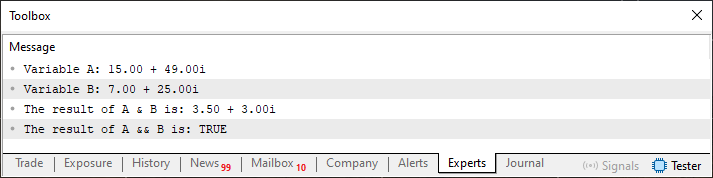
Figure 15
Now it is indeed much easier to understand. But let's get back to the bitwise operation. Why does A & B produce this result? That doesn't make any sense. Well, perhaps it doesn't make sense to you, my dear reader, if you jumped straight to this article. But for those who have studied the articles in this series, the result makes perfect sense. The compiler applies the bitwise operation not directly to the floating-point values, but to their integer representations. What? Wait a minute. Now even I, having followed the articles, am confused. How can the operands of this operation be integers? Isn't it stated in line 8 of Code 07 that the structure stores values of type double?
Yes, my dear reader, this structure stores values of type double, that is, double-precision floating-point values. However, the compiler CANNOT apply a bitwise operation directly to these values. Before performing the operation, we must provide 64-bit integer operands that represent the same binary content. That is why you get the result shown in Figures 14 and 15.
I still don't get it. Could you explain that a little better? No problem, my dear reader. To understand this once and for all, we'll create a small code sample that lets us reproduce the operation step by step.
01. //+------------------------------------------------------------------+
02. #property copyright "Daniel Jose"
03. //+------------------------------------------------------------------+
04. void OnStart(void)
05. {
06.     double  v1 = 15,
07.             v2 = 7,
08.             v3;
09.
10.     v3 = v1 & v2;
11.
12.     Print(v3);
13. }
14. //+------------------------------------------------------------------+
Code 08
When you try to compile this code, the compiler will show the following compilation error.

Figure 16
The compiler reports this error because it DOES NOT KNOW how to perform a bitwise AND operation when both operands are of type double. To solve this problem, we need to convert each operand of type double to an integer, since the compiler can indeed apply this operation to integer operands. The following code performs this explicit numeric conversion.
01. //+------------------------------------------------------------------+
02. #property copyright "Daniel Jose"
03. //+------------------------------------------------------------------+
04. void OnStart(void)
05. {
06.     double  v1 = 15,
07.             v2 = 7,
08.             v3;
09.     ulong   u1;
10.
11.     u1 = ulong(v1) & ulong(v2);
12.     v3 = double(u1);
13.
14.     Print(v3);
15. }
16. //+------------------------------------------------------------------+
Code 09
In fact, on lines 11 and 12, we convert the values stored in v1 and v2 from type double to an integer type, which allows the compiler to generate an executable file. However, I want you to note one specific coincidence: the values of v1 and v2 are exactly the same as those we used as the real part in the previous code snippets. Therefore, we should obtain a result equal to that produced by the overloaded bitwise AND operator. At least, that is what we expect to happen. However, when Code 09 is executed, the program returns a different result.
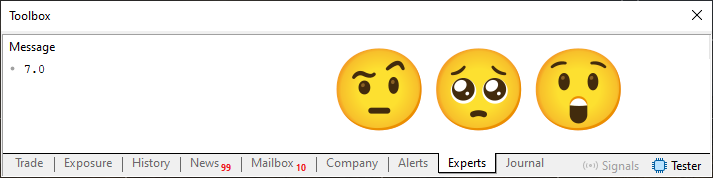
Figure 17
But what happened here? Why are the results different? I've explained the reason for this in other articles, my dear reader, where I showed how we can use memory to our advantage. One of them is "From Basic to Intermediate: Union (I)". In these articles on unions, I explained and demonstrated how to organize memory and work with it without losing any information. When converting a floating-point value to an integer, information is lost because the fractional part of the value is discarded. That's exactly the point I failed to explain when I was talking about unions.
"Well, now I'm starting to understand the reason for this result. But is there an easier way to check the binary representation of double values? Constantly repeating those divisions and multiplications that you demonstrated while explaining how to encode a decimal number in floating-point format is very tedious and exhausting." We can directly check the bits that store a value of type double without converting it to an integer. The only requirement is the ability to interpret this representation. To do this, you'll need to understand the article in which I explain the floating-point model. With this knowledge, we can modify Code 09 so that it reads the same bits as an integer representation and applies a bitwise operation to them.
01. //+------------------------------------------------------------------+
02. #property copyright "Daniel Jose"
03. //+------------------------------------------------------------------+
04. void OnStart(void)
05. {
06.     union _u
07.     {
08.         ulong   u64;
09.         double  pf64;
10.     }v1, v2, v3;
11.
12.     v1.pf64 = 15;
13.     v2.pf64 = 7;
14.     v3.u64 = v1.u64 & v2.u64;
15.
16.     Print(v3.pf64);
17. }
18. //+------------------------------------------------------------------+
Code 10
So, when the modified Code 09 is executed, the program will output the result of the new bitwise operation.
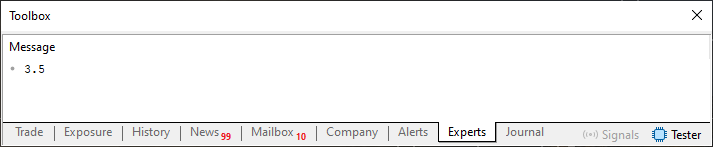
Figure 18
Great, now the program really does produce the same result as the previous overload. Nevertheless, I still want to inspect the contents stored in memory directly. I forgot about that detail. Please forgive me, my dear reader. Code 11 displays the internal representation of the values used in the operation.
01. //+------------------------------------------------------------------+
02. #property copyright "Daniel Jose"
03. //+------------------------------------------------------------------+
04. void OnStart(void)
05. {
06.     union _u
07.     {
08.         ulong   u64;
09.         double  pf64;
10.     }v1, v2, v3;
11.
12.     #define PrintContent(x) PrintFormat("Memory content in variable %s is: %I64X", #x, x.u64)
13.
14.     v1.pf64 = 15;
15.     v2.pf64 = 7;
16.     v3.u64 = v1.u64 & v2.u64;
17.
18.     PrintContent(v1);
19.     PrintContent(v2);
20.     PrintContent(v3);
21.     Print("The result of v1 & v2 is: ", v3.pf64);
22. }
23. //+------------------------------------------------------------------+
Code 11
When Code 11 is executed, the terminal will display the binary representation stored in memory for each value.
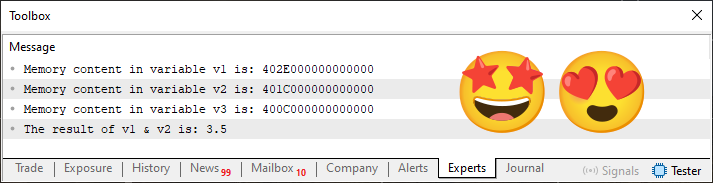
Figure 19
So, do you understand what's going on now, my dear reader? An incorrect implementation would lead to a completely incorrect result, which sooner or later would cause a huge number of problems and could jeopardize all the code we would develop from that point on.
I realize that, for many people, the techniques discussed in this article may seem unusual. However, since the goal is educational and is not to create any application, use these techniques solely for that purpose. That's why I always start my articles with the same phrase, making it clear that everything created here is intended solely for educational purposes.
Depending on the task you need to solve, you'll have to adapt the code and concepts to suit your needs. So don't memorize the code. Understand how it works and what concepts it uses. That's exactly what will come in handy in any situation.
Concluding Thoughts
In this article, we explored how to implement operator overloading for both logical operators and comparison operators. Implementing these overloads requires caution and great care, since even a minor mistake during implementation could force you to discard all the code. If any problems arise in the overloads, the entire database created from the results generated by the code will have to be either completely discarded or, at the very least, reviewed in full. In addition, the problem will also affect all dependencies based on these results.
Therefore, you should study this article very carefully and understand how it connects many concepts that many people consider unnecessary. Nevertheless, it is precisely these concepts that allow us to verify that the tests actually produce correct results. I hope you enjoyed this article. In the next article, we'll look at overloading other operators. So, see you soon—I'll see you there.
| MQ5 file | Description |
|---|---|
| Code 01 | Basic Demonstration |
| Code 02 | Basic Demonstration |
| Code 03 | Basic Demonstration |
| Code 04 | Basic Demonstration |
| Code 05 | Basic Demonstration |
Translated from Portuguese by MetaQuotes Ltd.
Original article: https://www.mql5.com/pt/articles/16938
Warning: All rights to these materials are reserved by MetaQuotes Ltd. Copying or reprinting of these materials in whole or in part is prohibited.
This article was written by a user of the site and reflects their personal views. MetaQuotes Ltd is not responsible for the accuracy of the information presented, nor for any consequences resulting from the use of the solutions, strategies or recommendations described.