

From Basic to Intermediate: Function Pointers
 1 255
1 255
 0
0

Introduction
In the previous article From Basic to Intermediate: Objects (II), we began working with the first type of event that can be used to manipulate an object displayed on the chart.
However, that article used an event type that MetaTrader 5 always triggers by default when the user interacts with the chart. In this case, we are talking about a key press. Since this event is easy to intercept with the OnChartEvent handler, you may be thinking that there is no other way to use the keyboard except by intercepting that event. Well, dear reader, that is not quite the case. Although scripts neither use nor support the OnChartEvent handler directly, we can enable mechanisms for controlling certain object properties with the keyboard and a script, even if this is a somewhat unusual approach.
So, before looking at mouse event handling, let us see how to handle keyboard events when using scripts. Although MetaTrader 5, and therefore MQL5, is not designed for this kind of operation, since it was developed to work with price charts, it is important for you to know what can and cannot be done. There are limitations that must be understood.
A script with events?
First, you need to understand this: WE CANNOT HAVE A SCRIPT WITH EVENTS. But this does not prevent us from creating a script capable of handling events that come from the keyboard. However, and this is where things really get complicated, you need to understand that MQL5 IS NOT DESIGNED for certain types of implementations. Therefore, when programming something exclusively with MQL5, various limitations and difficulties arise.
But how can keyboard events be intercepted and handled inside a script? The truth is that WE CANNOT. What we can actually do is intercept certain keys and, using a kind of filtering, create something similar to a keyboard event handler. Although in reality we will be using the OnChartEvent handler.
To make this clearer, we will use the code that we examined in the previous article. This will make it much easier to understand exactly what problem we may encounter. The code in question is shown below.
01. //+------------------------------------------------------------------+
02. #property copyright "Daniel Jose"
03. //+------------------------------------------------------------------+
04. #define def_KEY_UP          38
05. #define def_KEY_DOWN        40
06. //+----------------+
07. #define macro_NameObject  "Demo" + (string)ObjectsTotal(0)
08. //+------------------------------------------------------------------+
09. string  gl_Objs[2];
10. //+------------------------------------------------------------------+
11. int OnInit()
12. {
13.     ObjectCreate(0, gl_Objs[0] = macro_NameObject, OBJ_VLINE, 0, 0, 0);
14.     ObjectSetInteger(0, gl_Objs[0], OBJPROP_COLOR, clrRoyalBlue);
15.     ObjectCreate(0, gl_Objs[1] = macro_NameObject, OBJ_HLINE, 0, 0, 0);
16.     ObjectSetInteger(0, gl_Objs[1], OBJPROP_COLOR, clrPurple);
17.
18.     return INIT_SUCCEEDED;
19. };
20. //+------------------------------------------------------------------+
21. int OnCalculate(const int rates_total, const int prev_calculated, const int begin, const double &price[])
22. {
23.     return rates_total;
24. };
25. //+------------------------------------------------------------------+
26. void OnChartEvent(const int id, const long &lparam, const double &dparam, const string &sparam)
27. {
28.     static int p = 0;
29.     MqlRates rate[1];
30.
31.     switch(id)
32.     {
33.         case CHARTEVENT_KEYDOWN:
34.             switch ((int)lparam)
35.             {
36.                 case def_KEY_DOWN:
37.                     p = (p < Bars(_Symbol, _Period) ? p + 1 : p);
38.                     break;
39.                 case def_KEY_UP:
40.                     p = (p > 0 ? p - 1 : p);
41.                     break;
42.                 default:
43.                     return;
44.             }
45.             Comment(StringFormat("Current bar analyzed: %d", p));
46.             CopyRates(_Symbol, _Period, p, rate.Size(), rate);
47.             ObjectMove(0, gl_Objs[0], 0, rate[0].time, rate[0].close);
48.             ObjectMove(0, gl_Objs[1], 0, rate[0].time, rate[0].close);
49.             break;
50.     }
51.     ChartRedraw();
52. };
53. //+------------------------------------------------------------------+
54. void OnDeinit(const int reason)
55. {
56.     Comment("");
57.     for (uint c = 0; c < gl_Objs.Size(); c++)
58.         ObjectDelete(0, gl_Objs[c]);
59.     ChartRedraw();
60. };
61. //+------------------------------------------------------------------+
Code 01
When code 01 is executed, the following result will be obtained:
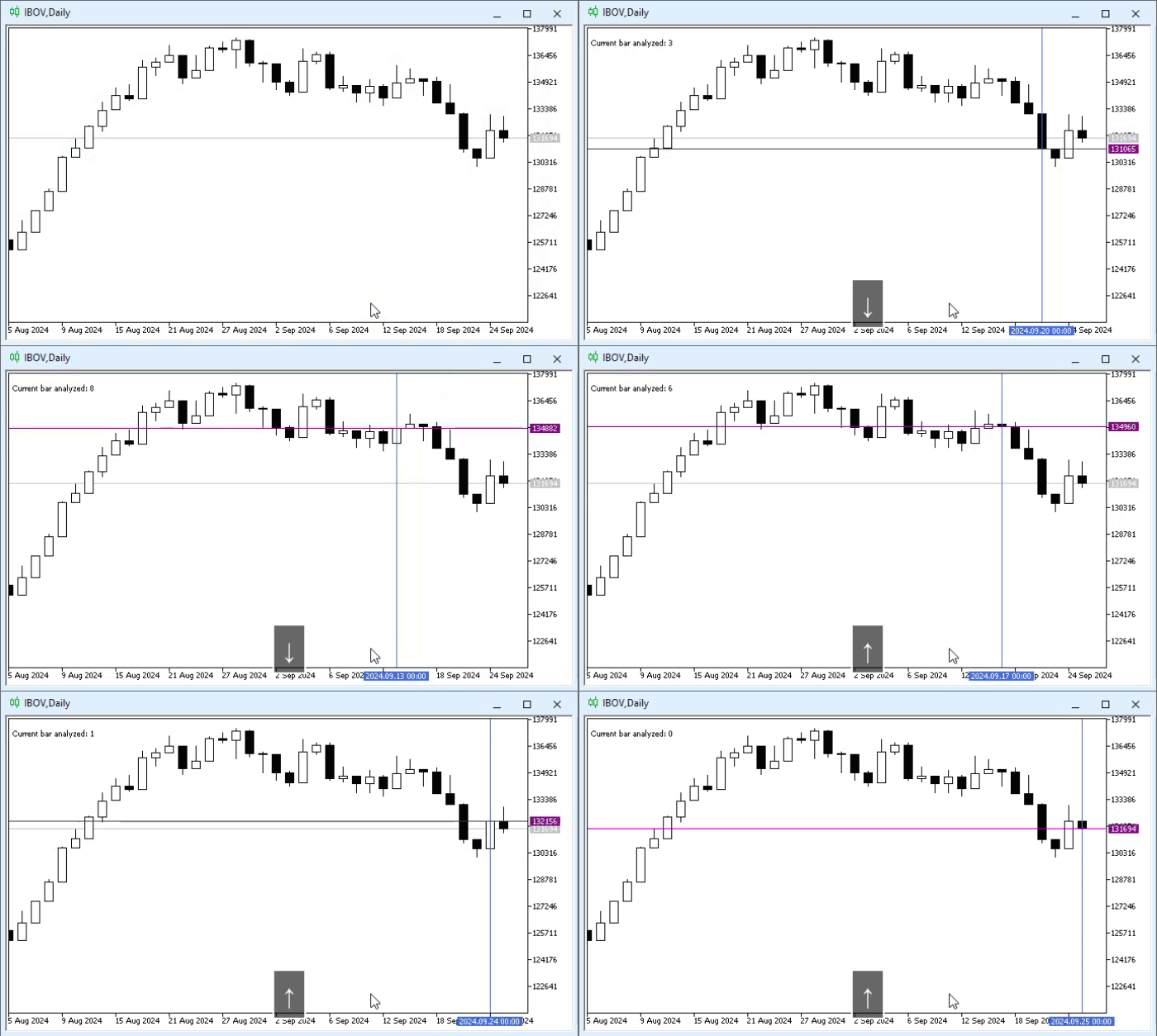
Animation 01
Now the question is: how can we create something similar to code 01, with the same result as in animation 01, but using a script for this? Good, that is exactly the question we are going to answer.
To achieve this goal, we will need to use various calls from the MQL5 library. However, since we want to focus exclusively on MQL5, we will not use any other methodology here. Although using a methodology based on C or C++ code could make the task much simpler, we will not do that here in articles aimed at the basic-to-intermediate level.
Perhaps in the future, if I decide to show how to develop more advanced code where it is necessary to use programs written and compiled in other languages, we will look at the same problem in a simpler way. However, that is also much more complicated, because to ensure interaction between languages and therefore solve the task, one must understand both MQL5 and another programming language well.
So, let us return to our main problem. To begin with: we will not use structural code here. This is because our goal is not to create an application, but to show how to solve the problem. Therefore, we need to develop an action plan. And for that, the first step is to define what the initial script will look like.
As you can see, both in the code and in the animation we have two objects: one is a horizontal line, and the other is a vertical one. Both will be linked to the bar creation time and to the closing price. And when the script finishes its work — and does so correctly — we will need to delete both objects created by this script.
Excellent, now we have an initial action plan. After that, we can start implementing the source code. This is shown below:
01. //+------------------------------------------------------------------+
02. #property copyright "Daniel Jose"
03. //+------------------------------------------------------------------+
04. #define def_KEY_UP          38
05. #define def_KEY_DOWN        40
06. //+----------------+
07. #define macro_NameObject  "Demo" + (string)ObjectsTotal(0)
08. //+------------------------------------------------------------------+
09. string gl_Objs[2];
10. //+------------------------------------------------------------------+
11. void OnStart(void)
12. {
13.     int p = 0;
14.     MqlRates rate[1];
15.
16.     ObjectCreate(0, gl_Objs[0] = macro_NameObject, OBJ_VLINE, 0, 0, 0);
17.     ObjectSetInteger(0, gl_Objs[0], OBJPROP_COLOR, clrRoyalBlue);
18.     ObjectCreate(0, gl_Objs[1] = macro_NameObject, OBJ_HLINE, 0, 0, 0);
19.     ObjectSetInteger(0, gl_Objs[1], OBJPROP_COLOR, clrPurple);
20.
21.     Comment(StringFormat("Current bar analyzed: %d", p));
22.     CopyRates(_Symbol, _Period, p, rate.Size(), rate);
23.     ObjectMove(0, gl_Objs[0], 0, rate[0].time, rate[0].close);
24.     ObjectMove(0, gl_Objs[1], 0, rate[0].time, rate[0].close);
25.
26.     Comment("");
27.     for (uint c = 0; c < gl_Objs.Size(); c++)
28.         ObjectDelete(0, gl_Objs[c]);
29.     ChartRedraw();
30. }
31. //+------------------------------------------------------------------+
Code 02
Code 02 serves as the basis for our approach. However, if we try to run it, we will not see any results. The reason is that the objects are created, positioned, and deleted before we have time to notice their actual presence.
Dear reader, here in code 02 I want to draw your attention to one point. Look carefully at each line of code 02 and you will see that the very same lines are also present in code 01. But here we see nothing. The reason is that the code fragment between lines 21 and 24, which is part of the OnChartEvent event handler shown in code 01, is executed too quickly here, giving us no opportunity to interact. This is exactly the fragment where we need to intervene in order to implement keyboard event handling.
Perfect. We already know what the source code will look like, so it is time to break the task into smaller parts. Creating monolithic code is a very tiresome activity. Thus, code 02 will change and become code 03.
01. //+------------------------------------------------------------------+
02. #property copyright "Daniel Jose"
03. //+------------------------------------------------------------------+
04. #define def_KEY_UP          38
05. #define def_KEY_DOWN        40
06. //+----------------+
07. #define macro_NameObject  "Demo" + (string)ObjectsTotal(0)
08. //+------------------------------------------------------------------+
09. string gl_Objs[2];
10. //+------------------------------------------------------------------+
11. void OnStart(void)
12. {
13.     Init();
14.     KeyEvent(def_KEY_DOWN);
15.     Deinit();
16. }
17. //+------------------------------------------------------------------+
18. void Init(void)
19. {
20.     ObjectCreate(0, gl_Objs[0] = macro_NameObject, OBJ_VLINE, 0, 0, 0);
21.     ObjectSetInteger(0, gl_Objs[0], OBJPROP_COLOR, clrRoyalBlue);
22.     ObjectCreate(0, gl_Objs[1] = macro_NameObject, OBJ_HLINE, 0, 0, 0);
23.     ObjectSetInteger(0, gl_Objs[1], OBJPROP_COLOR, clrPurple);
24. }
25. //+------------------------------------------------------------------+
26. void KeyEvent(int lparam)
27. {
28.     static int p = 0;
29.     MqlRates rate[1];
30.
31.     switch (lparam)
32.     {
33.         case def_KEY_DOWN:
34.             p = (p < Bars(_Symbol, _Period) ? p + 1 : p);
35.             break;
36.         case def_KEY_UP:
37.             p = (p > 0 ? p - 1 : p);
38.             break;
39.         default:
40.             return;
41.     }
42.     Comment(StringFormat("Current bar analyzed: %d", p));
43.     CopyRates(_Symbol, _Period, p, rate.Size(), rate);
44.     ObjectMove(0, gl_Objs[0], 0, rate[0].time, rate[0].close);
45.     ObjectMove(0, gl_Objs[1], 0, rate[0].time, rate[0].close);
46. }
47. //+------------------------------------------------------------------+
48. void Deinit(void)
49. {
50.     Comment("");
51.     for (uint c = 0; c < gl_Objs.Size(); c++)
52.         ObjectDelete(0, gl_Objs[c]);
53.     ChartRedraw();
54. }
55. //+------------------------------------------------------------------+
Code 03
Now we have much nicer code, a real pleasure. That is because, when looking at code 03, we can see what we really need to do. We need some kind of loop to run on line 14 so that we can interact with the objects and control them, as shown in animation 01. The question is, how can we do this? So, here comes the most interesting part. But before we get to it, I want to remind you that loops are dangerous. This has already been explained, as has the way to exit loops safely.
And since every script is permanently removed from the chart as soon as MetaTrader 5 needs to rebuild the chart from scratch, for example when the user asks MetaTrader 5 to change the chart period, the script will be removed at that moment. However, and this is important to understand, simply removing the script is not enough. The objects created by it must also be removed. Otherwise, those objects will appear on the chart again as soon as MetaTrader 5 starts redrawing it.
I know this may sound rather shocking, but I am telling you this so that you are careful when using objects inside a script. If you do not want the objects created by the script to remain on the chart after the script finishes, you should delete them. Otherwise, simply ignore this deletion step and the matter will be resolved.
So now let us move on to loops. The problem here is not creating the loop itself, but making sure it is not too aggressive and does not consume too many CPU resources. Since keyboard events — no matter how wild the user may be — do not occur every single moment, we can add some elements to the body of the loop. As a result, we will get a script that is much less demanding in terms of CPU usage. After analyzing these possibilities, we get this:
01. //+------------------------------------------------------------------+
02. #property copyright "Daniel Jose"
03. //+------------------------------------------------------------------+
04. #define def_KEY_UP          38
05. #define def_KEY_DOWN        40
06. //+----------------+
07. #define macro_NameObject  "Demo" + (string)ObjectsTotal(0)
08. //+------------------------------------------------------------------+
09. string gl_Objs[2];
10. //+------------------------------------------------------------------+
11. void OnStart(void)
12. {
13.     Init();
14.     while (!IsStopped())
15.     {
16.         if (TerminalInfoInteger(TERMINAL_KEYSTATE_UP))
17.             KeyEvent(def_KEY_UP);
18.         if (TerminalInfoInteger(TERMINAL_KEYSTATE_DOWN))
19.             KeyEvent(def_KEY_DOWN);
20.         Sleep(100);
21.     }
22.     Deinit();
23. }
24. //+------------------------------------------------------------------+
25. void Init(void)
26. {
27.     ObjectCreate(0, gl_Objs[0] = macro_NameObject, OBJ_VLINE, 0, 0, 0);
28.     ObjectSetInteger(0, gl_Objs[0], OBJPROP_COLOR, clrRoyalBlue);
29.     ObjectCreate(0, gl_Objs[1] = macro_NameObject, OBJ_HLINE, 0, 0, 0);
30.     ObjectSetInteger(0, gl_Objs[1], OBJPROP_COLOR, clrPurple);
31. }
32. //+------------------------------------------------------------------+
33. void KeyEvent(int lparam)
34. {
35.     static int p = 0;
36.     MqlRates rate[1];
37.
38.     switch (lparam)
39.     {
40.         case def_KEY_DOWN:
41.             p = (p < Bars(_Symbol, _Period) ? p + 1 : p);
42.             break;
43.         case def_KEY_UP:
44.             p = (p > 0 ? p - 1 : p);
45.             break;
46.         default:
47.             return;
48.     }
49.     Comment(StringFormat("Current bar analyzed: %d", p));
50.     CopyRates(_Symbol, _Period, p, rate.Size(), rate);
51.     ObjectMove(0, gl_Objs[0], 0, rate[0].time, rate[0].close);
52.     ObjectMove(0, gl_Objs[1], 0, rate[0].time, rate[0].close);
53. }
54. //+------------------------------------------------------------------+
55. void Deinit(void)
56. {
57.     Comment("");
58.     for (uint c = 0; c < gl_Objs.Size(); c++)
59.         ObjectDelete(0, gl_Objs[c]);
60.     ChartRedraw();
61. }
62. //+------------------------------------------------------------------+
Code 04
Now look at the loop on line 14. In this way, we get the behavior that can be seen in the animation below.
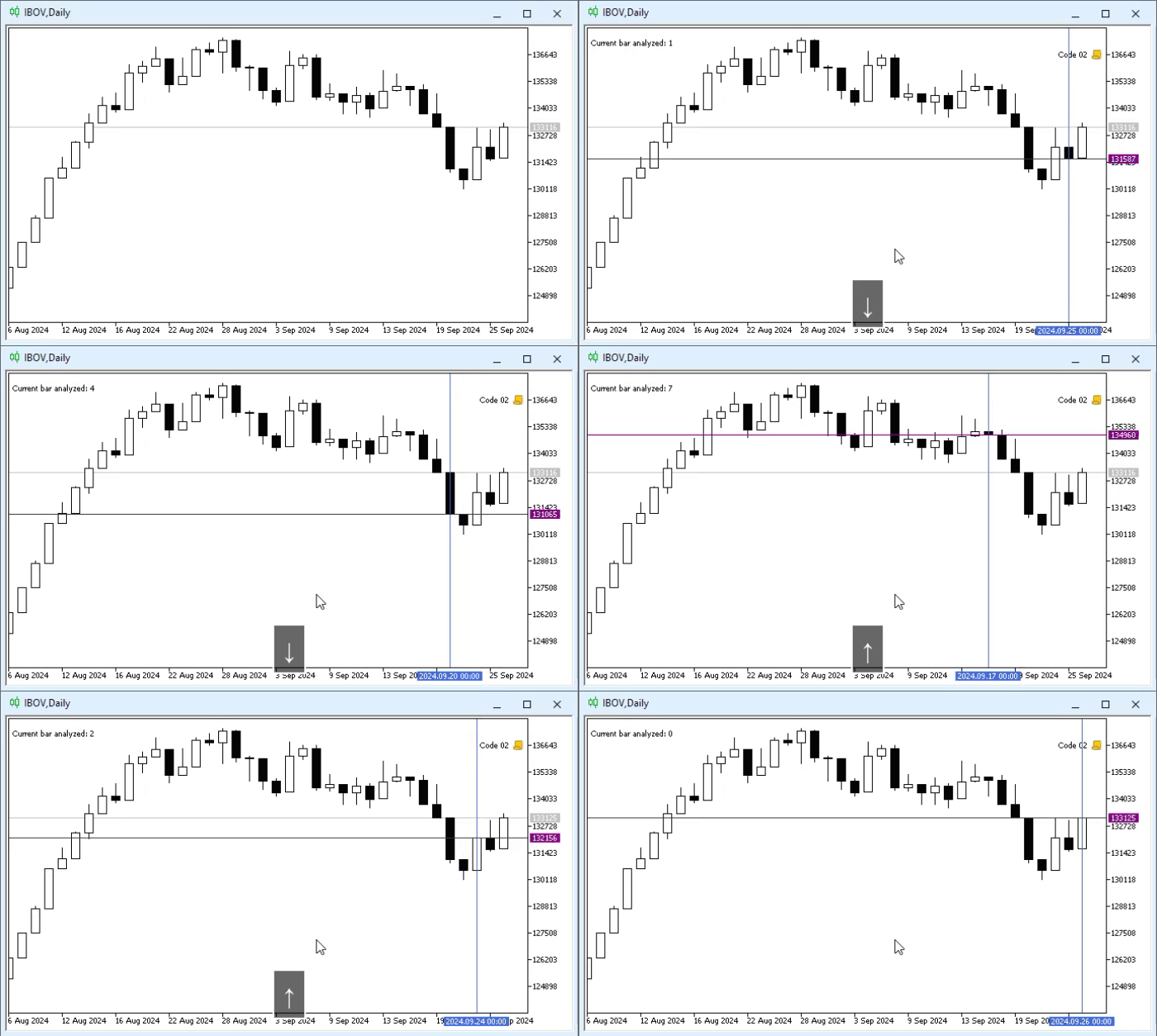
Animation 02
Interesting, is it not? But that is not all. There is more material to demonstrate. It can be seen in the animation below.
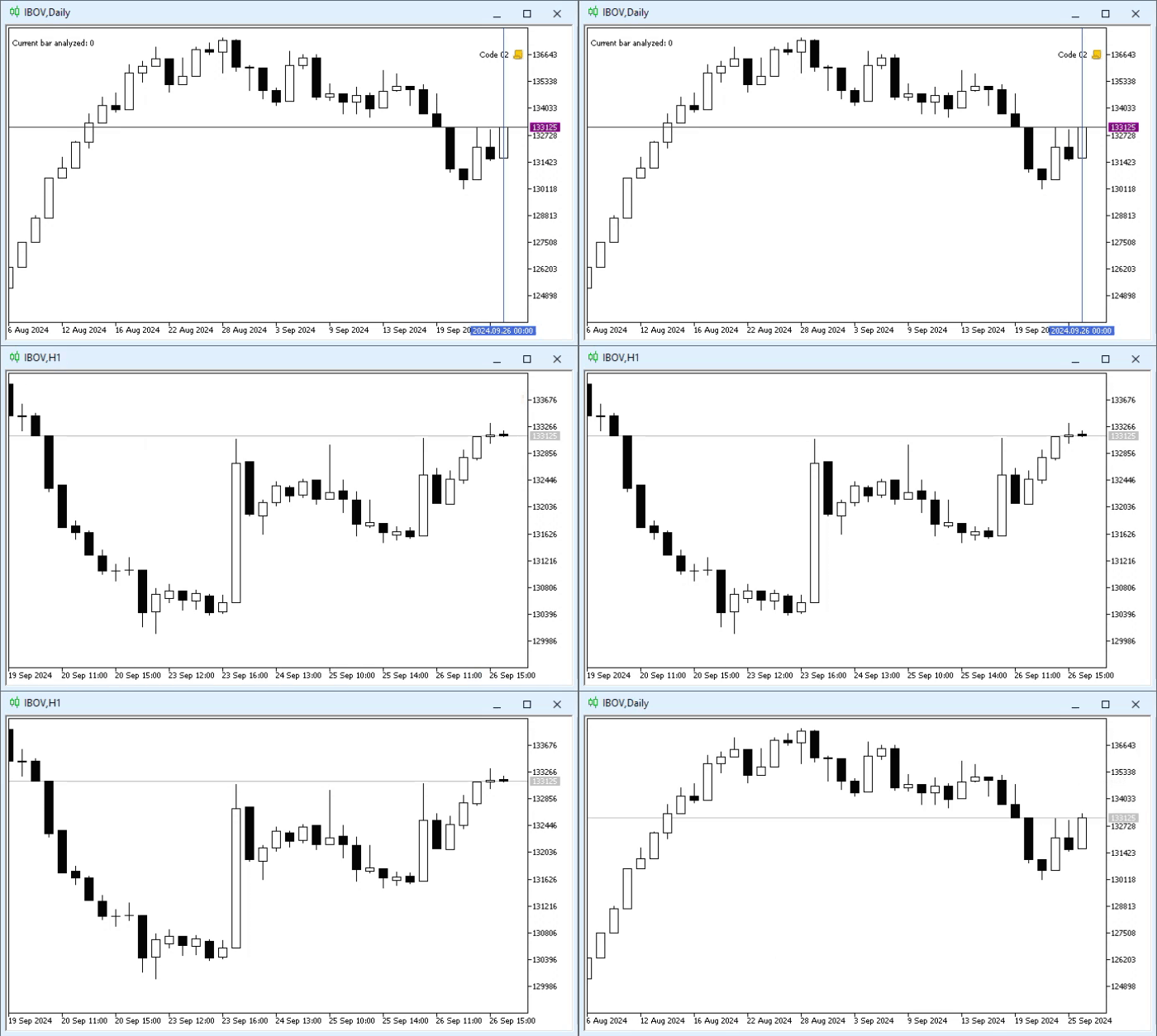
Animation 03
Please note, dear reader: when we request a change of the chart period, MetaTrader 5 deletes the chart and immediately creates it again. Since scripts in MetaTrader 5 are not reloaded by default, the script will finish, and the objects created by it will be removed from the chart — this is exactly what we wanted to achieve in code 04 shown above.
But you may be wondering: why use the functions on lines 16 and 18? The reason is to avoid using absolutely anything that is not part of the standard MQL5 library. Since MQL5, because there is no need for it, does not provide any functions or procedures for directly reading pressed keys, we cannot read them in a more universal way. This allows us to build a mechanism equivalent to intercepting CHARTEVENT_KEYDOWN through OnChartEvent, as shown in code 01.
However, this does not mean that we cannot use this type of keyboard reading. To do that, we would need to use mechanisms that are not part of MQL5, and therefore we will not discuss them in these basic-to-intermediate articles.
All right, but you may notice that in code 04 we use constants or an enumeration that make it much easier to understand what type of key is expected. At the same time, we can see that we do not necessarily have to set everything up exactly as shown in code 04. We can improve things a little. And in this case, since we do not want to show a modification that is too simple and uninteresting, we will take the opportunity to explain another feature available in MQL5. This is something with a very specific purpose, and we do not have many opportunities to show how this feature works; this case is one of them. So, to separate the topics properly, let us move on to a new one.
Function pointer
This is one of those rare opportunities we have to explain a mechanism with a very specific purpose in MQL5. Since in the previous topic we implemented, let us say, an alternative version of what had previously been presented as an indicator, we now have an opportunity to explain function pointers. This is a very interesting language feature, but it causes enormous confusion in the mind of any beginning programmer, especially if they do not have a clear understanding of certain concepts.
To begin with: for quite some time now we have not mentioned the need for any prerequisites in order to understand a topic. This is because the topics have always been tied to one of the recent articles. However, this is one of those cases where the concepts we use appear in relatively old articles. In this case, I am referring to the article From Basic to Intermediate: Variables (III) . That article concludes the discussion of the topic related to variables and constants. A clear understanding of the concept presented there will be of primary importance in order to understand what we will do next here.
To begin, let us look at a very simple and seemingly ridiculous example. However, it will help us understand how to work with the construct we are about to study. The source code can be seen below.
01. //+------------------------------------------------------------------+
02. #property copyright "Daniel Jose"
03. //+------------------------------------------------------------------+
04. string Msg_01(const int value)
05. {
06.     return "Example message made in function " + __FUNCTION__ + " with the value " + (string)value;
07. }
08. //+------------------------------------------------------------------+
09. string Msg_02(const int value)
10. {
11.     return "Example message made in function " + __FUNCTION__ + " with the value " + (string)value;
12. }
13. //+------------------------------------------------------------------+
14. void OnStart(void)
15. {
16.     Print(Msg_01(171));
17.     Print(Msg_02(-375));
18. }
19. //+------------------------------------------------------------------+
Code 05
All right, code 05 is very simple, so we will not explain it. But the result of running it can be seen below.
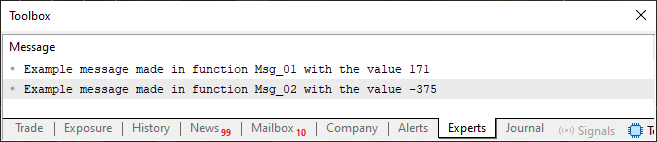
Image 01
Although code 05 is very simple, it contains elements that we are interested in understanding before moving on to something more complex. The main question here is: what mechanism could we create to connect the function defined on line 04 with the function defined on line 09? This allows us to choose which function to use without directly specifying its name.
All right, perhaps you are thinking about overloading, which was discussed in the article From Basic to Intermediate: Overloading . Nevertheless, overloading does not apply here, at least not in the way we want to use it. In reality, the mechanism closest to the ideal would be arrays. In the articles From Basic to Intermediate: Array (IV) we explained in simple terms how to work with arrays. There, the focus was on storing discrete values such as integers and floating-point numbers. However, arrays can also store other types of information. In this case, functions or procedures. "Wait, but how is that possible? Are you crazy? How can functions and procedures be stored in an array? That makes no sense at all."
That is exactly why we mentioned that you need to understand the concept of a variable very well. There is a special type of variable called a pointer. Since, for reasons of safety and simplicity, MQL5 does not implement or, rather, does not allow the programmer to implement code using pointers, you will hardly ever encounter them. However, there are situations where pointers are created and used even in MQL5. And since, in practice, pointers in MQL5 differ from pointers in C and C++, you almost never hear about them here.
Therefore, before you understand what we are going to do, I need you to grasp this: any function or procedure resides in memory at a certain address. This address is stored in a special type of variable known as a pointer. Pointers are undoubtedly the most powerful tool in programming. But at the same time they are also the most confusing and the most difficult to master, considering that by manipulating pointers we are working with the contents of computer memory regardless of the type of data we are accessing.
Well, we will not go too deeply into this, precisely because there is no need to. You need to understand the following:
A pointer is a variable. This variable points to a memory area. If that area contains executable code, we can transfer program execution to that area.
Simply understanding this is already enough for our needs and for what we are going to do. Excellent, now we know what a pointer is, but how do we create, or rather define, a pointer? This is written in the MQL5 language. So, this is exactly the moment when understanding how templates work becomes necessary. In the articles From Basic to Intermediate: Template and Typename (V) it was explained how templates work and how to use them to create overloaded functions and procedures. But this is exactly where things become confusing for beginners: we can also define data type templates. A pointer is exactly that: a data type template. However, in this case it is a data type that represents a function or procedure template. "Wow, now everything has become very complicated, because in my opinion this makes absolutely no sense."
Do not worry, let us not rush. I understand that at first this is indeed difficult. That is exactly why I have mentioned this language feature only now and will explain it. You need to master several different concepts in order to truly understand how to work with this language feature known as a pointer.
In code 05, the functions on lines 04 and 09 were declared this way intentionally. This is done to make it easier to understand the concept of the template that will be used when defining the pointer. If you look closely, you will notice that, essentially, only the function name changes. The content or logic implementing the function does not matter; what matters is the declaration. Since the declarations there are very similar both in the return type and in the number and type of arguments passed to the functions, we have suitable conditions for defining a pointer. To do this, we will add the following line from the code below. We will gradually show how code 05 changes so that you can truly understand exactly what is happening.
01. //+------------------------------------------------------------------+
02. #property copyright "Daniel Jose"
03. //+------------------------------------------------------------------+
04. typedef string (*FnPtr)(const int);
05. //+------------------------------------------------------------------+
06. string Msg_01(const int value)
07. {
08.     return "Example message made in function " + __FUNCTION__ + " with the value " + (string)value;
09. }
10. //+------------------------------------------------------------------+
11. string Msg_02(const int value)
12. {
13.     return "Example message made in function " + __FUNCTION__ + " with the value " + (string)value;
14. }
15. //+------------------------------------------------------------------+
16. void OnStart(void)
17. {
18.     Print(Msg_01(171));
19.     Print(Msg_02(-375));
20. }
21. //+------------------------------------------------------------------+
Code 06
Now put aside everything you are doing and anything that might distract you, and listen very carefully to what I am about to explain. If you do not understand this beginning, you will be completely lost. Please note that in code 06 we added line 04, which was not present in code 05. It is line 04 that defines the pointer we will use.
Notice that this statement is very similar to what appears on lines 06 and 11. Except that the variable name has been omitted, and the function name has been replaced with (FnPtr). This part, this element (FnPtr), can be anything you want to use. However, be careful with it, because we will need to use this exact part shortly.
Good, the first part has been explained. Now we will declare an array with the type defined on line 04 of code 06. Remember that a pointer was defined there. The second part is shown in the next code.
01. //+------------------------------------------------------------------+
02. #property copyright "Daniel Jose"
03. //+------------------------------------------------------------------+
04. typedef string (*FnPtr)(const int);
05. //+------------------------------------------------------------------+
06. string Msg_01(const int value)
07. {
08.     return "Example message made in function " + __FUNCTION__ + " with the value " + (string)value;
09. }
10. //+------------------------------------------------------------------+
11. string Msg_02(const int value)
12. {
13.     return "Example message made in function " + __FUNCTION__ + " with the value " + (string)value;
14. }
15. //+------------------------------------------------------------------+
16. void OnStart(void)
17. {
18.     FnPtr FnMsg[2];
19.
20.     Print(Msg_01(171));
21.     Print(Msg_02(-375));
22. }
23. //+------------------------------------------------------------------+
Code 07
Now, on line 18, which can be seen in this code 07, we have the definition of an array for using pointers of the type that was defined on line 04. To simplify the task, we define a static array with two elements. If you have doubts about what is happening here, review the previous articles; I am not going to go into details about what has already been explained. Excellent, I think you are still following everything correctly. The next step can be seen in the code below.
01. //+------------------------------------------------------------------+
02. #property copyright "Daniel Jose"
03. //+------------------------------------------------------------------+
04. typedef string (*FnPtr)(const int);
05. //+------------------------------------------------------------------+
06. string Msg_01(const int value)
07. {
08.     return "Example message made in function " + __FUNCTION__ + " with the value " + (string)value;
09. }
10. //+------------------------------------------------------------------+
11. string Msg_02(const int value)
12. {
13.     return "Example message made in function " + __FUNCTION__ + " with the value " + (string)value;
14. }
15. //+------------------------------------------------------------------+
16. void OnStart(void)
17. {
18.     FnPtr FnMsg[2];
19.
20.     FnMsg[0] = Msg_01;
21.     FnMsg[1] = Msg_02;
22.
23.     Print(Msg_01(171));
24.     Print(Msg_02(-375));
25. }
26. //+------------------------------------------------------------------+
Code 08
"Wow, what madness is this? Have you completely lost your mind? Code 08 will not compile."
But of course code 08 will compile, dear reader. How is that possible? Did you not understand what was done here? Here we are defining the elements of the array. If this seemed completely crazy to you, go back to the beginning of this topic and try to understand what was said. On line 04 we define a data type. On line 18 we define a variable that will use the same data type as on line 04. And on lines 20 and 21 we assign values to the elements of the variable declared on line 18. Nothing more, everything is very simple and clear. The hardest part is shown in the next step. Look at it in the code presented below.
01. //+------------------------------------------------------------------+
02. #property copyright "Daniel Jose"
03. //+------------------------------------------------------------------+
04. typedef string (*FnPtr)(const int);
05. //+------------------------------------------------------------------+
06. string Msg_01(const int value)
07. {
08.     return "Example message made in function " + __FUNCTION__ + " with the value " + (string)value;
09. }
10. //+------------------------------------------------------------------+
11. string Msg_02(const int value)
12. {
13.     return "Example message made in function " + __FUNCTION__ + " with the value " + (string)value;
14. }
15. //+------------------------------------------------------------------+
16. void OnStart(void)
17. {
18.     FnPtr FnMsg[2];
19.
20.     FnMsg[0] = Msg_01;
21.     FnMsg[1] = Msg_02;
22.
23.     Print(Msg_01(171));
24.     Print(Msg_02(-375));
25.
26.     for (uchar c = 0, i = 15; c < FnMsg.Size(); c++, i += 30)
27.         Print(FnMsg[c](i));
28. }
29. //+------------------------------------------------------------------+
Code 09
When code 09 is executed, the following messages will appear in the terminal.
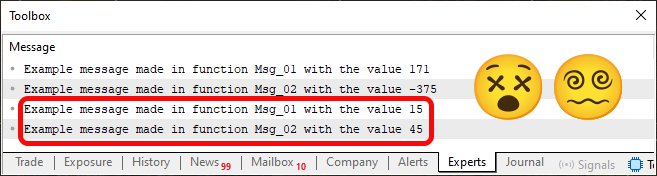
Image 02
"What kind of madness is this? What is going on here?" Well, dear reader, at this stage we have reached the truly difficult part. In a sense, I even overdid it a little with this code. Because if you skip the previous steps and try to understand code 09 from the very beginning, you will most likely become more confused than ever before in your life. This is because you would be able to understand the first two lines visible in image 02, but where do the other two that I am pointing out come from? And that is the whole point. Even so, in MQL5 pointers are actually very simple to explain and understand. But even then, they can confuse someone who sees code that uses them without fully understanding what exactly has been implemented there.
Please note that the two highlighted lines in image 02 are precisely defined on line 27 of code 09. But how? This is where the confusion arises. Since the declaration on line 18 uses a type that is a pointer, when seeing line 27 you might expect to get a certain type of information. However, the compiler understood that this is a function call. That is why this declaration is formulated exactly this way. And that is why the result is as you can see in image 02. Please note that the function name does not matter. Line 27 will determine exactly which function should be called, because on lines 20 and 21 we assigned a function to an array element.
Perhaps you are thinking: "But why create such complications? Are there not enough of them in life already? Did we really need something like this, even though it is technically possible? My goodness! Programmers are strange people; they are all completely crazy."
Perhaps a significant share of programmers really will go crazy at some point and turn into very strange people. (LAUGHTER). But overall, we are all very kind people, just a little eccentric. However, at this stage we can already think about something that was previously impossible to do. That is because you had not yet seen what was shown in this topic. But now we will update code 04, seen in the previous topic, to use what we saw in this topic. Thus, we will get this code:
01. //+------------------------------------------------------------------+
02. #property copyright "Daniel Jose"
03. //+------------------------------------------------------------------+
04. #define def_KEY_UP          38
05. #define def_KEY_DOWN        40
06. //+----------------+
07. #define macro_NameObject  "Demo" + (string)ObjectsTotal(0)
08. //+------------------------------------------------------------------+
09. string gl_Objs[2];
10. //+------------------------------------------------------------------+
11. typedef void (*ProcPtr)(void);
12. typedef void (*KeyEvent)(int &);
13. //+------------------------------------------------------------------+
14. void OnStart(void)
15. {
16.     ProcPtr proc[3];
17.
18.     proc[0] = Init;
19.     proc[1] = Loop;
20.     proc[2] = Deinit;
21.
22.     for (uint c = 0; c < proc.Size(); c++)
23.         proc[c]();
24. }
25. //+------------------------------------------------------------------+
26. void Init(void)
27. {
28.     ObjectCreate(0, gl_Objs[0] = macro_NameObject, OBJ_VLINE, 0, 0, 0);
29.     ObjectSetInteger(0, gl_Objs[0], OBJPROP_COLOR, clrRoyalBlue);
30.     ObjectCreate(0, gl_Objs[1] = macro_NameObject, OBJ_HLINE, 0, 0, 0);
31.     ObjectSetInteger(0, gl_Objs[1], OBJPROP_COLOR, clrPurple);
32. }
33. //+------------------------------------------------------------------+
34. void Loop(void)
35. {
36.     KeyEvent    key[3];
37.     int         pos = 0;
38.
39.     key[0] = Bar_NONE;
40.     key[1] = Bar_Next;
41.     key[2] = Bar_Prev;
42.
43.     while (!IsStopped())
44.     {
45.         key[TerminalInfoInteger(TERMINAL_KEYSTATE_UP) ? 1 : (TerminalInfoInteger(TERMINAL_KEYSTATE_DOWN) ? 2 : 0)](pos);
46.         Sleep(100);
47.     }
48. }
49. //+------------------------------------------------------------------+
50. void Event(const int arg)
51. {
52.     MqlRates rate[1];
53.
54.     Comment(StringFormat("Current bar analyzed: %d", arg));
55.     CopyRates(_Symbol, _Period, arg, rate.Size(), rate);
56.     for (uint c = 0; c < gl_Objs.Size(); c++)
57.         ObjectMove(0, gl_Objs[c], 0, rate[0].time, rate[0].close);
58. }
59. //+------------------------------------------------------------------+
60. void Deinit(void)
61. {
62.     Comment("");
63.     for (uint c = 0; c < gl_Objs.Size(); c++)
64.         ObjectDelete(0, gl_Objs[c]);
65.     ChartRedraw();
66. }
67. //+------------------------------------------------------------------+
68. void Bar_Prev(int &arg)
69. {
70.     arg = (arg < Bars(_Symbol, _Period) ? arg + 1 : arg);
71.     Event(arg);
72. }
73. //+------------------------------------------------------------------+
74. void Bar_Next(int &arg)
75. {
76.     arg = (arg > 0 ? arg - 1 : arg);
77.     Event(arg);
78. }
79. //+------------------------------------------------------------------+
80. void Bar_NONE(int &arg)
81. {}
82. //+------------------------------------------------------------------+
Code 10
The result of executing code 10 will be exactly the same as shown in animation 01. Therefore, we will not repeat it here. However, in code 10 I allow myself a small liberty. I do this so that you understand that we do not always have to do something in only one way. There are many ways to achieve the same result. Some of them are simpler but make extending the code a little slower, while others, being somewhat more complex, allow it to be extended very quickly.
In any case, in my opinion, code 10 does not contain elements that are so difficult to understand. Especially since the material is still quite fresh in memory at this point. However, code 10 has some points that, as presented, may not seem entirely logical. Let us briefly explain these points.
The first of them is in the OnStart procedure. Here we see that on line 16 an array of procedures is declared. Immediately after that, on lines 18, 19, and 20, we define the procedures that will be executed for each array element. Then we enter a loop to execute each of these procedures in a certain order. I understand that at first glance this may seem illogical, but you need to understand that the goal of these articles is to teach you to think like a programmer.
Now imagine a sequence of small, constantly repeated steps that must be performed in a specific order. If you had to write line by line every procedure that needs to be executed, this would not only take a lot of time, but would also make changing or correcting the execution order a tedious task. But if a mathematical expression can be used to calculate indices in the array, then it is quite possible to define procedures as elements of that same array. By doing this, you could use a loop to execute the array elements in a certain order, which would otherwise be impossible.
As for the Loop procedure, which is on line 34, it has a very similar purpose. However, the mechanism works somewhat differently there. In this case, between lines 39 and 41, we define some procedures that will be used depending on the key pressed. And on line 45, using the ternary operator, we call the corresponding procedure.
This approach, or this way of thinking when solving a particular problem, can sometimes turn a task that would be very tedious into something much simpler and faster. Because if something needed to be changed, we would have to make a minimal number of changes, and this would allow any solution to be implemented very quickly.
Final thoughts
Although we can do much more than what has been shown here, I am sure that for many people what we covered in this article is something completely new and therefore should be studied properly. It is necessary to understand every point presented in this article.
In the attachment you will find the main code examples presented in this article. Therefore, use this time to practice everything that was shown here. Also try to reflect on what was explained in previous articles, and on how the same facts and concepts can be used together with what we saw here. Try to implement something that allows you to use all the knowledge acquired up to this point. In the next article, we will again talk about events related to objects. But this time the main topic will be using the mouse, since the keyboard-related part has already been studied properly.
Translated from Portuguese by MetaQuotes Ltd.
Original article: https://www.mql5.com/pt/articles/15995
Warning: All rights to these materials are reserved by MetaQuotes Ltd. Copying or reprinting of these materials in whole or in part is prohibited.
This article was written by a user of the site and reflects their personal views. MetaQuotes Ltd is not responsible for the accuracy of the information presented, nor for any consequences resulting from the use of the solutions, strategies or recommendations described.

 Analyzing Price Time Gaps in MQL5 (Part II): Creating a Heat Map of Liquidity Distribution Over Time
 Market Simulation (Part 23): Getting Started with SQL (VI)
 Market Simulation (Part 24): Getting Started with SQL (VII)
 Low-Frequency Quantitative Strategies in MetaTrader 5 (Part 3): A Regime-Adaptive Mean-Reversion Swing Trading System

- Free trading apps
- Over 8,000 signals for copying
- Economic news for exploring financial markets
You agree to website policy and terms of use