

Market Simulation: Getting started with SQL in MQL5 (IV)
 1 212
1 212
 0
0

Introduction
Welcome everyone to another article in the series on how to create a replay/simulation system.
In the previous article Market Simulation: Getting started with SQL in MQL5 (III) we showed how an SQL script can be embedded in an executable file created in MQL5. However, we did not stop there. We also made some changes to the class code to make it much easier to use and, of course, adjusted the way the code is implemented a little.
Although the class code presented in the previous article is very useful for creating a database using built-in SQLite in MetaTrader 5 (which we will discuss later), this code does not allow us to execute queries from MQL5.
Therefore, the main goal of this article is to explain as clearly as possible how this class can be modified to add the code needed to execute queries. In other words, here we will implement a system for querying an SQLite database and retrieving the results.
Before we see how to do this, we need to understand something very important when using what we are showing in this series. It is precisely because of such nuances that we are not yet using SQLite together with the replay/simulation system code, since we want to explain and show as clearly as possible how the SQLite support built into MetaTrader 5 actually works.
Many may think that the SQLite included with MetaTrader 5 works the same way as the version accessed through a DLL file. Although both options essentially work in the same way, there are some peculiarities in using the built-in SQLite version in MetaTrader 5. The developers may change this in the future, but nothing should be taken for granted. If you have any doubts, test first and then study how to solve any problems that may arise when using SQLite embedded in a particular application. I am not saying that the problem lies in any specific application. I am simply saying that you should check everything first and only then draw conclusions about whether the SQLite version being used is not the one you expected.
Understanding the problem
At the time of writing this article, the problem is observed in version 5.00 Build 3815 dated June 22, 2023. Yes, this code was created quite some time ago. By the time you read these lines, I assure you that MetaTrader 5 will already have been updated, and all this will be outdated. Nevertheless, do not ignore the content of these articles, as they may teach you things you may not even have thought possible.
Now let us move on to the problem. Take a look at the SQL script below.
01. PRAGMA FOREIGN_KEYS = ON;
02.
03. DROP TABLE IF EXISTS tb_Symbols;
04. DROP TABLE IF EXISTS tb_Quotes;
05.
06. CREATE TABLE IF NOT EXISTS tb_Symbols
07. (
08.     id PRIMARY KEY,
09.     symbol NOT NULL UNIQUE
10. );
11.
12. CREATE TABLE IF NOT EXISTS tb_Quotes
13. (
14.     of_day NOT NULL,
15.     price NOT NULL,
16.     fk_id NOT NULL,
17.     FOREIGN KEY (fk_id) REFERENCES tb_Symbols(id)
18. );
Code in SQLite
This SQL script creates a set of tables in which there is a relationship between the tb_Symbols and tb_Quotes tables. This is guaranteed by the foreign key defined on line 17. If you are not sure what we are talking about, refer to the previous articles in this series.
Now look at lines 3 and 4 of the same SQL script. They delete tables from the SQL database file. Whether you run it in MetaTrader 5 or use the SQLite DLL library, we will get the same result. However, this is not always the case. The reason lies precisely in line 17, which establishes the relationship between the values present in tb_Symbols and tb_Quotes.
"Wait, what do you mean when you say that we will not always get the same result? Doesn't SQLite in MetaTrader 5 work the same way as when using it through a DLL library? Why do you say that running this script produces different results?" Perhaps I did not express myself very well, or at least did not explain the details properly. In fact, execution leads to the same result; however, if there is any value that establishes a relationship between tb_Symbols and tb_Quotes, the built-in SQLite in MetaTrader 5 cannot delete the tables and an error occurs, as you can verify with the following test.
Run the script below twice in a row. The first run will finish without errors. But on the second run we will get the image accompanying the code.
01. PRAGMA FOREIGN_KEYS = ON;
02.
03. DROP TABLE IF EXISTS tb_Symbols;
04. DROP TABLE IF EXISTS tb_Quotes;
05.
06. CREATE TABLE IF NOT EXISTS tb_Symbols
07. (
08.     id PRIMARY KEY,
09.     symbol NOT NULL UNIQUE
10. );
11.
12. CREATE TABLE IF NOT EXISTS tb_Quotes
13. (
14.     of_day NOT NULL,
15.     price NOT NULL,
16.     fk_id NOT NULL,
17.     FOREIGN KEY (fk_id) REFERENCES tb_Symbols(id)
18. );
19.
20. INSERT INTO tb_Symbols (id, symbol) VALUES (1, 'PETR4');
21.
22. INSERT INTO tb_Quotes (of_day, price, fk_id) VALUES ('2023-07-10', '22.00', 1);
Code in SQLite
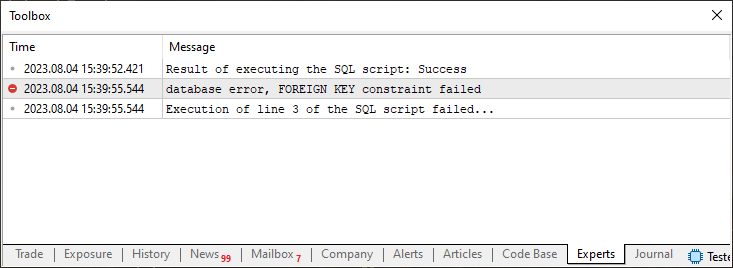
Note that with an interval of less than three seconds between executions, the results were completely different. On the first attempt, the SQL script executed successfully; immediately after that, when the same script was run again, the operation ended with an error. The reported error code clearly indicates that the problem is related to the relationship between the tables, and this relationship is created precisely on line 17 of the script.
However, the error was not caused specifically by line 17. Pay attention to the image above: the code of our class, intended for executing SQL scripts, reports that the problem occurred when line 3 was sent for execution in SQLite.
Nevertheless, one point must be emphasized. If we send the same SQL script to SQLite for standalone execution, the script runs without errors. We demonstrated this when discussing SQL programming; if you have any doubts, check the previous articles where I showed this visually.
One might think that the problem lies in the built-in SQLite in MetaTrader 5, but I am not going to stir up controversy. Perhaps this built-in SQLite version contains a built-in safeguard that prevents tables with active foreign keys from being deleted. I do not know the exact reason for this apparent asymmetry between standalone SQLite and MetaTrader 5's built-in SQLite. And this is not the only difference: you will also notice discrepancies, for example, when trying to create a trigger using the built-in SQLite library.
Therefore, I will not blame you if you decide to use SQLite through a DLL. Nevertheless, judging by my tests, the built-in SQLite makes it possible to solve many tasks without using a DLL. If the behavioral differences become too critical, we will find another way. For now, we can continue working with the built-in SQLite version.
Thus, if we are using the built-in SQLite in MetaTrader 5 and need to delete database tables, the simplest way is to delete the database file. When the script embedded in the executable file is run again, no conflicts will occur.
All right. If everything above is clear, let us move on to the next step — the most interesting part begins right now. I recommend that you focus as much as possible on the explanation.
In the article Market Simulation (Part 25): Getting started with SQL in MQL5 (I) we mentioned that only six of the functions available in MQL5 are enough for working with SQL. In the previous articles, we have already examined three of them, and they are already implemented in the C_DB_SQL class. Now it is time to learn and understand why we need only the other three functions. To separate the explanations properly, we will consider a new topic next.
The last three required functions
What I will explain next should in no way make you feel inadequate for not having understood it earlier, whether you already use databases in MQL5 or are only just starting. I will simply show how I do it: it is neither the most correct nor the least suitable way, but merely my approach to the work.
By stating that only six MQL5 functions are enough to access SQL, I am not saying that you are wrong if you use more functions or procedures. On the contrary, I admire those who study a language or tool in depth. My approach is to use the bare minimum required.
I usually do not memorize every detail of every function in every language or tool I use; that would take time, and available deadlines are often limited. I prefer to complete the task on time, regardless of its level of complexity.
To check whether my approach is correct, we will once again make changes to the database script. I suggest doing this differently to avoid inflexible techniques: create a new script and name it script 02.sql. If you wish, add its contents to the end of the file script 01.sql; you will get exactly the same result.
The only difference, if you follow my advice, is that you will need to modify the main file slightly. Since not everyone knows exactly where the changes need to be made, we will look at this solution in detail and show how to implement it to obtain the correct result.
The goal here is to insert data into the database so that queries can later be executed. Look at the following SQL scripts.
01. PRAGMA FOREIGN_KEYS = ON;
02.
03. CREATE TABLE IF NOT EXISTS tb_Symbols
04. (
05.     id PRIMARY KEY,
06.     symbol NOT NULL UNIQUE
07. );
08.
09. CREATE TABLE IF NOT EXISTS tb_Quotes
10. (
11.     of_day NOT NULL,
12.     price NOT NULL,
13.     fk_id NOT NULL,
14.     FOREIGN KEY (fk_id) REFERENCES tb_Symbols(id)
15. );
Code in SQLite
01. INSERT INTO tb_Symbols (id, symbol) VALUES
02.     (2, 'PETR4'),
03.     (1, 'ITUB3'),
04.     (3, 'VALE3');
05.
06. INSERT INTO tb_Quotes (of_day, price, fk_id) VALUES
07.     ('2023-07-10', '22.00', 1),
08.     ('2023-07-11', '22.20', 1),
09.     ('2023-07-12', '22.40', 1),
10.     ('2023-07-13', '22.30', 1),
11.     ('2023-07-14', '22.60', 1),
12.     ('2023-07-10', '26.00', 2),
13.     ('2023-07-11', '26.20', 2),
14.     ('2023-07-12', '26.40', 2),
15.     ('2023-07-13', '26.30', 2),
16.     ('2023-07-14', '26.60', 2),
17.     ('2023-07-10', '62.00', 3),
18.     ('2023-07-11', '62.20', 3),
19.     ('2023-07-12', '62.40', 3),
20.     ('2023-07-13', '62.30', 3),
21.     ('2023-07-14', '62.60', 3);
Code in SQLite
Although there are two of them, you can merge their contents and run the program with the main MQL5 file already shown. If you decide to keep them separate, you will have to modify the main MQL5 code as shown below.
01. //+------------------------------------------------------------------+
02. #property copyright "Daniel Jose"
03. #property description "Basic script for SQL database written in MQL5"
04. #property version   "1.00"
05. #property script_show_inputs
06. //+------------------------------------------------------------------+
07. #resource "\\Files\\Script 01.sql" as string SQL_Create
08. #resource "\\Files\\Script 02.sql" as string SQL_Insert
09. //+------------------------------------------------------------------+
10. #include <Market Replay\SQL\C_DB_SQL.mqh>
11. //+------------------------------------------------------------------+
12. input string user01 = "DataBase01";        //Database File Name
13. //+------------------------------------------------------------------+
14. C_DB_SQL *SQL;
15. //+------------------------------------------------------------------+
16. const string ExecScripts(void)
17. {
18.     string szMsg = (*SQL).ExecResourceSQL(SQL_Create);
19.     if (szMsg != NULL) return szMsg;
20.     return (*SQL).ExecResourceSQL(SQL_Insert);
21. };
22. //+------------------------------------------------------------------+
23. void OnStart()
24. {
25.     string szMsg;
26.
27.     SQL = new C_DB_SQL(user01);
28.
29.     szMsg = ExecScripts();
30.     Print(szMsg == NULL ? "Result of executing the SQL script: Success" : szMsg);
31.
32.     delete SQL;
33. }
34. //+------------------------------------------------------------------+
Code in MQL5
You can see that everything is very simple, practical, and clear. The first SQL script creates the required tables; the second inserts data into the database by adding some values. Since these same scripts have already appeared before, you probably know what each of them does and how they interact to create the records we are going to form.
All right, now look at the code in MQL5. Please note that we added line 8 and changed the name of the existing resource to a more appropriate one. Due to some specifics of line 29, we call the function located on line 16. Its purpose is to execute two SQL scripts, which will actually be internal resources of the final executable file created in MQL5. First, on line 18, we request the execution of the SQL script that creates the tables. Then, on line 19, we check the result. If the first SQL script executes successfully, we run the second one on line 20.
The task of the second SQL script is to insert data into the database. This is a simple task and does not require much effort to perform. With this, we have everything needed for the next implementation stage: developing the part that will execute queries to the SQL database from MQL5 code. But first, let us examine the contents of the database file; for this, we can conveniently use MetaEditor, as shown below:
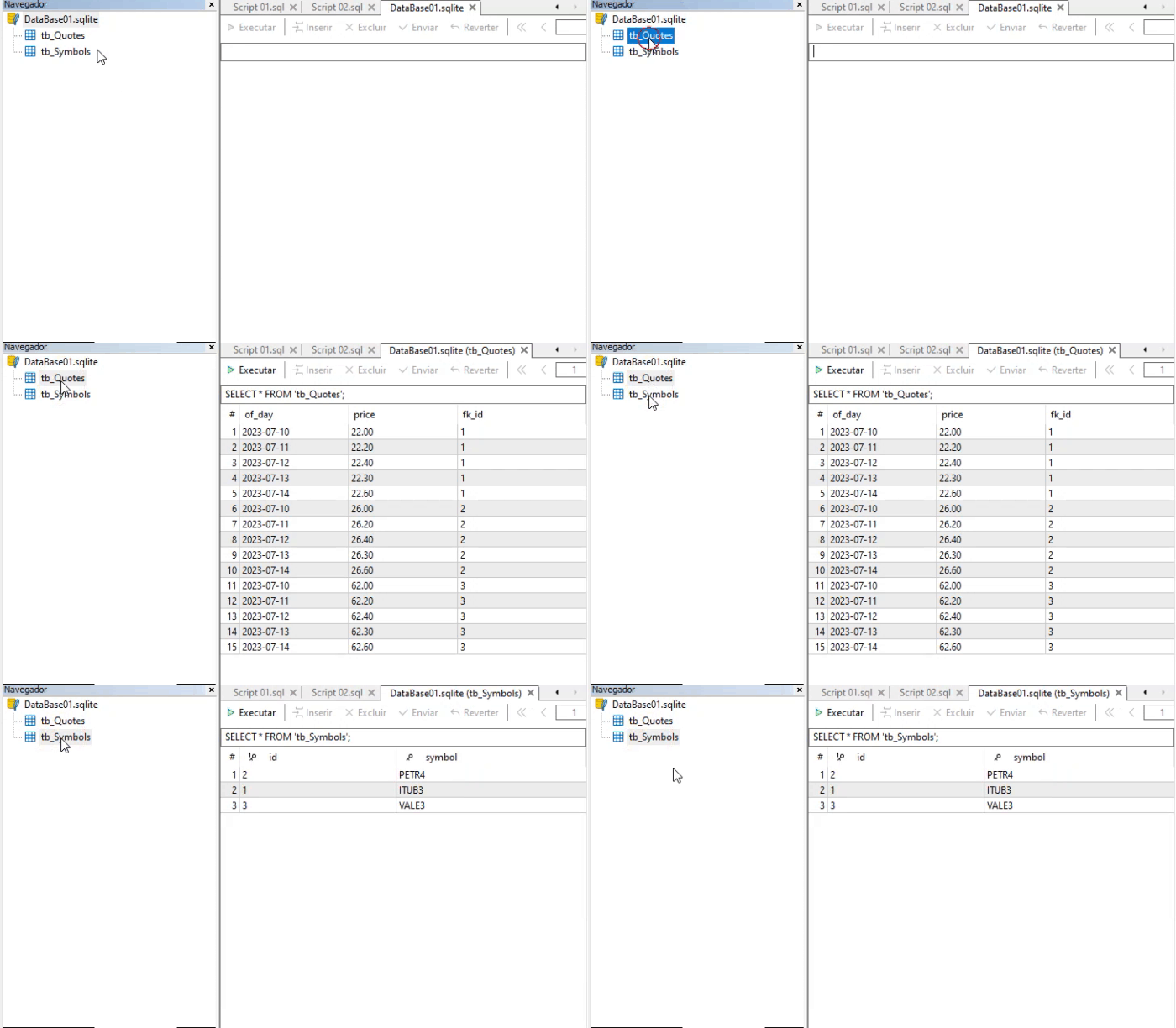
You can see that the expected content was indeed added to the database. Now that we have confirmed this, let us move on to the next step. Let us return to the C_DB_SQL.mqh header file. Remember that in its original form, the class cannot return query results. Although it is possible to run SELECT commands, as we explained before starting work with the MQL5 code, this is of little use if we cannot use the results directly in MQL5 itself.
The MQL5 developers have provided several functions for obtaining SQL query results. Let us emphasize again that everything we will consider next assumes the use of built-in SQLite in MetaTrader 5. If you use SQLite through a DLL, the procedure changes slightly; perhaps we will explain how to do that later. For now, we will work with the built-in SQLite database. Similarly, accessing a database through sockets requires a different approach. Do not confuse them: each situation requires its own solution, even if the final result may seem the same.
With the above in mind, we can focus on the code itself. We need to ensure that queries are executed and that their results can be easily interpreted when necessary. To do this, we will need to use two new functions. The first is DatabasePrepare, intended for executing database queries. Note that we should not use DatabaseExecute, as many might assume or think. The reason is that DatabaseExecute only tells us whether the SQL command was executed successfully or not. It does not provide any way to inspect the result set returned by the query.
That is exactly why we use DatabasePrepare, because this function allows us to inspect the data returned to our MQL5 application by the query. This is the first part and the first function we need. In addition, we will need another function intended for reading the data returned by an SQL query. But first, let us look at how the class code has changed to include DatabasePrepare. The class code is shown below.
001. //+------------------------------------------------------------------+
002. #property copyright "Daniel Jose"
003. //+------------------------------------------------------------------+
004. #include "..\Service Graphics\Support\C_Array.mqh"
005. //+------------------------------------------------------------------+
006. class C_DB_SQL
007. {
008.     private    :
009.         C_Array     m_Arr;
010.         int         m_handleDB,
011.                     m_Request;
012. //+------------------------------------------------------------------+
013.         void Convert(const char &buff[], const int size)
014.         {
015.             string sz0 = "";
016.             bool b0, b1, bs1, bs2, bc0, bc1, bc;
017.             int nLine = 1;
018.
019.             b0 = b1 = bs1 = bs2 = bc0 = bc1 = bc = false;
020.             for (int count = 0, nC0 = nLine; count < size; count++)
021.             {
022.                 switch (buff[count])
023.                 {
024.                     case '\t':
025.                         sz0 += (bs1 || bs2 ? "\t" : "");
026.                         break;
027.                     case '\n':
028.                         nC0++;
029.                     case '\r':
030.                         bc0 = false;
031.                         break;
032.                     case ';':
033.                         b0 = (bs1 || bs2 || bc0 || bc1 ? b0 : true);
034.                     default:
035.                         switch (buff[count])
036.                         {
037.                             case '"':
038.                                 bs1 = (bs2 || bc0 || bc1 ? bs1 : !bs1);
039.                                 break;
040.                             case '\'':
041.                                 bs2 = (bs1 || bc0 || bc1 ? bs2 : !bs2);
042.                                 break;
043.                         }
044.                         if (((count + 1) < size) && (!bs1) && (!bs2))
045.                         {
046.                             if (bc = ((buff[count] == '-') && (buff[count + 1] == '-'))) bc0 = true;
047.                             if (bc = ((buff[count] == '/') && (buff[count + 1] == '*'))) bc1 = true;
048.                             if (bc = ((buff[count] == '*') && (buff[count + 1] == '/'))) bc1 = false;
049.                             if (bc)
050.                             {
051.                                 count += 1;
052.                                 bc = false;
053.                                 continue;
054.                             }
055.                         }
056.                         if (!(bc0 || bc1))
057.                         {
058.                             if ((!b1) && (buff[count] > ' '))
059.                             {
060.                                 b1 = true;
061.                                 nLine = nC0;
062.                             }
063.                             sz0 += (b1 ? StringFormat("%c", buff[count]) : "");
064.                         }
065.                 }
066.                 if (b0)
067.                 {
068.                     m_Arr.Add(sz0, nLine);
069.                     sz0 = "";
070.                     b0 = b1 = false;
071.                 }
072.             }
073.         }
074. //+------------------------------------------------------------------+
075.         const string ExecSQL(void)
076.         {
077.             string szCmd;
078.
079.             for (int count = 0, nLine; count >= 0; count++)
080.             {
081.                 szCmd = m_Arr.At(count, nLine);
082.                 if (nLine < 0) break;
083.                 if (!ExecCommandSQL(szCmd))
084.                     return StringFormat("Execution of line %d of the SQL script failed...", nLine);
085.             }
086.
087.             return NULL;
088.         }
089. //+------------------------------------------------------------------+
090.     public    :
091. //+------------------------------------------------------------------+
092.         C_DB_SQL(const string szFileName = ":memory:")
093.         {
094.             m_handleDB = DatabaseOpen(szFileName, DATABASE_OPEN_CREATE | DATABASE_OPEN_READWRITE);
095.             m_Request = INVALID_HANDLE;
096.         }
097. //+------------------------------------------------------------------+
098.         ~C_DB_SQL()
099.         {
100.             DatabaseClose(m_handleDB);
101.         }
102. //+------------------------------------------------------------------+
103.         const string ExecResourceSQL(const string szResource)
104.         {
105.             char buff[];
106.             int size;
107.
108.             ArrayResize(buff, size = StringLen(szResource));
109.             StringToCharArray(szResource, buff);
110.             Convert(buff, size);
111.             ArrayFree(buff);
112.
113.             return ExecSQL();
114.         }
115. //+------------------------------------------------------------------+
116.         const string ExecScriptSQL(const string szFileName)
117.         {
118.             int file, size;
119.             char buff[];
120.
121.             if ((file = FileOpen(szFileName, FILE_READ | FILE_BIN)) == INVALID_HANDLE)
122.                 return StringFormat("Unable to open script file: %s", szFileName);
123.             ArrayResize(buff, size = (int) FileSize(file));
124.             FileReadArray(file, buff);
125.             FileClose(file);
126.             Convert(buff, size);
127.             ArrayFree(buff);
128.
129.             return ExecSQL();
130.         }
131. //+------------------------------------------------------------------+
132.         bool ExecCommandSQL(const string szCmd)
133.         {
134.             return (m_handleDB == INVALID_HANDLE ? false : DatabaseExecute(m_handleDB, szCmd));
135.         }
136. //+------------------------------------------------------------------+
137.         bool ExecRequestOfData(const string szCmd)
138.         {
139.             if (m_Request != INVALID_HANDLE) DatabaseFinalize(m_Request);
140.             return ((m_Request = DatabasePrepare(m_handleDB, szCmd)) != INVALID_HANDLE);
141.         }
142. //+------------------------------------------------------------------+
143. };
144. //+------------------------------------------------------------------+
C_DB_SQL.mqh code
Please note that on line 11 we added a new variable. This variable will be used to read the data that SQL returns to us in the query. Like all variables, it will be initialized on line 95. Pay attention to the value we use. Now let us move to line 137, where the ExecRequestOfData function is implemented. This is the function we will use to send a query command to SQL. Usually this command is executed using SELECT FROM, but as we will see later, it can be quite specific here.
In any case, please note that on line 139 we check whether the m_Request variable has a value other than INVALID_HANDLE. If this is confirmed, it means that we have a previous query in the cache. In other words, we want to finalize the previous prepared statement and release its resources before executing a new one. For this we use another function: DatabaseFinalize. Its purpose is to finalize the previous prepared statement and release its resources, and thus it represents the third function we will need at this stage of extending the C_DB_SQL class.
After finalizing the previous prepared statement, if there was one, a new query can be sent on line 140. Note that it is not necessary to specify the database name. This was done when the class was created. All we need is to specify which command to use, and the command itself will come from the caller, which we will look at later. If the query is successful, DatabasePrepare will return a numeric value. This data will be stored in the m_Request variable for later use. If the query fails, INVALID_HANDLE will be returned. Consequently, ExecRequestOfData will return false, telling the caller that query execution failed.
All right, but there is one nuance here: why not return the data directly from the ExecRequestOfData function itself? Why do we provide feedback only on whether the query succeeded or failed? The reason is very simple. For one reason or another, we may want to make a query that returns specific values or table fields. Depending on the specifics of a given area, we may choose different directions or make different decisions. This would force us to execute a new query against the database. Although this is not an error, such an approach leads to redundant database queries, which is especially critical in a client-server scenario.
All the required fields can be obtained with a single query. In addition to optimizing SQL queries to the database, this also helps us speed up the main code a little. For this reason, data reading has been separated into a dedicated function intended exclusively for this purpose.
This may seem like complete nonsense and even somewhat impractical. But keep in mind that the main code can be very easily adapted to read a specific field precisely because query execution is separated from reading the obtained result. This may seem very difficult to explain, since when executing an SQL query we can obtain several returned values while using only one column from one of the tables. This is shown in the previous animation in this same article.
But if the query is written correctly and properly targeted, we will often obtain a single result. Although it is also possible to obtain none at all. This happens because the criteria used in the query were not found in the database.
This is exactly where a nuance arises that few people truly understand. Before showing the data-reading function, I would like to take the opportunity to explain this point, because this topic may be of interest to you.
Many people tend to underestimate SQL, or even not use it at all, because they do not fully understand how it actually works. When we query an SQL database, we are not always looking for a general answer. In some cases, we may need a very specific and practical answer. If a database is created with a proper structure and data model, almost any type of information can be integrated into it. This is quite interesting, because people often think of a database merely as a set of numbers and alphanumeric characters for storing data about sales, customers, products, or the like.
But if you properly understand how SQL works and how to work with it, you can create a system, or more precisely a small robot, capable of learning to work with a given trading symbol. And all of this without the need to create a trading model. We simply enter a series of quotes into the database and, using SQL for queries together with MQL5 itself to perform calculations that SQL cannot do, create a mechanism capable of learning to trade on the market in a fully automatic mode. This mechanism will learn on its own to predict possible future movements of that symbol.
I already mentioned this some time ago in the same series of articles devoted to the replay/simulation system. Perhaps you have not yet seen or noticed how much can be achieved with this simple system whose creation process I am now demonstrating. But if you study this subject properly, you can create the very mechanism we have been talking about. Of course, to obtain the desired result, we will need to use certain mathematical methods and programming skills. This is exactly why we do not return the query result directly from SQL to MQL5 at query execution time, as shown in the code above.
It may turn out that this query was written in such a way that we can use the results in a completely different way than many would expect. Since the MQL5 developers allowed us to use this mechanism, I do not think it is reasonable to change the way it works. And since explaining exactly how the reading will be performed is quite difficult in a few words, we will leave both this explanation and the changes that will need to be made to the main code for the next article.
Final thoughts
In this article, we discussed how we can do certain things. We mentioned the fact that it is possible to create a robot capable of learning to trade without the need to design a trading model for it. We discussed the problem that arises when trying to use some SQL functions directly in the built-in SQLite in MetaTrader 5 and showed how to work around it. Despite all this, however, we still have not shown how to actually obtain query execution results using MQL5 itself. The reason is that we can create a function that automatically adapts to the expected query result. This is so that you can understand why we said that we need only six functions that MQL5 allows us to use when working with SQL.
And one final detail: MQL5 already has mechanisms for using ONNX models. Using ONNX models is much better suited than SQL for creating a robot capable of learning to trade on the market on its own. But nothing prevents you from using SQL-based modeling for this purpose. The main thing is learning and correctly applying the knowledge gained.
| File | Description |
|---|---|
| Experts\Expert Advisor.mq5 | Demonstrates the interaction between Chart Trade and the Expert Advisor (Mouse Study is required for interaction). |
| Indicators\Chart Trade.mq5 | Creates a window for configuring the order to be sent (Mouse Study is required for interaction). |
| Indicators\Market Replay.mq5 | Creates controls for interacting with the replay/simulation service (Mouse Study is required for interaction). |
| Indicators\Mouse Study.mq5 | Provides interaction between graphical controls and the user (required both for the replay/simulation system and for the real market). |
| Services\Market Replay.mq5 | Creates and maintains the market replay/simulation service (the main file of the entire system). |
| Code VS C++\Servidor.cpp | Creates and maintains a server socket developed in C++ (MiniChat version). |
| Code in Python\Server.py | Creates and maintains a Python socket for communication between MetaTrader 5 and Excel. |
| Indicators\Mini Chat.mq5 | Allows a mini-chat to be implemented through an indicator (requires the use of a server). |
| Experts\Mini Chat.mq5 | Allows a mini-chat to be implemented using an Expert Advisor (a server is required). |
| Scripts\SQLite.mq5 | Demonstrates the use of an SQL script with MQL5. |
| Files\Script 01.sql | Demonstrates the creation of a simple table with a foreign key. |
| Files\Script 02.sql | Shows how to add values to a table. |
Translated from Portuguese by MetaQuotes Ltd.
Original article: https://www.mql5.com/pt/articles/13110
Warning: All rights to these materials are reserved by MetaQuotes Ltd. Copying or reprinting of these materials in whole or in part is prohibited.
This article was written by a user of the site and reflects their personal views. MetaQuotes Ltd is not responsible for the accuracy of the information presented, nor for any consequences resulting from the use of the solutions, strategies or recommendations described.

 Neural Networks in Trading: LSTM Optimization for Multivariate Time Series Forecasting (Final Part)
 From Basic to Intermediate: Handling Mouse Events
 Implementing the Decorator Pattern in MQL5: Adding Logging, Timing, and Filtering to Any Indicator Non-Invasively
 Community of Scientists Optimization (CoSO): Theory

- Free trading apps
- Over 8,000 signals for copying
- Economic news for exploring financial markets
You agree to website policy and terms of use