

Market Simulation: Getting Started with SQL in MQL5 (V)
 1 087
1 087
 0
0

Introduction
Hello, and welcome to another article in the series on how to create a replication/simulation system.
In the previous article Market Simulation: Getting Started with SQL in MQL5 (IV) we described a small precaution that should be observed when using SQLite in MetaTrader 5. Although this behavior may change in the future, as a precaution you should always test things first before using SQLite in the MetaTrader 5 environment. In any case, there we showed how to proceed in order to add a query mechanism, so that in MQL5 code we could make full use of SQL and retrieve results using SQL SELECT queries.
But there is still one last function we need to discuss and implement. This is the DatabaseReadBind function. Since understanding it properly requires a slightly more detailed explanation, it was decided to cover it not in the previous article, but in today's article. So, since this topic will be fairly extensive, let us proceed directly to the next section.
Implementing the function for reading query results
Implementing the function responsible for reading the data returned by an SQL query is fairly simple, but there is one detail that must never be forgotten. The result returned by the read function is precisely the result of the previous execution of the ExecRequestOfData call. Therefore, ExecRequestOfData must always be called before reading the returned data.
Here, however, we should make a short digression. To understand this better, we first need to look at the class code. The complete C_DB_SQL class code is shown below. Remember that this code is designed for using the built-in SQL support in MetaTrader 5. For other SQL usage scenarios, this code would have to be modified to add the required capabilities.
001. //+------------------------------------------------------------------+
002. #property copyright "Daniel Jose"
003. //+------------------------------------------------------------------+
004. #include "..\Service Graphics\Support\C_Array.mqh"
005. //+------------------------------------------------------------------+
006. class C_DB_SQL
007. {
008.     private    :
009.         C_Array    m_Arr;
010.         int        m_handleDB,
011.                    m_Request;
012. //+------------------------------------------------------------------+
013.         void Convert(const char &buff[], const int size)
014.         {
015.             string sz0 = "";
016.             bool b0, b1, bs1, bs2, bc0, bc1, bc;
017.             int nLine = 1;
018.
019.             b0 = b1 = bs1 = bs2 = bc0 = bc1 = bc = false;
020.             for (int count = 0, nC0 = nLine; count < size; count++)
021.             {
022.                 switch (buff[count])
023.                 {
024.                     case '\t':
025.                         sz0 += (bs1 || bs2 ? "\t" : "");
026.                         break;
027.                     case '\n':
028.                         nC0++;
029.                     case '\r':
030.                         bc0 = false;
031.                         break;
032.                     case ';':
033.                         b0 = (bs1 || bs2 || bc0 || bc1 ? b0 : true);
034.                     default:
035.                         switch (buff[count])
036.                         {
037.                             case '"':
038.                                 bs1 = (bs2 || bc0 || bc1 ? bs1 : !bs1);
039.                                 break;
040.                             case '\'':
041.                                 bs2 = (bs1 || bc0 || bc1 ? bs2 : !bs2);
042.                                 break;
043.                         }
044.                         if (((count + 1) < size) && (!bs1) && (!bs2))
045.                         {
046.                             if (bc = ((buff[count] == '-') && (buff[count + 1] == '-'))) bc0 = true;
047.                             if (bc = ((buff[count] == '/') && (buff[count + 1] == '*'))) bc1 = true;
048.                             if (bc = ((buff[count] == '*') && (buff[count + 1] == '/'))) bc1 = false;
049.                             if (bc)
050.                             {
051.                                 count += 1;
052.                                 bc = false;
053.                                 continue;
054.                             }
055.                         }
056.                         if (!(bc0 || bc1))
057.                         {
058.                             if ((!b1) && (buff[count] > ' '))
059.                             {
060.                                 b1 = true;
061.                                 nLine = nC0;
062.                             }
063.                             sz0 += (b1 ? StringFormat("%c", buff[count]) : "");
064.                         }
065.                 }
066.                 if (b0)
067.                 {
068.                     m_Arr.Add(sz0, nLine);
069.                     sz0 = "";
070.                     b0 = b1 = false;
071.                 }
072.             }
073.         }
074. //+------------------------------------------------------------------+
075.         const string ExecSQL(void)
076.         {
077.             string szCmd;
078.
079.             for (int count = 0, nLine; count >= 0; count++)
080.             {
081.                 szCmd = m_Arr.At(count, nLine);
082.                 if (nLine < 0) break;
083.                 if (!ExecCommandSQL(szCmd))
084.                     return StringFormat("Execution of line %d of the SQL script failed...", nLine);
085.             }
086.
087.             return NULL;
088.         }
089. //+------------------------------------------------------------------+
090.     public    :
091. //+------------------------------------------------------------------+
092.         C_DB_SQL(const string szFileName = ":memory:")
093.         {
094.             m_handleDB = DatabaseOpen(szFileName, DATABASE_OPEN_CREATE | DATABASE_OPEN_READWRITE);
095.             m_Request = INVALID_HANDLE;
096.         }
097. //+------------------------------------------------------------------+
098.         ~C_DB_SQL()
099.         {
100.             DatabaseClose(m_handleDB);
101.         }
102. //+------------------------------------------------------------------+
103.         const string ExecResourceSQL(const string szResource)
104.         {
105.             char buff[];
106.             int size;
107.
108.             ArrayResize(buff, size = StringLen(szResource));
109.             StringToCharArray(szResource, buff);
110.             Convert(buff, size);
111.             ArrayFree(buff);
112.
113.             return ExecSQL();
114.         }
115. //+------------------------------------------------------------------+
116.         const string ExecScriptSQL(const string szFileName)
117.         {
118.             int file, size;
119.             char buff[];
120.
121.             if ((file = FileOpen(szFileName, FILE_READ | FILE_BIN)) == INVALID_HANDLE)
122.                 return StringFormat("Unable to open script file: %s", szFileName);
123.             ArrayResize(buff, size = (int) FileSize(file));
124.             FileReadArray(file, buff);
125.             FileClose(file);
126.             Convert(buff, size);
127.             ArrayFree(buff);
128.
129.             return ExecSQL();
130.         }
131. //+------------------------------------------------------------------+
132.         bool ExecCommandSQL(const string szCmd)
133.         {
134.             return (m_handleDB == INVALID_HANDLE ? false : DatabaseExecute(m_handleDB, szCmd));
135.         }
136. //+------------------------------------------------------------------+
137.         bool ExecRequestOfData(const string szCmd)
138.         {
139.             if (m_Request != INVALID_HANDLE) DatabaseFinalize(m_Request);
140.             return ((m_Request = DatabasePrepare(m_handleDB, szCmd)) != INVALID_HANDLE);
141.         }
142. //+------------------------------------------------------------------+
143.         template <typename T> bool GetRegisterOfRequest(T &stObject, const bool Finish = true)
144.         {
145.             if (!DatabaseReadBind(m_Request, stObject))
146.             {
147.                 if (Finish)
148.                 {
149.                     DatabaseFinalize(m_Request);
150.                     m_Request = INVALID_HANDLE;
151.                 }
152.                 return false;
153.             }
154.
155.             return true;
156.         }
157. //+------------------------------------------------------------------+
158. };
159. //+------------------------------------------------------------------+
C_DB_SQL.mqh code
So, this is the complete class code. But since only a small part has not yet been commented on, or, more precisely, has not been shown before, we will not examine functions or points already covered in other articles. Here we will focus exclusively on the function on line 143. This is the GetRegisterOfRequest function. The first and perfectly fair question is: why is this function declared in exactly this way? This point is rather difficult to explain using only MQL5.
To understand this in detail, we would need to explain a very complex concept that exists in C/C++. This concept is related to generic object references and, in C/C++, to mechanisms often explained alongside void pointers. Yes, in C/C++ we can work with generic references and pointer-like mechanisms, not only with ordinary types as many people imagine. But since explaining this concept in an article is extremely difficult, we will try to show you, dear reader, why this function is declared in this way while avoiding, as much as possible, a discussion of C/C++.
Let us start with the fact that we are dealing here with a type dependency. Not in the function declaration on line 143, but in the DatabaseReadBind function. This dependency forces us to use a specific data type so that the MQL5 compiler does not produce a flood of errors when trying to compile the code. Many programmers, when they are going to use DatabaseReadBind or try to do so, do not wrap it in a call like the one we use here. The reason is precisely that they do not understand the type dependency that arises here.
So, what do they usually do? They create some procedure or function where the query is executed, the result returned by SQL is analyzed, and finally the value is returned to the caller in the usual way. This approach works and is quite suitable for very specific cases. In other cases, programmers simply use DatabaseReadBind directly in the main code whenever they need it.
But why do they take this approach? Again, the reason is this type dependency. In MQL5, this is not so easy to handle. When using C/C++, however, the situation changes somewhat, because C/C++ provides lower-level mechanisms for working with generic object references, including void pointers. I think you may not yet have fully understood this point. So let us see how the DatabaseReadBind function is declared in MQL5. You can see it below:
bool  DatabaseReadBind(
   int    request,           // handle of the query created in DatabasePrepare
   void&  struct_object      // reference to the structure for reading the record
   );
What we see can be found in the MQL5 function documentation. It may not be entirely clear to you, but to a C/C++ programmer this declaration makes complete sense. Without going into the details of C/C++, the idea is as follows: the function must accept two parameters. The first parameter is an integer value representing the handle returned by DatabasePrepare. We already discussed this in the previous article. However, the key role here is played by the second parameter. The second parameter has type void, which means the function accepts a reference to an object without explicitly specifying a concrete type in the signature.
However, what is passed here is not an address in the usual sense, but a reference to an object in memory. This is because pointers usually refer to an address in memory. However, when we use the ampersand character (&) before a name, we indicate that we will refer to a variable, not to a position. If you really want to understand this, try learning how to use pointers in C/C++, since this topic often takes several chapters in a book aimed at teaching C/C++. It is a rather complex and confusing topic.
Since MQL5 does not allow us to use pointers in the same way as C/C++, we need a small trick to access the DatabaseReadBind function, as shown in the C_DB_SQL class code. This trick consists precisely in using a templated type mechanism that lets the compiler infer the appropriate type. At first glance, this may seem very complicated and difficult to solve. Fortunately, MQL5 gives us the ability to use something that also exists in C/C++, namely the declaration:
template <typename T >
There is one caveat here. T can be anything, but in programming we usually use T by convention. The key point is that this declaration, placed before the function name, tells the compiler that it must perform the correct type casting to solve the typing problem. Now note the following: the first parameter of GetRegisterOfRequest is precisely T. Since we cannot use the void type, this declaration effectively lets us generalize the parameter type, instead of relying on void as in lower-level C/C++ patterns.
"All right. But I still cannot understand this logic. After studying the MQL5 documentation for DatabaseReadBind, we see that it says the second parameter must be a structure. Even in the examples demonstrating the use of this function, a structure is also used as the second parameter. So I cannot understand why there is this complexity with using template <typename T > and this strange declaration on line 143. Why not simply pass the structure directly to this function? Why make it so complicated?"
Indeed, dear reader, I fully share your view on this. You are right. We could simply pass a structure as the function parameter, and that would greatly simplify the declaration on line 143. But now I will ask you: how many fields should that structure have, and what types should those fields be? If you can answer this question in a way that allows the logic to be generalized, I would certainly implement the call on line 143 differently.
But this structure will never be built in such a way that it can generalize all situations. This is because even if we know the number of fields present in the database, sooner or later that number may change. If that happens, the whole implementation in the MQL5 code would have to be reworked. For this reason, many people use DatabaseReadBind in a way that differs from what is shown here.
The function we are showing, whose purpose is to return to our MQL5 code what SQL returned, is a generic function. You will soon understand why. In any case, on line 145 we will make the call, and depending on the return value, we will have two completely different situations. The first situation occurs when DatabaseReadBind manages to read some record returned by SQL. In that case, line 155 will be executed. But it may happen that there are no more records left in this block. Then we will have two different situations. However, both cases are handled in the branch triggered when DatabaseReadBind returns false.
Please note that by default the second parameter of GetRegisterOfRequest has the value true. When the check on line 145 fails, we check on line 147 whether the second parameter is true or not. If the caller has not changed it, DatabaseFinalize is called on line 149. Finally, on line 150 we change the value of the m_Request variable, indicating that there are no more available records and that a new query to the database will be required. However, if the caller specifies that the Finish parameter is false, the check on line 147 will fail, and everything will remain as it is. This will be useful later in the main code. In any case, the return value will be false, and this is handled on line 152.
Thus, we fully complete the main part of the C_DB_SQL class. From now on, any code will be able to use it inside our replay and simulation system. But before doing that, we need to make sure everything works properly. To do this, let us move on to a new topic so that we can separate the issues more clearly.
Testing the C_DB_SQL class for use with SQLite in MetaTrader 5
Most of our C_DB_SQL class has already been tested. Now all that remains is to test the part related to queries and somehow understand exactly what SQL will return when executing a query.
To explain this properly while also making it easy for everyone to understand, especially you, dear reader, we will show a fragment of the main code, demonstrate the result obtained, and explain what is happening and why we get exactly that result. Toward the end of the article, we will provide the complete code so that you can test locally what we will do here.
Once we have dealt with this part, we will move on to the first test. We will do this using the following fragment:
18. //+------------------------------------------------------------------+
19. void SELECT_Type_01(void)
20. {
21.     struct st
22.     {
23.         int id;
24.         string symbol;
25.     }stLocal;
26.
27.     Print("Executing type 1 data request...");
28.     if ((*SQL).ExecRequestOfData("SELECT * FROM tb_Symbols"))
29.     {
30.         Print("Request: OK...");
31.         for (int c = 0; (*SQL).GetRegisterOfRequest(stLocal, false); c++)
32.             Print(" Resq ", c, " ==> ", stLocal.id, " - ", stLocal.symbol);
33.         Print("Reload...");
34.         for (int c = 0; (*SQL).GetRegisterOfRequest(stLocal); c++)
35.             Print(" Resq ", c, " ==> ", stLocal.id, " - ", stLocal.symbol);
36.     };
37.     Print("Finish type 1...");
38. }
39. //+------------------------------------------------------------------+
Fragment from the main file
The line numbering corresponds exactly to what we will see in the complete code. This means you can review each fragment at your own pace. The execution result of this fragment can be seen in the following animation:
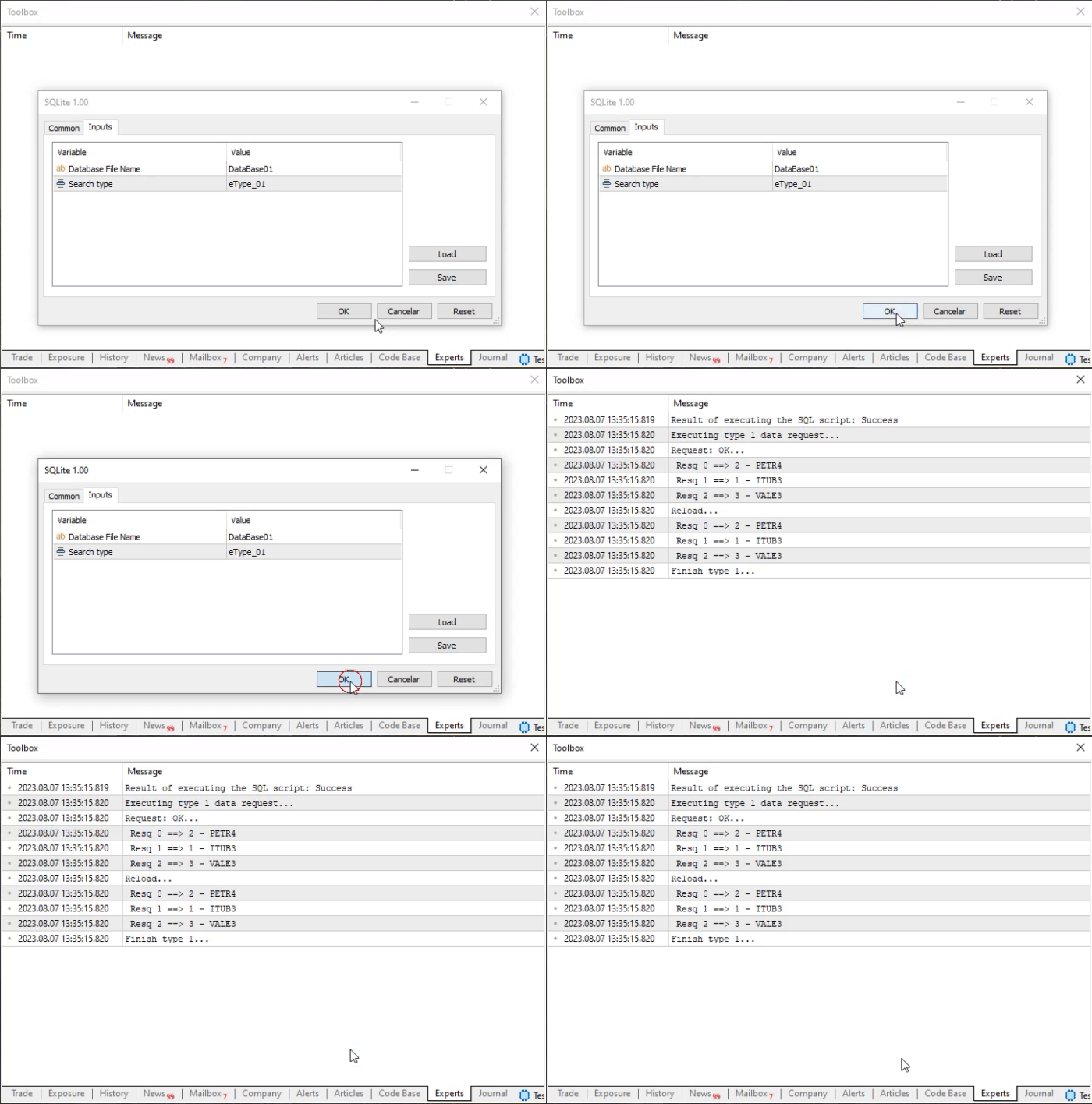
Note that this is quite simple and clear. On line 21 we declared a structure. Remember that within this structure we will have two variables. You should not look at them in that way. Do not think of them as variables, because that will confuse you and make it harder to understand other things later. They should be treated as fields or columns inside the response returned by SQL. So we have a structure that should be treated as a row in the SQL result set. Two fields are expected in this result row.
So, on line 28 we try to query data from the database using SQL. Pay close attention to what is inside the double quotation marks ("), because that is the command SQL will execute. You must write exactly what you want to pass to SQL for execution. In this simplest example, we only need all values present in the tb_Symbols table. Although this way of creating queries is not suitable for practical use, it is perfectly adequate for our example, since our table is very small and contains few records.
If our query succeeds, we will first execute the for loop on line 31. Now note that the reason the loop ends will be precisely the absence of new returned records. Also note that during these calls on line 31, we tell GetRegisterOfRequest that we do not want to close or finalize the current result block yet. In other words, when there are no more available records, we will keep the current result set open and available.
Then, on line 32, we print the returned result to the terminal. On line 33, we indicate in the terminal that we will go through the returned data again. Note that we do almost the same thing as on line 31. This time, however, we will not pass anything at all in the second parameter of the GetRegisterOfRequest call. Thus, as soon as the block has been fully read, everything returned by the SQL query will be discarded, and therefore we will have to make a new query.
The next implementation method is shown in the following fragment:
39. //+------------------------------------------------------------------+
40. void SELECT_Type_02(void)
41. {
42.     struct st
43.     {
44.         string of_day;
45.         double price;
46.         string symbol;
47.     }stLocal;
48.
49.     Print("Executing type 2 data request...");
50.     if ((*SQL).ExecRequestOfData("SELECT tq.of_day, tq.price, ts.symbol FROM tb_Quotes AS tq, tb_Symbols AS ts WHERE tq.fk_id = ts.id ORDER BY price DESC;"))
51.     {
52.         Print("Request: OK...");
53.         for (int c = 0; (*SQL).GetRegisterOfRequest(stLocal); c++)
54.             Print(" Resq ", c, " ==> ", stLocal.of_day, " { ", stLocal.price, " } ", stLocal.symbol);
55.     }
56.     Print("Finish type 2...");
57. }
58. //+------------------------------------------------------------------+
Main code fragment
And the result can be seen in the following animation:
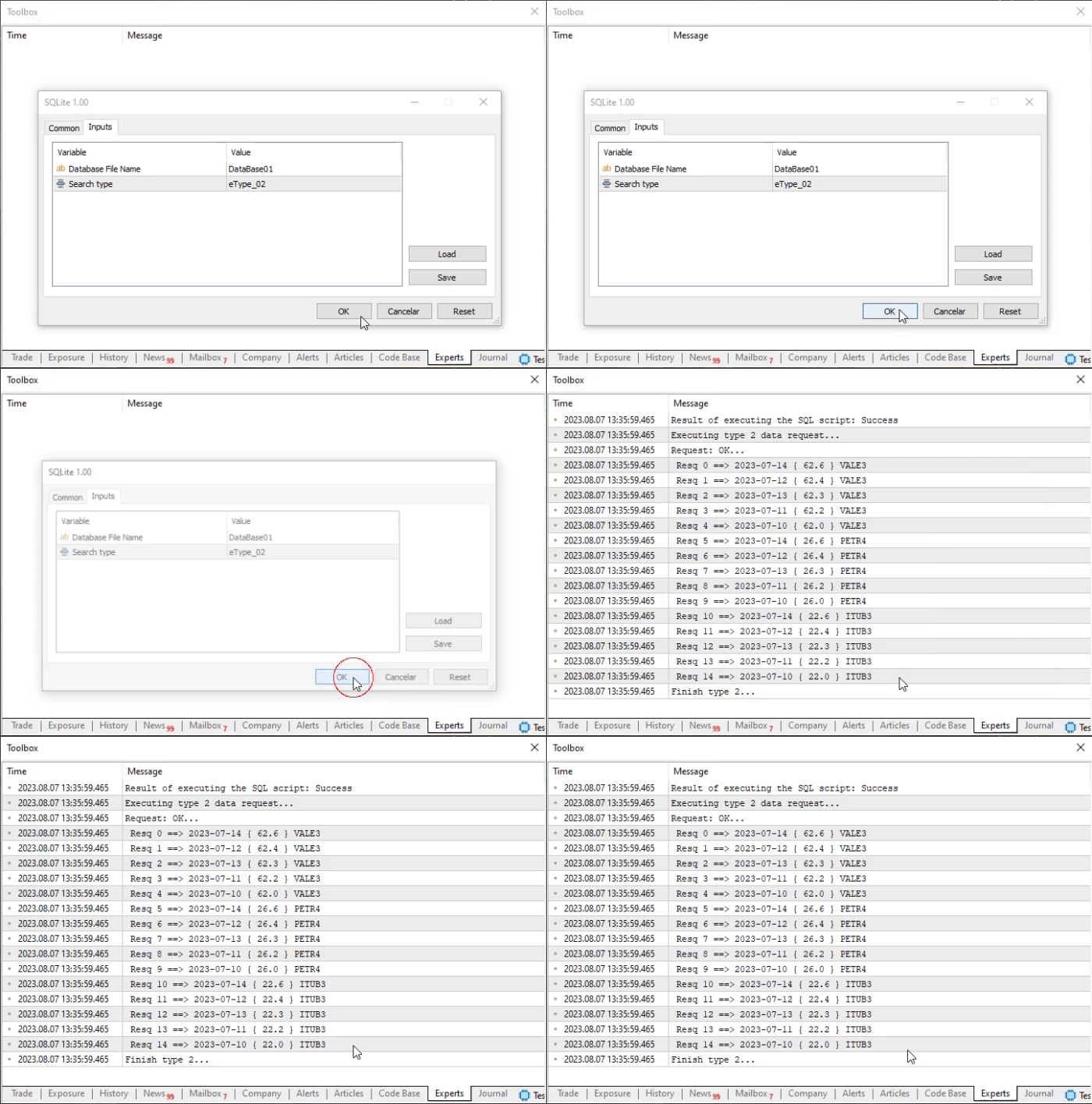
Notice that here we have a slightly different picture. First, on line 42 we declare a structure that will have three fields. In the previous case, each row had two fields. However, please note that despite the increased number of fields, we are still using code very similar to the previous one. This time, however, I want you to look carefully at the SQL command used on line 50. There we join the tb_Quotes and tb_Symbols tables in order to present, in a certain way, what actually exists in the database.
Now pay attention to the order in which the fields are declared in the SQL query. This is important because DatabaseReadBind will follow that same order when reading the SQL response data. Therefore, if we change the order either in the SQL command or in the field declaration inside the structure on line 42, we may see completely unexpected things in the returned data. So do not overlook such details.
Now we have a case that, at first glance, looks somewhat more complex. But do not be misled by the first impression: it is just as simple as everything else. We will simply make somewhat more detailed use of the functions available in MQL5 whose purpose is to allow SQL to be used inside MQL5. You can see the fragment below.
58. //+------------------------------------------------------------------+
59. void SELECT_Type_03(void)
60. {
61.     struct st0
62.     {
63.         double price;
64.         string symbol;
65.     }stLocal;
66.     struct st1
67.     {
68.         string tmp1,
69.                tmp2,
70.                date;
71.     }std;
72.
73.     Print("Executing type 3 data request...");
74.     if ((*SQL).ExecRequestOfData("SELECT tq.price, ts.symbol, tq.of_day FROM tb_Quotes AS tq, tb_Symbols AS ts WHERE tq.fk_id = ts.id ORDER BY price DESC;"))
75.     {
76.         Print("Request: OK...");
77.         for (int c = 0; (*SQL).GetRegisterOfRequest(stLocal, false); c++)
78.             Print(" Resq ", c, " ==> { ", stLocal.price, " } ", stLocal.symbol);
79.         Print("Reload...");
80.         for (int c = 0; (*SQL).GetRegisterOfRequest(std); c++)
81.             Print(" Resq ", c, " ==> < ", std.date, " > ");
82.
83.     }
84.     Print("Finish type 3...");
85. }
86. //+------------------------------------------------------------------+
Main code fragment
The execution result of this code fragment can be seen below.
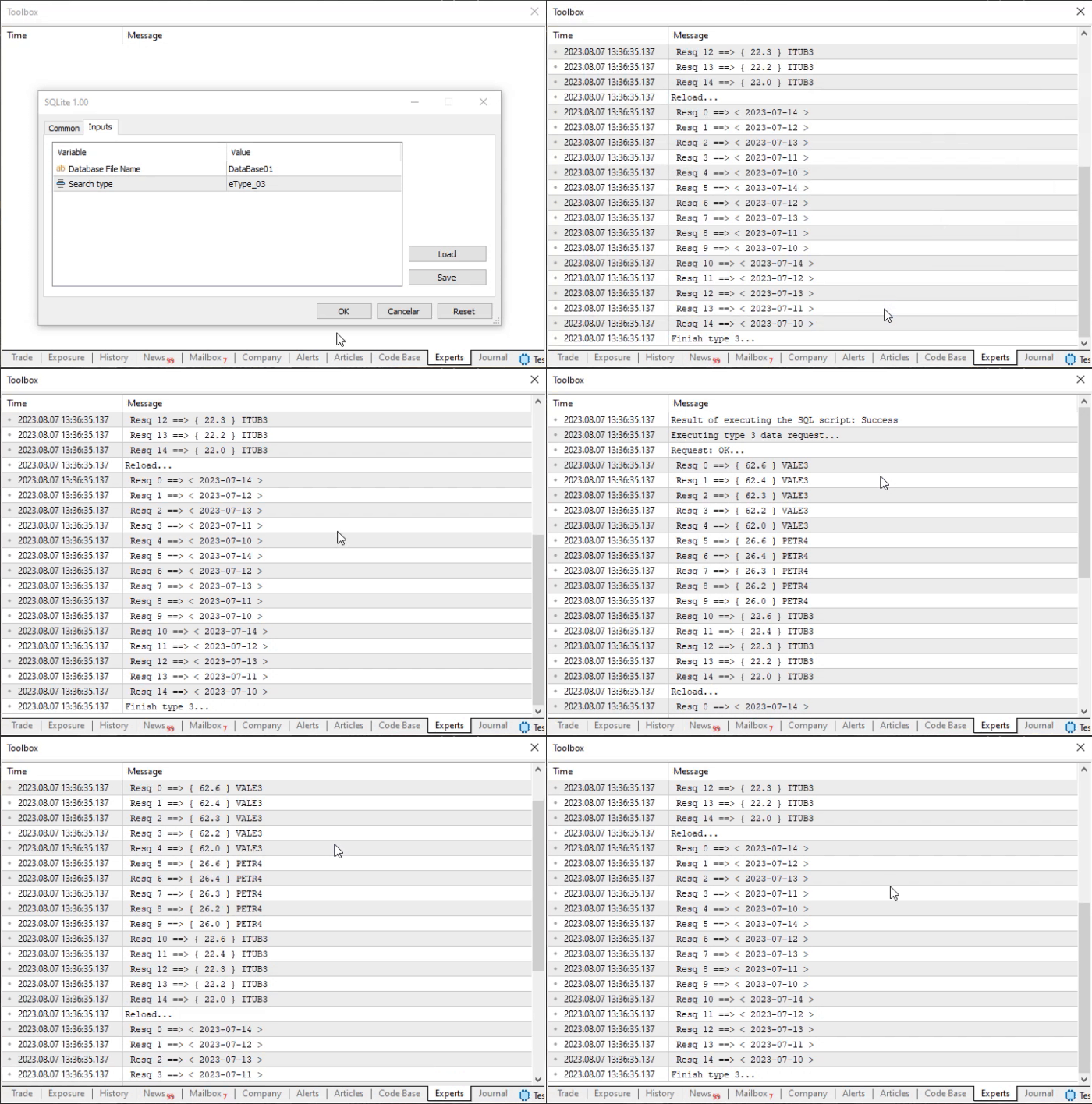
Up to this point, we have used a structure corresponding to a result row with two or three fields. But as we explained in the previous topic, we can do much more, namely make SQL return more fields than we need. And, by properly analyzing the fields we actually need, we can take advantage of what SQL has already returned. This way, we will not have to create a new query to find the data we need, because it already came together with the previous query.
Here is an important detail that must be understood. The key point is that each row returned by SQL contains the values of the corresponding fields. But, as you will see in this example, we will execute the same query as in the previous fragment. However, now the query will return the fields in a different order. It is very important that you pay attention to this. The reason is that the structure declared on line 61 contains two fields. The structure declared on line 66 contains three fields. SQL will return three fields. This happens because the query command tells SQL to return those three fields.
Now note that we switch from structure st0 to structure st1. However, the field named date is absent from structure st0 and is therefore ignored when we move on to reading the data returned by SQL. This happens on line 77, where we create a loop to read and print the data returned by SQL to the terminal.
However, on line 80 we do the same thing. But this time we ignore the remaining data returned by the SQL query and show only the field named date. There is no great complexity here. It is all about understanding what we are doing and what SQL returns.
You must already be thinking that we can do whatever we want and that, regardless of our actions, a result will still be obtained. In reality, however, that is not quite true. To see this, look at the following excerpt:
086. //+------------------------------------------------------------------+
087. void SELECT_Type_04(void)
088. {
089.     struct st
090.     {
091.         string of_day;
092.         double price;
093.         string symbol;
094.     }stLocal;
095.
096.     Print("Executing type 4 data request...");
097.     if ((*SQL).ExecRequestOfData("SELECT tq.price, ts.symbol FROM tb_Quotes AS tq, tb_Symbols AS ts WHERE tq.fk_id = ts.id ORDER BY price DESC;"))
098.     {
099.         Print("Request: OK...");
100.         for (int c = 0; (*SQL).GetRegisterOfRequest(stLocal); c++)
101.             Print(" Resq ", c, " ==> ", stLocal.of_day, " { ", stLocal.price, " } ", stLocal.symbol);
102.     }
103.     Print("Finish type 4...");
104. }
105. //+------------------------------------------------------------------+
Main code fragment
The execution result of this fragment is shown below, and at first glance it seems somewhat strange because we get a completely unexpected result.
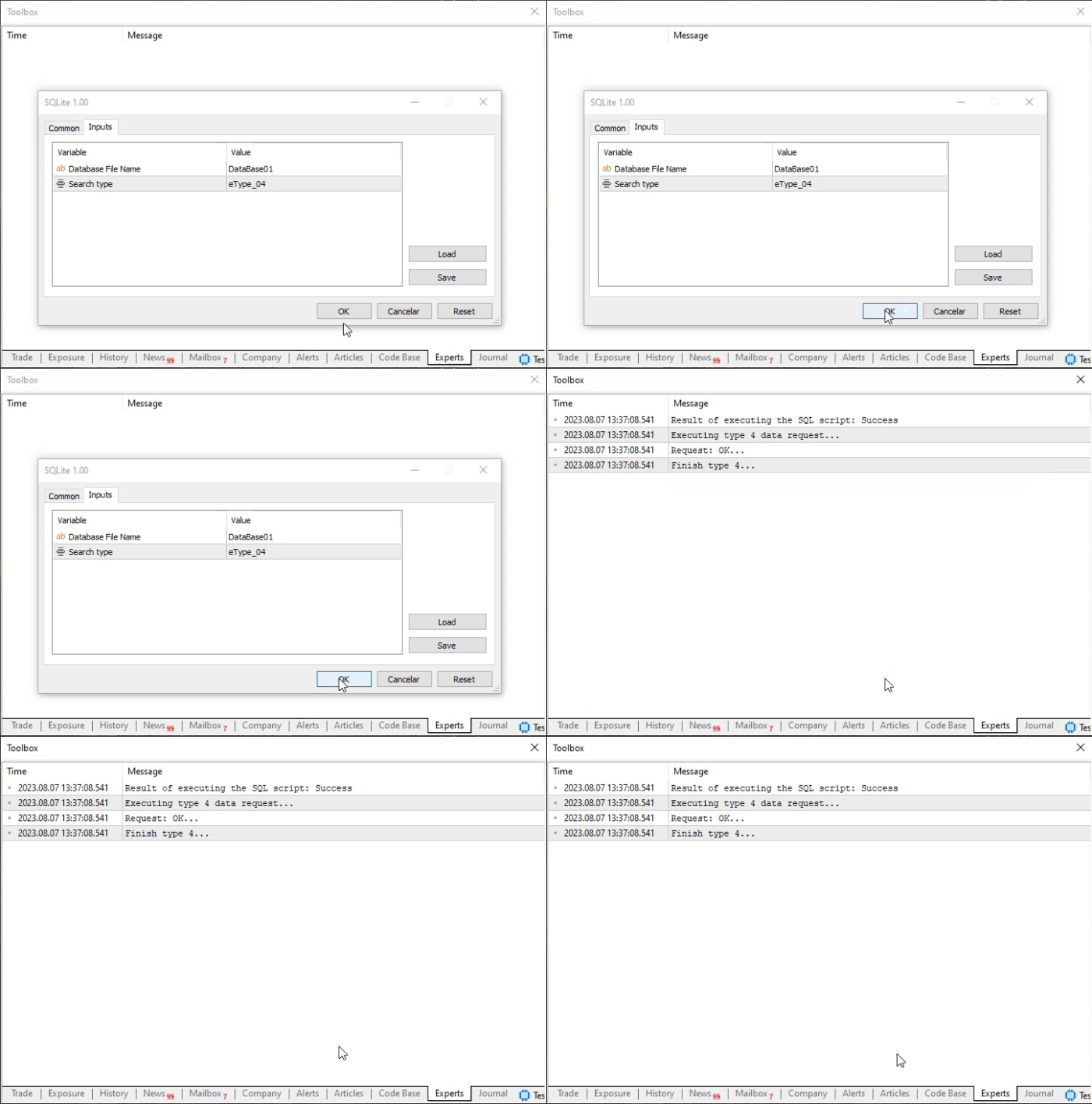
This may seem rather strange to you. But there is nothing unusual about it: just look at the declaration on line 89, where we indicate exactly which fields we expect to receive in the SQL query. Now look at line 97 and at what we are requesting from SQL. Notice that the information is not aligned between what we expect to receive as the result and what we ask SQL to return.
Here a question arises that forces us once again to consult the MQL5 documentation in order to understand why the result turned out exactly as shown in the animation. So, when we consult the documentation for the underlying function used by GetRegisterOfRequest, namely DatabaseReadBind, we see the following highlighted fragment:
Note
The number of fields in the struct_object structure cannot exceed the value of DatabaseColumnsCount(). If the number of fields in struct_object is smaller than the number of fields in the record, partial reading will be performed. The remaining data can be obtained explicitly using the corresponding DatabaseColumnText(), DatabaseColumnInteger(), and so on functions.
"But wait, we are not using DatabaseColumnsCount. Therefore, the result makes no sense." Well, in fact it does make sense, because in the SQL query we clearly specify that we want to receive two fields. Note that on line 97 we request the price field and the symbol field, each coming from a different table. Since GetRegisterOfRequest does not use any methods to adjust the data and fill two of the three fields specified in the structure, DatabaseReadBind simply ignores any attempt to match the data to the fields in the structure. Thus, the result corresponds exactly to what can be seen in the animation.
We can improve this, but for now it will remain as it is, because we need to consider one more case. This can be seen in the following fragment.
105. //+------------------------------------------------------------------+
106. void SELECT_Type_05(void)
107. {
108.     struct st
109.     {
110.         double price;
111.     }stLocal;
112.
113.     Print("Executing type 5 data request...");
114.     if ((*SQL).ExecRequestOfData("SELECT tq.price FROM tb_Quotes AS tq, tb_Symbols AS ts WHERE tq.fk_id = (SELECT ts.id FROM tb_Symbols WHERE ts.symbol = 'PETR4') AND tq.of_day = '2023-07-11';"))
115.     {
116.         Print("Request: OK...");
117.         for (int c = 0; (*SQL).GetRegisterOfRequest(stLocal); c++)
118.             Print(" Resq ", c, " ==> { ", stLocal.price, " } ");
119.     }
120.     Print("Finish type 5...");
121. }
122. //+------------------------------------------------------------------+
Main code fragment
As a result of execution, we get exactly this:
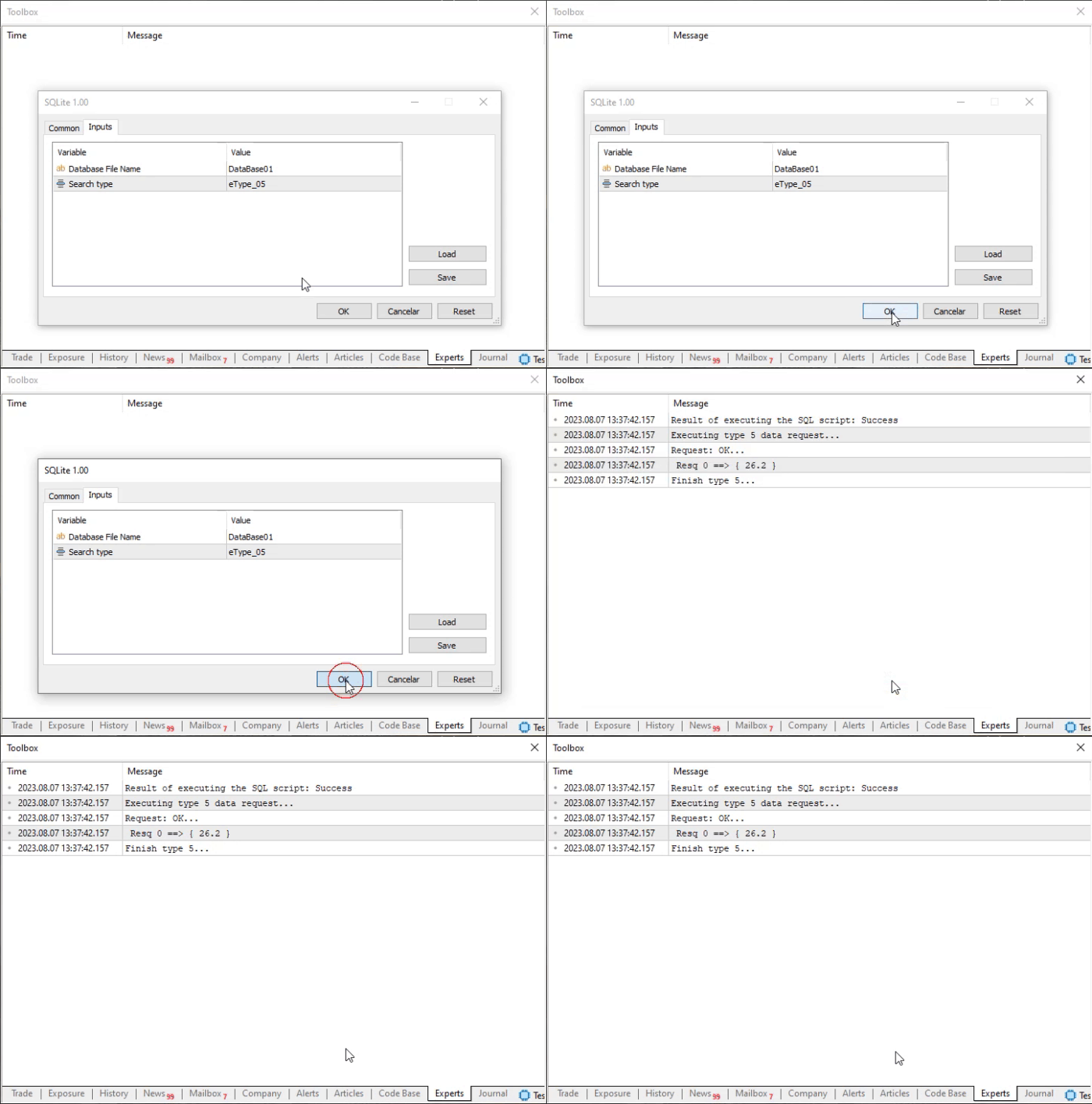
This is a slightly more extreme case of using SQL, where we make it do exactly what you might have thought should be done outside SQL. But here we simply make a very specific query to retrieve a particular record from the database. Now pay attention to line 114. It contains the command that SQL must execute. Please note that we are requesting quotes for the PETR4 instrument, specifically for 11.07.2023. Of course, the date follows the format expected by SQL. But I think by now you already understand how SQL works.
If we look at the database, we will get the same result as in the terminal when executing the SQL query. In such situations, only one field is required to be returned. Note how this is declared on line 108.
But a perfectly reasonable question may arise here: could we simply use line 110 without declaring the structure shown on line 108? Unfortunately, no, dear reader. Not with the way GetRegisterOfRequest was declared. The point is that if we try to use only line 110 without creating a structure, we would not actually be calling the read function executed through DatabaseReadBind. We would be using something else. However, as programmers, we can write code capable of handling such points, as well as the situation described in the previous fragment.
In any case, you can test these queries, or more precisely the SQL commands we examined here, directly in MetaEditor to experiment a little more with creating queries aimed at obtaining results like those in this last fragment. But do not forget to test the same thing in the final code that will be used as a MetaTrader 5 application. The complete code for testing can be seen below:
001. //+------------------------------------------------------------------+
002. #property copyright "Daniel Jose"
003. #property description "Basic script for SQL database written in MQL5"
004. #property version   "1.00"
005. #property script_show_inputs
006. //+------------------------------------------------------------------+
007. #resource "\\Files\\Script 01.sql" as string SQL_Create
008. #resource "\\Files\\Script 02.sql" as string SQL_Insert
009. //+------------------------------------------------------------------+
010. #include <Market Replay\SQL\C_DB_SQL.mqh>
011. //+------------------------------------------------------------------+
012. enum eCall {eType_00, eType_01, eType_02, eType_03, eType_04, eType_05};
013. //+------------------------------------------------------------------+
014. input string user01 = "DataBase01";       //Database File Name
015. input ECall user02 = eType_01;            //Search type
016. //+------------------------------------------------------------------+
017. C_DB_SQL *SQL;
018. //+------------------------------------------------------------------+
019. void SELECT_Type_01(void)
020. {
021.     struct st
022.     {
023.         int id;
024.         string symbol;
025.     }stLocal;
026.
027.     Print("Executing type 1 data request...");
028.     if ((*SQL).ExecRequestOfData("SELECT * FROM tb_Symbols"))
029.     {
030.         Print("Request: OK...");
031.         for (int c = 0; (*SQL).GetRegisterOfRequest(stLocal, false); c++)
032.             Print(" Resq ", c, " ==> ", stLocal.id, " - ", stLocal.symbol);
033.         Print("Reload...");
034.         for (int c = 0; (*SQL).GetRegisterOfRequest(stLocal); c++)
035.             Print(" Resq ", c, " ==> ", stLocal.id, " - ", stLocal.symbol);
036.     };
037.     Print("Finish type 1...");
038. }
039. //+------------------------------------------------------------------+
040. void SELECT_Type_02(void)
041. {
042.     struct st
043.     {
044.         string of_day;
045.         double price;
046.         string symbol;
047.     }stLocal;
048.
049.     Print("Executing type 2 data request...");
050.     if ((*SQL).ExecRequestOfData("SELECT tq.of_day, tq.price, ts.symbol FROM tb_Quotes AS tq, tb_Symbols AS ts WHERE tq.fk_id = ts.id ORDER BY price DESC;"))
051.     {
052.         Print("Request: OK...");
053.         for (int c = 0; (*SQL).GetRegisterOfRequest(stLocal); c++)
054.             Print(" Resq ", c, " ==> ", stLocal.of_day, " { ", stLocal.price, " } ", stLocal.symbol);
055.     }
056.     Print("Finish type 2...");
057. }
058. //+------------------------------------------------------------------+
059. void SELECT_Type_03(void)
060. {
061.     struct st0
062.     {
063.         double price;
064.         string symbol;
065.     }stLocal;
066.     struct st1
067.     {
068.         string tmp1,
069.                  tmp2,
070.                  date;
071.     }std;
072.
073.     Print("Executing type 3 data request...");
074.     if ((*SQL).ExecRequestOfData("SELECT tq.price, ts.symbol, tq.of_day FROM tb_Quotes AS tq, tb_Symbols AS ts WHERE tq.fk_id = ts.id ORDER BY price DESC;"))
075.     {
076.         Print("Request: OK...");
077.         for (int c = 0; (*SQL).GetRegisterOfRequest(stLocal, false); c++)
078.             Print(" Resq ", c, " ==> { ", stLocal.price, " } ", stLocal.symbol);
079.         Print("Reload...");
080.         for (int c = 0; (*SQL).GetRegisterOfRequest(std); c++)
081.             Print(" Resq ", c, " ==> < ", std.date, " > ");
082.
083.     }
084.     Print("Finish type 3...");
085. }
086. //+------------------------------------------------------------------+
087. void SELECT_Type_04(void)
088. {
089.     struct st
090.     {
091.         string of_day;
092.         double price;
093.         string symbol;
094.     }stLocal;
095.
096.     Print("Executing type 4 data request...");
097.     if ((*SQL).ExecRequestOfData("SELECT tq.price, ts.symbol FROM tb_Quotes AS tq, tb_Symbols AS ts WHERE tq.fk_id = ts.id ORDER BY price DESC;"))
098.     {
099.         Print("Request: OK...");
100.         for (int c = 0; (*SQL).GetRegisterOfRequest(stLocal); c++)
101.             Print(" Resq ", c, " ==> ", stLocal.of_day, " { ", stLocal.price, " } ", stLocal.symbol);
102.     }
103.     Print("Finish type 4...");
104. }
105. //+------------------------------------------------------------------+
106. void SELECT_Type_05(void)
107. {
108.     struct st
109.     {
110.         double price;
111.     }stLocal;
112.
113.     Print("Executing type 5 data request...");
114.     if ((*SQL).ExecRequestOfData("SELECT tq.price FROM tb_Quotes AS tq, tb_Symbols AS ts WHERE tq.fk_id = (SELECT ts.id FROM tb_Symbols WHERE ts.symbol = 'PETR4') AND tq.of_day = '2023-07-11';"))
115.     {
116.         Print("Request: OK...");
117.         for (int c = 0; (*SQL).GetRegisterOfRequest(stLocal); c++)
118.             Print(" Resq ", c, " ==> { ", stLocal.price, " } ");
119.     }
120.     Print("Finish type 5...");
121. }
122. //+------------------------------------------------------------------+
123. const string ExecScripts(void)
124. {
125.     string szMsg = (*SQL).ExecResourceSQL(SQL_Create);
126.     if (szMsg != NULL) return szMsg;
127.     return (*SQL).ExecResourceSQL(SQL_Insert);
128. };
129. //+------------------------------------------------------------------+
130. void OnStart()
131. {
132.     string szMsg = NULL;
133.
134.     SQL = new C_DB_SQL(user01);
135.
136.     if (user02 == eType_00) szMsg = ExecScripts();
137.     Print(szMsg == NULL ? "Result of executing the SQL script: Success" : szMsg);
138.
139.     if (szMsg == NULL) switch (user02)
140.     {
141.         case eType_01: SELECT_Type_01();    break;
142.         case eType_02:    SELECT_Type_02();    break;
143.         case eType_03: SELECT_Type_03(); break;
144.         case eType_04: SELECT_Type_04(); break;
145.         case eType_05: SELECT_Type_05(); break;
146.     }
147.
148.     delete SQL;
149. }
150. //+------------------------------------------------------------------+
Main code in MQL5
Note that all explanations are contained in the code, with the same line numbering. The only small difference from the code we saw in previous articles is line 139, where, starting with the variable declared on line 15, we select the type, or more precisely, which fragment will be executed. This way you can see the same thing as in each of the animations.
Final thoughts
In this article, we showed how to read the data returned by an SQL command when using MetaTrader 5 SQLite. Although, as you may have noticed while reading the article, we can still improve our C_DB_SQL class while keeping it focused on working with the built-in SQLite in MetaTrader 5. The main improvements we can make are as follows:
- Allow the fields defined in the MQL5 structure to be populated even when we execute a query with fewer columns. This would avoid the unpleasant result where a GetRegisterOfRequest call returns no information.
- Another improvement would be that, in the case of a query whose result is a single record of interest to us, as happened in the SELECT_Type_05 fragment, we would not have to declare the returned variable inside a structure and could instead use it directly as a regular standalone variable.
Although implementing these improvements is interesting, I am not yet sure whether I will show how to do it. This is because when programming an application in MQL5, we can take a somewhat more cautious approach. In any case, if it is decided to show how to make these changes to better support the cases shown in the fragments, this will be done in the next article. Regardless of that, be sure to follow the next article in this series, because the topic is becoming more interesting every day.
| File | Description |
|---|---|
| Experts\Expert Advisor.mq5 | Demonstrates the interaction between Chart Trade and the Expert Advisor (Mouse Study is required for interaction). |
| Indicators\Chart Trade.mq5 | Creates a window for configuring the order to be sent (Mouse Study is required for interaction). |
| Indicators\Market Replay.mq5 | Creates controls for interacting with the replication/simulation service (Mouse Study is required for interaction). |
| Indicators\Mouse Study.mq5 | Provides interaction between graphical controls and the user (required both for the replication/simulation system and in the real market). |
| Services\Market Replay.mq5 | Creates and maintains the market replication/simulation service (the main file of the entire system). |
| Code VS C++\Servidor.cpp | Creates and maintains a socket server developed in C++ (mini-chat version). |
| Code in Python\Server.py | Creates and maintains a Python socket server for communication between MetaTrader 5 and Excel. |
| Indicators\Mini Chat.mq5 | Allows a mini chat to be implemented through an indicator (requires the use of the server). |
| Experts\Mini Chat.mq5 | Allows a mini chat to be implemented using an Expert Advisor (requires the server). |
| Scripts\SQLite.mq5 | Demonstrates the use of an SQL script through MQL5. |
| Files\Script 01.sql | Demonstrates the creation of a simple table with a foreign key. |
| Files\Script 02.sql | Shows how to add values to a table. |
Translated from Portuguese by MetaQuotes Ltd.
Original article: https://www.mql5.com/pt/articles/13117
Warning: All rights to these materials are reserved by MetaQuotes Ltd. Copying or reprinting of these materials in whole or in part is prohibited.
This article was written by a user of the site and reflects their personal views. MetaQuotes Ltd is not responsible for the accuracy of the information presented, nor for any consequences resulting from the use of the solutions, strategies or recommendations described.

 CSV Data Analysis (Part 5): Real-Time CSV Streaming from Live MetaTrader 5 Sessions
 From Basic to Intermediate: Object Events (II)
 Encoding Candlestick Patterns (Part 3): Frequency Analysis for Single Candlestick Type Structure
 Community of Scientists Optimization (CoSO): Practice

- Free trading apps
- Over 8,000 signals for copying
- Economic news for exploring financial markets
You agree to website policy and terms of use