

Market Simulation: Position View (III)
 1 357
1 357
 0
0

Introduction
Hello and welcome everyone to another article in the series on how to create a replication/simulation system.
In the previous article, Market Simulation: Position View (II), we created a very simple thing whose purpose is to show on the chart the price lines associated with an open position. Although this indicator can provide us with the necessary information, it is not yet ready for practical use, because several minor issues need to be solved. But there is nothing complicated about this. It is merely something that you, dear reader, need to understand before we can move a little further in implementing the code.
To make things a little simpler and easier to understand, we will look at this in a separate topic devoted only to this task. So, let us get down to business without further delay.
Understanding the ZOrder property
I do not know whether you have noticed, dear reader, that MQL5 objects have a property that is rarely used or explicitly defined in code. I myself have studied a great deal of code and have not found anyone who actually defines this object property in practice. I am talking about the ZOrder property. If you have been following this series of articles, you have probably noticed that, for quite some time now, this property has been defined in the C_Terminal class when objects are created through the CreateObjectGraphics call, which is a procedure of this class.
And in these recent articles, I mentioned that at certain moments we need to set a value for this property. But why? The reason is that many pieces of code that add objects to a chart simply do not use, or more precisely do not define, a value for this property. The point is that I am not here to say what every programmer should or should not do, or how they should or should not write their code. I am here to show you, dear reader, and everyone who truly wants to understand how these processes work internally, what actually happens behind the scenes.
Without understanding what I am going to explain, or without properly absorbing certain concepts of using MetaTrader 5 or even programming in MQL5, you will undoubtedly end up having a very negative experience with the platform. And one of these concepts is directly related to the ZOrder property.
To show as clearly as possible what we are talking about, we will use the code below:
01. //+------------------------------------------------------------------+
02. #property copyright "Daniel Jose"
03. #property version   "1.00"
04. #property indicator_chart_window
05. #property indicator_plots 0
06. //+------------------------------------------------------------------+
07. input char user00 = 0;      //ZOrder to Chart #01
08. input char user01 = 0;      //ZOrder to Chart #02
09. //+------------------------------------------------------------------+
10. void ChartOfTest(string sz1, int x, int y, int zOrder)
11. {
12.     long id = ChartID();
13.
14.     ObjectCreate(id, sz1, OBJ_CHART, 0, 0, 0);
15.     ObjectSetInteger(id, sz1, OBJPROP_XDISTANCE, x);
16.     ObjectSetInteger(id, sz1, OBJPROP_YDISTANCE, y);
17.     ObjectSetInteger(id, sz1, OBJPROP_ZORDER, zOrder);
18.     ObjectSetInteger(id, sz1, OBJPROP_SELECTABLE, true);
19. }
20. //+------------------------------------------------------------------+
21. int OnInit()
22. {
23.     ChartOfTest("Chart #01", 160, 140, user00);
24.     ChartOfTest("Chart #02", 200, 200, user01);
25.
26.     return INIT_SUCCEEDED;
27. }
28. //+------------------------------------------------------------------+
29. int OnCalculate(const int rates_total, const int prev_calculated, const int begin, const double &price[])
30. {
31.     return rates_total;
32. }
33. //+------------------------------------------------------------------+
34. void OnDeinit(const int reason)
35. {
36.     ObjectsDeleteAll(ChartID(), "Chart #");
37. }
38. //+------------------------------------------------------------------+
Indicator source code
This simple code does exactly what we need in order to understand how the ZOrder property can and will affect the user experience in MetaTrader 5. Note that in lines 23 and 24 we call the procedure responsible for creating two objects and placing them on the currently open chart. The created objects are of the OBJ_CHART type, as can be seen in line 14. For convenience, dear reader, in lines 07 and 08 we have provided two input parameters. Their purpose is to save us from having to constantly adjust the ZOrder values of the objects.
By default, the values are always zero. So, for now, we will leave them as they are. The result is shown in the following image:
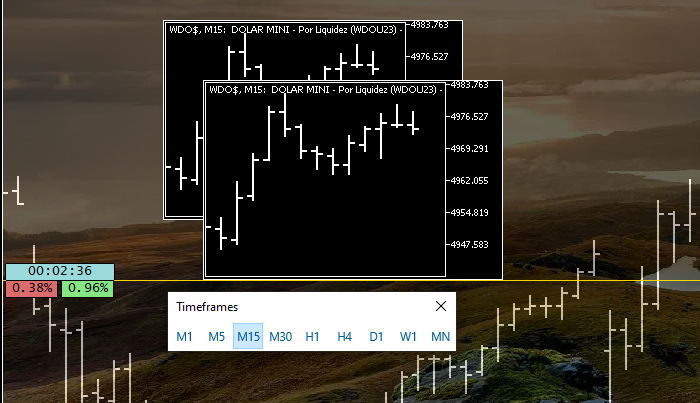
Something simple and obvious, as expected. "But what if we change the chart timeframe? What will happen in this window where we have an indicator whose purpose is to create a background for the chart? Will we end up in a situation where we can no longer interact with the OBJ_CHART objects?" Well, this can be seen in the following animation:
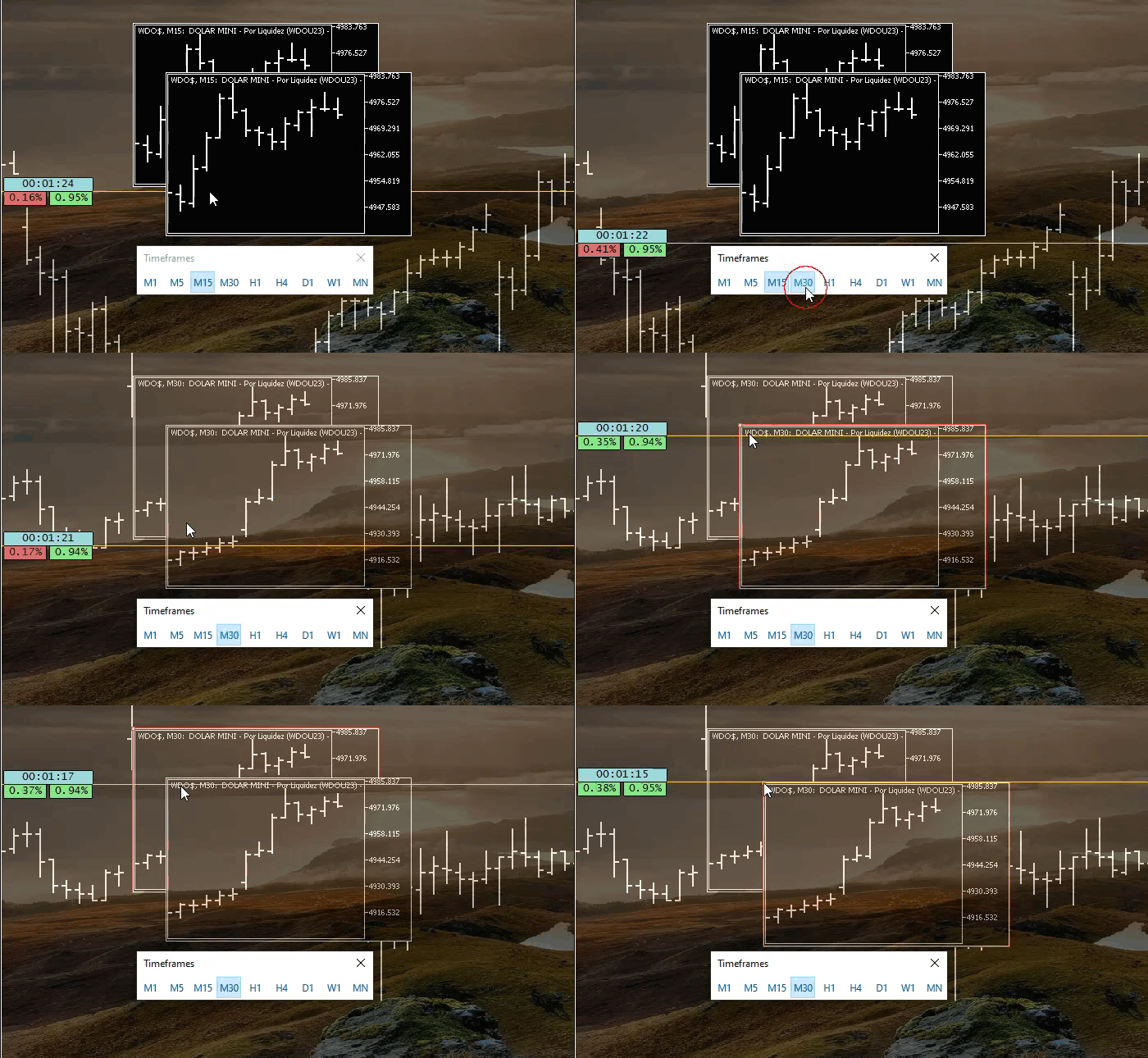
Note that although the background image, that is, an object of the OBJ_BITMAPLABEL type, is located above the OBJ_CHART objects, this would normally cause problems. The background of the OBJ_CHART object is no longer black, but displays the contents of the area in which it is located, over the OBJ_BITMAPLABEL object. However, since in line 17 we set a zero value for ZOrder, while the ZOrder value of the object with the background image is lower, in this case -1, as we saw in previous articles, the click response and object selection behavior of the OBJ_CHART objects are not affected, as can be seen in the animation above.
However, we will have the clear illusion that the object in the foreground has priority, as shown in the following animation:
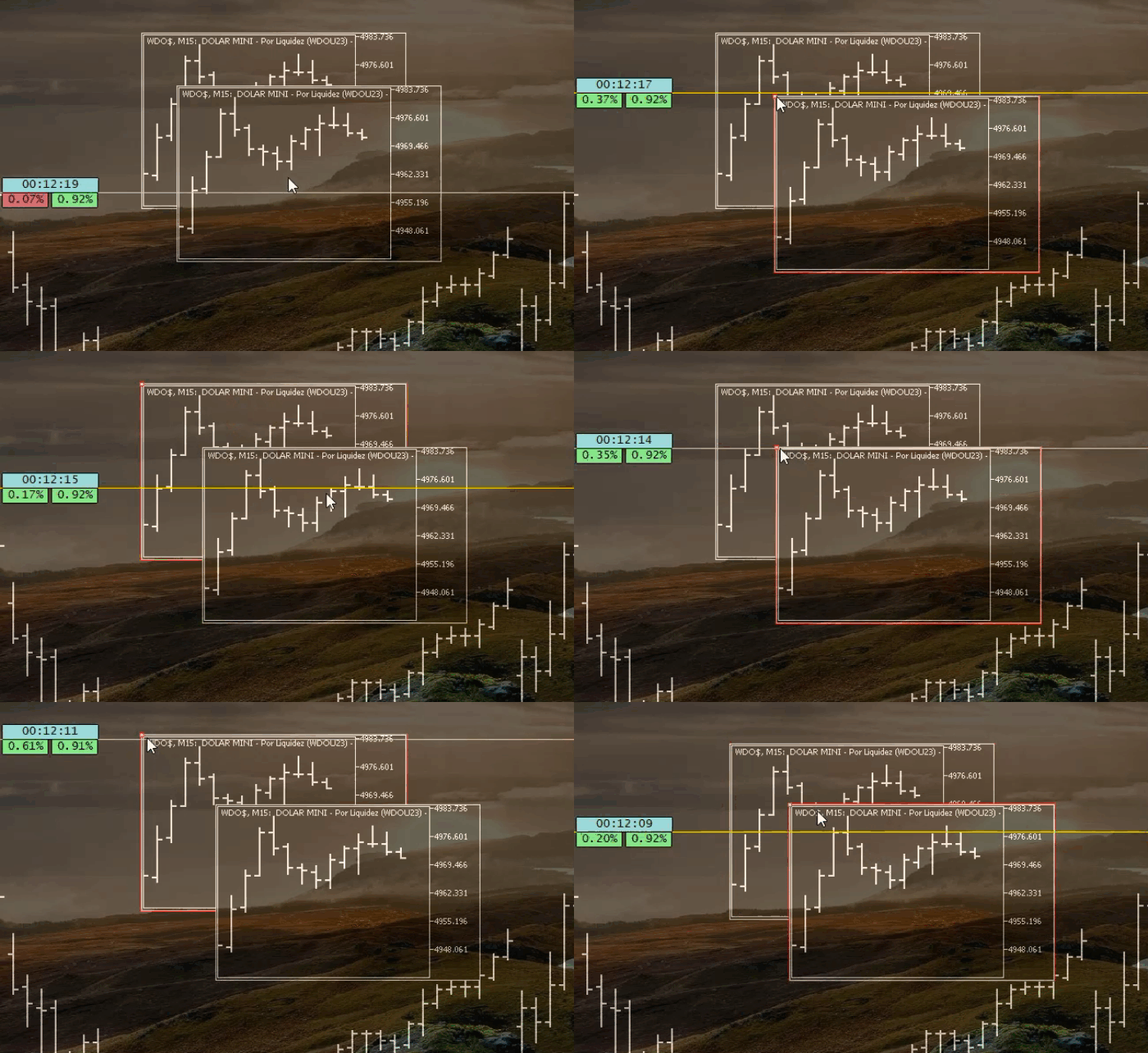
As I have just said, this is an illusion, because the object that is actually in the foreground is the OBJ_BITMAPLABEL containing the image that fills the entire chart, thereby creating the background image. But this illusion becomes even more intriguing if we change the priority of the objects. To do this using the code above, I suggest looking at the following animation:
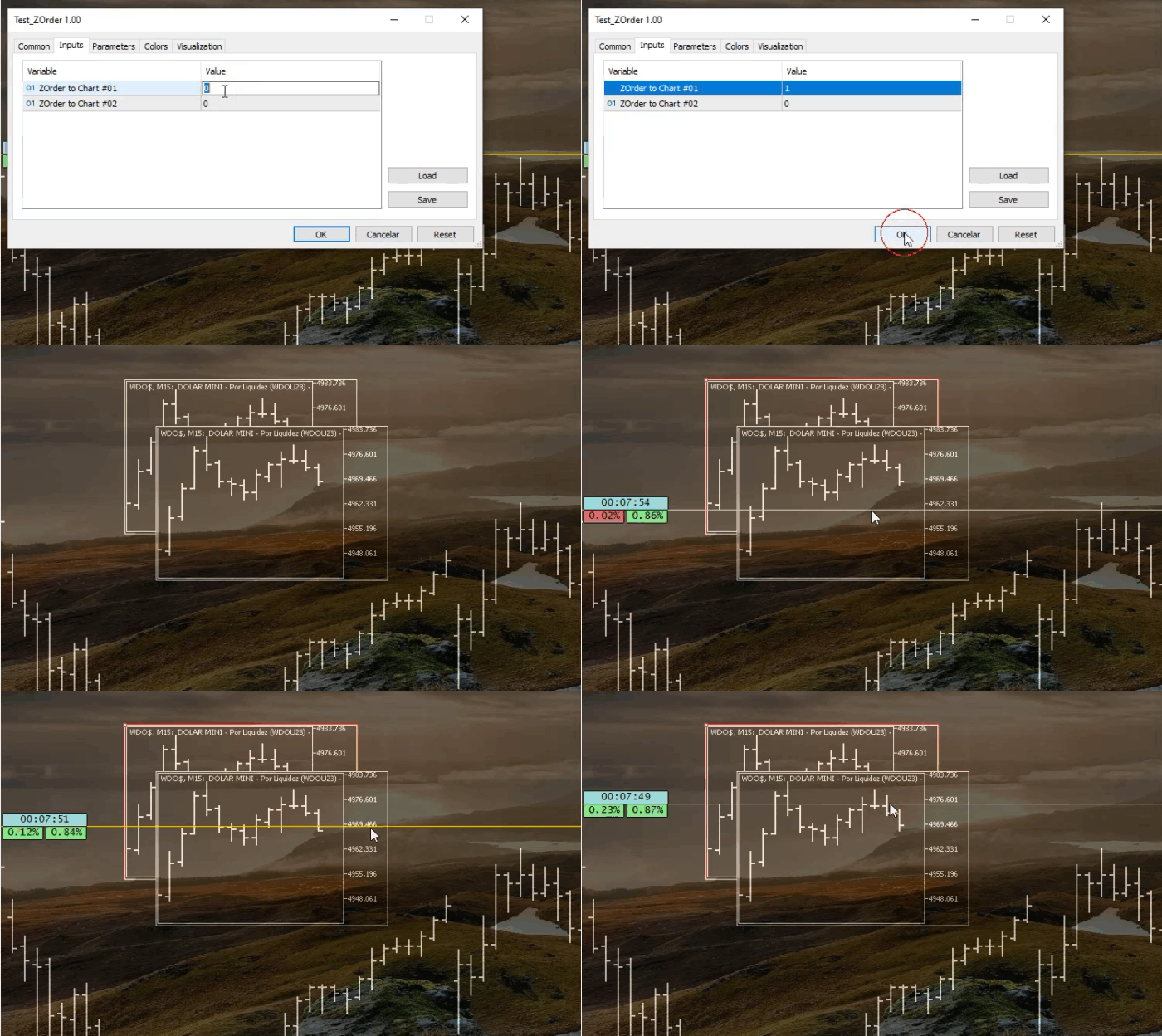
Note that we changed the priority of the object underneath, namely CHART #01. Thus, because it has a higher priority, we get the result shown in the animation. If you did not understand this, test it in your own MetaTrader 5 terminal. You will notice that even when you click on an area that belongs to CHART #02 but also belongs to CHART #01, CHART #01 will be selected. You will be able to select CHART #02 only if, and only when, you click on an area outside CHART #01 but belonging to CHART #02. If both are located in exactly the same area, CHART #01 will have priority, even if it is covered by CHART #02.
This will undoubtedly become much more interesting if you try to set values for OBJ_CHART that are less than or equal to the value of the OBJ_BITMAPLABEL object acting as the background image. Or if you place another object using the shortcut/quick command shown below in the following image.
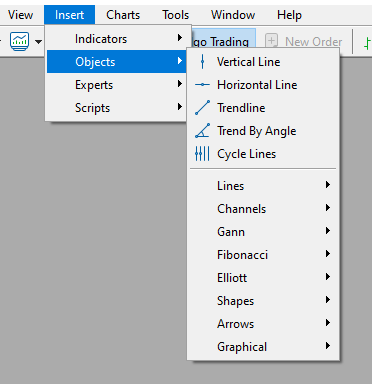
Try doing the following: add another OBJ_CHART, but this time using the keyboard shortcut shown earlier, and play with the indicator values, as shown in the previous animation. Without a doubt, you will begin to understand the importance of using an appropriate value in the ZOrder property. But where exactly is this applied in what we are currently developing? Well, to answer this in the most appropriate way and thereby separate the topics, we will look at it in a new topic.
Applying the knowledge gained
Well, knowing and understanding what has been explained is extremely important so that you can understand what we will do during implementation. Later on, this will lose its meaning, because we will use a different approach. But for now, it is important, especially depending on how you modify or adapt the code for your own personal use.
In the previous article, we created three lines: one for the position opening price, one for the stop loss level and one for the take profit level. Excellent. Up to this point, there is nothing wrong with what was done. The horizontal line marking the opening price should never be movable. We will correct that shortly. By contrast, the stop loss and take profit horizontal lines can be moved freely. And this is where we have a problem when both lines, the stop loss line and the take profit line, are at the same price.
In this case, which line should have priority when trying to select one of them? This is necessary so that the system receives a certain event, for example, the line being moved or even deleted. You might say that it should be the stop loss, while another trader might say that it should be the take profit. Who would actually be right in such a situation?
Do you see the problem here? In a sense, the order in which the lines are created will influence this decision if both lines have the same ZOrder value. Thus, simply changing the creation order would solve many of the problems. However, let us take this situation to an even more extreme level. There is nothing unusual about some traders, especially on HEDGING accounts, having more than one open position. In this case, it may be necessary to set a different ZOrder between the stop loss line and the take profit line. But even if this is done, which would eliminate the problem of the stop loss line and take profit line coinciding, another problem would arise: when two lines, for example two stop loss lines, accidentally overlap.
Have you noticed that any change in ZOrder becomes meaningless? Even if you use different values to solve one task, there will always be another one that needs to be solved. However, according to some professional traders who advise me on a number of aspects related to the development and implementation of the replication/simulation system, there is no practical reason to keep more than two, three or at most four such entities/records on the server. In other words, in their opinion, if we use a HEDGING account, there is no practical point in keeping more than two, three, or at most four open positions at the same time, because on a NETTING account this problem does not exist. At this initial stage, I will consider only HEDGING accounts. But this does not mean that the indicator will not work on NETTING accounts.
So, let us return to the code we examined in the previous article. There, we implemented the stop loss and take profit lines with the same ZOrder. To change this, we need to make small changes to the code. The changes are so minor that we will not go into detail. Just see what the modified code will look like:
01. //+------------------------------------------------------------------+
02. #property copyright "Daniel Jose"
03. #property description "Indicator for tracking an open position on the server."
04. #property version   "1.00"
05. #property indicator_chart_window
06. #property indicator_plots 0
07. //+------------------------------------------------------------------+
08. #define def_SufixLinePrice   "Price"
09. #define def_SufixLineTake    "Take"
10. #define def_SufixLineStop    "Stop"
11. //+------------------------------------------------------------------+
12. #include <Market Replay\Auxiliar\C_Terminal.mqh>
13. //+------------------------------------------------------------------+
14. input color user00 = clrRoyalBlue;          //Color Line Price
15. input color user01 = clrForestGreen;        //Color Line Take Profit
16. input color user02 = clrFireBrick;          //Color Line Stop Loss
17. //+------------------------------------------------------------------+
18. C_Terminal *Terminal;
19. struct st
20. {
21.     long       id;
22.     string     szPrefixName;
23. }glVariables;
24. //+------------------------------------------------------------------+
25. void CreateLineInfos(const string szObjName, const double price, const color cor, const string szDescription = "\n")
26. {
27.     if (price <= 0) return;
28.     (*Terminal).CreateObjectGraphics(szObjName, OBJ_HLINE, cor, (EnumPriority)(cor == user00 ? ePriorityNull : (ePriorityOrders + (cor == user02))));
29.     ObjectSetDouble(glVariables.id, szObjName, OBJPROP_PRICE, price);
30.     ObjectSetString(glVariables.id, szObjName, OBJPROP_TEXT, szDescription);
31.     ObjectSetString(glVariables.id, szObjName, OBJPROP_TOOLTIP, szDescription);
32.     ObjectSetInteger(glVariables.id, szObjName, OBJPROP_SELECTABLE, cor != user00);
33. }
34. //+------------------------------------------------------------------+
35. int OnInit()
36. {
37.     ZeroMemory(glVariables);
38.     Terminal = new C_Terminal();
39.     if (!PositionSelect((*Terminal).GetInfoTerminal().szSymbol)) return INIT_FAILED;
40.     glVariables.id = (*Terminal).GetInfoTerminal().ID;
41.     glVariables.szPrefixName = IntegerToString(PositionGetInteger(POSITION_TICKET));
42.     CreateLineInfos(glVariables.szPrefixName + def_SufixLinePrice, PositionGetDouble(POSITION_PRICE_OPEN), user00, "Position opening price.");
43.     CreateLineInfos(glVariables.szPrefixName + def_SufixLineTake, PositionGetDouble(POSITION_TP), user01, "Take Profit point.");
44.     CreateLineInfos(glVariables.szPrefixName + def_SufixLineStop, PositionGetDouble(POSITION_SL), user02, "Stop Loss point.");
45.
46.     return INIT_SUCCEEDED;
47. }
48. //+------------------------------------------------------------------+
49. int OnCalculate(const int rates_total, const int prev_calculated, const int begin, const double &price[])
50. {
51.     return rates_total;
52. }
53. //+------------------------------------------------------------------+
54. void OnDeinit(const int reason)
55. {
56.     delete Terminal;
57.     if (glVariables.id > 0)
58.         ObjectsDeleteAll(glVariables.id, glVariables.szPrefixName);
59. }
60. //+------------------------------------------------------------------+
Position View indicator
Please note that now the stop loss line will have priority over the take profit line. This is explained by the higher ZOrder value. Then, if we have two open positions and the stop loss line is at the same price as the take profit line, any attempt to interact with these lines will give priority to the stop loss line. Note that the only change that led to this occurred in line 28. Compare this line with the same one in the previous code to understand the change.
However, although this indicator works, it is not suitable for use on HEDGING accounts. The reason is that the system will always look for either the first open position or the last one. And even if you do something to change this, one way or another, it will not have a real effect. We need to implement a solution that delivers more effective results and is more general in nature. In addition, you can see that we use different colors so that the indicator understands what each line represents. Such solutions are useful for testing. However, they are completely unsuitable for more general-purpose use. Therefore, we still have many problems to solve and correct.
At this stage, many people who are just starting out in programming often give up or make so many changes that they eventually lose control of the code they are creating. Therefore, if you already know how to program and have the right basic knowledge, I ask you to be patient with those who have less experience, because I am going to show how beginners should start thinking so that they can sincerely fall in love with the art of programming and learn to create their own solutions.
Starting to fix the situation
If you, dear reader, encounter code like the one shown above that needs improvement, do not start changing it without any criteria. Start by dividing the task into parts, but always make sure that the code remains functional. No, and I repeat: DO NOT change anything until you have separated the components. One of the simplest and most appropriate ways to do this is to place some parts of the code in a header file so that you can then immediately start modifying it. But since it is much easier to combine all the parts into one class, that is what we will do. But why is it easier to place the code in a class than to split it into header files?
The reason is simple: if you place the code in a class, you can later move it to a header file. However, simply moving it to a header file does not make management easier. This is because name conflicts may arise in the future. Such conflicts are not uncommon in codebases containing many files. Instead, when we move elements into a class, the likelihood of conflicts is significantly reduced. This does not mean that they are completely eliminated, as you will see for yourself as you progress in programming. However, resolving such conflicts becomes much simpler and faster. Knowing this, let us begin by moving the elements into a new class within the replication/simulation system.
01. //+------------------------------------------------------------------+
02. #property copyright "Daniel Jose"
03. #property description "Indicator for tracking an open position on the server."
04. #property version   "1.00"
05. #property indicator_chart_window
06. #property indicator_plots 0
07. //+------------------------------------------------------------------+
08. #define def_SufixLinePrice   "Price"
09. #define def_SufixLineTake    "Take"
10. #define def_SufixLineStop    "Stop"
11. //+------------------------------------------------------------------+
12. #include <Market Replay\Auxiliar\C_Terminal.mqh>
13. //+------------------------------------------------------------------+
14. input color user00 = clrRoyalBlue;          //Color Line Price
15. input color user01 = clrForestGreen;        //Color Line Take Profit
16. input color user02 = clrFireBrick;          //Color Line Stop Loss
17. //+------------------------------------------------------------------+
18. class C_IndicatorPosition
19. {
20.     private    :
21.         struct st00
22.         {
23.             long      id;
24.             string    szPrefixName;
25.         }m_Infos;
26. //+------------------------------------------------------------------+
27.         void CreateLineInfos(const string szObjName, const double price, const color cor, const string szDescription = "\n")
28.         {
29.             if (price <= 0) return;
30.             (*Terminal).CreateObjectGraphics(szObjName, OBJ_HLINE, cor, (EnumPriority)(cor == user00 ? ePriorityNull : (ePriorityOrders + (cor == user02))));
31.             ObjectSetDouble(m_Infos.id, szObjName, OBJPROP_PRICE, price);
32.             ObjectSetString(m_Infos.id, szObjName, OBJPROP_TEXT, szDescription);
33.             ObjectSetString(m_Infos.id, szObjName, OBJPROP_TOOLTIP, szDescription);
34.             ObjectSetInteger(m_Infos.id, szObjName, OBJPROP_SELECTABLE, cor != user00);
35.         }
36. //+------------------------------------------------------------------+
37.     public    :
38. //+------------------------------------------------------------------+
39.         C_IndicatorPosition(const long Id)
40.         {
41.             ZeroMemory(m_Infos);
42.             m_Infos.id = Id;
43.             m_Infos.szPrefixName = IntegerToString(PositionGetInteger(POSITION_TICKET));
44.             CreateLineInfos(m_Infos.szPrefixName + def_SufixLinePrice, PositionGetDouble(POSITION_PRICE_OPEN), user00, "Position opening price.");
45.             CreateLineInfos(m_Infos.szPrefixName + def_SufixLineTake, PositionGetDouble(POSITION_TP), user01, "Take Profit point.");
46.             CreateLineInfos(m_Infos.szPrefixName + def_SufixLineStop, PositionGetDouble(POSITION_SL), user02, "Stop Loss point.");
47.         }
48. //+------------------------------------------------------------------+
49.         ~C_IndicatorPosition()
50.         {
51.             if (m_Infos.id > 0)
52.                 ObjectsDeleteAll(m_Infos.id, m_Infos.szPrefixName);
53.         }
54. //+------------------------------------------------------------------+
55. };
56. //+------------------------------------------------------------------+
57. C_Terminal *Terminal;
58. C_IndicatorPosition *Positions;
59. //+------------------------------------------------------------------+*/
60. int OnInit()
61. {
62.     Terminal = new C_Terminal();
63.     if (!PositionSelect((*Terminal).GetInfoTerminal().szSymbol)) return INIT_FAILED;
64.     Positions = new C_IndicatorPosition((*Terminal).GetInfoTerminal().ID);
65.
66.     return INIT_SUCCEEDED;
67. }
68. //+------------------------------------------------------------------+
69. int OnCalculate(const int rates_total, const int prev_calculated, const int begin, const double &price[])
70. {
71.     return rates_total;
72. }
73. //+------------------------------------------------------------------+
74. void OnDeinit(const int reason)
75. {
76.     delete Terminal;
77.     delete Positions;
78. }
79. //+------------------------------------------------------------------+
Position View source code
In the code below, you might imagine that we have added complexity. But in fact, we have merely placed the code that was previously outside the class inside the class. Thus, contrary to what it may seem, we are not adding complexity, but improving the way the elements are implemented, because the same code that existed before now has better protection and allows us to separate tasks more effectively. I am talking about a higher degree of protection because the CreateLineInfos function is now private. That is, the calling code or the user does not need to know exactly how the indicator will be created. It simply requests the creation of the indicator. The way this is implemented may change significantly over time, but for the user it will always remain the same.
However, doing what I have just shown does not solve any of the problems we have. It only makes it easier to implement the code in a more efficient way. Note that all the code remains exactly the same as before, and its operation has not changed at all. This is the first thing we must always ensure. Do not change the code until it works exactly as it did before you placed it inside the class. After that, further actions will depend on what you need or want to do first. But since the class has already been created, we can immediately place it in a header file. This way, we avoid overloading the main code unnecessarily. Then we will create a file with the same name as the class that will be placed in it. Although this is good programming practice, it is not mandatory. Thus, the new main code can be seen below:
01. //+------------------------------------------------------------------+
02. #property copyright "Daniel Jose"
03. #property description "Indicator for tracking an open position on the server."
04. #property version   "1.00"
05. #property indicator_chart_window
06. #property indicator_plots 0
07. //+------------------------------------------------------------------+
08. #include <Market Replay\Auxiliar\C_Terminal.mqh>
09. #include <Market Replay\Order System\C_IndicatorPosition.mqh>
10. //+------------------------------------------------------------------+
11. input color user00 = clrRoyalBlue;          //Color Line Price
12. input color user01 = clrForestGreen;        //Color Line Take Profit
13. input color user02 = clrFireBrick;          //Color Line Stop Loss
14. //+------------------------------------------------------------------+
15. C_Terminal *Terminal;
16. C_IndicatorPosition *Positions;
17. //+------------------------------------------------------------------+
18. int OnInit()
19. {
20.     Terminal = new C_Terminal();
21.     if (!PositionSelect((*Terminal).GetInfoTerminal().szSymbol)) return INIT_FAILED;
22.     Positions = new C_IndicatorPosition((*Terminal).GetInfoTerminal().ID);
23.
24.     return INIT_SUCCEEDED;
25. }
26. //+------------------------------------------------------------------+
27. int OnCalculate(const int rates_total, const int prev_calculated, const int begin, const double &price[])
28. {
29.     return rates_total;
30. }
31. //+------------------------------------------------------------------+
32. void OnDeinit(const int reason)
33. {
34.     delete Terminal;
35.     delete Positions;
36. }
37. //+------------------------------------------------------------------+
Position View source code
Where did the class code go? Well, it is now in the file whose location is specified in line 09 of the code above. Please note that the class took with it some data that was previously here in the main code. This is because, as mentioned earlier, the user does not need to know how everything is arranged. You only need to know what exactly needs to be called and what parameters should be passed to the class code. How the class will process the data is of no interest to the calling code. So, take a look at the C_IndicatorPosition header file code shown below:
01. //+------------------------------------------------------------------+
02. #property copyright "Daniel Jose"
03. //+------------------------------------------------------------------+
04. #define def_SufixLinePrice   "Price"
05. #define def_SufixLineTake    "Take"
06. #define def_SufixLineStop    "Stop"
07. //+------------------------------------------------------------------+
08. class C_IndicatorPosition
09. {
10.     private    :
11.         struct st00
12.         {
13.             long      id;
14.             string    szPrefixName;
15.         }m_Infos;
16. //+------------------------------------------------------------------+
17.         void CreateLineInfos(const string szObjName, const double price, const color cor, const string szDescription = "\n")
18.         {
19.             if (price <= 0) return;
20.             (*Terminal).CreateObjectGraphics(szObjName, OBJ_HLINE, cor, (EnumPriority)(cor == user00 ? ePriorityNull : (ePriorityOrders + (cor == user02))));
21.             ObjectSetDouble(m_Infos.id, szObjName, OBJPROP_PRICE, price);
22.             ObjectSetString(m_Infos.id, szObjName, OBJPROP_TEXT, szDescription);
23.             ObjectSetString(m_Infos.id, szObjName, OBJPROP_TOOLTIP, szDescription);
24.             ObjectSetInteger(m_Infos.id, szObjName, OBJPROP_SELECTABLE, cor != user00);
25.         }
26. //+------------------------------------------------------------------+
27.     public    :
28. //+------------------------------------------------------------------+
29.         C_IndicatorPosition(const long Id)
30.         {
31.             ZeroMemory(m_Infos);
32.             m_Infos.id = Id;
33.             m_Infos.szPrefixName = IntegerToString(PositionGetInteger(POSITION_TICKET));
34.             CreateLineInfos(m_Infos.szPrefixName + def_SufixLinePrice, PositionGetDouble(POSITION_PRICE_OPEN), user00, "Position opening price.");
35.             CreateLineInfos(m_Infos.szPrefixName + def_SufixLineTake, PositionGetDouble(POSITION_TP), user01, "Take Profit point.");
36.             CreateLineInfos(m_Infos.szPrefixName + def_SufixLineStop, PositionGetDouble(POSITION_SL), user02, "Stop Loss point.");
37.         }
38. //+------------------------------------------------------------------+
39.         ~C_IndicatorPosition()
40.         {
41.             if (m_Infos.id > 0)
42.                 ObjectsDeleteAll(m_Infos.id, m_Infos.szPrefixName);
43.         }
44. //+------------------------------------------------------------------+
45. };
46. //+------------------------------------------------------------------+
47. #undef def_SufixLinePrice
48. #undef def_SufixLineTake
49. #undef def_SufixLineStop
50. //+------------------------------------------------------------------+
Source code for C_IndicatorPosition.mqh
Note that the code has remained the same. Only three new lines have been added to the end of the file. Their purpose is to remove definitions that make sense only within this header file. In other words, we are using the principle of least privilege. Or, to put it more clearly: no one needs to know what does not concern them. This prevents information from leaking without your knowledge. In addition, this is, of course, good programming practice, because other pieces of code may use the same names that you defined here. And if you do not remove them here, you will have to do it elsewhere, which creates many inconveniences when improving very large code, because definition conflicts produce errors that make no sense.
Good. But if you now look only at the code in the header file, you will notice that it declares and uses values that depend on the main code. This creates a problem, because when the main code changes, this header file will also have to be changed. In other words, this is a huge amount of work, so we need to fix it. A good solution is to have the main code pass these values independently. Thus, below is the new header file with the changes already made.
01. //+------------------------------------------------------------------+
02. #property copyright "Daniel Jose"
03. //+------------------------------------------------------------------+
04. #define def_SufixLinePrice   "Price"
05. #define def_SufixLineTake    "Take"
06. #define def_SufixLineStop    "Stop"
07. //+------------------------------------------------------------------+
08. class C_IndicatorPosition
09. {
10.     private    :
11.         struct st00
12.         {
13.             long      id;
14.             string    szPrefixName;
15.             color     corPrice, corTake, corStop;
16.         }m_Infos;
17. //+------------------------------------------------------------------+
18.         void CreateLineInfos(const string szObjName, const double price, const color cor, const string szDescription = "\n")
19.         {
20.             if (price <= 0) return;
21.             (*Terminal).CreateObjectGraphics(szObjName, OBJ_HLINE, cor, (EnumPriority)(cor == m_Infos.corPrice ? ePriorityNull : (ePriorityOrders + (cor == m_Infos.corStop))));
22.             ObjectSetDouble(m_Infos.id, szObjName, OBJPROP_PRICE, price);
23.             ObjectSetString(m_Infos.id, szObjName, OBJPROP_TEXT, szDescription);
24.             ObjectSetString(m_Infos.id, szObjName, OBJPROP_TOOLTIP, szDescription);
25.             ObjectSetInteger(m_Infos.id, szObjName, OBJPROP_SELECTABLE, cor != m_Infos.corPrice);
26.         }
27. //+------------------------------------------------------------------+
28.     public    :
29. //+------------------------------------------------------------------+
30.         C_IndicatorPosition(const long Id, color corPrice, color corTake, color corStop)
31.         {
32.             ZeroMemory(m_Infos);
33.             m_Infos.id = Id;
34.             m_Infos.szPrefixName = IntegerToString(PositionGetInteger(POSITION_TICKET));
35.             CreateLineInfos(m_Infos.szPrefixName + def_SufixLinePrice, PositionGetDouble(POSITION_PRICE_OPEN), m_Infos.corPrice = corPrice, "Position opening price.");
36.             CreateLineInfos(m_Infos.szPrefixName + def_SufixLineTake, PositionGetDouble(POSITION_TP), m_Infos.corTake = corTake, "Take Profit point.");
37.             CreateLineInfos(m_Infos.szPrefixName + def_SufixLineStop, PositionGetDouble(POSITION_SL), m_Infos.corStop = corStop, "Stop Loss point.");
38.         }
39. //+------------------------------------------------------------------+
40.         ~C_IndicatorPosition()
41.         {
42.             if (m_Infos.id > 0)
43.                 ObjectsDeleteAll(m_Infos.id, m_Infos.szPrefixName);
44.         }
45. //+------------------------------------------------------------------+
46. };
47. //+------------------------------------------------------------------+
48. #undef def_SufixLinePrice
49. #undef def_SufixLineTake
50. #undef def_SufixLineStop
51. //+------------------------------------------------------------------+
C_IndicatorPosition.mqh
Please note that the constructor will now need to accept three new arguments. They pass the colors for each of the lines. Thus, the main code must be changed in the following place, which is shown in the fragment below:
17. //+------------------------------------------------------------------+
18. int OnInit()
19. {
20.     Terminal = new C_Terminal();
21.     if (!PositionSelect((*Terminal).GetInfoTerminal().szSymbol)) return INIT_FAILED;
22.     Positions = new C_IndicatorPosition((*Terminal).GetInfoTerminal().ID, user00, user01, user02);
23.
24.     return INIT_SUCCEEDED;
25. }
26. //+------------------------------------------------------------------+
Fragment from the indicator
Everything is simple. We now have code that is almost completely independent. This is because we still depend on the main code reading information about whether any position exists. This is done in line 21 in the previous fragment. So, let us fix this, because we want the indicator to work on HEDGING accounts. On such accounts, we can have more than one open position at the same time and on the same symbol. But to solve this problem, we will have to make somewhat more substantial changes to the code. However, since we have separated things, making this change becomes much easier and more pleasant. Thus, the new indicator code can be seen below:
01. //+------------------------------------------------------------------+
02. #property copyright "Daniel Jose"
03. #property description "Indicator for tracking an open position on the server."
04. #property version   "1.00"
05. #property indicator_chart_window
06. #property indicator_plots 0
07. //+------------------------------------------------------------------+
08. #define def_ShortName "Position View"
09. //+------------------------------------------------------------------+
10. #include <Market Replay\Order System\C_IndicatorPosition.mqh>
11. //+------------------------------------------------------------------+
12. input color user00 = clrRoyalBlue;          //Color Line Price
13. input color user01 = clrForestGreen;        //Color Line Take Profit
14. input color user02 = clrFireBrick;          //Color Line Stop Loss
15. //+------------------------------------------------------------------+
16. C_IndicatorPosition *Positions;
17. //+------------------------------------------------------------------+*/
18. int OnInit()
19. {
20.     IndicatorSetString(INDICATOR_SHORTNAME, def_ShortName);
21.     Positions = new C_IndicatorPosition(user00, user01, user02);
22.     if (!Positions.CheckCatch())
23.     {
24.         ChartIndicatorDelete(ChartID(), 0, def_ShortName);
25.         return INIT_FAILED;
26.     }
27.
28.     return INIT_SUCCEEDED;
29. }
30. //+------------------------------------------------------------------+
31. int OnCalculate(const int rates_total, const int prev_calculated, const int begin, const double &price[])
32. {
33.     return rates_total;
34. }
35. //+------------------------------------------------------------------+
36. void OnDeinit(const int reason)
37. {
38.     delete Positions;
39. }
40. //+------------------------------------------------------------------+
Position View source code
Note that quite simple changes have been made to the OnInit procedure code. Essentially, we are now working in such a way that if the indicator fails, it will be removed from the chart. This is achieved with lines 20 and 24. Line 24 is precisely the one that will remove the indicator if it cannot remain on the chart. So what exactly can prevent the indicator from remaining on the chart? Well, at this stage there is only one condition left. To understand this, let us look at the code that is called in line 22. So, we move on to the new class code:
01. //+------------------------------------------------------------------+
02. #property copyright "Daniel Jose"
03. //+------------------------------------------------------------------+
04. #define def_SufixLinePrice   "Price"
05. #define def_SufixLineTake    "Take"
06. #define def_SufixLineStop    "Stop"
07. //+------------------------------------------------------------------+
08. #include "..\Auxiliar\C_Terminal.mqh"
09. //+------------------------------------------------------------------+
10. class C_IndicatorPosition : private C_Terminal
11. {
12.     private    :
13.         struct st00
14.         {
15.             ulong     ticket;
16.             string    szPrefixName;
17.             color     corPrice, corTake, corStop;
18.         }m_Infos;
19. //+------------------------------------------------------------------+
20.         void CreateLineInfos(const string szObjName, const double price, const color cor, const string szDescription = "\n")
21.         {
22.             if (price <= 0) return;
23.             CreateObjectGraphics(szObjName, OBJ_HLINE, cor, (EnumPriority)(cor == m_Infos.corPrice ? ePriorityNull : (ePriorityOrders + (cor == m_Infos.corStop))));
24.             ObjectSetDouble(GetInfoTerminal().ID, szObjName, OBJPROP_PRICE, price);
25.             ObjectSetString(GetInfoTerminal().ID, szObjName, OBJPROP_TEXT, szDescription);
26.             ObjectSetString(GetInfoTerminal().ID, szObjName, OBJPROP_TOOLTIP, szDescription);
27.             ObjectSetInteger(GetInfoTerminal().ID, szObjName, OBJPROP_SELECTABLE, cor != m_Infos.corPrice);
28.         }
29. //+------------------------------------------------------------------+
30.     public    :
31. //+------------------------------------------------------------------+
32.         C_IndicatorPosition(color corPrice, color corTake, color corStop)
33.             :C_Terminal()
34.         {
35.             ZeroMemory(m_Infos);
36.             m_Infos.corPrice = corPrice;
37.             m_Infos.corTake  = corTake;
38.             m_Infos.corStop  = corStop;
39.         }
40. //+------------------------------------------------------------------+
41.         ~C_IndicatorPosition()
42.         {
43.             if (m_Infos.ticket != 0)
44.                 ObjectsDeleteAll(GetInfoTerminal().ID, m_Infos.szPrefixName);
45.         }
46. //+------------------------------------------------------------------+
47.         bool CheckCatch(void)
48.         {
49.             for (int count = PositionsTotal() - 1; count >= 0; count--, m_Infos.ticket = 0)
50.                 if ((m_Infos.ticket = PositionGetTicket(count)) > 0)
51.                     if (PositionGetString(POSITION_SYMBOL) == GetInfoTerminal().szSymbol)
52.                     {
53.                         m_Infos.szPrefixName = IntegerToString(m_Infos.ticket);
54.                         if (ObjectFind(GetInfoTerminal().ID, m_Infos.szPrefixName + def_SufixLinePrice) < 0)
55.                             break;
56.                     }
57.             if (m_Infos.ticket == 0) return false;
58.             IndicatorSetString(INDICATOR_SHORTNAME, IntegerToString(m_Infos.ticket));
59.             CreateLineInfos(m_Infos.szPrefixName + def_SufixLinePrice, PositionGetDouble(POSITION_PRICE_OPEN), m_Infos.corPrice, "Position opening price.");
60.             CreateLineInfos(m_Infos.szPrefixName + def_SufixLineTake, PositionGetDouble(POSITION_TP), m_Infos.corTake, "Take Profit point.");
61.             CreateLineInfos(m_Infos.szPrefixName + def_SufixLineStop, PositionGetDouble(POSITION_SL), m_Infos.corStop, "Stop Loss point.");
62.
63.             return true;
64.         }
65. //+------------------------------------------------------------------+
66. };
67. //+------------------------------------------------------------------+
68. #undef def_SufixLinePrice
69. #undef def_SufixLineTake
70. #undef def_SufixLineStop
71. //+------------------------------------------------------------------+
C_IndicatorPosition.mqh
Please note that the code is growing and becoming increasingly complex. Nevertheless, I am moving step by step so that you can really follow what we are doing. This is because a deep understanding of this code will be very important in the future. So do not hurry. Calmly and carefully follow the changes that are taking place, because I will show and explain them gradually so that the understanding is as complete as possible.
Note that the last time we looked at this code, it did not contain include directives. Now it does. And this is exactly what allows the main code to require less code to be written, and also, of course, helps with other aspects of writing code. In line 10, we include the C_Terminal class in the C_IndicatorPosition class through inheritance. This inheritance allows us, at least for now, to use the public methods of the C_Terminal class directly in the C_IndicatorPosition class. It creates the impression that the C_IndicatorPosition class has more functions than exist in MQL5, but this is only an illusion, because the functions being used are actually in the C_Terminal class.
However, keep in mind that you will not be able to use these same functions of the C_Terminal class outside the C_IndicatorPosition class. This is because the inheritance is private, which prevents external access to the C_Terminal class methods through the C_IndicatorPosition class.
But because we inherit the C_Terminal class, we need to initialize it before using the C_IndicatorPosition class. This is done in line 33. Now note that in the constructor we removed the code that had previously been there and left only the code that will initialize the class's internal variables. Good. Now let us move on to line 47, where we have the function that checks whether the indicator should remain on the chart during initialization.
From this point on, in the loop on line 49, we begin to consider positions on HEDGING accounts. Until this point, we had considered only NETTING accounts. Note that we will iterate through the list of open positions looking for a position that has not yet been assigned to an indicator. So how do we do this? Well, on each iteration of the loop, we will perform the check in line 50. If this check is positive, we will perform a new one in line 51. Now pay attention: if this second check in line 51 is positive, in line 53 we will generate a prefix for the names of the objects to be created. Up to this point, everything remains the same. Of course, except that now we will be able to take into account/handle more than one open position on the same symbol, which is exactly what happens on HEDGING accounts.
Excellent. And now the most interesting part begins. How does the indicator know whether the position has already been analyzed or not? Pay attention to this. Each position indicator present on the chart will track, or more precisely refer to, one specific position. There may be several positions open. However, each indicator will refer to only one position. The same indicator will NOT track more than one position. Therefore, so that the indicator knows whether a position is already being analyzed by another position indicator or not, we iterate through the chart objects. This is done in line 54.
If MetaTrader 5 reports that the object is already on the chart, we will look for a new open position on the same symbol. The loop in line 49 will be executed again. Such situations will repeat until one of two conditions is met. The first is that we no longer have any open positions. The second is the execution of line 55.
In any case, line 57 will be executed at some point. If the ticket variable does not contain a value, we will return false, telling the main code that the indicator must be removed from the chart. If the ticket variable has some value, we will assign a new short name to the indicator so that we can refer to it later, and we will create the lines as shown earlier. Finally, in line 63, we return true. Thus, we ensure that the indicator works the same way on both HEDGING and NETTING accounts, without any additional checks.
Final thoughts
In this article, we introduced the necessary changes to make the open position indicator truly functional on both HEDGING and NETTING accounts. Indeed, and this is easy to notice, this indicator still does nothing except show the lines at the prices corresponding to the given position. In addition, this indicator cannot determine that the position no longer exists. In order for you, as a trader, to really notice this, you need to change the chart timeframe.
Thus, the indicator will detect that the position has been closed. Once this is detected, the indicator will be removed from the chart and will therefore be removed naturally, without any additional intervention. In the next article, we will further improve this indicator by adding several new functions to it.
| File | Description |
|---|---|
| Experts\Expert Advisor.mq5 | Demonstrates the interaction between Chart Trade and the Expert Advisor (Mouse Study is required for interaction). |
| Indicators\Chart Trade.mq5 | Creates a window for configuring the order to be sent (Mouse Study is required for interaction). |
| Indicators\Market Replay.mq5 | Creates controls for interacting with the replication/simulation service (Mouse Study is required for interaction). |
| Indicators\Mouse Study.mq5 | Provides interaction between graphical controls and the user (required both for the replication/simulation system and for the real market). |
| Indicators\Order Indicator.mq5 | Responsible for displaying market orders, providing interaction with them and control over them. |
| Indicators\Position View.mq5 | Responsible for displaying market positions, providing interaction with them and control over them. |
| Services\Market Replay.mq5 | Creates and maintains the market replication/simulation service (the main file of the entire system). |
Translated from Portuguese by MetaQuotes Ltd.
Original article: https://www.mql5.com/pt/articles/13167
Warning: All rights to these materials are reserved by MetaQuotes Ltd. Copying or reprinting of these materials in whole or in part is prohibited.
This article was written by a user of the site and reflects their personal views. MetaQuotes Ltd is not responsible for the accuracy of the information presented, nor for any consequences resulting from the use of the solutions, strategies or recommendations described.

 Building a Traditional Daily Pivot Point Indicator in MQL5
 From Basic to Intermediate: Working with Files in the MetaTrader 5 Sandbox
 Measuring What Matters (Part 2): Building the Covariance Matrix: Eigenvalue Decomposition and Risk Factor Analysis in MQL5
 Strategy Configuration via External JSON Files in MQL5: Replacing Input Parameters with a Runtime Config Loader

- Free trading apps
- Over 8,000 signals for copying
- Economic news for exploring financial markets
You agree to website policy and terms of use