Trade Assistant MT4 PRO Panel

  • 实用工具
  • Andrei Strashko
    Andrei Strashko
    我叫 Andrey。我是一名专业交易员,也是 MetaTrader 4 和 MetaTrader 5 交易解决方案开发者。10 多年来,我一直从事交易机器人、指标、脚本和交易策略的开发,将真实交易经验与深入的编程知识相结合。
    我正在发展自己的品牌 Golden Wolf。它不仅仅是一个名称,更代表了我的工作方式:精准、纪律、强大的算法逻辑以及对每一个细节的关注。基于我的交易经验和编程能力,我创建专业的交易智能顾问、指标和实用工具,帮助交易者自动化策略、分析市场,并更高效地管理交易过程。
    我为希望更清晰地理解市场、更快速地做出决策,并将交易想法自动化的交易者创建工具。
  • 版本: 2.50
  • 更新: 10 六月 2026
  • 激活: 15

使用说明:点击打开 Trade Assistant MT4/MT5 PRO 使用说明

Trade Assistant MT4/MT5 PRO 使用说明

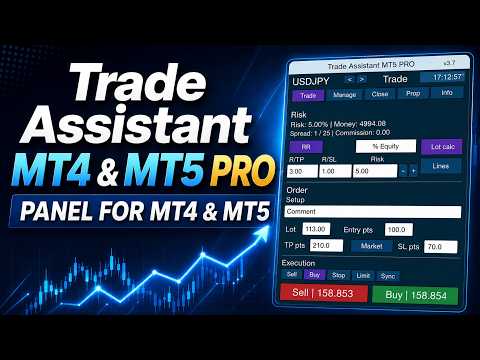
Trade Assistant MT4/MT5 PRO 是一款面向 MetaTrader 4/5 的专业交易面板,适合需要快速、方便、直观地控制交易流程的交易者。该产品可以减少重复性的手动操作,加快订单开立和管理速度,标准化风险管理流程,并让手动交易更加有纪律。

这个工具不会替代交易者寻找信号,也不会承诺神奇的结果。它的任务更实际,也更有价值:在图表上为你提供一个方便的交易执行和管理环境。你自己决定入场点、交易思路和市场逻辑,而 Trade Assistant MT4/MT5 PRO 帮助你快速把这个想法转化为清晰的交易计划:风险、仓位大小、Stop Loss、Take Profit、Break Even、Trailing Stop 以及持仓管理。

如果你已经厌倦了每次都手动计算仓位大小、打开终端标准下单窗口、检查止损距离、移动保护位、删除挂单、进行部分平仓,并反复确认每笔交易是否符合你的交易系统规则,那么这个助手正是为你设计的。

为什么大多数手动交易者需要这个工具

很多交易者的问题并不是没有策略,而是在交易想法和实际执行之间存在太多手动步骤。

当交易者计算风险、设置交易量、检查止损距离、打开新订单窗口、确认订单类型、执行交易,然后再管理持仓时,市场可能已经走远,情绪开始上升,错误也更容易发生。

手动交易中最常见的问题:

风险百分比是知道的,但每次仓位大小计算方式不同;

Stop Loss 是凭感觉设置的,而不是根据规则设置的;

交易者想快速把仓位移动到 Break Even,但操作经常延迟;

Trailing Stop 使用不稳定;

Partial Close 需要手动执行,往往不够及时;

很难在图表上快速看到完整的交易结构;

Pending Orders 留在图表上的时间比需要的更久;

在高波动市场中,执行交易会消耗太多时间。

Trade Assistant MT4/MT5 PRO 正是为了解决这些实际问题而创建的。它不是玩具,也不是装饰性面板,而是为那些希望交易更准确、更快速、更系统的交易者准备的工作工具。

使用 Trade Assistant MT4/MT5 PRO 你可以获得什么

安装到图表后,你会得到一个方便的交易面板,它在一个界面中整合了:

快速 Buy 和 Sell 按钮;

单笔交易风险计算;

根据设定风险计算仓位大小;

Entry / Stop Loss / Take Profit 水平管理;

图表上的可视化交易结构;

Risk/Reward 比例设置;

手动和自动 Break Even;

多种 Trailing Stop 模式;

Partial Close 部分平仓;

删除 Pending Orders;

隐藏保护水平管理;

Virtual Pending Orders 管理;

通过信息模块查看当前交易状态。

你不需要在 MetaTrader 4/5 的多个标准窗口之间切换,而是可以通过一个统一的交易控制中心完成主要操作。

产品的核心理念

Trade Assistant MT4/MT5 PRO 的目标,是让手动交易变得:

更快;

更精确;

更直观;

更有纪律;

更适合系统化风险管理。

这对以下类型的交易者尤其重要:

日内交易者;

每天开多笔交易的人;

按价格水平交易的人;

把 Stop Loss 和 Take Profit 作为每笔交易必要组成部分的人;

不想违反资金管理规则的人;

更喜欢手动控制,而不是完全自动化交易系统的人。

产品的主要优势

1. 快速开仓

面板允许你通过 Buy 和 Sell 按钮快速开立交易。

你不需要把时间浪费在终端标准订单窗口上,可以直接在图表上看到交易的关键参数。

2. 内置风险管理

你可以用方便的方式设置风险,面板会根据 Stop Loss 和交易品种参数计算仓位大小。

3. 可视化控制

你不只是把数字输入字段中,而是可以直接在图表上看到交易结构:入场、止损、止盈、风险区域和潜在利润区域。

4. 节省时间

该助手可以减少重复操作,尤其适合主动交易、高波动市场以及需要同时处理多个入场场景的情况。

5. 交易管理

入场后,面板不仅可以帮助你开仓,还可以帮助你管理仓位:移动到 Break Even、启用 Trailing Stop、部分平仓、删除 Pending Orders。

6. 通用性

该产品几乎可以用于任何手动交易风格:剥头皮、日内交易、突破交易、回调交易、支撑阻力交易、交易兴趣区交易。

主要功能

1. Buy / Sell 按钮

面板提供快速交易按钮,用于开立市场订单。这在需要快速执行并实时控制交易场景时非常方便。

支持:

Buy;

Sell;

Stop;

Limit。

因此,该面板不仅适合市场价入场,也适合通过挂单进行交易。

2. 单笔交易风险计算

产品最重要的功能之一是 Risk Calculation。

你可以设置风险方式:

按账户余额百分比;

按 Equity 百分比;

按 Free Margin 百分比;

按账户货币中的固定金额;

面板中提供的其他风险计算模式。

之后,助手会计算:

资金风险;

仓位大小;

交易量;

设定风险与当前 Stop Loss 之间的关系。

这有助于在不同交易品种和不同市场条件下,按照统一规则进行交易。

实际效果:

每笔交易的风险更容易保持一致;

降低开出过大仓位的概率;

更容易遵守交易系统规则;

更容易扩大或调整策略;

减少情绪影响。

3. 根据 Stop Loss 计算仓位大小

内置仓位计算会考虑:

选择的风险模式;

Stop Loss 大小;

交易品种规格;

最小交易量;

最大交易量;

交易量步长;

交易品种的交易参数。

因此,面板可以帮助避免常见错误:交易者手动计算手数时,意外开出不符合计划的仓位。

对于主动手动交易来说,这一点尤其重要。即使策略本身很强,如果每次仓位大小都是随机的,策略也会失去意义。

4. Entry / Stop Loss / Take Profit 水平

面板围绕交易的基础结构工作:

Entry;

Stop Loss;

Take Profit。

这些水平可以用于提前准备交易,并进行可视化控制。

这种方式的优势:

交易者可以立即看到交易计划结构;

更容易在开仓前评估交易质量;

风险与利润比例更清楚;

更容易控制执行纪律;

可视化交易结构让图表操作更加方便。

5. 图表上的可视化交易地图

Trade Assistant MT4/MT5 PRO 不只是按钮和输入字段。

它会在图表上构建清晰的交易场景可视化结构。

通常交易者可以看到:

风险区域;

潜在利润区域;

入场水平;

Stop Loss 水平;

Take Profit 水平;

交易相关的其他视觉参考。

这在做决定时非常有用:

可以立即看到止损是否合理;

可以判断仓位是否过大;

可以更容易判断交易是否符合你的规则。

对很多交易者来说,可视化正是面板中最有价值的部分之一。

6. Risk/Reward 和 TP 与 SL 比例设置

面板允许使用 Take Profit 与 Stop Loss 的比例。

你可以快速设置想要的交易结构:

1:1;

1.5:1;

2:1;

3:1;

以及其他数值。

如果你的交易系统基于固定或半固定的风险收益比,这非常方便。

优势:

加快交易准备;

统一交易结构;

让交易更接近算法化纪律;

更容易维护策略统计。

7. Break Even — 移动到保本

面板中包含 Break Even 模块。

它允许:

手动将仓位移动到保本;

当价格走过指定距离后,自动移动 Stop Loss;

使用偏移量;

考虑 spread 和 commission。

为什么需要 Break Even:

当价格已经朝有利方向运行了一段距离后,交易者通常希望移除该仓位的风险。每次手动操作并不方便。助手可以简化这个过程。

可以设置:

触发水平;

相对于入场点的偏移;

交易成本考虑;

后续管理逻辑。

这有助于保护仓位,并减少情绪化决策。

8. Trailing Stop

产品支持使用 Trailing Stop 管理仓位。

可用的 Trailing 逻辑包括:

标准距离 Trailing;

基于 ATR 的 Trailing;

基于 Moving Average 的 Trailing;

基于 Fractals 的 Trailing;

基于 Parabolic SAR 的 Trailing;

基于上一根K线最高价/最低价的 Trailing;

带有附加逻辑的其他跟踪方式。

为什么这很重要:

很多交易者会入场,但不擅长管理持仓。结果要么过早止盈,要么让浮动利润长时间没有保护。

Trailing Stop 可以帮助:

保护浮动利润;

跟随强趋势行情;

自动化部分手动流程;

让交易更稳定一致。

9. Partial Close 部分平仓

面板提供 Partial Close 功能。

当交易者希望执行以下操作时,它非常有用:

锁定部分利润;

降低风险;

随着价格移动逐步减少仓位;

将 Partial Close 与 Break Even 和 Trailing Stop 结合使用。

这特别适合:

日内交易;

波段场景;

价格水平交易;

分阶段止盈。

10. Pending Orders 管理

Trade Assistant MT4/MT5 PRO 简化了挂单管理。

面板支持与以下操作相关的功能:

设置 Stop 和 Limit 订单;

删除 Pending Orders;

取消不再有效的 setup;

保护入场场景。

这可以节省时间,并减少随机错误,尤其是在市场快速变化时。

11. OCO 逻辑

面板支持基于 One Cancels Other 原则的订单管理逻辑。

这在以下场景中非常有用:

突破交易;

替代入场点;

一个交易场景需要取消另一个交易场景时。

这种逻辑让订单管理更加专业,也有助于避免图表上留下多余的 Pending Orders。

12. Hide SL/TP

在高级模式中,助手允许使用隐藏保护水平:

隐藏 Stop Loss;

隐藏 Take Profit。

为什么需要它:

一些交易者不希望真实保护水平发送给经纪商;

保护逻辑由 EA 控制;

交易管理保留在面板内部。

重要提示:隐藏水平要求交易终端和 EA 必须保持运行。

13. Virtual Pending Orders

面板可以使用 Virtual Pending Orders。

在这种模式下,入场逻辑不是通过经纪商服务器上的标准挂单执行,而是由面板内部算法控制。

优势:

更灵活地手动管理交易场景;

可以使用隐藏入场逻辑;

更细致地控制交易计划。

这是为理解虚拟机制用途和风险的交易者准备的工具。

14. 信息模块和交易状态

面板提供单独的信息区域,帮助查看:

当前交易品种;

spread;

风险参数;

保护功能状态;

面板当前启用的模式;

主要交易配置。

这在交易过程中非常适合用于控制和诊断。

推荐产品
FIBO Price Calculator 功能简介 1. 自动绘制斐波那契回调线 本指标可自动在MT4图表上绘制斐波那契回调线,助您快速识别潜在支撑和阻力位。 2. 自定义斐波那契数列 用户可自定义斐波那契数列的数值,指标会根据当前市场价格自动换算成相应价格水平。 3. 灵活调整指标窗位置 指标窗可放置在图表的四个角中的任意位置,方便用户根据个人喜好和交易习惯调整布局。 综上所述,本指标不仅能够帮助交易者自动绘制斐波那契回调线,还提供了自定义输入斐波那契黄金数列换算成价格以及自定义指标窗位置的功能,为交易者提供了更便捷、更灵活的技术分析工具。无论是初学者还是经验丰富的交易者,都能够通过本指标更好地把握市场趋势,提高交易成功率。
当市场与您的交易相反时,保护您的帐户免受追加保证金的影响。 使用Mar,网格,平均时管理风险。它们不再是危险的,而是可以控制的 使用此EA实用程序伴随每次MT4安装 当交易不利时,此EA可以保护您的资金: 最大的金钱损失, 最大提取/股本损失百分比, 您的最低资产净值达到 那些先到达 交易简单,直接,强大 在货币选项卡之一中安装此EA,它将监视来自交易终端的所有交易。 简单,轻巧且非常有用 Dāng shìchǎng yǔ nín de jiāoyì xiāngfǎn shí, bǎohù nín de zhànghù miǎn shòu zhuījiā bǎozhèngjīn de yǐngxiǎng. Shǐyòng Mar, wǎng gé, píngjūn shí guǎnlǐ fēngxiǎn. Tāmen bù zài shì wéixiǎn de, ér shì kěyǐ kòngzhì de shǐyòng cǐ EA shíyòng chéngxù bànsuí měi cì MT4 ānzhuāng dāng jiāoyì bùlì shí, cǐ
FREE
Build your own strategy by using this panel and specify indicator and multiple time frame to display and use in a summary calculation to generate a trade signal. A panel or dashboard that display multiple Indicator in a multiple Time Frame. The user has an option to specify number of Indicator to enable or display on the dashboard. A maximum of 10 indicators can be enabled. Each indicator column can be selected from multiple lists of Indicator type. The user has an option which Time Frame of eac
專為 MetaTrader 環境設計的性能評估解決方案 工具功能概述 這款專業測試工具能夠評估您的 MetaTrader 環境性能,提供對交易執行有實際影響的洞察。不同於一般系統基準測試,本工具專門針對 MetaTrader 運行環境進行評估。 專業交易者與開發者功能: 性能指標測量 :評估計算吞吐量和記憶體效率 交易相關測試 :模擬 EA 運行和基本訂單執行的測試 比較分析 :使用標準評分系統比較不同主機解決方案 技術洞察 :反映 MetaTrader 資源使用情況的測試方法 決策支持 :為 VPS 選擇和配置提供有用數據 新手交易者功能: 簡化評分系統 :易於理解的整體性能評分 視覺化性能報告 :在圖表上清晰展示測試結果 簡單操作流程 :最少配置的簡易測試程序 基本建議 :改善交易環境的建議 教育元素 :了解系統性能如何影響交易 全面測試套件: 1. CPU 性能 (總分的 25%) 使用數學函數的計算測試 測量交易計算的處理能力 實際影響 :影響 EA 處理市場數據的速度 2. 記憶體管理 (總分的 20%) 記憶體分配和使用測試 基本記憶體效率測量 實際影響 :影響您可以同時運
Draw Horizontal Ray
JUAN LUIS CIENFUEGOS RUIZ
5 (1)
Sometimes we want to draw a horizontal ray from any given price based on a candlestick, and this tool solves that with just 1 key! In order to draw an horizontal ray you just need to drag and drop the indicator over any chart you want and then: 1) Click over ANY candle and then 2) Hit any of the following keys: O - It will draw an horizontal ray right at the OPEN price of the clicked candle H - It will draw an horizontal ray right at the HIGH price of the clicked candle L - It will draw an horiz
Fibo pending EA
Thanat Thitithammaphong
"Fibo Pending EA is an Expert Advisor that places pending limit orders based on Fibonacci levels. You can configure it to enter orders according to specific Fibonacci levels. For any level that you don't want to use, simply set its value to zero (0). Once the EA has placed all pending orders, please remove the Fibonacci object from the chart. The various 'Close' buttons on the chart will trigger a pop-up confirmation before closing orders. If you don't want these confirmation alerts, you can dis
In a trend trading system, find the right entry and exit points. In forex trading, a trading strategy is a fixed plan designed to make a decent return by going long or short the market. The main reason a properly researched trading strategy is helpful is because it is verifiable, quantifiable, consistent, and objective. For each trading strategy, you need to define the assets to be traded, the entry/exit points, and money management rules.
Description  Fibo Levels  is a color multicurrency/multi-symbol indicator that automatically plots Fibonacci   levels  on any of the following six standard indicators ( AD, OBV, MA, Momentum, ATR and StdDev ) in a separate window below the chart of the main financial instrument. It can be used with any broker, regardless of the name of a financial instrument used because the symbol name must be entered manually as an input parameter. If you enter a non-existent or invalid name of a financial ins
Trend Trading
Igor Semyonov
4 (1)
Description Trend Trading is an innovative analyzer designed for trend following trading. The analyzer consists of a trend line, colored bars, arrow pointers and reference information. After completion of the current bar, the trend line, the color of the bar and the arrow pointers are not redrawn. Change of market sentiment can be calculated based on one of the fourteen basic indicators included in the standard package of MT4, it affects the color of the trend line. Optionally colored bars, arro
If you are looking for an indicator in the purest Tradingview style to plot your trades with Take Profit (TP) and Stop Loss (SL) as well as the entry point on the chart, Risk Reward Indicator is your indicator for Metatrader 4. This indicator, among many other functions, allows you to draw and simulate operations, as well as the risk ratio (RB) benefit and the pips that you can win or lose in that operation. In addition, this indicator includes a calculator where you can indicate the % of ris
MTF TrendLine
Dmitrii Leshchev
Ea交易用于手动绘制趋势线及其附带的止损和获利。 趋势线的初始构建基于分形指标。 接下来,您需要根据交易通道的方向和宽度或一些重要级别对其进行编辑。 构建后,EA会记住水平,方向和地段。 当您使用计算的价格触摸当前价格时,一个预先选择的参数的订单被打开。 您可以从不同的时间框架中构建和存储多达10个多向水平。 您可以在任何交易工具上使用它。 它与4和5位数的价格正常工作。 您可以从多个交易线创建交易策略,用于交易通道的细分和从中反弹。 您可以设置一个周期,如果市场价格未触及,交易线的所有设置将被删除。 为了方便计算趋势目标,有一个内置的Fibo标尺,设置水平和颜色,但由于事件处理的特殊性,这个功能在测试期间不起作用。
This indicator is a great utilities tools for Fibonacci Trader that draw their chart manually. This indicator do not draw any Fibonacci Retracement or Fibonacci Expansion. It is a utilities tool for modifying the Fibonacci level for Fibonacci object manually drawn on the chart. Just draw using the Fibonacci Retracement or other Fibonacci tool in MT4 as per normal. The select the Fibonacci you have just drawn. Make sure you have only 1 object selected. Then open up this Fibonacci Level Management
Algo v3 ea robot
Sharif Khatib Said
1 (1)
ALGO V3 EA is developed with over a year of intense research and testing. This expert advisor employs multi-timeframe volatility measurements, analyses intentions of market participants and anticipate price movements before they occur with help candlestick patterns, and supply & demand analysis for accurate entries that are highly reactive to market price movements of Gold, breaking out at critical price levels. Gold Mana is proven to be resilient for more than 3 years with stable trading throug
This indicator helps you control several pairs in a small workspace, therefore, it is not necessary to open several charts on the platform to do so. The indicator shows sequentially up to 6 different pairs, besides that each of these pairs has a button with which you can stop the indicator to observe the selected pair. Place the indicator on a chart to monitor several pairs and the rest of your space use it on the chart of the pair you wish to observe in detail.    MT5 version          Parameter
Automatic Transmission
Daniel Emanuel Hardenberg
Automatic transmission is for trader who are annoyed by constantly putting manual take profit and stop loss. This will take some of the burden for you. All you need is a laptop/pc at home or a VPS, so that you can press buy or sell on your phone and all will be automatically done for you. check out parameters below. Do you wish for more features? maybe you can shoot me a message. Other products Forex Destiny Xau breakout This utility is for every symbol you can get your hands on. Automatic
FREE
The indicator calculates the historic price statistics: the number of intersections of a level and the number of rollbacks. The levels are set as horizontal lines (the 'Horizontal lines' element on the Toolbar) manually, are are drawn automatically by the indicator with the specified step. Only strong levels are drawn in the automated mode. There are two options for the automated mode: 1. Strong levels of intersection and support/resistance; 2. Strong support/resistance levels. The indicator use
Partial Close Wizard Script
Opengates Success International
Partial Close Wizard Script is a script created to execute a partial close on any already profitable order in order to permanently lock in some part of the profits and reduce the lot size in the process. It can also be used to reduce the loss presently incurring on a trading account by cutting part of the loss and reduce the lot size to save the account from being wiped out. How to use: It is easy to use; just attach it to the chart of the same currency pair you intend to close the part of the p
Description Price CD HTB (Price Convergence/Divergence High Top Bottom) is a innovative universal analytical bears indicator of convergence/divergence between financial instruments. The indicator is the first out of the two possible versions (HBT and HTB) of the bearish convergence/divergence origins. Due to its multiple use feature, the indicator allows you to find convergences/divergences between the price of main financial instrument and other financial instruments simultaneously. Users can s
Automate your Trendsurfer trailing stop management - day and night With this Expert Advisor for Metatrader 4 you save time, avoid mistakes and trade more relaxed - specially developed for the Trendsurfer trading system. Always the right stop loss Fully automatic Simple to use Saves you time How it works 1. download the Expert Advisor and install it in Metatrader 4 (I will give you instructions on how to do this) 2. define your stop-loss rule 3. run your computer or VPS - the Expert Advisor
This product copies newly entered trades on MT4 and sends them to a telegram group or channel instantly. It also sends alerts on closed trades as TP Hit or SL Hit when they close with profit or loss. To use the product you first need to create a telegram bot and get the bot token. The bot token should be entered in the inputs on the token field. The chat ID to the telegram group/channel should be entered in the inputs on the chat_ID field. This product is suitable for instant sharing of trade si
Account Monitor and Notifier Pro v3
Ahmed Mohamed Abdelmaksoud Maria
Account Monitor and Notifier Pro v3 代表着实用工具开发的一次重大飞跃,它将机构级账户仪表盘与高度精密的交易和警报监控器完美结合。这款指标专为一丝不苟的外汇交易者设计,将标准图表界面转变为一个全面的控制中心。它不仅追踪实时权益波动,还能深入分析历史交易表现,并在交易活动的多个维度上执行严格的自动化风险管理协议。 v3.0 版本更新最引人注目的特点是其完全模块化的图表图形用户界面 (GUI)。仪表盘采用简洁的等宽“Consolas”字体,搭配深色且高度可定制的背景面板,并清晰地划分为七个可切换的独立部分。这些部分包括账户信息、余额和保证金、未平仓交易、业绩、盈亏、回撤以及实时警报监控。可视化层级采用动态颜色编码——使用道奇蓝表示章节标题,亮绿色表示业绩表现良好,橙红色表示警告——确保交易者在瞬息万变、波动剧烈的市场环境中能够一目了然地快速解读关键账户数据。 除了基本的账户指标外,v3.0 还引入了强大的内置业绩分析引擎。该指标不再仅仅显示累计利润或浮动权益,而是主动评估当月的交易历史,并原生计算高级统计指标。交易者可以直接在 HUD 上查看实时胜率、
Skylark EA
Manuel Mateo Soto
Discounted price.   The price will increase to $2999 starting 15th March 2026. Daily Live Signal: myfxbook[.]com/members/wanol0/skylark/11874656   Skylark EA is a rules-based, session-focused Expert Advisor built to trade with discipline and consistency on intraday markets. It is designed and optimized specifically for EUR/USD, where it has been tested and calibrated for liquidity and execution conditions. That said, it can also be used on other FX pairs if you wish to experiment, but EUR/USD
Multi operations script to operate manually. It is not a toy! Warning: This script needs one to two months of utilization to achieve a proficient usage level and knowing all functions and market situations where it can be used. THIS IS A TOOL FOR PROFESSIONALS & EXPERIENCED TRADERS! You can save  thousands of configurations to make thousands  operations beyond your imagination . Steps buy to protect steps sell, chains of take profits and stop losses, protected, martingale, progressive, inverte
FREE
Trading Board is a Tool That Help you execute Sell and Buy Operation very smoothly. General Description : This Tool has this functions: The function of Send Buy or Sell orders. The function to close all orders in the current chart. Choose the volume you need to trade. Calculate of Stop loss and Take Profit with the number of points. Draw the Fibonacci retracement.
FREE
Element 7
Vladimir Deryagin
Ea交易基于蜡烛(柱)的分析。 Ea交易设置非常直观。 您可以在任何货币对上使用此Ea交易,之前使用测试选择了设置。 Ea交易设置,描述: Magic是开放交易的唯一数量。 交易量-初始交易的交易量。 使用所选系数增加手数的符号-在手数和增加该手数的系数之间选择动作符号。  前一个订单手数乘以或相加的系数-系数本身价值的选择。  已平仓的无利可图交易和未平仓的盈利交易之间的百分比差异-设置已平仓订单和未平仓的盈利订单之间的百分比差异。 用于分析的先前烛条(柱)的数量-选择ea交易用于分析交易的蜡烛条(柱)的数量。  P.S-任何人谁需要添加任何功能,这个专家顾问与随后的出版物在市场上,写:)有一个很好的利润,朋友。...
Xelar EA
DENIS BRAUN
2 (1)
Robot Name: Xelar EA Description: Xelar EA - Your Gateway to High-Risk, Potentially Highly Profitable Trading Experiences! Are you in search of a trading robot capable of providing risk-loving traders the opportunity to achieve exceptional profits? Xelar EA could be exactly what you've been looking for. This highly specialized trading robot has been developed to conquer the markets in a unique and efficient manner. Information: After every 5 sales, the price increases by $100. Please contact me
Description Price CD LTB (Price Convergence/Divergence Low Top Bottom) is a innovative universal analytical bulls indicator of convergence/divergence between financial instruments. The indicator is the second out of the two possible versions (LBT and LTB) of the bullish convergence/divergence origins. Due to its multiple use feature, the indicator allows you to find convergences/divergences between the price of main financial instrument and other financial instruments simultaneously. Users can s
Utility Boilermaker
Algoritmic Capital, Ltd.
UTILITY BOILERMAKER   is a semi-automatic Expert Advisor (utility), whose task is to close orders based on the signals of the BOILERMAKER and Keltner MTF indicators. How it works? The trader opens trades on the signals of the BOILERMAKER or Keltner MTF indicators UTILITY BOILERMAKER – independently closes these deals when there are conditions for their closure. The conditions for closing deals are: Achievement quotes of Keltner MTF central line (look at the picture below) The appearance of the o
VoltArx Volatility
Alex Amuyunzu Raymond
VoltArx Volatility Engine - Institutional-Grade Breakout Algorithm Harness the power of volatility compression and explosive market breakouts with precision timing VoltArx Volatility Engine is a sophisticated multi-market trading system designed to identify and capitalize on high-probability volatility expansion events. Built on institutional research and advanced market microstructure analysis, VoltArx detects when markets are "coiling up" for explosive moves and positions you ahead of the bre
Description Price CD HBT (Price Convergence/Divergence High Bottom Top) is a innovative universal analytical bears indicator of convergence/divergence between financial instruments. The indicator is the first out of the two possible versions (HBT and HTB) of the bearish convergence/divergence origins. Due to its multiple use feature, the indicator allows you to find convergences/divergences between the price of main financial instrument and other financial instruments simultaneously. Users can s
该产品的买家也购买
欢迎来到 Trade Manager EA——这是一个终极风险管理工具,旨在使交易变得更直观、精准和高效。它不仅仅是一个下单工具,而是一个用于无缝交易计划、仓位管理和风险控制的全面解决方案。不论您是新手交易员、资深交易员,还是需要快速执行的剥头皮交易员,Trade Manager EA 都可以满足您的需求,适用于外汇、指数、大宗商品、加密货币等各种市场。 借助 Trade Manager EA,复杂的计算已成过去。只需分析市场,在图表上用水平线标记入场、止损和止盈,设置您的风险水平,Trade Manager 就会立即计算出理想的头寸规模,并实时显示以点、账户货币计价的止损和止盈。每笔交易都得以轻松管理。 主要功能: 头寸规模计算器 :根据定义的风险瞬间确定交易规模。 简单的交易计划 :在图表上用可拖动的水平线直接计划交易,设置入场、止损和止盈。 实时显示 SL 和 TP :以账户货币、点或分显示止损和止盈,便于分析。 高级保护工具 盈亏平衡选项 : 基本盈亏平衡 :当您的交易达到设定水平时自动保护利润。 多级盈亏平衡 :设置多达 4 个级别以逐步保护利润。 尾随止损选项 : 基本尾随
Local Trade Copier EA MT4
Juvenille Emperor Limited
4.96 (110)
通过 Local Trade Copier EA MT4 获得非常快速的交易复制体验。它的简单1分钟设置,使您可以在同一台Windows计算机或Windows VPS上在多个MetaTrader终端之间复制交易,具有闪电般快速的复制速度,低于0.5秒。 无论您是初学者还是专业交易者, Local Trade Copier EA MT4 都提供了广泛的选项,可根据您的特定需求进行自定义。对于任何希望增加利润潜力的人来说,这都是终极解决方案。 今天就尝试一下,看看为什么它是市场上最快、最简单的贸易复印机! 提示: 您可以在您的模拟账户中下载并试用 Local Trade Copier EA MT4 模拟版: 这里 将下载的免费演示文件粘贴到您的 MT4 >> 文件 >> 打开数据文件夹 >> MQL4 >> 专家文件夹并重新启动您的终端。  免费演示版本每次可在 4 小时内发挥全部功能,仅限演示帐户。 要重置试用期,请转至 MT4 >> 工具 >> 全局变量 >> Control + A >> 删除。 请仅在非关键模拟账户上执行此操作,不要在挑战道具公司账户中执行此操作。 如果您无法在
Exp COPYLOT CLIENT for MT4
Vladislav Andruschenko
4.69 (65)
MetaTrader 4 专业交易复制器 快速、专业、可靠的 MetaTrader 4 交易复制器。 COPYLOT 可在 MetaTrader 4 与 MetaTrader 5 终端之间复制外汇交易,并为不同账户类型和交易场景提供灵活的同步方案。 COPYLOT MT4 版本支持: MetaTrader 4 → MetaTrader 4 MetaTrader 5 Hedge → MetaTrader 4 MetaTrader 5 Netting → MetaTrader 4   MT5 版本 完整说明 + DEMO + PDF 如何购买 如何安装 如何获取日志文件 如何测试与优化 Expforex 的全部产品 您也可以使用 MetaTrader 5 版本,在 MetaTrader 5 → MetaTrader 5 和 MetaTrader 4 → MetaTrader 5 之间进行复制: COPYLOT CLIENT for MT5 COPYLOT 是一款专业级交易复制器,可稳定运行于 2、3 甚至 10 个终端之间。 支持从模拟账户和投资者密码账户进行复制 可同时运行在多个终端上
Trade Assistant MT4
Evgeniy Kravchenko
4.43 (196)
它有助于计算每笔交易的风险,容易安装新的订单,具有部分关闭功能的订单管理, 7 种类型的追踪止损和其他有用的功能。 附加材料和说明 安装说明 - 应用程序说明 - 模拟账户应用程序的试用版 线条功能  - 在图表上显示开仓线、止损线、止盈线。 有了这个功能,就可以很容易地设置一个新的订单,并在开仓前看到它的附加特性。   风险管理  - 风险计算功能在考虑到设定的风险和止损单的大小的情况下,计算新订单的成交量。它允许你设置任何大小的止损,同时观察设定的风险。 批量计算按钮 - 启用 / 禁用风险计算。 在 " 风险 " 一栏中设置必要的风险值,从 0 到 100 的百分比或存款的货币。 在 " 设置 " 选项卡上选择风险计算的变量: $ 货币, % 余额, % 资产, % 自由保证金, % 自定义, %AB 前一天, %AB 前一周, %AB 前一个月。   R/TP 和 R/SL - 设置止盈和止损的关系。 这允许你设置相对于损失的利润大小。 例如, 1 : 1 - 这决定了 TP = SL 的大小。 2 : 1 - 这意味着 TP 是 SL 的两倍。 RR - 它禁用比率。  
TradePanel MT4
Alfiya Fazylova
4.84 (95)
交易面板是一款多功能交易助手。该应用包含超过50种手动交易功能,并允许您自动执行大多数交易任务。 在购买之前,您可以在演示账户上测试演示版本。下载用于演示账户的试用版应用程序: https://www.mql5.com/zh/blogs/post/762579 。 完整说明 这里 。 贸易. 只需单击一下即可执行交易操作: 打開掛單和頭寸,並自動計算風險。 一鍵打開多個訂單和頭寸。 打開訂單網格。 按組別關閉掛單和頭寸。 反轉頭寸方向(關閉買入>打開賣出,關閉賣出>打開買入)。 鎖定頭寸(通過開啟缺少的頭寸,使買入和賣出頭寸的數量相等)。 一鍵部分關閉所有頭寸。 將所有頭寸的止盈和止損設置在同一價格水平。 將所有頭寸的止損設置在盈虧平衡水平。 開倉時,可使用以下功能: 在多個訂單或倉位之間分配計算出的數量(在單擊一次時開啟多個訂單和倉位)。 在開啟訂單前在圖表上可視化交易水平。 僅在當前點差不超過設定值時才開啟倉位。 止盈和止損之間的自動比例。 虛擬止損和止盈。 自動將止損和止盈的大小增加為當前點差的大小。 基於ATR指標讀數計算止盈和止損。 設置掛單的到期日期。 為掛單設置追蹤(掛單
Copy Cat More Trade Copier MT4 (复制猫MT4) 不仅仅是一个简单的本地交易复制工具;它是一个为当今交易挑战而设计的完整风险管理与执行框架。从 prop firm 挑战到个人账户管理,它都能通过强大的执行力、资本保护、灵活配置以及先进的交易处理来适应各种情况。 该复制器同时支持 Master(发送端) 和 Slave(接收端) 模式,能够实时同步市价单与挂单、交易修改、部分平仓以及 Close By 操作。它兼容模拟账户与真实账户,支持交易或投资者密码,并通过持久交易记忆系统(Persistent Trade Memory)确保即使 EA、终端或 VPS 重启后也能恢复。可同时管理多个 Master 与 Slave,并通过前缀/后缀自动调整或自定义符号映射来处理跨平台或跨经纪商差异。 使用手册/设置: Copy Cat Trading Copier 使用手册 Copy Cat More MT5: https://www.mql5.com/en/market/product/139088 加入频道: https://www.mql5.com/en/cha
这是一个可视化的交易面板,可帮助您轻松进行交易管理,避免人为错误并增强交易活动。它结合了易于使用的视觉界面以及完善的风险和位置管理方法。 [ 安装指南 | 更新指南 | 故障排除 | 常见问题 | 所有产品 ] 易于使用 从图表轻松交易 精确的风险管理交易,无忧 保本是重中之重 让利润不受您的关注 尽快享受无风险交易 所有已开通交易的自动追踪止损 交易开始后立即设置初始止损 进行交易后,EA将执行以下任务: 初始止损/获利被自动放置 它会尽快锁定自由行(可选) 它将止损首次移动到盈亏平衡点(可选) 它使用您所需的方法跟踪止损,直到止损为止 其他很酷的功能是: 出色的终端活动报告 单一但功能强大的尾随止损方法 干净的图表界面 没有输入参数 我进行交易后会怎样? 这是您进行交易后EA的操作: 它放置初始止损并获利订单。 尽快搭便车并确保保本。默认情况下,这是通过在达到盈亏平衡点时关闭50%的交易来完成的,默认情况下为5点。这意味着,如果您日后被淘汰,您将一无所获(可选)。 盈亏平衡后,跟踪止损开始运行。 它跟踪止损,直到止损为止,让利润运行。 尾随止损如何运作? 追踪止损表示为所管
Trade Manager MT4 DaneTrades
Levi Dane Benjamin
4.09 (11)
交易管理器可帮助您快速进入和退出交易,同时自动计算风险。 包括帮助您防止过度交易、报复性交易和情绪化交易的功能。 交易可以自动管理,账户绩效指标可以在图表中可视化。 这些功能使该面板成为所有手动交易者的理想选择,并有助于增强 MetaTrader 4 平台。多语言支持。 MT5版本  |  用户指南+演示 交易经理在策略测试器中不起作用。 如需演示,请参阅用户指南 风险管理 根据%或$自动调整风险 可选择使用固定手数或根据交易量和点自动计算手数 使用 RR、点数或价格设置盈亏平衡止损 追踪止损设置 最大每日损失百分比,在达到目标时自动平仓所有交易。 保护账户免遭过多提款并阻止您过度交易 最大每日损失(以美元为单位)在达到目标时自动关闭所有交易。 保护账户免遭过多提款并阻止您过度交易 一键实现所有交易的盈亏平衡 自动计算从手机/电话发送的交易的风险 OCO 在设置中可用 交易和头寸管理 通过设置每月、每周、每天、每小时或每分钟的最大交易次数,停止过度交易和报复性交易。 高级挂单管理。 调整何时关闭挂单的规则 追踪挂单 支持市价订单和挂单 每日最大利润目标(以美元为单位)以确保头寸并停止
Coppy Master MT4
Sergey Batudayev
4 (3)
Coppy Master MT4     是一款适用于 MetaTrader 4 和 MetaTrader 5 终端的交易复制工具。它支持双向复制: 从 MT4 到 MT5,从 MT5 到 MT4,以及同类型账户之间的 MT4 到 MT4。 为了正常工作,所有终端必须在同一台 PC 或 VPS 上运行。 [ Instruction  and Demo ]  如需复制到 MetaTrader 4,需另行购买 —       Coppy Master MT5       - 是必须的。 主要特点: 复印模式 支持主账户和接收账户角色。灵活设置发送和接收交易。 订单管理 复制市价单和挂单。支持同步平仓、部分平仓、交易逆转以及止损/获利修改。 符号处理 支持前缀和后缀。允许排除或包含特定符号,并为资产分配自定义名称。 风险控制与限额 每日交易限额、最大亏损限制以及停止复制的余额水平阈值。 批量设置 固定手数、风险百分比、手数乘数。可选择拒绝未设置止损或止盈的交易。 信号检查 检测重复交易,限制每个符号的交易数量,并验证订单类型以避免冲突。 时间过滤器 用于定义允许交易复制的时间段
Custom Alerts AIO:多市场智能监控,一键启动,无需设置 概述 Custom Alerts AIO 是一款“开箱即用”的高级市场扫描工具,无需额外安装任何其他指标或进行复杂设置。它内置了 Stein Investments 的所有核心指标(FX Power、FX Volume、FX Dynamic、FX Levels 和 IX Power),可帮助您轻松监控所有主要资产类别,如外汇、黄金、指数和加密货币。如果您的经纪商支持股票,您也可以手动添加个股进行监控。 1. 为什么选择 Custom Alerts AIO? 无需额外购买任何指标 • 所有关键指标均已内置,开箱即用。 • 专注于实时预警,不包含任何图形元素,性能高效,界面简洁。 全面覆盖所有主要市场 • 支持监控外汇、金属、加密货币和指数市场。 • 无需手动输入任何交易品种,只需在设置中勾选资产类别即可启用。 • 股票并不属于默认类别,如有需要可手动通过参数输入添加。 高效、专业、便捷 • 无需图表模板和手动加载,适合自动化或远程交易环境。 • 非常适合 VPS 上长期运行,或作为后台市场预警工具使用。 2
Exp4 Duplicator
Vladislav Andruschenko
4.5 (22)
Duplicator for MetaTrader 4 —— 单终端内的专业交易与订单复制系统 这是一款面向专业交易者的强大 Expert Advisor,用于自动复制已经存在的交易、放大或调整仓位,并按照你的规则管理复制出的订单与持仓。 它非常适合手动交易者、自动化系统使用者,以及希望对现有仓位进行更灵活管理的用户。 Duplicator 本身并不会按自己的交易策略主动开仓。它的核心任务是监控 MetaTrader 4 终端中已经存在的仓位和订单,然后按照你的设定创建精确副本,包括复制次数、手数、止损、止盈、过滤条件以及后续管理逻辑。 如果你需要的是 同一个终端内部 的智能交易复制模块,而不是不同终端之间的复制工具,那么 Duplicator 正是为此而设计。 MT5版本 详细描述 + DEMO + PDF 如何购买 如何安装 如何获取日志文件 如何测试和优化 Expforex 的所有产品 链接 如果你需要 MetaTrader 终端之间的交易复制工具,请查看: COPYLOT 为什么交易者会选择 Duplicator 可复制手动开立的交易、其他 Expert Advisor 开立
DrawDown Limiter MT4
Haidar Lionel Haj Ali
5 (8)
Drawdown Limiter EA You are in the right place if you were searching for Drawdown control, Drawdown limiter, Balance protection, Equity Protection or Daily Drawdown Limit related to Prop Firm, FTMO, or Funded account trading, or if you want to protect your trading account. Have you suffered from controlling your drawdown when trading funded accounts? This EA is meant for you. Prop firms usually set a rule called “Trader Daily Drawdown”, and if it is not respected, you are disqualified.  I am an
Close by percentage MT4
Konstantin Kulikov
5 (1)
Hello friends. I wrote this utility specifically for use in my profile with a large number of Expert Advisors and sets ("Joint_profiles_from_grid_sets" https://www.mql5.com/en/blogs/post/747929 ). Now, in order to limit losses on the account, there is no need to change the "Close_positions_at_percentage_of_loss" parameter on each chart. Just open one additional chart, attach this utility and set the desired percentage for closing all trades on the account. The utility has the following function
Telegram to MT4 Coppy
Sergey Batudayev
4 (10)
Telegram 到 MT4: 终极信号复制解决方案 使用 Telegram 转 MT4 简化您的交易流程,这款先进的实用程序旨在将交易信号直接从 Telegram 频道和聊天复制到您的 MetaTrader 4 平台,无需 DLL 文件。这款强大的解决方案确保信号执行的无缝衔接,拥有无与伦比的精度和丰富的自定义选项,从而节省您的时间并提高您的效率。 [ Instructions and DEMO ] 主要特点 直接 Telegram API 集成 通过电话号码和安全码进行身份验证。 使用用户友好的 EXE 桥轻松获取和管理聊天 ID。 添加、删除和刷新多个频道/聊天以同时复制信号。 使用高级过滤器进行信号解析 跳过包含自定义例外词(例如“报告”、“摘要”)的不需要的信号。 支持灵活的 SL 和 TP 格式:价格、点数或点数。 当信号指定点而不是价格时自动计算入场点。 订单定制和灵活性 使用多种模式定制订单规模:固定手数、动态手数(% 风险)或特定符号手数。 使用信号数据或自定义参数调整 SL/TP。 配置滑点、挂单到期和重试设置以实现完美执行。 综合符号管理 排除特定符号或匹配自定义
MT4 至 Telegram 信号提供者 是一款易用、可完全自定义的工具,它使发送信号到 Telegram 成为可能,将您的账户变成信号提供者。 消息的格式 可以完全自定义! 但是,为了简便使用,您也可以选择一个预设模板,并能够启用或禁用消息的特定部分。 [ 演示 ]  [ 手册 ] [ MT5 版本 ] [ Discord 版本 ] [ Telegram 频道 ]  New: [ Telegram To MT5 ] 设置 可通过 用户指南 获取逐步说明。 无需了解 Telegram API;开发者提供所需的一切。 主要特性 自定义发送给订阅者的订单详情的能力 您可以创建分层订阅模型,例如铜牌、银牌、金牌。金牌订阅可获得所有信号等。 按订单号、符号或备注过滤订单 包括执行订单的图表的屏幕截图 在发送的屏幕截图上绘制已关闭的订单,以便额外验证 推迟发送新订单消息的可能性,以便在发送前对位置进行调整 订单详情的全透明度: 新的市场订单 *附带屏幕截图 订单修改(止损、获利点) 已关闭订单 *附带屏幕截图 部分关闭订单 ** 新的挂起订单 修改的挂起订单(进场价格) 挂起订单激活(
Unlimited Trade Copier Pro is a tool to copy trade remotely to multiple MT4, MT5 and cTrader accounts at different computers/locations over internet. This is an ideal solution for you if you are a signal provider and want to copy your trades to other receivers globally on your own rules. One provider can copy trades to multiple receivers and one receiver can get trade from multiple providers as well. The provider can even set the subscription expiry for each receiver, so that receiver will not b
The product will copy all telegram signal to MT4   ( which you are member  ) , also it can work as remote copier.  Easy to set up, copy order instant, can work with almost signal formats, image signal, s upport to translate other language to English Work with all type of channel or group, even channel have "Restrict Saving Content", work with  multi channel, multi MT5 Work as remote copier: with signal have ticket number, it will copy exactly via ticket number. Support to backtest signal. How to
VirtualTradePad PRO SE MT4 — MetaTrader 4 高级交易面板和图表工作区 VirtualTradePad PRO SE 是一款适用于 MetaTrader 4 的专业交易面板和交易管理工作区。它帮助交易者通过一个基于图表的界面,更快速地开仓、管理、保护、平仓和分析交易。 该产品专为需要的不只是简单按钮集合的活跃手动交易者而创建。PRO SE 将一键执行、挂单、持仓控制、部分平仓、篮子利润/亏损逻辑、加仓均价层级、ATM 规则、信号监控、市场信息、策略测试器流程和面向 VPS 的准备整合到一个结构化工作区中。 MT5 版本 | 完整说明和截图 | 如何购买 | 如何安装 | 如何获取日志文件 | 如何测试与优化 | Expforex 的所有产品 为什么交易者会选择这套面板 图表一键交易 ,并支持键盘快速操作 快速完成开仓、平仓、修改、反转、锁仓与部分平仓 深度控制仓位、挂单、总利润与风控逻辑 自动参数计算,减少手动输入与重复劳动 相对于普通手动交易的优势 一个工作区替代多个窗口 — 交易执行、持仓控制、风险信息和管理工具都保留在图表上。 更快处理交易
Smart Channel M4
Vahidreza Heidar Gholami
The trend in the market can be predicted using trend lines but the problem is you don’t know where exactly the price is going to touch the trend line where you can put your pending orders on. Smart Channel Expert Advisor makes it possible to put an advanced channel around the price data, which can be configured to handle placing orders, opening and closing positions, managing risk per trade, spread, slippage, and trailing stop-loss and take-profit automatically. Features Money Management (Calcul
MT4 to Discord Signal Provider 是一款用户友好、完全可定制的工具,专为直接向 Discord 发送交易信号而设计。这个工具将您的交易账户转变为一个高效的信号提供者。 自定义消息格式以适应您的风格!为了方便使用,您可以从预先设计的模板中选择,并决定包括或排除哪些消息元素。 [ 演示 ] [ 手册 ] [ MT5 版本 ] [ Telegram 版本 ]  New: [ Telegram To MT5 ] 设置 遵循我们详细的 用户指南 进行简单设置。 不需要预先了解 Discord API;我们提供所有必要工具。 主要特性 为订阅者更新自定义订单详情。 实施分层订阅模型,如铜牌、银牌、金牌,每一层都提供不同级别的信号访问。 附加执行订单的图表截图。 在这些截图上显示已关闭的订单,以增加清晰度。 提供延迟发送新订单消息的选项,以便在发送前进行最后调整。 透明和详细的订单信息: 带截图的新市场订单。 订单修改(止损、获利)。 已关闭和部分关闭的订单。 新的和修改的挂起订单。 挂起订单的激活和删除。 关于历史订单的详细报告。 每个订单的可定制评论。 注意: *
ManHedger MT4
Peter Mueller
5 (2)
THIS EA IS A SEMI-AUTO EA, IT NEEDS USER INPUT. Manual & Test Version Please TEST this product before   BUYING  and watch my video about it. Contact me for user support or bug reports, or if you want the MT5 version! MT5 Version I do not guarantee any profits or financial success using this EA. With this Expert Advisor, you can: Implement your own   Zone Recovery   strategy to capitalize on trending markets. Create   Grid   trading strategies, to profit from ranging markets. Place orders easil
RS Trade Copier - 超快 本地跟单系统,配备 真正的 图形界面。别再手动输入账号了。告别200多个晦涩的参数设置。 一款可靠且灵活的工具,用于在 MT4 和 MT5 多个终端之间复制交易操作。适合专业交易员、信号服务商以及个人投资者使用。能够以高精度和低延迟将一个或多个信号源(Provider)的 交易操作同步 到一个或多个接收端(Client)。支持简单自动配置和高级手动设置。不会干扰手动或其他 EA 开的订单。完全 在 MT4 本地运行 ,无需第三方服务器。 RS Trade Copier 与其他解决方案的对比 RS Trade Copier 其他解决方案 设置 可视化分步向导。 设置大约需要 1 分钟。 200 多个晦涩的输入参数。 设置大约需要 20 分钟。 速度 异步交易操作。* 批量平仓 50 个头寸仅需 ~1 秒。 缓慢的顺序执行。 批量平仓 50 个头寸需要约 25 秒。 界面 真正的图形界面,支持 11 种语言的工具提示。 无需手册即可上手。 EA 属性中“输入参数”选项卡下的长长参数列表。 需要阅读所有文档。 批量操作 完全支持。 接收端上的批量平仓
秒级图表 (Seconds Chart) - 一款专为 MetaTrader 4 设计的独特工具,用于创建秒级时间框架的图表。 通过 秒级图表 ,您可以构建以秒为单位的时间框架图表,获得标准分钟或小时图表无法提供的极致灵活性和分析精度。例如,时间框架 S15 表示每根蜡烛图持续15秒。您可以使用任何指标、智能交易系统和脚本,操作方式与标准图表同样便捷。 与标准工具不同, 秒级图表 让您能够在超短时间框架下进行高精度交易,无延迟干扰。 您可能还需要 RS Trade Copier - 超快的本地跟单系统,配备完整的图形界面。设置仅需约1分钟,无需手动输入账号。支持MT4与MT5之间的任意组合复制。 秒级图表的优势 支持 1至900秒 的时间框架图表。 即时加载 历史数据,通过从MT5终端导入Tick数据库。 要导入tick数据,首先需要在MT5终端中启动 Tick Database 工具。 数据实时更新, 无延迟或滞后 。 可同时创建 多个秒级图表 。 秒级图表的理想应用场景 剥头皮交易 和高频交易。 精确的入场和出场时机。 在短时间框架下测试交易策略。 时间框架设置 默认设置包含以下时
Trading History MT4
Siarhei Vashchylka
5 (9)
Trading History - A program for trading and money management on the history of quotes in stratagy tester. It can work with pending and immediate orders, and is equipped with trailing stop, breakeven and take profit functions. Very good for training and testing different strategies. Manual (Be sure to read before purchasing) Advantages 1. Allows you to test any trading strategy in the shortest possible time 2. An excellent simulator for trading training. You can gain months of trading experience
News Filter EA: Advanced Algo Trading Assistant News Filter EA is an advanced algo trading assistant designed to enhance your trading experience. By using the   News Filter EA , you can integrate a Forex economic news filter into your existing expert advisor, even if you do not have access to its source code. In addition to the news filter, you can also specify   trading days   and   hours   for your expert. The News Filter EA also includes   risk management   and   equity protection   features
Telegram to MT4 Multi-Channel Copier 自动将您 Telegram 频道中的交易信号直接复制到 MetaTrader 4。无需机器人、无需浏览器扩展、无需手动复制。您在 Telegram 上收到信号,EA 会在几秒钟内在您的终端打开交易。 产品包含两个组件:一个监听 Telegram 频道的 Windows 应用程序,以及在您的 MT4 终端上执行信号的 EA。也提供 MT5 版本。 安装指南和应用程序下载: https://www.mql5.com/en/blogs/post/768988 工作原理 Windows 应用程序使用您自己的 API 凭据连接到 Telegram — 不是机器人。这意味着它可以读取您订阅的任何频道、群组或论坛主题,包括私人和 VIP 频道。当检测到信号时,它会解析并发送给 EA。EA 根据您的经纪商解析品种名称,根据您的风险设置计算手数,并打开交易。 整个过程是自动的。您不需要坐在电脑前。 打开应用程序并登录 Telegram(仅首次需要)。 选择您想要监听的频道或主题。 按 Start。EA 负责其余工作。 支持的信号格
使用我们先进的 Telegram Bridge EA 提升您的交易信号 是时候用专业且视觉吸引人的实时交易更新来吸引您的受众了。 联系我获取试用版并查看演示频道! 我们在用户友好的功能上进行了大量投资,为客户和提供商创造了独特的体验。  SIGNAL BRIDGE 能够为所有业务场景提供 100% 跟单友好信号,甚至可以绕过其他 EA 无法处理的 Metatrader 逻辑! 我们的 Telegram Bridge EA 自动将信号、图表快照和详细的绩效报告直接发送到您的 Telegram 群组——无需您动手。 查看 功能输入详细说明手册! 主要功能和优势  全面的交易数据 决定每条消息中显示的内容:从点数、入场价、止损、止盈、手数,甚至风险和盈亏比。为您的关注者提供完全透明度。 发送新订单、更新止损/止盈、从设置中自定义盈亏平衡,发送 100% 跟单友好的部分平仓  超精美图表附件功能 包含每笔交易的截图,显示您的入场点、止损/止盈和整体市场背景。完美构建每次更新的信任度和清晰度。 选择图表模板、自定义交易颜色、决定缩放级别  决定附加位置:所有交易、仅挂单、仅市价单、部分平
Exp SafetyLock PRO
Vladislav Andruschenko
4.57 (28)
SAFETYLOCK for MetaTrader 4 是一款高级交易保护工具,可在市场突然反转时自动放置反向安全订单,从而保护已开仓位。 一旦交易者或 Expert Advisor (EA) 开立仓位, SAFETYLOCK for MT4 就会在相反方向创建对应的挂单(Buy Stop 或 Sell Stop)。 如果市场朝着原始交易的不利方向运行,该挂单将被触发并形成保护锁仓,帮助交易者控制回撤,更高效地组织恢复逻辑。 该 Expert Advisor 允许您灵活管理仓位:关闭原始交易、对已激活的安全仓位进行追踪、以更大的手数扩展锁仓,或根据市场条件组合多种安全管理方案。 SAFETYLOCK for MT4 还支持动态移动挂单价格,使保护结构能够实时跟随市场,并在价格走势变化时保持有效。 使用 SAFETYLOCK 升级您的 MetaTrader 4 保护逻辑——这是一款面向 2026 的高级解决方案,可实现更智能的锁仓、更清晰的恢复管理以及更强的交易控制。 Exp5 SafetyLock PRO for MT5 完整说明 +DEMO +PDF 如何购买    如何安装 如何
VirtualTradePad mt4 Extra
Vladislav Andruschenko
4.85 (61)
一键交易的交易面板。处理头寸和订单!通过图表或键盘进行交易 交易小组进行人工交易。您可以从图表(图表窗口)或键盘进行交易。打开和关闭,反向和锁定。处理职位和订单! МetaТrader4中主要订单的交易控制面板:买入,卖出,买入,买入,卖出,卖出限制,收盘,删除,修改,追踪止损,止损,止损。 全新高级版本现已推出: 使用   VirtualTradePad PRO SE   升级您的交易流程 — 适用于   MetaTrader 5   和   MetaTrader 4   的新一代专业交易面板。 MT5版本 详细描述 +DEMO +PDF 如何购买 如何安装    如何获取日志文件    如何测试和优化    Expforex 的所有产品 从符号窗口交易并从键盘交易! 您正在为MetaTrader 4终端提供一个独特的插件 - 虚拟控制面板VirtualTradePad。 Description on English 注意!如果您想学习如何交易 策略测试器  ,请查看我们的免费 TesterPad 实用程序 VirtualTradePad在“  MQL5语言最佳图形面板  ”竞
The News Filter
Leolouiski Gan
5 (25)
这个产品在新闻时间过滤所有的专家顾问和手动图表,因此您不必担心突然的价格波动会破坏您的手动交易设置或其他专家顾问输入的交易。此产品还带有完整的订单管理系统,可在任何新闻发布前处理您的持仓和挂单。一旦您购买了 The News Filter ,您将不再需要依赖以后的专家顾问内置的新闻过滤器,因为这个产品可以从此过滤它们所有。 新闻选择 新闻来源于Forex Factory的经济日历。 选择可以基于任何一种货币,如USD,EUR,GBP,JPY,AUD,CAD,CHF,NZD和CNY等。 选择也可以基于关键识别,例如Non-Farm (NFP),FOMC,CPI等。 能够选择新闻影响级别的筛选,从低、中、到高影响。 自动模式只选择与图表相关的新闻。 新闻来源每小时自动刷新,以确保最新的新闻数据。 为每个新闻影响级别提供单独的输入,以确定您要过滤掉的新闻发布前后的分钟数。 订单管理选项 在新闻发布前关闭未平仓头寸的选项,并在新闻发布后恢复它们。 在新闻发布前删除挂单的选项,并在新闻发布后恢复它们。 在新闻发布前移除止损和止盈水平的选项,并在新闻发布后恢复它们。 在新闻发布前移动止损和止盈
作者的更多信息
使用说明: 点击打开 Trade Assistant MT4/MT5 PRO 使用说明 Trade Assistant MT4/MT5 PRO 使用说明 Trade Assistant MT4/MT5 PRO 是一款面向 MetaTrader 4/5 的专业交易面板,适合需要快速、方便、直观地控制交易流程的交易者。该产品可以减少重复性的手动操作,加快订单开立和管理速度,标准化风险管理流程,并让手动交易更加有纪律。 这个工具不会替代交易者寻找信号,也不会承诺神奇的结果。它的任务更实际,也更有价值:在图表上为你提供一个方便的交易执行和管理环境。你自己决定入场点、交易思路和市场逻辑,而 Trade Assistant MT4/MT5 PRO 帮助你快速把这个想法转化为清晰的交易计划:风险、仓位大小、Stop Loss、Take Profit、Break Even、Trailing Stop 以及持仓管理。 如果你已经厌倦了每次都手动计算仓位大小、打开终端标准下单窗口、检查止损距离、移动保护位、删除挂单、进行部分平仓,并反复确认每笔交易是否符合你的交易系统规则,那么这个助手正是为你设计的。 为
我的产品 Trade Assistant MT5 Standard 是一款适用于 MetaTrader 5 的交易面板,专为手动交易者设计,适合需要快速风险计算、手数计算、可视化交易计划以及直接从图表执行基础订单操作的用户。 它是免费风险计算器 Risk Calculator Panel MT5 与完整版本 Trade Assistant MT5 PRO 之间的中间版本。 Standard 版本适合那些需要主要功能来准备和开立交易,但不需要高级自动持仓管理功能的交易者。 该面板可以帮助交易者提前根据风险计算仓位大小,构建 Entry / Stop Loss / Take Profit 水平,检查风险/收益比,开立交易,并执行基础持仓管理。 使用说明: Trade Assistant MT4/MT5 Standard User Guide 主要功能 风险计算 Trade Assistant MT5 Standard 可以在开仓前计算交易风险。 可用的风险计算模式: 固定金额,按账户存款货币计算; Balance 百分比; Equity 百分比; Free Margin 百分比; Cust
我的产品 产品系列 Trade Assistant MT5 Standard Trade Assistant MT5 PRO Risk Calculator Panel MT5 是一款适用于 MetaTrader 5 的免费面板,用于直接在图表上进行风险计算、仓位大小计算和可视化交易计划。 该面板可以帮助交易者根据设定风险提前计算手数,构建 Entry / Stop Loss / Take Profit 水平,检查风险/收益比,并在进入市场之前看到完整的交易结构。 这个工具不会开仓、不会平仓,也不会发送订单。它仅用于计算、可视化和准备交易场景。 使用说明: Risk Calculator Panel MT4/MT5 User Guide 主要功能 风险计算 Risk Calculator Panel MT5 可以在进入市场之前计算交易的潜在风险。 可用的风险计算模式: 固定金额,按账户存款货币计算; Balance 百分比; Equity 百分比; Free Margin 百分比; Custom base amount 百分比。 这有助于遵守风险管理规则,避免使用随机手数开仓。 手数计
FREE
Golden Wolf SMC Trendline is a professional market structure and Smart Money Concepts indicator for MetaTrader 5. Golden Wolf SMC Trendline also works together with Golden Wolf SMC Trendline Alerts:  https://www.mql5.com/ru/market/product/179163 Golden Wolf SMC Trendline is the main visual indicator. It analyzes the chart and displays market structure, zones, signals and the current market condition. Golden Wolf SMC Trendline Alerts is a companion notification indicator. It reads information fro
FREE
我的产品 产品系列 Trade Assistant MT4 Standard Trade Assistant MT4 PRO Risk Calculator Panel MT4 是一款适用于 MetaTrader 4 终端的专业风险计算面板。该工具可以帮助交易者提前计算交易参数:手数、资金风险、潜在利润、Risk/Reward 比率、仓位价值以及预估保证金。 该面板直接在图表上运行。交易者不需要使用第三方计算器,也不需要手动计算仓位大小。只需选择交易方向,设置风险,放置 Entry、Stop Loss 和 Take Profit 水平,EA 就会自动计算关键参数。 使用说明: Risk Calculator Panel MT4/MT5 User Guide 主要功能 根据风险计算手数 交易者可以将风险设置为 Balance、Equity 或 Free Margin 的百分比,也可以手动输入固定金额风险。面板会根据到 Stop Loss 的距离计算合适的仓位大小。 图表上的可视化水平 EA 会在图表上显示 Entry、Stop Loss 和 Take Profit 线。这可以让交易者快速
FREE
Golden Wolf SMC Trendline is a professional market structure and Smart Money Concepts indicator for MetaTrader 4.   Golden Wolf SMC Trendline also works together with Golden Wolf SMC Trendline Alerts:  https://www.mql5.com/ru/market/product/179256 Golden Wolf SMC Trendline is the main visual indicator. It analyzes the chart and displays market structure, zones, signals and the current market condition. Golden Wolf SMC Trendline Alerts is a companion notification indicator. It reads information f
FREE
My products   Important:   Quantum SuperTrend AI Alerts MT5 works in combination with the main   Quantum SuperTrend AI   indicator. Quantum SuperTrend AI Alerts MT5- user guid   Quantum SuperTrend AI Alerts MT5 is a notification indicator and on-chart dashboard for MetaTrader 5. It is designed to work together with the main Quantum SuperTrend AI indicator and provide clear alerts when trading signals appear. This product does not generate independent trading signals. It reads the signal buffe
FREE
My products   In the product line: Candlestick Pattern Detector   — a free basic version. Candlestick Patterns Standard   — a paid single-chart version with extended patterns and filters Japanese Candlestick Patterns Pro MT5   — a professional single-chart version with a summary table Multi-Currency Candlestick Pattern Scanner   — the ultimate version: a multi-currency and multi-timeframe scanner with a dashboard panel  Every buyer of this indicator additionally receives a Bonus Package: The Ca
FREE
My products: https: // www.mql5.com/ru/users/astra077/seller In the product line: Candlestick Pattern Detector   — a free basic version. Candlestick Patterns Standard   — a paid single-chart version with extended patterns and filters  https://www.mql5.com/ru/market/product/174659 Japanese Candlestick Patterns Pro MT4   — a professional single-chart version with a summary table  https://www.mql5.com/ru/market/product/174681 Multi-Currency Candlestick Pattern Scanner   — the ultimate version: a mu
FREE
My products   Important:   Quantum SuperTrend AI Alerts MT4 works together with   Quantum SuperTrend AI MT4 . Quantum SuperTrend AI Alerts MT4 Quantum SuperTrend AI Alerts MT4 is a notification and dashboard add-on for Quantum SuperTrend AI MT4 . It reads the signals from the main Quantum SuperTrend AI MT4 indicator and sends alerts when a new trade signal or exit signal appears. This tool is designed for traders who already use Quantum SuperTrend AI MT4 and want to receive clear notification
FREE
My products Product Line Trade Assistant MT4 Standard Trade Assistant MT4 PRO Risk Calculator Panel MT4   is a professional risk calculation panel for the MetaTrader 4 terminal. The tool helps traders calculate trade parameters in advance: lot size, monetary risk, potential profit, Risk/Reward ratio, position value and estimated margin. The panel works directly on the chart. The trader does not need to use third-party calculators or calculate position size manually. It is enough to select the tr
FREE
Universal Trade Copier MT4  is a professional local trade copying utility designed to copy trades between MetaTrader 4 and MetaTrader 5 terminals on the same computer or VPS. The product supports multiple copying directions: MT4 → MT4 MT5 → MT5 MT4 → MT5 MT5 → MT4 To copy trades in MT5, you need to purchase  Universal Trade Copier MT5   The copier is suitable for traders who manage multiple accounts, use different MetaTrader terminals, work with different brokers, or need to copy trades betwe
My products: https: // www.mql5.com/ru/users/astra077/seller In the product line: Candlestick Pattern Detector   — a free basic version. Candlestick Patterns Standard   — a paid single-chart version with extended patterns and filters  https://www.mql5.com/ru/market/product/174659 Japanese Candlestick Patterns Pro MT4   — a professional single-chart version with a summary table  https://www.mql5.com/ru/market/product/174681 Multi-Currency Candlestick Pattern Scanner   — the ultimate version: a mu
My products: https: // www.mql5.com/ru/users/astra077/seller In the product line: Candlestick Pattern Detector   — a free basic version. Candlestick Patterns Standard   — a paid single-chart version with extended patterns and filters  https://www.mql5.com/ru/market/product/174659 Japanese Candlestick Patterns Pro MT4   — a professional single-chart version with a summary table  https://www.mql5.com/ru/market/product/174681 Multi-Currency Candlestick Pattern Scanner   — the ultimate version: a m
My products: https: // www.mql5.com/ru/users/astra077/seller In the product line: Candlestick Pattern Detector   — a free basic version. Candlestick Patterns Standard   — a paid single-chart version with extended patterns and filters  https://www.mql5.com/ru/market/product/174659 Japanese Candlestick Patterns Pro MT4   — a professional single-chart version with a summary table  https://www.mql5.com/ru/market/product/174681 Multi-Currency Candlestick Pattern Scanner   — the ultimate version: a mu
My products   Important:   Quantum SuperTrend AI MT4 works together with   Quantum SuperTrend AI Alerts MT4 Quantum SuperTrend AI MT4 is a visual SuperTrend-based indicator for MetaTrader 4, designed to identify trend entries, filter weak signals, and display trade statistics directly on the chart. The indicator shows trend direction, Buy/Sell signals, ATR Take Profit levels, ATR TP exits, reverse SuperTrend exits, and optional AI Exit signals. A built-in statistics panel displays total trades,
PatternGuard VWAP Trader — a Smart Expert Advisor for Market Structure-Based Trading PatternGuard VWAP Trader is an advanced trading Expert Advisor designed to identify high-quality entry points after price exits a zone of market uncertainty. The strategy is based on a combination of VWAP logic, a NO TRADE zone, candlestick pattern confirmation, trend filtering, and flexible trade management. The EA does not open trades randomly. It analyzes market structure, waits for price to leave a consolida
Gold Wolf EA MT4
Andrei Strashko
Gold Wolf EA — Automated Gold Trading Expert Advisor for MT4 / MT5 Gold Wolf EA is an automated trading Expert Advisor for MetaTrader 4 and MetaTrader 5, developed for trading XAUUSD based on trend-following logic, market condition filtering, and controlled risk management. The EA is not designed for aggressive high-frequency trading. Its main objective is to identify suitable market conditions, avoid unnecessary entries, and trade only when the internal strategy conditions are met. Gold Wolf EA
Dream of the Golden Wolf EA The gold market moves fast, but not every movement is suitable for trading. Dream of the Golden Wolf EA is an automated trading Expert Advisor designed for XAUUSD and optimized for the M5 timeframe . The EA analyzes market structure, trend direction, momentum, price activity, and additional confirmation signals before opening a trade. The main goal of the EA is not to open as many trades as possible, but to identify higher-quality trading conditions where several fact
Golden Wolf Grid PRO is an Expert Advisor for MetaTrader 4 , designed for automated trading on Gold / XAUUSD using the M15 timeframe . The EA is based on a grid trading strategy and is created to work with market fluctuations, opening and managing trades automatically according to the selected parameters. Golden Wolf Grid PRO comes with optimized settings for XAUUSD M15 , so you can use the prepared configuration or perform your own optimization and forward testing according to your broker, acco
我的产品 Trade Assistant MT4 Standard 是一款适用于 MetaTrader 4 的交易面板,专为手动交易者设计,适合需要快速风险计算、手数计算、可视化交易计划以及直接从图表执行基础订单操作的用户。 它是免费风险计算器 Risk Calculator Panel MT4 与完整版本 Trade Assistant MT4 PRO 之间的中间版本。 Standard 版本适合那些需要主要功能来准备和开立交易,但不需要高级自动持仓管理功能的交易者。 该面板可以帮助交易者提前根据风险计算仓位大小,构建 Entry / Stop Loss / Take Profit 水平,检查风险/收益比,开立交易,并执行基础持仓管理。 使用说明: Trade Assistant MT4/MT5 Standard User Guide 主要功能 风险计算 Trade Assistant MT4 Standard 可以在开仓前计算交易风险。 可用的风险计算模式: 固定金额,按账户存款货币计算; Balance 百分比; Equity 百分比; Free Margin 百分比; Cust
Golden Wolf Investors Dream is designed for traders who want fast, clear, and practical market analysis directly on the chart. The indicator combines the key elements of Bill Williams’ methodology and presents them in a clean visual format. Its main purpose is to help traders quickly identify market direction, read momentum, track fractals, monitor the Alligator, and receive clear BUY and SELL signals. Golden Wolf Investors Dream is especially useful when you need to understand whether the marke
MPA Trend Dashboard — Multi-Symbol Market Scanner for MetaTrader 4 MPA Trend Dashboard is a multi-symbol technical analysis indicator for MetaTrader 4. It is designed to help traders monitor several trading instruments from one chart and quickly evaluate market direction using a combination of popular technical indicators. The indicator displays a compact signal dashboard directly on the chart. For each selected symbol, it shows BUY, SELL or WAIT signals based on multiple market analysis tools.
Golden Wolf SMC Trendline Alerts is a companion notification indicator for MetaTrader 4, designed to work together with the main indicator Golden Wolf SMC Trendline MT4:  https://www.mql5.com/ru/market/product/179255 This indicator is not a replacement for the main dashboard system. It is an additional monitoring and alert module that expands the functionality of  Golden Wolf SMC Trendline MT4  by displaying a clean information panel on the chart and sending notifications when important market s
奖励:购买 Golden Wolf GameChanger 即可获赠 Trade Assistant MT5 PRO 。购买后请通过 MQL 给我发送消息,优惠限时。 Golden Wolf GameChanger 是一款功能强大的 MetaTrader 5 交易智能顾问,专为希望将 Game Changer 指标信号转化为自动交易系统的用户打造。它支持灵活的订单管理、风险控制、交易系列管理和保护算法。 该智能顾问专为 XAUUSD / GOLD 黄金交易而创建并优化,推荐用于 M15 时间周期。黄金以其波动性、强劲冲击行情和快速反转而闻名,因此 Golden Wolf GameChanger EA 面向主动交易场景,在这类交易中,反应速度、纪律性和交易算法的精准执行尤为重要。 使用理念 Golden Wolf GameChanger EA 根据 Game Changer 信号运行,并根据市场方向自动开立 Buy 和 Sell 交易。它的任务不仅是开立一笔交易,而是根据设定参数管理整个交易系列,包括手数、订单间距、最大持仓数量、追踪止损、Take Profit、Stop Loss、交
Golden Wolf GameChanger is a powerful visual signal indicator for MetaTrader 4, created for traders who want to see the market direction faster, cleaner, and with more confidence. The market is full of noise. Candles move fast. Price changes direction without warning. Many traders enter too late, exit too early, or miss the real movement because they do not have a clear visual structure on the chart. Golden Wolf GameChanger was designed to solve this problem. This indicator combines trend logic,
My products Trade Assistant MT4 Standard   is a trading panel for MetaTrader 4, created for manual traders who need fast risk calculation, lot size calculation, visual trade planning and basic order execution directly from the chart. It is an intermediate version between the free risk calculator   Risk Calculator Panel MT4   and the full version   Trade Assistant MT4 PRO . The Standard version is suitable for traders who need the main tools for preparing and opening trades, but do not require ad
Universal Trade Copier MT4    is a professional local trade copying utility designed to copy trades between MetaTrader 4 and MetaTrader 5 terminals on the same computer or VPS. The product supports multiple copying directions: MT4 → MT4 MT5 → MT5 MT4 → MT5 MT5 → MT4 To copy trades in MT5, you need to purchase   Universal Trade Copier MT5  The copier is suitable for traders who manage multiple accounts, use different MetaTrader terminals, work with different brokers, or need to copy trades bet
My products:   https://www.mql5.com/ru/users/astra077/seller In the product line: Candlestick Pattern Detector   — a free basic version. Candlestick Patterns Standard   — a paid single-chart version with extended patterns and filters:  https://www.mql5.com/ru/market/product/174530 Japanese Candlestick Patterns Pro MT5   — a professional single-chart version with a summary table:  https://www.mql5.com/ru/market/product/173411 Multi-Currency Candlestick Pattern Scanner   — the ultimate version: a
Bonus: every buyer receives Trade Assistant MT5 Standard as a gift.  After purchase, please contact the seller through the MQL5 private messaging system. Important:   Quantum SuperTrend AI  works in combination with the   Quantum SuperTrend AI  Alerts MT5   indicator. Quantum SuperTrend AI is a professional visual trend indicator for MetaTrader 5, designed to identify SuperTrend-based entries, ATR Take Profit exits, reverse-trend exits, and filter-confirmed signals directly on the chart. The
筛选:
无评论
回复评论