Trade Assistant MT4 PRO Panel
- 유틸리티
-
Andrei Strashko
 소개
소개
저희는 전문 트레이더이자 MetaTrader 4 및 MetaTrader 5용 Expert Advisor(EA), 트레이딩 인디케이터, 트레이딩 유틸리티를 개발하는 경험 많은 개발자입니다. - 버전: 2.50
- 업데이트됨: 10 6월 2026
- 활성화: 15
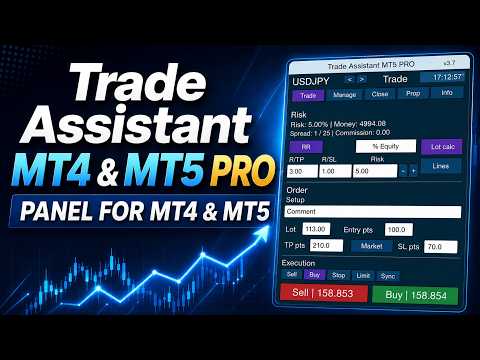
Trade Assistant MT4/MT5 PRO는 MetaTrader 4/5용 전문 트레이딩 패널입니다. 빠르고 편리하며 시각적으로 명확하게 거래를 제어하고 싶은 트레이더를 위해 제작되었습니다. 이 제품은 반복적인 수동 작업을 줄이고, 주문 실행과 관리 속도를 높이며, 리스크 관리를 표준화하고, 수동 트레이딩을 더 규율 있게 만들어 줍니다.
이 도구는 트레이더 대신 매매 신호를 찾지 않으며, 마법 같은 결과를 약속하지도 않습니다. 역할은 훨씬 더 실용적입니다. 차트 위에서 바로 사용할 수 있는 편리한 트레이딩 인프라를 제공하는 것입니다. 진입 지점, 거래 아이디어, 시장 논리는 트레이더가 직접 선택합니다. Trade Assistant MT4/MT5 PRO는 그 아이디어를 명확한 리스크, 포지션 크기, Stop Loss, Take Profit, Breakeven, Trailing Stop, 포지션 관리가 포함된 정확한 거래 계획으로 빠르게 전환하도록 도와줍니다.
매번 포지션 크기를 수동으로 계산하고, 터미널의 기본 주문 창을 열고, Stop Loss까지의 거리를 확인하고, 보호 레벨을 옮기고, Pending Orders를 삭제하고, Partial Close를 실행하며, 거래가 자신의 시스템 규칙에 맞는지 계속 확인하는 것이 지쳤다면 이 어시스턴트는 바로 그런 사용자를 위해 만들어졌습니다.
Trade Assistant MT4/MT5 PRO 사용 설명
대부분의 수동 트레이더에게 이 도구가 필요한 이유
많은 트레이더의 문제는 전략이 없다는 것이 아닙니다. 진짜 문제는 거래 아이디어와 실제 실행 사이에 너무 많은 수동 작업이 있다는 것입니다.
트레이더가 리스크를 계산하고, 거래량을 설정하고, Stop Loss까지의 거리를 확인하고, 새 주문 창을 열고, 주문 유형을 점검하고, 거래를 확정한 뒤 포지션까지 관리하는 동안 시장은 이미 움직일 수 있습니다. 감정은 커지고, 실수도 늘어납니다.
수동 트레이딩에서 자주 발생하는 문제:
리스크 비율은 알고 있지만 포지션 크기를 매번 다르게 계산함;
Stop Loss를 규칙이 아니라 감으로 설정함;
포지션을 빠르게 Breakeven으로 옮기고 싶지만 실제操作는 늦어짐;
Trailing Stop을 일관되게 사용하지 못함;
Partial Close를 수동으로 실행하며 항상 제때 처리하지 못함;
차트에서 전체 거래 구조를 빠르게 보기 어려움;
Pending Orders가 필요 이상으로 오래 차트에 남아 있음;
높은 변동성에서는 실행에 너무 많은 시간이 소요됨.
Trade Assistant MT4/MT5 PRO는 바로 이러한 실질적인 문제를 해결하기 위해 만들어졌습니다. 장난감이나 장식용 패널이 아니라, 더 정확하고 빠르며 체계적으로 거래하고 싶은 트레이더를 위한 실제 작업 도구입니다.
Trade Assistant MT4/MT5 PRO로 얻을 수 있는 것
차트에 설치하면 하나의 인터페이스 안에서 다음 기능을 사용할 수 있는 편리한 트레이딩 패널을 얻게 됩니다.
빠른 Buy 및 Sell 버튼;
거래당 리스크 계산;
설정한 리스크에 따른 포지션 크기 계산;
Entry / Stop Loss / Take Profit 레벨 관리;
차트 위 거래 구조 시각화;
Risk/Reward 비율 설정;
수동 및 자동 Breakeven;
여러 가지 Trailing Stop 방식;
Partial Close;
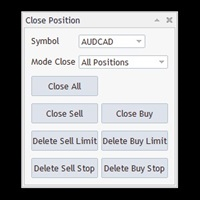
Pending Orders 삭제;
숨겨진 보호 레벨 관리;
Virtual Pending Orders 관리;
별도의 정보 블록을 통한 거래 상태 확인.
MetaTrader 4/5의 여러 기본 창을 오갈 필요 없이, 하나의 거래 제어 센터에서 주요 작업을 수행할 수 있습니다.
제품의 핵심 아이디어
Trade Assistant MT4/MT5 PRO는 수동 트레이딩을 다음과 같이 만들기 위해 설계되었습니다.
더 빠르게;
더 정확하게;
더 시각적이고 이해하기 쉽게;
더 규율 있게;
체계적인 리스크 관리에 더 적합하게.
이것은 특히 다음과 같은 트레이더에게 중요합니다.
인트라데이 트레이딩을 하는 사람;
하루에 여러 번 거래를 여는 사람;
가격 레벨을 기준으로 거래하는 사람;
Stop Loss와 Take Profit을 모든 거래의 필수 요소로 사용하는 사람;
자금 관리 규칙을 어기고 싶지 않은 사람;
완전 자동 알고리즘보다 수동 제어를 선호하는 사람.
주요 장점
1. 빠른 거래 개시
패널을 사용하면 불필요한 작업 없이 Buy와 Sell 거래를 빠르게 열 수 있습니다.
터미널의 기본 주문 창에 시간을 낭비하지 않고, 차트에서 바로 거래의 핵심 매개변수를 확인할 수 있습니다.
2. 내장 리스크 관리
사용자가 편리한 방식으로 리스크를 설정하면, 패널이 Stop Loss와 거래 상품의 사양을 고려하여 포지션 크기를 계산합니다.
3. 시각적 제어
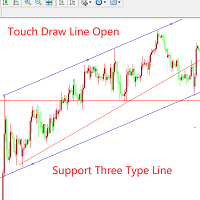
숫자를 입력하는 것에 그치지 않습니다. 차트 위에서 진입, Stop Loss, Take Profit, 리스크 구간, 잠재 수익 구간을 직접 볼 수 있습니다.
4. 시간 절약
특히 활발한 트레이딩, 높은 변동성, 여러 진입 시나리오를 다룰 때 반복 작업을 줄여 줍니다.
5. 거래 관리
진입 후에도 패널은 포지션 관리를 돕습니다. Breakeven으로 이동, Trailing Stop 활성화, Partial Close, Pending Orders 삭제 등을 수행할 수 있습니다.
6. 범용성
이 제품은 스캘핑, 인트라데이, 돌파 매매, 되돌림 매매, 레벨 기반 매매, 관심 구간 매매 등 거의 모든 수동 트레이딩 스타일에 사용할 수 있습니다.
주요 기능
1. Buy / Sell 버튼
패널에는 시장가 주문을 빠르게 열기 위한 거래 버튼이 포함되어 있습니다. 실행 속도와 실시간 거래 시나리오 제어가 중요한 상황에서 유용합니다.
지원되는 주문:
Buy;
Sell;
Stop;
Limit.
따라서 이 패널은 시장가 진입뿐만 아니라 Pending Orders를 사용하는 거래에도 적합합니다.
2. 거래당 리스크 계산
제품의 가장 중요한 기능 중 하나는 Risk Calculation입니다.
리스크는 다음 방식으로 설정할 수 있습니다.
잔고 기준 퍼센트;
Equity 기준 퍼센트;
Free Margin 기준 퍼센트;
계좌 통화 기준 고정 금액;
패널에서 제공하는 기타 계산 모드.
그 후 어시스턴트는 다음을 계산합니다.
금액 기준 리스크;
포지션 크기;
거래량;
설정한 리스크와 현재 Stop Loss 사이의 관계.
이를 통해 서로 다른 상품과 시장 상황에서도 동일한 규칙으로 거래하기 쉬워집니다.
실제 효과:
각 거래의 리스크를 비교 가능하게 만듦;
과도한 포지션을 열 가능성을 줄임;
트레이딩 시스템 규칙을 더 쉽게 지킴;
전략 확장과 조정을 더 명확하게 함;
감정의 영향을 줄임.
3. Stop Loss 기준 포지션 크기 계산
내장 포지션 크기 계산은 다음 요소를 고려합니다.
선택한 리스크 모드;
Stop Loss 크기;
심볼 사양;
최소 거래량;
최대 거래량;
거래량 스텝;
거래 상품의 매매 조건.
이 기능은 수동으로 랏을 계산하다가 계획과 다른 포지션을 실수로 여는 일반적인 문제를 줄이는 데 도움이 됩니다.
활발한 수동 트레이딩에서는 특히 중요합니다. 아무리 좋은 전략이라도 포지션 크기가 매번 제멋대로라면 전략의 의미가 약해집니다.
4. Entry / Stop Loss / Take Profit 레벨
패널은 거래의 기본 구조와 함께 작동합니다.
Entry;
Stop Loss;
Take Profit.
이 레벨들은 거래를 미리 준비하고 시각적으로 확인하는 데 사용할 수 있습니다.
이 방식의 장점:
트레이더가 거래 계획의 구조를 즉시 확인할 수 있음;
진입 전에 거래의 품질을 더 쉽게 평가할 수 있음;
리스크와 수익의 관계가 더 명확해짐;
실행 규율을 더 쉽게 유지할 수 있음;
차트 작업이 훨씬 더 편리해짐.
5. 차트 위의 시각적 거래 맵
Trade Assistant MT4/MT5 PRO는 버튼과 입력 필드만 제공하는 도구가 아닙니다.
차트 위에 거래 시나리오의 명확한 시각 구조를 만들어 줍니다.
일반적으로 트레이더는 다음을 볼 수 있습니다.
리스크 구간;
잠재 수익 구간;
진입 레벨;
Stop Loss 레벨;
Take Profit 레벨;
거래와 관련된 추가 시각적 기준.
이는 의사결정 순간에 매우 유용합니다.
Stop Loss가 논리적인지 즉시 확인할 수 있음;
포지션 크기가 과도한지 판단하기 쉬움;
거래가 자신의 규칙에 맞는지 더 쉽게 이해할 수 있음.
많은 트레이더에게 이 시각화 기능은 패널에서 가장 유용한 부분 중 하나가 됩니다.
6. Risk/Reward 및 TP/SL 비율 설정
패널은 Take Profit과 Stop Loss 사이의 비율을 사용할 수 있습니다.
원하는 거래 프로파일을 빠르게 설정할 수 있습니다.
1:1;
1.5:1;
2:1;
3:1;
기타 값.
거래 시스템이 고정 또는 반고정 리스크/수익 비율을 기반으로 한다면 매우 편리합니다.
장점:
거래 준비 속도 향상;
거래 구조 통일;
트레이딩을 알고리즘적 규율에 더 가깝게 만듦;
전략 통계를 유지하기 쉬움.
7. Breakeven — 본전 이동
패널에는 Breakeven 블록이 포함되어 있습니다.
이 기능을 통해 다음이 가능합니다.
포지션을 수동으로 Breakeven으로 이동;
가격이 설정한 거리만큼 이동한 후 Stop Loss를 자동으로 이동;
오프셋 사용;
spread와 commission 고려.
Breakeven이 필요한 이유:
가격이 이미 유리한 방향으로 어느 정도 움직이면 트레이더는 포지션의 리스크를 제거하고 싶어 하는 경우가 많습니다. 이를 매번 수동으로 수행하는 것은 불편합니다. 어시스턴트는 이 과정을 단순화합니다.
설정 가능한 항목:
작동 레벨;
진입 지점 기준 오프셋;
거래 비용 고려;
이후 관리 로직.
이는 포지션을 보호하고 감정적인 결정을 줄이는 데 도움이 됩니다.
8. Trailing Stop
제품은 Trailing Stop을 이용한 포지션 관리를 지원합니다.
사용 가능한 Trailing 로직은 다음을 포함합니다.
거리 기준 표준 Trailing;
ATR 기반 Trailing;
Moving Average 기반 Trailing;
Fractals 기반 Trailing;
Parabolic SAR 기반 Trailing;
이전 봉의 고점/저점 기반 Trailing;
추가 로직을 포함한 기타 관리 방식.
왜 중요한가:
많은 트레이더는 진입은 잘하지만 포지션 관리는 약합니다. 그 결과 수익을 너무 일찍 확정하거나, 보호 없이 떠 있는 수익을 오래 방치하게 됩니다.
Trailing Stop은 다음을 돕습니다.
떠 있는 수익 보호;
강한 추세 추종;
수동 루틴 일부 자동화;
더 일관된 거래 수행.
9. Partial Close
패널에는 Partial Close 기능이 있습니다.
트레이더가 다음을 원할 때 사용합니다.
수익 일부 확정;
리스크 감소;
가격 진행에 따라 포지션 크기 축소;
Partial Close를 Breakeven 및 Trailing Stop과 함께 사용.
특히 다음에 유용합니다.
인트라데이 트레이딩;
파동 시나리오;
레벨 기반 거래;
단계적 수익 실현.
10. Pending Orders 관리
Trade Assistant MT4/MT5 PRO는 Pending Orders 관리를 단순화합니다.
패널에서는 다음 작업을 수행할 수 있습니다.
Stop 및 Limit 주문 설정;
Pending Orders 삭제;
더 이상 유효하지 않은 setup 취소;
진입 시나리오 보호.
시장이 빠르게 변할 때 시간을 절약하고 우발적인 실수를 줄이는 데 도움이 됩니다.
11. OCO 로직
패널은 주문 관리 로직 안에서 One Cancels Other 원칙을 지원합니다.
다음 상황에서 유용할 수 있습니다.
돌파 시나리오;
대체 진입 지점;
하나의 시나리오가 다른 시나리오를 취소해야 하는 경우.
이 로직은 주문 관리를 더 전문적으로 만들고, 차트에 불필요한 Pending Orders가 남는 것을 줄여 줍니다.
12. Hide SL/TP
고급 모드에서는 어시스턴트가 숨겨진 보호 레벨을 사용할 수 있습니다.
숨겨진 Stop Loss;
숨겨진 Take Profit.
필요한 이유:
일부 트레이더는 실제 보호 레벨을 브로커에게 전송하고 싶어 하지 않음;
보호 로직을 Expert Advisor가 제어함;
거래 관리가 패널 내부에 유지됨.
중요: 숨겨진 레벨을 사용하려면 터미널과 Expert Advisor가 계속 활성 상태여야 합니다.
13. Virtual Pending Orders
패널은 Virtual Pending Orders를 사용할 수 있습니다.
이 모드에서는 진입 로직이 브로커 서버의 일반 Pending Order가 아니라 패널 내부 알고리즘에 의해 제어됩니다.
장점:
수동 시나리오 관리의 유연성;
숨겨진 진입 로직 사용 가능;
거래 계획의 더 세밀한 제어.
이는 수동 트레이딩에서 가상 메커니즘을 왜, 어떻게 사용하는지 이해하는 트레이더를 위한 기능입니다.
14. 정보 블록 및 거래 상태
패널에는 별도의 정보 섹션이 포함되어 있으며 다음을 확인할 수 있습니다.
현재 심볼;
spread;
리스크 매개변수;
보호 기능 상태;
패널의 활성 모드;
주요 거래 설정.
이는 거래 과정 중 제어와 진단에 편리합니다.