 MetaTrader 5
 专家
专家
 指标
指标
 程序库
程序库
 实用工具
实用工具
 窗口小部件
窗口小部件
 规则
规则
免费的MetaTrader 5 交易实用工具 - 3
 以下是可在MetaTrader 5中简化交易的交易程序。将鼠标悬停在一个工具上,阅读它的描述和用途。
RR Box - Visual Risk-Reward Planning Tool Overview RR Box is a professional-grade risk-reward visualization indicator that helps traders plan and visualize trade setups directly on the chart. With fully draggable, resizable boxes for Stop Loss and multiple Take Profit levels, you can instantly see your risk-reward ratios and adjust them with precision.
Key Features
Drag-and-Drop Flexibility Move your entire trade setup anywhere on the chart. Click any box to select it, then drag corners or ed
FREE

自动止损调整 – 精准锁定利润! 该专家顾问(EA)旨在根据用户定义的利润阈值自动调整开放头寸的止损(SL),使您的交易策略更加高效,减少人工干预。 如何工作: 动态止损调整: 一旦您的头寸有一些利润(以蓝色显示),此EA将追踪当前价格,并根据您定义的利润阈值调整止损,保护您的利润。 利润锁定: 例如,如果您在EUR/USD上有一个买单,获利15美元,并设置5美元的利润阈值,EA将调整止损以确保锁定10美元的利润。随着价格继续向有利方向移动,EA会继续调整止损,增加利润。 保护利润: 如果价格反转,止损将触发,确保锁定您的利润。 主要特点: 自动止损追踪: EA自动根据您设定的利润阈值调整止损。 可调节的利润阈值: 设置您希望的利润阈值(例如5美元),当利润增加时,EA会自动调整止损。 适用于所有已开头寸: EA不执行任何交易,它只会跟踪您打开的头寸并调整止损。 利润保护: 如果头寸的利润小于阈值,止损不会被调整。
FREE

KALIFX POSITION SIZE Calculator – Risk & Lot Size Tool KALIFX PS Calculator is a chart-based utility designed to help traders calculate position size and manage risk directly from a simple on-screen panel. It provides a structured way to define trade parameters and view calculated results before placing an order. Key Features On-Chart Control Panel: Manage all inputs and actions from a compact interface on the chart. Mode Switching: Toggle between Risk % and Fixed Lot modes. Order T
FREE

对于那些使用趋势线、矩形和文本等元素进行技术分析的人来说,VR 颜色级别是一个方便的工具。可以直接向图表添加文本并截取屏幕截图。 设置、设置文件、演示版本、说明、问题解决,可以从以下位置获取 [博客]
您可以在以下位置阅读或撰写评论 [关联]
版本为 [MetaTrader 4] 一键点击 即可使用该指标。为此,请单击带有线条的按钮,之后光标下方将出现一条趋势线。然后,通过移动光标,您可以选择 行位置 并通过再次单击来修复它。 该指标的特点 是,样式和颜色的所有更改都会自动保存,并随后应用于所有 新创建的 图形对象。 该指标配备了两个独立的按钮,用于设置不同样式的趋势线,两个独立的不同样式的矩形,一个具有自己风格的文本字段以及一个用于创建屏幕截图的按钮。 屏幕截图在 MetaTrader 终端目录的 Files 文件夹中创建,保存路径和文件名写入专家日志中。 大致路径:C:\Users\用户名\AppData\Roaming\MetaQuotes\Terminal\Character set\MQL5\Files\VR Color Levels 有大量类似于 VR Color Le
FREE

ThemeManager 一键更换 MetaTrader 5 所有已打开图表的配色方案。8 套专业图表主题任选 — 深色模式、浅色模式、网页交易风格等 — 也可以通过 13 个颜色选项设计您自己的 Custom 主题。不必再逐个图表设置颜色:图表上的小面板一次性美化您的全部图表。 ThemeManager 完全免费 — 所有主题和全部功能,没有任何限制。 更多交易工具 使用方法 将 ThemeManager 拖到任意图表上(导航器 → 指标)。 在 THEMES 面板上点击一个主题 — 每个按钮都实时预览自己的配色。 完成:所有打开的图表立即换上新配色。 最近使用的主题会被记住,指标加载时自动重新应用。把 ThemeManager 加入默认模板,每个新图表都会以您的配色打开。 内置 9 套主题 Dark Pro :现代炭灰深色主题,绿红蜡烛。 Classic Light :干净的白色图表,传统风格。 TV Dark :深蓝灰背景配青绿与红色蜡烛,网页交易风格。 Matrix :黑色背景配霓虹绿蜡烛。 Ocean :深海军蓝配青绿与珊瑚色蜡烛。 Sunset :紫色背景配橙色与洋红蜡
FREE

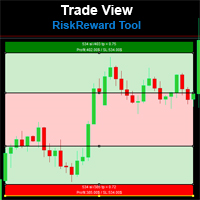
Risk Reward Tool , It is easy to use. With this tool you can see the rates of profit loss profit. You can see your strategy and earnings reward status of your goals.Double calculation can be done with single tool. Move with drag and drop. You can adjust the lot amount for calculations. The calculation results are shown in the comment section. There may sometimes be graphical errors during movements. Calculations works at all currency. Calculations All CFD works. Updates and improvements will co
FREE

[ 我的产品 ] , [ 我的频道 ] OMG Trading Panel 现在您可以直接通过手机控制您的交易面板。将 OMG Trading Tool 安装在您的 MQL VPS 上,在面板全天候 24/7 运行的同时,通过移动版 MetaTrader 5 应用舒适地进行交易。
我还添加了两个实用策略:Smart Margin Protection 和 Grid Strategy。您还可以设置当价格下跌时触发的提醒。
主要功能
通过移动 MT5 远程控制
使用智能手机随时随地控制您的交易工具!只需在评论栏中放置带有特殊命令的挂单,工具将自动执行您的指令。非常适合需要灵活性和移动性的交易者。
命令示例: `omg auto`- 切换自动模式 开/关 `omg auto on` - 启用自动模式 `omg auto off` - 关闭自动模式 `omg profit X` - 将止盈金额设置为 X 美元 `omg points X` - 将止盈设置为 X 点 `omg loss X` - 将止损金额设置为 X 美元 `omg slpoints X` - 将止损设置为 X 点 `
FREE

Displays a digital clock or a countdown (until new bar) in the chart in realtime.
Benefits: Current time always in sight for market open/close, economic data, etc. Displays accurate time (server/broker time) Keep an eye on how much time is left until a new bar starts (countdown) Clearly visible (set color, size, font, position) Always runs/refreshes every second even without new price tick Hint: To display the most accurate time, use the server (broker) clock setting combined with the time (hou
FREE

SmartTrailingStop 是一款通用追踪止损工具,可作用于任何持仓——手动交易或任何 EA 开出的订单均可。提供四种追踪模式,并支持保本与部分平仓,让它替您管理账户中的每一个持仓。
适合不愿盯盘的波段交易者、需要精准止损的剥头皮交易者,以及所有运行没有优质追踪止损模块的多 EA 用户。
我们的黄金 EA: Aurora Golden Goddess | Midas The Golden Touch | Golden Fatima
四种追踪模式 - Fixed — 经典固定点数距离 - ATR — 波动率自适应,根据市场状况调整 - Step — 仅在价格前进设定步长后锁定利润 - Candle — 跟随前 N 根 K 线的高/低点
附加功能 - 保本 — 盈利达到设定点数后将 SL 自动移至入场价 + 锁定点 - 部分平仓 — 在首个目标平掉一定比例,剩余继续追踪 - 激活阈值 — 在盈利前不触碰 SL - 范围过滤 — 按品种、魔术号、方向(仅 BUY 或仅 SELL) - 自动遵守经纪商 stops level 与 freeze level - 兼容对冲与
FREE

Kalifx Local Trade Copier Kalifx Local Trade Copier is built to replicate trades from one trading account (Master) to another (Slave) in real time.
Its main purpose is to copy trading activity—such as opening, modifying, and closing trades—so that multiple accounts can follow the same strategy without manual intervention. This is especially useful for managing multiple accounts, testing strategies across different brokers, or mirroring trades between accounts. The EA operates in two modes: MAS
FREE

Round numbers (or key levels) is an amazing strategy. These numbers are strong support and resistance levels. So what this indicator does is draw horizontal lines on the chart to help you find these levels. Configurations: Key levels in pips - distance between the lines. Color - lines color. Style - lines style. Width - lines width. Display at background - draw lines in front or back of candles. Selectable - turn on or off the option to select the lines. Lines identification - identifica
FREE

StatsMood Position Sizer Short Description Calculate position size instantly based on your risk and stop loss distance. Simple, fast and precise. Full Description Position sizing is one of the most important aspects of risk management. StatsMood Position Sizer is a free MT4/MT5 indicator that helps you calculate the appropriate lot size in real time based on your account balance, selected risk percentage and stop loss distance. It removes the need for manual calculations and helps maintain cons
FREE

Eagle Assistant Trade Manager
MetaTrader 5 紧凑型交易管理面板:按风险计算手数、可编辑字段的订单线、带最大点差限制的快速 Buy/Sell、分批平仓、7 种追踪止损、保本、OCO、隐藏止损止盈、虚拟订单和 Time Manager。
Eagle Assistant - Trade Manager 是一款用于 MetaTrader 5 手动交易的紧凑型面板。它根据您的风险计算手数,让您直接在图表上绘制并输入订单,并替您管理持仓:分批平仓、追踪止损、保本、OCO 等。
紧凑面板 - 一个小巧的深色面板:可拖动到任意位置,可最小化为一条横栏,尺寸可在 60% 到 150% 之间调整,也可使用紧凑行。 - 风险可按金额设置,也可按 Balance、Equity、Free Margin、自定义金额或前一日、前一周、前一月余额的百分比设置。手数向下取整,因此绝不会超过您设定的风险。 - 快速市价 Sell 和 Buy,带最大点差字段:点差高于最大值时按钮变灰,禁止入场。留空表示不限制。 - 对该品种的全部持仓执行 Close Sell、Close
FREE

VEXOR — 适用于 MetaTrader 5 的高级交易面板与风险管理工具 使用 VEXOR 掌控每一笔交易,这是一款专为重视精准、速度和更佳交易体验的交易者设计的现代化 MetaTrader 5(MT5)交易面板。通过直观的图形界面下达市价和挂单、计算仓位大小、管理风险,并设置止损和止盈水平。 MT4 Version 与传统交易面板僵硬的布局和过时的界面不同,VEXOR 将时尚的深色设计、交互式控制、实时价格信息、动态风险计算和直接图表交互整合到一个精简的工作空间中。 VEXOR 在 MetaTrader 5 中是什么? VEXOR 是一款先进的 MT5 交易面板,旨在简化手动交易并使订单配置更加直观。直接从图表上的单一界面管理手数、订单类型、风险设置、入场价、止损和止盈。 通过交互式控制和可视化订单验证,VEXOR 帮助您更高效地准备交易,同时将关键交易信息保持在触手可及的范围内。 VEXOR MT5 交易面板的核心功能 1. 现代深色界面 VEXOR 采用精心设计的深色用户界面,为传统 MetaTrader 交易面板提供现代化替代方案。 现代深色主题图形界面。 带悬停效果的交
FREE

"K线剩余时间" 适用于 MetaTrader 5
"再也不会错过K线收盘。以精准的时机进行交易。" 官方更新频道
加入频道 : Dhokiyas
技术支持
直接联系 : Contact "K线剩余时间 - MT5 精准计时工具" "K线剩余时间" 是一款轻量且精准的 MT5 实用工具,实时显示当前K线的精确剩余时间。专为等待K线收盘确认并希望获得精准入场和出场时机的交易者打造。 "如果您的交易策略依赖K线收盘确认,这个工具将变得至关重要。" "为什么这个工具很重要" 许多交易策略都需要等待K线收盘确认。没有可视化倒计时,交易者往往过早入场或过晚离场。该工具通过在图表上清晰显示倒计时来解决这一问题。 "核心功能" "实时K线倒计时" "支持所有时间周期" 从 M1 到 MN "支持所有交易品种" 外汇、黄金、加密货币、指数 "简洁清晰的显示界面" 适配任何图表风格 "可自定义" 字体大小、颜色和位置 "轻量级设计" 低CPU占用,运行流畅 "无交易逻辑" 纯实用辅助工具 "停止猜测。用精确的秒数进行交易。"
"非常适合剥头皮交易者和日内交易者。" "适合人群" "在 M1
FREE
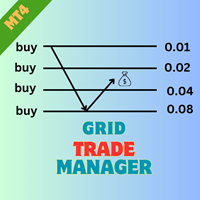
介绍 EA GridTradeManager MT4,一款强大的交易专家顾问,旨在优化您在 MetaTrader 4 平台上的网格交易策略。该工具非常适合希望自动化网格订单的下单和管理的初学者和经验丰富的交易者,有效利用市场波动。 MQL产品安装指南 | 在 MT4/MT5 上更新已购买的MQL产品 | 常见故障排除指南 | 常规设置 / 输入指南 | 回测和设置文件 凭借其先进的功能,EA GridTradeManager MT4通过启用动态网格调整来提高交易效率,显著减少回撤并最大化利润潜力。非常适合在波动资产如 forex 货币对和加密货币中交易,用户可以轻松实施此 EA,享受无干预的交易体验,同时保持强大的风险管理控制。 MQL产品安装指南 | 在 MT4/MT5 上更新已购买的MQL产品 | 常见故障排除指南 | 常规设置 / 输入指南 | 回测和设置文件 主要特点 动态网格管理:根据用户定义的损失或利润阈值启动网格,具有可自定义的步距以优化入场点。 手数进阶控制:在 lot 手数大小上选择乘法或增量策略,允许为每笔交易量身定制风险配置。 高级风险管理:设置固定或基于百分比的
FREE

The real‑time view of what is happening inside the market. Footprint Secrets brings detailed analysis directly into MetaTrader 5. It shows where volume is trading, how buyers and sellers are interacting, and how liquidity shifts as the market evolves. Designed for traders who want a precise, real‑time understanding of market behavior.
Benefits for the Trader See the real activity behind price . Footprint charts reveal bid/ask volume and delta at every price level. Understand who controls the m
FREE

风险交易面板是为手动交易而设计的. 这是发送订单的另一种方式。
面板的第一个特点是使用控制线方便地下订单。 第二个特征是在存在止损线的情况下计算给定风险的交易量。
使用热键设置控制行:
获利-默认情况下T键;
价格-默认情况下p键;
止损-默认情况下,S键;
您可以在交易面板的设置中自行配置密钥。
运算算法:
1)-我们把水平在所需的地方(这是没有必要把所有的水平);
2)-指定风险(可选);
3)-点击绿色发送订单按钮;
4)-我们正在等待下订单,或者会出现带有错误消息的警报;
5)-如果我们想关闭当前符号的所有订单,通过魔术链接到专家顾问,然后点击关闭订单按钮。
您不应该多次按下发送订单按钮。 一次就够了。 下单后,按钮将呈现"未按下"状态。
要发送带有风险计算的订单,需要设置止损线并在交易面板的"风险"字段中设置风险。 否则,订单将以当前交易工具的最低手数放置。
风险是从账户余额计算出来的. 由于经纪商对保证金交易细节的限制,不可能承担100%的风险。
在"风险"字段中允许小数(例如,您可以以余额的0.5%的风险进行交易)。
如果指定的风险低于允许
FREE

Trailing Stop Manager with Break Even is a MetaTrader 5 utility that moves your stop loss automatically to protect profit as price advances. Unlike the platform's single-mode trailing stop, it offers four professional methods plus break-even handling, and it manages all matching positions on any symbol. Features Four trailing modes for different conditions: Fixed Pips, ATR-based, Step, and Break-even plus Trail (two-phase). Fixed Pips: classic trail that starts after a set profit and follows at
FREE

Calculating the volume of orders every time you create an order is an extremely important thing in risk management Let this tool simplify your work! ----------------------------------------------------- How to use? Attach the indicator to the chart and set its parameters: Risk size in % or money and Risk Reward Ratio. Click on the ON button and locate the horizontal line to your would-be StopLoss level. Options: Click on the Pending/Instant button to locate the horizontal line to your would-b
FREE

MQT Lot Size Calculator 根据您选择的风险计算精确的手数——按账户净值的百分比 或固定金额——通过图表上三条可拖动的线:入场、止损和止盈。免费、轻量,且仅 用于计算:它绝不开仓、改单或平仓。 工作原理(逻辑说明): 方向由止损线的位置推断(在入场价下方为买入,上方为卖出)。 风险金额 = 账户净值 x 风险百分比(或您的固定金额)。 每手亏损 = 止损距离 / 最小变动价位 x 每跳价值。 手数 = 风险金额 / 每手亏损,始终向下取整到您经纪商的手数步长——绝不会 让您承担超过设定的风险。 面板显示:方向、入场/止损/止盈的价格与点数距离、以账户货币计的风险、计算 出的手数、取整后的真实风险、盈亏比、止盈处的潜在利润,以及所需保证金(若 超过可用保证金会发出警告)。 说明: 它只是一个计算器,绝不开仓、改单或平仓。 适用于任何品种和账户货币。 轻量:使用原生图表对象,无 DLL,无需联网。 有疑问或建议?请留言——24 小时内回复。
FREE

# Zikiman Risk Panel Standard
**Zikiman Risk Panel Standard 是一款面向手动交易者的 MT5 图表交易面板、仓位计算器和手数计算器。** 您可以按固定资金风险、账户余额风险百分比或固定手数设置仓位,并直接在图表上规划止损、止盈以及市价单和挂单。
本工具适合自主判断入场时机的交易者。它不会提供交易信号,也不会自动决定何时开仓。
## 按风险计算仓位
面板提供三种仓位设置方式:
- **固定资金风险** — 输入每笔交易愿意承担的账户货币金额。 - **风险百分比** — 按当前账户余额的百分比设置风险。 - **固定手数** — 直接输入所需的交易手数。
使用资金风险或风险百分比时,面板会根据计划入场价与止损距离计算所需手数。计算结果会按照经纪商规定的最小手数、最大手数和手数步进进行调整。
下单前,面板会显示预计亏损、潜在收益和风险回报比。显示结果不包含佣金、隔夜利息、跳空以及最终成交滑点。
## 图表可视化交易规划
可直接在 MT5 图表上拖动 **止损(Stop Loss)** 和 **止盈(Take Pr
FREE

概述 RiskPilot 是一款用于 MetaTrader 5 的可视化风险/回报执行面板。您可以通过拖动图表上的彩色线条和区域直接设置入场价、止损和止盈,实时查看仓位大小、风险金额和潜在收益,并一键下单——无需手动计算手数,也无需打开单独的订单窗口。 您可以在同一图表上同时运行多个独立的风险/回报设置,每个都有自己的入场/止损/止盈价位、自己的方向(买入或卖出),以及独立的图表控件用于删除、反转或锁定。 重要提示——这是一款手动交易工具,而非自动化策略。 RiskPilot 绝不会自行开仓或平仓。每一笔交易只有在您点击 BUY 或 SELL 时才会发送。由于 MetaTrader 5 将这类程序——包括这样简单的可视化工具——统一归入导航器中的"智能交易系统"(Expert Advisors)分类,因此 RiskPilot 会出现在您的 EA 文件夹中。这只是平台的技术分类要求,并不代表它会自动交易。 使用方法 拖动入场线设置入场价格。未被拖动时,它会跟随实时市场价格(市价单);一旦拖动,它会锁定在该位置并变为挂单(自动识别为 Stop 或 Limit)。 拖动止损线和止盈线,或直接
FREE

Auto TP SL – Smart Trade Manager for MetaTrader 5 Protect Your Trades. Automate Your Exits. Take Full Control. Managing multiple trading positions manually can be stressful, time-consuming, and prone to costly mistakes. Auto TP SL by Zistilo is a powerful and easy-to-use trade management Expert Advisor for MetaTrader 5, designed to automatically manage Take Profit, Stop Loss, Trailing Stop, individual profit targets, and total basket profit or loss. Whether you trade Forex, Gold, Indices, or oth
FREE

Overview Auto TPSL is a sophisticated MetaTrader 5 Expert Advisor designed to revolut ionize how traders manage their risk and protect profits. This powerful tool automatically sets and adjusts Take Profit (TP) and Stop Loss (SL ) levels, eliminating emotional decision-making and ensuring disciplined trading practices. The EA operates through two core systems:
Auto TPSL System The Auto TPSL system automatically calculates and sets appropriate Take Profit and Stop Loss level
FREE

IMD Fibo EA IMD Fibo EA 是一款适用于 MetaTrader 5 的交易辅助工具,用于寻找交易区域、分析市场方向,并基于分层 Fibonacci 结构生成清晰的交易计划。 该工具集成了: 多品种市场扫描器; 基于 EMA、MACD 和 ADX 的市场方向分析; 三级分层 Fibonacci 结构; Entry、Stop Loss 和 Take Profit 计算; 用于手动设置限价挂单的交易面板; 用于评估当前设置的虚拟统计功能。 IMD Fibo EA 并不是全自动交易机器人。
该工具不会在没有用户确认的情况下自动开仓。它负责分析市场并生成交易计划,而是否下单始终由交易者决定。 工具用途 IMD Fibo EA 适合需要以下功能的交易者: 快速扫描多个交易品种; 通过技术过滤器判断市场方向; 使用 Fibonacci 水平理解市场结构; 获得结构化交易计划; 通过内置面板手动设置限价挂单。 该工具适用于有纪律的手动交易:市场分析过程自动化,但最终交易决定由用户控制。 IMD Fibo EA 的工作方式 该工具分析选定的交易品种,并建立三级 Fibonacci
FREE

Quick Draw Palette for MT5 Quick Draw Palette for MT5 is a compact drawing panel for MetaTrader 5. It gives fast access to common chart markup tools without repeatedly opening the standard MT5 drawing menus. The panel is designed for traders who want to mark charts quickly while keeping the workspace clean and organized. Key Features Fast access to rectangles, trendlines, and horizontal levels Predefined visual settings for consistent chart markup Draggable on-chart panel with saved position Op
FREE
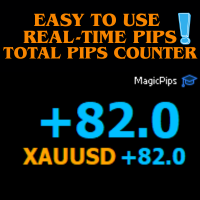
MagicPips - Ultimate Free Position Pip Counter Track Your Trading Performance in Real-Time with Precision MagicPips is a professional-grade tool for MetaTrader 5 (MT5) that provides traders with immediate, accurate pip calculations for all open positions. This utility offers a clear and customizable display of profit and loss in pips, helping traders monitor performance efficiently. Key Features Real-Time Pip Tracking Continuously updates pip gains and losses for all open positions (both buy and
FREE

Trade Manager OS is a risk-based order panel for MetaTrader 5. You decide where the entry, stop loss and take profit go. It works out the lot size so that a stop-out costs the amount you chose, in money or as a percentage of your account, and shows every number before you click. Then it keeps working after the order: breakeven, trailing stop, scale out and a daily loss guard run on the positions it sent, so you do not have to watch every tick. HOW IT WORKS Choose how much to risk: a fixed amount
FREE

100% 免费 — 完整版,无限制,无需注册。
功能
- 一键 BUY/SELL(当前图表品种),按点数自动设置止损与止盈。
- 按风险算量:输入风险百分比,面板根据止损距离与每跳价值计算手数;每笔交易承担相同比例的余额。也可切换为固定手数。
- 安全手数:手数自动限制在经纪商的最小/最大/步长/上限,并以你设定的上限封顶。每次下单前检查保证金——不会出现“资金不足”或数量超限的拒单。
- 平仓控制:CLOSE ALL、CLOSE PROFIT、CLOSE LOSS 与 PARTIAL 50%。
- BREAK-EVEN:将所有符合条件的持仓止损移至保本。
- TRAIL 开关:按点数开启/关闭移动止损。
- 实时摘要:余额、权益、持仓、浮动盈亏以及下一单将使用的精确手数。
作用范围
默认面板只管理自己的交易(按自身 magic),与其他EA及手动订单安全共存。
可在策略测试器(可视模式)中运行。兼容任何经纪商与账户货币。
如果这个工具对你的交易有帮助,在本页留下一条简短评价会很有帮助,无论好坏,包括你希望改进的地方。它能帮助其他交易者做决定,也能告诉我们下一步该修什么。
FREE

FREE FREE FREE Trade Assistant MT5 – Professional Trading & Risk Management Panel Trade Assistant MT5 is an advanced trading panel designed to help traders execute orders faster, safer, and more professionally .
It simplifies manual trading by combining smart order management , precise risk control , and one-click execution , making it ideal for both beginners and advanced traders. This tool does not trade automatically . Instead, it empowers you with full control while applying professional-gra
FREE

The Expert Advisor is designed to protect the account, fix profit (loss) and display current information about the account. Trading account protection is carried out by closing all open orders in the terminal and/or closing all charts. When running the Expert Advisor with default parameters, it will only display your account information and will be reduced in size. Next, you can set the conditions under which your trading account will be protected. Profit and loss limits can be set for daily pro
FREE

手動 復 盤 交易 工具 手動 復 盤 交易 工具 是 一 款 專為 MT5 Strategy Tester 視覺 化 回 測 設計 的 人工 交易 輔助 工具。 它的 用途 不是 自動 產生 交易 訊號, 而是 讓 交易 者 可以 在 歷史 行情 中, 像 實際 交易 一樣 親自 判斷 市場、 手動 進場、 設定 停 損 停 利、 管理 持倉, 最後 再 利用 MT5 Strategy Tester 的 正式 統計 報表, 檢查 自己 的 交易 策略 是否 真正 具備 長期 正 期望值。 你 可以 使用 這個 工具 測試 自己 的 裸 K 策略、 支撐 壓力、 型態 交易、 趨勢 交易、 波段 交易、 ICT/ SMC、 均 線 策略, 或 任何 需要 人工 判斷 才能 完成 的 交易 方法。 主要 功能 手動 BUY / SELL 下 單 自訂 交易 手 數 可 設定 一次 開啟 多 張 訂單 多 張 持倉 可 統一 管理 SL / TP 顯示 持倉 平均 進場 價格 顯示 目前 浮動 盈虧 顯示 TP 到達 時 的 預估 盈利 顯示 SL 到達 時 的 預估 虧損 可 一 鍵 平
FREE

# CopyMaster Pro 专业跟单系统
## 这是什么
CopyMaster Pro 是一款本地跟单工具,让你可以在多个MT4/MT5终端之间同步交易。一个账户下单,其他账户自动跟随。不需要服务器,不需要VPS,在同一台电脑上运行多个终端就能用。
## 能做什么
把一个账户的交易复制到其他账户。你在A账户开了一单黄金,B账户和C账户会自动跟着开。A账户平仓了,其他账户也跟着平。就这么简单。
## 为什么选这个
**不花钱** — 没有月费,没有订阅,没有隐藏收费。下载了就是你的。
**不联网** — 所有数据都在你自己电脑上,不经过任何第三方服务器。你的交易信息不会被别人看到。
**不复杂** — 打开就能用,界面上点几下就设置好了。不用改配置文件,不用敲命令。
**跨平台** — MT4和MT5可以互相跟单。你用MT5喊单,朋友用MT4跟,没问题。
## 主要功能
**灵活的手数设置** — 可以按倍数跟,可以固定手数,也可以按资金比例自动算。小账户跟大账户也不怕爆仓。
**智能品种匹配** — 不同平台的品种名称经常不一样,XAUUSD在有的平台叫
FREE

If you find this tool useful, please leave a review The position size you need, the levels you are trading, and the dollars at stake — always visible, always updating, always accurate. No manual calculations and No switching to a browser tab . Place your entry and stop loss lines on the chart. Is a Live Risk Calculator that calculates your lot size, take profit levels, risk, and reward in real time. Switch to live mode and the lot size updates with every tick as price moves. Every number on th
FREE

自定义交易面板,提升手动交易效率
该交易面板为 MT5 平台上的手动交易提供工具,具备帮助管理交易的多种功能。面板包括交易执行、订单管理和持仓监控功能,界面简洁实用。 为什么选择这款交易面板?无论您是需要管理多个交易订单,还是希望简化交易流程,这款自定义交易面板都能满足您的需求,帮助您高效管理持仓。轻松控制风险,实时监控交易表现。
核心功能 面板包含市场订单管理工具,用户可以: 执行带有预设止损和止盈水平的市价单 在指定价格点位设置挂单 通过单一界面管理多种订单类型 监控当前持仓和挂单状态 订单管理功能 用户可以访问以下关键交易管理功能: 为订单设置止损和止盈水平 对已开仓持仓启用保本设置 关闭特定类型的订单(买入、卖出或挂单) 查看所有订单的汇总止损和止盈信息 界面显示元素 面板展示实用的交易信息: 所选交易品种的当前点差数值 市场时间和日期 当前持仓的详细信息 订单状态指示器 技术规格 可自定义的参数设置 持仓手数计算器 订单执行确认选项 风险管理控制功能 使用说明
面板可直接集成 MT5 标准交易功能。用户可以: 通过设置菜单配置风险参数 通过主界面访问交易管理工具 实时监
FREE

100% 免费 — 完整版,无限制,无需注册。
防范哪些情况
- 权益移动止损——权益从峰值回落设定百分比时全部平仓,锁定利润。
- 最大回撤——权益低于峰值余额设定百分比时全部平仓。
- 单日亏损上限——当日亏损达到上限时停止当日交易(可选平仓)。
- 保证金紧急——保证金水平低于下限时在强平前全部平仓。
- 利润目标——当日盈利达到设定百分比时全部平仓锁定收益。
- 连续亏损——连亏后当日暂停。
- 周末空仓——从周五指定时刻起平仓并保持空仓。
- 新闻暂停——在经济日历事件前后暂停(可选平仓)。
工作原理
硬止损(权益移动、最大回撤、保证金)会一次性平掉范围内全部持仓并保持暂停,直到你按下 RESET。每日类止损在下一交易日自动解除。暂停期间,守护工具会平掉重新出现的持仓以保持空仓。
你可选择作用范围:整个账户(全部品种)或仅当前图表品种,并可用 magic 编号过滤只管理某一策略。
图表面板与按钮
简洁的状态面板一目了然地显示当前状态、触发原因、余额/权益、保证金水平、回撤、当日盈亏、持仓与各项防护设置。两个按钮:PANIC(立即平仓)与 RESET(重新武装防护)。
FREE

風險回報工具 – 智慧交易規劃指標
風險回報工具是一款簡單易用但功能強大的指標,旨在幫助交易者自信地規劃每筆交易。 它能夠即時計算您的入場價、止損價、止盈價以及風險回報率 (RR Ratio),並直接在圖表上顯示。
只需點擊幾下,您即可了解:
如果觸及停損點,您將承擔多少風險
如果觸及止盈點,您將獲得多少收益
️ 準確的風險報酬率,讓您決定交易是否值得
主要功能
拖放線 - 直接在圖表上移動入場線、停損線和獲利線
即時計算 - 風險、回報率和風險回報率即時更新
清晰的視覺效果 - 顏色編碼線(藍色 = 入場線,紅色 = 停損線,綠色 = 獲利線)
通用 - 適用於任何交易品種、任何時間週期和任何經紀商
智慧交易規劃 - 避免情緒化交易,入場前務必了解風險
範例
交易黃金 (XAUUSD):
入場線 = 2000
停損線 = 1990
獲利線 = 2020
該工具顯示:
風險 = 10 美元
獎勵 = 20 美元
風險比率 = 1:2
這意味著您每投入 1 美元的風險,就有可能獲得 2 美元的收益。
交易者喜愛它的
FREE

Smart TradePanel Manager MT5 is a free visual trade panel for MetaTrader 5. It lets you place market and pending orders in one click, with automatic risk-based lot sizing, up to four take-profit levels, break-even automation, and a built-in PropFirm drawdown guard that protects your whole account in real time. Everything is controlled from a clean on-chart panel and a set of draggable price lines — no manual lot math, no guesswork. Trade Place orders in one click, straight from the chart: Open m
FREE

一款免费的 MetaTrader 5 一篮子平仓工具。如果你在跑网格、做对冲,或者围绕同一个想法持有好几笔单子,你在意的是整篮子的合计,而不是单张票。把它挂到图表上、设好合计目标,一旦持仓加起来达到这个数,它就 全部 一次性平掉。它不开仓,也不发信号。 它做什么 到达目标就平掉整篮子。 当你持仓的合计结果达到目标时,它会一次性把它们一起平掉。 可选的亏损上限。 设一个合计亏损额,合计结果跌到那里时它就把整篮子平掉,相当于给整篮子设一个简单的止损。 平仓会做到底。 一旦触发目标,它会清掉整篮子并一直盯着,直到每一笔都平掉,所以经纪商一时的拒单绝不会留下一笔落单的还开着。 目标用你习惯的单位 账户货币 的固定金额。 余额的百分比 ,或者 净值的百分比。 合计按整篮子的浮动盈亏计算,含隔夜利息(也可以把它排除在外)。 哪些单子算在篮子里 只管本图表的品种,或者所有品种。 一个开关。 按幻数筛选,或者全部。 只盯某一个智能交易系统的单子,或者留在 0,把账户里所有持仓都算进去,包括你手动下的单。 只买单、只卖单,或者两者。 为安全而设计 读数不对时它不动。 它会等到账户
FREE

Fast Trade Assistant Panel Fast Trade Assistant Panel is an on-chart trading utility for MetaTrader 5. It provides market orders, pending orders, risk-based lot sizing, selective close, break-even, step take-profit, keyboard trading, Super Trend, Inside/Outside Bars and a bar countdown timer. Settings are changed from the main panel and the Settings window. No EA Inputs setup is required to start trading. Execution Market Buy and Sell use the lot size and the optional Stop Loss and Take Profit e
FREE

Signalator Trade Summary Panel MT5 是一款免费的本地 MetaTrader 5 工具,可直接在图表上清晰显示账户、持仓、交易品种和风险概览。 它属于 Signalator Trading and Analysis Ecosystem —— 一套持续扩展的实用 MetaTrader 工具,用于账户监控、市场分析、品种扫描、提醒以及改善交易工作流程。 该面板将账户和持仓监控与内置 Symbol Inspector 以及交易前 Lot Size / Risk Calculator 结合在一起。您无需在多个终端标签之间切换,即可查看浮动 P/L、敞口、SL/TP 覆盖情况、经纪商品种规格以及计划交易风险。 如需市场扫描、趋势方向查看和多周期提醒,也可以查看以下相关 Signalator 产品: MT4 Summary Panel - Multi TF Symbol Scanner Alerts
MetaTrader 标准 Trade 标签会显示单个持仓,但当多个交易或多个品种同时存在时,快速理解整个账户情况并不容易。Signalator Trade Su
FREE

欢迎使用 Quantum Trade Assistant ,这是一款旨在帮助您改善手动交易的免费工具。 本产品适用于两类交易者:第一类是希望使用简单而专业的交易助手来执行交易、 部分平仓 、 锁定利润 以及处理其他重要交易任务的交易者。 第二类是已经拥有某款 Quantum Indicators 的交易者。Quantum Trade Assistant 可以连接这些指标,并根据它们产生的信号自动执行交易。 如果您属于以上两类交易者中的任何一类,那么您来对地方了。 Trade Assistant 1.1 版本的主要功能:
包含即时订单和挂单的交易窗口 部分平仓功能 根据账户余额百分比设置锁定利润,当达到目标后自动关闭所有交易 Quantum 窗口,可将任何 Quantum 产品连接到 Trade Assistant,以实现自动交易
FREE

Support Resistance Alert — MT5 支撑阻力提醒工具 Support Resistance Alert 是一款辅助型 EA,可自动在图表上绘制支撑位和阻力位,并在 Bid 价格触及或穿越这些价位时发出弹窗提醒。本工具仅用于行情分析与监控,不会开仓、平仓或修改交易。 主要功能 价位验证:过滤掉已被较新的已收盘 K 线触及或突破的候选价位。 触及与穿越提醒:当价格进入价位上下两个品种点值的范围内,或在相邻 Tick 之间穿越价位时触发提醒。支撑与阻力提醒可分别开启或关闭。 避免重复提醒:每个已启用监控的价位仅触发一次提醒。 自定义显示:支持调整线条颜色、粗细、标签字号及位置。 自动更新:每根新 K 线开始时重新计算价位,并在每个 Tick 检查价格。 使用方法 将 EA 加载到所需交易品种及周期的图表上。 设置支撑、阻力提醒及绘图参数。 保持 EA 运行,以监控价位并接收弹窗提醒。
输入参数
参数 默认值 说明 InpAlertResistance true 当 Bid 触及或穿越阻力位时发出提醒。设为 false 可关闭提醒,但不隐藏阻力位。 InpAler
FREE

AR Trade Practice Coach MT5 is a chart-based practice utility for MetaTrader 5. It is designed for traders who want to train their manual trading decisions on historical price movement without sending real orders to the broker.
The tool creates a live-style practice environment directly on the MT5 chart. You can replay market movement, place virtual BUY or SELL trades, manage SL and TP levels, close trades manually, and review your practice results through an on-chart trade history panel.
Thi
FREE

Overview Auto Fibonacci EA is a professional trading tool designed to automatically detect swing points and draw Fibonacci retracement levels on your charts. This indicator helps traders identify potential support and resistance zones based on the golden ratio principles. Key Features Automatic Swing Detection Intelligent algorithm identifies swing high and swing low points automatically Customizable swing detection sensitivity (SwingBars parameter) Works on all timeframes: M1, M5, M15, M30, H1
FREE

CRYSTAL THEMES: The Ultimate MT5 Workspace Upgrade Transform Your Trading Environment in One Click Staring at default, cluttered, neon-green charts for hours causes severe eye strain, mental fatigue, and loss of focus. A clean, aesthetically pleasing workspace is not just a luxury; it is the foundation of professional trading. Crystal Themes instantly transforms your MetaTrader 5 terminal from a basic grid into a premium, high-contrast, distraction-free environment. Clean your charts, protect yo
FREE

Seconds Chart Tester es la versión de prueba gratuita de Seconds Chart, la utilidad que muestra velas de segundos (S1, S3, S5, S10, S15, S30) en una ventana flotante sobre tu gráfico de MetaTrader 5.
A diferencia del demo del Probador de Estrategias, esta versión funciona en un gráfico real, para que puedas probar la herramienta en vivo antes de comprar.
Qué podés probar en el demo: - Velas de segundos de S1 a S30, seleccionables con un click. - Ventana flotante: mover, redimensionar, minimiz
FREE

MT5 Trade Manager is a MetaTrader 5 trade management panel designed to provide order execution, position monitoring, and risk control tools within a single interface. It operates as an on-chart dashboard with multiple pages for different trading functions. The tool is designed to support manual trading by centralizing trade operations and account monitoring in one place without requiring external applications. Interface Structure The dashboard is organized into six main sections: Dashboard
Provi
FREE

Virtual SL/TP Manager manages stop loss and take profit levels as virtual chart objects instead of relying on broker-side SL and TP orders. It draws horizontal lines with Labels showing the projected profit or loss at each virtual exit level.
This approach is useful for traders who want hidden exits, flexible post-entry trade management, and visual control over stop loss and take profit levels directly on the chart.
The EA does not need to place broker stop loss or take profit orders. Instead
FREE

Stats Dashboard & Journal Pro for MT5 - 交易分析工具 MetaTrader 5 实时绩效分析与专业日志系统 Stats Dashboard Pro 是一款专为 MetaTrader 5 交易者设计的综合分析工具,旨在提供详细的绩效洞察、数据驱动的分析以及专业的日志系统,帮助交易者掌握交易纪律。 主要功能 多视图分析界面 6 个交互式标签页:日志设置(新)、交易记录、图表、日历、每小时绩效和竞技场统计。 实时更新:自动刷新已平仓头寸,并实时追踪在途订单和挂单。 专业日志系统:为每笔交易添加笔记、追踪策略(Setups)并记录错误。 TradingView 集成:将 TradingView 截图链接到您的交易。仪表板可直接在 MT5 内部下载并显示它们。 自定义过滤:高级品种过滤、多选魔术编号 (Magic Number) 过滤和自定义时间范围。 响应式设计:适应任何图表大小,具有最大化/最小化选项。 日历视图 - 每月绩效细分 可视化热力图:显示每日盈亏的月度日历,采用颜色编码。 绩效指标:每周总计及增长百分比。 月度统计:总交易数、胜率、总利润
FREE

EquityGuard 是一款静默运行的账户保护工具。它实时监控您的账户净值,一旦触及任何预设的亏损、回撤或盈利阈值,立即关闭所有持仓、删除挂单,并可选自动停用 EA。
专为跟单考核交易员 (FTMO、MFF、FundedNext、The5ers)、多 EA 组合用户,以及所有不愿看着盈利日变成亏损日的交易者设计。
核心功能 - 日内亏损上限 — 按当日起始余额的百分比 - 日内盈利目标 — 达标后锁定收益 - 最大回撤 — 可基于峰值净值、初始余额或当日起始 - 总亏损上限 — 保护初始本金 - 三种响应模式:仅报警、平仓全部、平仓并停用 EA - 范围过滤 — 按品种和魔术号 - 通知方式:弹窗、推送、邮件、声音 - 图表实时面板,状态颜色编码 - 与任何 EA 兼容,绝不干扰策略 - 完美适配 FTMO 风格的考核规则
工作流程 1. 挂载到任意图表,设置限额,启用自动交易。 2. EquityGuard 每秒检测一次账户状态。 3. 触发时:报警提示、按市价平掉所有匹配持仓、删除挂单。 4. 日计数器在午夜自动重置。
典型用途 - 顺利通过考核账户,不触发日亏损规则
FREE

LT Trade Panel Lite - 快捷执行与免费快捷交易面板 LT Trade Panel Lite 是 MetaTrader 5 上最实用、最快捷的交易面板,专为在手动执行中追求极致速度的交易者而设计。非常适合用于指数、股票和外汇的日内交易(Day Trade)。 此免费版本提供了让您进行专业、精准交易的核心必备工具,且完全免费。 LITE(轻量)版本包含的功能: 即时执行: 一键执行买入(Buy)、卖出(Sell)和全额平仓(Close)。 键盘快捷键: 使用快捷键 B (Buy)、S (Sell) 和 C (Close),像专业交易员一样高效操作。 ️ 简单管理: 为所有订单预设以点数(Points)为单位的标准止损(Stop Loss)和止盈(Take Profit)。 基础监控: 直接在面板上实时查看当日利润、持仓量(打开的交易量)和实时点差。 卓越性能: 软件运行轻量化,绝不拖慢您的 MetaTrader 5 终端速度。 为什么您更需要 PRO(专业)版本? 如果您视交易为事业,或者正在自营交易公司(Prop Firms/Me
FREE

简洁、清晰、易用的交易面板,可直接在图表上快速执行市价订单并管理持仓。
面板采用直观的界面 — 大多数功能一目了然。 主要功能 BUY 和 SELL 按钮 — 以所选手数即时执行市价订单。 灵活的手数管理 — 手数可手动输入,或通过 Quick Lots 按钮设置。步长会自动适应每个品种的要求。 CLOSE BUY 和 CLOSE SELL — 一键平掉当前品种上相应方向的所有持仓。 PLAN 模式 — 可视化盈亏计算器,图表上带有可拖动的 SL 和 TP 线。 可视化信息 — 直接在图表上显示每个持仓的 P&L 和可拖动的 SL/TP 水平。 值得注意的两个按钮 大多数按钮一目了然,但中间两个按钮的功能从图标上不能立即看出 (请参见第一张截图) : 切换可视化信息 显示图表上持仓的信息(P&L + 可拖动的 SL/TP)。 计划线跟踪 (该线跟随市场价格或保持固定)。
注意:无论计划线位于何处,通过 BUY 或 SELL 按钮开出的订单始终按当前市场价格执行。 关于订单执行 面板使用 同步订单执行 。按下 BUY 或 SELL 后,它会等待服务器确认。这可以防止意外的重复订单,但在
FREE

Account Protector Pro is a lightweight Expert Advisor that monitors open positions and closes them when they exceed your configured profit or loss thresholds. It includes a daily loss limit that halts trading when triggered. Features Overview The EA provides multiple ways to manage risk at both the trade level and account level. You can use any combination of these features: Per-trade profit and loss thresholds Lot-scaled loss limit that adjusts with position size Daily loss limit that resets ea
FREE

Trade management panel for MetaTrader 5. It lets you place orders and manage open positions from a panel on the chart, without opening separate order windows. It works on any symbol and timeframe, on hedging and netting accounts.
Layout and display The panel has two layouts. Single shows all controls in one view. Tabs splits the controls into separate tabs for a smaller footprint. You can hide the panel to see the chart behind it and restore it when needed. The panel scales with the screen res
FREE

BreakEven Trailing 是一款用于 MetaTrader 5 的工具型 EA,用来管理您已持有仓位的止损。它可以把止损移动到保本位置,并让止损跟随价格移动,因此您不必一直盯盘也能保护已有的浮动盈利。
本 EA 不开仓,也不使用市价单平仓。它只修改已有仓位的止损。平仓发生在价格触及 EA 所设置的止损时。
功能说明
- 当仓位达到设定的盈利点数(pips)时,把止损移动到开仓价,或开仓价加上设定的偏移量。 - 当仓位达到设定的盈利点数时,让止损与当前价格保持固定距离并跟随移动。 - 保本移动和移动止损可以分别开启或关闭,也可以同时使用。 - 支持买入(BUY)和卖出(SELL)仓位。 - 绝不会把已有止损移动到更不利的位置。止损只向能保护更多盈利的方向移动。 - 修改止损时保持已有的止盈不变。 - 在图表上显示当前设置、账户类型和运行状态。
管理哪些仓位
EA 管理其所在图表品种上的所有仓位。
- 不检查 Magic 编号。手动开出的仓位、其他 EA 开出的仓位以及跟单产生的仓位都会被管理。 - 从不修改其他品种的仓位。 - 从不修改挂单。 - 只修改止损。手
FREE

ATC Trading Sessions 在您的图表上将悉尼、东京、伦敦和纽约时段绘制为覆盖每个时段高点和低点的框,并添加一个小面板,显示每个市场的实时状态。 时段交易时间以每个市场自身的当地时间设置,欧洲、美国和澳大利亚的夏令时自动应用。无论您的经纪商使用什么时区,框全年保持正确。
此工具也是 All In One Trade Management Panel MT5 的一部分,与仓位工具、交易管理和绩效分析一起
演示账户的免费试用版 ——在实时图表上试用,无时间限制。 主要功能: 从时段高点到时段低点的时段框,每个框上显示名称和以点表示的范围。
开盘时段的框随着价格创出新高或新低而增长。
一个面板,显示每个时段是开盘还是收盘、距其收盘或开盘的时间以及开盘时段的范围。
每个时段的 ON/OFF 开关。您的选择会为每个图表记住。
每个时段可调整的开盘和收盘时间。时段可以跨越午夜。
经纪商 GMT 偏移自动检测,或可手动设置。 输入: 时段开盘和收盘时间,格式为 HH:MM,每个以市场的当地时间表示(默认悉尼 07:00-16:00,东京 09:00-18:00,伦敦 0
FREE

Buy Sell Keyboard — 专业的键盘冲动交易专家顾问 闪电般的键盘交易。单次点击即可完全控制市场。分配热键即可瞬间执行交易,无需鼠标和对话框。 主要特性: 用于精准进场的冲动算法
专业交易者的秘密公式。算法可识别价格即将出现强势波动的市场冲动时刻。过滤假突破,判断吸筹点,提供经冲动确认的信号。 即时键盘交易
A/S - 即时买入/卖出开仓(不受键盘大小写影响 (A/a, S/s)),并设置魔术编号
Q/W/Z/X - 智能平仓(不受键盘大小写影响 (Q/q, W/w, Z/z, X/x))
零延迟 - 毫秒级执行
极简模式 - 可隐藏面板,仅使用键盘操作 智能仓位管理
以手术般的精度平仓。4种平仓策略:
Q - 关闭投资组合中所有盈利仓位(所有品种,根据其魔术编号)
W - 关闭投资组合中所有亏损仓位(所有品种,根据其魔术编号)
Z - 关闭当前品种的盈利仓位(根据其魔术编号)
X - 关闭当前品种的亏损仓位(根据其魔术编号) 专业风险管理
按时间自动平仓:可配置的超时设置,用于自动锁定利润和限制亏损
盈利仓位在设定时间后平仓(例如,1分钟)
FREE

SL TP Manager is a compact on-chart panel that sets the stop loss or take profit of all open trades on a symbol in one click, or moves every stop loss to break-even. It is designed for traders who scale in with several positions and do not want to edit each trade one by one.
HOW IT WORKS - Type a price in the SL box and click Set SL: the stop loss is applied to every open trade on the chart's symbol. - Type a price in the TP box and click Set TP: the take profit is applied the same way. - Clic
FREE

一款MT5实用工具,用于创建自定义符号以仅显示特定交易时段,过滤掉隔夜数据(Globex)和非交易时段的价格走势。它允许您严格基于Regular Trading Hours (RTH)或自定义时间段构建图表。 功能特点: 作为服务运行: 一次设置,永久使用。服务随MT5自动启动,在后台运行。无需保持源图表打开或附加指标。
真实数据过滤: 删除低成交量的隔夜数据,提供更清晰的缺口、成交量节点和时段高低点视图。 自动化工作流程: 自动下载M1历史数据,创建自定义符号,并实时路由实时tick数据。 智能时间路由: 完全支持标准日内时段(如09:30–16:00)和跨午夜时段(如London/Asia重叠或加密货币时段)。 性能优化: 高速tick处理,具有可配置的更新频率以节省CPU资源。 自动维护: 内置历史清理功能,通过删除超过指定历史深度的数据,确保您的终端保持快速运行。 应用场景: 过滤指数(US500、DE40等)的夜盘时段(Globex)。仅显示RTH时段。仅显示一个时段(London/NY或自定义时段)。
工作原理: 输入 源符号 (如US
FREE
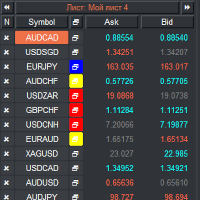
VR 观察列表和链接器 是 MetaTrader 终端的筛选器应用程序。使您更容易找到最有趣和技术性的金融工具。该筛选器供交易者在bybit、莫斯科交易所、美国交易所、外汇和加密货币市场、金属市场等交易所进行交易,并用于自营公司的交易。金融工具的选择是手动进行的。筛选器连接 MetaTrader 终端中打开的图表,并在更改金融工具时单独显示每个图表中的数据。 设置、设置文件、演示版本、说明、问题解决,可以在 [博客] 中找到
您可以在 [链接] 阅读或撰写评论
[MetaTrader 4] 版本 使用筛选器可以帮助交易者找到最具技术性的金融工具,并排除流动性低、风险高的工具的交易。筛选器使您可以轻松快速地创建和更改带有股票行情的工作表,快速添加和删除工作表中的股票行情。在所有图表上保存和加载交易者加价和指标。直接从筛选器交易金融工具。应用预先准备的策略。 VR 监视列表和链接器 - 支持使用热键 - 这使您可以直接从键盘操作工作表,几乎无需使用鼠标。通过这种方法,交易者可以选择多种金融工具在白天进行交易。 筛选器被设计为顾问,需要多个打开的图表才能工作。 在策略测试器中不起作用。 VR
FREE

交易面板 版本:1.00 该交易面板是一款基于图表的手动交易界面,旨在为交易者提供快速、精准的交易执行和持仓管理功能。无需使用 MetaTrader 的标准下单窗口,即可实现一键交易和灵活的风险控制。 交易执行 BUY 按钮
使用当前选择的手数在当前交易品种上立即开立买入(多头)订单。
止损和(可选)止盈将根据面板当前设置自动应用。 SELL 按钮
使用当前选择的手数在当前交易品种上立即开立卖出(空头)订单,并应用止损和(可选)止盈。 CLOSE 按钮
立即关闭当前交易品种的所有未平仓订单。 止损管理 SL + / SL −
增加或减少止损点数。 止损显示
当前止损点数实时显示在面板上。 APPLY 功能
将当前止损设置应用到该交易品种的所有未平仓订单。 止盈管理 TP + / TP −
调整止盈点数。 TP ON / TP OFF 开关
启用或禁用止盈功能: 启用时,止盈将应用于新订单及订单修改 禁用时,订单将不设置止盈 止盈显示
当前止盈点数实时显示在面板上。 追踪止损(Trailing Stop) TRAIL ON / TRAIL OFF
启用或关闭追踪止损功
FREE

Account Dashboard 在一个轻量面板中显示您每天都要查看的数据,直接读取自您的账户历史。这是一款指标:它只读取账户,绝不会交易。免费,无任何限制。 实时账户 余额、净值、浮动盈亏、保证金水平和持仓敞口 按周期统计的结果 今日、本周、本月以及全部历史的净结果 以金额及占各周期起始余额的百分比显示,不计入存款和取款 所选周期的详细信息 一键在 Day、Week、Month 和 All 之间切换 交易笔数、胜率、盈利因子、最佳和最差交易 当前及最长连续亏损、最大已平仓回撤(入金和出金不计入回撤) 统计计算经过单元测试(36 项检查) 每个策略单独统计 按品种和魔术号统计结果(手动交易的魔术号为 0),按影响程度排序 可按品种和/或魔术号过滤,只跟踪某一个 EA 或某一个市场 简洁轻量 可移动、可最小化的面板;移除指标时所有对象都会一并删除 适用于该账户的任意图表 输入参数 过滤:仅限这些品种、仅限这些魔术号(以逗号分隔,留空 = 全部) 面板:启动时显示的周期、按品种统计结果、按魔术号统计结果、角落、距离 截图使用的是由测试版本生成的示例账户,并非真实交易记录。
FREE

OHLC 磁铁增加了水平线、矩形和价格标签的缺失磁点。 如果你喜欢这个实用程序,请评价,评论,并查看我的其他程序。 指示:
只需将上述对象之一拖动到像素接近范围内所需的 "打开"、"高"、"低" 或 "关闭", OHLC 磁铁就会自动将该对象附加到您选择的确切价格点。
参数:
接近度 (像素): 要将实用程序附加到该特定价格点的实用程序的 "打开/高/低/关闭" 的接近程度 (以像素为单位)。默认值为10。 自动调整价格标签: 将自动调整价格标签的左侧 (左价格标签) 或右侧 (对于右侧的价格标签)。默认值为 "已启用"。 (Sorry for the rough translation. The rest is here to meet the minimum character count.)
FREE
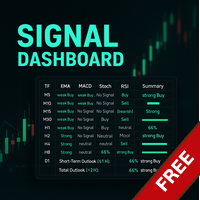
Link to the full version: https://www.mql5.com/de/market/product/138246?source=Site +Profile+Seller#description Feature enhancements or comments are always welcome! Description: This powerful script provides traders with a comprehensive real-time signal overview across multiple timeframes using some of the most reliable technical indicators. It is designed as a clear, compact table on the chart and displays actionable insights for selected timeframes - helping traders make informed decisions ba
FREE

The "Close All Order Tools" tool is designed to solve common problems faced by Forex traders when managing profitable orders—especially in highly volatile market conditions or when dealing with multiple open trades simultaneously. Problems This Tool Solves: Unable to close orders in time : “Just when it was rising nicely, the price suddenly dropped—I couldn’t close it in time, and the profit vanished.” Closing orders one-by-one is time-consuming : “With multiple orders open, closing each one ind
FREE

# QuickTrade Panel 快捷交易面板
## 产品概述
QuickTrade Panel 是一款专为MT5设计的专业快捷交易面板,集成市价交易、挂单交易、冰山订单、网格挂单、智能平仓、历史统计分析等功能于一体,帮助交易者快速执行各类交易操作并深入分析交易表现。
## 核心功能
### 1. 市价交易 - 一键买入卖出,实时显示Ask/Bid价格 - 支持快捷手数切换,预设6档常用手数 - 手数微调按钮,支持0.01手精细调整 - 可选止损止盈,支持点数设置
### 2. 双开与对锁 - 双开:同时开立等量多空单,适合震荡行情 - 对锁:自动计算净仓位,一键锁定现有持仓
### 3. 挂单交易 - 买限价:在指定价格下方挂买单 - 卖限价:在指定价格上方挂卖单 - 买止损:在指定价格上方挂突破买单 - 卖止损:在指定价格下方挂突破卖单
### 4. 智能平仓 - 全部平仓:平掉当前品种所有持仓 - 平多单:只平多头仓位 - 平空单:只平空头仓位 - 平盈利单:只平浮盈仓位 - 平亏损单:只平浮亏仓位 - 删挂单:删除所有挂单
### 5. 价格平仓 - 设置
FREE

Generates custom tick-based charts. Runs as a service. Key Features: Custom Tick Bars: Define the exact number of ticks per candle. Auto-Setup: Automatically creates the custom symbol in Market Watch and loads history. Session Control: Automatically closes the current bar at the end of the trading day. Real-Time: Updates seamlessly with live market data. Parameters: Source Symbol: Base asset (e.g., EURUSD). Required. Symbol suffix: Suffix for the new symbol (default: _TICK ). Ticks per bar: Tick
FREE
MetaTrader市场提供了一个方便,安全的购买MetaTrader平台应用程序的场所。直接从您的程序端免费下载EA交易和指标的试用版在测试策略中进行测试。
在不同模式下测试应用程序来监视性能和为您想要使用MQL5.community支付系统的产品进行付款。
