Trade Manager OS
- 实用工具
- 版本: 1.0

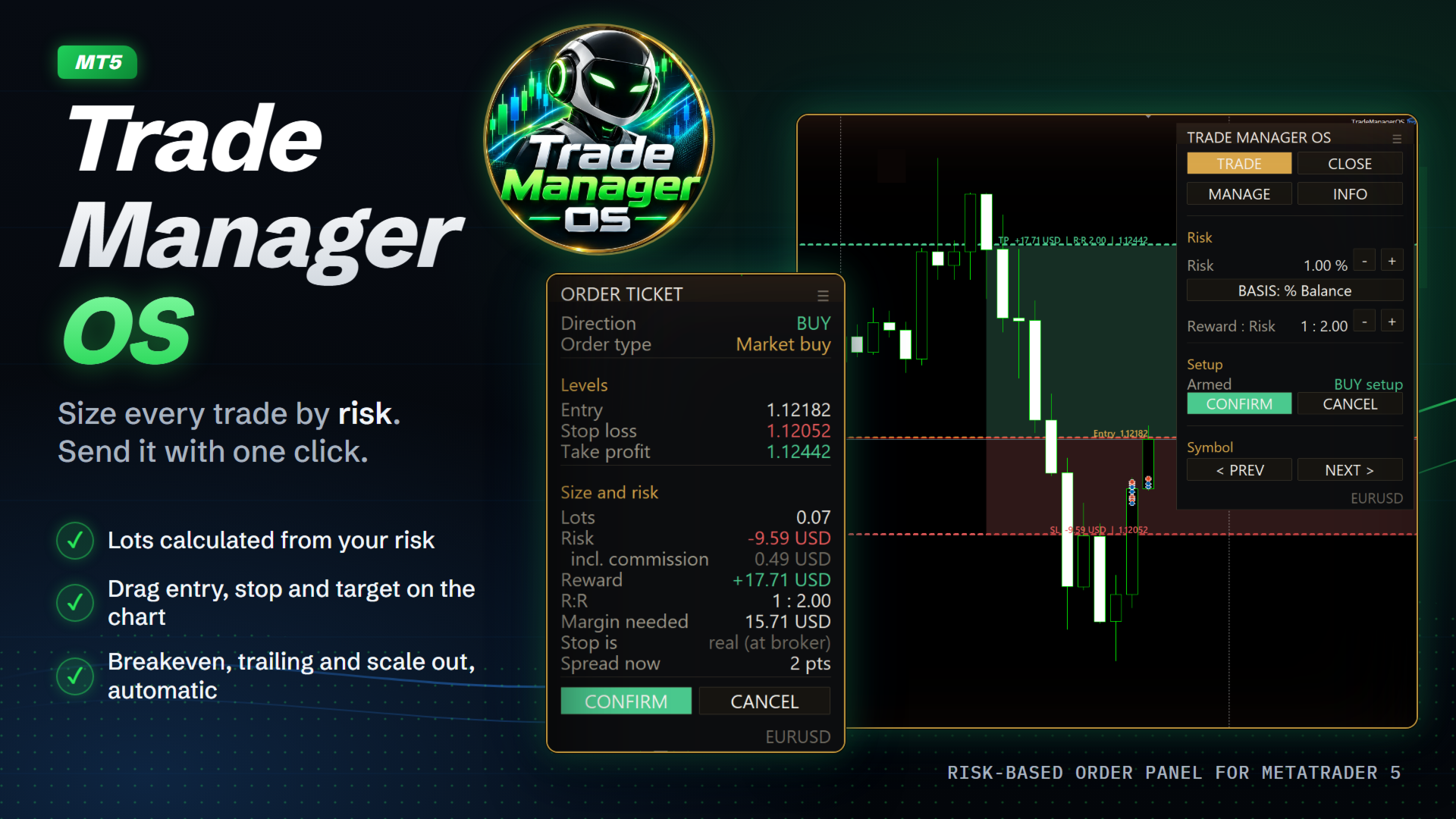
Trade Manager OS is a risk-based order panel for MetaTrader 5. You decide where the entry, stop loss and take profit go. It works out the lot size so that a stop-out costs the amount you chose, in money or as a percentage of your account, and shows every number before you click.
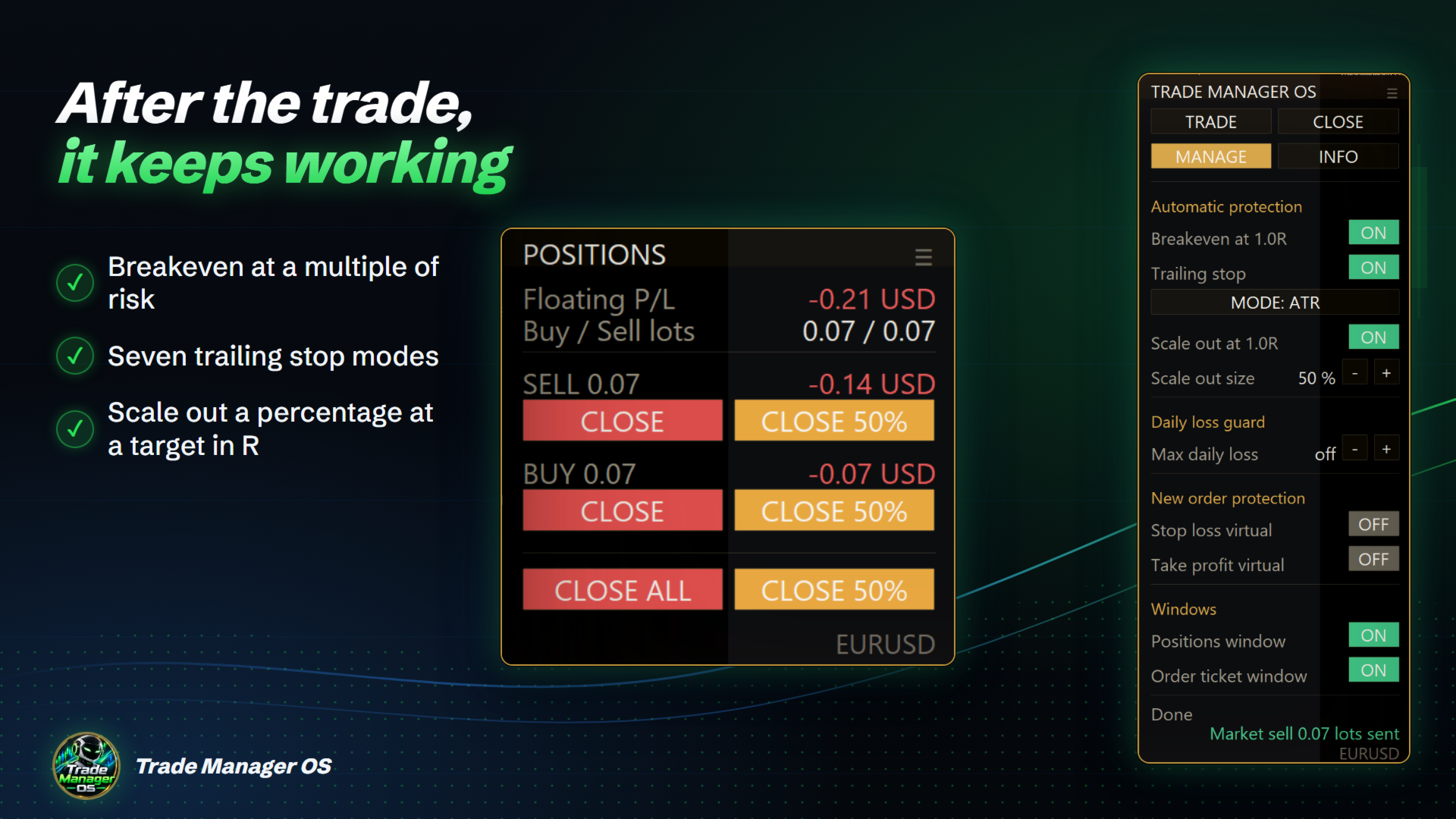
Then it keeps working after the order: breakeven, trailing stop, scale out and a daily loss guard run on the positions it sent, so you do not have to watch every tick.
HOW IT WORKS
- Choose how much to risk: a fixed amount, or a percentage of balance, equity or free margin. Use the + and - buttons on the panel, or set the default in the inputs.
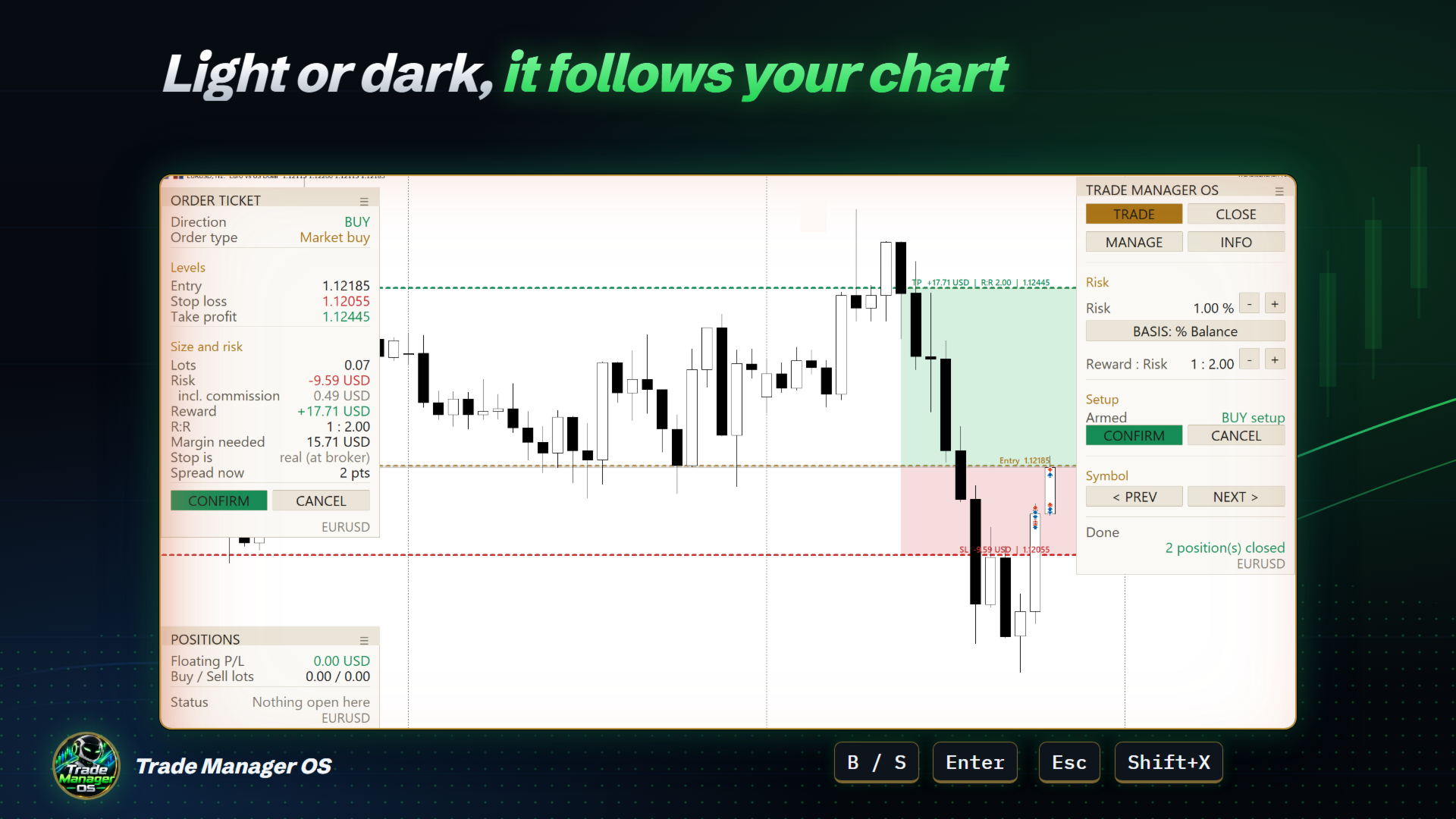
- Press BUY or SELL (or B and S on the keyboard). Entry, stop loss and take profit lines appear on the chart, with shaded risk and reward zones.
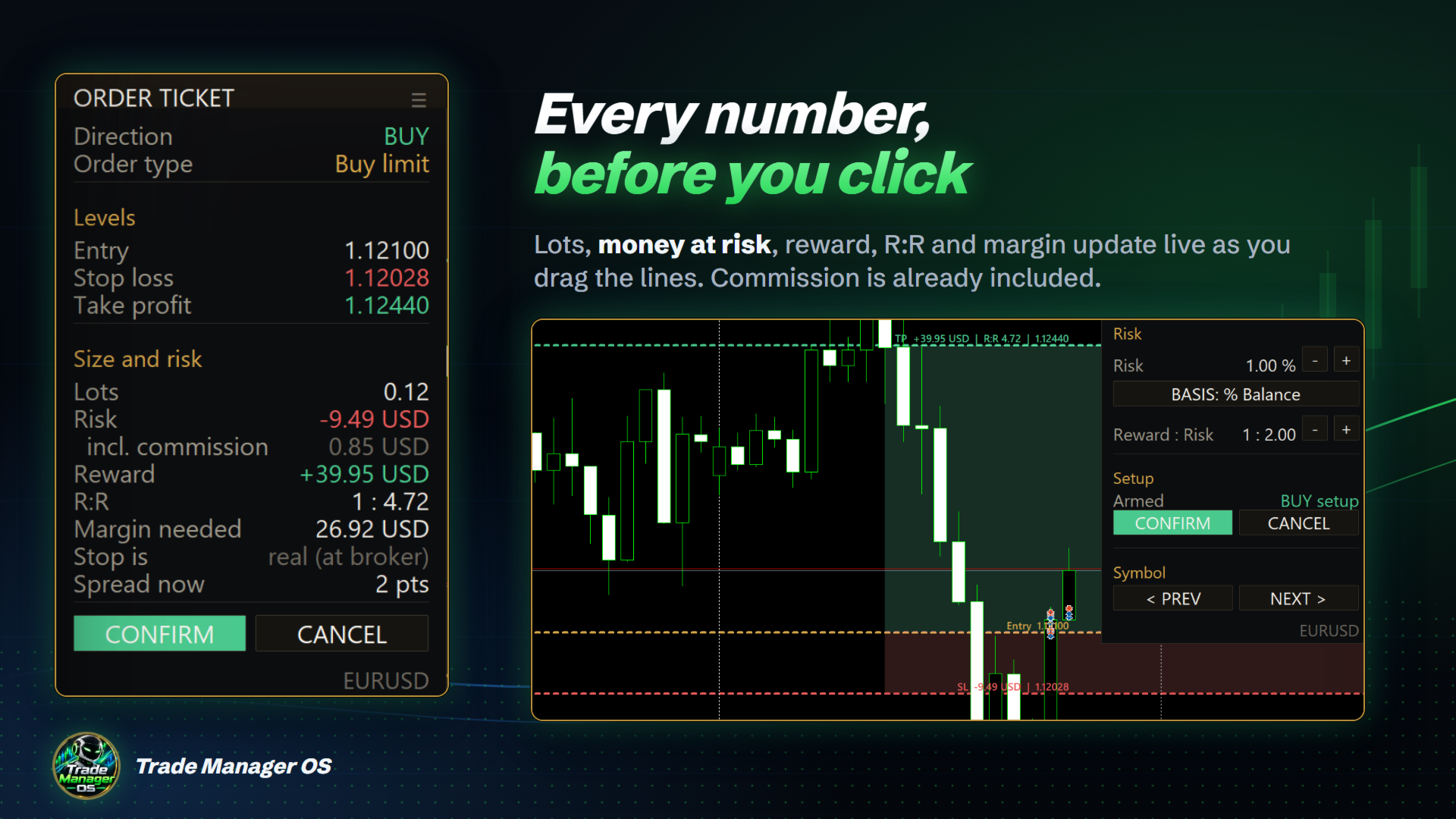
- Drag any line. The order ticket updates live: lots, risk in money, reward, reward to risk ratio and margin needed. The reward to risk ratio is adjustable, 1 : 2 by default.
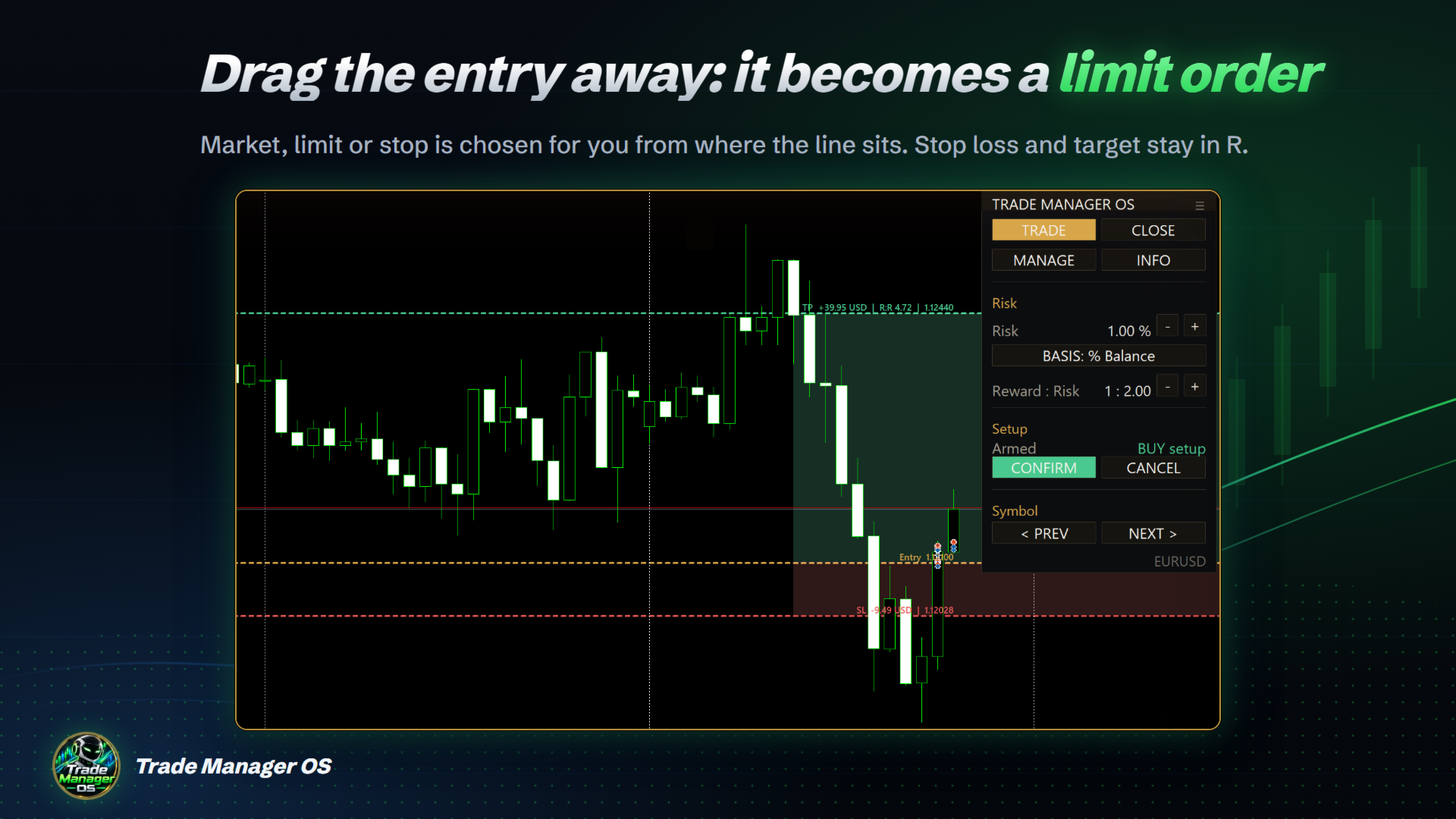
- Press CONFIRM (or Enter). Entry at the current price sends a market order. Drag the entry away and it becomes a buy limit, buy stop, sell limit or sell stop, chosen for you from where the line sits.
- Press CANCEL (or Esc) to discard the setup. Nothing is sent until you confirm.
A WORKED EXAMPLE
Account of 10,000 USD, risk set to 1% of balance, which is 100 USD. You arm a EURUSD buy at 1.1000 with the stop at 1.0980, 20 pips below. One lot loses about 200 USD over those 20 pips, so the tool sizes 0.50 lots. With the target at 2R, 1.1040, the ticket shows a reward of about 200 USD and R:R 1 : 2.00. If your account pays commission, it is added to the risk and the lots drop slightly, so the stop-out still costs what you chose. Drag the stop to 1.0990 and the lots double to keep the same 100 USD at risk.
WHAT YOU SEE BEFORE YOU CLICK
- Lots, money at risk, money at the target, R:R, margin needed and current spread.
- Entry, stop loss and take profit prices, and the labels on the chart lines with the money value of each.
- Commission already included in the risk, estimated from your own deals on that symbol over the last 30 days. With no history it says "unknown" instead of guessing.
- Whether the stop is real (placed at the broker) or virtual (kept by the tool).
- An alert if price crosses the stop or target of an armed setup before you send it.
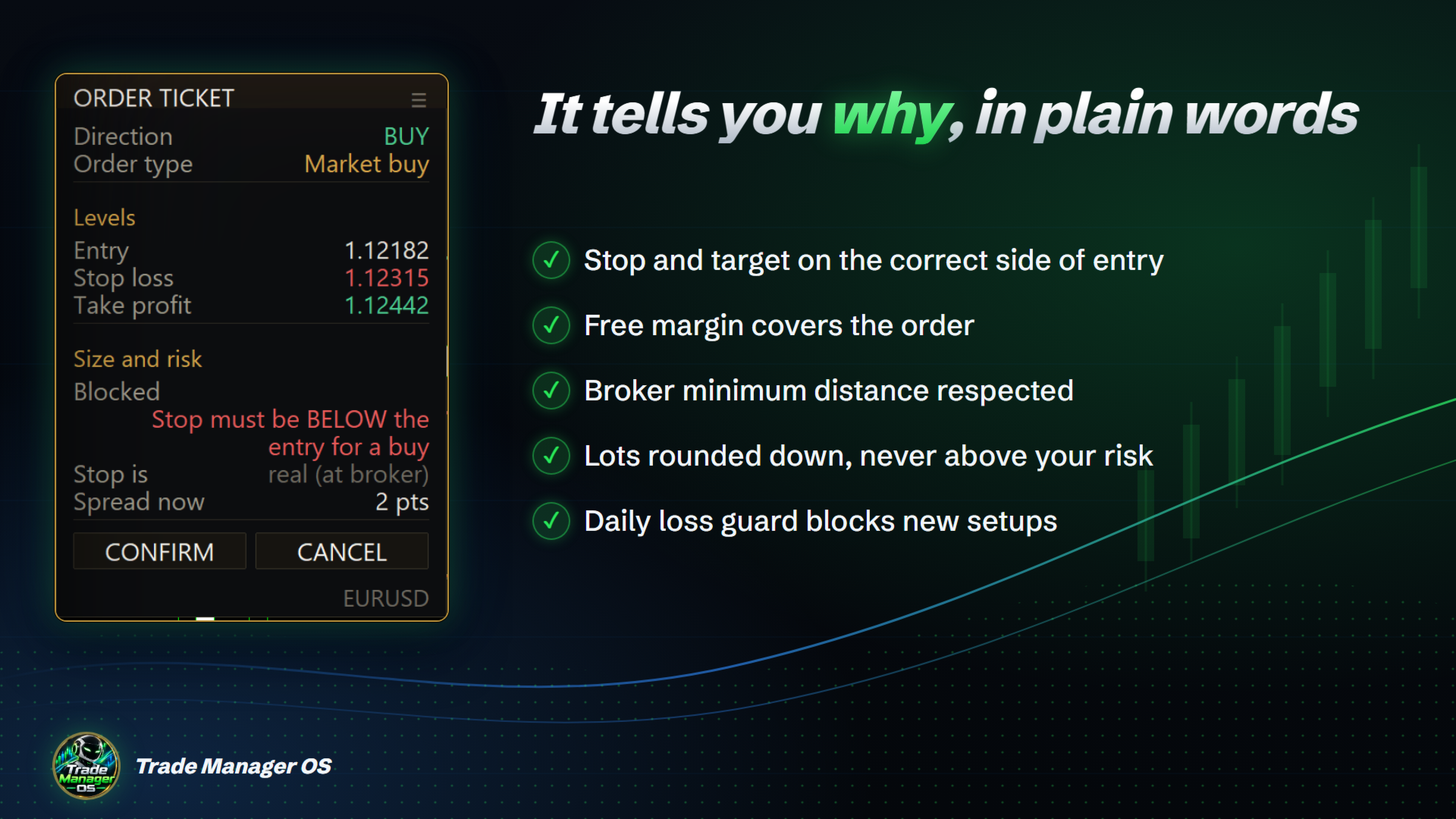
SAFETY CHECKS ON EVERY ORDER
- Stop and target on the correct side of the entry.
- Free margin covers the order.
- Stop and entry respect the broker's minimum distance.
- Market open for the symbol, with automatic retries while it is closed or not accepting orders yet.
- Lots rounded down to the volume step, never up, so you never risk more than you asked.
- Daily loss guard: blocks new setups once the day's loss reaches your limit.
When something fails, the ticket says why in plain words, for example "Stop must be BELOW the entry for a buy", instead of the order coming back rejected.
AFTER THE ORDER
- Breakeven in R. Moves the stop to entry plus a small locked profit once the trade is up a set multiple of its initial risk. Defaults: at 1R, locking 0.1R to cover commission and spread. It uses the real initial risk of each trade, even after you change the stop.
- Trailing stop, seven modes. Fixed distance, fractals, moving average, Parabolic SAR, ATR, partial step, and high or low of the last N bars. Levels that would sit on the wrong side of price are ignored. ATR adapts to each symbol.
- Scale out. Closes a percentage of the position at a target measured in R (50% at 1R by default) and can move the stop to entry afterwards.
- Manual closing. Close buttons per position (full or 50%) and for groups: all, buys, sells, winners, losers and pending orders. Hotkeys: Shift+X closes everything on the symbol, Shift+P partially closes.
- Virtual stop loss and take profit. If you prefer the broker not to see them. The tool closes the position when price reaches the level.
THE PANEL
Separate windows for commands, the order ticket and open positions. Drag any window by its title bar and anchor the commands window to any corner. The commands window has four tabs: TRADE (risk and setup), CLOSE (close buttons), MANAGE (automatic protection, daily loss guard, virtual stops, windows) and INFO. Every automatic feature has an ON and OFF switch on the MANAGE tab and works live, without re-attaching the tool.
Dark or light theme follows your chart colors. Font size and width are adjustable for small and high resolution screens. The positions window shows floating profit, buy and sell lots, and one row per position with its own close buttons. Optional chart screenshot when an order is placed or a position closes.
HOTKEYS
- B: arm a buy. S: arm a sell.
- Enter: send the armed setup. Esc: cancel it.
- Shift+X: close every position of this tool on the symbol. Shift+P: partial close.
- Comma and period: previous and next symbol from Market Watch.
- All keys can be rebound by key code in the inputs.
COMPATIBILITY
- Any symbol and timeframe: forex, metals, indices, crypto, CFDs. Lot sizing uses the broker's own profit calculation, so it is correct on indices and metals too.
- No DLL and no WebRequest.
- Tested on hedging accounts.
- Attach it to one chart per symbol. It manages the orders and positions it sent, identified by the magic number (default 990001).
- Settings and virtual stop levels are kept across terminal restarts.
INPUTS
- Risk: basis (money, balance %, equity %, free margin %) and value.
- Protections: stop loss and take profit real or virtual.
- Panel: position, font size, width.
- Hotkeys: all rebindable.
- Breakeven: trigger and locked profit, in R.
- Trailing: on or off, mode, and the parameters of each mode.
- Scale out: trigger in R, percentage closed, move stop to entry.
- Daily loss guard: percentage of the day's starting balance (0 = off).
- Alerts, screenshots, magic number.
FREQUENT QUESTIONS
Does it trade by itself? No. It sends an order only when you press its buttons or hotkeys. It generates no signals. Breakeven, trailing and scale out only manage trades the tool sent.
Why is my setup blocked? The ticket shows the reason in the "Size and risk" section: wrong side stop, not enough margin, stop too close to price, market closed or daily loss reached.
Real or virtual stops? Real stops are placed at the broker and work with the terminal off. Virtual stops are hidden from the broker but only work while the terminal is running with the tool on the chart. The ticket always states which kind you are sending.
Does it work on netting accounts? It was tested on hedging accounts. Netting accounts have not been tested yet.
IMPORTANT TO KNOW
- Enable Algo Trading in the terminal and tick "Allow Algo Trading" when attaching the tool. The panel tells you if either is off.
NOT INCLUDED
No OCO orders, no scheduled opening or closing, no copy trading between accounts, no news filter, no management of trades opened by other tools or from the phone. This is a manual execution and management tool, not an automated strategy.
RISK DISCLAIMER
Trading foreign exchange, metals, indices, cryptocurrencies and other leveraged financial instruments carries a high level of risk and may not be suitable for everyone. You can lose some or all of your invested capital, so never trade with money you cannot afford to lose. Any investment in financial markets involves risk.
Trade Manager OS is a manual execution and risk calculation tool. It does not provide investment advice, signals or recommendations, and it does not guarantee profits or protect you from losses. Lot sizes, stop levels and other figures are calculated from the data your broker provides and may differ from the result obtained, for example because of slippage, spreads, gaps, requotes, commissions, swaps or connection problems.
Use the tool responsibly and make your own decisions. Test it on a demo account before using it on a live account. The author is not responsible for any loss or damage arising from its use. You are solely responsible for your trading decisions and results.
Questions or ideas: send me a private message on MQL5.com.