VirtualTradePad mt4 Extra

4.85

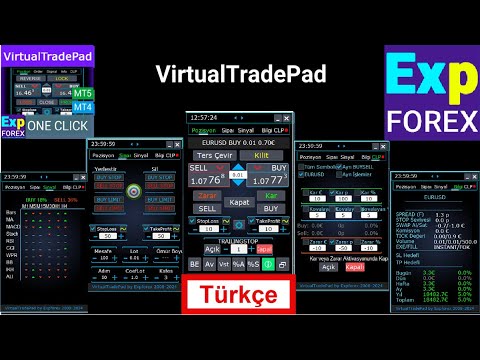
1 tıklama ile ticaret için Ticaret Paneli. Pozisyonlar ve emirlerle çalışmak! Grafikten veya klavyeden alım satım.

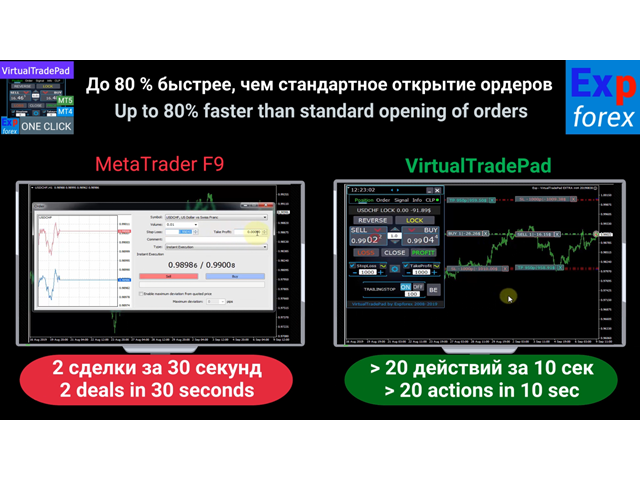
  • Alım satım panelimizi kullanarak, grafikten tek bir tıklamayla alım satım yapabilir ve alım satım işlemlerini standart MetaTrader kontrolünden 30 kat daha hızlı gerçekleştirebilirsiniz.
  • Bir tüccar için hayatı kolaylaştıran ve bir tüccarın ticaret faaliyetlerini çok daha hızlı ve daha rahat gerçekleştirmesine yardımcı olan parametrelerin ve işlevlerin otomatik hesaplamaları.
  • Grafikte ticaret anlaşmaları hakkında grafik ipuçları ve tam bilgiler.

Yeni premium sürüm çıktı: VirtualTradePad PRO SE ile işlem çalışma sürecinizi geliştirin — MetaTrader 5 ve MetaTrader 4 için yeni nesil profesyonel işlem paneli.

Açma ve Kapama, Ters ve Kilitleme, Kısmi Kapanma / Autolot. Sanal/gerçek zararı durdur/kar al/sondaki dur/başabaş, Siparişler tablosu ....

МetaТrader 4'teki  ana talebin ticaret kontrol paneli : al, sat, alstop, buylimit, sellstop, selllimit, kapat, sil, değiştir, takip eden stop, stoploss, alproft.

Bağlantılar

  • Tam otomatik ticaret için tavsiye ederim XCustom
  • Strateji test cihazında nasıl işlem yapacağınızı öğrenmek istiyorsanız, ücretsiz TesterPad yardımcı programımıza göz atın.

Çalışma sekmeleri

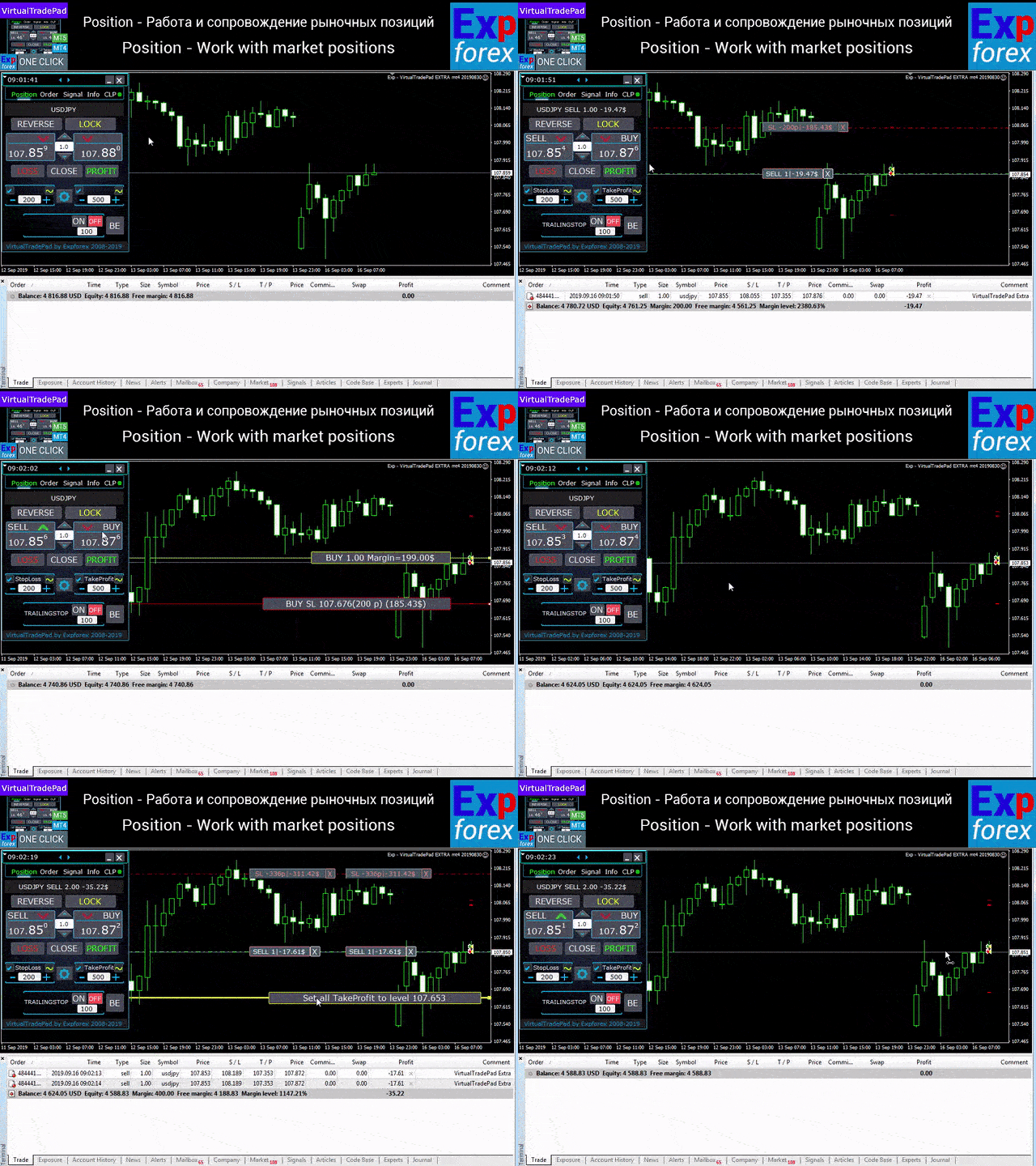
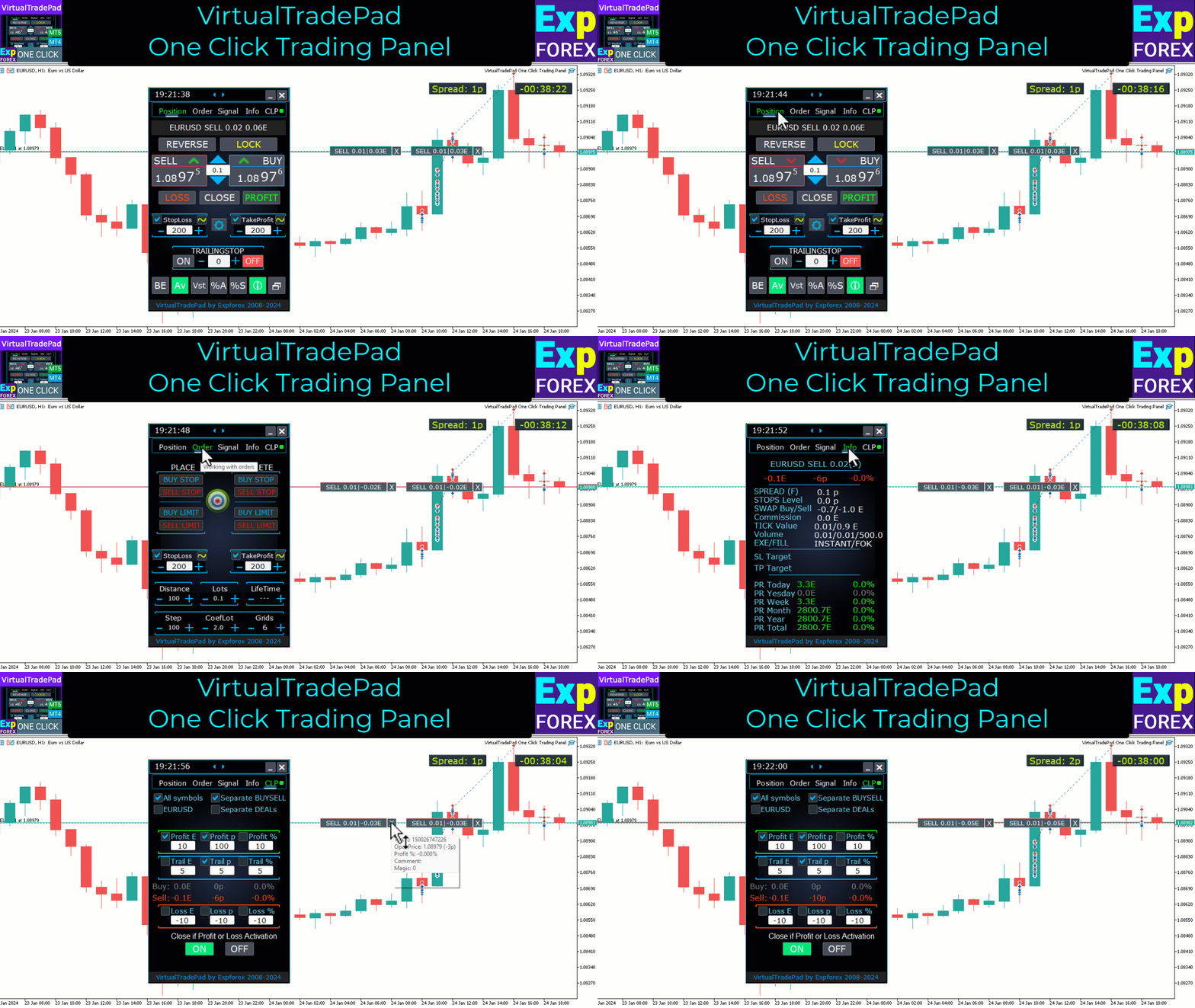
Pozisyonlar sekmesi - Pozisyonlarla çalışın:

  • Açılış / Kapanış AL ve SAT,
  • Tüm pozisyonları tersine çevir,
  • Ortak bir pozisyonun kilitlenmesi,
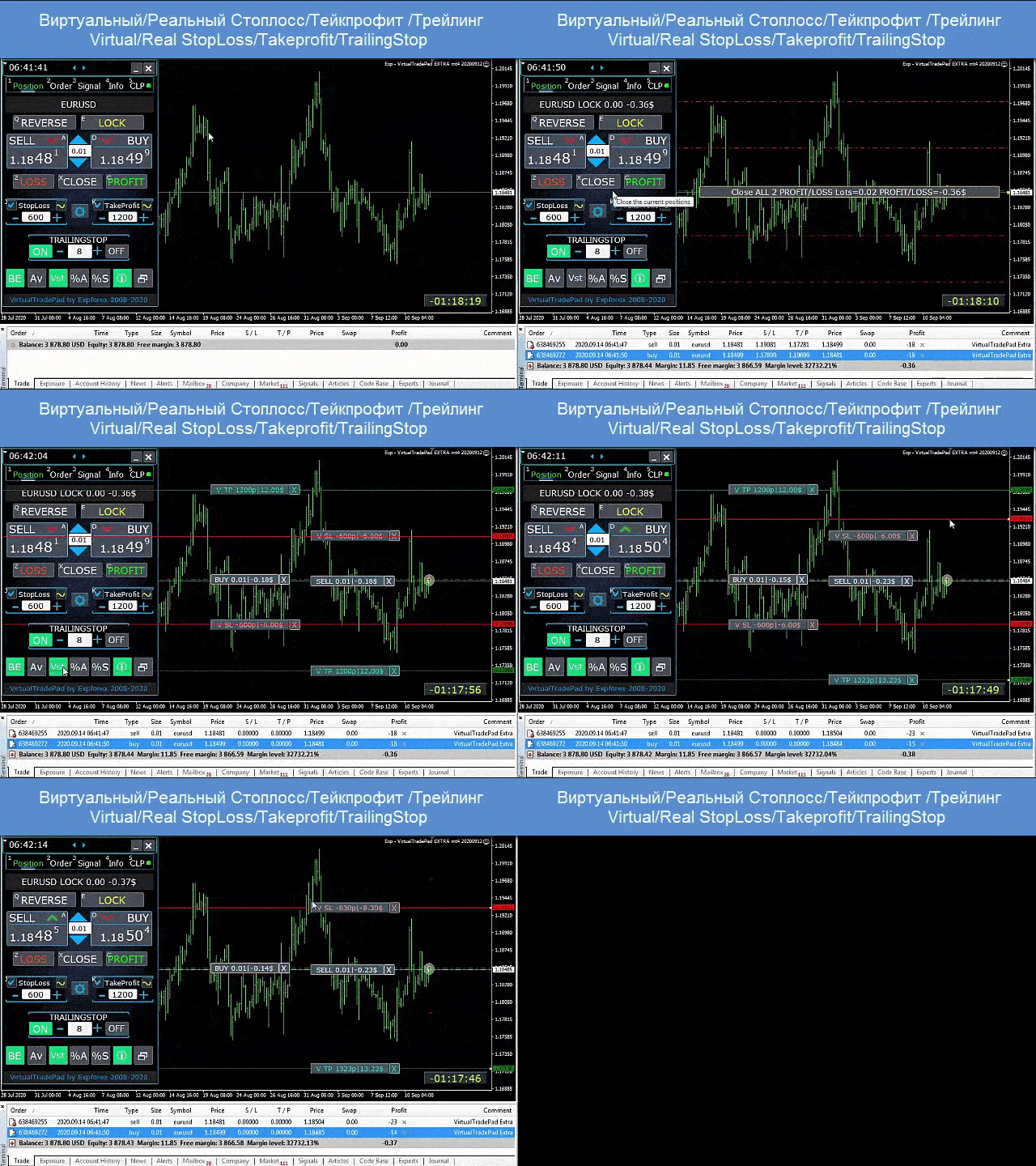
  • Zarar Durdur / Kar Al,
  • Pozisyon ızgarası için ortak bir zararı durdur / kar al,
  • İz bırakma,
  • Başa baş
  • Sadece karlı / zarar eden pozisyonların kapatılması,
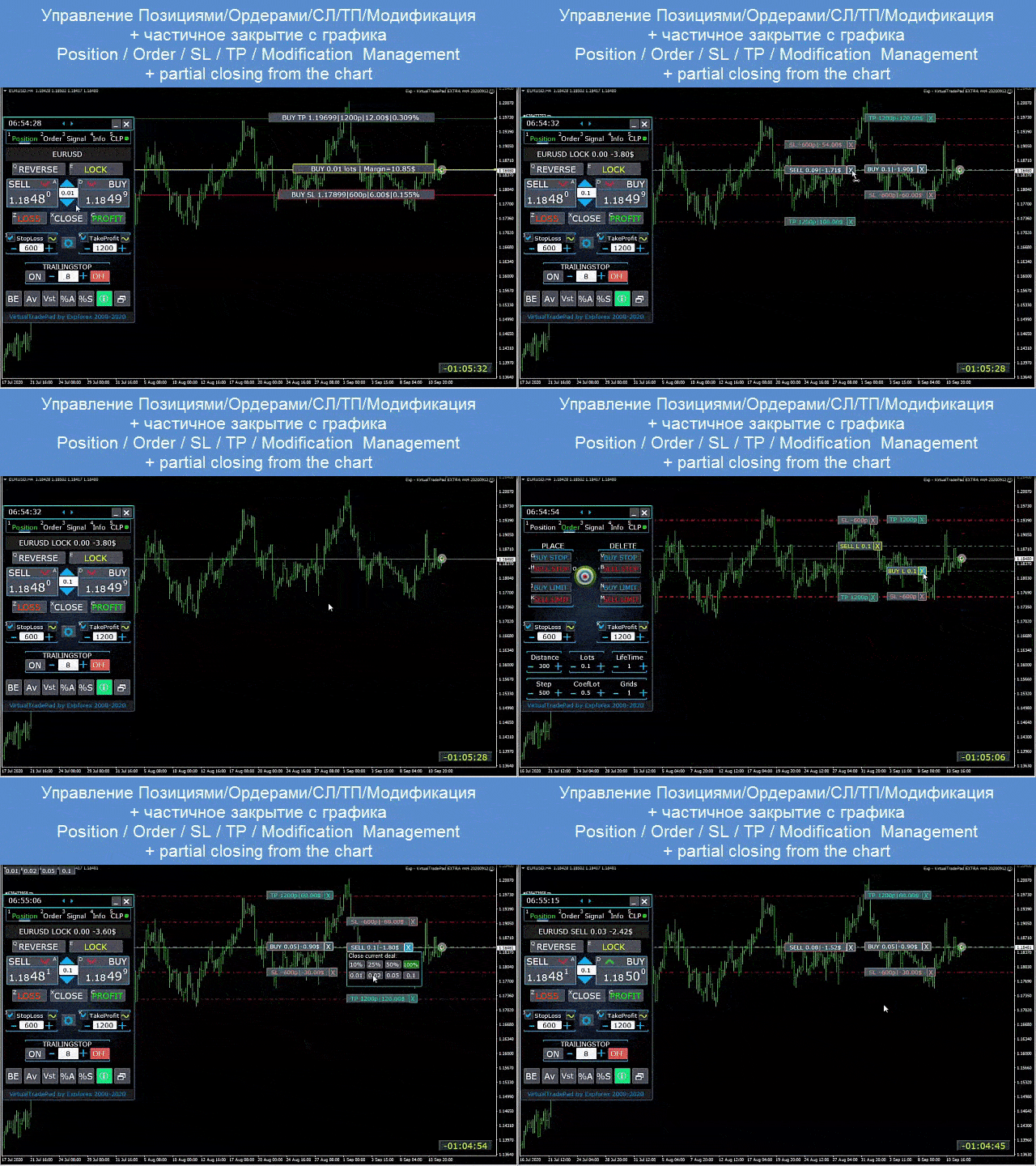
  • Pozisyon yönetimi / zararı durdur / terminal tablosundan kar al,
  • Grafikteki pozisyonların kısmi kapanması;
  • Bakiyenin yüzdesi olarak Autolot / Dinamik lot veya ayarlanmış zarar durdurma
  • Gerçek / Sanal Zarar Durdur ve Kâr Al'ı Etkinleştirme / Devre Dışı Bırakma
  • Toplam Ortalama İzleyen Stop / Başabaş Pozisyonları Ortalama Fiyattan Izgaralar

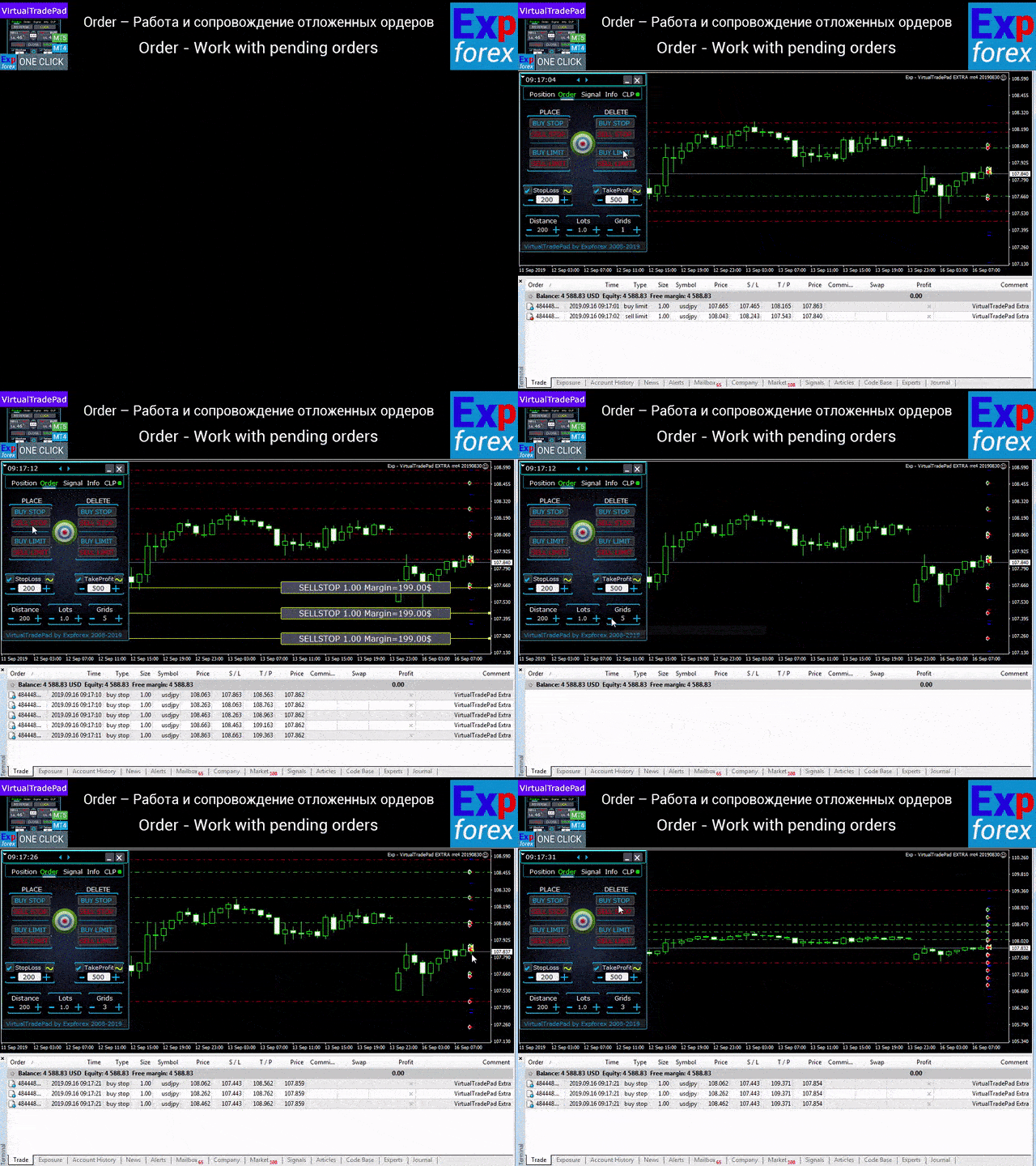
Siparişler sekmesi - Bekleyenlerle çalışın ve siparişleri sınırlayın:

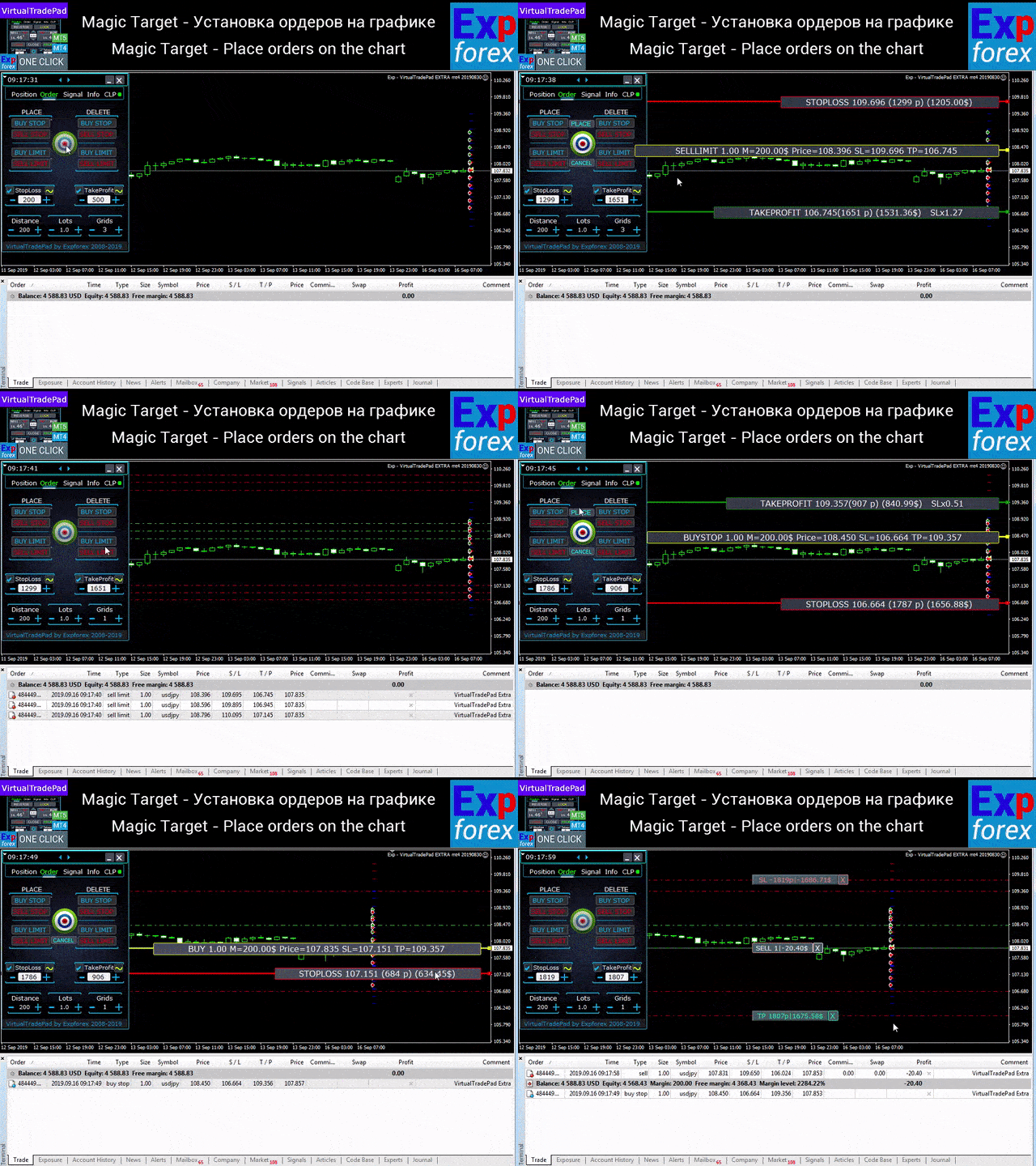
  • Beklemede / Sil BuyStop SellStop BuyLimit SellLimit,
  • Partilerde artış, şebeke mesafesi ile bir siparişler şebekesi oluşturma,
  • Grafik üzerinde mouse ve çizgiler ile emir/pozisyon belirleme,
  • Tüm sipariş serileri için ortak bir zarar durdur/kar al belirleme,
  • Grafikten bekleyen siparişlerle çalışma! Kaldırma, Siparişleri doğrudan grafikten değiştirme.

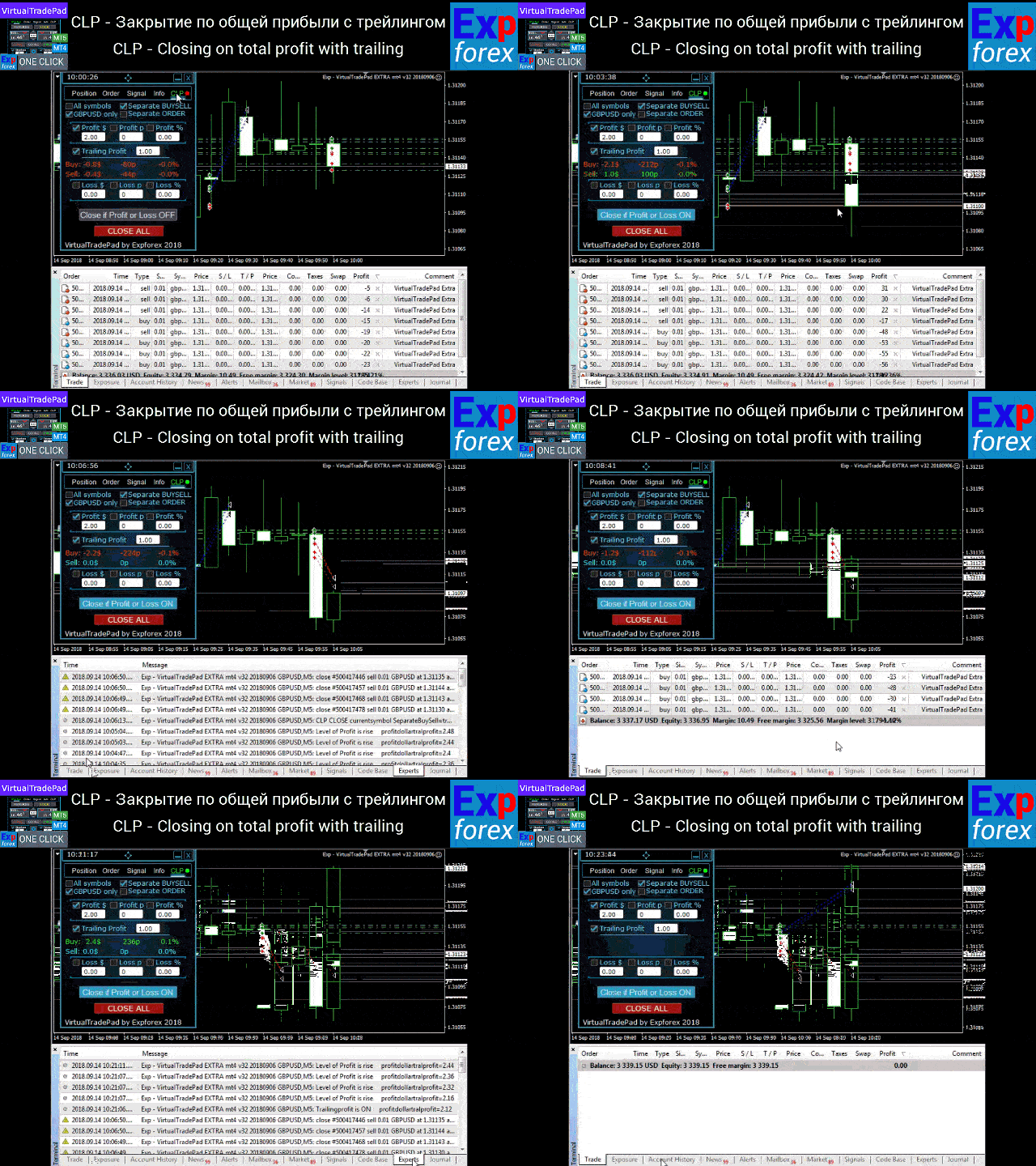
CLP sekmesi - Toplam kâr veya zarar için kapatma işleviyle çalışın.

  • Puan, dolar, yüzde olarak toplam kar/zararda kapanış.
  • Ayrı ayrı AL / SAT kapat,
  • Ayrı/genel bir pozisyon için sanal zararı durdur/kar al özelliğini etkinleştirin.
  • Puan, dolar, yüzde olarak toplam kârın son durağı.

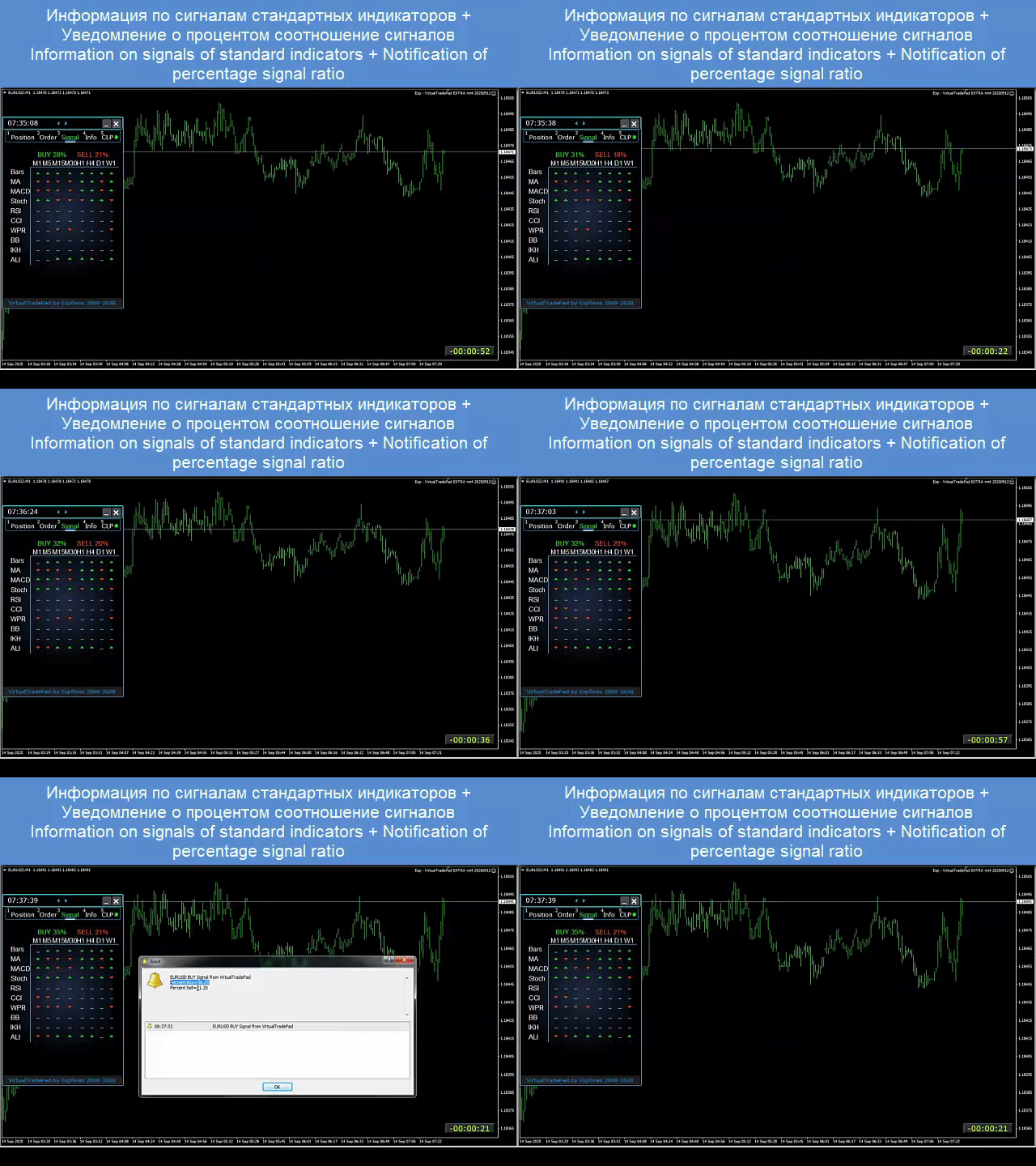
    Sinyaller sekmesi

    10 standart gösterge ve 8 zaman diliminden gelen sinyali gösterir. Ayrıca AL ve SAT yönlerindeki sinyallerin kümülatif yüzdesini de gösterir. Kümülatif sinyal aşıldığında pozisyonları otomatik olarak açmak da mümkündür.

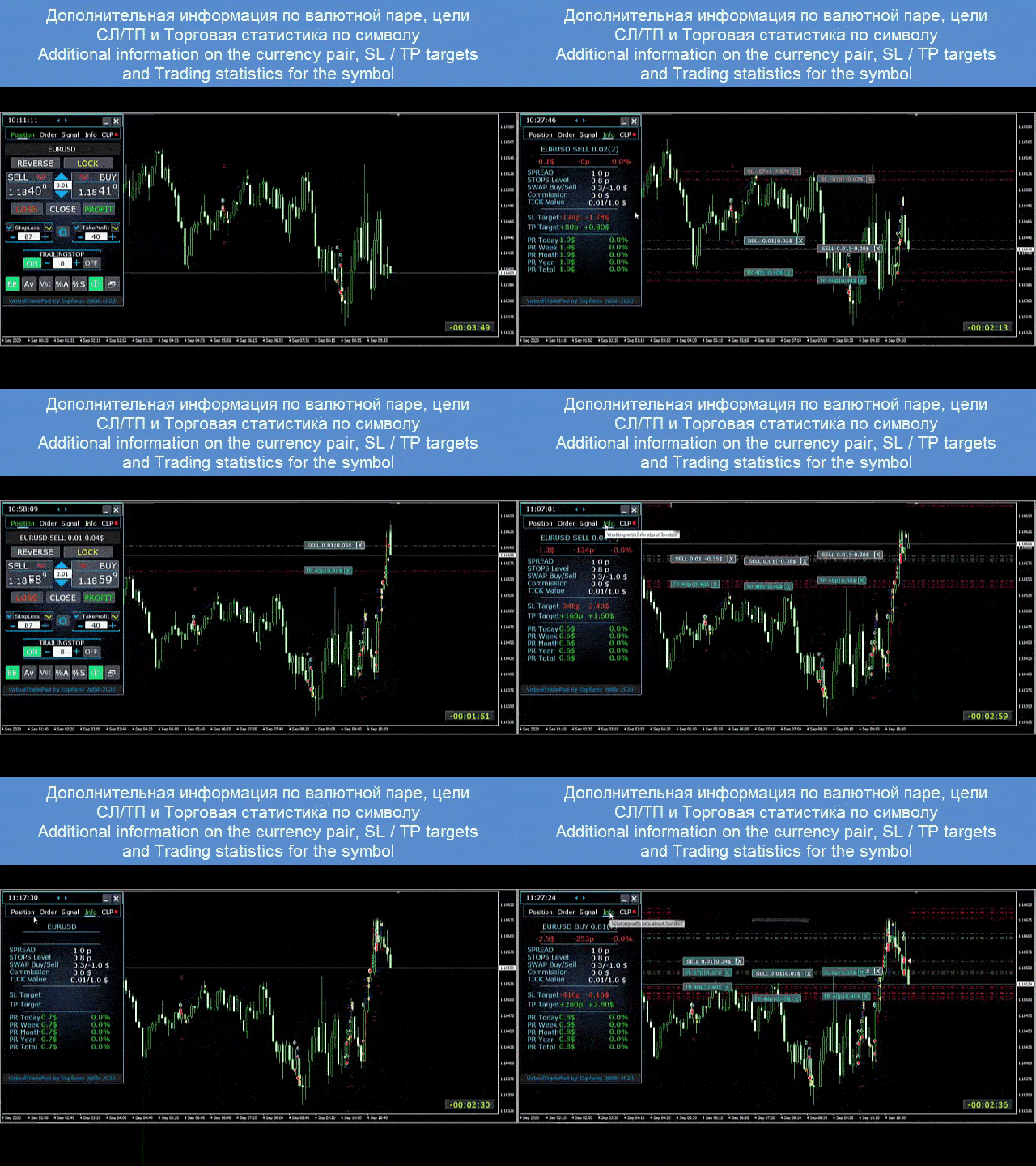
    BİLGİ sekmesi

    seçilen sembolün mevcut spesifikasyonunu, mevcut zararı durdur ve kar al hedeflerini ve ayrıca mevcut gün, geçmiş gün, hafta, ay için karı görüntüler.

    Ana Özellikler:

    • Herhangi bir hesap türü ve bir komisyoncu üzerinde çalışır.
    • Özel beceriler gerektirmez.
    • Sezgisel ve basit arayüz.
    • Sadece en önemli fonksiyonlar.
    • Herhangi bir komuta hızlı yanıt.
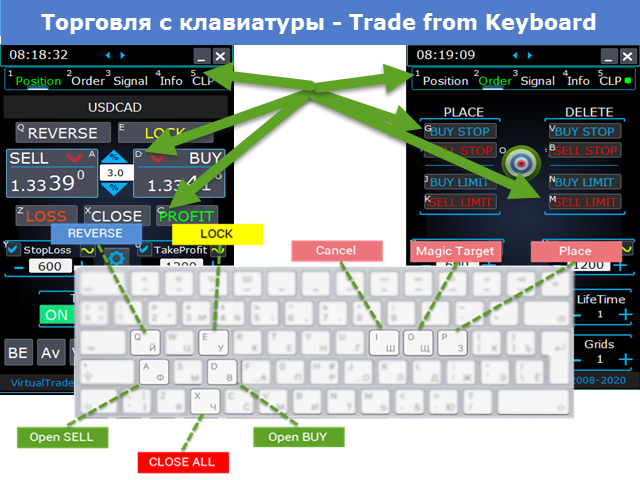
    • Klavyeyi kullanarak ticaret yapın (Bunu yapmak için ayarlarda KeyBoardTrade parametresini DOĞRU olarak ayarlayın) veya grafikteki düğmeleri
      #tags Expforex, Vladon, Manuel Ticaret , Ticaret Paneli , Panel Ticareti, Ticari Kullanım Programı , Kendi Kendini Test Etme , Kar Al , Araç Yönetimi , Yönetim Aracı , Forex Yardımcısı , Forex Ticareti , Sanal Ticaret Eğitimi , Hızlı Araç, Manuel Test Cihazı, Manuel Geri Test, Test Pad , Tradepad , Virtual Trade Pad, Торговая панель , ticaret paneli #tags Expforex, Vladon, Manual Trade , Trade Panel ,Panel Trade,Trade Utility ,Self Test ,Take Profit ,Tool Management ,Management Tool ,Forex helper ,Forex Trade ,Training virtual trade ,Quick Tool, Manual Tester, Manual Backtest,TesterPad, Tradepad, Virtual Trade Pad, Торговая панель , Trader Assistant ,CLP,CloseifProfitorLoss,Close Profit,Total Profit, Close if Profit or Loss , Trailing Profit, Smart Trailing Stop
      Değerlendirmeler 89
      Chris Jacobs
      320
      Chris Jacobs 2026.03.26 18:35 
       

      since I've bought the virtual tradepanel my tradng improved alot and the developer just release an update and it is amazing Thanks for you hard work Vladislav and Vladislav is always available to answered questions

      talavera.merced
      66
      talavera.merced 2026.01.09 18:59 
       

      He cambiado ordenador por rotura, trato de instalar en uno nuevo y dice que no quedan activaciones. Si el otro no funciona y no está en uso, no se puede usar el indicador en el nuevo? hay que comprarlo de nuevo?

      hurshid
      33
      hurshid 2024.09.25 20:25 
       

      👍

      Önerilen ürünler
      Rhino Backtest Manager - canlı işlem ve strateji test edicisi için işlem yönetim paneli Rhino Backtest Manager, hem canlı işlemde hem de MetaTrader 4 strateji test edicisinde çalışan bir işlem yönetim panelidir. Canlı hesapta kullanılan arayüzün aynısıyla test edicinin içinde elle emir girmenize ve bu emirleri yönetmenize olanak tanır; böylece bir strateji geçmiş veriler üzerinde denendikten sonra araç değiştirmeden işleme alınabilir. Panel, pozisyon hacmini risk ayarlarınıza göre hesaplar, emi
      This utility is designed to help you with your Manual Trading. It allows different ways of closing trades. It can display total number of BUY and SELL orders individually and also their individual profits. It can enter trades without stopl loss and take profits. However upon selecting UseStopLossTakeProfit from the settings it can use best possible stop loss and take profits based on the market conditions. Upon selecting the CloseOppositeTrades  from the settings it can close opposite trades. Fo
      Candlestick Pattern Scanner is a multi-timeframe and multi-symbol dashboard and alert system that checks all timeframes and currency pairs for different candlestick patterns that are formed in them. Scanner is integrated with support and resistance zones so you can check the candlestick patterns in the most important areas of the chart to find breakout and reversal patterns in the price chart. Download demo version   (works on M30,D1,W1 timeframes and 20 symbols of Market Watch window) Read the
      TradePilot
      Hossein Khalil Alishir
      TradePilot Expert Advisor (EA) for MetaTrader 4 TradePilot is a professional and user-friendly Expert Advisor (EA) for MetaTrader 4 (MT4) . It simplifies automated trading , risk management , and trade execution using a smart trading panel . Perfect for beginners and experienced traders looking for a reliable trade manager EA with automated lot size calculation . Key Advantages User-Friendly Trading Panel: Customizable panel with buttons and hotkeys. Smart Risk Management: Supports percen
      Virtual Collider Manual   is a trading assistant with a built-in panel for manual trading. It automatically moves a position opened by a trader in profit using innovative adaptive grid algorithm of averaging and adaptive pyramiding Know-how of the grid algorithm of averaging and pyramiding of the   Virtual Collider Manual   trading robot is based on fully automatic adaptation of all characteristics of dynamically build order grid and pyramid with actual price movement with no need for adjusting
      Panel "panel_kjutaMultiTerminal" for trading. Opens, modifies, closes and deletes trading and pending orders from the chart using virtual lines, buttons and the active information terminal. Automatically opens an order by indicator levels. Hints in Russian, English or disabled. It has a number of functions for trailing virtual Take Profit lines and limit orders. Displays information on the active information terminal.  Hides and includes virtual lines S/L , T / P, buttons "<>","M","X", as well a
      Exp Averager
      Vladislav Andruschenko
      4.82 (22)
      Averager for MetaTrader 4 — profesyonel pozisyon kurtarma ve işlem sepeti yönetim sistemi Drawdown'a giren açık işlemleri daha kontrollü yönetmek, ortalama giriş fiyatını iyileştirmek ve tüm pozisyon serisini tek bir mantık altında toparlamak isteyen yatırımcılar için geliştirilmiş profesyonel bir Expert Advisor. Averager yalnızca yeni işlemler ekleyen basit bir ortalama alma aracı değildir. Mevcut pozisyonları yeniden yapılandıran, zarar baskısını azaltan ve tüm sepeti daha verimli bir çıkış n
      VN Trade Panel II
      Vyacheslav Nekipelov
      4 (1)
      The new version of the trading panel, which now has the ability to separately close Buy and Sell orders, display targets for all orders on the chart, as well as the ability to use the panel to trade with brokers working on the FIFO rule. Also, the new version adds option buttons for separate management of open orders. It has a convenient visualized interface and intuitive control without a lot of additional tabs to which traders have to be distracted and switch their attention. Thanks to this,
      Utility, which draws buy or sell trendlines, which can also become support or resistances able to close any position on the screen Algorithm that calculates the gain of the position, at the touch closure of the line.   The benefits you get: Works on forex and CFD, timeframe from M1 to Weekly. Easy to use screen control panel. Audible warning messages at the touch of the line. Easy to use.
      <p><b><i>Easy Trade Executor, MT4 için hızlı lot hesaplama, emir yürütme ve işlem yönetimi aracıdır.</i></b></p> <p>Entry Price, Stop Loss ve Take Profit seviyelerini doğrudan grafik üzerinde belirleyin, lot büyüklüğünü otomatik olarak hesaplayın ve yalnızca birkaç tıklamayla kontrollü risk altında işlemler açın.</p> <p><br></p> <h3>Neden Easy Trade Executor?<br></h3> <p>Easy Trade Executor, yalnızca risk hesaplamasından daha fazlasını isteyen traderlar için geliştirilmiştir. Traderlar işle
      Product Name: Risk Commander: Trade Assistant & Strategy Simulator Risk Commander is more than just a trade panel—it is a complete Manual Trading Ecosystem . It serves two powerful purposes: Live Assistant: Helps you execute trades with speed, precision, and perfect risk management in real-time markets. Training Simulator: Fully compatible with the Strategy Tester (Visual Mode) , allowing you to practice manual trading on historical data without risking a cent. NEW! Built-in Simulator Mode Stop
      Margin Call Shield – Defend Your Margin on Your Terms Margin Call Shield   is a tool for MetaTrader 4 traders who want to decide for themselves which open positions are closed during margin call situations before the platform does so automatically based on its internal rules. By default, the broker or platform decides which positions to close, often using undisclosed algorithms. Margin Call Shield lets you set this order according to your own strategy. Why Was Margin Call Shield Created? In a  
      About The Secret of Dow The Secret of Dow  is an unique system running on a complex set of algorithms and advanced machine learning computation mechanism to analyze massive sets of data from the neural network, and combines with a special set of price action movement analysis to optimize the trading decision, and it will then predicts the next best possible and potential moves of the Dow Jones (US30) prices. The advantages of The Secret of Dow:- Easy plug and play, worry free with easy param
      TP1 TP2 TP3 panel
      Denis Paul Richard Remanjon
      3.5 (2)
      TP1 TP2 TP3 panel is a simple tool designed for manual trading. It helps you to follow free or paid forex signals with multiple take profit (TP1 TP2 TP3). Fill the fields (volume, SL, TP1, TP2, TP3) in pips or price, press the ‘Sell’ or ‘Buy’ buttons and the program opens 3 identical orders. It also adds TP1 and TP2 lines on chart. When TP1 is reached, the program automatically closes order #1 and moves SL for order #2 and order #3 according to your settings. When TP2 is reached, the program aut
      Bu, bir mumun kapanış fiyatını tahmin eden bir göstergedir. Gösterge öncelikle D1 çizelgelerinde kullanılmak üzere tasarlanmıştır. Bu gösterge hem geleneksel forex ticareti hem de ikili opsiyon ticareti için uygundur. Gösterge, bağımsız bir ticaret sistemi olarak kullanılabilir veya mevcut ticaret sisteminize ek olarak hareket edebilir. Bu gösterge, mevcut mumu analiz ederek mumun gövdesi içindeki belirli güç faktörlerini ve önceki mumun parametrelerini hesaplar. Böylece gösterge, piyasa hareket
      VR Cub
      Vladimir Pastushak
      VR Cub , yüksek kaliteli giriş noktaları elde etmenin bir göstergesidir. Gösterge, matematiksel hesaplamaları kolaylaştırmak ve bir pozisyona giriş noktalarının aranmasını basitleştirmek için geliştirildi. Göstergenin yazıldığı ticaret stratejisi uzun yıllardan beri etkinliğini kanıtlamaktadır. Ticaret stratejisinin basitliği, acemi yatırımcıların bile başarılı bir şekilde ticaret yapmasına olanak tanıyan büyük avantajıdır. VR Cub, pozisyon açılış noktalarını ve Kâr Al ve Zararı Durdur hedef sev
      | Fully-automated Smart Money Concept (ICT) inspired trading solution with multi-strategy capabilities | Built by a grid trader >> for grid traders.  This is MT4 version, click  here  for  Blue CARA MT5  (settings and logics are same in both versions)     Real monitoring signal  -->  Cara Gold Intro Blue CARA EA   ('CARA') - short for  C omprehensive  A lgorithmic R esponsive A dvisor is a next-gen  multi-currency    multi-timeframe  EA base on the widely known (and perhapse most popular) Inn
      The analyzer panel allows traders to add the pending order grid (Buy Limit, Sell Limit, Buy Stop, Sell Stop) quickly and efficiently.   Parameters stop mode - select stop setting mode every order - stop levels are set for each order separately position as - common stop levels for all orders order type - select pending order type Buy Limit Sell Limit Buy Stop Sell Stop magic - set a magic number for open orders if necessary. If position as mode is enabled, stop levels are corrected for all orders
      Savage Trades M.T.A.  is a Manual Trade Assistant expert advisor. This EA contains self-adaptive market algorithm, which uses price action patterns and standard trading indicators. 1.) Quickly Execute trade entries with the click of a button with your own predetermined Stop Loss and Take Profit. 2.) Non-Repainting retracement and reversal warnings indicated by arrows and system alert. 3.) Auto adjusting Support and Resistance levels with strength indicated by color shade. 4.) Auto adjusting Fibo
      The Infinity Expert Advisor is a scalper. When the resistance and support levels are broken, trades are opened in the direction of the price movement. Open positions are managed by several algorithms based on the current market situation (fixed stop loss and take profit, trailing stop, holding positions in case of trend indication, etc.). Requirements for the broker The EA is sensitive to spread, slippages and execution quality. It is strongly recommended not to use the EA for currencies with s
      Trading panel for manual trading. Has a fairly wide functionality. Allows you to automatically calculate the order size, open both market and pending orders. It has a wide range of options for closing orders, it is possible to partially close orders, close orders after reaching a certain profit or loss, separately close profitable and unprofitable, buy and sell, as well as pending orders. The panel also contains a simple implementation of a grid of pending orders, reverse and lock functions, tr
      Vizzion
      Joel Protusada
      Vizzion is a fully automated scalping Expert Advisor that can be run successfully using GBPJPY currency pair at H1 timeframe. Very Important This Expert Advisor can not run with any EAs in the same account. As part of the money management plan, it calculates and monitors the Margin Level % and assumes that all open trades are created by it. If you want an Expert Advisor that trades in a daily basis, this EA is not for you because using this requires a patience to wait for a few days or weeks on
      Trade with Gann on your side!! MASTER CIRCLE 360 CIRCLE CHART, originally created by Gann admitted that this is “The Mother of all charts”. It is one of the last studies that this great trader left for us. The numeric tab le is apparently quite simple like all the tables and is based on square numbers, the SQUARE OF 12 and is by evolution, one of the most important square numbers. Here we can find CYCLE, PRICE AND TIME thanks to angles and grades, to show past and future support and resistance.
      "Impulses and Corrections 4" is created to help traders navigate the market situation. The indicator shows multi-time frame upward and downward "Impulses" of price movements. These impulses are the basis for determining the "Base" , which is composed of zones of corrections of price movements, as well as "Potential" zones for possible scenarios of price movement. Up and down impulses are determined based on a modified formula of Bill Williams' "Fractals" indicator. The last impulse is always "U
      The PatternMMB trading indicator finds the most common candlestick analysis patterns and provides trading recommendations based on them. The PatternMMB trading indicator is designed to search for candlestick patterns on the price chart and issue trading recommendations depending on the nature of the found candlestick pattern. It is also possible to send sound notifications when all or any of the selected patterns appear, with an explanation of the pattern and its interpretation. In addition, th
      Indicator function This index buys and sells according to the color, using time is one hour,Please run the test on a 30-minute cycle It is best to use 1H for testing   About update questions In order to be more suitable for market fluctuations, the company regularly updates the indicators   Product cycle and trading time applicable to indicators Applicable mainstream currency pair EUR/USD GBP/USD NZD/USD AUD/USD USD/JPY USD/CAD USD/CHF Applicable mainstream cross currency pair EUR/JPY EUR/GBP E
      Trading Helper - Program for trading and money management. It works with pending and immediate orders, and is equipped with trailing stop, breakeven and take profit functions. Manual (Be sure to read before purchasing) Advantages 1. Comfortable trading in a few clicks. Immediate and pending orders are available in the panel 2. Fixed percent method. The panel can select the lot size based on a predetermined risk 3. Trading with a fixed lot. In a few clicks, select a lot and open a Trade 4. Posi
      Hedef kâra ulaşıldığında otomatik kâr kilitleme EquityTargetCloser   — MetaTrader 5 için,   öz kaynak (Equity) mevcut bakiyeyi belirtilen kâr tutarı kadar aştığında tüm piyasa pozisyonlarını otomatik olarak kapatan ve bekleyen emirleri silen bir yardımcı uzman danışmandır. Tüm pozisyonlar kapandıktan sonra hedef otomatik olarak yükseltilir: yeni eşik = yeni bakiye + belirtilen kâr. EA işlem açmaz, yalnızca mevcut pozisyonları yönetir; kârı güvenilir bir şekilde kilitlemeye ve birikmiş fonları ko
      TRADE MANAGER G2 – PRODUCT DESCRIPTION By Ida Bagus Putu Mahardika Trade Manager G2 – All-in-One Trading Panel for Professional Execution & Risk Management Trade Manager G2 is a next-generation trading panel designed to give you full control over order execution, position management, and profit optimization in real time on MetaTrader 5. With a modern card-based user interface and individual TP actions per level, this panel elevates your trading experience to the next level. KEY ADVANTAGES OF
      The “ SG Opposit Grid ” EA works with Virtual TakeProfit(or real) - at the trader's choice. The EA looks for signals to enter the market along the trend on D1 and H1 . If the signals coincide, the EA on the working period ( М1 - М30 depends on the trader's choice) looks for a confirming pattern and opens a position in the direction of the trend. If, after opening a position, the price moves in a profitable direction, the position is closed upon reaching the virtual TProfit with a profit. If the
      Bu ürünün alıcıları ayrıca şunları da satın alıyor
      Trade Indicator Assistant is a powerful MT4 utility designed to turn indicators into automated trading systems. Its main feature is the ability to automatically detect an indicator’s   BUY and SELL signal buffers , without requiring you to know the buffer numbers, search through indicator settings, or modify the indicator source code. Bonus Indicator: After purchasing Trade Indicator Assistant, contact me to receive Trade Signal Pro completely free as a bonus indicator. [Download Demo Version]
      Trade Manager EA’ye hoş geldiniz! Ticaretin daha sezgisel, hassas ve verimli hale gelmesi için tasarlanmış nihai risk yönetim aracı ile tanışın. Bu sadece bir emir verme aracı değil; ticaret planlaması, pozisyon yönetimi ve risk kontrolü için kapsamlı bir çözüm. İster yeni başlayan bir yatırımcı olun, ister deneyimli bir trader ya da hızlı emir gerektiren bir scalper, Trade Manager EA ihtiyaçlarınıza uyum sağlar ve forex, endeksler, emtialar ve kripto paralar dahil tüm piyasalarda esneklik sunar
      TradePanel MT4
      Alfiya Fazylova
      4.84 (95)
      Trade Panel, çok işlevli bir ticaret asistanıdır. Uygulama, manuel ticaret için 50'den fazla ticaret fonksiyonu içerir ve çoğu ticaret görevini otomatikleştirmeyi mümkün kılar. Uygulama talimatları + video talimatları: https://www.mql5.com/en/blogs/post/772292 Demo hesabı için uygulamanın deneme sürümü: https://www.mql5.com/en/blogs/post/750865 Uygulamayı nasıl kurulur: https://www.mql5.com/en/blogs/post/756239 Uygulamayı görsel modda nasıl test edilir: https://www.mql5.com/en/blogs/post/770277
      Telegram to MT4 Multi-Channel Copier   , Telegram kanallarınızdaki alım-satım sinyallerini doğrudan MetaTrader 4'e otomatik kopyalar. Bot yok, tarayıcı uzantısı yok, elle kopyalama yok. Sinyal Telegram'a düşer ve EA birkaç saniye içinde terminalinizde işlemi açar. Ve bir kanalı kopyalamadan önce, yerleşik backtester o kanalın hesabınızda ne yapmış olacağını gösterir. Ürün iki bileşenden oluşur: Telegram kanallarınızı dinleyen bir Windows uygulaması ve sinyalleri MT4 terminalinizde yürüten bu Exp
      The product will copy all telegram signal to MT4   ( which you are member  ) , also it can work as remote copier.  Easy to set up, copy order instant, can work with almost signal formats, image signal, s upport to translate other language to English Work with all type of channel or group, even channel have "Restrict Saving Content", work with  multi channel, multi MT5 Work as remote copier: with signal have ticket number, it will copy exactly via ticket number. Support to backtest signal. How to
      Prop Guardian Risk Manager MT4 – Drawdown, Risk & Hedge Protection for Prop Firm and Managed Accounts Prop Guardian Risk Manager is a professional risk-control utility for MetaTrader 4, designed for prop firm traders, money managers and anyone who wants strict account-level risk protection. It does not generate trading signals, strategy entries or trading decisions. Instead, it runs in the background, monitors your account risk and can automatically block new exposure, close managed trades or ac
      Riskinizi otomatik olarak hesaplarken işlemlere hızlı bir şekilde girip çıkmanıza yardımcı olacak Ticaret Yöneticisi. Aşırı Ticaret, İntikam Ticareti ve Duygusal Ticaretten korunmanıza yardımcı olacak özellikler içerir. İşlemler otomatik olarak yönetilebilir ve hesap performans ölçümleri bir grafikte görselleştirilebilir. Bu özellikler, bu paneli tüm manuel yatırımcılar için ideal kılar ve MetaTrader 4 platformunun geliştirilmesine yardımcı olur. Çoklu Dil desteği. MT5 Sürümü  |  Kullanım Kılavu
      MT4 to Telegram Signal Provider , Telegram'a sinyal göndermeyi sağlayan ve hesabınızı bir sinyal sağlayıcısına dönüştüren kullanımı kolay ve tamamen özelleştirilebilir bir araçtır. Mesajların formatı tamamen özelleştirilebilir! Ancak basit kullanım için, önceden tanımlanmış bir şablonu seçebilir ve mesajın belirli kısımlarını etkinleştirebilir veya devre dışı bırakabilirsiniz. [ Demo ]  [ Kullanım Kılavuzu ] [ MT5 Sürümü ] [ Discord Sürümü ] [ Telegram Kanalı ]  New: [ Telegram To MT5 ] Kurulum
      Effortlessly calculate lot sizes and manage trades to save time and avoid costly errors The Trade Pad Pro EA is a tool for the Metatrader Platform that aims to help traders manage their trades more efficiently and effectively. It has a user-friendly visual interface that allows users to easily place and manage an unlimited number of trades, helping to avoid human errors and enhance their trading activity. [ Installation Guide | Update Guide | Troubleshooting | FAQ | All Products ] One of the k
      Unlimited Trade Copier Pro is a tool to copy trade remotely to multiple MT4, MT5 and cTrader accounts at different computers/locations over internet. This is an ideal solution for you if you are a signal provider and want to copy your trades to other receivers globally on your own rules. One provider can copy trades to multiple receivers and one receiver can get trade from multiple providers as well. The provider can even set the subscription expiry for each receiver, so that receiver will not b
      Strategy Builder offers an incredible amount of functionality. It combines a trade panel with configurable automation (covert indicators into an EA), real-time statistics (profit & draw down) plus automatic optimization of SL, TP/exit, trading hours, indicator inputs. Multiple indicators can be combined into an single alert/trade signal and can include custom indicators, even if just have ex4 file or purchased from Market. The system is easily configured via a CONFIG button and associated pop-up
      Manuel işlem için profesyonel bir panel: işlemin tüm döngüsü, hassas girişten hesabınızı korumaya kadar, grafik üzerindeki tek bir pencerede toplanır. Her pozisyonun lotunu tam olarak belirlediğiniz riske göre hesaplayın; RR Tool ile işlemi doğrudan grafik üzerinde çizgilerle kurun; piyasa emirleri, bekleyen emirler, gridler ve OCO emirleri açın. Pozisyon yönetimini panel üstlenir: beş seviyeye kadar kısmi kapatma, altı tür trailing stop, maliyetine çekme ve Virtual SL/TP. Günlük, haftalık ve ay
      Grid Manual MT4
      Alfiya Fazylova
      4.71 (17)
      Grid Manual, sipariş ızgarasıyla çalışmak için kullanılan bir ticaret yardımcı programıdır. Yardımcı program evrenseldir, esnek ayarlara ve sezgisel bir arayüze sahiptir. Sadece kayıpların ortalaması yönünde değil, aynı zamanda kazanç artışı yönünde de bir emir ızgarası ile çalışır. Tüccarın bir emir ızgarası oluşturmasına ve eşlik etmesine gerek yoktur, bu yardımcı programı yapacaktır. Emri açmanız yeterlidir ve Grid manual otomatik olarak ona bir emir ızgarası oluşturacak ve kapanana kadar ona
      Ticaret yapmak istediğiniz temel alanları belirledikten sonra otomatik olarak destek ve direnç veya arz ve talep bölgelerini değiştirin. Bu EA, tek bir tıklamayla alım ve satım bölgeleri çizmenize ve ardından bunları fiyatın dönmesini beklediğiniz yere tam olarak yerleştirmenize olanak tanır. EA daha sonra bu bölgeleri izler ve bölgeler için belirttiğiniz fiyat hareketine göre otomatik olarak işlemler gerçekleştirir. İlk işlem gerçekleştirildikten sonra EA, hedef bölge haline gelen yerleştirdiğ
      TradeMirror, MT4/MT5 platformları için geliştirilmiş, gerçek zamanlı işlem senkronizasyonu destekleyen yerel bir emir kopyalama aracıdır. Eğitim Daha fazla eğitim görmek için lütfen Trademirror Eğitimi bağlantısına tıklayın. Ürün Avantajları Finansal yazılımlar için güvenlik, istikrar ve gizlilik standartlarına uygun olarak üç temel alanda iyileştirme yapılmıştır: Kullanıcı dostu arayüz ile kolay kullanım Finansal senaryolarda hassas veri izolasyonu için gelişmiş gizlilik koruması Milisanlık emi
      Riskless Pyramid
      Snapdragon Systems Ltd
      5 (1)
      Introduction This powerful MT4 trade mangement EA offers a way potentially to aggressively multiply trade profits in a riskfree manner. Once a trade has been entered with a defined stoploss and take profit target then the EA will add three pyramid add-on trades in order to increase the overall level of profit. The user sets the total combined profit target to be gained if everything works out. This can be specified either as a multiple of the original trade profit or as a total dollar amount. Fo
      Простая в управлении Торговая панель обеспечит безопасную торговлю. Вычислит объём сделки от заданного уровня Stop Loss и величины убытка. Поможет рассчитать сейф, и в ноль закрыть неверную сделку. Интуитивно понятный интерфейс делает панель удобной в управлении, освобождая внимание трейдера для принятия решения о входе в сделку. Программа сделает все расчёты за вас. Поэтому работа с помощью панели Снайпер - оптимальное решение для торговли с соблюдением Мани-менеджмента. А это главный ключ к по
      " Trader Evolution " - A utility designed for traders who use wave and technical analysis in their work. One tab of the utility is capable of money management and opening orders, and the other can help in making Elliott wave and technical analysis. Manual (Be sure to read before purchasing) | Version for MT5 Advantages 1. Trading in a few clicks. Immediate and pending orders are available in the panel 2. Money management. The program automatically selects the appropriate lot size 3. Simplifies
      Auto Trade Copier is designed to copy trades to multiple MT4, MT5 and cTrader accounts/terminals with 100% accuracy. The provider and receiver accounts must be on the same PC/VPS. With this tool, you can copy trades to receiver accounts on the same PC/VPS. All trading actions will be copied from provider to receiver perfectly. This version can be used on MT4 accounts only. For MT5 accounts, you must use Auto Trade Copier for MT5 . Reference: - For MT4 receiver, please download Trade Receiver Fre
      VirtualTradePad PRO SE MT4 — MetaTrader 4 için gelişmiş işlem paneli ve grafik çalışma alanı VirtualTradePad PRO SE , MetaTrader 4 için profesyonel bir işlem paneli ve trade yönetim çalışma alanıdır. Traderların işlemleri tek bir grafik tabanlı arayüzden daha hızlı açmasına, yönetmesine, korumasına, kapatmasına ve analiz etmesine yardımcı olur. Ürün, basit bir buton setinden daha fazlasına ihtiyaç duyan aktif manuel traderlar için oluşturulmuştur. PRO SE; tek tıkla emir yürütme, bekleyen emirler
      EASY Insight AIO – Akıllı ve zahmetsiz yatırım için hepsi bir arada çözüm Genel Bakış Tüm piyasayı — Forex, Altın, Kripto, Endeksler ve hatta Hisseler — saniyeler içinde, manuel grafik incelemesi, gösterge kurulumu ya da karmaşık ayarlar olmadan analiz edebildiğinizi hayal edin. EASY Insight AIO , yapay zekâ destekli yatırım için nihai, kullanıma hazır dışa aktarma aracınızdır. Tüm piyasanın kapsamlı bir anlık görüntüsünü tek bir temiz CSV dosyasında sunar; bu dosya ChatGPT, Claude, Gemini, Pe
      This EA Utility delivers a robust solution for managing an unlimited array of open orders, both manual and automated. It enables customizable partial profit levels utilizing metrics such as pips, ratios, ATR (Average True Range), and profit amounts for precise trade management. The utility features an advanced on-screen display, offering clear visualization of all orders and their profit levels to enhance strategic decision-making and control. To evaluate its performance and interface, the EA s
      Time saving and fast execution Whether you’re traveling or sleeping, always know that Telegram To Mt4 performs the trades for you. In other words, Our   Telegram MT4 Signal Trader  will analyze the trading signals you receive on your selected Telegram channels and execute them to your Telegram to MT4 account. Reduce The Risk Telegram To Mt4   defines the whole experience of copying signals from   Telegram signal copier to mt4 platforms. Users not only can follow all instructions from the signa
      In the current version this filter will only work with my   night scalpers and the EA Profitection Filter  or with other EAs that utilize the global variables set by this EA.  An MT5 version is availalble   here .  Many scalpers these days have a "normal" news filter, which filters calendar news such as interest rate decisions or CPI releases.  However, this breaking news filter is able to filter non-standard breaking news. It will check every minute for news and if it finds a news event, it w
      Auto Trade Driver is an automatic powerful tool (run as Expert Advisor) that helps you to manage risk and control orders and maximize your profit in multi-protect/trailing-stop rules. This tool is very useful for both scalpers and trend followers. It not only calculates the trade risk exactly, but also protects and maximizes your profits in real-time. With this tool, the only thing you have to do is to enter trade by your own strategy, then it will auto-drive your position with exit strategy you
      The FFx Hidden Manager panel will help you to manage easily your orders directly on the chart. Below all features described: TP, SL and TrailingStop are hidden Each order has its own lines on chart Drag & Drop any line to change the TP/SL as per your need Option to move automatically the SL line at breakeven when TP #1 is reached Option to choose the TP/SL type (by pips or price) Option to choose the TrailingStop type (by pips, MA, Fractals, PSAR or ATR) Define which order(s) you want to manage
      FFx Risk Calculator panel will help you to calculate very easily your trades size, SL or the risk directly on the chart. All features are described below: Option to select which parameter to calculate: Risk, Stop Loss or Lot Size The panel will show if the lot size is allowed according to the current account free margin Button to maximize/minimize the panel Drag and Drop the panel anywhere on the chart How to use it? Select the parameter you want to be calculated. It will be based on the 2 other
      Trade Controller provides multiple methods to protect and maximize your profits. This powerful weapon helps you to set the protect and trailing-stop rules on your trade automatically in many effective methods. Once it is set and turned on, you don't need to monitor your orders anymore, the software will keep watching and control your orders with your predefined rules. It's designed to support multi-protection and trailing strategy: Protect by break-even, protect by percentage, protect by pip, pr
      Trade Copier Pro is a tool to copy trade remotely to MT4, MT5 and cTrader accounts at different computers/locations over internet. This is an ideal solution for you if you are a signal provider and want to copy your trades to other receivers globally on your own rules. One provider can copy trades to multiple receivers and one receiver can get trade from multiple providers as well. The provider can even set the subscription expiry for each receiver, so that receiver will not be able to receive t
      News Loader Pro is a tool that automatically updates every economic news in real time with detailed information from several online data sources. It uses the unique technology to load data with full details from popular Forex websites. An alert will be sent to your mobile/email before an upcoming news release. Moreover, it also marks the news release points on the chart for further review and research. In Forex trading, news is one of the important factors that move the market. Sticking with new
      Yazarın diğer ürünleri
      Exp COPYLOT CLIENT for MT4
      Vladislav Andruschenko
      4.69 (65)
      MetaTrader 4 için profesyonel işlem kopyalayıcı MetaTrader 4 için hızlı, güvenilir ve profesyonel bir işlem kopyalayıcı. COPYLOT , MetaTrader 4 ve MetaTrader 5 terminalleri arasında Forex işlemlerinin kopyalanmasını sağlar ve farklı hesap türleri ile işlem senaryoları için esnek senkronizasyon sunar. COPYLOT MT4 sürümü şunları destekler: MetaTrader 4 → MetaTrader 4 MetaTrader 5 Hedge → MetaTrader 4 MetaTrader 5 Netting → MetaTrader 4   MT5 sürümü Tam açıklama + DEMO + PDF Nasıl satın alınır Nası
      Exp COPYLOT CLIENT for MT5
      Vladislav Andruschenko
      3.97 (35)
      MetaTrader 5 için profesyonel işlem kopyalayıcı MetaTrader için hızlı, profesyonel ve güvenilir bir işlem kopyalayıcı . COPYLOT , MT4 ve MT5 terminalleri arasında Forex işlemlerini kopyalamanıza olanak tanır ve Hedge ile Netting hesaplarını destekler. COPYLOT MT5 sürümü şunları destekler: - MT5 Hedge → MT5 Hedge - MT5 Hedge → MT5 Netting - MT5 Netting → MT5 Hedge - MT5 Netting → MT5 Netting - MT4 → MT5 Hedge - MT4 → MT5 Netting MT4 sürümü Tam açıklama + DEMO + PDF Nasıl satın alınır Nasıl kurul
      Exp TickSniper PRO FULL
      Vladislav Andruschenko
      3.95 (57)
      TickSniper for MetaTrader 5 — otomatik parametre uyarlamasına sahip yüksek hızlı tick scalper Karmaşık manuel ayarlar gerektirmeden, mevcut işlem enstrümanına göre kendi çalışma mantığını otomatik olarak uyarlayan tamamen otomatik bir Expert Advisor. TickSniper for MetaTrader 5, her döviz çifti için onlarca ayarı manuel olarak optimize etmek istemeyen ve hızlı, akıllı, neredeyse kullanıma hazır bir sistem arayan yatırımcılar için tasarlanmıştır. Expert Advisor; fiyat akışını, tick geliş hızını,
      SAFETYLOCK for MetaTrader 5 , zıt yönde bir güvenlik emrini otomatik olarak yerleştirerek açık pozisyonları ani piyasa dönüşlerinden korumak için tasarlanmış premium bir risk yönetimi yardımcı aracıdır. Bir trader veya Expert Advisor (EA) bir pozisyon açtığında, SAFETYLOCK for MT5 anında buna karşılık gelen bir bekleyen emir oluşturur (Buy Stop veya Sell Stop). Orijinal pozisyon drawdown bölgesine girmeye başladığında, bekleyen emir aktive olur ve koruyucu bir safety lock oluşturur; bu da riski
      Exp5 Swing PRO for MT5
      Vladislav Andruschenko
      5 (1)
      Swing modeline dayalı ticaret stratejisi, artan lotlarla iki karşıt bekleyen emrin yerleştirilmesini içerir. Piyasa fiyatı belirli bir yönde hareket ettikçe emirlerden biri tetiklenirken diğerinin lot büyüklüğü artar. Bu yaklaşım, yatırımcıların riskleri en aza indirirken kar elde etmelerine olanak tanır ve bu da onu forex, hisse senetleri ve emtia ticareti için güvenilir bir yol haline getirir. Bu stratejinin finansal ticarette kullanılması, özellikle değişken piyasalarda bilinçli karar almayı
      MetaTrader 5 için Trading Panel — grafik ve klavyeden profesyonel tek tıkla işlem kontrolü Aktif traderlar için geliştirilmiş güçlü bir Trading Panel; işlemleri standart MetaTrader arayüzüne göre çok daha hızlı açmanıza, yönetmenize ve kapatmanıza yardımcı olur. Bu çözüm; pozisyonları, bekleyen emirleri, toplam kârı ve işlem yürütmesini tek bir profesyonel çalışma alanında kontrol etmek isteyen kullanıcılar için tasarlanmıştır. Bu sadece sıradan bir yardımcı araç değildir. MetaTrader 5 için ger
      Exp4 The xCustomEA for MT4
      Vladislav Andruschenko
      4 (5)
      The xCustomEA for MetaTrader 4 — özel göstergeler için evrensel Expert Advisor Neredeyse her özel göstergeyi otomatik işlem stratejisine dönüştürün. The xCustomEA for MetaTrader 4, kendi göstergelerinizden gelen sinyalleri okuyup sizin belirlediğiniz mantığa göre işlemleri açmak için geliştirilmiş evrensel bir Expert Advisor’dır. Gösterge adını, sinyal buffer’larını ve temel parametreleri belirtmeniz yeterlidir; EA bu verileri kullanarak işlem yürütmesini otomatik hale getirir. Her yeni fikir iç
      Close If Profit or Loss with Trailing for MetaTrader 4 — toplam kâr veya toplam zarar ile otomatik kapatma MetaTrader 4 için pratik bir işlem yönetimi aracıdır. Toplam kâr veya toplam zarar belirlediğiniz seviyeye ulaştığında, seçilen pozisyonları otomatik olarak kapatabilir. Expert Advisor açık işlemleri izler, değişken kâr/zarar sonucunu hesaplar, Trailing Profit kullanabilir ve pozisyonları manuel müdahaleden daha hızlı yönetmenize yardımcı olur. MetaTrader 4 hâlâ manuel trader’lar, scalper’
      Exp5 AI Sniper for MT5
      Vladislav Andruschenko
      2 (3)
      AI Sniper for MetaTrader 5 — hassasiyet için tasarlanmış akıllı işlem robotu AI Sniper , MetaTrader 5 için geliştirilmiş güçlü ve akıllı bir işlem robotudur; sıradan bir Expert Advisor’dan çok daha fazlasını bekleyen traderlar için tasarlanmıştır. Gelişmiş piyasa mantığını, uyarlanabilir işlem davranışını ve hassas giriş zamanlamasını bir araya getirerek, dinamik ve volatil piyasalarda yüksek olasılıklı BUY ve SELL fırsatlarını belirlemeye yardımcı olur. AI Sniper , piyasayı gerçek zamanlı anali
      Exp Tick Hamster MT5
      Vladislav Andruschenko
      3.59 (17)
      Tick Hamster for MetaTrader 5 — kolay kullanılabilen tam otomatik Expert Advisor Karmaşık ayarlar olmadan hemen başlayın. Tick Hamster for MetaTrader 5, otomatik işlemi hızlı şekilde kullanmak isteyen ancak detaylı kurulumla vakit kaybetmek istemeyen yatırımcılar için geliştirilmiş bir Expert Advisor’dır. Farklı işlem sembollerine göre iç mantığını otomatik olarak optimize eder ve daha sade, daha verimli bir kullanım sunar. Uzun parametre listeleriyle uğraşmak istemeyen ve daha pratik bir otomat
      Exp5 The xCustomEA for MT5
      Vladislav Andruschenko
      4.27 (11)
      The xCustomEA for MetaTrader 5 — özel göstergeler için evrensel Expert Advisor Neredeyse her özel göstergeyi otomatik işlem stratejisine dönüştürün. The xCustomEA for MetaTrader 5, kendi göstergelerinizden gelen sinyalleri okuyup sizin belirlediğiniz mantığa göre işlemleri açmak için geliştirilmiş evrensel bir Expert Advisor’dır. Gösterge adını, sinyal buffer’larını ve temel parametreleri belirtmeniz yeterlidir; EA bu verileri kullanarak işlem yürütmesini otomatik hale getirir. Her yeni fikir iç
      VirtualTradePad PRO SE MT5 — MetaTrader 5 için profesyonel işlem kontrol merkezi VirtualTradePad PRO SE , MetaTrader 5 için grafik tabanlı premium bir işlem paneli ve trade yönetim çalışma alanıdır. Daha hızlı emir yürütme, daha net pozisyon kontrolü, yapılandırılmış trade yönetimi, görsel seviye planlama ve doğrudan grafik üzerinden profesyonel bir çalışma akışı isteyen traderlar için tasarlanmıştır. Bu yalnızca basit bir BUY / SELL paneli değildir. PRO SE; manuel işlem, bekleyen emirler, pozis
      Lib5 EAPadPRO for MT5
      Vladislav Andruschenko
      4.5 (6)
      EAPADPRO Library for MetaTrader 5 , Expert Advisor’ınıza modern bir bilgi paneli eklemek için kullanılan ücretsiz ve profesyonel bir arayüz kütüphanesidir. Bu kütüphane, trading programlarını MetaTrader 5 grafiği üzerinde daha temiz, daha bilgilendirici ve daha profesyonel bir görsel sunuma taşımak isteyen MQL5 geliştiricileri için tasarlanmıştır. MetaTrader 5 Expert Advisors genellikle daha karmaşık mantık, çok sayıda ayar, Magic number filtreleri, emir yürütme kuralları ve dahili strateji değe
      FREE
      Averager FULL
      Vladislav Andruschenko
      4.64 (14)
      MetaTrader 5 için Averager — profesyonel ortalama alma ve pozisyon serisi yönetim sistemi Drawdown'a giren pozisyonların ortalamasını almak için geliştirilen, hem trend yönünde hem de trendin tersine ek işlemler açabilen güçlü bir Expert Advisor. Bu ürün yalnızca basit bir ortalama alma aracı değildir. İşlem serisini yönetmek, ortalama giriş fiyatını iyileştirmek ve tüm sepeti ortak bir kâr noktasına taşımak için geliştirilmiş esnek bir çözümdür. Averager bağımsız bir otomatik işlem stratejisi
      Yardımcı program, strateji test cihazında stratejilerinizi manuel olarak test etmenize olanak tanır. Görselleştirme grafiğinde tek tıklamayla işlem yapın. Ticaret becerilerini test etmek için kullanışlı ve eksiksiz işlevsellik artık strateji test cihazında da mevcut. Forex Tester Pad, strateji test cihazı için bir ticaret simülatörüdür. Göstergeleri kullanarak ticaret. Yardımcı programımızın ana fonksiyonları MT4 sürümü Tam tanım +DEMO +PDF Nasıl alınır Nasıl kurulur     Günlük Dosyaları nası
      FREE
      Exp Assistant 5
      Vladislav Andruschenko
      4.77 (126)
      Otomatik Ayarlama, zararı durdurma, kar alma, takip eden durdurma, başabaş seviyeleri, zararı   sanal olarak   durdurma ve kar almayı etkinleştirme. Exp Assistant,   pozisyonlarınızın bakımını organize etmenize yardımcı olacaktır. Uzman Danışman olarak adlandırılan bu program,   Gerçek veya Sanal'ı   otomatik olarak ayarlamak için tasarlanmıştır.       İşlem yaparken pozisyonlarınız için   Zararı Durdur ve Kar Al   seviyeleri. Expert Advisor'ın tüm işlemlerini grafik üzerinde yer alan kontrol pa
      FREE
      Profit or Loss Pad
      Vladislav Andruschenko
      4.27 (11)
      Close If Profit or Loss with Trailing for MetaTrader 5 — toplam kâr veya toplam zarar ile otomatik pozisyon kapatma MetaTrader 5 için geliştirilmiş profesyonel bir risk yönetimi aracıdır. Toplam kâr veya toplam zarar ayarlanan seviyeye ulaştığında pozisyonları otomatik olarak kapatmak için tasarlanmıştır. Expert Advisor açık pozisyonları izler, değişken kâr/zarar sonucunu hesaplar, kâr takibi uygulayabilir ve işlemleri sizin kurallarınıza göre kapatabilir. Bu basit bir “hepsini kapat” scripti d
      MetaTrader 5 için premium Partial Close ve Trailing Stop yardımcı EA. Kârdaki bir pozisyonun bir kısmını geri çekilme sırasında otomatik olarak kapatır ve kalan hacmi akıllı trailing mantığı ile yönetmeye devam eder. Exp Trail Partial Close PRO for MT5 , açık kârı adım adım korumak için tasarlanmış profesyonel bir işlem yönetimi Expert Advisor’ıdır. EA, kârdaki açık bir pozisyonu takip eder, fiyat ileri yönde hareket ettikçe kâr seviyelerini sabitler, kontrollü bir geri çekilme bekler, ardında
      Exp TickSniper
      Vladislav Andruschenko
      3.97 (30)
      TickSniper for MetaTrader 4 — otomatik parametre uyarlamasına sahip yüksek hızlı tick scalper Karmaşık manuel ayarlar gerektirmeden, her döviz çiftine göre çalışma parametrelerini otomatik olarak uyarlayan tamamen otomatik bir Expert Advisor. TickSniper for MetaTrader 4, her enstrüman için onlarca ayarı tek tek optimize etmek istemeyen ve hızlı, akıllı, neredeyse kullanıma hazır bir sistem arayan yatırımcılar için tasarlanmıştır. Expert Advisor; mevcut fiyatları, tick geliş hızını, sembol özell
      Exp5 COPYLOT MASTER for MT5
      Vladislav Andruschenko
      4.42 (12)
      Exp5 - COPYLOT MASTER, МetaТrader 5 ve MetaTrader 4 için bir ticaret fotokopisidir. Forex işlemlerini herhangi bir hesaptan kopyalar. Kurulum Bu Uzman Danışman, bir ana fotokopi makinesidir. İşlemleri kopyalamak istediğiniz terminale Expert Advisor'ı kurun. Herhangi bir metin etiketi adını pathWrite olarak belirtin, örneğin "KOPYALA". İşlemleri kopyalamak istediğiniz terminale COPYLOT MASTER for MT5 yükleyin. Ardından, kopyalamak istediğiniz   MT4   terminaline COPYLOT Client MT4'ü kurun.   Veya
      FREE
      Exp Swing
      Vladislav Andruschenko
      4.44 (64)
      Swinger (Pendulum, Cheburashka) adı verilen ünlü bir stratejinin modelini kullanır - bekleyen emirlerin artan lotla alternatif olarak yerleştirilmesi. Strateji iki zıt bekleyen emrin verilmesinde yatmaktadır. Fiyat belirli bir yönde hareket ettiğinde bekleyen bir emir tetiklenirken diğer emrin lot büyüklüğü artar. EA, üç tür bekleyen açılış emri sağlar (TypeofTrade) Yerleştirme sonrası otomatik açılma (Anlık açılış AutoTrade) Manuel açma sonrası açma ve yönetim (Manuel açma ManualTrade) Yüksek/
      FREE
      Exp5 Duplicator
      Vladislav Andruschenko
      4.78 (9)
      Duplicator for MetaTrader 5 — tek terminal içinde profesyonel pozisyon çoğaltıcı MetaTrader 5 içinde önceden açılmış pozisyonları otomatik olarak çoğaltmak, hacmi artırmak, özel lot ayarları uygulamak ve kopyaları hassas kurallarla yönetmek isteyen yatırımcılar için güvenilir bir Expert Advisor. Manuel işlem, algoritmik sistemler ve tek terminal içinde mevcut pozisyonların esnek yönetimi için pratik bir araçtır. Duplicator for MT5 kendi işlem stratejisine göre pozisyon açmaz. Görevi, MetaTrader
      Ind5 Extra Report Pad
      Vladislav Andruschenko
      4.77 (35)
      Tüccar Günlüğü: Bu, MetaTrader 5 için işlem hesabınızın analizini sağlayan bir istatistik panelidir. Analiz sonuçları grafikte gerçek zamanlı olarak görüntülenir. Çoklu para birimi ticareti çok popüler. MT4 sürümü Tam tanım +PDF Nasıl alınır Nasıl kurulur     Günlük Dosyaları nasıl alınır?     Nasıl Test Edilir ve Optimize Edilir     Expforex'in tüm ürünleri Bununla birlikte, işlem miktarı arttıkça, her birinin karlılığını analiz etmek daha zor hale gelir. İşlemleri aylara göre analiz etmek
      FREE
      Exp COPYLOT MASTER for MT4
      Vladislav Andruschenko
      4.52 (27)
      МetaТrader 4 için ticaret fotokopisi. Herhangi bir hesaptan forex işlemlerini, pozisyonlarını, emirlerini kopyalar. # Bugünün   en iyi МТ4   -   МТ4, МТ5   -   МТ5, МТ4   -   МТ5, МТ5   -   МТ4   ticari fotokopi makinelerinden biridir. #       Benzersiz kopyalama algoritması, tüm işlemleri ana hesaptan müşteri hesabınıza tam olarak kopyalar. Yüksek çalışma hızı. Zor hata işleme. Güçlü bir dizi özellik. #       Tüm bu nitelikler tek bir programda birleştirilmiştir - EXP - COPYLOT. #       Program
      FREE
      Exp Tick Hamster MT4
      Vladislav Andruschenko
      3.62 (13)
      Tick Hamster for MetaTrader 4 — kolay kullanılabilen tam otomatik Expert Advisor Karmaşık ayarlar olmadan işlem yapın. Tick Hamster, MetaTrader 4 için geliştirilmiş otomatik bir Expert Advisor’dır. Farklı işlem sembollerine göre iç mantığını otomatik olarak optimize eder ve hızlı, sade ve pratik bir otomatik işlem çözümü arayan yatırımcılar için tasarlanmıştır. Detaylı parametre ayarlarıyla uğraşmak istemeyen ve otomatik işlemi mümkün olduğunca basit şekilde kullanmak isteyen kullanıcılar için u
      Exp Assistant 4
      Vladislav Andruschenko
      4.88 (76)
      Otomatik Ayar kaybı durdurma, kar alma, takip eden durdurma, başabaş seviyeleri, sanal durdurmaları etkinleştirme. Exp Assistant   , pozisyonlarınızın bakımını organize etmenize yardımcı olacaktır. Bu Uzman Danışman, pozisyonlarınız için gerekli tüm stop loss ve kâr seviyelerini belirleyecektir. Tüm Expert Advisor işlemi, tablodaki kontrol panelinden yönetilir. Açık pozisyonlarınız varsa ancak Uzman Danışmanınız zarar durdur, kar al, takip eden stop veya başabaş ayarlayamıyorsa ve manuel olarak
      FREE
      Ind5 InfoPad Information Panel
      Vladislav Andruschenko
      4.89 (9)
      INFOPad, MetaTrader 5 terminalinde seçilen döviz çifti hakkında bilgi oluşturan bir bilgi panelidir. Bu göstergenin 5 işlevi vardır: Seçilen sembol üzerinde ana ve ana bilgileri gösterir: Teklif Sor, Spread, Stop Level, Swap, Tick değeri, Komisyon fiyatları; SL hedefinin ve TP Hedefinin gelecekteki hedeflerini gösterir (Kurulan zararı durdur ve kârı al puanlarının sayısı, dolar tutarı); Dönemler için alınan karı gösterir: Bugün, Hafta, Ay, Yıl, Seçilen para birimi için toplam kâr; Mevcut açık p
      FREE
      Exp Averager
      Vladislav Andruschenko
      4.82 (22)
      Averager for MetaTrader 4 — profesyonel pozisyon kurtarma ve işlem sepeti yönetim sistemi Drawdown'a giren açık işlemleri daha kontrollü yönetmek, ortalama giriş fiyatını iyileştirmek ve tüm pozisyon serisini tek bir mantık altında toparlamak isteyen yatırımcılar için geliştirilmiş profesyonel bir Expert Advisor. Averager yalnızca yeni işlemler ekleyen basit bir ortalama alma aracı değildir. Mevcut pozisyonları yeniden yapılandıran, zarar baskısını azaltan ve tüm sepeti daha verimli bir çıkış n
      Exp4 Duplicator
      Vladislav Andruschenko
      4.5 (22)
      Duplicator for MetaTrader 4 — tek bir terminal içinde çalışan profesyonel işlem ve emir çoğaltma sistemi Zaten açık olan işlemleri otomatik olarak çoğaltmak, hacmi büyütmek, kendi lot kurallarını uygulamak ve çoğaltılmış pozisyonları hassas bir mantıkla yönetmek isteyen yatırımcılar için geliştirilmiş güçlü bir Expert Advisor. Manuel işlem yapanlar, otomatik sistem kullananlar ve terminalde zaten mevcut olan pozisyonları daha esnek şekilde yönetmek isteyenler için pratik bir çözümdür. Duplicato
      Yardımcı program, strateji test cihazında stratejilerinizi manuel olarak test etmenize olanak tanır. Görselleştirme grafiğinde tek tıklamayla işlem yapın. Yardımcı programın en son sürümü, yatırımcıların ticaret stratejilerini manuel olarak test etmeleri için gelişmiş özellikler sunar. Strateji test cihazıyla artık ticaret stratejilerinizin etkinliğini simüle edilmiş bir ortamda değerlendirebilirsiniz. Bu işlevsellik, ticaret tekniklerinizin performansını analiz etmenize ve bunları ticaret becer

      FREE
      Filtrele:
      Chris Jacobs
      320
      Chris Jacobs 2026.03.26 18:35 
       

      since I've bought the virtual tradepanel my tradng improved alot and the developer just release an update and it is amazing Thanks for you hard work Vladislav and Vladislav is always available to answered questions

      Vladislav Andruschenko
      312552
      Geliştiriciden yanıt Vladislav Andruschenko 2026.03.27 02:25
      Thank you 😊
      talavera.merced
      66
      talavera.merced 2026.01.09 18:59 
       

      He cambiado ordenador por rotura, trato de instalar en uno nuevo y dice que no quedan activaciones. Si el otro no funciona y no está en uso, no se puede usar el indicador en el nuevo? hay que comprarlo de nuevo?

      Vladislav Andruschenko
      312552
      Geliştiriciden yanıt Vladislav Andruschenko 2026.01.10 02:33
      Lamentablemente, no es posible transferir una activación del ordenador antiguo al nuevo.
      Sin embargo, el producto incluye 10 activaciones.
      ¿Has utilizado ya las 10 activaciones?
      Jose Antonio Camara Martinez
      236
      Jose Antonio Camara Martinez 2025.05.28 18:10 
       

      Kullanıcı değerlendirmeye herhangi bir yorum bırakmadı

      Vladislav Andruschenko
      312552
      Geliştiriciden yanıt Vladislav Andruschenko 2025.05.29 03:42
      ¡Hola!
      Claro, puede habilitar la función para eliminar las órdenes pendientes una vez que se alcanza el beneficio total. Para ello, en la configuración del Asesor Experto (F7), establezca la opción en "true":
      CLP_DeleteStopOrders
      Eliminar órdenes pendientes cuando se cierra por “beneficio o pérdida total”.
      Esto garantizará que las órdenes pendientes se eliminen automáticamente al cerrarse la operación con ganancia o pérdida general.
      tehass
      29
      tehass 2025.03.02 15:56 
       

      it's not good workingin tester strategy...

      Vladislav Andruschenko
      312552
      Geliştiriciden yanıt Vladislav Andruschenko 2025.03.02 16:59
      unfortunately, in the strategy tester there are big limitations in the panels. but these are limitations from metaquotes. I can't do anything.
      hurshid
      33
      hurshid 2024.09.25 20:25 
       

      👍

      MariolaCampos
      24
      MariolaCampos 2024.07.16 18:12 
       

      Mt5? Metatrader 5?

      Vladislav Andruschenko
      312552
      Geliştiriciden yanıt Vladislav Andruschenko 2024.07.16 18:44
      💎 VirtualTradePad MT5: https://www.mql5.com/en/market/product/167
      Pongthep Laprom
      225
      Pongthep Laprom 2024.05.11 02:18 
       

      It's a very good tool. The seller answers questions and solves problems clearly.

      CLÉCIO ALVES
      33
      CLÉCIO ALVES 2024.05.02 21:09 
       

      Good afternoon!! I bought the one click product today, or around 11 am, in the MT4 version. However, the platform I am operating does not accept operations in less than 5 minutes. In this sense, you need to change the version to MT5. Can you help me? You can see that only 01 activation of the product was carried out.

      It is worth mentioning that the information in the product description is that it would work for any platform and broker and it didn't work!!

      Vladislav Andruschenko
      312552
      Geliştiriciden yanıt Vladislav Andruschenko 2024.05.02 21:46
      you can write to the service desk, but if you have already completed the activation, the purchase cannot be canceled. These are the market rules, not mine. I don't have access to activation.
      Mohamedshah
      186
      Mohamedshah 2024.04.28 21:31 
       

      I have just purchased VirtualTradePad. I can see that the developer has put a huge effort and commitment to make the Virtual Tradepad perfect in all its parameters and functions available. I have checked many similar EA's in MQL5 and this the only EA I can recommend. Thank You! Vladislav Andruschenko for providing this robust EA at an affordable price.

      Vladislav Andruschenko
      312552
      Geliştiriciden yanıt Vladislav Andruschenko 2024.04.29 12:53
      Thank you very much. )))
      Andy Aryanto
      323
      Andy Aryanto 2024.04.20 16:47 
       

      Very good! Have been using it for 3 days, it increases my profits! Thank you very much

      Vladislav Andruschenko
      312552
      Geliştiriciden yanıt Vladislav Andruschenko 2024.04.20 17:11
      Thank you )))
      Gary
      92
      Gary 2024.03.28 09:25 
       

      Kullanıcı değerlendirmeye herhangi bir yorum bırakmadı

      Vladislav Andruschenko
      312552
      Geliştiriciden yanıt Vladislav Andruschenko 2024.03.28 09:27
      Hello.
      All updates are free. You can download them from the terminal.
      How to do it: Instructions: You can install/buy/update any advisor from the terminal/website: 🏬🏬🏬
      MARKET MQL5.COM: HOW TO INSTALL ea from terminal?: https://www.mql5.com/en/blogs/post/734585
      ▶️Youtube: https://www.youtube.com/watch?v=zT76FoAjX9A
      romeito_x
      46
      romeito_x 2023.10.27 16:16 
       

      I was happy with it until after using it for a while it started placing orders with a lot of LAG or delay. It has cost me a lot of money because when I open the operations the virtualpad does nothing for a few seconds and suddenly it enters a lot of operations because when I pressed for it to enter several operations it did not enter them and I tried again and it still did not enter them and Of course, when the virtualpad suddenly reacted, it gave me a lot of orders. It has been doing this for several weeks and it is not because of my computer since it is very powerful. An Intel i7900 cost me €2,500. It's because of the virtualpad. Any possible solution? thank you

      Vladislav Andruschenko
      312552
      Geliştiriciden yanıt Vladislav Andruschenko 2023.12.17 14:01
      Hello. Do you have more info?
      Processing of chart events occurs on the MetaTrader terminal. After processing the “button” event, the order is sent to the server and the panel waits for a response.
      If you press the button several times, then the panel will send several orders to the server!
      jmparejog
      34
      jmparejog 2023.09.28 11:15 
       

      Hola. Sería posible añadir botones para el cierre de los buy y de los sell? Gracias.

      Vladislav Andruschenko
      312552
      Geliştiriciden yanıt Vladislav Andruschenko 2023.09.28 11:26
      Hola. Lamentablemente no podemos agregarlo ahora. sin posibilidad.
      marlowyip
      86
      marlowyip 2023.09.04 02:30 
       

      Kullanıcı değerlendirmeye herhangi bir yorum bırakmadı

      lorrenzs
      71
      lorrenzs 2023.07.06 16:59 
       

      Kullanıcı değerlendirmeye herhangi bir yorum bırakmadı

      Vladislav Andruschenko
      312552
      Geliştiriciden yanıt Vladislav Andruschenko 2023.07.06 19:53
      I don't have the opportunity to freelance. The program algorithm does not change with the update. In 2023, I only updated the compilation on the latest build of the terminal. Everything else works the same as before.
      Gabriel Muela Garcia
      219
      Gabriel Muela Garcia 2023.02.01 12:21 
       

      Hola necesitaría saber como activar una de las licencias en otro boker para poder usar el virtual Pad , si alguien me puede ayudar lo agradecería mucho .

      Vladislav Andruschenko
      312552
      Geliştiriciden yanıt Vladislav Andruschenko 2023.02.01 12:51
      Hola.
      Instrucciones: Puede instalar / comprar / actualizar cualquier asesor desde el terminal / sitio web: 🏬🏬🏬
      MARKET MQL5.COM: ¿CÓMO INSTALAR EA desde la terminal?: https://www.mql5.com/es/blogs/post/742965
      ppseksraygm
      36
      ppseksraygm 2022.12.23 23:02 
       

      Good morning I can't download the virtual .. can you solve this for me? thanks

      Vladislav Andruschenko
      312552
      Geliştiriciden yanıt Vladislav Andruschenko 2022.12.24 07:44
      Hello. What error you have ? Please write in discussion page.
      Instructions: You can install / buy / update any advisor from the terminal / website: 🏬🏬🏬
      MARKET MQL5.COM: HOW TO INSTALL ea from terminal?: https://www.mql5.com/en/blogs/post/734585
      Alexander Men
      1788
      Alexander Men 2022.12.21 20:43 
       

      Very useful too for manual scalping. Thank you

      Gregory Knobloch
      373
      Gregory Knobloch 2022.11.14 18:45 
       

      Vlad. Please test and upgrade this product. It has great potential but moving those yellow lines around to set stops and take profit does not work. It is too slow. this is a great concept but it seems that you are not testing your products in a live environment. Please help.

      Vladislav Andruschenko
      312552
      Geliştiriciden yanıt Vladislav Andruschenko 2022.11.14 20:00
      Thank you. Unfortunately, at the moment I do not have a working tool for this project to do something.
      Salah Abdulla Abdul Alteneiji
      218
      Salah Abdulla Abdul Alteneiji 2022.06.26 19:19 
       

      Kullanıcı değerlendirmeye herhangi bir yorum bırakmadı

      Değerlendirmeye yanıt