Lib5 EAPadPRO for MT5

4.5

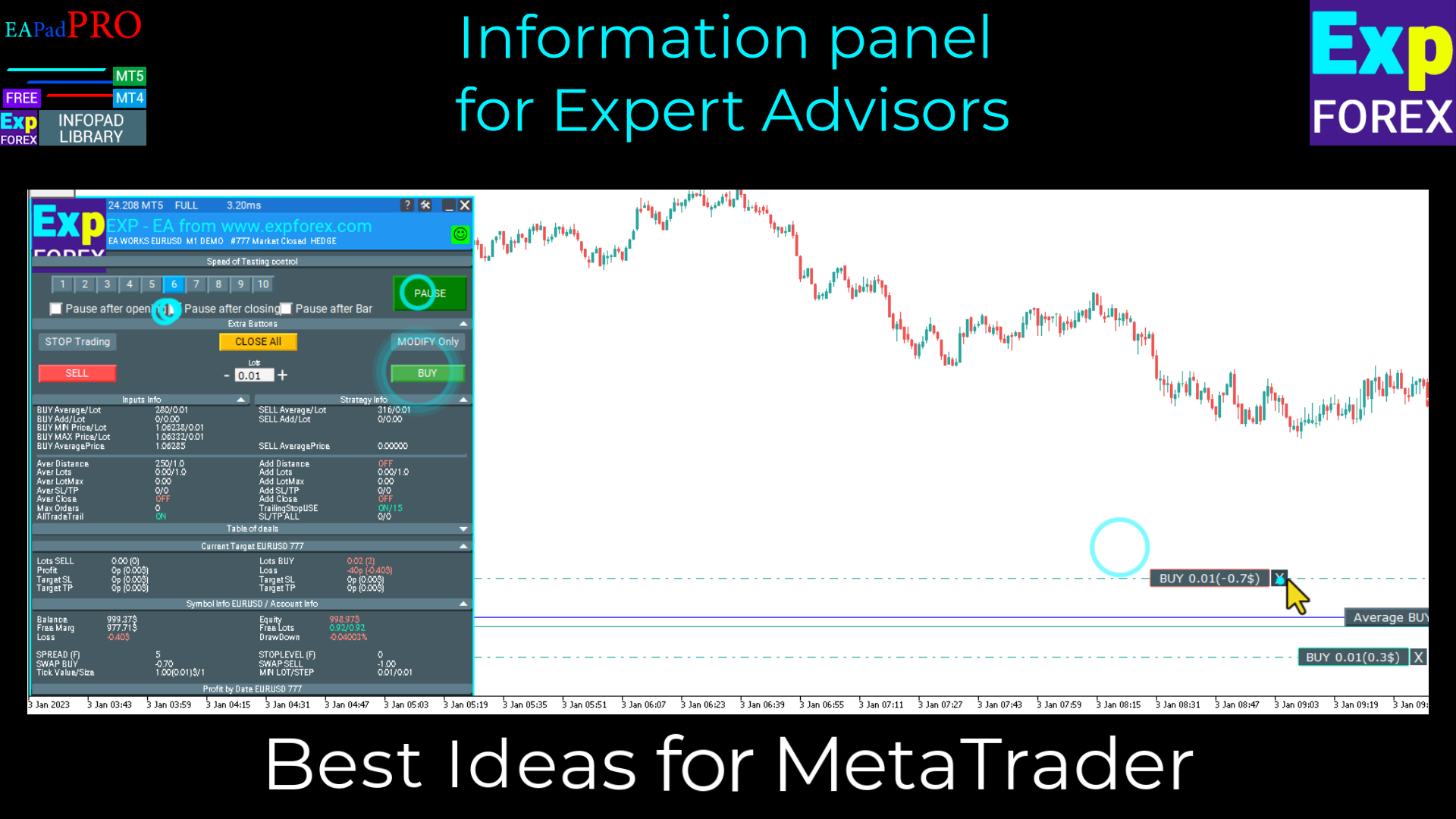
EAPADPRO Library for MetaTrader 5, Expert Advisor’ınıza modern bir bilgi paneli eklemek için kullanılan ücretsiz ve profesyonel bir arayüz kütüphanesidir.

Bu kütüphane, trading programlarını MetaTrader 5 grafiği üzerinde daha temiz, daha bilgilendirici ve daha profesyonel bir görsel sunuma taşımak isteyen MQL5 geliştiricileri için tasarlanmıştır.

MetaTrader 5 Expert Advisors genellikle daha karmaşık mantık, çok sayıda ayar, Magic number filtreleri, emir yürütme kuralları ve dahili strateji değerleri içerir. EAPADPRO bu bilgileri düzenli bir panelde sunarak kullanıcının programın mevcut durumunu daha hızlı ve daha net görmesine yardımcı olur.

MT5 için EAPADPRO ücretsiz bir kütüphanedir. Expert Advisor’ınızın arayüzünü, bilgi çıktısını ve görsel kalitesini geliştirmek için kullanabilirsiniz.

Tam adım adım entegrasyon rehberi: LIB - EAPADPRO adım adım kurulum talimatı

EAPADPRO panelinin detaylı açıklaması: EAPADPRO bilgi paneli

MetaTrader 4 sürümü: EAPADPRO Library for MT4

MQL5 Channel https://www.mql5.com/en/channels/expforex


MT5 Expert Advisors için profesyonel arayüz

EAPADPRO, sıfırdan tam bir panel sistemi yazmadan Expert Advisor’ınıza görsel bir bilgi dashboard’u eklemenizi sağlar.

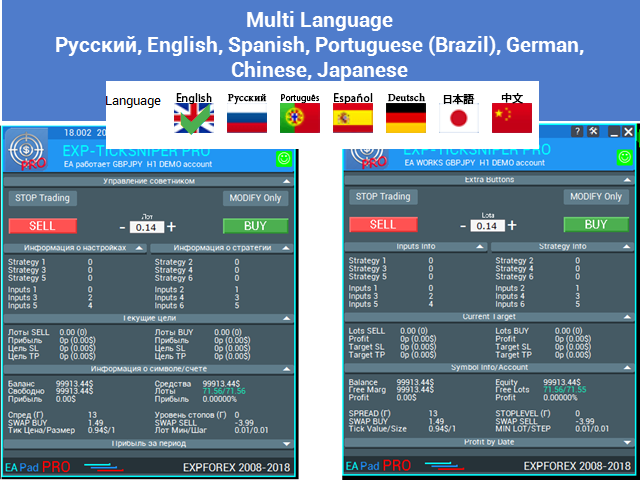
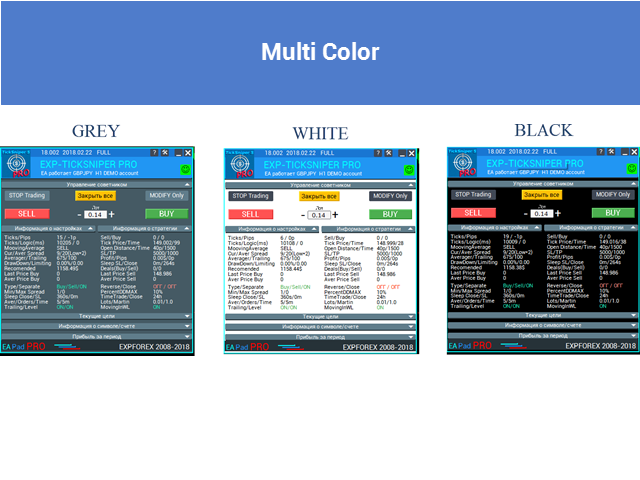
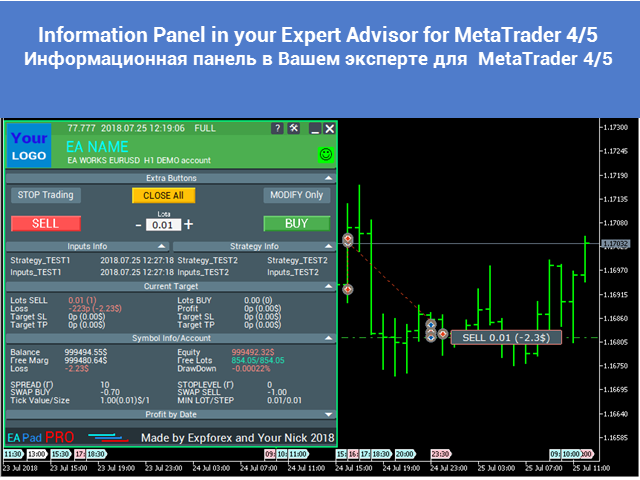
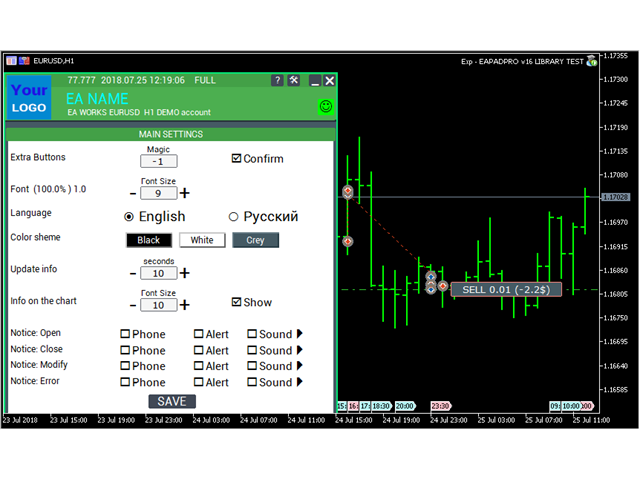
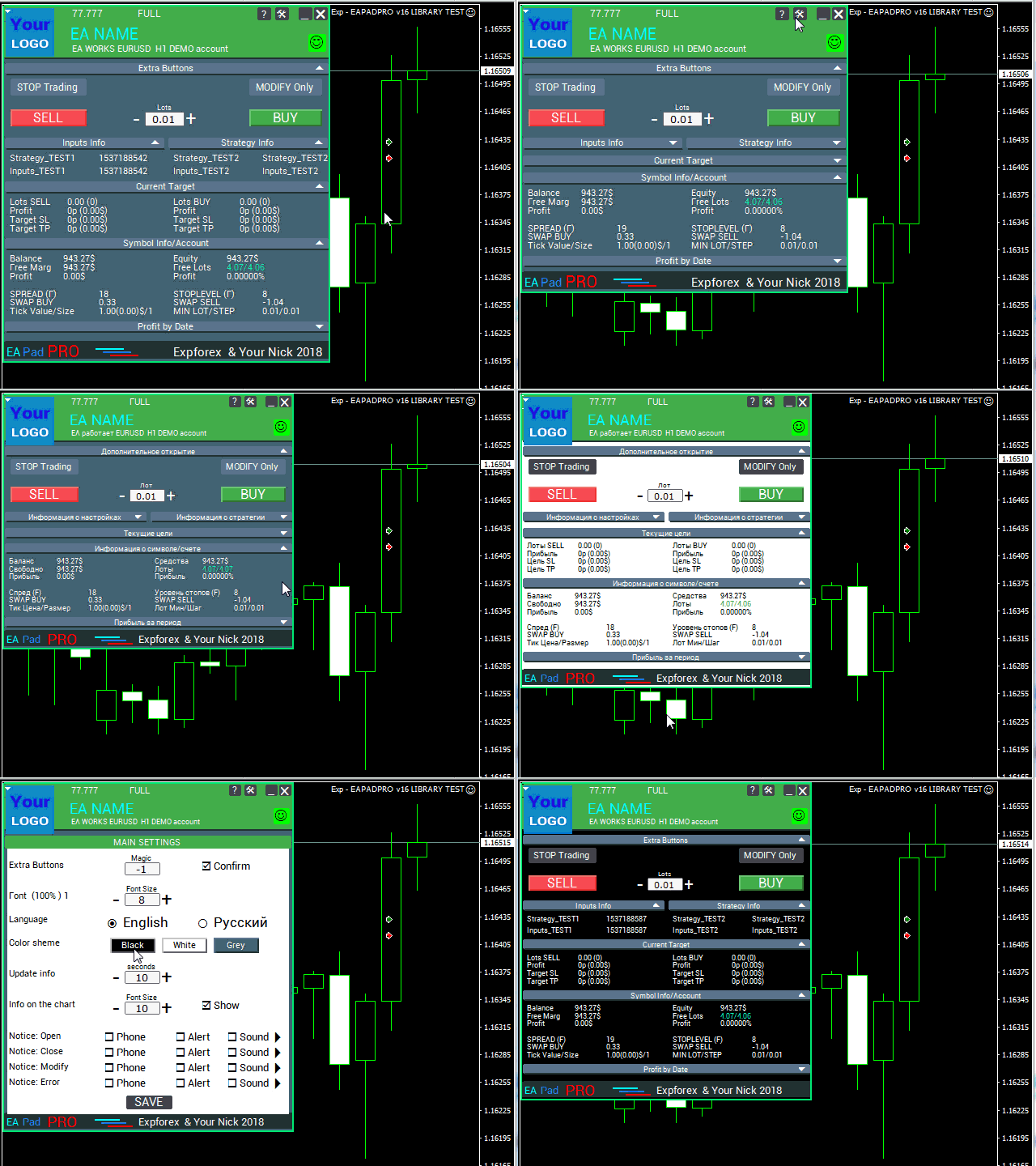
Panel; EA, mevcut sembol, hesap, strateji değerleri, Magic number mantığı, trading izinleri, bildirimler ve isteğe bağlı tek tıkla trading kontrol öğeleri hakkında önemli bilgileri gösterebilir.

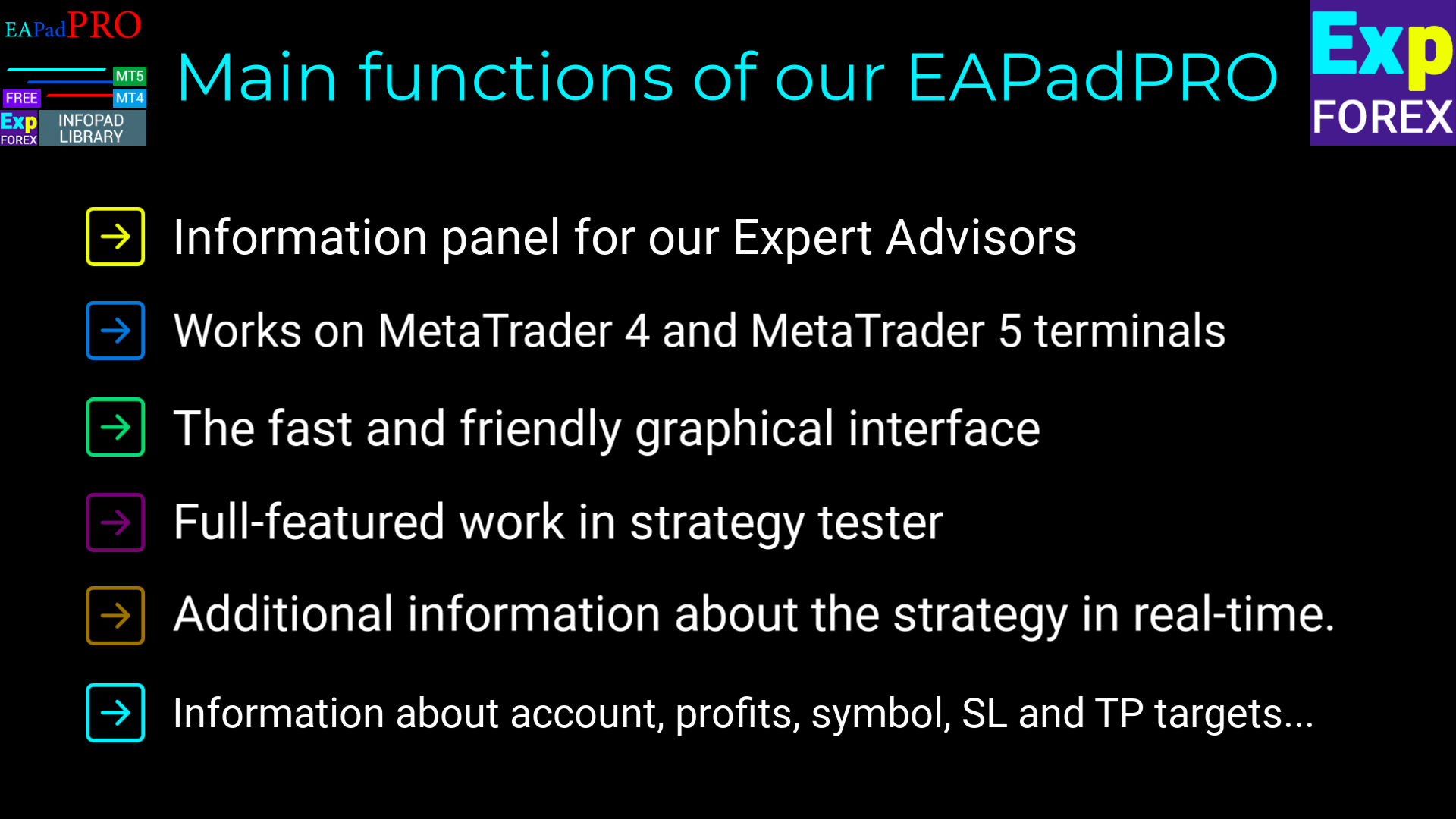
  • MetaTrader 5 grafiğinde doğrudan görüntülenen modern bilgi paneli;
  • Expert Advisor adı, sürüm, logo ve geliştirici bilgilerinin gösterimi;
  • Seçilen input parametreleri ve önemli strateji değerlerinin gösterimi;
  • Panel bilgilerinin Magic number’a göre filtrelenmesi;
  • MT5 emir yürütme tipi ayarları için destek;
  • Tek tıkla kontrol için isteğe bağlı BUY / SELL bloğu;
  • Daha fazla şeffaflık için bildirimler, loglar ve hata bilgileri;
  • Trading ürününüz için daha temiz ve profesyonel bir sunum.


Bu kütüphane neden faydalı?

Bir trading robotu güçlü bir mantığa sahip olabilir, ancak iyi bir arayüz olmadan kullanıcı Expert Advisor’ın tam olarak ne yaptığını her zaman anlayamayabilir.

EAPADPRO ile EA’nız temel bilgileri doğrudan grafikte gösterebilir. Bu, ürününüzü daha anlaşılır, desteklenmesi daha kolay ve net görsel geri bildirim isteyen kullanıcılar için daha cazip hale getirir.

Kütüphane trading sinyali sağlamaz ve strateji mantığınızı değiştirmez. MetaTrader 5 Expert Advisor’ınızın arayüzünü, bilgi gösterimini ve kullanıcı deneyimini geliştirmek için tasarlanmıştır.


Entegrasyon süreci

Entegrasyon süreci 10 pratik adımdan oluşur. Her adım ilgili talimatta ayrıntılı olarak açıklanmıştır.

  1. EAPADPRO kütüphanesini MQL5 Market üzerinden kurun;
  2. MetaTrader 5 Expert Advisor kaynak kodunuzu açın;
  3. Adım adım talimattaki örnek dosyayı açın;
  4. Gerekli kod bloklarını EA’nıza ekleyin;
  5. Başlatma, tick, trading event ve chart event fonksiyonlarını bağlayın;
  6. Paneli kendi ürününüze göre özelleştirin;
  7. Sonucu MetaTrader 5 içinde derleyin ve test edin.


EAPADPRO özelleştirme

Paneli kendi Expert Advisor’ınıza göre uyarlayabilirsiniz:

  1. versionea — panelde gösterilen Expert Advisor sürümü;
  2. BMPLOGO — panelde gösterilen 60x60 BMP logonuz;
  3. icon — terminal özelliklerinde gösterilen Expert Advisor ikonu;
  4. defEANAME — panelde gösterilen Expert Advisor adı;
  5. YourName — panelde gösterilen adınız veya takma adınız;
  6. copyright — Expert Advisor özelliklerinde gösterilen copyright bilgisi;
  7. CreateInputs — seçilen harici input değişkenlerini panelde göstermek için kullanılan fonksiyon;
  8. CreateStrategy — seçilen strateji değerlerini panelde göstermek için kullanılan fonksiyon;
  9. MagicForEaPadPRO — panel bilgilerinin Magic number’a göre filtrelenmesi;
  10. MagicForEaPadPRO_Open — panelden açılan pozisyonlara atanacak Magic number;
  11. CommentForEaPadPRO — panelden açılan pozisyonlara atanacak işlem yorumu;
  12. TypeFillingForEaPadPRO — MT5 trading işlemlerinde kullanılan emir yürütme tipi;
  13. ShowBuySell — tek tıkla BUY / SELL trading bloğunu gösterme veya gizleme seçeneği.

Ayrıca harici değişkenleri de yapılandırabilirsiniz:

  1. ShowEaPadPro — EAPADPRO panelini gösterir veya gizler;
  2. FontName — panelde kullanılan yazı tipi.


Kullanım koşulları

MetaTrader 5 için EAPADPRO bilgi paneli kütüphanesi ücretsiz olarak dağıtılır, ancak yazar bilgisinin belirtilmesi gerekir.

Bu kütüphaneyi yayınladığınız, sattığınız veya dağıttığınız bir Expert Advisor, gösterge veya başka bir trading ürününde kullanıyorsanız, ürün açıklamanıza lütfen aşağıdaki atıf bilgisini ekleyin:

  1. EAPADPRO bilgi paneli Expforex tarafından geliştirilmiştir.
  2. EAPADPRO panelinin tüm hakları Vladislav / Expforex’e aittir.
  3. EAPADPRO panelinin yazarı, bu paneli kullanan Expert Advisor, gösterge veya stratejiden sorumlu değildir.
  4. EAPADPRO paneli yalnızca MetaTrader içinde ek görsel ve trading bilgileri sağlamak amacıyla tasarlanmıştır.


Önemli not

EAPADPRO bir arayüz ve bilgi gösterim kütüphanesidir. Expert Advisor içinde ilgili kontrol fonksiyonlarını bağlayıp etkinleştirmediğiniz sürece kendi başına işlem açmaz.

Bu kütüphane kâr garantisi vermez, trading stratejinizin yerine geçmez ve trading sinyalleri sağlamaz.

MetaTrader 5 Expert Advisor’ınızı daha bilgilendirici, kullanıcı için daha anlaşılır ve daha profesyonel hale getirmek için EAPADPRO kullanabilirsiniz.

Değerlendirmeler 11
Benjamin Afedzie
3943
Benjamin Afedzie 2025.07.02 22:08 
 

great product

Seth Tetteh
2587
Seth Tetteh 2024.04.25 12:47 
 

not bad

Nepomnjashchy
78
Nepomnjashchy 2023.12.16 02:08 
 

Пока все классно. тестируют

Önerilen ürünler
UZFX - MetaTrader 5 (MT5) için Sadece Bekleyen Emirleri Sil komut dosyası, bekleyen tüm emirleri (Alış Limiti, Satış Limiti, Alış Durdurma, Satış Durdurma) işlem hesabından otomatik olarak kaldıran basit ama etkili bir araçtır. Bu komut dosyası, aktif piyasa pozisyonlarını etkilemeden bekleyen emirlerini anında temizlemek isteyen tüccarlar için idealdir. Diğer tüm MT4 / MT5 göstergelerime ve EA'larıma göz atın >> BURAYA Özellikler: Bekleyen tüm emirleri siler (Alış Limiti, Satış Limiti, Alış
FREE
UZFX - Grafikteki Tüm Çizim ve Nesneleri Anında Sil, tüm çizim nesnelerini aktif grafikten anında kaldırmak için tasarlanmış basit ama güçlü bir MetaTrader 5 (MT5) komut dosyasıdır. Bu komut dosyası, grafiklerini teknik analiz çizimlerinden, trend çizgilerinden, Fibonacci araçlarından, metin etiketlerinden ve diğer nesnelerden tek tek manuel olarak silmeden hızlı bir şekilde temizlemesi gereken tüccarlar için kullanışlıdır. Özellikler: Aktif grafikteki tüm nesneleri ve çizimleri siler. Tek b
FREE
UZFX - MetaTrader 5 (MT5) için Tüm Açık Alış ve Satış Emirlerini Anında Kapat komut dosyası, yatırımcıların tüm aktif piyasa pozisyonlarını tek bir işlemle hemen kapatmalarını sağlayan güçlü bir araçtır. Bu komut dosyası, acil ticaret yönetimi için idealdir ve yatırımcıların yüksek volatilite, haber olayları veya strateji ayarlamaları sırasında piyasadan hızla çıkmalarına yardımcı olur. Özellikler Tüm sembollerdeki tüm açık Alış ve Satış pozisyonlarını kapatır. Doğru uygulama için en son Alış
FREE
Trading Notes   is an innovative tool designed for traders to streamline their decision-making process by allowing them to write and display important reminders or short details directly over their trading charts. This essential feature ensures that traders have quick access to their personalized checklist before opening any positions, enhancing their trading efficiency and accuracy. MT4 Version -  https://www.mql5.com/en/market/product/120613 Join To Learn Market Depth -  https://www.mql5.co
FREE
UZFX - MetaTrader 5 (MT5) için Marjin Gerekli ve Maksimum Lot Büyüklüğü komut dosyası, yatırımcıların 1 lotluk bir pozisyon açmak için gereken marjini hızlı bir şekilde belirlemelerine ve mevcut hesap özkaynaklarına göre işlem yapabilecekleri maksimum lot büyüklüğünü hesaplamalarına yardımcı olmak için tasarlanmıştır. Bu araç, risk yönetimi ve pozisyon boyutlandırma için gereklidir ve yatırımcıların işlemlerini verimli bir şekilde planlamalarına olanak tanır. Özellikler: Seçilen sembol üzeri
FREE
MarketPro toolkit
Johannes Hermanus Cilliers
Start earning profits by copying All trades are sent by our successful Forex trader & are extremely profitable. You can earn profits by copying trades daily Trial Period included You'll also get access to extremely powerful trading education which is designed in a simple way for you to become a profitable trader, even if you have no trading experience. https://ec137gsj1wp5tp7dbjkdkxfr4x.hop.clickbank.net/?cbpage=vip
FREE
NATS (Niguru Automatic Trailing Stop) will help you achieve more profits, by setting the trailing stop automatically. Pair this NATS application with EA, or can also be used as a complement to manual trading. A trailing stop is a powerful tool in trading that combines risk management and profit optimization.  A trailing stop is a type of market order that sets a stop-loss at a percentage below the market price of an asset, rather than a fixed number. It dynamically adjusts as the asset’s pric
FREE
INTRODUCING MML Data Bridge The demand for bridging external data and machine learning with trading platforms is higher than ever. MetaTrader 5 is a powerful environment for trading and back testing, but without a data bridge, MT5 is largely isolated from using any external data. MML Bridge is a developer tool that allows users to bridge external data into MT5 for back testing, live trading, and optimization. It's built for ease of use, providing users with a simple function API that drip-feeds
FREE
Simple program i created, to help close all your orders instantly when you are busy scalping the market or if you want to avoid news days but still have a lot of orders and pending orders open and can't close them in time.. with this script all you're problems will be solved. Simple drag and drop and the script automatically does it's thing, quick and easy  also a very good tool to use when scalping
FREE
This simple logging library is designed to provide clear and contextual log output with minimal hassle. It exposes five  methods: LogError Message (message) LogWarn Message (message) LogInfo Message (message) LogDebug Message (message) LogTrace Message (message) Each method prints the provided message to the console only if the severity level meets or exceeds the current threshold set by a global variable logLevel. This means you control the verbosity of your application's logs by adjusting logL
FREE
Overview AlgoNLP.mqh   is a standalone MQL5 library that converts   human-written trading instructions   into   structured trade intents   that your Expert Advisor (EA) or indicator can understand. Example input: Buy gold at 2370 with TP 0.3% and SL 1% Output intent: Side: BUY | Type: LIMIT | Symbol: XAUUSD | Entry: 2370 | TP: 0.3% | SL: 1% | Lot: 0.00 This enables you to build   chat-controlled   or   Telegram-integrated EAs   that can interpret plain English commands and execute structured
FREE
MetaTrader 5 (MT5) için UZFX - Set Stop Loss to Breakeven Instantly komut dosyası, yatırımcıların tüm açık pozisyonların stop loss'unu hızlı bir şekilde giriş fiyatlarına taşımalarına ve risksiz işlemleri güvence altına almalarına olanak tanıyan güçlü bir araçtır. Bu komut dosyası, aktif işlemleri verimli bir şekilde yönetmek için özellikle yararlıdır ve bir pozisyon olumlu yönde hareket ettiğinde, tüccarın potansiyel kayıplardan korunmasını sağlar. (Profili Ziyaret Edin ve Diğer Tüm MT4 / MT
FREE
Next Arrival : Flip or Die Trading Arena. Flip a trading account:  https://flipordie.com/chapter-1-thirteen-doublings-double-a-trading-account/ https://trenddaytrader.com/smc-ct5f-xauusd-free-gold-trading-robot/ sample  .set file for XAUUSD 5 Minute  is in the comment section. SMC CT5F XAUUSD   is a fully automated   Smart Money Concept (SMC) execution framework   engineered specifically for   Gold( XAUUSD ) . It is not a signal copier, not an indicator, and not a position manager — it is a   r
FREE
The Amazing Chart Manager is a lightweight solution that allows you to restore and preserve your preferred chart colours and settings cluttered by the dirty EAs. Simply drop it on any chart to instantly apply and keep your chosen theme and configuration. Zero indicator buffers. No tick processing. Colours are resolved once on load. 7 THEMES - T.View — TradingView's dark blue with teal and red candles - Black — pure black OLED-friendly with deep green and red - Dim — soft dark theme with mute
FREE
Gives you a trading environment where you can do forward testing without the use of a live trading account. You will be able to trade the same Market without having to wait for the next day, but by just fast forwarding  on the strategy tester and going straight to that session. You can trade it over and over again without having to just look at the charts and have a bias analysis when  back testing on a chart that is not moving
FREE
Exact Time — detailed time on the seconds chart. The utility shows the opening time of the selected candle. This is necessary when working with seconds charts. For example, it can be used on a seconds chart built using the Seconds Chart utility. Inputs Base corner — the chart corner to which an object Is attached. X distance — the horizontal distance from the chart corner. Y distance — the vertical distance from the chart corner. Text font — font name Font size — font size Color — text color
FREE
IMPORTANT NOTE: This is a professional Trade Management Utility and on-chart assistant. It is NOT an automated trading robot. It does not open trades on its own. The UltraFast Trade Manager MT5 is the ultimate execution and risk-management suite designed to give you absolute control over your manual and algorithmic trades. When managing multiple positions, calculating complex net break-even points, or constantly monitoring the economic calendar, hesitation can lead to costly mistakes. This utili
FREE
MACD Colored ZeroLag
Farzin Sadeghi Bonjar
4.73 (11)
It is the MQL5 version of zero lag MACD that was available for MT4 here: https://www.mql5.com/en/code/9993 Also there was a colored version of it here but it had some problems: https://www.mql5.com/en/code/8703 I fixed the MT4 version which has 95 lines of code. It took me 5 days to write the MT5 version.(reading the logs and testing multiple times and finding out the difference of MT5 and MT4!) My first MQL5 version of this indicator had 400 lines of code but I optimized my own code again and n
FREE
Click Trading
Jawad Tauheed
5 (2)
One Click Trading – Auto TP SL Developer TraderLinkz Version 1.00 Category Utility What it does Adds missing TP and SL to your manual trades and pending orders Sets them once per ticket Lets you move TP and SL afterward Works on hedging and netting accounts Scans on every tick and reacts on trade events Why you want it You place faster entries You get consistent risk and exit targets You reduce fat finger errors You keep full manual control Quick start Attach the EA to any chart Keep TP and SL e
FREE
EV Adaptative Stack Trader
Enrique Valeros Muriana
5 (2)
RSI Weighted Scaler Pro 2.8 is a controlled multi-entry trading system designed to exploit RSI-based reversal and exhaustion points with stable, fixed-lot scaling. The EA adds positions only when market conditions remain favorable, without increasing lot sizes or applying aggressive risk models. The strategy uses RSI overbought and oversold levels to generate high-probability entry zones. Traders can enable new-bar confirmation to reduce noise and limit entries using a configurable maximum numbe
FREE
PZ Goldfinch Scalper EA MT5
PZ TRADING SLU
3.34 (56)
This is the latest iteration of my famous scalper, Goldfinch EA, published for the first time almost a decade ago. It scalps the market on sudden volatility expansions that take place in short periods of time: it assumes and tries to capitalize of inertia in price movement after a sudden price acceleration. This new version has been simplified to allow the trader use the optimization feature of the tester easily to find the best trading parameters. [ Installation Guide | Update Guide | Troublesh
FREE
Indicator measures strength of each currency in your list. Main idea: It simply iterates through all combinations of pairs and adds difference between open and close in percent. Parameters: List of currencies - what currencies will be calculated (maximum is 8) Calculation type - from which data will be strength calculated Calculation data input - used as input related to calculation type Symbol suffix - used in case of suffix on symbols, e.g: when your symbols look like EURUSDm, EURUSDmicro etc
FREE
The XU_H4_910440109_S_PS_CF_SQX is an algorithmic trading strategy for MetaTrader, tested on XAUUSD (Gold) using the H4 timeframe from April 1, 2004, to April 24, 2024.  There is no need to set up parameters, all settings are already optimized and fine-tuned. Recommended broker  RoboForex  because of EET timezone. You can find the strategy source code for StrategyQuant at the link:   https://quantmonitor.net/gold-bulls-power-trader/ Key details are: Parameters MagicNumber: 910440109 Main Ch
FREE
Go Long Advanced
Phantom Trading Inc.
4.78 (9)
Go Long EA, çoklu teknik onaylarla sistematik günlük ticaret prensibine dayalı gelişmiş bir gün içi ticaret stratejisi uygular. Birçok trader karmaşık algoritmalar ararken, bu EA basit ama etkili konseptleri sofistike risk yönetimi ve çoklu teknik filtrelerle birleştirir. EA her gün belirli bir saatte pozisyon açar, ancak sadece piyasa koşulları çoklu teknik göstergelerle uyumlu olduğunda işlem yapar. Bu sistematik yaklaşım, kârları aşındırabilecek gecelik tutma maliyetlerinden kaçınırken gün
FREE
Trading panel for manual trading. Has a fairly wide functionality. Allows you to automatically calculate the order size, open both market and pending orders. It has a wide range of options for closing orders, it is possible to partially close orders, close orders after reaching a certain profit or loss, separately close profitable and unprofitable, buy and sell, as well as pending orders. The panel also contains a simple implementation of a grid of pending orders, reverse and lock functions, tr
FREE
This tool allows you to export Ticks for any financial instrument available in MetaTrader 5. You can download multiple symbols into the same CSV file. You can also schedule the download frequency (every 5 minutes, 60 minutes, etc.). There is no need to open multiple charts to get the latest data—the tool downloads the data directly. The CSV file will be stored in the following folder: \MQL5\Files . How it works Select the symbols to download: Click an item to select or deselect it. Enter the CSV
FREE
TrendEA FourAverage
Mikhail Sergeev
3 (2)
Trend uzmanı, «FourAverage» göstergesi için en uygun parametreleri bulmak için özel olarak oluşturulmuştur. Danışman her zaman işlem modunda işlem yapar (satın alma işlemini kapatarak hemen tersini açarız). Bu yaklaşım, göstergelerin eğilimi belirleme yeteneğini mümkün olduğunca doğru bir şekilde belirlemenizi sağlar. Uzman tamamen otomatiktir ve parayı Martingale yöntemine göre yönetme yeteneğine sahiptir. Varsayılan ayarlar «XAUUSD(GOLD) H1» içindir. Gösterge: hhttps://www.mql5.com/tr/market/
FREE
Universal MarketInfo Service Library for MT4 & MT5 Bring simplicity and power to your trading projects with the Universal MarketInfo Service — a professional library that exposes a unified API for both MetaTrader 4 and MetaTrader 5. No more rewriting code for each platform. With this library, you can: Access symbol data, OHLC prices, spreads, and volatility with a single call. Query account balance, free margin, stop levels, and lot constraints. Work with currency precision, pip values, and n
FREE
What is SMC Market Structure Pro? SMC Market Structure Pro is an automated trading Expert Advisor for MetaTrader 5 , developed based on Smart Money Concept (SMC) and market structure analysis . The EA is designed to help traders follow the natural flow of the market , focusing on price structure instead of indicators or lagging signals. How Does the EA Work? The EA analyzes market structure changes using pure price action: Detects higher highs & higher lows for bullish structure Detects l
FREE
Risk Manager – Account Protection Tool Risk Manager is an Expert Advisor for MetaTrader 5 designed to protect your trading account by applying automatic risk management rules. This tool does not open trades . It continuously monitors your account and enforces predefined limits to help prevent excessive losses and maintain disciplined trading. Risk Manager works in the background and can manage positions opened by manual trading or other Expert Advisors. It is particularly useful for: • Manual tr
FREE
Bu ürünün alıcıları ayrıca şunları da satın alıyor
WalkForwardOptimizer MT5
Stanislav Korotky
3.78 (9)
WalkForwardOptimizer library allows you to perform rolling and cluster walk-forward optimization of expert advisers (EA) in MetaTrader 5. To use the library include its header file WalkForwardOptimizer.mqh into your EA source code, add call provided functions as appropriate. Once the library is embedded into EA, you may start optimization according to the procedure described in the User guide . When it's finished, intermediate results are saved into a CSV file and some special global variables.
<h2>MetaTrader 5 için ModernUI Kütüphanesi</h2> <p>ModernUI, MetaTrader 5 grafik ortamında çalışan bir kullanıcı arayüzü kütüphanesidir. MQL5 geliştiricilerinin MT5 grafik ortamı içinde daha düzenli EA panelleri, dashboardlar, ayar pencereleri, formlar, tablolar, diyaloglar, drawer panelleri ve kompakt trading tarzı arayüzler oluşturmasına yardımcı olur.</p> <p>Dağınık grafik objeleri yerine daha profesyonel bir arayüz katmanı isteyen, ancak kendi EA, indikatör veya yardımcı araç mantığı üzeri
If you just want to simply copy your positions and orders from MetaTrader to Binance use the Binance Copier If you're a developer looking to use Binance.com and Binance.us exchanges directly from your MetaTrader 5 terminal, you'll want to check out Binance Library MetaTrader 5. This powerful tool allows you to trade all asset classes on both exchanges, including Spot, USD-M   and COIN-M futures, and includes all the necessary functions for trading activity. Important: you need to have source c
Native Websocket
Racheal Samson
5 (6)
An   easy to use, fast,  asynchronous   WebSocket library  for MQL5. It supports: ws://   and   wss://  (Secure "TLS" WebSocket) text   and   binary   data It handles: fragmented message  automatically (large data transfer) ping-pong   frames  automatically (keep-alive handshake) Benefits: No DLL required. No OpenSSL installation required. Up to 128 Web Socket Connections from a single program. Various Log Levels for error tracing Can be synchronized to MQL5 Virtual Hosting . Completely native t
After downloading this service program, it will be used as a service support program for Dom BookHeatMAP Lightning Trading Panel. Dom BookHeatMAP Lightning Trading Panel   download link: https://www.mql5.com/zh/market/product/159414?source=Site+Market+MT5+Search+Rating006%3aDom+BookHeatMAP+Lightning+Trading+Panel Please first drag and drop the downloaded file to the corresponding service folder (` MQL5 \ Services `) in the MT5 data directory, and confirm that the file has been successfully pla
Bu kütüphane, herhangi bir EA'nızı kullanarak işlemleri yönetmenize izin verecektir ve açıklamalarda belirtilen komut dosyası koduyla ve ayrıca tüm süreci gösteren videodaki demo örnekleriyle kendi başınıza yapabileceğiniz herhangi bir EA'ya entegrasyonu çok kolaydır. - Limit Ver, SL Limit Ver ve Kar Al Limit Emirleri - Market, SL-Market, TP-Market siparişlerini verin - Limit emrini değiştirin - Siparişi iptal et - Siparişleri Sorgula - Kaldıraç, marjı değiştir - Pozisyon bilgisini al ve
Want to get all events like Previous/Forecast/Actual values for each news to analyze/predict it? By this simple library you can do it easily,Just import/integrate the library into your system,then get all possible values for each news   Even In Strategy Tester   . Note: Please add the address " https://www.forexfactory.com/ " of news feed at your MT5 tab > Tools > Options > Expert Advisors > Check Allow web request for listed URL. Since the WebRequest() function can't be called from indicator ba
Here   is   the   English translation   of   your   description   for   the EA   (Expert   Advisor): --- This   is a   time -based   automatic trading   EA . It allows   you   to   set the   exact   time   for trading , down   to   the   second , and   specify the   maximum number   of   orders . You   can choose   to   place   either   buy   or   sell   orders . It   is possible to   set take   profit and   stop   loss   points . Additionally , you can   specify   how   long after   placing  
The library is dedicated to help manage your trades, calculate lot, trailing, partial close and other functions. Lot Calculation Mode 0: Fixed Lot. Mode 1: Martingale Lot (1,3,5,8,13) you can use it in different way calculate when loss=1 ,when profit=0. Mode 2: Multiplier Lot (1,2,4,8,16) you can use it in different way calculate when loss=1 ,when profit=0. Mode 3: Plus Lot (1,2,3,4,5) you can use it in different way calculate when loss=1 ,when profit=0. Mode 4: SL/Risk Lot calculate based on s
Friends, join us! Ask questions and connect with like-minded traders: MetaCOT Public Group MetaCOT Information Channel: news, CFTC reports, and signals: MetaCOT Channel Here’s to successful trading and new profitable signals for us all! Attention! Recently, certain countries have been blocking access to the cftc.gov website. As a result, users in these countries are giving the product low ratings. MetaCOT has always adhered to the highest quality standards and is in no way associated with th
This is a simplified and effective version of the library for walk forward analysis of trading experts. It collects data about the expert's trade during the optimization process in the MetaTrader tester and stores them in intermediate files in the "MQL5\Files" directory. Then it uses these files to automatically build a cluster walk forward report and rolling walk forward reports that refine it (all of them in one HTML file). Using the WalkForwardBuilder MT5 auxiliary script allows building othe
Order Book, known also as Market Book, market depth, Level 2, - is a dynamically updated table with current volumes of orders to buy and to sell specific financial instument at price levels near Bid and Ask. MetaTrader 5 provides the means for receiving market book from your broker, but in real time only, without access to its history. The library OrderBook History Library reads market book state in the past from archive files, created by OrderBook Recorder . The library can be embedded into you
Cryptocurrency analysis has never been easier with Crypto Charts for MetaTrader 5. Now, trading on BitMEX has never been easier with BitMEX Trading API for MetaTrader 5. BitMEX Trading API library was built to be as easy to use as possible. Just include the library into your Expert Advisor or Script, call the corresponding methods and start trading! Features Trade on BitMEX and BitMEX Testnet. Build and automate your strategies. Concern more with the trading strategy logic and less with the co
Teclado trader, é uma BIBLIOTECA que você pode chamar no OnChartEvent para abrir posição de compra/venda/zerar, os botões padrões são: V = venda C = compra Z = zerar posições a mercado S = zerar posições opostas e depois a mercado X = zerar posições opostas Além da função de teclado, é possível mostrar os estados do ExpertAdvisor usando o MagicId, com informação de: lucro mensal, semanal, diario, e posição aberta, para isto use o OnTick, ou qualquer outro evento (OnTimer / OnTrade / OnBookEven
Goliath Mt5
Nicolokondwani Biscaldi
Goliath MT5 - scalper fully automated Expert Advisor for medium-volatile forex markets P roperties: The Library trades 10 currency pairs (USDCHF, EURCHF, EURGBP, AUDUSD, USDCAD, GBPUSD, EURUSD, NZDUSD, CADCHF, EURAUD, EURCAD, AUDJPY) The Library does not use martingale The Library sets a fixed stop loss and take profit for all orders The Library only trades a user input volume The Library can be installed on any currency pair and any timeframe Recommendations: Before using on a real account, t
Binance Library
Hadil Mutaqin SE
5 (1)
The library is used to develop automatic trading on Binance Spot Market from MT5 platform. Support all order types: Limit, Market, StopLimit and StopMarket Support Testnet mode Automatically display the chart on the screen Usage: 1. Open MQL5 demo account 2. Download Header   file and EA sample   https://drive.google.com/uc?export=download&id=1kjUX7Hyy02EiwTLgVi8qdaCNvNzazjln Copy Binance.mqh to folder \MQL5\Include Copy  BinanceEA-Sample.mq5 to folder \MQL5\Experts 3. Allow WebRequest from MT5
Gold plucking machine   Gold plucking machine is an Expert Advisor designed specifically for trading gold. The operation is based on opening orders using the Fast and Slow lines indicator, thus the EA works according to the "Trend Follow" strategy, which means following the trend. Use grid strategy to place orders without stop loss operation, so please make sure the account has sufficient funds. magic number      -  is a special number that the EA assigns to its orders. Lot Multiplier        - 
The library is used to develop automatic trading on Binance Futures Market from MT5 platform. Support Binance Futures USD-M and COIN-M Support Testnet mode Support all order types: Limit, Market, StopLimit, StopMarket, StopLoss and TakeProfit Automatically display the chart on the screen Usage: 1. Open MQL5 demo account 2. Download Header file and EA sample https://drive.google.com/uc?export=download&id=17fWrZFeMZoSvH9-2iv4WDJhcyxG2eW17 Copy BinanceFutures.mqh to folder \MQL5\Include Copy  Bina
MT4/5通用交易库(  一份代码通用4和5 ) #ifdef __MQL5__      #define KOD_TICKET ulong      #define KOD_MAGIC   long #else        #define KOD_TICKET long      #define KOD_MAGIC   int #endif class ODLIST; #import "K Trade Lib Pro 5.ex5"       //祝有个美好开始,运行首行加入    void StartGood() ;    //简单开单    long OrderOpen( int type, double volume, int magic, string symbol= "" , string comment= "" , double opprice= 0 , double sl= 0 , double tp= 0 , int expiration= 0 , bool slsetmode= false , bool tpsetmode= false );    //复杂开单
1. What is this The MT5 system comes with very few optimization results. Sometimes we need to study more results. This library allows you to output more results during backtest optimization. It also supports printing more strategy results in a single backtest. 2. Product Features The results of the optimized output are quite numerous. CustomMax can be customized. The output is in the Common folder. It is automatically named according to the name of the EA, and the name of the same EA will be au
T5L Library is necessary to use the EAs from TSU Investimentos, IAtrader and others. It contains all the functions framework needed to Expert Advisors working properly.  ツ - The Expert Advisors from  TSU Investimentos does not work without this library,  the T5L library can have updates during the year - At this Library you will find several funcionalities like order sends, buy and sell, trigger entry points check, candlestick analyses, supply and demmand marking and lines, and much more. 
AO Core
Andrey Dik
3.67 (3)
AO Core is the core of the optimization algorithm, it is a library built on the author's HMA (hybrid metaheuristic algorithm) algorithm. Pay attention to the MT5 Optimization Booster product , which makes it very easy to manage the regular MT5 optimizer . An example of using AO Core is described in the article: https://www.mql5.com/ru/articles/14183 https://www.mql5.com/en/blogs/post/756510 This hybrid algorithm is based on a genetic algorithm and contains the best qualities and properties of p
EA Toolkit
Esteban Thevenon
EA Toolkit   is a library that allows any developer to quickly and easily program Advisor experts. It includes many functions and enumerations such as trailing stop, lot, stop loss management, market trading authorisations, price table updates, trading conditions and many more. Installation + Documentation : You will find all the information to install this library and the documentation of its functions on this GitHub : https://github.com/Venon282/Expert-Advisor-Toolkit WARNING : The installat
A Simple Moving Average (SMA) is a statistical indicator used in time series analysis. This indicator represents the arithmetic mean of a sequence of values over a specific period of time. SMA is used to smooth short-term fluctuations in data, helping to highlight the overall trend or direction of changes. This aids analysts and traders in better understanding the general dynamics of the time series and identifying potential trends or changes in direction.  More information you can find in Wiki 
Hello everyone! I am a professional MQL programmer , Making EAs, Indicators and Trading Tools for my clients all over the world. I build 3-7 programs every week but I seldomly sell any ready-made Robots. Because I am fastidious and good strategy is so few...  this EA is the only one so far I think its good enough to be published here.  As we all know, the Ichimoku indicator has become world popular for decades, but still, only few people knows the right way of using it, and if we check the clo
Applying these methods, I managed to arrive at a nuanced conclusion that is crucial to understanding the importance of unique strategies in contemporary trading. Although the neural network advisor showed impressive efficiency in the initial stages, it proved to be highly unstable in the long run. Various factors such as market fluctuations, trend changes, external events, etc. cause its operation to be chaotic and eventually lead to instability. With these experiences, I accepted the challenge
Introducing "TG Risk Service Manager" — your comprehensive toolkit for swift and precise risk management and lot size calculations in the dynamic world of trading. Designed to streamline development processes and enhance trading strategies, this indispensable library equips developers with essential tools for optimizing risk assessment and trade profitability. Metatrader4 Version |  All Products  |  Contact   Key Features: Efficient Lot Size Calculation : Harness the power of precise lot size c
Introducing "TG Trade Service Manager" — your all-in-one solution for seamless trade management in both MQL4 and MQL5 environments. With a focus on speed, reliability, and convenience, this powerful library simplifies the complexities of trade execution and management, empowering developers with a single interface for enhanced efficiency. Metatrader4 Version   |   All Products   |   Contact   Key Features: Unified Interface : TG Trade Service Manager" provides a unified interface for   MQL4   an
The following library is proposed as a means of being able to use the OpenAI API directly on the metatrader, in the simplest way possible. For more on the library's capabilities, read the following article: https://www.mql5.com/en/blogs/post/756098 The files needed to use the library can be found here: Manual IMPORTANT: To use the EA you must add the following URL to allow you to access the OpenAI API as shown in the attached images In order to use the library, you must include the following Hea
This trailing stop application will helping trader to set the trailing stop value for many open positions, that apply a grid or martingale strategy as a solution. So if you apply a grid or martingale strategy (either using an EA or trading manually), and you don't have an application to set a trailing stop, then this application is the solution. For EAs with a single shot strategy, just use the FREE trailing stop application which I have also shared on this forum.
Yazarın diğer ürünleri
Exp COPYLOT CLIENT for MT5
Vladislav Andruschenko
3.91 (33)
MetaTrader 5 için profesyonel işlem kopyalayıcı MetaTrader için hızlı, profesyonel ve güvenilir bir işlem kopyalayıcı . COPYLOT , MT4 ve MT5 terminalleri arasında Forex işlemlerini kopyalamanıza olanak tanır ve Hedge ile Netting hesaplarını destekler. COPYLOT MT5 sürümü şunları destekler: - MT5 Hedge → MT5 Hedge - MT5 Hedge → MT5 Netting - MT5 Netting → MT5 Hedge - MT5 Netting → MT5 Netting - MT4 → MT5 Hedge - MT4 → MT5 Netting MT4 sürümü Tam açıklama + DEMO + PDF Nasıl satın alınır Nasıl kurul
Exp5 AI Sniper for MT5
Vladislav Andruschenko
2 (3)
AI Sniper for MetaTrader 5 — hassasiyet için tasarlanmış akıllı işlem robotu AI Sniper , MetaTrader 5 için geliştirilmiş güçlü ve akıllı bir işlem robotudur; sıradan bir Expert Advisor’dan çok daha fazlasını bekleyen traderlar için tasarlanmıştır. Gelişmiş piyasa mantığını, uyarlanabilir işlem davranışını ve hassas giriş zamanlamasını bir araya getirerek, dinamik ve volatil piyasalarda yüksek olasılıklı BUY ve SELL fırsatlarını belirlemeye yardımcı olur. AI Sniper , piyasayı gerçek zamanlı anali
Exp TickSniper PRO FULL
Vladislav Andruschenko
3.95 (57)
TickSniper for MetaTrader 5 — otomatik parametre uyarlamasına sahip yüksek hızlı tick scalper Karmaşık manuel ayarlar gerektirmeden, mevcut işlem enstrümanına göre kendi çalışma mantığını otomatik olarak uyarlayan tamamen otomatik bir Expert Advisor. TickSniper for MetaTrader 5, her döviz çifti için onlarca ayarı manuel olarak optimize etmek istemeyen ve hızlı, akıllı, neredeyse kullanıma hazır bir sistem arayan yatırımcılar için tasarlanmıştır. Expert Advisor; fiyat akışını, tick geliş hızını,
VirtualTradePad PRO SE MT4 — MetaTrader 4 için gelişmiş işlem paneli ve grafik çalışma alanı VirtualTradePad PRO SE , MetaTrader 4 için profesyonel bir işlem paneli ve trade yönetim çalışma alanıdır. Traderların işlemleri tek bir grafik tabanlı arayüzden daha hızlı açmasına, yönetmesine, korumasına, kapatmasına ve analiz etmesine yardımcı olur. Ürün, basit bir buton setinden daha fazlasına ihtiyaç duyan aktif manuel traderlar için oluşturulmuştur. PRO SE; tek tıkla emir yürütme, bekleyen emirler
Exp COPYLOT CLIENT for MT4
Vladislav Andruschenko
4.69 (65)
MetaTrader 4 için profesyonel işlem kopyalayıcı MetaTrader 4 için hızlı, güvenilir ve profesyonel bir işlem kopyalayıcı. COPYLOT , MetaTrader 4 ve MetaTrader 5 terminalleri arasında Forex işlemlerinin kopyalanmasını sağlar ve farklı hesap türleri ile işlem senaryoları için esnek senkronizasyon sunar. COPYLOT MT4 sürümü şunları destekler: MetaTrader 4 → MetaTrader 4 MetaTrader 5 Hedge → MetaTrader 4 MetaTrader 5 Netting → MetaTrader 4   MT5 sürümü Tam açıklama + DEMO + PDF Nasıl satın alınır Nası
Exp THE X FULL
Vladislav Andruschenko
4.79 (28)
Standart göstergeler üzerinde çalışan MetaTrader 5 için evrensel otomatik Uzman Danışman. EvrenselEA Constructor EA, geniş bir işlev seti ile sağlanır. Bir pozisyon açmak için 20 sinyalden birini ve MetaTrader paketinde bulunan standart göstergelerin sinyallerini sıralamak için 20 filtreden 5'ini seçebilirsiniz. Ayrıca, gösterge parametrelerini ayarlayabilir, bir zaman çerçevesi seçebilir ve her sinyal için bir sinyal çubuğu belirleyebilirsiniz. Ayrıca MetaTrader 4 terminali için X EA'yı indire

MetaTrader 5 için Trading Panel — grafik ve klavyeden profesyonel tek tıkla işlem kontrolü Aktif traderlar için geliştirilmiş güçlü bir Trading Panel; işlemleri standart MetaTrader arayüzüne göre çok daha hızlı açmanıza, yönetmenize ve kapatmanıza yardımcı olur. Bu çözüm; pozisyonları, bekleyen emirleri, toplam kârı ve işlem yürütmesini tek bir profesyonel çalışma alanında kontrol etmek isteyen kullanıcılar için tasarlanmıştır. Bu sadece sıradan bir yardımcı araç değildir. MetaTrader 5 için ger
Averager FULL
Vladislav Andruschenko
4.64 (14)
MetaTrader 5 için Averager — profesyonel ortalama alma ve pozisyon serisi yönetim sistemi Drawdown'a giren pozisyonların ortalamasını almak için geliştirilen, hem trend yönünde hem de trendin tersine ek işlemler açabilen güçlü bir Expert Advisor. Bu ürün yalnızca basit bir ortalama alma aracı değildir. İşlem serisini yönetmek, ortalama giriş fiyatını iyileştirmek ve tüm sepeti ortak bir kâr noktasına taşımak için geliştirilmiş esnek bir çözümdür. Averager bağımsız bir otomatik işlem stratejisi
Exp5 The xCustomEA for MT5
Vladislav Andruschenko
4.27 (11)
The xCustomEA for MetaTrader 5 — özel göstergeler için evrensel Expert Advisor Neredeyse her özel göstergeyi otomatik işlem stratejisine dönüştürün. The xCustomEA for MetaTrader 5, kendi göstergelerinizden gelen sinyalleri okuyup sizin belirlediğiniz mantığa göre işlemleri açmak için geliştirilmiş evrensel bir Expert Advisor’dır. Gösterge adını, sinyal buffer’larını ve temel parametreleri belirtmeniz yeterlidir; EA bu verileri kullanarak işlem yürütmesini otomatik hale getirir. Her yeni fikir iç
Exp4 AI Sniper for MT4
Vladislav Andruschenko
2.33 (3)
AI Sniper for MetaTrader 4 — hassasiyet için tasarlanmış akıllı işlem robotu AI Sniper , MetaTrader 4 için özel olarak geliştirilmiş akıllı ve uyarlanabilir bir işlem robotudur. Sadece sıradan bir Forex botu olmak için değil, daha yüksek hassasiyet, daha güçlü yapı ve daha profesyonel bir otomasyon arayan traderlar için tasarlanmıştır. AI Sniper for MT4 , gelişmiş algoritmik mantığı, gerçek zamanlı piyasa okumasını ve dikkatle tasarlanmış yürütme yapısını bir araya getirerek daha kaliteli BUY ve
Close If Profit or Loss with Trailing for MetaTrader 4 — toplam kâr veya toplam zarar ile otomatik kapatma MetaTrader 4 için pratik bir işlem yönetimi aracıdır. Toplam kâr veya toplam zarar belirlediğiniz seviyeye ulaştığında, seçilen pozisyonları otomatik olarak kapatabilir. Expert Advisor açık işlemleri izler, değişken kâr/zarar sonucunu hesaplar, Trailing Profit kullanabilir ve pozisyonları manuel müdahaleden daha hızlı yönetmenize yardımcı olur. MetaTrader 4 hâlâ manuel trader’lar, scalper’
Exp5 Swing PRO for MT5
Vladislav Andruschenko
5 (1)
Swing modeline dayalı ticaret stratejisi, artan lotlarla iki karşıt bekleyen emrin yerleştirilmesini içerir. Piyasa fiyatı belirli bir yönde hareket ettikçe emirlerden biri tetiklenirken diğerinin lot büyüklüğü artar. Bu yaklaşım, yatırımcıların riskleri en aza indirirken kar elde etmelerine olanak tanır ve bu da onu forex, hisse senetleri ve emtia ticareti için güvenilir bir yol haline getirir. Bu stratejinin finansal ticarette kullanılması, özellikle değişken piyasalarda bilinçli karar almayı
Exp Assistant 5
Vladislav Andruschenko
4.77 (125)
Otomatik Ayarlama, zararı durdurma, kar alma, takip eden durdurma, başabaş seviyeleri, zararı   sanal olarak   durdurma ve kar almayı etkinleştirme. Exp Assistant,   pozisyonlarınızın bakımını organize etmenize yardımcı olacaktır. Uzman Danışman olarak adlandırılan bu program,   Gerçek veya Sanal'ı   otomatik olarak ayarlamak için tasarlanmıştır.       İşlem yaparken pozisyonlarınız için   Zararı Durdur ve Kar Al   seviyeleri. Expert Advisor'ın tüm işlemlerini grafik üzerinde yer alan kontrol pa
FREE
Yardımcı program, strateji test cihazında stratejilerinizi manuel olarak test etmenize olanak tanır. Görselleştirme grafiğinde tek tıklamayla işlem yapın. Ticaret becerilerini test etmek için kullanışlı ve eksiksiz işlevsellik artık strateji test cihazında da mevcut. Forex Tester Pad, strateji test cihazı için bir ticaret simülatörüdür. Göstergeleri kullanarak ticaret. Yardımcı programımızın ana fonksiyonları MT4 sürümü Tam tanım +DEMO +PDF Nasıl alınır Nasıl kurulur     Günlük Dosyaları nası
FREE
Profit or Loss Pad
Vladislav Andruschenko
4.27 (11)
Close If Profit or Loss with Trailing for MetaTrader 5 — toplam kâr veya toplam zarar ile otomatik pozisyon kapatma MetaTrader 5 için geliştirilmiş profesyonel bir risk yönetimi aracıdır. Toplam kâr veya toplam zarar ayarlanan seviyeye ulaştığında pozisyonları otomatik olarak kapatmak için tasarlanmıştır. Expert Advisor açık pozisyonları izler, değişken kâr/zarar sonucunu hesaplar, kâr takibi uygulayabilir ve işlemleri sizin kurallarınıza göre kapatabilir. Bu basit bir “hepsini kapat” scripti d
MetaTrader 5 için premium Partial Close ve Trailing Stop yardımcı EA. Kârdaki bir pozisyonun bir kısmını geri çekilme sırasında otomatik olarak kapatır ve kalan hacmi akıllı trailing mantığı ile yönetmeye devam eder. Exp Trail Partial Close PRO for MT5 , açık kârı adım adım korumak için tasarlanmış profesyonel bir işlem yönetimi Expert Advisor’ıdır. EA, kârdaki açık bir pozisyonu takip eder, fiyat ileri yönde hareket ettikçe kâr seviyelerini sabitler, kontrollü bir geri çekilme bekler, ardında
Exp5 Duplicator
Vladislav Andruschenko
4.78 (9)
Duplicator for MetaTrader 5 — tek terminal içinde profesyonel pozisyon çoğaltıcı MetaTrader 5 içinde önceden açılmış pozisyonları otomatik olarak çoğaltmak, hacmi artırmak, özel lot ayarları uygulamak ve kopyaları hassas kurallarla yönetmek isteyen yatırımcılar için güvenilir bir Expert Advisor. Manuel işlem, algoritmik sistemler ve tek terminal içinde mevcut pozisyonların esnek yönetimi için pratik bir araçtır. Duplicator for MT5 kendi işlem stratejisine göre pozisyon açmaz. Görevi, MetaTrader
Exp SafetyLock PRO
Vladislav Andruschenko
4.57 (28)
SAFETYLOCK , yatırımcıların mevcut açık pozisyonları için ters bir emir belirleyerek ani piyasa dönüşlerine karşı korunmalarını sağlar. Bir yatırımcı veya EA yeni bir pozisyon açtığında, SAFETYLOCK otomatik olarak bu pozisyona ters yönde bir bekleyen emir oluşturur. Pozisyon zarar etmeye başlarsa, bekleyen emir devreye girer ve pozisyonu kilitleyerek zararı sınırlamaya yardımcı olur. Bu EA, başlangıç pozisyonunu kapatma, takip eden durdurma (trailing stop) ile çalışarak kazançları maksimize etme
Exp Swing
Vladislav Andruschenko
4.51 (59)
Swinger (Pendulum, Cheburashka) adı verilen ünlü bir stratejinin modelini kullanır - bekleyen emirlerin artan lotla alternatif olarak yerleştirilmesi. Strateji iki zıt bekleyen emrin verilmesinde yatmaktadır. Fiyat belirli bir yönde hareket ettiğinde bekleyen bir emir tetiklenirken diğer emrin lot büyüklüğü artar. EA, üç tür bekleyen açılış emri sağlar (TypeofTrade) Yerleştirme sonrası otomatik açılma (Anlık açılış AutoTrade) Manuel açma sonrası açma ve yönetim (Manuel açma ManualTrade) Yüksek/
FREE
Exp5 COPYLOT MASTER for MT5
Vladislav Andruschenko
4.42 (12)
Exp5 - COPYLOT MASTER, МetaТrader 5 ve MetaTrader 4 için bir ticaret fotokopisidir. Forex işlemlerini herhangi bir hesaptan kopyalar. Kurulum Bu Uzman Danışman, bir ana fotokopi makinesidir. İşlemleri kopyalamak istediğiniz terminale Expert Advisor'ı kurun. Herhangi bir metin etiketi adını pathWrite olarak belirtin, örneğin "KOPYALA". İşlemleri kopyalamak istediğiniz terminale COPYLOT MASTER for MT5 yükleyin. Ardından, kopyalamak istediğiniz   MT4   terminaline COPYLOT Client MT4'ü kurun.   Veya
FREE
VirtualTradePad mt4 Extra
Vladislav Andruschenko
4.85 (61)
1 tıklama ile ticaret için Ticaret Paneli.   Pozisyonlar ve emirlerle çalışmak!   Grafikten veya klavyeden alım satım. Alım satım panelimizi kullanarak, grafikten tek bir tıklamayla alım satım yapabilir ve alım satım işlemlerini standart MetaTrader kontrolünden 30 kat daha hızlı gerçekleştirebilirsiniz. Bir tüccar için hayatı kolaylaştıran ve bir tüccarın ticaret faaliyetlerini çok daha hızlı ve daha rahat gerçekleştirmesine yardımcı olan parametrelerin ve işlevlerin otomatik hesaplamaları. Graf

Exp TickSniper
Vladislav Andruschenko
3.97 (30)
TickSniper for MetaTrader 4 — otomatik parametre uyarlamasına sahip yüksek hızlı tick scalper Karmaşık manuel ayarlar gerektirmeden, her döviz çiftine göre çalışma parametrelerini otomatik olarak uyarlayan tamamen otomatik bir Expert Advisor. TickSniper for MetaTrader 4, her enstrüman için onlarca ayarı tek tek optimize etmek istemeyen ve hızlı, akıllı, neredeyse kullanıma hazır bir sistem arayan yatırımcılar için tasarlanmıştır. Expert Advisor; mevcut fiyatları, tick geliş hızını, sembol özell
Exp Tick Hamster MT4
Vladislav Andruschenko
3.62 (13)
Tick Hamster for MetaTrader 4 — kolay kullanılabilen tam otomatik Expert Advisor Karmaşık ayarlar olmadan işlem yapın. Tick Hamster, MetaTrader 4 için geliştirilmiş otomatik bir Expert Advisor’dır. Farklı işlem sembollerine göre iç mantığını otomatik olarak optimize eder ve hızlı, sade ve pratik bir otomatik işlem çözümü arayan yatırımcılar için tasarlanmıştır. Detaylı parametre ayarlarıyla uğraşmak istemeyen ve otomatik işlemi mümkün olduğunca basit şekilde kullanmak isteyen kullanıcılar için u
Exp4 Duplicator
Vladislav Andruschenko
4.5 (22)
Duplicator for MetaTrader 4 — tek bir terminal içinde çalışan profesyonel işlem ve emir çoğaltma sistemi Zaten açık olan işlemleri otomatik olarak çoğaltmak, hacmi büyütmek, kendi lot kurallarını uygulamak ve çoğaltılmış pozisyonları hassas bir mantıkla yönetmek isteyen yatırımcılar için geliştirilmiş güçlü bir Expert Advisor. Manuel işlem yapanlar, otomatik sistem kullananlar ve terminalde zaten mevcut olan pozisyonları daha esnek şekilde yönetmek isteyenler için pratik bir çözümdür. Duplicato
Ind5 Extra Report Pad
Vladislav Andruschenko
4.76 (34)
Tüccar Günlüğü: Bu, MetaTrader 5 için işlem hesabınızın analizini sağlayan bir istatistik panelidir. Analiz sonuçları grafikte gerçek zamanlı olarak görüntülenir. Çoklu para birimi ticareti çok popüler. MT4 sürümü Tam tanım +PDF Nasıl alınır Nasıl kurulur     Günlük Dosyaları nasıl alınır?     Nasıl Test Edilir ve Optimize Edilir     Expforex'in tüm ürünleri Bununla birlikte, işlem miktarı arttıkça, her birinin karlılığını analiz etmek daha zor hale gelir. İşlemleri aylara göre analiz etmek
FREE
Exp Tick Hamster MT5
Vladislav Andruschenko
3.59 (17)
Tick Hamster for MetaTrader 5 — kolay kullanılabilen tam otomatik Expert Advisor Karmaşık ayarlar olmadan hemen başlayın. Tick Hamster for MetaTrader 5, otomatik işlemi hızlı şekilde kullanmak isteyen ancak detaylı kurulumla vakit kaybetmek istemeyen yatırımcılar için geliştirilmiş bir Expert Advisor’dır. Farklı işlem sembollerine göre iç mantığını otomatik olarak optimize eder ve daha sade, daha verimli bir kullanım sunar. Uzun parametre listeleriyle uğraşmak istemeyen ve daha pratik bir otomat
Exp COPYLOT MASTER for MT4
Vladislav Andruschenko
4.52 (27)
МetaТrader 4 için ticaret fotokopisi. Herhangi bir hesaptan forex işlemlerini, pozisyonlarını, emirlerini kopyalar. # Bugünün   en iyi МТ4   -   МТ4, МТ5   -   МТ5, МТ4   -   МТ5, МТ5   -   МТ4   ticari fotokopi makinelerinden biridir. #       Benzersiz kopyalama algoritması, tüm işlemleri ana hesaptan müşteri hesabınıza tam olarak kopyalar. Yüksek çalışma hızı. Zor hata işleme. Güçlü bir dizi özellik. #       Tüm bu nitelikler tek bir programda birleştirilmiştir - EXP - COPYLOT. #       Program
FREE
Exp Assistant 4
Vladislav Andruschenko
4.88 (76)
Otomatik Ayar kaybı durdurma, kar alma, takip eden durdurma, başabaş seviyeleri, sanal durdurmaları etkinleştirme. Exp Assistant   , pozisyonlarınızın bakımını organize etmenize yardımcı olacaktır. Bu Uzman Danışman, pozisyonlarınız için gerekli tüm stop loss ve kâr seviyelerini belirleyecektir. Tüm Expert Advisor işlemi, tablodaki kontrol panelinden yönetilir. Açık pozisyonlarınız varsa ancak Uzman Danışmanınız zarar durdur, kar al, takip eden stop veya başabaş ayarlayamıyorsa ve manuel olarak
FREE
Yardımcı program, strateji test cihazında stratejilerinizi manuel olarak test etmenize olanak tanır. Görselleştirme grafiğinde tek tıklamayla işlem yapın. Yardımcı programın en son sürümü, yatırımcıların ticaret stratejilerini manuel olarak test etmeleri için gelişmiş özellikler sunar. Strateji test cihazıyla artık ticaret stratejilerinizin etkinliğini simüle edilmiş bir ortamda değerlendirebilirsiniz. Bu işlevsellik, ticaret tekniklerinizin performansını analiz etmenize ve bunları ticaret becer

FREE
SAFETYLOCK for MetaTrader 5 , zıt yönde bir güvenlik emrini otomatik olarak yerleştirerek açık pozisyonları ani piyasa dönüşlerinden korumak için tasarlanmış premium bir risk yönetimi yardımcı aracıdır. Bir trader veya Expert Advisor (EA) bir pozisyon açtığında, SAFETYLOCK for MT5 anında buna karşılık gelen bir bekleyen emir oluşturur (Buy Stop veya Sell Stop). Orijinal pozisyon drawdown bölgesine girmeye başladığında, bekleyen emir aktive olur ve koruyucu bir safety lock oluşturur; bu da riski
Filtrele:
Benjamin Afedzie
3943
Benjamin Afedzie 2025.07.02 22:08 
 

great product

wilaim67
44
wilaim67 2025.06.20 05:54 
 

Kullanıcı değerlendirmeye herhangi bir yorum bırakmadı

Vladislav Andruschenko
307582
Geliştiriciden yanıt Vladislav Andruschenko 2026.02.06 18:05
This is spam
Seth Tetteh
2587
Seth Tetteh 2024.04.25 12:47 
 

not bad

Shigeo Sorihashi
99
Shigeo Sorihashi 2024.03.24 11:17 
 

よくわからないです?効果が今ひとるわからないのです。申し訳ありません。もう一つ成果が出ていないように思うのです。しっくりこないのです。ごめんなさい!

Vladislav Andruschenko
307582
Geliştiriciden yanıt Vladislav Andruschenko 2024.03.24 12:47
なぜ
This is spam
Nepomnjashchy
78
Nepomnjashchy 2023.12.16 02:08 
 

Пока все классно. тестируют

Pasadena.VP
14
Pasadena.VP 2022.03.15 17:33 
 

Пока тестирую. К каждому терминалу надо привыкать. Пока привыкаю. Немного неудобно - закрытие открытых позиций

Xiaoyu Huang
9226
Xiaoyu Huang 2021.07.22 03:58 
 

good !

geo6688
44
geo6688 2021.03.07 05:51 
 

супер!

hrhugd
57
hrhugd 2020.09.27 10:54 
 

Kullanıcı değerlendirmeye herhangi bir yorum bırakmadı

Barour Bilal
2466
Barour Bilal 2019.06.17 00:20 
 

Kullanıcı değerlendirmeye herhangi bir yorum bırakmadı

[Silindi] 2019.01.07 17:45 
 

Kullanıcı değerlendirmeye herhangi bir yorum bırakmadı

Değerlendirmeye yanıt