Symbol Manager

5
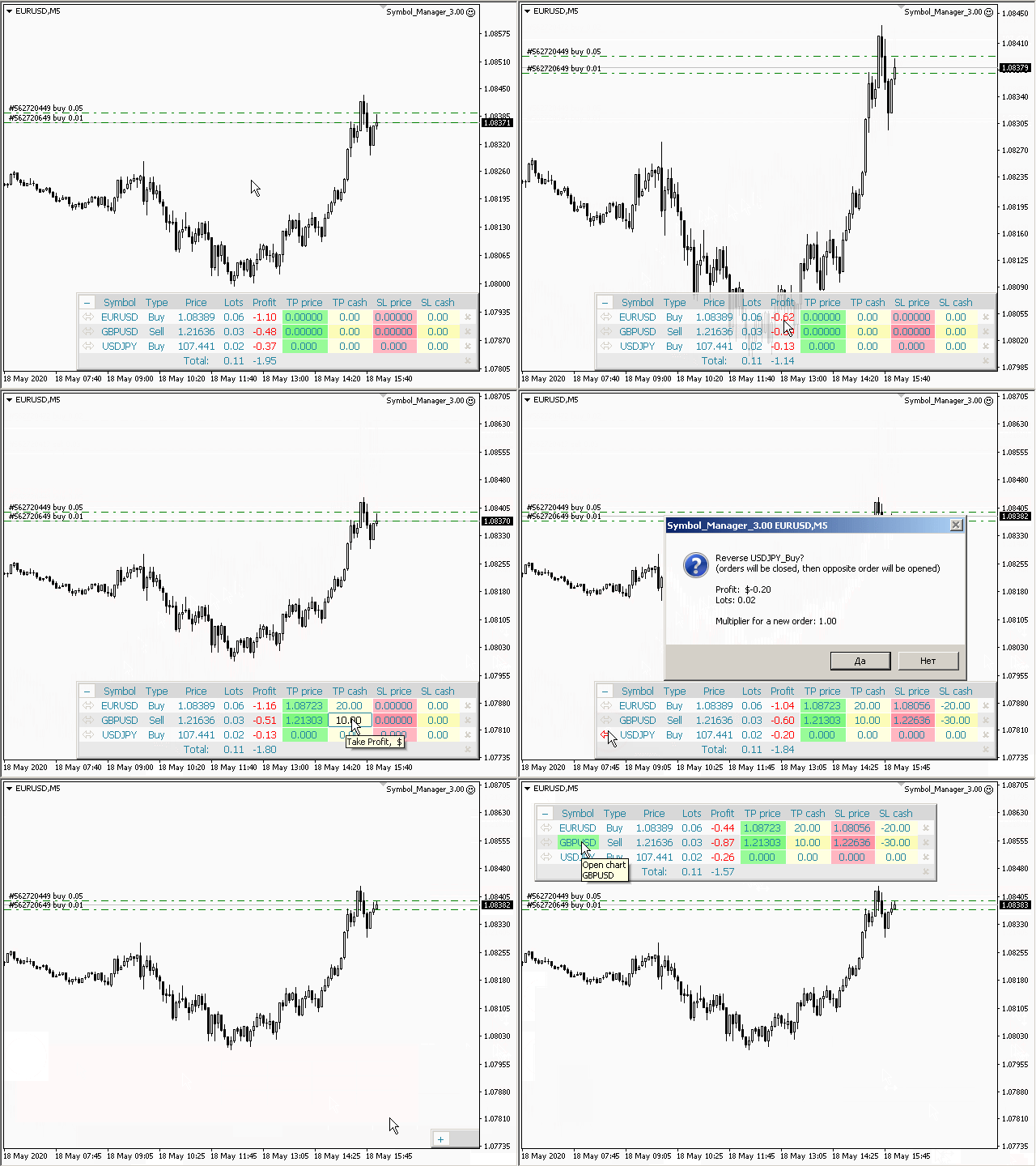
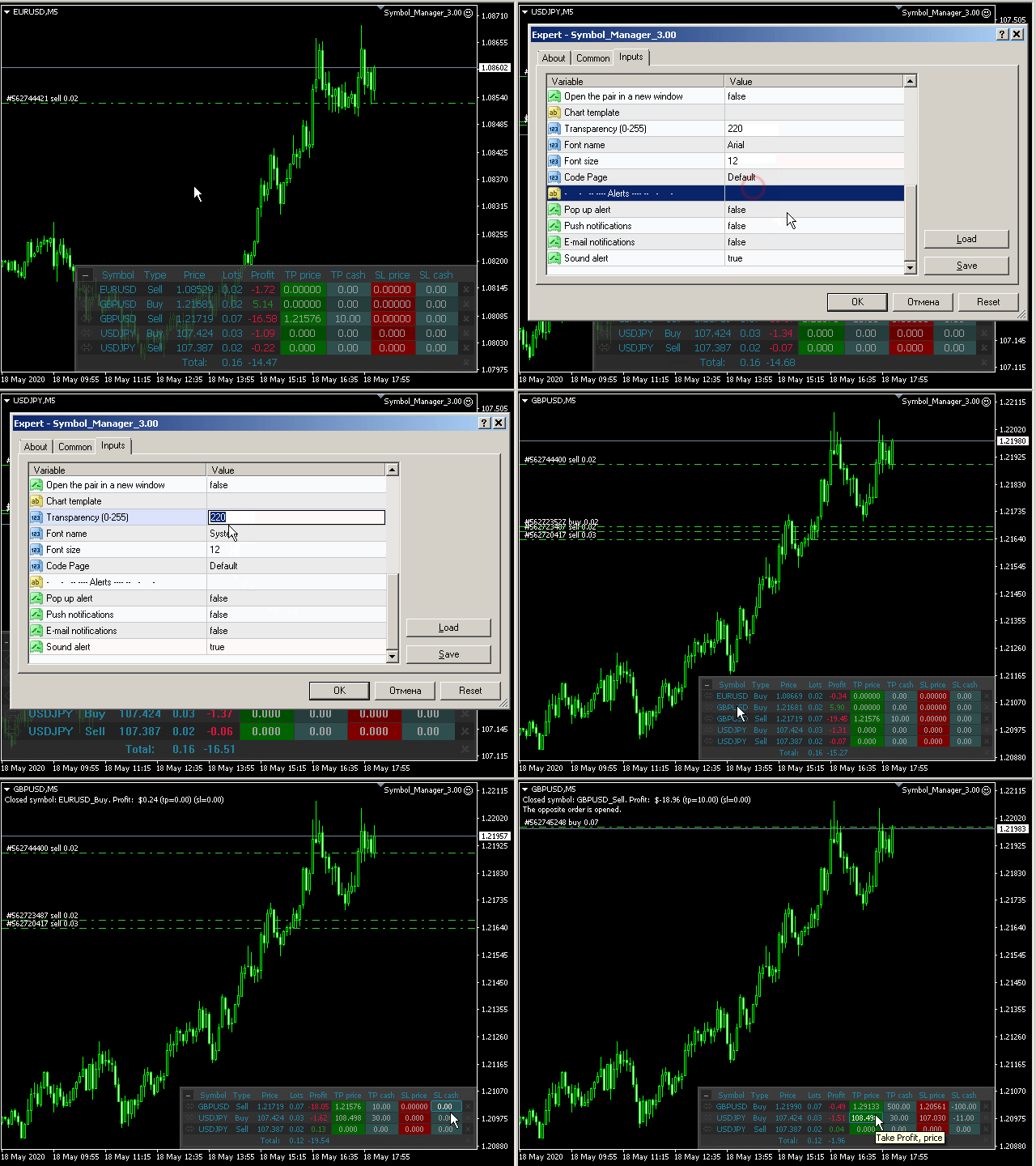
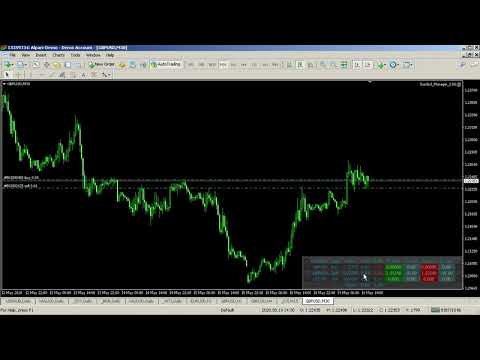
Symbol Manager or Grid Manager, designed to group orders into one position (by Symbol or by Magic Number). This utility will be useful to multi-currency traders (many EAs), who can have multiple orders on several pairs. You will be able to see the total number of lots, the total profit, and set virtual stop loss and virtual take profit. To set a real TP (or SL), you must first set the virtual value, and then enter the command in this cell: "set". If you want to set real TP/SL for all orders at once, then enter the command: "set all" or "setall".

The Symbol Manager collects orders all together into one position. So you see not dozens of orders, but positions collected by type and pair, which you can manage. EA does not trade by itself, it only does what you tell it to do.

Parameters

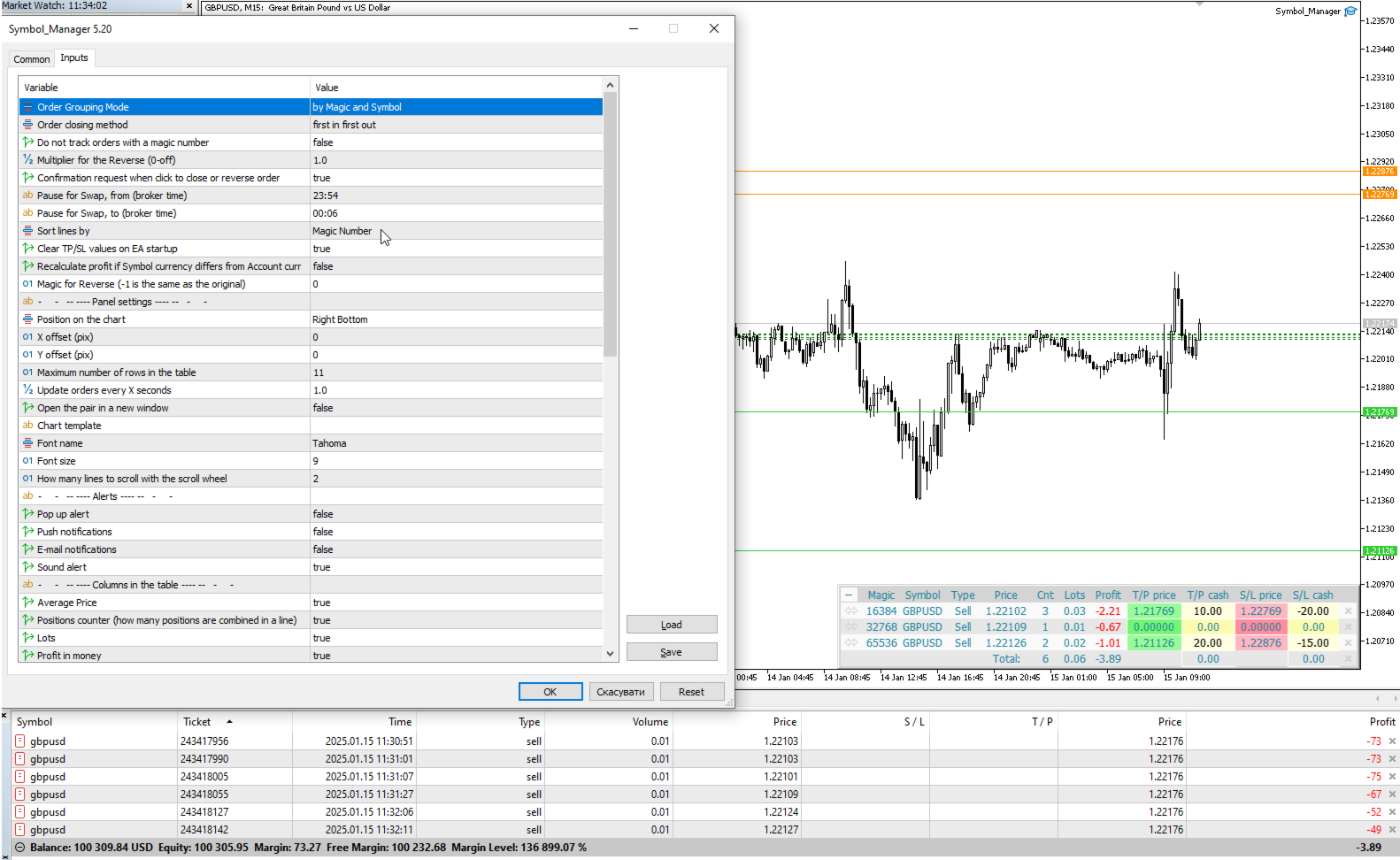
Order Grouping Mode:
 by Symbol
 by Magic and Symbol
 do not group
Order closing method — order closing modes:
    — first in first out — (FIFO) starting from the first open orders;
    — first in last out — (FILO) starting from the last open orders;
    — profitable orders first — starting with the most profitable;
    — unprofitable orders first — starting with the least profitable;
    — first the largest volumes — starting with the largest volumes;
    — first the smallest volumes — starting with the smallest volumes;
    — without sorting — don't sort;
    Do not track orders with a magic number — do not manage orders with a magic number;
    Multiplier for the Reverse — multiplication factor for position reversal;
    Confirmation request when click to close or reverse order — ask for confirmation when closing or reversing positions;
    Show arrows on the chart when closing and opening orders — display trade arrows on the chart;
    Pause for Swap, from (broker time) — the beginning of a pause in the work of EA;
    Pause for Swap, to (broker time) — the end of a pause in the work of EA.
    Sort lines by:
     Symbol
     Price
     Type
     Lot
     Positions counter
     Magic Number
     do not sort
    Clear TP/SL values on EA startup.
    Magic for Reverse (-1 is the same as the original).
      Panel setup:
      Position on chart — the angle of the panel on the chart;
      X offset (pix) — shift the panel along the X axis;
      Y offset (pix) — shift the panel along the Y axis;
      Maximum number of rows in the table — the number of rows in the window;
      Update orders every X seconds —  update period for all pairs and timeframes;
      Open the pair in a new window — open a symbol in a new chart window by clicking.
      Chart template — the name of the template for the chart, if the chart opens in a new window.
      Font name.
      Font size.
        Notification setup:
        Pop up alert.
        Push notifications.
        E-mail notifications.
        Sound alert.
          Columns in the table:
          Average Price — show average price column;
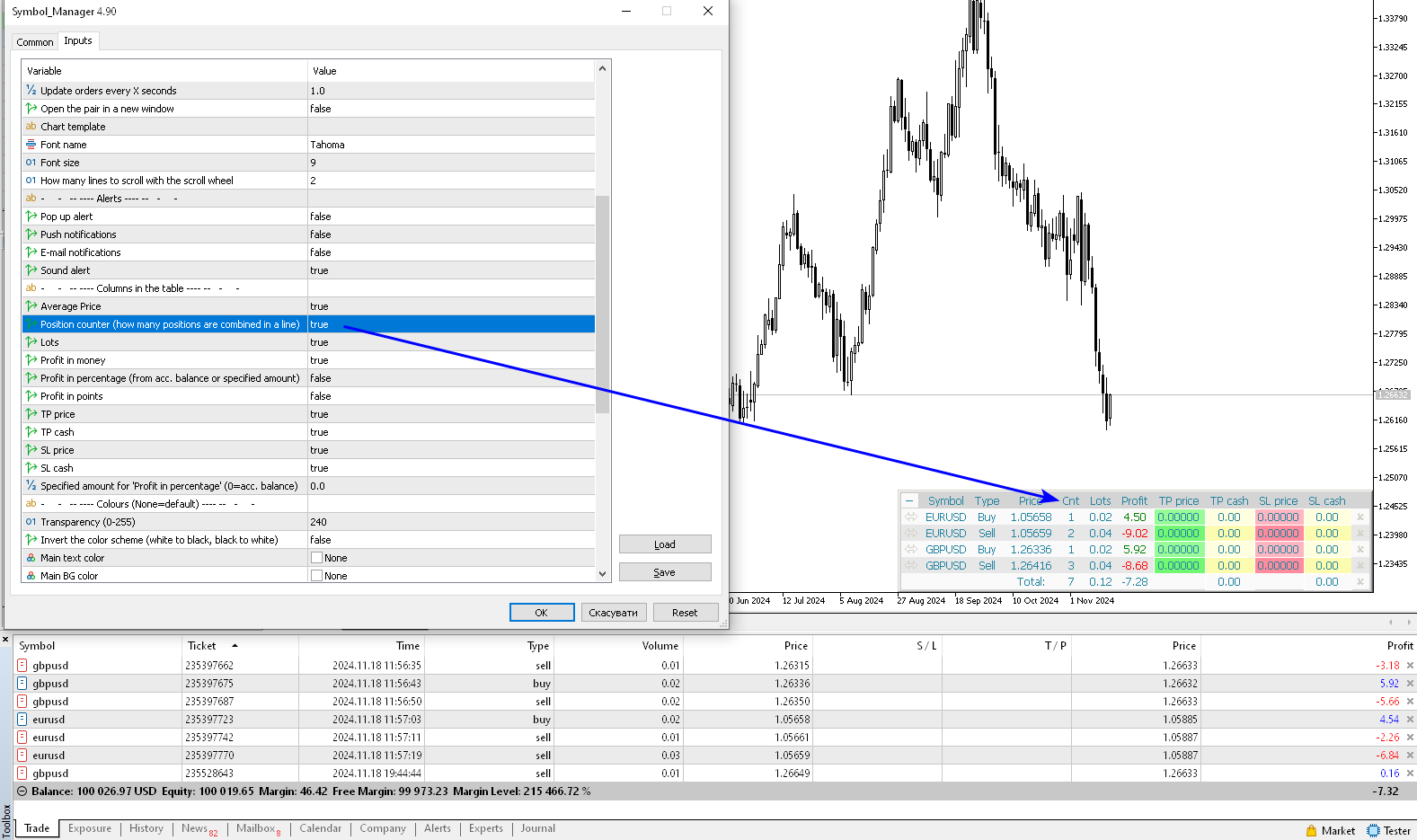
          Positions counter — how many positions are combined in a line;
          Lots — show lots column;
          Profit in money — show profit column in deposit currency;
          Profit in percentage (from acc. balance or specified amount) — show profit column as a percentage. The percentage is calculated either from the account balance or from a given amount;
          Profit in points — show profit column in points;
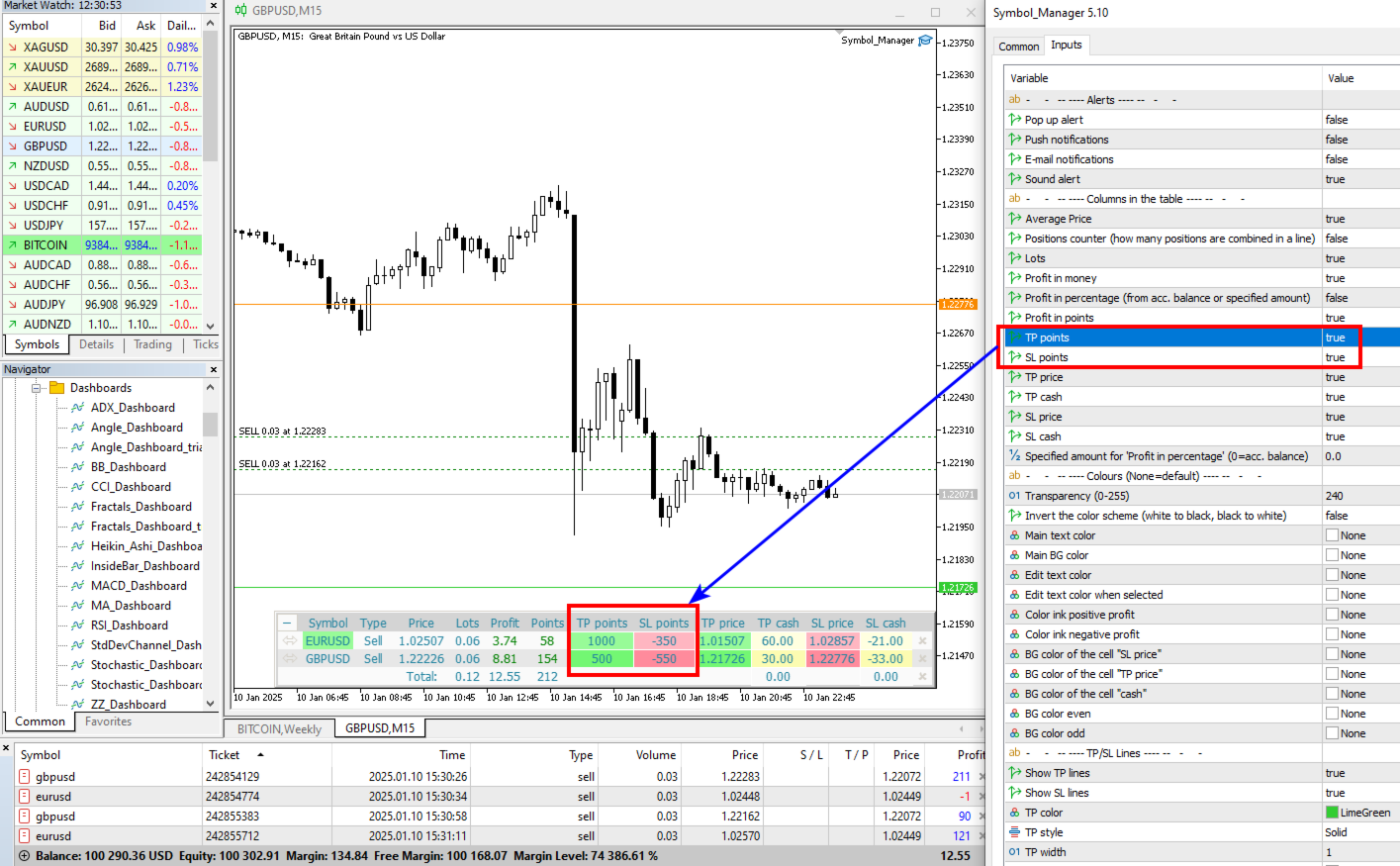
          TP points — show take profit column in points;
          SL points — show stoploss column in points;
          TP price — show take profit column in prices;
          TP cash — show the take profit column in money;
          SL price — show stoploss column in prices;
          SL cash — show stoploss column in money.
          Magic Number for orders.
          Specified amount for 'Profit in percentage' (0=acc. balance) — amount for calculating the percentage, for the column "Profit in percentage".

          Colours (None=default) — here you can change the panel colors. The clrNONE color means use the default color.
          Invert the color scheme (white to black, black to white) — inverting the color scheme, black color turns to white and white to black.
          Değerlendirmeler 5
          GoodMorningg
          537
          GoodMorningg 2021.12.16 18:40 
           

          Очень хороший помощник в торговле. Лучшая поддержка от автора! 5 звезд

          Jia Bin Zheng
          310
          Jia Bin Zheng 2021.12.15 00:36 
           

          I like the author's products very much, but the only small feature I want to add is the sorting of the table columns, otherwise the sorting order is very messy when selecting "do not group".

          Max
          1624
          Max 2021.09.17 18:18 
           

          very good, perfect really, so useful, setting tp/sl function is so great and works perfect, text size can be changed to suit

          Önerilen ürünler
          Product Name: Risk Commander: Trade Assistant & Strategy Simulator Risk Commander is more than just a trade panel—it is a complete Manual Trading Ecosystem . It serves two powerful purposes: Live Assistant: Helps you execute trades with speed, precision, and perfect risk management in real-time markets. Training Simulator: Fully compatible with the Strategy Tester (Visual Mode) , allowing you to practice manual trading on historical data without risking a cent. NEW! Built-in Simulator Mode S
          Riskinizi otomatik olarak hesaplarken işlemlere hızlı bir şekilde girip çıkmanıza yardımcı olacak Ticaret Yöneticisi. Aşırı Ticaret, İntikam Ticareti ve Duygusal Ticaretten korunmanıza yardımcı olacak özellikler içerir. İşlemler otomatik olarak yönetilebilir ve hesap performans ölçümleri bir grafikte görselleştirilebilir. Bu özellikler, bu paneli tüm manuel yatırımcılar için ideal kılar ve MetaTrader 4 platformunun geliştirilmesine yardımcı olur. Çoklu Dil desteği. MT5 Sürümü  |  Kullanım Kılavu
          Gösterge, dünya borsalarının çalışma saatlerini gösterir. Hangi pazarların şu anda en aktif olduğunu görmenize yardımcı olur Benim  #1 Pro  Utility : 66+ özellik, bu araç dahil  |   Bana ulaşın  sorularınız varsa Şu anda en volatil enstrümanları seçmenize yardımcı olur; Özellikle gün içi traderlar için faydalıdır; 1) 1H ve altı zaman dilimlerinde kullanıldığında: çizgiler, grafikteki çubukların gerçek konumuna karşılık gelecek ve grafik hareket ettirildiğinde işlem seanslarının çizgileri grafik
          Kalifx Equity Guard — Account Protection Utility (MT4) Kalifx Equity Guard is a MetaTrader 4 utility that monitors account equity and floating losses and closes open positions when predefined risk limits are reached. It operates independently of trade entry logic and works with both manual trades and Expert Advisors. The utility runs continuously in the background after being attached to any chart and timeframe. Main Functions Monitors account equity drawdown using percentage or monetary thresh
          FREE
          Çok İşlevli Ticaret Aracı: Lot Hesaplayıcı, Grid Emirleri, R/R Oranı, Ticaret Yöneticisi, Arz ve Talep Bölgeleri, Fiyat Hareketi ve Daha Fazlası Demo Sürüm   |   Kullanım Kılavuzu Ticaret Asistanı strateji test cihazında çalışmaz: bu yardımcı programı test etmek için Demo Sürümünü BURADAN indirebilirsiniz. Herhangi bir soru /iyileştirme fikri/hatalar için benimle iletişime geçin MT5 sürümüne ihtiyacınız varsa, burada mevcuttur Ticaret sürecinizi basitleştirin, hızlandırın ve otomatikleştirin. St
          Symbol Order Close EA was developed to handle the closing and trailing of profit per symbol. The expert can also trail by dollars and the user can specify a particular magic number in case multiple experts are used on the same account. You can close by total profit on a symbol, start trailing, stop trailing and trailing step, all in a dollar value This EA is VERY handy if you are running an expert that trades multiple symbols and ends up with a floating profit. It can also be used to close man
          This tool will perform Trailing stop loss and Break even management for orders. Helps you limit or reduce the time spend watching orders on the screen, especially when you need to go to sleep. Just add this EA to 1 chart, you can manage all pairs. You can filter orders by comment, magic number, symbol, and order ticket number. When Breakeven it can add shift/offset pips (to cover the commission...). You can try in strategy tester before purchase. The EA will add Buy and Sell alternately, so yo
          Trade Assistant Risk Calculator    is the ultimate all-in-one floating trading panel designed for professional manual traders. It combines   Visual Chart Trading ,   Automatic Risk Calculation , and   Advanced Position Management   into a single, sleek interface. Stop calculating lot sizes manually. Stop guessing your Risk:Reward ratio. With Trade Assistant Pro, you simply drag lines on the chart, and the EA calculates the exact lot size to match your risk percentage or money target. Key Feat
          This utility is designed to help you with your Manual Trading. It allows different ways of closing trades. It can display total number of BUY and SELL orders individually and also their individual profits. It can enter trades without stopl loss and take profits. However upon selecting UseStopLossTakeProfit from the settings it can use best possible stop loss and take profits based on the market conditions. Upon selecting the CloseOppositeTrades  from the settings it can close opposite trades. Fo
          This simple but useful script calculates the lot in % of the deposit. It is indispensable for risk management. There is only one customizable parameter: MaxRisk - risk in % for lot calculation. The product works as a standard script. Launch it once on an appropriate chart and start trading using the calculated lot value. Genious is simplicity! Happy trading!
          FREE
          Symbol Cycler is a lightweight on-chart utility that lets you quickly switch between symbols in your Market Watch list using two simple arrow buttons (). With a single click, you can scroll forward or backward through your predefined symbols without leaving the chart. Key Features: One-click symbol switching from the chart Works with your Market Watch list order Buttons can be placed in any chart corner or even the center Timeframe remains locked while switching symbols Clean, responsive UI
          FREE
          You can change the time period of the chart at the touch of a button. You can also change multiple charts at the touch of a button. You can also change multiple charts at the touch of a button, saving you the trouble of changing time periods. We are live-streaming the actual operation of the system. https://www.youtube.com/@ganesha_forex We do not guarantee your investment results. Investments should be made at your own risk. We sharll not be liable for any disadvantage or damage caused by th
          Açıklama: Bu script, MetaTrader 4 platformunda mevcut olan tüm forex paritelerinin ve altın (XAUUSD) grafiğinin otomatik olarak açılması için tasarlanmıştır. Script, platformda mevcut olan tüm sembolleri tarar, hangilerinin forex paritesi olduğunu belirler ve bunların grafiklerini M1 (bir dakika) zaman diliminde açar. Ana Özellikler: Altın Grafiğinin Açılması: Script, eğer brokerınız tarafından sağlanıyorsa, XAUUSD (altın/dolar) grafiğini otomatik olarak açar. Eğer altın sembolü bulunamazsa, bir
          Çoğu perakende tüccar, riski yönetemez ve aşırı risk alarak veya aşırı ticaret yaparak hesapları patlatamaz. Bu araç, düşüş ve risk yönetimini tamamen otomatikleştirerek, bir tüccarın yalnızca girişlerine odaklanmasını sağlar. Fiyat işlemin tersine gittiğinde kısmi pozisyonları otomatik olarak kapatmak için Agresif Risk Kontrolü özelliği ile fiyat eylemini kullanan ilk ve tek ticaret yöneticisidir. Bu, kayıpların her zaman kazançlardan daha küçük tutulmasını sağlar. Herhangi bir giriş yöntemi
          PZ Trade Pad EA
          PZ TRADING SLU
          4.27 (30)
          This simple visual expert advisor allows you to trade easily from the chart. It handles risk management for you and can perform several useful tasks with your existing trades, saving time and making risk-management for each individual trade easier.  [ Installation Guide | Update Guide | Troubleshooting | FAQ | All Products ] Trade easily from the chart Trade with precise risk management, hassle free Trade pending order with drag and drop price selection Set SL and TP levels with drag and drop pr
          FREE
          TP SL Bot - Yeni açılan emirlere, belirtilen talimatlarınıza göre otomatik olarak Stop Loss ve Take Profit ayarlayan bir araçtır. Ayrıca, istenen Stop Loss/Take Profit boyutunda istenen miktarı elde etmek için işlem açmak için gereken hacmi hesaplama özelliği de bulunmaktadır. Boyut ve parametre ayarlamaları için birkaç seçenek vardır: 1. Mevcut hesap bakiyesinin yüzdesi olarak kullanıcı tarafından belirtilen miktarlara göre ayarlama yapma. 2. Kullanıcı tarafından belirtilen Stop Loss veya Take
          ASTA Trade Manager is a semi-automated trading tool designed to assist professional traders in Exit Strategy Management . This EA will not open trading positions automatically. This version is made to manage manual transactions on 1 chart (pair) only. For the Multipair version, you can check the product at:  ASTA Multipair Trade Manager . FEATURES: 1. Entry and Exit Panel Order Panel: Buy, Sell and Pending Orders Exit Button: Close All Order, Close All Buy, Close All Sell Can be used on strategy
          The utility displays in a convenient form the historical trades made on the account. You can filter trades by magic or comcent, display only profitable or losing trades, and only buy or sell trades. Using this utility, you can see trade entry and exit points, stop loss and take profit levels, trade profit, magic number and comment, order ticket and order size - you only need to run the utility on the chart of the currency pair you want information on get and customize the input parameters. MT5
          StealthTrade Commander is an advanced visual trading panel and risk-management utility designed for manual traders, scalpers, and Prop-Firm challengers. This tool helps you execute trades visually directly from the chart, hide your Stop Loss and Take Profit levels from the broker, and strictly control your daily drawdown—a crucial feature for passing and keeping Prop-Firm funded accounts.  KEY FEATURES:  Risk Guardian (Prop-Firm Protector) Max Daily Loss Limit: Automatically closes all trades a
          FREE
          News Scalping Executor Pro is an utility which helps to trade high impact and huge volatility   news . This utility helps to create two opposite orders with risk management and profit protection. It moves automatically stop loss level to avoid losses as much as possible by using many different algorithms. It helps to avoid trading the news if spread suddenly becomes very huge. It can lock profit by moving stop loss or partially closing of orders. To be profitable with this type of trading you
          How to Use the Features       MT5 VERSION   TRADE COPIER Select Role: On the account sending trades, choose Sender (Master Account) . On the account receiving trades, choose Copier (Receiver Account) . Lot Size Mode: Same Lot Size as Master: Ignores multipliers, copies exactly what the Master has. Multiply Master Lot Size: Uses the "Lot Multiplier" field (e.g., Master 0.10, Multiplier 2.0 = Copier 0.20). Use Fixed Lot Size: Ignores Master's volume entirely, uses the "Fixed Lot Size" field for ev
          The indicator displays the data of the Stochastic oscillator from a higher timeframe on the chart. The main and signal lines are displayed in a separate window. The stepped response is not smoothed. The indicator is useful for practicing "manual" forex trading strategies, which use the data from several screens with different timeframes of a single symbol. The indicator uses the settings that are identical to the standard ones, and a drop-down list for selecting the timeframe. Indicator Paramet
          Magic Balance
          Daniil Evstratenko
          The indicator shows which trading pairs, strategies, robots and signals that you use are profitable and which are not. The statistic of trades and balance graph are displayed in the account currency and pips - to switch simply click on the graph. button "$"(top left) - minimize/expand and move the indicator panel button ">"(bottom right) - stretching and resetting to the original size Statistic of trades 1 line - account balance, current profit and lot of open trades; 2 line - the number of all
          Fast Trade Copier
          Volodymyr Hrybachov
          4.2 (5)
          The trade copier is designed for a fast and accurate copying of orders between the MetaTrader 4 terminals. The trade copier copies trades from the Master account to the Slave account by writing information to the total file, which is located in the common directory of the MetaTrader 4 terminals. This allows the trade copier to either customize various schemes for receiving and transmitting trade signals by changing the file name. Reading and writing the copier file is performed by timer. The tra
          VR Cub
          Vladimir Pastushak
          VR Cub , yüksek kaliteli giriş noktaları elde etmenin bir göstergesidir. Gösterge, matematiksel hesaplamaları kolaylaştırmak ve bir pozisyona giriş noktalarının aranmasını basitleştirmek için geliştirildi. Göstergenin yazıldığı ticaret stratejisi uzun yıllardan beri etkinliğini kanıtlamaktadır. Ticaret stratejisinin basitliği, acemi yatırımcıların bile başarılı bir şekilde ticaret yapmasına olanak tanıyan büyük avantajıdır. VR Cub, pozisyon açılış noktalarını ve Kâr Al ve Zararı Durdur hedef sev
          Trading panel for manual trading. Has a fairly wide functionality. Allows you to automatically calculate the order size, open both market and pending orders. It has a wide range of options for closing orders, it is possible to partially close orders, close orders after reaching a certain profit or loss, separately close profitable and unprofitable, buy and sell, as well as pending orders. The panel also contains a simple implementation of a grid of pending orders, reverse and lock functions, tr
          Tester for binary options, strategies and indicators. It allows you to test yourself, test strategies and indicators on binary options. The EA does not perform any real deals! It is for testing purposes only. It can be run both on a live chart, and in the MetaTrader 4 Strategy Tester. MetaTrader 4 provides numerous indicators, you can attach them to the chart and test indefinitely. There are two buttons on the chart, Call and Put, as well as a field for specifying the lot. During testing, it dis
          FREE
          "Auto FIBO Pro" Crypto_Forex göstergesi - ticarette harika bir yardımcı araçtır! - Gösterge, Fibo seviyelerini ve yerel trend çizgilerini (kırmızı renk) otomatik olarak hesaplar ve grafikte yerleştirir. - Fibonacci seviyeleri, fiyatın tersine dönebileceği önemli alanları gösterir. - En önemli seviyeler %23,6, %38,2, %50 ve %61,8'dir. - Ters scalping veya bölge ızgara ticareti için kullanabilirsiniz. - Auto FIBO Pro göstergesini kullanarak mevcut sisteminizi geliştirmek için birçok fırsat vardı
          Commodity Channel Index Message is an indicator for the MetaTrader 4 trading platform. Unlike the original indicator, this three in one version has a system of alerts that inform on market situation changes. It consists of the following signals: when the Main line crosses the levels of extreme zones and 50% level; when the Main line crosses the Trend line in the indicator window; Divergence on the last bar. Values of the middle and extreme levels and divergence zones are customizable. Parameter
          Trade panel manual is a multifunctional trading assistant. It allows you to open market and pending orders in one click. Value is set via button menu edit or deleted by specific buttons pending orders and the value of take profit and stop loss in one click. Through the edit menu of the button, a value is set that can be easily changed by simply moving level_tp lines for take profit or stop loss levels and for pending orders. It is possible to select orders and determine for them and set the leve



          Bu ürünün alıcıları ayrıca şunları da satın alıyor
          Trade Assistant MT4
          Evgeniy Kravchenko
          4.42 (193)
          It helps to calculate the risk per trade, the easy installation of a new order, order management with partial closing functions, trailing stop of 7 types and other useful functions. Additional materials and instructions Installation instructions   -   Application instructions   -   Trial version of the application for a demo account Line function -   shows on the chart the Opening line, Stop Loss, Take Profit. With this function it is easy to set a new order and see its additional characteris
          Local Trade Copier EA MT4
          Juvenille Emperor Limited
          4.96 (108)
          Local Trade Copier EA MT4 ile olağanüstü hızlı işlem kopyalama deneyimi yaşayın. Kolay 1 dakikalık kurulumuyla bu işlem kopyalayıcısı, aynı Windows bilgisayarda veya Windows VPS'te birden fazla MetaTrader terminali arasında işlemleri kopyalamanıza olanak tanır ve 0.5 saniyenin altındaki şimşek hızında kopyalama hızları sunar. Başlangıç seviyesinde veya profesyonel bir tüccar olsanız da, Local Trade Copier EA MT4 , spesifik ihtiyaçlarınıza göre özelleştirmek için geniş bir seçenek yelpazesi sunar
          Trade Manager EA’ye hoş geldiniz! Ticaretin daha sezgisel, hassas ve verimli hale gelmesi için tasarlanmış nihai risk yönetim aracı ile tanışın. Bu sadece bir emir verme aracı değil; ticaret planlaması, pozisyon yönetimi ve risk kontrolü için kapsamlı bir çözüm. İster yeni başlayan bir yatırımcı olun, ister deneyimli bir trader ya da hızlı emir gerektiren bir scalper, Trade Manager EA ihtiyaçlarınıza uyum sağlar ve forex, endeksler, emtialar ve kripto paralar dahil tüm piyasalarda esneklik sunar
          TradePanel MT4
          Alfiya Fazylova
          4.85 (92)
          Trade Panel, çok işlevli bir ticaret asistanıdır. Uygulama, manuel ticaret için 50'den fazla ticaret fonksiyonu içerir ve çoğu ticaret görevini otomatikleştirmeyi mümkün kılar. Satın almadan önce demo hesapta demo sürümü test edebilirsiniz. Demo hesap için uygulamanın deneme sürümünü indirin: https://www.mql5.com/en/blogs/post/750865 . Talimatların tamamı buraya . Ticaret. Tek tıklamayla ticaret işlemleri yapmayı sağlar: Risk otomatik hesaplaması ile bekleyen emirleri ve pozisyonları açmak. Bird
          Exp COPYLOT CLIENT for MT4
          Vladislav Andruschenko
          4.65 (66)
          MetaTrader 4 için ticaret fotokopisi.       Herhangi bir hesaptan forex işlemlerini, pozisyonlarını, emirlerini kopyalar. En iyi ticari fotokopi makinelerinden biridir.       MT4 - MT4, MT5 - MT4       için       KOPYLOT MT4       sürüm (veya       MT4 - MT5 MT5 - MT5       için       KOPYLOT MT5       sürüm). MT5 sürümü Tam tanım   +DEMO +PDF Nasıl alınır Nasıl kurulur     Günlük Dosyaları nasıl alınır?     Nasıl Test Edilir ve Optimize Edilir     Expforex'in tüm ürünleri için fotokopi   sür
          Copy Cat More Trade Copier MT4 (Kopyacı MT4) sadece basit bir yerel trade kopyalayıcı değildir; günümüzün alım satım zorlukları için tasarlanmış eksiksiz bir risk yönetimi ve yürütme çerçevesidir. Prop firm sınavlarından kişisel hesap yönetimine kadar, güçlü yürütme, sermaye koruması, esnek yapılandırma ve gelişmiş işlem yönetimi ile her duruma uyum sağlar. Kopyalayıcı hem Master (gönderici) hem de Slave (alıcı) modlarında çalışır ve piyasa emirleri ile bekleyen emirlerin gerçek zamanlı senkroni
          Trade copier MT4
          Alfiya Fazylova
          4.58 (33)
          Trade Copier, ticaret hesapları arasındaki işlemleri kopyalamak ve senkronize etmek için tasarlanmış profesyonel bir yardımcı programdır. Kopyalama, tedarikçinin hesabından/terminalinden alıcının aynı bilgisayarda veya vps'de kurulu olan hesabına/terminaline gerçekleşir. Satın almadan önce demo sürümünü bir demo hesabında test edebilirsiniz. Demo versiyonu burada . Tüm talimatlar burada . Ana işlevler ve avantajlar: Emirlerin kopyalanmasını destekler: МТ4> МТ4, МТ4> МТ5, МТ5> МТ4. Emirlerin kopy
          THIS EA IS A SEMI-AUTO EA, IT NEEDS USER INPUT. Manual & Test Version Please TEST this product before   BUYING  and watch my video about it. Contact me for user support or bug reports, or if you want the MT5 version! MT5 Version I do not guarantee any profits or financial success using this EA. With this Expert Advisor, you can: Implement your own   Zone Recovery   strategy to capitalize on trending markets. Create   Grid   trading strategies, to profit from ranging markets. Place orders easil
          Özel İşlem İndirimi – %40 İndirim Gelişmiş İşlem Yöneticisi – Daha Hızlı, Daha Akıllı ve Daha Güvenli Manuel İşlemler İçin Nihai Hepsi Bir Arada Çözüm. Anında işlem yürütme, görsel işlem planlama ve güçlü risk yönetimini tek bir sezgisel araçta birleştiren profesyonel grafik paneli olan NextGen Trade Manager AI ile manuel işlemlerinizi dönüştürün. Emirleri yürütün, riski yönetin ve kârlarınızı koruyun, hem de grafiğinizden ayrılmadan. Hassasiyetlerini ve verimliliklerini artırmak isteyen tüm
          The product will copy all telegram signal to MT4   ( which you are member  ) , also it can work as remote copier.  Easy to set up, copy order instant, can work with almost signal formats, image signal, s upport to translate other language to English Work with all type of channel or group, even channel have "Restrict Saving Content", work with  multi channel, multi MT5 Work as remote copier: with signal have ticket number, it will copy exactly via ticket number. Support to backtest signal. How to
          Tired of complex order placement and manual calculations? Trade Dashboard is your solution. With its user-friendly interface, placing orders becomes effortless, by a single click, you can open trades, set stop loss and take profit levels, manage trade lot size, and calculate risk to reward ratios, allowing you to only focus on your strategy. Say goodbye to manual calculations and streamline your trading experience with Trade Dashboard. Download  Demo Version  right now. You can find  Details of
          Bu ürün, haber saatlerinde tüm uzman danışmanları ve manüel grafikleri filtreler, böylece manüel ticaret kurulumlarınızı veya diğer uzman danışmanlar tarafından girilen işlemleri yok edebilecek ani fiyat dalgalanmaları konusunda endişelenmenize gerek kalmaz. Bu ürün, herhangi bir haber yayınlanmadan önce açık pozisyonlarınızı ve bekleyen emirlerinizi yönetebilen tam bir sipariş yönetim sistemi ile birlikte gelir. The News Filter'ı satın aldığınızda, gelecekteki uzman danışmanlar için yerleşik ha
          Seconds Chart - MetaTrader 4 için saniye bazlı grafikler oluşturmanıza olanak sağlayan eşsiz bir araçtır. Seconds Chart sayesinde saniye cinsinden zaman dilimleriyle grafik oluşturabilir, standart dakika veya saatlik grafiklerde mümkün olmayan esneklik ve analiz hassasiyetine ulaşabilirsiniz. Örneğin, S15 zaman dilimi 15 saniyelik mum çubuklarını ifade eder. Tüm indikatörleri, uzman danışmanları ve komut dosyalarını standart grafiklerde olduğu gibi kolaylıkla kullanabilirsiniz. Standart araçları
          MT4 to Telegram Signal Provider , Telegram'a sinyal göndermeyi sağlayan ve hesabınızı bir sinyal sağlayıcısına dönüştüren kullanımı kolay ve tamamen özelleştirilebilir bir araçtır. Mesajların formatı tamamen özelleştirilebilir! Ancak basit kullanım için, önceden tanımlanmış bir şablonu seçebilir ve mesajın belirli kısımlarını etkinleştirebilir veya devre dışı bırakabilirsiniz. [ Demo ]  [ Kullanım Kılavuzu ] [ MT5 Sürümü ] [ Discord Sürümü ] [ Telegram Kanalı ]  New: [ Telegram To MT5 ] Kurulum
          DrawDown Limiter MT4
          Haidar Lionel Haj Ali
          5 (8)
          Drawdown Limiter EA You are in the right place if you were searching for Drawdown control, Drawdown limiter, Balance protection, Equity Protection or Daily Drawdown Limit related to Prop Firm, FTMO, or Funded account trading, or if you want to protect your trading account. Have you suffered from controlling your drawdown when trading funded accounts? This EA is meant for you. Prop firms usually set a rule called “Trader Daily Drawdown”, and if it is not respected, you are disqualified.  I am an
          MicroScalp Signal Finder Multi-Sembol, Multi-Zaman Dilimi Smart Money Scalping Sinyal Tarayici - MetaTrader 5 Scalping, birden fazla enstrumanda hassas zamanlama ve cok katmanli analiz gerektirir — bu, gercek zamanli olarak manuel yapilmasi neredeyse imkansiz bir gorevdir. Piyasa yapisini, order block'lari, fair value gap'leri, likidite taramalarini ve momentum onaylarini birden fazla sembolde ayni anda takip etmek otomasyon gerektirir. MicroScalp Signal Finder (MSF), bes zaman diliminde (H4-H1-
          Crystal Trade Manager PRO – MT4 İçin Gelişmiş Risk Yönetimi ve İşlem Kontrol Sistemi Ücretsiz Sürüm: https://www.mql5.com/en/market/product/150632 Genel Bakış Crystal Trade Manager PRO (CTM), MetaTrader 4 için geliştirilmiş profesyonel bir işlem yürütme ve risk yönetimi aracıdır. Disiplinli işlem yürütme, güçlü sermaye koruması ve MT4 içinde akıllı otomasyon isteyen trader’lar için tasarlanmıştır. Sistem; riski yönetir, equity’yi korur, günlük sınırları uygular, SL/TP’yi otomatik ayarlar ve prof
          News filter, equity guard & session control for all your EAs — one tool, full protection Take a Break has evolved from a basic news filter into a comprehensive account protection solution . It pauses your other Expert Advisors during news events or based on custom filters. When trading resumes, it automatically restores your entire chart setup , including all EA settings. Why traders choose Take a Break One news filter for all your EAs — no more relying on individual built-in filters that may o
          This EA is fully automated , it is built based on  the method of catching the pop-up Alert event and Open Market Orders (BUY/SELL) . Download trial version here:  https://www.mql5.com/en/blogs/post/751340 ***NOTE:   It is recommended to remove the available filter settings, only install the filter for your indicator. Parameters of the EA: -------- <EA Settings> -------- Magic Number:   The identifying (magic) number of the currently selected order. Allow Open trade:   Enable/ Disable Open Trade
          Fotokopi->Kullanışlı ve hızlı arayüz etkileşimi, kullanıcılar hemen kullanabilir       ->>>> Windows bilgisayarlarda veya VPS Windows'ta kullanılması önerilir Özellikler: Çeşitlendirilmiş ve kişiselleştirilmiş kopyalama ticareti ayarları: 1. Farklı sinyal kaynakları için farklı lot modları ayarlanabilir 2. İleri ve geri kopyalama ticareti için farklı sinyal kaynakları ayarlanabilir 3. Sinyaller yorumlarla ayarlanabilir 4. Lotun sözleşme lotuna göre kalibre edilip edilmeyeceği Çeşitlendirilmiş v
          VirtualTradePad mt4 Extra
          Vladislav Andruschenko
          4.86 (59)
          1 tıklama ile ticaret için Ticaret Paneli.   Pozisyonlar ve emirlerle çalışmak!   Grafikten veya klavyeden alım satım. Alım satım panelimizi kullanarak, grafikten tek bir tıklamayla alım satım yapabilir ve alım satım işlemlerini standart MetaTrader kontrolünden 30 kat daha hızlı gerçekleştirebilirsiniz. Bir tüccar için hayatı kolaylaştıran ve bir tüccarın ticaret faaliyetlerini çok daha hızlı ve daha rahat gerçekleştirmesine yardımcı olan parametrelerin ve işlevlerin otomatik hesaplamaları. Graf
          Live Forex Signals site sinyalleri üzerinden işlem yapmak için tasarlanmıştır   https://live-forex-signals.com/en   ve  https://foresignal.com/en   . Live Forex Signals for MetaTrader 5  https://www.mql5.com/ru/market/product/81448 Ayarlar Web sitelerine aboneliğiniz varsa Username ve Password live-forex-signals.com/foresignal.com . o zaman bu seçenekleri kimlik bilgilerinizle doldurmalısınız; Abonelik yoksa alanları boş bırakın; Comment açılan anlaşmalara ilişkin yorum Risk = 0 ise, ticaret i
          The product will copy all  Discord  signal   to MT4   ( which you are member  ) , also it can work as remote copier.  Easy to set up. Work with almost signal formats, support to translate other language to English Work with multi channel, multi MT4. Work with Image signal. Copy order instant, auto detect symbol. Work as remote copier: with signal have ticket number, it will copy exactly via ticket number. How to setup and guide: Let read all details about setup and download Discord To MetaTrader
          News Filter EA: Advanced Algo Trading Assistant News Filter EA is an advanced algo trading assistant designed to enhance your trading experience. By using the   News Filter EA , you can integrate a Forex economic news filter into your existing expert advisor, even if you do not have access to its source code. In addition to the news filter, you can also specify   trading days   and   hours   for your expert. The News Filter EA also includes   risk management   and   equity protection   features
          Effortlessly calculate lot sizes and manage trades to save time and avoid costly errors The Trade Pad Pro EA is a tool for the Metatrader Platform that aims to help traders manage their trades more efficiently and effectively. It has a user-friendly visual interface that allows users to easily place and manage an unlimited number of trades, helping to avoid human errors and enhance their trading activity. One of the key features of the Trade Pad Pro EA is its focus on risk and position manageme
          MT4 to Discord Signal Provider , ticaret sinyallerini doğrudan Discord'a göndermek için tasarlanmış kullanıcı dostu ve tamamen özelleştirilebilir bir araçtır. Bu araç, ticaret hesabınızı etkili bir sinyal sağlayıcısına dönüştürür. Mesaj formatlarını tarzınıza uyacak şekilde özelleştirin! Kolay kullanım için önceden tasarlanmış şablonlardan seçim yapın ve hangi mesaj öğelerini dahil etmek veya çıkarmak istediğinize karar verin. [ Demo ] [ Kullanım Kılavuzu ] [ MT5 Versiyonu ] [ Telegram Versiyonu
          The Ultimate Drawdown Recovery & Trade Protection EA for MT4! Your Trades Deserve a Second Chance. Give Them This Soldier. Struggling with floating losses or sudden drawdowns that threaten your account? Stop watching your trades drown in red and let the Ultimate Drawdown Recovery EA (UDR) recover, protect, and empower your trading strategy automatically. What Is UDR? UDR is an ultra-smart, lightning-fast MT4 Expert Advisor designed to recover drawdowns, secure break-even exits, manage trades wi
          Risk/Reward Tool, MetaTrader 4'te işlem planlama, görselleştirme ve gerçekleştirme şeklinizi devrim niteliğinde değiştirmek için tasarlanmış profesyonel düzeyde bir Uzman Danışmandır. İster hassas risk yönetimine değer veren isteğe bağlı bir trader olun, ister işlem kurulumlarını görsel olarak test etmesi gereken bir strateji geliştiricisi olun, bu araç zarif ve sezgisel bir arayüzde ihtiyacınız olan her şeyi sağlar. Temel pozisyon hesaplayıcılarından farklı olarak, Risk/Reward Tool görsel işlem
          Anında gün ve hafta bazında kapalı işlem geçmişinizi, mevcut açık işlemlerinizi ve döviz maruziyetinizi tek bir grafikte görün! Karlı işlemleri ve mevcut düşüşünüzün işlem portföyünüzde nerede olduğunu belirlemek için ısı haritasını kullanın. Hızlı Kapatma Düğmeleri Hızlı kapatma düğmelerini kullanarak tek bir semboldeki her işlemi kapatın, tek tek işlemleri tamamen kapatın veya bir düğmeye tıklayarak kısmi kar veya zarar elde edin. Artık bir listede işlem aramanıza ve işlemlerinizin bir kısmı
          Smart Channel M4
          Vahidreza Heidar Gholami
          The trend in the market can be predicted using trend lines but the problem is you don’t know where exactly the price is going to touch the trend line where you can put your pending orders on. Smart Channel Expert Advisor makes it possible to put an advanced channel around the price data, which can be configured to handle placing orders, opening and closing positions, managing risk per trade, spread, slippage, and trailing stop-loss and take-profit automatically. Features Money Management (Calcul
          Yazarın diğer ürünleri
          Göreceli Güç Endeksi (RSI) göstergesinin çoklu para birimi ve çoklu zaman çerçeveli modifikasyonu. Parametrelerde istediğiniz para birimini ve zaman dilimlerini belirtebilirsiniz. Ayrıca panel aşırı alım ve aşırı satım seviyelerini geçerken bildirim gönderebilir. Noktalı bir hücreye tıkladığınızda bu sembol ve nokta açılacaktır. Bu MTF Tarayıcıdır. Kontrol panelini grafikten gizlemenin anahtarı varsayılan olarak "D"dir. Para Birimi Gücü Ölçer'e benzer şekilde, Kontrol Paneli belirli bir para
          ZigZag Lines MTF for MT5
          Taras Slobodyanik
          5 (11)
          Çoklu zaman dilimi ZigZag göstergesi. Destek/direnç yatay çizgilerini ve bunların kırılmalarını gösterir, ayrıca piyasanın mevcut hedeflerini de çizer. Ayrıca Fraktallar göstergesinin çizgilerini ve diğer dönemlere ait mumları da görüntüleyebilir (Üç Aylığa kadar). Gösterge – Trend çizgilerini göstermek için önemli dip ve tepe noktalarını birbirine bağlar. Gösterge son (geçerli) noktayı yeniden çizer ve bazı durumlarda son 2-3 noktayı değiştirebilir. Tüm çizgiler nesneler olarak çizilir ( gös
          Göreceli Güç Endeksi (RSI) göstergesinin çoklu para birimi ve çoklu zaman çerçeveli modifikasyonu. Parametrelerde istediğiniz para birimini ve zaman dilimlerini belirtebilirsiniz. Ayrıca panel aşırı alım ve aşırı satım seviyelerini geçerken bildirim gönderebilir. Noktalı bir hücreye tıkladığınızda bu sembol ve nokta açılacaktır. Bu MTF Tarayıcıdır. Kontrol panelini grafikten gizlemenin anahtarı varsayılan olarak "D"dir. Para Birimi Gücü Ölçer'e benzer şekilde, Kontrol Paneli belirli bir para
          Çoklu para birimi ve çoklu zaman çerçeveli Heikin Ashi göstergesi. Piyasanın mevcut durumunu gösterir. Tarayıcı panelinde mevcut trendin yönünü, gücünü ve çubuk sayısını görebilirsiniz. Konsolidasyon/Tersine Dönme mumları da renk kullanılarak gösterilir. Parametrelerde istediğiniz para birimini ve periyodu belirtebilirsiniz. Ayrıca gösterge, trend değiştiğinde veya tersine dönüş ve konsolidasyon mumları (dojiler) göründüğünde bildirim gönderebilir. Bir hücreye tıkladığınızda bu simge ve nokta a
          Time Scale for MT5
          Taras Slobodyanik
          4.76 (29)
          The indicator draws the time scale on the chart. You can specify the time offset, adjust the size and font to display on the chart ( it is displaying your local time on your chart instead of MT time ). You can also select the desired format for displaying the date and time. You may be interested in my other product , which contains a more advanced version of the Time Scale . You can also find my other products here . Parameters Hours (time shift) — time shift (hours); Minutes (time shift) — tim
          FREE
          Stokastik Osilatörün çoklu para birimi ve çoklu zaman çerçevesi modifikasyonu. Parametrelerde istediğiniz para birimini ve zaman dilimlerini belirtebilirsiniz. Panel, Sinyal ve Ana (stokastik geçiş) çizgilerinin mevcut değerlerini ve kesişimlerini görüntüler. Ayrıca gösterge aşırı alım ve aşırı satım seviyelerini geçerken bildirim gönderebilir. Noktalı bir hücreye tıkladığınızda bu sembol ve nokta açılacaktır. Bu MTF Tarayıcıdır. Para Birimi Gücü Ölçer'e benzer şekilde, Kontrol Paneli belirli b
          ADX Dashboard MT5
          Taras Slobodyanik
          5 (4)
          ADX göstergesi trendi ve gücünü belirlemek için kullanılır. Fiyatın yönü +DI ve -DI değerleriyle, ADX değeri ise trendin gücünü gösterir. +DI -DI'nin üzerindeyse piyasa yükseliş trendindedir, tam tersi ise düşüş trendindedir. ADX 20'nin altında ise kesin bir yön yoktur. Gösterge bu seviyeyi kırdığı anda orta güçte bir trend başlıyor. 40'ın üzerindeki değerler güçlü bir trendi (düşüş trendi veya yükseliş trendi) gösterir. Ortalama Yönlü Hareket Endeksi (ADX) göstergesinin çoklu para birimi ve ç
          Lines Profit Loss MT5
          Taras Slobodyanik
          4.62 (13)
          Gösterge mevcut sembol üzerinde kârı (zararı) gösterir. Mevcut kar veya zararı görüntülemek için çizgiyi serbestçe sürükleyip bırakabilirsiniz. You can find my products   here Parametreler Calculation in money or in points — kar/zararı puan veya para cinsinden hesaplayın. Add pending orders to calculate — hesaplamalarda bekleyen siparişleri dikkate alın. Magic Number (0 - all orders on symbol) — belirli sıraları değerlendirmek gerekiyorsa sihirli sayı. Offset for first drawing (points from t
          FREE
          Levels of Timeframes
          Taras Slobodyanik
          5 (2)
          Gösterge, diğer (ve standart olmayan) zaman dilimlerindeki Yüksek/Düşük/Açık/Kapanış Seviyelerini gösterir - Yıl, 6 Ay, 4 Ay, 3 Ay, 2 Ay, Ay, Hafta, Gün, H3-H6-H8-H12 Saat . Ayrıca mumları açmak ve sanal mumlar oluşturmak için vardiyayı da ayarlayabilirsiniz. Bu zaman dilimlerinden biri için "Dönem ayırıcılar" dikey çizgiler biçiminde mevcuttur. Uyarılar, mevcut veya önceki seviyelerin kırılmaları (dün/geçen haftanın Yüksek/Düşük çizgisinin kırılması vb.) için yapılandırılabilir. Ayrıca tüm sev
          Pro Sessions MT5
          Taras Slobodyanik
          5 (1)
          Bu, dört seans boyunca tüm seviyeleri (Açık-Yüksek-Düşük-Kapanış) görüntüleyebilen işlem seanslarının bir göstergesidir. Gösterge aynı zamanda oturum düzeylerini de tahmin edebilir. Oturumlar çizgiler veya dikdörtgenler (boş veya dolu) ile çizilebilir, çizgiler bir sonraki oturuma uzatılabilir. Kısayol tuşlarına (varsayılan olarak '1', '2', '3', '4') basarak her oturumu kolayca gizleyebilir/gösterebilirsiniz. ASR (Ortalama Oturum Aralığı)   satırlarını görebilirsiniz (varsayılan kısayol tuşu '
          MA Dashboard MT5
          Taras Slobodyanik
          5 (4)
          Hareketli Ortalama (MA) göstergesinin çok para birimi ve çok zaman çerçeveli modifikasyonu. Kontrol panelinde göstergenin mevcut durumunu görebilirsiniz - Hızlı MA ve Yavaş MA'nın kırılmaları ve dokunuşları (fiyata göre) ve ayrıca MA çizgilerinin birbirleri arasındaki kesişimi (hareketli ortalama geçiş). Parametrelerde istediğiniz para birimini ve zaman dilimlerini belirleyebilirsiniz. Ayrıca gösterge, fiyatın çizgilere temas etmesi ve geçişleri hakkında bildirimler gönderebilir. Noktalı bir hü
          Pro Sessions MT4
          Taras Slobodyanik
          4.75 (4)
          Bu, dört seans boyunca tüm seviyeleri (Açık-Yüksek-Düşük-Kapanış) görüntüleyebilen işlem seanslarının bir göstergesidir. Gösterge aynı zamanda oturum düzeylerini de tahmin edebilir. Oturumlar çizgiler veya dikdörtgenler (boş veya dolu) ile çizilebilir, çizgiler bir sonraki oturuma uzatılabilir. Kısayol tuşlarına (varsayılan olarak '1', '2', '3', '4') basarak her oturumu kolayca gizleyebilir/gösterebilirsiniz. ASR (Ortalama Oturum Aralığı) satırlarını görebilirsiniz (varsayılan kısayol tuşu 'A'
          Gösterge, diğer (ve standart olmayan) zaman dilimlerindeki Yüksek/Düşük/Açık/Kapanış Seviyelerini gösterir - Yıl, 6 Ay, 4 Ay, 3 Ay, 2 Ay, Ay, Hafta, Gün, H3-H6-H8-H12 Saat . Ayrıca mumları açmak ve sanal mumlar oluşturmak için vardiyayı da ayarlayabilirsiniz. Bu zaman dilimlerinden biri için "Dönem ayırıcılar" dikey çizgiler biçiminde mevcuttur. Uyarılar, mevcut veya önceki seviyelerin kırılmaları (dün/geçen haftanın Yüksek/Düşük çizgisinin kırılması vb.) için yapılandırılabilir. Ayrıca tüm sev
          This is the famous FX Sniper's T3 CCI indicator. It is a fixed version additionally containing search for classical and reverse (hidden) divergence. The classical divergence is displayed as a solid line, the reverse divergence is shown as a dotted line. Divergences are drawn in the indicator and on the chart (if you select the appropriate options). Parameters CCI Period — Commodity Channel Index indicator period CCI Type of price — price used for indicator calculation T3 Period — Sniper period
          Time Scale
          Taras Slobodyanik
          4.87 (15)
          The indicator draws the time scale on the chart. You can specify the time offset, adjust the size and font to display on the chart (it is displaying your local time on your chart instead of MT time). You can also select the desired format for displaying the date and time. While holding down the middle mouse button, and moving the cursor, a slider will appear on the scale. You may be interested in my other product , which contains a more advanced version of the Time Scale. You can also find my o
          FREE
          Lines Profit Loss
          Taras Slobodyanik
          4.65 (17)
          Gösterge mevcut sembol üzerinde kârı (zararı) gösterir. Mevcut kar veya zararı görüntülemek için çizgiyi serbestçe sürükleyip bırakabilirsiniz. You can find my products   here Parametreler Calculation in money or in points — kar/zararı puan veya para cinsinden hesaplayın. Add pending orders to calculate — hesaplamalarda bekleyen siparişleri dikkate alın. Magic Number (0 - all orders on symbol) — belirli sıraları değerlendirmek gerekiyorsa sihirli sayı. Offset for first drawing (points from t
          FREE
          Easy Grider
          Taras Slobodyanik
          4.5 (2)
          The EA creates an order grid using labels. Opening and closing of the grid is done either automatically by the system signals or manually. In the same grid can be both Limit and Stop orders. It is possible to reverse the grid on specified condition. You can enter the breakdown/rebound from established levels. All types of Sell limit, Buy limit, Buy stop, Sell stop orders are supported. The grid is rebuilt with a single click. The stop loss and take profit lines can be easily modified. You are fr


          ADX Dashboard
          Taras Slobodyanik
          5 (5)
          ADX göstergesi trendi ve gücünü belirlemek için kullanılır. Fiyatın yönü +DI ve -DI değerleriyle, ADX değeri ise trendin gücünü gösterir. +DI -DI'nin üzerindeyse piyasa yükseliş trendindedir, tam tersi ise düşüş trendindedir. ADX 20'nin altında ise kesin bir yön yoktur. Gösterge bu seviyeyi kırdığı anda orta güçte bir trend başlıyor. 40'ın üzerindeki değerler güçlü bir trendi (düşüş trendi veya yükseliş trendi) gösterir. Ortalama Yönlü Hareket Endeksi (ADX) göstergesinin çoklu para birimi ve ç
          Gösterge Bollinger Bantlarının çoklu para birimi ve çoklu zaman çerçevesi modifikasyonu. Kontrol panelinde Bollinger Bantlarının kırılmalarını ve dokunuşlarını görebilirsiniz. Parametrelerde istediğiniz para birimini ve zaman dilimlerini belirleyebilirsiniz. Gösterge ayrıca fiyat Bollinger Bantlarına dokunduğunda, mevcut oynaklık değiştiğinde (genişlediğinde veya düştüğünde) ve fiyat tüm bantlara dokunduğunda bildirim gönderebilir. Noktalı bir hücreye tıkladığınızda bu sembol ve nokta açılacakt
          Göstergenin üç ana aracı vardır: Büyüteç (Yakınlaştırma grafiği), Cetvel (Zaman ve Fiyat ölçekleri) ve Artı İşareti. Farenizle her yeri hareket ettirebilir ve farklı görüntüleme formatlarını özelleştirebilir, her öğenin boyutunu ve rengini özelleştirebilirsiniz. Büyüteç (yakınlaştırma tablosu), mumları herhangi bir zaman diliminde ve farklı ölçeklerde görüntülemenizi sağlar. Varsayılan kısayol tuşları: 'Q' - daha yüksek zaman aralığı, 'A' - daha düşük zaman aralığı, 'W' - mum boyutunu azalt, '
          Göstergenin üç ana aracı vardır: Büyüteç (Yakınlaştırma grafiği), Cetvel (Zaman ve Fiyat ölçekleri) ve Artı İşareti. Farenizle her yeri hareket ettirebilir ve farklı görüntüleme formatlarını özelleştirebilir, her öğenin boyutunu ve rengini özelleştirebilirsiniz. Büyüteç   (yakınlaştırma tablosu), mumları herhangi bir zaman diliminde ve farklı ölçeklerde görüntülemenizi sağlar. Varsayılan kısayol tuşları: 'Q' - daha yüksek zaman aralığı, 'A' - daha düşük zaman aralığı, 'W' - mum boyutunu azalt,
          ZigZag Lines MTF
          Taras Slobodyanik
          4.38 (13)
          Çoklu zaman dilimi ZigZag göstergesi. Destek/direnç yatay çizgilerini ve bunların kırılmalarını gösterir, ayrıca piyasanın mevcut hedeflerini de çizer. Ayrıca Fraktallar göstergesinin çizgilerini ve diğer dönemlere ait mumları da görüntüleyebilir (Üç Aylığa kadar). Gösterge – Trend çizgilerini göstermek için önemli dip ve tepe noktalarını birbirine bağlar. Gösterge son (geçerli) noktayı yeniden çizer ve bazı durumlarda son 2-3 noktayı değiştirebilir. Tüm çizgiler nesneler olarak çizilir ( gös
          Bu kontrol paneli üç kaynaktan güncel haberleri görüntüler: ForexFactory.com web sitesinden (FFC takvimi), Investing.com web sitesinden ve mql5.com Ekonomik Takviminden. Haberleri etki alanına ve ülkeye göre sıralayabilir, tek tıkla grafikte görüntüleyebilirsiniz. 'Ctrl' tuşunu basılı tutarak sıralamak için birkaç farklı 'para birimi' veya 'etki' seçebilirsiniz. Ayrıca bu yardımcı program yalnızca tahmini değil, aynı zamanda sitede göründükten sonraki gerçek değerleri de gösterir. Her haber içi
          Gann Kutusu (veya Gann Meydanı), W.D. Gann'ın "Piyasa tahminleri için matematiksel formül" makalesine dayanan bir pazar analiz yöntemidir. Bu gösterge üç Kare modelini çizebilir: 90, 52(104), 144. Altı ızgara çeşidi ve iki yay çeşidi vardır. Bir grafik üzerinde aynı anda birden fazla kare çizebilirsiniz. Parametreler Square — Gann kare modelinin seçimi: 90 — 90'ın karesi (veya dokuzun karesi); 52 (104) — 52'nin karesi (veya 104); 144 — 144'ün evrensel karesi; 144 (full) — karenin "tam" versiy
          Stokastik Osilatörün çoklu para birimi ve çoklu zaman çerçevesi modifikasyonu. Parametrelerde istediğiniz para birimini ve zaman dilimlerini belirtebilirsiniz. Panel, Sinyal ve Ana (stokastik geçiş) çizgilerinin mevcut değerlerini ve kesişimlerini görüntüler. Ayrıca gösterge aşırı alım ve aşırı satım seviyelerini geçerken bildirim gönderebilir. Noktalı bir hücreye tıkladığınızda bu sembol ve nokta açılacaktır. Bu MTF Tarayıcıdır. Para Birimi Gücü Ölçer'e benzer şekilde, Kontrol Paneli belirli b
          Gösterge Bollinger Bantlarının çoklu para birimi ve çoklu zaman çerçevesi modifikasyonu. Kontrol panelinde Bollinger Bantlarının kırılmalarını ve dokunuşlarını görebilirsiniz. Parametrelerde istediğiniz para birimini ve zaman dilimlerini belirleyebilirsiniz. Gösterge ayrıca fiyat Bollinger Bantlarına dokunduğunda, mevcut oynaklık değiştiğinde (genişlediğinde veya düştüğünde) ve fiyat tüm bantlara dokunduğunda bildirim gönderebilir. Noktalı bir hücreye tıkladığınızda bu sembol ve nokta açılacakt
          Gösterge, ZigZag göstergesine, İşlem Seanslarına, Fraktallara veya Mumlara (standart olmayan zaman dilimleri dahil: Yıl, 6 Ay, 4 Ay, 3 Ay, 2 Ay) (Otomatik Fibo Geri Çekme) dayalı olarak Fibonacci seviyelerini otomatik olarak çizer. Fibonachi hesaplaması için daha yüksek bir zaman dilimini seçebilirsiniz. Mevcut çubuk her kapandığında seviyeler yeniden çizilir. Belirtilen seviyeleri geçerken uyarıları etkinleştirmek mümkündür. Ayrıca tarihteki seviyeleri de analiz edebilirsiniz. Bunun için "Geç
          ZigZag göstergesinin çoklu para birimi ve çoklu zaman çerçevesi modifikasyonu. Piyasanın mevcut yönünü, son hareketin yüksekliğini, bu hareketteki çubuk sayısını ve ZigZag'ın önceki noktasının (yatay çizgi) kırılmasını görüntüler. Bu MTF Tarayıcıdır. Parametrelerde istediğiniz para birimini ve zaman dilimlerini belirtebilirsiniz. Ayrıca panel, ZigZag yön değiştirdiğinde veya önceki noktada bir ilerleme olduğunda bildirim gönderebilir. Noktalı bir hücreye tıkladığınızda bu sembol ve nokta açıla
          Inside Bar Dashboard
          Taras Slobodyanik
          5 (3)
          Çoklu para birimi ve çoklu zaman dilimi göstergesi Inside Bar (IB). Parametrelerde istediğiniz para birimini ve zaman dilimini belirtebilirsiniz. Panel, en son bulunan İç Çubuk (ve Ana Çubuk) formasyonunu, mevcut fiyat pozisyonunu ve Ana ve İç Çubuk seviyelerinin kırılmasını görüntüler. Hücrelerdeki çubukların ve metnin boyutunu ve rengini ayarlayabilirsiniz. Gösterge aynı zamanda seviyeler kırıldığında da bildirim gönderebiliyor. Noktalı bir hücreye tıkladığınızda belirtilen sembol ve nokta aç
          Çoklu para birimi ve çoklu zaman dilimi göstergesi Inside Bar (IB). Parametrelerde istediğiniz para birimini ve zaman dilimini belirtebilirsiniz. Panel, en son bulunan İç Çubuk (ve Ana Çubuk) formasyonunu, mevcut fiyat pozisyonunu ve Ana ve İç Çubuk seviyelerinin kırılmasını görüntüler. Hücrelerdeki çubukların ve metnin boyutunu ve rengini ayarlayabilirsiniz. Gösterge aynı zamanda seviyeler kırıldığında da bildirim gönderebiliyor. Noktalı bir hücreye tıkladığınızda belirtilen sembol ve nokta aç
          Filtrele:
          GoodMorningg
          537
          GoodMorningg 2021.12.16 18:40 
           

          Очень хороший помощник в торговле. Лучшая поддержка от автора! 5 звезд

          Jia Bin Zheng
          310
          Jia Bin Zheng 2021.12.15 00:36 
           

          I like the author's products very much, but the only small feature I want to add is the sorting of the table columns, otherwise the sorting order is very messy when selecting "do not group".

          Taras Slobodyanik
          93642
          Geliştiriciden yanıt Taras Slobodyanik 2021.12.16 11:39
          Added the "Sort symbols alphabetically" parameter.
          Max
          1624
          Max 2021.09.17 18:18 
           

          very good, perfect really, so useful, setting tp/sl function is so great and works perfect, text size can be changed to suit

          Taras Slobodyanik
          93642
          Geliştiriciden yanıt Taras Slobodyanik 2021.09.17 18:24
          You can change the 'Font size' and the whole panel will become larger.
          Hisayoshi Muramatsu
          570
          Hisayoshi Muramatsu 2020.08.20 11:41 
           

          Kullanıcı değerlendirmeye herhangi bir yorum bırakmadı

          jcnovoa21
          791
          jcnovoa21 2020.06.07 01:23 
           

          I like it! Its pretty usefull and it helps to use better your space when trading while seeing all the information. The programmer is very kind! I asked for some modifications to the code and he did it quite soon. I really like this tool!

          Değerlendirmeye yanıt