Trading Simulator in StrategyTester MT4

5

Rhino Backtest Manager - canlı işlem ve strateji test edicisi için işlem yönetim paneli

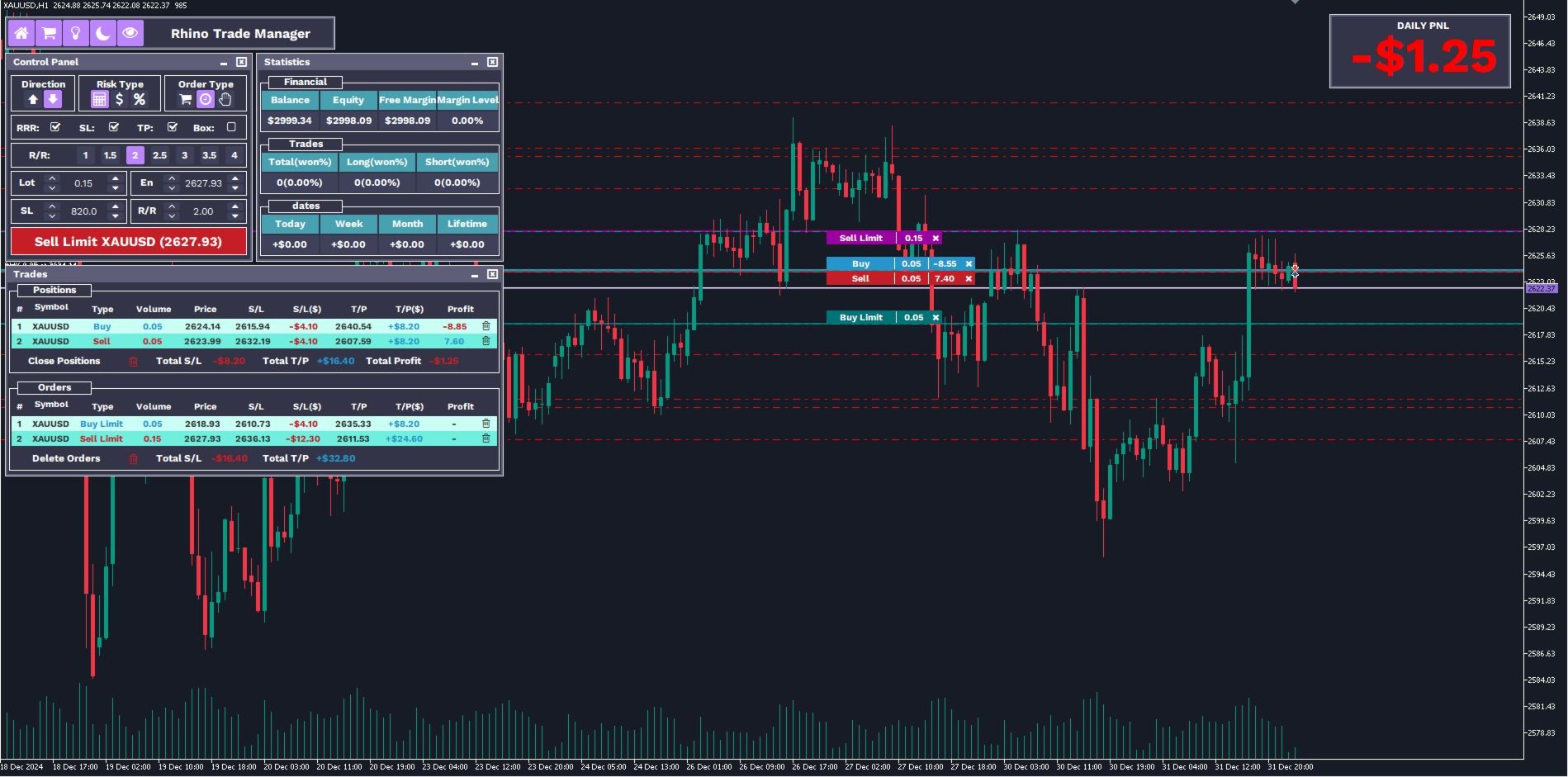
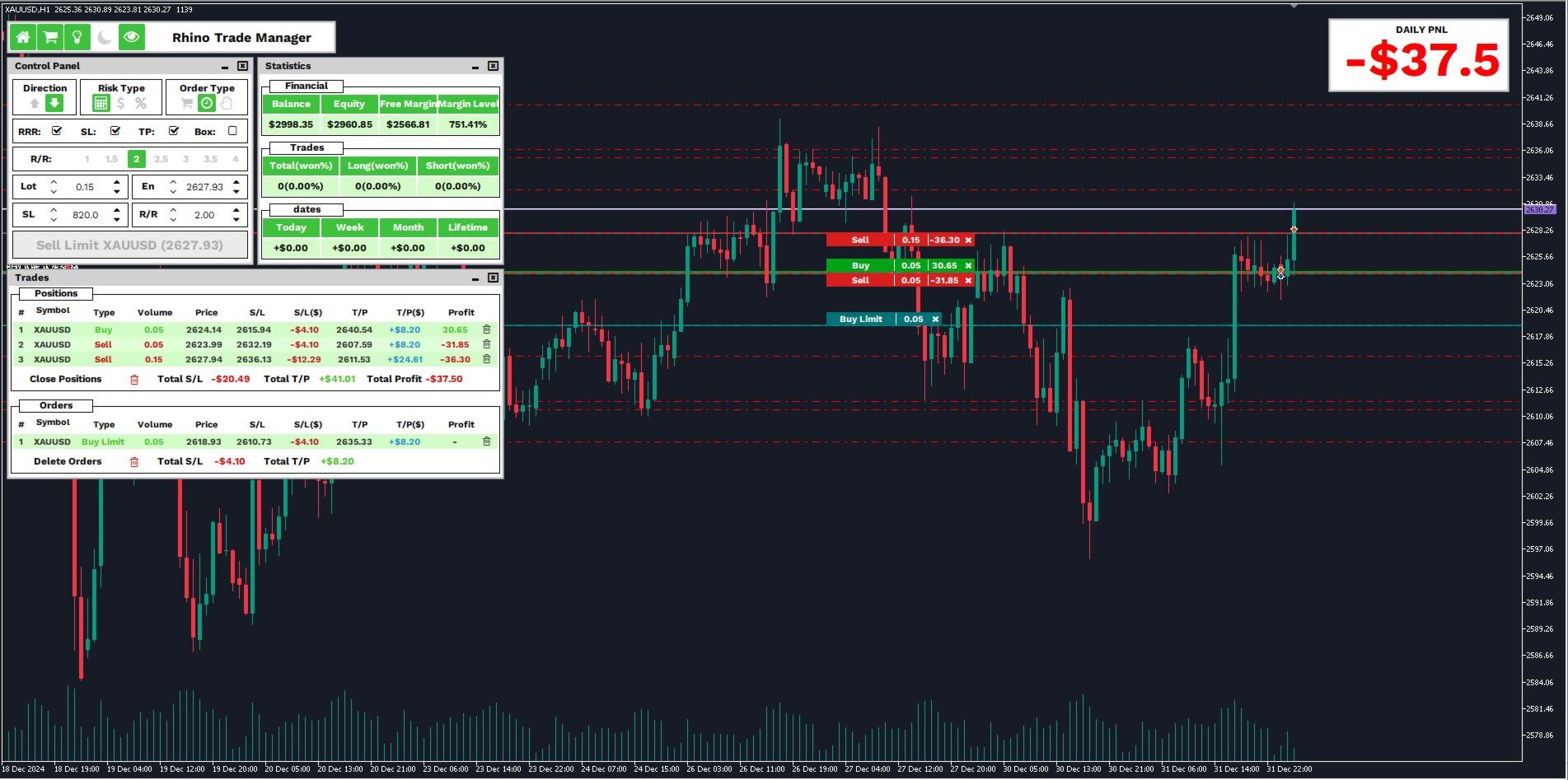
Rhino Backtest Manager, hem canlı işlemde hem de MetaTrader 4 strateji test edicisinde çalışan bir işlem yönetim panelidir. Canlı hesapta kullanılan arayüzün aynısıyla test edicinin içinde elle emir girmenize ve bu emirleri yönetmenize olanak tanır; böylece bir strateji geçmiş veriler üzerinde denendikten sonra araç değiştirmeden işleme alınabilir.

Panel, pozisyon hacmini risk ayarlarınıza göre hesaplar, emir gönderilmeden önce her zarar durdur ve kâr al seviyesinin para karşılığını gösterir ve sonuçları gün, hafta, ay ve hesabın tüm geçmişi bazında tutar.

Kullanım kılavuzu: Ürün nasıl kullanılır

Ücretsiz demo sürümü: Demoyu indir

MetaTrader 5 sürümü: Rhino Backtest Manager MT5 sürümü

İlk çalıştırmadan önce kılavuz sayfasında verilen yazı tipleri kurulmalıdır. Bunlar kurulmadığında panel doğru görüntülenmez.

Özellikler

İki mod. Aynı panel canlı işlemde ve strateji test edicisi modunda çalışır.

Emir tipleri. Piyasa, limit ve stop emirleri; giriş fiyatı gönderim öncesinde ayarlanabilir.

Risk ayarları. Zarar durdur, kâr al ve risk-kazanç oranı ayrı ayrı açılıp kapatılabilir.

Hacim hesabı. Pozisyon büyüklüğü sabit lot, hesap para biriminde sabit tutar veya bakiyenin yüzdesi olarak belirlenir.

İşlem listesi. Açık pozisyonlar ve bekleyen emirler; hacim, yön, giriş fiyatı, zarar durdur, kâr al ve güncel sonuç ile birlikte listelenir. İşlemler tek tek veya hepsi birden kapatılabilir.

İstatistikler. Hesap değerleri, yöne göre kazanma oranı ve günlük, haftalık, aylık ile hesabın tüm geçmişine ait net sonuç.

Piyasa gözlemi. Piyasa gözlemindeki sembollerin alış ve satış fiyatları; tıklandığında sembolün grafiği açılır. Canlı işlemde kullanılabilir.

Grafik üzerindeki işaretler. Her işlem grafik üzerinde giriş çizgisi, hacmi ve güncel sonucuyla işaretlenir ve yanında kapatma düğmesi bulunur.

Gün sonucu. Ayrı bir pencere, güncel işlem gününün net sonucunu büyük punto ile gösterir.

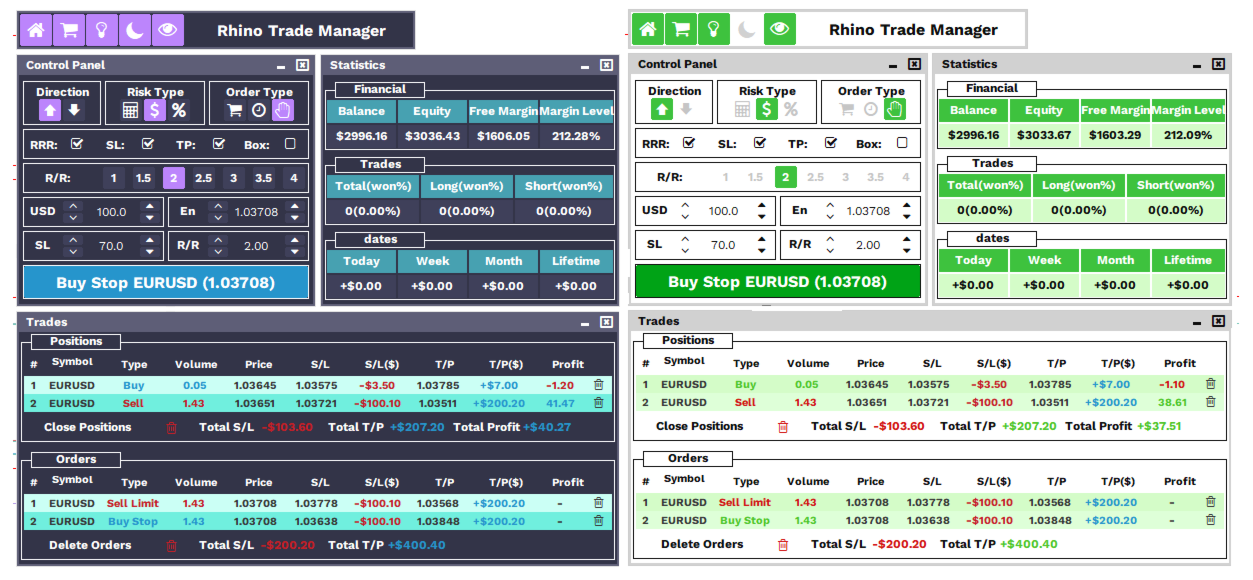
Renk düzeni. Arayüz koyu ve açık renk düzeni arasında değiştirilebilir.

Test edicide göstergeler. Grafiğinizi tester.tpl adıyla bir şablon olarak kaydedin; test edici çalıştığında göstergeleriniz otomatik olarak yüklenir.

Pencereler

Pencere İçerik
Ana panel Diğer pencereleri açar ve kapatır, renk düzenini değiştirir, grafik üzerindeki işaretleri gösterir veya gizler
Kontrol paneli Yön, hacim hesaplama biçimi, emir tipi, zarar durdur, kâr al, risk-kazanç oranı, giriş fiyatı ve gönderme düğmesi
Emir bilgi penceresi Zarar durdur ve kâr al için fiyat seviyesi, pip mesafesi ve para karşılığı; ayrıca sembol, hacim, emir tipi ve giriş fiyatı
İşlemler penceresi Pozisyonlar ve bekleyen emirler, tekil ve toplu kapatma, tüm zarar durdur veya tüm kâr al seviyelerine ulaşılması hâlindeki toplam sonuç
İstatistik penceresi Hesap değerleri, işlem sayıları ve döneme göre net sonuç
Piyasa gözlemi penceresi Alış ve satış fiyatları ile grafik değiştirme, canlı işlemde
Gün sonucu penceresi Güncel işlem gününün net sonucu
Grafik işaretleri Her işlem için giriş çizgisi, hacim ve güncel sonuç, kapatma düğmesiyle birlikte

İstatistikler

Hesap İşlemler Net sonuç
Bakiye İşlem sayısı Bugün
Varlık Kazanma oranı Bu hafta
Serbest teminat Alış işlemleri ve kazanma oranı Bu ay
Teminat seviyesi Satış işlemleri ve kazanma oranı Tüm geçmiş

İki mod arasındaki farklar

İşlev Canlı işlem Strateji test edicisi
Piyasa, limit ve stop emirleri Evet Evet
Zarar durdur, kâr al, risk-kazanç oranı Evet Evet
İşlemler penceresi ve toplu kapatma Evet Evet
İstatistik penceresi Evet Evet
Grafik üzerindeki işaretler Evet Evet
Koyu ve açık renk düzeni Evet Evet
Piyasa gözlemi penceresi Evet Hayır
Zarar durdur ve kâr al seviyelerini sürükleyerek taşıma Evet Hayır
Değerleri klavyeyle yazma Evet Hayır

MetaTrader, strateji test edicisi içinde klavye girişini kabul etmez. Test edici modunda tüm değerler ok düğmeleriyle ayarlanır; bu düğmeler değeri bir adım veya on adım değiştirir.

Başlangıç

1. Kılavuz sayfasındaki yazı tiplerini kurun.

2. Ürünü bir grafiğe ekleyin veya strateji test edicisinde uzman danışman olarak seçin.

3. Ana panelden kontrol panelini açın ve alış ya da satış yönünü seçin.

4. Hacmin nasıl hesaplanacağını ve emir tipini seçin.

5. İhtiyacınız olan zarar durdur, kâr al ve risk-kazanç oranını açın; seviyeleri ok düğmeleriyle veya canlı işlemde yazarak belirleyin.

6. Emri gönderin ve işlemler penceresinden yönetin.

Sorular ve yanıtlar

Strateji test edicisinin içinde çalışıyor mu? Evet. Test edici görsel modda çalışırken emir yönetimi, risk ayarları, istatistikler ve grafik işaretlerinin tamamı kullanılabilir.

Demo var mı? Evet, ücretsiz demo sürümünün bağlantısı yukarıda verilmiştir.

Diğer platform için bir sürüm var mı? Evet, MetaTrader 5 sürümünün bağlantısı yukarıda verilmiştir.

Panel doğru görüntülenmiyor. Yazı tipleri kurulu değildir. Kılavuz sayfasındaki yazı tiplerini kurun.

Test sırasında kendi göstergelerimi kullanabilir miyim? Evet. Grafiği canlı işlemde hazırlayın, şablonu tester.tpl adıyla kaydedin; test edici çalıştığında göstergeler yüklenir.

Hangi semboller ve zaman dilimleri destekleniyor? Brokerınızın sunduğu tüm sembol ve zaman dilimleri.

Test edicide neden değer yazılamıyor? MetaTrader strateji test edicisinde klavye girişini kabul etmez. Ok düğmelerini kullanın.

Sorularınızı ve önerilerinizi özel mesajla iletebilirsiniz.
Değerlendirmeler 1
reign777
280
reign777 2025.04.22 17:44 

Sandro is extremely helpful and quick to support this product with fixes and upgrades. One of the very few products that displays your risk at full stop out for your each and all trades.

Excellent tool for managing risk, placing trades and displaying your account performance.

Önerilen ürünler
Virtual Collider Manual   is a trading assistant with a built-in panel for manual trading. It automatically moves a position opened by a trader in profit using innovative adaptive grid algorithm of averaging and adaptive pyramiding Know-how of the grid algorithm of averaging and pyramiding of the   Virtual Collider Manual   trading robot is based on fully automatic adaptation of all characteristics of dynamically build order grid and pyramid with actual price movement with no need for adjusting
<p><b><i>Easy Trade Executor, MT4 için hızlı lot hesaplama, emir yürütme ve işlem yönetimi aracıdır.</i></b></p> <p>Entry Price, Stop Loss ve Take Profit seviyelerini doğrudan grafik üzerinde belirleyin, lot büyüklüğünü otomatik olarak hesaplayın ve yalnızca birkaç tıklamayla kontrollü risk altında işlemler açın.</p> <p><br></p> <h3>Neden Easy Trade Executor?<br></h3> <p>Easy Trade Executor, yalnızca risk hesaplamasından daha fazlasını isteyen traderlar için geliştirilmiştir. Traderlar işle
VN Trade Panel II
Vyacheslav Nekipelov
4 (1)
The new version of the trading panel, which now has the ability to separately close Buy and Sell orders, display targets for all orders on the chart, as well as the ability to use the panel to trade with brokers working on the FIFO rule. Also, the new version adds option buttons for separate management of open orders. It has a convenient visualized interface and intuitive control without a lot of additional tabs to which traders have to be distracted and switch their attention. Thanks to this,
This utility is designed to help you with your Manual Trading. It allows different ways of closing trades. It can display total number of BUY and SELL orders individually and also their individual profits. It can enter trades without stopl loss and take profits. However upon selecting UseStopLossTakeProfit from the settings it can use best possible stop loss and take profits based on the market conditions. Upon selecting the CloseOppositeTrades  from the settings it can close opposite trades. Fo
TradePilot
Hossein Khalil Alishir
TradePilot Expert Advisor (EA) for MetaTrader 4 TradePilot is a professional and user-friendly Expert Advisor (EA) for MetaTrader 4 (MT4) . It simplifies automated trading , risk management , and trade execution using a smart trading panel . Perfect for beginners and experienced traders looking for a reliable trade manager EA with automated lot size calculation . Key Advantages User-Friendly Trading Panel: Customizable panel with buttons and hotkeys. Smart Risk Management: Supports percen
Utility, which draws buy or sell trendlines, which can also become support or resistances able to close any position on the screen Algorithm that calculates the gain of the position, at the touch closure of the line.   The benefits you get: Works on forex and CFD, timeframe from M1 to Weekly. Easy to use screen control panel. Audible warning messages at the touch of the line. Easy to use.
This tool will perform Trailing stop loss and Break even management for orders. Helps you limit or reduce the time spend watching orders on the screen, especially when you need to go to sleep. Just add this EA to 1 chart, you can manage all pairs. You can filter orders by comment, magic number, symbol, and order ticket number. When Breakeven it can add shift/offset pips (to cover the commission...). You can try in strategy tester before purchase. The EA will add Buy and Sell alternately, so yo
Panel "panel_kjutaMultiTerminal" for trading. Opens, modifies, closes and deletes trading and pending orders from the chart using virtual lines, buttons and the active information terminal. Automatically opens an order by indicator levels. Hints in Russian, English or disabled. It has a number of functions for trailing virtual Take Profit lines and limit orders. Displays information on the active information terminal.  Hides and includes virtual lines S/L , T / P, buttons "<>","M","X", as well a
Product Name: Risk Commander: Trade Assistant & Strategy Simulator Risk Commander is more than just a trade panel—it is a complete Manual Trading Ecosystem . It serves two powerful purposes: Live Assistant: Helps you execute trades with speed, precision, and perfect risk management in real-time markets. Training Simulator: Fully compatible with the Strategy Tester (Visual Mode) , allowing you to practice manual trading on historical data without risking a cent. NEW! Built-in Simulator Mode Stop
Trading panel for manual trading. Has a fairly wide functionality. Allows you to automatically calculate the order size, open both market and pending orders. It has a wide range of options for closing orders, it is possible to partially close orders, close orders after reaching a certain profit or loss, separately close profitable and unprofitable, buy and sell, as well as pending orders. The panel also contains a simple implementation of a grid of pending orders, reverse and lock functions, tr
Margin Call Shield – Defend Your Margin on Your Terms Margin Call Shield   is a tool for MetaTrader 4 traders who want to decide for themselves which open positions are closed during margin call situations before the platform does so automatically based on its internal rules. By default, the broker or platform decides which positions to close, often using undisclosed algorithms. Margin Call Shield lets you set this order according to your own strategy. Why Was Margin Call Shield Created? In a  
Expert Advisor for MT4 Useful utility MUST have for all traders.  With 1 click button, you're able to close all your open positions. Its come with a warning pop up notification when you click to close all your trades, to avoid an accident press the button. Just press 'Yes' to confirm or 'No' to cancel it. The expert will close all your open positions no matter what pairs you currently open or directions. Just attach the expert on 1 of your chart, and you're good to go.
很多交易者亏钱,不是因为判断方向错了。 是因为行情动的时候手慢了。是因为手滑点错了手数。是因为新闻数据一出来, 三笔盈利的单子还没来得及平,全部回吐了。 Apex Trade Manager Pro 就是为了解决这些问题而做的。 这是一款适用于 MetaTrader 4 和 MetaTrader 5 的可视化交易面板。它挂在 图表上,把所有常用操作——平仓、减仓、设止损、开单——都变成一个按键的 事情。不用翻菜单,不用等弹窗,不会手忙脚乱。 --- 功能说明 一键全平 一个按钮关掉当前品种所有持仓。按钮上实时显示总浮动盈亏,让你在按下去 之前就知道自己在什么位置。 分批减仓 直接从面板关掉每笔持仓的50%或80%仓位。想落袋一部分利润但不想完全出场 的时候,这个比去终端一笔一笔操作快得多。 按类型分开平仓 只平多单、只平空单、只平盈利的、只平亏损的,各有独立按键。不用在终端 里翻找,不用逐笔选择。 一键移至保本 行情往你方向走了,按一下保本键,所有盈利持仓的止损立刻移到各自的开仓 价。亏损的单子不受影响。 批量修改止损止盈 输入点数,按键,所有持仓同时更新。也可以
TRADE MANAGER G2 – PRODUCT DESCRIPTION By Ida Bagus Putu Mahardika Trade Manager G2 – All-in-One Trading Panel for Professional Execution & Risk Management Trade Manager G2 is a next-generation trading panel designed to give you full control over order execution, position management, and profit optimization in real time on MetaTrader 5. With a modern card-based user interface and individual TP actions per level, this panel elevates your trading experience to the next level. KEY ADVANTAGES OF
It is so very disappointing when the price does not have enough points to achieve Take Profit and makes a reversal. This EA sets virtual levels near the TakeProfit levels. This EA sets virtual levels next to TakeProfit orders. If these levels are reached by price, breakeven or trailing stop is applied for an order. Features This EA does not set new orders. The aim of this EA is to manage stop losses of existing orders that are set by another EA or manually (magic number equals 0). For correct w
The Best One Scalping Trade Panel functional manual trade panel with risk reward, auto SL by candle ( original solution), lot size calculation, one-click trading, scale in and out of trades (partial close),  Works with all symbols not just currency pairs, perfect works on DAX, NASDAQ, GOLD, ...... I earn every day during live stream on ZakopiecFX - join Me Risk by lot Risk by percent SL by points SL by Candle, Renko, RangeBar ( original solution) TP by point TP by Risk/Reward Auto Trailing by P
Auto SLTP Maker MT4  is an assistant for all those who forget to set StopLoss and/or TakeProfit in deal parameters, or trade on a very fast market and fail to place them in time. This tool automatically tracks trades without StopLoss and/or TakeProfit and checks what level should be set in accordance with the settings. The tool works both with market and pending orders. The type of orders to work with can be set in the parameters. It can track either trades for the instrument it runs on, or all
The   Grid Builder MT4   utility is designed for placing a grid of pending orders of any complexity and will be an excellent tool in the hands of a trader who trades grid trading strategies. The tool has numerous settings that allow you to quickly and easily build a grid of orders with the specified parameters. All types of pending orders are supported: Buy Stop; Buy Limit; Sell Stop; Sell Limit. The script also allows you to delete a previously placed grid of orders in one click. If the "Delete
Exp Averager
Vladislav Andruschenko
4.82 (22)
Averager for MetaTrader 4 — profesyonel pozisyon kurtarma ve işlem sepeti yönetim sistemi Drawdown'a giren açık işlemleri daha kontrollü yönetmek, ortalama giriş fiyatını iyileştirmek ve tüm pozisyon serisini tek bir mantık altında toparlamak isteyen yatırımcılar için geliştirilmiş profesyonel bir Expert Advisor. Averager yalnızca yeni işlemler ekleyen basit bir ortalama alma aracı değildir. Mevcut pozisyonları yeniden yapılandıran, zarar baskısını azaltan ve tüm sepeti daha verimli bir çıkış n
Noize Absorption Index MT4
Ekaterina Saltykova
5 (1)
Noize Absorption Index - is the manual trading system that measures the difference of pressure between bears forces and bulls forces. Green line - is a noize free index that showing curent situation. Zero value of index shows totally choppy/flat market.Values above zero level shows how powerfull bullish wave is and values below zero measures bearish forces.Up arrow appears on bearish market when it's ready to reverse, dn arrow appears on weak bullish market, as a result of reverse expectation. S
TP1 TP2 TP3 panel
Denis Paul Richard Remanjon
3.5 (2)
TP1 TP2 TP3 panel is a simple tool designed for manual trading. It helps you to follow free or paid forex signals with multiple take profit (TP1 TP2 TP3). Fill the fields (volume, SL, TP1, TP2, TP3) in pips or price, press the ‘Sell’ or ‘Buy’ buttons and the program opens 3 identical orders. It also adds TP1 and TP2 lines on chart. When TP1 is reached, the program automatically closes order #1 and moves SL for order #2 and order #3 according to your settings. When TP2 is reached, the program aut
Trading tool combining a sophisticated equity stop-loss, dynamic take-profit management (Breakeven & Trailing), and symbol-group-based closing logic. It is a complete risk management and trade supervision tool. Features: All features of `Equity Master Stop v1` (floating profit/loss limits, exit protection, skip hours). Take-Profit Override: Can force a TP on any order to lock in a `MAX_FLOATING_PROFIT`. Step Breakeven: Locks in increasing amounts of profit as a trade moves favorably (e.g., aft
Automate Risk Management with Smart Trailing Stop Manager for MetaTrader 4 Looking for MetaTrader 5 version? I t is available separately in the Market:   Smart Trailing Stop Manager MT5 Full User Guide    –  Public channel:   CLICK HERE Struggling with manually adjusting stops and securing profits? Smart Trailing Stop Manager MT4 is an intelligent utility for MetaTrader 4 that automates trailing stops, break-even management, partial closes, and auto SL. Optimized specifically for MT4 users, it e
Trade panel manual is a multifunctional trading assistant. It allows you to open market and pending orders in one click. Value is set via button menu edit or deleted by specific buttons pending orders and the value of take profit and stop loss in one click. Through the edit menu of the button, a value is set that can be easily changed by simply moving level_tp lines for take profit or stop loss levels and for pending orders. It is possible to select orders and determine for them and set the leve
The analyzer panel allows traders to add the pending order grid (Buy Limit, Sell Limit, Buy Stop, Sell Stop) quickly and efficiently.   Parameters stop mode - select stop setting mode every order - stop levels are set for each order separately position as - common stop levels for all orders order type - select pending order type Buy Limit Sell Limit Buy Stop Sell Stop magic - set a magic number for open orders if necessary. If position as mode is enabled, stop levels are corrected for all orders
Symbol Manager
Taras Slobodyanik
5 (4)
Symbol Manager or Grid Manager, designed to group orders into one position (by Symbol or by Magic Number). This utility will be useful to multi-currency traders (many EAs), who can have multiple orders on several pairs. You will be able to see the total number of lots, the total profit, and set virtual stop loss and virtual take profit. To set a real TP (or SL), you must first set the virtual value, and then enter the command in this cell: "set". If you want to set real TP/SL for all orders at
Tanıtım 'Virtual OCO Pending' - OCO bekleyen kuralı (Tek İptal) kullanarak sanal kar al ve zararı durdur ile mevcut fiyata bir düğme tıklamasıyla bekleyen durdurmaları veya limitleri hızlı bir şekilde yerleştirmenizi sağlayan risk değerlendirmesine sahip yarı otomatik bir sipariş yönetimi yardımcı programı aracı (uzman danışman) Başka). Kolay görsel onay için grafik üzerinde çizilmiş görsel seviyeler. Bu aracı tek bir grafikten istediğiniz herhangi bir sembole emir göndermek için kullanabilirsi
Otomatik Trade Kapatma: zamana göre veya Kâr / Zarar tetikleyicisi Bu araçla, belirli bir koşul altında trade'leri otomatik olarak kapatabilirsiniz. Çok fonksiyonlu araç : 66+ özellik, bu araç dahil  |   Sorularınız için iletişime geçin   |   MT5 versiyonu Otomatik Kapatmayı etkinleştirmek için aşağıdaki parametreleri ayarlamanız gerekir (panelde): 1. Sembol   fonksiyonun uygulanacağı: belirli bir   [Symbol]   / veya   [ALL]   tüm semboller. 2.   Koşul,   ne zaman kapatılacağı: [if total] / [if
Trading Helper - Program for trading and money management. It works with pending and immediate orders, and is equipped with trailing stop, breakeven and take profit functions. Manual (Be sure to read before purchasing) Advantages 1. Comfortable trading in a few clicks. Immediate and pending orders are available in the panel 2. Fixed percent method. The panel can select the lot size based on a predetermined risk 3. Trading with a fixed lot. In a few clicks, select a lot and open a Trade 4. Posi
Short Description: FTMO Protector PRO MT4 is an EA designed to protect your funded account by managing risk and ensuring compliance with the Prop Firm's trading rules. This EA automatically monitors equity levels, closes trades when profit targets or drawdown limits are reached, and provides a visual display of key account metrics. EA w orks with all different Prop Firm service providers. Overview: FTMO Protector PRO MT4 is an Drawdown Safeguard Expert Advisor meticulously crafted for traders
Bu ürünün alıcıları ayrıca şunları da satın alıyor
Trade Manager EA’ye hoş geldiniz! Ticaretin daha sezgisel, hassas ve verimli hale gelmesi için tasarlanmış nihai risk yönetim aracı ile tanışın. Bu sadece bir emir verme aracı değil; ticaret planlaması, pozisyon yönetimi ve risk kontrolü için kapsamlı bir çözüm. İster yeni başlayan bir yatırımcı olun, ister deneyimli bir trader ya da hızlı emir gerektiren bir scalper, Trade Manager EA ihtiyaçlarınıza uyum sağlar ve forex, endeksler, emtialar ve kripto paralar dahil tüm piyasalarda esneklik sunar
Exp COPYLOT CLIENT for MT4
Vladislav Andruschenko
4.69 (65)
MetaTrader 4 için profesyonel işlem kopyalayıcı MetaTrader 4 için hızlı, güvenilir ve profesyonel bir işlem kopyalayıcı. COPYLOT , MetaTrader 4 ve MetaTrader 5 terminalleri arasında Forex işlemlerinin kopyalanmasını sağlar ve farklı hesap türleri ile işlem senaryoları için esnek senkronizasyon sunar. COPYLOT MT4 sürümü şunları destekler: MetaTrader 4 → MetaTrader 4 MetaTrader 5 Hedge → MetaTrader 4 MetaTrader 5 Netting → MetaTrader 4   MT5 sürümü Tam açıklama + DEMO + PDF Nasıl satın alınır Nası
Local Trade Copier EA MT4
Juvenille Emperor Limited
4.96 (111)
Local Trade Copier EA MT4, aynı Windows bilgisayarı veya Windows VPS üzerinde çalışan birden fazla MetaTrader 4 hesabı arasında işlemleri kopyalamak ve yönetmek için hızlı ve esnek bir işlem kopyalayıcıdır. Yerel işlem senkronizasyonunu, Receiver tarafında lot büyüklüğü, risk yönetimi, işlem filtreleme, sembol eşleştirme, işlem yönetimi ve hesap koruması kontrolleriyle birleştirir. Transmitter ve Receiver terminallerinizi yaklaşık 1 dakika içinde ayarlayın ve aynı veya farklı brokerlardaki hesa
Trade Assistant MT4
Evgeniy Kravchenko
4.43 (197)
It helps to calculate the risk per trade, the easy installation of a new order, order management with partial closing functions, trailing stop of 7 types and other useful functions. Additional materials and instructions Installation instructions   -   Application instructions   -   Trial version of the application for a demo account Line function -   shows on the chart the Opening line, Stop Loss, Take Profit. With this function it is easy to set a new order and see its additional characteris
TradePanel MT4
Alfiya Fazylova
4.84 (95)
Trade Panel, çok işlevli bir ticaret asistanıdır. Uygulama, manuel ticaret için 50'den fazla ticaret fonksiyonu içerir ve çoğu ticaret görevini otomatikleştirmeyi mümkün kılar. Uygulama talimatları : https://www.mql5.com/en/blogs/post/756482 Demo hesabı için uygulamanın deneme sürümü: https://www.mql5.com/en/blogs/post/750865 Uygulamayı nasıl kurulur: https://www.mql5.com/en/blogs/post/756239 Uygulamayı görsel modda nasıl test edilir: https://www.mql5.com/en/blogs/post/770277 Uygulamayı VPS Meta
Trade Indicator Assistant is a powerful MT4 utility designed to turn indicators into automated trading systems. Its main feature is the ability to automatically detect an indicator’s   BUY and SELL signal buffers , without requiring you to know the buffer numbers, search through indicator settings, or modify the indicator source code. Bonus Indicator: After purchasing Trade Indicator Assistant, contact me to receive Trade Signal Pro completely free as a bonus indicator. [Download Demo Version]
Fotokopi->Kullanışlı ve hızlı arayüz etkileşimi, kullanıcılar hemen kullanabilir       ->>>> Windows bilgisayarlarda veya VPS Windows'ta kullanılması önerilir Özellikler: Çeşitlendirilmiş ve kişiselleştirilmiş kopyalama ticareti ayarları: 1. Farklı sinyal kaynakları için farklı lot modları ayarlanabilir 2. İleri ve geri kopyalama ticareti için farklı sinyal kaynakları ayarlanabilir 3. Sinyaller yorumlarla ayarlanabilir 4. Lotun sözleşme lotuna göre kalibre edilip edilmeyeceği Çeşitlendirilmiş v
Telegram to MT4 Multi-Channel Copier   , Telegram ve Discord kanallarınızdaki alım-satım sinyallerini doğrudan MetaTrader 4'e otomatik kopyalar. Bot yok, tarayıcı uzantısı yok, elle kopyalama yok. Sinyal Telegram'a veya Discord'a düşer ve EA birkaç saniye içinde terminalinizde işlemi açar. Ve bir kanalı kopyalamadan önce, yerleşik backtester o kanalın hesabınızda ne yapmış olacağını gösterir. Ürün iki bileşenden oluşur: Telegram kanallarınızı dinleyen bir Windows uygulaması ve sinyalleri MT4 ter
Çalışan Deneme Sürümünü İndir Copy Cat More (Taklitçi Kedi) — İşlem Kopyalayıcı (Trade Copier) MT4 sadece basit bir yerel işlem kopyalayıcı değildir; bugünün ticaret zorlukları için tasarlanmış eksiksiz bir risk yönetimi ve yürütme çerçevesidir (risk management and execution framework). Prop firm challenge'larından kişisel portföy yönetimine kadar, sağlam yürütme, sermaye koruması, esnek yapılandırma ve gelişmiş işlem yönetimi karışımıyla her duruma uyum sağlar. Kopyalayıcı hem   Master (Mast
FCK CurrencyStrength Pro
Patel Hitendrakumar Mahendrabhai
Hi Friends, " FCK Currency Strength Pro " is a auto & semi auto trading expert with direction of pair. Buy-Sell separate or multi currency in one click. The strategy of  FCK Currency Strength Pro  is a combination of custom indicator, Trendlines, Support & Resistance levels ( Price Action ) and most important secretive trading algorithm mentioned above. Download News Ex4 and csv file You need the following SDSnews.ex4 in MQL4/Libraries and the daylightsavings.csv in MQL4/Files. Only 4 of 5 copi
The product will copy all telegram signal to MT4   ( which you are member  ) , also it can work as remote copier.  Easy to set up, copy order instant, can work with almost signal formats, image signal, s upport to translate other language to English Work with all type of channel or group, even channel have "Restrict Saving Content", work with  multi channel, multi MT5 Work as remote copier: with signal have ticket number, it will copy exactly via ticket number. Support to backtest signal. How to
News Filter EA: Advanced Algo Trading Assistant News Filter EA is an advanced algo trading assistant designed to enhance your trading experience. By using the   News Filter EA , you can integrate a Forex economic news filter into your existing expert advisor, even if you do not have access to its source code. In addition to the news filter, you can also specify   trading days   and   hours   for your expert. The News Filter EA also includes   risk management   and   equity protection   features
RS Trade Copier - gerçek grafik arayüze sahip, ultra hızlı yerel işlem kopyalayıcı. Hesap numaralarını elle girmeyi bırakın. Artık 200'den fazla anlaşılmaz giriş parametresiyle uğraşmak yok. Birden fazla MT4 ve MT5 terminali arasında işlem operasyonlarını kopyalamak için güvenilir ve esnek bir araçtır. Hem profesyonel yatırımcılar, sinyal hizmetleri hem de bireysel yatırımcılar için uygundur. Bir veya birden fazla Sağlayıcıdan bir veya birden fazla Alıcıya ticareti senkronize eder ve bunu yüksek
Take a Break pauses your Expert Advisors when trading is a bad idea: before news, after a daily loss, outside your trading hours, or when a rule you wrote yourself says so. When the pause is over, your EAs simply continue. Account protection for all your EAs in one tool: news filter, drawdown and equity protection, time filter and custom rules. One EA on one chart protects the whole account, the free indicator gives every chart its own rules on top. Free demo | What is new in 26.09 | Support Ass
MT4 to Telegram Signal Provider , Telegram'a sinyal göndermeyi sağlayan ve hesabınızı bir sinyal sağlayıcısına dönüştüren kullanımı kolay ve tamamen özelleştirilebilir bir araçtır. Mesajların formatı tamamen özelleştirilebilir! Ancak basit kullanım için, önceden tanımlanmış bir şablonu seçebilir ve mesajın belirli kısımlarını etkinleştirebilir veya devre dışı bırakabilirsiniz. [ Demo ]  [ Kullanım Kılavuzu ] [ MT5 Sürümü ] [ Discord Sürümü ] [ Telegram Kanalı ]  New: [ Telegram To MT5 ] Kurulum
Telegram'dan MT4'e:   Nihai Sinyal Kopyalama Çözümü Telegram ile MT4'e   işlemlerinizi kolaylaştırın, DLL'lere ihtiyaç duymadan doğrudan Telegram kanallarından ve sohbetlerinden MetaTrader 4 platformunuza işlem sinyallerini kopyalamak için tasarlanmış son teknoloji yardımcı program. Bu sağlam çözüm, sinyallerin benzersiz hassasiyet ve özelleştirme seçenekleriyle sorunsuz bir şekilde yürütülmesini sağlayarak size zaman kazandırır ve verimliliğinizi artırır. [ Instructions and DEMO ] Temel Özellik
Riskinizi otomatik olarak hesaplarken işlemlere hızlı bir şekilde girip çıkmanıza yardımcı olacak Ticaret Yöneticisi. Aşırı Ticaret, İntikam Ticareti ve Duygusal Ticaretten korunmanıza yardımcı olacak özellikler içerir. İşlemler otomatik olarak yönetilebilir ve hesap performans ölçümleri bir grafikte görselleştirilebilir. Bu özellikler, bu paneli tüm manuel yatırımcılar için ideal kılar ve MetaTrader 4 platformunun geliştirilmesine yardımcı olur. Çoklu Dil desteği. MT5 Sürümü  |  Kullanım Kılavu
Trade Copier Global: The name speaks for itself. This copier allows you to copy orders between MT4 terminals even if they are not installed on the same computer. Features Copying trades between MT4 terminals around the world with a short delay. Automatically recognizes symbol prefixes. Can connect many Slaves to the same Master. Supports pending and market orders. Supports partial order close (with limitations, see below) Can send messages and notifications to the Slaves from the Master Several
VirtualTradePad mt4 Extra
Vladislav Andruschenko
4.85 (61)
1 tıklama ile ticaret için Ticaret Paneli.   Pozisyonlar ve emirlerle çalışmak!   Grafikten veya klavyeden alım satım. Alım satım panelimizi kullanarak, grafikten tek bir tıklamayla alım satım yapabilir ve alım satım işlemlerini standart MetaTrader kontrolünden 30 kat daha hızlı gerçekleştirebilirsiniz. Bir tüccar için hayatı kolaylaştıran ve bir tüccarın ticaret faaliyetlerini çok daha hızlı ve daha rahat gerçekleştirmesine yardımcı olan parametrelerin ve işlevlerin otomatik hesaplamaları. Graf

MetaTrader 4 için para birimi gücü göstergesi Bu para birimi gücü göstergesi 28 kadar ana pariteyi okur ve 8 ana para birimi için birer değer üretir: USD, EUR, GBP, JPY, CHF, CAD, AUD ve NZD. Kimin önde olduğunu anlamak için grafik üstüne grafik açmak yerine, MetaTrader 4 grafiğinizdeki tek bir paneli okur ve hangi para biriminin alındığını, hangisinin satıldığını görürsünüz. Panelde ne görürsünüz 8 para biriminin her biri için sıralanmış güç çubuğu ve yüzdesi Çoklu zaman dilimi matrisi: para bi
Trade Dashboard simplifies how you open, manage, and control your trades, with built-in lot size calculation. It allows you to execute trades, manage risk, and control positions directly on the chart, with tools such as partial close, breakeven, and trailing stop. Designed to reduce manual work and help you stay focused on your trading decisions. A demo version is available for testing. Detailed explanations of features are provided within the MQL5 platform. Installation instructions are include
Smart Copy Local MT4
Kyra Nickaline Watson-gordon
5 (7)
Smart Copy is an Easy-to-Use EA that supports Multi Copying Metatrader4 and Metatrader5 and Local/Remote Copying. (Remote Version is coming soon) Free version is available on Smart Copy Local Free MT4 Specifications :     Real Time, Multi Terminal - Multi Account - MT4/MT5 trade copying     Copy from netting to hedge and hedge to netting is supported.     Fast and instant copy     All settings are input visually.     Easy modifying symbol names, prefix, suffix     Enable/Disable copying s
Want automatically to put the pending order, take profit and stop loss? This EA will do it on your behalf! The Fibo Heart EA strategy will place limit order after the ‘check point’ breakout. The position will be triggered when the price make a successful retest. If not, the pending order will automatically deleted after price hit certain level. You also have option to enable market order (instant execution) and custom take profit in the inputs setting. This EA must be attached with Fibo Heart In
Unlimited Trade Copier Pro is a tool to copy trade remotely to multiple MT4, MT5 and cTrader accounts at different computers/locations over internet. This is an ideal solution for you if you are a signal provider and want to copy your trades to other receivers globally on your own rules. One provider can copy trades to multiple receivers and one receiver can get trade from multiple providers as well. The provider can even set the subscription expiry for each receiver, so that receiver will not b
Bar Replay MT4
Hoang The Manh
3.43 (7)
Don't purchase before testing the Demo version first. DEMO version:   https://www.mql5.com/en/market/product/76917 __________________________________________________ This EA  - Tool allow you replay bar in Meta Trader 4 for back test. This Tool can back test in multi timeframe in only one chart. This Tool is very useful for Price action trader. It can work with Indicators, some indicators cannot works. So please download Demo to test before purchase.  Demo Version We do not accept refund in any
King Trade Copier MT4
Mohammed Maher Al-sayed Mohammed Ahmed Saleh
5 (1)
King Trade Copier, aynı bilgisayarda veya VPS'te çalışan MetaTrader terminallerini birbirine bağlar. Bir hesapta açılan işlemler diğerlerinde de görünür. Dosya her iki rolü de taşır, bu yüzden aynı indirme, Mode'u neye ayarladığınıza bağlı olarak gönderici ya da alıcı olur. Her grafikte panel, bu terminalin gönderip göndermediğini ya da alıp almadığını gösterir, karşı taraftaki hesabın adını verir, yanıt veren alıcıları sayar ve son sinyalin yaşını bildirir. Kopyalanmayan bir emir, kaybolmak ye
This is a program in the form of an EA that attaches to a chart in MetaTrader 4. Then, by using API from Bittrex, Binance websites, it downloads the history of altcoins. By selecting a pair name, the EA automatically downloads all time frames history (Daily,H12,H4,H2,H1,M30,M15,M5,M3,M1) so there is no need to attach multiple EAs to different charts. You can select one pair from Bittrex and 4 pairs from Binance exchange with one running EA and create up to 15 timeframes for 5 different pairs. Th
Strategy Builder offers an incredible amount of functionality. It combines a trade panel with configurable automation (covert indicators into an EA), real-time statistics (profit & draw down) plus automatic optimization of SL, TP/exit, trading hours, indicator inputs. Multiple indicators can be combined into an single alert/trade signal and can include custom indicators, even if just have ex4 file or purchased from Market. The system is easily configured via a CONFIG button and associated pop-up
Grid Manual MT4
Alfiya Fazylova
4.71 (17)
Grid Manual, sipariş ızgarasıyla çalışmak için kullanılan bir ticaret yardımcı programıdır. Yardımcı program evrenseldir, esnek ayarlara ve sezgisel bir arayüze sahiptir. Sadece kayıpların ortalaması yönünde değil, aynı zamanda kazanç artışı yönünde de bir emir ızgarası ile çalışır. Tüccarın bir emir ızgarası oluşturmasına ve eşlik etmesine gerek yoktur, bu yardımcı programı yapacaktır. Emri açmanız yeterlidir ve Grid manual otomatik olarak ona bir emir ızgarası oluşturacak ve kapanana kadar ona
Ticaret yapmak istediğiniz temel alanları belirledikten sonra otomatik olarak destek ve direnç veya arz ve talep bölgelerini değiştirin. Bu EA, tek bir tıklamayla alım ve satım bölgeleri çizmenize ve ardından bunları fiyatın dönmesini beklediğiniz yere tam olarak yerleştirmenize olanak tanır. EA daha sonra bu bölgeleri izler ve bölgeler için belirttiğiniz fiyat hareketine göre otomatik olarak işlemler gerçekleştirir. İlk işlem gerçekleştirildikten sonra EA, hedef bölge haline gelen yerleştirdiğ
Yazarın diğer ürünleri
MetaTrader 5 için Rhino Chart Drawing Tools Rhino Chart Drawing Tools, MetaTrader 5 için TradingView benzeri bir çizim çalışma alanı sağlar. 54 çizim aracı, özelleştirilebilir bir araç çubuğu, favoriler, hızlı stil ayarları, nesne ayarları, şablonlar ve nesne yöneticisi içerir. Çizim Araçları Çizgiler Trend çizgisi, ışın, uzatılmış çizgi, yatay çizgi, dikey çizgi, yatay ışın, çapraz çizgi, trend açısı, ok, yol, çoklu çizgi ve bilgi çizgisi. Kanallar Paralel kanal, regresyon kanalı, düz kanal, ay
Rhino PDF Trade Report — MT5 İşlem Geçmişinizi PDF Olarak Dışa Aktarın MetaTrader 5 hesabınızdaki işlem geçmişini temiz ve yazdırmaya hazır bir PDF işlem raporuna dönüştürün. Tarih aralığı, işlem sayısı veya sembol seçerek işlem günlüğünüz, performans analiziniz, yatırımcı raporlarınız veya kayıt arşiviniz için yapılandırılmış bir rapor oluşturun. Performans Özeti İlk sayfa, seçilen dönem için işlem performansınızın özetini sunar: Performans göstergeleri: Net sonuç, işlem sayısı, kazanma oranı,
FREE
Rhino PDF Trade Report — MT4 işlem geçmişinizi PDF olarak dışa aktarın MetaTrader 5 hesap geçmişinizi tek tıkla temiz, baskıya hazır bir PDF işlem  raporuna  dönüştürün. Betiği çalıştırın, bir tarih aralığı ya da işlem sayısı seçin; yatırımcıya gönderebileceğiniz, prop firma başvurunuza ekleyebileceğiniz, mali müşavirinize verebileceğiniz veya işlem günlüğü olarak saklayabileceğiniz bir belge elde edin. Neler sunuyor Sayfa 1 — performans özeti Net sonuç, işlem sayısı, kazanma oranı , kâr fa
FREE
Rhino Chart Drawing Tools , MetaTrader 4 için TradingView tarzı bir çizim çalışma ortamı sunar. 54 çizim aracı , özelleştirilebilir araç çubuğu, Favoriler, hızlı stil ayarları, nesne ayarları, şablonlar ve nesne yöneticisi içerir. Kullanıcı kılavuzu: Ürün nasıl kullanılır Ücretsiz demo sürümü: Demoyu indir MetaTrader 5 sürümü: MT5 için Rhino Drawing Tools Çizim Araçları Grup Nesne Listesi Çizgiler Trend çizgisi, ışın, uzatılmış çizgi, yatay çizgi, dikey çizgi, yatay ışın, çapraz çizgi, trend a
Rhino Trade Manager , canlı grafiklerde ve Strateji Sınayıcı içinde görsel modda çalışan, MetaTrader 5 için bir işlem yöneticisidir. Sınayıcıda emirleri, gerçek hesapta kullandığınız panelin aynısıyla verir ve yönetirsiniz; böylece geçmiş veriler üzerinde manuel geri test ve canlı işlem tek bir araçla yapılır. Riske dayalı pozisyon büyüklüğü, grafikte net Zarar Durdur ve Kâr Al seviyeleri ve sonuçlarının kaydını isteyen, kendi kararıyla işlem yapan yatırımcılar için tasarlanmıştır. Panel, risk a
Filtrele:
reign777
280
reign777 2025.04.22 17:44 

Sandro is extremely helpful and quick to support this product with fixes and upgrades. One of the very few products that displays your risk at full stop out for your each and all trades.

Excellent tool for managing risk, placing trades and displaying your account performance.

Sandro Begashvili
2769
Geliştiriciden yanıt Sandro Begashvili 2025.04.23 07:18
Thank you for your great review! If you have any additional ideas or come across any bugs, please don’t hesitate to let me know. I’m always eager to hear your feedback and work on improving the Trading Tool.
Değerlendirmeye yanıt