 MetaTrader 5
 Uzmanlar
 Göstergeler
 Kütüphaneler
 Yardımcı programlar
 Widgetlar
 Kurallar
YouTube'dan Mağaza ile ilgili öğretici videoları izleyin
Bir alım-satım robotu veya gösterge nasıl satın alınır?
Uzman Danışmanınızı
sanal sunucuda çalıştırın
sanal sunucuda çalıştırın
Satın almadan önce göstergeyi/alım-satım robotunu test edin
Mağazada kazanç sağlamak ister misiniz?
Satış için bir ürün nasıl sunulur?
MetaTrader 5 için alım-satım yardımcı programları
 Aşağıda MetaTrader 5'te işlem yapmayı kolaylaştıran alım-satım programları bulunmaktadır. Açıklamasını ve amacını okumak için aşağıdaki listeden ürünün üzerine gelin.
It helps to calculate the risk per trade, the easy installation of a new order, order management with partial closing functions, trailing stop of 7 types and other useful functions.
Additional materials and instructions
Installation instructions - Application instructions - Trial version of the application for a demo account
Line function - shows on the chart the Opening line, Stop Loss, Take Profit. With this function it is easy to set a new order and see its additional characteristics bef

Trade Manager EA’ye hoş geldiniz! Ticaretin daha sezgisel, hassas ve verimli hale gelmesi için tasarlanmış nihai risk yönetim aracı ile tanışın. Bu sadece bir emir verme aracı değil; ticaret planlaması, pozisyon yönetimi ve risk kontrolü için kapsamlı bir çözüm. İster yeni başlayan bir yatırımcı olun, ister deneyimli bir trader ya da hızlı emir gerektiren bir scalper, Trade Manager EA ihtiyaçlarınıza uyum sağlar ve forex, endeksler, emtialar ve kripto paralar dahil tüm piyasalarda esneklik sunar

================================================================================ POC BREAKOUT - V20.72. Full Professional Grade Toolkit ================================================================================ POC Breakout is a full MetaTrader 5 trading dashboard for discretionary traders who want breakout signals, Point of Control (POC) context, volume profiles, order flow, market structure, news, alerts, and advanced trade planning in one professional workspace. Attached directly to you

Local Trade Copier EA MT5, aynı Windows bilgisayarı veya Windows VPS üzerinde çalışan birden fazla MetaTrader 5 hesabı arasında işlemleri kopyalamak ve yönetmek için hızlı ve esnek bir işlem kopyalayıcıdır. Yerel işlem senkronizasyonunu, Receiver tarafında lot büyüklüğü, risk yönetimi, işlem filtreleme, sembol eşleştirme, işlem yönetimi ve hesap koruması kontrolleriyle birleştirir. Transmitter ve Receiver terminallerinizi yaklaşık 1 dakika içinde ayarlayın ve aynı veya farklı brokerlardaki hesa

Trade Panel, çok işlevli bir ticaret asistanıdır. Uygulama, manuel ticaret için 50'den fazla ticaret fonksiyonu içerir ve çoğu ticaret görevini otomatikleştirmeyi mümkün kılar. Uygulama talimatları + video talimatları: https://www.mql5.com/en/blogs/post/772292 Demo hesabı için uygulamanın deneme sürümü: https://www.mql5.com/en/blogs/post/750865 Uygulamayı nasıl kurulur: https://www.mql5.com/en/blogs/post/756239 Uygulamayı görsel modda nasıl test edilir: https://www.mql5.com/en/blogs/post/770277

Telegram to MT5 Multi-Channel Copier , Telegram kanallarınızdaki alım-satım sinyallerini doğrudan MetaTrader 5'e otomatik kopyalar. Bot yok, tarayıcı uzantısı yok, elle kopyalama yok. Sinyal Telegram'a düşer ve EA birkaç saniye içinde terminalinizde işlemi açar. Ve bir kanalı kopyalamadan önce, yerleşik backtester o kanalın hesabınızda ne yapmış olacağını gösterir. Ürün iki bileşenden oluşur: Telegram kanallarınızı dinleyen bir Windows uygulaması ve sinyalleri MT5 terminalinizde yürüten bu Exp

Telegram sinyallerini kendi işlem kurallarınızla kopyalayın Telegram to MT5 Signal Trader , herkese açık ve özel Telegram kanallarındaki ve gruplarındaki metin tabanlı işlem sinyallerini otomatik olarak MetaTrader 5'e kopyalar. Tek bir masaüstü uygulamasından birden fazla sinyal sağlayıcısını ve MT5 hesabını yönetin; her sağlayıcı için ayrı risk ve işlem ayarları belirleyin. Sinyal kopyalamak için Telegram botu veya API kurulumu gerekmez. Kendi Telegram hesabınızla telefon numarası veya QR kod k

Strategy Ledger Pro , MetaTrader 5 için salt okunur bir hesap analiz panelidir. Hesap sonuçlarını Expert Advisor, strateji, sembol ve magic numarasına göre ayırır.
Her özelliğin açıklandığı ayrıntılı kılavuz .
MetaTrader tüm hesap için tek bir bakiye gösterir. Birden fazla Expert Advisor birlikte işlem yaptığında bu bakiye her birinin katkısını göstermez. Strategy Ledger Pro hesap geçmişini okur, kapanmış pozisyonları yeniden kurar, stratejilere atar ve sonuçları tek panelde sunar. Ürün emir a

Farmed Hedge Yield Farming | All Markets
(Manual - Hybrid - Semi/Automated EA)
VERIFIED TRADING RESULTS - Farmed Hedge Yield Axi Copy: https://www.mql5.com/en/signals/2356376 - Farmed Hedge Yield Exn Copy: https://www.mql5.com/en/signals/2356404
- Farmed Hedge Yield V Copy: https://www.mql5.com/en/signals/2357156
IMPORTANT NOTICE: FarmedHedge is a MANUAL-FOCUSED TRADING UTILITY ,not a fully automated EA.
Results shown on this Signal include manual trades and overall strategic management.

Diğer ürünlerime göz atın: Buraya tıklayın Görsel İşlem Kolaylaştı: Giriş, Zarar Durdur ve Kâr Al seviyelerinizi ayarlamak için grafiğinizde yatay çizgileri yerleştirin ve sürükleyin. Ne görüyorsanız onu alırsınız. Görsel çizgiler, işlem kurulumunuz hakkında size anında netlik sağlar. Otomatik Lot Büyüklüğü Hesaplama: Niyet ettiğinizden daha fazlasını riske atmayı bırakın. Riskinizi sabit bir miktar para veya hesap bakiyenizin bir yüzdesi (ör. %1) olarak ayarlayın. EA, zarar durdurma mesafenize
FREE

Satın aldıktan sonra bana mesaj göndererek tam kullanım kılavuzu paketini + AI özelliklerini test etmek için 3 günlük OpenAI API denemesini + bir başka bonus hediyeyi alabilirsiniz
Mevcut fiyat, Ağustos Yeniden Lansman Güncellemesi için sınırlı süreli indirimli fiyattır — fiyat artmadan önce sürümünüzü şimdi güvence altına alın.
Sonraki fiyat: $340 Bu, piyasada şimdiye kadar denediğiniz veya gördüğünüz tüm trading panellerinden tamamen farklıdır. Şu anda perakende piyasasında bulunan en yenilik

Premium Trade Manager - İçine Koç Yerleştirilmiş İşlem Paneli Premium Trade Manager , grafiğinizin içine bir trading koçu yerleştirir; altında tam bir yürütme motoru çalışır. İşlemi her zamanki gibi kurun, ardından yapay zeka trading koçunuz Max, o kurulumu tam olarak okusun ve canlı hesabınıza göre taahhüt etmeden önce size net bir değerlendirme sunsun: stop disiplinli bir yaklaşıma uyuyor mu, risk büyüklüğü makul mü, yüksek etkili bir haber dakikalar sonra mı geliyor, prop firm limitinize yakl

MetaTrader 5 için profesyonel işlem kopyalayıcı MetaTrader için hızlı, profesyonel ve güvenilir bir işlem kopyalayıcı .
COPYLOT , MT4 ve MT5 terminalleri arasında Forex işlemlerini kopyalamanıza olanak tanır ve Hedge ile Netting hesaplarını destekler. COPYLOT MT5 sürümü şunları destekler:
- MT5 Hedge → MT5 Hedge
- MT5 Hedge → MT5 Netting
- MT5 Netting → MT5 Hedge
- MT5 Netting → MT5 Netting
- MT4 → MT5 Hedge
- MT4 → MT5 Netting MT4 sürümü Tam açıklama + DEMO + PDF Nasıl satın alınır Nasıl kurul

Telegram To MT5 — Sinyal Kopyalayıcı Telegram kanallarınızdaki işlem çağrılarını gerçek MT5 emirlerine dönüştürün — otomatik olarak, istediğiniz kadar hesapta ve risk ile kurallar tamamen sizin kontrolünüzde. Telegram To MT5, Telegram'da zaten takip ettiğiniz VIP / sinyal kanallarını MetaTrader 5 terminalinize bağlar. Ücretsiz bir eşlik eden masaüstü uygulaması mesajları okur (botlara izin vermeyen kanallardan bile), ve bu Expert Advisor bunları hesabınızda yürütür — kendi risk ayarlarınızı, sem

HINN MAGIC ENTRY – the ultimate tool for entry and position management!
SIMPLE. FASTEST. INTUITIVE. MAX AUTOMATED. Place orders by selecting a level directly on the chart!
full description :: demo-version :: 60-sec-video-description
Key features:
- Market, limit, and pending orders
- Automatic lot size calculation
- Automatic spread and commission accounting
- Unlimited partitial take-profits
- Breakeven and trailing stop-loss and take-profit functions
- Invalidation leves
- Intuitive, a

DashPlus , MetaTrader 5 platformunda işlem verimliliğinizi ve etkinliğinizi artırmak için tasarlanmış gelişmiş bir işlem yönetim aracıdır. Risk hesaplama, emir yönetimi, gelişmiş ızgara sistemleri, grafik tabanlı araçlar ve performans analitiği gibi kapsamlı bir özellik yelpazesi sunar. Temel Özellikler 1. Kurtarma Izgarası Olumsuz piyasa koşullarında işlemleri yönetmek için ortalama alma ve esnek bir ızgara sistemi uygular. İşlem kurtarma çabalarını optimize etmek için stratejik giriş ve çıkış

EASY Insight AIO – Akıllı ve zahmetsiz yatırım için hepsi bir arada çözüm Genel Bakış
Tüm piyasayı — Forex, Altın, Kripto, Endeksler ve hatta Hisseler — saniyeler içinde, manuel grafik incelemesi, gösterge kurulumu ya da karmaşık ayarlar olmadan analiz edebildiğinizi hayal edin.
EASY Insight AIO , yapay zekâ destekli yatırım için nihai, kullanıma hazır dışa aktarma aracınızdır. Tüm piyasanın kapsamlı bir anlık görüntüsünü tek bir temiz CSV dosyasında sunar; bu dosya ChatGPT, Claude, Gemini, Pe

Trade Copier Ultimate - Telegram to MT5 Signal Copier Trade Copier Ultimate automatically copies Telegram trading signals into MetaTrader 5. The EA can read signal messages, detect the symbol, order type, entry price, Stop Loss, Take Profit levels and selected update commands, then execute or manage the trade in MT5 using your lot and risk settings. It is more than a basic Telegram to MT5 copier. TCU also supports Bot API and user-account Bridge workflows, Discord signal routing, local MT5 to MT

Trade Dashboard simplifies how you open, manage, and control your trades, with built-in lot size calculation. It allows you to execute trades, manage risk, and control positions directly on the chart, with tools such as partial close, breakeven, and trailing stop. Designed to reduce manual work and help you stay focused on your trading decisions. A demo version is available for testing. Detailed explanations of features are provided within the MQL5 platform. Installation instructions are include

Timeless Charts, profesyonel yatırımcılar için hepsi bir arada bir trading aracıdır. Saniye Grafikleri ve Renko gibi özel grafik türlerini, Footprints , Clusters , Hacim Profilleri , VWAP çalışmaları ve gelişmiş piyasa analizi sağlayan sabitlenmiş analiz araçlarıyla gelişmiş emir akışı analiziyle birleştirir. İşlem ve pozisyon yönetimi, entegre işlem yönetim paneli aracılığıyla doğrudan grafik üzerinden gerçekleştirilirken, Market Replay ve Sanal Hesaplar trading becerileri ve stratejileri üzeri

That backtest looks great. But will it still be making money tomorrow, next week, next month?
EA Overfitter re-runs your EA on 100 price histories it has never seen. One score tells you if the edge is real.
A backtest tells you what an EA did on one price history — the one that happened to occur. What you cannot tell from it is how much of that result was the strategy and how much was the particular path.
EA Overfitter answers that. It builds up to 100 synthetic price histories your EA has n

Trade Indicator Assistant is a powerful MT5 utility designed to turn indicators into automated trading systems. Its main feature is the ability to automatically detect an indicator’s BUY and SELL signal buffers , without requiring you to know the buffer numbers, search through indicator settings, or modify the indicator source code. Bonus Indicator: After purchasing Trade Indicator Assistant, contact me to receive Trade Signal Pro completely free as a bonus indicator.
[Download Demo V

Footprint Chart Pro — Professional OrderFlow EA for MetaTrader 5
Version 6.34 | Professional tool for real traders | Institutional-Grade Visualization DEMO USERS - PLEASE SELECT EVERY TICK / REAL TICK WHEN TESTING AND YOU HAVE DOWNLOADED HISTORICAL DATA. IF YOU SEE A WAITING SCREEN AND IT IS NOT DOWNLOADING, IT MEANS YOU HAVE LOW HISTORICAL DATA. TRY 1 MIN AND 5 MIN FIRST ON 1 DAY DATA. ONE DAY DATA SHOULD BE THE NEWEST AND MOST CURRENT DATE. PLEASE WAIT UNTIL THE MARKET HAS ROLLED OVER PERIOD.

Bu ürün, haber saatlerinde tüm uzman danışmanları ve manüel grafikleri filtreler, böylece manüel ticaret kurulumlarınızı veya diğer uzman danışmanlar tarafından girilen işlemleri yok edebilecek ani fiyat dalgalanmaları konusunda endişelenmenize gerek kalmaz. Bu ürün, herhangi bir haber yayınlanmadan önce açık pozisyonlarınızı ve bekleyen emirlerinizi yönetebilen tam bir sipariş yönetim sistemi ile birlikte gelir. The News Filter'ı satın aldığınızda, gelecekteki uzman danışmanlar için yerleşi

The product will copy all telegram signal to MT5 ( which you are member) , also it can work as remote copier. Easy to set up, copy order instant, can work with almost signal formats, image signal, s upport to translate other language to English Work with all type of channel or group, even channel have "Restrict Saving Content", work with multi channel, multi MT5 Work as remote copier: with signal have ticket number, it will copy exactly via ticket number. Support to backtest signal. How to s

MT5 için Stats Dashboard & Journal ULTRA Tam Kapsamlı Ticaret Komuta Merkezi: Analitik, Otomasyon ve Haber İstihbaratı. Stats Dashboard ULTRA, Pro analiz aracının nihai evrimidir. MetaTrader 5'i, kurumsal düzeyde performans analizini otomatik haber koruması ve gelişmiş psikolojik metriklerle birleştiren profesyonel bir ticaret istasyonuna dönüştürür. Tam kontrol talep eden manuel işlemciler (traderlar) ve EA portföy yöneticileri için tasarlanmıştır. ULTRA VERSİYONDAKİ YENİLİKLER Haber İstihbarat

News Filter EA: Advanced Algo Trading Assistant News Filter EA is an advanced algo trading assistant designed to enhance your trading experience. By using the News Filter EA , you can integrate a Forex economic news filter into your existing expert advisor, even if you do not have access to its source code. In addition to the news filter, you can also specify trading days and hours for your expert. The News Filter EA also includes risk management and equity protection features. MT4 Version
Ma

Your EAs cannot see each other, but Anchor can. Anchor gives you one place to coordinate your EAs, manage risk, and decide when trading is allowed. It works alongside the trading bots you already use without any changes to them. The Problem One EA opens a trade. Then another starts trading. The next thing you know, you wake up to multiple grids built across your account. Each EA may be doing exactly what it was designed to do, but together they can place far more risk on your account than you in

Seconds Chart - MetaTrader 5 için saniye bazlı grafikler oluşturmanıza olanak sağlayan eşsiz bir araçtır. Seconds Chart sayesinde saniye cinsinden zaman dilimleriyle grafik oluşturabilir, standart dakika veya saatlik grafiklerde mümkün olmayan esneklik ve analiz hassasiyetine ulaşabilirsiniz. Örneğin, S15 zaman dilimi 15 saniyelik mum çubuklarını ifade eder. Desteklenen özel sembollerle herhangi bir gösterge ve danışman kullanabilirsiniz. Onlarla çalışmak, standart grafiklerde işlem yapmak kadar

Trade Copier, ticaret hesapları arasındaki işlemleri kopyalamak ve senkronize etmek için tasarlanmış profesyonel bir yardımcı programdır. Kopyalama, tedarikçinin hesabından/terminalinden alıcının aynı bilgisayarda veya vps'de kurulu olan hesabına/terminaline gerçekleşir. KAMPANYA - Eğer zaten "Trade copier MT5" aldıysanız, "Trade copier MT4"ü ücretsiz olarak alabilirsiniz (MT4 > MT5 ve MT4 < MT5 kopyalamalar için). Koşullar hakkında daha fazla bilgi almak için lütfen bizimle özel mesaj yoluyla i

Power Candles Strateji Tarayıcısı - Kendi Kendini Optimize Eden Çoklu Sembol Kurulum Bulucu Power Candles Strateji Tarayıcısı , Power Candles göstergesini çalıştıran aynı kendinden optimize edici motoru, Piyasa İzleyicinizdeki her sembol üzerinde yan yana çalıştırır. Tek bir panel, şu anda istatistiksel olarak hangi sembollerin işlem yapılabilir olduğunu, her birinde hangi stratejinin kazandığını, en uygun Stop Loss / Take Profit çiftini gösterir ve yeni bir sinyal geldiği anda size bildirim gön

Merhaba beyler
Tüccarlar için başka bir ücretsiz araç.
Risk-Ödül Oranı:
Her tüccarın, bunun iyi bir ticaret olup olmadığına karar verebilmesi için kârın büyüklüğüne göre zararın büyüklüğünü hesaplaması kullanışlıdır. Ayrıca kayıp ve karı pip ve yüzde cinsinden gösterir.
Her parçanın rengini istediğiniz gibi ayarlayabilirsiniz. Ya bu panelle de ticaret yapabiliyorsanız?! Aşağıdaki bağlantıya bakın Trader Assistant Mini MT5 MT4 sürümünü aşağıdaki bağlantıdan görebilirsiniz:
Risk to Reward Ra
FREE

25% discount on the release of the tool: only for the next 3 buyers Send a message to receive a demo version. AstroTrade Trading Assistant
AstroTrade is a comprehensive multi-functional trading utility developed for the MetaTrader 5 platform. It integrates essential tools for trade execution, risk management, and technical monitoring into a single unified interface. The application is designed to assist traders in managing their daily operations through a visual and structured environment.
Vi

Local Trade Copier EA , bir MAM veya PAMM hesabına ihtiyaç duymadan, harici kaynaklardan ticaret sinyalleri yürütmesi veya aynı anda birkaç hesabı yönetmesi gereken bireysel tüccarlar veya hesap yöneticileri için bir çözümdür. 8 ana hesaptan sınırsız bağımlı hesaba kopyalar
[ Kurulum Kılavuzu | Güncelleme Kılavuzu | Sorun Giderme | SSS | Tüm Ürünler ]
%100 kendi kendine barındırılan Kurulumu ve kullanımı kolay
Hiçbir yükleyici, yapılandırma dosyası, sunucu, bellek kanalı veya DLL kullanılmadı
E

Manuel işlem için profesyonel bir panel: işlemin tüm döngüsü, hassas girişten hesabınızı korumaya kadar, grafik üzerindeki tek bir pencerede toplanır. Her pozisyonun lotunu tam olarak belirlediğiniz riske göre hesaplayın; RR Tool ile işlemi doğrudan grafik üzerinde çizgilerle kurun; piyasa emirleri, bekleyen emirler, gridler ve OCO emirleri açın. Pozisyon yönetimini panel üstlenir: beş seviyeye kadar kısmi kapatma, altı tür trailing stop, maliyetine çekme ve Virtual SL/TP. Günlük, haftalık ve ay

FUTURES ORDERFLOW FOOTPRINT CHART Professional OrderFlow EA for MetaTrader 5
Version 1.01| Professional tool for real traders | Institutional-Grade Visualization
STRATEGY TESTER USERS - PLEASE SELECT EVERY REAL TICK WHEN TESTING AND YOU HAVE DOWNLOADED HISTORICAL DATA. IF YOU SEE A WAITING SCREEN AND IT IS NOT DOWNLOADING, IT MEANS YOU HAVE LOW HISTORICAL DATA. TRY 1 MIN AND 5 MIN FIRST ON 1 DAY DATA. ONE DAY DATA SHOULD BE THE NEWEST AND MOST CURRENT DATE. PLEASE WAIT UNTIL THE MARKET HAS ROL
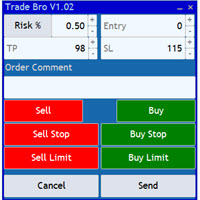
The Trade Bro tool helps you to calculate your positions size and place orders quickly. You no longer need to count ticks or do time consuming calculations. The easy to understand graphical panel is designed to interact with the chart of your symbol perfectly. Please leave a 5 star rating if you like this free tool! Thank you so much :)
List of Inputs: <Graphic> InpFontSize: FontSize of the text of the trading panel. InpShowLinesRight: When set to true the entry, TP and SL lines will be oriente
FREE

Çok Fonksiyonlu Araç: Lot Hesaplayıcı, Grid Emirleri, R/R Oranı, İşlem Yöneticisi, Arz ve Talep Bölgeleri, Fiyat Hareketi ve çok daha fazlası Demo Sürüm | Kullanım Kılavuzu İşlem Asistanı strateji test cihazında çalışmaz : Demo Sürümü BURADAN indirerek aracı test edebilirsiniz.
Herhangi bir sorunuz / iyileştirme fikriniz / bulunan bir hata için benimle iletişime geçin MT4 sürümüne ihtiyacınız varsa burada mevcuttur İşlem sürecinizi basitleştirin, hızlandırın ve otomatikleştirin. Sta

Risk Manager Pro MT5 is an account protection Expert Advisor for traders who want strict risk control inside MetaTrader 5. The utility monitors your account equity, daily and weekly results, drawdown, open positions, trade count, consecutive losses, and trading hours. When a configured limit is reached, it can automatically close positions, cancel pending orders, stop other EAs, send notifications, or close the terminal. Instead of relying on discipline during a stressful trading session, you de

Attention: You can view the program operation in the free version YuClusters DEMO . YuClusters is a professional market analysis system. The trader has unique opportunities to analyze the flow of orders, trade volumes, price movements using various charts, profiles, indicators, and graphical objects. YuClusters operates on data based on Time&Sales or ticks information, depending on what is available in the quotes of a financial instrument. YuClusters allows you to build graphs by combining da

Signal TradingView to MT5 Pro Automator TradingView ve MetaTrader 5 arasında anında profesyonel uygulama TradingView alarmları ile MT5'teki gerçek uygulama arasındaki en güçlü iletişim köprüsüyle ticaret stratejinizi otomatikleştirin. Hız, esneklik ve kusursuz risk yönetimi talep eden yatırımcılar için tasarlanan bu Uzman Danışman (Expert Advisor), herhangi bir alarm mesajını hassas bir piyasa (market) veya limit emrine dönüştürür. GÜÇLÜ YÖNLER VE AVANTAJLAR Evrensel Ayrıştırma Motoru (Tescilli)

MT4 to Discord Signal Provider , ticaret sinyallerini doğrudan Discord'a göndermek için tasarlanmış kullanıcı dostu ve tamamen özelleştirilebilir bir araçtır. Bu araç, ticaret hesabınızı etkili bir sinyal sağlayıcısına dönüştürür. Mesaj formatlarını tarzınıza uyacak şekilde özelleştirin! Kolay kullanım için önceden tasarlanmış şablonlardan seçim yapın ve hangi mesaj öğelerini dahil etmek veya çıkarmak istediğinize karar verin. [ Demo ] [ Kullanım Kılavuzu ] [ MT4 Versiyonu ] [ Telegram Versiyonu

COPYLATOR – MT5 Trade Copier Key Highlights Multi-Sender / Multi-Receiver Trade Replication – supports one-to-many, many-to-one, and many-to-many configurations, with complete real-time copying of market orders, pending orders, SL, and TP. Advanced drawdown protection – closing, blocking, pending-order deletion, manual and automatic reset mechanisms. Automatic symbol mapping – finds correct symbols, alerts if missing, allows manual override. Hedging & Netting support – auto-detected, no manual s

Trading Pozisyonu ve Geri Test Aracı:
"Trading Pozisyonu ve Geri Test Aracı", aynı zamanda "Risk Ödül Oranı Aracı" olarak da bilinen kapsamlı ve yenilikçi bir göstergedir ve teknik analizinizi ve ticaret stratejilerinizi geliştirmek için tasarlanmıştır. Risk Aracı, forex ticaretinde etkili risk yönetimi için kapsamlı ve kullanıcı dostu bir çözümdür. Giriş fiyatı, stop-loss (SL) ve take-profit (TP) seviyeleri de dahil olmak üzere ticaret pozisyonlarını önizleme yeteneği ile gelecek işlemlerin ş
FREE

Welcome to ENTRY IN THE ZONE WITH SMC MULTI TIMEFRAME Entry In The Zone and SMC Multi Timeframe is a real-time market analysis tool based on Smart Money Concepts (SMC), designed to analyze market structure, price direction, and key trading zones. It supports both Single-Timeframe Analysis and Multi-Timeframe Analysis, providing a clearer view of the overall market structure across multiple timeframes, with real-time BUY / SELL signals that do not repaint. It is designed to help filter trading op

Chart Drawing Toolkit is a complete drawing and chart-analysis workspace for MetaTrader 5 . It places more than 50 drawing and markup tools in one fast, clean panel that docks to the edge of your chart, so every manual analysis tool you need is a single click away. It runs as an indicator, so it works alongside your Expert Advisors and other indicators on the same chart. Overview
The toolkit combines a docking sidebar, a quick tool flyout, a pinned tools bar, a live properties bar for the select
FREE

Telegram'dan MT5'e: Nihai Sinyal Kopyalama Çözümü Telegram'dan MT5'e işlemlerinizi basitleştirin, DLL'lere ihtiyaç duymadan işlem sinyallerini doğrudan Telegram kanallarından ve sohbetlerinden MetaTrader 5 platformunuza kopyalayan modern araç. Bu güçlü çözüm hassas sinyal yürütme, kapsamlı özelleştirme seçenekleri sağlar, zamandan tasarruf sağlar ve verimliliğinizi artırır. [ Instructions and DEMO ] Temel Özellikler Doğrudan Telegram API Entegrasyonu Telefon numarası ve güvenli kod ile kimlik

SAFETYLOCK for MetaTrader 5 , zıt yönde bir güvenlik emrini otomatik olarak yerleştirerek açık pozisyonları ani piyasa dönüşlerinden korumak için tasarlanmış premium bir risk yönetimi yardımcı aracıdır.
Bir trader veya Expert Advisor (EA) bir pozisyon açtığında, SAFETYLOCK for MT5 anında buna karşılık gelen bir bekleyen emir oluşturur (Buy Stop veya Sell Stop). Orijinal pozisyon drawdown bölgesine girmeye başladığında, bekleyen emir aktive olur ve koruyucu bir safety lock oluşturur; bu da riski

MT5 to Telegram Signal Provider , hesabınızı bir sinyal sağlayıcı haline getirerek belirtilen sinyalleri Telegram'ın sohbetine, kanalına veya grubuna göndermeyi sağlayan kullanımı kolay, tamamen özelleştirilebilir bir araçtır. Rakip ürünlerin çoğunun aksine, DLL içe aktarması yapmaz. [ Demo ] [ Kılavuz ] [ MT4 Versiyonu ] [ Discord Versiyonu ] [ Telegram Kanalı ] New: [ Telegram To MT5 ]
Kurulum Adım adım bir kullanıcı kılavuzu mevcuttur. Telegram API'si hakkında bilgi gerekmemektedir; ihtiyac

OrderManager 'ı Tanıtıyoruz: MT5 için Devrim Niteliğinde Bir Yardımcı Program Yepyeni Order Manager yardımcı programı ile MetaTrader 5 için işlemlerinizi bir profesyonel gibi yönetin. Basitlik ve kullanım kolaylığı göz önünde bulundurularak tasarlanmış olan Order Manager, her işlemle ilişkilendirilen riski kolayca tanımlamanıza ve görselleştirmenize olanak tanır, böylece bilinçli kararlar alabilir ve ticaret stratejinizi optimize edebilirsiniz. OrderManager hakkında daha fazla bilgi için lütfen

Grid Manual, sipariş ızgarasıyla çalışmak için kullanılan bir ticaret yardımcı programıdır. Yardımcı program evrenseldir, esnek ayarlara ve sezgisel bir arayüze sahiptir. Sadece kayıpların ortalaması yönünde değil, aynı zamanda kazanç artışı yönünde de bir emir ızgarası ile çalışır. Tüccarın bir emir ızgarası oluşturmasına ve eşlik etmesine gerek yoktur, bu yardımcı programı yapacaktır. Emri açmanız yeterlidir ve Grid manual otomatik olarak ona bir emir ızgarası oluşturacak ve kapanana kadar ona
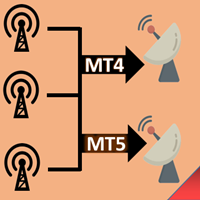
Fotokopi->Kullanışlı ve hızlı arayüz etkileşimi, kullanıcılar hemen kullanabilir ->>>> Windows bilgisayarlarda veya VPS Windows'ta kullanılması önerilir Temel işlevler: Kopyalama ticaretinin normal etkileşim hızı 0,5 saniyeden azdır Sinyal kaynaklarını otomatik olarak algıla ve sinyal kaynağı hesaplarının bir listesini görüntüle Sembolleri otomatik olarak eşleştirin, farklı platformlarda yaygın olarak kullanılan ticaret sembollerinin %95'i (farklı ekler gibi özel durumlar) otomatik olarak

Ultimate Extractor - Professional Trading Analytics for MT5 *****this is the local HTML version of Ultimate Extractor. !!!!!it is not compatible with Cloud!!!! For the online version please reach out to me directly****** Ultimate EA manager also now available when you use cloud pro and above for free!!
Ultimate Extractor transforms your MetaTrader 5 trading history into actionable insights with comprehensive analytics, interactive charts, and real-time performance tracking. What It Does Automa

UTM Manager, hızlı ve verimli ticaret gerçekleştirme olanağı sunan sezgisel ve kullanımı kolay bir araçtır. Öne çıkan özelliklerden biri, spreadleri tamamen göz ardı ederek mum fiyatı üzerinden işlem yapmanızı sağlayan "Yayılmayı Yoksay" modudur (örneğin, LTF'de daha yüksek spread çiftlerinde işlem yapmanızı sağlar, spread nedeniyle alım satımların dışında kalmaktan kaçınır). UTM Manager'ın diğer bir önemli yönü, benzersiz yerel ticaret kopyalayıcısıdır ve her bir aracı kurumda farklı ticaret st

Coppy Master MT5, MetaTrader 4 ve MetaTrader 5 terminalleri arasında işlemleri kopyalamak için kullanılan bir araçtır. Her iki yönde kopyalamayı destekler:
MT5'ten MT4'e, MT4'ten MT5'e ve aynı tipteki hesaplar arasında. Doğru çalışması için tüm terminallerin tek bir bilgisayarda veya VPS'de başlatılması gerekmektedir.
[ Instruction and Demo ] MetaTrader 4'e kopyalamak için ürünün ayrı bir sürümüne ihtiyaç vardır - Coppy Master MT4 . Ana fonksiyonları: Bağlantı türü
Master ve Receiver mo

MetaTrader 5 için Trading Panel — grafik ve klavyeden profesyonel tek tıkla işlem kontrolü Aktif traderlar için geliştirilmiş güçlü bir Trading Panel; işlemleri standart MetaTrader arayüzüne göre çok daha hızlı açmanıza, yönetmenize ve kapatmanıza yardımcı olur. Bu çözüm; pozisyonları, bekleyen emirleri, toplam kârı ve işlem yürütmesini tek bir profesyonel çalışma alanında kontrol etmek isteyen kullanıcılar için tasarlanmıştır. Bu sadece sıradan bir yardımcı araç değildir. MetaTrader 5 için ger

Çalışan Demo İndir
Copy Cat More (Taklitçi Kedi) — İşlem Kopyalayıcı (Trade Copier) MT5 , yerel bir işlem kopyalayıcı ve bugünün ticaret zorlukları için tasarlanmış eksiksiz bir risk yönetimi ve yürütme çerçevesidir. Prop firm challenge'larından kişisel portföy yönetimine kadar, sağlam yürütme, sermaye koruması, esnek yapılandırma ve gelişmiş işlem yönetimi karışımıyla her duruma uyum sağlar. Kopyalayıcı hem Master (Master, gönderen) hem de Slave (Slave, alıcı) modlarında çalışır; piyasa ve be

Becktester Telegram Signals Custom Becktester Telegram Signals Custom is an advanced version of the regular Becktester Telegram Signals, created for traders who want not only to parse Telegram signals and backtest them in MetaTrader 5, but also to test custom post-entry trade management logic that goes far beyond the standard version. The regular Becktester Telegram Signals already allows you to connect to Telegram, read real channel messages, parse Buy/Sell, Entry, Stop Loss and Take Profit dat

Replay Study — Train the Market as If It Were Live Replay Study is a tool designed for traders who want to accelerate their growth through realistic practice. With it, the trader can go back in time, choose a specific date and time, and follow the market candle by candle, simulating decisions as if they were trading live. Instead of simply looking at a static chart after the move has already happened, Replay Study allows you to study price behavior in motion, test entries, train market reading,

Risk Panel is an on-chart position sizing, order execution and trade management utility for MetaTrader 5. It is built for discretionary traders who choose their own entries but want to calculate volume, prepare orders and manage positions directly from the chart. The panel does not provide trading signals and does not choose when to trade. How it works Enter the amount you want to risk, in money or as a percentage of your balance or equity. Position the Stop Loss and Take Profit lines on the cha

Trade Utility Pro is a bot utility designed to help you manage trades more easily, quickly, and accurately. This utility features a control panel interface and supports MetaTrader 5 exclusively. This utility does not link to any account information or external sources, ensuring safety. Main Features: Open Trade Support: Lot size calculation Fixed Lot: Custom input lot required Money Risk Lot: Automatically calculated based on stop loss and money risk Account % Risk Lot: Automatically calculated
FREE
VM Auto SLTP Pro - Advanced Order and Risk Management EA
Overview:
VM Auto SLTP Pro is a professional upgrade to the VM Auto SLTP Basic edition, built to deliver robust performance, advanced trade management tools, and an intuitive on-chart control panel. This Expert Advisor automatically sets and manages Stop Loss (SL) and Take Profit (TP) levels for existing positions — whether opened manually or by other EAs — using ATR-based, fixed-point, fixed-price, or USD-based rules. VM Auto SLTP Pro

Trade Sentinel MT5 is a manual trading panel for MetaTrader 5. It combines the usual trade manager functions (one-click orders, lot size from risk, draggable Entry, SL and TP lines, breakeven, trailing, partial closes) with a basket manager that handles several positions as one trade, and an equity monitor with daily and total loss limits. The user guide is published on the MQL5 blog: https://www.mql5.com/en/blogs/post/773646 . Support is available through the product comments or the mql5.com me

The Trade Manager Interface is a free utility designed to simplify manual trading in MetaTrader. MT4 Version Available Manual +Free Strategy Gold Breakout Engine Please leave a review, if you like the trade manager.
It allows traders to visualize trades directly on the chart, calculate position size automatically, and manage orders with advanced features such as partial take profits, automatic breakeven, and trailing stops. For more advanced features check out: ManHedger This
FREE

Hızlı. Doğru. Yenilikçi. Teknoloji Odaklı. Devrim niteliğindeki X2 Copy MT5 ile anlık işlem kopyalamayı keşfedin. Sadece 10 saniyelik basit bir kurulumla, tek bir bilgisayar veya Windows VPS üzerindeki MetaTrader terminalleri arasında işlemleri benzeri görülmemiş bir hızla senkronize eden güçlü bir araca sahip olacaksınız. İster birden fazla hesap yönetiyor, ister sinyalleri takip ediyor, isterseniz stratejinizi ölçeklendiriyor olun, X2 Copy MT5 eşsiz hassasiyet ve kontrolle iş akışınıza uyum sa

This non-trading expert utilizes so called custom symbols feature ( available in MQL API as well) to build renko charts based on history of real ticks of selected standard symbol. RenkoFromRealTicks generates custom symbol quotes, thus you may open many charts to apply different EAs and indicators to the renko. It also transmits real ticks to update renko charts in real time. The generated renko chart uses M1 timeframe. It makes no sense to switch the renko chart to a timeframe other than M1. T

EA Auditor is an independent analysis tool for traders evaluating Expert Advisors and trading signals on MetaTrader 5. It audits backtest reports, reviews posted developer signals, and cross-verifies the two against each other to help traders assess strategies before committing capital.
The MQL5 market offers a wide range of Expert Advisors from many developers, with varying approaches, quality, and transparency. EA Auditor provides a consistent, data-driven framework for reviewing them, answer

MetaTrader 5 için Rhino Chart Drawing Tools Rhino Chart Drawing Tools, MetaTrader 5 için TradingView benzeri bir çizim çalışma alanı sağlar. 54 çizim aracı, özelleştirilebilir bir araç çubuğu, favoriler, hızlı stil ayarları, nesne ayarları, şablonlar ve nesne yöneticisi içerir. Çizim Araçları Çizgiler Trend çizgisi, ışın, uzatılmış çizgi, yatay çizgi, dikey çizgi, yatay ışın, çapraz çizgi, trend açısı, ok, yol, çoklu çizgi ve bilgi çizgisi. Kanallar Paralel kanal, regresyon kanalı, düz kanal, ay

Riskinizi otomatik olarak hesaplarken işlemlere hızlı bir şekilde girip çıkmanıza yardımcı olacak Ticaret Yöneticisi. Aşırı Ticaret, İntikam Ticareti ve Duygusal Ticaretten korunmanıza yardımcı olacak özellikler içerir. İşlemler otomatik olarak yönetilebilir ve hesap performans ölçümleri bir grafikte görselleştirilebilir. Bu özellikler, bu paneli tüm manuel yatırımcılar için ideal kılar ve MetaTrader 5 platformunun geliştirilmesine yardımcı olur. Çoklu Dil desteği. MT4 Sürümü | Kullanım Kılavu

Axiom Trade — ÖZEL TEKLİF Axiom Trade ürününü 30 ABD dolarına alın, Smart Universal Expert Advisor HEDİYE olsun. İşlemi planlayın. Riski belirleyin. Grafik üzerinde yönetin. Axiom Trade, MT5 üzerinde görsel emir hazırlığını ve işlem yönetimini birleştirir. Seviyeleri taşıyın, emir öncesinde lot ve riski kontrol edin. Giriş, zarar durdur ve kâr al çizgileriyle piyasa ve bekleyen emirler. Sabit lot, yüzdesel risk ve risk–getiri hesaplamaları. Kısmi çıkışlar, başa baş, yedi iz süren stop yöntemi ve
MetaTrader Mağazası, MetaTrader platformu için uygulama satın almak adına rahat ve güvenli bir ortam sunar. Strateji Sınayıcıda test etmek için Uzman Danışmanların ve göstergelerin ücretsiz demo sürümlerini doğrudan terminalinizden indirin.
Performanslarını izlemek için uygulamaları farklı modlarda test edin ve MQL5.community Ödeme Sistemini kullanarak istediğiniz ürün için ödeme yapın.

Alım-satım fırsatlarını kaçırıyorsunuz:
- Ücretsiz alım-satım uygulamaları
- İşlem kopyalama için 8.000'den fazla sinyal
- Finansal piyasaları keşfetmek için ekonomik haberler
Kayıt
Giriş yap
Web sitesi politikasını ve kullanım şartlarını kabul edersiniz
Hesabınız yoksa, lütfen kaydolun