 MetaTrader 5
 Uzmanlar
 Göstergeler
 Kütüphaneler
 Yardımcı programlar
 Widgetlar
 Kurallar
YouTube'dan Mağaza ile ilgili öğretici videoları izleyin
Bir alım-satım robotu veya gösterge nasıl satın alınır?
Uzman Danışmanınızı
sanal sunucuda çalıştırın
sanal sunucuda çalıştırın
Satın almadan önce göstergeyi/alım-satım robotunu test edin
Mağazada kazanç sağlamak ister misiniz?
Satış için bir ürün nasıl sunulur?
MetaTrader 5 için alım-satım yardımcı programları - 28
 Aşağıda MetaTrader 5'te işlem yapmayı kolaylaştıran alım-satım programları bulunmaktadır. Açıklamasını ve amacını okumak için aşağıdaki listeden ürünün üzerine gelin.
Positions Risk Analyzer Utility
The Trade Analyzer is a powerful tool designed for real-time monitoring of your trading performance directly on the chart. It provides insights into: Total Open Positions : Number of active trades. Potential Profit (TP) : Estimated profit if all Take Profits are hit. Potential Loss (SL) : Maximum potential loss if all Stop Losses are triggered. Floating Profit/Loss : Real-time net profit or loss of all open trades. This utility dynamically updates its calculation
FREE

Investment Castle Panel — Your Trades, At a Glance
The Panel puts the numbers that matter right on your chart: floating profit and loss, drawdown and more — for manual trades and for any Expert Advisor. A clean, movable dashboard so you always know exactly where you stand.
What it does for you Live P/L on the chart: floating profit/loss for the current symbol, for both buy and sell orders, in your base currency and in pips. Max drawdown at a glance: keep an eye on risk without digging through
FREE
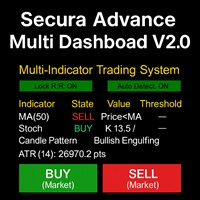
# Secura Multi Dashboard - Advanced Trading Assistant ## **Professional Multi-Indicator Analysis Platform** Secura Multi Dashboard is a comprehensive trading assistant designed for traders who demand clarity, precision, and efficiency. This powerful EA integrates multiple technical analysis tools into a single, intuitive interface, helping you make informed trading decisions without overwhelming complexity.
### ** Key Features:**
** Multi-Indicator Consensus System** - Simultaneous anal
FREE

Smart One-Click Risk Manager - TradingView Style UI Tired of placing manual market orders without instant protection or dealing with MetaTrader’s outdated default panel? Smart One-Click Risk Manager is a high-performance visual utility built for traders who need 1-click execution with pre-configured Stop Loss and Take Profit in USD , wrapped in a sleek, modern TradingView Dark Theme interface. Clearly visualize your profit zone (soft pastel green) and risk zone (soft pastel red) directly on the
FREE

Ürün Adı: StopAndTake — SL/TP yönetimi için basit, hızlı ve hassas bir script Ürün Açıklaması: StopAndTake , pozisyonlarını yönetirken hız, doğruluk ve güvenilirliği ön planda tutan traderlar için tasarlanmış hafif ve sezgisel bir script'tir. Bu araç, seçilen grafikteki tüm pozisyonlar için Stop Loss (SL) ve Take Profit (TP) seviyelerini anında güncellemenizi sağlar ve kullanım kolaylığı sunar. Avantajlar ve Faydalar: Basitlik: Minimalist bir arayüz, yeni başlayanlar için bile kolayca anlaşılabi
FREE
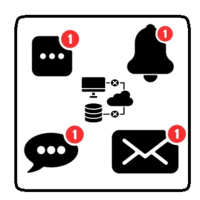
This utility will help you avoid losing money on your trades when your terminal loses connection to the broker or your VPS / computer goes into an update and doesn't open your MetaTrader client automatically after the update. How is this product different from the other disconnect alerts? This one will email you and/or an SMS even when your MetaTrader client gets disconnected from the Internet or doesn't respond! Your client is monitored externally and doesn't rely on its own Internet con
FREE

Tired of manually closing dozens of charts or managing multiple positions one by one?
With Close All Pro, you can clear your workspace in a flash—saving time, reducing clutter, and streamlining your trading workflow. Love it? Hate it? Let me know in a review! Feature requests and ideas for new tools are highly appreciated. :) Try "The AUDCAD Trader":
https://www.mql5.com/en/market/product/151841 ️ ALWAYS TEST THIS EA ON A DEMO ACCOUNT BEFORE USING IT LIVE! Description: Close All Pro is desi
FREE

ProTrade Panel – Speed, Precision, Professionalism Master the markets with the ultimate MT5 assistant. Are you tired of the slow, clumsy default execution in MT5?
Do you struggle to manage multiple orders during high volatility?
ProTrade Panel is designed for serious manual traders. It combines One-Click Execution, Breakout Pending Orders, Bulk Closing, and Visual Risk Management into one sleek, floating interface. Key Features Smart Drag & Drop : Long-press the header to move th
FREE

(Kripto Para Tabloları)
Binance Future'daki tüm sembolleri özel sembollere kaydeder.
Binance Future'daki sembollere "F" önekini ekler.
Binance Future'daki sembollerin takip edilebileceği alt yapıyı oluşturur.
Araçlar menüsü >> Seçenekler >> Uzman Danışmanlar'dan WebRequest'e izin vermeli ve URL'yi eklemelisiniz: https://fapi.binance.com
komut dosyasına çift tıklamanız yeterlidir.
Tüm listeye saniyeler içinde sahipsiniz.
https://www.mql5.com/en/market/product/68694 linkteki ürüne bakın
FREE

Coyote by Stellarex Horizons — visual trade setup, sized to your risk, every time. Coyote turns trade planning into three lines on a chart. Drag your Entry, Stop Loss, and Take Profit into position, and Coyote handles the rest — calculating the correct position size for your account risk, working out your reward-to-risk ratio, and automatically choosing the right order type. No manual lot-size math, no guessing whether you need a limit or a stop order. Why traders use Coyote Most traders either
FREE
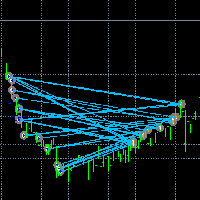
İşlemleri görünür hale getirin. MT4 Strateji Test Cihazında veya Grafik Üzerindeki Sinyal Görselleştirmesinde işlemleri hiç analiz ettiniz mi?
Cevap "Evet" ise, işlem çizgilerinin ne kadar görünmez olduğunu zaten biliyorsunuz demektir.
Çözüm, “Visible Deals” adlı yardımcı araçtır.
“Visible Deals” , işlem çizgilerini daha kalın yapmanıza veya rengini değiştirmenize olanak tanır.
Sadece “Visible Deals” aracını grafiğe bırakın ve yeni çizgi formatlarını ayarlayın.
FREE

The utility opens copies of open trades. It is very convenient if you use the Signals service and want to increase the volume of transactions.
Settings: Symbols: all symbols only current symbol Orders: Buy Sell Magic Any Magic Input Magic Lot size Original - lot size from original order; Fix Lot - fix lot size (input); Lot X Mult - lot size X koef; Stop Loss From sender - Stop Loss from original; Without - without Stop Loss; Plus Fix - Stop Loss from original order + fix points; Fix Point -
FREE

Draws trend lines from the high and / or low values of the week. The color and thickness of the levels are customizable. All trend lines can be edited. Suitable levels of the past can be renamed and other properties changed. Levels are re-read only on the H1 timeframe once an hour.
...
FREE
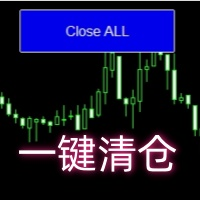
Close all open orders, delete all pending orders, and clear the entire account's orders. Please use caution! After clicking the button, the account order will be 0! Help us quickly clear account orders! As it is a free version, only the function of closing all orders is available. If other functions are needed, customization is required! The paid version has more features!
FREE

Close Positions Panel is a scalper’s best friend; specifically, those with an aggressive trading style, opening multiple positions in both buy and sell directions. This tool provides the possibility of closing positions with different combinations:
Close All:Closing all buy/ sell/ in profit/ and in loss positions
Close Buy: Closing all buy positions
Close Sell: Closing all sell positions
Close Profit: closing all po
FREE

Auto Position Manager is a unique services application of its kind across the entire MQL5 market, setting new standards for applications of this type. The Services app is a compact but powerful tool that significantly impacts the entire system. Its user-friendly interface and start-stop system make it excellent for automating repetitive tasks. Once it's set up, the service can be toggled on or off with a single click. Crucially, the configuration persists even if the platform is turned off and
FREE

input double MaxLossLevel = 500.0; // Max Loss Level in account currency input double SafetyBufferMoney = 10.0; // Safe Buffer. In this case Threshold be 500+10 = 510 input int CheckEverySeconds = 2; input bool is_debugged = false; // Print additional messages in the Terminal
It will checks every CheckEverySeconds. If the total Loss of the account Go below Threshold of MaxLossLevel + SafeBufferMoney, then start Heding: for each open Position, open a new reversed Position with
FREE

Posh Sessions is indicator which displays sessions in broker time or your local time. You can set up to 5 sessions, assign name, start time, end time and color of each session. There is session's range to help you make a chart analysis.
Settings for a session: Show: To show or not the session on chart Title: The title/name of the session Timezone: Select between broker or local time to implement the session's period Start time: The session start time End time: The session end time Co
FREE

Automatic transmission is for the traders who are annoyed by constantly putting manual take profit and stop loss. This will take some of the burden. All you need is a laptop/pc at home or a VPS, so that you can press buy or sell on your phone and all will be automatically done for you. Check out parameters below.
This utility is for every symbol. Watch for oddities when trading crypto.
Other products Automatic Transmission MT4 XAU Breakout MT5
Parameters
-Manage Magic Number (0 = Disabled)
FREE

* This product was converted using "BRiCK Convert4To5 MT4 " based on the MQL4 source file of "BRiCK Convert4To5 MT4 Free" . "Convert4To5" is a Script that converts MQL4 source files into MQL5 source files.
Experts, Indicators, Scripts, and Libraries with extension ".mq4" will be available for MT5.
Parameter
None.
Procedure
1. Open the following folder.
terminal_data_folder\MQL4\Files\ (in the terminal menu select to view "File" - "Open the data directory") 2. Confirm that the BRiCK_Conv
FREE

Server Clock and Daily Reset Hour is a small read-only chart panel that answers one question: what hour, in your broker's server time, does your trading day actually reset? Prop firm and funded account rules are usually written in a time zone that is not yours and not your broker's. A rule that says the day resets at 5:00 pm New York has to be converted into broker server time before it is any use to you, and the answer changes twice a year when clocks shift. Getting it wrong means every daily l
FREE

Smart Lot-Size Calculator And Trade Assistant for Mobile Trading Overview: This is the tool every trader in the market must have no matter if you are scalper, swing traders, day trader, or long term trader. This On-The-Go trading tool will help you stay disciplined and also stay free from daily trade management chores, Most traders face common problems like 1. Calculation of proper lot-size of a position to take controlled risk 2. Managing every trade and trailing stop-loss if trades goes in
FREE

BUY/SELL işlemlerinin açılmasını bir işlem hesabından (Master) başka bir hesaba (Slave) otomatik olarak kopyalar ve aynı yön için ortak bir Take Profit’in otomatik senkronizasyonunu sağlar. Grid, averaging ve martingale stratejileri için tasarlanmıştır. Slave hesabı Master hesabının işlem eylemlerini tekrarlar ve bağımsız işlem kararları vermez. Terminallerin aynı cihazda kurulu olması gerekmez. Nasıl çalışır: Master hesabı EURUSD üzerinde bir BUY pozisyon ağı açar ve ortak bir Take Profit belir
FREE

Many prop firm traders fail challenges because they lose track of daily drawdown or overall risk. Prop Firm Tracker helps you monitor your challenge directly on the MetaTrader 5 chart. No spreadsheets.
No manual calculations.
Everything updates automatically. Features
Current Balance Current Equity Profit / Loss Challenge Progress (%) Daily Drawdown Daily Drawdown Usage Maximum Drawdown Maximum Drawdown Usage Color Progress Bars Automatic Daily Reset Challenge Status: ACTIVE, PASSED,
FREE

Burst Trade Utility – Multi-Position Manager & One-Click Execution Burst Trade Utility is a powerful, fast, and intuitive assistant designed for MetaTrader 5 to simplify your daily trading. If you follow copy trading channels, signal groups, or scale into positions, this utility will completely transform your execution speed. Stop wasting time opening multiple orders manually. With a single click, you can open, manage, and close multiple positions simultaneously on any financial instrument.
FREE

Economic Calendar Defender – Smart News Protection for MT5 Economic Calendar Defender, önemli ekonomik haberlerin neden olduğu yüksek oynaklık olayları sırasında, grafiğin önünde olmaya veya kullanmakta olduğunuz standart işlem operasyonunu veya EA'ları değiştirmeye gerek kalmadan işlemlerinizi korumak için tasarlanmış bir yardımcı programdır. Basitçe herhangi bir grafiğe yükleyin ve EA, ekonomik takvimi gerçek zamanlı olarak izlemekten ve ilgili her olaydan önce, sırasıda ve sonra işlemlerinizi
FREE

We apologize, but we are unable to provide service due to network issues. If you encounter any problems during installation or use, please contact 9048914@qq.com. Thank you. Binance is a world-renowned cryptocurrency exchange! In order to facilitate MT5 users to directly trade Binance Futures, the program provides the following trading functions:
1. Imitate the trading style of Binance Futures and provide a friendly operation panel;
2. Enter api and secret by yourself (you need to open futures
FREE

Demo copier of deals from MetaTrader 5 to MetaTrader 5 ( MetaTrader 4<->MetaTrader 4 version is available ; with both versions, you can copy MetaTrader 5<->MetaTrader 4, MetaTrader 4<->MetaTrader 5, MetaTrader 5<->MetaTrader 5, MetaTrader 4<->MetaTrader 4). Works only in the mode of hedging. Spread filter. Select the best price (start copying positions with a profit or loss). Configure the lot size, fixed or ratio-based (provider signals can be copied with an increased lot). Configure order copy
FREE
Minimalist and fully customizable info panel. It works on any chart and timeframe, with 2 - 4 digits brokers and with 3 - 5 digits ones. It can show: Current Spread in pips (1 decimal digit if you are on a 3 - 5 digits broker) ATR (Average True Range) in pips Current Server Time Current GMT Time Important Account Info: Current Leverage and Stop-out Level (%) Time left for the current bar. Very useful on 4 h charts All info labels have a tooltip with the same data Available customizations : Ena
FREE

Mini Trader Nestor Glob – Manual Trading Panel for MT5 Follow me on social media and learn how to trade gold. Mini Trader Nestor Glob is a professional manual trading tool for MetaTrader 5 , designed to speed up and simplify trade execution and position management, especially for Gold (XAUUSD) trading. This product is not an automated trading robot .
All trades are executed only through user interaction using on-chart buttons. Main Features Manual trading panel with BUY / SELL / CLOSE buttons Au
FREE

Rojeryo Trade Manager ATR is a MetaTrader 5 utility Expert Advisor designed to manage already opened trades.
The tool does not generate entry signals and does not open trades by itself. It is built for traders who prefer manual entries but want automatic trade management after the position is opened.
The EA can automatically set protective Stop Loss and Take Profit levels, move the Stop Loss to breakeven, close part of the position, and apply trailing stop management according to the selected
FREE
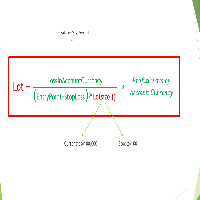
Important Note: Before using it in a real account test it in your demo account.
//+------------------------------------------------------------------+ //| Optimum_Lot_Size.mq5 | //| Copyright 2023, MetaQuotes Ltd. | //| https://www.mql5.com | //+------------------------------------------------------------------+ #property copyright "Copyright 2023, MetaQuotes Ltd." #property
FREE
Emergency Exit is an MT5 expert advisor I developed to solve a specific problem: monitoring and managing overall account risk across multiple positions. Unlike traditional EAs that focus on entry signals or complex trading algorithms, Emergency Exit has one job - to watch your total floating P/L and take action when your predefined thresholds are hit.
The main functionality revolves around two simple conditions:
Close when P/L >: Triggers when profit exceeds a value (take profit) OR when loss
FREE

Position Guard automatically manages your open positions on MetaTrader 5. It does not open trades and makes no market prediction - it is a money- and risk-management layer on top of manual trades or trades opened by another EA. Features: - Breakeven: move the stop to entry (with a spread-safe offset) after a set profit in pips. - Staged partial close: take partial profit at up to three configurable profit levels. - Trailing stop: starts after a set distance, then trails with a configurable step.
FREE

ExpertGain Risk Manager MT5 is a professional MetaTrader 5 utility designed to help traders manage risk, protect trading capital, and improve trading discipline. It is built for manual traders, semi-automated traders, prop-firm traders, forex traders, gold traders, and anyone who needs better control over daily losses, drawdown, trade exposure, and open positions. This utility does not open trades automatically and does not provide buy or sell signals. Instead, it focuses on responsible trade ma
FREE
ImpulseShield EA is here to say NO to trading decisions made on Impulse
Have you ever placed a trade based on an impulsive decision and regretted your action? What if you could have been able to avoid taking the trade? ImpulseShield is here to help you to only when it is right. The Free Version Only Supports EURUSD, GBPUSD and USDJPY, Here is the Full Version, Just $30 https://www.mql5.com/en/market/product/131519 Key Settings and Their Role
The EA uses the inputs defined earlier to determine
FREE

Monitor Your EAs and Manual Trading From One MT5 Dashboard One account. Multiple strategies. One clear overview. Quantum Magic Monitor is a professional MT5 trading dashboard designed to help traders monitor multiple Expert Advisors and manual trading activity separately and in one place . Instead of analysing a mixed account history, Quantum Magic Monitor lets you organise trading activity by Magic Number / EA group and monitor the performance of different strategies independently. WHY QUANTUM
FREE

Exact Countdown Timer — shows the remaining time before the current bar closes and a new bar forms. A fast and exact countdown timer will help you find the best moment to open a position. For example, it can be used on a seconds chart built using the Seconds Chart utility. Inputs Base corner — the chart corner to which an timer Is attached. X distance — the horizontal distance from the chart corner. Y distance — the vertical distance from the chart corner. Text font — font name Font size — font
FREE

The Equity Curve indicator is a simple and helpful tool that shows the development of the equity curve in real time. For precision measurement, it should be used in a separate window with a period of M1.
Main features The indicator shows the development of the equity curve in real time. High precision on the minute chart. High-speed calculation. Available for MT4 and MT5. Please visit the Equity Curve indicator product page for the input and output parameters settings.
FREE

The Close In Quick Script is an optimized, high-performance MQL5 script designed to swiftly close all open positions for the current chart's symbol on the MetaTrader 5 platform. Engineered for speed and reliability, it leverages asynchronous trading, minimal system checks, and robust error handling to ensure seamless trade closure. Whether you're a day trader, scalper, or portfolio manager, this script is an essential tool for efficiently managing and exiting trades. Key Features: Asynchronous t
FREE

UEX Reader - Uzman Danışman UEX göstergesine dayalı çalışan Tam Otomatik İşlem EA'sı. https://www.mql5.com/en/market/product/152936
UEX Reader iki esnek işlem yöntemi seçeneği sunar: Normal ve Ortalama Alma Stili.
İşlem pozisyonları, UEX göstergesi tarafından belirlenen piyasa yönüne göre tek tek veya eş zamanlı olarak gerçekleştirilebilir.
UEX Reader bir gösterge ile çalışsa da, MT5 Test Cihazında test edilebilir.
- - -
UEX Reader Uzman Danışmanını kullanma adımları: https://www.mql5.com/
FREE
Yardımcı program, fare tekerleğini kaydırarak herhangi bir göstergenin herhangi bir parametresini kontrol eder. Bu yardımcı programı yükleyebilir ve herhangi bir göstergenin arayüzünü standart terminal teslimatından değiştirebilirsiniz . Özel göstergeler için ve ayrıca "Market'ten" satın alınanlar için Universal Scroller 'ın bir yardımcı programı vardır.
Çalışma prensibi Yardımcı program, seçtiğiniz seçeneklerden birini fare tekerleğini kaydırarak değiştirerek kontrol eder. Kaydırma modunu etk
FREE

Seviye Asistan ı, destek ve direnç seviyelerini manuel olarak ayarlamak için uzman bir yardımcıdır.
Tüccarlar genellikle kendi seviyelerini oluştururlar. Farklı dönemlere ait birçok çizelge varsa, seviye tüm çizelgelerle çarpılacaktır.
Bir grafiğe yatay bir çizgi yerleştirirken, Asistan bu çizgiyi bir seviyeye dönüştürmeyi önerir. Aynı zamanda, enstrümanın süresine ve fiyata göre nerede olduğuna bağlı olarak çizginin rengini ve kalınlığını kendisi belirleyecektir. Seviyeyi bir yazıtla işaretl
FREE

Bir trend uzun süredir devam ederken, anlık piyasa hareketlerine kapıldığınız oldu mu?
"Her an tersine dönecek" hissiyle trende karşı işlem yapmak. "Kazandığımı kaybetmek istemiyorum" kaygısıyla erkenden kar almak. Bunların hepsi, sadece mumun kapanmasını bekleyebilseydiniz önlenebilecek pişmanlıklardır.
Bu araç, monitör başında bekleme stresini ortadan kaldırmak ve disiplinli ticareti desteklemek için yapıldı.
Bu araç, boğa veya ayı mumunun onaylandığı anda sizi uyaran basit bir izleme EA'sıd
FREE

InnovaDash Smart Sync, MetaTrader terminalinizi doğrudan InnovaDash Analytics kontrol panelinize bağlamak için tasarlanmış resmi veri bağlayıcısıdır.
Profesyonel yatırımcılar için oluşturulan bu hafif yardımcı program, arka planda sessizce çalışarak canlı varlık (equity) güncellemelerinizi, açık pozisyonlarınızı ve geçmiş alım satım verilerinizi otomatik olarak InnovaDash'e aktarır.
Neden InnovaDash?
InnovaDash, ham alım satım verilerinizi ticaret performansınızı artırmak için eyleme dönüştü
FREE

[FREE UTILITY] EA35 TANIN COPY UTILITY: ZERO LATENCY LOCAL COPIER
Are you looking for a lightning-fast trade copier to manage multiple funded accounts on the same VPS? Introducing EA35 Tanin Copy Utility, a commercial-grade Local Trade Copier for MetaTrader 5. Engineered for Prop Firm traders, this utility ensures zero lag and instant execution between your Master and Slave accounts.
KEY FEATURES: * Master & Slave Roles: Easily assign roles to your MT5 terminals. One Master can broadcas
FREE

PnL Executer Bot (MetaTrader 5) PnL Executer Bot is an advanced risk management and trade automation Expert Advisor designed to protect open positions, lock in profits, and automate basket-level exits. Whether you trade manually or deploy external strategies, this EA acts as your automated risk manager. Key Features Automated Initial SL & TP : Automatically attaches configurable Stop Loss and Take Profit levels to newly opened positions the moment they appear. Dynamic High-Profit Trailing Stop
FREE

AutoClose MT5 - Your 24/7 Automatic Capital Guardian Stop the bleeding. Lock in profits. Trade with peace of mind.
️ Why Your Trading Account Is Incomplete Without AutoClose MT5 You have your strategy, your EA, your analysis. But what's your automatic fail-safe ? One emotional decision, one missed market gap, one bad day can undo months of work. AutoClose MT5 is that non-negotiable layer of protection. It's not just a tool; it's your trading insurance policy that works 24/7. The Profession
FREE

SpreadMonitor SpreadMonitor is a professional MetaTrader 5 indicator that colorizes candles by spread level and displays an on-chart monitoring panel with current value, statistics, and history. Created by a practicing trader with 12 years of real-account experience. Helps you avoid entering the market when spreads are abnormally high and see the real cost of trading at every moment. What the indicator shows Candle coloring by spread level: Blue — normal spread Orange — elevated Gr
FREE
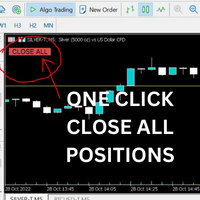
Just Attach to the Chart to be able to Click Button to Close all Open Positions in your Trading Account. Change Horizontal And Vertical Pixel based positioning for Button placement on chart. Appreciate your feedback and reviews. Note: All open positions on your trading account will be closed when button pressed.
If you need help with any simple utility happy to help.
FREE

Delving deep into the sphere of finance and trading strategies, I decided to conduct a series of experiments, exploring approaches based on reinforcement learning as well as those operating without it. Applying these methods, I managed to formulate a nuanced conclusion, pivotal for understanding the significance of unique strategies in contemporary trading.
FREE

Visual Trade Info is designed to give traders a clear, visual understanding of their trading activity in real time. Instead of relying on scattered data or manually calculating key metrics, the tool presents all essential information directly on the chart in a clean and intuitive format. It enables traders to monitor every transaction with precision, including entry and exit points, active positions, and overall trade performance. Profit and loss are displayed dynamically, allowing users to inst
FREE

The MetaTrader 5 script to set TP and SL for all positions during volatile market conditions in the current chart It is able to modify or close Key Features Absolute prices only
Leave as 0.0 if you don't want to change a particular value
No confirmation. The script executes immediately
Current symbol only. The script only affects positions in the chart the script is dragged to Use Cases Emergency exit
Risk management by changing SL and TP of all orders
FREE

Important: Do not download or install My Chart Control unless you already own My Chart Generator service. My Chart Control is not a standalone chart generator. It is designed to work together with the custom charts produced by My Chart Generator. Your Range/Volume chart, optimized for your indicator — automatically. My Chart Control is the on-chart dashboard and intelligence interface for My Chart Generator. Attach it to your My Chart custom symbol chart and it gives you complete control over
FREE

RiskSentry: Professional Drawdown & Breakeven Manager Stop guessing your risk. Visualize it. RiskSentry is the ultimate utility for manual and algorithmic traders who need to monitor their exposure in real-time. It automatically calculates and draws precise Drawdown (DD) Lines and a True Breakeven (BE) Line directly on your chart, factoring in commissions and swaps. Whether you are managing a grid of positions, a single trade, or a complex basket, RiskSentry keeps you aware of your exact risk le
FREE

Title: Stoch Mantis Description: Stoch Mantis is a professional multi-timeframe utility designed to monitor the Stochastic Oscillator across your current chart while providing a broader trend context using the 200 EMA. This tool does not execute trades automatically; instead, it serves as a highly efficient alert system and market analyzer for manual traders who utilize pullback strategies. Trading extreme zones on lower timeframes can be risky without considering the major trend. Stoch Mantis
FREE

Welcome to my product page, glad you stopped by and I hope you find interest in this product which is completely free to use. There are certainly many other similar products but this is my version of one. AS Check MT5 - Account and symbol informer utility compatible with Meta Trader 5 With this software you quickly and easily extract information about your account and symbol. As this is a script and not an indicator or expert, the program runs once and detach itself from the chart and the i
FREE

Most traders lose not because of bad strategy — but because they never review their trades. Aurex Trade Journal fixes that automatically. Drop this EA on any chart and it silently logs every closed trade to a structured CSV file. Open it in Excel or Google Sheets and your edge becomes visible within minutes. What it logs Entry & exit price, direction, lot size Stop loss & take profit levels Trade duration (minutes) Profit in $ and % of account balance R:R ratio (calculated automatically) Win / l
FREE

Trade Manager – BreakEven and Global Stop Loss with one click
This Expert Advisor (EA) is designed to help traders manage their positions faster and more efficiently. It comes with two main features, accessible through on-chart buttons:
BreakEven function:
Instantly moves all open trades to the entry price with a single click.
Option to add a configurable margin (e.g., +2 pips) to cover spreads or commissions.
Global Stop Loss function:
Instantly applies the same stop loss level to
FREE

About Equity Watching Telegram EA Equity Watching Telegram is an intelligent assistant tool designed for investors who want to monitor their portfolios in real-time. This EA continuously tracks your account's Equity and sends instant notifications directly to your private Telegram account whenever your Equity changes according to your specified conditions. Why do you need this EA? In highly volatile market conditions, or while you are running other EAs, unexpected errors or significant drawdown
FREE

Your limits, enforced — not just displayed. Most funded accounts are not lost to a bad strategy. They are lost to one bad session. A bad hour, after a bad morning, when the daily limit was already half gone and nobody was counting. This counts. It sits on your chart, watches the two limits that end most evaluations, and refuses to send an order that would break one. In 30 seconds It is free, and it is not a trial. No expiry, no account limit, no countdown, no pop-up, nothing that switches off a
FREE

Drawdown Shield — Free Prop Firm Drawdown Protector & Risk Manager for MT5
Free Prop Firm Drawdown Protector | FTMO Compliant | No DLL Required | NFP Safe
Failed a prop firm challenge because of a drawdown breach? You're not alone. Over 70% of traders fail due to risk management — not strategy. Drawdown Shield gives you the essential Drawdown Protector to pass your FTMO challenge, completely free. Brought to you by the PropGuard Pro team.
What You Get in This FREE Version
Feature Stat
FREE
Introduction to Order Risk Management EA ORM EA is specially designed for fast and accurate market order execution to be used with our Price Action and Econometric Trading strategies listed below. ORM EA is fully automatic and ORM EA is also very easy to use. ORM EA is totally free of charge. You can also use this robust order execution feature of this ORM EA for any other your own trading strategy.
Trading Strategy Guide Order Risk Management EA provides the guide for the risk management for y
FREE

Risk Control Utility: Margin Call & Loss Level Calculator Info Loss Level is an information utility for MetaTrader 5 traders that monitors critical risk levels in real-time and provides clear visualization of deposit loss points. Key Features Critical Risk Level Calculations Margin Call Level - price level where broker force-closes positions Loss Level - theoretical price level for complete deposit depletion The difference between levels shows your account's "safety buffer" Critica
FREE

Ladies and gentlemen, let me explain a simple tool that can help adjust stop-loss positions based on historical data and customized distance. Tool Name: Trailing Stop Pro Description: A trailing stop is a risk management tool commonly used in trading. It allows traders to set a dynamic stop-loss level that automatically adjusts as the price moves in their favor. Here’s how it works: Initial Stop-Loss: When you enter a trade, you set an initial stop-loss level. This is the price at which you’re
FREE

TCP - Trader Control Panel is an extension to build into MetaTrader 5 manual methods to control open positions. It adds opening and closing position feature as well as user-friendly monitoring dashboard, money and risk management when opening. Opening and closing positions are done by mouse by interactively placing stop loss line on appropriate level or by pressing predefined keys on keyboard. Before opening a new position, the EA calculates such lot size, which will guarantee you no more losses
FREE

CHART REVOLUTION EA - Yarı Otomatik Ticarette Bir Devrim! MT5'in kullanışsız standart arayüzünden sıkıldınız mı? Sürekli pencereler arasında geçiş yapmayı ve karmaşık hesaplamaları unutun! Chart Revolution EA , grafiğinizi tam teşekküllü bir yatırımcı komuta merkezine dönüştürecek yeni nesil profesyonel bir işlem panelidir! NEDEN CHART REVOLUTION'U SEÇMELİSİNİZ? Her şey tek ekranda - artık ekstra pencere yok
Anında işlem gerçekleştirme - tek tıkla işlem açma
Akıllı risk hesaplaması -
FREE

The script is intended for synchronization and loading into the Terminal of the desired (or maximum possible) history of quotes of the timeframes specified by the user for the symbols in the "Market Watch" window. The first download of the full history for one "new" symbol takes approximately one and a half to two minutes.
Input parameters for running the script: 1. Desired history length (bars) - here we indicate the number of bars in the quote history that we would like to receive from t
FREE
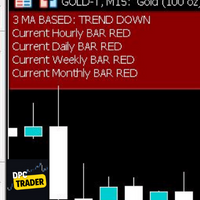
This Utility Bot is for New Traders, that struggle to spot the Trend direction. It also make you conscious about different Timeframes Bar Status. Utility have 3 Moving Averages totally configurable by input parameters. 3MA Based Trend is shown for the current Timeframe selected on the chart. (Line 1) 3MA Based Trend for Daily Timeframe. (Line 2nd) Also provide quick information about the currently Hourly Daily and Weekly Candle Status. Utility work on 1 Min Bar control, so comment section info
FREE

This EA provides: Grid buy button and grid sell button When pressed, it enters market then subsequent layers as pending order separated by pips value for each layer. Close all button When pressed it closes all running positions and pending orders. This expert advisor does not provides means to automatically add take profits and stop losses. User must specify it manually.
FREE
MetaTrader Mağazası - yatırımcılar için alım-satım robotları ve teknik göstergeler doğrudan işlem terminalinde mevcuttur.
MQL5.community ödeme sistemi, MetaTrader Hizmetlerindeki işlemler için MQL5.com sitesinin tüm kayıtlı kullanıcıları tarafından kullanılabilir. WebMoney, PayPal veya banka kartı kullanarak para yatırabilir ve çekebilirsiniz.

Alım-satım fırsatlarını kaçırıyorsunuz:
- Ücretsiz alım-satım uygulamaları
- İşlem kopyalama için 8.000'den fazla sinyal
- Finansal piyasaları keşfetmek için ekonomik haberler
Kayıt
Giriş yap
Web sitesi politikasını ve kullanım şartlarını kabul edersiniz
Hesabınız yoksa, lütfen kaydolun