Omni Device AI Utiility and Indicator

Only for serious Traders (This Utility uses AI but you can use it without AI as well, you need to get an API key and add the webrequest URL, read the relevant paragraphs to understand how it needs to be done. If you already know to get an API key and add the URL and input the API key in the input parameters, then dont need to read deployment instructions)

OMNI DEVICE AI

- trend signals with a complete trade plan, a simulated track record and an AI second opinion


OMNI DEVICE AI is a chart tool for traders who decide for themselves. It marks rule-based BUY and SELL signals, draws the whole trade plan for every signal (entry, stop, two targets, break-even and trailing stop), keeps a simulated track record of its own signals with costs included, and has an AI Advisor button that asks the AI agent of your choice - Claude, ChatGPT, Grok, Gemini, DeepSeek or a custom one - for a reasoned second opinion before you act.


The program never opens, changes or closes a trade. It contains no trading function. Product type: Utility. It is one file and uses no DLL.

THE DASHBOARD


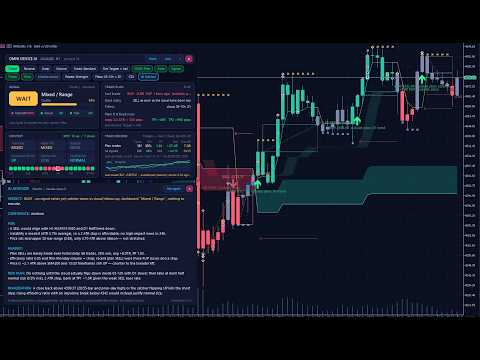
The dashboard is a set of floating cards that you can drag, or a docked strip under the chart that never covers price. Its buttons: Trend / Reversal / Scalp / Volume (what the Signal card evaluates), Mode (Standard, Strict, Loose), Exit scheme, OMNI Filter, Alerts, Signals, Trades, Plots, Module arrows, Palette, Filters, CSV, AI Advisor, Dock / Float, More / Less, minimise and close. The arrows and trade levels on the chart always follow the trend signal; the four strategy buttons change only the reading of the Signal card.


- SIGNAL card: BUY, SELL or WAIT, the market state (for example Bullish / Trend or Mixed / Range), a quality score from 0 to 100 built from the agreement of the modules and of the timeframes, the state of each module, and in plain words what the tool is waiting for.

- TRADE PLAN card: for a running signal the entry, stop, targets, the current result in R and in pips, a progress bar and the next management step, for example "at TP1 close 1/3 and move the stop to the entry". A size helper shows the lot size for your chosen risk per trade. When there is no position: the last trade, the condition for the next entry, the active filters, and the stop and target distances a signal would have right now.

- CONTEXT card: trend bias, higher-timeframe bias, trend strength, RSI momentum, volume and volatility against their averages, and a strip with the trend direction on 20 timeframes from M1 to W1.

- TRACK RECORD card: a simulated record of the tool's own signals on the history of your chart: number of trades, win rate, profit factor, net result in R, maximum drawdown in R, average win and loss, two equity curves (plan trades and all signals) and the last closed trade. Spread and commission are charged on every simulated trade. A Monte Carlo helper estimates the risk per trade that would have kept the simulated drawdown under your limit. These figures are a simulation on past data of your broker. They are not real trading results and they do not predict future results.


Alerts: a pop-up alert, and a push notification to your phone if you switch it on, for every new signal with entry, stop and targets, when a target is reached, when the stop should be moved, and when the trade ends. The CSV button exports all simulated trades for your own analysis.


WHAT YOU SEE ON THE CHART


- BUY and SELL arrows. A signal appears when the two trend modules, the Trend Breakout Catcher and the OMNI Cloud, come to agree on a direction. A Classic rule (the catcher turns while the cloud already agrees) can be chosen in the inputs. Signals are evaluated on closed bars.

- The trade plan of every signal, drawn as levels: entry, initial stop (2 x ATR by default), target 1 (1.5 R), target 2 (3 R), the move of the stop to break-even and the path of the trailing stop. R is the initial risk of the trade. A finished trade carries a tag with its result in R and the way it ended: TP, STOP, BREAK-EVEN, TRAIL or FLIP.

- Three exit schemes, changed with one click: Targets + break-even + trail, Stop + trail only, Opposite signal only.

- Entry filters, called the plan: a session window in server hours, agreement with the H4 and / or D1 trend, optional regime filters (efficiency ratio, ATR ratio) and direction (long, short or both). A signal that a filter refuses is still drawn with all its levels in a quieter colour and tagged "outside plan" with the reason. It is shown for your information and is not counted as a plan trade.

- Trend candles, the cloud, the catcher line with its band, ATR bands, reversal zones and the trailing-stop ribbon. Five colour palettes (Midnight, Graphite, Paper, Classic, Purple), or the tool leaves your own chart colours alone.

THE AI ADVISOR


Click AI Advisor on the dashboard. The tool sends one snapshot of the situation to the AI agent you chose and shows the answer in a window on the chart, usually within 5 to 40 seconds. The answer always has the same form: VERDICT (TAKE, TAKE SMALLER, WAIT or SKIP), CONFIDENCE, FOR, AGAINST, RISK PLAN and INVALIDATION. "Ask again" repeats the question with fresh data.


What is sent: symbol, timeframe, server time and current spread; the signal or position in question with entry, stop, targets and, if a filter refused it, which one; the state of the modules and the trend direction on 20 timeframes; volatility, momentum and price-structure figures; the tool's own simulated statistics on your chart, including how comparable past signals ended; medium and high impact events from the economic calendar of MetaTrader; your risk-per-trade setting; recent price bars of the chart timeframe, of H4 and of D1.


What is never sent: account number, name, balance, equity, open positions, orders or trade history. Nothing is sent to the author of this product. The request goes directly from your MetaTrader to the AI company whose key you entered. For your own inspection the tool saves what it sent, without the key, in MQL5\Files\AI_Advisor\last_request_(symbol)_(timeframe).txt and the answer in last_answer_(symbol)_(timeframe).txt.


The AI is instructed to use only the supplied data, to weigh the measured statistics, to be candid about uncertainty and never to promise a result. A language model cannot predict the market. Treat the answer as a second opinion, not as a signal service and not as financial advice. You can add your own standing instructions in the input AI_ExtraInstructions, for example: Answer in Spanish. I never hold trades over the weekend.


Cost of the AI: the AI companies charge for API usage, to your own account with them. This is separate from the price of this product, and a chat subscription such as ChatGPT Plus or Claude Pro does not cover API usage. One question is about 3,500 tokens of input plus a short answer. See the price list of the agent you choose; smaller models cost less per question.


SETUP


Step 1 - attach the tool

After the purchase the tool is in the Navigator under Expert Advisors > Market. Drag it onto a chart. MetaTrader runs one Expert per chart: if the chart already runs a trading robot, open a second chart of the same symbol for this tool. The dashboard appears after a few seconds. Everything except the AI Advisor works without further setup.


Step 2 - allow the address of your AI agent in MetaTrader (once per terminal)

MetaTrader blocks every internet address that is not on its list.

1. In MetaTrader 5 open the menu Tools > Options (or press Ctrl+O).

2. Open the tab Expert Advisors.

3. Tick "Allow WebRequest for listed URL".

4. Double-click the line with the plus sign below it ("add new URL like https://www.mql5.com"), type the address of your agent exactly as written here and press Enter.

5. Press OK. A restart is not needed.


Addresses to allow (one line per agent, nothing after it):

Claude (Anthropic): https://api.anthropic.com

ChatGPT (OpenAI): https://api.openai.com

Grok (xAI): https://api.x.ai

Gemini (Google): https://generativelanguage.googleapis.com

DeepSeek: https://api.deepseek.com

Custom agent: the protocol and host part of the address you typed into AI_Url


All models of one agent use the same address. For reference, these are the full addresses the tool calls:

Claude: https://api.anthropic.com/v1/messages

ChatGPT: https://api.openai.com/v1/responses

Grok: https://api.x.ai/v1/chat/completions

Gemini: https://generativelanguage.googleapis.com/v1beta/openai/chat/completions

DeepSeek: https://api.deepseek.com/chat/completions


Step 3 - get an API key and paste it

An API key is a long password that lets a program use your account at the AI company. You create it on the developer site of the company, not in its chat app. Copy it at once, because the sites show it only one time. Then open the inputs of the tool (press F7 on the chart), paste the key into AI_ApiKey, choose the same company in AI_Provider and press OK.


Claude (Anthropic)

1. Go to platform.claude.com (Claude Console) and sign in or create an account.

2. Open Settings > Billing and buy credits.

3. Open Settings > API keys and click Create key. Give it a name, choose an expiration (Never, if you do not want to renew it), set Linked account to yourself and choose a workspace for the key - the Default workspace is fine. This last point matters: a key without a workspace is refused with a message about anthropic-workspace-id.

4. Copy the key. It starts with sk-ant-.

Inputs: AI_Provider = Claude. Models in the list: Opus 5 (claude-opus-5, used when AI_Model is left on the recommended model), Fable 5.1 (claude-fable-5-1), Sonnet 5 (claude-sonnet-5), Haiku 4.5 (claude-haiku-4-5).


ChatGPT (OpenAI)

1. Go to platform.openai.com and sign in or create an account. This is the developer platform; a ChatGPT subscription is not needed for it.

2. Open Settings > Billing, add payment details and buy credits.

3. Open API keys and click Create new secret key. Copy the key. It starts with sk-.

Inputs: AI_Provider = ChatGPT. Models in the list: GPT-5.6 Terra (gpt-5.6-terra, the recommended one), GPT-6 Astra (gpt-6-astra), GPT-5.6 Sol (gpt-5.6-sol), GPT-5.6 Luna (gpt-5.6-luna).


Grok (xAI)

1. Go to console.x.ai and sign in or create an account.

2. Load the account with credits in the billing section.

3. Open API Keys, create a key and copy it.

Inputs: AI_Provider = Grok. Models in the list: Grok 4.6 (grok-4.6, the recommended one), Grok 4.5 (grok-4.5), Grok 4.3 (grok-4.3).


Gemini (Google)

1. Go to aistudio.google.com/apikey and sign in with a Google account. After you accept the terms, a new user gets a first project and a first key automatically; otherwise click Create API key.

2. Copy the key.

3. Google lists a free tier with request limits for some models. For regular use enable billing for the project in Google AI Studio.

Inputs: AI_Provider = Gemini. Models in the list: Gemini 3.8 Flash (gemini-3.8-flash, the recommended one), Gemini 3.1 Pro preview (gemini-3.1-pro-preview), Gemini 2.5 Pro (gemini-2.5-pro). If Google refuses an old key, create a new one on the same page: Google changed its key type in 2026.


DeepSeek

1. Go to platform.deepseek.com and sign in or create an account.

2. Top up the balance.

3. Open API keys, create a new key and copy it. It starts with sk-.

Inputs: AI_Provider = DeepSeek. Models in the list: DeepSeek V4 Pro (deepseek-v4-pro, the recommended one), DeepSeek Flash (deepseek-flash).


Custom agent

Any service that speaks the OpenAI chat-completions format. Inputs: AI_Provider = Custom, the full address in AI_Url, the model name in AI_CustomModel, the key in AI_ApiKey. Add the address to the WebRequest list as in step 2.


Model names change often. When a company retires a model of the list, type the id of its current model into AI_CustomModel. That input wins over the list, so no update of the product is needed.


Keep the key safe. It is stored with the settings of the chart on your computer. Chart templates, profiles and .set files contain it, so do not share them, and do not post screenshots of the inputs. If a key leaks, delete it on the site of the company and create a new one. Set a spending limit there if the company offers one.


MESSAGES OF THE AI WINDOW AND WHAT TO DO


- MetaTrader blocked the address (error 4014): the address is missing in Tools > Options > Expert Advisors or it is misspelled. Compare it letter by letter, including https:// at the start.

- No API key yet: AI_ApiKey is empty.

- HTTP 401 or 403: the key is wrong, deleted or expired, or it belongs to another company than the one chosen in AI_Provider.

- HTTP 400 with anthropic-workspace-id in the text: create a new Claude key and choose a workspace for it.

- HTTP 404: the company does not know the model name. Choose another model, or type the current id into AI_CustomModel. AI_Model must belong to the company chosen in AI_Provider.

- HTTP 429: the rate limit is reached, or no credit is left on your account with the company.

- HTTP 500 and above: the servers of the company are busy. Ask again later.

- Time-out: raise AI_TimeoutSec, choose a faster model or a lower AI_Effort.

- No answer arrived: open the Experts tab of the Toolbox. The tool writes one line per request there, never the key.

- Strategy Tester: the tester has no internet access, so the AI Advisor shows a built-in sample answer there. Everything else, including the buttons of the dashboard, can be tried in the visual mode of the tester.


INPUT PARAMETERS


Main control

- BarsToScan (500): bars on which the visual modules and arrows are drawn.

- OMNIFilter (true): the catcher arrows need the agreement of the cloud.

- TM_SignalMode (Agreement): Agreement = catcher and cloud come to agree, whichever turns last; Classic = the catcher turns while the cloud already agrees.


Trade manager: entries, exits, trailing stop

- TM_Enabled (true): draw entries, stops, targets and exits.

- TM_ExitMethod (Targets + break-even + ribbon trail): the exit scheme. The Exit button of the dashboard changes it too.

- TM_StopDistanceATR (2.0): initial stop in multiples of ATR 14.

- TM_TP1_R (1.5) and TM_TP2_R (3.0): the targets in R. At each target one third is closed.

- TM_BreakEven (true): move the stop to the entry at target 1.

- TM_TrailAfterBE (true): the stop trails on the ribbon only after break-even.

- TM_BreakEvenAtR (1.5): Stop + trail scheme: result in R that moves the stop to break-even.

- TM_FlipStopATR (4.0): Opposite-signal scheme: protective stop in ATR, 0 = none.

- TM_EntryNextOpen (true): the simulated entry is the open of the next bar; false = close of the signal bar.


Trade manager: entry filters

- TM_Direction (Long and short): allowed direction.

- TM_SessionOnly (true), TM_SessionStart (3), TM_SessionEnd (12): entries only inside this window of SERVER hours; the end hour is exclusive and the window may pass midnight.

- TM_MinEfficiency (0 = off): the efficiency ratio of the last 20 bars must reach this value.

- TM_MinAtrRatio (0 = off): ATR divided by its 50-bar average must reach this value.

- TM_TrendAgree (D1): only with the trend of H4, of D1, of both, or off.

- TM_MinEdgeR (-99 = off): evidence score gate, the expected R of similar past signals.

- TM_AddOns (0 = off) and TM_AddOnTouchATR (0.35): pullback add-ons once the stop is at break-even.


Trade manager: statistics, drawing, alerts

- TM_StatsBars (20000): history used for the track record.

- TM_DrawTrades (60): number of past trades drawn on the chart.

- TM_CostPoints (-1 = automatic): spread in points charged per simulated trade. Automatic uses the recorded spread of the entry bar and never less than TM_TypicalSpreadPct.

- TM_TypicalSpreadPct (0.012): typical spread in percent of the price. Bar history stores only the smallest spread of each bar, so a realistic floor is charged. Suggested values: gold 0.012, silver 0.05, EURUSD 0.005.

- TM_CommissionPct (0.005): round-trip commission in percent of the traded value, charged in the track record.

- TM_RiskPercent (1.0): risk per trade in percent of the balance, used by the size helper.

- TM_MaxDDPercent (20): drawdown limit of the Monte Carlo risk helper.

- TM_PushAlerts (false): send the alerts to your phone as push notifications too.

- TM_OriginalMarkers (false): hindsight markers, for study only.

- TM_HideModuleArrows (true): hide the small arrows of the single modules.

- TM_ShowSignals (true): BUY / SELL arrow at every signal bar.

- TM_ShowOutsidePlan (true): draw the levels of signals that the filters refuse.


Dashboard

- UI_Mode (Floating): floating cards or docked strip under the chart.

- UI_Columns (0 = automatic), UI_ScalePercent (0 = follow the Windows display scale), UI_X (12), UI_Y (28): layout, size and position.

- UI_Palette (Midnight): chart colours. The Palette button changes them and remembers the choice.


AI Advisor

- AI_Provider (Claude): the AI company.

- AI_Model (recommended model of the chosen company): must belong to the company above.

- AI_CustomModel (empty): any model id typed by hand; wins over the list.

- AI_ApiKey (empty): your key.

- AI_Url (empty = the standard address of the company): needed only for Custom.

- AI_WebRequest_NOTE: a reminder of the addresses, nothing to set.

- AI_Effort (medium): how hard the model thinks, where the company supports it. Higher is slower and costs more.

- AI_TimeoutSec (90): give up after this many seconds.

- AI_ExtraInstructions (empty): your own standing instructions to the advisor.

- AI_ClaudeFallback (true): Claude Opus 5 and Fable 5.1 only: if the model declines a request, Anthropic may run it on its fallback model.


This program

- Host_PollMs (300): how often the tool looks for a new question, in milliseconds.

- Host_Log (true): one journal line per AI request, never the key.


GOOD TO KNOW


- Works on every symbol and timeframe of MetaTrader 5. The default filters (session 03 to 12 server time and agreement with the D1 trend) come from the author's tests on XAUUSD H1. Server time differs between brokers. On other symbols and timeframes compare Plan trades with All signals on the Track Record card - the Filters button switches the two filters off and on - and set the filters to what your own chart shows.

- Attach the tool to every chart on which you want it. Each chart keeps its own settings.

- The tool does not trade and does not manage positions. The size helper reads your balance only on your computer.

- Trading involves risk of loss. Signals, simulated statistics and AI answers are information, not advice. Past and simulated results do not predict future results.
Рекомендуем также
Prop Firm Shield is a risk management panel for MetaTrader 5, built for prop firm traders who need control over their daily limits. You configure each limit and the tool watches the account around the clock, acting automatically when a limit is reached: closing positions, deleting pending orders and blocking new trading until the next day. Features: - Daily Take Profit - three modes: fixed USD, percent of the day-start balance, or target balance - Daily Stop Loss - three modes: fixed USD, percen
Orphira Gold
Mohammad Reza Rezaei
Orphira Gold is an automated trading system developed specifically for gold trading in MetaTrader 5. It combines adaptive trade management, equity-based position sizing and several layers of portfolio protection in one straightforward Expert Advisor. The system continuously evaluates market conditions and opens trades only when its internal requirements are met. When a position moves against the expected direction, Orphira Gold may use carefully spaced recovery positions. Every additional order
Скальпинг бот для пары золото/доллар (XAU/USD) — это мощное и универсальное решение для трейдеров, которое обеспечивает максимальную эффективность в условиях динамичного рынка. Бот специально разработан для скальпинга: он анализирует изменения цены и делает ставки ещё до начала значительного движения. Это позволяет заранее занимать выгодные позиции и извлекать прибыль из самых малейших рыночных колебаний. Основные преимущества: Гибкость: Подходит для любых рыночных условий и адаптируется под ваш
Sonic R Pro Enhanced EA - Версия 2025 249$ только для первых 5 покупателей! Live Сигнал Проверьте реальную производительность Sonic R Pro Enhanced: Торговая стратегия Sonic R Pro Enhanced — это обновленная версия классической стратегии Sonic R, которая автоматизирует сделки на основе Dragon Band (EMA 34 и EMA 89) и использует усовершенствованные алгоритмы для максимальной эффективности. Таймфреймы: M15, M30 Поддерживаемые пары: XAUUSD, BTCUSD, AUDJPY, USDJPY Стиль торговли: Свинг-трейд
ProTrade EA
Jim Ariel Camarce Ignao
Key Features   Automated Candle Pattern Recognition 10 Professional Patterns : Detects Bullish/Bearish Engulfing, Hammer/Shooting Star, Morning/Evening Star, Piercing/Dark Cloud, and 6 additional professional candlestick patterns Smart Filtering : Combine multiple patterns with configurable confirmation logic Volume Confirmation : Optional volume filter to validate pattern strength Multi-Timeframe Analysis : Separate execution and bias timeframes for better timing   Trading Dashboard Int
Matrix Arrow EA MT5
Juvenille Emperor Limited
5 (7)
Matrix Arrow EA MT5  - уникальный советник, который может торговать по сигналам  MT5 индикатора Matrix Arrow  с помощью торговой панели на графике, вручную или на 100% автоматически.  Индикатор Matrix Arrow MT5  будет определять текущую тенденцию на ранних этапах, собирая информацию и данные от до 10 стандартных индикаторов, а именно: Индекс среднего направленного движения (ADX), Индекс товарного канала (CCI), Классические свечи Heiken Ashi, Скользящая средняя, Дивергенция схождения скользящих
Forex Diamond EA MT5
Lachezar Krastev
4.67 (3)
FOREX MEGA SALE! 50% OFF! Buy Forex Diamond EA with a huge –50% discount ! Promo Price: $267 (Regular Price: $547 — You Save $280! ) Act now before this deal ends! Live Results:   https://www.mql5.com/en/signals/2379493 Forex Diamond EA – Reliable Automated Trading Powered by Smart Algorithms Forex Diamond EA is a proven expert advisor designed to deliver consistent results using a combination of trend and counter-trend strategies. Trusted by thousands of traders since its launch, Forex Diamo
Gold Sovereign Strike AI Algorithmic Strike-Avoidance Protocol Gold Sovereign Strike AI represents a paradigm shift in automated Gold trading, built entirely upon the proprietary Algorithmic Strike-Avoidance Theory. Heavy drawdowns and extreme volatility spikes are treated as "Strikes" against your portfolio's longevity and platform compliance. This Expert Advisor is engineered for Monetization Safety (Prop-Firm and Funded Account friendly), prioritizing sustainable, compounded capital growth o
Viking Alpha DAX Ivar Edition
Valdeci Carlos Dos Passos Albuquerque
Viking Alpha DAX — Germany 40 Expert Advisor for MetaTrader 5 LAUNCH PROMO Only 10 copies at launch price. Price increases with each sale. Launch price: $297 Next price: $497 Final price: $997 Live Performance: FX Blue — Vikingtradingbots What Makes Viking Alpha DAX Different Most DAX robots fail for one simple reason: they treat the Germany 40 like a forex pair. It isn't. The DAX has a heartbeat — a specific rhythm tied to the Frankfurt Stock Exchange opening, the European session structure, an
Grid Trading - полуавтоматический советник для торговли по сетке в один клик на хеджевых счетах. Также доступна версия для MetaTrader 4 . *Данный советник предназначен только для счетов с хеджинговой системой учета позиций Обычный режим Вы нажимаете на кнопку Sell или Buy на графике, затем эксперт добавит уровни стоп-лосс, тейк-профит для сделки, а функции трейлинг-стопа и безубытка позаботятся о сделке, если она не сможет достичь цели профита. Хеджирование При выборе торговли с использованием
WTI Crude Oil
Nuttapon Maneechote
WTI Crude Oil is an automated Expert Advisor developed specifically for trading West Texas Intermediate crude oil on MetaTrader 5. The system combines structured price zones, market-direction analysis and basket-based position management. It is designed to manage both BUY and SELL positions while controlling when new exposure may be added. The internal entry calculations are fully automated. Users do not need to install additional indicators, connect external services or perform manual analysis.
Финансовый Робот SolarTrade Suite: LaunchPad Market Expert - предназначенный для открытия торговых сделок! Это торговый робот, который использует особые инновационные и передовые алгоритмы для рассчета своих значений, Ваш Помошник в Мире Финансовых Рынков. Испольуйте наш набор индикаторов из серии SolarTrade Suite чтобы лучше выбрать момент для запуска этого робота. Проверьте другие наши продукты из серии SolarTrade Suite внизу описания. Хотите уверенно ориентироваться в мире инвестиций и фи
| Fully-automated Smart Money Concept (ICT) inspired trading solution with multi-strategy capabilities | Built by a grid trader >> for grid traders.  This is MT5 version, click  here  for  Blue CARA MT4  (settings and logics are same in both versions)     Real monitoring signal  -->  Cara Gold Intro Blue CARA EA   ('CARA') - short for  C omprehensive  A lgorithmic   R esponsive   A dvisor is a next-gen  multi-currency    multi-timeframe  EA base on the widely known (and perhaps the most popul
Apex Beyond
Yi Hsiu Tsai
5 (1)
Живой сигнал (Live Signal) https://www.mql5.com/en/users/sagen520/seller Динамическое ценообразование (Ограниченное предложение) Стартовая цена : $49 Рост цены : +$100 за каждые 10 проданных копий. Зафиксируйте минимальную цену до следующего повышения! 15-летний бэктест (2010 - 2026) Доказанная стабильность за 15 лет в сложных рыночных циклах: In-Sample (2010–2020) : Оптимизация ядра стратегии и риск-менеджмента. Out-of-Sample (2020–2026) : Подтвержденный рост капитала на рынках с высокой вола
Alpha Bullish Engine MT5 Overview Alpha Bullish Engine(No Martingale, no Grid) is a professional Expert Advisor for MetaTrader 5 designed to identify and trade high-quality market bullish opportunities while maintaining a strong focus on risk management and capital preservation. Built with a combination of trend analysis, momentum assessment, and intelligent trade management, the EA is designed to operate in favorable market conditions while avoiding unnecessary exposure during less suitable env
Golden BREAK
Sakon Muangpakdee
4.82 (11)
GOLDEN BREAK 5.1 is an automated gold breakout EA for MetaTrader 5. It identifies swing highs and lows, places pending breakout orders, and manages positions with stop losses and strategy-specific exit rules. LIVE SIGNAL |  FOLLOW CHANNEL LIVE SET CHART 1 | LIVE SET CHART 2 Six Strategies. One EA. Classic: GB1–GB4 Scalping: GB5–GB6 Run All Strategies: GB1–GB6 Custom Strategies: Choose your own combination Key Features No grid. No martingale. Fixed Lot or Risk per Trade position sizing Stop-loss
SMC OTE Gold Pattern — OTE Zone Expert Advisor for MT5 SMC OTE Gold Pattern is an Expert Advisor for MetaTrader 5 designed to identify and trade Fibonacci Optimal Trade Entry (OTE) zones using market structure, trend, volatility and confirmation filters. The EA identifies completed swing movements and calculates the 61.8%–79% Fibonacci retracement area as a potential OTE zone. A 70.5% reference level is also displayed within the zone. OTE Zone Detection The EA monitors swing highs and swing lows
GoldMaster X
Jim Ariel Camarce Ignao
GoldMaster X is a next-generation automated trading system engineered for traders who demand precision, consistency, and intelligent risk management. Powered by advanced candlestick pattern recognition, adaptive ATR-based Stop Loss and Take Profit, dynamic position sizing, and multiple trailing stop strategies, GoldMaster X identifies high-probability trading opportunities while protecting your capital. Designed with a professional trading dashboard, market bias filtering, and smart session mana
Manus Pro
Itumeleng Mohlouwa Kgotso Tladi
MANUS PRO EA The Trading Revolution You've Been Waiting For Are you TIRED of watching other traders make consistent profits while your account bleeds red?   The financial markets don't wait for anyone – and neither should you. MANUS PRO isn't just another Expert Advisor... it's your   TICKET TO FINANCIAL FREEDOM . Why MANUS PRO is Different (And Why Everyone's Talking About It) FOR BEGINNERS: Your Trading Mentor That Never Sleeps Zero Learning Curve   – Install, activate, and watch it wo
Exclusive EA for FOREX HEDGE account The EA (FuzzyLogicTrendEA) is based on fuzzy logic strategies based on the analysis of a set of 5 indicators and filters. Each indicator and filter has a weight in the calculation and, when the fuzzy logic result reaches the value defined in the EA parameter, a negotiation is opened seeking a pre-defined gain. As additional functions it is possible to define maximum spread, stop loss and so on . Recommended Symbol: EURUSD, AUDUSD, GBPUSD, NZDUSD, USDCAD, AUD
Goldmost – Precision Trading for XAUUSD This EA implements a multi-timeframe breakout strategy for XAUUSD, identifying critical support/resistance levels to execute trades with dynamic SL/TP adjustments, and intelligent exit protocols for optimized risk management. The parameters are updated regularly to adapt to evolving market conditions. This ensures the model continuously adjusts to shifting sentiment, investor behavior, and emerging trends - keeping your strategy aligned with current marke
Somewhere over the rainbow It is a system that tries to operate the market from the exhaustion of the trend with a correction algorithm that tries to cut losses at the cost of increasing the margin This system makes all the adjustments automatically, analyzing the pair and the market to decide which is the most efficient step to reach your destination. Somewhere over the rainbow is a multiple trade and multi lot system(The maximum batch can be up to 5 times the initial batch distributed in mult
EMA256 Fourier Cycle Trader EMA256 Fourier Cycle Trader is an advanced MetaTrader 5 Expert Advisor combining a long-term EMA or TEMA trend model, causal Fourier cycle analysis, configurable averaging and a unified basket take-profit system. The Expert Advisor is designed primarily for CENT accounts and for traders who understand basket recovery strategies, geometric lot progression and the risks associated with trading without a mandatory Stop Loss. RECOMMENDED STARTING CONFIGURATION Recommended
Net Z
Sugianto
5 (1)
NET Z uses a very well-known trend reversal technique to determine position entry with slight modifications by using virtual trade techniques and virtual pending orders so that position entry is not too early or too late. Why NETZ? NET Z does not require complicated settings and is easy to use because user only need to upload a set file that is already available. Currently there are set files for 20 fx pairs. The best GRID EA with the ability to control risks. I will share my personal daily rou
Lot Master Rebate Scalper MT5 Designed for high-volume lot generation (Lot Flipping/Rebate Farming). EA Features & Strategy No Grid Strategy: The EA opens orders at specific time intervals (e.g., every 1 minute or 5 minutes). It is specifically designed to generate high trading volume. For example, if set to 1-minute intervals, the EA will open approximately 1,440 orders per day. You can increase the lot size via the Lot_Fix input setting. RSI Entry Logic: The EA uses the RSI Indicator to determ
Hector EA
Anton Shevtsov
5 (3)
The signal is run by the same Expert Advisor whose logic you see in the public statistics. For a result close to the signal, run Hector Gold EA on the recommended settings and on an ECN/RAW account with zero or low spread (FxPro, Ultima Markets, Fusion Markets, IC Markets). On other brokers behavior may differ — test it on tick data. For broker compatibility questions, use the product comments. Please note that the live account history is not uniform. It covers three stages: the old version of
Dynamic Grid EA is a grid trading system that adapts to market volatility in real time. It automatically adjusts grid spacing, lot sizing, and position management based on current market conditions. The EA opens initial orders when entry conditions are met, then builds a grid of positions when price moves against the initial entry. Grid distance increases when volatility rises and tightens when the market calms down, with a minimum floor to prevent clustering. Entry Filters Momentum-based filter
The Gold Buyer
Moses Aboliwen Aduboa
Ride the Gold Trend with a Simple Buy-Only EA The  EA is a fully automated Buy-Only Expert Advisor for MetaTrader 5. It is designed to capture upward market opportunities with safe risk management and seamless execution. Why Traders Choose It: Best performance on Gold (XAUUSD) – highly liquid and trending. Buy-Only EA – focuses purely on long positions. Plug & Play setup – attach and let it trade automatically. Built-in Stop Loss & Take Profit protection. Smart one-position contro
Product Name: Anchor auto TP and SL Trade Manager Pro MT5 The ultimate manual assistant. Turns trades into auto-grids with Hedging, Zero-Loss Breakeven & Spread Detection. Your manual trade will be managed automatically. Anchor Auto TP and SL Trade Manager MT5 Pro is the advanced edition of our popular trade assistant. It transforms simple manual trades into sophisticated, professional-grade recovery grids. Unlike the free version, this PRO edition fully supports Hedging (simultaneous Buy & Sell
Iconic BTC AI
Maurice Prang
5 (1)
ICONIC BTC AI+ | SYNAPSE.PHENOTYPE S6 ENGINE (Версия 15.00) Цены запуска Текущая цена: 599 USD. Доступно лицензий: 10. Следующий ценовой уровень: 699 USD. Финальная цена: 1699 USD. Цена раннего доступа отражает текущую фазу выпуска продукта. Цена будет повышаться по мере закрытия текущего пакета лицензий и открытия следующих уровней. Конкретной даты, после которой действующая цена перестанет действовать, не установлено. Bitcoin не является валютной парой Forex. Он не ведет себя как золото, не ув
С этим продуктом покупают
Trade Assistant MT5
Evgeniy Kravchenko
4.43 (216)
Помогает рассчитать риск на сделку, простая установка нового ордера с помощью линий, управление ордерами с функциями частичного закрытия, 7 типов трейлинг-стопа и другие полезные функции. Дополнительные материалы и инструкции Инструкция по установке - Инструкция к приложению - Пробная версия приложения для демо счета Функция Линии   - отображает на графике линию открытия, стоп-лосс, тейк-профит. С помощью этой функции легко установить новый ордер и увидеть его дополнительные характеристики пе
Добро пожаловать в Trade Manager EA — лучший инструмент для управления рисками, предназначенный для упрощения, точности и эффективности торговли. Это не просто инструмент для размещения ордеров; это комплексное решение для удобного планирования торгов, управления позициями и усиленного контроля над рисками. Независимо от того, начинающий вы трейдер, опытный специалист или скальпер, нуждающийся в быстром исполнении, Trade Manager EA адаптируется к вашим потребностям и работает с любыми активами:
================================================================================ POC BREAKOUT - V20.72. Full Professional Grade Toolkit ================================================================================ POC Breakout is a full MetaTrader 5 trading dashboard for discretionary traders who want breakout signals, Point of Control (POC) context, volume profiles, order flow, market structure, news, alerts, and advanced trade planning in one professional workspace. Attached directly to you
TradePanel MT5
Alfiya Fazylova
4.88 (169)
Trade Panel — это многофункциональный торговый помощник. Приложение содержит более 50 торговых функций для ручной торговли и позволяет автоматизировать большинство торговых операций. Инструкция к приложению + видео-инструкции: https://www.mql5.com/ru/blogs/post/771695 Пробная версия приложения для демо-счета: https://www.mql5.com/ru/blogs/post/750864 Как установить приложение: https://www.mql5.com/ru/blogs/post/750096 Как тестировать приложение в визуальном режиме: https://www.mql5.com/ru/blogs/
Telegram to MT5 Multi-Channel Copier   автоматически копирует торговые сигналы из ваших Telegram-каналов прямо в MetaTrader 5. Без ботов, без браузерных расширений, без ручного копирования. Сигнал приходит в Telegram — и советник открывает сделку в вашем терминале за считанные секунды. А перед тем как копировать канал, встроенный бэктестер покажет, что этот канал сделал бы на вашем счёте. Продукт состоит из двух компонентов: приложения для Windows, которое слушает ваши Telegram-каналы, и этого с
Копируйте сигналы из Telegram по своим торговым правилам Telegram to MT5 Signal Trader автоматически копирует текстовые торговые сигналы из открытых и закрытых каналов и групп Telegram в MetaTrader 5. Управляйте несколькими поставщиками сигналов и счетами MT5 из одного приложения для компьютера, задавая индивидуальные параметры риска и торговли для каждого поставщика . Для копирования не нужны бот Telegram и настройка API. Просто войдите в свой аккаунт Telegram по номеру телефона или QR-коду и в
Farmed Hedge Yield Farming | All Markets (Manual - Hybrid - Semi/Automated EA) VERIFIED TRADING RESULTS - Farmed Hedge Yield Axi Copy:  https://www.mql5.com/en/signals/2356376 - Farmed Hedge Yield Exn Copy:   https://www.mql5.com/en/signals/2356404 - Farmed Hedge Yield V Copy:  https://www.mql5.com/en/signals/2357156 IMPORTANT NOTICE: FarmedHedge is a MANUAL-FOCUSED TRADING UTILITY ,not a fully automated EA. Results shown on this Signal include manual trades and overall strategic management.
Premium Trade Manager - Торговая панель со встроенным коучем Premium Trade Manager помещает торгового коуча прямо в ваш график, а под ним работает полноценный движок исполнения. Настройте сделку так, как вы всегда это делаете, затем позвольте Max, вашему ИИ-наставнику по трейдингу, прочитать именно эту настройку с учётом вашего живого счёта и дать чёткое заключение до того, как вы входите: соответствует ли стоп дисциплинированному подходу, разумен ли риск, не выходит ли высоковолатильный релиз ч
Power Candles Strategy Scanner — самооптимизирующийся инструмент для поиска настроек по нескольким инструментам Power Candles Strategy Scanner использует тот же самооптимизирующийся движок, что и индикатор Power Candles — для всех символов в вашем Market Watch, одновременно. На одной панели отображается информация о том, какие символы в данный момент являются статистически торгуемыми, какая стратегия выигрывает на каждом из них, оптимальная пара Stop Loss / Take Profit, а также отправляется увед
Exp COPYLOT CLIENT for MT5
Vladislav Andruschenko
3.97 (35)
Профессиональный копировщик сделок для MetaTrader 5 Быстрый, профессиональный и надежный копировщик сделок для MetaTrader . COPYLOT позволяет копировать сделки Forex между терминалами MT4 и MT5 с поддержкой счетов Hedge и Netting . Версия COPYLOT для MT5 поддерживает: - MT5 Hedge → MT5 Hedge - MT5 Hedge → MT5 Netting - MT5 Netting → MT5 Hedge - MT5 Netting → MT5 Netting - MT4 → MT5 Hedge - MT4 → MT5 Netting Версия MT4 Полное описание + DEMO + PDF Как купить Как установить Как получить файлы жур
HINN MAGIC ENTRY - лучший инструмент для входа и менеджмента позиций! ПРОСТО. БЫСТРО. ИНТУИТИВНО. МАКСИМАЛЬНО АВТОМАТИЗИРОВАНО. Выставляет ордера через выбор уровня на графике! полное описание    ::    demo-версия    ::   60-sec-video-description Основные функции: - Рыночные, лимитные и отложенные ордера -  Автоматический подсчет лоттажа  -  Автоматический учет спреда и комиссий -  Неограниченное количество промежуточных тейков для позиций - Перевод в безубыток и трейл стоп-лосса и тейк-проф
MT5 Trading Deck
Manuel Michiels
5 (2)
One button. One trade. MT5 Trading Deck is a hotkey trading panel for MetaTrader 5 that turns the platform into a keyboard-driven execution cockpit. Stop loss, take profit and lot size are pre-calculated for every key; the moment you press, a market order is live on the broker. A complete technical user manual is attached in the product Comments section. It documents every input parameter, the full hotkey map, the recommended Stream Deck XL layout, and the advanced workflows for Pre-Limit orders
Signal TradingView to MT5 Pro Automator Мгновенное профессиональное исполнение между TradingView и MetaTrader 5 Автоматизируйте свою торговую стратегию с помощью самого надежного моста связи между алертами TradingView и реальным исполнением в MT5. Разработанный для трейдеров, которым требуются скорость, гибкость и безупречное управление рисками, этот советник (Expert Advisor) превращает любое сообщение с алертом в точный рыночный или лимитный ордер. ПРЕИМУЩЕСТВА И СИЛЬНЫЕ СТОРОНЫ Универсальный д
Grid Manual MT5
Alfiya Fazylova
4.73 (22)
Grid Manual — это торговая панель для работы с сеточными стратегиями. Утилита универсальная, имеет гибкие настройки и понятный интерфейс. Работает с сеткой ордеров не только в сторону усреднения убытков, но и в сторону наращивания прибыли. Трейдеру не нужно создавать и сопровождать сетку ордеров, это сделает утилита. Достаточно открыть ордер и Grid manual автоматически создаст ему сетку ордеров и будет сопровождать его до самого закрытия. Полная инструкция и демо-версия здесь . Основные особенно
Trade Dashboard MT5
Fatemeh Ameri
4.94 (134)
Trade Dashboard simplifies how you open, manage, and control your trades, with built-in lot size calculation. It allows you to execute trades, manage risk, and control positions directly on the chart, with tools such as partial close, breakeven, and trailing stop. Designed to reduce manual work and help you stay focused on your trading decisions. A demo version is available for testing. Detailed explanations of features are provided within the MQL5 platform. Installation instructions are include
EasyInsight AIO MT5
Alain Verleyen
4.92 (12)
EASY Insight AIO – Всё-в-одном для умного и простого трейдинга Обзор Представьте, что вы можете просканировать весь рынок — Форекс, золото, криптовалюты, индексы и даже акции — всего за несколько секунд, без ручного просмотра графиков, сложной установки или настройки индикаторов. EASY Insight AIO — это ваш идеальный инструмент экспорта для трейдинга с поддержкой искусственного интеллекта. Он предоставляет полный снимок рынка в одном аккуратном CSV-файле — готовом к мгновенному анализу в ChatGP
EA Overfitter
Stephen J Martret
5 (1)
Бэктест выглядит отлично. Но будет ли советник зарабатывать завтра, через неделю, через месяц? EA Overfitter прогоняет вашего советника по 100 историям цены, которых он никогда не видел. Одна оценка показывает, реально ли преимущество. Бэктест показывает, что советник сделал на одной истории цены — на той, которая случайно произошла. Из него невозможно понять, какая часть результата была заслугой стратегии, а какая — конкретного пути цены. EA Overfitter отвечает на этот вопрос. Он строит до 10
EA Slipstream
Stephen J Martret
5 (1)
EA Slipstream — описание для MQL5 Маркета (русский) Ваш бэктест исполнил каждый ордер по той цене, которую запросил. Ваш счёт — нет. EA Slipstream измеряет, во что обходится исполнение вашему советнику, используя ваши собственные исполнения, проскальзывания и спреды, и показывает реальную результативность советника. В бэктесте каждая сделка рассчитывается по цене, которую назвал советник. В реальной торговле отложенный ордер исполняется по той цене, которая доступна в момент срабатывания, стоп з
Представляем последнюю версию Dynamic Fibonacci Grid Dashboard для MT5. Теперь с множеством новых функций, этот обновлённый дашборд полностью меняет ваш торговый опыт и позволяет увидеть рынок и ценовое движение с совершенно иной перспективы. Откройте новые возможности благодаря одновременному анализу нескольких таймфреймов и множества инструментов. Удобный интерфейс для ручной торговли и управления позициями, а также расширенные возможности применения предопределённых автоматических стратегий.
Trade Indicator Assistant   is a powerful MT5 utility designed to turn indicators into automated trading systems. Its main feature is the ability to automatically detect an indicator’s   BUY and SELL signal buffers , without requiring you to know the buffer numbers, search through indicator settings, or modify the indicator source code. Bonus Indicator:   After purchasing Trade Indicator Assistant, contact me to receive   Trade Signal Pro   completely free as a bonus indicator. [Download Demo V
The News Filter MT5
Leolouiski Gan
4.78 (23)
Этот продукт фильтрует всех экспертных советников и ручные графики во время новостей, так что вам не нужно беспокоиться о внезапных скачках цены, которые могут разрушить ваши ручные торговые настройки или сделки, введенные другими экспертными советниками. Этот продукт также поставляется с полной системой управления ордерами, которая может обрабатывать ваши открытые позиции и ордера на ожидание перед выпуском новостей. После покупки   The News Filter   вам больше не придется полагаться на встроен
Local Trade Copier EA — это решение для индивидуальных трейдеров или менеджеров по работе с клиентами, которым необходимо выполнять торговые сигналы из внешних источников или которым необходимо управлять несколькими счетами одновременно, без необходимости использования МАМ или ПАММ-счета. Он копирует до 8 основных учетных записей на неограниченное количество подчиненных учетных записей. [ Руководство по установке | Руководство по обновлению | Устранение неполадок | Часто задаваемые вопросы | Вс
Профессиональная панель для ручной торговли: весь цикл сделки в одном окне на графике, от точного входа до защиты счёта. Рассчитывайте объём строго под заданный риск, стройте сделку линиями прямо на графике с помощью RR Tool, открывайте рыночные и отложенные ордера, сетки и OCO. Сопровождение позиции панель берёт на себя: частичное закрытие до пяти уровней, шесть типов трейлинг-стопа, безубыток и Virtual SL/TP. Дневные, недельные и месячные лимиты защищают депозит и срабатывают автоматически при
Anchor Trade Manager
Kalinskie Gilliam
5 (9)
Your EAs cannot see each other, but Anchor can. Anchor gives you one place to coordinate your EAs, manage risk, and decide when trading is allowed. It works alongside the trading bots you already use without any changes to them. The Problem One EA opens a trade. Then another starts trading. The next thing you know, you wake up to multiple grids built across your account. Each EA may be doing exactly what it was designed to do, but together they can place far more risk on your account than you in
Footprint Chart Pro — Professional OrderFlow EA for MetaTrader 5 Version 6.34 | Professional tool for real traders | Institutional-Grade Visualization DEMO USERS - PLEASE SELECT EVERY TICK / REAL TICK WHEN TESTING AND YOU HAVE DOWNLOADED HISTORICAL DATA. IF YOU SEE A WAITING SCREEN AND IT IS NOT DOWNLOADING, IT MEANS YOU HAVE LOW HISTORICAL DATA. TRY 1 MIN AND 5 MIN FIRST ON 1 DAY DATA. ONE DAY DATA SHOULD BE THE NEWEST AND MOST CURRENT DATE. PLEASE WAIT UNTIL THE MARKET HAS ROLLED OVER PERIOD.
YuClusters
Yury Kulikov
4.93 (43)
Внимание: Ознакомиться с работой программы можно с помощью бесплатной версии  YuClusters DEMO . YuClusters это профессиональная система анализа рынка. Для трейдера открываются уникальные возможности анализа потока ордеров, объемов торговли, движения цены используя различные графики, профили, индикаторы, графические объекты. YuClusters оперирует данными на основе ленты сделок или тиковой информации, в зависимости от того, что доступно в котировках финансового инструмента.  YuClusters позволяет с
Trade Manager DaneTrades
Levi Dane Benjamin
4.23 (30)
Trade Manager, который поможет вам быстро входить и выходить из сделок, автоматически рассчитывая риск. Включает функции, которые помогут предотвратить чрезмерную торговлю, торговлю из мести и эмоциональную торговлю. Сделками можно управлять автоматически, а показатели эффективности счета можно визуализировать в виде графика. Эти функции делают эту панель идеальной для всех трейдеров, занимающихся ручной торговлей, и помогают улучшить платформу MetaTrader 5. Многоязычная поддержка. Версия для МТ
News Filter EA
Rashed Samir
5 (2)
News Filter EA: Advanced Algo Trading Assistant News Filter EA is an advanced algo trading assistant designed to enhance your trading experience. By using the News Filter EA , you can integrate a Forex economic news filter into your existing expert advisor, even if you do not have access to its source code. In addition to the news filter, you can also specify trading days and hours for your expert. The News Filter EA also includes risk management  and equity protection features. MT4 Version Ma
Timeless Charts
Samuel Manoel De Souza
5 (8)
Timeless Charts is an all-in-one trading utility for professional traders. It combines custom chart types such as Seconds Charts and Renko with advanced order flow analysis using Footprints , Clusters , Volume Profiles , VWAP studies, and anchored analysis tools for deeper market insight. Trading and position management are handled directly from the chart through an integrated trade management panel , while Market Replay and Virtual Accounts provide environments for practicing trading skills and
MT5 to Discord Signal Provider — это удобный, полностью настраиваемый инструмент, предназначенный для отправки торговых сигналов напрямую в Discord. Этот инструмент превращает ваш торговый счет в эффективного поставщика сигналов. Настройте формат сообщений под свой стиль! Для удобства выберите из предварительно разработанных шаблонов и решите, какие элементы сообщения включить или исключить. [ Демо ] [ Руководство ] [ Версия MT4] [ Версия Telegram ]  New: [ Telegram To MT5 ] Настройка Следуйте
Другие продукты этого автора
Omni Device
Ranaweera Wanasinghe Herath Bandara
OMNI DEVICE is a complete trading system in one indicator: confirmed BUY/SELL signals, a full trade plan with stop, targets and trailing, and an honest, cost-adjusted track record on a modern on-chart dashboard. Full description OMNI DEVICE – The Complete Trading System in a Single Indicator Most indicators hand you an arrow and leave the hard part to you. OMNI DEVICE goes all the way: it finds the signal, builds the trade plan, manages the stop bar by bar, tells you when to take profit, and the
BTC Jump
Ranaweera Wanasinghe Herath Bandara
5 (2)
BTC Jump is a breakout Expert Advisor developed for Bitcoin against the US dollar. Once per trading day it places a single stop order at the previous day's extreme and waits for the market to reach that level. If the level is reached during the session, the order becomes a position that is managed by a volatility-based stop loss, a fixed take profit and a trailing stop. If the level is not reached, the order is removed at the end of the trading window and no trade is taken that day. The Expert A
FREE
Multi jump
Ranaweera Wanasinghe Herath Bandara
MULTI JUMP — Daily Breakout EA for Crypto, Metals and Indices Multi Jump waits for the market to leave yesterday's range. Once per day, at a time you choose, it arms a Buy Stop at the previous day's high and a Sell Stop at the previous day's low. If price never reaches a level, nothing is traded that day and the pending orders are removed at the end of the window. If price does break out, the opposite order is cancelled immediately and the position is handed to the management engine. Everythi
FREE
VG Indicator
Ranaweera Wanasinghe Herath Bandara
VG INDICATOR Three independent strategy engines read every closed bar. They vote. Only when they agree does VG Indicator print a signal -- and it tells you exactly how strong that agreement was. Most signal indicators give you an arrow and nothing else. VG Indicator gives you the arrow, the entry price, the stop, a three-level target ladder, a graded confidence score, and a live dashboard that scores its own past calls on your chart, from your broker's own price history. -------------------
Push Capture
Ranaweera Wanasinghe Herath Bandara
PUSH Capture A multi-symbol portfolio EA — engineered by a developer, refined by a trader. PUSH Capture is a fully automated portfolio Expert Advisor that trades a diversified basket of major markets from a single chart. Instead of relying on lagging indicators or reacting to every tick, it follows a disciplined, time-driven framework — entering, managing, and exiting positions according to a defined plan, with the patience and consistency that manual trading rarely achieves. A true portfolio a
Momentum Portfolio
Ranaweera Wanasinghe Herath Bandara
Momentum Portfolio EA Multi-symbol momentum expert advisor for gold, US indices, and bitcoin. Trades four instruments from a single chart with adaptive risk management, regime detection, and broker-agnostic symbol resolution. Overview Momentum Portfolio is a four-symbol expert advisor that trades XAUUSD, NAS100, US30, and BTCUSD using two complementary momentum-detection engines. A single instance attached to any H1 chart manages entries, exits, partial profit-taking, and risk control across all
Ram 2 point 5 B 12
Ranaweera Wanasinghe Herath Bandara
Multi-Symbol Trend Pyramid EA — structure-based stops, volatility-filtered entries Overview A systematic, multi-symbol trend-following Expert Advisor. It trades a configurable basket of instruments from a single chart, entering only in the direction of the higher-timeframe trend, on controlled pullbacks, and only when volatility is in a tradable range. Winners are managed with a structure-based stop, breakeven protection, and a Chandelier trailing stop, with optional pyramiding into established
Grid people ea mt5
Ranaweera Wanasinghe Herath Bandara
GRID PEOPLE — Built for Consistency, Tuned for AUDCAD and AUDNZD (M5) (Live signal is only using AUDCAD) If you're here, you already know the appeal of grid trading: smooth equity curves, frequent wins, and a system that works   with   the market's natural ranging behavior instead of fighting it. GRID PEOPLE is crafted for traders who want that consistency — without flying blind. This EA is engineered around disciplined money management and built-in protection, not just raw grid logic: What's un
Uncertainty Analyser
Ranaweera Wanasinghe Herath Bandara
Uncertainty Analyser XAUUSD H1 Uncertainty Analyser is a fully automated breakout Expert Advisor built for Gold (XAUUSD). It runs five independent breakout strategies side by side, each with its own magic number, timing, stop-loss, take-profit and trailing logic. Every trade is entered with a pending stop order at a confirmed structural level and is protected by a hard stop-loss from the moment it is placed. No martingale, no grid averaging, no lot multiplication after losses. After purchase
Darkhorse EA MT5
Ranaweera Wanasinghe Herath Bandara
Darkhorse EA "No computer gimmick" Dark Horse EA is a fully automated trend-breakout Expert Advisor with a complete trade plan built in: signal, stop, break-even, trailing, optional targets, and a full layer of account protection. Every trade has a hard stop loss from the moment it opens. No martingale, no grid, no lot multiplication. The EA is a multi-symbol EA and default work with XAUUSD and USDJPY (dont need to add to seperate charts, works by attaching the EA to one chart). you can add t
Фильтр:
Нет отзывов
Ответ на отзыв