Omni Device AI Utiility and Indicator

Only for serious Traders (This EA uses AI or without AI and if you want to use AI, you need to get an API key and add the webrequest URL, read the relevant paragraphs to understand how it needs to be done. If you already know to get an API key and add the URL and input the API key in the input parameters, then dont need to read deployment instructions)

OMNI DEVICE AI

- trend signals with a complete trade plan, a simulated track record and an AI second opinion


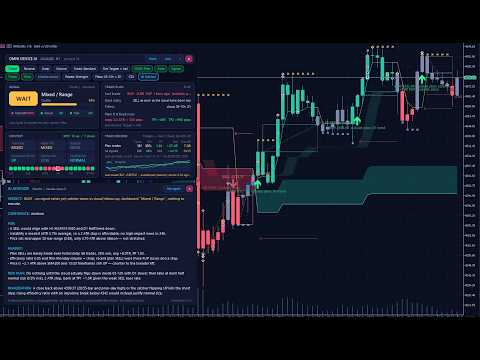
OMNI DEVICE AI is a chart tool for traders who decide for themselves. It marks rule-based BUY and SELL signals, draws the whole trade plan for every signal (entry, stop, two targets, break-even and trailing stop), keeps a simulated track record of its own signals with costs included, and has an AI Advisor button that asks the AI agent of your choice - Claude, ChatGPT, Grok, Gemini, DeepSeek or a custom one - for a reasoned second opinion before you act.


The program never opens, changes or closes a trade. It contains no trading function. Product type: Utility. It is one file and uses no DLL.

THE DASHBOARD


The dashboard is a set of floating cards that you can drag, or a docked strip under the chart that never covers price. Its buttons: Trend / Reversal / Scalp / Volume (what the Signal card evaluates), Mode (Standard, Strict, Loose), Exit scheme, OMNI Filter, Alerts, Signals, Trades, Plots, Module arrows, Palette, Filters, CSV, AI Advisor, Dock / Float, More / Less, minimise and close. The arrows and trade levels on the chart always follow the trend signal; the four strategy buttons change only the reading of the Signal card.


- SIGNAL card: BUY, SELL or WAIT, the market state (for example Bullish / Trend or Mixed / Range), a quality score from 0 to 100 built from the agreement of the modules and of the timeframes, the state of each module, and in plain words what the tool is waiting for.

- TRADE PLAN card: for a running signal the entry, stop, targets, the current result in R and in pips, a progress bar and the next management step, for example "at TP1 close 1/3 and move the stop to the entry". A size helper shows the lot size for your chosen risk per trade. When there is no position: the last trade, the condition for the next entry, the active filters, and the stop and target distances a signal would have right now.

- CONTEXT card: trend bias, higher-timeframe bias, trend strength, RSI momentum, volume and volatility against their averages, and a strip with the trend direction on 20 timeframes from M1 to W1.

- TRACK RECORD card: a simulated record of the tool's own signals on the history of your chart: number of trades, win rate, profit factor, net result in R, maximum drawdown in R, average win and loss, two equity curves (plan trades and all signals) and the last closed trade. Spread and commission are charged on every simulated trade. A Monte Carlo helper estimates the risk per trade that would have kept the simulated drawdown under your limit. These figures are a simulation on past data of your broker. They are not real trading results and they do not predict future results.


Alerts: a pop-up alert, and a push notification to your phone if you switch it on, for every new signal with entry, stop and targets, when a target is reached, when the stop should be moved, and when the trade ends. The CSV button exports all simulated trades for your own analysis.


WHAT YOU SEE ON THE CHART


- BUY and SELL arrows. A signal appears when the two trend modules, the Trend Breakout Catcher and the OMNI Cloud, come to agree on a direction. A Classic rule (the catcher turns while the cloud already agrees) can be chosen in the inputs. Signals are evaluated on closed bars.

- The trade plan of every signal, drawn as levels: entry, initial stop (2 x ATR by default), target 1 (1.5 R), target 2 (3 R), the move of the stop to break-even and the path of the trailing stop. R is the initial risk of the trade. A finished trade carries a tag with its result in R and the way it ended: TP, STOP, BREAK-EVEN, TRAIL or FLIP.

- Three exit schemes, changed with one click: Targets + break-even + trail, Stop + trail only, Opposite signal only.

- Entry filters, called the plan: a session window in server hours, agreement with the H4 and / or D1 trend, optional regime filters (efficiency ratio, ATR ratio) and direction (long, short or both). A signal that a filter refuses is still drawn with all its levels in a quieter colour and tagged "outside plan" with the reason. It is shown for your information and is not counted as a plan trade.

- Trend candles, the cloud, the catcher line with its band, ATR bands, reversal zones and the trailing-stop ribbon. Five colour palettes (Midnight, Graphite, Paper, Classic, Purple), or the tool leaves your own chart colours alone.

THE AI ADVISOR


Click AI Advisor on the dashboard. The tool sends one snapshot of the situation to the AI agent you chose and shows the answer in a window on the chart, usually within 5 to 40 seconds. The answer always has the same form: VERDICT (TAKE, TAKE SMALLER, WAIT or SKIP), CONFIDENCE, FOR, AGAINST, RISK PLAN and INVALIDATION. "Ask again" repeats the question with fresh data.


What is sent: symbol, timeframe, server time and current spread; the signal or position in question with entry, stop, targets and, if a filter refused it, which one; the state of the modules and the trend direction on 20 timeframes; volatility, momentum and price-structure figures; the tool's own simulated statistics on your chart, including how comparable past signals ended; medium and high impact events from the economic calendar of MetaTrader; your risk-per-trade setting; recent price bars of the chart timeframe, of H4 and of D1.


What is never sent: account number, name, balance, equity, open positions, orders or trade history. Nothing is sent to the author of this product. The request goes directly from your MetaTrader to the AI company whose key you entered. For your own inspection the tool saves what it sent, without the key, in MQL5\Files\AI_Advisor\last_request_(symbol)_(timeframe).txt and the answer in last_answer_(symbol)_(timeframe).txt.


The AI is instructed to use only the supplied data, to weigh the measured statistics, to be candid about uncertainty and never to promise a result. A language model cannot predict the market. Treat the answer as a second opinion, not as a signal service and not as financial advice. You can add your own standing instructions in the input AI_ExtraInstructions, for example: Answer in Spanish. I never hold trades over the weekend.


Cost of the AI: the AI companies charge for API usage, to your own account with them. This is separate from the price of this product, and a chat subscription such as ChatGPT Plus or Claude Pro does not cover API usage. One question is about 3,500 tokens of input plus a short answer. See the price list of the agent you choose; smaller models cost less per question.


SETUP


Step 1 - attach the tool

After the purchase the tool is in the Navigator under Expert Advisors > Market. Drag it onto a chart. MetaTrader runs one Expert per chart: if the chart already runs a trading robot, open a second chart of the same symbol for this tool. The dashboard appears after a few seconds. Everything except the AI Advisor works without further setup.


Step 2 - allow the address of your AI agent in MetaTrader (once per terminal)

MetaTrader blocks every internet address that is not on its list.

1. In MetaTrader 5 open the menu Tools > Options (or press Ctrl+O).

2. Open the tab Expert Advisors.

3. Tick "Allow WebRequest for listed URL".

4. Double-click the line with the plus sign below it ("add new URL like https://www.mql5.com"), type the address of your agent exactly as written here and press Enter.

5. Press OK. A restart is not needed.


Addresses to allow (one line per agent, nothing after it):

Claude (Anthropic): https://api.anthropic.com

ChatGPT (OpenAI): https://api.openai.com

Grok (xAI): https://api.x.ai

Gemini (Google): https://generativelanguage.googleapis.com

DeepSeek: https://api.deepseek.com

Custom agent: the protocol and host part of the address you typed into AI_Url


All models of one agent use the same address. For reference, these are the full addresses the tool calls:

Claude: https://api.anthropic.com/v1/messages

ChatGPT: https://api.openai.com/v1/responses

Grok: https://api.x.ai/v1/chat/completions

Gemini: https://generativelanguage.googleapis.com/v1beta/openai/chat/completions

DeepSeek: https://api.deepseek.com/chat/completions


Step 3 - get an API key and paste it

An API key is a long password that lets a program use your account at the AI company. You create it on the developer site of the company, not in its chat app. Copy it at once, because the sites show it only one time. Then open the inputs of the tool (press F7 on the chart), paste the key into AI_ApiKey, choose the same company in AI_Provider and press OK.


Claude (Anthropic)

1. Go to platform.claude.com (Claude Console) and sign in or create an account.

2. Open Settings > Billing and buy credits.

3. Open Settings > API keys and click Create key. Give it a name, choose an expiration (Never, if you do not want to renew it), set Linked account to yourself and choose a workspace for the key - the Default workspace is fine. This last point matters: a key without a workspace is refused with a message about anthropic-workspace-id.

4. Copy the key. It starts with sk-ant-.

Inputs: AI_Provider = Claude. Models in the list: Opus 5 (claude-opus-5, used when AI_Model is left on the recommended model), Fable 5.1 (claude-fable-5-1), Sonnet 5 (claude-sonnet-5), Haiku 4.5 (claude-haiku-4-5).


ChatGPT (OpenAI)

1. Go to platform.openai.com and sign in or create an account. This is the developer platform; a ChatGPT subscription is not needed for it.

2. Open Settings > Billing, add payment details and buy credits.

3. Open API keys and click Create new secret key. Copy the key. It starts with sk-.

Inputs: AI_Provider = ChatGPT. Models in the list: GPT-5.6 Terra (gpt-5.6-terra, the recommended one), GPT-6 Astra (gpt-6-astra), GPT-5.6 Sol (gpt-5.6-sol), GPT-5.6 Luna (gpt-5.6-luna).


Grok (xAI)

1. Go to console.x.ai and sign in or create an account.

2. Load the account with credits in the billing section.

3. Open API Keys, create a key and copy it.

Inputs: AI_Provider = Grok. Models in the list: Grok 4.6 (grok-4.6, the recommended one), Grok 4.5 (grok-4.5), Grok 4.3 (grok-4.3).


Gemini (Google)

1. Go to aistudio.google.com/apikey and sign in with a Google account. After you accept the terms, a new user gets a first project and a first key automatically; otherwise click Create API key.

2. Copy the key.

3. Google lists a free tier with request limits for some models. For regular use enable billing for the project in Google AI Studio.

Inputs: AI_Provider = Gemini. Models in the list: Gemini 3.8 Flash (gemini-3.8-flash, the recommended one), Gemini 3.1 Pro preview (gemini-3.1-pro-preview), Gemini 2.5 Pro (gemini-2.5-pro). If Google refuses an old key, create a new one on the same page: Google changed its key type in 2026.


DeepSeek

1. Go to platform.deepseek.com and sign in or create an account.

2. Top up the balance.

3. Open API keys, create a new key and copy it. It starts with sk-.

Inputs: AI_Provider = DeepSeek. Models in the list: DeepSeek V4 Pro (deepseek-v4-pro, the recommended one), DeepSeek Flash (deepseek-flash).


Custom agent

Any service that speaks the OpenAI chat-completions format. Inputs: AI_Provider = Custom, the full address in AI_Url, the model name in AI_CustomModel, the key in AI_ApiKey. Add the address to the WebRequest list as in step 2.


Model names change often. When a company retires a model of the list, type the id of its current model into AI_CustomModel. That input wins over the list, so no update of the product is needed.


Keep the key safe. It is stored with the settings of the chart on your computer. Chart templates, profiles and .set files contain it, so do not share them, and do not post screenshots of the inputs. If a key leaks, delete it on the site of the company and create a new one. Set a spending limit there if the company offers one.


MESSAGES OF THE AI WINDOW AND WHAT TO DO


- MetaTrader blocked the address (error 4014): the address is missing in Tools > Options > Expert Advisors or it is misspelled. Compare it letter by letter, including https:// at the start.

- No API key yet: AI_ApiKey is empty.

- HTTP 401 or 403: the key is wrong, deleted or expired, or it belongs to another company than the one chosen in AI_Provider.

- HTTP 400 with anthropic-workspace-id in the text: create a new Claude key and choose a workspace for it.

- HTTP 404: the company does not know the model name. Choose another model, or type the current id into AI_CustomModel. AI_Model must belong to the company chosen in AI_Provider.

- HTTP 429: the rate limit is reached, or no credit is left on your account with the company.

- HTTP 500 and above: the servers of the company are busy. Ask again later.

- Time-out: raise AI_TimeoutSec, choose a faster model or a lower AI_Effort.

- No answer arrived: open the Experts tab of the Toolbox. The tool writes one line per request there, never the key.

- Strategy Tester: the tester has no internet access, so the AI Advisor shows a built-in sample answer there. Everything else, including the buttons of the dashboard, can be tried in the visual mode of the tester.


INPUT PARAMETERS


Main control

- BarsToScan (500): bars on which the visual modules and arrows are drawn.

- OMNIFilter (true): the catcher arrows need the agreement of the cloud.

- TM_SignalMode (Agreement): Agreement = catcher and cloud come to agree, whichever turns last; Classic = the catcher turns while the cloud already agrees.


Trade manager: entries, exits, trailing stop

- TM_Enabled (true): draw entries, stops, targets and exits.

- TM_ExitMethod (Targets + break-even + ribbon trail): the exit scheme. The Exit button of the dashboard changes it too.

- TM_StopDistanceATR (2.0): initial stop in multiples of ATR 14.

- TM_TP1_R (1.5) and TM_TP2_R (3.0): the targets in R. At each target one third is closed.

- TM_BreakEven (true): move the stop to the entry at target 1.

- TM_TrailAfterBE (true): the stop trails on the ribbon only after break-even.

- TM_BreakEvenAtR (1.5): Stop + trail scheme: result in R that moves the stop to break-even.

- TM_FlipStopATR (4.0): Opposite-signal scheme: protective stop in ATR, 0 = none.

- TM_EntryNextOpen (true): the simulated entry is the open of the next bar; false = close of the signal bar.


Trade manager: entry filters

- TM_Direction (Long and short): allowed direction.

- TM_SessionOnly (true), TM_SessionStart (3), TM_SessionEnd (12): entries only inside this window of SERVER hours; the end hour is exclusive and the window may pass midnight.

- TM_MinEfficiency (0 = off): the efficiency ratio of the last 20 bars must reach this value.

- TM_MinAtrRatio (0 = off): ATR divided by its 50-bar average must reach this value.

- TM_TrendAgree (D1): only with the trend of H4, of D1, of both, or off.

- TM_MinEdgeR (-99 = off): evidence score gate, the expected R of similar past signals.

- TM_AddOns (0 = off) and TM_AddOnTouchATR (0.35): pullback add-ons once the stop is at break-even.


Trade manager: statistics, drawing, alerts

- TM_StatsBars (20000): history used for the track record.

- TM_DrawTrades (60): number of past trades drawn on the chart.

- TM_CostPoints (-1 = automatic): spread in points charged per simulated trade. Automatic uses the recorded spread of the entry bar and never less than TM_TypicalSpreadPct.

- TM_TypicalSpreadPct (0.012): typical spread in percent of the price. Bar history stores only the smallest spread of each bar, so a realistic floor is charged. Suggested values: gold 0.012, silver 0.05, EURUSD 0.005.

- TM_CommissionPct (0.005): round-trip commission in percent of the traded value, charged in the track record.

- TM_RiskPercent (1.0): risk per trade in percent of the balance, used by the size helper.

- TM_MaxDDPercent (20): drawdown limit of the Monte Carlo risk helper.

- TM_PushAlerts (false): send the alerts to your phone as push notifications too.

- TM_OriginalMarkers (false): hindsight markers, for study only.

- TM_HideModuleArrows (true): hide the small arrows of the single modules.

- TM_ShowSignals (true): BUY / SELL arrow at every signal bar.

- TM_ShowOutsidePlan (true): draw the levels of signals that the filters refuse.


Dashboard

- UI_Mode (Floating): floating cards or docked strip under the chart.

- UI_Columns (0 = automatic), UI_ScalePercent (0 = follow the Windows display scale), UI_X (12), UI_Y (28): layout, size and position.

- UI_Palette (Midnight): chart colours. The Palette button changes them and remembers the choice.


AI Advisor

- AI_Provider (Claude): the AI company.

- AI_Model (recommended model of the chosen company): must belong to the company above.

- AI_CustomModel (empty): any model id typed by hand; wins over the list.

- AI_ApiKey (empty): your key.

- AI_Url (empty = the standard address of the company): needed only for Custom.

- AI_WebRequest_NOTE: a reminder of the addresses, nothing to set.

- AI_Effort (medium): how hard the model thinks, where the company supports it. Higher is slower and costs more.

- AI_TimeoutSec (90): give up after this many seconds.

- AI_ExtraInstructions (empty): your own standing instructions to the advisor.

- AI_ClaudeFallback (true): Claude Opus 5 and Fable 5.1 only: if the model declines a request, Anthropic may run it on its fallback model.


This program

- Host_PollMs (300): how often the tool looks for a new question, in milliseconds.

- Host_Log (true): one journal line per AI request, never the key.


GOOD TO KNOW


- Works on every symbol and timeframe of MetaTrader 5. The default filters (session 03 to 12 server time and agreement with the D1 trend) come from the author's tests on XAUUSD H1. Server time differs between brokers. On other symbols and timeframes compare Plan trades with All signals on the Track Record card - the Filters button switches the two filters off and on - and set the filters to what your own chart shows.

- Attach the tool to every chart on which you want it. Each chart keeps its own settings.

- The tool does not trade and does not manage positions. The size helper reads your balance only on your computer.

- Trading involves risk of loss. Signals, simulated statistics and AI answers are information, not advice. Past and simulated results do not predict future results.
Prodotti consigliati
Prop Firm Shield Full
Pablo Adolfo Cantos
Prop Firm Shield is a risk management panel for MetaTrader 5, built for prop firm traders who need control over their daily limits. You configure each limit and the tool watches the account around the clock, acting automatically when a limit is reached: closing positions, deleting pending orders and blocking new trading until the next day. Features: - Daily Take Profit - three modes: fixed USD, percent of the day-start balance, or target balance - Daily Stop Loss - three modes: fixed USD, percen
Orphira Gold
Mohammad Reza Rezaei
Orphira Gold is an automated trading system developed specifically for gold trading in MetaTrader 5. It combines adaptive trade management, equity-based position sizing and several layers of portfolio protection in one straightforward Expert Advisor. The system continuously evaluates market conditions and opens trades only when its internal requirements are met. When a position moves against the expected direction, Orphira Gold may use carefully spaced recovery positions. Every additional order
Scalping bot for the gold/dollar pair (XAU/USD) — a powerful and versatile solution for traders, designed to deliver maximum efficiency in a dynamic market. This bot is specifically engineered for scalping: it analyzes price changes and places trades even before significant market movements begin. This allows it to secure advantageous positions early and capitalize on even the smallest market fluctuations. Key Features: Flexibility: Adapts to any market conditions and suits your trading strategy
Sonic R Pro Enhanced EA - Versione 2025 249$ Solo per i primi 5 acquirenti! Segnale Live Verifica la performance live di Sonic R Pro Enhanced: Strategia di Trading Sonic R Pro Enhanced è una versione avanzata della strategia Sonic R, che automatizza le operazioni basate su Dragon Band (EMA 34 e EMA 89) e utilizza algoritmi avanzati per massimizzare le prestazioni. Timeframe: M15, M30 Coppie supportate: XAUUSD, BTCUSD, AUDJPY, USDJPY Stile di trading: Swing Trading - Pullback & Controten
ProTrade EA
Jim Ariel Camarce Ignao
Key Features   Automated Candle Pattern Recognition 10 Professional Patterns : Detects Bullish/Bearish Engulfing, Hammer/Shooting Star, Morning/Evening Star, Piercing/Dark Cloud, and 6 additional professional candlestick patterns Smart Filtering : Combine multiple patterns with configurable confirmation logic Volume Confirmation : Optional volume filter to validate pattern strength Multi-Timeframe Analysis : Separate execution and bias timeframes for better timing   Trading Dashboard Int
Matrix Arrow EA MT5
Juvenille Emperor Limited
5 (7)
Matrix Arrow EA MT5  è un consulente esperto unico che può scambiare i segnali MT5 dell'indicatore Matrix Arrow con un pannello commerciale sul grafico, manualmente o automaticamente al 100%.  Matrix Arrow Indicator MT5  determinerà la tendenza attuale nelle sue fasi iniziali, raccogliendo informazioni e dati da un massimo di 10 indicatori standard, che sono: Indice di movimento direzionale medio (ADX), Indice del canale delle materie prime (CCI), Candele classiche Heiken Ashi, Media mobile, Me
Forex Diamond EA MT5
Lachezar Krastev
4.67 (3)
FOREX MEGA SALE! 50% OFF! Buy Forex Diamond EA with a huge –50% discount ! Promo Price: $267 (Regular Price: $547 — You Save $280! ) Act now before this deal ends! Live Results:   https://www.mql5.com/en/signals/2379493 Forex Diamond EA – Reliable Automated Trading Powered by Smart Algorithms Forex Diamond EA is a proven expert advisor designed to deliver consistent results using a combination of trend and counter-trend strategies. Trusted by thousands of traders since its launch, Forex Diamo
Gold Sovereign Strike AI Algorithmic Strike-Avoidance Protocol Gold Sovereign Strike AI represents a paradigm shift in automated Gold trading, built entirely upon the proprietary Algorithmic Strike-Avoidance Theory. Heavy drawdowns and extreme volatility spikes are treated as "Strikes" against your portfolio's longevity and platform compliance. This Expert Advisor is engineered for Monetization Safety (Prop-Firm and Funded Account friendly), prioritizing sustainable, compounded capital growth o
Viking Alpha DAX Ivar Edition
Valdeci Carlos Dos Passos Albuquerque
Viking Alpha DAX — Germany 40 Expert Advisor for MetaTrader 5 LAUNCH PROMO Only 10 copies at launch price. Price increases with each sale. Launch price: $297 Next price: $497 Final price: $997 Live Performance: FX Blue — Vikingtradingbots What Makes Viking Alpha DAX Different Most DAX robots fail for one simple reason: they treat the Germany 40 like a forex pair. It isn't. The DAX has a heartbeat — a specific rhythm tied to the Frankfurt Stock Exchange opening, the European session structure, an
Grid Trading EA is a semi-automated one-click trading EA for both Normal Trading and Grid/Martingale Trading . Normal Trading Simply click Buy or Sell directly from the chart. The EA will automatically manage trades by: Setting Stop Loss and Take Profit Managing Trailing Stop Grid / Martingale Trading (For Hedging Account Type Only) When Grid Trading mode is enabled, the EA will automatically open additional grid orders at specified distances while increasing the lot size based on your settings.
WTI Crude Oil
Nuttapon Maneechote
WTI Crude Oil is an automated Expert Advisor developed specifically for trading West Texas Intermediate crude oil on MetaTrader 5. The system combines structured price zones, market-direction analysis and basket-based position management. It is designed to manage both BUY and SELL positions while controlling when new exposure may be added. The internal entry calculations are fully automated. Users do not need to install additional indicators, connect external services or perform manual analysis.
SolarTrade Suite Financial Robot: LaunchPad Market Expert - progettato per aprire le negoziazioni! Questo è un robot di trading che utilizza speciali algoritmi innovativi e avanzati per calcolare i suoi valori, il tuo assistente nel mondo dei mercati finanziari. Utilizza il nostro set di indicatori della serie SolarTrade Suite per scegliere meglio il momento in cui lanciare questo robot. Dai un'occhiata agli altri nostri prodotti della serie SolarTrade Suite in fondo alla descrizione. Vuoi n
| Fully-automated Smart Money Concept (ICT) inspired trading solution with multi-strategy capabilities | Built by a grid trader >> for grid traders.  This is MT5 version, click  here  for  Blue CARA MT4  (settings and logics are same in both versions)     Real monitoring signal  -->  Cara Gold Intro Blue CARA EA   ('CARA') - short for  C omprehensive  A lgorithmic   R esponsive   A dvisor is a next-gen  multi-currency    multi-timeframe  EA base on the widely known (and perhaps the most popul
Apex Beyond
Yi Hsiu Tsai
5 (1)
Segnale Live https://www.mql5.com/en/users/sagen520/seller Prezzo Dinamico (Offerta Limitata) Prezzo di Lancio : $49 Aumento di Prezzo : +$100 ogni 10 copie vendute. Assicurati la licenza al prezzo più basso prima del prossimo rincaro! Backtest di 15 Anni (2010 - 2026) Stabilità comprovata in 15 anni di complessi cicli di mercato: In-Sample (2010–2020) : Strategia core e ottimizzazione rischio-rendimento. Out-of-Sample (2020–2026) : Crescita del capitale verificata in mercati ad alta volatilit
Alpha Bullish Engine MT5 Overview Alpha Bullish Engine(No Martingale, no Grid) is a professional Expert Advisor for MetaTrader 5 designed to identify and trade high-quality market bullish opportunities while maintaining a strong focus on risk management and capital preservation. Built with a combination of trend analysis, momentum assessment, and intelligent trade management, the EA is designed to operate in favorable market conditions while avoiding unnecessary exposure during less suitable env
Golden BREAK
Sakon Muangpakdee
4.82 (11)
GOLDEN BREAK 5.1 is an automated gold breakout EA for MetaTrader 5. It identifies swing highs and lows, places pending breakout orders, and manages positions with stop losses and strategy-specific exit rules. LIVE SIGNAL | LIVE SET FILE | FOLLOW CHANNEL Six Strategies. One EA. Classic: GB1–GB4 Scalping: GB5–GB6 Run All Strategies: GB1–GB6 Custom Strategies: Choose your own combination Key Features No grid. No martingale. Fixed Lot or Risk per Trade position sizing Stop-loss protection and confi
SMC OTE Gold Pattern — OTE Zone Expert Advisor for MT5 SMC OTE Gold Pattern is an Expert Advisor for MetaTrader 5 designed to identify and trade Fibonacci Optimal Trade Entry (OTE) zones using market structure, trend, volatility and confirmation filters. The EA identifies completed swing movements and calculates the 61.8%–79% Fibonacci retracement area as a potential OTE zone. A 70.5% reference level is also displayed within the zone. OTE Zone Detection The EA monitors swing highs and swing lows
GoldMaster X
Jim Ariel Camarce Ignao
GoldMaster X is a next-generation automated trading system engineered for traders who demand precision, consistency, and intelligent risk management. Powered by advanced candlestick pattern recognition, adaptive ATR-based Stop Loss and Take Profit, dynamic position sizing, and multiple trailing stop strategies, GoldMaster X identifies high-probability trading opportunities while protecting your capital. Designed with a professional trading dashboard, market bias filtering, and smart session mana
Manus Pro
Itumeleng Mohlouwa Kgotso Tladi
MANUS PRO EA The Trading Revolution You've Been Waiting For Are you TIRED of watching other traders make consistent profits while your account bleeds red?   The financial markets don't wait for anyone – and neither should you. MANUS PRO isn't just another Expert Advisor... it's your   TICKET TO FINANCIAL FREEDOM . Why MANUS PRO is Different (And Why Everyone's Talking About It) FOR BEGINNERS: Your Trading Mentor That Never Sleeps Zero Learning Curve   – Install, activate, and watch it wo
Exclusive EA for FOREX HEDGE account The EA (FuzzyLogicTrendEA) is based on fuzzy logic strategies based on the analysis of a set of 5 indicators and filters. Each indicator and filter has a weight in the calculation and, when the fuzzy logic result reaches the value defined in the EA parameter, a negotiation is opened seeking a pre-defined gain. As additional functions it is possible to define maximum spread, stop loss and so on . Recommended Symbol: EURUSD, AUDUSD, GBPUSD, NZDUSD, USDCAD, AUD
Goldmost MT5
Hongliang Ding
Goldmost – Precision Trading for XAUUSD This EA implements a multi-timeframe breakout strategy for XAUUSD, identifying critical support/resistance levels to execute trades with dynamic SL/TP adjustments, and intelligent exit protocols for optimized risk management. The parameters are updated regularly to adapt to evolving market conditions. This ensures the model continuously adjusts to shifting sentiment, investor behavior, and emerging trends - keeping your strategy aligned with current marke
Somewhere over the rainbow It is a system that tries to operate the market from the exhaustion of the trend with a correction algorithm that tries to cut losses at the cost of increasing the margin This system makes all the adjustments automatically, analyzing the pair and the market to decide which is the most efficient step to reach your destination. Somewhere over the rainbow is a multiple trade and multi lot system(The maximum batch can be up to 5 times the initial batch distributed in mult
EMA256 Fourier Cycle Trader EMA256 Fourier Cycle Trader is an advanced MetaTrader 5 Expert Advisor combining a long-term EMA or TEMA trend model, causal Fourier cycle analysis, configurable averaging and a unified basket take-profit system. The Expert Advisor is designed primarily for CENT accounts and for traders who understand basket recovery strategies, geometric lot progression and the risks associated with trading without a mandatory Stop Loss. RECOMMENDED STARTING CONFIGURATION Recommended
Net Z
Sugianto
5 (1)
NET Z uses a very well-known trend reversal technique to determine position entry with slight modifications by using virtual trade techniques and virtual pending orders so that position entry is not too early or too late. Why NETZ? NET Z does not require complicated settings and is easy to use because user only need to upload a set file that is already available. Currently there are set files for 20 fx pairs. The best GRID EA with the ability to control risks. I will share my personal daily rou
Lot Master Rebate Scalper MT5 Designed for high-volume lot generation (Lot Flipping/Rebate Farming). EA Features & Strategy No Grid Strategy: The EA opens orders at specific time intervals (e.g., every 1 minute or 5 minutes). It is specifically designed to generate high trading volume. For example, if set to 1-minute intervals, the EA will open approximately 1,440 orders per day. You can increase the lot size via the Lot_Fix input setting. RSI Entry Logic: The EA uses the RSI Indicator to determ
Hector EA
Anton Shevtsov
5 (2)
The signal is run by the same Expert Advisor whose logic you see in the public statistics. For a result close to the signal, run Hector Gold EA on the recommended settings and on an ECN/RAW account with zero or low spread (FxPro, Ultima Markets, Fusion Markets, IC Markets). On other brokers behavior may differ — test it on tick data. For broker compatibility questions, use the product comments. Please note that the live account history is not uniform. It covers three stages: the old version of
DynamicGrid MT5
Mr Adisorn Mayang
Dynamic Grid EA is a grid trading system that adapts to market volatility in real time. It automatically adjusts grid spacing, lot sizing, and position management based on current market conditions. The EA opens initial orders when entry conditions are met, then builds a grid of positions when price moves against the initial entry. Grid distance increases when volatility rises and tightens when the market calms down, with a minimum floor to prevent clustering. Entry Filters Momentum-based filter
The Gold Buyer
Moses Aboliwen Aduboa
Ride the Gold Trend with a Simple Buy-Only EA The  EA is a fully automated Buy-Only Expert Advisor for MetaTrader 5. It is designed to capture upward market opportunities with safe risk management and seamless execution. Why Traders Choose It: Best performance on Gold (XAUUSD) – highly liquid and trending. Buy-Only EA – focuses purely on long positions. Plug & Play setup – attach and let it trade automatically. Built-in Stop Loss & Take Profit protection. Smart one-position contro
Product Name: Anchor auto TP and SL Trade Manager Pro MT5 The ultimate manual assistant. Turns trades into auto-grids with Hedging, Zero-Loss Breakeven & Spread Detection. Your manual trade will be managed automatically. Anchor Auto TP and SL Trade Manager MT5 Pro is the advanced edition of our popular trade assistant. It transforms simple manual trades into sophisticated, professional-grade recovery grids. Unlike the free version, this PRO edition fully supports Hedging (simultaneous Buy & Sell
Iconic BTC AI
Maurice Prang
5 (1)
ICONIC BTC AI+ | SYNAPSE.PHENOTYPE S6 ENGINE (Versione 15.00) Prezzo di lancio Prezzo attuale: 599 USD. Licenze disponibili: 10. Livello di prezzo successivo: 699 USD. Prezzo finale: 1699 USD. Il prezzo di accesso anticipato riflette la fase attuale del lancio del prodotto. Il prezzo aumenterà man mano che il contingente di licenze attuale si esaurirà e si apriranno i livelli successivi. Non è prevista una data dopo la quale il prezzo attuale cesserà di essere disponibile. Bitcoin non è una copp
Gli utenti di questo prodotto hanno anche acquistato
Trade Assistant MT5
Evgeniy Kravchenko
4.43 (216)
It helps to calculate the risk per trade, the easy installation of a new order, order management with partial closing functions, trailing stop of 7 types and other useful functions. Additional materials and instructions Installation instructions - Application instructions - Trial version of the application for a demo account Line function -   shows on the chart the Opening line, Stop Loss, Take Profit. With this function it is easy to set a new order and see its additional characteristics bef
Forex Trade Manager MT5
InvestSoft
4.98 (679)
Benvenuto a Trade Manager EA, lo strumento definitivo per la gestione del rischio , progettato per rendere il trading più intuitivo, preciso ed efficiente. Non è solo uno strumento per l'esecuzione degli ordini, ma una soluzione completa per la pianificazione delle operazioni, la gestione delle posizioni e il controllo del rischio. Che tu sia un principiante, un trader avanzato o uno scalper che necessita di esecuzioni rapide, Trade Manager EA si adatta alle tue esigenze, offrendo flessibilità s
================================================================================ POC BREAKOUT - V20.72. Full Professional Grade Toolkit ================================================================================ POC Breakout is a full MetaTrader 5 trading dashboard for discretionary traders who want breakout signals, Point of Control (POC) context, volume profiles, order flow, market structure, news, alerts, and advanced trade planning in one professional workspace. Attached directly to you
TradePanel MT5
Alfiya Fazylova
4.88 (169)
Trade Panel è un assistente commerciale multifunzionale. L'applicazione contiene più di 50 funzioni di trading per il trading manuale e permette di automatizzare la maggior parte delle attività commerciali. Istruzioni per l'applicazione + video tutorial: https://www.mql5.com/it/blogs/post/772320 Versione di prova dell'applicazione per un conto demo: https://www.mql5.com/it/blogs/post/762419 Come installare l'applicazione: https://www.mql5.com/it/blogs/post/762362 Come testare l'applicazione in m
Copia i segnali Telegram con le tue regole di trading Telegram to MT5 Signal Trader copia automaticamente i segnali di trading testuali dai canali e gruppi Telegram pubblici e privati in MetaTrader 5. Gestisci più fornitori e conti MT5 da un'unica applicazione desktop, con impostazioni di rischio e di trading specifiche per ogni fornitore . Per copiare i segnali non servono bot Telegram né configurazioni API. Accedi semplicemente con il tuo account Telegram tramite numero di telefono o codice QR
Telegram to MT5 MultiChannel Copier
Sergio Marquez Uroz
4.56 (16)
Telegram to MT5 Multi-Channel Copier   copia automaticamente i segnali di trading dai tuoi canali Telegram direttamente su MetaTrader 5. Niente bot, niente estensioni del browser, niente copia manuale. Il segnale arriva su Telegram e l'EA apre l'operazione nel tuo terminale in pochi secondi. E prima di copiare un canale, il backtester integrato ti mostra cosa avrebbe fatto quel canale sul tuo conto. Il prodotto include due componenti: un'applicazione Windows che ascolta i tuoi canali Telegram, e
FarmedHedge Pair Trading Dashboard
Tanapisit Tepawarapruek
5 (5)
Farmed Hedge Yield Farming | All Markets (Manual - Hybrid - Semi/Automated EA) VERIFIED TRADING RESULTS - Farmed Hedge Yield Axi Copy:  https://www.mql5.com/en/signals/2356376 - Farmed Hedge Yield Exn Copy:   https://www.mql5.com/en/signals/2356404 - Farmed Hedge Yield V Copy:  https://www.mql5.com/en/signals/2357156 IMPORTANT NOTICE: FarmedHedge is a MANUAL-FOCUSED TRADING UTILITY ,not a fully automated EA. Results shown on this Signal include manual trades and overall strategic management.
Exp COPYLOT CLIENT for MT5
Vladislav Andruschenko
3.97 (35)
Copiatore professionale di trade per MetaTrader 5 Un copiatore di trade veloce, professionale e affidabile per MetaTrader . COPYLOT consente di copiare operazioni Forex tra terminali MT4 e MT5 con supporto per conti Hedge e Netting . La versione MT5 di COPYLOT supporta: - MT5 Hedge → MT5 Hedge - MT5 Hedge → MT5 Netting - MT5 Netting → MT5 Hedge - MT5 Netting → MT5 Netting - MT4 → MT5 Hedge - MT4 → MT5 Netting Versione MT4 Descrizione completa + DEMO + PDF Come acquistare Come installare Come ot
Premium Trade Manager - Il pannello di trading con un coach integrato Premium Trade Manager porta un coach di trading direttamente nel tuo grafico, con un motore di esecuzione completo al di sotto. Imposta il trade come fai sempre, poi lascia che Max, il tuo coach di trading IA, legga esattamente quel setup rispetto al tuo conto live e ti dia un verdetto chiaro prima che tu confermi: lo stop rispetta un approccio disciplinato, il rischio è ragionevole, c'è un evento ad alto impatto tra pochi min
Trade Dashboard MT5
Fatemeh Ameri
4.94 (133)
Trade Dashboard simplifies how you open, manage, and control your trades, with built-in lot size calculation. It allows you to execute trades, manage risk, and control positions directly on the chart, with tools such as partial close, breakeven, and trailing stop. Designed to reduce manual work and help you stay focused on your trading decisions. A demo version is available for testing. Detailed explanations of features are provided within the MQL5 platform. Installation instructions are include
Power Candles Strategy Scanner - Strumento di ricerca configurazioni multi-simbolo con ottimizzazione automatica Power Candles Strategy Scanner utilizza lo stesso motore di auto-ottimizzazione che alimenta l'indicatore Power Candles, applicandolo a tutti i simboli presenti nel tuo Market Watch, uno accanto all'altro. Un unico pannello ti indica quali simboli sono statisticamente negoziabili in questo momento, quale strategia è vincente su ciascuno di essi, la coppia ottimale di Stop Loss / Take
MT5 Trading Deck
Manuel Michiels
5 (2)
One button. One trade. MT5 Trading Deck is a hotkey trading panel for MetaTrader 5 that turns the platform into a keyboard-driven execution cockpit. Stop loss, take profit and lot size are pre-calculated for every key; the moment you press, a market order is live on the broker. A complete technical user manual is attached in the product Comments section. It documents every input parameter, the full hotkey map, the recommended Stream Deck XL layout, and the advanced workflows for Pre-Limit orders
EasyInsight AIO MT5
Alain Verleyen
4.92 (12)
EASY Insight AIO – La soluzione all-in-one per un trading intelligente e senza sforzo Panoramica Immagina di poter analizzare l’intero mercato — Forex, Oro, Cripto, Indici e persino Azioni — in pochi secondi, senza dover controllare manualmente i grafici, installare indicatori o affrontare configurazioni complicate. EASY Insight AIO è il tuo strumento definitivo di esportazione per il trading alimentato dall’IA, pronto all’uso. Offre una panoramica completa del mercato in un unico file CSV pul
HINN MagicEntry Extra
ALGOFLOW OÜ
4.74 (19)
HINN MAGIC ENTRY – the ultimate tool for entry and position management! SIMPLE. FASTEST. INTUITIVE. MAX AUTOMATED. Place orders by selecting a level directly on the chart! full description   ::  demo-version  :: 60-sec-video-description Key features: - Market, limit, and pending orders - Automatic lot size calculation - Automatic spread and commission accounting - Unlimited partitial take-profits  - Breakeven and trailing stop-loss and take-profit  functions - Invalidation leves - Intuitive, a
EA Overfitter
Stephen J Martret
5 (1)
That backtest looks great. But will it still be making money tomorrow, next week, next month? EA Overfitter re-runs your EA on 100 price histories it has never seen. One score tells you if the edge is real. A backtest tells you what an EA did on one price history — the one that happened to occur. What you cannot tell from it is how much of that result was the strategy and how much was the particular path. EA Overfitter answers that. It builds up to 100 synthetic price histories your EA has n
Timeless Charts
Samuel Manoel De Souza
5 (8)
Timeless Charts è un'utilità di trading completa progettata per trader professionisti. Combina tipi di grafici personalizzati come Grafici a Secondi e Renko con analisi avanzata del flusso ordini tramite Footprints , Clusters , Profili di Volume , studi VWAP e strumenti di analisi ancorata per una visione più approfondita del mercato. Il trading e la gestione delle posizioni vengono eseguiti direttamente dal grafico tramite un pannello integrato di gestione delle operazioni , mentre Market Repla
Trade Indicator Assistant   is a powerful MT5 utility designed to turn indicators into automated trading systems. Its main feature is the ability to automatically detect an indicator’s   BUY and SELL signal buffers , without requiring you to know the buffer numbers, search through indicator settings, or modify the indicator source code. Bonus Indicator:   After purchasing Trade Indicator Assistant, contact me to receive   Trade Signal Pro   completely free as a bonus indicator. [Download Demo V
Grid Manual MT5
Alfiya Fazylova
4.73 (22)
Grid Manual è un pannello di trading per lavorare con una griglia di ordini. L'utilità è universale, ha impostazioni flessibili e un'interfaccia intuitiva. Funziona con una griglia di ordini non solo nella direzione delle perdite, ma anche nella direzione dell'aumento dei profitti. Il trader non ha bisogno di creare e mantenere una griglia di ordini, lo farà l'utilità. È sufficiente aprire un ordine e il manuale di Grid creerà automaticamente una griglia di ordini per esso e lo accompagnerà fino
Trade Manager DashPlus
Henry Lyubomir Wallace
4.85 (13)
DashPlus è uno strumento avanzato di gestione delle operazioni progettato per migliorare l'efficienza e l'efficacia del trading sulla piattaforma MetaTrader 5. Offre una suite completa di funzionalità, tra cui calcolo del rischio, gestione degli ordini, sistemi di griglia avanzati, strumenti basati su grafici e analisi delle prestazioni. Caratteristiche Principali 1. Griglia di Recupero Implementa un sistema di griglia flessibile e di media per gestire le operazioni in condizioni di mercato avve
Trade Copier Ultimate
Janitha Sandaruwan Amaradasa Wickramasingha Arachchilage
5 (5)
Trade Copier Ultimate - Telegram to MT5 Signal Copier Trade Copier Ultimate automatically copies Telegram trading signals into MetaTrader 5. The EA can read signal messages, detect the symbol, order type, entry price, Stop Loss, Take Profit levels and selected update commands, then execute or manage the trade in MT5 using your lot and risk settings. It is more than a basic Telegram to MT5 copier. TCU also supports Bot API and user-account Bridge workflows, Discord signal routing, local MT5 to MT
The News Filter MT5
Leolouiski Gan
4.78 (23)
Questo prodotto filtra tutti gli esperti consulenti e i grafici manuali durante il periodo delle notizie, così non dovrai preoccuparti di improvvisi picchi di prezzo che potrebbero distruggere le tue impostazioni di trading manuali o le negoziazioni effettuate da altri esperti consulenti. Questo prodotto viene fornito anche con un sistema completo di gestione degli ordini che può gestire le tue posizioni aperte e gli ordini in sospeso prima della pubblicazione di qualsiasi notizia. Una volta che
YuClusters
Yury Kulikov
4.93 (43)
Attention: You can view the program operation in the free version  YuClusters DEMO .  YuClusters is a professional market analysis system. The trader has unique opportunities to analyze the flow of orders, trade volumes, price movements using various charts, profiles, indicators, and graphical objects. YuClusters operates on data based on Time&Sales or ticks information, depending on what is available in the quotes of a financial instrument. YuClusters allows you to build graphs by combining da
Anchor Trade Manager
Kalinskie Gilliam
5 (9)
Your EAs cannot see each other, but Anchor can. Anchor gives you one place to coordinate your EAs, manage risk, and decide when trading is allowed. It works alongside the trading bots you already use without any changes to them. The Problem One EA opens a trade. Then another starts trading. The next thing you know, you wake up to multiple grids built across your account. Each EA may be doing exactly what it was designed to do, but together they can place far more risk on your account than you in
Il Local Trade Copier EA è una soluzione per i singoli trader o account manager che devono eseguire segnali commerciali da fonti esterne o che devono gestire più account contemporaneamente, senza la necessità di un account MAM o PAMM. Copia da un massimo di 8 account master su account slave illimitati [ Guida all'installazione | Guida all'aggiornamento | Risoluzione dei problemi | Domande frequenti | Tutti i prodotti ] 100% self-hosted Facile da installare e utilizzare Nessun programma di insta
Un pannello professionale per il trading manuale che tiene l'intero ciclo dell'operazione in un'unica finestra sul grafico, dall'ingresso preciso alla protezione del conto. Calcola il volume esattamente sul rischio che hai definito, costruisci l'operazione con le linee direttamente sul grafico grazie all'RR Tool e apri ordini a mercato e pendenti, griglie e OCO. La gestione della posizione la prende in carico il pannello: chiusura parziale fino a cinque livelli, sei tipi di trailing stop, breake
The product will copy all telegram signal to MT5 ( which you are member) , also it can work as remote copier.  Easy to set up, copy order instant, can work with almost signal formats, image signal,  s upport to translate other language to English Work with all type of channel or group, even channel have "Restrict Saving Content", work with  multi channel, multi MT5 Work as remote copier: with signal have ticket number, it will copy exactly via ticket number. Support to backtest signal. How to s
Signal Trading View to MT5 Pro
Mirel Daniel Gheonu
4.5 (2)
Signal TradingView to MT5 Pro Automator Esecuzione professionale istantanea tra TradingView e MetaTrader 5 Automatizza la tua strategia di trading con il ponte di comunicazione più robusto tra gli alert di TradingView e l'esecuzione reale in MT5. Progettato per i trader che richiedono velocità, flessibilità e una gestione del rischio impeccabile, questo Expert Advisor trasforma qualsiasi messaggio di avviso in un preciso ordine a mercato o limite. PUNTI DI FORZA E VANTAGGI Motore di Parsing Univ
Footprint Chart Pro — Professional OrderFlow EA for MetaTrader 5 Version 6.34 | Professional tool for real traders | Institutional-Grade Visualization DEMO USERS - PLEASE SELECT EVERY TICK / REAL TICK WHEN TESTING AND YOU HAVE DOWNLOADED HISTORICAL DATA. IF YOU SEE A WAITING SCREEN AND IT IS NOT DOWNLOADING, IT MEANS YOU HAVE LOW HISTORICAL DATA. TRY 1 MIN AND 5 MIN FIRST ON 1 DAY DATA. ONE DAY DATA SHOULD BE THE NEWEST AND MOST CURRENT DATE. PLEASE WAIT UNTIL THE MARKET HAS ROLLED OVER PERIOD.
FUTURES ORDERFLOW FOOTPRINT CHART Professional OrderFlow EA for MetaTrader 5 Version 1.01| Professional tool for real traders | Institutional-Grade Visualization STRATEGY TESTER USERS - PLEASE SELECT EVERY REAL TICK WHEN TESTING AND YOU HAVE DOWNLOADED HISTORICAL DATA. IF YOU SEE A WAITING SCREEN AND IT IS NOT DOWNLOADING, IT MEANS YOU HAVE LOW HISTORICAL DATA. TRY 1 MIN AND 5 MIN FIRST ON 1 DAY DATA. ONE DAY DATA SHOULD BE THE NEWEST AND MOST CURRENT DATE. PLEASE WAIT UNTIL THE MARKET HAS ROL
Trade Assistant 38 in 1
Makarii Gubaydullin
4.91 (23)
Strumento multifunzionale: Calcolatore di Lotto, Ordini Grid, Rapporto R/R, Gestore di Trade, Zone di Domanda e Offerta, Price Action e molto altro Versione Demo   |   Manuale Utente L'Assistente di Trading   non funziona nel tester di strategie : puoi scaricare la   Versione Demo QUI  per testare l' utilità . Contattami   per qualsiasi domanda  / idee di miglioramento / in caso di bug riscontrato Se hai bisogno di una versione MT4, è disponibile qui Semplifica, accelera e automatizza il tuo  
Altri dall’autore
BTC Jump
Ranaweera Wanasinghe Herath Bandara
5 (2)
BTC Jump is a breakout Expert Advisor developed for Bitcoin against the US dollar. Once per trading day it places a single stop order at the previous day's extreme and waits for the market to reach that level. If the level is reached during the session, the order becomes a position that is managed by a volatility-based stop loss, a fixed take profit and a trailing stop. If the level is not reached, the order is removed at the end of the trading window and no trade is taken that day. The Expert A
FREE
Multi jump
Ranaweera Wanasinghe Herath Bandara
MULTI JUMP — Daily Breakout EA for Crypto, Metals and Indices Multi Jump waits for the market to leave yesterday's range. Once per day, at a time you choose, it arms a Buy Stop at the previous day's high and a Sell Stop at the previous day's low. If price never reaches a level, nothing is traded that day and the pending orders are removed at the end of the window. If price does break out, the opposite order is cancelled immediately and the position is handed to the management engine. Everythi
FREE
VG Indicator
Ranaweera Wanasinghe Herath Bandara
VG INDICATOR Three independent strategy engines read every closed bar. They vote. Only when they agree does VG Indicator print a signal -- and it tells you exactly how strong that agreement was. Most signal indicators give you an arrow and nothing else. VG Indicator gives you the arrow, the entry price, the stop, a three-level target ladder, a graded confidence score, and a live dashboard that scores its own past calls on your chart, from your broker's own price history. -------------------
Push Capture
Ranaweera Wanasinghe Herath Bandara
PUSH Capture A multi-symbol portfolio EA — engineered by a developer, refined by a trader. PUSH Capture is a fully automated portfolio Expert Advisor that trades a diversified basket of major markets from a single chart. Instead of relying on lagging indicators or reacting to every tick, it follows a disciplined, time-driven framework — entering, managing, and exiting positions according to a defined plan, with the patience and consistency that manual trading rarely achieves. A true portfolio a
Momentum Portfolio
Ranaweera Wanasinghe Herath Bandara
Momentum Portfolio EA Multi-symbol momentum expert advisor for gold, US indices, and bitcoin. Trades four instruments from a single chart with adaptive risk management, regime detection, and broker-agnostic symbol resolution. Overview Momentum Portfolio is a four-symbol expert advisor that trades XAUUSD, NAS100, US30, and BTCUSD using two complementary momentum-detection engines. A single instance attached to any H1 chart manages entries, exits, partial profit-taking, and risk control across all
Ram 2 point 5 B 12
Ranaweera Wanasinghe Herath Bandara
Multi-Symbol Trend Pyramid EA — structure-based stops, volatility-filtered entries Overview A systematic, multi-symbol trend-following Expert Advisor. It trades a configurable basket of instruments from a single chart, entering only in the direction of the higher-timeframe trend, on controlled pullbacks, and only when volatility is in a tradable range. Winners are managed with a structure-based stop, breakeven protection, and a Chandelier trailing stop, with optional pyramiding into established
Grid people ea mt5
Ranaweera Wanasinghe Herath Bandara
GRID PEOPLE — Built for Consistency, Tuned for AUDCAD and AUDNZD (M5) (Live signal is only using AUDCAD) If you're here, you already know the appeal of grid trading: smooth equity curves, frequent wins, and a system that works   with   the market's natural ranging behavior instead of fighting it. GRID PEOPLE is crafted for traders who want that consistency — without flying blind. This EA is engineered around disciplined money management and built-in protection, not just raw grid logic: What's un
Uncertainty Analyser
Ranaweera Wanasinghe Herath Bandara
Uncertainty Analyser XAUUSD H1 Uncertainty Analyser is a fully automated breakout Expert Advisor built for Gold (XAUUSD). It runs five independent breakout strategies side by side, each with its own magic number, timing, stop-loss, take-profit and trailing logic. Every trade is entered with a pending stop order at a confirmed structural level and is protected by a hard stop-loss from the moment it is placed. No martingale, no grid averaging, no lot multiplication after losses. After purchase
Darkhorse EA MT5
Ranaweera Wanasinghe Herath Bandara
Darkhorse EA "No computer gimmick" Dark Horse EA is a fully automated trend-breakout Expert Advisor with a complete trade plan built in: signal, stop, break-even, trailing, optional targets, and a full layer of account protection. Every trade has a hard stop loss from the moment it opens. No martingale, no grid, no lot multiplication. The EA is a multi-symbol EA and default work with XAUUSD and USDJPY (dont need to add to seperate charts, works by attaching the EA to one chart). you can add t
Omni Device
Ranaweera Wanasinghe Herath Bandara
OMNI DEVICE is a complete trading system in one indicator: confirmed BUY/SELL signals, a full trade plan with stop, targets and trailing, and an honest, cost-adjusted track record on a modern on-chart dashboard. Full description OMNI DEVICE – The Complete Trading System in a Single Indicator Most indicators hand you an arrow and leave the hard part to you. OMNI DEVICE goes all the way: it finds the signal, builds the trade plan, manages the stop bar by bar, tells you when to take profit, and the
Filtro:
Nessuna recensione
Rispondi alla recensione