ApeX Journal MT5

📚 View User Manual      ApeX Trade Manager 

Your broker keeps a list of your trades. It does not keep a record of your trading.
ApeX Journal turns the history already sitting in MetaTrader into the journal you keep meaning to write.

Powered by ApeX Journal
A complete trading journal, built directly inside MetaTrader 5.

____________________________________________

ApeX Journal is a trading journal, statistics engine, trade review tool and performance analyser for MetaTrader 5.

Drop it on a chart and it reads every trade you have ever closed, builds its own database, and opens eleven pages over the top of your chart: a calendar of your days, a dashboard of your numbers, a searchable table of every trade, four analytics tabs, a month-by-month track record, your setups and checklists, your psychology, your screenshots, exportable reports, and an optional AI coach that runs on your own AI account.
Nothing is typed in by hand. Nothing is uploaded anywhere. No subscription.

_________________________________________________________

🚀 Launch Promotion — Lifetime License for  $49

Special introductory price available for a limited time.


🔥 This is just the beginning.

ApeX Journal is continuously evolving.

More analysis, more ways to review, and deeper integration with ApeX Trading Console are on the way.


Get the Lifetime License at the special launch price while it's available.

__________________________________________________


Demo Mode Notice

The built-in MQL5 Demo runs in the Strategy Tester.

Because of this limitation, the interactive journal window is not fully functional in Demo mode. Buttons, mouse interactions and drag operations may not respond as they do on a live chart. This is expected behavior and not a bug.

To experience the full functionality of ApeX Journal, please run it on a regular MT5 chart.


ℹ️ Good to know
ApeX Journal is an indicator. It never places, modifies or closes an order — it only reads. It works on hedging and netting accounts alike, on any broker and any symbol.

_________________________________________________________


Why a journal inside MetaTrader beats a journal in a browser

  • Nothing to type in. Every closed trade is already there — entry, exit, lots, commission, swap, duration, session, partial closes. The blank spreadsheet that killed your last three attempts at journaling does not exist here.
  • It opens where you already are. One click on the chart, and the journal is over your chart. No browser, no login, no export-import round trip, no monthly fee.
  • Your data stays on your machine. One database file in your MetaTrader folder. No cloud, no account to create, nothing uploaded. Delete the folder and it is gone.
  • It counts your deposits and withdrawals. Without them a growth curve and every drawdown percentage is wrong — which is exactly the mistake most journals make.
  • It says "I don't know" instead of guessing. Too few trades to rank a setup, no stop loss so no R, a period that cannot be measured — the pages tell you, rather than printing a confident number you would have believed.
  • One purchase, one program. ApeX Journal is complete on its own. If you also run ApeX Trading Console it goes further — but nothing here depends on owning it.


1. See it

  • Calendar — Your month as a grid, with each day's result and trade count, a weekly summary column, and a panel for any day you click: its score out of 100 on a six-axis radar, its cumulative line trade by trade, its best and worst trade, its top symbol and best hour.
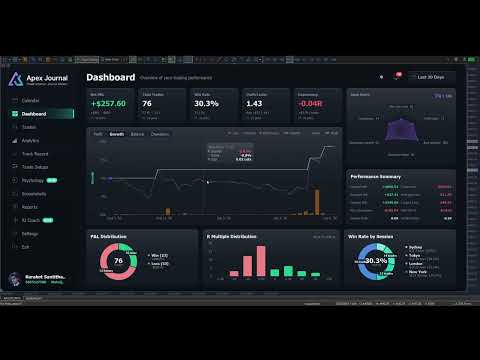
  • Dashboard — Net, trades, win rate, profit factor, expectancy and average R, each compared with the previous window of the same length. Balance with drawdown shaded underneath and deposits and withdrawals marked. Win/loss and R-multiple distributions, and your trades by session.
  • Trades — Every closed trade in one sortable, searchable table. Filter by symbol, direction, session, result, setup, hold time and date range, then export exactly what you filtered to CSV.
  • Trade Detail — One trade on real candles, on a timeframe chosen from how long the trade lasted. Risk, lot, R:R, R multiple, maximum run-up, exit efficiency, every partial close, how the last piece left, your notes, your checklist and your mindset.


2. Understand it

  • MFE / MAE — How far price went your way and against you while each trade was open, plotted as a scatter. Average missed move, how often price reached your target, and how often you were up 1R before closing at a loss.
  • Exit efficiency — Your winners graded Excellent, Good, Poor or Very Poor by how much of the available move they actually captured — and one plain sentence saying which of those is costing you: stops too wide, winners cut early, targets too far out, or profit given back.
  • Time — A 7 × 24 heatmap of result by day and hour, by session, and by day of week, in your local time or GMT.
  • DurationThe question nothing else answers: how long should you be holding? Nine hold-time bands scored on expectancy, the median hold of your winners against your losers, and where price actually peaked in your favour compared with where you got out.
  • Setups — Which of your patterns actually makes money, ranked by result per trade. What a second confluence tag does to a base setup. And, per checklist rule, your average R when you kept it against when you did not.
  • Psychology — Tag how you felt before you entered, and find out what each state costs you per trade. Flag the mistakes — no stop, overtrading, revenge, moved stop, cut winner early — and see the median result of the trades carrying each one against the rest.
  • Track Record — Every month or week side by side as a returns heatmap, your deepest drawdown episodes with how long each lasted, and a breakdown table showing whether you are actually getting better.


3. Keep it

  • Setups and checklists you write yourself — No fixed list to trade around. Add the rules that must be true, mark the ones the trade is off without, and tick them per trade. Editing a rule that has already been answered asks whether you are fixing a typo or changing its meaning, so your history stays honest.
  • Tag a backlog in minutes — The queue lists every untagged trade oldest first. Tick a dozen, pick a setup, save once.
  • Notes on any trade — What you saw and why you took it, in any keyboard layout, with copy and paste.
  • Screenshots — A gallery of every chart image attached to a trade, newest first, filtered by symbol and result, with a viewer that lets you keep scrolling.
  • Reports — Close the day, week or month and review it against the period before. Export to CSV for Excel, or to a self-contained HTML report you can send to anyone.
  • English and Thai — Switched in one click.


4. Ask it

  • AI Coach — Optional, off by default, and it runs on your own AI account: Anthropic, OpenAI, Google, xAI, DeepSeek — or Ollama entirely on your own PC with no key and no internet at all.
  • Analyse the period — It reads the trades you have selected and writes back what to fix, with the leaks ranked by what they cost and how many trades they hit. A leak that fires on nearly every trade is labelled as your style, not as a mistake.
  • Ask it questions — About your own closed trades. No market predictions, no entry calls, by design.
  • You can read what leaves the machine — Press "View full text" before anything is sent. Never sent: your balance, your login, your broker's name, or any image. Your key is encrypted on this PC and reaches only the provider you picked, and you are billed by that provider — set a daily request cap so you decide what it can cost.


Better together with ApeX Trading Console

Journal works on its own. With the Console on the same terminal, three things appear that no journal reading broker history can produce:

  • The plan, not just the result — Your setup and your checklist are ticked before the order exists, and follow the plan through to the trade. So the journal knows what you meant to do, not only what happened.
  • SL / TP history — Every time a stop or target moved, with the time and the distance. MetaTrader keeps no history of this, so for any trade managed outside ApeX it simply cannot be reconstructed.
  • Screenshots taken at entry — One button on the trade card captures the chart and attaches it to that trade, with the card hiding itself first so it is not in the picture.


Getting started

  1. Attach ApeX Journal to any chart.
  2. Wait a moment while it reads your account history — this happens once.
  3. Click Calendar on the bar. Press ESC to close it again.


Good to know

  • MetaTrader 5, any broker, any symbol — forex, metals, indices, crypto. Hedging and netting accounts both supported.
  • It is an indicator: it reads your account and never sends an order.
  • Trades taken without a stop loss have no R. Every R figure is calculated only from trades that had one, and the pages say so rather than counting a missing stop as zero. You can type in the stop you actually had in mind on any trade — it is always labelled "typed", so a figure you supplied is never mistaken for one the broker reported.
  • The growth chart is balance with drawdown shaded, not an equity curve — MetaTrader keeps no history of floating profit and loss, so no program can reconstruct one after the fact.
  • Sharpe and Sortino here are per trade — no risk-free rate, not annualised. Compare your own periods with each other, not with a fund's published figures.
  • Stops held inside ApeX Trading Console (Virtual) do not appear in the broker's records, so those trades show no planned SL or TP unless the Console recorded the plan.
  • The AI Coach is optional, needs your own provider account, and requires one line of setup: allow the provider's address under Tools > Options > Expert Advisors > Allow WebRequest for listed URL. The program shows you the exact address to paste. Everything else works with no internet connection at all.
  • Screenshots are captured from the trade card, which requires ApeX Trading Console. The gallery and viewer work either way.
Рекомендуем также
Fox Wave Pro Copier - Professional Multi-Master Trade Copier Copy trades from multiple Master accounts simultaneously with advanced risk management Key Features Multi-Master Architecture Copy from unlimited master accounts simultaneously Automatic master account detection or manual configuration Real-time trade synchronization via file system Independent risk management for each master Advanced Risk Management Individual risk settings per master account Automatic lot size calculation based
Trade Copier Local MT5 is a fast local trade copier for copying trades between multiple MT4 and MT5 accounts. One EA works in both Master and Slave modes. Simply select the required Copier Mode and use the same product on your MetaTrader terminals. Copy trades between: • MT5 → MT5 • MT5 → MT4 • MT4 → MT5 • MT4 → MT4 Perfect for: • Trading multiple accounts at once • Linking multiple trading accounts • Personal account mirroring • Signal providers • Account managers • Prop trading setups #
Copy Local Pro
Algori Systems FZ-LLC
Copy Local Pro — Ultra Fast MT5 Local Trade Copier Copy Local Pro is a high-speed local trade copier for MetaTrader 5 that instantly replicates trades between multiple MT5 accounts on the same PC or VPS. Overview Execute trades on one account and automatically copy them to multiple accounts in real time. The copier runs entirely locally, providing ultra-low latency, stable execution, and full control over risk management without external servers. Key Features Fast local trade copying with near-
Советник Auto Trade Copier предназначен для копирования сделок на нескольких счетах/терминалах MetaTrader 4/MetaTrader 5 со 100% точностью. С помощью этого инструмента вы можете выступать как в роли поставщика (источник), так и получателя (назначение). Все торговые действия будут скопированы от поставщика к получателю без задержки. Ссылки: Если копирование производится через Интернет, посмотрите продукт Trade Copier Pro MT5 по ссылке: https://www.mql5.com/ru/market/product/5531 Если копирование
SmartEntry EA
Saksit Pawapootanont
Overview SmartEntry EA gives traders full control over any trading symbol — Gold (XAUUSD), Indices, Crypto, and Forex — with both manual and automated entry modes. The EA automatically detects the symbol type and adjusts pip/unit calculations accordingly. The built-in panel allows real-time control of every feature without restarting the EA.   Key Features Auto HG Trigger •   Automatically detects bullish M1 candles exceeding a configurable size threshold •   Mode 1 — HG Sure-Fire: Opens BUY an


QuickCopy – Simple MT5 Local Trade Copier with Volume Factor QuickCopy is a lightweight and efficient MT5 local trade copier designed for traders who want to copy trades between accounts on the same computer quickly and reliably. With its simple setup and intuitive interface, QuickCopy makes managing multiple accounts easier than ever. Key Features: Local Account Copying: Instantly copies trades from your master account to one or more client accounts running on the same computer. Volume Factor A
SCALPING GOLD DIGGER EA Intelligent Gold Trading Robot for XAUUSD Free Demo Version =   https://c.mql5.com/6/1028/GoldDigger_DEMO.zip Trade Gold with Confidence SCALPING GOLD DIGGER EA is an advanced Expert Advisor designed exclusively for XAUUSD (Gold) traders. Combining intelligent market analysis with adaptive trade management, it automatically identifies high-quality trading opportunities while maintaining strict risk control. Built for both beginners and experienced traders, SCALPING GOLD
Welcome to ENTRY IN THE ZONE WITH SMC MULTI TIMEFRAME Entry In The Zone and SMC Multi Timeframe is a real-time market analysis tool based on Smart Money Concepts (SMC), designed to analyze market structure, price direction, and key trading zones. It supports both Single-Timeframe Analysis and Multi-Timeframe Analysis, providing a clearer view of the overall market structure across multiple timeframes, with real-time BUY / SELL signals that do not repaint. It is designed to help filter trading op
Gold Hunter Pro Gold Hunter Pro is a specialized XAUUSD Expert Advisor designed for the M15 timeframe. Unlike dangerous grid bots, this algorithm uses a fixed Stop Loss on every trade and a smart partial close system to secure profits early. It is optimized specifically to assist in consistent growth for smaller balance accounts. Key Features High Profit Factor: Validated on high-quality real tick data. Capital Protection: Focuses on maintaining a low historical drawdown (under 2%) to protect yo
King Trade Copier
Mohammed Maher Al-sayed Mohammed Ahmed Saleh
KingCopier – Lightning-Fast Local Trade Copier for MetaTrader (Master + Slave) KingCopier is a professional local trade copier that mirrors every trading action from one Master account to unlimited Slave accounts on the same PC or VPS — with an internal copy latency of just a few milliseconds. It was built by a real trader for daily real-money use, with one goal: whatever happens on the Master must happen on the Slave, instantly and without exceptions. Watch the demo video to see the real cop
SUPREME COPY TRADE - ALL IN ONE The Fastest and Most Complete Copier for MetaTrader 5 Latency of only 100ms, up to 20x faster than common trade copiers. While other copiers take 2, 3 or even 5 seconds to replicate a trade, SUPREME COPY TRADE acts in just 100 milliseconds. Speed Comparison Common copiers: 2000ms Competitors: 500ms SUPREME COPY TRADE: 100ms (up to 20x faster) How We Achieve This Speed Instant event detection technology that reacts at the exact moment of the trade. Intelligent ver
NEW: A Fully Automated strategy using price action and candle patterns to trade Gold (XAUUSD).   This EA can be used on any currency but recommended for XAUUSD, EURUSD and BTCUSD Safe stop loss option for FTMO and other funded accounts.  REAL BACKTEST DATA - no manipulation or backtest conditioning like other EAs! 100% Modelling Quality Backtest!  USE: Default settings on XAUUSD & XAUAUD on the M15 timeframe. Use ECN account for best results. MAIN SETTINGS Setting Value Description          Ma
Trade Assistant 38 in 1
Makarii Gubaydullin
4.91 (23)
Многофункциональная утилита: калькулятор лота, сеточные ордера, индикатор Price Action, менеджер ордеров, рассчёт R/R, и многое другое Демо-веpсия  |   Инструкция  |   Версия для MT4 Утилита не работает в тестере стратегий: вы можете скачать демо-версию ЗДЕСЬ , чтобы протестировать продукт перед покупкой. Напишите мне  если есть вопросы / идеи по улучшению / в случае найденного бага Упроситите и сделайте вашу торговлю быстрее, при этом расширяя стандартные возможности терминала. 1. Открытие но
### EQUINOX SESSION SCALPER MT5 — The Triple-Filter Momentum Engine Trade XAUUSD Only Are you tired of Expert Advisors that use dangerous grid systems, hold massive drawdowns, or blow up accounts during high-impact news?  **Equinox Session Scalper** is a professional-grade, data-driven algorithmic trading system engineered for stable portfolio compounding. It is built strictly around **Multi-Timeframe Trend Alignment** and **Intraday Momentum Breakouts**.  Equinox does NOT trade blindly 24/
MT5 to MT5 Trade Copier – Fast and Reliable Trade Copying Solution The MT5 Trade Copier is a powerful tool designed to copy trades seamlessly between MetaTrader 5 accounts with minimal latency and high accuracy. Built for speed, flexibility, and ease of use, the copier works across different brokers, even when symbols use different prefixes or suffixes. This Expert Advisor is suitable for professional traders, signal providers, fund managers, and traders who manage multiple accounts. Key Featur
Phantom ICT
Thanaphat Jantawee
PHANTOM ICT MTF EA is an automated trading system designed for XAUUSD (Gold), using a multi-timeframe analysis approach. The system focuses on identifying structured market conditions and executing trades based on selective entry logic. It is not designed for frequent trading, but instead waits for specific conditions before opening positions. Core Features Multi-timeframe analysis (D1 / H4 / M5) Selective trade entry based on structured conditions Designed for short-term execution on M5 timefr
FREE
Gold Flow Seconds Chart превращает MetaTrader 5 в удобное рабочее пространство для ручной торговли. Утилита строит 5- и 10-секундные свечи из тиков, полученных от брокера. В том же интерфейсе доступны периоды M1, M5, M7, M15, M30, H1 и H4. УПРАВЛЕНИЕ ГРАФИКОМ МЫШЬЮ • Перемещение графика по горизонтали и вертикали левой кнопкой мыши. • Изменение ширины свечей колесом мыши. • Изменение вертикального масштаба с помощью Ctrl + колесо мыши. • Возврат к текущей рыночной цене кнопкой LIVE. ТОРГОВЛ
Trade copier MT5
Alfiya Fazylova
4.61 (56)
Trade Copier — это профессиональная утилита, предназначенная для копирования и синхронизации сделок между торговыми счетами. Копирование происходит от счета/терминала поставщика к счету/терминалу получателя, которые установлены на одном компьютере или vps. АКЦИЯ - Если вы уже приобрели "Trade copier MT5", вы можете получить "Trade copier MT4" бесплатно (для копирования MT4 > MT5 и MT4 < MT5). Для получения более подробной информации об условиях, пожалуйста, свяжитесь с нами через личные сообщени
Изучите все мои продукты для MetaTrader 4, MetaTrader 5 и бесплатные пробные версии: https://www.mql5.com/es/users/urocio/seller У вас есть две версии советника (EA): Полная версия с неограниченным количеством символов и функций. Пробная версия (бесплатная) для тестирования работы EA: работает только на EURUSD, выполняет 5 последовательных циклов, после чего приостанавливается на 7 дней перед перезапуском. Создавайте собственные торговые стратегии с полной гибкостью! Этот советник (EA) разр
Server Link >> h ttps://www.mql5.com/en/market/product/160109 CopyTrade Slave is a lightweight, reliable local trade copier for MetaTrader 5 that mirrors positions from a Master account to one or more Slave accounts using a fast shared-file mechanism. It is designed for signal providers, account managers, and traders who need precise synchronization of trades with flexible delay and lot control. ​ Main concept Role: Works as the Slave side of a local copy trading setup and receives trades fr
Изучите все мои продукты для MetaTrader 4, MetaTrader 5 и бесплатные пробные версии: https://www.mql5.com/es/users/urocio/seller У вас есть две версии советника (EA): Полная версия с неограниченным количеством символов и функций. Пробная версия (бесплатная) для тестирования работы EA: работает только на EURUSD, выполняет 5 последовательных циклов, после чего приостанавливается на 7 дней перед перезапуском. Создавайте собственные торговые стратегии с полной гибкостью! Этот советник (EA) разр
Just Copier MT5
Agung Imaduddin
4.75 (4)
"Just copier" is designed to copy trading without any complicated settings. The copy can be done in one PC. One EA can be set as master (provider) or slave (receiver). The receiver lot can be set to multiple providers lots. Please also check this product at fxina.hostingerapp.com.  Any type of copy is available. MT4 -> MT5 MT4 -> MT4 MT5 -> MT5 MT5 -> MT4 If you want to copy MT4 -> MT5 or MT5 -> MT4, please purchase "Just copier" for MT4 and "Just copier" for MT5 separately. Just Copier can copy
Free Slave Version – Remote Trade Receiver MT5. This is the FREE Slave version of our professional Remote Trade Copier system. It allows you to receive trades from a Master account running our full Copy Trade solution. Designed for simplicity and reliability, this version is read-only and cannot send trades or operate independently. Key Features: One-click setup – simply connect to the Master. Fast and accurate order copying. Supports all symbols, order types, and brokers. Minimal resource us
FREE
EA Local Trade Copier Pro MT5: The Ultimate DLL-Free Trade Duplicator Are you tired of complicated trade copiers that require unsafe external DLLs, crash your terminal, or confuse you with separate "Master" and "Client" files? Experience the next generation of trade copying with EA Local Trade Copier Pro MT4. Engineered for maximum stability, lightning-fast execution, and ultimate simplicity, this utility allows you to seamlessly copy trades between multiple MetaTrader terminals on the same Wind
Madura Gold Scalper is an Expert Advisor developed for automated gold trading on MetaTrader 5. The EA is designed Only for XAUUSD and GOLD on the H1 timeframe. It uses a proprietary multi-factor decision engine to identify qualified trading For stable operation, MetaTrader 5 and Algo Trading must remain active. A VPS located close to the broker’s trading server is recommended. Risk Management Madura Gold Scalper uses a relatively short Stop Loss. Because of this trading approach, several consecu
ТОРГОВЫЙ КОПИР - ПАРОЛЬ ИНВЕСТОРА - КОПИРОВАТЬ ТОРГОВЛЮ - КРОСС-ПЛАТФОРМА MT4 x MT5 Примечание. Вам понадобится «Mirror Copier Master» в основной учетной записи, за которой будет следовать клиентская учетная запись, и «Mirror Copier Client» в клиентской учетной записи, которая будет следовать за основной учетной записью. Блоги: https://www.mql5.com/en/blogs/post/756897. КАК ЭТО РАБОТАЕТ : https://www.youtube.com/watch?v=V7FNpuzrg5M Версия МТ4 Мастер: https://www.mql5.com/en/market/produ
FREE
Изучите все мои продукты для MetaTrader 4, MetaTrader 5 и бесплатные пробные версии: https://www.mql5.com/es/users/urocio/seller У вас есть две версии советника (EA): Полная версия с неограниченным количеством символов и функций. Пробная версия (бесплатная) для тестирования работы EA: работает только на EURUSD, выполняет 5 последовательных циклов, после чего приостанавливается на 7 дней перед перезапуском. Создавайте собственные торговые стратегии с полной гибкостью! Этот советник (EA) разр
CopyIQ
Stephen Sanjeeve Sahayam
CopyIQ mirrors your trades between MetaTrader 5 terminals running on the same Windows PC - one source account feeding as many receiver accounts as you need. Everything happens locally on the one machine: no VPS, no DLLs, and no internet link between terminals to lag or break. A trade on your source account reaches every receiver in milliseconds. CopyIQ was built by studying where other local copiers let traders down - copies that arrive late, lot sizes that ignore the receiving account, symbols
Trade Copier This tool copies trades between MT5 or MT4 platforms running on the same computer. For example: MT5 --> MT4 & MT4 & MT4 etc. MT5 --> MT5 & MT5 & MT5 etc. MT5 --> MT4 & MT5 & MT4 & MT5 etc. Also download the version for   MT4 Parameters ID - is not required. If you want to use multiple MASTERs on one PC or on one MT5, each MASTER must have a different ID (alphanumeric). Then SLAVE must have the same ID as the MASTER. Mode MASTER - for a provider account; in this mode, the tool transm
Инструкция к индикатору Dynamic_DOM_Labels Dynamic_DOM_Labels — это профессиональный аналитический инструмент для терминала MetaTrader 5, предназначенный для анализа потока ордеров (Order Flow) в реальном времени. Индикатор подключается напрямую к биржевому стакану цен ( Depth of Market / DOM ) брокера, находит крупные лимитные заявки покупателей ( Buy Limit ) и продавцов ( Sell Limit ) и проецирует их на рабочий график. Инструмент разработан специально для ликвидных рынков, таких как Золото (XA
FREE
С этим продуктом покупают
Trade Assistant MT5
Evgeniy Kravchenko
4.41 (216)
Помогает рассчитать риск на сделку, простая установка нового ордера с помощью линий, управление ордерами с функциями частичного закрытия, 7 типов трейлинг-стопа и другие полезные функции. Дополнительные материалы и инструкции Инструкция по установке - Инструкция к приложению - Пробная версия приложения для демо счета Функция Линии   - отображает на графике линию открытия, стоп-лосс, тейк-профит. С помощью этой функции легко установить новый ордер и увидеть его дополнительные характеристики пе
Добро пожаловать в Trade Manager EA — лучший инструмент для управления рисками, предназначенный для упрощения, точности и эффективности торговли. Это не просто инструмент для размещения ордеров; это комплексное решение для удобного планирования торгов, управления позициями и усиленного контроля над рисками. Независимо от того, начинающий вы трейдер, опытный специалист или скальпер, нуждающийся в быстром исполнении, Trade Manager EA адаптируется к вашим потребностям и работает с любыми активами:
Farmed Hedge Yield Farming | All Markets (Manual - Hybrid - Semi/Automated EA) VERIFIED TRADING RESULTS - Farmed Hedge Yield Axi Copy:  https://www.mql5.com/en/signals/2356376 - Farmed Hedge Yield Exn Copy:   https://www.mql5.com/en/signals/2356404 - Farmed Hedge Yield V Copy:  https://www.mql5.com/en/signals/2357156 * Before purchasing, please feel free to send me a message if you have any questions about the product or setup. - You can test the system using Strategy Tester: Visual Mode , a
Бета-версия Telegram to MT5 Signal Trader почти готов к официальному альфа-релизу. Некоторые функции все еще находятся в разработке, и вы можете столкнуться с небольшими ошибками. Если вы заметите проблемы, пожалуйста, сообщите о них, ваша обратная связь помогает улучшать программное обеспечение для всех. Telegram to MT5 Signal Trader — мощный инструмент, который автоматически копирует торговые сигналы из каналов и групп Telegram прямо в ваш счёт MetaTrader 5 . Поддерживаются как публичные, так
================================================================================ POC BREAKOUT - V20.72. Full Professional Grade Toolkit ================================================================================ POC Breakout is a full MetaTrader 5 trading dashboard for discretionary traders who want breakout signals, Point of Control (POC) context, volume profiles, order flow, market structure, news, alerts, and advanced trade planning in one professional workspace. Attached directly to you
TradePanel MT5
Alfiya Fazylova
4.88 (167)
Trade Panel — это многофункциональный торговый помощник. Приложение содержит более 50 торговых функций для ручной торговли и позволяет автоматизировать большинство торговых операций. Инструкция к приложению + видео-инструкции: https://www.mql5.com/ru/blogs/post/771695 Пробная версия приложения для демо-счета: https://www.mql5.com/ru/blogs/post/750864 Как установить приложение: https://www.mql5.com/ru/blogs/post/750096 Как тестировать приложение в визуальном режиме: https://www.mql5.com/ru/blogs/
Local Trade Copier EA MT5
Juvenille Emperor Limited
4.94 (148)
Опыт экстремально быстрого копирования сделок с помощью Local Trade Copier EA MT5 . Благодаря простой установке в течение 1 минуты этот копировщик сделок позволяет вам копировать сделки между несколькими терминалами MetaTrader на одном компьютере с Windows или на Windows VPS с крайне быстрыми скоростями копирования менее 0.5 секунды. Независимо от того, новичок вы или профессиональный трейдер, Local Trade Copier EA MT5 предлагает широкий спектр опций, чтобы настроить его под ваши конкретные по
EA Overfitter
Stephen J Martret
5 (1)
Бэктест выглядит отлично. Но будет ли советник зарабатывать завтра, через неделю, через месяц? EA Overfitter прогоняет вашего советника по 100 историям цены, которых он никогда не видел. Одна оценка показывает, реально ли преимущество. Бэктест показывает, что советник сделал на одной истории цены — на той, которая случайно произошла. Из него невозможно понять, какая часть результата была заслугой стратегии, а какая — конкретного пути цены. EA Overfitter отвечает на этот вопрос. Он строит до 10
Telegram to MT5 Multi-Channel Copier   автоматически копирует торговые сигналы из ваших Telegram-каналов прямо в MetaTrader 5. Без ботов, без браузерных расширений, без ручного копирования. Сигнал приходит в Telegram — и советник открывает сделку в вашем терминале за считанные секунды. А перед тем как копировать канал, встроенный бэктестер покажет, что этот канал сделал бы на вашем счёте. Продукт состоит из двух компонентов: приложения для Windows, которое слушает ваши Telegram-каналы, и этого с
Astro Trade MT5
Indra Maulana
5 (6)
25% discount on the release of the tool: only for the next 3 buyers Send a message to receive a demo version. AstroTrade Trading Assistant AstroTrade is a comprehensive multi-functional trading utility developed for the MetaTrader 5 platform. It integrates essential tools for trade execution, risk management, and technical monitoring into a single unified interface. The application is designed to assist traders in managing their daily operations through a visual and structured environment. Vi
HINN MAGIC ENTRY - лучший инструмент для входа и менеджмента позиций! ПРОСТО. БЫСТРО. ИНТУИТИВНО. МАКСИМАЛЬНО АВТОМАТИЗИРОВАНО. Выставляет ордера через выбор уровня на графике! полное описание    ::    demo-версия    ::   60-sec-video-description Основные функции: - Рыночные, лимитные и отложенные ордера -  Автоматический подсчет лоттажа  -  Автоматический учет спреда и комиссий -  Неограниченное количество промежуточных тейков для позиций - Перевод в безубыток и трейл стоп-лосса и тейк-проф
Exp COPYLOT CLIENT for MT5
Vladislav Andruschenko
3.97 (35)
Профессиональный копировщик сделок для MetaTrader 5 Быстрый, профессиональный и надежный копировщик сделок для MetaTrader . COPYLOT позволяет копировать сделки Forex между терминалами MT4 и MT5 с поддержкой счетов Hedge и Netting . Версия COPYLOT для MT5 поддерживает: - MT5 Hedge → MT5 Hedge - MT5 Hedge → MT5 Netting - MT5 Netting → MT5 Hedge - MT5 Netting → MT5 Netting - MT4 → MT5 Hedge - MT4 → MT5 Netting Версия MT4 Полное описание + DEMO + PDF Как купить Как установить Как получить файлы жур
Premium Trade Manager - Торговая панель со встроенным коучем Premium Trade Manager помещает торгового коуча прямо в ваш график, а под ним работает полноценный движок исполнения. Настройте сделку так, как вы всегда это делаете, затем позвольте Max, вашему ИИ-наставнику по трейдингу, прочитать именно эту настройку с учётом вашего живого счёта и дать чёткое заключение до того, как вы входите: соответствует ли стоп дисциплинированному подходу, разумен ли риск, не выходит ли высоковолатильный релиз ч
Anchor Trade Manager
Kalinskie Gilliam
5 (9)
Your EAs cannot see each other, but Anchor can. Anchor gives you one place to coordinate your EAs, manage risk, and decide when trading is allowed. It works alongside the trading bots you already use without any changes to them. The Problem One EA opens a trade. Then another starts trading. The next thing you know, you wake up to multiple grids built across your account. Each EA may be doing exactly what it was designed to do, but together they can place far more risk on your account than you in
Power Candles Strategy Scanner — самооптимизирующийся инструмент для поиска настроек по нескольким инструментам Power Candles Strategy Scanner использует тот же самооптимизирующийся движок, что и индикатор Power Candles — для всех символов в вашем Market Watch, одновременно. На одной панели отображается информация о том, какие символы в данный момент являются статистически торгуемыми, какая стратегия выигрывает на каждом из них, оптимальная пара Stop Loss / Take Profit, а также отправляется увед
MT5 to Telegram Signal Provider — это простой в использовании полностью настраиваемый инструмент, который позволяет отправлять определённые сигналы в чат, канал или группу Telegram, превращая вашу учётную запись в провайдера сигналов . В отличие от большинства конкурирующих продуктов, он не использует импорт DLL. [ Демо ]   [ Руководство ] [ Версия MT4 ] [ Версия для Discord ] [ Канал в Telegram ]  New: [ Telegram To MT5 ] Настройка Доступно пошаговое руководство пользователя . Никаких знаний A
Grid Manual MT5
Alfiya Fazylova
4.73 (22)
Grid Manual — это торговая панель для работы с сеточными стратегиями. Утилита универсальная, имеет гибкие настройки и понятный интерфейс. Работает с сеткой ордеров не только в сторону усреднения убытков, но и в сторону наращивания прибыли. Трейдеру не нужно создавать и сопровождать сетку ордеров, это сделает утилита. Достаточно открыть ордер и Grid manual автоматически создаст ему сетку ордеров и будет сопровождать его до самого закрытия. Полная инструкция и демо-версия здесь . Основные особенно
The News Filter MT5
Leolouiski Gan
4.78 (23)
Этот продукт фильтрует всех экспертных советников и ручные графики во время новостей, так что вам не нужно беспокоиться о внезапных скачках цены, которые могут разрушить ваши ручные торговые настройки или сделки, введенные другими экспертными советниками. Этот продукт также поставляется с полной системой управления ордерами, которая может обрабатывать ваши открытые позиции и ордера на ожидание перед выпуском новостей. После покупки   The News Filter   вам больше не придется полагаться на встроен
Signal TradingView to MT5 Pro Automator Мгновенное профессиональное исполнение между TradingView и MetaTrader 5 Автоматизируйте свою торговую стратегию с помощью самого надежного моста связи между алертами TradingView и реальным исполнением в MT5. Разработанный для трейдеров, которым требуются скорость, гибкость и безупречное управление рисками, этот советник (Expert Advisor) превращает любое сообщение с алертом в точный рыночный или лимитный ордер. ПРЕИМУЩЕСТВА И СИЛЬНЫЕ СТОРОНЫ Универсальный д
Footprint Chart Pro — Professional OrderFlow EA for MetaTrader 5 Version 6.34 | Professional tool for real traders | Institutional-Grade Visualization DEMO USERS - PLEASE SELECT EVERY TICK / REAL TICK WHEN TESTING AND YOU HAVE DOWNLOADED HISTORICAL DATA. IF YOU SEE A WAITING SCREEN AND IT IS NOT DOWNLOADING, IT MEANS YOU HAVE LOW HISTORICAL DATA. TRY 1 MIN AND 5 MIN FIRST ON 1 DAY DATA. ONE DAY DATA SHOULD BE THE NEWEST AND MOST CURRENT DATE. PLEASE WAIT UNTIL THE MARKET HAS ROLLED OVER PERIOD.
Trade Dashboard MT5
Fatemeh Ameri
4.95 (132)
Trade Dashboard simplifies how you open, manage, and control your trades, with built-in lot size calculation. It allows you to execute trades, manage risk, and control positions directly on the chart, with tools such as partial close, breakeven, and trailing stop. Designed to reduce manual work and help you stay focused on your trading decisions. A demo version is available for testing. Detailed explanations of features are provided within the MQL5 platform. Installation instructions are include
FUTURES ORDERFLOW FOOTPRINT CHART Professional OrderFlow EA for MetaTrader 5 Version 1.01| Professional tool for real traders | Institutional-Grade Visualization STRATEGY TESTER USERS - PLEASE SELECT EVERY REAL TICK WHEN TESTING AND YOU HAVE DOWNLOADED HISTORICAL DATA. IF YOU SEE A WAITING SCREEN AND IT IS NOT DOWNLOADING, IT MEANS YOU HAVE LOW HISTORICAL DATA. TRY 1 MIN AND 5 MIN FIRST ON 1 DAY DATA. ONE DAY DATA SHOULD BE THE NEWEST AND MOST CURRENT DATE. PLEASE WAIT UNTIL THE MARKET HAS ROL
Ultimate Extractor - Professional Trading Analytics for MT5 *****this is the local HTML version of Ultimate Extractor. !!!!!it is not compatible with Cloud!!!! For the online version please reach out to me directly****** Ultimate EA manager also now available when you use cloud pro and above for free!! Ultimate Extractor transforms your MetaTrader 5 trading history into actionable insights with comprehensive analytics, interactive charts, and real-time performance tracking. What It Does Automa
Risk Manager Pro MT5 - это советник для защиты торгового счета и контроля рисков в MetaTrader 5. Утилита отслеживает equity, дневной и недельный результат, просадку, открытые позиции, количество сделок, серии убыточных сделок и разрешенное торговое время. Когда заданный лимит достигнут, Risk Manager Pro MT5 может автоматически закрыть позиции, удалить отложенные ордера, остановить другие советники, отправить уведомление или закрыть терминал. Вместо того чтобы полагаться только на дисциплину во в
Seconds Chart MT5
Boris Sedov
4.61 (18)
Seconds Chart - уникальный инструмент для создания секундных графиков в MetaTrader 5 . С помощью Seconds Chart вы можете построить график с таймфреймом, заданным в секундах, получая идеальную гибкость и точность анализа, недоступную на стандартных минутных или часовых графиках. Например, таймфрейм S15 обозначает график со свечами продолжительностью 15 секунд. Вы можете использовать любые индикаторы и советники с поддержкой пользовательских символов. Работать с ними так же удобно, как и на станда
Telegram To MT5 Receiver
Levi Dane Benjamin
4.53 (15)
Копируйте сигналы из любого канала, участником которого вы являетесь (в том числе частного и ограниченного), прямо на свой MT5. Этот инструмент был разработан с учетом потребностей пользователей и предлагает множество функций, необходимых для управления и мониторинга сделок. Этот продукт представлен в простом в использовании и визуально привлекательном графическом интерфейсе. Настройте свои параметры и начните использовать продукт в течение нескольких минут! Руководство пользователя + Демо  |
X2 Copy MT5
Liubov' Shkandrii
Быстрый. Точный. Инновационный. Технологичный. Откройте для себя мгновенное копирование сделок с революционным X2 Copy MT5. Всего за 10 секунд простой установки вы получите мощный инструмент для синхронизации сделок между терминалами MetaTrader на одном компьютере или Windows VPS с беспрецедентной скоростью. Управляете несколькими счетами, следуете сигналам или масштабируете свою стратегию — X2 Copy MT5 адаптируется к вашему рабочему процессу с непревзойдённой точностью и контролем. Работайте бы
Trade Copier Ultimate
Janitha Sandaruwan Amaradasa Wickramasingha Arachchilage
5 (5)
Trade Copier Ultimate - Telegram to MT5 Signal Copier Trade Copier Ultimate automatically copies Telegram trading signals into MetaTrader 5. The EA can read signal messages, detect the symbol, order type, entry price, Stop Loss, Take Profit levels and selected update commands, then execute or manage the trade in MT5 using your lot and risk settings. It is more than a basic Telegram to MT5 copier. TCU also supports Bot API and user-account Bridge workflows, Discord signal routing, local MT5 to MT
The product will copy all telegram signal to MT5 ( which you are member) , also it can work as remote copier.  Easy to set up, copy order instant, can work with almost signal formats, image signal,  s upport to translate other language to English Work with all type of channel or group, even channel have "Restrict Saving Content", work with  multi channel, multi MT5 Work as remote copier: with signal have ticket number, it will copy exactly via ticket number. Support to backtest signal. How to s
Prop Firm Os
Gayathiri Gopalakrishnan
5 (1)
PROP FIRM OS Structured Trading Assistant for MetaTrader 5 PROP FIRM OS is a structured trading assistant designed for MetaTrader 5 users who prefer rule-based market analysis and organized trading workflows. The Expert Advisor combines market analysis tools, scanner functions, dashboard monitoring, alerts, risk-control settings, and trade management features inside one system. PROP FIRM OS is designed to help traders follow selected rules, filters, and monitoring conditions during trading activ
Другие продукты этого автора
Руководство пользователя 1       Руководство пользователя 2        Руководство пользователя  3 ApeX Trading Console — профессиональный менеджер сделок, торговый помощник, риск-менеджер и калькулятор размера позиции для MetaTrader 5. Планируйте сделку на графике, а консоль сама её проведёт: автоматический расчёт лота исходя из заданного риска, частичные тейк-профиты и стоп-лоссы, безубыток, трейлинг-стоп, OCO, стопы, хранящиеся внутри EA, а не на сервере, и живой контроль просадки для фи
Фильтр:
Нет отзывов
Ответ на отзыв




















