 MetaTrader 5
 Experts
 Indicadores
 Bibliotecas
 Utilitários
 Widgets
 Regras
Conheça o Mercado MQL5 no YouTube, assista aos vídeos tutoriais
Como comprar um robô de negociação ou indicador?
Execute seu EA na
hospedagem virtual
hospedagem virtual
Teste indicadores/robôs de negociação antes de comprá-los
Quer ganhar dinheiro no Mercado?
Como apresentar um produto para o consumidor final?
Utilitários de negociação para a plataforma MetaTrader 4
 Abaixo estão os programas de negociação que simplificam o trading no MetaTrader 4. Passe o mouse sobre um produto para ler uma descrição mostrando seu propósito.
Local Trade Copier EA MT4 é um copiador de operações rápido e flexível para copiar e gerenciar operações entre várias contas MetaTrader 4 no mesmo computador Windows ou Windows VPS. Ele combina a sincronização local de operações com controles no lado do Receiver para tamanho de lote, gerenciamento de risco, filtragem de operações, mapeamento de símbolos, gerenciamento de operações e proteção da conta. Configure seus terminais Transmitter e Receiver em aproximadamente 1 minuto e copie operações

Bem-vindo ao Trade Manager EA—uma ferramenta de gestão de risco criada para tornar o trading mais intuitivo, preciso e eficiente. Não é apenas uma ferramenta para executar ordens, mas uma solução abrangente para planejamento de operações, gerenciamento de posições e controle de risco. Seja você um iniciante, trader avançado ou scalper que precisa de execução rápida, o Trade Manager EA adapta-se às suas necessidades, oferecendo flexibilidade em todos os mercados, desde forex e índices até commodi

Copiador profissional de operações para MetaTrader 4 Copiador de operações rápido, profissional e confiável para MetaTrader 4 . COPYLOT permite copiar operações de Forex entre os terminais MetaTrader 4 e MetaTrader 5 , com sincronização flexível para diferentes tipos de conta e cenários de negociação. A versão COPYLOT MT4 oferece suporte para: MetaTrader 4 → MetaTrader 4 MetaTrader 5 Hedge → MetaTrader 4 MetaTrader 5 Netting → MetaTrader 4 Versão MT5 Descrição completa + DEMO + PDF Como compra

Ajuda a calcular o risco por comércio, a fácil instalação de uma nova encomenda, gestão de encomendas com funções de fecho parcial, trailing stop de 7 tipos e outras funções úteis.
Materiais e instruções adicionais
Instruções de instalação - Instruções para a aplicação - Versão de teste da aplicação para uma conta de demonstração
Função de linha Mostra no gráfico a linha de Abertura, Stop Loss, Take Profit. Com esta função é fácil definir uma nova ordem e ver as suas características adicionais

O Telegram to MT4 Multi-Channel Copier copia automaticamente os sinais de trading dos seus canais de Telegram e Discord diretamente para o MetaTrader 4. Sem bots, sem extensões de navegador, sem copiar à mão. O sinal chega ao Telegram ou ao Discord e o EA abre a operação no seu terminal em poucos segundos. E antes de copiar um canal, o backtester integrado mostra o que esse canal teria feito na sua conta. O produto inclui dois componentes: um aplicativo de Windows que escuta os seus canais de Te

Trade Panel é um assistente de negociação multifuncional. O aplicativo contém mais de 50 funções de negociação para trading manual e permite automatizar a maioria das tarefas de negociação. Instruções para o aplicativo: https://www.mql5.com/pt/blogs/post/762435 Versão de teste do aplicativo para conta demo: https://www.mql5.com/pt/blogs/post/762547 Como instalar o aplicativo: https://www.mql5.com/pt/blogs/post/762548 Como testar o aplicativo no modo visual: https://www.mql5.com/pt/blogs/post/770

Trade Copier é um utilitário profissional projetado para copiar e sincronizar negociações entre contas de negociação. A cópia ocorre da conta / terminal do fornecedor para a conta / terminal do destinatário, instalada no mesmo computador ou vps. Antes de comprar, você pode testar a versão demo em uma conta demo. Versão de demonstração aqui . Instruções completas aqui . Principais funcionalidades e benefícios: Suporta a cópia de MT4> MT4, MT4> MT5, MT5> MT4, incluindo contas "MT5 netting". Os mod

Trade Indicator Assistant is a powerful MT4 utility designed to turn indicators into automated trading systems. Its main feature is the ability to automatically detect an indicator’s BUY and SELL signal buffers , without requiring you to know the buffer numbers, search through indicator settings, or modify the indicator source code. Bonus Indicator: After purchasing Trade Indicator Assistant, contact me to receive Trade Signal Pro completely free as a bonus indicator.
[Download Demo Version]

Copiadora->Interação de interface conveniente e rápida, os usuários podem usá-la imediatamente ->>>> Recomendado para uso em computadores Windows ou VPS Windows Características: Configurações de negociação de cópias diversificadas e personalizadas: 1. Diferentes modos de lote podem ser definidos para diferentes fontes de sinal 2. Diferentes fontes de sinal podem ser definidas para negociação de cópias direta e reversa 3. Os sinais podem ser definidos com comentários 4. Se deve calibrar o

Telegram para MT4: A solução definitiva para cópia de sinais Otimize suas negociações com o Telegram para MT4 , o utilitário de última geração desenvolvido para copiar sinais de negociação diretamente de canais e chats do Telegram para sua plataforma MetaTrader 4 — sem a necessidade de DLLs. Esta solução robusta garante a execução perfeita de sinais com precisão incomparável e opções de personalização, economizando seu tempo e aumentando sua eficiência. [ Instructions and DEMO ] Principais

Baixar versão de teste funcional
Copy Cat More (Gato Copião) — Copiador de Trades (Trade Copier) MT4 não é apenas um simples copiador local de trades; é um completo framework de gerenciamento de risco e execução (risk management and execution framework) projetado para os desafios de trading de hoje. De desafios de prop firm ao gerenciamento de portfólio pessoal, ele se adapta a cada situação com sua combinação de execução robusta, proteção de capital, configuração flexível e manuseio avançado

News Filter EA: Advanced Algo Trading Assistant News Filter EA is an advanced algo trading assistant designed to enhance your trading experience. By using the News Filter EA , you can integrate a Forex economic news filter into your existing expert advisor, even if you do not have access to its source code. In addition to the news filter, you can also specify trading days and hours for your expert. The News Filter EA also includes risk management and equity protection features

Trade Dashboard simplifies how you open, manage, and control your trades, with built-in lot size calculation. It allows you to execute trades, manage risk, and control positions directly on the chart, with tools such as partial close, breakeven, and trailing stop. Designed to reduce manual work and help you stay focused on your trading decisions. A demo version is available for testing. Detailed explanations of features are provided within the MQL5 platform. Installation instructions are include

Easy Trade Executor es una herramienta para el cálculo rápido del tamaño de posición, la ejecución de operaciones y la gestión de operaciones en MT4. Coloque los niveles de Precio de Entrada, Stop Loss y Take Profit directamente en el gráfico, obtenga el cálculo automático del tamaño de posición y abra operaciones con un riesgo controlado en solo unos clics.
¿Por qué Easy Trade Executor?
Easy Trade Executor está diseñado para traders que buscan algo más que simples cálculos de riesgo: quieren g

An equity protection EA for MetaTrader that enforces your loss limits and profit target for you: when your account reaches a rule you set, it closes your trades on every symbol, before one bad day turns into a lost account. It suits prop firm challenges and personal accounts alike. Attach it to one chart, answer a few questions in the on-chart setup wizard, and it watches your whole account in the background while you trade by hand or with other EAs. What it protects Daily loss limit: a percenta

Take a Break pauses your Expert Advisors when trading is a bad idea: before news, after a daily loss, outside your trading hours, or when a rule you wrote yourself says so. When the pause is over, your EAs simply continue. Account protection for all your EAs in one tool: news filter, drawdown and equity protection, time filter and custom rules. One EA on one chart protects the whole account, the free indicator gives every chart its own rules on top. Free demo | What is new in 26.09 | Support Ass

EchoTrade Telegram Signal Backtester VALIDATE TELEGRAM SIGNALS IN MINUTES - STOP GUESSING, START BACKTESTING Stop blowing accounts on "VIP" signals that don't deliver.
The EchoTrade Telegram Signal Backtester is the professional solution to audit, verify, and optimize any Telegram signal provider's performance on historical data. Most signal providers show you their wins but hide their losses. This tool reveals the naked truth. By combining a powerful Data Manager (included) with an advanced MT4

The Multicharts Crosshair draws a cross hair in any linked chart. The indicator can be used for comparison of symbol price levels in different time frame or to compare candles of different instruments in the same time frame
How it works: It can works from every linked charts where the indicator is installed towards the others or from the chart where is istalled towards the following linked charts . It can be shown just pressing a the key of keyboard. After installing the indicators in the char

O MT4 para Telegram Signal Provider é uma ferramenta fácil de usar e totalmente personalizável que permite o envio de sinais para o Telegram, transformando sua conta em um provedor de sinais. O formato das mensagens é totalmente personalizável! No entanto, para uso simples, você também pode optar por um modelo predefinido e habilitar ou desabilitar partes específicas da mensagem. [ Demonstração ] [ Manual ] [ Versão MT5 ] [ Versão Discord ] [ Canal do Telegram ] New: [ Telegram To MT5 ]
Conf

Smart Trend Line Alert is a unique professional Trend Line, Support Line and Resistance Line Touch and Break out Alert with awesome Alert History feature, designed to help traders easily manage many charts and symbols without staring at the monitor.
Features Candle Break Out Alert, Price Touch Alert and Time Line Alert; 1 click for converting any drawn line into an alert line (Trend line and Horizontal line or Trend Line By Angle); Alerts History able to re-open closed charts or re-draw deleted

The product will copy all telegram signal to MT4 ( which you are member ) , also it can work as remote copier. Easy to set up, copy order instant, can work with almost signal formats, image signal, s upport to translate other language to English Work with all type of channel or group, even channel have "Restrict Saving Content", work with multi channel, multi MT5 Work as remote copier: with signal have ticket number, it will copy exactly via ticket number. Support to backtest signal. How to

Trade Manager para ajudá-lo a entrar e sair rapidamente de negociações enquanto calcula automaticamente seu risco. Incluindo recursos para ajudar a evitar negociações excessivas, negociações de vingança e negociações emocionais. As negociações podem ser gerenciadas automaticamente e as métricas de desempenho da conta podem ser visualizadas em um gráfico. Esses recursos tornam este painel ideal para todos os traders manuais e ajudam a aprimorar a plataforma MetaTrader 4. Suporte multilíngue. Vers

Painel de negociação para negociação em 1 clique. Trabalhando com posições e pedidos! Negociar a partir do gráfico ou do teclado.
Usando nosso painel de negociação, você pode negociar com um clique no gráfico e realizar operações de negociação 30 vezes mais rápido do que o controle MetaTrader padrão. Cálculos automáticos de parâmetros e funções que tornam a vida mais fácil para um trader e ajudam-no a conduzir suas atividades de trading com muito mais rapidez e conveniência. Dicas gráficas e i

Hi Friends, " FCK Currency Strength Pro " is a auto & semi auto trading expert with direction of pair. Buy-Sell separate or multi currency in one click. The strategy of FCK Currency Strength Pro is a combination of custom indicator, Trendlines, Support & Resistance levels ( Price Action ) and most important secretive trading algorithm mentioned above. Download News Ex4 and csv file You need the following SDSnews.ex4 in MQL4/Libraries and the daylightsavings.csv in MQL4/Files.
Only 4 of 5 copi

Close If Profit or Loss with Trailing para MetaTrader 4 — fechamento automático por lucro ou perda total Uma utilidade prática para MetaTrader 4 que fecha posições automaticamente quando o lucro total ou a perda total atinge o nível definido por você. O Expert Advisor monitora as operações abertas, calcula o resultado flutuante, pode aplicar Trailing Profit e ajuda a fechar posições mais rápido do que uma reação manual. O MetaTrader 4 ainda é muito usado por traders manuais, scalpers, usuários

O Partial Closure EA MT4 permite fechar parcialmente qualquer operação na sua conta, manualmente por uma porcentagem escolhida do tamanho do lote e/ou por número de ticket, ou automaticamente em porcentagens específicas dos níveis de TP/SL, fechando uma porcentagem do lote inicial em até 10 níveis de take profit e 10 de stop loss. Ele pode gerenciar todas ou algumas das operações na sua conta, especificando ou excluindo determinados números mágicos, comentários ou símbolos.
Sugerencia: descarg

RS Trade Copier - o local trade copier ultrarrápido com uma interface gráfica verdadeira . Pare de digitar números de conta manualmente. Chega daquela lista enorme de 200+ parâmetros de entrada incompreensíveis. Uma ferramenta confiável e flexível para cópia de operações comerciais entre múltiplos terminais MT4 e MT5. Atende tanto traders experientes e serviços de sinais quanto investidores individuais. Permite sincronizar negociações de um ou múltiplos Provedores para um ou múltiplos Clientes c

Smart Copy is an Easy-to-Use EA that supports Multi Copying Metatrader4 and Metatrader5 and Local/Remote Copying. (Remote Version is coming soon)
Free version is available on Smart Copy Local Free MT4
Specifications :
Real Time, Multi Terminal - Multi Account - MT4/MT5 trade copying Copy from netting to hedge and hedge to netting is supported.
Fast and instant copy
All settings are input visually. Easy modifying symbol names, prefix, suffix Enable/Disable copying s

Want automatically to put the pending order, take profit and stop loss? This EA will do it on your behalf! The Fibo Heart EA strategy will place limit order after the ‘check point’ breakout. The position will be triggered when the price make a successful retest. If not, the pending order will automatically deleted after price hit certain level. You also have option to enable market order (instant execution) and custom take profit in the inputs setting. This EA must be attached with Fibo Heart In

Um copiador de negociações local entre terminais MetaTrader num PC ou VPS. A cópia funciona em qualquer direção entre MT5 e MT4. O volume de uma cópia é calculado em percentagem do património, na moeda da conta ou espelhando a participação no risco da conta principal; as negociações são selecionadas por filtros de símbolo, número mágico, comentário e tamanho. O painel gere o tempo de vida de uma cópia aberta: Stop Loss/Take Profit virtuais, ponto de equilíbrio, trailing stop, fecho do cesto e f

The Trade Manager Interface is a free utility designed to simplify manual trading in MetaTrader. Please leave a review, if you like the trade manager. It allows traders to visualize trades directly on the chart, calculate position size automatically, and manage orders with advanced features such as partial take profits, automatic breakeven, and trailing stops.
This tool focuses on risk control and execution precision, making trade management faster and more efficient. For the advanced trade
FREE

Olá, pessoal
Outra ferramenta gratuita para traders.
Taxa de risco para recompensa:
É útil para cada comerciante calcular o tamanho da perda em relação ao tamanho do lucro para que ele possa julgar se é um bom negócio ou não. Além disso, mostra a perda e o lucro em pips e porcentagens.
Você pode definir as cores de cada parte que desejar. E se você também puder negociar com este painel?! Veja o link abaixo Trader Assistant Mini MT4 Você pode ver a versão MT5 no link abaixo:
Risk to Reward
FREE

Trade Copier Global: The name speaks for itself. This copier allows you to copy orders between MT4 terminals even if they are not installed on the same computer.
Features Copying trades between MT4 terminals around the world with a short delay. Automatically recognizes symbol prefixes. Can connect many Slaves to the same Master. Supports pending and market orders. Supports partial order close (with limitations, see below) Can send messages and notifications to the Slaves from the Master Several

ATTENTION: The Indicator cannot be backtested, as it is generated exclusively from live intraday calculations based on options flow.
GEX Level Converter – Gamma Exposure Mapping for CFD Charts NASDAQ-100 edition — for US100 · NDX · NAS100 · USTECH and every Nasdaq-100 CFD equivalent
Instantly see professional options-market levels directly on your MetaTrader Nasdaq-100 CFD chart. The GEX Level Converter translates the daily Gamma Exposure (GEX) zones of the NDX options market into precise pri

Trade Simulator não é apenas um painel de negociação. Ele permite praticar operações realistas usando dados históricos, com controle interativo de gráficos. Você pode abrir ordens, ajustar níveis de stop e monitorar os resultados como se estivesse negociando ao vivo. Também é possível colocar e gerenciar ordens diretamente no Strategy Tester do MT4. A mesma ferramenta e interface podem ser usadas diretamente em gráficos reais para negociação ao vivo. Para mais informações, visite o Guia de Confi
FREE

Unlimited Trade Copier Pro is a tool to copy trade remotely to multiple MT4, MT5 and cTrader accounts at different computers/locations over internet. This is an ideal solution for you if you are a signal provider and want to copy your trades to other receivers globally on your own rules. One provider can copy trades to multiple receivers and one receiver can get trade from multiple providers as well. The provider can even set the subscription expiry for each receiver, so that receiver will not b

Título do Produto Trade Builder - Gerenciador visual de trading e assistente de risco interativo no gráfico Descrição Curta Simplifique suas operações com o Trade Builder , um assistente de negociação ( Trade Assistant ) e gerenciador de ordens ( Trade Manager ) visual. Defina entradas, stop-loss e take-profit diretamente no gráfico, com cálculo automático de lotes e da relação risco-retorno ( risk reward ratio ) em tempo real. Visão Geral A gestão de operações ( Trade Management ) eficiente é o
FREE

Ferramenta de Posição de Negociação e Backtesting:
A "Ferramenta de Posição de Negociação e Backtesting", também conhecida como "Ferramenta de Risco e Recompensa", é um indicador abrangente e inovador projetado para aprimorar sua análise técnica e estratégias de negociação. A Ferramenta de Risco é uma solução completa e fácil de usar para gestão eficaz de riscos na negociação forex. Com a capacidade de visualizar posições de negociação, incluindo preço de entrada, stop-loss (SL) e take-profit
FREE

天机跟单系统-MT4接收端
天机文件跟单系统是一款专业的跨平台跟单EA,让您在MT4和MT5之间自由复制交易。无论您是管理多个账户、在模拟盘与实盘之间验证策略,还是在不同券商之间迁移交易,天机都能为您提供稳定、灵活、安全的跟单体验。
重要提示:本系统由「发送端 + 接收端」两个EA文件组成,缺一不可,需成对使用。请确保下载了对应您平台(MT4或MT5)的两个文件。
下载 MT5发送端 访问: https://www.mql5.com/zh/market/product/187073 下载 MT5接收端 访问: https://www.mql5.com/zh/market/product/187071 下载 MT4发送端 访问: https://www.mql5.com/zh/market/product/187078 下载 MT4接收端 访问: https://www.mql5.com/zh/market/product/187074
如果这个跟单系统对你有帮助,请给个好评,你的认可是我持续更新最大的动力
核心功能 真正的

天机跟单系统 -MT4发送端
天机文件跟单系统是一款专业的跨平台跟单EA,让您在MT4和MT5之间自由复制交易。无论您是管理多个账户、在模拟盘与实盘之间验证策略,还是在不同券商之间迁移交易,天机都能为您提供稳定、灵活、安全的跟单体验。
重要提示:本系统由「发送端 + 接收端」两个EA文件组成,缺一不可,需成对使用。请确保下载了对应您平台(MT4或MT5)的两个文件。
下载 MT5发送端 访问: https://www.mql5.com/zh/market/product/187073 下载 MT5接收端 访问: https://www.mql5.com/zh/market/product/187071 下载 MT4发送端 访问: https://www.mql5.com/zh/market/product/187078 下载 MT4接收端 访问: https://www.mql5.com/zh/market/product/187074
如果这个跟单系统对你有帮助,请给个好评,你的认可是我持续更新最大的动力
核心功能 真正的跨

Equity Protect Pro: Seu Especialista em Proteção de Contas Abrangente para Negociação Tranquila Se você está procurando recursos como proteção de conta, proteção de patrimônio, proteção de portfólio, proteção de múltiplas estratégias, proteção de lucro, coleta de lucro, segurança de negociação, programas de controle de risco, controle automático de risco, liquidação automática, liquidação condicional, liquidação programada, liquidação dinâmica, trailing stop loss, fechamento com um clique, liqu

O King Trade Copier conecta terminais MetaTrader que funcionam no mesmo computador ou VPS. As operações abertas numa conta aparecem nas outras. O arquivo traz as duas funções, de modo que o mesmo download se torna o emissor ou um receptor, dependendo do valor que você definir em Mode. Em cada gráfico, o painel informa se este terminal está enviando ou recebendo, indica o nome da conta do outro lado, conta os receptores que responderam e mostra a idade do último sinal. Uma ordem que não foi copi

Universal copier of deals from MetaTrader 4 to MetaTrader 4 ( MT5<->MT5 version is available ; with both versions, you can copy MetaTrader 5<->MetaTrader 4, MetaTrader 4<->MetaTrader 5, MetaTrader 5<->MetaTrader 5, MetaTrader 4<->MetaTrader 4). Spread filter. Select the best price (start copying positions with a profit or loss). Configure the lot size, fixed or ratio-based (provider signals can be copied with an increased lot). Configure order copying (include pending orders or copy only open po

This is a program in the form of an EA that attaches to a chart in MetaTrader 4. Then, by using API from Bittrex, Binance websites, it downloads the history of altcoins. By selecting a pair name, the EA automatically downloads all time frames history (Daily,H12,H4,H2,H1,M30,M15,M5,M3,M1) so there is no need to attach multiple EAs to different charts. You can select one pair from Bittrex and 4 pairs from Binance exchange with one running EA and create up to 15 timeframes for 5 different pairs. Th

X1 Copy MT4 é uma solução simples e confiável para a sincronização rápida de operações entre terminais MetaTrader num único computador ou Windows VPS. Em apenas um minuto, terá uma ferramenta pronta a usar que cuida de toda a rotina técnica de cópia, permitindo que se concentre no trading. Quer esteja a copiar sinais ou a gerir as suas próprias contas, o X1 garante alta velocidade e precisão na execução. O X1 Copy MT4 é um produto totalmente autónomo que inclui todas as ferramentas essenciais pa
FREE

Versão MT4: https://www.mql5.com/en/market/product/91169 Versão MT5: https://www.mql5.com/en/market/product/110193 Sinal em direto: https://www.mql5.com/en/signals/2345410
Apresentamos o "Smart Trader", o assistente de trading Expert Advisor – a ferramenta definitiva, utilizada por traders profissionais em todo o mundo pela sua adaptabilidade incomparável e estratégias de gestão de risco de ponta.
No coração do "Smart Trader" está o seu revolucionário sistema de ajustamento da gestão de risco

Strategy Builder offers an incredible amount of functionality. It combines a trade panel with configurable automation (covert indicators into an EA), real-time statistics (profit & draw down) plus automatic optimization of SL, TP/exit, trading hours, indicator inputs. Multiple indicators can be combined into an single alert/trade signal and can include custom indicators, even if just have ex4 file or purchased from Market. The system is easily configured via a CONFIG button and associated pop-up

Indicador de força das moedas para MetaTrader 4 Este indicador de força das moedas analisa até 28 pares principais e produz um valor por moeda, para as 8 principais: USD, EUR, GBP, JPY, CHF, CAD, AUD e NZD. Em vez de abrir gráfico após gráfico para saber quem lidera, você lê um único painel no seu gráfico MetaTrader 4 e sabe qual moeda está a ser comprada e qual está a ser vendida. O que o painel mostra Uma barra de força ordenada para cada uma das 8 moedas, com a sua percentagem Uma matriz mult

Painel de negociação para abertura de ordens em 1 clique! Para ajudar o trader, conjuntos de realização de lucros, stop loss, ordens pendentes de Stop e Limit, transferências para ponto de equilíbrio, trilhas. Há também um fechamento parcial do pedido em %
Todos os parâmetros são personalizáveis. Instalado em especialistas!
Configurações
Lotes - Lote 0,02 StopLoss --- 700 Stop Loss TakeProfit --- 400 Take Profit UseBreekeven ---- falso ponto de equ
FREE
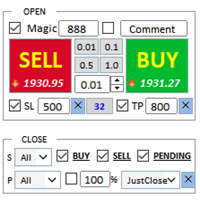
Assistente: Assistente de Comércio-MT4 (clique para baixar) Assistente de Comércio-MT5 (clique para baixar)
Leia atentamente as instruções de operação.
Noções básicas: Suporte para seleção e troca de idiomas (atualmente suporta chinês e inglês) Reconhecimento automático de idioma Apoiar tecla de atalho para abertura e fechamento vinculação, use teclas de atalho para abrir e fechar posições rapidamente... fechamento de tecla de atalho. Suporta até 30 teclas de at
FREE

如果产品有任何问题或者您需要在此产品上添加功能,请联系我 Contact/message me if you encounter any issue using the product or need extra feature to add on the base version.
Close Button provides you an intuitive, effective, and handy way to close your orders based on their type. The utility provides seven close options: Close All: close all orders, including trading and pending ones. Close Profit: close all orders which are in profit. Close Loss: close all orders which are in loss. Close Stop: close all stop orders. Close L
FREE

Este é um otimizador automático de parâmetros para o indicador Trend Line PRO Com facilidade e rapidez, você selecionará os parâmetros ideais para o seu indicador favorito Trend Line PRO. A otimização leva apenas alguns segundos. O otimizador permite que você encontre os melhores parâmetros para cada par e período: Amplitude, TP1-TP3, StopLoss, bem como os valores Para Time Filter e HTF Filter na seção selecionada do histórico (Days)
Para otimizar diferentes períodos de tempo, você precisa d

The Candle Timer indicator displays an advanced bar countdown timer on a chart. This study indicates the remaining time for the last candle in the chart.
Main features The indicator shows the remaining time for the last bar in the chart. Alert notifications for new bar. Works on every timeframe (M1, M5, M15, M30, H1, H4, D1, W1, MN). Customizable parameters (Colors, Text size, Visibility...). Ideal tool for all kinds of trading (Scalpers, intraday traders...). Very fast calculation. Availa
FREE

Break Even Trailing EA | Automação de Breakeven e Trailing Stop Break Even Trailing EA é um Expert Advisor (EA) utilitário para MetaTrader 4/5, desenvolvido para automatizar a proteção de lucros no trading manual. Este EA gerencia o risco e protege os ganhos automaticamente após suas entradas manuais, tornando o processo de negociação mais eficiente e tranquilo.
Oferece dois modos poderosos e configuráveis de proteção de lucro , que podem ser usados individualmente ou em conjunto, conforme seu e
FREE

"Grid Manual" é um painel comercial para trabalhar com uma grade de ordens. O utilitário é universal, possui configurações flexíveis e uma interface intuitiva. Ele trabalha com uma grade de ordens não apenas na direção da média das perdas, mas também na direção do aumento dos lucros. O trader não precisa criar e manter uma grade de ordens, tudo será feito pelo ""Grid Manual". Basta abrir um orden e o "Grid manual" criará automaticamente uma grade de ordens para ele e trabalhará com ele até que s

Negocie o suporte e a resistência ou as zonas de oferta e procura automaticamente depois de identificar as áreas-chave nas quais pretende negociar. Este EA permite-lhe desenhar zonas de compra e venda com um único clique e, em seguida, colocá-las exatamente onde espera que o preço mude. O EA monitoriza então estas zonas e realizará automaticamente negociações com base na ação de preço que especificar para as zonas. Assim que a negociação inicial for realizada, o EA obterá lucro na zona oposta q

Este é um painel de negociação visual que ajuda você a realizar e gerenciar operações facilmente, evitando erros humanos e aprimorando sua atividade comercial. Ele combina uma interface visual fácil de usar com uma abordagem sólida de gerenciamento de riscos e posições. [ Guia de instalação | Guia de atualização | Solução de problemas | FAQ | Todos os produtos ] Surpreendentemente fácil de usar Negocie facilmente a partir do gráfico Negocie com gerenciamento preciso de riscos, sem complicações

Rápido. Preciso. Inovador. Tecnológico. Descubra a cópia instantânea de negociações com o revolucionário X2 Copy MT4. Com apenas 10 segundos de configuração simples, você obterá uma ferramenta poderosa para sincronizar negociações entre terminais MetaTrader em um único computador ou Windows VPS com velocidade sem precedentes. Quer você gerencie várias contas, siga sinais ou dimensione sua estratégia, o X2 Copy MT4 se adapta ao seu fluxo de trabalho com precisão e controle incomparáveis. Trabalhe

TradeMirror é uma ferramenta local de cópia de ordens desenvolvida para as plataformas MT4/MT5, com suporte à sincronização de negociações em tempo real. Samouczek Kliknij link Samouczek Trademirror , aby zobaczyć więcej samouczków. Vantagens do Produto Alinhado com os altos padrões de segurança, estabilidade e privacidade para softwares financeiros, otimizamos três aspectos fundamentais: Interface gráfica intuitiva para operação simplificada Proteção de privacidade reforçada para isolamento de

Copiadora de comércio para МetaТrader 4. Ele copia comércios forex, posições, ordens de quaisquer contas.
É uma das melhores copiadoras comerciais МТ4 - МТ4, МТ5 - МТ5, МТ4 - МТ5, МТ5 - МТ4 hoje. O algoritmo de cópia exclusivo copia exatamente todas as negociações da conta principal para sua conta de cliente. Alta velocidade de operação. Tratamento de erros difícil. Um poderoso conjunto de recursos. Todas essas qualidades são combinadas em um único programa - EXP - COPYLOT. O pr
FREE

R R Trade Assistant is a utility Expert Advisor for MetaTrader 4 built to help traders visually define trades and manage risk efficiently. This tool combines a graphical risk-reward interface with manual trade execution , allowing traders to easily set trade parameters directly on the chart. Users can define Entry, Stop-Loss, and Take-Profit levels , calculate lot size based on risk percentage, and execute trades directly from the control panel.
If you like the EA, feel free to lea
FREE

SyncObjects é uma ferramenta que permite sincronizar objetos desenhados em vários gráficos em tempo real no MetaTrader. Objetos como linhas de tendência, linhas horizontais e rótulos de texto podem ser automaticamente refletidos em outros gráficos. Isso permite uma análise contínua entre diferentes períodos de tempo e pares de moedas, melhorando a eficiência do seu ambiente de negociação. Além disso, funciona bem com ferramentas de prática e teste de negociação, como o PracticeSimulator , permit
FREE

Configuração de stop loss, take profit, stop móvel, níveis de equilíbrio, permitindo paradas virtuais.
Exp Assistant ajudará você a organizar a manutenção de suas posições. Este Expert Advisor definirá todas as perdas necessárias e terá níveis de lucro para suas posições. Toda a operação do Expert Advisor é gerenciada a partir do painel de controle no gráfico. Se você tiver posições abertas, mas seu Expert Advisor não puder definir stop loss, take profit, trailing stop ou breakeven, e se você n
FREE
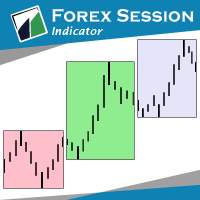
The indicator Forex Session displays official forex session times for Asia, Europe, America.
Main features shows Asian, European and American sessions shows the session volatility it can also be used for breakout trading
Indicator parameters 01: Sessions Session value - number of sessions Last session in developing mode - the session will be progressively displayed Adapts the size session to range - session size adjusts to volatility
02: Display Asia - on/off Europe - on/off America - on/of
FREE

Easy and Smart Trade Manager. It does work on visual strategy tester. Take your trading to the next level with it. Backtest you ideas and indicators. Improve it and run it live. This assistant has everything you need to do that. MT5 version
Basic features: Works with any FX, Crypto, Indices, Futures etc Several volume calculations methods, included risk calculation based on StopLoss level Several BreakEven modes Time close, timeout close and orders expiration Cancel pending orders level (OCO) R
FREE

Gerente de Risco TPSpro é um sistema único de controle de risco profissional para traders de qualquer formação e capital. Permite evitar perdas nas negociações e erros graves nas transações.
O TPSpro Risk Manager é necessário para o gerenciamento de risco, principalmente para cambistas e day traders, mas é usado com sucesso por traders de qualquer estilo de negociação. O painel possui 3 colunas, cada uma contendo informações úteis.
A primeira coluna exibe informações sobre a conta no iní

Blogs MQL5: https://www.mql5.com/en/blogs/post/770814 Versão MT4: https://www.mql5.com/en/market/product/107986
RALLY BASE RALLY (RBR), DROP BASE RALLY (DBR), DROP BASE DROP (DBD), RALLY BASE DROP (RBD), FAIR VALUE GAP (FVG) / IMBALANCE, HIDDEN BASE
Apresentamos o Expert Advisor "Supply and Demand Assistant" (EA) – a sua ferramenta definitiva para navegar no dinâmico mundo dos mercados financeiros com precisão e confiança. Este Expert Advisor de última geração foi meticulosamente concebido pa
FREE

Backtest Trade Simulator (BTS) — painel de simulação manual para MT4/MT5
Utilitário para MetaTrader 4 e MetaTrader 5. Use-o no modo visual do Testador de Estratégias para colocar e gerir ordens de mercado e pendentes simuladas em dados históricos. O produto não abre operações automaticamente, não constitui aconselhamento de investimento e não garante resultados em conta real nem futuros.
Finalidade - Praticar o fluxo de trading manual dentro do Testador de Estratégias - Verificar preços de or
FREE

One Click Close MT4 is an EA which allows you close orders quickly. EA display on chart two buttons. The first button "Close All Positions" is using to close all opened orders. The second button "Close Profit Positions" is using to close only profitable orders. EA is closing orders for all available symbols, not only for chart symbol. In EA params you can set distance from upper chart frame (Y Offset) and from left chart frame (X Offset). For installation EA it is only need to copy One Click Clo
FREE

Um player de gráficos simples para reproduzir gráficos históricos.
É possível analisar o mercado avançando os candles um a um. A reprodução pode ser pausada e retomada a qualquer momento.
[Características] Reprodução automática do passado para o futuro Avanço de um candle em intervalos fixos Pausa disponível durante a reprodução [Especificações de reprodução] Direção de reprodução: Passado → Futuro Velocidade de reprodução: Fixa Barras movidas: 1 barra por etapa Pausa / Retomar reprodução END
FREE
O Mercado MetaTrader oferece um local conveniente e seguro para comprar aplicativos para a plataforma MetaTrader. Faça download de versões de demonstração gratuitas de Expert Advisors e indicadores a partir do seu terminal para testes no Testador de Estratégia.
Teste os aplicativos em diferentes modos para monitoramento do desempenho e assim fazer um pagamento para o produto que você deseja, usando o sistema de pagamento MQL5.community.

Você está perdendo oportunidades de negociação:
- Aplicativos de negociação gratuitos
- 8 000+ sinais para cópia
- Notícias econômicas para análise dos mercados financeiros
Registro
Login
Você concorda com a política do site e com os termos de uso
Se você não tem uma conta, por favor registre-se