
Auto BE break even EA
- Utilitários
-
Calvin Andile Mahlangu
 I build both free and paid tools for MetaTrader 4 & 5.
🔹My goal is to keep things simple, useful, and realistic.
🔹Free tools are meant to be genuinely helpful — not limited trials.
🔹Paid tools are thoroughly backtested and created with care for practical use in live conditions. - Versão: 1.10
- Atualizado: 9 novembro 2026
AUTO BE Utility – Breakeven Manager for MetaTrader 4
The AUTO BE Utility by KALIFX is a compact and efficient trade-management tool for MetaTrader 4.It automatically adjusts the stop-loss level to the breakeven point once the market price reaches a defined profit distance, and can manage several clustered orders at once. This ensures that active trades are protected from reversals once they move into profit, without requiring manual intervention.
Main Features
- Automatic Breakeven Control – Moves the stop-loss to breakeven when the price reaches the specified activation level.
- Multi-Order Breakeven – Groups orders placed within a set pip distance and moves all of their stop-losses to breakeven together once the latest order reaches your trigger.
- Automatic SL / TP Placement – Assigns stop-loss and take-profit levels automatically when trades open, according to your predefined inputs.
- Custom Activation Point – Define the percentage of the total take-profit distance at which breakeven should activate.
- Offset Option – Add a pip-based offset beyond the entry price for flexibility in spread and cost coverage.
- Minimal Interface – Lightweight design with clear parameters for straightforward use.
Input Parameters
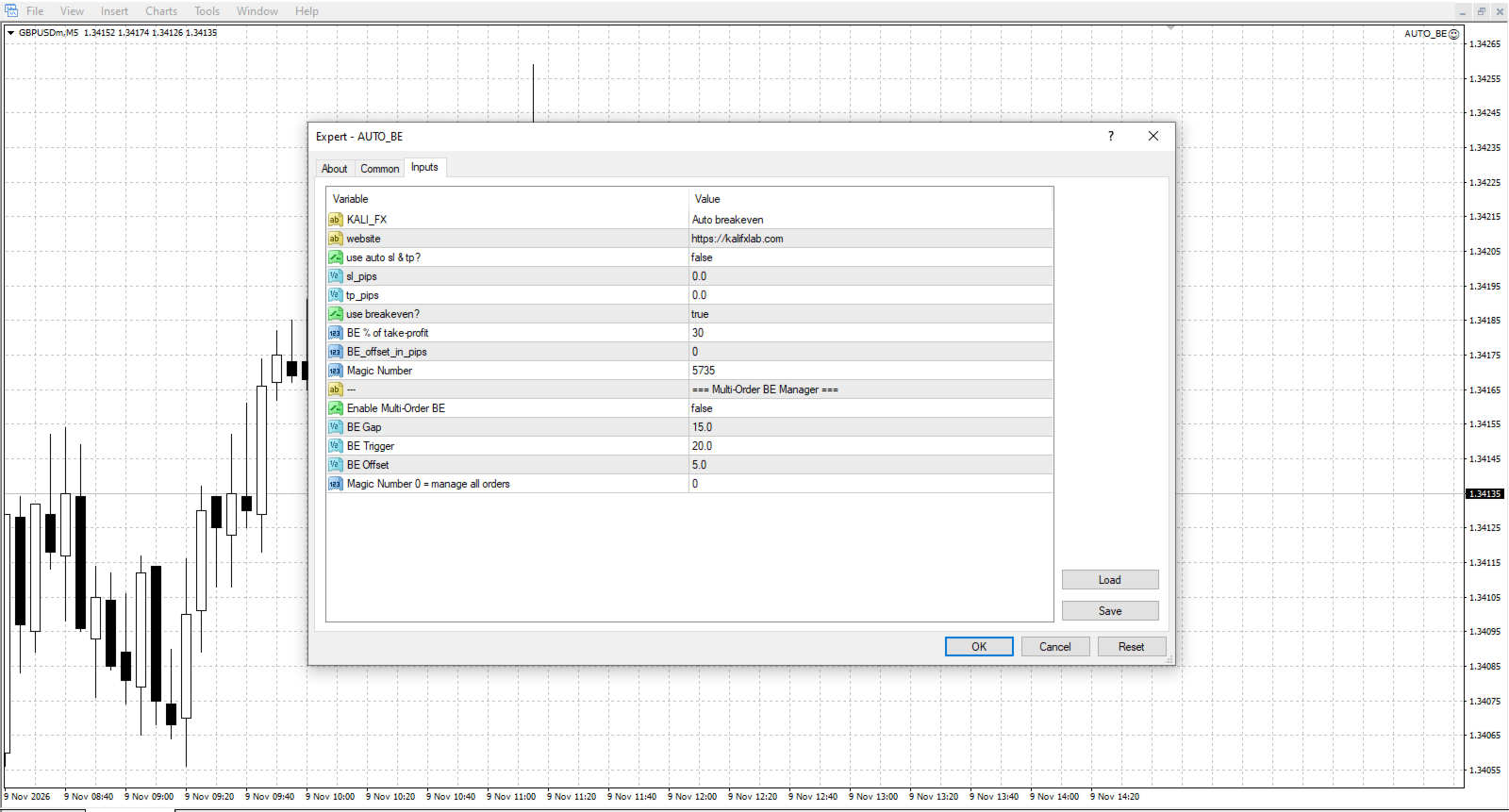
- Use Automatic SL / TP – Enable or disable automatic placement of stop-loss and take-profit levels.
- Use Breakeven – Enable or disable automatic breakeven adjustment.
- BE % of Take-Profit – Percentage of the TP distance at which the stop-loss will be moved to breakeven.
- BE Offset (pips) – Additional pips beyond breakeven for stop-loss placement.
- Use Multi-Order BE – Enable or disable breakeven for multiple clustered orders.
- GapPips – Maximum pip distance between orders to group them together.
- BETriggerPips – Profit in pips required on the latest order before breakeven activates.
- BEOffsetPips – Extra pips beyond entry when placing the breakeven stop for a group.
- MagicNumber – Orders managed by Multi-Order BE (0 = all orders).
How to Use
1. Open the chart for the instrument you want to manage.
2. Attach the AUTO BE Utility to that chart.
3. Adjust input settings to match your preferred risk-management style.
4. The utility will automatically monitor and adjust stop-loss levels for trades on the attached symbol.
Usage Notes
- Works with both manual and Expert-Advisor-initiated trades.
- Compatible with all trading instruments and timeframes.
- Use either Use Breakeven or Use Multi-Order BE for a given setup, not both.
- Always test on a demo account before live use to confirm correct behavior with your broker's settings.
Support
For assistance or customization inquiries, please contact the author via the MQL5 comments section or the private messaging system.






















































хороший инструмент