Take a Break

5

Take a Break pauses your Expert Advisors when trading is a bad idea: before news, after a daily loss, outside your trading hours, or when a rule you wrote yourself says so. When the pause is over, your EAs simply continue. Account protection for all your EAs in one tool: news filter, drawdown and equity protection, time filter and custom rules. One EA on one chart protects the whole account, the free indicator gives every chart its own rules on top.

Free demo | What is new in 26.09 | Support Assistant (24/7): trading.custom-solutions.it/support

What it does for you

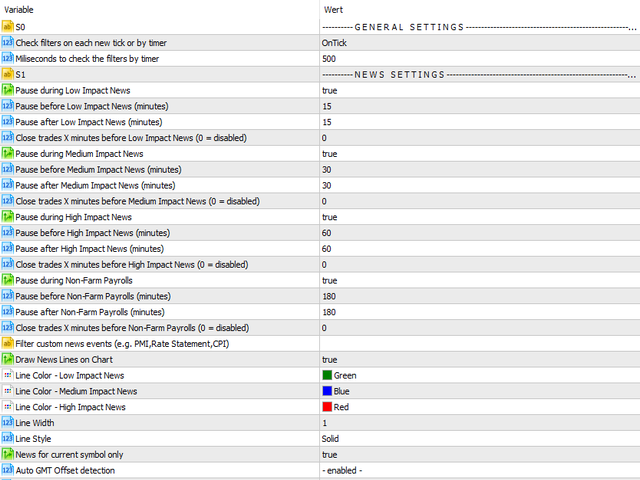
  • One news filter for all your EAs. Pause before and after high, medium or low impact news. Take a Break knows which currencies matter for the chart, also for gold, indices and stocks. No setup needed.
  • Daily loss and profit limits. When the limit is reached, all trades are closed and every chart pauses until the next day. Built for prop firm and funded accounts (FTMO, The5ers, FundedNext and similar).
  • Your own rules (MetaTrader 5). Put any indicator on the chart and write a condition: RSI>70, Close<MA(200), ADX<20, or a buffer from your own indicator. Pause new trades or close one side. If you can code it as an indicator, Take a Break can act on it.
  • Trading hours per chart. Hours per weekday, close trades outside those hours, maximum trade duration.
  • AI second opinion. Every new trade entry can be assessed on the chart, with a verdict and reasoning. Optional auto-close on poor entries. Some assessments are included, your own Anthropic API key gives unlimited use.
  • Works with any EA. No source code, no settings inside the EA. If it runs on a chart, Take a Break can pause it. A kill switch and risk management layer for every EA you run.

How it works

  • The EA runs on one M1 chart and protects the whole account: daily limits, equity thresholds, news alerts.
  • The free Take a Break Indicator goes on any chart that needs its own rules: news filter, loss limits, trading hours, spread, volatility, custom conditions.
  • A paused chart keeps everything but the EA. When trading is allowed again, the EA comes back with all its settings.

Setup in three steps

  • Press CTRL+O, open the tab Expert Advisors and add this URL to the allowed WebRequest list: https://trading.custom-solutions.it
  • Attach the Take a Break EA to any M1 chart. The symbol does not matter.
  • Optional: add the free Take a Break Indicator to every chart that should have its own rules.

All features

News filter Pause before and after special, high, medium and low impact news. Separate timing for NFP. Filter by event name ("CPI,PMI") or currency ("EUR,USD"). "0,day" trades until the release and pauses until midnight. Trade management before news: close all trades or only those with a magic number or comment, optionally only when in profit.
News alerts Push, email and on-screen alerts before news, grouped per pause window, with quiet hours.
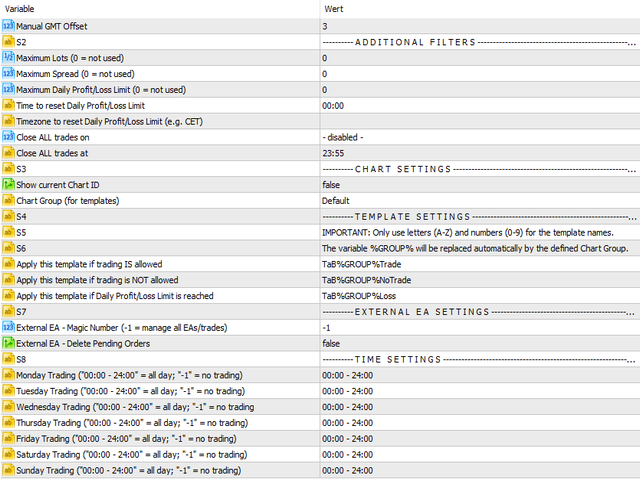
Account and equity protection Daily profit and loss limits in equity or balance mode, maximum drawdown per day. Minimum and maximum equity thresholds. Your own reset time and time zone. Closes all trades, pauses every chart, resumes automatically.
Drawdown protection per chart Profit and loss limits in money or percent, per trade or across all trades, like a stop loss and take profit for the whole chart. A soft level that pauses new trades before the close level. Cooldown pause after a limit closed trades.
Custom indicator rules MetaTrader 5 only. Conditions on any chart indicator or price, combined with AND / OR. Actions: pause new trades, close BUY, close SELL. A debug mode lists the indicator names to use.
Trading times (time filter) Hours per weekday, trading sessions, days of month, days of year, months. Close trades outside trading hours. Maximum trade duration.
Market filters Spread filter with maximum spread, candle volatility on any timeframe, daily price change in percent or points.
Order limits Maximum open orders (total, buy or sell), maximum total lots, maximum daily orders, minimum success rate.
AI trade assessment Optional: every new entry gets a verdict with reasoning and improvement hints. Assess buttons on the chart for a verdict before you enter. Optional auto-close on poor entries.
Trade scope Which trades a chart counts: additional symbols, magic numbers, comments, order types.

Good to know

  • Take a Break cannot run in the Strategy Tester. Test it with the free demo, limited to one chart symbol.
  • MetaTrader VPS: supported, except the AI trade assessment.
  • Custom indicator rules (MT5 only).
  • Update the EA and the indicator together, they work as a pair.
  • Actively developed since 2018. You get support directly from me, feature requests welcome.

Full settings list and latest changes: see the What's new tab. Questions? Ask the Support Assistant at trading.custom-solutions.it/support or contact me.


Comentários 33
dyakoo
263
dyakoo 2025.12.19 19:33 
 

A must have tool for every trader! I love it been looking for something like this for a long time

Quantxtech
548
Quantxtech 2025.01.28 10:34 
 

Excellent EA. I recommend it to everyone. It allows me to integrate risk management functions and stay away from situations of high expected (news) and unexpected volatility. The author is very professional and enthusiastic, responds immediately and is very available to give suggestions and accept advice.

Carl Christian Nyberg
1435
Carl Christian Nyberg 2024.12.15 19:54 
 

Fantastic little thing that adds up really good the the EA's that I'm currently running. So far it has managed to avoid bad trades just before major news happenings. Will keep on running it and trying to find the perfect setup regarding Drawdown Control and Minimum Profit/Maximum Loss before and during news.

Produtos recomendados
Details of each condition Type 1. Set no use Hedging Martingale, to open the order by yourself only through the push button. TP and SL follow setting. Set Setting_Hedging =false; Set Setting_TrailingStop =false; if not use. Type 2. Semi Auto Recovery Zone You have to open the order by yourself only through the push button. If in the wrong direction and Set true on Hedging Martingale, EA will fix the order with the zone system by use Hedging Martingale Set Setting_Hedging =true; Set Setting_Tra
SmartDash Trader EA This is MT4 Semi Automated EA which trade using BUY, SELL and CLOSE Buttons to executes trade actions. You can use Auto Set SL/TP/Lot of your choice since the EA comes with only 0.01 lot and 0 for TP/SL. Set 10 pips for TP to take advantage of trades. NOTE: THIS EA DOES NOT BACKTEST. ITS BUTTON TRADER EA HOW THE STRATEGIES TO USE THE DASHBOARD TRADER Wait for a weaker or stronger currency means the currency strength meter should show less than 15% for SELL and more than 88% f
Unlock the power of "Psychological Numbers" with RoundLevel . Large financial institutions, banks, and hedge funds don't place orders at random prices; they prefer round numbers (e.g., 1.1000, 105.00, 2000). These levels act as invisible magnets for price action, serving as high-probability support and resistance zones. Key Features: Universal Compatibility: Works perfectly on Forex, Gold (XAUUSD), Indices, and Stocks. Clean Visualization: Automatically draws horizontal levels without cluttering
Details of each condition Type 1. Set no use Hedging Martingale, to open the order by yourself only through the push button. TP and SL follow setting. Set Setting_Hedging =false;     Use_Signal =false;  Type 2. Semi Auto Recovery Zone You have to open the order by yourself only through the push button. If in the wrong direction and Set true on Hedging Martingale, EA will fix the order with the zone system by use Hedging Martingale Set Setting_Hedging =true;     Use_Signal =false;  Type 3. Use
LineTrader Pro – Plan. Size. Execute. Manage. Introductory Pricing LineTrader Pro is currently available for $59 USD for unlimited use , or $30 USD for a 1-month rental . LineTrader Pro is a manual trade execution, position-sizing, and trade-management utility for MetaTrader 4. It combines visual trade planning, flexible position sizing, pre-trade validation, deliberate execution controls, and live trade management in one MT4 panel. You choose the setup. LineTrader Pro does not generate tradi
MultiTP Trade Manager EA — Advanced Trade Management Made Effortless (MT4) Limited Offer – First 100 Downloads FREE! Be among the first 100 traders to download Trade Anchor Manager (MT4/MT5) completely free of charge. Hurry – once the limit is reached, the offer closes instantly! After trying it out, we’d love if you could leave a review and share your thoughts – your feedback helps us improve and lets other traders know what to expect. Need this Trade Anchor Manager for MT5?  http
FREE
Zirk Trading Management Zirk Trading Management is a powerful trade management utility for MetaTrader that helps traders execute trades with consistent risk management. It is designed to simplify position sizing by automatically calculating the correct lot size based on your chosen risk percentage and stop-loss distance. Instead of manually calculating lot sizes, simply set your desired account risk (e.g., 1%), place your stop loss, and the utility instantly determines the appropriate trade vol
Telegram To MT4 Receiver
Levi Dane Benjamin
3.67 (6)
Copie sinais de qualquer canal do qual seja membro (incluindo privados e restritos) diretamente para o seu MT4.  Esta ferramenta foi projetada com o usuário em mente, oferecendo muitos recursos que você precisa para gerenciar e monitorar as negociações. Este produto é apresentado em uma interface gráfica fácil de usar e visualmente atraente. Personalize suas configurações e comece a usar o produto em minutos! Guia do Usuário + Demonstração  | Versão MT5 | Versão Discord Se você quiser experime
Grid Trading
Waseem Raza
5 (3)
Grid Trading EA is a semi-automated one-click trading EA for both Normal Trading and Grid/Martingale Trading . Normal Trading Simply click Buy or Sell directly from the chart. The EA will automatically manage trades by: Setting Stop Loss and Take Profit Managing Trailing Stop Grid / Martingale Trading When Grid Trading mode is enabled, the EA will automatically open additional grid orders at specified distances while increasing the lot size based on your settings. Inputs & Settings Lots — Initia
This EA will help you to automatically put stop loss and take profit for all your orders. Stop loss point and take profit points can be selected in the tab of the input parameters. You can specify three symbols with SL and TP values (you can see symbol1 , symbol2 ... in the input tab below). The EA performs checks. If a new order with symbol1 appears, it puts SL and TP with stoploss1 and takeprofit1 values (in points). If a new order with symbol2 appears, it puts SL and TP with stoploss2 and tak
MRKD Vector
Jay Benedict Alfaras
MRKD Vector — Smart Trade Management Utility MRKD Vector is a powerful and intuitive order execution tool designed for efficient manual trading in MetaTrader 5. Built with precision and speed in mind, MRKD Vector simplifies trade management by giving you full control over entries, stops, and targets — all from a sleek interface. Key Features: Quick Order Execution Place trades with ease using a clean, fast interface built for active traders. Intuitive SL, TP, and Lot Size Control Adjust sto
Overview Happy Shiba Inu is a precision scheduling utility designed to restrict a MT4 account's trading activity to specific day or time windows. It manages both live execution logic and the automatic cleanup of pending orders during "Off-Hours." Operational Logic Pending Orders: The moment the timer hits a "Restricted" zone, the EA will scan all open orders. Any Limit or Stop orders will be deleted immediately to prevent accidental fills during high-volatility off-hours. Execution Block: Any c
ARC indicator
Aleksandr Goryachev
ARC Indicator   — é um indicador baseado em três algoritmos: analítico, que determina os pontos de entrada ótimos, e um algoritmo para a saída de operações. O indicador funciona simultaneamente tanto para compras quanto para vendas, o que o torna adequado para o mercado Forex. A saída de uma operação é realizada no melhor momento graças a um algoritmo especializado. Os níveis de   Stop Loss   são calculados automaticamente, e há dois modos disponíveis: Modo " Minimal " é adequado para scalping.
NewsReady
Joel Protusada
NewsReady is a semi-automated Expert Advisor that uses a smart straddle methods It needs to be set in charts 2 to 10 minutes before Economic Data release with a red-flag impact on currencies related to the news. Then it run pending orders in specified number of minutes indicated in the time-period parameter. After the specified time, it will stop trading and will remove all pending orders. Important You can not backtest this tool because it is semi-automated and can only be set and run a few min
What is this?  This script not only can help you to place all type of orders, included market order " BUY " / " SELL " and pending order " BUYSTOP " / " BUYLIMIT " / " SELLSTOP " / " SELLLIMIT ", but also, it allow you to place order lots by money management concept. How to use this script? 1. Open the chart you want to trade; 2. Drag and drop the script to that chart; 3. Input the parameter what you want to do; 4. Double check the order information, then click "Yes" to confirm to place order;
KT COG Robot
KEENBASE SOFTWARE SOLUTIONS
KT COG Robot is a fully automated Expert Advisor based on the KT COG Indicator . The COG indicator was originally presented by John F. Ehlers in the May 2002 edition of Technical Analysis of Stocks & Commodities magazine. The EA fires a long trade when COG line cross above the signal line and a short trade is fired when the COG line cross below the signal line.  Adaptive Filtration Our adaptive filtration algorithm combines the original COG formula with the major trend direction and market acce
Nosso avançado bot EA foi projetado para revolucionar sua experiência de negociação com recursos sofisticados e estratégias robustas de gerenciamento de risco. As principais características incluem: Gerenciamento de Risco Avançado : Protege seus investimentos com algoritmos de gerenciamento de risco de ponta. Trailing Stop Loss : Maximiza seus lucros ajustando os níveis de stop-loss de acordo com os movimentos do mercado. Multiplicador KeyValue/ATR : Utiliza um multiplicador KeyValue/ATR de 12 e
Richestcousin EA
Vicent Osman Kiboye
INSTAGRAM Billionaire: @richestcousin PIONEER OF ZOOM BILLIONAIRES EA THE ONLY PROFITABLE TRADING ROBOT. To trade without withdrawals is Scamming. Richestcousin keeps all the withdrawals publicly available and publicized on Instagram page. The trades are fr His very own Robot software. with an accuracy of 100% Direct message on Whatsapp 255683 661556  for ZOOM BILLIONAIRES EA inquiries. ABOUT Richestcousin is a self made Acclaimed forex Billionaire with an unmatched abilities in discerni
News Filter EA that send you a Push notification to your MT4 phone APP and TURN OFF MT4 Automatically Before News.  This EA doesn't work in backtest From 1.7 version  the EA have  Close all trades before news functions added. You only need to allow that url in MT4 options: To see the url and how to add it to MT4, visit this post: https://www.mql5.com/en/blogs/post/754402 When Metatrader is turned off, it saves the status of all the charts, indicators and Expert Advisors that you have in them
Algo Pumping MT4
Ihor Otkydach
4.69 (16)
PUMPING STATION – Sua estratégia pessoal “tudo incluído” Apresentamos o PUMPING STATION — um indicador revolucionário para Forex que vai transformar sua maneira de operar em uma experiência empolgante e eficaz. Este não é apenas um assistente, mas sim um sistema de trading completo com algoritmos poderosos que vão te ajudar a operar de forma mais estável. Ao adquirir este produto, você recebe GRATUITAMENTE: Arquivos de configuração exclusivos: para uma configuração automática e desempenho máximo
Candle Exit Pro Fechamento automático de operações baseado em velas para traders manuais Candle Exit Pro é uma ferramenta leve de gestão de operações que fecha automaticamente posições abertas manualmente após um número específico de velas concluídas. Em vez de monitorar constantemente suas operações, basta abrir uma posição manualmente e deixar o EA gerenciar o momento de saída com base na contagem de velas. Principais funcionalidades Fecha automaticamente operações manuais após o número de vel
Mongol Indicator2
Sumiyabazar Buyanjargal
It's a variation of mid of HH and LL since it compares the higher of HH or LL against a period and twice the number of bars back to avoid whipsaws. I used to display this against lines on a chart, but made a histogram out of it and it looks interesting. It looks good at gauging trend strength and general turns (see image below). The name of the indicator is BAM, which is an acronym for "Below and Above Mid". Ways to use it: 1. To see general trend on longer TFs (more than 30 bars back).
Trades Manager Buy and Sell Close The Close Buy and Sell Expert Advisor is a free EA given to help traders manage trades easily especially during volatile market environment. Features: It helps to quickly close trades either in profit or loss. Close for separate Buy Only  Close for separate Sell Only  Close for both Buy and Sell Only  Control Box can be minimized, closed or moved around from the chart. It works for all open trades opened on the terminal. Contact me for your specific coding
FREE
The Arrow Scalper
Fawwaz Abdulmantaser Salim Albaker
1 (2)
Dear Friend..  I share with you this simple Expert Adviser .. it is full automatic  this Expert Adviser following the trend of the pair you install on or any stocks or indices , it is works like that: - when the trend on H4 chart show a start of up trend the expert will wait till the 15M & 1H charts show an up trend the EA will open a buy order directly , and do the same for down trend and open a sell order the buy or sell  order lot size and take profit and stop loss will measured manually  by
FREE
Last 50 Pips
Martin Alejandro Bamonte
O indicador Last 50 Pips foi projetado para identificar rapidamente oportunidades de compra e venda com base no comportamento recente dos preços. Ele mede a variação de preço nas últimas velas para destacar em amarelo os momentos em que o preço pode estar mudando de direção. Sinal de compra: Deve abrir uma posição de COMPRA quando o indicador muda de VERMELHO para AMARELO , sugerindo uma mudança de uma tendência de baixa para uma de alta. Por favor, veja as imagens para entender como é simples.
Usdjpy Killer MT4
Benbyaanda Silvere Henri Sedric Kabore
USDJPY Killer   a powerful and unique expert advisor (EA) designed specifically for the USDJPY pair. Unlike most robots on the market that are hastily put together and sold to maximize profits from naive buyers, USDJPY Killer is built on a discretionary and psychologically sound approach to the market. This EA was not created to be a money-making product for mass distribution, but rather as a temporary release to raise capital for a larger goal: launching my own proprietary trading firm.   Once
EA Performance Hub (MT4) EA Performance Hub is a passive dashboard indicator that monitors the performance of every Expert Advisor running in your MT4 terminal. It automatically detects all magic numbers, reads EA names from order comments, groups multi-strategy robots, and shows core metrics in a single clean panel. This is a read-only utility . It does not trade, does not modify orders, and does not touch your positions. It only reads your account history and open trades to display statistics.
FREE
Market Steps MT4
Mahdi Ebrahimzadeh
5 (2)
O Indicador Market Steps foi projetado e construído baseado nas correlações de Preço/Tempo de Gann, e otimizado por regras específicas de Price Action do Mercado Forex. Ele usa o conceito de fluxo de ordens de mercado para prever as zonas de preços potenciais que terão um alto volume de ordens. Os níveis apresentados pelo Indicador podem ser usados para negociação, e/ou também para filtro de sinais de outras estratégias ou indicadores. Todo Trader precisa desta poderosa ferramenta para ter ao
Trading Control Pad
Sukunthakan Ngernbamrung
Trading Control Pad is a useful tool for all traders. To send BUY/SELL, pending order, modify and automatic setting SL and TP in one click by the current symbol. The Trading Control Pad can help you being comfortable and quickly trading.  Pad can help you automatic and manual partially close some lot at the target, breakeven and trailing stop. The Trading Control Pad features / Functionality Showing the currency pair, the total positions, the number of buy and sell orders. Standard tools for op
****************** ******* ******* *** FREE Trail for Demo *** ****************** ******* ******* 1. Search "ShootingAlert_bot in Telegram 2. Start it 3. Enjoy it EA Alert is using Telegram to do various actions: 1. Check Account Info 2. Check Order 3. Place Order 4. Modify Order 5. Switch user to help trade 6. Check Market Info 7. Show Chart 8. Show Chart with your template It is very useful for order management, especially while you are Working at office or Dine out with friends . It use
Os compradores deste produto também adquirem
Trade Indicator Assistant is a powerful MT4 utility designed to turn indicators into automated trading systems. Its main feature is the ability to automatically detect an indicator’s   BUY and SELL signal buffers , without requiring you to know the buffer numbers, search through indicator settings, or modify the indicator source code. Bonus Indicator: After purchasing Trade Indicator Assistant, contact me to receive Trade Signal Pro completely free as a bonus indicator. [Download Demo Version]
O Telegram to MT4 Multi-Channel Copier copia automaticamente os sinais de trading dos seus canais de Telegram diretamente para o MetaTrader 4. Sem bots, sem extensões de navegador, sem copiar à mão. O sinal chega ao Telegram e o EA abre a operação no seu terminal em poucos segundos. E antes de copiar um canal, o backtester integrado mostra o que esse canal teria feito na sua conta. O produto inclui dois componentes: um aplicativo de Windows que escuta os seus canais de Telegram, e este Expert Ad
The product will copy all telegram signal to MT4   ( which you are member  ) , also it can work as remote copier.  Easy to set up, copy order instant, can work with almost signal formats, image signal, s upport to translate other language to English Work with all type of channel or group, even channel have "Restrict Saving Content", work with  multi channel, multi MT5 Work as remote copier: with signal have ticket number, it will copy exactly via ticket number. Support to backtest signal. How to
Unlimited Trade Copier Pro is a tool to copy trade remotely to multiple MT4, MT5 and cTrader accounts at different computers/locations over internet. This is an ideal solution for you if you are a signal provider and want to copy your trades to other receivers globally on your own rules. One provider can copy trades to multiple receivers and one receiver can get trade from multiple providers as well. The provider can even set the subscription expiry for each receiver, so that receiver will not b
Strategy Builder offers an incredible amount of functionality. It combines a trade panel with configurable automation (covert indicators into an EA), real-time statistics (profit & draw down) plus automatic optimization of SL, TP/exit, trading hours, indicator inputs. Multiple indicators can be combined into an single alert/trade signal and can include custom indicators, even if just have ex4 file or purchased from Market. The system is easily configured via a CONFIG button and associated pop-up
Um painel profissional para operação manual que reúne todo o ciclo do trade em uma única janela no gráfico, da entrada precisa à proteção da conta. Calcule o volume exato de cada posição para o risco definido, monte a operação traçando linhas no gráfico com o RR Tool e envie ordens a mercado e pendentes, grids e OCO. O painel assume o acompanhamento da posição: fechamento parcial em até cinco níveis, seis tipos de trailing stop, breakeven e Virtual SL/TP. Limites diários, semanais e mensais prot
Riskless Pyramid
Snapdragon Systems Ltd
5 (1)
Introduction This powerful MT4 trade mangement EA offers a way potentially to aggressively multiply trade profits in a riskfree manner. Once a trade has been entered with a defined stoploss and take profit target then the EA will add three pyramid add-on trades in order to increase the overall level of profit. The user sets the total combined profit target to be gained if everything works out. This can be specified either as a multiple of the original trade profit or as a total dollar amount. Fo
VirtualTradePad PRO SE MT4 — painel de trading avançado e ambiente de gráfico para MetaTrader 4 VirtualTradePad PRO SE é um painel de trading profissional e um ambiente de gerenciamento de operações para MetaTrader 4 . Ele ajuda traders a abrir, gerenciar, proteger, fechar e analisar operações com mais rapidez a partir de uma única interface baseada no gráfico. O produto foi criado para traders manuais ativos que precisam de mais do que um simples conjunto de botões. O PRO SE combina execução em
EasyInsight AIO MT4
Alain Verleyen
4 (2)
EASY Insight AIO – A solução tudo-em-um para trading inteligente e sem esforço Visão geral Imagine analisar todo o mercado — Forex, Ouro, Cripto, Índices e até Ações — em segundos, sem precisar examinar gráficos manualmente, instalar indicadores ou lidar com configurações complicadas. EASY Insight AIO é sua ferramenta definitiva de exportação para trading com IA, pronta para usar. Ela oferece um panorama completo do mercado em um único arquivo CSV limpo — pronto para análise imediata no ChatGP
RedFox Copier Pro
Rui Manh Tien
4.7 (10)
Time saving and fast execution Whether you’re traveling or sleeping, always know that Telegram To Mt4 performs the trades for you. In other words, Our   Telegram MT4 Signal Trader  will analyze the trading signals you receive on your selected Telegram channels and execute them to your Telegram to MT4 account. Reduce The Risk Telegram To Mt4   defines the whole experience of copying signals from   Telegram signal copier to mt4 platforms. Users not only can follow all instructions from the signa
O painel FFx Hidden Manager vai ajudar facilitando o gerenciamento de suas ordens diretamente no gráfico. Abaixo a descrição de todos os recursos: TP, SL e Trailing Stop ficam ocultos Cada ordem tem a sua própria linha no gráfico Arrasta e solta (Drag & Drop) qualquer linha para alterar o TP/SL, conforme sua necessidade Opção para mover automaticamente a linha SL no empate (breakeven) quando TP # 1 for atingido Opção para escolher o tipo de TP/SL (por pips ou preço) Opção para escolher o tipo de
FFx Risk Calculator panel will help you to calculate very easily your trades size, SL or the risk directly on the chart. All features are described below: Option to select which parameter to calculate: Risk, Stop Loss or Lot Size The panel will show if the lot size is allowed according to the current account free margin Button to maximize/minimize the panel Drag and Drop the panel anywhere on the chart How to use it? Select the parameter you want to be calculated. It will be based on the 2 other
Trade Copier Pro
Vu Trung Kien
4.29 (14)
Trade Copier Pro é uma ferramenta poderosa para copiar remotamente comércio entre multi-contas em diferentes locais mais internet. Esta é uma solução ideal para provedor de sinais, que querem compartilhar seu comércio com os outros no mundo todo em suas próprias regras. Um provedor pode copiar comércios de multi-receptores e um receptor pode obter comércio de multi-fornecedores também. Provedor e receptor pode gerenciar sua lista de parceiros com potência sistema de gestão de banco de dados buil
News Trader Pro
Vu Trung Kien
4.38 (16)
News Trader Pro é um robô único que permite a negociação com notícias pela sua estratégia pré-definida. Ele carrega pedaços de notícias de vários sites populares de Forex. Você pode escolher qualquer notícia e programar a estratégia para negociar, então o News Trader Pro vai operar com essa notícia através de uma estratégia selecionada automaticamente quando a notícia for publicada. As notícias dão a oportunidade de ter pips desde que o preço tenha um grande movimento com a publicação. Agora, co
FFx Watcher PRO
Eric Venturi-Bloxs
The FFx Watcher PRO is a dashboard displaying on a single chart the current direction of up to 15 standard indicators and up to 9 timeframes. It has 2 different modes: 1. Watcher mode: Multi Indicators User is able to select up to 15 indicators to be displayed User is able to select up to 9 timeframes to be displayed 2. Watcher mode: Multi Pairs User is able to select any number of pairs/symbols User is able to select up to 9 timeframes to be displayed This mode uses one of the standard indicat
NickZ Tool
Nicolas Zouein
This is a must have tool for a serious trader. It saves your precious time spent for opening/closing trades, creating pending trades and modifying your TP/SL in bulk according to either pips or price. If you need to quickly open several pending orders (Buy Stop, Sell Stop) at a certain distance from each other, this script will do all the routine for you! The first time you use this handy tool, you will realize it has already paid for itself. Instructions: Drag and drop this script onto a chart.
The product combines a manual trade panel with the ability to perform actions automatically in a highly configurable way. Actions include capturing indicator values and then based on those values raising alerts, open/close or partially close trades, scale-in, setting up pending orders, adjusting stop loss, take profit and more. On-chart controls can be configured, such as tick boxes and buttons, so can be fully interactive. The EA also handles money management, news events, hidden stop loss, tak
Binary Options Copier Remote is an EA that allows to copy binary options trades between MT4 accounts at different computers. This is an ideal solution for signal provider, who want to share his trade with the others globally on his own rules. Provider can give free bonus license to 10 receivers. That means those 10 receivers can copy from provider by using Binary Options Receiver Free (no cost). From 11th one, receiver have to buy Binary Options Receiver Pro (paid version) in order to copy from
This panel is very simple to use and it is a very ally to manage your positions and orders. Also you can modify your risk, writing in fields directly on Panel. One click on buttons and the operation on market is done! Operations possible: BUY/SELL Break Even Split (close 50% all orders) Close All positions Hedging (opens reverse positions to cover) Close only BUY positions Close only SELL positions Close All pending orders Reverse all positions Please watch the video to verify the very simple u
Slow Pips OCO Trade Panel is an advanced trading panel for placing pending orders. Traders can use this panel to place two pending orders at once. One pending order would be of buy entry type and the other one would be of sell entry type. Both orders will have Stop Loss and Take Profit parameters. Since two pending orders are placed at the same time, the pending order for which the price hits first gets converted into a market order and the other pending order gets deleted (one order cancels the
This indicator changes the timeframe and chart profile for multiple charts. If you dispatched many charts (10~20 or more) in single MetaTrader terminal, it is very boring and difficult work to manage the timeframe and chart profile individually. If the indicators you use in a chart are numerous and the setting values are different from the default one, you might give up adding all the indicators to all charts. The changing of timeframes on multiple charts has the same problem, too. Whenever you
The Price Action Dashboard is an innovative tool to help the trader to control a large number of financial instruments. This tool is designed to automatically suggest signals and price conditions. The Dashboard analyzes all major Time Frame suggesting price action conditions with graphic elements. The Dashboard can suggest you the strength of the trend identifying directional movement, it is an indispensable tool for those who want to open position themselves using market trends identifiers. The
Elliott Wave Counter é um painel para marcação manual rápida e fácil de usar das ondas Elliott. Pode-se selecionar uma cor e um nível de marcas. Também existem funções para remover a última marcação e toda a marcação feita pela ferramenta. A marcação é feita com um clique. Clique cinco vezes - tenha cinco ondas! O Elliott Wave Counter será um ótimo instrumento tanto para iniciantes quanto para analistas profissionais de ondas Elliott. Guia de instalação e entradas do Elliott Wave Counter se você
If you wish to draw Support and Resistance lines, view: daily market opening, classical pivot levels, Fibonacci pivot levels, trend lines, Fibonacci levels, the remaining time to candle closing, and current spread. If you seek to place your orders with the exact lot that meets your desired stop loss risk. If you wish to do all this and more with just one click, then this is the perfect tool to use. This tool will allow you to feel more relaxed when deciding to open orders, as well as predicting
A ferramenta de análise de um clique é uma       criação de objeto baseada em atalho de teclado       e ferramenta de cópia para MetaTrader. Facilita o uso de ferramentas de análise no MetaTrader com apenas um clique. Com nossa ferramenta, você pode desenhar rapidamente níveis de suporte e resistência, níveis de Fibonacci, formas, canais, linhas de tendência e todos os outros objetos em seu gráfico. Basta clicar no botão, mover o mouse e a ferramenta One Click Analysis fará o resto para você. Is
O Partial Close Expert   é uma ferramenta que combina diversas funções em um sistema automatizado. Este EA pode ajudar os traders a gerenciar suas posições com mais eficiência, oferecendo diversas opções para gerenciar riscos e maximizar ganhos potenciais. Com o Partial Close Expert, os comerciantes podem definir um       fechamento parcial       nível para garantir lucros, um       parada móvel       nível para proteger lucros e limitar perdas, um       empatar       nível para garantir que a
Master Trend Dashboard is a new generation indicator, compact, light and efficient. Each element of this Dashboard is designed to return specific signals as: Price Action, Breakout, Net Change (performance of the instrument), algorithmic studies, correlations and statistical calculations. This tool will change your way of trading allowing you to receive important information. See the Graphic Signals to understand every single signal below: Graphic Signals Symbol name and arrow color Green = Cur
Trade Copier Agent é projetado para copiar negociações entre várias contas/terminais MetaTrader(4/5). Com esta ferramenta, você pode atuar como provedor (origem) ou receptor (destino). Todas as ações de negociação serão copiadas do provedor para o destinatário sem demora. Esta ferramenta permite que você copie negociações entre vários terminais MetaTrader no mesmo computador com velocidades de cópia ultrarrápidas de menos de 0,5 segundos. Guia de instalação e entradas do Trade Copier Agent Apli
Unlimited Binary Options Copier Remote is a powerful tool to copy binary options trades remotely between multiple accounts at different locations over internet. This is an ideal solution for signal provider, who want to share his binary options trades with the others globally on his own rules. One provider can copy trades to unlimited receivers and one receiver can get trade from unlimited providers as well. The provider can set the subscription expiry for each receiver, so that receiver will no
This is an Expert Adviser use for manual trading as a background EA or combine with external EA to open orders. Loss Recovery Trading is one of your options to handle the lose positions instead of using stop loss by setting a zone recovery area and target to exit the turn rounds sequence. How It Work? If the market goes against your first positions direction at the specific of losing points, the EA will open an opposite direction position with calculated larger lot size and also keep the first
Mais do autor
Tax Buddy MT5
Eric Emmrich
5 (5)
Tax Buddy creates a simple, sortable trading report which you can send to your local tax authorities alongside your annual declaration. I've been using this kind of report for the German Finanzamt in order to declare my capital gains ("Kapitalerträge") in a readily comprehensible manner. For testing purposes, the Demo version places random trades in the Strategy Tester on the symbol of your choice and creates a demo report for them. Conveniently, all reports are stored in the common path for al
Take a Break MT5
Eric Emmrich
4.76 (25)
Take a Break pauses your Expert Advisors when trading is a bad idea: before news, after a daily loss, outside your trading hours, or when a rule you wrote yourself says so. When the pause is over, your EAs simply continue. Account protection for all your EAs in one tool: news filter, drawdown and equity protection, time filter and custom rules. One EA on one chart protects the whole account, the free indicator gives every chart its own rules on top. Free demo | What is new in 26.09 | Support Ass
Take a Break Indicator gives any chart its own protection rules: pause before news, stop after a daily loss, trade only during your hours, or pause when your own indicator condition is true. News filter, drawdown protection, time filter and custom indicator rules per chart. It is the free companion of the Take a Break EA, which does the pausing for the whole account. Rules you can set per chart Custom indicator rules (MetaTrader 5): put any indicator on the chart and write a condition. RSI>70 ,
FREE
Take a Break FREE is the free version of Take a Break , the account protection and risk management tool for all your Expert Advisors. It pauses your EAs before news, after a daily loss or when your own rules say so, and lets them continue when the pause is over. What the free version does Daily loss brake: a fixed limit of -5% per day is always active (reset at 00:00 server time). When it triggers, one chart pauses. News filter for one chart symbol: pause before and after scheduled releases, cur
FREE
Take a Break Indicator gives any chart its own protection rules: pause before news, stop after a daily loss, trade only during your hours, or pause when your own indicator condition is true. News filter, drawdown protection, time filter and custom indicator rules per chart. It is the free companion of the Take a Break EA, which does the pausing for the whole account. Rules you can set per chart Custom indicator rules (MetaTrader 5): put any indicator on the chart and write a condition. RSI>70 ,
FREE
Take a Break FREE is the free version of Take a Break , the account protection and risk management tool for all your Expert Advisors. It pauses your EAs before news, after a daily loss or when your own rules say so, and lets them continue when the pause is over. What the free version does Daily loss brake: a fixed limit of -5% per day is always active (reset at 00:00 server time). When it triggers, one chart pauses. News filter for one chart symbol: pause before and after scheduled releases, cur
FREE
Tax Buddy
Eric Emmrich
5 (3)
Tax Buddy creates a simple, sortable trading report which you can send to your local tax authorities alongside your annual declaration. I've been using this kind of report for the German Finanzamt in order to declare my capital gains ("Kapitalerträge") in a readily comprehensible manner. For testing purposes, the Demo version places random trades in the Strategy Tester on the symbol of your choice and creates a demo report for them. Conveniently, all reports are stored in the common path for al
Never miss a trading opportunity again and stay up-to-date with latest market developments even while on the go - welcome to The Notifier . No need to watch your charts all day: receive real-time alerts from all your favorite indicators - by push notifications and on-screen alerts. This tool notifies you on every every new (indicator) high/low, or also regularly with just  a summary of the total highs/lows within the last X minutes. It also comes with its own built-in notifications that can be
Filtro:
dyakoo
263
dyakoo 2025.12.19 19:33 
 

A must have tool for every trader! I love it been looking for something like this for a long time

Eric Emmrich
11111
Resposta do desenvolvedor Eric Emmrich 2025.12.20 21:17
Thank you very much for sharing your experience with TaB!
Quantxtech
548
Quantxtech 2025.01.28 10:34 
 

Excellent EA. I recommend it to everyone. It allows me to integrate risk management functions and stay away from situations of high expected (news) and unexpected volatility. The author is very professional and enthusiastic, responds immediately and is very available to give suggestions and accept advice.

Eric Emmrich
11111
Resposta do desenvolvedor Eric Emmrich 2025.01.28 11:42
Thank you very much for taking the time for a review - much appreciated! :)
Carl Christian Nyberg
1435
Carl Christian Nyberg 2024.12.15 19:54 
 

Fantastic little thing that adds up really good the the EA's that I'm currently running. So far it has managed to avoid bad trades just before major news happenings. Will keep on running it and trying to find the perfect setup regarding Drawdown Control and Minimum Profit/Maximum Loss before and during news.

Eric Emmrich
11111
Resposta do desenvolvedor Eric Emmrich 2024.12.16 11:20
Many thanks for sharing your positive experience with TaB! Very happy to read that it helps in your trading :)
Maik Siebel
801
Maik Siebel 2024.08.23 11:38 
 

Eric has answers and solutions for all questions :-) Thanks again for your help and your great tool.

Eric Emmrich
11111
Resposta do desenvolvedor Eric Emmrich 2024.08.23 14:30
Thank you very much!
Brandon Thames
294
Brandon Thames 2024.07.12 19:14 
 

I originally just bought this to use as a news filter, but this is so much more than just a news filter. While I have not used any of the many other features this utility provides I did reach out to the author to implement a suggestion. Eric was quick to respond and deploy a solution that works for what I needed. Thank you Eric, top tier news filter (and so much more).

Eric Emmrich
11111
Resposta do desenvolvedor Eric Emmrich 2024.07.12 19:35
Many thanks for taking the time for a review! Glad to hear that you are happy with TaB. If you miss any feature, feel free to reach out :)
MartinRuslan-MQL
312
MartinRuslan-MQL 2024.04.17 17:39 
 

THis is my first EA purchase at MQL5 that: 1. The product are really good 2. The author is very supportive and always give a straight answer and help. Kudos for the author, keep up the great support, and looking forward for the next great product.

Eric Emmrich
11111
Resposta do desenvolvedor Eric Emmrich 2024.04.18 10:33
Thank you so much for taking the time for a review & sharing your feedback! :)
Andre Nas
273
Andre Nas 2023.12.18 01:01 
 

So I've been using this for almost a year now with phenomenal results. The amount of equity protection features are unmatched by any other out there that I could find and it's especially useful for prop firm trading. The simple fact that you can set max daily profit/loss by specific magic numbers is just one example of the attention to detail the author has given to this product. There are also constant updates from the author on an as needed basis and if you request help from him, he gets back to you in only a few hours.

Eric Emmrich
11111
Resposta do desenvolvedor Eric Emmrich 2023.12.18 11:47
Delighted to read about your positive long-term experience with TaB, Andre - many thanks for sharing! :)
Lau Ka Shun
576
Lau Ka Shun 2023.10.16 16:33 
 

A "MUST" have tools for my Prop Firm Challenge and I've passed both 2 Steps challenge on FTMO with TaB. The Support from author is great as well! Thank you Eric!

Eric Emmrich
11111
Resposta do desenvolvedor Eric Emmrich 2023.10.16 17:12
Many thanks for sharing your experience with TaB! I'm really happy to read that TaB has helped you in passing the challenge & wish you good profits in the future as well :)
Mark Thimoty Evangelista
520
Mark Thimoty Evangelista 2023.09.27 03:12 
 

After exchanging several conversations with the author, TaB now completes my risk management for my portfolio. Eric has been really helpful with the workarounds and even acknowledges a bug and fixes it the day after through an update!

Eric Emmrich
11111
Resposta do desenvolvedor Eric Emmrich 2023.09.27 08:28
Thanks so much! Always happy about happy users :)
iSlyDz
225
iSlyDz 2023.04.12 22:52 
 

This EA is really incredible and complete, it allows you to protect your account well, there are so many parameters that it becomes a must-have. The author is really available for any question and for the installation I really recommend

Eric Emmrich
11111
Resposta do desenvolvedor Eric Emmrich 2023.04.13 09:11
Many thanks! :)
Alesamo
1608
Alesamo 2023.04.08 08:33 
 

I bought TaB last week because internal news filters of some EAs with a specific URL do not work any more and developpers of these EAs don't give a s**t about it and didn't fix it immediately. So far I am very happy, TaB does exactly what I need! Can recommend!

Eric Emmrich
11111
Resposta do desenvolvedor Eric Emmrich 2023.04.11 13:54
Thank you! :)
handler47
29
handler47 2023.02.15 02:43 
 

Testing it right now, will update the review after a few days of testing, in any case we can underline that the tool is very complete, I don't know any other similar tool, it has everything that IceFx NewsInfo does not have.

Greetings to the developer!

Jekil
750
Jekil 2023.01.21 13:09 
 

Very good protector for all EA. Is necessary.

Nemesio Jr Reyes
771
Nemesio Jr Reyes 2022.11.18 18:50 
 

Amazing product this is better than IceFX.NewsInfo. Is it true that this EA can close all trades before the high-impact news? Are there any setfiles for the setting all close trade before high impact? or is it already included in the default configuration?

Eric Emmrich
11111
Resposta do desenvolvedor Eric Emmrich 2022.11.20 12:13
Thank you for your great review! :) Yes, TaB can close trades before high impact news. To achieve this, you need to set the option "Take action X minutes before/after news" to the desired value in minutes. Given the dynamic nature of TaB, there are no specific .set files. You need to configure TaB according to your needs. If you need help with it, just contact me.

Usama Zulfiqar
23
Usama Zulfiqar 2022.11.02 15:02 
 

O usuário não deixou nenhum comentário para sua avaliação

Eric Emmrich
11111
Resposta do desenvolvedor Eric Emmrich 2022.11.02 15:37
Many thanks for the great review :) There are already plans to make the current daily limits configurable with the amount of days. That should also cover your feature request then :)
Adoyzke1229
219
Adoyzke1229 2022.10.12 17:08 
 

O usuário não deixou nenhum comentário para sua avaliação

Eric Emmrich
11111
Resposta do desenvolvedor Eric Emmrich 2022.10.12 18:05
Thank you for your great review - glad you like it :)
christofort
361
christofort 2022.02.07 14:13 
 

Very professionnal tool ! A must have for all manual and automatic trader :) Five stars !

portkinov
287
portkinov 2021.11.28 18:52 
 

THIS SELLER IS TAKING CUSTOMER ADVICE SERIOUSLY, I'M STARTING TO LOVE THIS GUY.. THANKS A LOT MAN &lt;

Eric Emmrich
11111
Resposta do desenvolvedor Eric Emmrich 2021.11.28 18:55
Thank you very much for your review!
(And sorry that integrating your requests took a bit longer than expected :))
Wolfgang Rockert
2457
Wolfgang Rockert 2021.11.27 16:01 
 

TaB is a very helpful tool, i use it with my Portfolio and works very good... Also good Service...

Eric Emmrich
11111
Resposta do desenvolvedor Eric Emmrich 2021.11.28 11:35
Thank you very much, Wolfgang! Much appreciated :)
Susan Anne Thompson
409
Susan Anne Thompson 2021.10.21 15:58 
 

This EA 'TaB' is so very very useful - and powerful. It takes some time to get to know how to use it - but it's worth investing your time. Most of my time was spent 'testing' ie I said "do this then, or because..." - and every time I was happy with the outcome The seller himself, Eric, is absolutely brilliant - I have every confidence to keep using the EA, and the indicator - and to keep watching what Eric may deliver next. TaB is worth every dollar - even within a few days of use, it's paid for itself - and I sleep much better, and dare I say "I'm much more relaxed too!"

Eric Emmrich
11111
Resposta do desenvolvedor Eric Emmrich 2021.10.21 19:58
Susan, thank you very much for sharing your positive experience and for the kind words. Much appreciated!
12
Responder ao comentário