One Click B3 MT5
- Experts
-
Mariusz Franciszek Szczepanczyk
 I have been trading since 2005. Over the years I have built my own set of tools because I could not find what I actually needed on the market. Not magic entry signals. Not promises. Just clean, reliable trade management that works while I am away from the screen.
 - Versione: 1.37
- Aggiornato: 19 settembre 2026
- Attivazioni: 5
Questo non è solo un Expert Advisor per chiudere rapidamente le posizioni, indipendentemente dal numero di operazioni o strumenti aperti. È anche un Expert Advisor per controllare, proteggere e massimizzare il profitto percentuale da tutte le posizioni aperte a piattaforma chiusa. È un Expert Advisor che ti permette di dormire sonni tranquilli e riposare. È un Expert Advisor che continua a Lavorare anche quando ti godi il tuo breve momento di libertà, utilizzando i guadagni del tuo lavoro. Esaminalo attentamente, dedica un po' di tempo una sola volta per impostare i parametri in base Alle tue esigenze e pratica questa professione senza stress.
One Click B3 MT5 – Pannello di gestione delle operazioni con un solo clic, dotato di trailing stop, take profit automatico e linee di segnale.
Un clic B3 MT5 È un Expert Advisor per la gestione delle operazioni di trading per MetaTrader 5. Non apre posizioni automaticamente. Tutte le operazioni vengono effettuate manualmente o tramite altri Expert Advisor. Questo strumento interviene dal momento dell'apertura di una posizione e gestisce Stop Loss, Trailing Stop, Take Profit e azioni di chiusura in base alle impostazioni definite.
È progettato per i trader che desiderano definire il proprio piano di rischio una sola volta, impostare i parametri e poi allontanarsi dallo schermo. Se lo si esegue su un VPS, monitorerà le operazioni tra una sessione e l'altra senza interruzioni. Durante il normale orario di trading, il sistema audio integrato segnala gli eventi importanti: nuova posizione rilevata, spostamento dello Stop Loss, impostazione del Take Profit, chiusura della posizione. Se non si sente alcun suono, significa che non sta accadendo nulla di importante.
Questo strumento è efficace anche per lo scalping. Permette di proteggere simultaneamente un numero qualsiasi di posizioni aperte su diversi strumenti finanziari e di chiuderle tutte, oppure Solo quelle redditizie, con un singolo clic sul pulsante corrispondente al simbolo selezionato.
Prima dell'utilizzo, verifica che l'installazione di MetaTrader 5 includa i file audio order-filled.wav e order-submitted.wav. Si tratta di suoni standard di MT5, che dovrebbero essere presenti di default.
CONTROLLO STRATEGICO
Gli elementi visivi come pulsanti, pannelli e linee di segnale non vengono visualizzati nello Strategy Tester. Si tratta di una limitazione della piattaforma MetaTrader 5. L'esecuzione degli ordini, la gestione di Stop Loss e Take Profit, Auto TP, la logica del Trailing Stop, il calcolo dei profitti e tutti i meccanismi di trading interni funzionano normalmente nel tester. Test per un Visivo completo, utilizzare un conto demo.
PANNELLI DI CONTROLLO
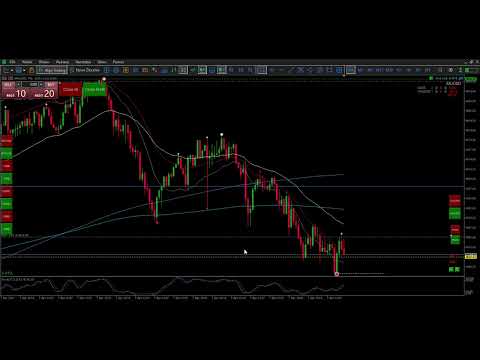
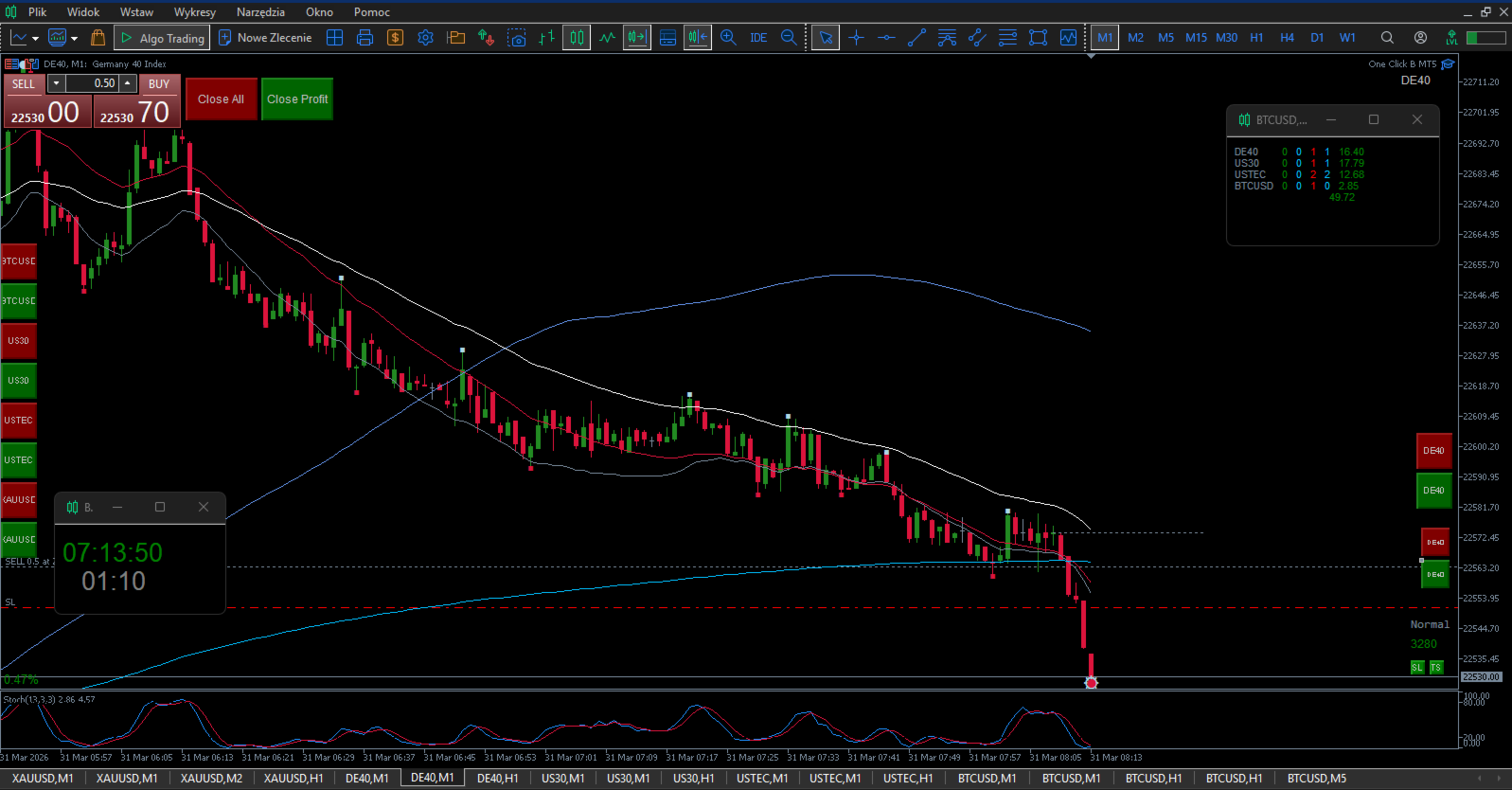
L'EA offre due pannelli indipendenti. Il pannello principale ha due pulsanti: "Chiudi profitto" chiude tutte le posizioni in profitto sull'intera piattaforma, "Chiudi tutto" chiude tutte le posizioni aperte sull'intera piattaforma. Il pannello degli strumenti viene generato automaticamente dal parametro PanelSymbols. È possibile inserire fino a 20 nomi di simboli separati da virgole. L'EA crea una coppia di pulsanti per ogni simbolo: uno per chiudere tutte le posizioni su quello strumento, uno per chiudere solo le posizioni in profitto su quello strumento. Il calcolo del profitto netto include lo swap e le commissioni manuali definite per simbolo utilizzando Commission_1 a Commission_20. La posizione del pannello, le dimensioni dei pulsanti, la spaziatura, i colori e L'ancoraggio agli angoli sono completamente configurabili. Le coordinate X e Y individuali possono essere impostate separatamente per ciascuno dei 20 slot dei simboli. Se non definite, il pannello si dispone automaticamente.
STOP LOSS E TRAIL STOP STOP
L'EA monitora tutte le posizioni aperte sullo strumento corrente. Quando una posizione raggiunge la distanza di profitto definita da TriggerPips, l'EA imposta uno Stop Loss iniziale al punto Z wyjątkiem SL_Offset_Pips. Questa è la coppia di parametri più importante. SL_Offset_Pips definisce quanti pip di distanza dal prezzo di apertura viene posizionato lo SL. In questo Valore è necessario includere i costi di transazione e lo slippage previsto. Per XAUUSD con una commissione di 4,5 USD per lotto, un valore sicuro è compreso tra 80 e 120 pip. TriggerPips definisce di quanto deve muoversi la posizione in profitto prima che lo SL venga attivato. Per XAUUSD con posizioni più lunghe, un valore sicuro è compreso tra 250 e 300 pip. Tutti i parametri devono essere identici su ogni grafico dello stesso strumento. Dopo aver impostato lo SL iniziale, il Trailing Stop entra in gioco se abilitato. Il piccolo pulsante quadrato TS sul grafico attiva e disattiva il Za nim. Il suo colore riflette lo stato corrente. Le impostazioni del trailing riguardano la distanza di attivazione, la dimensione del passo, il movimento minimo e il tempo minimo tra le modifiche. Il sistema utilizza variabili globali per sincronizzare lo stato tra i grafici e prevenire modifiche duplicate.
PRELIEVO AUTOMATICO DEI PROFITTI
Quando EnableAutoTP è attivo, l'EA imposta automaticamente il Take Profit per ogni nuova posizione aperta che non ne abbia già uno. La distanza è definita da AutoTP_Pips. L'Auto TP viene applicato una sola volta per posizione. Se lo si rimuove manualmente, non verrà riapplicato. Il calcolo si adatta alla struttura dei pip del simbolo.
LINEE SEGNALI GRIGIE E VERDI
L'EA disegna una struttura di segnale a due fasi sul grafico, basata sull'azione dei prezzi analizzata sul timeframe SignalTF. La linea grigia indica l'impulso iniziale. Appare quando una Candela chiude con il suo corpo completamente oltre il corpo della candela precedente, confermando il momentum direzionale. La linea viene posizionata sul bordo opposto del corpo della candela di Segnale. La linea verde indica la zona di ingresso correttiva. Dopo il completamento dell'impulso, l'EA traccia il ritracciamento. Quando il prezzo entra nella zona di Fibonacci compresa tra il 50 e il 61,8% dell'impulso e poi chiude nella direzione del movimento originale, la linea verde viene posizionata all'estremità del ritracciamento all'interno di tale zona. Una linea verde non può esistere Senza una linea grigia attiva. Se la struttura grigia viene invalidata, la linea verde viene rimossa automaticamente. Le linee vengono ripristinate dopo un cambio di timeframe o un aggiornamento del grafico. L'intera struttura si reimposta automaticamente ogni un numero di ore definito. Colori, stili e spessori sono configurabili separatamente per Acquisto e Vendita. L'intera logica può essere disabilitata con Enable Gray GreenLogic = false.
DETTAGLI TECNICI
L'EA supporta i conti di hedging. È possibile tracciare simultaneamente fino a 100 posizioni. I blocchi di modifica impediscono operazioni di trailing duplicate. Lo stato dei pulsanti e le posizioni del pannello vengono salvati localmente e ripristinati dopo il riavvio della piattaforma. Tutte le operazioni di trading includono la convalida del margine prima dell'esecuzione.
SPECIFICHE DEI PARAMETRI
Impostazioni generali
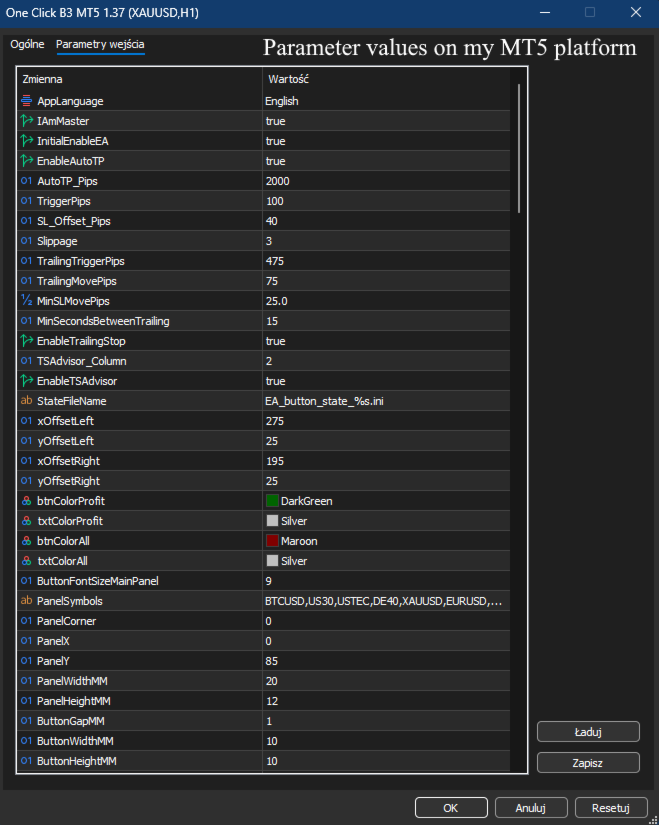
Lingua dell'app: seleziona la lingua dell'interfaccia (polacco/inglese/tedesco/russo/spagnolo) per etichette e messaggi.
IAmMaster – designa questo grafico come Master per le modifiche SL/TS su questo strumento. Impostare su true solo per un grafico, su false per tutti gli altri che utilizzano lo stesso strumento.
InitialEnableEA – L'EA si avvia abilitato/disabilitato all'associazione al grafico.
Impostazioni Stop Loss, Trailing Stop e Auto TP
EnableAutoTP – abilita/disabilita il TP automatico per le nuove posizioni.
AutoTP_Pips – distanza in pip dal prezzo di apertura per il posizionamento automatico del Take Profit.
TriggerPips – soglia di profitto in pip superata la quale viene impostato lo stop loss protettivo iniziale.
SL_Offset_Pips – offset in pip dal prezzo di apertura per lo stop loss iniziale in pareggio.
Slippage – pip di slippage massimo del prezzo per modifica/chiusura.
TrailingTriggerPips – pip di profitto dal prezzo per attivare l'aggiornamento TS.
TrailingMovePips – passi di pip per le mosse SL durante il trascinamento.
MinSLMovePips – differenza minima in pip per la modifica dello stop loss. Verifica qual è il livello minimo di ordini stop accettati dal tuo broker.
MinSecondsBetweenTrailing – secondi minimi tra gli aggiornamenti SL.
EnableTrailingStop – opzione globale per attivare/disattivare l'arresto anomalo.
TSAdvisor_Column – numero di colonna per l'integrazione esterna con TS Advisor.
EnableTSAdvisor – abilita/disabilita l'integrazione esterna con TS Advisor.
Impostazioni dei pannelli 1 e 2 (pannello principale e pannello strumenti)
StateFileName – modello per il file INI di stato on/off di EA per simbolo.
xOffsetLeft – Posizione X del pulsante principale Chiudi Profitto.
yOffsetLeft – Posizione sull'asse Y del pulsante principale Chiudi Profitto.
xOffsetRight – Posizione X del pulsante principale Chiudi tutto.
yOffsetRight – Posizione Y del pulsante principale Chiudi tutto.
btnColorProfit – colore di sfondo per il pulsante Chiudi Profitto.
txtColorProfit – colore del testo per il pulsante Chiudi Profitto.
btnColorAll – colore di sfondo per il pulsante Chiudi tutto.
txtColorAll – colore del testo per il pulsante Chiudi tutto.
ButtonFontSizeMainPanel – dimensione del carattere per i pulsanti del pannello principale.
PanelSymbols – nomi dei simboli, separati da virgole, per i singoli pulsanti dello strumento.
PanelCorner – angolo di ancoraggio per il pannello dei simboli.
PanelX – offset base X per il pannello dei simboli.
PanelY – offset Y di base per il pannello dei simboli.
PanelWidthMM – larghezza dei pulsanti del pannello principale in mm.
PanelHeightMM – altezza del pulsante principale del pannello in mm.
ButtonGapMM – spaziatura tra i pulsanti del pannello in mm.
ButtonWidthMM – larghezza del pulsante per simbolo in mm.
ButtonHeightMM – altezza del pulsante per simbolo in mm.
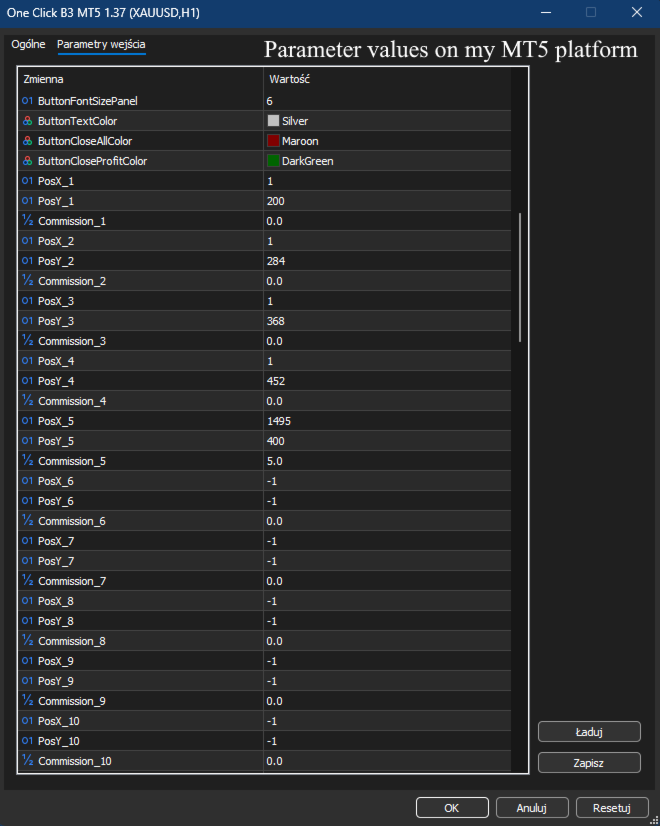
ButtonFontSizePanel – dimensione del carattere per i pulsanti di ciascun simbolo.
ButtonTextColor – colore del testo per i pulsanti con symboli.
ButtonCloseAllColor – kolor sfondo per il pulsante Chiudi tutto nel pannello.
ButtonCloseProfitColor – kolor sfondo per Close Profit nel pannello.
BTCUSD_PosX – posizione X personalizzata per il pulsante BTCUSD.
BTCUSD_PosY – posizione Y personalizzata per il pulsante BTCUSD.
US30_PosX – posizione X personalizzata per il pulsante US30.
US30_PosY – posizione Y personalizzata per il pulsante US30.
USTEC_PosX – posizione X personalizzata per il pulsante USTEC.
USTEC_PosY – posizione Y personalizzata per il pulsante USTEC.
DE40_PosX – posizione X personalizzata per il pulsante DE40.
DE40_PosY – posizione Y personalizzata per il pulsante DE40.
XAUUSD_PosX – posizione X personalizzata per il pulsante XAUUSD.
XAUUSD_PosY – posizione Y personalizzata per il pulsante XAUUSD.
Commission_BTCUSD – prowizja za loterię na BTCUSD.
Commission_US30 – prowizja za loterię za 30 USD.
Commission_USTEC – prowizja za loterię według USTEC.
Commission_DE40 – prowizja za loterię według DE40.
Commission_XAUUSD – prowizja za loterię według XAUUSD.
Impostazioni delle linee di segnale
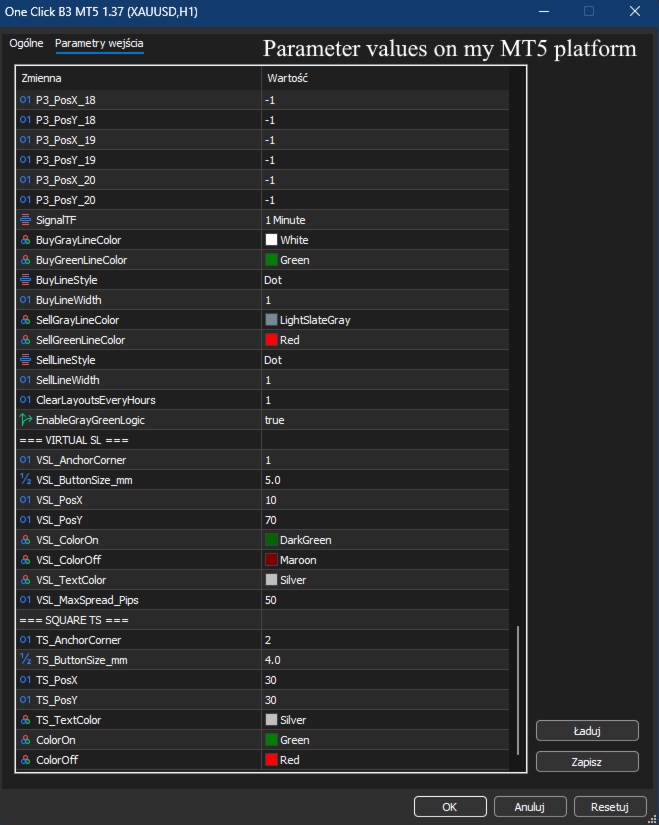
SignalTF – intervallo temporale per l'analisi del segnale grigio/verde.
BuyGrayLineColor – kolor linii detektywnej z aquisto grigia.
BuyGreenLineColor – colore della linea del segnale di acquisto verde.
BuyLineStyle – stile della linea per i segnali di acquisto.
BuyLineWidth – larghezza delle linee del segnale di acquisto.
SellGrayLineColor – colore della linea grigia del segnale di vendita.
SellGreenLineColor – colore della linea del segnale di vendita verde.
SellLineStyle – stile della linea per i segnali di vendita.
SellLineWidth – larghezza delle linee del segnale di vendita.
ClearLayoutsEveryHours – intervallo di ore per la cancellazione automatica delle linee di segnalazione (0=disabilitato).
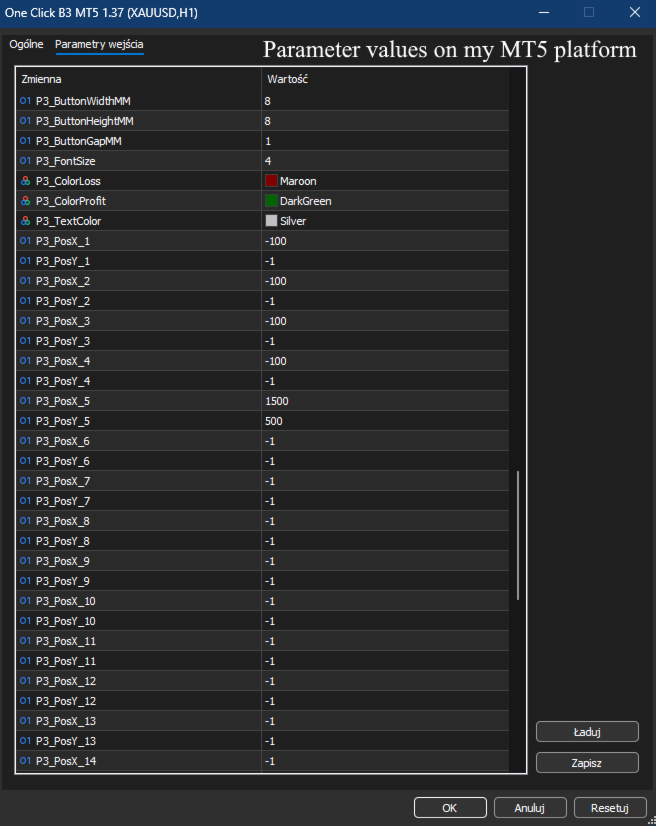
Impostazioni del pannello 3 (Controllo ultima posizione)
P3_Corner – angolo di ancoraggio per il terzo pannello.
P3_X – offset base X per il terzo pannello.
P3_Y – offset base Y per il terzo pannello.
P3_ButtonWidthMM – larghezza del pulsante in mm per il Terzo Pannello.
P3_ButtonHeightMM – altezza del pulsante in mm per il Terzo Pannello.
P3_ButtonGapMM – spaziatura tra i pulsanti nel Terzo Pannello.
P3_FontSize – dimensione del carattere per i pulsanti del Terzo Pannello.
P3_ColorLoss – colore di sfondo per la chiusura dell'ultima posizione di perdita.
P3_ColorProfit – colore di sfondo per la chiusura dell'ultima posizione di profitto.
P3_TextColor – colore del testo per i pulsanti del Terzo Pannello.
P3_BTCUSD_PosX – posizione X personalizzata per il pulsante BTCUSD nel Pannello 3.
P3_BTCUSD_PosY – posizione Y personalizzata per il pulsante BTCUSD nel Pannello 3.
P3_US30_PosX – posizione X personalizzata per il pulsante US30 nel pannello 3 (utilizzare -100 per la modalità automatica).
P3_US30_PosY – posizione Y personalizzata per il pulsante US30 nel pannello 3 (utilizzare -1 per la modalità automatica).
P3_USTEC_PosX – posizione X personalizzata per il pulsante USTEC nel pannello 3 (utilizzare -100 per la modalità automatica).
P3_USTEC_PosY – posizione Y personalizzata per il pulsante USTEC nel pannello 3 (utilizzare -1 per la modalità automatica).
P3_DE40_PosX – posizione X personalizzata per il pulsante DE40 nel pannello 3 (utilizzare -100 per la modalità automatica).
P3_DE40_PosY – posizione Y personalizzata per il pulsante DE40 nel pannello 3 (utilizzare -1 per la modalità automatica).
P3_XAUUSD_PosX – posizione X personalizzata per il pulsante XAUUSD nel Pannello 3 (utilizzare -100 per la modalità automatica).
P3_XAUUSD_PosY – posizione Y personalizzata per il pulsante XAUUSD nel Pannello 3 (utilizzare -1 per la modalità automatica).
Interruttore principale del segnale tecnico
EnableGrayGreenLogic – abilita/disabilita la visualizzazione delle linee di segnaletica grigie/verdi.
Impostazioni Virtual SL (VSL)
VSL_AnchorCorner – punto di ancoraggio nell'angolo del grafico per il pulsante "V" (Virtual SL).
VSL_ButtonSize_mm – Dimensione del pulsante "V" in millimetri.
VSL_PosX – Posizione X del pulsante "V" dall'angolo.
VSL_PosY – Posizione Y del pulsante "V" dall'angolo.
VSL_ColorOn – Sfondo del pulsante "V" quando Virtual SL è attivo.
VSL_ColorOff – Sfondo del pulsante "V" quando Virtual SL è disattivato.
VSL_TextColor – Colore del testo "V" sul pulsante.
VSL_MaxSpread_Pips – spread massimo consentito in pip per l'esecuzione di VSL (impedisce la chiusura in caso di ampliamento estremo dello spread).
Impostazioni del pulsante Trailing Stop (TS)
TS_AnchorCorner – ancoraggio nell'angolo del grafico per il pulsante TS.
TS_ButtonSize_mm – Dimensione del pulsante TS in mm.
TS_PosX – Posizione X del pulsante TS dall'angolo.
TS_PosY – Posizione Y del pulsante TS dall'angolo.
TS_TextColor – Colore del testo TS sul pulsante.
ColorOn – Sfondo del pulsante TS quando è attivo.
ColorOff – Sfondo del pulsante TS quando disattivato.
I bot porteranno successo solo se si ha accesso a capitali illimitati. Solo "occhi e mente" faranno diventare il tuo conto in attivo, e strumenti semplici, puliti, veloci ed efficienti ti Aiuteranno a raggiungere questo obiettivo.
Il vero successo richiede che sia il TUO cervello a prendere decisioni. I miei strumenti non sono bot, ma strumenti per trader che pensano.
Il prezzo di chiusura del giorno precedente agisce come una calamita →Massimo Minimo Chiusura MT5
La sessione asiatica definisce le linee guida per le sessioni di Londra e New York →Livelli di sessione asiatici
Se si utilizzano più strumenti per lo scalpo:
One Click B3 MT5, Pannello Posizioni dei simboli,Pulsante di attivazione/disattivazione SL TP, Zoom MT5 B, Volume Delta MT5
Se si taglia uno strumento:
One Click B3 MT5, Pannello Posizioni dei simboli,Pulsante di attivazione/disattivazione SL TP,Etichetta Pips Ultimo scambio, Zoom MT5 B, Volume Delta MT5
Se investi a lungo termine in diversi strumenti finanziari:
Un clic B3 MT5, Pannello Posizioni dei simboli,Volume Delta MT5
Se dopo aver letto le descrizioni avete bisogno di chiarimenti, contattatemi. Vi spiegherò ogni funzione, impostazione e caso d'uso per assicurarvi che questi strumenti siano adatti alla Vostra Strategia di Trading.