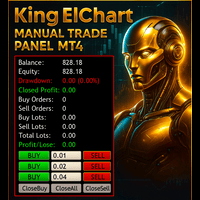
King ElChart Manual Trade Panel
- Utilità
-
Mohammed Maher Al-sayed Mohammed Ahmed Saleh
 "I am an independent Trading Bot Developer specialized in creating automated trading solutions using advanced techniques on platforms like MetaTrader 4 and MetaTrader 5. I have experience in designing and developing custom trading strategies, including using technical indicators and data analysis to
 - Versione: 5.10
- Aggiornato: 17 settembre 2026
- Attivazioni: 5
King ElChart Manual Trade Panel v5 – Fai trading veloce. Rischia con precisione.
Un pannello di trading manuale completo per MetaTrader 5 che calcola il lotto di ogni operazione a partire dal vostro stop, posiziona uno stop intelligente al di fuori del rumore di mercato e protegge le operazioni aperte dal telefono. Digitate la percentuale di rischio che siete disposti ad assumere, controllate stop e obiettivo sul grafico e aprite il lotto esatto con un clic.
Stop Intelligente (ATR + Swing)
- Due modalità di stop, selezionabili direttamente dal pannello: Smart ATR o Fixed pips.
- Smart ATR posiziona lo stop al livello più lontano tra due: ATR × moltiplicatore dal prezzo, oppure oltre l'ultimo massimo / minimo di swing più un margine di sicurezza.
- Una larghezza massima (ATR × limite) mantiene lo stop ragionevole nei mercati veloci.
- Il timeframe dell'ATR è fisso nelle impostazioni, quindi cambiare il timeframe del grafico non modifica mai il vostro stop.
Lotto per % di Rischio in un Clic
- BUY RISK e SELL RISK aprono il lotto che perde esattamente la vostra % di rischio allo stop.
- Digitate la % di rischio direttamente sul pannello, basata sul saldo o sull'equity.
- Il lotto viene calcolato in base ai dati contrattuali del vostro broker: forex, oro, indici e crypto con qualsiasi broker.
- Il lotto viene sempre arrotondato per difetto. Se anche il lotto minimo rischia più di quanto impostato, il pannello mostra la % reale e non apre l'operazione.
Anteprima in Tempo Reale di Stop Loss e Take Profit
- In modalità Smart ATR, brevi indicatori SL e TP sopra la candela corrente mostrano dove un nuovo acquisto o vendita posizionerebbe il proprio stop e obiettivo.
- Ogni indicatore mostra il proprio valore monetario per il lotto minimo e per il vostro lotto di rischio, ancora prima di cliccare.
- Gli indicatori scompaiono finché è aperta una posizione sul simbolo e riappaiono una volta chiusa.
- Take profit come multiplo rendimento : rischio dello stop, oppure in pips fissi.
Fai Trading dal Telefono, Lascia che il tuo VPS lo Gestisca
Lasciate il pannello in esecuzione sul vostro VPS con un grafico per simbolo, impostate una sola volta stop, take profit e trailing, quindi operate dall'app mobile MT5 ovunque vi troviate. Ogni posizione che aprite viene gestita dal pannello.
- Ogni posizione senza stop riceve automaticamente lo stop del pannello (Smart ATR o Fixed).
- Take profit, trailing stop e obiettivi del basket vengono applicati anche a essa.
- Se il prezzo ha già superato quel livello, lo stop viene ricostruito dal prezzo attuale invece di chiudere l'operazione.
- Un clic passa dalla gestione di tutti gli ordini sul simbolo alla gestione dei soli ordini del pannello.
Dashboard Professionale
- Conto: saldo, equity, profitto/perdita flottante e chiuso, drawdown attuale e massimo, spread.
- Posizioni: numero di acquisti e vendite con lotti, esposizione netta, modalità di gestione.
- Smart Stop e Rischio: prezzo dello stop, distanza dello stop e lotto consentito dal rischio, aggiornati in tempo reale.
- Si adatta automaticamente alla risoluzione dello schermo e alla dimensione del grafico.
- Trascinabile ovunque e riducibile a icona. Ricorda posizione, modalità di stop e scelta di gestione.
- Tema scuro opzionale per il grafico.
Toolbox Manuale Completo
- 3 righe Buy / Sell a lotto fisso ed editabile.
- Chiudi acquisti, vendite o tutto.
- Chiudi solo posizioni in profitto o solo in perdita.
- Chiusura parziale in % (tutte le posizioni o solo quelle in profitto).
- Break-even + step: ogni clic blocca ulteriori pips oltre l'ingresso.
- Reverse: inverte la vostra esposizione netta con lo stesso lotto.
- Trailing stop per posizione (in pips) o per l'intero basket (in denaro).
- Obiettivi di profitto e perdita del basket.
- Tasti di scelta rapida per ogni azione, inclusi i tasti numerici del tastierino. I tasti di scelta rapida si sospendono mentre digitate in un campo del pannello.
- Notizie USD e sessioni di mercato nel vostro orario locale, con gestione automatica dell'ora legale.
- Esecuzione asincrona per apertura e chiusura istantanee.
Compatibile Con
- Qualsiasi broker e qualsiasi simbolo: decimali, punto, valore del tick, limiti di lotto, stop level e freeze level vengono letti automaticamente.
- Conti hedging e netting.
Come Usarlo
- 1. Applicate il pannello al grafico del simbolo che tradate.
- 2. Scegliete la modalità di stop e digitate la % di rischio.
- 3. Controllate gli indicatori SL / TP e il lotto di rischio, poi premete BUY RISK o SELL RISK (o il tasto di scelta rapida).
- 4. Tenete attivo "Manage all orders" se operate anche dal telefono.
Parametri di Input
- Orders Settings: dimensione del lotto per le righe 1, 2 e 3.
- Risk Lot: % di rischio per operazione, rischio basato su saldo o equity, apertura del lotto minimo quando il lotto di rischio è inferiore.
- Stop Loss: modalità di stop, stop fisso per acquisto e vendita (pips), timeframe dell'ATR, periodo dell'ATR, moltiplicatore dell'ATR, uso dello swing stop, barre di lookback dello swing, buffer dello swing (× ATR), larghezza massima dello stop (× ATR), mostra anteprima SL / TP.
- Take Profit: modalità di take profit, take profit fisso per acquisto e vendita (pips), rapporto rendimento : rischio.
- Hotkeys: un tasto per ciascuna azione Buy, Sell, Buy Risk, Sell Risk, chiusura e gestione.
- Partial / BreakEven: modalità di chiusura parziale, step del break-even (pips).
- Basket Settings: importi di obiettivo di profitto e perdita del basket.
- Trailing Stop: attivazione, modalità (pips per posizione o denaro per basket), avvio, distanza e step.
- Magic Number / External Orders: magic number, gestione degli ordini manuali / da telefono, protezione automatica delle posizioni senza stop.
- Dashboard & Chart: posizione della dashboard, dimensione della dashboard (automatica o % fissa), tema del grafico, logo sul grafico.
- News & Sessions: mostra notizie e sessioni, ora locale o offset GMT fisso (per VPS), avvisi di notizie.
Per domande o assistenza, utilizzate il sistema di messaggi privati di MQL5.