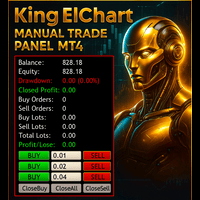
King ElChart Manual Trade Panel
- Yardımcı programlar
-
Mohammed Maher Al-sayed Mohammed Ahmed Saleh
 "I am an independent Trading Bot Developer specialized in creating automated trading solutions using advanced techniques on platforms like MetaTrader 4 and MetaTrader 5. I have experience in designing and developing custom trading strategies, including using technical indicators and data analysis to
 - Sürüm: 5.10
- Güncellendi: 17 Eylül 2026
- Etkinleştirmeler: 5
King ElChart Manual Trade Panel v5 – Hızlı işlem yapın. Riski tam isabetli yönetin.
MetaTrader 5 için eksiksiz bir manuel işlem paneli; stopunuza göre her işlemin lotunu hesaplar, piyasa gürültüsünün dışına akıllı bir stop yerleştirir ve telefonunuzdan açtığınız işlemleri de korur. Almaya razı olduğunuz risk yüzdesini girin, grafikte stop ve hedefi kontrol edin, tek tıkla tam lotu açın.
Akıllı Stop (ATR + Swing)
- Doğrudan panelden değiştirilebilen iki stop modu: Smart ATR veya Fixed pips.
- Smart ATR, stopu iki seviyeden daha uzak olanına yerleştirir: fiyattan ATR × çarpan kadar uzağa, ya da son swing tepe / dip noktasının ötesine ek bir güvenlik payıyla.
- Maksimum genişlik (ATR × üst sınır), hızlı piyasalarda stopu makul seviyede tutar.
- ATR zaman dilimi ayarlarda sabittir, bu nedenle grafik zaman dilimini değiştirmek stopunuzu asla değiştirmez.
Tek Tıkla Risk % Lotu
- BUY RISK ve SELL RISK, stopa ulaşıldığında tam olarak belirlediğiniz risk yüzdesi kadar kaybettiren lotu açar.
- Risk yüzdesini doğrudan panelden, bakiye veya özkaynak bazında girin.
- Lot, brokerınızın kendi kontrat verilerinden hesaplanır: herhangi bir brokerda forex, altın, endeks ve kripto.
- Lot her zaman aşağı yuvarlanır. Minimum lot bile belirlediğiniz riskten fazlasını riske atıyorsa, panel gerçek yüzdeyi gösterir ve işlemi açmaz.
Canlı Stop Loss ve Take Profit Önizlemesi
- Smart ATR modunda, mevcut mumun üzerindeki kısa SL ve TP işaretleri yeni bir alış veya satışın stopunu ve hedefini nereye yerleştireceğini gösterir.
- Her işaret, siz tıklamadan önce minimum lot ve risk lotunuz için parasal değeri gösterir.
- Sembolde açık bir pozisyon olduğu sürece işaretler kaybolur, pozisyon kapandığında yeniden görünür.
- Take profit, stopa göre getiri : risk katı olarak veya sabit pip olarak ayarlanabilir.
Telefonunuzdan İşlem Yapın, Yönetimi VPS'inize Bırakın
Sembol başına bir grafikle paneli VPS'inizde çalışır durumda bırakın, stopu, take profiti ve trailing'i bir kez ayarlayın, ardından nerede olursanız olun MT5 mobil uygulamasından işlem yapın. Açtığınız her pozisyon panel tarafından devralınır.
- Stopu olmayan her pozisyon otomatik olarak panel stopunu alır (Smart ATR veya Fixed).
- Take profit, trailing stop ve sepet hedefleri de bu pozisyona uygulanır.
- Fiyat bu seviyeyi zaten geçtiyse, stop işlemi kapatmak yerine mevcut fiyattan yeniden oluşturulur.
- Tek tıkla, sembolün tüm emirlerini yönetmek ile yalnızca panel emirlerini yönetmek arasında geçiş yapılır.
Profesyonel Gösterge Paneli
- Hesap: bakiye, özkaynak, dalgalı ve kapanmış kâr/zarar, anlık ve maksimum drawdown, spread.
- Pozisyonlar: lotlarıyla birlikte alış ve satış sayısı, net pozisyon, yönetim modu.
- Smart Stop ve Risk: stop fiyatı, stop mesafesi ve riskinizin izin verdiği lot, canlı olarak güncellenir.
- Ekran çözünürlüğüne ve grafik boyutuna göre otomatik ölçeklenir.
- Her yere sürüklenebilir ve küçültülebilir. Konumunu, stop modunu ve yönetim tercihini hatırlar.
- İsteğe bağlı sade koyu grafik teması.
Eksiksiz Manuel Araç Kutusu
- Düzenlenebilir sabit lotlu 3 satır Buy / Sell.
- Alışları, satışları veya tümünü kapat.
- Yalnızca kârdaki veya yalnızca zarardaki pozisyonları kapat.
- % ile kısmi kapama (tüm pozisyonlar veya yalnızca kârdakiler).
- Break-even + adım: her tıklama girişin ötesinde daha fazla pip kilitler.
- Reverse: aynı lot ile net pozisyonunuzu tersine çevirir.
- Pozisyon başına (pip olarak) veya tüm sepet için (para olarak) trailing stop.
- Sepet kâr ve sepet zarar hedefleri.
- Numpad rakamları dahil her eylem için kısayol tuşları. Panel alanına yazarken kısayollar duraklar.
- Yerel saatinize göre USD haberleri ve piyasa seansları, yaz saati otomatik olarak uygulanır.
- Anında açma ve kapama için asenkron işlem yürütme.
Uyumluluk
- Herhangi bir broker ve herhangi bir sembol: basamak sayısı, point, tick değeri, lot limitleri, stop level ve freeze level otomatik olarak okunur.
- Hedge ve netting hesapları.
Nasıl Kullanılır
- 1. Paneli işlem yaptığınız sembolün grafiğine ekleyin.
- 2. Stop modunuzu seçin ve risk yüzdenizi girin.
- 3. SL / TP işaretlerini ve risk lotunu kontrol edin, ardından BUY RISK veya SELL RISK'e (ya da kısayola) basın.
- 4. Telefonunuzdan da işlem yapıyorsanız "Manage all orders" seçeneğini açık tutun.
Giriş Parametreleri
- Orders Settings: 1, 2 ve 3. satırlar için lot büyüklüğü.
- Risk Lot: işlem başına risk %, bakiye veya özkaynak bazlı risk, risk lotu minimum lotun altındayken minimum lotu açma.
- Stop Loss: stop modu, alış ve satış için sabit stop (pip), ATR zaman dilimi, ATR periyodu, ATR çarpanı, swing stop kullanımı, swing geriye bakış bar sayısı, swing tamponu (× ATR), maksimum stop genişliği (× ATR), SL / TP önizlemesini gösterme.
- Take Profit: take profit modu, alış ve satış için sabit take profit (pip), getiri : risk oranı.
- Hotkeys: Buy, Sell, Buy Risk, Sell Risk, kapatma ve yönetim eylemlerinin her biri için bir tuş.
- Partial / BreakEven: kısmi kapama modu, break-even adımı (pip).
- Basket Settings: sepet kâr ve sepet zarar tutarları.
- Trailing Stop: etkinleştirme, mod (pozisyon başına pip veya sepet başına para), başlangıç, mesafe ve adım.
- Magic Number / External Orders: magic number, manuel / telefon emirlerinin yönetimi, stopu olmayan pozisyonların otomatik korunması.
- Dashboard & Chart: gösterge paneli konumu, gösterge paneli boyutu (otomatik veya sabit %), grafik teması, grafik üzerinde logo.
- News & Sessions: haber ve seansları gösterme, yerel saat veya sabit GMT ofseti (VPS için), haber uyarıları.
Sorularınız veya destek için lütfen MQL5 özel mesaj sistemini kullanın.