Magic Keyboard MT5

Trade at the Speed of Thought – No Mouse Required

⚡ The Fastest Way to Execute Trades.

Magic Keyboard (MT5 Utility) transforms your standard keyboard into a professional trading cockpit. Stop wasting milliseconds dragging your mouse to a "Buy" button. With this utility, you can execute, secure, and close trades instantly using the arrow keys you already know.

Perfect for Scalpers and High-Frequency Traders where every split-second counts.

[ Get the MT4 Version Here ]


🎮 Default Hotkey Layout

Start trading immediately with these pre-set intuitive shortcuts:

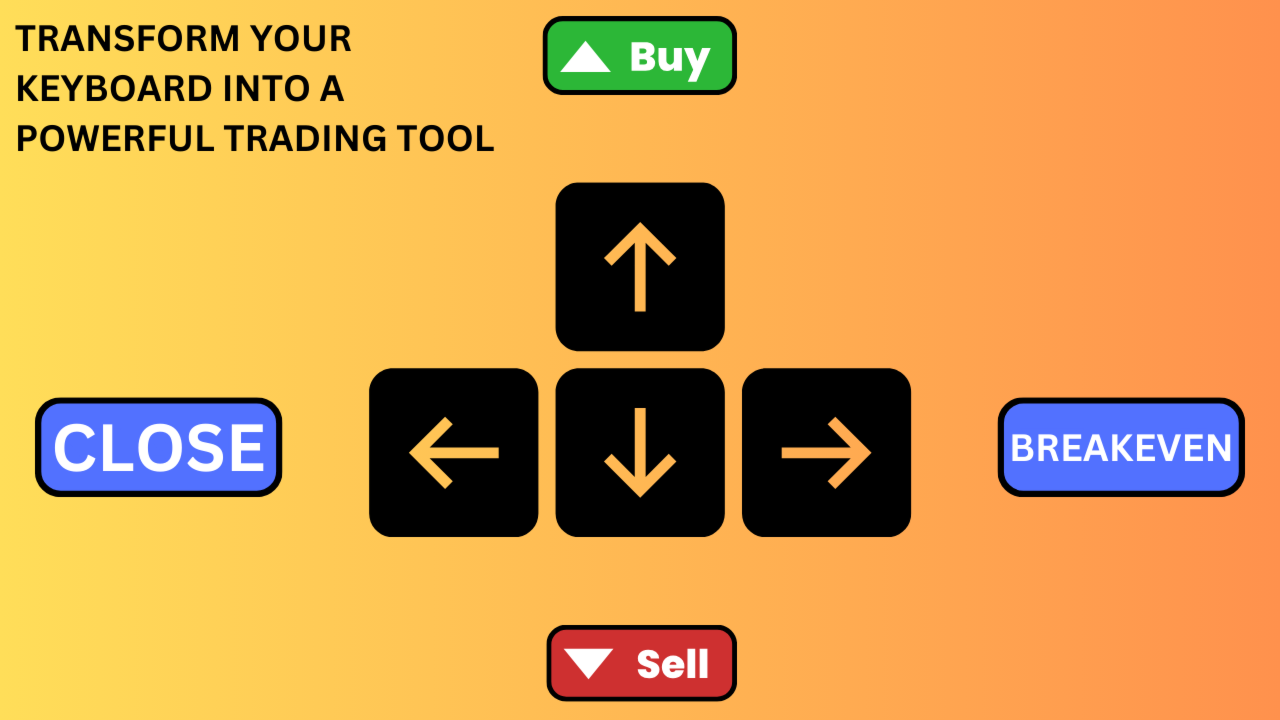
  • ⬆️ UP Arrow: Instant BUY (with Auto SL/TP)

  • ⬇️ DOWN Arrow: Instant SELL (with Auto SL/TP)

  • ➡️ RIGHT Arrow: Instant Break-Even (Secure Profit)

  • ⬅️ LEFT Arrow: Panic Button (Close ALL Trades Instantly)

Don't like arrows? You can remap these functions to ANY key on your keyboard (Spacebar, Enter, 'B', 'S', etc.) using Key Codes!


🔥 Key Features

1. Millisecond Execution Bypass the visual terminal. Press a key, and the order is sent immediately. This reduces the friction between seeing a setup and being in the market.

2. Fully Automated Protection Speed means nothing without safety. Every trade you open via keyboard automatically gets:

  • Auto Stop Loss: Hard risk protection immediately.

  • Auto Take Profit: Hard target set immediately.

3. Smart Trade Management Once you are in the trade, the manager handles the rest:

  • Auto Break-Even: Automatically moves SL to entry when profit is reached.

  • Auto Trailing Stop: "Steps" your stop loss behind price to capture maximum trends.


⚙️ Input Settings Guide

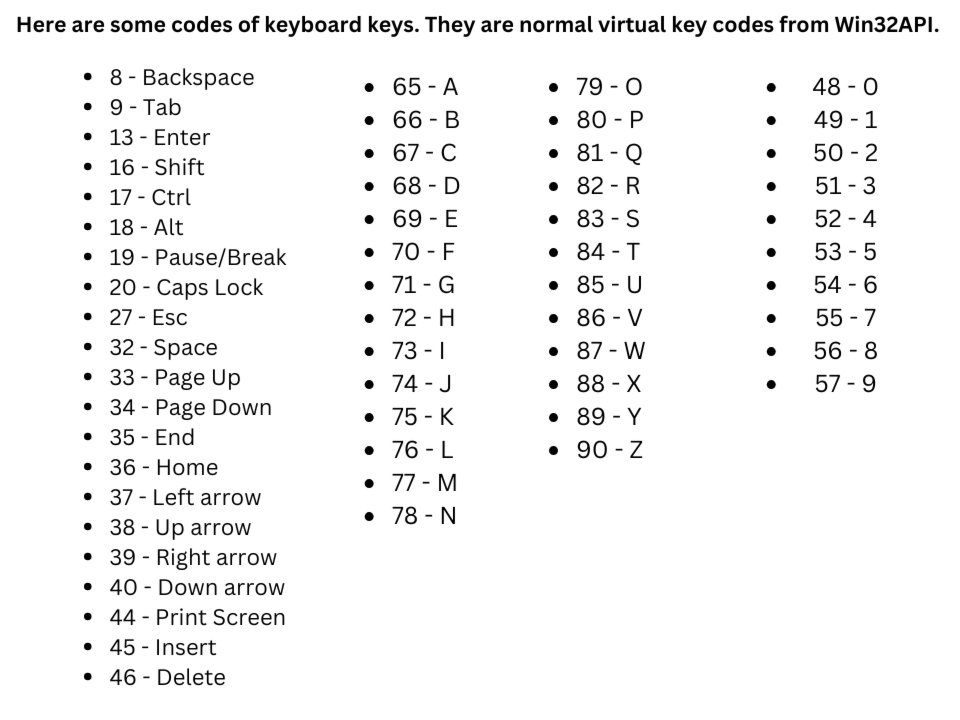
⌨️ Magic Keyboard Configuration (Key Codes) Map your keys using standard ASCII Key Codes.

  • Buy - Key: Default 38 (Up Arrow).

  • Sell - Key: Default 40 (Down Arrow).

  • Break-even - Key: Default 39 (Right Arrow).

  • Close All - Key: Default 37 (Left Arrow).

  • Tip: Want to use the Spacebar? Change the code to 32. Want 'Enter'? Change to 13. Simply search "Keyboard Key Codes" on Google to find the ID for any key you want.

🛡️ Trade Management

  • Take Profit (pips): Distance for target.

  • Stop Loss (pips): Distance for safety stop.

🔒 Break-Even Settings

  • Auto Break-even: true = Automatic; false = Manual (via Hotkey).

  • Pips in Profit: Distance required to trigger break-even.

  • Pips Offset: Extra profit to lock in (to cover spread/commissions).


📉 Trailing Stop Settings

  • Auto Trailing Stop: true/false.

  • Stop: Distance behind price.

  • Step: Minimum move required to update the stop (prevents log spam).

  • Start: Minimum profit required before trailing activates.

🤖 Magic Number Strategy

  • Magic Number:

  • Set to 0 to manage your manual/keyboard trades.

  • Set to a specific ID to manage trades from another EA using your keyboard shortcuts.
Prodotti consigliati
SwiftEdge Scalper EA Professionale di Scalping con Controllo Manuale Completo Lo scalping richiede decisioni in una frazione di secondo, gestione precisa del rischio ed esecuzione perfetta degli ordini. Gestire calcoli di breakeven, trailing stop e multiple posizioni mentre si osserva l'azione del prezzo è travolgente senza gli strumenti giusti. SwiftEdge Scalper è il tuo assistente di trading professionale progettato per scalper attivi e day trader. Esegui trade con un clic o scorciatoia da tas
This tool will perform Trailing stop loss and Break even management for orders. Helps you limit or reduce the time spend watching orders on the screen, especially when you need to go to sleep. Just add this EA to 1 chart, you can manage all pairs. You can filter orders by comment, magic number, symbol and order ticket number. When Breakeven it can add shift/offset pips (to cover the commission...). You can try in strategy tester before purchase. The EA will add Buy and Sell alternately, so you
SL TP Panel
Mikhail Ostashov
SL TP Panel — Visual Trading Panel for MT5 A convenient trading panel that lets you place pending orders by simply dragging lines on the chart. Stop Loss, Take Profit, order type, and lot size — everything is controlled with your mouse in seconds. Who is this for This panel is designed for manual traders who value speed of execution. Instead of opening the order window, filling in fields, and calculating levels — just drag a line to the desired price and click one button. Key Features Visua
TradingCoPilot
Viktor Mitrofanov
Trading Co-Pilot for MetaTrader 5 Advanced Position Management for Manual Traders Trading Co-Pilot is a professional trade management assistant designed for traders who open positions manually and want precise, automated control over risk and profit handling. It does not open trades. It manages them intelligently. You focus on entries. The Co-Pilot protects and optimizes the exit. How It Works Once you open a manual position, Trading Co-Pilot automatically: • Applies Stop Loss • Sets Take Profit
FREE
Tool Auto Modify SLTP – Protect Your Trades, Optimize Your Strategy In trading, risk is always present. Just one forgotten SL/TP can turn a promising trade into a loss. Even experienced traders occasionally make mistakes. That’s why Tool Auto Modify SLTP was created – to keep you protected and let you focus on your strategy. Key Features: Manage Orders for All Symbols: Monitor and adjust SL/TP for all your trading pairs. Three Flexible Risk Modes: Point-Based: Set fixed SL/TP distances. Account
Indicator Automator EA: The Ultimate Indicator Automation Tool Tired of being chained to your desk, waiting for signals from your favorite indicator? Do you want to eliminate emotional trading and unlock the true potential of your manual strategy? Indicator Automator EA is a powerful and highly versatile Expert Advisor for MetaTrader 5 designed to automate ANY trading indicator that provides clear Buy and Sell signals through its indicator buffers. You don't need to be a programmer. If you have
Expert TP SL v04
Mikhail Ostashov
Expert TP SL v04 - Professional Trading Assistant with AI Motivation System Advanced manual trading tool with automatic risk management, overtrading protection, and intelligent psychological support for disciplined trading. PRODUCT OVERVIEW Expert TP SL v04 is a comprehensive trading assistant designed for manual traders who want to maintain emotional discipline while automating risk calculations. This isn't just another order placement tool - it's a complete trading psychology system that pr
Trade Manager DaneTrades
Levi Dane Benjamin
4.36 (28)
Trade Manager per aiutarti a entrare e uscire rapidamente dalle operazioni calcolando automaticamente il tuo rischio. Incluse funzionalità che ti aiutano a prevenire l'eccessivo trading, il vendetta trading e il trading emotivo. Le operazioni possono essere gestite automaticamente e i parametri di performance del conto possono essere visualizzati in un grafico. Queste caratteristiche rendono questo pannello ideale per tutti i trader manuali e aiuta a migliorare la piattaforma MetaTrader 5. Suppo
StealthTrade Commander   is an advanced visual trading panel and risk-management utility designed for manual traders, scalpers, and Prop-Firm challengers. This tool helps you execute trades visually directly from the chart, hide your Stop Loss and Take Profit levels from the broker, and strictly control your daily drawdown—a crucial feature for passing and keeping Prop-Firm funded accounts.  KEY FEATURES:  Risk Guardian (Prop-Firm Protector) Max Daily Loss Limit:   Automatically closes all trad
FREE
Il DYJ MOBILE GAMING TRADING WINNER può utilizzare i vari terminali (TELEFONO CELLULARE, WEB, TRADINGVIEW, MT5) per il trading manuale e quindi elaborato automaticamente da EA. Il trading mobile può utilizzare le varie modalità di griglia di EA, la modalità scalp, la modalità di arbitraggio di copertura e la modalità di ordine indipendente per aprire le posizioni manualmente, EA può impostare automaticamente lo stop loss per l'apertura mobile. E usa il tuo cellulare per aprire una griglia, sc
SmartTrail PRO MT5 — All-in-One Trade Management Panel Your all-in-one trade management companion for MetaTrader 5. SmartTrail PRO takes the stress out of position management. Whether you trade manually or use Expert Advisors, it protects your capital with intelligent, volatility-adaptive stop management — across all symbols, all account types, automatically. Why SmartTrail PRO? Most traders lose not because of bad entries, but because of poor exits. SmartTrail PRO solves this by providing a com
Breakevan Utility
Jose Luis Thenier Villa
BreakEvan Utility  Is a simple tool in a panel with this utilities: This utility will draw a Golden Line in the chart applied showing the breakeven price, considering all the positions opened for that specific symbol. Also the information panel shows: Balance Breakeven Price for that chart Force Breakeven (for that symbol) as ON/OFF Force Breakeven Global (takes into account all trades opened) as ON/OFF Total Lots opened for Symbol Total Lots opened Global And two buttons: Force Breakeven: Whe
Trading Utility for Forex Currency Pairs Only not for Gold  Functions Auto Lot Calculation based on Risk Auto stoploss  Auto TakeProfit Breakeven Auto Close Half % Close in percentage with respect to the PIPs Pending Orders BuyLimit Sell Limit with distances BuyStop Sell Stop    with distances Trading Informations Risk in percentage For Multiple trades Combine Takeprofit and Combine Stoplosses
Lot calculator tool MT5
Ernestas Kvedaras
3.67 (3)
More stable MetaTrader 4 version is available here:  Lot Calculator Tool . This tool helps you to automatically calculate and manage risk, conveniently place orders visually, schedule orders, trail stops, move them to break-even and more. Features Place market or pending orders using draggable lines Schedule orders Calculate and limit risk using various methods See current spread See time till next candle Set custom order comments Trail stops Move stops to break-even See order profit/loss in p
This EA is there to take your trade closing stress away. Quickly close as many trades as you have opened at the click of a button, INCLUDING PENDING ORDERS. This works on the MT5 platform whether it be currencies, Indices, stocks or Deriv synthetic indices. I have saved it under utilities as it is a utility, however, to install this, you have to save the file in you "EA" folder. That is; Go to "File", then "Open Data Folder", "MQL5" and then "Experts". Paste this file there. Restart MT5 and you'
TradeMngrMT5
Edgar Enrique Retontali
TradeManager 1.0   is an Expert Advisor for MetaTrader 4 y 5 that streamlines real-time trade management. Through a graphical control panel, you can send market and pending orders, move stop losses to breakeven, and automatically calculate position size based on your risk settings. Below is a comprehensive overview of its features and input parameters. Key Features Market Orders & Pending Orders BUY/SELL Buttons : Instantly open long or short positions at market. BUY STOP / SELL STOP / BUY LIMI
OCN Position Manager
Franck Henri Maglott
OCN Trade Manager Professional Trade Management for MetaTrader 5 Trading requires precision. A poorly placed Stop Loss, a missed Break Even, or incorrect Take Profit levels can quickly turn a well-planned trade into an avoidable mistake. OCN Trade Manager was designed to solve this problem. This utility helps you manage your trades automatically and with precision directly on MetaTrader 5. Once a trade is opened, the manager applies your predefined rules and helps you maintain a disciplined exec
RiskCopilot
Carlos Adrian Feged Zapata
ITALIANO RiskCopilot Utility - Il Tuo Assistente di Trading Intelligente "Vedi il Tuo Rischio. Padroneggia il Tuo Trading." RiskCopilot Utility è la soluzione definitiva per la gestione del rischio e il dimensionamento delle posizioni per MetaTrader 5. Questo assistente di trading completo fornisce calcoli in tempo reale, strumenti avanzati di valutazione del rischio e analisi professionali senza controllare le tue decisioni di trading. Perfetto sia per trader principianti che professional
Prop Firm Simulator
Abdeljalil El Kedmiri
Padroneggia le sfide delle prop firm prima di rischiare denaro reale!   Il nostro simulatore avanzato ricrea ambienti di trading autentici delle prop firm, aiutandoti a fare pratica, elaborare strategie e superare le sfide con sicurezza. Utilizzando il nostro Simulatore, puoi simulare qualsiasi sfida di prop firm utilizzando conti demo o reali, supporta sia strategie di trading manuali che trading automatizzato tramite EA, crea sfide personalizzate per periodi personalizzati e mettiti alla prova
Symbol Manager for MT5
Taras Slobodyanik
5 (3)
Symbol Manager or Grid Manager, designed to group orders into one position (by Symbol or by Magic Number). This utility will be useful to multi-currency traders (many EAs), who can have multiple orders on several pairs. You will be able to see the total number of lots, the total profit, and set virtual stop loss and virtual take profit. To set a real TP (or SL), you must first set the virtual value, and then enter the command in this cell: "set". If you want to set real TP/SL for all orders at
OneClick Trade Panel v1.0 — MT5 Expert Advisor Professional On-Chart Trading Panel with Built-in Risk Calculator What Is It? Group support:  https://www.mql5.com/en/channels/vuongphamtrading OneClick Trade Panel is an all-in-one trading panel that sits directly on your MT5 chart. It replaces the default MT5 one-click window with a full-featured interface combining: order execution, automatic lot calculation, visual SL/TP planning, position monitoring, and batch close operations. Built for speed.
Laguerre SuperTrend Clouds   adds an Adaptive Laguerre averaging algorithm and alerts to the widely popular SuperTrend indicator. As the name suggests,   Laguerre SuperTrend Clouds (LSC)   is a trending indicator which works best in trendy (not choppy) markets. The SuperTrend is an extremely popular indicator for intraday and daily trading, and can be used on any timeframe. Incorporating Laguerre's equation to this can facilitate more robust trend detection and smoother filters. The LSC uses the
Auto SLTP Maker MT5
Oleg Remizov
5 (1)
Auto SLTP Maker MT5  is an assistant for all those who forget to set StopLoss and/or TakeProfit in deal parameters, or trade on a very fast market and fail to place them in time. This tool automatically tracks trades without StopLoss and/or TakeProfit and checks what level should be set in accordance with the settings. The tool works both with market and pending orders. The type of orders to work with can be set in the parameters. It can track either trades for the instrument it runs on, or all
Turbo Close All
Phami Thanh Hoang
Turbo Close All is a powerful and versatile script designed to help traders quickly and efficiently manage their trading positions and pending orders on MetaTrader 5. With its advanced features and customizable settings, this script is an essential tool for traders who want to streamline their trading process and maintain control over their positions and orders. Key Features: Comprehensive Closing Options: Turbo Close All allows you to close all market positions and/or delete pending orders bas
Close Buttons Utility è un'utility MQL5 compatta e flessibile per la gestione manuale di posizioni e ordini pendenti direttamente dal grafico. Il pannello consente di chiudere gruppi di ordini e posizioni sul simbolo corrente o su un gruppo di simboli selezionati con un solo clic. Può funzionare con tutti gli ordini, così come con un elenco specificato di Magic Number o con ordini manuali. Il pannello può essere ridotto a icona o spostato sullo schermo. Sono supportati temi chiari e scuri, dime
Candlestick Pattern Scanner is a multi-timeframe and multi-symbol dashboard and alert system that checks all timeframes and currency pairs for different candlestick patterns that are formed in them. Scanner is integrated   with support and resistance zones so you can check the candlestick patterns in most important areas of the chart to find breakout and reversal patterns in the price chart. Download demo version   (works on M4,M6,M12,H3,H8 timeframes and 20 symbols of Market Watch window) Read
Capital Manager
Pham Cong Chinh
Capital Management EA – Smart Risk Management & Profit Optimization for MT5 Take control of your trading capital with smart, automated strategies — fully optimized for MetaTrader 5 (MT5). Looking to protect your capital and maximize profits through automated money management strategies ? Capital Management EA is the all-in-one Expert Advisor for MetaTrader 5 (MT5) that helps you trade smarter, not harder. Core Features: 5-in-1 Capital Management Strategies – Built-in versatility Gr
Equity Shield Pro
Saad Janah
4.5 (2)
Equity Shield Pro 1.1 NEW VERSION  Equity Shield Pro 1.1 is a powerful utility EA designed to safeguard your trading account by actively monitoring and enforcing equity protection and profit management rules. Whether you’re trading personal accounts or working through proprietary firm challenges, this EA ensures strict adherence to risk and profit targets, enabling you to maintain discipline and consistency. Fully compatible with all challenge types, Equity Shield Pro 1.1 is specifically craft
Drawing Assistant Tool for MT5 This is an assistant tool that allows you to create drawing objects with a single click from an on-chart panel, using settings independent of the standard MT5 objects. Dual Presets: You can draw two distinct styles for each object type, labeled "1" and "2", simply by clicking the respective buttons. Three Styles Available: Since these presets function independently from the standard MT5 toolbar objects, you effectively have access to three different object styles (
Short Description: FTMO Protector PRO MT5 is an EA designed to protect your funded account by managing risk and ensuring compliance with the Prop Firm's trading rules. This EA automatically monitors equity levels, closes trades when profit targets or drawdown limits are reached, and provides a visual display of key account metrics.  EA w orks with all different Prop Firm service providers. Overview: FTMO Protector PRO MT5 is an Drawdown Safeguard Expert Advisor meticulously crafted for trade
Gli utenti di questo prodotto hanno anche acquistato
Trade Assistant MT5
Evgeniy Kravchenko
4.42 (208)
It helps to calculate the risk per trade, the easy installation of a new order, order management with partial closing functions, trailing stop of 7 types and other useful functions. Additional materials and instructions Installation instructions - Application instructions - Trial version of the application for a demo account Line function -   shows on the chart the Opening line, Stop Loss, Take Profit. With this function it is easy to set a new order and see its additional characteristics bef
Forex Trade Manager MT5
InvestSoft
4.97 (628)
Benvenuto a Trade Manager EA, lo strumento definitivo per la gestione del rischio , progettato per rendere il trading più intuitivo, preciso ed efficiente. Non è solo uno strumento per l'esecuzione degli ordini, ma una soluzione completa per la pianificazione delle operazioni, la gestione delle posizioni e il controllo del rischio. Che tu sia un principiante, un trader avanzato o uno scalper che necessita di esecuzioni rapide, Trade Manager EA si adatta alle tue esigenze, offrendo flessibilità s
TradePanel MT5
Alfiya Fazylova
4.87 (149)
Trade Panel è un assistente commerciale multifunzionale. L'applicazione contiene più di 50 funzioni di trading per il trading manuale e consente di automatizzare la maggior parte delle operazioni di trading. Attenzione, l'applicazione non funziona nel tester di strategia. Prima dell'acquisto, puoi testare la versione demo su un conto demo. Versione demo qui . Istruzioni complete qui . Commercio. Ti consente di eseguire operazioni di trading con un clic: Apri ordini e posizioni pendenti con calco
Versione Beta Telegram to MT5 Signal Trader è quasi pronto per il rilascio ufficiale in versione alpha. Alcune funzionalità sono ancora in fase di sviluppo e potresti riscontrare piccoli bug. Se riscontri problemi, ti preghiamo di segnalarli, il tuo feedback aiuta a migliorare il software per tutti. Telegram to MT5 Signal Trader è uno strumento potente che copia automaticamente segnali di trading da canali o gruppi Telegram al tuo account MetaTrader 5 . Supporta canali pubblici e privati e cons
FarmedHedge Pair Trading Dashboard
Tanapisit Tepawarapruek
5 (2)
VERIFIED TRADING RESULTS - Farmed Hedge Yield Axi Copy:  https://www.mql5.com/en/signals/2356376 - Farmed Hedge Yield Exn Copy:   https://www.mql5.com/en/signals/2356404 - Farmed Hedge Yield V Copy:  https://www.mql5.com/en/signals/2357156 Contact me via private message to receive the User Manual and Setup. * Thai Lauguage Support Available Farmed Hedge Yield Farming - Professional Pair Trading Dashboard (Manual - Hybrid - Semi/Automated EA) VERSION 3 - WILD HARVEST UPDATE Trading Approac
Trade Dashboard MT5
Fatemeh Ameri
4.94 (119)
Tired of complex order placement and manual calculations? Trade Dashboard is your solution. With its user-friendly interface, placing orders becomes effortless, by a single click, you can open trades, set stop loss and take profit levels, manage trade lot size, and calculate risk to reward ratios, allowing you to only focus on your strategy. Say goodbye to manual calculations and streamline your trading experience with Trade Dashboard. Download  Demo Version  right now. You can find  Details of
Copy Cat More Trade Copier MT5 (Gatto Copiatore MT5) è un copiatore di trade locale e un framework completo di gestione del rischio ed esecuzione progettato per le sfide di trading odierne. Dalle sfide delle prop firm alla gestione di portafogli personali, si adatta a ogni situazione con una combinazione di esecuzione robusta, protezione del capitale, configurazione flessibile e gestione avanzata dei trade. Il copiatore funziona sia in modalità Master (mittente) che Slave (ricevente), con sincro
Smart Stop Manager MT5
Daniel Stein
4.33 (3)
Smart Stop Manager – Esecuzione automatica dello stop-loss con precisione professionale Panoramica Smart Stop Manager è il livello di esecuzione della linea Smart Stop, progettato per i trader che richiedono una gestione dello stop-loss strutturata, affidabile e completamente automatizzata su più posizioni aperte. Monitora continuamente tutte le operazioni attive, calcola il livello di stop ottimale utilizzando la logica di struttura di mercato Smart Stop e aggiorna gli stop automaticamente se
Telegram To MT5 Receiver
Levi Dane Benjamin
4.53 (15)
Copia i segnali da qualsiasi canale di cui sei membro (compresi quelli privati e ristretti) direttamente sul tuo MT5.  Questo strumento è stato progettato con l'utente in mente offrendo molte funzionalità necessarie per gestire e monitorare gli scambi. Questo prodotto è presentato in un'interfaccia grafica facile da usare e visivamente accattivante. Personalizza le tue impostazioni e inizia ad utilizzare il prodotto in pochi minuti! Guida per l'utente + Demo  | Versione MT4 | Versione Discord
Non testare un EA solo contro l’unico percorso di mercato che si è realmente verificato. Testalo su molti mercati plausibili e scopri se la sua logica è davvero robusta. Il backtest tradizionale ha un limite fondamentale: mostra soltanto come un sistema avrebbe funzionato in un unico passato reale . Questo è il problema. Il mercato avrebbe potuto seguire molti percorsi diversi. E un expert advisor che funziona bene sullo storico reale non necessariamente si comporterà allo stesso modo se le con
Smart Stop Scanner – Analisi multi-asset degli stop-loss basata sulla reale struttura di mercato Panoramica Smart Stop Scanner offre un monitoraggio professionale dei livelli di stop-loss su più mercati. Il sistema identifica automaticamente le zone di stop più rilevanti basandosi sulla reale struttura di mercato, sulle rotture significative e sulla logica del price action, presentando tutte le informazioni in un pannello chiaro, coerente e ottimizzato per schermi ad alta risoluzione (DPI-awar
The News Filter MT5
Leolouiski Gan
4.74 (19)
Questo prodotto filtra tutti gli esperti consulenti e i grafici manuali durante il periodo delle notizie, così non dovrai preoccuparti di improvvisi picchi di prezzo che potrebbero distruggere le tue impostazioni di trading manuali o le negoziazioni effettuate da altri esperti consulenti. Questo prodotto viene fornito anche con un sistema completo di gestione degli ordini che può gestire le tue posizioni aperte e gli ordini in sospeso prima della pubblicazione di qualsiasi notizia. Una volta che
Exp COPYLOT CLIENT for MT5
Vladislav Andruschenko
3.82 (34)
Trade copyr per MT5 è un trade copyr per la piattaforma МetaТrader 5   . Copia le negoziazioni forex   tra       eventuali conti   MT5   -   MT5, MT4   -   MT5 per la versione COPYLOT MT5 (o MT4   -   MT4 MT5   -   MT4 per la versione COPYLOT MT4) Fotocopiatrice affidabile! Versione MT4 Descrizione completa   +DEMO +PDF Come comprare Come installare     Come ottenere i file di registro     Come testare e ottimizzare     Tutti i prodotti di Expforex Puoi anche copiare le operazioni nel termina
Trade Manager DashPlus
Henry Lyubomir Wallace
5 (13)
DashPlus è uno strumento avanzato di gestione delle operazioni progettato per migliorare l'efficienza e l'efficacia del trading sulla piattaforma MetaTrader 5. Offre una suite completa di funzionalità, tra cui calcolo del rischio, gestione degli ordini, sistemi di griglia avanzati, strumenti basati su grafici e analisi delle prestazioni. Caratteristiche Principali 1. Griglia di Recupero Implementa un sistema di griglia flessibile e di media per gestire le operazioni in condizioni di mercato avve
Ultimate Extractor
Clifton Creath
5 (9)
Ultimate Extractor - Professional Trading Analytics for MT5 *****this is the local HTML version of Ultimate Extractor. Check out Ultimate Extractor Cloud on mql5 for the Cloud version****** Ultimate Extractor transforms your MetaTrader 5 trading history into actionable insights with comprehensive analytics, interactive charts, and real-time performance tracking. What It Does Automatically analyzes your MT5 trading history across all Expert Advisors and generates detailed HTML reports with inte
MT5 to Telegram Signal Provider è un'utilità facile da usare e completamente personalizzabile che consente l'invio di segnali specificati a una chat, canale o gruppo Telegram, rendendo il tuo account un fornitore di segnali. A differenza della maggior parte dei prodotti concorrenti, non utilizza importazioni DLL. [ Dimostrativo ] [ Manuale ] [ Versione MT4 ] [ Versione Discord ] [ Canale Telegram ]  New: [ Telegram To MT5 ] Configurazione Una guida utente passo-passo è disponibile. Nessuna cono
YuClusters
Yury Kulikov
4.93 (43)
Attention: You can view the program operation in the free version  YuClusters DEMO .  YuClusters is a professional market analysis system. The trader has unique opportunities to analyze the flow of orders, trade volumes, price movements using various charts, profiles, indicators, and graphical objects. YuClusters operates on data based on Time&Sales or ticks information, depending on what is available in the quotes of a financial instrument. YuClusters allows you to build graphs by combining da
VirtualTradePad One Click Trading Panel
Vladislav Andruschenko
4.59 (73)
Pannello di trading per il trading in 1 clic.   Lavorare con posizioni e ordini!   Trading dal grafico o dalla tastiera. Con il nostro pannello di trading, puoi eseguire operazioni con un solo clic direttamente dal grafico ed eseguire operazioni di trading 30 volte più velocemente rispetto al controllo MetaTrader standard. I calcoli automatici di parametri e funzioni rendono il trading più veloce e conveniente per i trader. Suggerimenti grafici, etichette informative e informazioni complete sugl
Telegram to MT5 Coppy
Sergey Batudayev
5 (8)
Da Telegram a MT5:   la soluzione definitiva per la copia del segnale Semplifica il tuo trading con Telegram su MT5, il moderno strumento che copia i segnali di trading direttamente dai canali e dalle chat di Telegram sulla tua piattaforma MetaTrader 5, senza bisogno di DLL. Questa potente soluzione garantisce un'esecuzione precisa dei segnali, ampie opzioni di personalizzazione, fa risparmiare tempo e aumenta la tua efficienza. [ Instructions and DEMO ] Caratteristiche principali Integrazione d
The product will copy all telegram signal to MT5 ( which you are member) , also it can work as remote copier.  Easy to set up, copy order instant, can work with almost signal formats, image signal,  s upport to translate other language to English Work with all type of channel or group, even channel have "Restrict Saving Content", work with  multi channel, multi MT5 Work as remote copier: with signal have ticket number, it will copy exactly via ticket number. Support to backtest signal. How to s
Take a Break MT5
Eric Emmrich
4.75 (24)
News filter, equity guard & session control for all your EAs — one tool, full protection Take a Break has evolved from a basic news filter into a comprehensive account protection solution . It pauses your other Expert Advisors during news events or based on custom filters. When trading resumes, it automatically restores your entire chart setup , including all EA settings. Why traders choose Take a Break One news filter for all your EAs — no more relying on individual built-in filters that may o
Custom Alerts AIO: Monitora tutti i mercati — senza alcuna configurazione Panoramica Custom Alerts AIO è una soluzione di monitoraggio dei mercati pronta all’uso che non richiede alcuna configurazione. Tutti gli indicatori necessari — FX Power, FX Volume, FX Dynamic, FX Levels, IX Power — sono integrati internamente. Non vengono mostrati grafici, rendendolo ideale per generare alert in tempo reale in modo discreto ed efficiente. Supporta tutte le classi di asset offerte dal tuo broker: Forex,
Entry In The Zone with SMC Multi Timeframe is a real-time market analysis tool developed based on Smart Money Concepts (SMC). It is designed to analyze market structure, price direction, reversal points, and key zones across multiple timeframes in a systematic way. The system displays Points of Interest (POI) and real-time No Repaint signals, with instant alerts when price reaches key zones or when signals occur within those zones. It functions as both an Indicator and a Signal System (2-in-1),
DrawDown Limiter
Haidar Lionel Haj Ali
5 (20)
Drawdown Limiter EA You are in the right place if you were searching for Drawdown control, Drawdown limiter, Balance protection, Equity Protection or Daily Drawdown Limit related to Prop Firm, FTMO, or Funded account trading, or if you want to protect your trading account. Have you suffered from controlling your drawdown when trading funded accounts? This EA is meant for you. Prop firms usually set a rule called “Trader Daily Drawdown”, and if it is not respected, you are disqualified.  I am an
Anchor: The EA Manager A coordination system for traders running multiple EAs. Anchor ensures only one EA can trade at a time, preventing conflicting positions and keeping your portfolio safer. Attach Anchor to any chart. Configure your EAs and their magic numbers. Anchor handles the rest. Built for portfolios. Built for discipline. Built for prop firms. The Problem Running multiple EAs on the same account creates risk. Two gold EAs can open opposite positions on the same candle. Three EA
EasyTrade MT5
Alain Verleyen
5 (3)
Easy Trade – Gestione Operativa Intelligente, Semplice e Potente Easy Trade è la soluzione tutto-in-uno per la gestione delle operazioni su MetaTrader, ideale per chi desidera mantenere il rischio sotto controllo e garantire un’esecuzione fluida. Progettato da zero con il feedback reale dei trader, Easy Trade rende semplice eseguire, monitorare e gestire operazioni su più simboli – senza complicare il tuo flusso di lavoro. Che tu faccia scalping manuale o gestisca un piccolo portafoglio di str
HINN Lazy Trader
ALGOFLOW OÜ
5 (2)
The core idea: using the user interface, you configure the parameters the chart must meet before entering a position (or positions), choose which entry models to use, and set the rules for when trading and planning should end. Lazy Trader takes over all the routine chart watching and execution.  Lazy Trader  handles the rest. full description  :: 3 key videos [1] ->  [2]   ->  [3] What can it do? - Understands Larry Williams market structure - Understands swing market structure by Michael Hu
TradeMirror è uno strumento locale di copia degli ordini progettato per le piattaforme MT4/MT5, con supporto alla sincronizzazione delle operazioni in tempo reale. Vantaggi del Prodotto In linea con gli elevati standard di sicurezza, stabilità e privacy per i software finanziari, abbiamo ottimizzato tre aspetti fondamentali: Interfaccia grafica intuitiva per un utilizzo semplificato Protezione rafforzata della privacy per l'isolamento di dati sensibili negli scenari finanziari Sincronizzazione d
Pulsar Terminal MT5
Astralys LLC
5 (3)
Pulsar Terminal è un prodotto di Pulsar Technologies, un marchio di Astralys LLC . Pulsar Terminal è un componente aggiuntivo per MetaTrader 5. È un' interfaccia visiva combinata con strumenti di esecuzione in un' applicazione companion collegata al tuo account MetaTrader 5 tramite un Expert Advisor . Utilizziamo un'applicazione companion per massimizzare le capacità dello strumento e fornire un'interfaccia visiva e un flusso di lavoro più avanzati rispetto ai pannelli standard di MT5. Pulsar T
EasyInsight MT5
Alain Verleyen
5 (7)
EASY Insight – Il trading intelligente inizia qui Panoramica E se potessi analizzare l’intero mercato – Forex, Oro, Cripto, Indici e persino Azioni – in pochi secondi, senza dover controllare manualmente ogni grafico? EASY Insight è il tuo strumento di esportazione pronto per l’IA, che trasforma i dati degli indicatori in informazioni di trading operative. Pensato per i trader che vogliono smettere di perdere tempo con ipotesi e sovraccarico visivo, offre una panoramica completa del mercato in
Altri dall’autore
Basta indovinare. Basta calcolare. Inizia a fare trading. Risk Reward Tool porta l'esperienza visiva e intuitiva di TradingView direttamente sul tuo grafico MetaTrader. Il trading professionale richiede una gestione precisa del rischio, ma calcolare la dimensione dei lotti manualmente con fogli Excel è lento e pericoloso. La Soluzione: Trascina semplicemente le linee visive sui tuoi livelli di Entrata, Stop Loss e Take Profit. Lo strumento calcola istantaneamente esattamente quanti Lotti devi
Auto Stop Loss MT5
Nabil Oukhouma
5 (1)
Il Gestore del Rischio "Set & Forget" per il Trading Multi-Asset ️ Mai lasciare un trade senza protezione. Auto Stop Loss (MT5 Manager) è l'utility di background definitiva per i trader che mettono la sicurezza al primo posto. A differenza dei pannelli standard, questo strumento lavora instancabilmente dietro le quinte per proteggere istantaneamente ogni operazione. Che tu apra trade manualmente o tramite un altro EA, questo manager assicura che ogni posizione abbia immediatamente un Stop Loss
Auto Stop Loss
Nabil Oukhouma
Il Gestore del Rischio "Set & Forget" per il Trading Multi-Asset ️   Mai lasciare un trade senza protezione. Auto Stop Loss (MT5 Manager)   è l'utility di background definitiva per i trader che mettono la sicurezza al primo posto. A differenza dei pannelli standard, questo strumento lavora instancabilmente dietro le quinte per proteggere istantaneamente ogni operazione. Che tu apra trade manualmente o tramite un altro EA, questo manager assicura che ogni posizione abbia immediatamente un Stop
Fast Manager
Nabil Oukhouma
The Professional Trade Management Panel for Manual & Hybrid Trading Execute Faster. Manage Smarter. Secure Profits. Fast Manager (MT4 Utility)   is designed for scalpers and day traders who cannot afford to waste seconds calculating lots or dragging stop lines. This utility transforms your MT5 chart into a professional trading cockpit, handling the math and risk management automatically so you can focus purely on price action. Why Traders Choose Fast Manager: Speed:   Enter and exit the mark
The "Smart Lot" Trading Panel for Visual Execution Stop Guessing Your Lot Size. Trade with Precision. The Super Manager (MT4 Manager)  removes the math from your trading. Instead of manually calculating lot sizes or risking too much on a volatile candle, simply define your  Risk in Dollars ($) or (account currency USD, EUR, GBP..) , drag your Stop Loss line on the chart, and let the EA calculate the exact lot size for you instantly. Perfect for traders who follow strict Risk:Reward ratios (1:
Magic Keyboard
Nabil Oukhouma
Trade at the Speed of Thought – No Mouse Required The Fastest Way to Execute Trades. Magic Keyboard (MT4 Utility) transforms your standard keyboard into a professional trading cockpit. Stop wasting milliseconds dragging your mouse to a "Buy" button. With this utility, you can execute, secure, and close trades instantly using the arrow keys you already know. Perfect for Scalpers and High-Frequency Traders where every split-second counts. [ Get the MT5 Version Here ] Default Hotkey Layout St
Bank Your Profits & Secure Your Trade in One Click The Ultimate "Scale Out" Tool for Professional Traders. Close Partial  (MT4 Utility)   is designed for traders who want to lock in profits without killing the trend. With a single click, you can bank a percentage of your profit instantly. New Feature (Auto-Secure):   Stop wasting time dragging your Stop Loss after taking profit. This manager can now   automatically move your Stop Loss to Break-Even   the moment you click the "Close Partial" b
The "One-Click" Breakout Monitor Never Miss a Breakout Again. Price Alert Line   is designed for traders who need speed and simplicity. Instead of navigating complex menus to set price alerts, this tool places a button directly on your chart. With a single click, you can deploy a horizontal line that monitors price action and alerts you immediately when the price crosses it. New Feature (Smart UI):   The control buttons now automatically adapt to match your line colors. If you set your resis
Basta indovinare. Basta calcolare. Inizia a fare trading. Risk Reward Tool   porta l'esperienza visiva e intuitiva di TradingView direttamente sul tuo grafico MetaTrader. Il trading professionale richiede una gestione precisa del rischio, ma calcolare la dimensione dei lotti manualmente con fogli Excel è lento e pericoloso. La Soluzione:   Trascina semplicemente le linee visive sui tuoi livelli di Entrata, Stop Loss e Take Profit. Lo strumento calcola   istantaneamente   esattamente quanti Lo
The Professional Trade Management Panel for Manual & Hybrid Trading Execute Faster. Manage Smarter. Secure Profits. Fast Manager (MT5 Utility) is designed for scalpers and day traders who cannot afford to waste seconds calculating lots or dragging stop lines. This utility transforms your MT5 chart into a professional trading cockpit, handling the math and risk management automatically so you can focus purely on price action. Why Traders Choose Fast Manager: Speed: Enter and exit the market i
The "Smart Lot" Trading Panel for Visual Execution Stop Guessing Your Lot Size. Trade with Precision. The Super Manager (MT5 Manager)  removes the math from your trading. Instead of manually calculating lot sizes or risking too much on a volatile candle, simply define your Risk in Dollars ($) or ( account currency USD, EUR, GBP..) , drag your Stop Loss line on the chart, and let the EA calculate the exact lot size for you instantly. Perfect for traders who follow strict Risk:Reward ratios (1:
Bank Your Profits & Secure Your Trade in One Click The Ultimate "Scale Out" Tool for Professional Traders. Close Partial  (MT5 Utility) is designed for traders who want to lock in profits without killing the trend. With a single click, you can bank a percentage of your profit instantly. New Feature (Auto-Secure): Stop wasting time dragging your Stop Loss after taking profit. This manager can now automatically move your Stop Loss to Break-Even the moment you click the "Close Partial" button. B
The "One-Click" Breakout Monitor Never Miss a Breakout Again. Price Alert Line is designed for traders who need speed and simplicity. Instead of navigating complex menus to set price alerts, this tool places a button directly on your chart. With a single click, you can deploy a horizontal line that monitors price action and alerts you immediately when the price crosses it. New Feature (Smart UI): The control buttons now automatically adapt to match your line colors. If you set your resistance
If you already trade the Opening Range Breakout (ORB) strategy manually , you know the daily routine: wait for the opening range to form, quickly calculate your risk, place your Buy Stop and Sell Stop orders, and monitor the trade. ORB Automator is designed specifically for experienced ORB traders to completely automate this mechanical workflow. You define the times and the risk; the EA handles the execution. Instead of staring at the screen waiting for a candle to close, let the EA identify the
Filtro:
Nessuna recensione
Rispondi alla recensione