RS Trade Copier

5

RS Trade Copier - le copieur de trades local ultra-rapide avec une véritable interface graphique. Arrêtez de saisir les numéros de compte manuellement. Fini les listes interminables de 200+ paramètres dans l'onglet Inputs.

Un outil fiable et flexible pour copier les opérations de trading entre plusieurs terminaux MT4 et MT5. Il convient aux traders expérimentés, aux services de signaux ainsi qu'aux investisseurs privés. Il permet la synchronisation du trading d'un ou plusieurs Providers vers un ou plusieurs Clients avec une haute précision et une latence minimale. Il supporte une configuration simple et automatique ainsi qu'une personnalisation manuelle avancée. Il ne modifie pas les ordres ouverts manuellement ou par d'autres conseillers. Fonctionnement entièrement local dans MT4, sans serveurs tiers.

Comparaison : RS Trade Copier et autres solutions

RS Trade Copier Autres solutions
Configuration Assistant visuel étape par étape.
La configuration prend ~1 minute.
200+ paramètres d'entrée incompréhensibles.
La configuration prend ~20 minutes.
Vitesse Opérations de trading asynchrones.*
La fermeture en masse de 50 positions prend seulement ~1 seconde.
Exécution séquentielle lente.
La fermeture en masse de 50 positions prend ~25 sec.
Interface Véritable interface graphique avec infobulles en 11 langues.
Tout est clair sans manuel.
Longue liste de paramètres dans l'onglet Données d'entrée.
Nécessite de lire toute la documentation.
Opérations en masse Support complet.
La fermeture de positions en masse sur le Client est instantanée - comme sur le Provider.
Aucun support.
La fermeture de positions en masse sur le Client ne se produit PAS.
Les positions restent ouvertes, entraînant des pertes potentielles.

Le développement est en cours depuis 2008. L'outil a fait l'objet de tests approfondis et est utilisé en trading réel.

* Dans MT4, le mode asynchrone est optionnel et s'active séparément. Dans MT5, il est activé par défaut.

Version d'essai gratuite : RS Trade Copier v8.16 Demo.ex4

Téléchargez la version d'essai gratuite et voyez par vous-même :

  • Entièrement fonctionnelle - toutes les fonctionnalités disponibles sans limitations
  • 24 heures de test - assez pour évaluer la rapidité et la commodité
  • Comptes démo uniquement - aucun risque pour l'argent réel

Comment installer la démo (guide étape par étape)

Copie multiplateforme

RS Trade Copier MT4 est entièrement compatible avec la version MT5 et prend en charge la copie dans toutes les combinaisons suivantes :

  • MT4 -> MT5
  • MT5 -> MT4
  • MT4 -> MT4
  • MT5 -> MT5 *

Pour copier entre différentes versions de plateformes (MT4 <-> MT5), vous devez également acquérir RS Trade Copier MT5.

* Pour la copie de MT5 vers MT5, une seule version pour MT5 suffit.

Avantages clés

RS Trade Copier est un système de qualité industrielle dont chaque détail est pensé et optimisé :

  • Vitesse - mode boosté pour une copie ultra-rapide

  • Fiabilité - protection multicouche contre les pannes

  • Flexibilité - paramètres individuels pour chaque paire (provider / symbole)

  • Confort - interface graphique conviviale avec un assistant de configuration pas à pas

  • Clarté - info-bulles en 11 langues (tout est clair sans manuels)

  • Architecture - algorithmes optimisés et logique intelligente

Ce n'est pas seulement un outil de copie de transactions. C'est un écosystème puissant où la vitesse, la fiabilité et le contrôle sont combinés avec la facilité d'utilisation.

Fonctionnalités principales

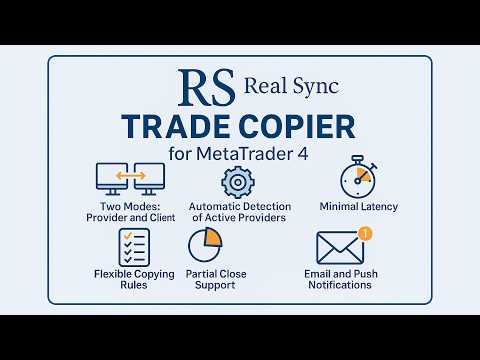
  • Deux modes : Provider et Client.

  • Interface graphique conviviale avec un assistant de configuration pas à pas.

  • Info-bulles en 11 langues - tout est clair, pas besoin de manuel.

  • Détection automatique des providers actifs.

  • Règles flexibles de copie par symbole.

  • Support complet de la fermeture partielle des positions.

  • Inversion : possibilité d'inverser les ordres.

  • Mappage automatique des symboles : adaptation automatique aux différents courtiers.

  • Latence minimale : exécution des transactions en fractions de seconde.

  • Support des configurations multi-terminaux.

Exemples d'utilisation

  • Copie sur plusieurs comptes
    Un provider et plusieurs clients.

  • Agrégation de signaux
    Plusieurs providers et un seul client.

  • Configurations flexibles
    Plusieurs providers et plusieurs clients dans toutes les combinaisons.

À qui cette solution s'adresse-t-elle ?

  • Aux traders gérant les fonds de clients.

  • Aux services de signaux et systèmes d'arbitrage.

  • Aux investisseurs utilisant plusieurs terminaux.

  • Aux traders algorithmiques copiant des transactions vers plusieurs comptes.


Guide de configuration de RS Trade Copier    |    Comment installer la démo (guide étape par étape)

#Tags: copieur de trading, copie de trades, copieur d'ordres, copieur forex, copie de comptes, copie de signaux, MT4 copier, copieur MT4, copieur de positions, local trade copier, local copier, copy trading, copy trade, trade copy, social trade, social trading, copytrading, trade copier, copy trader, mirror trading, orders copier, trade mirrors.
Avis 2
RagneAu
46
RagneAu 2025.10.01 05:16 
 

A great system and a wonderful experience. Once test n will love n thrill. TQ for the support n efficiency

Produits recommandés
A   rocket   (from   Italian :   rocchetto ,   lit. 'bobbin/spool') [nb 1] [1]   is a   projectile   that   spacecraft ,   aircraft   or other   vehicles   use to obtain   thrust   from a   rocket engine . Rocket engine exhaust is formed entirely from   propellant   carried within the rocket. [2]   Rocket engines work by   action and reaction   and push rockets forward simply by expelling their exhaust in the opposite direction at high speed, and can therefore work in the   vacuum   of space. In
Heaven Assistant: Simplify Your MT4 Management Simplify the management of the MetaTrader 4 (MT4) platform with the Heaven Assistant . This Expert Advisor (EA) is a robust tool that allows you to control and customize your trading environment in an efficient and user-friendly manner. Key Features: Multiple Pairs Opening: Quick access to most currency pairs, both major and minor, plus exotic pairs. The ability to open indices, metals, and cryptocurrencies with a single click. Template Change: Easi
EA Arbitrage Mixed MT4
Ruslan Pishun
2.67 (3)
Attention!!!   Do not try to test the EA in the Tester - it is simply impossible, because the EA opens positions on different 28 instruments. The tester is able to test only one pair. The EA uses 4 strategies, each strategy uses joint work on several currencies at the same time. The EA  uses 4 stages of control and order tracking for a step-by-step profit capture. Trading is carried out in a pair for several currencies at the same time, trading is also carried out in a group of several strate
Market Monitor
Rodrigo Rethka Goncalves
Market Monitor – Smart Asset Performance Dashboard for MT4 Turn your MetaTrader 4 into a professional trading intelligence center! Market Monitor is a powerful monitoring tool that displays, in real time, the most relevant performance metrics of each symbol being traded — helping you make faster, smarter, and more strategic decisions. What Does This Indicator Do? Market Monitor scans all open and historical orders, consolidates the data by symbol, and displays everything in visual pa
The whole market in one click! Do you value your time? Is ease of use important for you? Are you still looking for the symbol you want or do you have 100 charts open in one terminal? Forget that! Do everything in a single click, on one chart! Advantages: Quick navigation on all the symbols and timeframes you want in a single chart window; Instant transfer to the required chart in one click; All the necessary symbols and timeframes are clearly and compactly grouped on one chart; Two navigation m
Blogs MQL5 : https://www.mql5.com/en/blogs/post/761446 Version MT4 : https://www.mql5.com/en/market/product/136790 Version MT5 : https://www.mql5.com/en/market/product/136791 Time Wizard est un assistant de trading professionnel conçu pour les traders exigeants qui recherchent rapidité, timing et contrôle de l’exécution sur un tableau de bord intuitif. Ce conseiller expert est conçu pour le trading événementiel, l’exécution programmée et la gestion semi-automatique rapide des ordres. Il vou
Buy Sell Multiple Panel - Execute Bulk Orders in a Single Click! Description: Save time and seize market opportunities instantly. This powerful panel allows you to place multiple buy or sell orders simultaneously, each with custom lot sizes, take-profit, and stop-loss levels. Perfect for sophisticated entry strategies and managing complex trades efficiently. Key Features: Bulk Order Execution:   Open multiple market orders at once with just one click. Flexible Lot Sizing:   Set individual lot
One Click Trader is a tool designed for MetaTrader 4 platform, which enables you to take your trading to the next level. It enables you to open, manage and close your trades in simple an efficient way by just one click of your mouse button. Up arrow minimizes the OCT panel Down arrow maximizes the OCT panel Right arrow displays the next panel with additional features Left arrow hides the panel with additional features Red SELL button enables you to open short market orders Red SELL STOP button e
History Exporter can help to export your orders history from MT4 account. After that you can use another data analysis tools to get what you want.  File format is .csv file, the content such as below OrderID,Symbol,Type,Lots,OpenTime,OpenPrice,StopLoss,TakeProfit,CloseTime,ClosePrice,Commission,Swap,MagicNo,Comment,ProfitUSD,ProfitPips,NetProfit,Duration,(Days),(HH:MM:SS), 21520206,EURCHF,buy,0.05,2020.03.10 08:06:15,1.06304,0.00000,0.00000,2020.03.11 13:37:38,1.06015,-0.60,-0.05,28282888,RedRab
FREE
Le trading Forex est un robot scalpeur forex unique. Le robot négocie GBPUSD M5. Le dépôt minimum est de 300 $. Le tirage maximum lors des tests dans le testeur de stratégie pendant 2 ans ne dépasse pas 15 %. Le robot n'utilise pas de Martingale, Grid ou d'autres stratégies de trading risquées. Chaque transaction est accompagnée de TakeProfit et StopLoss. Le robot peut trader simultanément sur plusieurs comptes de trading. À chaque transaction, le robot envoie un message d'information au commer
如果产品有任何问题或者您需要在此产品上添加功能,请联系我 Contact/message me if you encounter any issue using the product or need extra feature to add on the base version. There is Demo version of this panel Dashboard Super Three MA Demo in my product list, please try it out to get familiar with all functionalities free, LINK . This system basically utilizes PA and three adjustable Moving Average as the main indicator set to generate trading signal. With the feature that all MA_timeframe, MA_period, MA_applied_price are ad
This tool working You can buy or sell from the button of this tool, the lot size can be filled manually, as for the close all buy button to end all buy positions, close all sell button to end all sell positions, Close All profit button to end  All  profit position, Close All Loss button to end all loss position, Delete Pending button to delete all Pending order, close all orders to end all orders. The variable, you can use close all percent for close all orders when profit in percent, if close
VSAsGradient
Alexander Lasygin
VSAsGradient это утилита предназначена компенсировать ограниченные возможности оформления рабочей области терминала МТ4. Позволяет задать цвет окон графика (индикатора) в виде цветового градиента, установить классические обои или фотографию любимой девушки, семьи. Предварительных настроек, которые имеют значение только две: Set Gradients- выбераем насколько настройки будут индивидуальны. Default Set- только для данного типа инструмента. Individual Set- инструмент+ период графика. Hide Panel- сво
This Dashboard displays signals in grid view for the 28 major fx currency pairs. It is Mainly used for forex scalping in between 10 to 20 pips maximum and can be used on major trend market decisions. It Uses mainly Moving average and does not give false signal. All you need to note is the point in the grid where the signal occurs.  A beep sound is heard whenever there is a new signal and it will be displayedat the top of the chart.
(MT5):  https://www.mql5.com/en/market/product/135268?source=Site+Market+My+Products+Page#description Live account: https://www.mql5.com/en/signals/2307663?source=Site+Profile Gold Breakout Sniper( Strategy 259 158 ) EA is a fully automated trading system designed for XAUUSD on the H1 timeframe, focusing on volatility breakout opportunities confirmed by trend filters. This EA combines multiple ATR levels to accurately gauge market volatility conditions and filters trades using MACD to ensure e
This tool monitors your current Expert Advisors and manages stop losses and take profits. You can customize which EAs and/or which currencies to monitor. It is primarily meant for EAs that you feel manage stop losses and/or take profits poorly. If you want this tool to be able to monitor manual trades, please use '0' (zero) as the magic number. Supports hidden stoploss and take profit Supports ATR-calculated dynamic stoploss Supports Breakeven for individual trades Supports Trailing stop Lower r
Indicator Values Panel
AL MOOSAWI ABDULLAH JAFFER BAQER
Indicator Values Panel – Your Ultimate Indicator Monitoring Solution! Are you tired of constantly switching between indicators to check values? Want a simple, elegant, and real-time solution that puts all key indicator readings in one place? Indicator Values Panel is the ultimate utility for traders who want a clear and concise display of important indicator values – directly on their chart! What is Indicator Values Panel? Indicator Values Panel is a sleek, easy-to-use utility that provides rea
Grid MT4 Recovery
Volodymyr Hrybachov
A grid advisor with an adaptive system for "Resolving" a basket of orders   can also be used   to restore unprofitable positions on the account. Works inside a linear regression channel, input on several conditions. The signal uses the direction of the   linear regression   channel, exponential moving averages, average daily volatility, then   builds an order grid if the price deviates. The grid step is configurable, and if the price goes against us, then after a certain number of orders, the ac
Close by percentage MT4
Konstantin Kulikov
5 (1)
Hello friends. I wrote this utility specifically for use in my profile with a large number of Expert Advisors and sets ("Joint_profiles_from_grid_sets" https://www.mql5.com/en/blogs/post/747929 ). Now, in order to limit losses on the account, there is no need to change the "Close_positions_at_percentage_of_loss" parameter on each chart. Just open one additional chart, attach this utility and set the desired percentage for closing all trades on the account. The utility has the following function
Scorpion Grid
Evgenii Kuznetsov
5 (2)
Multi-currency grid Expert Advisor, in most cases it receives quite accurate entries. If an entry is not accurate enough, the positions are managed using an elaborate martingale strategy. Work on real account:  http://tiny.cc/nkaqmz Entries are performed using the signals of RSI and Stochastic indicators, in the overbought/oversold areas, plus additional entry conditions based on a proprietary algorithm. Recommended timeframe - М15. The EA features a drawdown management system, which takes into
TimeFilter simple 4
Andrej Nikitin
1 (1)
The indicator is an inter-week hourly filter. When executing trading operations, the indicator allows considering time features of each trading session. Permissive and restrictive filter intervals are set in string form. The used format is [first day]-[last day]:[first hour]-[last hour]. See the screenshots for examples. Parameters: Good Time for trade - intervals when trading is allowed. Bad Time for trade - intervals when trading is forbidden. time filter shift (hours) - hourly shift. percenta
OrderManager MT4
Lukas Roth
4.73 (26)
Présentation du OrderManager : Un utilitaire révolutionnaire pour MT4 Gérez vos transactions comme un pro avec le tout nouveau utilitaire Order Manager pour MetaTrader 4. Conçu avec simplicité et facilité d'utilisation à l'esprit, l'Order Manager vous permet de définir et de visualiser sans effort le risque associé à chaque transaction, vous permettant de prendre des décisions éclairées et d'optimiser votre stratégie de trading. Pour plus d'informations sur l'OrderManager, veuillez vous référer
-------------------------------------------------------------------------------------------------------------------------------------------------- First free version of this product is here :  https://www.mql5.com/en/market/product/46855?source=Site+Profile+Seller -------------------------------------------------------------------------------------------------------------------------------------------------- This product is an EA that can be used either to practice to educate yourself on Tester
Send periodic (Health Check) notification from your MT4 terminal to your mobile phone to be sure that your MT4 terminal is still running. When you did not receive the notification, it means that your terminal is unavailable. Optional information like Account Equity and Trading Pairs are also available. Notification Period - 1 Hour, 2 Hours, 4 Hours, 8 Hours, 12 Hours, 24 Hours Attach EA to any H1 chart
Ichimoku Waves Meter vm RU
Ichimoku sp z o.o.
5 (1)
The professional utilities "Ichimoku Waves Meter" to analyse graphs using the correct interpretation of Ichimoku kinkōhyō! Is a graphic program that allows traders to quickly and easily measure the proportions between the indicated points on the price graph. This time and price indicator is a basic tool for analysing the chart according to the Ichimoku strategy on the MT4 platform. Using this tool allows an insightful and complete analysis of time waves as well as price waves in a very short ti
Partial Close MT4
Ahmed Alaoui Chrifi
This is a very simple, and easy-to-use Trade Manager with features like   Auto Partial Close, Auto Stop-loss, Breakeven. EA  closes a profitable position in partial closes when the price moves first in the direction of profits, and then comes back. EA monitors the position. If the price moves in the direction of profits, then ea establish the first level of rollback price at a distance. If the price continues to move in the direction of profits, this level of profit continues modifying this lev
Time Sessions MT4
Faran Ataeiraveshti
"Time Sessions MT4" est un autre outil pratique pour les traders de forex montrant les quatre principales séances de trading au monde. Séances horaires : L'heure dans cet outil est réglée automatiquement en fonction de votre heure locale. Il dispose d'un indicateur de temps mobile qui se déplace seconde par seconde vers la gauche et vous montre le temps réel. Le panneau contient de superbes graphismes accrocheurs. De plus, vous pouvez déplacer le panneau n'importe où sur le graphique. Plus d
Hello This EA for send Orders Signals when you open or close order and send statics to your channel in Telegram with sum of profit or Loss Pips you can share your orders with your clients in your telegram please watch our video  to see how it is fast. https://www.youtube.com/watch?v=u_7twtYZhyI you must have Telegram channel then make bot and give it Permission and get token (watch this video to know how do it) https://www.youtube.com/watch?v=x1bKWFOjSBE and you must download this files https
This indicator will display current logined mt4 account's orders information of current symbol chart. It also allow import some formated data: 1) MQL5 Signals History CSV file (*.csv) 2) MT4 Account History Statement file (*.htm -> *.txt) *[Next Version] Allow Import data form 'HF HistoryExporter (*.csv)' Sample Data of MQL5 Signals History File Time;Type;Volume;Symbol;Price;S/L;T/P;Time;Price;Commission;Swap;Profit;Comment 2023.12.20 23:00:02;Buy Limit;0.06;EURUSD;1.08994;1.06024;1.09464;202
Auto trade V20 is a trading tool like Robot or Expert Advisor that is used for automatic trading, this type is Martingale EA, the recommended broker is FBS, EU Pair, default setting. If you want to find the best setting, please look for it by backtesting it, so that you find the best setting and help your trading become more profitable, please try this tool to help you trade. minimum deposit 200 $ cen lot 0.01, pipstep in points.
Les acheteurs de ce produit ont également acheté
Bienvenue sur Trade Manager EA, l’outil ultime de gestion des risques conçu pour rendre le trading plus intuitif, précis et efficace. Ce n’est pas seulement un outil d’exécution d’ordres ; c’est une solution complète pour la planification des trades, la gestion des positions et le contrôle des risques. Que vous soyez débutant, trader expérimenté ou scalpeur ayant besoin d’une exécution rapide, Trade Manager EA s’adapte à vos besoins, offrant une flexibilité sur tous les marchés, des devises et i
Custom Alerts AIO : Surveillez tous les marchés à la fois — sans aucune configuration Présentation Custom Alerts AIO est une solution de surveillance du marché prête à l’emploi, sans configuration nécessaire. Tous les indicateurs requis — FX Power, FX Volume, FX Dynamic, FX Levels, IX Power — sont directement intégrés. Aucun graphique n’est affiché, ce qui rend cet outil idéal pour la génération d’alertes en temps réel. Il prend en charge toutes les classes d’actifs proposées par votre courtie
Unlimited Trade Copier Pro is a tool to copy trade remotely to multiple MT4, MT5 and cTrader accounts at different computers/locations over internet. This is an ideal solution for you if you are a signal provider and want to copy your trades to other receivers globally on your own rules. One provider can copy trades to multiple receivers and one receiver can get trade from multiple providers as well. The provider can even set the subscription expiry for each receiver, so that receiver will not b
Copy Cat More Trade Copier MT4 (Copie Chat MT4) n’est pas seulement un simple copieur de trades local ; c’est un cadre complet de gestion des risques et d’exécution conçu pour les défis actuels du trading. Des challenges de prop firms à la gestion de comptes personnels, il s’adapte à chaque situation grâce à une combinaison d’exécution robuste, de protection du capital, de configuration flexible et de traitement avancé des opérations. Le copieur fonctionne en mode Master (émetteur) et en mode Sl
Exp COPYLOT CLIENT for MT4
Vladislav Andruschenko
4.69 (65)
Copieur de trades professionnel pour MetaTrader 4 Un copieur de trades rapide, fiable et professionnel pour MetaTrader 4 . COPYLOT permet de copier des opérations Forex entre les terminaux MetaTrader 4 et MetaTrader 5 , avec une synchronisation flexible adaptée à différents types de comptes et styles de trading. La version COPYLOT MT4 prend en charge : MetaTrader 4 → MetaTrader 4 MetaTrader 5 Hedge → MetaTrader 4 MetaTrader 5 Netting → MetaTrader 4   Version MT5 Description complète + DEMO + PDF
TradePanel MT4
Alfiya Fazylova
4.84 (95)
Trade Panel est un assistant commercial multifonction. L'application contient plus de 50 fonctions de trading pour le trading manuel et permet d'automatiser la plupart des tâches commerciales. Avant l'achat, vous pouvez tester la version de démonstration sur un compte de démonstration. Télécharger la version d'essai de l'application pour un compte de démonstration : https://www.mql5.com/fr/blogs/post/762644 . Instructions complètes ici . Commerce. Permet d'effectuer des opérations commerciales e
The product will copy all telegram signal to MT4   ( which you are member  ) , also it can work as remote copier.  Easy to set up, copy order instant, can work with almost signal formats, image signal, s upport to translate other language to English Work with all type of channel or group, even channel have "Restrict Saving Content", work with  multi channel, multi MT5 Work as remote copier: with signal have ticket number, it will copy exactly via ticket number. Support to backtest signal. How to
Smart Channel M4
Vahidreza Heidar Gholami
The trend in the market can be predicted using trend lines but the problem is you don’t know where exactly the price is going to touch the trend line where you can put your pending orders on. Smart Channel Expert Advisor makes it possible to put an advanced channel around the price data, which can be configured to handle placing orders, opening and closing positions, managing risk per trade, spread, slippage, and trailing stop-loss and take-profit automatically. Features Money Management (Calcul
The News Filter
Leolouiski Gan
5 (25)
Ce produit filtre tous les conseillers experts et les graphiques manuels pendant les heures de publication des actualités, de sorte que vous n'avez pas à vous soucier des pics de prix soudains qui pourraient détruire vos configurations de trading manuelles ou les transactions entrées par d'autres conseillers experts. Ce produit est également livré avec un système de gestion des ordres complet qui peut gérer vos positions ouvertes et vos ordres en attente avant la publication de toute actualité.
Elevate Your Trading Signals with Our Advanced Telegram Bridge EA It’s time to captivate your audience with real-time trading updates that are both professional and visually appealing. Contact me to receive a trial and see the demo channel! We have significantly invested in user friendly features that create a unique experience for customers and providers.  SIGNAL BRIDGE is able to deliver 100% COPIER FRIENDLY SIGNALS for all business cases, even bypassing Metatrader logics where other EAs stru
Trade Manager MT4 DaneTrades
Levi Dane Benjamin
4.09 (11)
Trade Manager pour vous aider à entrer et sortir rapidement des transactions tout en calculant automatiquement votre risque. Y compris des fonctionnalités pour vous aider à éviter le sur-trading, le trading de vengeance et le trading émotionnel. Les transactions peuvent être gérées automatiquement et les mesures de performances du compte peuvent être visualisées dans un graphique. Ces fonctionnalités rendent ce panneau idéal pour tous les traders manuels et contribuent à améliorer la plateforme
Ultimate Trailing Stop EA
BLAKE STEVEN RODGER
4.33 (15)
This EA Utility allows you to manage (with advanced filtering) unlimited open orders (manual or EA) with 16 trailing stop methods: fixed, percent, ATR Exit, Chandelier Exit, Moving Average, Candle High Low Exit, Bollinger Bands, Parabolic, Envelope, Fractal, Ichimoku Kijun-Sen, Alligator, Exit After X Minutes or Bars, RSI and Stochastic. The trailing stop can be either real or virtual, and you can exit fully or with a partial close percent on touch or bar close.  Moreover, you can add (overrid
Auto Trade Copier
Vu Trung Kien
4.76 (85)
Auto Trade Copier is designed to copy trades to multiple MT4, MT5 and cTrader accounts/terminals with 100% accuracy. The provider and receiver accounts must be on the same PC/VPS. With this tool, you can copy trades to receiver accounts on the same PC/VPS. All trading actions will be copied from provider to receiver perfectly. This version can be used on MT4 accounts only. For MT5 accounts, you must use Auto Trade Copier for MT5 . Reference: - For MT4 receiver, please download Trade Receiver Fre
The product will copy all  Discord  signal   to MT4   ( which you are member  ) , also it can work as remote copier.  Easy to set up. Work with almost signal formats, support to translate other language to English Work with multi channel, multi MT4. Work with Image signal. Copy order instant, auto detect symbol. Work as remote copier: with signal have ticket number, it will copy exactly via ticket number. How to setup and guide: Let read all details about setup and download Discord To MetaTrader
Telegram to MT4 Coppy
Sergey Batudayev
4 (10)
Télégramme vers MT4 :   la solution ultime pour copier des signaux Simplifiez votre trading avec   Telegram vers MT4   , l'utilitaire de pointe conçu pour copier les signaux de trading directement depuis les canaux et chats Telegram vers votre plateforme MetaTrader 4, sans DLL. Cette solution robuste garantit une exécution fluide des signaux avec une précision et des options de personnalisation inégalées, vous faisant gagner du temps et optimisant votre efficacité. [ Instructions and DEMO ] Cara
Take a Break
Eric Emmrich
5 (31)
News filter, equity guard & session control for all your EAs — one tool, full protection Take a Break has evolved from a basic news filter into a comprehensive account protection solution . It pauses your other Expert Advisors during news events or based on custom filters. When trading resumes, it automatically restores your entire chart setup , including all EA settings. Why traders choose Take a Break One news filter for all your EAs — no more relying on individual built-in filters that may o
Edge Zone EA
FXsolutions
5 (1)
With this Expert Advisor you will follow the sound trading principle Buy Low and Sell High by default ! And you can do that even with a normal day job . You will be even able to trade on lower timeframes which you could never do without such an Expert Advisor. And the best thing is that you are in control! You can tell the Edge Zone EA where it has to enter and where it has to exit. And you can do that even many hours before the trade will occur . This EA is therefore an excellent assistant for
MultiOrder Assistent V3.0   - Your professional trading assistant for MetaTrader 4 The  MultiOrder Manager  is a powerful trading tool designed to optimize your trading while managing risk efficiently. With intuitive features and a user-friendly interface, this Tool is ideal for traders who want to manage multiple orders simultaneously without losing track.   Symbols: FX pairs, gold and cryptocurrencies Here you get a detailed description of the parameters and functions Manual     Features and
News Filter EA: Advanced Algo Trading Assistant News Filter EA is an advanced algo trading assistant designed to enhance your trading experience. By using the   News Filter EA , you can integrate a Forex economic news filter into your existing expert advisor, even if you do not have access to its source code. In addition to the news filter, you can also specify   trading days   and   hours   for your expert. The News Filter EA also includes   risk management   and   equity protection   features
EasyTrade MT4
Alain Verleyen
5 (1)
Easy Trade – Gestion des transactions intelligente, simple et puissante Easy Trade est la solution tout-en-un pour la gestion des transactions destinée aux utilisateurs de MetaTrader souhaitant garder le contrôle du risque et assurer une exécution fluide. Conçu dès le départ avec les retours des traders, Easy Trade facilite l'exécution, la surveillance et la gestion des transactions sur plusieurs symboles – sans complexifier votre flux de travail. Que vous pratiquiez le scalping manuel ou que
Verrouillage automatique des bénéfices lors de l'atteinte du bénéfice cible EquityTargetCloser   — est un conseiller expert utilitaire pour MetaTrader 5 qui ferme automatiquement toutes les positions de marché et supprime les ordres en attente dès que   les capitaux propres (Equity) dépassent le solde actuel du montant de bénéfice spécifié . Après la fermeture de toutes les positions, l'objectif est automatiquement relevé : le nouveau seuil = nouveau solde + bénéfice spécifié. L'EA n'ouvre pas d
Crystal Trade Manager PRO – Système Avancé de Gestion du Risque et de Contrôle des Positions pour MT4 Version gratuite : https://www.mql5.com/en/market/product/150632 Présentation Générale Crystal Trade Manager PRO (CTM) est un utilitaire professionnel pour MetaTrader 4 dédié à la gestion du risque, au contrôle des opérations et à l’automatisation intelligente du trading. Il a été conçu pour les traders qui exigent une exécution disciplinée, une protection solide du capital et un contrôle avancé
EchoTrade Telegram to MT4 Copier
Perpetual Chinemerem Vincent
5 (2)
EchoTrade Telegram to MT5 Copier Seamless, Instant, and Reliable Signal Copying - Direct from Telegram to MetaTrader 4! The product does not run in the strategy tester but you can get free trial version   here  for testing before purchase. Tired of manually executing trades from Telegram signals? EchoTrade automates the process, instantly copying trades from any Telegram channel or group directly into your MT5 account—accurately, efficiently, and without delay. Key Features: Universal Compatib
VirtualTradePad mt4 Extra
Vladislav Andruschenko
4.85 (61)
Panneau de trading pour trader en 1 clic.   Travailler avec des positions et des commandes!   Trading à partir du graphique ou du clavier. En utilisant notre panel de trading, vous pouvez trader en un clic à partir du graphique et effectuer des opérations de trading 30 fois plus rapidement que le contrôle MetaTrader standard. Des calculs automatiques de paramètres et de fonctions qui facilitent la vie d'un trader et aident un trader à mener ses activités de trading beaucoup plus rapidement et pl
Le MT4 to Telegram Signal Provider est un outil facile à utiliser et entièrement personnalisable qui permet d'envoyer des signaux à Telegram, transformant ainsi votre compte en fournisseur de signaux. Le format des messages est entièrement personnalisable ! Cependant, pour une utilisation simple, vous pouvez également opter pour un modèle prédéfini et activer ou désactiver des parties spécifiques du message. [ Démonstration ]   [ Manuel ] [ Version MT5 ] [ Version Discord ] [ Canal Telegram ]  N
Work with gold and Japanese yen. Now working without pips! While you are trading,  Auto StopLoss Defender  doing all the routine work. "Must have" for scalping. Best way to save account balance in case of force majeure.(Internet connection loss, power outage, sharp change in price direction) The Utilite automatically adds a stop loss to open and pending orders that have no stoploss set. The anti-requote system is built into the Utilite. That means  the stop loss will be registered anyway! In the
RiskManager
Roman Zhitnik
5 (4)
The Expert Advisor is a risk manager helping users to control their trading. In the settings, it is possible to specify the parameters at which the risk manager force closes the opened trades and closes the terminal as well, if it is needed to prevent opening trades on emotions, which do not correspond to the trading strategy. Risk Manager settings Check limit to close - check the equity limit Limit to close (account currency)   - equity limit that is checked when  Check limit to close is activ
ManHedger MT4
Peter Mueller
5 (2)
THIS EA IS A SEMI-AUTO EA, IT NEEDS USER INPUT. Manual & Test Version Please TEST this product before   BUYING  and watch my video about it. Contact me for user support or bug reports, or if you want the MT5 version! MT5 Version I do not guarantee any profits or financial success using this EA. With this Expert Advisor, you can: Implement your own   Zone Recovery   strategy to capitalize on trending markets. Create   Grid   trading strategies, to profit from ranging markets. Place orders easil
Riskless Pyramid
Snapdragon Systems Ltd
5 (1)
Introduction This powerful MT4 trade mangement EA offers a way potentially to aggressively multiply trade profits in a riskfree manner. Once a trade has been entered with a defined stoploss and take profit target then the EA will add three pyramid add-on trades in order to increase the overall level of profit. The user sets the total combined profit target to be gained if everything works out. This can be specified either as a multiple of the original trade profit or as a total dollar amount. Fo
Comprehensive on chart trade panel with the unique ability to be controllable from mobile as well. Plus has a library of downloadable configuration, e.g. exit rules, extra panel buttons, pending order setup and more. Please see our product video. Works with all symbols not just currency pairs. Features On chart panel plus controllable from free app for Windows, iPhone and Android Built-in script engine with library of downloadable configuration, e.g. add 'Close All Trades in Profit' button, exit
Plus de l'auteur
Seconds Chart MT5
Boris Sedov
4.59 (17)
Seconds Chart - un outil unique pour créer des graphiques en secondes dans MetaTrader 5 . Grâce à Seconds Chart , vous pouvez créer un graphique avec une période définie en secondes, offrant une flexibilité et une précision idéales pour l'analyse, indisponibles sur les graphiques standards en minutes ou en heures. Par exemple, la période S15 indique un graphique avec des bougies d'une durée de 15 secondes. Vous pouvez utiliser n'importe quels indicateurs et experts advisors compatibles avec les
Seconds Chart - un outil unique pour créer des graphiques en secondes dans MetaTrader 4 . Grâce à Seconds Chart , vous pouvez créer un graphique avec une période définie en secondes, offrant une flexibilité et une précision idéales pour l'analyse, indisponibles sur les graphiques standards en minutes ou en heures. Par exemple, la période S15 indique un graphique avec des bougies d'une durée de 15 secondes. Vous pouvez utiliser n'importe quel indicateur, expert advisor (EA) ou script. Leur utilis
This Expert Advisor is based on the "Ilan 1.6 Dynamic" Advisor with full preservation of the idea and input parameters. The "Ilan 1.6 Dynamic" advisor is the predecessor of all Ilans and the most recognizable Martingale method Forex advisor. The number of titles given to this development can hardly be counted. In fact, the Advisor uses a simple trading strategy based on two standard technical indicators - RSI (Relative Strength Index) and CCI (Commodity Channel Index) . The first one is used to
RS Trade Copier - le copieur de trades local ultra-rapide avec une véritable interface graphique. Arrêtez de saisir les numéros de compte manuellement. Fini les listes interminables de 200+ paramètres dans l'onglet Inputs. Un outil fiable et flexible pour copier les opérations de trading entre plusieurs terminaux MT5 et MT4. Il convient aux traders expérimentés, aux services de signaux ainsi qu'aux investisseurs privés. Il permet la synchronisation du trading d'un ou plusieurs Providers vers un
Tick History Loader is an essential auxiliary tool that downloads the full available tick history for any symbol in your MT5 terminal. The script performs a deep synchronization with the trading server, sequentially requesting and saving the entire tick history from the earliest available date. This is necessary for the correct operation of advanced analytical tools that require complete market data. The obtained tick history serves as the basis for building custom charts with a timeframe in sec
FREE
Exact Time — detailed time on the seconds chart. The utility shows the opening time of the selected candle. This is necessary when working with seconds charts. For example, it can be used on a seconds chart built using the Seconds Chart utility. Inputs Base corner — the chart corner to which an object Is attached. X distance — the horizontal distance from the chart corner. Y distance — the vertical distance from the chart corner. Text font — font name Font size — font size Color — text color
FREE
Exact Countdown Timer — shows the remaining time before the current bar closes and a new bar forms. A fast and exact countdown timer will help you find the best moment to open a position. For example, it can be used on a seconds chart built using the Seconds Chart utility. Inputs Base corner — the chart corner to which an timer Is attached. X distance — the horizontal distance from the chart corner. Y distance — the vertical distance from the chart corner. Text font — font name Font size — font
FREE
Chart Service — improving the charts of the custom symbol. The service shows trading levels on the chart of a custom symbol. For example, it can be used when working on a seconds chart built using the Seconds Chart utility. Unlike Expert Advisors, indicators and scripts, services are not linked to a specific chart. Such applications run in the background and are launched automatically when the terminal is started (if they were previously launched). Use the Navigator to manage services. Services
FREE
The programmable signal panel analyzes the charts of all available symbols and timeframes and sends a notification about the appearance of a trading signal. You can program all the necessary signals using the free binding indicator "Signal Collection". The binding   indicator is provided with open source code. Thus, it is possible to program all the necessary signals for subsequent use in conjunction with the signal panel. The signal panel can not only analyze charts, but also manage these chart
FREE
Tick Database — export of tick database from MT5 terminal to MT4. The utility provides access to the tick database in real time. This is necessary to generate synthetic charts in the MT4 terminal, which initially does not provide for loading a tick database. For example, you can organize permanent access to the tick database for the Seconds Chart utility. If the opening time of the current candle in the terminals is different, then you need to specify the time offset in hours. Example We open M1
FREE
DigitalFilterA
Boris Sedov
5 (5)
The algorithm of this indicator is based on a high-performance digital filter. The unique digital filtering algorithm allows receiving timely trading signals and estimating the current situation objectively while conducting technical analysis. The indicator is effective on small and big timeframes. Unlike common classic indicators, digital filtering method can significantly reduce the phase lag, which in turn allows obtaining a clear signal earlier than when using other indicators.

TickChart
Boris Sedov
5 (1)
Tick Chart — full-featured chart for MetaTrader 4. A utility for creating and working with a tick chart in the MetaTrader 4 terminal. You can create a tick chart that works exactly the same as a regular chart. You can apply indicators, Expert Advisors and scripts to the tick chart. You get a fully functional tick chart on which you can work just as well as on a regular chart. You can enable the output of the Ask price data. The data are generated in the form of the upper shadow of a tick bar. Fr
Tick Volume Chart — fixed volume bars for MetaTrader 4. The tool creates charts on which each candle has a fixed tick volume. Data sampling is carried out not by time but by the tick volume. Each bar contains a given (fixed) tick volume. Tick volume can be adjusted by changing the value of the Volume parameter. You can apply indicators, Expert Advisors and scripts to the tick chart. You get a fully functional chart, on which you can work just as well as on a regular chart. In the process of work
EXP DFA
Boris Sedov
This Expert Advisor can work in three different modes, which can be configured by changing the input parameters. The Expert Advisor performs trading operations based on the signals of the built-in indicator "Digital Filter A". The algorithm of this indicator is based on a highly efficient digital filter. The indicator resembles a moving average, but has one significant difference — the digital filtering algorithm. This algorithm is based on a mathematical model of a digital filter with adaptive

Ilan Dynamic Pro
Boris Sedov
4 (6)
Ilan Dynamic Pro: A New Level of Algorithmic Trading Ilan Dynamic Pro is a unique modification of the popular Ilan 1.6 Dynamic Expert Advisor, which has earned the trust of traders worldwide. At the core of the advisor lies a proven position averaging algorithm, allowing a series of unidirectional orders to be closed at a common TakeProfit level. However, in this version, everything has been taken to a new level. The entire code has been written from scratch, and the analytical block has been co
RenkoChart
Boris Sedov
5 (1)
Renko Chart — opens renko charts for MetaTrader 4. Renko charts can be created using this utility with all bars being in the form of Renko "bricks". All bars on the renko chart are the same size, which can be changed to get the desired chart. You can add indicators, EAs and scripts to the resulting chart. You get the completely operational chart which can be processed just like a regular one. The Renko Chart utility is not only history based, but also builds online. At the same time, the data is
Range Bar Chart
Boris Sedov
4 (4)
Range Bar Chart — opens range bar charts for MetaTrader 4. The utility allows you to create charts of range bars on which all candlesticks are the same size and may have shadows. Data on the range bar chart are distributed by the bar size, rather than by the time. Each bar represents the price movement instead of time period. It works simple – the bar is not drawn as long as the price does not move. You can add indicators, EAs and scripts to the resulting chart. You get the completely operationa


Tick Volume Chart - un outil unique pour créer des graphiques basés sur les volumes de ticks dans MetaTrader 5 . Grâce à Tick Volume Chart , vous pouvez construire des graphiques où chaque bougie est formée non pas en fonction du temps, mais selon un nombre défini de ticks. Cela vous offre une précision d'analyse idéale de l'activité du marché, inaccessible sur les graphiques temporels classiques. Vous pouvez utiliser tous les indicateurs et conseillers experts compatibles avec les symboles pers
Quick Trade Manager (QTM) est un outil puissant pour un trading rapide et intuitif directement sur le graphique MT5, avec un support complet des symboles personnalisés (synthétiques). QTM étend les possibilités du trading rapide directement sur le graphique, rendant le trading en un clic encore plus confortable. Le calcul automatique du volume de position en fonction du pourcentage de risque prédéfini par transaction est disponible. Tous les symboles personnalisés (synthétiques) sont entièrement
Filtrer:
RagneAu
46
RagneAu 2025.10.01 05:16 
 

A great system and a wonderful experience. Once test n will love n thrill. TQ for the support n efficiency

Boris Sedov
11510
Réponse du développeur Boris Sedov 2025.10.01 08:54
Thank you for your feedback! I’m glad RS Trade Copier gave you a smooth and efficient experience. It’s built to save traders time while keeping everything reliable. Wishing you great results in your trading!
Wooo7o9klW
48
Wooo7o9klW 2025.08.08 09:33 
 

L'utilisateur n'a laissé aucun commentaire sur la note

Répondre à l'avis