RS Trade Copier MT5

5

RS Trade Copier - le copieur de trades local ultra-rapide avec une véritable interface graphique. Arrêtez de saisir les numéros de compte manuellement. Fini les listes interminables de 200+ paramètres dans l'onglet Inputs.

Un outil fiable et flexible pour copier les opérations de trading entre plusieurs terminaux MT5 et MT4. Il convient aux traders expérimentés, aux services de signaux ainsi qu'aux investisseurs privés. Il permet la synchronisation du trading d'un ou plusieurs Providers vers un ou plusieurs Clients avec une haute précision et une latence minimale. Il supporte une configuration simple et automatique ainsi qu'une personnalisation manuelle avancée. Il ne modifie pas les ordres ouverts manuellement ou par d'autres conseillers. Fonctionnement entièrement local dans MT5, sans serveurs tiers.

Comparaison : RS Trade Copier et autres solutions

RS Trade Copier Autres solutions
Configuration Assistant visuel étape par étape.
La configuration prend ~1 minute.
200+ paramètres d'entrée incompréhensibles.
La configuration prend ~20 minutes.
Vitesse Opérations de trading asynchrones.
La fermeture en masse de 50 positions prend seulement ~1 seconde.
Exécution séquentielle lente.
La fermeture en masse de 50 positions prend ~25 sec.
Interface Véritable interface graphique avec infobulles en 11 langues.
Tout est clair sans manuel.
Longue liste de paramètres dans l'onglet Données d'entrée.
Nécessite de lire toute la documentation.
Opérations en masse Support complet.
La fermeture de positions en masse sur le Client est instantanée - comme sur le Provider.
Aucun support.
La fermeture de positions en masse sur le Client ne se produit PAS.
Les positions restent ouvertes, entraînant des pertes potentielles.

Le développement est en cours depuis 2008. L'outil a fait l'objet de tests approfondis et est utilisé en trading réel.

Version d'essai gratuite : RS Trade Copier v8.20 Demo.ex5

Téléchargez la version d'essai gratuite et voyez par vous-même :

  • Entièrement fonctionnelle - toutes les fonctionnalités disponibles sans limitations
  • 24 heures de test - assez pour évaluer la rapidité et la commodité
  • Comptes démo uniquement - aucun risque pour l'argent réel

Comment installer la démo (guide étape par étape)

Copie multiplateforme

RS Trade Copier MT5 est entièrement compatible avec la version MT4 et prend en charge la copie dans toutes les combinaisons suivantes :

  • MT5 -> MT4
  • MT4 -> MT5
  • MT5 -> MT5
  • MT4 -> MT4 *

Pour copier entre différentes versions de plateformes (MT4 <-> MT5), vous devez également acquérir RS Trade Copier MT4.

* Pour la copie de MT4 vers MT4, une seule version pour MT4 suffit.

Avantages clés

RS Trade Copier est un système de qualité industrielle dont chaque détail est pensé et optimisé :

  • Vitesse - mode boosté pour une copie ultra-rapide

  • Fiabilité - protection multicouche contre les pannes

  • Flexibilité - paramètres individuels pour chaque paire (provider / symbole)

  • Confort - interface graphique conviviale avec un assistant de configuration pas à pas

  • Clarté - info-bulles en 11 langues (tout est clair sans manuels)

  • Architecture - algorithmes optimisés et logique intelligente

Ce n'est pas seulement un outil de copie de transactions. C'est un écosystème puissant où la vitesse, la fiabilité et le contrôle sont combinés avec la facilité d'utilisation.

Fonctionnalités principales

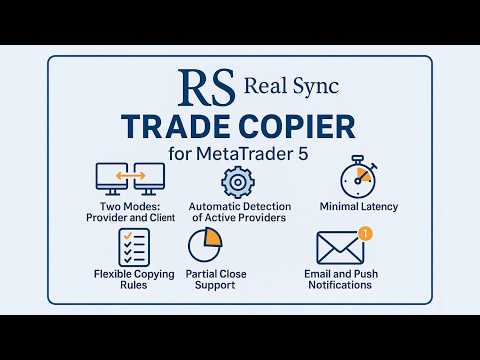
  • Deux modes : Provider et Client.

  • Interface graphique conviviale avec un assistant de configuration pas à pas.

  • Info-bulles en 11 langues - tout est clair, pas besoin de manuel.

  • Détection automatique des providers actifs.

  • Règles flexibles de copie par symbole.

  • Support complet de la fermeture partielle des positions.

  • Inversion : possibilité d'inverser les ordres.

  • Mappage automatique des symboles : adaptation automatique aux différents courtiers.

  • Latence minimale : exécution des transactions en fractions de seconde.

  • Support des configurations multi-terminaux.

Exemples d'utilisation

  • Copie sur plusieurs comptes
    Un provider et plusieurs clients.

  • Agrégation de signaux
    Plusieurs providers et un seul client.

  • Configurations flexibles
    Plusieurs providers et plusieurs clients dans toutes les combinaisons.

À qui cette solution s'adresse-t-elle ?

  • Aux traders gérant les fonds de clients.

  • Aux services de signaux et systèmes d'arbitrage.

  • Aux investisseurs utilisant plusieurs terminaux.

  • Aux traders algorithmiques copiant des transactions vers plusieurs comptes.

Combien de fois devez-vous acheter RS Trade Copier pour configurer la copie ?

Une seule.

Un seul achat de RS Trade Copier vous donne 20 activations. Chaque activation correspond à un ordinateur ou un VPS Windows.

Important : il s'agit d'un VPS Windows classique. Le service intégré « Virtual Hosting » de MetaQuotes (location d'un terminal virtuel directement dans MT5) ne convient pas à la copie de trades. Pour copier des trades, vous avez besoin d'un ordinateur (PC de bureau ou ordinateur portable) ou d'un VPS Windows complet sur lequel vous pouvez installer vos propres logiciels et configurer les terminaux manuellement.

Comment cela fonctionne en pratique :

Vous achetez le produit une seule fois. C'est tout. Vous pouvez maintenant installer RS Trade Copier sur 20 ordinateurs ou VPS Windows différents. Sur chacun de ces appareils, vous pouvez exécuter n'importe quel nombre de terminaux MT5 de n'importe quel courtier. Dans chaque terminal, n'importe quel nombre de comptes : réel, démo ou concours.

Tous ces comptes fonctionneront. Un seul achat couvre tout.

La seule condition : chaque terminal doit être connecté au compte MQL5 Community (celui avec lequel vous avez acheté le produit). Cela prend une minute : entrez votre identifiant et votre mot de passe dans les paramètres du terminal, et tous vos achats deviennent disponibles.

Pourquoi 20 activations ?

Vous pouvez toutes les utiliser en une seule fois - installer le produit sur tous vos ordinateurs et VPS Windows. Ou en garder une partie en réserve. C'est utile si vous changez d'ordinateur, remplacez la carte mère ou le processeur, ou réinstallez le système d'exploitation. Chaque changement de ce type compte comme un nouvel appareil et nécessite une nouvelle activation. Avec 20 activations, vous avez une grande réserve pour les années à venir.

En bref :
1 achat = 20 activations = 20 ordinateurs ou VPS Windows différents = nombre illimité de terminaux et de comptes sur chaque appareil.


Guide de configuration de RS Trade Copier    |    Comment installer la démo (guide étape par étape)

#Tags: copieur de trading, copie de trades, copieur d'ordres, copieur forex, copie de comptes, copie de signaux, MT5 copier, copieur MT5, copieur de positions, local trade copier, local copier, copy trading, copy trade, trade copy, social trade, social trading, copytrading, trade copier, copy trader, mirror trading, orders copier, trade mirrors.
Avis 2
Иван Прибыток
23
Иван Прибыток 2026.05.28 10:45 
 

я перепробовал кучу разных копировщиков и у всех были проблемы разные. Этот очень достоин, такой простой настройки я еще не встреча. Скорость синхронизации между терминалами космическая, как будто я юзаю софт который стоит десятки тысяч долларов. Автору респект.

Produits recommandés
Общие сведения Данная торговая панель предназначена для быстрой и удобной торговли в один клик. Создавался продукт для частичной автоматизации своей личной ручной торговли  https://www.mql5.com/ru/signals/1040299?source=Site+Profile+Seller Советник имеет ряд возможностей, а именно: Открытие BUY или SELL ордеров. SL выставляется ниже (выше)  минимальной (максимальной) цены, задаваемых в параметрах количества свечей. Размер TP рассчитывается в соотношении от размера SL (по умолчанию 0.618). Выстав
MT5 history exporter for accurate trade analysis and CSV export. Export trades to Excel from MetaTrader 5 with full performance metrics. Advanced MT5 trade analyzer with MAE, trade duration, and reconstruction. Usually platforms hide critical information about how your trades actually behave. History Downloader and Trade Analyzer solves this. It rebuilds your trades from raw deal history and exports a clean, structured dataset with accurate metrics MT5 does not provide. What You Get A fully s
ProBridger
Marius Ovidiu Sunzuiana
How Traders and Analysts Can Use the Data Export Bridge to Improve Their Analytics The MQL Data Export Bridge unlocks a new level of analytical power by transforming MetaTrader into a real‑time data provider for any external research environment. Here are the most impactful ways different users can apply the bridge to enhance their trading performance. Build Predictive Models with Machine Learning Who benefits: Quantitative traders, data scientists, algorithm developers How it helps: Export t
You can see Binance Spot data instantly in Metatrader 5 and it allows you to use all the features that Metatrader has provided to you. You can access the data of all symbols listed on Binance Futures. Don't forget to set the timezone. Binance it's 00:00 UTC. You need to fix it according to your own country You need to install the free Binance Spot Symbol List plugin. https://www.mql5.com/tr/market/product/83507 After loading, it automatically downloads the data of the cryptos in the market obser
Real-Time Spread Display Tool A   real-time spread display tool   is a specialized software or application designed to provide traders and investors with instant, live data on the   spread —the difference between the bid price (the price at which buyers are willing to purchase an asset) and the ask price (the price at which sellers are willing to sell it)—for various financial instruments. This tool is critical in markets such as forex (FX), stocks, futures, and cryptocurrencies, where price f
Tick Chart Constant Volume Generator
Trade The Volume Waves Single Member P.C.
1. Overview   The Tick Chart Toolset is a pair of tightly coupled MQL5 files that generate and control professional Constant Volume charts inside MetaTrader 5 as custom symbols. Unlike time-based charts, each bar closes only when a target volume threshold is reached, giving you a noise-filtered, activity-proportional view of the market. Free "Tick Chart Monitor Indicator" to control the generator EA:  https://www.mql5.com/en/market/product/17104   Component Type Role Tick_Chart_Generator_AI_MT5
Operational Management MT5
Leonardo Gabriel Caceres
Operative Management Pro – Advanced Trading Utility Operative Management Pro is a smart visual tool for traders who want to analyze and simulate their trades before placing them on the market. This panel displays in real-time the most important parameters of the current symbol: Current price and minimum lot size Required margin Spread cost in USD and pips Take Profit and Stop Loss value in USD Automatic risk and reward calculation With just a click on the chart, you can simulate BUY or SELL t
Advanced Trailing Stop & Break-Even Expert Advisor with Partial Profit Taking Overview Unlock the full potential of your trading strategy with this Expert Advisor that automates trade management to maximize profits and minimize losses. Designed for both novice and experienced traders, this EA offers precise control over your trades with customizable trailing stops, break-even protection, and partial profit taking — all working seamlessly to protect your capital and lock in gains. Key Features Dy
AUC SR Clusters
Alfonso Urbano Cardenas
AUC - S&R Clusters   est un indicateur qui identifie les zones de support et de résistance à partir de l’analyse du comportement du prix. L’indicateur utilise des données historiques pour détecter les zones où le prix a réagi à plusieurs reprises. À partir de ces informations, il regroupe les niveaux proches en zones. Contrairement aux niveaux fixes, il ajuste les zones en fonction des conditions du marché. Cela permet d’observer les zones pertinentes dans la structure du prix. Fonctionnement L’
FREE
Blogs MQL5 : https://www.mql5.com/en/blogs/post/761446 Version MT4 : https://www.mql5.com/en/market/product/136790 Version MT5 : https://www.mql5.com/en/market/product/136791 Time Wizard est un assistant de trading professionnel conçu pour les traders exigeants qui recherchent rapidité, timing et contrôle de l’exécution sur un tableau de bord intuitif. Ce conseiller expert est conçu pour le trading événementiel, l’exécution programmée et la gestion semi-automatique rapide des ordres. Il vou
Features 1️⃣ Flexible Grid Order Configuration Set price levels and spacing between orders. Customize order sizes and maximum number of positions for better risk control. 2️⃣ Hedge and Netting Modes Hedge Mode : Allows simultaneous long and short positions , ideal for advanced strategies. Netting Mode : Consolidates positions for easier balance management. 3️⃣ Supported Order Types Limit Orders : Buy and sell at predetermined prices. Market Orders : Instant execution. Integrated Take-Profit : Wi
Close Simple MT5
TRUONG DINH THANG Trương
This is an EA that supports simple order closing on MT5. EA Close MT5 (Homemade ) - EA closes orders when profit >= x$ - EA closes orders when loss >= -x$ - EA closes orders when Equity >= x$ - EA closes orders when Equity <= x$ - EA closes orders for all currency pairs or pairs using EA If you have any questions, please contact me: https://t.me/EAForexFree_Channel
Buy Sell Multiple Panel - Execute Bulk Orders in a Single Click! Description: Save time and seize market opportunities instantly. This powerful panel allows you to place multiple buy or sell orders simultaneously, each with custom lot sizes, take-profit, and stop-loss levels. Perfect for sophisticated entry strategies and managing complex trades efficiently. Key Features: Bulk Order Execution: Open multiple market orders at once with just one click. Flexible Lot Sizing: Set individual lot size
Kikyo
Yuta Hirae
[Target currency pair / time] [EURUSD/15M] Recommended. Variable lot MT5EA for compound interest operation! [About EA operation] After purchasing an EA, it is recommended to operate with a real account after operating with a demo account for a certain period of time. [About kikyo/logic overview] Kikyo is an EA that supports EURUSD/15M. Adopts a variable lot system that can easily realize compound interest operation according to the amount of funds (the default is a fixed lot. Please change
One Click Trader  is a tool designed for MetaTrader 4 platform, which enables you to take your trading to the next level. It enables you to open, manage and close your trades in simple an efficient way by just one click of your mouse button. "-"   ,  "+"  change OCT window size  Up arrow minimizes the OCT panel Down arrow maximizes the OCT panel Right arrow displays the next panel with additional features Left arrow hides the panel with additional features Red  SELL  button enables you to open s
Harmony Grid MT5
Aliaksandr Charkes
Harmony Grid MT5  is a versatile trading system designed for the full or partial automation of various grid-based trading strategies (for hedging accounts). Additionally, this Expert Advisor can be viewed as a universal strategy builder, offering capabilities that go beyond simple grid trading. If you take the time to master its functionality, you can create more complex and customized systems. In other words, the strategy you implement does not necessarily have to be grid-oriented or fully auto
Why this Telegram copier is better than the rest! Creates a new position for every TP. Can add multiple layers and positions. Can run a Runner for maximum profit! Questions and special offers: Telegram @Fxmelvin You can automatick trade like MO Automatic copying from Telegram — we have developed free software for use on a VPS. Contact us for more information. This makes trading fully automated. Telegram Setup instruction Open your Telegram APP and search for "BotFather". Type  /start  and click
OrderManager MT5
Lukas Roth
4.81 (27)
Présentation du   OrderManager   : Un utilitaire révolutionnaire pour MT5 Gérez vos transactions comme un pro avec le tout nouveau utilitaire Order Manager pour MetaTrader 5. Conçu avec simplicité et facilité d'utilisation à l'esprit, l'Order Manager vous permet de définir et de visualiser sans effort le risque associé à chaque transaction, vous permettant de prendre des décisions éclairées et d'optimiser votre stratégie de trading. Pour plus d'informations sur l'OrderManager, veuillez vous réfé
Boleta de negociação, adiciona automáticamente as ordens Take Profit e Stop Loss quando excutada uma ordem de compra ou venda. Ao apertar as teclas de atalho (A, D, ou TAB), serão inseridas duas linhas de pre-visualização, representando as futuras ordens de take profit (azul) e stop loss (vermelho), as quais irão manter o distanciamento especificado pelo usuário. Ditas ordens só serão adicionadas ao ser executada a ordem inicial. Ao operar a mercado, as ordens pendentes de take profit, e stop lo
TerminatorTrades
Uriel Alfredo Evia Canche
"Terminator Trades " EA Robot, construit sur le puissant code MQ5, est conçu pour simplifier le processus de fermeture de vos positions et de commandes en attente. Vous pouvez vous ajuster si vous souhaitez fermer tous les métiers ou par des symboles spécifiques. Avec un seul clic sur un bouton, vous pouvez gérer efficacement vos positions actuelles, en vous assurant de ne jamais manquer une opportunité de mettre fin à un métier. 
FREE
GridTrailling
Chaianan Kraimud
Smart breakout grid EA with trailing pending orders, trailing stop, session/news filters, drawdown protection, and netting-safe execution for MT5. GridTrailingEA is a smart pending-order grid Expert Advisor with trailing pending orders, trailing stop, session filter, news-time filter, drawdown protection, and market-safe validation for MT5. GridTrailingEA is a MetaTrader 5 Expert Advisor designed for traders who want a clean and controlled grid-style pending order system. The EA places Buy Stop
Symbol Changer Panel
Nasimul Haque Choudhury
Symbol Changer Panel – Smart Symbol Switcher with Live P/L Status Trade faster. Navigate smarter. Stay in control. Symbol Changer Panel is a lightweight, high-performance chart panel for MetaTrader 5 that allows you to instantly switch between symbols while monitoring real-time profit and loss status directly from your chart window. Why You Need This Indicator Instant Symbol Switching – Change trading instruments with one click without opening Market Watch repeatedly. Live Profit/Loss Color D
N/B: All our product purchase comes with our free ‘’DAILY   SCALPER EA’’ Whatsapp Developer for yours after successful purchase   THE ARCHITECTURE OF A PERFECT TRADING SYSTEM Let me break down how all the components in this Ultimate Semafor system work together like a Swiss watch mechanism. This is a multi-layered confirmation system where each piece validates the others.   SYSTEM PHILOSOPHY: "TRIPLE CONFIRMATION" This system follows a simple but powerful principle: No single indicator can
如果产品有任何问题或者您需要在此产品上添加功能,请联系我 Contact/message me if you encounter any issue using the product or need extra feature to add on the base version. There is Demo version of this panel Dashboard Super Three MA MT5 Demo in my product list, please try it out to get familiar with all functionalities for free Free version: LINK MT4 version: LINK This system basically utilizes PA and three adjustable Moving Average as the main indicator set to generate trading signal. With the feature that all MA_timefram
Cable Hunter EA
Mathis Philippe Jean Deroy
Cable Hunter EA Stratégie Turtle Soup — Counter-breakout + Divergence RSI | GBPUSD M15 Profit Factor Drawdown max Rendement annuel Walk-Forward IS/OOS 1.67 5% ~15%/an 1.51 / 1.53 Compatible : GBPUSD M15 | Tous brokers MT5 | FTMO / Prop firms | VPS 1. Description de la stratégie Cable Hunter EA est basé sur la stratégie Turtle Soup , une approche de counter-breakout qui exploite les faux cassages de niveaux de swing. Les marchés piègent régulièrement les traders qui suivent les breakouts classiqu
Are you the type that likes to protect your trades by moving the stop loss to the entry point and also using trail stop? Cool! This EA will help you with that. What's more, it also partially closes the trade when the trail stop is activated. That's it! Beyond all this it shows the stop loss projection (which you can move)   and notify you when it is activated. EA can be used by configuring the default window or by using a custom window , which makes it easy to change settings. You can test
Ultimate Risk Manager for MT5 Every trader knows the feeling: a promising setup appears, but fear of a large loss prevents you from pulling the trigger. You hesitate, overthink, and often miss the opportunity. The root cause is not a lack of strategy – it is the absence of guaranteed loss control. The Ultimate Risk Manager solves this problem completely. This tool lets you trade exactly how you want – any style, any frequency, any risk per trade – while ensuring that your total loss over a ch
Telegram to mt5 signal copier
Chukwuemeka Kingsley Anyanwu
5 (1)
Copies Signal from any Telegram channel and instantly executes the trade on MT5 without admin rights! Do you receive trading signals on Telegram and wish they could execute instantly on Meta Trader 5? READ THIS FOR SETUP GUIDE Telegram to MT5 Signal Copier  (AKA SpackCopier Bot) is a powerful bridge between your Telegram signal channels and MetaTrader 5. It listens to messages from a specific Telegram channel and automatically extracts trading signals — including symbol, action, entry price, s
Quick operation, quick purchase, sale, empty operation. Provide three buttons: Buy, Sell, empty. Buy: Quickly place more orders after clicking, default 1 hand, profit point and stop-loss point are 110 points, after successful order can be manually modified. Sell: Quickly place an empty order after clicking, default 1 hand, profit point and stop-loss point are 110 points, can be manually modified after the order is successful. Empty: Quickly clear all orders, including purchase and s
MT5 to MT5 Trade Copier
Freedom Uzochukwu Nnadi
MT5 to MT5 Trade Copier: Unified Master-Slave Trade Replication for MetaTrader 5 Unlock seamless trade replication with the MT5 to MT5 Trade Copier, a powerful and versatile Expert Advisor (EA) for MetaTrader 5, now reengineered into a single, efficient solution. This updated version combines Master and Slave functionalities into one EA, allowing you to effortlessly switch between modes with a single parameter. Whether you are mirroring trades across accounts, managing client portfolios, or sca
Les acheteurs de ce produit ont également acheté
Trade Assistant MT5
Evgeniy Kravchenko
4.43 (211)
It helps to calculate the risk per trade, the easy installation of a new order, order management with partial closing functions, trailing stop of 7 types and other useful functions. Additional materials and instructions Installation instructions - Application instructions - Trial version of the application for a demo account Line function -   shows on the chart the Opening line, Stop Loss, Take Profit. With this function it is easy to set a new order and see its additional characteristics bef
Bienvenue sur Trade Manager EA, l’outil ultime de gestion des risques conçu pour rendre le trading plus intuitif, précis et efficace. Ce n’est pas seulement un outil d’exécution d’ordres ; c’est une solution complète pour la planification des trades, la gestion des positions et le contrôle des risques. Que vous soyez débutant, trader expérimenté ou scalpeur ayant besoin d’une exécution rapide, Trade Manager EA s’adapte à vos besoins, offrant une flexibilité sur tous les marchés, des devises et i
TradePanel MT5
Alfiya Fazylova
4.87 (157)
Trade Panel est un assistant commercial multifonction. L'application contient plus de 50 fonctions de trading pour le trading manuel et permet d'automatiser la plupart des tâches commerciales. Avant l'achat, vous pouvez tester la version de démonstration sur un compte de démonstration. Télécharger la version d'essai de l'application pour un compte de démonstration : https://www.mql5.com/fr/blogs/post/762644 . Instructions complètes ici . Commerce. Permet d'effectuer des opérations commerciales e
Version Bêta Le Telegram to MT5 Signal Trader est presque prêt pour la sortie officielle en version alpha. Certaines fonctionnalités sont encore en développement et vous pourriez rencontrer de petits bugs. Si vous rencontrez des problèmes, merci de les signaler, vos retours aident à améliorer le logiciel pour tout le monde. Telegram to MT5 Signal Trader est un outil puissant qui copie automatiquement les signaux de trading depuis des chaînes ou groupes Telegram vers votre compte MetaTrader 5 .
AI Agent Supervisor is NOT an Expert Advisor. AI Agent Supervisor   is a   multi-agent AI risk & portfolio supervisor   that watches every EA on your account and intervenes in real time.  WANT AN AI PORTFOLIO MANAGER WATCHING YOUR FLEET 24/7?   Run your fleet on the same brokers I do:   IC MARKETS , IC TRADING   .  Unlike the centralized stock market, Forex has no single, unified price feed.  Every broker sources liquidity from different providers, creating unique data streams. The Supervisor r
Quant AI Agents
Ho Tuan Thang
5 (1)
Quant AI Agents are independent trading Expert Advisors. Instead of trading using a fixed strategy like other conventional EAs, Quant AI Agents   is a   multi-agent AI trading framework   that turns natural-language strategy prompts into live.  WANT THE SAME RESULTS AS MY LIVE SIGNAL?   Use the exact same brokers I do:   IC MARKETS , IC TRADING   .  Unlike the centralized stock market, Forex has no single, unified price feed.  Every broker sources liquidity from different providers, creating un
Exp COPYLOT CLIENT for MT5
Vladislav Andruschenko
3.91 (33)
Copieur professionnel de trades pour MetaTrader 5 Un copieur de trades rapide, professionnel et fiable pour MetaTrader . COPYLOT permet de copier des trades Forex entre les terminaux MT4 et MT5 avec prise en charge des comptes Hedge et Netting . La version MT5 de COPYLOT prend en charge : - MT5 Hedge → MT5 Hedge - MT5 Hedge → MT5 Netting - MT5 Netting → MT5 Hedge - MT5 Netting → MT5 Netting - MT4 → MT5 Hedge - MT4 → MT5 Netting Version MT4 Description complète + DEMO + PDF Comment acheter Comme
The News Filter MT5
Leolouiski Gan
4.78 (23)
Ce produit filtre tous les conseillers experts et les graphiques manuels pendant les heures de publication des actualités, de sorte que vous n'avez pas à vous soucier des pics de prix soudains qui pourraient détruire vos configurations de trading manuelles ou les transactions entrées par d'autres conseillers experts. Ce produit est également livré avec un système de gestion des ordres complet qui peut gérer vos positions ouvertes et vos ordres en attente avant la publication de toute actualité.
Footprint Chart Pro — Professional OrderFlow EA for MetaTrader 5 Version 6.34 | Professional tool for real traders | Institutional-Grade Visualization DEMO USERS - PLEASE SELECT EVERY TICK / REAL TICK WHEN TESTING AND YOU HAVE DOWNLOADED HISTORICAL DATA. IF YOU SEE A WAITING SCREEN AND IT IS NOT DOWNLOADING, IT MEANS YOU HAVE LOW HISTORICAL DATA. TRY 1 MIN AND 5 MIN FIRST ON 1 DAY DATA. ONE DAY DATA SHOULD BE THE NEWEST AND MOST CURRENT DATE. PLEASE WAIT UNTIL THE MARKET HAS ROLLED OVER PERIOD.
Premium Trade Manager - Gestion de trades rapide et disciplinée pour MetaTrader 5 Premium Trade Manager est fait pour les traders qui veulent garder leur attention sur la décision pendant que le panneau prend en charge la routine : dimensionnement, placement, partiels, trailing, actualités et limites de prop firm, traités de la même façon disciplinée à chaque trade. C'est un panneau rapide sur le graphique pour MetaTrader 5 qui supprime le travail mécanique de chaque trade. Vous décidez de la di
Prop Firm Os
Gayathiri Gopalakrishnan
5 (1)
PROP FIRM OS Structured Trading Assistant for MetaTrader 5 PROP FIRM OS is a structured trading assistant designed for MetaTrader 5 users who prefer rule-based market analysis and organized trading workflows. The Expert Advisor combines market analysis tools, scanner functions, dashboard monitoring, alerts, risk-control settings, and trade management features inside one system. PROP FIRM OS is designed to help traders follow selected rules, filters, and monitoring conditions during trading activ
Farmed Hedge Yield Farming | All Markets (Manual - Hybrid - Semi/Automated EA) MULTI-ASSET SUPPORT Trade any asset available on your broker - Forex: Major, Minor, Exotic pairs - Crypto: BTC, ETH, XRP, SOL, BNB - Stocks: Apple, Tesla, Amazon, Google, etc. - Commodities: Gold, Silver, Oil, Gas - Indices: US30, NAS100, SPX500, DAX40 - Any CFD your broker offers VERIFIED TRADING RESULTS - Farmed Hedge Yield Axi Copy:  https://www.mql5.com/en/signals/2356376 - Farmed Hedge Yield Exn Copy:   https:/
Power Candles Strategy Scanner - Outil de recherche de configurations multi-symboles à optimisation automatique Le Power Candles Strategy Scanner utilise le même moteur d'auto-optimisation que celui qui alimente l'indicateur Power Candles, pour chaque symbole de votre Market Watch, en parallèle. Un panneau vous indique quels symboles sont statistiquement négociables à l'instant, quelle stratégie est la plus performante pour chacun, la paire Stop Loss / Take Profit optimale, et vous alerte dès qu
The product will copy all telegram signal to MT5 ( which you are member) , also it can work as remote copier.  Easy to set up, copy order instant, can work with almost signal formats, image signal,  s upport to translate other language to English Work with all type of channel or group, even channel have "Restrict Saving Content", work with  multi channel, multi MT5 Work as remote copier: with signal have ticket number, it will copy exactly via ticket number. Support to backtest signal. How to s
Custom Alerts AIO : Surveillez tous les marchés à la fois — sans aucune configuration Présentation Custom Alerts AIO est une solution de surveillance du marché prête à l’emploi, sans configuration nécessaire. Tous les indicateurs requis — FX Power, FX Volume, FX Dynamic, FX Levels, IX Power — sont directement intégrés. Aucun graphique n’est affiché, ce qui rend cet outil idéal pour la génération d’alertes en temps réel. Il prend en charge toutes les classes d’actifs proposées par votre courtie
AntiOverfit PRO MT5
Enrique Enguix
5 (6)
Avant d’acheter un EA, vérifiez s’il tient vraiment la route ou s’il a simplement eu de la chance en backtest. La plupart des robots se vendent avec un beau backtest. Une courbe qui monte. Un bon profit factor. Très peu de doutes. Et pourtant, beaucoup de ces EA s’effondrent dès que le marché cesse de se comporter comme dans cet historique précis. Pourquoi ? Parce qu’un backtest ne prouve qu’une seule chose : que cette stratégie a fonctionné sur un parcours de prix bien précis. Il ne prouve pas
Timeless Charts
Samuel Manoel De Souza
5 (6)
Timeless Charts est un utilitaire de trading tout-en-un destiné aux traders professionnels. Il combine des types de graphiques personnalisés tels que les graphiques en secondes et Renko avec une analyse avancée du flux d’ordre s utilisant Footprints , Clusters , Profils de Volume , études VWAP et outils d’analyse ancrés pour une compréhension plus approfondie du marché. Le trading et la gestion des positions sont effectués directement depuis le graphique via un panneau intégré de gestion des ord
YuClusters
Yury Kulikov
4.93 (42)
Attention: You can view the program operation in the free version  YuClusters DEMO .  YuClusters is a professional market analysis system. The trader has unique opportunities to analyze the flow of orders, trade volumes, price movements using various charts, profiles, indicators, and graphical objects. YuClusters operates on data based on Time&Sales or ticks information, depending on what is available in the quotes of a financial instrument. YuClusters allows you to build graphs by combining da
Trade Manager DaneTrades
Levi Dane Benjamin
4.28 (29)
Trade Manager pour vous aider à entrer et sortir rapidement des transactions tout en calculant automatiquement votre risque. Y compris des fonctionnalités pour vous aider à éviter le sur-trading, le trading de vengeance et le trading émotionnel. Les transactions peuvent être gérées automatiquement et les mesures de performances du compte peuvent être visualisées dans un graphique. Ces fonctionnalités rendent ce panneau idéal pour tous les traders manuels et contribuent à améliorer la plateforme
================================================================================ POC BREAKOUT - V20.72. Full Professional Grade Toolkit ================================================================================ POC Breakout is a full MetaTrader 5 trading dashboard for discretionary traders who want breakout signals, Point of Control (POC) context, volume profiles, order flow, market structure, news, alerts, and advanced trade planning in one professional workspace. Attached directly to you
SMC Trade Pilot MT5 Assistant de trading semi-automatique pour les traders Smart Money Concepts. Recevez les signaux directement sur Telegram avec capture du graphique, puis placez le trade en un seul appui. Gérez vos positions depuis votre téléphone, même loin de votre ordinateur. Le problème résolu Les setups Smart Money n'attendent pas. Les Order Blocks et les Liquidity Sweeps se forment pendant l'ouverture de Londres, de New York ou en plein milieu de la session asiatique, souvent quand vous
MT5 to Telegram Signal Provider est un utilitaire facile à utiliser et entièrement personnalisable qui permet l'envoi de signaux spécifiés vers un chat, un canal ou un groupe Telegram, transformant ainsi votre compte en fournisseur de signaux. Contrairement à la plupart des produits concurrents, il n'utilise pas d'importations DLL. [ Démonstration ] [ Manuel ] [ Version MT4 ] [ Version Discord ] [ Canal Telegram ]  New: [ Telegram To MT5 ] Configuration Un guide utilisateur étape par étape est
Signal TradingView to MT5 Pro Automator Exécution professionnelle instantanée entre TradingView et MetaTrader 5 Automatisez votre stratégie de trading avec le pont de communication le plus robuste entre les alertes TradingView et l'exécution réelle sur MT5. Conçu pour les traders qui exigent vitesse, flexibilité et une gestion des risques impeccable, cet Expert Advisor transforme tout message d'alerte en un ordre au marché ou à cours limité précis. POINTS FORTS ET AVANTAGES Moteur d'analyse univ
Telegram to MT5 Multi-Channel Copier copie automatiquement les signaux de trading de vos canaux Telegram directement dans MetaTrader 5. Pas de bots, pas d'extensions de navigateur, pas de copie manuelle. Vous recevez un signal sur Telegram et l'EA ouvre la position sur votre terminal en quelques secondes. Le produit comprend deux composants : une application Windows qui écoute vos canaux Telegram, et cet Expert Advisor qui exécute les signaux sur votre terminal MT5. Une version MT4 est également
Telegram to MT5 Coppy
Sergey Batudayev
5 (9)
Télégramme vers MT5 :   la solution ultime pour copier des signaux Simplifiez votre trading avec Telegram vers MT5, l'outil moderne qui copie les signaux de trading directement des canaux et chats Telegram vers votre plateforme MetaTrader 5, sans DLL. Cette solution puissante garantit une exécution précise des signaux, de nombreuses options de personnalisation, un gain de temps et une efficacité accrue. [ Instructions and DEMO ] Caractéristiques principales Intégration directe de l'API Telegram
Take a Break MT5
Eric Emmrich
4.75 (24)
News filter, equity guard & session control for all your EAs — one tool, full protection — Free Demo | Latest Updates Take a Break has evolved from a basic news filter into a comprehensive account protection solution . It pauses your other Expert Advisors during news events or based on custom filters. When trading resumes, it automatically restores your entire chart setup , including all EA settings. New in v10: an integrated AI Trade Assessment evaluates each new trade entry directly on your ch
FUTURES ORDERFLOW FOOTPRINT CHART Professional OrderFlow EA for MetaTrader 5 Version 1.01| Professional tool for real traders | Institutional-Grade Visualization STRATEGY TESTER USERS - PLEASE SELECT EVERY REAL TICK WHEN TESTING AND YOU HAVE DOWNLOADED HISTORICAL DATA. IF YOU SEE A WAITING SCREEN AND IT IS NOT DOWNLOADING, IT MEANS YOU HAVE LOW HISTORICAL DATA. TRY 1 MIN AND 5 MIN FIRST ON 1 DAY DATA. ONE DAY DATA SHOULD BE THE NEWEST AND MOST CURRENT DATE. PLEASE WAIT UNTIL THE MARKET HAS ROL
EA Auditor
Stephen J Martret
5 (2)
EA Auditor is an independent analysis tool for traders evaluating Expert Advisors and trading signals on MetaTrader 5. It audits backtest reports, reviews posted developer signals, and cross-verifies the two against each other to help traders assess strategies before committing capital. The MQL5 market offers a wide range of Expert Advisors from many developers, with varying approaches, quality, and transparency. EA Auditor provides a consistent, data-driven framework for reviewing them, answer
Anchor Trade Manager
Kalinskie Gilliam
5 (2)
Anchor: The EA Manager Run your full EA portfolio without conflicts, without stacked risk, and without watching every chart yourself. Anchor coordinates up to 64 Expert Advisors on a single account. Attach Anchor to any chart. Type your EA names and magic numbers in one line. Click OK. Anchor begins coordinating immediately. Built for portfolios. Built for discipline. Built for prop firms. The Problem Running multiple EAs on the same account creates risk. Two gold EAs can open opposite positions
AlgoRadar
Stephen J Martret
5 (4)
AlgoRadar is an on-chart analytics dashboard for MT5 that aggregates Expert Advisor performance across multiple accounts, brokers, and platforms, including both MT4 and MT5 data, into a single live view on your MT5 chart. All analysis runs from the chart interface, with no external applications or manual report processing required. EA Analysis and Ranking For traders running multiple Expert Advisors, AlgoRadar provides a consolidated view of each EA's performance across accounts. Active EAs a
Plus de l'auteur
Seconds Chart MT5
Boris Sedov
4.59 (17)
Seconds Chart - un outil unique pour créer des graphiques en secondes dans MetaTrader 5 . Grâce à Seconds Chart , vous pouvez créer un graphique avec une période définie en secondes, offrant une flexibilité et une précision idéales pour l'analyse, indisponibles sur les graphiques standards en minutes ou en heures. Par exemple, la période S15 indique un graphique avec des bougies d'une durée de 15 secondes. Vous pouvez utiliser n'importe quels indicateurs et experts advisors compatibles avec les
RS Trade Copier
Boris Sedov
5 (1)
RS Trade Copier - le copieur de trades local ultra-rapide avec une véritable interface graphique. Arrêtez de saisir les numéros de compte manuellement. Fini les listes interminables de 200+ paramètres dans l'onglet Inputs. Un outil fiable et flexible pour copier les opérations de trading entre plusieurs terminaux MT4 et MT5. Il convient aux traders expérimentés, aux services de signaux ainsi qu'aux investisseurs privés. Il permet la synchronisation du trading d'un ou plusieurs Providers vers un
Seconds Chart - un outil unique pour créer des graphiques en secondes dans MetaTrader 4 . Grâce à Seconds Chart , vous pouvez créer un graphique avec une période définie en secondes, offrant une flexibilité et une précision idéales pour l'analyse, indisponibles sur les graphiques standards en minutes ou en heures. Par exemple, la période S15 indique un graphique avec des bougies d'une durée de 15 secondes. Vous pouvez utiliser n'importe quel indicateur, expert advisor (EA) ou script. Leur utilis
Quick Trade Manager (QTM) est un outil puissant pour un trading rapide et intuitif directement sur le graphique MT5, avec un support complet des symboles personnalisés (synthétiques). QTM étend les possibilités du trading rapide directement sur le graphique, rendant le trading en un clic encore plus confortable. Le calcul automatique du volume de position en fonction du pourcentage de risque prédéfini par transaction est disponible. Tous les symboles personnalisés (synthétiques) sont entièrement
FREE
This Expert Advisor is based on the "Ilan 1.6 Dynamic" Advisor with full preservation of the idea and input parameters. The "Ilan 1.6 Dynamic" advisor is the predecessor of all Ilans and the most recognizable Martingale method Forex advisor. The number of titles given to this development can hardly be counted. In fact, the Advisor uses a simple trading strategy based on two standard technical indicators - RSI (Relative Strength Index) and CCI (Commodity Channel Index) . The first one is used to
Tick History Loader is an essential auxiliary tool that downloads the full available tick history for any symbol in your MT5 terminal. The script performs a deep synchronization with the trading server, sequentially requesting and saving the entire tick history from the earliest available date. This is necessary for the correct operation of advanced analytical tools that require complete market data. The obtained tick history serves as the basis for building custom charts with a timeframe in sec
FREE
Exact Time — detailed time on the seconds chart. The utility shows the opening time of the selected candle. This is necessary when working with seconds charts. For example, it can be used on a seconds chart built using the Seconds Chart utility. Inputs Base corner — the chart corner to which an object Is attached. X distance — the horizontal distance from the chart corner. Y distance — the vertical distance from the chart corner. Text font — font name Font size — font size Color — text color
FREE
Exact Countdown Timer — shows the remaining time before the current bar closes and a new bar forms. A fast and exact countdown timer will help you find the best moment to open a position. For example, it can be used on a seconds chart built using the Seconds Chart utility. Inputs Base corner — the chart corner to which an timer Is attached. X distance — the horizontal distance from the chart corner. Y distance — the vertical distance from the chart corner. Text font — font name Font size — font
FREE
Tick Database — export of tick database from MT5 terminal to MT4. The utility provides access to the tick database in real time. This is necessary to generate synthetic charts in the MT4 terminal, which initially does not provide for loading a tick database. For example, you can organize permanent access to the tick database for the Seconds Chart utility. If the opening time of the current candle in the terminals is different, then you need to specify the time offset in hours. Example We open M1
FREE
Chart Service — improving the charts of the custom symbol. The service shows trading levels on the chart of a custom symbol. For example, it can be used when working on a seconds chart built using the Seconds Chart utility. Unlike Expert Advisors, indicators and scripts, services are not linked to a specific chart. Such applications run in the background and are launched automatically when the terminal is started (if they were previously launched). Use the Navigator to manage services. Services
FREE
The programmable signal panel analyzes the charts of all available symbols and timeframes and sends a notification about the appearance of a trading signal. You can program all the necessary signals using the free binding indicator "Signal Collection". The binding   indicator is provided with open source code. Thus, it is possible to program all the necessary signals for subsequent use in conjunction with the signal panel. The signal panel can not only analyze charts, but also manage these chart
FREE
DigitalFilterA
Boris Sedov
5 (5)
The algorithm of this indicator is based on a high-performance digital filter. The unique digital filtering algorithm allows receiving timely trading signals and estimating the current situation objectively while conducting technical analysis. The indicator is effective on small and big timeframes. Unlike common classic indicators, digital filtering method can significantly reduce the phase lag, which in turn allows obtaining a clear signal earlier than when using other indicators.
TickChart
Boris Sedov
5 (1)
Tick Chart — full-featured chart for MetaTrader 4. A utility for creating and working with a tick chart in the MetaTrader 4 terminal. You can create a tick chart that works exactly the same as a regular chart. You can apply indicators, Expert Advisors and scripts to the tick chart. You get a fully functional tick chart on which you can work just as well as on a regular chart. You can enable the output of the Ask price data. The data are generated in the form of the upper shadow of a tick bar. Fr
Tick Volume Chart — fixed volume bars for MetaTrader 4. The tool creates charts on which each candle has a fixed tick volume. Data sampling is carried out not by time but by the tick volume. Each bar contains a given (fixed) tick volume. Tick volume can be adjusted by changing the value of the Volume parameter. You can apply indicators, Expert Advisors and scripts to the tick chart. You get a fully functional chart, on which you can work just as well as on a regular chart. In the process of work
EXP DFA
Boris Sedov
This Expert Advisor can work in three different modes, which can be configured by changing the input parameters. The Expert Advisor performs trading operations based on the signals of the built-in indicator "Digital Filter A". The algorithm of this indicator is based on a highly efficient digital filter. The indicator resembles a moving average, but has one significant difference — the digital filtering algorithm. This algorithm is based on a mathematical model of a digital filter with adaptive
Ilan Dynamic Pro
Boris Sedov
4 (6)
Ilan Dynamic Pro: A New Level of Algorithmic Trading Ilan Dynamic Pro is a unique modification of the popular Ilan 1.6 Dynamic Expert Advisor, which has earned the trust of traders worldwide. At the core of the advisor lies a proven position averaging algorithm, allowing a series of unidirectional orders to be closed at a common TakeProfit level. However, in this version, everything has been taken to a new level. The entire code has been written from scratch, and the analytical block has been co
RenkoChart
Boris Sedov
5 (1)
Renko Chart — opens renko charts for MetaTrader 4. Renko charts can be created using this utility with all bars being in the form of Renko "bricks". All bars on the renko chart are the same size, which can be changed to get the desired chart. You can add indicators, EAs and scripts to the resulting chart. You get the completely operational chart which can be processed just like a regular one. The Renko Chart utility is not only history based, but also builds online. At the same time, the data is
Range Bar Chart
Boris Sedov
4 (4)
Range Bar Chart — opens range bar charts for MetaTrader 4. The utility allows you to create charts of range bars on which all candlesticks are the same size and may have shadows. Data on the range bar chart are distributed by the bar size, rather than by the time. Each bar represents the price movement instead of time period. It works simple – the bar is not drawn as long as the price does not move. You can add indicators, EAs and scripts to the resulting chart. You get the completely operationa
Tick Volume Chart - un outil unique pour créer des graphiques basés sur les volumes de ticks dans MetaTrader 5 . Grâce à Tick Volume Chart , vous pouvez construire des graphiques où chaque bougie est formée non pas en fonction du temps, mais selon un nombre défini de ticks. Cela vous offre une précision d'analyse idéale de l'activité du marché, inaccessible sur les graphiques temporels classiques. Vous pouvez utiliser tous les indicateurs et conseillers experts compatibles avec les symboles pers
Filtrer:
DaresGonzales
283
DaresGonzales 2026.06.04 14:11 
 

L'utilisateur n'a laissé aucun commentaire sur la note

Boris Sedov
11648
Réponse du développeur Boris Sedov 2026.06.04 15:41
Большое спасибо за такой развёрнутый отзыв! Очень рад, что вы оценили скорость — асинхронный движок как раз ради этого и задумывался. Особенно приятно, что вы отметили связку MT4↔MT5 и удобство работы с множеством счетов — я стремился сделать инструмент одновременно простым для новичка и мощным для профессионала. Если будут вопросы или пожелания — пишите, отвечаю лично.
Иван Прибыток
23
Иван Прибыток 2026.05.28 10:45 
 

я перепробовал кучу разных копировщиков и у всех были проблемы разные. Этот очень достоин, такой простой настройки я еще не встреча. Скорость синхронизации между терминалами космическая, как будто я юзаю софт который стоит десятки тысяч долларов. Автору респект.

Boris Sedov
11648
Réponse du développeur Boris Sedov 2026.06.04 15:41
Большое спасибо за такой развёрнутый отзыв! Рад, что оценили скорость и простоту настройки — это лучшая награда для разработчика. Если будут вопросы или пожелания — пишите, отвечаю лично.
Répondre à l'avis