Mirza Baig / News feed
- Information
|
12+ years
experience
|
0
products
|
0
demo versions
|
|
0
jobs
|
0
signals
|
0
subscribers
|
::: You must expect to be stung by bees when in search of honey :::
::: He who is not courageous enough to take risks will accomplish nothing in life :::
Friends
297
Requests
Outgoing
Bernhard Schweigert
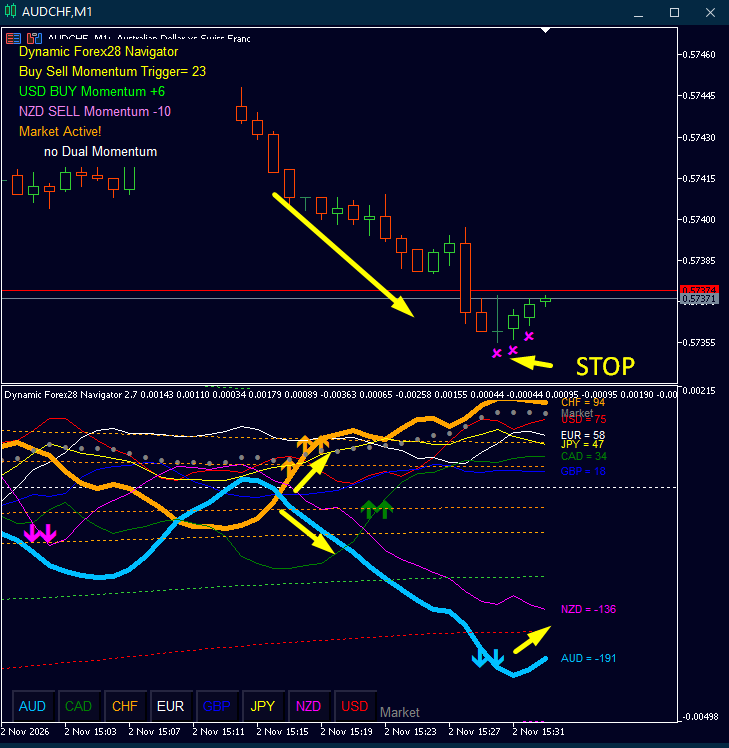
Dynamic Forex28 Navigator MT5 – Precision & Polish Update
We’ve fine-tuned the tool for your daily trading:
Maximized Chart Space: The 8 currency buttons are now compact, leaving more room for your analysis—without losing the one-click pair switching.
Flawless MFib Lines: Fibonacci lines now extend seamlessly to the current candle and the left edge—zero kinks or gaps.
Bulletproof Scaling: No more outlier spikes in the subwindow. Curves stay perfectly in range for clean, accurate data reading.
Update now for free!
👉 Dynamic Forex28 Navigator User Manual: https://www.mql5.com/en/blogs/post/758844
We’ve fine-tuned the tool for your daily trading:
Maximized Chart Space: The 8 currency buttons are now compact, leaving more room for your analysis—without losing the one-click pair switching.
Flawless MFib Lines: Fibonacci lines now extend seamlessly to the current candle and the left edge—zero kinks or gaps.
Bulletproof Scaling: No more outlier spikes in the subwindow. Curves stay perfectly in range for clean, accurate data reading.
Update now for free!
👉 Dynamic Forex28 Navigator User Manual: https://www.mql5.com/en/blogs/post/758844
Eleni Anna Branou
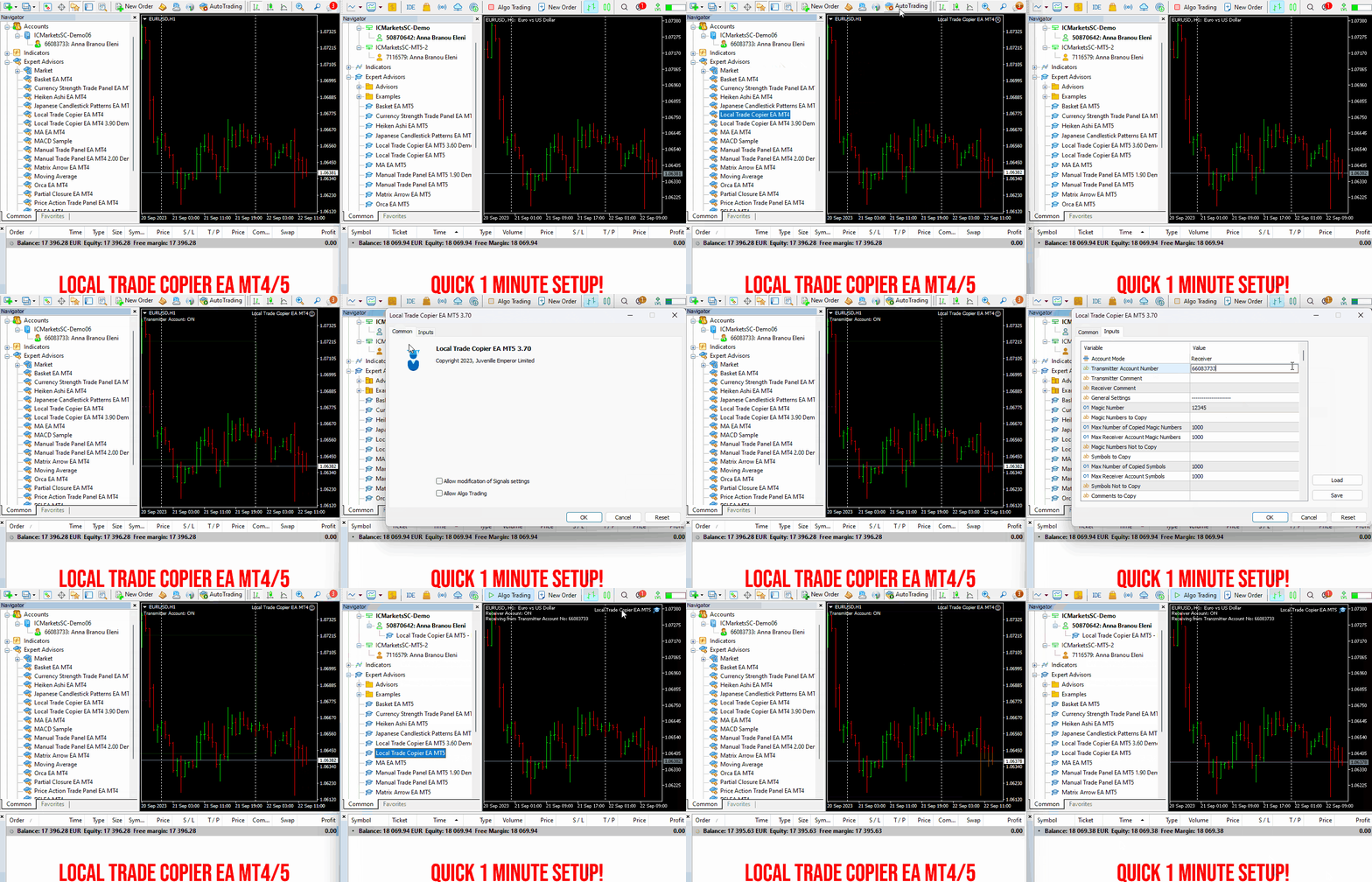
Local Trade Copier EA MT4/5© is a fast and flexible trade copier for copying and managing trades between multiple MetaTrader 4 and MetaTrader 5 accounts on the same Windows computer or Windows VPS.
Set up your Transmitter and Receiver terminals in about 1 minute and copy manual or EA trades between accounts at the same or different brokers. Under suitable conditions, trade information can be synchronized between local MetaTrader terminals in under 0.5 seconds. Actual trade execution depends on broker latency, network conditions, computer/VPS performance and terminal workload.
Each Receiver account can use its own lot sizing, risk management, trade filtering, symbol mapping, trade management and account-protection settings. This allows the same trading activity to be synchronized across multiple accounts while each Receiver can be configured according to its own requirements.
✔️ Copying & Connectivity: Copy between multiple MT4/MT5 accounts* on the same Windows computer or VPS, across different brokers and real/demo accounts.
✔️ Lot Sizing & Risk Management: Choose from 18 lot size and risk options, with independent sizing and risk settings for each Receiver.
✔️ Trade Filtering & Copying Controls: Filter copied trades by symbol, magic number, comment, ticket, volume, direction, day and time.
✔️ Trade Management: Manage market and pending orders, TP/SL, partial closures, reopening, reverse copying, better-price conditions and trade splitting.
✔️ Account Protection: Control lot limits, risk, daily drawdown/profit, copying restrictions and emergency protection independently for each Receiver.
✔️ Broker Compatibility & Symbol Mapping: Copy between different brokers and configure suffixes and special symbol mappings when symbol names differ.
✔️ Notifications & Reliability: Use email/push notifications, persistent settings and MetaTrader logs for monitoring and troubleshooting.
✔️ 20 Activations: Each MT4/MT5 version includes 20 activations, allowing you to install and use it on multiple Windows computers or VPSs.
* MT4 → MT5 and MT5 → MT4 copying requires both LTC versions. Both terminals must run on the same Windows computer or Windows VPS.
🔥🔥🔥🔥🔥 Watch the Local Trade Copier EA MT4/5© Quick Setup Video: https://www.youtube.com/watch?v=zhc9s56QhlE
⭐️⭐️⭐️⭐️⭐️ Local Trade Copier EA MT4©: https://www.mql5.com/en/market/product/68950
⭐️⭐️⭐️⭐️⭐️ Local Trade Copier EA MT5©: https://www.mql5.com/en/market/product/68951
📥 Download the Local Trade Copier EA MT4© Free Demo: https://c.mql5.com/6/1030/Local_Trade_Copier_EA_MT4_4_60_Demo.ex4
📥 Download the Local Trade Copier EA MT5© Free Demo: https://c.mql5.com/6/1030/Local_Trade_Copier_EA_MT5_4_40_Demo.ex5
✅ Local Trade Copier EA MT4/5© Purchase, Installation & Quick Setup Guide: https://www.mql5.com/en/blogs/post/745683
✅ Local Trade Copier EA MT4/5© Detailed Inputs/Settings Guide: https://www.mql5.com/en/blogs/post/745681
✅ Local Trade Copier EA MT4/5© Troubleshooting Guide: https://www.mql5.com/en/blogs/post/746561
💎💎💎💎💎 View all my Expert Advisors, Indicators and Utilities: https://www.mql5.com/en/users/eleanna74/seller
2 November 2026
Set up your Transmitter and Receiver terminals in about 1 minute and copy manual or EA trades between accounts at the same or different brokers. Under suitable conditions, trade information can be synchronized between local MetaTrader terminals in under 0.5 seconds. Actual trade execution depends on broker latency, network conditions, computer/VPS performance and terminal workload.
Each Receiver account can use its own lot sizing, risk management, trade filtering, symbol mapping, trade management and account-protection settings. This allows the same trading activity to be synchronized across multiple accounts while each Receiver can be configured according to its own requirements.
✔️ Copying & Connectivity: Copy between multiple MT4/MT5 accounts* on the same Windows computer or VPS, across different brokers and real/demo accounts.
✔️ Lot Sizing & Risk Management: Choose from 18 lot size and risk options, with independent sizing and risk settings for each Receiver.
✔️ Trade Filtering & Copying Controls: Filter copied trades by symbol, magic number, comment, ticket, volume, direction, day and time.
✔️ Trade Management: Manage market and pending orders, TP/SL, partial closures, reopening, reverse copying, better-price conditions and trade splitting.
✔️ Account Protection: Control lot limits, risk, daily drawdown/profit, copying restrictions and emergency protection independently for each Receiver.
✔️ Broker Compatibility & Symbol Mapping: Copy between different brokers and configure suffixes and special symbol mappings when symbol names differ.
✔️ Notifications & Reliability: Use email/push notifications, persistent settings and MetaTrader logs for monitoring and troubleshooting.
✔️ 20 Activations: Each MT4/MT5 version includes 20 activations, allowing you to install and use it on multiple Windows computers or VPSs.
* MT4 → MT5 and MT5 → MT4 copying requires both LTC versions. Both terminals must run on the same Windows computer or Windows VPS.
🔥🔥🔥🔥🔥 Watch the Local Trade Copier EA MT4/5© Quick Setup Video: https://www.youtube.com/watch?v=zhc9s56QhlE
⭐️⭐️⭐️⭐️⭐️ Local Trade Copier EA MT4©: https://www.mql5.com/en/market/product/68950
⭐️⭐️⭐️⭐️⭐️ Local Trade Copier EA MT5©: https://www.mql5.com/en/market/product/68951
📥 Download the Local Trade Copier EA MT4© Free Demo: https://c.mql5.com/6/1030/Local_Trade_Copier_EA_MT4_4_60_Demo.ex4
📥 Download the Local Trade Copier EA MT5© Free Demo: https://c.mql5.com/6/1030/Local_Trade_Copier_EA_MT5_4_40_Demo.ex5
✅ Local Trade Copier EA MT4/5© Purchase, Installation & Quick Setup Guide: https://www.mql5.com/en/blogs/post/745683
✅ Local Trade Copier EA MT4/5© Detailed Inputs/Settings Guide: https://www.mql5.com/en/blogs/post/745681
✅ Local Trade Copier EA MT4/5© Troubleshooting Guide: https://www.mql5.com/en/blogs/post/746561
💎💎💎💎💎 View all my Expert Advisors, Indicators and Utilities: https://www.mql5.com/en/users/eleanna74/seller
2 November 2026
Eleni Anna Branou
Basket EA MT4/5© is a powerful profit-harvesting tool and a comprehensive account protection system, all combined into a simple and easy-to-use solution. Its core purpose is to give you complete control over your trading account’s overall profit and loss by managing all open positions at the basket level, rather than individually. The EA offers a full range of basket-level features, including take profit, stop loss, break even, and trailing stop loss. These can be configured as a percentage of your account balance, a fixed amount in your account’s currency, or a target in average points across all managed trades. This flexibility allows traders to tailor risk and profit strategies to their unique needs. Basket EA MT4/5© also supports intelligent trade filtering, allowing you to include or exclude specific trades from management based on their magic number, symbol, or comment. This ensures that only the trades you want managed by the EA are affected, while others are left untouched.
For added protection, the EA includes advanced account safeguarding mechanisms. When a specified equity take profit or stop loss level or a maximum drawdown from the account's balance high is reached, the EA can automatically close all open trades, delete any pending orders, and shut down all charts, removing any Expert Advisors running on them. This feature helps protect your capital during unexpected market movements or when reaching your predefined account targets.
✔️ Does not use Martingale, Grid, Averaging, or other high-risk techniques
✔️ Allows exclusion of specific Magic Numbers, trade comments, or symbol trades from management
✔️ Basket Take Profit in % for all managed trades combined
✔️ Basket Stop Loss in % for all managed trades combined
✔️ Basket Break Even in % for all managed trades combined
✔️ Basket Trailing Stop Loss in % for all managed trades combined
✔️ Basket Take Profit in money for all managed trades combined
✔️ Basket Stop Loss in money for all managed trades combined
✔️ Basket Break Even in money for all managed trades combined
✔️ Basket Trailing Stop Loss in money for all managed trades combined
✔️ Basket Take Profit in average points for all managed trades combined
✔️ Basket Stop Loss in average points for all managed trades combined
✔️ Basket Break Even in average points for all managed trades combined
✔️ Basket Trailing Stop Loss in average points for all managed trades combined
✔️ Option to reset all Basket settings after each account balance update or after a Basket target is hit
✔️ Option to close all managed trades at break even after recovering from a drawdown
✔️ Option to close all managed trades at a specific time on a chosen day or daily
✔️ Account protection feature that closes all trades and charts when equity-based TP or SL is reached
✔️ Maximum drawdown % from balance high that closes all trades and charts/EAs if triggered
✔️ Optional on-chart panel to monitor profit/loss and close trades by type or all at once
✔️ Terminal, push notification, and email alerts when any Basket or protection condition is triggered
✔️ 100% automated Expert Advisor
✔️ Fully compatible with MQL5 VPS
⭐️⭐️⭐️⭐️⭐️ Basket EA EA MT4©: https://www.mql5.com/en/market/product/45192
⭐️⭐️⭐️⭐️⭐️ Basket EA EA MT5©: https://www.mql5.com/en/market/product/72782
📥 Download the Basket EA MT4© demo version in your demo account now: https://c.mql5.com/6/988/Basket_EA_MT4_2_20_Demo.ex4
📥 Download the Basket EA MT5© demo version in your demo account now: https://c.mql5.com/6/988/Basket_EA_MT5_2_00_Demo.ex5
✅ Basket EA MT4/5© detailed Settings/Inputs guide: https://www.mql5.com/en/blogs/post/746117
💎💎💎💎💎 Check out all my Expert Advisors and Utilities: https://www.mql5.com/en/users/eleanna74/seller
2 November 2026
For added protection, the EA includes advanced account safeguarding mechanisms. When a specified equity take profit or stop loss level or a maximum drawdown from the account's balance high is reached, the EA can automatically close all open trades, delete any pending orders, and shut down all charts, removing any Expert Advisors running on them. This feature helps protect your capital during unexpected market movements or when reaching your predefined account targets.
✔️ Does not use Martingale, Grid, Averaging, or other high-risk techniques
✔️ Allows exclusion of specific Magic Numbers, trade comments, or symbol trades from management
✔️ Basket Take Profit in % for all managed trades combined
✔️ Basket Stop Loss in % for all managed trades combined
✔️ Basket Break Even in % for all managed trades combined
✔️ Basket Trailing Stop Loss in % for all managed trades combined
✔️ Basket Take Profit in money for all managed trades combined
✔️ Basket Stop Loss in money for all managed trades combined
✔️ Basket Break Even in money for all managed trades combined
✔️ Basket Trailing Stop Loss in money for all managed trades combined
✔️ Basket Take Profit in average points for all managed trades combined
✔️ Basket Stop Loss in average points for all managed trades combined
✔️ Basket Break Even in average points for all managed trades combined
✔️ Basket Trailing Stop Loss in average points for all managed trades combined
✔️ Option to reset all Basket settings after each account balance update or after a Basket target is hit
✔️ Option to close all managed trades at break even after recovering from a drawdown
✔️ Option to close all managed trades at a specific time on a chosen day or daily
✔️ Account protection feature that closes all trades and charts when equity-based TP or SL is reached
✔️ Maximum drawdown % from balance high that closes all trades and charts/EAs if triggered
✔️ Optional on-chart panel to monitor profit/loss and close trades by type or all at once
✔️ Terminal, push notification, and email alerts when any Basket or protection condition is triggered
✔️ 100% automated Expert Advisor
✔️ Fully compatible with MQL5 VPS
⭐️⭐️⭐️⭐️⭐️ Basket EA EA MT4©: https://www.mql5.com/en/market/product/45192
⭐️⭐️⭐️⭐️⭐️ Basket EA EA MT5©: https://www.mql5.com/en/market/product/72782
📥 Download the Basket EA MT4© demo version in your demo account now: https://c.mql5.com/6/988/Basket_EA_MT4_2_20_Demo.ex4
📥 Download the Basket EA MT5© demo version in your demo account now: https://c.mql5.com/6/988/Basket_EA_MT5_2_00_Demo.ex5
✅ Basket EA MT4/5© detailed Settings/Inputs guide: https://www.mql5.com/en/blogs/post/746117
💎💎💎💎💎 Check out all my Expert Advisors and Utilities: https://www.mql5.com/en/users/eleanna74/seller
2 November 2026
Eleni Anna Branou
Partial Closure EA MT4/5© allows you to partially close any trade on your account, manually by a chosen percentage of the lot size and/or by trade ticket, or automatically at specified percentages of the TP/SL level, closing a percentage of the initial lot size across up to 10 take profit and 10 stop loss levels.. It can manage all or selected trades in your account by specifying or excluding certain magic numbers, comments, or symbols.
✔️ Extremely easy and straightforward interface
✔️ Works smoothly on any chart, account type, or broker
✔️ Automatic partial closure of managed trades at specified TP/SL levels, closing independent percentages of the initial lot size across up to 10 TP and 10 SL levels
✔️ Manual partial closure of all managed trades or any individual trade by ticket number, based on a percentage of the lot size
✔️ Option to move the stop loss to break even for the remaining portion of trades automatically partially closed as above
✔️ Option to move the stop loss to break even once a specified profit level (in points) is reached
✔️ Ability to exclude certain magic numbers, comments, or symbol trades from management
✔️ Compatible with MQL5 VPS
⭐️⭐️⭐️⭐️⭐️ Partial Closure EA MT4©: https://www.mql5.com/en/market/product/82356
⭐️⭐️⭐️⭐️⭐️ Partial Closure EA MT5©: https://www.mql5.com/en/market/product/82357
📥 Download the Partial Closure EA MT4© demo version in your demo account now: https://c.mql5.com/6/975/Partial_Closure_EA_MT4_1.30_Demo.ex4
📥 Download the Partial Closure EA MT5© demo version in your demo account now: https://c.mql5.com/6/975/Partial_Closure_EA_MT5_1.30_Demo.ex5
✅ Partial Closure EA MT4/5© installation & user guide: https://www.mql5.com/en/blogs/post/749385
💎💎💎💎💎 Check out all my Expert Advisors, Indicators and Utilities: https://www.mql5.com/en/users/eleanna74/seller
2 November 2026
✔️ Extremely easy and straightforward interface
✔️ Works smoothly on any chart, account type, or broker
✔️ Automatic partial closure of managed trades at specified TP/SL levels, closing independent percentages of the initial lot size across up to 10 TP and 10 SL levels
✔️ Manual partial closure of all managed trades or any individual trade by ticket number, based on a percentage of the lot size
✔️ Option to move the stop loss to break even for the remaining portion of trades automatically partially closed as above
✔️ Option to move the stop loss to break even once a specified profit level (in points) is reached
✔️ Ability to exclude certain magic numbers, comments, or symbol trades from management
✔️ Compatible with MQL5 VPS
⭐️⭐️⭐️⭐️⭐️ Partial Closure EA MT4©: https://www.mql5.com/en/market/product/82356
⭐️⭐️⭐️⭐️⭐️ Partial Closure EA MT5©: https://www.mql5.com/en/market/product/82357
📥 Download the Partial Closure EA MT4© demo version in your demo account now: https://c.mql5.com/6/975/Partial_Closure_EA_MT4_1.30_Demo.ex4
📥 Download the Partial Closure EA MT5© demo version in your demo account now: https://c.mql5.com/6/975/Partial_Closure_EA_MT5_1.30_Demo.ex5
✅ Partial Closure EA MT4/5© installation & user guide: https://www.mql5.com/en/blogs/post/749385
💎💎💎💎💎 Check out all my Expert Advisors, Indicators and Utilities: https://www.mql5.com/en/users/eleanna74/seller
2 November 2026
Eleni Anna Branou
Local Trade Copier EA MT4/5© is a fast and flexible trade copier for copying and managing trades between multiple MetaTrader 4 and MetaTrader 5 accounts on the same Windows computer or Windows VPS.
Set up your Transmitter and Receiver terminals in about 1 minute and copy manual or EA trades between accounts at the same or different brokers. Under suitable conditions, trade information can be synchronized between local MetaTrader terminals in under 0.5 seconds. Actual trade execution depends on broker latency, network conditions, computer/VPS performance and terminal workload.
Each Receiver account can use its own lot sizing, risk management, trade filtering, symbol mapping, trade management and account-protection settings. This allows the same trading activity to be synchronized across multiple accounts while each Receiver can be configured according to its own requirements.
✔️ Copying & Connectivity: Copy between multiple MT4/MT5 accounts* on the same Windows computer or VPS, across different brokers and real/demo accounts.
✔️ Lot Sizing & Risk Management: Choose from 18 lot size and risk options, with independent sizing and risk settings for each Receiver.
✔️ Trade Filtering & Copying Controls: Filter copied trades by symbol, magic number, comment, ticket, volume, direction, day and time.
✔️ Trade Management: Manage market and pending orders, TP/SL, partial closures, reopening, reverse copying, better-price conditions and trade splitting.
✔️ Account Protection: Control lot limits, risk, daily drawdown/profit, copying restrictions and emergency protection independently for each Receiver.
✔️ Broker Compatibility & Symbol Mapping: Copy between different brokers and configure suffixes and special symbol mappings when symbol names differ.
✔️ Notifications & Reliability: Use email/push notifications, persistent settings and MetaTrader logs for monitoring and troubleshooting.
✔️ 20 Activations: Each MT4/MT5 version includes 20 activations, allowing you to install and use it on multiple Windows computers or VPSs.
* MT4 → MT5 and MT5 → MT4 copying requires both LTC versions. Both terminals must run on the same Windows computer or Windows VPS.
🔥🔥🔥🔥🔥 Watch the Local Trade Copier EA MT4/5© Quick Setup Video: https://www.youtube.com/watch?v=zhc9s56QhlE
⭐️⭐️⭐️⭐️⭐️ Local Trade Copier EA MT4©: https://www.mql5.com/en/market/product/68950
⭐️⭐️⭐️⭐️⭐️ Local Trade Copier EA MT5©: https://www.mql5.com/en/market/product/68951
📥 Download the Local Trade Copier EA MT4© Free Demo: https://c.mql5.com/6/1030/Local_Trade_Copier_EA_MT4_4_60_Demo.ex4
📥 Download the Local Trade Copier EA MT5© Free Demo: https://c.mql5.com/6/1030/Local_Trade_Copier_EA_MT5_4_40_Demo.ex5
✅ Local Trade Copier EA MT4/5© Purchase, Installation & Quick Setup Guide: https://www.mql5.com/en/blogs/post/745683
✅ Local Trade Copier EA MT4/5© Detailed Inputs/Settings Guide: https://www.mql5.com/en/blogs/post/745681
✅ Local Trade Copier EA MT4/5© Troubleshooting Guide: https://www.mql5.com/en/blogs/post/746561
💎💎💎💎💎 View all my Expert Advisors, Indicators and Utilities: https://www.mql5.com/en/users/eleanna74/seller
2 November 2026
.
Set up your Transmitter and Receiver terminals in about 1 minute and copy manual or EA trades between accounts at the same or different brokers. Under suitable conditions, trade information can be synchronized between local MetaTrader terminals in under 0.5 seconds. Actual trade execution depends on broker latency, network conditions, computer/VPS performance and terminal workload.
Each Receiver account can use its own lot sizing, risk management, trade filtering, symbol mapping, trade management and account-protection settings. This allows the same trading activity to be synchronized across multiple accounts while each Receiver can be configured according to its own requirements.
✔️ Copying & Connectivity: Copy between multiple MT4/MT5 accounts* on the same Windows computer or VPS, across different brokers and real/demo accounts.
✔️ Lot Sizing & Risk Management: Choose from 18 lot size and risk options, with independent sizing and risk settings for each Receiver.
✔️ Trade Filtering & Copying Controls: Filter copied trades by symbol, magic number, comment, ticket, volume, direction, day and time.
✔️ Trade Management: Manage market and pending orders, TP/SL, partial closures, reopening, reverse copying, better-price conditions and trade splitting.
✔️ Account Protection: Control lot limits, risk, daily drawdown/profit, copying restrictions and emergency protection independently for each Receiver.
✔️ Broker Compatibility & Symbol Mapping: Copy between different brokers and configure suffixes and special symbol mappings when symbol names differ.
✔️ Notifications & Reliability: Use email/push notifications, persistent settings and MetaTrader logs for monitoring and troubleshooting.
✔️ 20 Activations: Each MT4/MT5 version includes 20 activations, allowing you to install and use it on multiple Windows computers or VPSs.
* MT4 → MT5 and MT5 → MT4 copying requires both LTC versions. Both terminals must run on the same Windows computer or Windows VPS.
🔥🔥🔥🔥🔥 Watch the Local Trade Copier EA MT4/5© Quick Setup Video: https://www.youtube.com/watch?v=zhc9s56QhlE
⭐️⭐️⭐️⭐️⭐️ Local Trade Copier EA MT4©: https://www.mql5.com/en/market/product/68950
⭐️⭐️⭐️⭐️⭐️ Local Trade Copier EA MT5©: https://www.mql5.com/en/market/product/68951
📥 Download the Local Trade Copier EA MT4© Free Demo: https://c.mql5.com/6/1030/Local_Trade_Copier_EA_MT4_4_60_Demo.ex4
📥 Download the Local Trade Copier EA MT5© Free Demo: https://c.mql5.com/6/1030/Local_Trade_Copier_EA_MT5_4_40_Demo.ex5
✅ Local Trade Copier EA MT4/5© Purchase, Installation & Quick Setup Guide: https://www.mql5.com/en/blogs/post/745683
✅ Local Trade Copier EA MT4/5© Detailed Inputs/Settings Guide: https://www.mql5.com/en/blogs/post/745681
✅ Local Trade Copier EA MT4/5© Troubleshooting Guide: https://www.mql5.com/en/blogs/post/746561
💎💎💎💎💎 View all my Expert Advisors, Indicators and Utilities: https://www.mql5.com/en/users/eleanna74/seller
2 November 2026
.
Eleni Anna Branou
Japanese Candlestick Patterns EA ΜΤ4/5© is a fully automated Expert Advisor with 8 built in strategies, based on the well known Japanese Candlestick Patterns. It has a unique number of settings that make it extremely versatile in all market conditions. This EA comes with new set files for many symbols/instruments, specially optimized for ECN Raw Spread ICMarkets accounts (New York based GMT+3 time zone servers).
✔️ Martingale, Grid, Averaging or other dangerous techniques are not used
✔️ 8 built in Strategies, based on the extremely reliable Japanese Candlestick Patterns
✔️ Specially optimized set files for many symbols/instruments
✔️ Hard and Virtual Take Profit and Stop Loss levels at various timings
✔️ SL, TP, BE and Trailing SL levels in Percentage of the Average Daily Range
✔️ Time and Price Level settings for maximum flexibility
✔️ 100% automated Expert Advisor
✔️ MQL5 VPS compatible
🔥🔥🔥🔥🔥 Japanese Candlestick Patterns EA MT4/5© Backtests & Set Files: https://www.mql5.com/en/blogs/post/745873
⭐️⭐️⭐️⭐️⭐️ Japanese Candlestick Patterns EA MT4©: https://www.mql5.com/en/market/product/45732
⭐️⭐️⭐️⭐️⭐️ Japanese Candlestick Patterns EA MT5©: https://www.mql5.com/en/market/product/45800
💎💎💎💎💎 Check out all my Expert Advisors, Indicators and Utilities: https://www.mql5.com/en/users/eleanna74/seller
1 November 2026
✔️ Martingale, Grid, Averaging or other dangerous techniques are not used
✔️ 8 built in Strategies, based on the extremely reliable Japanese Candlestick Patterns
✔️ Specially optimized set files for many symbols/instruments
✔️ Hard and Virtual Take Profit and Stop Loss levels at various timings
✔️ SL, TP, BE and Trailing SL levels in Percentage of the Average Daily Range
✔️ Time and Price Level settings for maximum flexibility
✔️ 100% automated Expert Advisor
✔️ MQL5 VPS compatible
🔥🔥🔥🔥🔥 Japanese Candlestick Patterns EA MT4/5© Backtests & Set Files: https://www.mql5.com/en/blogs/post/745873
⭐️⭐️⭐️⭐️⭐️ Japanese Candlestick Patterns EA MT4©: https://www.mql5.com/en/market/product/45732
⭐️⭐️⭐️⭐️⭐️ Japanese Candlestick Patterns EA MT5©: https://www.mql5.com/en/market/product/45800
💎💎💎💎💎 Check out all my Expert Advisors, Indicators and Utilities: https://www.mql5.com/en/users/eleanna74/seller
1 November 2026
Dragan Drenjanin
Apex Trade Assistant — Kurulum ve Resimli Kullanıcı Kılavuzu MetaTrader 5 grafiğinde manuel işlem yapmak için bir çalışma alanı. APEX; emir gönderimini, görsel işlem planlamasını, pozisyon yönetimini ve bağımsız doğrusal regresyon ile Kalman modellerini tek bir uygulamada birleştirir...
Dragan Drenjanin
Apex Trade Assistant — Configurazione e guida utente illustrata Uno spazio di lavoro sul grafico per il trading manuale in MetaTrader 5...
Dragan Drenjanin
Apex Trade Assistant — Configuration et guide d’utilisation illustré Un espace de travail sur graphique pour le trading manuel dans MetaTrader 5...
Dragan Drenjanin
Apex Trade Assistant — 설정 및 그림으로 보는 사용자 가이드 MetaTrader 5 차트에서 수동 거래를 위한 작업 공간입니다. APEX는 주문 전송, 시각적 거래 계획, 포지션 관리, 독립적인 선형 회귀 모델과 칼만 모델을 하나의 애플리케이션에 통합합니다. 직접 값을 입력하거나, 어시스턴트를 통해 매개변수 준비를 도움받거나, 모델의 제안을 검토한 후 적용할 내용을 선택할 수 있습니다...
Dragan Drenjanin
Apex Trade Assistant — Einrichtung und bebildertes Benutzerhandbuch
1 November 2026, 20:10
Apex Trade Assistant — Einrichtung und bebildertes Benutzerhandbuch Ein Arbeitsbereich direkt im Chart für den manuellen Handel in MetaTrader 5...
Dragan Drenjanin
Apex Trade Assistant — セットアップと図解ユーザーガイド MetaTrader 5のチャート上で裁量取引を行うためのワークスペースです。 APEXは、注文、視覚的な取引プランの作成、ポジション管理、独立した線形回帰モデルとカルマンモデルを1つのアプリケーションにまとめています...
Dragan Drenjanin
Apex Trade Assistant — Configuração e guia ilustrado do usuário Um espaço de trabalho no gráfico para negociação manual no MetaTrader 5. O APEX reúne envio de ordens, planejamento visual de operações, gestão de posições e modelos independentes de regressão linear e Kalman em um único aplicativo...
Dragan Drenjanin
Apex Trade Assistant — Configuración y guía ilustrada del usuario Un espacio de trabajo sobre el gráfico para el trading manual en MetaTrader 5...
Dragan Drenjanin
Apex Trade Assistant — 设置与图解用户指南 在 MetaTrader 5 图表上进行手动交易的工作空间。 APEX 将订单提交、可视化交易规划、持仓管理,以及相互独立的线性回归模型和卡尔曼模型整合在一个应用中。您可以先输入自己的数值,也可以使用助手辅助准备参数,或先查看模型建议,再决定应用哪些内容...
Dragan Drenjanin
Apex Trade Assistant — настройка и иллюстрированное руководство пользователя
1 November 2026, 20:09
Apex Trade Assistant — настройка и иллюстрированное руководство пользователя Рабочее пространство для ручной торговли непосредственно на графике MetaTrader 5...
Dragan Drenjanin
Apex Trade Assistant — Illustrated User Guide A chart-based workspace for manual trading in MetaTrader 5. APEX brings order entry, visual trade planning, position management, and independent linear regression and Kalman models into one application...
Dragan Drenjanin
Published product
Apex Trade Assistant — Your Manual Trading Workspace in MetaTrader 5 Plan trades, place orders, and manage positions directly from your chart. Apex Trade Assistant brings visual planning, position sizing, protective levels, and trade management commands together in one workspace. Use the main APEX panel for everyday operations and independent Apex Micro planners to prepare several individual trading plans. Move Entry, SL and TP levels on the chart, review the parameters, and choose the
Eleni Anna Branou
Heiken Ashi EA MT4/5© is a fully automated trading system that takes Classic or Smoothed Heiken Ashi candles to the next level. It enters trades based on Heiken Ashi color changes, offering a highly customizable approach to fit different trading styles. The EA provides great flexibility, allowing you to select which Heiken Ashi candle (from the 2nd to the 10th) should trigger the first trade. Additionally, it includes a distance limitation feature to prevent excessive entries at similar price levels. A built-in Heiken Ashi trailing stop dynamically adjusts stop-loss levels based on past Heiken Ashi candles, helping to adapt to different market conditions. To improve trade quality, the EA includes Moving Average and MACD filters to reduce false signals. This EA comes with specialy optimized set files for many symbols/instruments.
✔️ The EA offers flexible trade execution, allowing either one trade per color change or multiple trades per trend.
✔️ Custom entry selection lets users open trades based on the 2nd to 10th Heiken Ashi candle.
✔️ Distance control helps prevent excessive trades at similar price levels.
✔️ A built-in Heiken Ashi trailing stop dynamically adjusts the stop-loss for better trend-following adaptability.
✔️ Advanced filters, including Moving Average and MACD, help reduce false signals.
✔️ ADR-based risk management calculates SL, TP, BE, and Trailing SL as a percentage of the Average Daily Range.
✔️ Basket TP and SL options enable efficient management of all open positions.
✔️ The EA avoids risky strategies such as Martingale and Grid, ensuring a safer trading approach for long-term success.
✔️ It is 100% compatible with MQL5 VPS, allowing smooth operation when running 24/7.
🔥🔥🔥🔥🔥 Heiken Ashi EA MT4/5© Backtests & New Optimized Set Files: https://www.mql5.com/en/blogs/post/745696
✅ How to Test the Heiken Ashi EA MT4/5©: https://www.mql5.com/en/blogs/post/750887
⭐️⭐️⭐️⭐️⭐️ Heiken Ashi EA MT4©: https://www.mql5.com/en/market/product/45283
⭐️⭐️⭐️⭐️⭐️ Heiken Ashi EA MT5©: https://www.mql5.com/en/market/product/64877
💎💎💎💎💎 Check out all my Expert Advisors, Indicators and Utilities: https://www.mql5.com/en/users/eleanna74/seller
1 November 2026
✔️ The EA offers flexible trade execution, allowing either one trade per color change or multiple trades per trend.
✔️ Custom entry selection lets users open trades based on the 2nd to 10th Heiken Ashi candle.
✔️ Distance control helps prevent excessive trades at similar price levels.
✔️ A built-in Heiken Ashi trailing stop dynamically adjusts the stop-loss for better trend-following adaptability.
✔️ Advanced filters, including Moving Average and MACD, help reduce false signals.
✔️ ADR-based risk management calculates SL, TP, BE, and Trailing SL as a percentage of the Average Daily Range.
✔️ Basket TP and SL options enable efficient management of all open positions.
✔️ The EA avoids risky strategies such as Martingale and Grid, ensuring a safer trading approach for long-term success.
✔️ It is 100% compatible with MQL5 VPS, allowing smooth operation when running 24/7.
🔥🔥🔥🔥🔥 Heiken Ashi EA MT4/5© Backtests & New Optimized Set Files: https://www.mql5.com/en/blogs/post/745696
✅ How to Test the Heiken Ashi EA MT4/5©: https://www.mql5.com/en/blogs/post/750887
⭐️⭐️⭐️⭐️⭐️ Heiken Ashi EA MT4©: https://www.mql5.com/en/market/product/45283
⭐️⭐️⭐️⭐️⭐️ Heiken Ashi EA MT5©: https://www.mql5.com/en/market/product/64877
💎💎💎💎💎 Check out all my Expert Advisors, Indicators and Utilities: https://www.mql5.com/en/users/eleanna74/seller
1 November 2026
: