GoldEdge SMC Dashboard MT5
- Utilities
-
Thanusak Chaluthong
 GoldEdge Labs - Smart Dashboards for Gold.
I build all-in-one trading dashboards for Gold (XAUUSD) on the 15-minute chart. - Version: 2.15
- Activations: 5
EARLY BIRD: $79 - first 20 copies only.
Then the price steps up by $50 every 10 copies: $129 > $179 > $229 > ... with no ceiling.
The earlier you buy, the less you pay. When the 20th copy is sold, the price goes to $129 the same day.
Want an EA to place the trades for you? See SMC Hybrid Master MK - the 12-strategy gold EA for MetaTrader 4. Early Bird $299 for the first 20 copies.
GoldEdge SMC Dashboard — Smart Dashboard for Gold
GoldEdge SMC Dashboard brings everything a Gold trader needs onto one chart. It is built and tuned for XAUUSD on the M15 timeframe.
This is a decision-support tool, not an auto-trading robot. The dashboard never opens trades by itself. It reads the market, shows you the setups, simulates them with virtual orders, and leaves every decision to you.
What you see on the chart
BO · TF · ICT · SMC · Scalp · Micro · BO-C · Range · Liquidity FVG · ORB · Intraday Momentum · Volatility Breakout
For each strategy the panel shows its live status (FORMING / CONFIRM / OPEN), direction and the reason behind it, so you always know why a setup is or isn't valid.
Virtual trade simulation
Every signal is simulated with virtual orders directly on the chart, with entry, SL and TP shown. The STATS and HISTORY pages show results per strategy and a 12-month table, so you can see how each setup has behaved before you risk real money.
Market context at a glance
Account risk rules (optional, off by default)
Daily target, daily loss limit, pause after losses, maximum open orders, minimum distance between orders, weekly and monthly targets, and a monthly drawdown limit — to help you stay disciplined.
Recommended setup
See our EA trading a real account (Exness, XAUUSD): GoldEdge SMC Hybrid Master MK signal
Risk notice
Trading involves risk. This product is an analysis and decision-support tool. Past or simulated results do not guarantee future results. Always test on a demo account first.
Support
Questions or suggestions? Send me a private message — I reply as soon as possible.
Then the price steps up by $50 every 10 copies: $129 > $179 > $229 > ... with no ceiling.
The earlier you buy, the less you pay. When the 20th copy is sold, the price goes to $129 the same day.
Want an EA to place the trades for you? See SMC Hybrid Master MK - the 12-strategy gold EA for MetaTrader 4. Early Bird $299 for the first 20 copies.
GoldEdge SMC Dashboard — Smart Dashboard for Gold
GoldEdge SMC Dashboard brings everything a Gold trader needs onto one chart. It is built and tuned for XAUUSD on the M15 timeframe.
This is a decision-support tool, not an auto-trading robot. The dashboard never opens trades by itself. It reads the market, shows you the setups, simulates them with virtual orders, and leaves every decision to you.
What you see on the chart
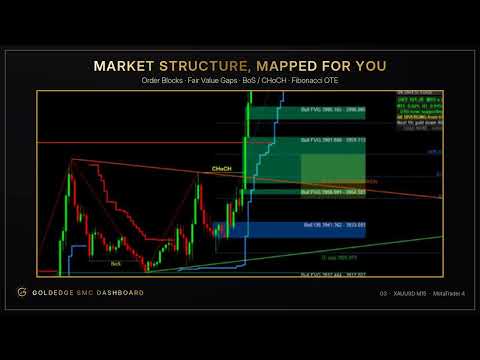
- Market structure: BoS / CHoCH, ZigZag swings
- Order Blocks and Supply / Demand zones
- Fair Value Gaps (FVG) with a minimum-size filter
- Liquidity levels (buy-side / sell-side)
- Supertrend on the chart and on H4
- Fibonacci with OTE zone, Premium / Discount zones
- Quasimodo (QM) levels, trend lines, ICT box, POI H1
- Every layer can be switched on or off with a single click
BO · TF · ICT · SMC · Scalp · Micro · BO-C · Range · Liquidity FVG · ORB · Intraday Momentum · Volatility Breakout
For each strategy the panel shows its live status (FORMING / CONFIRM / OPEN), direction and the reason behind it, so you always know why a setup is or isn't valid.
Virtual trade simulation
Every signal is simulated with virtual orders directly on the chart, with entry, SL and TP shown. The STATS and HISTORY pages show results per strategy and a 12-month table, so you can see how each setup has behaved before you risk real money.
Market context at a glance
- Momentum on M15 / H1 / H4
- ADX trend strength and DI direction
- Premium / Discount zone
- Trading session (Asia / London / New York) with automatic GMT detection
- DXY momentum box (synthetic Dollar Index)
- Edge Score: a quick read on whether conditions favour trading today
- One-click Buy / Sell and Buy/Sell Stop & Limit
- Automatic SL / TP based on ATR and risk:reward
- Break-even, trailing stop in $, close all / close profit / close loss
- P Line — drag Entry, SL and TP lines on the chart, then place the order
- Free-margin check before every order
Account risk rules (optional, off by default)
Daily target, daily loss limit, pause after losses, maximum open orders, minimum distance between orders, weekly and monthly targets, and a monthly drawdown limit — to help you stay disciplined.
Recommended setup
- Symbol: XAUUSD (Gold), timeframe: M15
- Download at least 1 year of H1 history (History Center, F2) for the multi-timeframe and GMT detection
- The DXY box uses EURUSD, USDJPY, GBPUSD, USDCAD, USDSEK and USDCHF. If your broker doesn't offer them, the dashboard still works and the DXY box shows as unavailable
- Attach the dashboard to an XAUUSD M15 chart (it runs like an Expert Advisor — enable Algo Trading only if you want to use the manual trading buttons).
- Turn chart layers on or off from the panel.
- Watch the strategy list and context. When a setup is CONFIRMED and fits your plan, decide whether to trade manually.
- Review STATS / HISTORY to learn which setups suit your style.
- Is it locked to my trading account? No. It works with any account (real or demo) and any broker on your computer, on as many MT5 terminals as you like.
- How many computers can I use? 5 activations — one activation per computer (hardware + Windows). Running it on the MQL5 VPS does not use an activation.
- Does it open trades automatically? No. It is decision support only. Orders are sent only when you press a button.
- Can I try it first? Yes. Download the Free Demo and run it in the Strategy Tester, or start with the 1-month rent.
- Is there a discount or coupon? The price is the same for everyone. The lowest-cost way to start is the 1-month rent.
- Other symbols or timeframes? It is designed and tuned for XAUUSD M15. Other symbols and timeframes are not officially supported.
- MT4 version? Yes - GoldEdge SMC Dashboard (MT4).
- How do I install it after buying? In MT5, log in with your MQL5 account (Tools → Options → Community), open Market → Purchased, click Install, then drag GoldEdge SMC Dashboard onto an XAUUSD M15 chart.
See our EA trading a real account (Exness, XAUUSD): GoldEdge SMC Hybrid Master MK signal
Risk notice
Trading involves risk. This product is an analysis and decision-support tool. Past or simulated results do not guarantee future results. Always test on a demo account first.
Support
Questions or suggestions? Send me a private message — I reply as soon as possible.