Partial TP Manager

Partial TP Manager

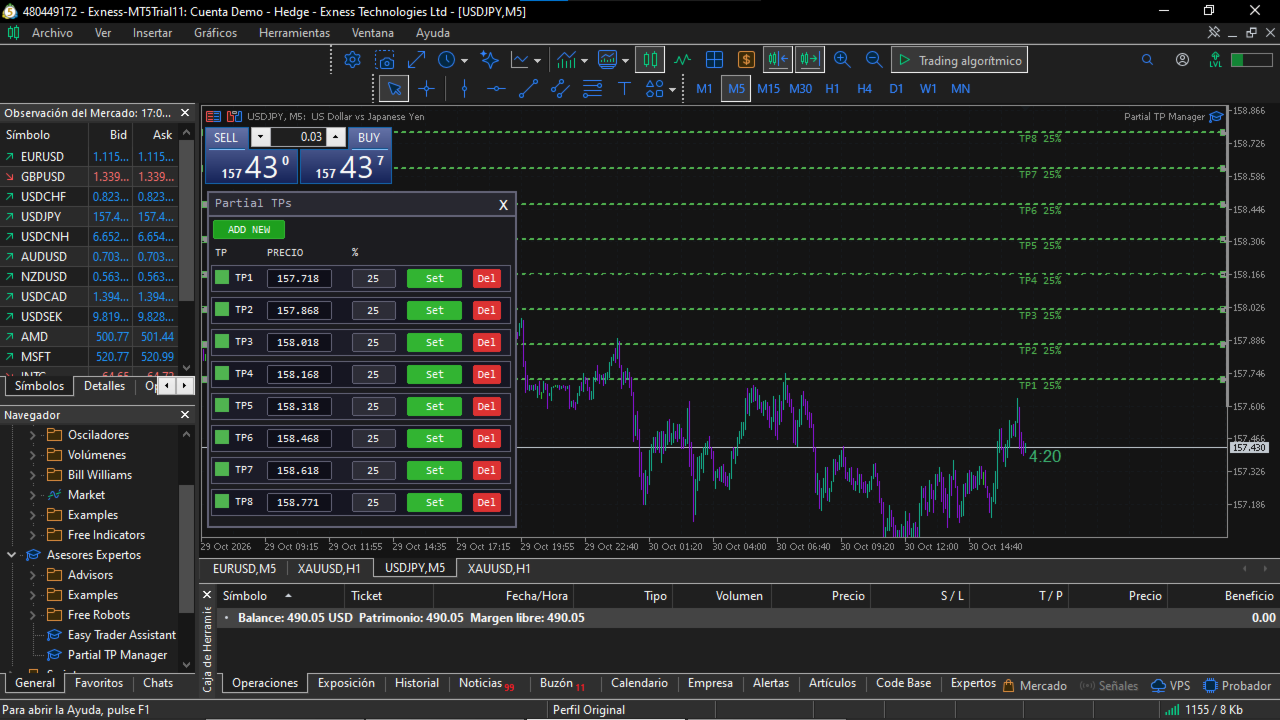
Partial TP Manager is a free utility for MetaTrader 5 that lets you manually close a portion of your trade when the price reaches a level you define, while keeping the rest of the position open. Everything is managed directly from the chart: you create the levels, drag them, and specify what percentage of the position to close at each one.

The idea is simple: secure part of the profit without exiting the trade.

Simple example

You have a trade with 100 USD of floating profit and you want to withdraw 25 USD without leaving the trade.

You set a partial take profit level with 25% of the position.
When the price touches that line, the utility closes 25% and secures approximately 25 USD.
The remaining 75% stays open, now with less money at risk and the profit already partially secured.
You can repeat this at several levels: for example, 25% at TP1, 25% at TP2 and 25% at TP3, letting the rest run.

Approach

Designed for discretionary traders who open their entries manually and want clear, precise exit management.

The utility does not open trades: it only manages the ones you already have open.

Main features

  • Up to 8 partial take profit levels per symbol

  • Draggable TP lines directly on the chart

  • Configurable percentage of the position to close at each level

  • Automatic partial close when the price touches the line

  • Works with multiple manual trades

  • Compact, movable and easy-to-use panel

  • Add, edit or delete levels with one click

How it works

  1. Attach the utility to the chart of the symbol you trade.

  2. Open your trade manually.

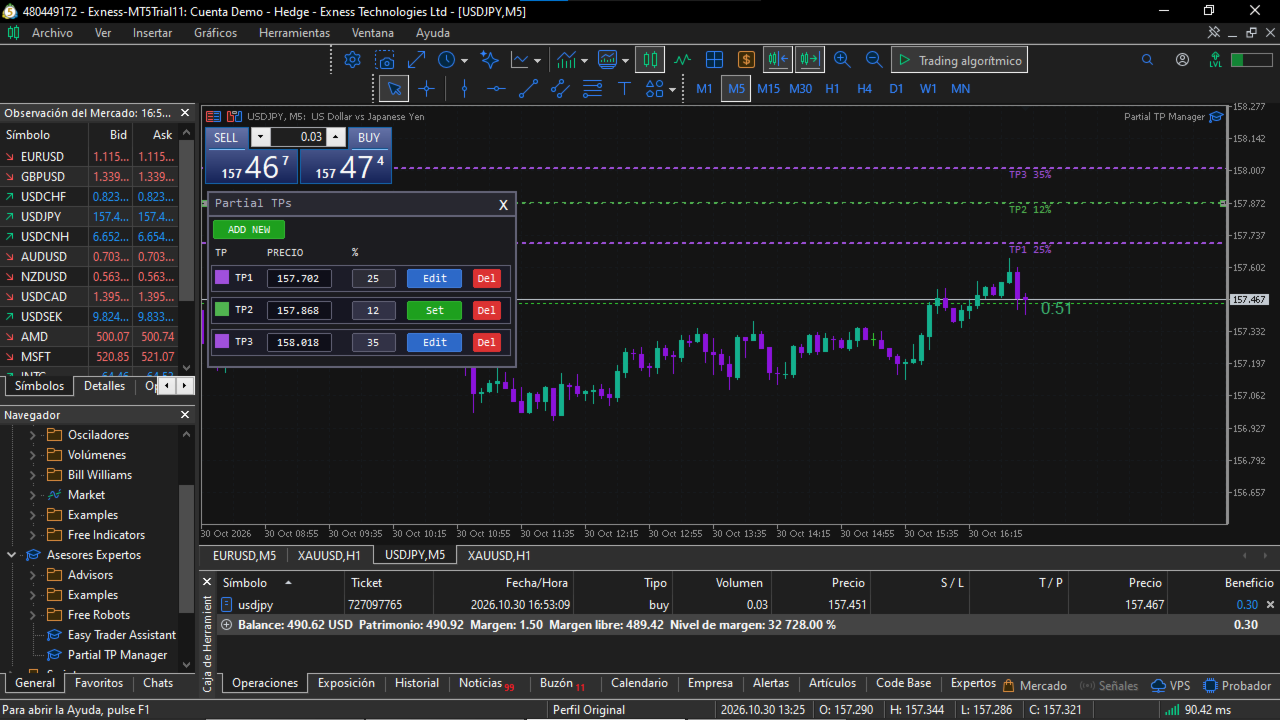
  3. Press ADD NEW to create a take profit level.

  4. Enter the price (or drag the line) and the percentage to close.

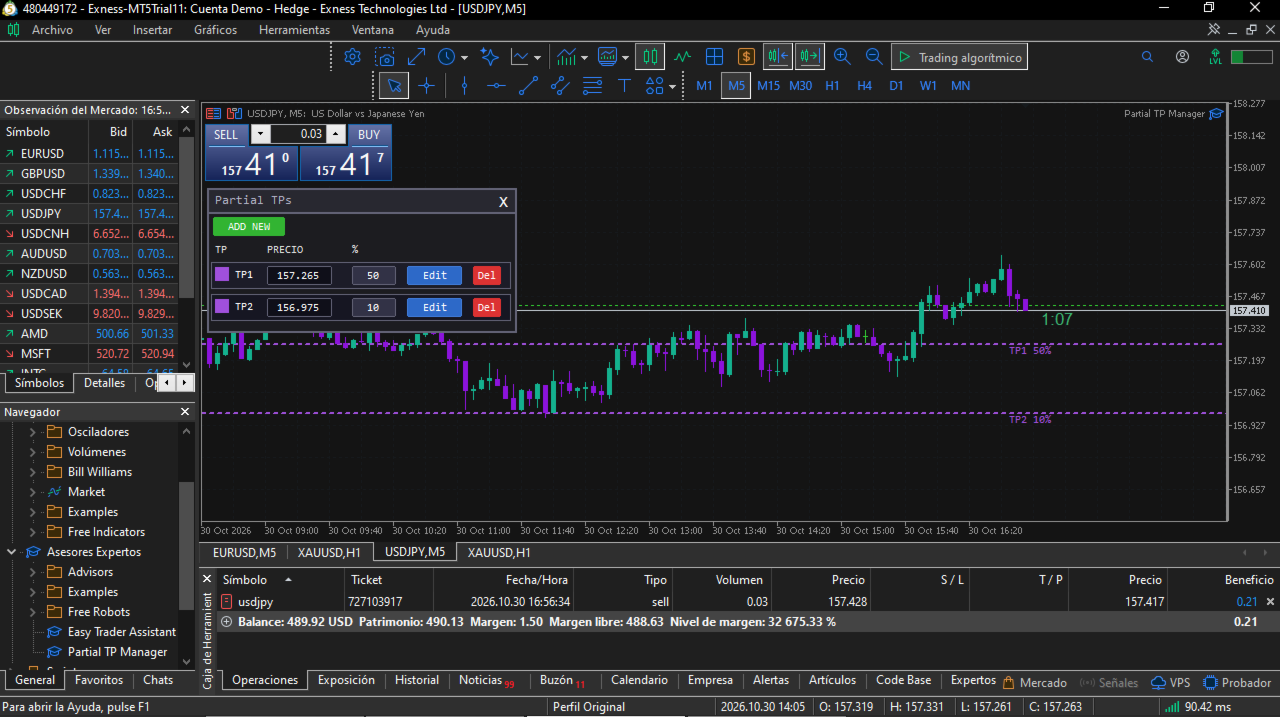
  5. Press Set to activate it. Use Edit to modify it or Del to delete it.

  6. When the price touches the line, the utility closes the selected percentage.

Visual

  • Panel integrated into the main chart

  • Visible lines that are easy to move

  • Clean design, no unnecessary elements

Requirements

  • MetaTrader 5 (netting and hedging accounts)

  • Algorithmic trading enabled in the terminal

  • Terminal open and connected, with the chart open

  • VPS recommended for greater stability

Considerations

  • It is not a robot: it does not open trades on its own

  • It works on the symbol of the chart it is attached to

  • Partial closes are executed by the utility, they are not pending orders on the server

  • The closing volume is adjusted to the symbol's minimum lot and volume step; in very small positions, some levels may not be divisible

  • Execution depends on the market, spread and slippage, so the closing price may differ from the line

  • The secured amount in the example is approximate and depends on the actual closing price

  • It is recommended to test it first on a demo account

Risk warning

Trading involves risk. This utility is a position management tool and does not guarantee profits.

Support

Comments and suggestions are welcome in the comments section. If you like the tool, leave a review. Check out my other products for more tools to improve your trading.
Recommended products
Local Account Monitor MT5 is a read-only local monitoring utility for traders who run multiple MetaTrader terminals on the same PC or the same Windows VPS . It combines Agent mode and Dashboard mode so you can monitor local accounts from one place, spot stale terminals quickly, review account health states, and inspect risk details without switching between many terminals. Public channel:   CLICK HERE What it is for Monitoring multiple local MT5 terminals from one dashboard Quickly identifying
FREE
Overview Copy Trades Master is a high-performance local signal broadcaster for MetaTrader 5. It tracks active positions on your master account in real time and streams execution data directly to one or multiple SlaveCopier terminals running on the same PC or local network via ultra-fast local file IPC ( FILE_COMMON ). https://www.mql5.com/en/market/product/189485 Key Features Local Common-File IPC: Uses local file streaming ( MQL5\Files ) for near-zero latency execution without requiring externa
FREE
Copy your MT5 trades to accounts anywhere in the world with the   MetaToolsLab Master EA . Unlike local copiers that only work between terminals on the   same   PC or VPS, MetaToolsLab uses a secure cloud relay — so you can broadcast your trades to followers across   different computers, VPS providers, brokers, and continents , with   sub-second delivery   and   no broker passwords . Whether you're a signal provider, a multi-account trader, or an account manager, the Master EA installs in about
FREE
XBOOT BOLETA PRO Professional Manual Trading Panel for MetaTrader 5 XBOOT Boleta Pro is a complete trading panel designed for traders who execute manual trades and want greater speed, organization, and control during every trading session. More than a standard Buy and Sell panel, XBOOT Boleta Pro combines powerful trading tools into a single interface, helping traders analyze the market, manage risk, execute orders, and monitor trading performance without leaving the chart. Its purpose is to sim
Guardian Yield Keeper is a utility Expert Advisor for traders who want real-time exit management and profit protection for open positions on the current symbol. This EA does not open new trades and does not generate entry signals. Its job is simple: monitor existing positions and close them when your profit or risk conditions are met . It is especially suitable for traders using DCA, Grid, Martingale, or basket trading systems and looking for a dedicated management layer that is more flexible th
Trade Assistant 38 in 1
Makarii Gubaydullin
4.91 (23)
Multifunctional tool: Lot Calculator, Grid Orders, R/R ratio, Trade Manager, Supply and Demand zones, Price Action and much more Demo version   |   User manual Trade Assistant   doesn't work in the strategy tester : you can download the   Demo Version HERE  to test the utility . Contact me   for any questions  / ideas for improvement / in case of a bug found If you need a MT4 version, it is available here Simplify, speed up and automate your trading   process . Expand the standard terminal capa
Smart Trade Assistant Pro MT5 Smart Trade Assistant Pro MT5 is a professional manual trading and position management utility designed to help traders manage risk, execute trades, and control open positions directly from the chart. The utility does not predict market direction and does not generate guaranteed trading signals. The trader remains in control of BUY and SELL decisions, while Smart Trade Assistant Pro helps with position sizing, risk management, execution, and trade management. Main F
Forex Trade Manager Pro MT5 Trade Manager MT5 is a comprehensive trade management utility for MetaTrader 5 that gives you complete control over every aspect of your position from the moment you plan a trade to the moment you close it. It is built for traders who take risk seriously, from the beginner building discipline to the professional scalper who needs instant execution across multiple positions. The tool attaches to any chart and presents a clean, compact panel. You mark your intended entr
ModifyTPSL
Yun Fei Kang
批量止損止盈同步管理器 這是一款專為 MT5 多持倉交易者 設計的持倉管理工具。 當同一個商品、同一個方向同時有多張持倉時,只需要手動修改其中一張持倉的 Stop Loss(SL)或 Take Profit(TP) ,工具就會自動把該持倉目前完整的 SL / TP,同步到其他相同商品、相同方向的持倉。 例如: XAUUSD BUY #1 XAUUSD BUY #2 XAUUSD BUY #3 如果將 #1 修改為: SL = 3300 TP = 3500 其他 XAUUSD BUY 持倉會自動同步成相同設定。 主要功能 批量同步 Stop Loss 批量同步 Take Profit 可同時同步 SL + TP 支援將 SL 或 TP 設為 0,批量移除 BUY 與 SELL 分開管理 不同商品分開管理 新開持倉不會立即觸發整批同步 啟動時只記錄現有持倉,不會自動修改 平倉後自動移除內部紀錄 一個圖表即可管理帳戶中的多個商品 分組方式 工具以: 商品 + 交易方向 作為同步群組。 例如: XAUUSD BUY XAUUSD SELL EURUSD BUY EURUSD SELL 全部視
FREE
This tool will perform Trailing stop loss and Break even management for orders. Helps you limit or reduce the time spend watching orders on the screen, especially when you need to go to sleep. Just add this EA to 1 chart, you can manage all pairs. You can filter orders by comment, magic number, symbol and order ticket number. When Breakeven it can add shift/offset pips (to cover the commission...). You can try in strategy tester before purchase. The EA will add Buy and Sell alternately, so you
no Trade operation, Robot Set auto SL to every manually Trade from a Phone Automatic Phone TradeManager Need just Set on 1 Symbol Auto BE Trigger is added that immediately sets a stop-loss for every () But does NOT calculate position size based on risk, allows the fixed  SL to   adjusted dynamically drag on Chart or Menu. It protects capital around the clock, reduces emotional mistakes, and ensures consistent risk management.
FREE
Free Slave Version – Remote Trade Receiver MT5. This is the FREE Slave version of our professional Remote Trade Copier system. It allows you to receive trades from a Master account running our full Copy Trade solution. Designed for simplicity and reliability, this version is read-only and cannot send trades or operate independently. Key Features: One-click setup – simply connect to the Master. Fast and accurate order copying. Supports all symbols, order types, and brokers. Minimal resource us
FREE
Account and Market Dashboard
Ezekiel Bronal Nyangweso
Advanced Account Dashboard & Risk Monitor (MT5) This script provides a real-time on-chart dashboard for monitoring account performance, risk exposure, and execution conditions in MetaTrader 5. It is designed for traders who want clear visibility of account health and risk awareness during live trading or VPS operation. The script does not open trades and does not interfere with any strategy logic . Key Features Account Metrics Live equity, balance, and floating profit/loss Open position count an
FREE
Atlas Trade Desk
Bernhard Wurzlbauer
Atlas Trade Desk MT5 Atlas Trade Desk MT5 is a visual trade panel, risk manager and lot calculator for manual MetaTrader 5 traders. Plan market and pending orders directly on the chart, calculate position size from your selected risk, adjust Entry, Stop Loss and Take Profit visually, and manage open positions from one clean dashboard. The tool is built for discretionary traders who want faster order preparation, clearer risk control and safer position management without switching between multipl
GTM Prop Firm Risk Manager
Gayan Indika Honnanthara Acharige
GTM Prop Guard watches a prop firm account so a rule is never broken by accident. It shows how much you can still lose today, works out the biggest safe lot before you trade, draws the price where the account would fail, and steps in when a limit gets close: warn, then close new trades, then close everything and lock. It watches the whole account - every symbol, every EA, and trades placed from your phone - from one chart.          Protection before, during and after every trade Most guards onl
Quick Trade Panel Pro
Nicolas Olivier Menetrey
5 (1)
One-click trading panel with automatic lot and risk management Quick Trade Panel Pro is an intuitive trading panel designed for traders who want to execute orders quickly while maintaining full control over their risk. Main Features Automatic lot size calculation based on a percentage of your available margin Configurable Stop Loss in points, automatically applied to each trade Lot size locked during a series of trades to ensure consistent position sizing Smart Hedge System Hedge mode allows o
FREE
AlgoDevMT5 Trade Manager Pro
Harry Charles H Westwood
AlgoDevMT5 Trade Manager Pro AlgoDevMT5 Trade Manager Pro is a professional trade management and risk control utility for MetaTrader 5. Designed for discretionary traders and funded account traders, this utility helps traders plan trades visually, calculate position size instantly, and manage risk with precision. Trade Manager Pro does not generate trading signals, open trades automatically, or provide investment advice. It is a trader-assistance utility designed to improve consistency and risk
Equity guardian and prop risk radar
Cristian David Castillo Arrieta
AbacuQuant Equity Guardian is an essential, 100% free institutional risk management utility designed for both Prop-Firm challenges (FTMO, FundedNext, The5ers) and Live personal accounts. Tired of losing your prop challenge or wiping weeks of profits in a single revenge-trading tilt? Equity Guardian stands watch 24/7 on your MetaTrader 5 chart and enforces strict, disciplined risk limits before emotions destroy your account. KEY FEATURES: Daily Loss Limit Guard: Tracks equity vs. broker day-
FREE
OB FVG Trade Copier: Unified Master & Slave EA Version: 2.00 Type: Trade Copier / Risk Management Utility Compatibility: MetaTrader 4 & MetaTrader 5 (Cross-compatible codebase) Overview The OB FVG Trade Copier is a professional-grade, unified trade copying system designed to mirror trades between Master and Slave accounts seamlessly. Built with a unified architecture, a single EA file serves as both the sender (Master) and receiver (Slave) simply by toggling the EA Mode in the settings. It uti
FREE
CopyTrader Pro FAST MT5 — FREE Real-Time Trade Copier | MT4 ↔ MT5 Cross-Platform | 20ms Latency CopyTrader Pro FAST is a professional trade copier Expert Advisor that copies trades between MetaTrader terminals in real time using a high-speed file-based communication system. No VPS, no network setup, no DLL — just attach and copy. FREE VERSION : Copies up to 1 trade at a time. Upgrade to the full version, Copy Trader Pro FAST MT5 , for unlimited copying. Key Features 20ms refresh rate — in
FREE
Click Trading
Jawad Tauheed
5 (2)
One Click Trading – Auto TP SL Developer TraderLinkz Version 1.00 Category Utility What it does Adds missing TP and SL to your manual trades and pending orders Sets them once per ticket Lets you move TP and SL afterward Works on hedging and netting accounts Scans on every tick and reacts on trade events Why you want it You place faster entries You get consistent risk and exit targets You reduce fat finger errors You keep full manual control Quick start Attach the EA to any chart Keep TP and SL e
FREE
VIBAVINA SmartVolume Copier When Individual Trades Are Too Small to Copy A common challenge in trade copying appears when the Master opens many small or minimum-volume positions, while the Slave account has significantly smaller capital. If every trade is reduced individually, the calculated Slave volume may fall below the broker's minimum lot size. For example: Master: 12 BUY positions x 0.01 lot Total BUY volume = 0.12 lot Lot Ratio = 0.25 A trade-by-trade copier would need: 0.01 x 0.
================================================================ MATRIX CONDITION MONITOR Live Trade Condition Panel for MetaTrader 5 Fully Automatic -- Works with ALL Matrix EAs ================================================================ NEVER MISS A TRADE SETUP AGAIN Matrix Condition Monitor is a free utility that attaches to any chart and automatically checks all 10 trade conditions in real time -- showing you exactly why a trade will or will not open, and alerting you the moment ever
FREE
Trade Copier Local MT5 is a fast local trade copier for copying trades between multiple MT4 and MT5 accounts. One EA works in both Master and Slave modes. Simply select the required Copier Mode and use the same product on your MetaTrader terminals. Copy trades between: • MT5 → MT5 • MT5 → MT4 • MT4 → MT5 • MT4 → MT4 Perfect for: • Trading multiple accounts at once • Linking multiple trading accounts • Personal account mirroring • Signal providers • Account managers • Prop trading setups #
Local Trade Copiier is a professional utility designed to copy and synchronize trades between trading accounts. With its easy 1-minute setup, this trade copier allows you to copy trades between multiple MetaTrader terminals on the same Windows computer with lightning-fast copying speeds of under 0.5 seconds. Whether you're a beginner or a professional trader, the Local Trade Copiier MT5 offers a wide range of options to customize it to your specific needs. It's the ultimate solution for anyone l
Protect your funded accounts and personal capital with military-grade precision. This utility continuously monitors your floating equity against your daily starting balance. The moment your custom drawdown threshold is breached, it instantly liquidates all open positions, deletes pending orders, and completely unloads from the chart. Stop revenge trading and never fail a prop firm evaluation due to a margin breach again.
FREE
POSITION EXIT MANAGER DEMO is the free demo of the Position Exit Manager, and it is the real thing with one difference. It is a trailing stop, a break-even stop, a take profit and a stop loss manager for MetaTrader 5: a panel over every open position where you can set a trailing stop, move every stop to break-even, set a take profit and stop loss on all of them at once, and close every position, the losers or the winners together. It shows the risk per trade and the R multiple of each position w
FREE
Trade Manager OS
Ubaldo Barranco Jimenez
Trade Manager OS is a risk-based order panel for MetaTrader 5. You decide where the entry, stop loss and take profit go. It works out the lot size so that a stop-out costs the amount you chose, in money or as a percentage of your account, and shows every number before you click. Then it keeps working after the order: breakeven, trailing stop, scale out and a daily loss guard run on the positions it sent, so you do not have to watch every tick. HOW IT WORKS Choose how much to risk: a fixed amount
FREE
Trade Assistant MT5 — Trade Manager for Prop Firms Trade Manager for MT5 that calculates position size, manages risk, visualises your trade setup in real time and protects your account with built-in daily loss and trade limits — everything you need to trade with consistency and pass your prop firm challenge. > Trade Tab — Position Sizing & Execution **Automatic lot calculation** Enter your risk as a percentage of account balance or as a fixed dollar amount and the panel instantly calculates t
TradeMngrMT5
Edgar Enrique Retontali
TradeManager 1.0   is an Expert Advisor for MetaTrader 4 y 5 that streamlines real-time trade management. Through a graphical control panel, you can send market and pending orders, move stop losses to breakeven, and automatically calculate position size based on your risk settings. Below is a comprehensive overview of its features and input parameters. Key Features Market Orders & Pending Orders BUY/SELL Buttons : Instantly open long or short positions at market. BUY STOP / SELL STOP / BUY LIMI
Buyers of this product also purchase
Trade Assistant MT5
Evgeniy Kravchenko
4.43 (216)
It helps to calculate the risk per trade, the easy installation of a new order, order management with partial closing functions, trailing stop of 7 types and other useful functions. Additional materials and instructions Installation instructions - Application instructions Line function -   shows on the chart the Opening line, Stop Loss, Take Profit. With this function it is easy to set a new order and see its additional characteristics before opening.   Risk management  - The risk calculation
Forex Trade Manager MT5
InvestSoft
4.98 (689)
Trade Manager MT5 is an advanced position size calculator and trade management tool for MetaTrader 5, designed to help traders plan trades faster, control risk more precisely, and manage open positions directly from the chart. It combines order placement, risk based lot calculation, Stop Loss and Take Profit management, Break Even, Trailing Stop, Partial Close, Equity Protection, and external trade management in one panel. Whether you trade forex, indices, metals, commodities, crypto, or future
FarmedHedge Pair Trading Dashboard
Tanapisit Tepawarapruek
5 (7)
Farmed Hedge Yield Farming | All Markets (Manual - Hybrid - Semi/Automated EA) VERIFIED TRADING RESULTS - Farmed Hedge Yield Axi Copy:  https://www.mql5.com/en/signals/2356376 - Farmed Hedge Yield Exn Copy:   https://www.mql5.com/en/signals/2356404 - Farmed Hedge Yield V Copy:  https://www.mql5.com/en/signals/2357156 IMPORTANT NOTICE: FarmedHedge is a MANUAL-FOCUSED TRADING UTILITY ,not a fully automated EA. Results shown on this Signal include manual trades and overall strategic management.
Telegram to MT5 MultiChannel Copier
Sergio Marquez Uroz
4.68 (22)
Telegram to MT5 Multi-Channel Copier   automatically copies trading signals from your Telegram and Discord channels straight to MetaTrader 5. No bots, no browser extensions, no manual copying. A signal arrives in Telegram or Discord and the EA opens the trade in your terminal within seconds. And before you copy a channel, the built-in backtester shows you what that channel would have done in your account. The product has two components: a Windows application that listens to your Telegram channel
Local Trade Copier EA MT5
Juvenille Emperor Limited
4.94 (149)
Local Trade Copier EA MT5 is a fast and flexible trade copier for copying and managing trades between multiple MetaTrader 5 accounts on the same Windows computer or Windows VPS. It combines local trade synchronization with Receiver-side controls for lot sizing, risk management, trade filtering, symbol mapping, trade management and account protection. Set up your Transmitter and Receiver terminals in about 1 minute and copy manual or EA trades between accounts at the same or different brokers. U
Strategy Ledger Pro
Abdullah Uygar Tuna
5 (14)
Strategy Ledger Pro is a read-only account analysis panel for MetaTrader 5. It separates account results by Expert Advisor, strategy, symbol, and magic number, so you can see what each one really contributes. The panel is available in 11 languages: English, Français, Deutsch, Español, Italiano, Português, Русский, Türkçe, 中文, 日本語 and 한국어. Before you download the demo. The Market runs the demo of any paid product in the Strategy Tester only. This panel analyses the trades on your own account, and
Copy Telegram signals with your own trading rules Telegram to MT5 Signal Trader automatically copies text-based trading signals from public and private Telegram channels and groups into MetaTrader 5. Manage multiple providers and MT5 accounts from one desktop app, with individual risk and trade settings for each provider . No Telegram bot or API setup needed for copying. Simply sign in with your own Telegram account by phone or QR code and select the channels or groups you have already joined. Y
TradePanel MT5
Alfiya Fazylova
4.88 (170)
Trade Panel is a multi-functional trading assistant. The app contains over 50 trading functions for manual trading and allows you to automate most trading tasks. Application instructions: https://www.mql5.com/en/blogs/post/756482 Trial version of the application for a demo account: https://www.mql5.com/en/blogs/post/750865 How to install the application: https://www.mql5.com/en/blogs/post/756239 How to test the application in visual mode: https://www.mql5.com/en/blogs/post/770277 How to install
================================================================================ POC BREAKOUT - V20.72. Full Professional Grade Toolkit ================================================================================ POC Breakout is a full MetaTrader 5 trading dashboard for discretionary traders who want breakout signals, Point of Control (POC) context, volume profiles, order flow, market structure, news, alerts, and advanced trade planning in one professional workspace. Attached directly to you
MT5 to Telegram Signal Provider turns your trading account into a signal provider. Every trade action, whether manual, by EA or from your phone, is instantly sent as a message to Telegram. You can fully customize the format or use a ready-made template for quick setup. [ Demo ] [ Manual ] [ MT4 Version ] [ Discord Version ]     New: [ Telegram To MT5 ] Setup A step by step user guide is available. Key Features Ability to customize order details sent to subscribers You can create a tiered subs
VirtualTradePad PRO SE MT5 — professional trading control center for MetaTrader 5 VirtualTradePad PRO SE is a premium chart-based trading panel and trade-management workspace for MetaTrader 5 . It is designed for traders who want faster execution, clearer position control, structured trade management, visual level planning and a professional workflow directly from the chart. This is not only a BUY / SELL panel. PRO SE combines manual trading, pending orders, position management, partial exits, b
REVDEN AI Desk: Run Your Trading From One Conversation With Your Own AI, on REVDEN's Market Context Imagine running your trading from one conversation. REVDEN AI Desk brings it into MetaTrader 5: you ask your own AI how it reads the market, and it answers from REVDEN's full context on the symbols you trade, with their state, their risk picture and the releases ahead. Its proposals arrive with entry, stop, target and risk, and you approve the ones that fit. Your rules change the same way: write w
Trade copier MT5
Alfiya Fazylova
4.61 (57)
Trade Copier is a professional utility designed to copy and synchronize trades between trading accounts. Copying occurs from the account / terminal of the supplier to the account / terminal of the recipient, which are installed on the same computer or VPS . Before buying, you can test the demo version on a demo account. Demo version here . Full instruction here . Main functionality and benefits: Supports copying MT5> MT5, MT4> MT5, MT5> MT4, including MT5 netting accounts. * Supports copying Dem
News Trade EA MT5
Konstantin Kulikov
4.55 (11)
Present to you the useful robot that I have been using for several years. It can be used in both semi-automatic mode and fully automatic mode. >>> Chat <<< The program contains flexible settings for trading on the news of the economic calendar. It cannot be checked in the strategy tester. Only real work. In the terminal settings, you need to add the news site to the list of allowed URLs. Click Tools > Options > Expert Advisors. Check the option "Allow WebRequests for listed URL:". Add this (de
Exp COPYLOT CLIENT for MT5
Vladislav Andruschenko
3.97 (35)
Professional Trade Copier for MetaTrader 5 Fast, professional, and reliable trade copier for MetaTrader . COPYLOT allows you to copy Forex trades between MT4 and MT5 terminals with support for Hedge and Netting accounts. COPYLOT MT5 version supports: - MT5 Hedge to MT5 Hedge - MT5 Hedge to MT5 Netting - MT5 Netting to MT5 Hedge - MT5 Netting to MT5 Netting - MT4 to MT5 Hedge - MT4 to MT5 Netting MT4 version Full Description +DEMO +PDF How To Buy How To Install How to get Log Files H
RETAILBERG FOOTPRINT CHART PRO — Order-Flow Workspace for MetaTrader 5 Version 7.00  |  Professional System  |  31 tools  |  One chart A full 150-page illustrated User Manual is included. Please read the full manual to understand this feature packed footprint chart elements and ui. https://www.mql5.com/en/blogs/post/777982 DEMO / STRATEGY TESTER — PLEASE READ FIRST
The Patch
Mian Rameez Ali
The Patch It never opens a trade. It walks behind the ones that did. Every open position, every pending order — checked twice a second for the one thing that's easy to forget: a stop, a target. Found bare, it doesn't ask. It writes the missing number in, measured in points from wherever the position began, and moves on to the next. No strategy, no opinion on direction. Just the quiet assumption that nothing should ever sit on the market unprotected — not because someone decided it shouldn't,
Telegram To MT5 Ultra
Mirel Daniel Gheonu
5 (5)
Telegram To MT5 — Signal Copier Turn the trading calls from your Telegram channels into real MT5 orders — automatically, on as many accounts as you like, with risk and rules fully under your control. Telegram To MT5 connects the VIP / signal channels you already follow on Telegram to your MetaTrader 5 terminal. A free companion desktop app reads the messages (even from channels that block bots), and this Expert Advisor executes them on your account — applying your own risk settings, symbol mappi
Next Update — Version 2.52 Coming Soon! [NEW] Get Ready for 4 Major New Features Designed to Enhance Your Market Analysis and Trading Workflow We’re taking market analysis to the next level with 4   new features designed to meet your trading needs. Introducing: TRADE OVERVIEW DASHBOARD CONFLUENCE AT ZONE STRONG & WEAK HIGH/LOW OPTIMAL TRADE ENTRY —  OTE 1. TADE OVERVIEW DASHBOARD  A dashboard that helps you understand the overall market picture more easily, providing guidance to support your
Grid Manual MT5
Alfiya Fazylova
4.73 (22)
Grid Manual is a trading panel for working with grid strategies. The utility is universal, has flexible settings and an intuitive interface. It works with a grid of orders not only in the direction of averaging losses, but also in the direction of increasing profits. The trader does not need to create and maintain a grid of orders, the utility will do it. It is enough to open an order and the "Grid manual" will automatically create a grid of orders for it and will accompany it until the close. F
HINN MagicEntry Extra
ALGOFLOW OÜ
4.74 (19)
HINN MAGIC ENTRY – the ultimate tool for entry and position management! SIMPLE. FASTEST. INTUITIVE. MAX AUTOMATED. Place orders by selecting a level directly on the chart! full description   ::  demo-version  :: 60-sec-video-description Key features: - Market, limit, and pending orders - Automatic lot size calculation - Automatic spread and commission accounting - Unlimited partitial take-profits  - Breakeven and trailing stop-loss and take-profit  functions - Invalidation leves - Intuitive, a
Anchor Trade Manager
Kalinskie Gilliam
5 (8)
Your EAs cannot see each other, but Anchor can. Anchor gives you one place to coordinate your EAs, manage risk, and decide when trading is allowed. It works alongside the trading bots you already use without any changes to them. The Problem One EA opens a trade. Then another starts trading. The next thing you know, you wake up to multiple grids built across your account. Each EA may be doing exactly what it was designed to do, but together they can place far more risk on your account than you in
EA Portfolio Control & Cloud Monitoring for MetaTrader 5 Your EAs manage trades. KONTROL_01 manages your EAs. A control system for traders running multiple Expert Advisors on the same account. Coordinate EA activity, manage trading risks and monitor your setup remotely. A detailed User Manual is available via DM after purchase. IN PRACTICE Multiple EAs. No coordination. Your EAs trade independently, unaware of each other's activity. KONTROL_01 coordinates them, limits simultaneous activity a
The product will copy all telegram signal to MT5 ( which you are member) , also it can work as remote copier.  Easy to set up, copy order instant, can work with almost signal formats, image signal,  s upport to translate other language to English Work with all type of channel or group, even channel have "Restrict Saving Content", work with  multi channel, multi MT5 Work as remote copier: with signal have ticket number, it will copy exactly via ticket number. Support to backtest signal. How to s
Astro Trade MT5
Indra Maulana
5 (8)
25% discount on the release of the tool: only for the next 3 buyers Send a message to receive a demo version. AstroTrade Trading Assistant AstroTrade is a comprehensive multi-functional trading utility developed for the MetaTrader 5 platform. It integrates essential tools for trade execution, risk management, and technical monitoring into a single unified interface. The application is designed to assist traders in managing their daily operations through a visual and structured environment. Vi
Timeless Charts
Samuel Manoel De Souza
5 (9)
Timeless Charts is an all-in-one trading utility for professional traders. It combines custom chart types such as Seconds Charts and Renko with advanced order flow analysis using Footprints , Clusters , Volume Profiles , VWAP studies, and anchored analysis tools for deeper market insight. Trading and position management are handled directly from the chart through an integrated trade management panel , while Market Replay and Virtual Accounts provide environments for practicing trading skills and
Floor Watch
Syed Tauqeer Hussain Shah
Floor Watch One number, watched every thirty seconds: how far equity has fallen since the day began — or since its highest point, if it's told to trail the peak instead of the open. Cross the line and it doesn't argue. Every open position closes, every pending order vanishes, and anything that slips through afterward gets shut the moment it appears. Not asked. Removed. The floor holds until the clock turns 5 AM Pakistan time — then, and only then, does the day start over. One rule. No except
RS Trade Copier - the ultra-fast local trade copier with a real graphical interface. Stop typing account numbers manually. No more 200+ cryptic inputs. A reliable and flexible tool for copying trading operations between multiple MT5 and MT4 terminals. It suits experienced traders, signal providers, and individual investors. It enables trade synchronization from one or multiple Providers to one or multiple Clients with high precision and minimal latency. It supports simple automatic configuration
Seconds Chart MT5
Boris Sedov
4.61 (18)
Seconds Chart is a unique tool for creating second-based charts in MetaTrader 5 . With Seconds Chart , you can construct charts with timeframes set in seconds, providing unparalleled flexibility and precision in analysis that is unavailable with standard minute or hourly charts. For example, the S15 timeframe indicates a chart with candles lasting 15 seconds. You can use any indicators and Expert Advisors that support custom symbols. Working with them is just as convenient as on standard charts.
Power Candles Strategy Scanner - Self-Optimizing Multi-Symbol Setup Finder Self-optimizing settings work one chart at a time, and finding where they pay off right now means opening chart after chart. Power Candles Strategy Scanner runs the same self-optimizing engine as the Power Candles indicator on every symbol in your Market Watch, side by side. One panel ranks where it pays off: the winning strategy per symbol, its optimized Stop Loss and Take Profit. An alert fires the moment a fresh signal
More from author
Easy Trader Assistant is a manual execution panel for MetaTrader 5 designed to trade faster and with clear risk control. Everything is managed from the chart: entry, exit and settings, without wasting time switching between windows. It integrates lot size calculation, SL/TP management, direct visualization of risk before opening the trade, a market sessions panel and a partial take profits panel. The idea is simple: reduce errors and make execution more precise. Approach Used in real trading fo
Filter:
No reviews
Reply to review