PropGuardian Prop Firm Risk Manager

FULL DESCRIPTION

PropGuardian is a risk management utility for traders on prop firm challenge and funded accounts.

It does not open trades and it does not give signals. It sits on one chart and protects the whole account: manual trades, trades from other Expert Advisors and trades opened from the mobile app.

Many challenges are failed for the same few reasons: one bad day, an oversized position, a trade left open during high-impact news, or a moment of revenge trading. PropGuardian enforces your rules automatically, so a single mistake does not cost you the account.

WHAT IT DOES

Daily Loss protection

• Saves your day start balance (or the higher of balance and equity) at the daily reset, in the timezone of your firm.

• Watches equity, including floating profit and loss, every second.

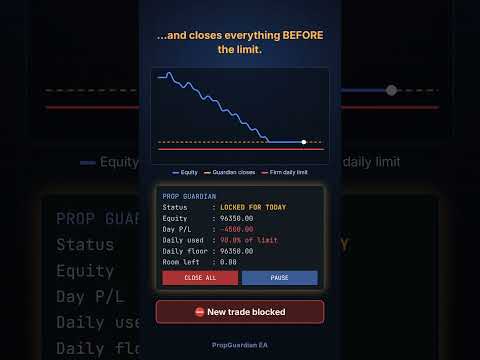
• When the daily floor is touched, it closes all positions, deletes all pending orders and locks trading until the next day.

• Any trade opened while locked is closed immediately.

Max Loss protection

• Three modes: static, trailing from equity high, and trailing from highest day start balance.

• When the max floor is touched, all trades are closed and the account is locked.

Safety buffer

• PropGuardian acts before the real limit (default: at 90% of each limit), leaving room for spread and slippage.

• Early warning when a chosen percentage of the daily limit is used.

Ready-made rule presets

• 2-step and 1-step challenge rule sets, including trailing max loss and different daily reset timezones (CE(S)T, UTC+3, server time).

• Custom mode to enter any rules of your own.

• Always compare the preset with your firm's current rules before trading.

News filter

• Uses the built-in MetaTrader 5 economic calendar.

• Choose currencies, impact level (high, or medium and high) and minutes before and after the event.

• Block mode: new trades are closed and pending orders deleted during the news window.

• Close mode: all positions are closed before the news window starts.

Lot and risk limits

• Max lot per position: larger positions are reduced with a partial close.

• Max risk per trade: calculated from your Stop Loss; oversized positions are reduced.

• Max total open risk across all positions.

• Require Stop Loss: positions without a Stop Loss after a grace period are closed.

• Max new trades per day, against over-trading.

Weekend lock

• Closes all trades on Friday at the time you choose and blocks trading until Monday.

• Warning before the Friday close.

Dashboard and controls

• Live panel: status, day P/L, percentage of daily limit used, daily floor, max floor, room left, active rules, next news and weekend status.

• PAUSE / RESUME button: blocks new trades without closing open positions.

• CLOSE ALL button with confirmation.

• Popup alerts and push notifications to the MetaTrader mobile app.

Reliable

• All state (day start base, locks, peaks, trade counter, pause) is saved, so restarting the terminal does not reset your protection.

• Checks run on a 1-second timer, not only on ticks of the chart symbol.

HOW TO USE

1. Attach PropGuardian to one chart only. It protects all symbols on the account.

2. Enable Algo Trading.

3. Select your rule preset and enter your account size (for example 100000).

4. Optional: set the news filter, lot and risk limits and weekend lock.

5. Keep MetaTrader 5 running. A VPS is recommended for 24/5 protection.

STRATEGY TESTER DEMO

In the Strategy Tester, PropGuardian runs a demo mode that simulates an aggressive trader without Stop Loss. Run a visual test to watch the daily floor being hit, all trades closed and the day locked, then unlocked the next day. The demo trader never runs on a live or demo chart.

Note: the MetaTrader 5 economic calendar is not available in the Strategy Tester, so the news filter can only be tested on a demo or live account.

MAIN INPUTS

• Rule preset / Account size

• Max daily loss %, daily base, reset timezone (Custom)

• Max total loss %, max loss mode (Custom)

• Safety buffer %, warning %, max trades per day, daily profit target

• Max lot, max risk per trade %, max open risk %, require Stop Loss, SL grace seconds

• News filter: importance, currencies, minutes before and after, action

• Weekend close: Friday close hour and minute (server time)

• Popup alerts, push notifications, panel position

IMPORTANT

• MetaTrader 5 does not allow an Expert Advisor to stop an order from being sent. PropGuardian closes new trades immediately after they open when trading is locked.

• In fast markets small slippage is possible. This is why the safety buffer exists.

• If the market is closed, positions cannot be closed until it reopens.

• Prop firm rules change. You are responsible for checking the current rules of your firm and setting PropGuardian accordingly.

• PropGuardian is a risk management tool. It does not guarantee any result. Trading involves risk.

• Test all settings on a demo account first.

A detailed user guide (PDF, English and Arabic) is available. Send me a private message after purchase to receive it.

"WHAT'S NEW" (version notes)

v1.40

• Strategy Tester demo mode

• News filter (MT5 economic calendar)

• Max lot, max risk per trade, max open risk, require Stop Loss

• Weekend lock

• Rule presets for common 1-step and 2-step challenges

• PAUSE / RESUME and CLOSE ALL buttons

Recommended products
Candlestick Pattern Scanner is a multi-timeframe and multi-symbol dashboard and alert system that checks all timeframes and currency pairs for different candlestick patterns that are formed in them. Scanner is integrated   with support and resistance zones so you can check the candlestick patterns in most important areas of the chart to find breakout and reversal patterns in the price chart. Download demo version   (works on M4,M6,M12,H3,H8 timeframes and 20 symbols of Market Watch window) Read
TradePilotmt5
Hossein Khalil Alishir
TradePilot Expert Advisor (EA) for MetaTrader 5 TradePilot is a professional and user-friendly Expert Advisor (EA) for MetaTrader 5 (MT5) . It simplifies automated trading , risk management , and trade execution with a smart trading panel . Perfect for beginners and experienced traders looking for a reliable trade manager EA with automated lot size calculation and smart position management. Key Advantages User-Friendly Trading Panel: Customizable panel with buttons and hotkeys for fast ex
BTC Trading Assistant EA (MT5) Manual trading assistant that helps place and manage trades with automated risk and stop management. Overview BTC Trading Assistant EA is a utility Expert Advisor for MetaTrader 5 intended for manual traders. It provides a chart interface to execute BUY/SELL/CLOSE actions and automates selected trade management functions such as position sizing, initial SL/TP placement, break-even, trailing stop and optional partial profit taking. This EA does not generate trade si


Zigzag Price Arrows 1
Aiman Saeed Salem Dahbag
The Zigzag Price Arrow indicator   is an enhanced version of the classic Zigzag indicator, combining the traditional zigzag pattern with advanced visual features. It not only identifies major market turning points but also provides clear trading signals through: •   Directional arrows:   Displays colored arrows (green for buy, magenta for sell) indicating potential trend directions. •   Price labels:   Shows the exact price values at each pivot point directly on the chart. •   Improved visual c
CosmiCLab SMC FIBO CosmiCLab SMC FIBO is a professional trading indicator designed for traders who use Smart Money Concepts (SMC), market structure analysis and Fibonacci retracement levels. The indicator automatically detects market swings and builds Fibonacci levels based on the latest impulse movement. It also identifies market structure changes such as BOS (Break of Structure) and CHOCH (Change of Character), helping traders understand the current market direction. CosmiCLab SMC FIBO also pr
ChronoEquity Beacon
Ekaterina Panteleeva
CHRONOEQUITY BEACON — ACCOUNT MONITORING AND ECONOMIC CALENDAR ChronoEquity Beacon is an information utility for MetaTrader 5. It monitors the trading account, summarizes open positions and sends reports and alerts to Telegram. The utility does not open, modify or close trades. It can run on a separate chart alongside any manual or automated trading system. MAIN FEATURES • Monitoring table for all available currency symbols. • Number of BUY and SELL positions. • Total trading volume and curr
Rhino Chart Drawing Tools for MetaTrader 5 Rhino Chart Drawing Tools provides a TradingView-style drawing workflow for MetaTrader 5. It includes 54 drawing tools, a customizable toolbar, favorites, quick styling, object settings, templates and an object manager. Drawing Tools Lines Trend line, ray, extended line, horizontal line, vertical line, horizontal ray, cross line, trend angle, arrow, path, polyline and info line. Channels Parallel channel, regression channel, flat channel, disjoint chann
Crypto_Forex Indicator "WPR with 2 Moving Averages" for MT5, No Repaint. - WPR itself is one of the best oscillators for scalping. - "WPR and 2 Moving Averages" Indicator allows you to see Fast and Slow Moving Averages of WPR oscillator. - Indicator gives opportunities to see the price corrections very early. - It is very easy to set up this indicator via parameters, it can be used on any time-frame. - You can see Buy and Sell entry conditions on the pictures. - With PC and Mobile alerts on WP
BerelzBridge
Barend Willem Van Den Berg
BerelzBridge Pro Read also comment sectie above for more. MT5-to-JSON data bridge for all timeframes with account information. Overview BerelzBridge Pro is an MT5 indicator that exports live market data to a JSON file on disk. It writes bid and ask prices, spread, tick volume, daily statistics, account information and OHLCV bars for all 9 timeframes. The file is updated at a configurable interval with a default of 2 seconds. The indicator runs alongside Expert Advisors on the same chart without
Video Explanation on YouTube: https://youtu.be/OJXERVs405g Keyboard Scalper Pro – Tool Explanation Keyboard Scalper Pro is a manual scalping tool designed to execute and manage trades entirely via keyboard hotkeys , allowing for fast, precise, and distraction-free trading . The tool does not automate trading decisions . All actions are triggered manually by the trader using predefined keys. Hotkey Functions Explained W – Buy Market Opens a market buy position instantly on the current symbol usi
"Impulses and Corrections 5" is created to help traders navigate the market situation. The indicator shows multi-time frame upward and downward "Impulses" of price movements. These impulses are the basis for determining the "Base" , which is composed of zones of corrections of price movements, as well as "Potential" zones for possible scenarios of price movement. Up and down impulses are determined based on a modified formula of Bill Williams' "Fractals" indicator. The last impulse is always "U
StrategyDeck — a cockpit for manual, discretionary trading. StrategyDeck draws and measures. It does not decide, and it never sends an order on its own. What it draws on the chart Opening range boxes for the Asia, Europe and US sessions, a linear regression channel, previous-day high and low with the day's open, and key candlestick patterns. Each drawing layer can be turned off, set to drawing only, or set to signal — and the signal position exists only where a measured scope is available.
Trading Utility for Forex Currency Pairs Only not for Gold  Functions Auto Lot Calculation based on Risk Auto stoploss  Auto TakeProfit Breakeven Auto Close Half % Close in percentage with respect to the PIPs Pending Orders BuyLimit Sell Limit with distances BuyStop Sell Stop    with distances Trading Informations Risk in percentage For Multiple trades Combine Takeprofit and Combine Stoplosses
Overview Harmonic Patterns MT5 is a technical analysis indicator designed for the MetaTrader 5 platform. It identifies and displays harmonic price patterns, such as Butterfly, Cypher, Crab, Bat, Shark, and Gartley, in both bullish and bearish directions. The indicator calculates key price levels, including entry, stop loss, and three take-profit levels, to assist traders in analyzing market movements. Visual elements and customizable alerts enhance usability on the chart. Features Detects six ha
Cumulative Volume Delta MA-X MTF with Gradient Momentum This indicator performs multi-timeframe volume delta analysis for MetaTrader5. It calculates the net difference between buying and selling pressure by analyzing tick or real volume data, providing a visual representation of order flow sentiment. Indicator Logic and Features The indicator uses a mathematical approach to volume analysis: Data Sourcing: Supports both Real Volume (for Exchange assets) and OHLC Wick Proxy calculations (for Forex
RRtoolBox
David Ruiz Moreno
RRtoolbox - Professional Tools: Risk:Reward Trading Tool (SL/TP Horizontals + Pending orders + Diagonals), Alerts set on trend lines (for alerts on diagonal levels), SelfManagement (BE, partials...), close/cancelling by time, Statistics, Info and trading on chart. One-Click Trading with Visual Risk:Reward Management RRtoolbox is a comprehensive trading panel that combines one-click order execution,  statistics and  powerful visual Risk:Reward tools, alerts set with trendlines, on chart butt
Bastion is a monitor-and-close-only risk manager for prop-firm traders. It watches your account against your firm's daily-loss and maximum-drawdown limits in real time and force-closes your open positions BEFORE you cross a line. It never opens a trade of its own, so it stays fully within the tools allowed by FTMO, FundedNext, The5ers, FTUK and FXIFY. Why traders fail challenges A large share of failed evaluations end on a single daily-loss breach: a moment of inattention, a news spike, one tra
Strong Levels — Support & Resistance Indicator Idicator for automatic detection of strong price consolidation levels. Designed to help traders identify important support and resistance zones on the chart.This indicator is intended for market analysis , not for generating trade signals. How it works Strong Levels analyzes price behavior using: 2 Moving Averages 1 MACD a proprietary multi-factor algorithm The same algorithm is used by the author in personal trading. The indicator detects pri
BTC Trend Scalper MT5 Trend Capture Edition — Precision Momentum Trading for BTCUSD Hello, traders! I am BTC Trend Scalper MT5 — an intelligent Bitcoin trading Expert Advisor engineered to capture momentum moves with disciplined risk management. I am not a martingale. I am not a grid system. I am not a gambling robot. I am a trend-following scalper built specifically for traders who understand that protecting capital is more important than chasing every candle. My specialty? Bitcoin (BTCUSD)
AW Workpad MT5
AW Trading Software Limited
AW Workpad is a multifunctional trading control panel designed for manual and semi-automatic trading. It allows you to manage pending orders, market positions, provides a wide range of statistical data, as well as a multi-period analysis of a group of classic indicators. The utility is represented by five tabs:   Positions, Pending, Close, Indicators, Info. Each tab has its own group of functions for processing orders or information about the current market situation. MT4 version ->   HERE  / P
Trade Manager Pro Guardian
Tochukwu Joseph Unaegbu
Trade Manager Pro A complete discretionary trade-management cockpit for MetaTrader 5 — direction-aware position planning, prop-firm rule enforcement, a live correlation heat map, a pre-trade checklist gate, and one-click execution, all in a single on-chart panel. Overview Trade Manager Pro is not a signal-generating "black box" EA. It does not predict market direction and makes no profitability promises. Instead, it is a risk and execution management tool built for discretionary traders — partic
Cumulative delta indicator As most traders believe, the price moves under the pressure of market buying or selling. When someone redeems an offer standing in the cup, the deal is a "buy". If someone pours into the bid standing in the cup - the deal goes with the direction of "sale". The delta is the difference between purchases and sales. A cumulative delta - the difference between the cumulative sum of purchases and sales for a certain period of time. It allows you to see who is currently contr
Expert TP SL v04
Mikhail Ostashov
Expert TP SL v04 - Professional Trading Assistant with AI Motivation System Advanced manual trading tool with automatic risk management, overtrading protection, and intelligent psychological support for disciplined trading. PRODUCT OVERVIEW Expert TP SL v04 is a comprehensive trading assistant designed for manual traders who want to maintain emotional discipline while automating risk calculations. This isn't just another order placement tool - it's a complete trading psychology system that pr
On-Chart Trade Assistant & Risk Management Panel Ergotick Trade Manager is an all-in-one professional trading panel designed for scalpers, day traders, and prop firm accounts. It brings automatic lot sizing, multi-mode TP/SL setups, basket management, live statistics, and economic news directly onto your MetaTrader 5 chart. Never miscalculate risk again. Execute orders instantly, manage trades visually, and protect your capital with built-in daily loss limit protection. Key Features 1. Interacti
Prop Calculator Assistant Stop blowing Prop Firm accounts due to bad math. Let the Assistant handle the risk. Prop Calculator Assistant   is the ultimate trade management panel designed specifically for traders attempting to pass funding challenges (FTMO, etc.) or managing funded capital. It replaces mental math and manual order dragging with a precision visual interface that keeps you strictly within your rules. This is   not   an auto-trading bot that guesses the market. It is a professional  
About the Indicator This indicator is based on Monte carlo simulations on the closing prices of a financial instrument. By definition, Monte carlo is a statistical technique used to model the probability of different outcomes in  a process that involves random numbers based on previously observed outcomes. How does it Work? This indicator generates multiple price scenarios for a security by modelling random price changes over time based on historical data. Each simulation trial uses random vari
CoPilot dashboard MT5
Frederic Jacques Collomb
CoPilot — Daily Trading Dashboard Know your numbers. Trade with clarity. MT4 version What is CoPilot? CoPilot is a professional-grade trading assistant that displays in real time all your daily performance statistics directly on the chart — with a live equity curve that updates trade by trade. Designed for active traders who need instant visibility into their session without leaving the chart, CoPilot aggregates every closed trade of the day across all symbols and presents them in a clean, color
Overview Mirror Signals Service EA (Text only)   is a powerful monitoring Expert Advisor that automatically sends   real-time Telegram notifications   for all important trade events on your MetaTrader 5 account. It is engineered specifically for   signal providers ,   trade-copier operators ,   auditors ,   educators , and   professional trading services   that require immediate, detailed, and reliable reporting. Everything from   entries, exits, SL/TP changes, comment changes, trailing sto
Trade smarter, not harder: Empower your trading with Harmonacci Patterns This is arguably the most complete harmonic price formation auto-recognition indicator you can find for the MetaTrader Platform. It detects 19 different patterns, takes fibonacci projections as seriously as you do, displays the Potential Reversal Zone (PRZ) and finds suitable stop-loss and take-profit levels. [ Installation Guide | Update Guide | Troubleshooting | FAQ | All Products  ] It detects 19 different harmonic pric
TradePad
Ruslan Khasanov
5 (1)
TradePad is a tool for both manual and algorithmic trading. We present you a simple solution for fast trading operations and control of positions on several trading instruments. Attention, the application does not work in the strategy tester! Trial version of the application for a demo account and a description of all the tools The application interface is adapted for high-resolution monitors, simple and intuitive. For comfortable work, the trader is offered the following set of tools: A hot ke
Buyers of this product also purchase
Trade Assistant MT5
Evgeniy Kravchenko
4.43 (216)
It helps to calculate the risk per trade, the easy installation of a new order, order management with partial closing functions, trailing stop of 7 types and other useful functions. Additional materials and instructions Installation instructions - Application instructions - Trial version of the application for a demo account Line function -   shows on the chart the Opening line, Stop Loss, Take Profit. With this function it is easy to set a new order and see its additional characteristics bef
Forex Trade Manager MT5
InvestSoft
4.98 (679)
Trade Manager MT5 is an advanced position size calculator and trade management tool for MetaTrader 5, designed to help traders plan trades faster, control risk more precisely, and manage open positions directly from the chart. It combines order placement, risk based lot calculation, Stop Loss and Take Profit management, Break Even, Trailing Stop, Partial Close, Equity Protection, and external trade management in one panel. Whether you trade forex, indices, metals, commodities, crypto, or future
Telegram to MT5 MultiChannel Copier
Sergio Marquez Uroz
4.59 (17)
Telegram to MT5 Multi-Channel Copier   automatically copies trading signals from your Telegram channels straight to MetaTrader 5. No bots, no browser extensions, no manual copying. A signal arrives in Telegram and the EA opens the trade in your terminal within seconds. And before you copy a channel, the built-in backtester shows you what that channel would have done in your account. The product has two components: a Windows application that listens to your Telegram channels, and this Expert Advi
TradePanel MT5
Alfiya Fazylova
4.88 (169)
Trade Panel is a multi-functional trading assistant. The app contains over 50 trading functions for manual trading and allows you to automate most trading tasks. Application instructions + video instructions: https://www.mql5.com/en/blogs/post/772292 Trial version of the application for a demo account: https://www.mql5.com/en/blogs/post/750865 How to install the application: https://www.mql5.com/en/blogs/post/756239 How to test the application in visual mode: https://www.mql5.com/en/blogs/post/7
================================================================================ POC BREAKOUT - V20.72. Full Professional Grade Toolkit ================================================================================ POC Breakout is a full MetaTrader 5 trading dashboard for discretionary traders who want breakout signals, Point of Control (POC) context, volume profiles, order flow, market structure, news, alerts, and advanced trade planning in one professional workspace. Attached directly to you
Copy Telegram signals with your own trading rules Telegram to MT5 Signal Trader automatically copies text-based trading signals from public and private Telegram channels and groups into MetaTrader 5. Manage multiple providers and MT5 accounts from one desktop app, with individual risk and trade settings for each provider . No Telegram bot or API setup needed for copying. Simply sign in with your own Telegram account by phone or QR code and select the channels or groups you have already joined. Y
FarmedHedge Pair Trading Dashboard
Tanapisit Tepawarapruek
5 (5)
Farmed Hedge Yield Farming | All Markets (Manual - Hybrid - Semi/Automated EA) VERIFIED TRADING RESULTS - Farmed Hedge Yield Axi Copy:  https://www.mql5.com/en/signals/2356376 - Farmed Hedge Yield Exn Copy:   https://www.mql5.com/en/signals/2356404 - Farmed Hedge Yield V Copy:  https://www.mql5.com/en/signals/2357156 IMPORTANT NOTICE: FarmedHedge is a MANUAL-FOCUSED TRADING UTILITY ,not a fully automated EA. Results shown on this Signal include manual trades and overall strategic management.
Power Candles Strategy Scanner - Self-Optimizing Multi-Symbol Setup Finder Self-optimizing settings work one chart at a time, and finding where they pay off right now means opening chart after chart. Power Candles Strategy Scanner runs the same self-optimizing engine as the Power Candles indicator on every symbol in your Market Watch, side by side. One panel ranks where it pays off: the winning strategy per symbol, its optimized Stop Loss and Take Profit. An alert fires the moment a fresh signal
Premium Trade Manager - The Trade Panel With a Coach Built In Premium Trade Manager puts a trading coach inside your chart, with a full execution engine underneath it. Set the trade up the way you always do, then let Max, your AI trading coach, read that exact setup against your live account and give you a straight verdict before you commit: is the stop disciplined, is the risk sane, is a high-impact release minutes away, are you near a prop-firm limit. Below sits the engine that runs everything
MT5 to Telegram Signal Provider turns your trading account into a signal provider. Every trade action, whether manual, by EA or from your phone, is instantly sent as a message to Telegram. You can fully customize the format or use a ready-made template for quick setup. [ Demo ] [ Manual ] [ MT4 Version ] [ Discord Version ]     New: [ Telegram To MT5 ] Setup A step by step user guide is available. Key Features Ability to customize order details sent to subscribers You can create a tiered subs
MT5 Trading Deck
Manuel Michiels
5 (2)
One button. One trade. MT5 Trading Deck is a hotkey trading panel for MetaTrader 5 that turns the platform into a keyboard-driven execution cockpit. Stop loss, take profit and lot size are pre-calculated for every key; the moment you press, a market order is live on the broker. A complete technical user manual is attached in the product Comments section. It documents every input parameter, the full hotkey map, the recommended Stream Deck XL layout, and the advanced workflows for Pre-Limit orders
EA Slipstream
Stephen J Martret
5 (1)
Your backtest filled every order at the price it asked for. Your account does not. EA Slipstream measures what execution costs your EA, using your own fills, slippages and spreads to show you the true performance of your EA. A backtest prices every trade at the level the EA named. In live trading a pending order fills at whatever price is available when it triggers, a stop closes wherever the market is when it is hit, and the spread at that moment is whatever the account was quoting. The differ
Grid Manual MT5
Alfiya Fazylova
4.73 (22)
Grid Manual is a trading panel for working with grid strategies. The utility is universal, has flexible settings and an intuitive interface. It works with a grid of orders not only in the direction of averaging losses, but also in the direction of increasing profits. The trader does not need to create and maintain a grid of orders, the utility will do it. It is enough to open an order and the "Grid manual" will automatically create a grid of orders for it and will accompany it until the close. F
EA Overfitter
Stephen J Martret
5 (1)
That backtest looks great. But will it still be making money tomorrow, next week, next month? EA Overfitter re-runs your EA on 100 price histories it has never seen. One score tells you if the edge is real. A backtest tells you what an EA did on one price history — the one that happened to occur. What you cannot tell from it is how much of that result was the strategy and how much was the particular path. EA Overfitter answers that. It builds up to 100 synthetic price histories your EA has n
Trade Manager DaneTrades
Levi Dane Benjamin
4.23 (30)
DaneTrades Trade Manager is a professional trade panel for MetaTrader 5, designed for fast, accurate execution with built‑in risk control. Place market or pending orders directly from the chart while the panel automatically calculates position size from your chosen risk, helping you stay consistent and avoid emotional decision‑making. The Trade Manager is built for manual traders who want structure: clear risk/reward planning, automation for repeatable management, and safeguards that help reduc
Dynamic Fibonacci Grid
Tsvetan Tsvetanov
5 (1)
Introducing the latest version of the Dynamic Fibonacci Grid Dashboard for MT5. Now packed with many new features, this new dashboard transforms your trading experience and allows you to see the market and the price action from a completely different perspective. Discover new possibilities with simultaneous analysis of multiple timeframes covering multiple symbols. User-friendly interface for manual trading and management of positions and an expanded ability to apply predefined automated strate
Welcome to ENTRY IN THE ZONE AND SMC MULTI TIMEFRAME Entry In The Zone and SMC Multi Timeframe is a real-time market analysis tool based on Smart Money Concepts (SMC), designed to analyze market structure, price direction, and key trading zones. It supports both Single-Timeframe Analysis and Multi-Timeframe Analysis, providing a clearer view of the overall market structure across multiple timeframes, with real-time BUY / SELL signals that do not repaint. It is designed to help filter trading opp
The product will copy all telegram signal to MT5 ( which you are member) , also it can work as remote copier.  Easy to set up, copy order instant, can work with almost signal formats, image signal,  s upport to translate other language to English Work with all type of channel or group, even channel have "Restrict Saving Content", work with  multi channel, multi MT5 Work as remote copier: with signal have ticket number, it will copy exactly via ticket number. Support to backtest signal. How to s
Anchor Trade Manager
Kalinskie Gilliam
5 (9)
Your EAs cannot see each other, but Anchor can. Anchor gives you one place to coordinate your EAs, manage risk, and decide when trading is allowed. It works alongside the trading bots you already use without any changes to them. The Problem One EA opens a trade. Then another starts trading. The next thing you know, you wake up to multiple grids built across your account. Each EA may be doing exactly what it was designed to do, but together they can place far more risk on your account than you in
Footprint Chart Pro — Professional OrderFlow EA for MetaTrader 5 Version 6.34 | Professional tool for real traders | Institutional-Grade Visualization DEMO USERS - PLEASE SELECT EVERY TICK / REAL TICK WHEN TESTING AND YOU HAVE DOWNLOADED HISTORICAL DATA. IF YOU SEE A WAITING SCREEN AND IT IS NOT DOWNLOADING, IT MEANS YOU HAVE LOW HISTORICAL DATA. TRY 1 MIN AND 5 MIN FIRST ON 1 DAY DATA. ONE DAY DATA SHOULD BE THE NEWEST AND MOST CURRENT DATE. PLEASE WAIT UNTIL THE MARKET HAS ROLLED OVER PERIOD.
YuClusters
Yury Kulikov
4.93 (43)
Attention: You can view the program operation in the free version  YuClusters DEMO .  YuClusters is a professional market analysis system. The trader has unique opportunities to analyze the flow of orders, trade volumes, price movements using various charts, profiles, indicators, and graphical objects. YuClusters operates on data based on Time&Sales or ticks information, depending on what is available in the quotes of a financial instrument. YuClusters allows you to build graphs by combining da
FUTURES ORDERFLOW FOOTPRINT CHART Professional OrderFlow EA for MetaTrader 5 Version 1.01| Professional tool for real traders | Institutional-Grade Visualization STRATEGY TESTER USERS - PLEASE SELECT EVERY REAL TICK WHEN TESTING AND YOU HAVE DOWNLOADED HISTORICAL DATA. IF YOU SEE A WAITING SCREEN AND IT IS NOT DOWNLOADING, IT MEANS YOU HAVE LOW HISTORICAL DATA. TRY 1 MIN AND 5 MIN FIRST ON 1 DAY DATA. ONE DAY DATA SHOULD BE THE NEWEST AND MOST CURRENT DATE. PLEASE WAIT UNTIL THE MARKET HAS ROL
Timeless Charts
Samuel Manoel De Souza
5 (8)
Timeless Charts is an all-in-one trading utility for professional traders. It combines custom chart types such as Seconds Charts and Renko with advanced order flow analysis using Footprints , Clusters , Volume Profiles , VWAP studies, and anchored analysis tools for deeper market insight. Trading and position management are handled directly from the chart through an integrated trade management panel , while Market Replay and Virtual Accounts provide environments for practicing trading skills and
The Expert Advisor will help you forward all alert from  MetaTrader 5 to Telegram channel/ group.  All alert must save to folder <Data folder>MQL5\Files\Alerts\ , text file with format *.txt and screenshot with format *.gif or *.png. Parameters: - Telegram Bot Token: - create bot on Telegram and get token. - Telegram Chat ID:  - input your Telegram user ID,  group / channel ID - Forward Alert: - default true, to forward alert. - Send message as caption of Screenshot: - default false, set true t
The product is used to trade base on any Alert signal in MT5 Easy to setup, simple format with custom keyword All option to management orders as trailing stop, breakeen, partial close, time filter, news filter ... Option to auto open grid orders How to setup and guide: Let read all details about setup and download indicator for auto get   Alert Signal   here Do not buy if you even can not install demo EA to your VPS ( some VPS block download EA from mql5 market) We always bring customers high q
Trade Manager DashPlus
Henry Lyubomir Wallace
4.85 (13)
DashPlus is an advanced trade management tool designed to enhance your trading efficiency and effectiveness on the MetaTrader 5 platform. It offers a comprehensive suite of features, including risk calculation, order management, advanced grid systems, chart-based tools, and performance analytics. Key Features 1. Recovery Grid Implements an averaging and flexible grid system to manage trades during adverse market conditions. Allows for strategic entry and exit points to optimize trade recovery
EasyInsight AIO MT5
Alain Verleyen
4.92 (12)
EASY Insight AIO – All-In-One Power for AI-Driven Trading Want to skip the setup and start scanning the entire market – Forex, Gold, Crypto, Indices, and even Stocks – in seconds? EASY Insight AIO is the complete plug-and-play solution for AI-powered trade analysis. It includes all core Stein Investments indicators built-in and automatically exports clean, structured CSV files – perfect for backtesting, AI prompts, and live market decision-making. No need to install or configure indicators manu
TAQ Magic Keys Trade Manager is for MetaTrader5 (MT5). It has an advanced trade management tool and Lot size calculator for MetaTrader 5.  It is designed to help traders to trades faster, precise and manage open positions directly with one click. Demo 3 Days Free Trial https://taqmagickeys.com/product/taq-magic-keys-v5-0-demo-3days-free-trial/ FN key is the best functions which automatically manage trades up to TP4 with auto partial closing and trailing SL. Define your trade strategy in FN keys
Trade Indicator Assistant   is a powerful MT5 utility designed to turn indicators into automated trading systems. Its main feature is the ability to automatically detect an indicator’s   BUY and SELL signal buffers , without requiring you to know the buffer numbers, search through indicator settings, or modify the indicator source code. Bonus Indicator:   After purchasing Trade Indicator Assistant, contact me to receive   Trade Signal Pro   completely free as a bonus indicator. [Download Demo V
Mentfx Mmanage mt5
Anton Jere Calmes
4.25 (8)
The added video will showcase all functionality, effectiveness, and uses of the trade manager. Drag and Drop Trade Manager. Draw your entry and have the tool calculate the rest. Advanced targeting and close portions of a trade directly available in tool (manage trades while you sleep). Market order or limit order on either side with factored spread. Just draw the entry, the tool does the rest. Hotkey setup to make it simple. Draw where you want to enter, and the stop loss, the tool calculates al
Filter:
No reviews
Reply to review