PropGuardian Prop Firm Risk Manager
- 实用工具
- 版本: 1.40
- 激活: 5

PropGuardian is a risk management utility for traders on prop firm challenge and funded accounts.
It does not open trades and it does not give signals. It sits on one chart and protects the whole account: manual trades, trades from other Expert Advisors and trades opened from the mobile app.
Many challenges are failed for the same few reasons: one bad day, an oversized position, a trade left open during high-impact news, or a moment of revenge trading. PropGuardian enforces your rules automatically, so a single mistake does not cost you the account.
WHAT IT DOES
Daily Loss protection
• Saves your day start balance (or the higher of balance and equity) at the daily reset, in the timezone of your firm.
• Watches equity, including floating profit and loss, every second.
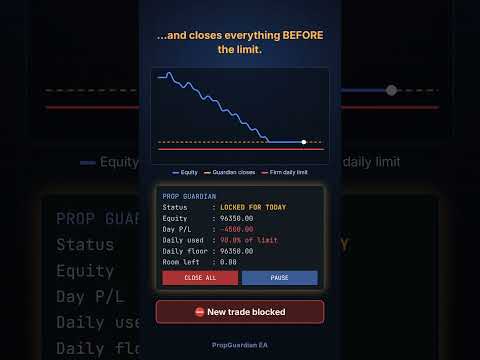
• When the daily floor is touched, it closes all positions, deletes all pending orders and locks trading until the next day.
• Any trade opened while locked is closed immediately.
Max Loss protection
• Three modes: static, trailing from equity high, and trailing from highest day start balance.
• When the max floor is touched, all trades are closed and the account is locked.
Safety buffer
• PropGuardian acts before the real limit (default: at 90% of each limit), leaving room for spread and slippage.
• Early warning when a chosen percentage of the daily limit is used.
Ready-made rule presets
• 2-step and 1-step challenge rule sets, including trailing max loss and different daily reset timezones (CE(S)T, UTC+3, server time).
• Custom mode to enter any rules of your own.
• Always compare the preset with your firm's current rules before trading.
News filter
• Uses the built-in MetaTrader 5 economic calendar.
• Choose currencies, impact level (high, or medium and high) and minutes before and after the event.
• Block mode: new trades are closed and pending orders deleted during the news window.
• Close mode: all positions are closed before the news window starts.
Lot and risk limits
• Max lot per position: larger positions are reduced with a partial close.
• Max risk per trade: calculated from your Stop Loss; oversized positions are reduced.
• Max total open risk across all positions.
• Require Stop Loss: positions without a Stop Loss after a grace period are closed.
• Max new trades per day, against over-trading.
Weekend lock
• Closes all trades on Friday at the time you choose and blocks trading until Monday.
• Warning before the Friday close.
Dashboard and controls
• Live panel: status, day P/L, percentage of daily limit used, daily floor, max floor, room left, active rules, next news and weekend status.
• PAUSE / RESUME button: blocks new trades without closing open positions.
• CLOSE ALL button with confirmation.
• Popup alerts and push notifications to the MetaTrader mobile app.
Reliable
• All state (day start base, locks, peaks, trade counter, pause) is saved, so restarting the terminal does not reset your protection.
• Checks run on a 1-second timer, not only on ticks of the chart symbol.
HOW TO USE
1. Attach PropGuardian to one chart only. It protects all symbols on the account.
2. Enable Algo Trading.
3. Select your rule preset and enter your account size (for example 100000).
4. Optional: set the news filter, lot and risk limits and weekend lock.
5. Keep MetaTrader 5 running. A VPS is recommended for 24/5 protection.
STRATEGY TESTER DEMO
In the Strategy Tester, PropGuardian runs a demo mode that simulates an aggressive trader without Stop Loss. Run a visual test to watch the daily floor being hit, all trades closed and the day locked, then unlocked the next day. The demo trader never runs on a live or demo chart.
Note: the MetaTrader 5 economic calendar is not available in the Strategy Tester, so the news filter can only be tested on a demo or live account.
MAIN INPUTS
• Rule preset / Account size
• Max daily loss %, daily base, reset timezone (Custom)
• Max total loss %, max loss mode (Custom)
• Safety buffer %, warning %, max trades per day, daily profit target
• Max lot, max risk per trade %, max open risk %, require Stop Loss, SL grace seconds
• News filter: importance, currencies, minutes before and after, action
• Weekend close: Friday close hour and minute (server time)
• Popup alerts, push notifications, panel position
IMPORTANT
• MetaTrader 5 does not allow an Expert Advisor to stop an order from being sent. PropGuardian closes new trades immediately after they open when trading is locked.
• In fast markets small slippage is possible. This is why the safety buffer exists.
• If the market is closed, positions cannot be closed until it reopens.
• Prop firm rules change. You are responsible for checking the current rules of your firm and setting PropGuardian accordingly.
• PropGuardian is a risk management tool. It does not guarantee any result. Trading involves risk.
• Test all settings on a demo account first.
A detailed user guide (PDF, English and Arabic) is available. Send me a private message after purchase to receive it.
"WHAT'S NEW" (version notes)v1.40
• Strategy Tester demo mode
• News filter (MT5 economic calendar)
• Max lot, max risk per trade, max open risk, require Stop Loss
• Weekend lock
• Rule presets for common 1-step and 2-step challenges
• PAUSE / RESUME and CLOSE ALL buttons